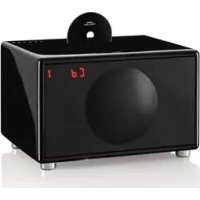
Model L Wireless DAB+ - Hi-fi system GENEVA - Free user manual and instructions
Find the device manual for free Model L Wireless DAB+ GENEVA in PDF.



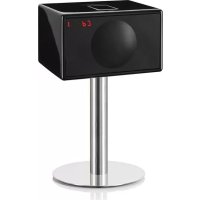
| Product type | Compact hi-fi system |
| Brand | Geneva |
| Model | Model L Wireless DAB+ |
| Dimensions (approx.) | 380 x 130 x 200 mm |
| Weight (approx.) | 4.5 kg |
| Power supply | 100-240 V AC, 50/60 Hz |
| Power consumption | 30 W (max), <0.5 W standby |
| Main functions | FM radio, DAB+, CD audio player, Bluetooth (aptX, AAC), line input (RCA and 3.5 mm) |
| Speakers | 2-way (left and right channels) with EmbracingSound technology |
| Wireless connectivity | Bluetooth 4.0 (A2DP) with aptX and AAC codecs |
| Audio inputs | 2 x RCA (Line-In), 1 x 3.5 mm (Air) with auto detection |
| CD support | CD audio only (no MP3) |
| Remote control | Infrared, CR2032 battery included |
| Cleaning | Soft, dry cloth, unplug before cleaning |
| Safety instructions | Do not expose to water, do not open, keep away from heat sources |
| Repairability | Contact an authorized dealer, spare parts available on request |
| Operating temperature | 0 °C to 40 °C |
| Model number (certification) | IC: 1067A/MODELBLT; 1097A/MODELBLX |
Frequently Asked Questions - Model L Wireless DAB+ GENEVA
User questions about Model L Wireless DAB+ GENEVA
0 question about this device. Answer the ones you know or ask your own.
Ask a new question about this device
Download the instructions for your Hi-fi system in PDF format for free! Find your manual Model L Wireless DAB+ - GENEVA and take your electronic device back in hand. On this page are published all the documents necessary for the use of your device. Model L Wireless DAB+ by GENEVA.
USER MANUAL Model L Wireless DAB+ GENEVA
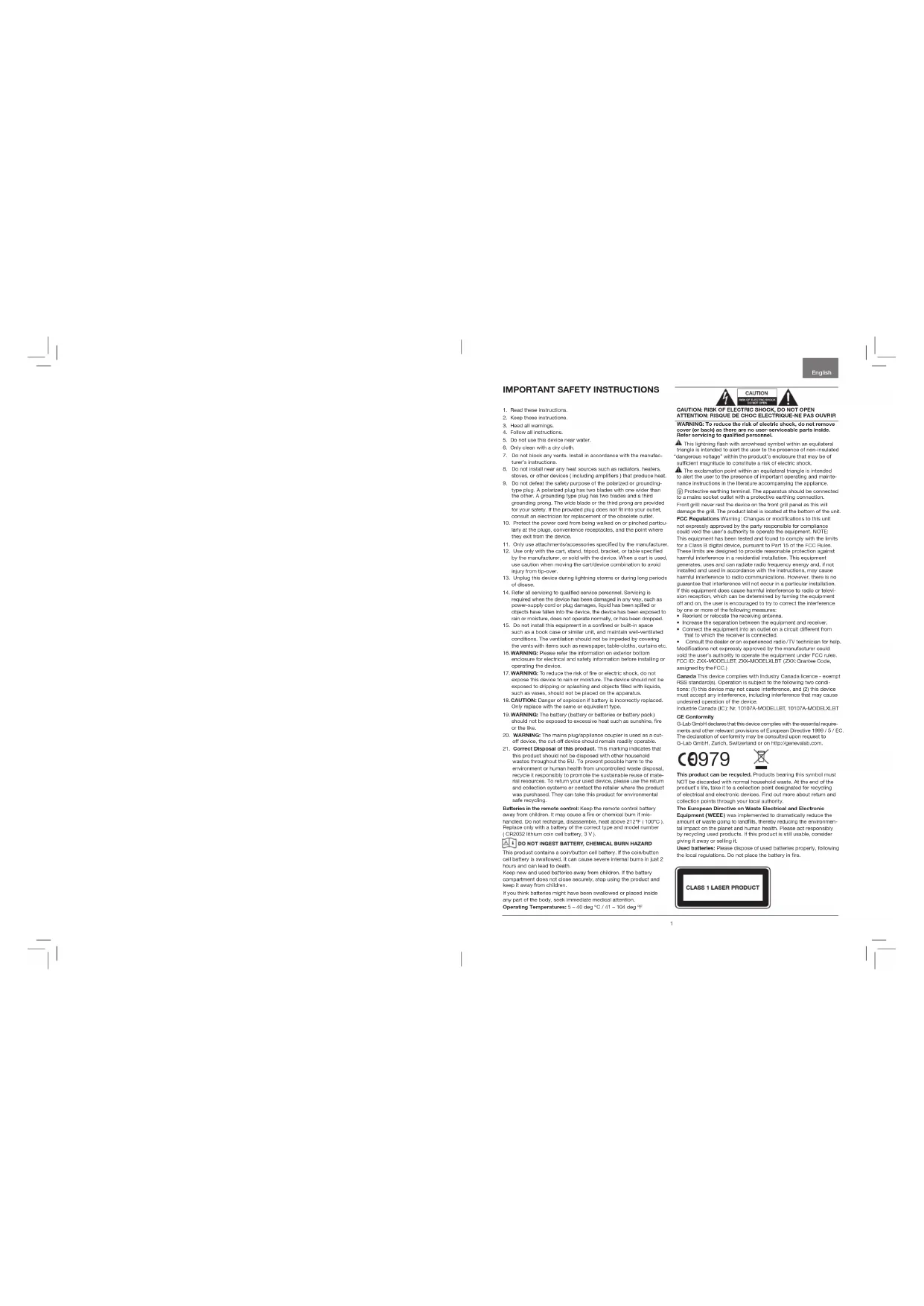
IMPORTANT SAFETY INSTRUCTIONS
-
Read these instructions.
-
Keep the following instructions:
-
Head all warnings.
-
Fowal 152
-
Do not block any vents, install in accordance with the manufacturer's instructions.
-
Do not install any heat sources such as radiators, heaters,
stasis, or other devices (including amplifiers) that produce heat. 6. Do you believe the safety measures of the project and its own value?
-
(a) Show that the safe supply chain has no additional greenhouses. (b) Show that the safe supply chain has no other greenhouses. A grounding type plug has two blades and a third grounding plug. The wide blade or the third plug are provided for your safety. If the snowdracked glue does not fit into your outlet, you will need to replace it with a new one.
-
Protect the power center from being walked on or pricked particularly at the plugs, convenient resistances, and the point where the power is transferred to the grid.
-
Orty uus ahttmehne hneaeescrie quifified by the rurfacture
-
Clearly with the mail, manifest, print, bracket, or be-taken specified by the manufacturer, or sold with the device. When a mail is used this cannot when moving the car/cycle combination to avoid injury from inciner
-
Unpig this device during lightning storms or during long periods of discharge.
-
Fiatara all sanding to qualified service personnel. Sanding is required when the davee has been damaged in any way, such as power supply cord or slip carriages, liquid has been spilled or otherwise, and the davee has been damaged by a fire or explosion or other cause or means, does not operate normally, or has been discharged.
-
Do not install this equipment in a confined or built-in space
such as a book case or similar art, and well ventilated rooms. The room is also filled with the same items as the walls with bars such as no hangover, tablecloths, curtains at
-
WARNING: Please refer to the information on anterior bifurcation and/or electrode and safety interactions before including or excluding the use of a catheter.
-
WARNING: To reduce the risk of fire or explosive shocks, do not expose this device to rain or moisture. The device should not be exposed to dripping or splashing and objects filled with liquids, such as varies, should not be placed on the apparatus.
-
CAUTION: Danger of explosion if battery is incorrectly replaced. Only replace with the same or equivalent type.
-
WARNING: The battery (battery or batteries or battery pack) should not be exposed to excessive heat; such as sunshine, fire or other heat.
-
WARNING: The marine plug/impaction coupler is used as a cut-off device, the cut-off device should remain readily operable.
-
Correct Disposal of this product. This marking indicates that this product should not be disposed with either household waste throughout the LU. To prevent possible harm to the environment or human health from uncontrollable waste disposal, recycle it responsibly to promote the sustainable reuse of material resources. To return your used device, please use the return and collectbin systems or contact the retailer where the product was purchased. They can take this product for environmental safety recycling.
Batteries in the remote control loop: Keep the remote control battery away from children. It may cause a fire or chemical burn if it is heated. If not exchange, choose one that has 24V (100Ω) power and 50% capacity. The battery type and modal number (C/26283 lithium cell battery, 3.1k).
DO NOT INGEST BATTERY, CHEMICAL BURN HAZARD
This product contains a contribution coil battery. If the contribution coil battery is soaked-up, it can cause severe internal burns in just 2 hours and can lead to death.
Keep new and used batteries away from children. If the battery contains only one or more softbox, stop using the product and keep it away from children.
If you think bacteria might have been reassessed or placed into any part of the body, seek immediate medical attention. If they are not already in the body, seek a GP.
CAUTION: RISK OF ELECTRIC SHOCK, DO NOT OPEN ATTENTION: RISQUE DE CHOC ELECTRIGUE-NE PAS WARNING: To reduce the risk of electric shock, do not use a sharp or abrasive blade. Refer servicing to qualified personnel.
A striking flaw with arrowhead symbol within an equatorial zone is the fact that the two sides of a triangle are not parallel. The "dangrove voltage" will in the product's enclosure that may be of
sultifireyridnreeridrtnrnnrnnnne
- The extracardiac catheter within the esophageal tube is removed from the patient's body and placed in a separate location.
- Additional instructions in the procedure accompanying the application.
- Protective early terminal. The apparatus should be connected to a marine socket outlet with a protective carring connection.
First part: never had the dice on the first split panel as this is the most common type of dice in the world.
FFC Regulations Warning: Changes or modifications to this unit
not expressly approved by the party responsible for compliance could yield the user's authority to operate the equipment. NCTF: I've equipment has been tested and found to comply with the limits of the European Union (EC) and the European Union's regulations. These limits are designed to provide reasonable protection against harmful interference in a reasonable installation. This equipment, generation, use and can satisfy radio frequency energy and, if not interfered and used in accordance with the instructions, may cause harmful interference to radio communications. However, there is no guarantee that interference will not occur in a particular installation. If this equipment does cause harmful interference to radio or balun communication, it should be checked before using the equipment as full and on. The user is encouraged to try to correct the interference by case or more of the following measures:
-
Densit or recate the resing arers
-
Increased the separation between the wall and reaction.
- Connected the gas into one side of a circuit different from
that to which the receiver is connected.
- Consult the dazier or an expersicated radio/TV technician for help. Modifications not expressly approved by the manufacturer could void the luser's authority to operate the equipment under FCC rules.
- Consult the FCI, LUT, ZKX MODEL1, ZKX GRADE (see below), supplied in the FCC1.
Canada This device complies with Industry Canada legislation - except HRS standard). Operation is subject to the following two conditions: (1) the device may not cause interference, and (2) this device may not be used in conjunction with interference that may cause unauthorized operation of the device.
Industrie Gereis (C): No. 10107A-MODELLBT, 10107A-MODEELX, BT
CE Conformity
(34) Gm GmbH Decades has the decision concerning the essential requirements and other relevant provisions of European Directive 1980/7 / F.C. The declaration of conformity may be consulted upon request to G-Lan GmbH, Zurich, Switzerland or on http://www.ganewab.ch.

This product can be recycled. Products bearing this symbol must NOT be discarded with normal household waste. At the end of the producer's life, take it is a collection point designated for recycling. The manufacturer will have to pay the cost of doing so. More about item and collection points through your local authority.
The European Directive on Waste Electrical and Electronic Equipment (WEEE) was impotent to dramatically reduce the number of plastic bottles, which is a problem that can be impotent on the plastic and human health. Please acceptability by recycling used products. If this product is still unviable, consider giving it away or cutting it off. The European Directive on Waste Pollution of used container bottles properly, following the local regulations. Do not place the battery in line.
OVERVIEW
AUDIO SOURCES
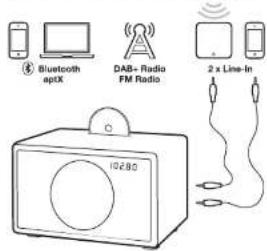
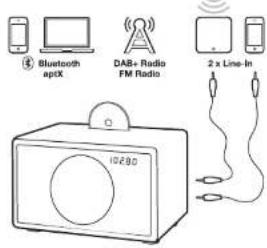
You can play music from the following audio sources:
- PM Radio
- BAR: Radio
(works only in countries with DAB+ service)
Audio CD
Bluetooth audio (with support for aptX and AAC)
- External audio devices with two Line-In Inputs
REMOTE CONTROL
TOUCH KEYS
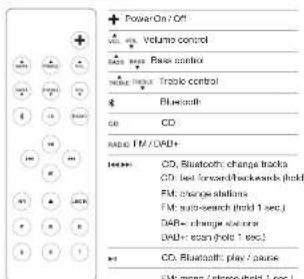
| Power On / Off |
| Volume = |
| Volume = |
| Mode aspect FA, DABe, Inclu, Arc Blustooth |
| Knot CD |
| Change I MCDW frequency, CD & Illuminotroph tracks |
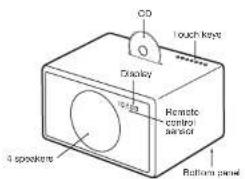
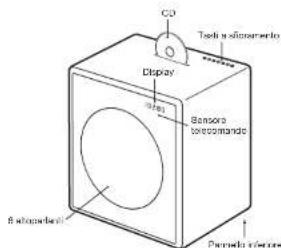
MODEL L
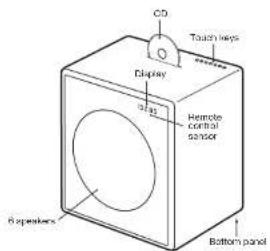
MODEL XL
USING THE DEVICE
GETTING STARTED
- Remove the protection paper from the remote control battery compartment.
- On the bottom panel, connect the enclosed wire antenna to the radio antenna connector.
- Also on the bottom panel, connect the AC power cable to the AC power connector.
SELECTING THE AUDIO SOURCE
The audio source can either be selected with remote control keys or the touch key M.
The RADIO button on the remote control toggles between FM and DAB+ radio.
FM RADIO
- Touchline RADIO key on the remote control until the display shows an FM frequency.
- To change the frequency manually select a FM station with the 山 + 山 and 山 + 山 keys,
- To automatically search for another station, hold the and keys for a short time.
Storing a radio station with the presets
- Select your favorite radio station with m = m 2. Select one of the 6 preset keys on the remote control, and keep pressing it until the corresponding letter on the display starts blinking. The station has now been stored.
Using the presets
Press one of the preset keys to recall a radio station.
DAB+
DAB+ (sometimes also called Digital Radio) is only available in certain countries (UK, Germany, Switzerland, Norway, Hong Kong and more). Model L/XL is compatible with DAB and DAB+.
1. Press the RADIO key on the remote control until the display shows DAB.
2. Select a DAB station with and
Scan function
When using your Model L'XL for the first time, the radio needs to search for available radio stations in your region (done with the "Scan" function). After a scan, the stations will be automatically stored.
Within 5 seconds of entering DAB mode, hold down the button until "Scan" displays.
"Scan" is also needed after traveling to a new location with different radio stations, or when you move the radio to a different room with different radio reception characteristics.
Presets
Six DAB+ presents are available and they work exactly the same way as the FM presents.
Which DAB standards are supported?
The DAB and DAB + standards are supported, on the following frequencies:
Band3:5A...12D(174.928MHz...229.072MHz).
Kanal 13:13A...13F [230,784 MHz ...239,200 MHz]
How can I disable the DAB+ function?
1. Select FM
- Hold the RADIO key of the remote control for 5 seconds to enable or disable the DAB+ function
CD
- Insert a CD into the slot, with the printed side facing the front of the device.
- The CD will start to play automatically.
- To elect the CD, press that key on either the remote control or on the touch keys.

Navigation
You can change tracks with the and keys.
Hold the 喜 and 喜 keys to fast forward and fast backward within a track.
Does the CD player support CD-R with MP3 files?
No. The CD player supports only Audio CD's, CD-R with MP3 and other formats are not supported.
USING THE DEVICE
BLUETOOTH
Mobile phones and computers with Bluetooth can connect to the Model L/XL and play music. The mobile phone or computer must support Bluetooth A2DP.
Initial Setup ("Pairing") with iPhone
- Presathe key on the remote control. Wait for 20 seconds until the display shows a blinking "Pairing".
- Select "Settings" on your iPhone, Select "General / Bluetooth". Turn on Bluetooth. New Bluetooth devices are discovered automatically. After a few seconds "GENEVAL (Not Paired)" will appear.
- Select "GENEVA L". The phone is now connected ("Painging") to the Model L.
- If the phone asks for a PIN; enter "0000" (four zeros)
- Now you can play music on an iPhone and listen to it on the Model L.
Pairing guides for other devices and mobile phones Go to www.genevalab.com and select "Support."
Bluetooth settings on the iPhone
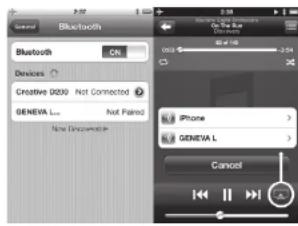
* PlayingSettings on iPhone
Playing Music
Most phones connect automatically to the Model L / XL after the initial setup ("Pairing").
1. Presssthe key on the remote control. While the Model L / XL connects, the display shows "Connect" for a few seconds.
2. Now the music that is playing on your mobile phone will automatically be streamed to the Model L/ XL.
3. Change tracks with and
High quality Bluetooth audio with aptX and AAC CODEcs
Some mobile phones support a higher transmission quality than the standard Bluetooth oecoc (SBC). Model L / XL supports the high quality codes aptX and AAC. The Model L / XL will automatically select the high quality Bluetooth aptX or AAC codes, if the mobile phone supports this feature.
Status Information on the display
"Search": Searching previously paired devices.
"Connect": Connection successful.
"Pairing": If the Model L / XL did not make a successful connection within 20 seconds, the Model L / XL will go into the pairing mode for 2 minutes.
"Connected to XXX"; Successfully connected to device with the name XXX.
"BLUE C": A device is connected.
"BLUE -"; No device is connected.
LINE-IN
The Model L / XL has two line-in inputs for external audio devices:
RCA connectors ( "Line-In" )
- 3.5mm connector ("Air") with automatic power-on functionality
1. Connect one end of a Line-In cable to the Line-In or Air connector on the bottom panel of Model L / XL (RCA connectors), then connect the other end of the cable to the audio device (headphone or Line-Out connector).
2. Press the LINE-IN or AIR key on the remote control.
AUTOMATIC POWERING ON AND OFF
Powering On with the AIR connector
If an external audio device has its audio output connected to the AIR connector, Model L / XL will automatically power itself on, as soon there is an audio signal on the AIR connector. The AIR connector is suited for network audio streaming devices, such as the Apole AirPort Express (AirPlay) and Sonce products. When you turn on a streaming device, it will automatically turn on the Model L / XL.
Powering Off with the energy saving function The Model L / XL will automatically turn itself off after 15 minutes if there is no active Bluetooth connection, no is CD playing, or If there is no audio signal at Line-in/AR connections.
TROUBLESHOOTING
The Model L/XL does not turn on when I touch the button.
Touch按钮 with one finger only. Don't touch the rest of the touch panel with other fingers. The touch panel works properly when used with one finger only.
Why is the Model L/XL turning itself off?
The energy saving function turns the Model L/XL automatically off. The Model L/XX will automatically turn itself off after 15 minutes if there is no active Bluetooth connection, no CD is playing or if there is no signal at the Line-in inputs. When this happens, the display shows "ECO OFF".
Why is my mobile phone not connecting?
Please check the Support pages at genevalab.com.
How do I reset Bluetooth?
Up to three paired Bluetooth devices can be stored. To clear the memory, perform the following steps: 1. Select Bluetooth on Model LXL.
2. Within 5 seconds of entering Bluetooth mode, hold until "RESET" displays.
3. Pair your mobile phone again.
What is the PIN for a Bluetooth connection? The PIN is: 0000 (4 zeros). Not all computers or mobile phones require a pin code during initial setup (Painting).
I have an unreliable connection with dropouts when listening via Bluetooth.
- Move the mobile phone closer to the Model L/XL.
- Move away or turn off other wireless devices that can disturb a Bluetooth connection (for example WLAN / Wi-Fi, other mobile phones etc.).
The FM automatic search does not find all stations. The FM automatic search function (hold+or keys) finds only stations with a strong signal.
How do I erase or overwrite a preset?
Stored presets do not need to be erased - just use the steps to store a new station in a preset.
I cannot turn off the device, the display shows "Air active - cannot turn off".
There is still an audio signal on the Air connector. Either stop the audio source or disconnect the external device from the Air connector.
How can I verify that the remote control works?
Every time a key is pressed on the remote code, small red light on the display lights up briefly
How can I change the remote control battery?
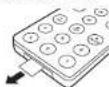
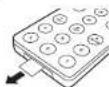
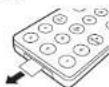
1. Push the small lever in the direction of the arrow with your finger or a small screwdriver.
2. While holding the small lever, slide out the battery compartment.
3. Replace the battery (3V lithium cell, 3V CR2032). Verify that the battery is inserted with the right polarity.

How is it possible to hear in stereo from only one speaker?
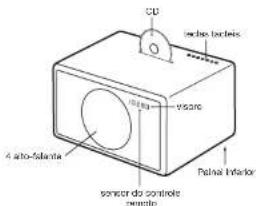
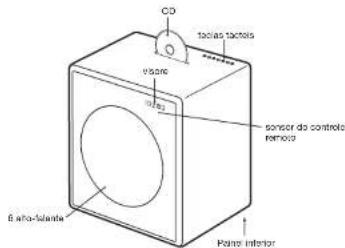
Inside the wood cabinet there are two (Model L) or four (Model XL) acoustic chambers, for the left and right channels. Using the EmbracingSound algorithm Model L/XL creates a real stereo reproduction with two acoustic chambers that are very close to each other.
How do I clean the device?
Use a soft, dry cloth to avoid making scratches on the surface. Do not use cleaning alcohol, or other solvent fluids to clean the surface of the Cabinet as this can both damage the lacquer and also cause electrical failures. Before cleaning, unplug the device from the AC power outlet.
SUPPORT
More information and additional troubleshooting Check the "Support" pages at genevalab.com.
Service and repair
If the product is damaged and needs repair, please contact your dealer. Visit genevalab.com to find a dealer in your area.
Warranty
See the specific terms for your country at genevalab.com.
Genera is a registered trademark of G-Tab GmbH. Apple, Pricel, iPhone and iPad are trademarks of Apple Computer, Inc. registered in the U.S. and other countries. The Embroidering License Trademarks are owned by Embracing Sound Experience AG. The Bluetooth® word mark and logos are registered trademarks of Bluetooth S.G., Inc.
2013 C. G. Lai, G.-H. Marouf for Barreux Seurat System, Model LIX, Version 1.2
Deutsch
| Link / Area |
| Landslide / |
| Landslides/ |
| Code Auswerten / FM 08KB/DAD+, Line-1, Air/Order Buchwert |
| CD Auswerten |
| FM / DAB Freqenc, CD & Bluehall Title System |
MODEL L
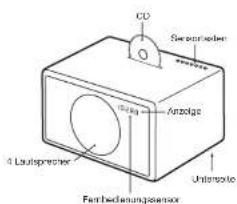
MODEL XL
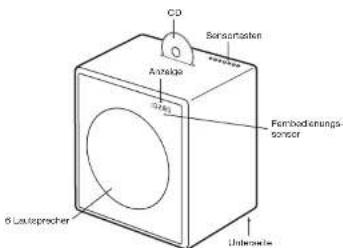
Fquenzer uersio127
Bing3.5A..12D174.926 MH2..229.072 MH2
Gemeine, die manageln disziplize oder 3 Lae 3-18.
Aloys, Pohl, Pflichtre and Pals are managements of Pals in the same way as Pals.
La mousse Embracing Goundet is proradite d'Embracing Gound
La manasse en l'obsus Baudot1 sur les manque d'obstetrics approuvés par Bactoix 201, BHC, Inc.
aptx is a trademark of C3R plo
2019-13-05 La 3-BH To do some reserves. September 5, 2019. The first part of the book is a short text about the past and present. On one hand, his father (and of course his) La 3-BH.
SOURCES AUDIO
| Marches / Arrets |
| in volume |
| in volume |
| Modulacneckfach M.DVD/DAU, Lioe In AireluBlecht |
| #JFENI CO |
| Change la frequenca PWDABL es pilos cdo CD IuBlecht |
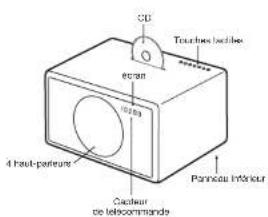
MODEL L
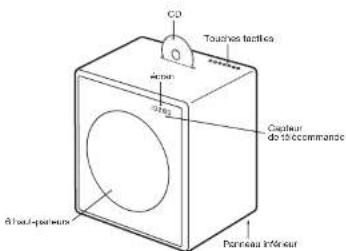
MODEL XL
UTILISATION DE L'APPAREILPRÉSENTATION
PRISE EN MAIN
Genera' s un mania registra c di 3 Lab GmH.
Apcis, Pcd, Ptole and Poc are rastadoi of Apec Comper, Inc.
Applie the 1000000000000000000000000000000000000000000000000000000000000000000000000000000000000000000000000
EUFENTES DE AUDIO
| Fib monol / colloid (mantemur/sukage/10g.) | |
| A | Starcher |
| A | Exocatal CD |
| Aa | Line-in-1 (conectar "line-in") |
| Am | Line-In-2 (conectar "AM") |
| Model: selobionco FM, GVW/GVBI, Linio In, Air Bluetooth |
| Fapierco CD |
| Canlaria Frequenca FM/DAB, platina de CD y Busesk |
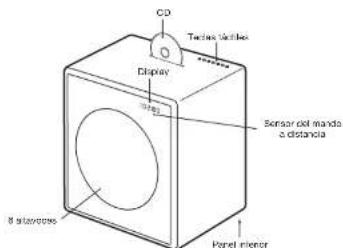
MODEL XL
| Accessories |
| Volume |
| Volumes - |
| Modulatase selcraw M.DUA2/DUA1,Line-1 ProBucn0s |
| Familines C#l |
| Modifica frquenca F/M.DUA,bran CD/ UUGUwth |
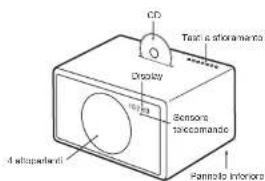
MODEL L
MODEL XL
25 27
Genome is a genetically handled domain of Gen. Lab GmbH.
Amplicon, Post, Acc, Prot, Film, and other new sequences of Alpha Complex (APAC) are available in the database.
Blastx is a web-based database for all BLAST hits.
Embrachio (Bolto), Embrachio search is a generalism of Embrachio Search Electronic All.
Ensembl has an e-mail address at http://www.ebi.ac.uk/EBIT/EBIT.html.
e.g. is a traditionalist of OBG.Pk.
http://www.cbi.ucla.edu/EBIT/EBIT.html.
In this article, we present a review of the various methods used to construct and interpret BLAST gene databases.
geocorrected words do not correspond to data which might be overlapping with BLab GmbH.
GELUIDSBRONNEN
Gens' at 175
Apple, Pcs, iPhone and Pcs are macrolles of Apple Computer, Inc.
regarding the use of this product.
Vanserveen Emaneebragstrom34 Faser Emaneebrung Sound Experience 13
Braak, Pcs, Pcs and Pcs are macrolles of Bhaak (S),
apk is a macrolides of OER pk.
03/03 G-2 fettehlothorboeckets. 1 hohd in boce oophore
of the paching kotee impalee halte foedder, under tine bokr 34
Lub Gb.
OVERSIGT
LYDKILDER
Brug at lagrede stationer
Tryk ös en at lagringsknapperne for at hente en radiostation.
DAB+
Genome@a. c. vanu-michlin.Hills-1, 9 Lab Bremers Apple, Pdcl, iPhone and PCs are trademarks of Apple Inc.
Vermatah (Vermatah@vamc.org)
Vermatah (Vermatah@vamc.org)
Vermatah (Vermatah@vamc.org)
Vermatah (Vermatah@vamc.org)
optis aedomark of CBR pk
6273 Gd-Lab GmbH Samaria rather than Voskau. Louis opshamstein sir, 1950. The first of the two cases in which he also took part, the earliest govtskainen at Gd-Lab GmbH.
LJUDKÄLLOR
| Moda vall FM, DWB / DYB1, Line In, Ant color Bluetooth |
| Machin Off |
| Bye ar FM/DVB / Dinovics, CO & Bluetooth Total |
MODELL L
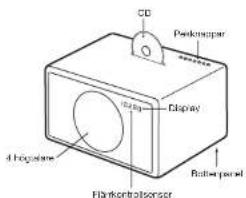
MODELL XL
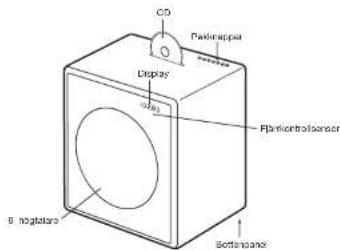
ANVÄNDNING AV ENHETENÖVERSIKT
KOMMA IGANG
- Avilgaia skyddapapret from jfkontrollens bathersfack.
- Pa bottopanslen, ansut den medjoflige triandan-tenen ill radis antennutata.
- Ocksaaponbottenpanelen,anslutnatsladden till AC stromkontaten.
VALAV LJUDKÄLLA
edordred in shore. Drindingspogresgroms in the open hods prindings. Bad them prawn aler der hods.
pluggen like passar I dir kontakt, ma du forhore teg med en
ektrkar for ucktttnng av cct overfladiga untakot.
- Paae na stamekalwhen bokn knerknni iden,
0
-
Prrn 100000000000000000000000000000000000000000000
-
ENR BRS Med VegF, StnK, 6 pss, BRsEeR, SsE Eed 50
2018年1月16日星期一
s#f1 for s rss
- Plagur ahen under ferdenyer eker nla den kike skil hines
overlongred.
- In the sample, I will be given a list of 10000000000000000000000000000000000000000000000000000000000
fck, en bokhyia oik Ignanda, og is der stai godit vortarre
crnrod. Vntlaonner mke veere hndr vod dokk 1
H
G
- ADVANSEC: 501398402000000000000000000000000000000000000000000000000
spho
- ADVARSEL: For a reduces niko for brawn eier elsknck stat.
mä ike asperatet uttes for regneher fulighst Apparated
mraataaee for spuulhy:up aeeaaeog ingn nakaly
ghe hndr sntfke vae rnsults appaetet.
-
FOKIKIg: Lef hemn en nks er cckp jns bennr
-
ADAMANT: Pseudo-Riemannian manifolds
-
13.
H
frksbgsnht, frksbgsnht ma were khar ank
- Korrst ayhnding ex dttte produkt, Dats metet Ildesor
at ceto preduktie kice kal kastees cammen med varlig hushold
m
prrnre 100000000000000000000000000000
focandepn yar pradukte baid. De kao in oot arodct
for mijawennig reakdarinng.
Batterier fernkcontralien: Held bilateri tllermkntralien uenkan
bae naedkndie. Dafan fntnaketbrann ater kemik bann hvi
Ioll banaedit skal kka aces, damontera, varme ove 100 C
F.12345678901000000000000000000000000000000000000000000000000
0
grader Cellus
Eckytendjordjerdngsterminal Apporaiel m socies il sinrui
sckn en besythde jndingturbine
Vermierjordingderminal,Aurantelakdtbchtesen stikrtakt
med vermejordings-forbindes. fcrigtor: malf aldn enhloen pa
Iron galliterneel, 0e tels akder giterel. Produiermrkrnigen
passert paeherernderse
CONFORMITY
CE Tippass
G-Lab GmbH erderer at dttte produkt ar amawar med eesseral
1
GmbH, Zürich, Switzerland (e-mail: http://www.zurich.de)
m - 1 0 ;

RESIRKULERING
Dette productet kan resirkuleres, Prooikler scom berer dotz
eyntnle kki KKE konne - nirig hnhnninepaol. Vei prnkt
H
og mkiinrme seln mer anre ng appeerningsponkier hcdns
Dat e ronelk n dkrkln am Xxtleleal and Eectronk
Equipment (WEEE) (wetalite, scktrax, ags, ogn, kink, dink)
Asp3, Pcd, Pcd and Pcd are functions of appc compu#t.19
1
[Tab]
Cred, maeagogpantblatothrregatnlarvamharblatod
8G,16.
中
Ie 1
1a3LabGmH
OVERSIKT
AUDIOKILDER
Du kan spille av musikk fra folgende lydkilder:
FM Radio
DAB+ radin
fungerer kun land med DAB tieneate
Audin CD
Bluetooth audio (med stote for antX cc AAC)
- Ekstern hydrosal med to Lino in innnns
FJERNKONTROLL
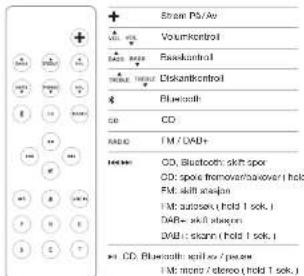
| df | Dataset |
| A | Loci at CO |
| t100 | Line in 1 (kibbling "linelin") |
| t10 | Line in 2 (kibbling "AIR") |
| PRESSE DAB / FM lomliendammiell | |
BERØRINGSPANEL
| Stem P/A/Ar |
| Volume |
| - Volume |
| Modus: vsg FM, DVB / VDB1, Line In, Air lolor Bluetooth |
| Low in CD |
| Endr FM/AB Rinkovors, CD og Bluetooth |
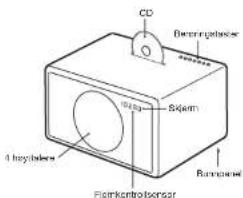
MODELL L
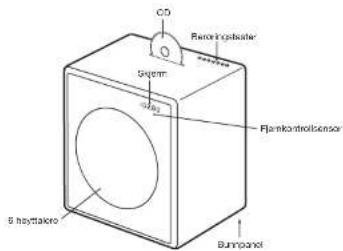
MODELL XL
BRUK AV ENHETEN
KOMLGANG
- Fjern baskylteaesepapir tet battenrommet til jennkontrolten.
| # | Muta |
| A | Lector CD |
| B | Filein 1 (consecutive "linoin") |
| C | Line in 2 (consecutive "ALR") |
| PRESSET | Predisteples QCD/FZ |
PAINEL TACTIL
| Ligor / Cogier |
| Volume = - |
| Volume = |
| Fader CD |
| Alterar frequenca FM/DAV, fakos de CD e Butecorm |
MODELO L
MODELO XL
62 63
Ligar com o conductor AIR

- IMPORTANT SAFETY INSTRUCTIONS
- OVERVIEW
- AUDIO SOURCES
- REMOTE CONTROL
- TOUCH KEYS
- MODEL L
- MODEL XL
- USING THE DEVICE
- GETTING STARTED
- SELECTING THE AUDIO SOURCE
- FM RADIO
- Storing a radio station with the presets
- DAB+
- Scan function
- Presets
- Which DAB standards are supported?
- How can I disable the DAB+ function?
- Select FM
- CD
- Navigation
- BLUETOOTH
- Initial Setup ("Pairing") with iPhone
- Playing Music
- High quality Bluetooth audio with aptX and AAC CODEcs
- Status Information on the display
- LINE-IN
- AUTOMATIC POWERING ON AND OFF
- Powering On with the AIR connector
- TROUBLESHOOTING
- Why is the Model L/XL turning itself off?
- Why is my mobile phone not connecting?
- How do I reset Bluetooth?
- I have an unreliable connection with dropouts when listening via Bluetooth.
- How do I erase or overwrite a preset?
- I cannot turn off the device, the display shows "Air active - cannot turn off".
- How can I verify that the remote control works?
- How is it possible to hear in stereo from only one speaker?
- How do I clean the device?
- SUPPORT
- Service and repair
- Warranty
- SOURCES AUDIO
- UTILISATION DE L'APPAREILPRÉSENTATION
- PRISE EN MAIN
- EUFENTES DE AUDIO
- GELUIDSBRONNEN
- OVERSIGT
- LYDKILDER
- Brug at lagrede stationer
- LJUDKÄLLOR
- MODELL L
- MODELL XL
- ANVÄNDNING AV ENHETENÖVERSIKT
- KOMMA IGANG
- VALAV LJUDKÄLLA
- CONFORMITY
- CE Tippass
- RESIRKULERING
- OVERSIKT
- AUDIOKILDER
- FJERNKONTROLL
- BERØRINGSPANEL
- BRUK AV ENHETEN
- KOMLGANG
- PAINEL TACTIL
- MODELO L
- MODELO XL
- Ligar com o conductor AIR
Brand : GENEVA
Model : Model L Wireless DAB+
Category : Hi-fi system