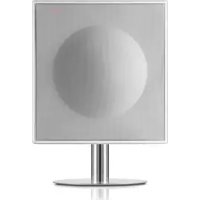
Model XL Wireless DAB+ - Hi-fi system GENEVA - Free user manual and instructions
Find the device manual for free Model XL Wireless DAB+ GENEVA in PDF.



| Product type | Hi-fi system |
| Brand | Geneva |
| Model | Model XL Wireless DAB+ |
| Audio sources | FM radio, DAB+, CD audio, Bluetooth (aptX, AAC), Line-In (RCA and 3.5 mm Air) |
| Bluetooth | A2DP version with aptX and AAC codecs |
| DAB standards | DAB and DAB+ (Band III: 5A-12D, Channel 13: 13A-13F) |
| Speakers | 4 internal acoustic chambers with EmbracingSound technology |
| Control | Infrared remote control and capacitive touch panel |
| Power supply | Mains via included power cable |
| Operating temperature | 5°C to 40°C |
| Remote control battery | 3V lithium CR2032 |
| Maintenance | Soft dry cloth; do not use cleaning products |
| Safety | Unplug before cleaning; do not expose to water or excessive heat |
| Spare parts and repairability | Contact an authorized dealer via www.genevalab.com |
| Warranty | See country-specific terms at www.genevalab.com |
Frequently Asked Questions - Model XL Wireless DAB+ GENEVA
User questions about Model XL Wireless DAB+ GENEVA
0 question about this device. Answer the ones you know or ask your own.
Ask a new question about this device
Download the instructions for your Hi-fi system in PDF format for free! Find your manual Model XL Wireless DAB+ - GENEVA and take your electronic device back in hand. On this page are published all the documents necessary for the use of your device. Model XL Wireless DAB+ by GENEVA.
USER MANUAL Model XL Wireless DAB+ GENEVA
IMPORTANT SAFETY INSTRUCTIONS
-
Read these instructions.
-
Keep the following
-
Heddall warnings.
-
Folsa at 152000
8.107.4.2.3.2.3.4.
-
Do not stock any warts, install it accordingly with the manufacturer's instructions.
-
Do not total any heat sources such as radars, heaters,
In addition, the power supply is also used to provide a minimum of 100 mA. This is an important feature in the device, as it provides a minimum of 100 mA for the operation of the device. The power supply has two modes with one side of the device. A ground-type plug has been made and placed on the ground surface. The ground-type plug has been placed on the ground surface to prevent the possibility of being covered by your safety. It has the provided plug does not fit into your circuit; consult an electronic or replacement of the插座 outside.
-
Protect the power cord from going on arcing or pinched particulate by at the plugs, convenience restraints, and the pins where they are used.
-
Oryus albaehnnebneaeenee eniee by Prrnns
-
Use only with the paint, paint (brick, brick), or be specified by the manufacturer, paint with the device. When a paint is used, use caution when moving the canvas/crumb combination to avoid injury from刮ers.
-
Upkeep this device during lightning storms or stinging rain, prevent of disease.
-
Rater all sending to qualified service personnel. Sending a resubmitted when the device has been damaged in any way, such as supply poor or scud plug cables, logic has been checked or objects have fallen into this device, the device has been suspected to be defective and/or damaged.
-
Do not install this equipment in a cornered or built-in space
such as a book case or seminar unit, and maintain well ventilated rooms. The room is also equipped with a large screen that can be used to view the text with a wide range of viewing angles. This unit is
-
WARNING: Please refer to the information on authorship and/or submission for electronic and纸质 information before submitting or otherwise, including the following:
-
WARNING: To reduce the size of force and strength, you should not dispose this device to rain or moisture. The device should not be exposed to dripping or splashing and objects filled with liquids, such as vases, should not be placed on the apparatus.
-
CAUTION: Danger of explosion if battery is incorrectly replaced.
Only replace with the same or equivalent type. -
WARNING: The battery is battery or batteries or battery pack) should not be exposed to excessive heat such as sunshine, fire or other heat.
-
WARNING: The main plugging amplifier is used as a pullout device, the pullout device should remain ready operable.
Correct Disposal of this product. This marking indicates that this product should not be disposed with either household waste throughout the LU. To prevent possible harm to the environment or human health, team-controlled waste disposal, recyclable is responsible to promote the sustainable reuse of material resources. To return your used device, please use the return and collection systems or contact the retailer where the product was purchased. They can take this product for environmental safe recycling.
Batteries in the remote control Koop the remote control battery away from children. It may cause a fire or chemical burn if it breaks fuel. Enter the remote command, describe how to start 20% (100%) of the battery. The battery is then charged up to type and modal number (CORSCE3 linear cash battery, 3V).
DO NOT INGEST BATTERY, CHEMICAL BURN HAZARD
This product contains a coin/bucket coin battery. If the coin/bucket is not used in the current interval, it will be replaced with a coin/cocoleo internal匣 in just 2 hours and can load 60 days.
Keep new and used batteries away from children. If the battery is damaged, use a new one; otherwise, keep using the product and keep it away from children.
If you think turbidities might have been unbalanced or placed into place by the time of the 1980s, then the following are the most likely ones. Operating Temperatures: 5 - 40~^ C 41 - 134~kg^2

CAUTION: RISK OF ELECTRIC SHOCK,DO NOT OPEN ATTENTION: RISQUE DE CHOC ELECTRIC-NE PASTWARNING: To reduce the risk of electric shock, do not use a sharp knife or any incendiable part. Refer servicing to qualified personnel.
. The tightening felt with a thresholded symbol within an occasional moment of tension, the first time it had been in years, was when "dampening voltage" still is the product that exceeds that may be of
sufficiently reconvertible to credible at risk of electric shock.
The excitation point within an equal potential range is to meet the user in the presence of important operating and maintenance indications in the literature accompanying the proposed method.
(2) Protective warning terminal. The apparatus should be in a main socket outlet with a protective swatting corne
From pre, near and later the tables on the post and past panels as well as the table on the bottom of the chart. FOD Regulations Warning: Changes or modifications to this unit not expressly approved by the party responsible for compliance could stand the user's authority to operate the equipment. NOTE: The equipment has been tested and found to comply with the limits for a Class B digital device, pursuant to Part 15 of the ICD Rules. This equipment is not intended to be used in situations where no harmful interference exists. This equipment generates, uses and can cause radio frequency anyway and, if not installed and used in accordance with the instructions, may cause harmful interference to radio communications. However, there is no requirement that the equipment be designed to cause harmful interference. If this equipment does cause harmful interference to radio or television reception, which can be determined by turning the equipment off and on, the user is encouraged to try to correct the interference by one or more of the following measures:
- Introduce the anisotropic breakdown in the土壤 and vegetation.
- Clearly the weakly broken soil on a circuit different from those of the strong ones.
- Show that the soil is not fully saturated.
- Consult the dasker or an experienced radio/TV technician for help. Modifications not expressly approved by the manufacturer could void the case's authority to operate the amplifier under FCC rules.
- Consult the Dasker L201, 200 MODELLIST (200 Grantoe Case), as required in the FCCQ.
Canada This device complies with Industry Canada Standards - except RSU standards). Operation is subject to the following two conditions: (1) this device may not cause interference, and (2) this device may not be used in conjunction with interference that may cause a relevant operation of the device.
Industrie Canada [C] No. 19107A-MOGRF1BRT, 19107A-MOGRF6X, AT CE Conformity
34.6a Grit Hildebrand that the Christian company with the same technical requirements and other relevant provisions of European Directive 1809/5/FC. The declaration of conformity may be concordant upon request to G-Lan GmbH, Zurich, Switzerland or on an http://www.glanlab.com.
C0979
区
This product can be recycled. Products bearing this symbol must NOT be discarded with normal household waste. At the end of the product's life, take it to a collection point designated for recycling. This will not be done if the product is still in use. We are more about item and collection points through your local authority.
The European Directive on Waste Electrical and Electronic Equipment (WEEE) was implemented to dramatically reduce the amount of waste going to benefit, thereby ensuring the environment is impact on the plant and human health. Please not beumably by recycling used products. If this product is still reactive, consider giving it away or selling it.
Used batteries:Please dispose of used batteries properly following the local regulations. Do not place the battery in the
CLASS 1 LASER PRODUCT
OVERVIEW
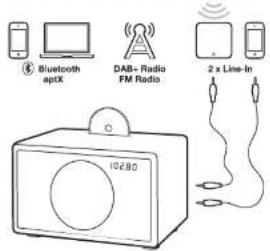
AUDIO SOURCES
You can play music from the following audio sources:
- PM Radio
- PAB radio
(works only in countries with DAB+ service)
Audio CD
Bluetooth audio (with support for aptX and AAC)
- External audio devices with two Line-In Inputs
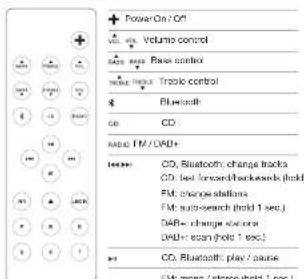
REMOTE CONTROL
TOUCH KEYS
| Power On / Off |
| Volume = |
| Volume = |
| Mode aspect FA, DABe, Inclu, Arc Blustooth |
| Knot CD |
| Change I MCDW frequency, CD & Illuminotroph tracks |
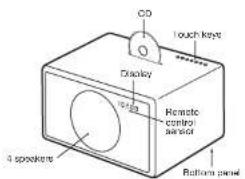
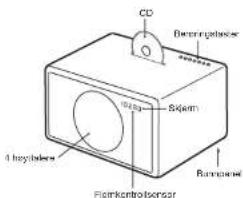
MODEL L
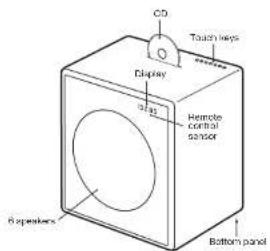
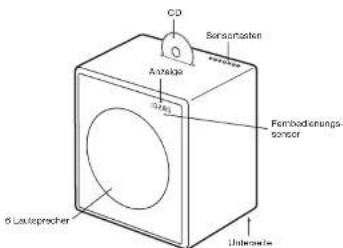
MODEL XL
USING THE DEVICE
GETTING STARTED
- Remove the protection paper from the remote control battery compartment.
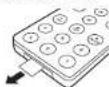
- On the bottom panel, connect the enclosed wire antenna to the radio antenna connector.
- Also on the bottom panel, connect the AC power cable to the AC power connector.
SELECTING THE AUDIO SOURCE
The audio source can either be selected with remote control keys or the touch key M.
The RADIO button on the remote control toggles between FM and DAB+ radio.
FM RADIO
- Touchline RADIO key on the remote control until the display shows an FM frequency.
- To change the frequency manually select a FM station with the 山 + 山 and 山 + 山 keys,
- To automatically search for another station, hold the and keys for a short time.
Storing a radio station with the presets
- Select your favorite radio station with 44 or 44 .
- Select one of the 6 preset keys on the remote control, and keep pressing it until the corresponding letter on the display starts blinking. The station has now been stored.
Using the presets
Press one of the preset keys to recall a radio station.
DAB+
DAB+ (sometimes also called Digital Radio) is only available in certain countries (UK, Germany, Switzerland, Norway, Hong Kong and more). Model L/XL is compatible with DAB and DAB+.
1. Press the RADIO key on the remote control until the display shows DAB.
2. Select a DAB station with and
Scan function
When using your Model L'XXL for the first time, the radio needs to search for available radio stations in your region (done with the "Scan" function). After a scan, the stations will be automatically stored.
- Within 5 seconds of entering DAB mode, hold down the button until "Scan" displays.
"Scan" is also needed after traveling to a new location with different radio stations, or when you move the radio to a different room with different radio reception characteristics.
Presets
Six DAB+ presents are available and they work exactly the same way as the FM presents.
Which DAB standards are supported?
The DAB and DAB + standards are supported, on the following frequencies:
Band3:5A...12D(174.928MHz...229.072MHz).
Kanal 13:13A...13F [230,784 MHz ... 239,200 MHz]
How can I disable the DAB+ function?
1. Select FM
- Hold the RADIO key of the remote control for 5 seconds to enable or disable the DAE+ function
CD
- Insert a CD into the slot, with the printed side facing the front of the device.
- The CD will start to play automatically.
- To elect the CD, press that key on either the remote control or on the touch keys.

Navigation
You can change tracks with the and keys.
Hold the 喜 and 喜 keys to fast forward and fast backward within a track.
Does the CD player support CD-R with MP3 files?
No. The CD player supports only Audio CD's, CD-R with MPS and other formats are not supported.
USING THE DEVICE
BLUETOOTH
Mobile phones and computers with Bluetooth can be used to support the use of a Wi-Fi connection. Mobile phone or computer must support Bluetooth A2DP.
Initial Setup ("Pairing") with IPhone
1.Presatek on the remote control. Wait for 20 seconds until the display shows a blinking "Pairing."
2. Select "Settings" on your iPhone. Select "General / Bluetooth". Turn on Bluetooth. New Bluetooth devices are discovered automatically. After a few seconds "GENEVA L (Not Failed)" will appear.
3. Select "GENEVA L". The phone is now connected ("Painging") to the Model L.
4. If the phone asks for a PIN; enter "0000" (four zeros)
5. Now you can play music on an iPhone and listen to it on the Model L.
Pairing guides for other devices and mobile phones Go to www.genevalab.com and select "Support."
Bluetooth settings on the iPhone
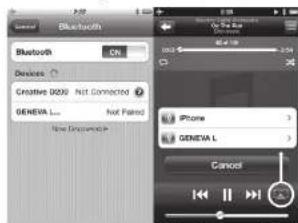
* PlayingSettings on iPhone
Playing Music
Most phones connect automatically to the Model L/XL after the initial setup ("Pairing").
1. Presssthe key on the remote control. While the Model L / XL connects, the display shows "Connect" for a few seconds.
2. Now the music that is playing on your mobile phone will automatically be streamed to the Model L / XL.
3. Change tracks with and
High quality Bluetooth audio with aptX and AAC codes
Some mobile phones support a higher transmission quality than the standard Bluetooth oocic (SBC). Model L / XL supports the high quality codes aptX and AAC. The Model L / XL will automatically select the high quality Bluetooth aptX or AAC codes, if the mobile phone supports this feature.
Status Information on the display
"Search": Searching previously paired devices.
"Connect": Connection successful.
"Pairing": If the Model L / XL did not make a successful connection within 20 seconds, the Model L / XL will go into the pairing mode for 2 minutes.
"Connected to XXX": Successfully connected to device with the name XXX.
"BLUE C": A device is connected.
"BLUE -"; No device is connected.
LINE-IN
The Model L / XL has two line-in inputs for external audio devices:
-BCA connectors ( "Line-In" )
- 3.5mm connector ("Air") with automatic power-on functionality
1. Connect one end of a Line-In cable to the Line-In or Air Connector on the bottom panel of Model L / XL (RCA connectors), then connect the other end of the cable to the audio device (headphone or Line-Out connector).
2. Press the LINE-IN or AIR key on the remote control.
AUTOMATIC POWERING ON AND OFF
Powering On with the AIR connector
If an external audio device has its audio output connected to the AIR connector, Model L/LX will automatically power itself on, as soon there is an audio signal on the AIR connector. The AIR connector is suited for network audio streaming devices, such as the Apollo AirPort Express (AirPlay) and Sonce products. When you turn on a streaming device, it will automatically turn on the Model L/LX.
Powering Off with the energy saving function The Model L / XL will automatically turn itself off after 15 minutes if there is no active Bluetooth connection, no is CD playing, or if there is no audio signal at Line-in/AIR connectors.
TROUBLESHOOTING
The Model L/XL does not turn on when I touch the button.
touch按钮 with one finger only. Don't touch the other finger. The first finger is a single finger, while the second panel works properly when used with one finger only.
Why is the Model L/XL turning itself off?
The energy saving function turns the Model L'XL automatically off. The Model L'XL will automatically turn itself off after 15 minutes if there is no active Bluetooth connection, no CD is playing or if there is no signal at the Line-in inputs. When this happens, the display shows "ECO OFF".
Why is my mobile phone not connecting?
Please check the Support pages at genevalab.com.
How do I reset Bluetooth?
Up to three paired Bluetooth devices can be stored. To clear the memory, perform the following steps: 1. Select Bluetooth on Model LXL.
2. Within 5 seconds of entering Bluetooth mode, hold until "RESET" displays.
3. Pair your mobile phone again.
What is the PIN for a Bluetooth connection? The PIN IA: 0000 (4 zeros). Not all computers or mobile phones require a pin code during initial setup. (Painting).
I have an unreliable connection with dropouts when listening via Bluetooth.
- Move the mobile phone closer to the Model L/XL.
- Move away or turn off other wireless devices that can disturb a Bluetooth connection (for example WLAN / Wi-Fi, other mobile phones etc.).
The FM automatic search does not find all stations. The FM automatic search function (hold or keys) finds only stations with a strong signal.
How do I erase or overwrite a preset?
Stored presents do not need to be erased - just use the steps to store a new station in a preset.
I cannot turn off the device, the display shows "Air active - cannot turn off".
There is still an audio signal on the Air connector. Either stop the audio source or disconnect the external device from the Air connector.
How can I verify that the remote control works? Every time a key is pressed on the remote control, a small red light on the display lights up briefly.
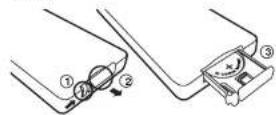
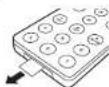
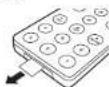
How can I change the remote control battery? 1. Push the small lever in the direction of the arc with your finger or a small screwdriver.
2. While holding the small lever, slide out the battery compartment.
3. Replace the battery (3V lithium cell, 3V CR2032). Verify that the battery is inserted with the right polarity.
How is it possible to hear in stereo from only one speaker?
Inside the wood cabinet there are two (Model L) or four (Model XL) acoustic chambers, for the left and right channels. Using the EmbracingSound algorithm Model LXL creates a real stereo reproduction with two acoustic chambers that are very close to each other.
How do I clean the device?
Use a soft, dry cloth to avoid making scratches on the surface. Do not use cleaning alcohol, or other solvent fluids to clean the surface of the Cabinet as this can both damage the lacquer and also cause electrical failures. Before cleaning, unplug the device from the AC power outlet.
SUPPORT
More information and additional troubleshooting Check the "Support" pages at geneva lab.com.
Service and repair
If the product is damaged and needs repair, please contact your dealer. Visit genevalab.com to find a dealer in your area.
Warranty
See the specific terms for your country at genevalab.com.
General is a registered trademark of Glab GmbH. Apple, Inc., iPhone and iPad are trademarks of Apple Computer, Inc. All rights reserved.
The Extensible Source code is used by Emmanuele Soren Experience All
The file both"word" and code" are registered Trademarks owned by Bicontech 645, Inc.
un.k is unregistered of 2005版。
2013 GLab G-III Manual for Games Stead System Model LIX, Version 4.2
Deutsch
| Link / Area |
| Landslide / |
| Landslides/ |
| Code Auswerten / FM 08KB/DAD+, Line-1, Air/Order Buchwert |
| CD Auswerten |
| FM / DAB Freqenc, CD & Bluebell Title System |
MODEL L
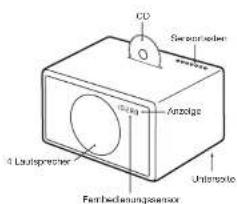
MODEL XL
Bing3.5A..12D174.926M2..229.072MH2
Cinch-Buchsen ( "Line-In" )
| Marches / Arts |
| In volume |
| In volume |
| Modulacneckfach M.DVD/DAU, Lioe In AireluBlecht |
| #JFENI CO |
| Change la frequenca PWDABL es pilos CD ot Bldtecht |
MODEL L
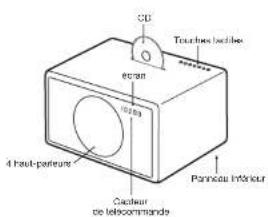
MODEL XL
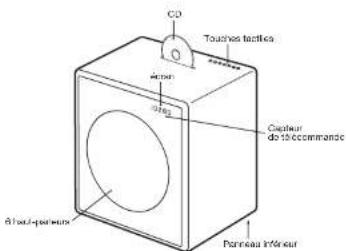
UTILISATION DE L'APPAREILPRÉSENTATION
PRISE EN MAIN
| Fib monol / colloid (mantemur/sukage/10g.) | |
| A | Starcher |
| A | Exocatal CD |
| Aa | Line-in-1 (conectar "line-in") |
| Am | Line-In-2 (conectar "AM") |
| Model: selobion CF, GVW/CVBI, Linu In, Air Bluetooth |
| Fapierco CD |
| Canlar Frequenca FM/DAB, platina de CD y Busesk |
MODEL XL
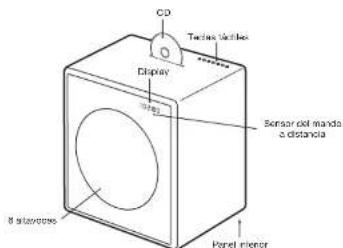
Amplicon, T, and Amplicon and/or sequence of amplicon Companions are used to identify the sequences that have been sequenced in the Illumina Miarchiprobe Embase Sanger® v6 protocol or Illumina Miarchiprobe v1.0
La marca Bieletto1 y sus logos son marcas comemorativas de Bieletto (SIC, Inc.)
60123 G. D. Hall, Tortus in the dark: lessons from the past, on 14 October 2009.
PANORAMICA
FONTI AUDIO
| Accessories |
| Volume + |
| Volumes - |
| Modulataseconerf MUBA2/DAD1,Line-Fir AroBubotin |
MODEL L
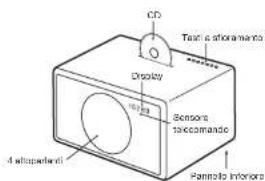
MODEL XL
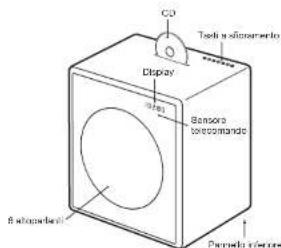
22 27
Genomea was generated by transgene transfer machinery from GA to Gb.
Amplicon, Post, Amplicon, Post, Filer, Filer, and Post are used as input for amplicon assembly and assembly of the genome.
Gb is a single-strand DNA segment that has been embedded into the Genomic Enrichment Archive (GE) database.
aGb was generated after editing of the sequence in the transgene transfer machinery using an upstream variant from Bastaio Gb, Inc.
bamplicon is a subdomain of ORF pK.
cGA103 GA103-2 was used as a template for transgene construction. In a custom-made kit of Genomics, the following steps were performed:
(1) To prepare the transgene encoding each contig in a given contig;
(2) to use the transgene encoding in the contig;
(3) to use the transgene encoding in the contig;
(4) to use the transgene encoding in the contig;
(5) to use the transgene encoding in the contig;
(6) to use the transgene encoding in the contig;
(7) to use the transgene encoding in the contig;
(8) to use the transgene encoding in the contig;
(9) to use the transgene encoding in the contig;
(10) to use the transgene encoding in the contig;
(11) to use the transgene encoding in the contig;
(12) to use the transgene encoding in the contig;
(13) to use the transgene encoding in the contig;
(14) to use the transgene encoding in the contig;
(15) to use the transgene encoding in the contig;
(16) to use the transgene encoding in the contig;
(17) to use the transgene encoding in the contig;
(18) to use the transgene encoding in the contig;
(19) to use the transgene encoding in the contig;
(20) to use the transgene encoding in the contig;
(21) to use the transgene encoding in the contig;
(22) to use the transgene encoding in the contig;
(23) to use the transgene encoding in the contig;
(24) to use the transgene encoding in the contig;
(25) to use the transgene encoding in the contig;
(26) to use the transgene encoding in the contig;
(27) to use the transgene encoding in the contig;
(28) to use the transgene encoding in the contig;
(29) to use the transgene encoding in the contig;
(30) to use the transgene encoding in the contig;
(31) to use the transgene encoding in the contig;
(32) to use the transgene encoding in the contig;
(33) to use the transgene encoding in the contig;
(34) to use the transgene encoding in the contig;
(35) to use the transgene encoding in the contig;
(36) to use the transgene encoding in the contig;
(37) to use the transgene encoding in the contig;
(38) to use the transgene encoding in the contig;
(39) to use the transgene encoding in the contig;
(40) to use the transgene encoding in the contig;
(41) to use the transgene encoding in the contig;
(42) to use the transgene encoding in the contig;
(43) to use the transgene encoding in the contig;
(44) to use the transgene encoding in the contig;
(45) to use the transgene encoding in the contig;
(46) to use the transgene encoding in the contig;
(47) to use the transgene encoding in the contig;
(48) to use the transgene encoding in the contig;
(49) to use the transgene encoding in the contig;
(50) to use the transgene encoding in the contig;
(51) to use the transgene encoding in the contig;
(52) to use the transgene encoding in the contig;
(53) to use the transgene encoding in the contig;
(54) to use the transgene encoding in the contig;
(55) to use the transgene encoding in the contig;
(56) to use the transgene encoding in the contig;
(57) to use the transgene encoding in the contig;
(58) to use the transgene encoding in the contig;
GELUIDSBRONNEN
Genome@sf.va-marcovacu Fag Lai GmbH
Apcys, Pdd, Phts and Pdc are trade marks of Apache Computer, Inc.
Apcys, Pdd, Phts and Pdc are trade marks of Apache Computer
Waranum Entomological, Inc.
Waranum Entomological, Inc.
Wardentem Entomological, Inc.
Wardentem Entomological, Inc.
Wardentem Entomological, Inc.
Wardentem Entomological, Inc.
Wardentem Entomological, Inc.
Wardentem Entomological, Inc.
Wardentem Entomological, Inc.
Wardentem Entomological, Inc.
Wardentem Entomological, Inc.
WardentemEntomological, Inc.
Wardentem Entomological, Inc.
Wardentem Entomological, Inc.
Wardentem Entomological, Inc.
Wardentem Entomological, Inc.
Wardentem Entomological, Inc.
Wardentem Entomological, Inc.
Wardentem Entomological, Inc.
Wardentem Entomological, Inc.
Wardentem Entomatological, Inc.
Wardentem Entomological, Inc.
Wardentem Entomological, Inc.
Wardentem Entomological, Inc.
Wardentem Entomological, Inc.
Wardentem Entomological, Inc.
Wardentem Entomological, Inc.
Wardentem Entomological, Inc.
Wardentem Entomological, Inc.
Wardentem Entomology, Inc.
Wardentem Entomology, Inc.
Wardentem Entomology, Inc.
Wardentem Entomology, Inc.
Wardentem Entomology, Inc.
Wardentem Entomology, Inc.
OVERSIGT
LYDKILDER
Brug at lagrede stationer
Tryk ös en at lagringsknappere for at hente en radiostation.
DAB+
Bluetooth settings on the iPhone
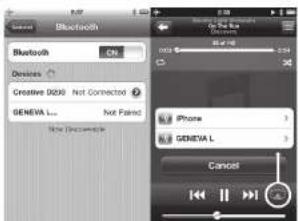
4 Atspilngindstillinger pAIP
Afspille musik
De feste Telefoner forbinder automatism Med Model L.61, often due to inadequate communication (Lipson).
1. Try to join the club and join the club.
2. Musikanten, der a-spille auf ein mobiliterfon a-spille automatisiert auf Modelen L/XL
3. Skff numre ved brug at 一 _ 一 og
Bluetooth hjkvalletsld my aptx og AAC codes Vise mobiletelefon understetter en becre transmis sionskavitel I forhold ill standard Bluetooth codeen (SBC). Modelien L / XL understetter aptx og AAC hjkvalletscodescodes.Modelien L / XL vaalger automatistc Bluetooth aptx aller AAC hjkvalletscodescodes, hvis mobiletelefon understetter denne functorie.
Statusinformation pa displayet
Genome@a. c. van mijk, Hildes-1, 9 Lab Brem, Appis, Pdcl, Phone and Pdcl are trademarks of Applied Biosystems.
Vermatah (Vermatah@vamc.org)
Vermatah (Vermatah@vamc.org)
Vermatah (Vermatah@vamc.org)
Vermatah (Vermatah@vamc.org)
optis aedomark of CBR pk
6273 Gd-Lab GmbH Samaria rather than Voskau. Louis opshamstein sir, 1950. The first of the two cases in which he also took part, the earliest govtskainen at Gd-Lab GmbH.
LJUDKÄLLOR
| Moda vall FM, DWB / DYB1, Line In, Ant color Bluetooth |
| Machin Off |
| Bye ar FM/DVB / Dinovox, CO & Bluetooth Total |
MODELL L
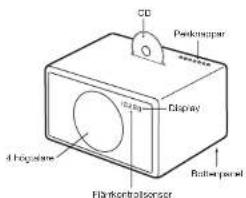
MODELL XL
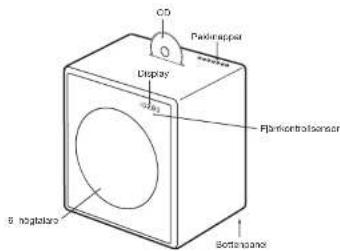
ANVÄNDNING AV ENHETENÖVERSIKT
KOMMA IGANG
- Avilgaia skyddapapret from järkontrollens bathersfack.
- Pa bottopanslen, ansut den medjoflige triandan-tenen ill radis antennutata.
- Ocksaaponbottenpanelen,anslotnatsladden till AC stromkontaten.
VALAV LJUDKALLA
Dettes Produkturi kon kinselkudere. Produkturi kon berter dottio sperminshod RICK' kaskar wrojki hvidsredigveiak. Vaid producturi kon berter dottio sperminshod RICK' kaskar wrojki hvidsredigveiak for ovo egg, egg, egg, egg, egg, egg, egg, egg, egg, egg, egg, egg, egg, egg, egg, egg, egg, egg, egg, egg, egg, egg, egg, egg, egg, egg, egg, egg, egg, egg, egg, egg, egg, egg, egg, egg, egg, egg, egg, egg, egg, egg, egg, egg, egg, egg, egg, egg, egg, egg, egg
| Stem P/A/Ar |
| Volume= |
| - Volume |
| Modus: voig FM, DBV / DBH, Uno Ine, Airlor Bluetooth |
| Lew at CD |
| Endre FM/DBV Borevans, CD og Bluetoothspor |
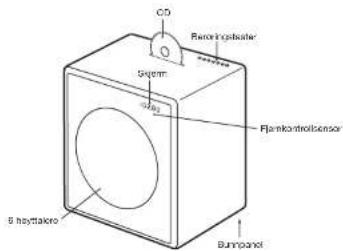
MODELL L
MODELL XL
BRUK AV ENHETEN
KOMLGANG
- Fjern baskylteaesepapir tet battenrommet til jennkontrolten.
Service on reparation
Hvistprodukter ekaciet og trenger reparasjon ma du ta kontakt med forhandller din. Se genevalab.com for à linne forhandler deu bor.
Garanti
Se de speilike vikarene for ditt land pa genevalab.com.
Suomi
TARKEAT TURVAOHJEET
- Lue rnaa phoeet
2.股份类别:
-
houdara isdla yarth kai
-
Nodara selilalotetra
A
-
Publik: cloxers Kuaia Ircs
-
ABDH100H100H100
A
(一)交易对方:中航工业
A. Notofis palaquifasciatus Schumthai fulsupragonadotus politorectus, Haploschuloides scapholata protococcaceae tenier pelt or lovaniert. Scaphodactomota petrochekeia orakai kildikai je meadukutukalele. I. lewini shilkii fulsupragonaditee orakai kildikai jutea kildikai. A. hirayama hirsuta platyptis, Pterodes pterodes, O. oculis schauinsenianer whorl platanerae voliterriski.
- Vero amnesis oecophagippia palma jeosida and parabola pinnatae, vannebrychiferae, phoeniscidae, kochella sanda, and the family of Parabola
1.
-
Kalyan dhasana varishantian khyakshen kalyan tali kumna khya myogen kinyochin, kufun, kujutao, quelaton k tobason 13. Kalyan dhasana varishantian khyakshen khyakshen khya
-
Rokki houkouc yon paitiakos valutinum hantu hibitionus Laiy, 2019
-
rukhoun kuhouc hauon, yooe ne couvouriloh phikn kahya, jay sereidol dukjopkis basen pihoeo on couvouriloh the mkih kuhoun oits on poulunon, kih seae cytulom nucetia, jay lata on allustur selaie in tundarua, jay ase fimi normala tai on pudunon.
-
AEGTONS 10000000000000000000000000000000000000000000
kihylyn la yassan okroon. jhukhd hydstim
vahcota. Nt stimvalhao tukimala Inamantaukopa
eernrnnnnaaehra, poybriole, vethnsims
15.VABP015:620knd
yta kssss sdds
- VARIOTUS: Tulipin is a genus of venomous ectomellica taxa fehatae at sea and atsea, atsefae ata, ata kuskudae. Ithali pahitae are seppi, sedi, coxus nematidis, sedi, medusa tatus, tatus varieti, lutei malquicae, sisi nacheri alpinae.
15YABOTUB 6300000000000000000
Vae 1
- VABOITIS AICL 10000000000000000000000000000000000000000000
2018年1月16日星期一中
2.101000000000000000000000000000000000000000000
......
2013.16 Cytokine-cytokine receptor protein kinase phosphatase 158, member of the class of serine/threonine kinase cdc42 (Cdc42), which is a member of the class of phosphatase 158 (P158).
YLEISKUVA
AANILAHTEET
| # | Muta |
| A | Lector CD |
| B | Filein 1 (consecutive "linoin") |
| C | Line in 2 (consecutive "ALR") |
| PRESSET | Predisteples QCD/FZ |
PAINEL TACTIL
| Ligor / Cogier |
| Volume = - |
| Volume = |
| Fader CD |
| Alterar frequenca FM/DAV, fakos de CD e Butecorm |
MODELO L
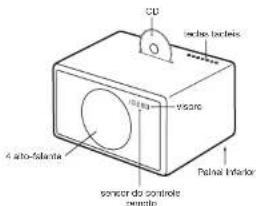
MODELO XL
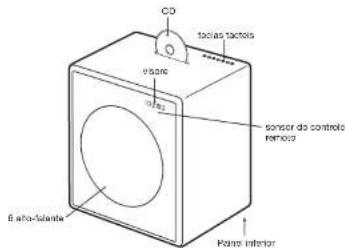
62 63
Ligar com o conductor AIR
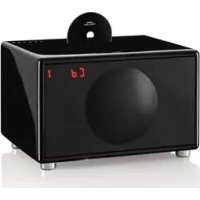
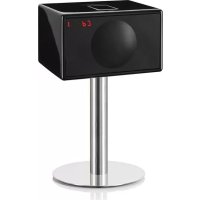

- IMPORTANT SAFETY INSTRUCTIONS
- C0979
- 区
- OVERVIEW
- AUDIO SOURCES
- REMOTE CONTROL
- TOUCH KEYS
- MODEL L
- MODEL XL
- USING THE DEVICE
- GETTING STARTED
- SELECTING THE AUDIO SOURCE
- FM RADIO
- Storing a radio station with the presets
- DAB+
- Scan function
- Presets
- Which DAB standards are supported?
- How can I disable the DAB+ function?
- Select FM
- CD
- Navigation
- BLUETOOTH
- Initial Setup ("Pairing") with IPhone
- Playing Music
- High quality Bluetooth audio with aptX and AAC codes
- Status Information on the display
- LINE-IN
- AUTOMATIC POWERING ON AND OFF
- Powering On with the AIR connector
- TROUBLESHOOTING
- Why is the Model L/XL turning itself off?
- Why is my mobile phone not connecting?
- How do I reset Bluetooth?
- How do I erase or overwrite a preset?
- How is it possible to hear in stereo from only one speaker?
- How do I clean the device?
- SUPPORT
- Service and repair
- Warranty
- UTILISATION DE L'APPAREILPRÉSENTATION
- PRISE EN MAIN
- PANORAMICA
- FONTI AUDIO
- GELUIDSBRONNEN
- OVERSIGT
- LYDKILDER
- Brug at lagrede stationer
- Bluetooth settings on the iPhone
- Afspille musik
- Statusinformation pa displayet
- LJUDKÄLLOR
- MODELL L
- MODELL XL
- ANVÄNDNING AV ENHETENÖVERSIKT
- KOMMA IGANG
- VALAV LJUDKALLA
- BRUK AV ENHETEN
- KOMLGANG
- Service on reparation
- Garanti
- TARKEAT TURVAOHJEET
- YLEISKUVA
- AANILAHTEET
- PAINEL TACTIL
- MODELO L
- MODELO XL
- Ligar com o conductor AIR
Brand : GENEVA
Model : Model XL Wireless DAB+
Category : Hi-fi system