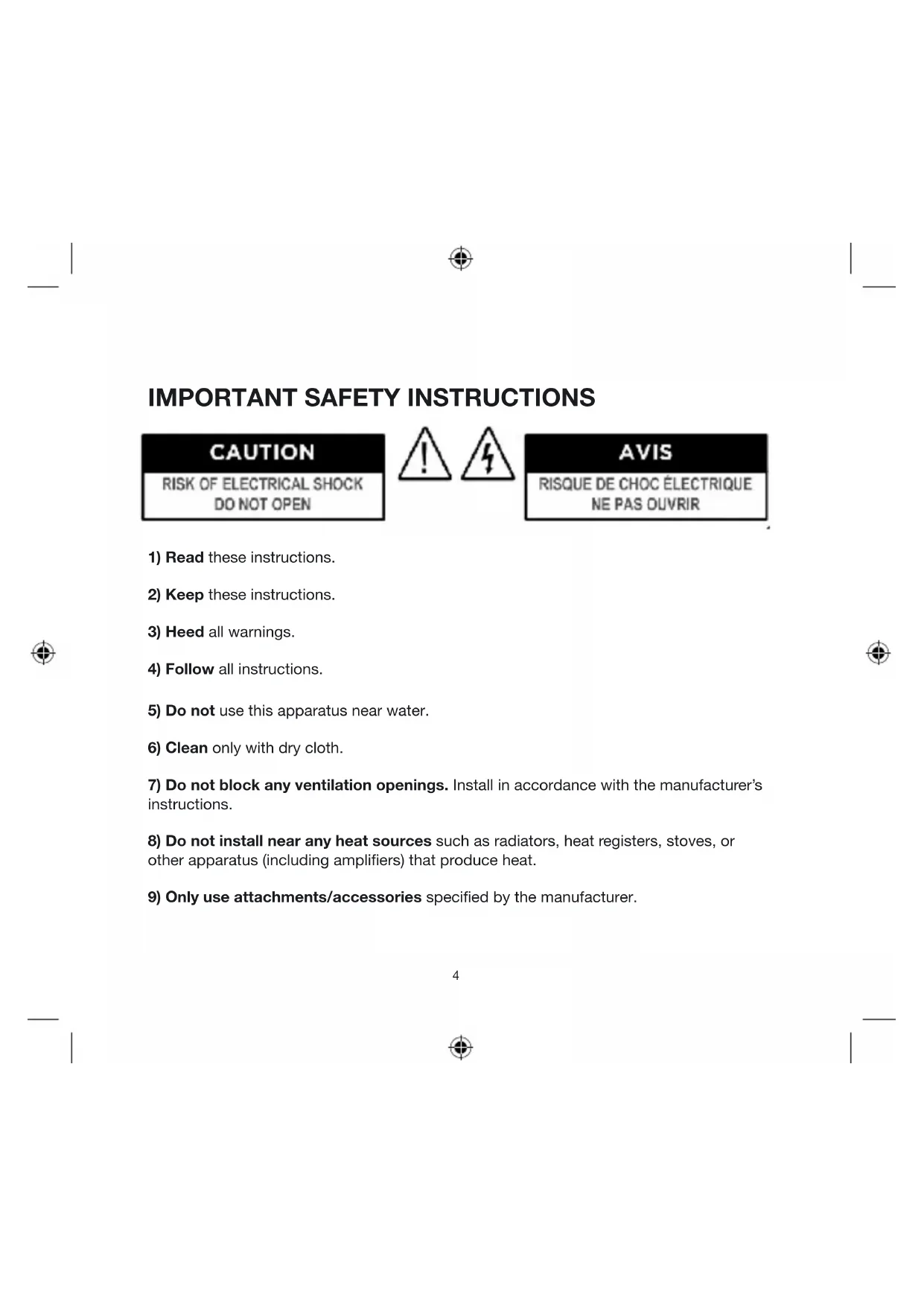
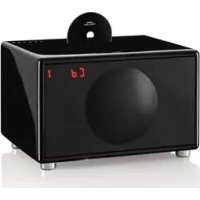
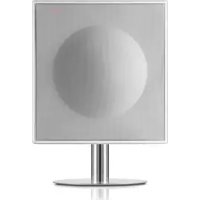
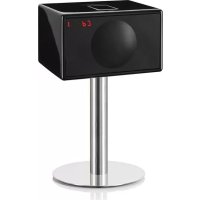
USER MANUAL Model M +CD GENEVA
IMPORTANT SAFETY INSTRUCTIONS
CAUTION
RISK OF ELECTRICAL SHOCK DO NOT OPEN

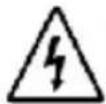
AVIS
RISQUE DE CHOC ELECTRIQUE NE PAS OUVRIR
1) Read these instructions.
2) Keep these instructions.
3) Heed all warnings.
4) Follow all instructions.
5) Do not use this apparatus near water.
6) Clean only with dry cloth.
7) Do not block any ventilation openings. Install in accordance with the manufacturer's instructions.
8) Do not install near any heat sources such as radiators, heat registers, stoves, or other apparatus (including amplifiers) that produce heat.
9) Only use attachments/accessories specified by the manufacturer.
10) Protect the power cord from being walked on or pinched particularly at plugs, convenience receptacles, and the point where they exit from the apparatus.
11) Unplug this apparatus during lightning storms or when unused for long periods of time.
12) Refer all servicing to qualified service personnel. Servicing is required when the apparatus has been damaged in any way, such as power-supply cord or plug is damaged, liquid has been spilled or objects have fallen into the apparatus, the apparatus has been exposed to rain or moisture, does not operate normally, or has been dropped.
13) This appliance shall not be exposed to dripping or splashing water and that no object filled with liquids such as vases shall be placed on apparatus.
Caution: Use of controls or adjustments or performance of procedures other than herein may result in hazardous radiation exposure or other unsafe operation.
Compact Disk Drive: The compact disk (CD) drive contains a laser. The laser radiates visible and invisible laser radiation. Do not open optical housing. Avoid direct exposure to the beam. The compact disc player should not be adjusted or repaired by anyone except properly qualified service personnel.
Class 1 laser product: This CD player is classified as a CLASS 1 LASER PRODUCT according to EN 60825- 1:1994+A1+A2, IEC 60825-1:1993+A1+A2. The CLASS 1 LASER PRODUCT label is located on the Back Panel of the product. This product complies with 21 CFR Part 1040.10. Technical details about the incorporated laser diode: Wavelength: 790nm± 15nm Max accessible radiant power (during service): 0.492~mW
CLASS 1 LASER PRODUCT
CAUTION
Visible and invisible laser radiation when open. Avoid exposure to beam.

Ventilation: Do not block any ventilation openings on the back or under the Geneva Sound System. To ensure reliable operation of the Geneva Sound System and to protect it from overheating, put the System in a position and location that will not interfere with its proper ventilation. For example, do not place the Geneva Sound System on a bed, sofa, or similar surface that may block the ventilation openings. Do not put it in a built-in position, such as in a bookcase or in a cabinet that may keep air from flowing through its ventilation openings. Do not push objects of any kind through openings.
Cleaning: Please note we have included a cleaning cloth with your Geneva Sound System, in the accessory bag. To avoid making scratches to the surface, we recommend that you use the cleaning cloth included. Before cleaning, please unplug this Geneva Sound System from the AC power outlet.
Overloading: To prevent risk of fire or electric shock, avoid overloading wall outlets or extension cords.
Open fire: Keep this Geneva Sound System a safe distance away from any open flame such as a lit candle. No open flame sources, such as lighted candles, should be placed on the Geneva Sound System.
Operating Temperatures: The recommended operating temperature range for the Geneva Sound System is 41 to 104 degrees Fahrenheit (5 to 40 degrees Celsius).
Front grille panel: Never remove front grille panel because the panel is non detachable and will void the Limited Warranty.
Avoid Hearing Damage: Playing very loud music for an extended period of time can result in permanent hearing loss.
The mains plug or appliance coupler is used as the disconnect device, such disconnect device shall remain readily operable.
Label location: The product labels and safety related markings are located on the Back Panel of the Geneva Sound System.
Unplugging while in operation: Do not remove the AC power cord out of the AC outlet if music is playing or if the Geneva Sound System is turned on. The drivers can be damaged by such an action.
Batteries in the remote control: Keep the remote control battery away from children. It may cause a fire or chemical burn if mishandled. Do not recharge, disassemble, heat above 212^ (100^) , or incinerate. Replace only with a battery of the correct type and model number (CR2025 lithium coin cell battery, 3 V).
CAUTION: Danger explosion if battery is incorrectly replaced. Replace only with the same or equivalent type.
Used batteries: Please dispose of used batteries properly, following any local regulations. Do not incinerate.
Compact Disks (CD's): Do not insert smaller disks than 12cm , such as a CD mini disk, etc., which are not supported. Also, do not insert anything else than a CD, such as coins.
Outside Antenna: If an outside antenna or cable system is connected to this product, be sure the antenna or cable system is grounded so as to provide some protection against voltage surges and built-up static charges. Article 810 of the National Electric Code, ANSI/NFP No. 70 information, Section 54 of the Canadian Electrical Code, with regard to proper grounding of the mast and supporting structure, grounding of the lead-in wire to an antenna discharge unit, size of grounding conductors, location of antenna/discharge unit, connection to grounding electrodes, and requirements for the grounding electrode.
Modification: Unauthorized modification of the receiver or radio remote control could void the user's authority to operate this equipment.
Note to CATV system installer: This reminder is provided to call the CATV system installer's attention to Article 820-40 of the NEC (of USA) that provides guidelines for proper grounding. In particular, it specifies that the cable ground shall be connected to the grounding system of the building, as close to the point of cable entry as is practical.
Removal of the Back Panel: By any unauthorized person also voids the Limited Warranty.
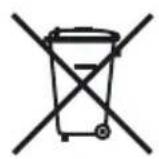
This product can be recycled. Products bearing this symbol must NOT be thrown away with normal household waste. At the end of the product's life, take it to a collection point designated for recycling of electrical and electronic devices. Find out more about return and collection points through your local authority.
The European Waste Electrical and Electronic Equipment (WEEE) Directive was implemented to dramatically reduce the amount of waste going to landfills, there by reducing the environmental impact on the planet and on human health. Please act responsibly by recycling used products. If this product is still usable, consider giving it away or selling it.
9
Contents
Chapter 1 12 Getting Started
12 Unpacking and setting up
14 Quick Start
16 Listen to your iPod
18 Listen to a CD
18 Listen to the FM radio
Chapter 2 19 How To...?
General:
19 How to turn the Geneva Sound System on?
19 How to adjust Volume and Sound?
19 How to verify that the remote control works?
20 How to clean the speaker?
20 What is the functionality of the AIR key on the remote control?
20 How to change battery in the remote control?
iPod:
21 How to select the right iPod Dock adapter for my iPod?
22 How to check the software version of your iPod?
22 How to upgrade your iPod?
22 How to insert or remove a Dock Adapter
22 How to control the iPod using the Geneva Sound System's remote control?
CD:
23 How to control the CD player using the remote control?
23 How to play CD's with MP3 and other formats?
23 How to play MP3 CD-R/W with several Albums?
FM radio:
24 How to control the FM radio using the remote control?
24 How to select a FM radio station?
25 How to store your favorite FM radio station in a preset?
25 How to play a FM radio station that is stored in the presets?
26 How to erase or overwrite a preset?
26 How to connect the External FM radio antenna?
26 How to change FM stereo/mono settings?
Line in:
26 How to connect a TV, Computer, VCR, DVD player or a game console to the Geneva Sound System using the "Line in" input?
Chapter 3 27 Troubleshooting, Service and Support
27 Troubleshooting and Support
27 Service and Repair
27 Technical Support
27 Customer Service Telephone Number
27 Website
Chapter 4 28 Made for iPod & Technology Partners
28 Made for iPod
28 Technology Partners
Chapter 5 29 Technical Specifications

1. Getting Started
Step 1: Unpack all components from the shipping box. Please save the original packaging material in case you ever need to return the System since the Limited Warranty does not cover shipping damages.
The shipping box should contain the following System components:
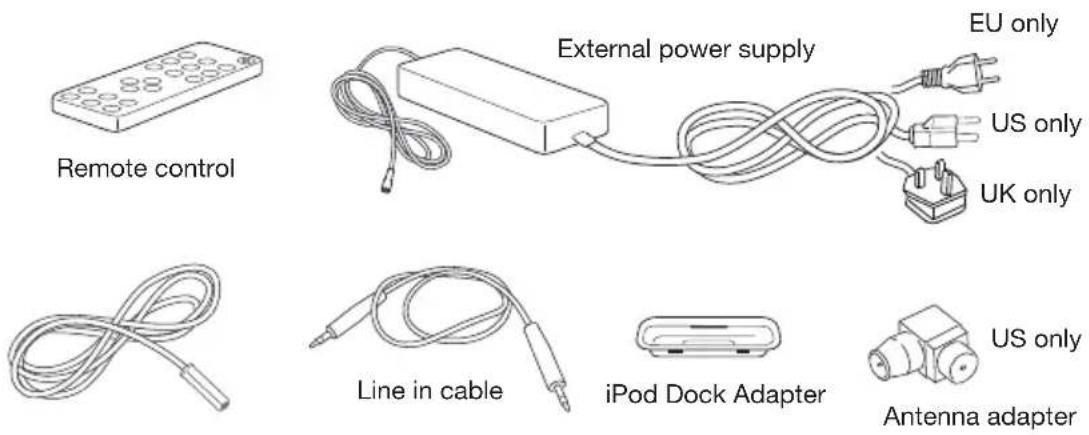
External antenna
Step 2: Insert the batteries into the remote control (see page 20). There are batteries included in the package.
Step 3: Insert the DC Power cable (the thin cable) of the external power supply into the DC Power Plug on the Back Panel (see picture below).
Then connect the AC Power cable of the external power supply to an AC outlet.
Back Panel:
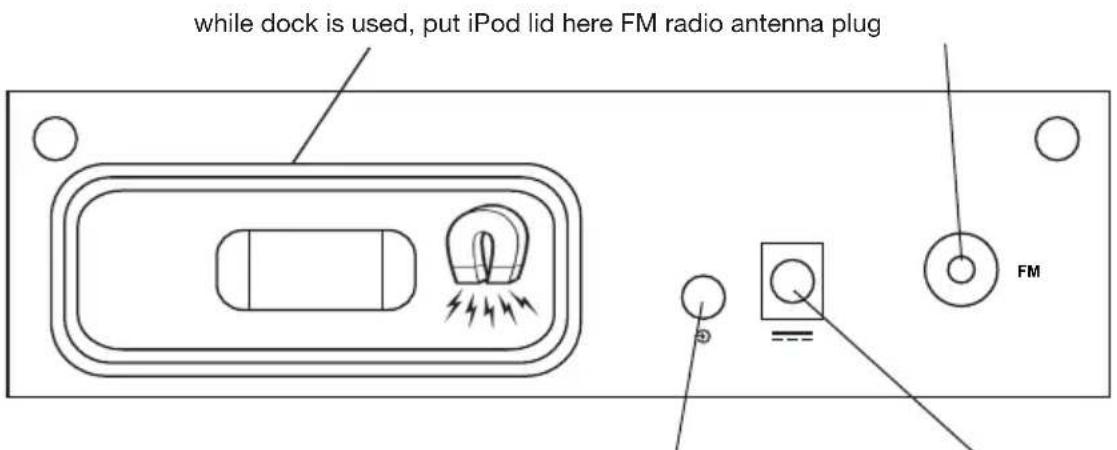
Line in Jack DC Power Plug

Quick start:
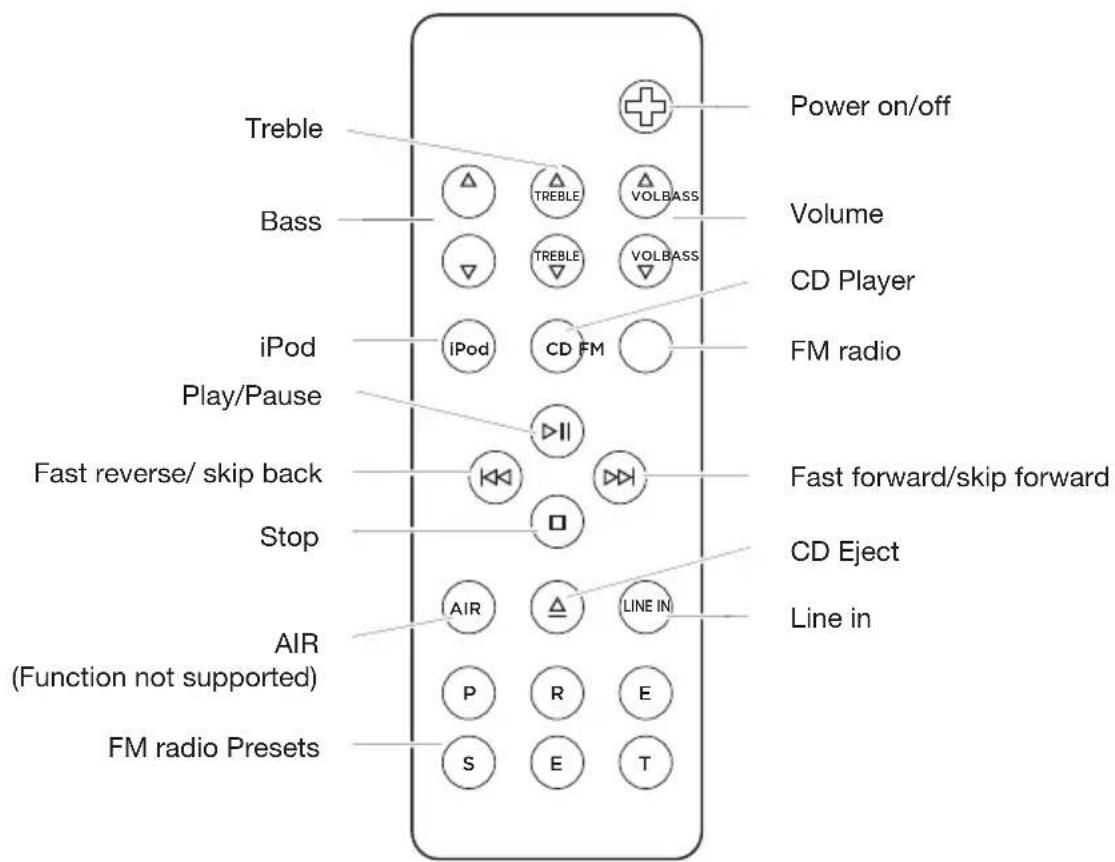
Remote control:
Turn on the Geneva Sound System:
Press the power on/off key on the remote control.
Select source:
To switch between sources, press either iPod, CD, FM or Line In key on the remote control to select which source to be controlled.
Listen to your iPod (more details on page 21):
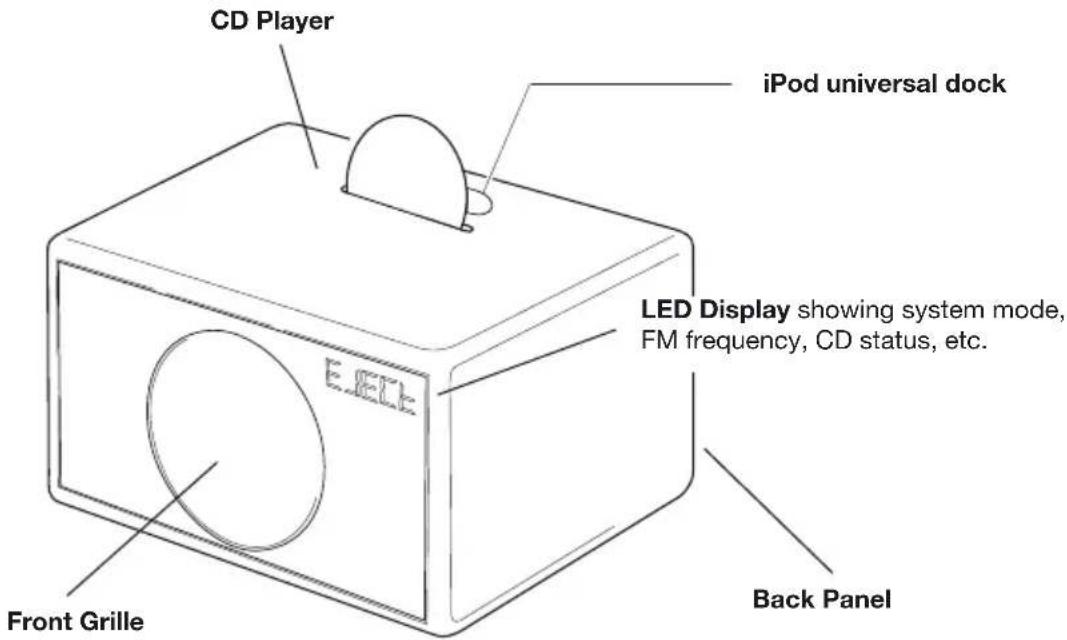
Step 1. If you intend to use the System with an iPod, remove the lid on top of the cabinet by using your finger nail or a soft tool. Do not use a knife or other sharp edged objects that can damage the laquer. The wooden lid has a built-in magnet and can be attached to the back panel (see page 13).
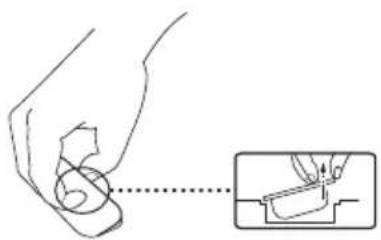
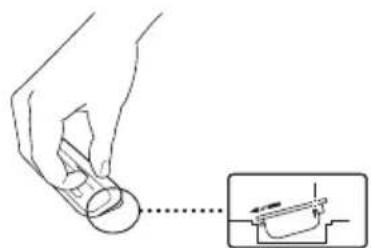
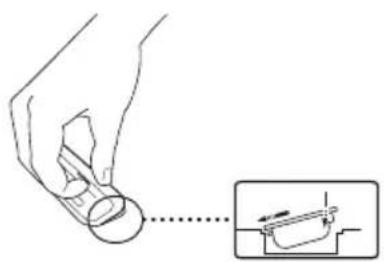
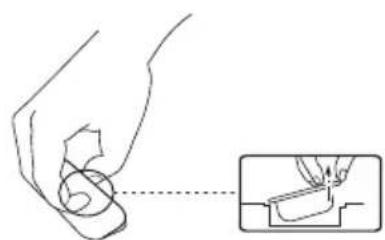
Select the right iPod Dock Adapters that fits with the iPod model you intend to dock by following the table on page 21, or try the enclosed Dock Adapters until you find the one that fits tightly with your iPod. Attach the Dock Adapter to the iPod Universal Dock by pressing lightly on the top of the Dock Adapter (see picture) and it will snap in.
Step 2. Insert the iPod in the corresponding Dock Adapter in the iPod Universal Dock.
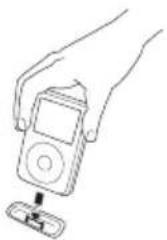
Step 3. Press the iPod key on the remote control and the LED Display under the grille should display "iPod". If the display does not lit up, check that the AC power cord is correctly inserted in to functioning AC outlet.
Step 4. Press the Play key on the remote control. If you still cannot hear any sound check that the volume is turned up by adjusting the "+" volume key.
Step 5. You can navigate your iPod using the Stop, Play/Pause, Skip/Fast Forward, Skip/Fast Reverse keys on your remote control.
Charging: Your iPod is charging while the system is on.
Listen to a CD (more details on page 23):
Step 1. Insert the CD into the slot - make sure the printed side of the CD is facing the front of the Cabinet. The LED Display under the grille should display "CD" and the CD should start playing automatically. If the display does not light up then check that the AC power cord is correctly inserted in to functioning AC outlet. If you still cannot hear any sound, check that the volume is turned up by adjusting the "+" volume key.
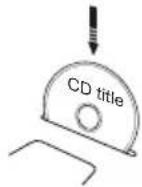
Step 2. You can navigate the CD player by using the Stop, Play/Pause, Skip/Fast Forward and Skip/Fast Reverse keys on your remote control.
Step 3. To remove the CD, press the Eject key on the remote control.
Listen to the FM radio (more details on page 24):
Step 1. Connect the External antenna to the External FM antenna connector on the Back Panel.
Step 2. Press the FM button on the remote control and the LED Display under the grille should display an FM frequency, e.g. "103.2". If the display does not light up, check that the AC power cord is correctly inserted into a functioning AC outlet. If you still cannot hear any sound, check that the volume is turned up by adjusting the "+" volume key.
Step 3. Select an FM station with the << and >> keys.
2. How to...?
General:
How to turn the Geneva Sound System on?
- Pressing the FM, iPod, CD, or Line In keys on the remote control
- Pressing the on/off key on the remote control
How to turn the Geneva Sound System off?
By pressing the ON/OFF key on the remote control Now the system is in standby mode. If you want the system completely disconnected from the power, you need to disconnect the power cable.
How to adjust Volume and Sound?
- Use the Volume, Bass and Treble keys on the remote control to adjust sound and volume.
- Volume: 0 means silence (no sound output), 100 means maximum output.
- Treble and Bass: -6 means very little bass or treble, 0 means neutral, 6 means maximum bass or treble.
- If you turn the device off, the current values are stored. So if it is at a very high volume when turned off, it will be at a very high volume when it is next turned on.
How to verify that the remote control works?
Every time a key is pressed on the remote control, a small red light on the LED Display lights up quickly.
How to clean the speaker?
Unplug this Geneva Sound System from the AC power outlet before cleaning. Clean only with a cleaning cloth provided in the accessory bag. To avoid making scratches to the surface, we recommend that you use the cleaning cloth included in the accessory bag.
Cleaning:
Clean only with a cleaning cloth provide in the accessory bag. Do not use cleaning alcohol, or other solvent fluids to clean the surface of the Cabinet as this can both damage the lacquer and also cause electrical failures and fire if it enters the electronics in the Geneva Sound System!
What is the functionality of the AIR key on the remote control?
This function is not valid on this system.
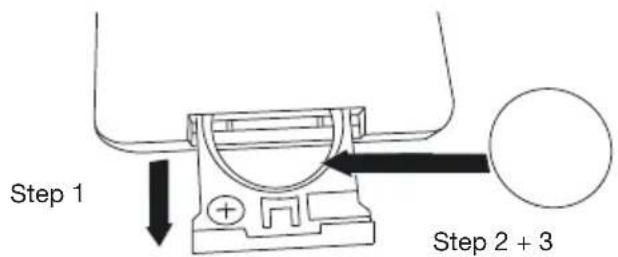
How to change battery in the remote control?
- Open the battery lid that is on the backside of the remote control.
- Remove the existing battery and replace it with a new lithium cell, 3 V battery (CR2025 type).
- Inside the battery compartment there are symbols showing in which direction the batteries should be placed. Carefully follow these directions.
20

How to select the right iPod Adapter for my iPod?
| Geneva
Dock Adapter Nr | Made for
iPod iPhone |
| 15 | Works with
iPhone 3G; iPhone 3G-S |
| 12 | Works with
iPhone 2G
(4GB, 8GB only) |
| 7 | Made for
iPod 4th generation (4G): iPod photo (iPod with color display)
(40GB, 60GB only) |
| 6 | Made for
iPod 4th generation (4G): iPod Photo, color U2 iPod
(20GB, 30GB only) |
| 5 | Made for
iPod 4th generation (4G)
(40GB only) |
| 4 | Made for
iPod 4th generation (4G iPod), U2 iPod
(20GB only) |
| 3 | Made for
iPod Mini
(4GB, 6GB only) |
| □ * | Made for
iPod touch*
iPod nano 3rd generation (3G)*
iPod classic*
iPod nano 2nd generation (2G)*
iPod 5th Generation (video)*
iPod nano* |
Not included. All new iPod models already include the dock adapter in the original packaging.
Not supported

iPod 3rd generation (3G iPod)
"Geneva may enclose one or several dock adapters together with this product."
The actual versions of these and number of dock adapters may change from time to time, as we seek to enclose adapters to the latest and most common Apple iPhone and iPod products. If the adapter to the iPod or iPhone product you wish to use with this Geneva system is not enclosed in this package, it should be available as an original accessory from your Apple dealer."

iPod:
How to check the software version of your iPod?
On the iPod select "Settings", "About", "Version". Always use the latest software version.
How to upgrade your iPod?
On the Apple iPod website you will find instructions on how to upgrade the software of your iPod: www.apple.com/ipod/download/
How to insert or remove a Dock Adapter?
How to control the iPod using the Geneva Sound System's remote control?
If you have connected an iPod to the speaker and turned the Geneva Sound System into iPod mode, you can control the iPod using the remote control supplied with the Geneva Sound System.
The figure on page 15 will give you an overview of the control functions.
CD:
How to control the CD player using the remote control?
You can control the built-in CD player using the remote control supplied with the Geneva Sound System.
The figure on page 15 will give you an overview of the control functions.
The built-in CD player supports CD-DA, CD-R, CD-RW, CD-ROM (both single and multi session) and MP-3 formats. The CD player will play CD's in these formats exactly as it plays a regular audio CD.
How to play MP3 CD-R/W with several Albums?
It is possible to organize MP3 files with directories (Folders) on a CD-R/W. The Geneva Sound System will play such a hierarchy in a simplified way - all files are played as if they would be in one large directory.
Can I play 8 cm CD's?
No.
FM radio:
How to control the FM radio using the remote control?
You can control the built-in FM radio using the remote control supplied with the Geneva Sound System.
The figure on page 15 will give you an overview of the control functions.
How to select a FM radio station?
- Press FM' on the remote control.
- Use the << or >> keys to select a station: one click increases or decreases the frequency.
- The number on the LED display under the Grille indicates the current frequency in MHz (e.g. "88.7" on display means 88.7 MHz).
- To scan through frequencies, hold down the << or the >> key for a few seconds and the FM radio searches for the next station automatically. When a station has been found, the automatic search stops. To keep scanning, repeat the action.
How to store your favorite FM radio station in a preset?
- Select your favorite radio station using the << or >> keys on the remote control.
- You have six presets (a preset memorizes the frequency of the station) available – these are the following six keys on your remote control:
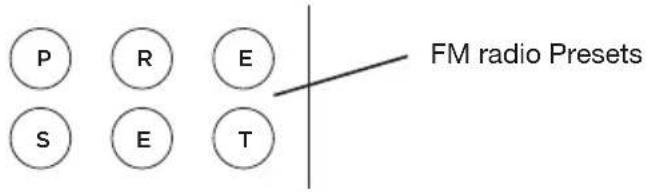
- Select one of the 6 preset keys on the remote control, and hold it down until 'store' appears on the LED display in the Grille of the Geneva Sound System. The station has now been stored and can be retrieved using the selected preset key.
How to play a FM radio station that is stored in the presets?
- Press the FM key on the remote control.
- Simply press one of the six preset keys once and the stored FM station will be received.
How to erase or overwrite a preset?
Stored presets do not need to be erased - just use the previous steps to store a station in a preset.
How to connect the FM radio antenna?
The Geneva Sound System is FM ready and it has a built-in FM tuner. To get radio reception you need to connect the External Antenna that is enclosed with the accessory bag.
You find the External Antenna Connector under the Geneva Sound System on the Back Panel.
How to change FM stereo/mono settings?
Press the "Stop" key to change between mono and stereo.
Line in:
Use the enclosed Line In cable to connect the Geneva Sound System to any audio device that has an audio out connector. First connect the Line In cable to the device you want to connect with the Geneva Sound System, and then connect the cable to the Line In connector located on the Back Panel. Press the Line In key on the remote control and start playing the content of the device you have connected. Note that you cannot control any such device using the Geneva Sound System remote control, but instead use the controls available for the connected device.
3. Troubleshooting, Service and Support
Troubleshooting and Support:
- If the system does not function as expected, first carefully read this manual to ensure that it is being correctly operated.
- If the problem persists, you can access our troubleshooting database available on the web at www.genevalab.com and select support page.
- If not successful, contact our customer support:
Service and Repair:
If the product is damaged and needs repair, please contact Geneva Lab by phone or email to be referred to an authorized service center. For repair under the Limited Warranty Period, see terms on the web at www.genevalab.com and select support page or consult your dealer.
Technical Support:
productsupport@genevalab.com
Customer Service Telephone Number:
see Geneva Lab Website www.genevalab.com and select support page for your local support number.
Website
www.genevalab.com
4. Made for iPod & Technology Partners
The "Made for iPod and iPhone" logo indicates that this product has been designed specifi call to work with iPod and the iPhone.
The manufacturer certifi es that this accessory has been made in accordance with the high standards of quality and performance that you expect from iPod and Apple.
Technology Partners:
Geneva Lab Corporation uses some of the world's leading developers of audio technologies to make the Geneva Sound System a very advanced product.
MPEG Layer-3 Audio Coding Technology licensed from Fraunhofer IIS and Thomson.
D2AUDIO
DIGITAL AMPLIFIERS
D2Audio's unique "Intelligent Digital Amplifiers" have impressed professionals and audiophiles for years. Our patented amplifier technology constantly optimizes the audio signal to deliver the best pure digital performance and the highest sound quality available.
EmbracingSound
"EmbracingSound™ is the technology for consumers and professionals alike to experience sound. As EmbracingSound™ is utilizing two very closely spaced speakers you will experience what is really in the recording with better resolution and clarity than ever before. Just sit back and experience all your music and you will most probably find new favorites as well as making excursions in to music genres that you where totally unfamiliar with before. Just let the experience guide you!
More details can be found on the www.genevalab.com website.
5. Technical Specifications:
Fore detailed technical specifications for this product, please go to our website www.genevalab.com and select support page, where you can download the detailed technical specifications for any of our products.
© 2010 G-Lab GmbH. All rights reserved
Under the copyright laws, this manual may not be copied, in whole or in part, without the written consent G-Lab GmbH.
Geneva® is a registered trademark of G-Lab GmbH.
D2Audio and D2A are registered trademarks, while the D2Audio Digital Amplifier logo is a trademark of D2Audio Corporation.
iPod is a trademark of Apple Computer, Inc. registered in the U.S. and other countries.
The trademark EmbracingSound™ and the Embracing Sound Experience logo are owned by Embracing Sound Experience AB.
Geneva Sound System, User Manual, Version v5.0-EU-E

Bedienungsanleitung
Geneva Sound System (Model M +CD)
CLASS 1 LASER PRODUCT
CAUTION
Visible and invisible laser radiation when open. Avoid exposure to beam.
| Geneva
Dock Adapter Nr | Made for
iPod iPhone |
| 15 | Works with
iPhone 3G; iPhone 3G-S |
| 12 | Works with
iPhone 2G
(4GB, 8GB only) |
| 7 | Made for
iPod 4th generation (4G): iPod photo (iPod with color display)
(40GB, 60GB only) |
| 6 | Made for
iPod 4th generation (4G): iPod Photo, color U2 iPod
(20GB, 30GB only) |
| 5 | Made for
iPod 4th generation (4G)
(40GB only) |
| 4 | Made for
iPod 4th generation (4G iPod), U2 iPod
(20GB only) |
| 3 | Made for
iPod Mini
(4GB, 6GB only) |
| = | Made for
iPod touch*
iPod nano 3rd generation (3G)*
iPod classic*
iPod nano 2nd generation (2G)*
iPod 5th Generation (video)*
iPod nano* |
productsupport@genevalab.com
Customer Service Telefonummer:
Geneva Sound System (Model M +CD)
AVERTISSEMENT
CAUTION
RISK OF ELECTRICAL SHOCK DO NOT OPEN

AVIS
RISQUE DE CHOC ÉLECTRIQUE NE PAS OUVRIR
CLASS 1 LASER PRODUCT
CAUTION
Visible and invisible laser radiation when open. Avoid exposure to beam.
| Geneva
Dock Adapter Nr | Made for
iPod iPhone |
| 15 | Works with
iPhone 3G; iPhone 3G-S |
| 12 | Works with
iPhone 2G
(4GB, 8GB only) |
| 7 | Made for
iPod 4th generation (4G): iPod photo (iPod with color display)
(40GB, 60GB only) |
| 6 | Made for
iPod 4th generation (4G): iPod Photo, color U2 iPod
(20GB, 30GB only) |
| 5 | Made for
iPod 4th generation (4G)
(40GB only) |
| 4 | Made for
iPod 4th generation (4G iPod), U2 iPod
(20GB only) |
| 3 | Made for
iPod Mini
(4GB, 6GB only) |
| □ * | Made for
iPod touch*
iPod nano 3rd generation (3G)*
iPod classic*
iPod nano 2nd generation (2G)*
iPod 5th Generation (video)*
iPod nano* |
productsupport@genevalab.com
Geneva Sound System (Model M +CD)
ATTENZIONE
CAUTION
RISK OF ELECTRICAL SHOCK DO NOT OPEN

AVIS
RISQUE DE CHOC ÉLECTRIQUE NE PAS OUVRIR
CLASS 1 LASER PRODUCT
CAUTION
Visible and invisible laser radiation when open. Avoid exposure to beam.

| Geneva Dock Adapter Nr | Made for iPod iPhone |
| 15 | Works with iPhone 3G; iPhone 3G-S |
| 12 | Works with iPhone 2G (4GB, 8GB only) |
| 7 | Made for iPod 4th generation (4G): iPod photo (iPod with color display) (40GB, 60GB only) |
| 8 | Made for iPod 4th generation (4G): iPod Photo, color U2 iPod (20GB, 30GB only) |
| 5 | Made for iPod 4th generation (4G) (40GB only) |
| 4 | Made for iPod 4th generation (4G iPod), U2 iPod (20GB only) |
| 3 | Made for iPod Mini (4GB, 6GB only) |
| □ * | Made for iPod touch * iPod nano 3rd generation (3G) * iPod classic * iPod nano 2nd generation (2G) * iPod 5th Generation (video) * iPod nano * |
productsupport@genevalab.com
Visible and invisible laser radiation when open. Avoid exposure to beam.
| Geneva
Dock Adapter Nr | Made for
iPod iPhone |
| 15 | Works with
iPhone 3G; iPhone 3G-S |
| 12 | Works with
iPhone 2G
(4GB, 8GB only) |
| 7 | Made for
iPod 4th generation (4G): iPod photo (iPod with color display)
(40GB, 60GB only) |
| 6 | Made for
iPod 4th generation (4G): iPod Photo, color U2 iPod
(20GB, 30GB only) |
| 5 | Made for
iPod 4th generation (4G)
(40GB only) |
| 4 | Made for
iPod 4th generation (4G iPod), U2 iPod
(20GB only) |
| 3 | Made for
iPod Mini
(4GB, 6GB only) |
| □ * | Made for
iPod touch*
iPod nano 3rd generation (3G)*
iPod classic*
iPod nano 2nd generation (2G)*
iPod 5th Generation (video)*
iPod nano* |
- Geneva Dock adapter
Ikke inkludert. Alle nye iPod-modeller inkluderer allerede dock adapteren i originalpakningen.
Not supported iPo
productsupport@genevalab.com
Telefonnummer til Kundeservice:
Geneva Sound System (Model M +CD)
WAARSCHUWING
CAUTION
RISK OF ELECTRICAL SHOCK DO NOT OPEN

AVIS
RISQUE DE CHOC ÉLECTRIQUE NE PAS OUVRIR
Visible and invisible laser radiation when open. Avoid exposure to beam.
| Geneva
Dock Adapter Nr | Made for
iPod iPhone |
| 15 | Works with
iPhone 3G; iPhone 3G-S |
| 12 | Works with
iPhone 2G
(4GB, 8GB only) |
| 7 | Made for
IPod 4th generation (4G): iPod photo (IPod with color display)
(40GB, 60GB only) |
| 6 | Made for
IPod 4th generation (4G): iPod Photo, color U2 iPod
(20GB, 30GB only) |
| 5 | Made for
IPod 4th generation (4G)
(40GB only) |
| 4 | Made for
IPod 4th generation (4G iPod), U2 iPod
(20GB only) |
| 3 | Made for
IPod Mini
(4GB, 6GB only) |
| C | Made for
iPod touch*
iPod nano 3rd generation (3G)*
iPod classic*
iPod nano 2nd generation (2G)*
iPod 5th Generation (video)*
iPod nano* |
productsupport@genevalab.com
Technologiepartners:
Geneva Sound System (Model M +CD)
Visible and invisible
laser radiation when open.
Avoid exposure to beam.
| Geneva Dock Adapter Nr | Made for iPod iPhone |
| 15 | Works with iPhone 3G; iPhone 3G-S |
| 12 | Works with iPhone 2G (4GB, 8GB only) |
| 7 | Made for iPod 4th generation (4G): iPod photo (iPod with color display) (40GB, 60GB only) |
| 6 | Made for iPod 4th generation (4G): iPod Photo, color U2 iPod (20GB, 30GB only) |
| 5 | Made for iPod 4th generation (4G) (40GB only) |
| 4 | Made for iPod 4th generation (4G iPod), U2 iPod (20GB only) |
| 3 | Made for iPod Mini (4GB, 6GB only) |
| □ | Made for iPod touch * iPod nano 3rd generation (3G) * iPod classic * iPod nano 2nd generation (2G) * iPod 5th Generation (video) * iPod nano * |
productsupport@genevalab.com
Geneva Sound System (Model M +CD)
WARNING
CAUTION
RISK OF ELECTRICAL SHOCK DO NOT OPEN

AVIS
RISQUE DE CHOC ÉLECTRIQUE NE PAS OUVRIR
CLASS 1 LASER PRODUCT
CAUTION
Visible and invisible laser radiation when open. Avoid exposure to beam.
| Geneva
Dock Adapter Nr | Made for
iPod iPhone |
| 15 | Works with
iPhone 3G; iPhone 3G-S |
| 12 | Works with
iPhone 2G
(4GB, 8GB only) |
| 7 | Made for
iPod 4th generation (4G): iPod photo (iPod with color display)
(40GB, 60GB only) |
| 6 | Made for
iPod 4th generation (4G): iPod Photo, color U2 iPod
(20GB, 30GB only) |
| 5 | Made for
iPod 4th generation (4G)
(40GB only) |
| 4 | Made for
iPod 4th generation (4G iPod), U2 iPod
(20GB only) |
| 3 | Made for
iPod Mini
(4GB, 6GB only) |
| Made for
iPod touch*
iPod nano 3rd generation (3G)*
iPod classic*
iPod nano 2nd generation (2G)*
iPod 5th Generation (video)*
iPod nano* |
- Geneva Dock Adapter Medfoljer ej. Alla nga Pod modeller har redan en medfoljande dockadapter i originalforpackningen.
iPod classic 3G supporteras ej
productsupport@genevalab.com
Kontaktelefon:
CLASS 1 LASER PRODUCT
CAUTION
Visible and invisible laser radiation when open. Avoid exposure to beam.
| Geneva
Dock Adapter Nr | Made for
iPod iPhone |
| 15 | Works with
iPhone 3G; iPhone 3G-S |
| 12 | Works with
iPhone 2G
(4GB, 8GB only) |
| 7 | Made for
IPod 4th generation (4G): iPod photo (IPod with color display)
(40GB, 60GB only) |
| 6 | Made for
IPod 4th generation (4G): iPod Photo, color U2 iPod
(20GB, 30GB only) |
| 5 | Made for
IPod 4th generation (4G)
(40GB only) |
| 4 | Made for
IPod 4th generation (4G iPod), U2 iPod
(20GB only) |
| 3 | Made for
IPod Mini
(4GB, 6GB only) |
| □ | Made for
iPod touch*
iPod nano 3rd generation (3G)*
iPod classic*
iPod nano 2nd generation (2G)*
iPod 5th Generation (video)*
iPod nano* |
* Geneva Dock Adapter
Ikke inkludert. Alle nye iPod-modeller inkluderer allerede dock adapteren i originalpakningen.
productsupport@genevalab.com
Kontaktelefon:
CLASS 1 LASER PRODUCT
CAUTION
Visible and invisible laser radiation when open. Avoid exposure to beam.
How to turn the Geneva Sound System on Virran paalkeytkenta
| Geneva Dock Adapter Nr | Made for iPod iPhone |
| 15 | Works with iPhone 3G; iPhone 3G-S |
| 12 | Works with iPhone 2G (4GB, 8GB only) |
| 7 | Made for iPod 4th generation (4G): iPod photo (IPod with color display) (40GB, 60GB only) |
| 6 | Made for iPod 4th generation (4G): iPod Photo, color U2 iPod (20GB, 30GB only) |
| 5 | Made for iPod 4th generation (4G) (40GB only) |
| 4 | Made for iPod 4th generation (4G iPod), U2 iPod (20GB only) |
| 3 | Made for iPod Mini (4GB, 6GB only) |
| □ * | Made for iPod touch * iPod nano 3rd generation (3G) * iPod classic * iPod nano 2nd generation (2G) * iPod 5th Generation (video) * iPod nano * |
* Geneva lataussovitin
Customer Service Telephone Number:
+3589662602
Internet-osoite
www.genevalab.com
279
Finnish
Technology Partners: