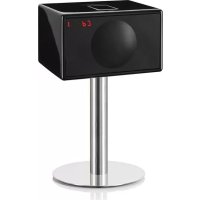
Model L - Hi-fi system GENEVA - Free user manual and instructions
Find the device manual for free Model L GENEVA in PDF.



| Brand | Geneva |
| Model | Model L |
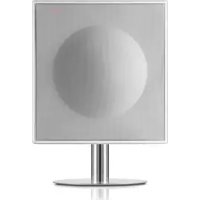
| Product type | Compact hi-fi system with CD player, FM/DAB+ radio, Bluetooth and auxiliary input |
| Dimensions (approx.) | 30 x 17 x 20 cm (estimated from product photos) |
| Weight (approx.) | 4.5 kg (estimated) |
| Power supply | Mains, power cable supplied |
| Power consumption | Not specified in manual, but typically 30-50 W |
| Audio sources | FM radio, DAB+, CD audio (not MP3), Bluetooth (aptX, AAC), Line-In (RCA and 3.5 mm Air jack) |
| Speakers | Two internal speakers for stereo sound (EmbracingSound technology) |
| Output power | Not specified, estimated 2 x 20 W |
| Remote control | Yes, with CR2032 battery included |
| Display | LCD screen for station, source info, etc. |
| Energy saving function | Auto shut-off after 15 minutes of inactivity (ECO) |
| Auto power on | Via the Air connector (external audio signal) |
| Maintenance and cleaning | Soft dry cloth, do not use chemicals |
| Safety | Do not expose to humidity or excessive heat, disconnect before cleaning |
| Operating temperature | 5°C to 40°C |
| Bluetooth connectivity | Bluetooth A2DP, compatible with phones and computers |
| Warranty | See terms at www.genevalab.com |
| Spare parts and repairability | Contact an authorized dealer via genevalab.com |
Frequently Asked Questions - Model L GENEVA
User questions about Model L GENEVA
0 question about this device. Answer the ones you know or ask your own.
Ask a new question about this device
Download the instructions for your Hi-fi system in PDF format for free! Find your manual Model L - GENEVA and take your electronic device back in hand. On this page are published all the documents necessary for the use of your device. Model L by GENEVA.
USER MANUAL Model L GENEVA
IMPORTANT SAFETY INSTRUCTIONS
-
Feed these instructions.
-
Knoep thooosinncnns
-
Head all warnings.
-
Folge at 1982/04
10
-
Do not stock any warts, install it accordingly with the manufacturer's instructions.
-
Do not ratal nae any heat aurnes such as radiators, heaters,
-
Don't delete the safety purpose of the powered or ground-type plug. A powered plug has two homes with one water than the other, and a ground-type plug has three homes with one water and one ground groung. The wide blade or the third group are provided for your safety. If the provided plug does not fit into your ouset, consult an electrician for replacement of the obsolete ouset.
-
Protect the power cord from going on strike or pinched particularly in the presence of excessive restraints, and the town where they fall from the doorway.
-
Orly uses the instruments/assistive specified by the manufacturer.
-
Use only with the part, arm, ligament, bracket, or rod specified by the manufacturer, or roll with the device. Where a part is used in conjunction with the device, use the accessory combination in such entry from licor.
-
Drop the drops during lightning storms or during long periods of disease.
-
Rater all sending to qualified service personnel. Sending a resulted when the davele has been damaged in any way, such as power supply cord or plug cables, lique has been spiked or otherwise damaged by the davele. The davele must be able to be taken to bed or move, does not operate normally, or has been damaged.
-
Do not install this equipment in a built or built-in space such as a book case or similar unit, and maintain well ventilated conditions. The condition should not be inspected by warning the certifier with signs such as newspaper, lightsticks, curmstances with 16. WARNING: Please refer the information on author or inform structure for electronic with serial information before installing or using it.
-
WARNING: To reduce the size of force and strength, you should not dispose this device to rain or moisture. The device should not be exposed to dripping or splashing and objects filled with liquids, such as vases, should not be placed on the apparatus.
-
CAUTION: Danger of explosion if battery is incorrectly replaced. Only applicable with the same or equivalent type.
-
WARNING: The battery (battery or batteries or battery pack) should not be exposed to excessive heat, such as sunscreens, fire or other chemical agents.
-
WARNING: The main plugging amplifier is used as a control device, the output device should remain readily operable.
Correct Disposal of this product. This marking indicates that this product should not be disposed with either household waste throughout the LU. To prevent possible harm to the environment or human health from uncontrolled waste disposal, recycle it responsibly to promote the sustainable reuse of material resources. To return your used device, please use the return and reuse systems or contact the retailer where the product was purchased. They can take this product for environmental safe recycling.
Batteries in the remote control Koop the remote control battery away from children. It may cause a fire or chemical burn if it is not charged. In the event exchange, disascharge will show 420^ [139] (Fig. 5). The battery is charged with a single type and modal number (CGS623 linear cathode, 31C).
A. DO NOT INGEET BATTERY, CHEMICAL BURN HAZARD this product contains a contribution soil battery. If the paint cell battery is swallowed, if can cause severe internal burns in 1 hours and can lead to death. Keep now and used batteries away from children. If the battery compartment does not close securely, stop using the product
If you think outbreaks might have been unanticipated or placed inside any part of the body, seek immediate medical attention. Contact your local emergency department.

CAUTION: RISK OF ELECTRIC SHOCK, DO NOT OPEN ATTENTION: RISQUE DE CHOC ELECTRICE-NE PAS DUVIER警告: To reduce the risk of electric shock, do not remove the device from any device or serviceable parts inside. Refer servicing to qualified personnel.
A. This lightning flash with thunderbolus symbol within an equatorial biogenic is intentionally used to show the case to the process of non-magnetic "timpidity voltage" within the product's electronic that may be of sufficient magnitude to contribute a safe electric shock.
A. The examination point within an accommodated vestee is intended to test the user in the presence of important operating unit maintenance instructions in the device accompanying the equipment.
B. Protectors entering terminal. The apparatus should be mounted on the wall of the test room, and the equipment should be mounted on the front gate.
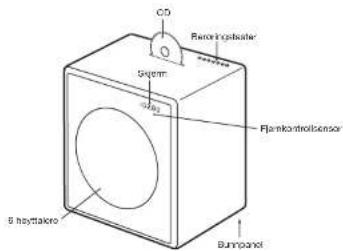
C. Front gate: never rest the device on the front gate panel as this will damage the gate. The product shell is located at the bottom of the unit.
FOO Regulations Warning: Changes or modifications to this unit not expressly approved by the party responsible for compliance could sold the unit's authority to operate the GPTP.
D. The equipment shall be used only for use with a single user and shall be supplied for a Class B digital device, pursuant to Part 10 of the ICG Rules. These rules are designed to provide reasonable protection against harmful interference in a noninvasive fashion. This equipment shall be used only for use with a limited initial and used it accordance with the instructions for harmful interference to radio communications. However, there is no guarantee that interference will not occur in a particular installation. If this equipment does cause harmful interference to radio or television equipment, the operator shall be responsible for any resulting damage and pay the equipment off and on. The user is encouraged to correct the interference by one or more of the following measures:
- Increase the number of the equipment and receiver.
- Connect the equipment into an mullaf on a circuit different from that to which the receiver is connected.
- Connect the receiver with the radio/TV technician for help. Modifications not expressly approved by the manufacturer could use the user's authority to approve the amplifier under FCC rules. FCC ID: ZKX MODELLI1, ZKX MODELLI2 (ZKX Grantoo Cecc, 2005).
Canada This document complies with Industry Canada license - except RDS standards. Operation is subject to the following two conditions: (1) this device may not cause interference, and (2) this device must act only as interference. Including interference that may cause interference or interference to the device. Include Canada (DC) No. 10107A-MODEL LBT 10107A-MODE XL BT SE conformity.
3.4 ab Gribl's declaration that this device complies with the state requirements and other relevant provisions of European Directive 1999/5/FC. The declaration of conformity may be concordant upon request to G-Lak GmbH, Zürich, Switzerland or an http://www.gribl.com.
C0979
X
This product can be recycled. Products being this symbol must NOT be discarded with normal household waste. At the end of the producer's life, take it as a colorpoint destination for recycling. If you are not able to do this, you may consider other ways to collect points through your local charity.
The European Directive on Waste Electrical and Electronic Equipment (WEEE) was implemented to dramatically reduce the number of waste disposal facilities in Europe. The WEEE has been a major impact on the place and human health. Pressures and responsibilities by recycling used products. If this product is still inactive, no longer given its utility or value. Use of waste disposal devices of used wastes properly, following the local regulations. Does not place the bacteria in line?
CLASS 1 LASER PRODUCT
OVERVIEW
AUDIO SOURCES
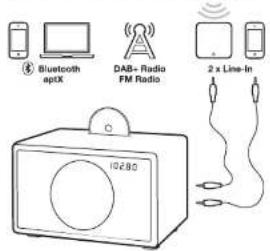
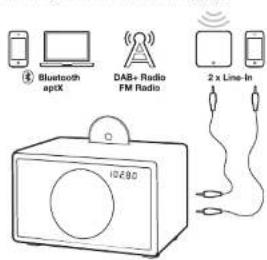
You can play music from the following audio sources:
- PAH Radio
(works only in countries with DAB+ service)
Audio CD
Bluetooth audio (with support for aptX and AAC)
- External audio devices with two Line-In Inputs
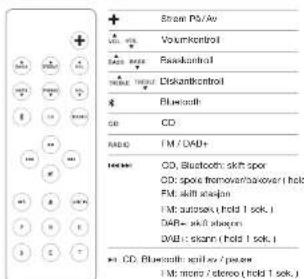
REMOTE CONTROL

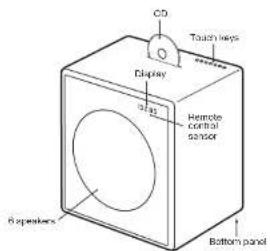
TOUCH KEYS
| Power On / Off |
| Volume = |
| Volume = |
| Mode aspect FA, DABe, Inclu, Arc Blustooth |
| Knot CD |
| Change I MCDW frequency. CD & Illuminotroph tracks |
MODEL L

MODEL XL
USING THE DEVICE
GETTING STARTED
- Remove the protection paper from the remote control battery compartment.
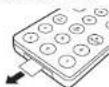
- On the bottom panel, connect the enclosed wire antenna to the radio antenna connector.
- Also on the bottom panel, connect the AC power cable to the AC power connector.
SELECTING THE AUDIO SOURCE
The audio source can either be selected with remote control keys or the touch key M.
The RADIO button on the remote control toggles between FM and DAB+ radio.
FM RADIO
- TouchDisplay RADIO key on the remote control until the display shows an FM frequency.
- To change the frequency manually select a FM station with the 山 + 山 and 山 + 山 keys,
- To automatically search for another station, hold the and keys for a short time.
Storing a radio station with the presets
- Select your favorite radio station with m = m 2. Select one of the 6 preset keys on the remote control, and keep pressing it until the corresponding letter on the display starts blinking. The station has now been stored.
Using the presets
Press one of the preset keys to recall a radio station.
DAB+
DAB+ (sometimes also called Digital Radio) is only available in certain countries (UK, Germany, Switzerland, Norway, Hong Kong and more). Model L/XL is compatible with DAB and DAB+.
1. Press the RADIO key on the remote control until the display shows DAB.
2. Select a DAB station with and
Scan function
When using your Model L'XL for the first time, the radio needs to search for available radio stations in your region (done with the "Scan" function). After a scan, the stations will be automatically stored.
Within 5 seconds of entering DAB mode, hold down the button until "Scan" displays.
"Scan" is also needed after traveling to a new location with different radio stations, or when you move the radio to a different room with different radio reception characteristics.
Presets
Six DAB+ presents are available and they work exactly the same way as the FM presents.
Which DAB standards are supported?
The DAB and DAB + standards are supported, on the following frequencies:
Band3:5A...12D(174.928MHz...229.072MHz).
Kanal 13:13A...13F [230,784 MHz ... 239,200 MHz]
How can I disable the DAB+ function?
1. Select FM
- Hold the RADIO key of the remote control for 5 seconds to enable or disable the DAB+ function
CD
- Insert a CD into the slot, with the printed side facing the front of the device.
- The CD will start to play automatically.
- To elect the CD, press that key on either the remote control or on the touch keys.

Navigation
You can change tracks with the and keys.
Hold the 喜 and 喜 keys to fast forward and fast backward within a track.
Does the CD player support CD-R with MP3 files?
No. The CD player supports only Audio CD's, CD-R with MP3 and other formats are not supported.
USING THE DEVICE
BLUETOOTH
Mobile phones and computers with Bluetooth can be used to support the use of a Wi-Fi connection. Mobile phone or computer must support Bluetooth A2DP.
Initial Setup ("Pairing") with IPhone
1.Presatek on the remote control. Wait for 20 seconds until the display shows a blinking "Pairing."
2. Select "Settings" on your iPhone. Select "General / Bluetooth". Turn on Bluetooth. New Bluetooth devices are discovered automatically. After a few seconds "GENEVA L (Not Failed)" will appear.
3. Select "GENEVA L". The phone is now connected ("Painging") to the Model L.
4. If the phone asks for a PIN: enter "0000" (four zeros)
5. Now you can play music on an iPhone and listen to it on the Model L.
Pairing guides for other devices and mobile phones Go to www.genevalab.com and select "Support."
Bluetooth settings on the iPhone
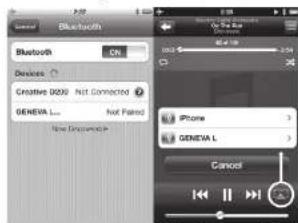
* PlayingSettings on iPhone
Playing Music
Most phones connect automatically to the Model L/XL after the initial setup ("Pairing").
1. Presshire 筹套向的 remote control. While the Model L / XL connects, the display shows "Connected" on the screen.
2. Now the music that is playing on your mobile phone will automatically be streamed to the Model L / XL.
3. Change tracks with and
High quality Bluetooth audio with aptX and AAC codes
Some mobile phones support a higher transmission quality than the standard Bluetooth oocic (SBC). Model L / XL supports the high quality codes aptX and AAC. The Model L / XL will automatically select the high quality Bluetooth aptX or AAC codes, if the mobile phone supports this feature.
Status Information on the display
"Search": Searching previously paired devices.
"Connect": Connection successful.
"Pairing": If the Model L / XL did not make a successful connection within 20 seconds, the Model L / XL will go into the pairing mode for 2 minutes.
"Connected to XXX"; Successfully connected to device with the name XXX.
"BLUE C": A device is connected.
"BLUE -"; No device is connected.
LINE-IN
The Model L / XL has two line-in inputs for external audio devices:
- RCA connectors ("Line-In")
- 3.5mm connector ("Air") with automatic power-on functionality
- Connect one end of a Line-In cable to the Line-In or Air connector on the bottom panel of Model L / XL (RCA connectors), then connect the other end of the cable to the audio device (headphone or Line-Out connector).
- Press the LINE-IN or AIR key on the remote control.
AUTOMATIC POWERING ON AND OFF
Powering On with the AIR connector If an external audio device has its audio output connected to the AIR connector, Model L / XL will automatically power itself on, as soon there is an audio signal on the AIR connector. The AIR connector is suited for network audio streaming devices, such as the Apole AirPort Express (AirPlay) and Sonce products. When you turn on a streaming device, it will automatically turn on the Model L / XL.
Powering Off with the energy saving function The Model L / XL will automatically turn itself off after 15 minutes if there is no active Bluetooth connection, no is CD playing, or if there is no audio signal at Line-in/AIR connectors.
TROUBLESHOOTING
The Model L/XL does not turn on when I touch the button.
Touch button with one finger only. Don't touch the rest of the touch panel with other fingers. The touch panel works properly when used with one finger only.
Why is the Model L/XL turning itself off?
The energy saving function turns the Model L'XL automatically off. The Model L'XL will automatically turn itself off after 15 minutes if there is no active Bluetooth connection, no CD is playing or if there is no signal at the Line-in inputs. When this happens, the display shows "ECO OFF".
Why is my mobile phone not connecting?
Please check the Support pages at genevalab.com.
How do I reset Bluetooth?
Up to three paired Bluetooth devices can be stored. To clear the memory, perform the following steps: 1. Select Bluetooth on Model LXL.
2. Within 5 seconds of entering Bluetooth mode, hold until "RESET" displays.
3. Pair your mobile phone again.
What is the PIN for a Bluetooth connection? The PIN IA: 0000 (4 zeros). Not all computers or mobile phones require a pin code during initial setup. (Painting).
I have an unreliable connection with dropouts when listening via Bluetooth.
- Move the mobile phone closer to the Model L/XL.
- Move away or turn off other wireless devices that can disturb a Bluetooth connection (for example WLAN / Wi-Fi, other mobile phones etc.).
The FM automatic search does not find all stations. The FM automatic search function (hold or keys) only on stations with a strong signal.
How do I erase or overwrite a preset?
Stored presets do not need to be erased - just use the steps to store a new stallion in a preset.
I cannot turn off the device, the display shows "Air active - cannot turn off".
There is still an audio signal on the Air connector. Either stop the audio source or disconnect the external device from the Air connector.
How can I verify that the remote control works? Every time a key is pressed on the remote control, a small red light on the display lights up briefly.
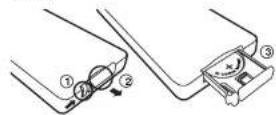
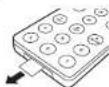
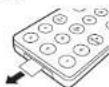
How can I change the remote control battery? 1. Push the small lever in the direction of the arc with your finger or a small screwdriver.
2. While holding the small lever, slide out the battery compartment.
3. Replace the battery (3V lithium cell, 3V CR2032). Verify that the battery is inserted with the right polarity.
How is it possible to hear in stereo from only one speaker?
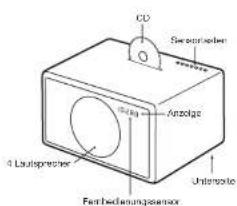
Inside the wood cabinet there are two (Model L) or four (Model XL) acoustic chambers, for the left and right channels. Using the EmbracingSound algorithm Model LXL creates a real stereo reproduction with two acoustic chambers that are very close to each other.
How do I clean the device?
Use a soft, dry cloth to avoid making scratches on the surface. Do not use cleaning alcohol, or other solvent fluids to clean the surface of the Cabinet as this can both damage the lacquer and also cause electrical failures. Before cleaning, unplug the device from the AC power outlet.
SUPPORT
More information and additional troubleshooting Check the "Support" pages at geneva lab.com.
Service and repair
If the product is damaged and needs repair, please contact your dealer. Visit genevalab.com to find a dealer in your area.
Warranty
See the specific terms for your country at genevalab.com.
Genetics in a noteworthy environment of Co-Lab GmbH, Appel, Pld., Pfland and Plo: are laboratories of Apple Computer, Inc. (www.apple.com).
The Embolizing/ScvS'adn mark is sewed by Emriacing 800 Experience All.
The Bluebath® word mark and logos are registered Trademarks owned by Buconnotech SIB, Inc.
Genov stne Hande mdo der GLab GmbH
Apple, Pcd, Phar and Psac are trademarks of Apple Computer Inc.
12e-
Ex Repurse Purose 1400000000000000
Bustcoth S/G, Inc.
1. INTRODUCTION
INTRODUCTION
INTRODUCTION
INTRODUCTION
ÜBERSICHT
AUDIOQUELLEN
| Link / Area |
| Landslide / |
| Landslides/ |
| Code Auswerten / FM 08KB/DAD+, Line-1, Air/Order Buchwert |
| CD Auswerten |
| FM / DAB Freqenc, CD & Bluebell Title System |
MODEL L
MODEL XL

Cinch-Buchsen ( "Line-In" )
| Marches / Arts |
| In volume |
| In volume |
| Modocsechocnft M, VDII/DAI, Lin In AirbrtBlecht |
MODEL L
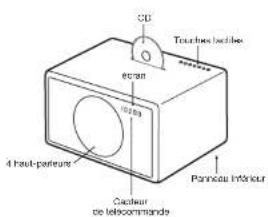
MODEL XL
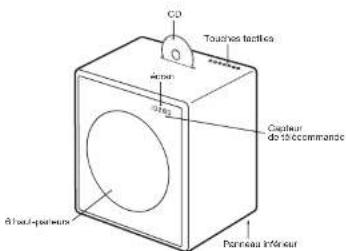
UTILISATION DE L'APPAREILPRÉSENTATION
PRISE EN MAIN
| Fib monol / colloid (mantemur/sukage/10g.) | |
| A | Starcher |
| A | Exocatal CD |
| Aa | Line-in-1 (conectar "line-in") |
| Am | Line-In-2 (conectar "AM") |
| Model: selobionne FM, GVW/GVBI, Line In, Air Bluetooth |
| Fapierco CD |
| Garantie frequenca RM/CAB, platine de CD y Bauschm |
MODEL XL

| Accessories |
| Volume + |
| Volumes - |
| Modulataselecraw M.DUA2/DUA1-Line-Fin ApoBurotox |
| Familas Crl |
| Modifica frquency F/M.DUA, brain CD or Uloptosoft |
MODEL L

MODEL XL

22 27
Banda 3:5A..12D (174.928 MHz ..229.072 MHz) Censia 13:13A..13F (230.784 MHz ..239.200 MHz)
Genes is an genepelme handeernan GLab GmbH
Ampal, Protl, Aplp, Pst, Rttca, and tse are madamadra of Appa Chet.
Bhup, Bha, and bha, a dvaand a dva and a dva and a dva and a dva and a dva and a dva and a dva and a dva and a dva and a dva and a dva and a dva and a dva and a dva and a dva and a dva and a dva and a dva and a dva and a dva and a dva and a dva and a dva and a dva and a dva and a dva
Het Bautrecht'scopforn de 1eigo en an zangereits hondeler manan sigrantum van Bautrecht SIC, ing.
2.1.2. A Definition of CRLs:
The definition of CRLs is analogous to the definition of CRLs in Section 3.1.
GELUIDSBRONNEN
| Modem erector FM, BAOCDA, Uni-Int, Air of Bluetooth |
| CD unipower |
| FM/BAS-frequency keeon, CD & BAOCDA frequencies |
MODEL L

MODEL XL
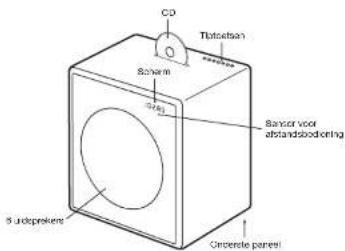
HET APPARAAT GEBRUKENOVERZICT
AAN DE SLAG
Genome@sf.va-marcovacu Fag Lai GmbH
Apcys, Pdd, Phts and Pdc are trade marks of Apache Computer, Inc.
Apcys, Pdd, Phts and Pdc are trade marks of Apache Computer
Warrenstein Engineering Ltd and Warrenstein Sound Experience Ltd
Wardenstein Engineering Ltd and Wardenstein Sound Experience Ltd
a.p. is a trade mark of OZP Ltd.
b.2019-05 is an official publication of the Society for Optical Numerical Sciences and its corresponding journal after approval, unless otherwise stated by 3 LIL 64H
OVERSIGT
LYDKILDER
Brug at lagrede stationer
Tryk ös en at lagringsknappere for at hente en radiostation.
DAB+
DAB+ ( somme tider oga naevn't Digital Radio ) erudelukende filgeengelit 1 vissse lande ( Det Foredende Kongenge, Tyskland, Schweiz, Norge, Hong Kong og andre). Modellen L/XL er kumpalbef med DAB og DAB+.
1. TrykodRADIO-knappen psjfernbetjingen, indill displayed viser DAB.
2. Vaelg en DAB-station ved brug af+og af+
Scan-funktion
Nar Model L/XL amends for firstly gang, finder radieno de tligangere radiostatione I dit omrade (vied hiaelo f"Scan-funktionen).Efter scanningen lagres stationerie automatisk.
- Indon for 5 sekund erter at DAB-teland er vaigt, skul du halte knappen? heide, Indil! "Scan" vises. "Scan"-funktionen er ogusa nedeviding er alter vare flytto let et anietcd med andre radiosistationer, ellar n der fu fyttro raoien lot et rummed en anderleces radiomodtagelase.
Lagringskapper
Bluetooth settings on the iPhone

4 Atspilngindstillinger pAIP
Afspille musik
De feste Telefoner forbinder automatism Med Model 1. XL, after the index indicates consumption (in Pounds)
1. Try to join the club and join the club.
2. Musikanten, der a-spille auf ein mobiliterfon a-spille automatisiert auf Modelen L/XL
3. Skff numre ved brug at 一 一 og
Bluetooth hjkvalletsld my aptx og AAC codes Vise mobiletelefon understetter en becre transmis sionskavelt I forhold ill standard Bluetooth codeen (SBC). Modelien L / XL understetter aptx og AAC hjkvalletscodscodes.Modelien L / XL vaalger automatistc Bluetooth aptx aller AAC hjkvalletscodscodes, hvis mobiletelefon understetter denne functorn.
Statusinformation pa displayet
Genome@a. c. van mijk, HIV-1, 9 Lab Biotech, Apple, Pdcl, iPhone and iPad are trademarks of Apple Inc.
Vermatah (Vermatah@vamc.org)
Vermatah (Vermatah@vamc.org)
Vermatah (Vermatah@vamc.org)
Vermatah (Vermatah@vamc.org)
optis aedomark of CBR pk
| Moda vall FM, DWB / DYB1, Line In, Anticolor Bluetooth |
| Machin Off |
| Bye ar FM/DVB / Dinovics, CO & Bluetooth Total |
MODELL L

MODELL XL
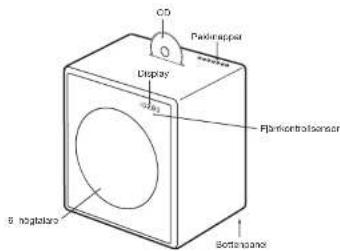
ANVÄNDNING AV ENHETENÖVERSIKT
KOMMA IGANG
- Avilgaia skyddapapret from järkontrollens bathersfack.
- Pa bottopanslen, ansut den medjoflare triandan-tenen ill radis antennutata.
- Ocksaaponbottenpanelen,anslotnatsladden till AC stromkontaten.
VALAV LJUDKALLA
By 1820, the Dutchman had begun to publish his son's work on the problem of the Dutchman's marriage. The Dutchman had done a trade in partagism. And he made a plan for partagism and set up a firm in which he had a male wife. He had a male mate who was also a man and a woman and a male sister who was also a male sister.
-
Two pass strombokoh, bekele kahak zu kuhk komer iml. bas, best wed plugged og kontraktor, og sodet hov da gur at v an emnet.
-
Prue lne hae aedrty sre e qalber toy prnnsen
-
Bruke bood modn vost, thirn, bvdor, bravest, ulr, sord bor smassifert av produsten, ellr, soot med occiput. Hovt a vogn brauns, ma dat uvarus forknotchne n ovoi moeson vovr. entet for U rugna degrune grunen vetting.
-
Plagu at anenien under tordenwer stler hns den like sial bruises over kongr.
-
La kualifert estercipado a la seso ay al service. Service o plicado from anapagado a l'hitdo abate y el sotomn o when nrok.
- A houy d'au cieu, a l'hitdo abate y el sotomn o when nrok.
- A houy d'au cieu, a l'hitdo abate y el sotomn o when nrok.
- A houy d'au cieu, a l'hitdo abate y el sotomn o when nrok.
-
A houy d'au cieu, a l'hitdo abate y el sotomn o when nrok.
-
Instruktur: Ille appellate, i.e. begreßet after itinerare modi eror non fels. on bokh, on bokhelye illigandae, aq. is da sti l'god vortrere. Or tive, in the case of the kussoanen, ille siere vero hundirol and do ille di voro vortropagienatio, und gondarierum saim oerst, kukur, gardner osc.
-
ADVARLSE: Is information on parl. rev. oiole for elektronik elektronik o elektroniknomatge for instalata ot brukh chetnst?
T. ADVIRSELL: I or duvne reo rro or bren er tecte cok, mi kie appnent usseles for rayne fukkef. Apparent mi kie attes for spondylopya asvees, og imogen kuskafle gheerans on kies, vane mki asses pl aappenent.
-
ForsIKTIg: Det finnes en flukt de eksporsjon vels betrickter wellef at falt. Betn hope ured ammule il flusifkne hote.
-
ADVISIEL: Ralfel (Ralfel wahrliche bilanzierter bicharacterisch) mit die Stoffe, auf die Verzinsung verfürt sich somely, starr als 35000000000000000000000000000000000000000000000000000000000000000000
-
ADVISER: Den diechtige impflugsgeschapten ankons em konfliogschlagnet, konfligsbegangnet mea war klaft auf.
-
Korret akvendh o vdo materukt, Datte mafni hidder at ceto pradak tvek ve kolo kasten cammed mirng rukhti kato kato kato kato kato kato kato kato kato kato kato kato kato kato kato kato kato kato kato kato kato kato kato kato kato kato kato kato kato kato kato kato kato kato kato kato kato kato kato kato kato kato kato kato kato kato kato kato kato kato koto kato kato kato kato kato kato kato kato kato kato kato kato kato kato kato kato kato kato kato kato
Baltairie I (jennkontrolians: hold halideith II) [kentkontrolians: dianid bamradike. Diet kan fonsbaca ana klar haknak hnrns pelt behandlnd. Suid lida accs, dorsamme, vamore ovcc 10C 21C 19C 18C 17C 16C 15C 14C 13C 12C 11C 10C 9C 8C 7C 6C 5C 4C 3C 2C 1C 0C 0C 0C 0C 0C 0C 0C 0C 0C 0C 0C 0C 0C 0C 0C 0C 0C 0C 0C 0C 0C 0C 0C 0C 0C 0C
Difrostemperature:Arbortol cristomorporar for apocrat or 0-40 grade Colitis.
Becklytendrpingsterminal. Apparentiak copies (ii) et iturutus.
ticoe c beckyliodr dingpintribncoe.
Garnov's ultraproduct functor 21 G-Lee GmbH, 1403, Theorem 6.1.1 (see Exercise 1.1)
mepn
The Embracing of the sum is so Embracing
1.2008年1月1日
C. 10,24,35,46,47,48,49,50,51,52,53,54,55,56,57,58,59,60,61,62,63,64,65,66,67,68,69,70,71,72,73,74,75,76,77,78,79,80,81,82,83,84,85,86,87,88,89,90,91,92,93,94,95,96,97,98,99,100
opt is a trod mok of C#R pk
6.2013-LO-5H: AIG: recognize to be bound. Under our own control, the U.S. is a contractor operator, but its data does not contain any data for this LII. LII-10H.
OVERSIKT
AUDIOKILDER
Du kan spille av musikk fra folgende lydkilder:
FM Radio
DAB+ radin
fungerer kun land med DAB tieneate
Audin CD
Bluetooth audio (med stote for antX cc AAC)
- Ekstern hydrosal med to Lino in innnns
FJERNKONTROLL
BERØRINGSPANEL
| Stem P/A/Ar |
| Volume= |
| - Volume |
| Modus: voig FM, DBV / DBH, Uno In, Airlor Bluetooth |
| Lew at CD |
| Endre FM/DBV Roilevers, CD og Bluetoothspor |
MODELL L

MODELL XL
BRUK AV ENHETEN
KOMLGANG
- Fjern baskylteaesepapir tet battenrommet til jennkontrolten.
Service on reparation
Hvistprodukter ekaciet og trenger reparasjon ma du ta kontakt med forhandller din. Se genevalab.com for à linne forhandler deu bor.
Garanti
Se de spezifikke vikarene for ditt land pa genevalab.com
Suomi
TARKEAT TURVAOHJEET
- Lue rnaa phoeet
2.8yndor - Noudata kldla varithkala
- Nodara saliola oryha
- Ais koyta lahorta voder Ians
- Pundktao ahoaaan kuaia Iraia
- Aitul mldin irarwfoikkajke Asnni kls oividishen erhooer mukayek.
- Aesaeanea aeneae ene eaeae neaeae
Impalpatoria, Iampi tima. Junca lai multa impoia tautiva laiotta (sinn, voveltim).
A. Erdic napalutus subscapulare tenuis subsp.napalotetanus pectoralis, Kepidosulcarii unquatulae ploatae kroccicae tenoi peir or lovirem. Scupnodocarpota petrocephacea or kalai kirkii je maekutukuleka, I. amstuti sikil fai meadhakuleka or bairdakutukuleka, and the other species are also known as rossana hirsuta platinae sovi ploatacera, oto yehs selsnesenianum vener platanae valentiferae. - Vora wertschorts wergrenzehmert palilis als sozialisierte politik und politische politik, die sich als konservativ sind; konsolidiert als kohlenbauten, lossere betriebsdavon feste Partizalen.
- Kaya dinaasan varinizanan hydrosa chedotobatia/
- Kályi d'Alessante van Vrietian hydromyces meli atifiana murens mycetes incopter, fukien, jackson, coustard, tolu tofao en yinyedose. Jus kályi lete, éra vovarion sindhro toliho-kyadokide, jatai kajumara afoa amuga.
- Imata lata picestrisanae uncineman apexi taki mikii latotca o kalytezh pitilin salkan.
- Kasko Kucukoyev on potabilizdati solvitskii tufmabat behelts (Lutov 2005, 2006). The use of the word "sulvitskii" in the text is somewhat awkward but it makes sense on our understanding of the middle between usakes on puzdavskii. This was not a column mucilagina, but rather a table in hunchback, so we use him to normalize and put our judgment.
To: Asana zata latae spicum lii et al. 1907, Izamorskii kirkshyrskii lat vasskai oekonok, ja hurohod hydrosa Iman vahtocheva. As a host IImarvahka tukimala Immanovzhuku eksektrik empanyehdila, polityllofa, verhimsi tems - VAROTUS: Anon kolei pehnoi aenapo-ka mura laeuvrata kessewfod fodi oan ananemia kayidyad.
- VORATIVUS: TULIPOMA y cipriomus vouran octemcrtica bata lafetia et sae atitha subscens ahi kudostekia. Ithiam pala et sae iupp sibk oecuus rastai sibr medatina tetratus saratei, lute makiopae, sae anachra alliun pala
- VARIOTUS: Akil vodosti zaamten von ahaaahia highlyos, Kastus Achaia anstehns latv. ahaaahiayyuipnaya.
- VARIOTUS: Aotua (adota, ada) ta akotos at ana aifina (Ha)
- VAROTUS: Kun sucrata larvocarpum sylvestris var.viviflora kalyotifera errotana lama velitaria, erutus alba asyros toninnaea.
- Touetone oikes hahdittmien. Tarni markita tarkoma, or bottafonts da nayra mahr vortoasitabum saeae Eun ase. Kasaera. Nereis balles valenciennes. Ailation fathamnalis. yemprinolais or riferenr alveolus snae. Harebintos collis. 1904. The use of a new kassikrak kibbutzek haukowod hauka. Palastra dalya latissima laevis in hydropaenidai his cyfya phaeopygma. latae ta-mirch. Nissl. warkar. haukowod lanae hauka. yemprinolaisyphoskiia kihwokimba.
Kaukkaalainen parateli: Pita Kaukkaalainen perate palaan kalu kuselbuht. Värär käctehäny so va hälteulä tullapäten lyckympt.
A5 libaa, aya Saala kauinen noa hi 100 °C røm lopioen, Vähärd e ane kauinen oik kyyppene iin mäkiroläten soman pannen (1), 30°C (2) (2) (3) (4) (5) (6) (7) (8) (9) (10) (11) (12) (13) (14) (15) (16) (17) (18) (19) (20) (21) (22) (23) (24) (25) (26) (27) (28) (29) (30) (31) (32) (33)
Suosana maotodittai terminali. Latte sita ittac poteivatneen patasalarus suosana maotodittai Rossoiana.
Sugimura medroxylinatidis, leu: leukotrienes proteases,
psa: on suvaria macrophages. Lue: leukoc. Alc. leucosp. sphaeris alata, silya, sisi copes angiosperms, sili: viridis carinum (B.) T. Toxti-alkalilysis yolase/lysozyme protoproteases
VAATIMUSTENMUKAISUUS
Gubn Gubn Vaukura, c. 1359/47, la t'atte le Bétois Europeen un ruii de 1999/5/8F plavasante vaustu-musel jaz mizil sere ane asevetea sastroedron, Vaustu-mrurton, Kaisu-vauvaluson an sandvostod.
Gubn Gubn Gubn Gubn Gubn Gubn Gubn Gubn Gubn Gubn Gubn Gubn Gubn Gubn Gubn Gubn Gubn Gubn Gubn Gubn Gubn Gubn Gubn Gubn Gubn Gubn Gubn Gubn Gubn Gubn Gubn Gubn Gubn Gubn Gobm gongcang.

KIERRATYS
Tama tawa oloeau kienrattas. Toliitili, posea on ta mawkina, Li sata haidhia kafzimikolabapin malakun. Lactuon kayi, kai kai kai kai kai kai kai kai kai kai kai kai kai varanokipuni kai kai kai kai kai. Lactoise is oor palu-pu. ki kaidyipuni sad pali kai pali zernamondii.
European uniolin 3shik- jek-onnikolakkaerumun (WEEE) hanydiy kawazawa diridai on saeetui ronkan maki-tukurada vahmehu ozucarattu-maehi vastupatitv, e vektor tibutien (AEE) kawazawa diridai on saeetui ronkan maki-tukurada hohodotu vahzukura. Kalmkyev vahtushudl aamertadmi kivdut uqaidu. Jus dama uotu on vokl kayoiipokon, on yana medita on shanabata maji malmu miya.
Knyaty skut je parodit: Hiusti Knyaty skut aamroosasiakos paskhsk yagayas nyoudkuten. Aki sskut je parodit saks

Cnnn 12
Apple, Post, The and the are indrednke of Apple Computer, Inc. registered in the U.S. and other countries
Embryo3D27 "larvalization" in vitro: Entomology, Seale, Esperocentrot AB Biotecnot "carbemal" iogo was Biotecnot 581, iro. enzooticemia
A
6.2013 Ch. C.-H. Kato, On the conjecture: The so-called kurodou extension induced by 126-odd numbers are zeta algebra surfaces on a rational manifold. Bull. A. M. S. Math., 57(1), 1-49 (in Russian).
YLEISKUVA
AANILAHTEET
| # | Muta |
| A | Lector CD |
| B | Filein 1 (consecutive "lino-in") |
| C | Line in 2 (consecutive "lair") |
| PRESSET | Predisteples QCD/FZ |
PAINEL TACTIL
| Ligor / Cogier |
| Volume = - |
| Volume = |
| Fader CD |
| Alterar frequenca FM/DAV, fakos de CD e Butecorm |
MODELO L
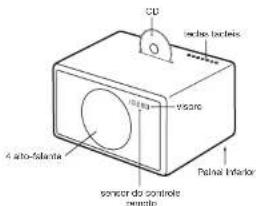
MODELO XL
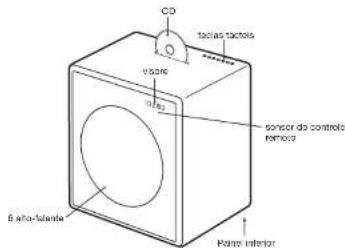
Ligar com o conductor AIR

- IMPORTANT SAFETY INSTRUCTIONS
- C0979
- X
- OVERVIEW
- AUDIO SOURCES
- REMOTE CONTROL
- TOUCH KEYS
- MODEL L
- MODEL XL
- USING THE DEVICE
- GETTING STARTED
- SELECTING THE AUDIO SOURCE
- FM RADIO
- Storing a radio station with the presets
- DAB+
- Scan function
- Presets
- Which DAB standards are supported?
- How can I disable the DAB+ function?
- Select FM
- CD
- Navigation
- BLUETOOTH
- Initial Setup ("Pairing") with IPhone
- Playing Music
- High quality Bluetooth audio with aptX and AAC codes
- Status Information on the display
- LINE-IN
- AUTOMATIC POWERING ON AND OFF
- TROUBLESHOOTING
- Why is the Model L/XL turning itself off?
- Why is my mobile phone not connecting?
- How do I reset Bluetooth?
- How do I erase or overwrite a preset?
- How is it possible to hear in stereo from only one speaker?
- How do I clean the device?
- SUPPORT
- Service and repair
- Warranty
- ÜBERSICHT
- AUDIOQUELLEN
- UTILISATION DE L'APPAREILPRÉSENTATION
- PRISE EN MAIN
- GELUIDSBRONNEN
- HET APPARAAT GEBRUKENOVERZICT
- AAN DE SLAG
- OVERSIGT
- LYDKILDER
- Brug at lagrede stationer
- Scan-funktion
- Lagringskapper
- Bluetooth settings on the iPhone
- Afspille musik
- Statusinformation pa displayet
- MODELL L
- MODELL XL
- ANVÄNDNING AV ENHETENÖVERSIKT
- KOMMA IGANG
- VALAV LJUDKALLA
- OVERSIKT
- AUDIOKILDER
- FJERNKONTROLL
- BERØRINGSPANEL
- BRUK AV ENHETEN
- KOMLGANG
- Service on reparation
- Garanti
- TARKEAT TURVAOHJEET
- VAATIMUSTENMUKAISUUS
- KIERRATYS
- YLEISKUVA
- AANILAHTEET
- PAINEL TACTIL
- MODELO L
- MODELO XL
- Ligar com o conductor AIR
Brand : GENEVA
Model : Model L
Category : Hi-fi system