CG 6200 - Coffee machine AEG-ELECTROLUX - Free user manual and instructions
Find the device manual for free CG 6200 AEG-ELECTROLUX in PDF.

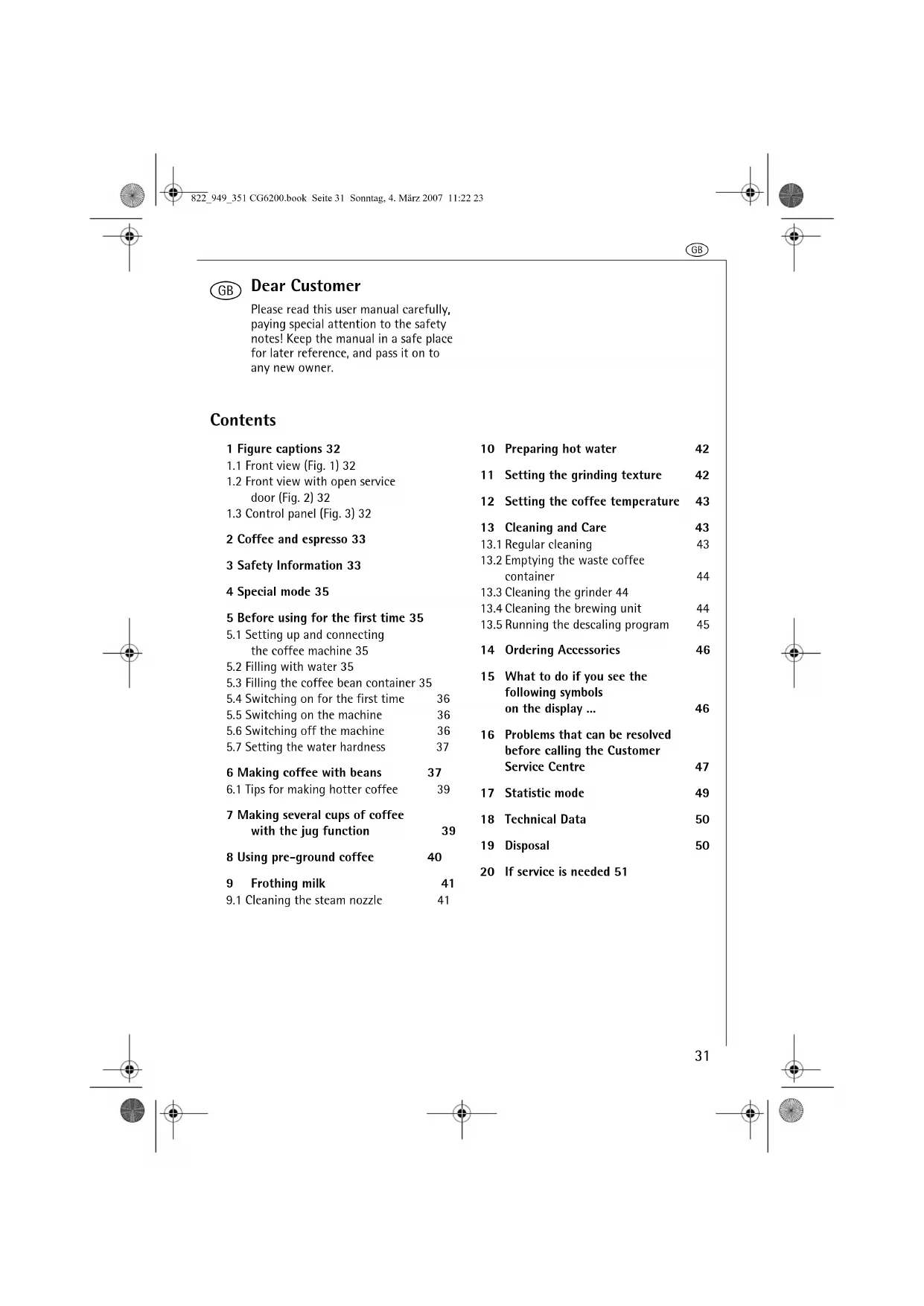


| Product type | Automatic coffee machine with built-in grinder |
| Brand | AEG-Electrolux |
| Model | CG 6200 |
| Power supply | 220-240 V, 1350 W |
| Water tank capacity | 1.8 liters |
| Bean container capacity | Approximately 250 g |
| Pump pressure | 15 bar (estimate) |
| Dimensions (H x W x D) | 280 x 360 x 430 mm (estimate) |
| Weight | Approximately 10 kg |
| Main functions | Whole bean coffee, ground coffee, steam for milk, hot water, carafe function (4, 6, 8, 10 cups) |
| Settings | Aroma intensity (5 levels: extra mild to extra strong), cup size (5 levels: espresso to mug), coffee temperature (3 levels), water hardness (4 levels), grind degree (adjustable during grinding) |
| Pre-infusion system | Yes |
| Grinder | Adjustable conical burr grinder |
| Thermal carafe | Included, stainless steel |
| Steam wand | Removable, with frothing attachment |
| Maintenance | Regular cleaning of removable parts (residue container, drip tray, water tank, grid), cleaning the brewing unit, descaling (automatic program), cleaning the steam wand |
| Safety | Automatic shut-off after 3h, burn protection (steam wand, dispensing unit), service panel lock, electromagnetic compatibility |
| Included accessories | Thermal carafe, measuring spoon, water hardness test stick |
| Spare parts available | Liquid descaler, steam wand, brewing unit, residue container, water tank |
Frequently Asked Questions - CG 6200 AEG-ELECTROLUX
User questions about CG 6200 AEG-ELECTROLUX
0 question about this device. Answer the ones you know or ask your own.
Ask a new question about this device
Download the instructions for your Coffee machine in PDF format for free! Find your manual CG 6200 - AEG-ELECTROLUX and take your electronic device back in hand. On this page are published all the documents necessary for the use of your device. CG 6200 by AEG-ELECTROLUX.
USER MANUAL CG 6200 AEG-ELECTROLUX
Operating instructions
Mode d'emploi
Gebruiksaanwijzing
2
3


natural_image
Diagram of a coffee machine with a hand operating the side panel (no text or symbols visible)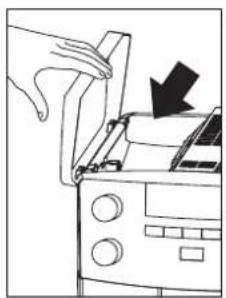
natural_image
Line drawing of a hand opening a refrigerator with a black arrow indicating the down arrow (no text or symbols present)6
4
5
natural_image
Diagram of a refrigerator with a downward arrow indicating a drop or change, no text or symbols present.
natural_image
Illustration of a hand pouring liquid into a mug using a coffee machine (no text or symbols visible)

9
1
0
8

flowchart
graph TD
    A["Step 1: Printer icon"] --> B["Step 2: Printer icon"]
    B --> C["Step 3: Printer icon"]
    C --> D["Step 4: Printer icon"]
    D --> E["Step 5: Printer icon"]
    E --> F["Step 6: Printer icon"]
    F --> G["Step 7: Printer icon"]
    G --> H["Step 8: Printer icon"]
    H --> I["Step 9: Printer icon"]
    I --> J["Step 10: Printer icon"]
    J --> K["Step 11: Printer icon"]
    K --> L["Step 12: Printer icon"]
    L --> M["Step 13: Printer icon"]
    M --> N["Step 14: Printer icon"]
    N --> O["Step 15: Printer icon"]
    O --> P["Step 16: Printer icon"]
    P --> Q["Step 17: Printer icon"]
    Q --> R["Step 18: Printer icon"]
    R --> S["Step 19: Printer icon"]
    S --> T["Step 20: Printer icon"]

flowchart
graph TD
    A["●"] --> B["○"]
    B --> C["●"]
    C --> D["○"]
    D --> E["●"]
    E --> F["○"]
    F --> G["●"]
    G --> H["○"]
    H --> I["●"]
    I --> J["○"]
    J --> K["●"]
    K --> L["○"]
    L --> M["●"]
    M --> N["○"]
    N --> O["●"]
    O --> P["○"]
    P --> Q["●"]
    Q --> R["○"]
    R --> S["●"]
    S --> T["○"]
    T --> U["●"]
    U --> V["○"]
    V --> W["●"]
    W --> X["○"]
    X --> Y["●"]
    Y --> Z["○"]
natural_image
Line drawing of a coffee maker with two cups on the front (no text or symbols)
natural_image
Line drawing of a hand inserting a device into a control panel (no text or symbols)12 13 14 15

natural_image
Mechanical component diagram showing a dial indicator and directional arrow (no text or symbols)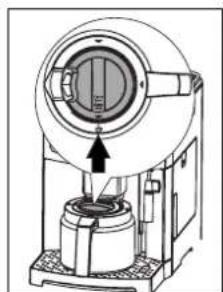
natural_image
Technical line drawing of a mechanical device with a central component and an arrow indicating direction (no text or symbols)

natural_image
Mechanical component diagram showing a circular housing with internal components and a base mount (no text or symbols)5
16 17 18 19


1

flowchart
graph TD
    A["Start"] --> B{Decision}
    B -->|Yes| C["Process"]
    B -->|No| D["End"]
natural_image
Line drawing of a hand using a coffee machine to press or adjust the cup (no text or symbols visible)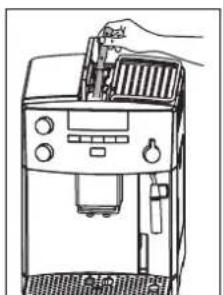
natural_image
Line drawing of a hand using a lathe machine to press or install a grater (no text or symbols visible)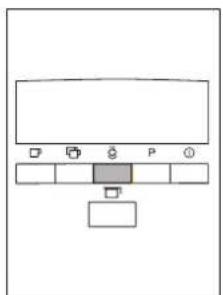
natural_image
Simple diagram of a computer monitor with control buttons and a small rectangle inside (no text or symbols)20 21 22 23

natural_image
Line drawing of a hand holding a cup with a handle and a straw (no text or symbols)
natural_image
Illustration of hands holding a small electronic device with a curved arrow indicating rotation (no text or symbols)
natural_image
Simple line drawing of a pen and a cylindrical object with arrows indicating direction (no text or symbols)
natural_image
Line drawing of a hand operating a machine with a scroll wheel (no text or symbols)24 25 26 27
natural_image
Technical line drawing of a coffee machine with a magnified inset showing internal components (no text or symbols)
natural_image
Line drawing of a hand using a coffee maker machine (no text or symbols)
natural_image
Line drawing of a hand operating a coffee maker with a black arrow indicating the press direction (no text or symbols present)
natural_image
Diagram of a mechanical device with a downward arrow indicating force or movement (no text or symbols present)28 29 30 31


natural_image
Line drawing of a hand using a brush to clean or store items inside a microwave oven (no text or symbols)
natural_image
Line drawing of a kitchen appliance with a hand holding a tool, showing no text or symbols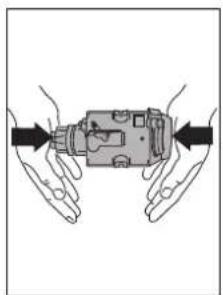
natural_image
Illustration of two hands holding a mechanical component with arrows indicating direction (no text or symbols)32 33 34 35


natural_image
Technical diagram of a mechanical device with directional arrows and a checkmark (no text or symbols)37

natural_image
Pure mechanical component diagram without any text, numbers, or symbols36 38

7




Please read this user manual carefully, paying special attention to the safety notes! Keep the manual in a safe place for later reference, and pass it on to any new owner.
Contents
1 Figure captions 32
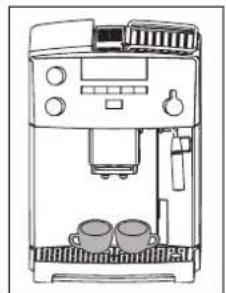
1.1 Front view (Fig. 1) 32
1.2 Front view with open service door (Fig. 2) 32
1.3 Control panel (Fig. 3) 32
2 Coffee and espresso 33
3 Safety Information 33
4 Special mode 35
5 Before using for the first time 35
5.1 Setting up and connecting the coffee machine 35
5.2 Filling with water 35
5.3 Filling the coffee bean container 35
5.4 Switching on for the first time 36
5.5 Switching on the machine 36
5.6 Switching off the machine 36
5.7 Setting the water hardness 37
6 Making coffee with beans 37
6.1 Tips for making hotter coffee 39
7 Making several cups of coffee with the jug function 39
8 Using pre-ground coffee 40
9 Frothing milk 41
9.1 Cleaning the steam nozzle 41
10 Preparing hot water 42
11 Setting the grinding texture 42
12 Setting the coffee temperature 43
13 Cleaning and Care 43
13.1 Regular cleaning 43
13.2 Emptying the waste coffee container 44
13.3 Cleaning the grinder 44
13.4 Cleaning the brewing unit 44
13.5 Running the descaling program 45
14 Ordering Accessories 46
15 What to do if you see the following symbols on the display ... 46
16 Problems that can be resolved before calling the Customer Service Centre 47
17 Statistic mode 49
18 Technical Data 50
19 Disposal 50
20 If service is needed 51
GB
1 Figure captions
1.1 Front view (Fig. 1)
A Drip grid
B Thermos jug
C Main switch (rear side of appliance)
D Height-adjustable coffee dispenser
E Control panel (see Fig. 3)
F Bean container lid
G Pre-ground coffee lid
H Heated cup rack
J Swivel pipe for steam and hot water
K Steam nozzle (removable)
L Inner part of steam nozzle (removable)
M Service door opening button
N Water tank with max. fill level indication (removable)
O Drip tray with float (removable)
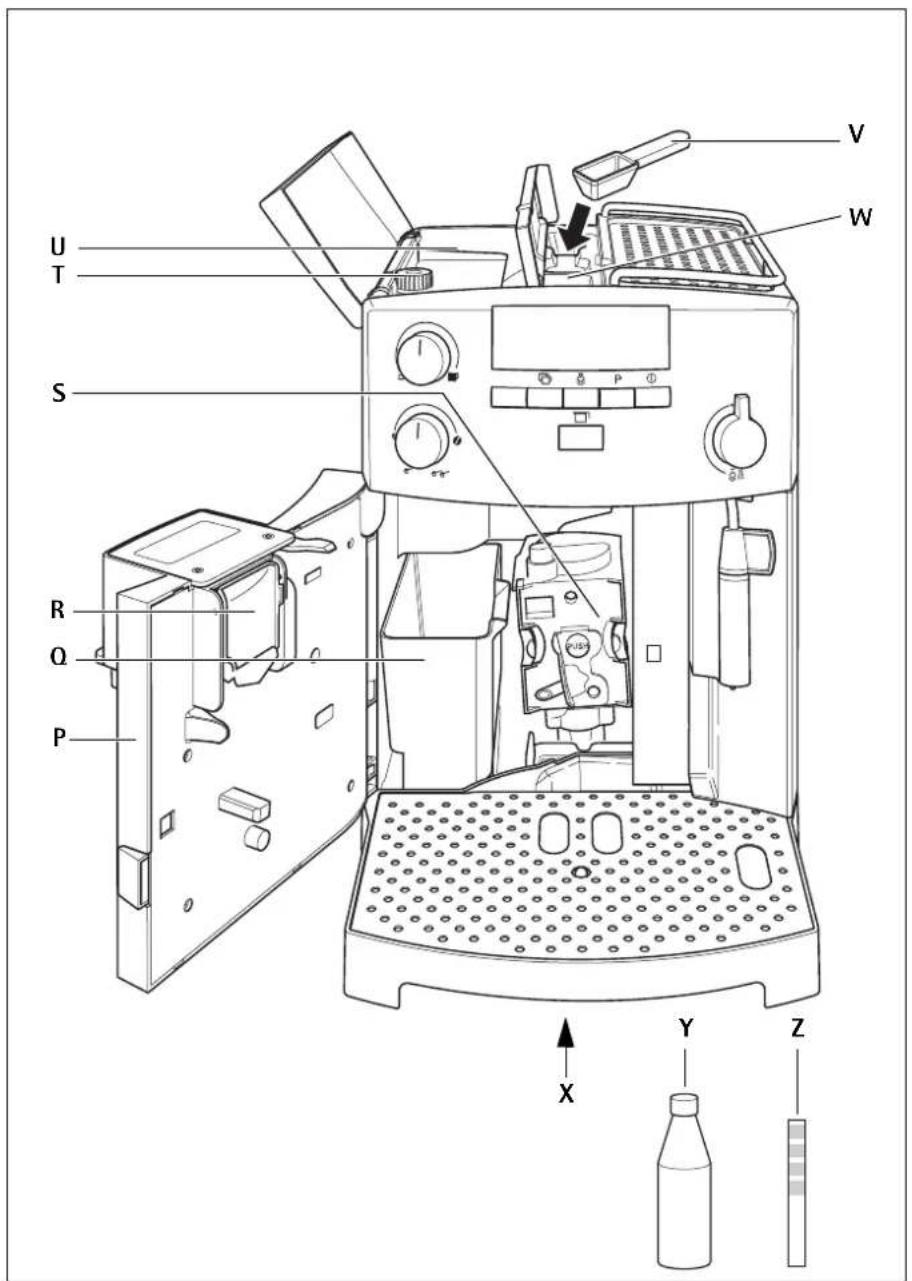
1.2 Front view with open service door (Fig. 2)
P Service door (open)
Q Waste coffee container (removable)
R Tilt compartment
S Brewing unit
T Knob for setting grinding texture
U Bean container
V Measuring spoon
W Funnel for pre-ground coffee
X Type plate (under appliance)
Y Liquid descaler
Z Test strip for water hardness
1.3 Control panel (Fig. 3)
a "Coffee strength / Pre-ground coffee" knob
b "Cup size" knob
c Display
d "1 cup of coffee" key ☐ In special mode, use this key for "scrolling" ("<")
e "2 cups of coffee" key In special mode, use this key for "scrolling" (">")
f "Steam" key In special mode, use this key to confirm ("OK")
g "P" key In special mode, this key returns to the last level without changing settings ("P")
h "ON/OFF" key ①
j Knob for "Steam / Hot water"
k "Jug coffee function" key

I "Pre-ground coffee" symbols
m "Jug coffee function" symbols
n "Coffee strength" symbols
o "Cup size" symbols
p "Fill water tank" symbol
q "Descale" symbol
r "Machine temperature" symbol
s "Servicedoor open" symbol
t "Waste coffee container" symbol
u "Attention" symbol
v "Hot water" symbol
w "Steam" symbol
x "Preparing 2 cups" symbol
y "Preparing 1 cup symbol"
z Symbols for the special mode
2 Coffee and espresso
Your fully automated coffee machine guarantees you absolute ease of operation, both in making coffee and in maintenance and care.
The excellent, individual taste is achieved by
• the pre-brewing system: before the coffee is brewed, it is first moistened to extract its full aroma
- the individually controllable amount of water per cup, from a short espresso to a "long" milky coffee
- the individually controllable temperature at which the coffee is made
• The choice between a normal or a strong cup of coffee
- the grinding texture, which can be adjusted according to type of coffee bean, and
- last, but not least, the guaranteed crema, that small crown of froth that makes espresso coffee so unique for connoisseurs
Did you know? The time the water is in contact with the ground coffee is considerably less for espresso coffee than conventional filter coffee. As a result, less bitterness is released from the ground coffee - making espresso coffee that much milder!
3 Safety Information

This appliance conforms to accepted technological standards with regard to safety, and to the Appliance Safety Law. As the manufacturer, we nevertheless wish to familiarise you with the following safety information.
General safety
- The coffee machine must be connected only to a mains power current of which the voltage, type of supply and frequency conform to the details shown on the type plate (this can be found on the underside of the appliance)!
- Never allow the mains lead to come into contact with hot parts of the appliance.
- Never use the mains lead to pull the plug out of the mains socket!
- Do not use the coffee machine if:
- the mains lead is damaged, or
- the housing shows visible signs of damage.
- Ensure that the coffee machine is switched off before plugging into the mains socket.
- This appliance is not intended for use by people (including children) who, due to lack of experience or knowledge, are unable to operate it safely, or for use by people (including children) whose physical, sensory or mental capabilities are reduced, unless a person responsible for them has shown them how to use it safely, and has supervised them initially.
Child safety
- Do not leave the coffee machine running unattended, and take special care when children are about!
- Packaging material, e.g. plastic bags, should not be accessible to children.
Safety in operation
- Caution! The coffee dispenser, steam nozzle and cup rack become hot in operation. Keep children at a safe distance!
GB
- Caution! Danger of scalding when the steam nozzle is activated! Hot water or steam output can cause scalding. Activate the steam nozzle only when you are holding a container under the nozzle.
- Do not use steam to heat inflammable liquids!
- Only use the coffee machine with water in the system! Fill the water tank only with cold water. Do not use hot water, milk or other liquids. Do not exceed the maximum fill level of approx. 1.8 litres.
- Do not put frozen or caramelised coffee beans in the bean container. Use only roasted coffee beans! Remove any foreign objects, such as small stones, from the coffee beans. Blocking or damage caused by foreign objects in the grinder might be excluded from the guarantee.
- Spoon only ground coffee into the ground coffee filler.
- Do not leave the coffee machine switched on unnecessarily.
- Do not expose the coffee machine to the effects of weather.
- When using an extension lead, use only a commercially available cable with a conductor cross-section of at least 1.5 ~mm^2 .
• To avoid injury, people with motor system disorders should never use the machine without an accompanying person. - Operate the machine only when the drip tray, waste coffee container and the drip grid are installed!
Safety in cleaning and care
- Follow the cleaning and descaling instructions.
- Switch off the coffee machine and unplug it from the mains socket before carrying out any maintenance or cleaning!
-
Do not immerse the coffee machine in water.
-
Only clean the steam nozzle when the machine is switched off, cold and not under pressure!
- Do not clean coffee machine parts in the dishwasher.
- Never put water in the grinder. This would damage the grinder.
Never open or repair the coffee machine. Faulty repairs can result in considerable hazard to the user.
Repairs to electrical appliances must be carried out only by qualified service engineers.
If a repair becomes necessary, including replacement of the mains lead, please contact
- the dealer where you bought the coffee machine, or
- the AEG/Electrolux Service Line. If the machine is misused or incorrectly operated the manufacturer accepts no liability for damage and the guarantee is invalidated - likewise if the descaling program is not carried out in accordance with these operating instructions immediately after the symbol comes on. Blocking or damage caused by foreign objects in the grinder might be excluded from the guarantee.
4 Special mode
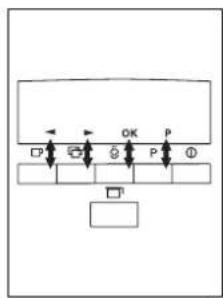
For setting the water hardness („Setting the water hardness“, page 37) and the coffee temperature („Setting the coffee temperature“, page 43), for starting the descaling program („Running the descaling program“, page 45) and for viewing the statistics („Statistic mode“, page 49), you can switch to a special mode by pressing the "P" key (Fig.4). In this mode, you can navigate by means of the "1 cup of coffee" "2 cups of coffee" "Steam" and "P" keys. The respective function in each case is shown in the display above the key (Fig. 5):
- «<» ("1 cup of coffee" □) and «>» ("2 cups of coffee" □) are for "scrolling"
- « OK» ("Steam" confirms an item
- «P» ("P") returns to the last level without changing settings.
5 Before using for the first time
5.1 Setting up and connecting the coffee machine
Place the machine on a suitable horizontal, stable, unheated and water-resistant surface.

Ensure that there is good air circulation. After positioning the appliance on the work top, leave a space of at least 5 cm between the surfaces of the appliance and the side and rear walls and at least 20 cm above the coffee maker.
Never install the appliance in environments where the temperature may reach 0°C or lower (the appliance may be damaged if the water freezes).

Important! If the coffee machine is brought into a warm room from a cold environment, wait about two hours before switching on!
We advise you to place the coffee machine on a suitable mat to prevent damage being caused by spray and splashes.
Plug the coffee machine into an earthed mains socket. Do not use a socket that is not earthed.
5.2 Filling with water
Each time before switching on the coffee machine, check that there is water in the water tank, and refill if necessary. The coffee machine requires water for the automatic rinsing processes each time the machine is switched on or off.
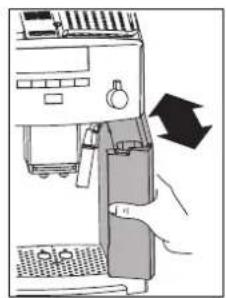
Remove the water tank from the coffee machine (Fig. 6). Before the tank is removed, the steam nozzle must always be positioned towards the centre of the appliance, otherwise the tank cannot be removed.
Fill the water tank with fresh cold water. Never exceed the MAX line.
Pour only fresh cold water into the water tank. Never put in other liquids, e.g. mineral water or milk.
Replace the water tank (Fig. 6). Press the tank firmly in, to ensure that the water tank valve opens.
To always be sure of obtaining a rich coffee with a full aroma, you should:
- change the water in the water tank daily,
- wash the water tank at least once a week in normal washing-up water (not in the dishwasher). Then rinse with fresh water.
5.3 Filling the coffee bean container
Raise the lid of the coffee bean container, and fill the container with fresh coffee beans (Fig. 7). Then reclose the lid.
GB
Note! Do not put frozen or caramelised coffee beans in the bean container. Use only roasted coffee beans! Make sure that no foreign objects, such as small stones, enter the coffee bean container. Blocking or damage caused by foreign objects in the grinder might be excluded from the guarantee.
The grinder is factory-set to a medium grinding texture. If necessary, you can change this setting. Notes on changing the grinder setting can be found in "Setting the grinding texture", page 42.
The grinder setting may be changed only while coffee is being ground. Making adjustments to the stationary grinder can damage the coffee machine.
i Coffee has been used to factory-test the appliance, and it is therefore completely normal for there to be traces of coffee in the mill. This appliance is however guaranteed to be new.
5.4 Switching on for the first time
When you operate the machine for the first time, the coffee machine has to be vented.
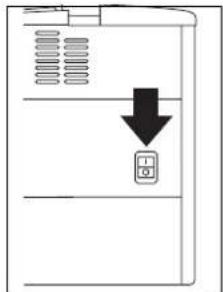
Switch on the machine with the main switch on the rear of the machine (Fig. 8). If the main switch is switched on for the very first time, all symbols in the display come on for a few seconds for a check, then the symbols and are flashing.
Fill the water tank; see „Filling with water“, page 35.
Replace the water tank (Fig. 6). Press the tank firmly in, to ensure that the water tank valve opens.
Move the steam nozzle outwards and place a cup underneath it (Fig. 9).
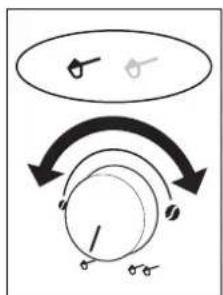
Turn the knob for steam and hot water anticlockwise as far as it will go to the position (Fig. 10). Water runs out of the steam nozzle. The symbols and are on steady.
When the cup contains about 30 ml of water, the symbols and start flashing.
Turn the steam knob clockwise (Fig. 10) as far as it will go, to the position ●to stop the water running out. The symbol ⚪ flashes for a few seconds and the appliance switches itself off.
Fill the coffee bean container with coffee beans; see "Filling the coffee bean container", page 35.
5.5 Switching on the machine
Each time before switching on, make sure there is water in the water tank and replenish if necessary. The machine requires water for the automatic rinsing cycles that are carried out each time the appliance is switched on or off.
Switch the machine on with the "On/Off" key (Fig. 11).
i Immediately after being switched on the machine runs through a set-up cycle. The noises occurring are perfectly normal.
During the heating-up phase (approx. 120 seconds) the symbol flashes. During pre-heating, the appliance performs an automatic rinse cycle (a little hot water runs out of the spouts and is collected in the drip tray beneath). When pre-heating is complete, the symbol remains constantly on. The coffee machine is now ready to use. The symbols shown on the display depend on the last coffee mode that was selected.
5.6 Switching off the machine
Switch the machine off with the "On/Off" key (Fig. 11). The symbol flashes. The machine carries out a rinsing cycle and turns off.
If the coffee machine is not used for a longer period of time, it automatically switches off for economy reasons after 3 hours.
If you will not be using the machine for a longer period of time, after switching off the "On/Off" key. You should also switch off the main switch at the back (Fig. 8).
5.7 Setting the water hardness
After putting the machine into operation for the first time, or when using a different water quality, you should set the machine to the water hardness level corresponding to the local water hardness. You can use the enclosed test strip to determine the water hardness, or contact your local water supply company.
Determining water hardness
Dip the test strip in cold water for around 1 second. Shake off the excess water, and gauge the hardness by means of the pink bands.
No pink bands or one pink band: Hardness level 1, soft up to 1.24 mmol/l, or up to 7° German hardness, or up to 12.6° French hardness
Two pink bands: Hardness level 2, medium hard up to 2.5 mmol/l, or up to 14° German hardness, or up to 25.2° French hardness
Three pink bands: Hardness level 3, hard up to 3.7 mmol/l, or up to 21° German hardness, or up to 37.8° French hardness
Four pink bands: Hardness level 4, very hard over 3.7 mmol/l or over 21° German hardness, or over 37.8° French hardness
Setting and saving the water hardness level
You can set 4 hardness levels. The coffee machine is factory-set to hardness level 4.
With the machine switched on, press the "P" key (Fig. 4).
The symbols "P" and come on. Furthermore 3 small symbols above the □, and buttons come on to show the present function of these buttons, see "Special mode", page 35.
Confirm the selection with the "OK" key (Fig. 5). The display indicates the current setting. The hardness levels are indicated as follows:
Hardness level 1 Hardness level 2 Hardness level 3 Hardness level 4
Then press the scrolling keys "<" or ">"(Fig. 5) until the determined hardness level is displayed.
Confirm the selection with the "OK" key (Fig. 5). This hardness level is now programmed.
To cancel without storing the setting, press "P" instead of "OK". If "OK" is not pressed, after about 120 sec., the appliance returns automatically to the coffee mode without storing the settings.
To return to the coffee mode, then press the "P" key (Fig. 4) or wait about 120 sec. for the machine to automatically return to the coffee mode.
6 Making coffee with beans
The following process for making coffee with beans runs completely automatically: Grinding, portioning, pressing, pre-brewing, brewing and ejection of the coffee grounds. The facility to select the grinding texture and the quantity of coffee to be ground allows you to individually set up the coffee machine to suit your own personal taste.
Ensure that you use only pure coffee beans with no caramelised or aromatised additives. Do not use frozen beans.
GB
Depending on your taste, select a "short" espresso or a "long" milky coffee.
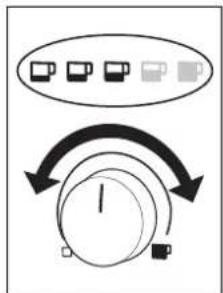
To choose the required cup size, turn the knob for "Cup size" (Fig. 12). The selected cup size will be indicated.
i The cup sizes are indicated as follows:
espresso cup
small cup
medium cup
large cup
mug
You can also choose coffee with an extra-mild, mild, normal, strong or extra-strong strength.
To choose the required strength, turn the knob for "Coffee strength selection" (Fig 13). The selected coffee strength will be indicated.
The coffee strength is indicated as follows:
extra-mild
mild
normal
strong
extra-strong
Place one or two cups under the coffee dispensing spouts (Fig. 14). The dispenser can be slid up or down, to match the height of your cup/mug to reduce heat loss and coffee splashes (Fig. 15).
Press the key for "1 cup" to make one cup, or the key for "2 cups" to make 2 cups.
The symbol "1 cup" or "2 cups" comes on. The appliance now grinds the beans. In the coffee-making process, the ground coffee is first of all wetted with a small quantity of water for pre-brewing. Following a short pause, the actual brewing process commences. The coffee is dispensed into the cup.
When the desired quantity of coffee has been dispensed, the appliance automatically stops delivering the coffee and ejects the grounds into the
waste coffee container. During this time, the symbol "1 cup" or "2 cups" flashes.
You can stop the delivery of coffee prematurely at any time, by briefly pressing the key for "1 cup" or "2 cups" by turning the knob for "Cup size" (Fig. 12) anti-clockwise towards the "Espresso cup" position.
As soon as delivery is complete, to increase the quantity of coffee, simply press and hold the key for "1 cup" or "2 cups" until the desired quantity is reached, or turn the knob for "Cup size" (Fig. 12) clockwise towards the "Mug" position (this operation must be performed immediately after the coffee is dispensed and before the coffee grounds are ejected into the waste coffee container).
After a few seconds, when the flashing symbol "1 cup" or "2 cups" goes off, the appliance is ready for use again and you can make another coffee.
If the coffee is delivered a drop at a time or not at all, or the coffee is delivered too fast and is not creamy enough, you should change the grinding setting; see „Setting the grinding texture“, page 42.
If the symbols band are flashing, the coffee is ground too fine. You should change the grinding setting; see "Setting the grinding texture", page 42.
If the symbol comes on the water tank must be refilled or the appliance will not make coffee. (It is normal for there still to be some water left in the tank when the symbol is displayed).
If the symbol comes on the waste coffee container is full and must be emptied and cleaned; see „Emptying the waste coffee container”, page 44. Until the waste coffee container has been cleaned, the appliance continues to display the symbol and cannot make coffee.
GB
i Never remove the water tank whilst the machine is delivering coffee. If it is removed, the appliance will not be able to make any more coffee. To vent the appliance, turn the knob for steam and hot water anticlockwise as far as it will go, to the setting, and run off water from the steam nozzle for a few seconds.
When using the appliance for the first time, at least 4-5 cups of coffee need to be made before the appliance starts to yield satisfactory results.
6.1 Tips for making hotter coffee
- When you turn the appliance on, if you want to make a short coffee (less than 60 ml), use the hot rinse-through water to preheat the cups.
- Set a higher coffee temperature; see "Setting the coffee temperature", page 43.
- Unless they have been pre-heated, do not use cups that are too thick, as they will absorb too much heat.
- Use cups that have been pre-heated by rinsing them with hot water or by leaving them for at least 20 minutes on the heated cup rack (H) with the coffee machine on.
7 Making several cups of coffee with the jug function
This function allows you to make several cups of coffee completely automatically, which are poured into the stainless steel thermos jug that is supplied: Grinding, portioning, pressing, pre-brewing, brewing and ejection of the coffee grounds are as described in the previous section.
Turn the lid of the stainless steel thermos jug to the position for removal (Fig. 16), and take the lid off the jug. Rinse both the lid and the thermos jug.
Place the thermos jug under the coffee dispenser (D), with the lid in position
for pouring (Fig. 17). The dispenser must be slid up fully to allow the jug to be pushed in.
One of the symbols for the jug function comes on, depending on the number of cups selected the last time the jug function was used. Also the scrolling keys "<" and ">" are illuminated.
The numbers of cups to be dispensed into the thermos jug are indicated as follows:
4 cups
6 6 cups
8 cups
10 10 cups
Check that the water tank is full, the bean container has enough coffee beans, and the waste coffee container is empty in order to allow the preparation of a series of coffees for the jug.
If you wish to change the strength and size of the cups for the jug function, use the knob for "Cup size" (Fig. 12) resp. the knob for "Coffee strength selection" (Fig. 13) as described in the section "Making coffee with beans", page 37.
If necessary, press the scrolling keys "<" or "> " to choose the symbol according to the number of cups you wish to pour into the jug, e.g. 8 cups.
Press the "JUG" key (fig.18).
During preparation, the symbol for the selected number of cups is flashing. Once the brewing is finished, all symbols of the jug function are flashing alternately, whereby the symbol for the selected number of cups is lighted twice as long than the other symbols.
Now you can remove the thermos jug and close the lid (Fig. 19) to keep the coffee warm for a longer period of time.
The appliance returns automatically to the coffee mode.
GB
i If there are either not enough coffee beans or there is too little water to complete the requested operation, or the waste coffee container is full, the machine will stop the operation and the current program is cancelled. After the error has been rectified, the program must be restarted. The amount of coffee already in the jug must be taken into consideration, so that the jug is not over-filled.
i If the symbols band and flashing, the coffee is ground too fine. You should change the grinding setting; see "Setting the grinding texture", page 42.
8 Using pre-ground coffee
This function allows you to brew pre-ground coffee, e.g. decaffeinated coffee.
Make sure that no ground coffee has remained in the filler, and that no foreign objects enter the filler. The ground coffee filler is not a storage container. The ground coffee must be fed directly into the brewing unit.
Turn the "Coffee strength / Pre-ground coffee" knob (Fig. 20) to the desired position (for 1 cup) or (for 2 cups) to select the pre-ground coffee function. This disables the coffee mill function. One symbol (for 1 cup) or both symbols (for 2 cups) are illuminated.
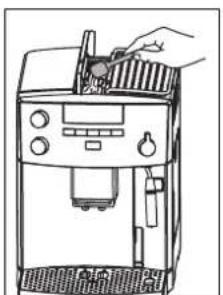
Open the lid of the ground coffee filler, and scoop in the fresh ground coffee (Fig. 21).
Use only the supplied measuring spoon. Never add more than 2 level measured scoops, otherwise either the appliance will not make the coffee, the ground coffee will be dispersed inside the appliance, dirtying it, or the coffee will be delivered drop by drop and the symbols band are flashing.
Do not add ground coffee during the brewing process. Only put in ground coffee for the next cup when the
brewing process has completely finished and the coffee machine is ready. Never add the ground coffee when the appliance is off, as otherwise it will be dispersed inside the appliance.
Use only ground coffee for fully automated espresso coffee makers. Do not put coffee beans, any water-soluble or freeze-dried instant products or any other drink powder into the ground coffee filler. Coffee powder which is too fine can lead to blockages.
If the filler shaft is blocked (due to moisture inside the appliance, or because more than 2 measuring scoops of pre-ground coffee have been used), use a knife or a spoon handle to push the coffee down (Fig. 22). Then remove the brewing unit and clean it and the appliance as described in the section "Cleaning the brewing unit", page 44".
Close the lid.
To choose the required cup size, turn the knob for "Cup size" (Fig. 12) as described in the section "Making coffee with beans", page 37.
Press the key for "1 cup" to make one cup, or the key for "2 cups" to make 2 coffees.
The coffee is prepared.
If the pre-ground coffee function for 1 cup has been selected and the ground coffee has not been filled into the ground coffee filler, after pressing the Button the symbols and are flashing. If the pre-ground coffee function for 2 cups has been selected and the ground coffee has not been filled into the ground coffee filler, after pressing the Button the symbols and are flashing.
Once the coffee has been prepared, to go back to making coffee using beans, turn the "Coffee strength / Pre-ground coffee" knob (Fig. 20) to any coffee strength setting (the coffee mill is enabled for operation again).
9 Frothing milk
The steam can be used to froth milk and to heat liquids. Since a higher temperature is needed to produce steam than to make coffee, the coffee machine has an additional steam mode.
To make a cappuccino, fill a large cup 1/2 to 2/3 full with espresso, and then add the frothed milk.
Caution! Danger of scalding when the steam nozzle is activated! Hot water or steam output can cause scalding. Do not activate the steam nozzle until it is immersed in the milk.
To produce steam, press the "Steam" key Fig. 23). The symbol comes on and the appliance heats up. During the heating process, the symbol flashes. When the heating process is finished, the symbol remains constantly on. The machine is ready for the milk frothing.
i If the steam function is not used for longer than 2 minutes, the machine switches back automatically to the coffee mode.
To avoid any residual water mixing in with the milk when frothing, the water should be drained off beforehand. To do this, place a container under the steam nozzle and turn the knob for steam and hot water (Fig. 10) to position until steam emission starts. Then turn the knob back to position
Pour low-fat, cold milk into a mug which must be small enough to fit under the steam nozzle.
i The milk should be cold. You should also use a cold mug, preferably a stainless steel one, which should not be rinsed beforehand in hot water.
Swing out the steam nozzle and hold the mug under the steam nozzle so that the nozzle opening is just immersed in the milk (Fig. 24).
Attention! Risk of impurities from dried on milk residues in the steam nozzle. Take care not to immerse the steam nozzle in the milk far enough to cover the air intake opening at the top of the steam nozzle. Otherwise milk can be sucked into the nozzle and cause impurities in the steam nozzle.
Turn the knob for steam and hot water (Fig. 10) to the position 📋The milk is frothed.
To obtain a creamier froth, slowly move the container upwards. Froth the milk to at least twice its volume.
You should not discharge steam for more than two minutes at a time. To end the frothing, turn the knob for steam and hot water (Fig. 10) to the position and then remove the mug.
Caution! Danger of scalding from hot milk spray! Switch the steam off before removing the mug with the frothed milk.
Exit the steam mode by pressing the "Steam" key (Fig. 23) or wait approx. 120 sec. for the machine to automatically return to the coffee mode. Now the machine is once again ready for making coffee.
Each time you have frothed milk, let off some hot water through the nozzle for a short time by turning the knob for steam and hot water (Fig. 10) to the position. This is necessary to prevent milk residues drying inside the nozzle, and thereby blocking it. Use a suitable container to catch the water. During this process the symbol comes on.
Then return the knob to the position ●; the last selected coffee setting is shown in the display.
9.1 Cleaning the steam nozzle
Important: To guarantee hygiene, you are recommended to follow this procedure each time you make frothed milk, to avoid milk stagnating in the nozzle.
GB
Turn the knob for steam and hot water clockwise as far as it will go to the position Wait a couple of minutes for the steam nozzle to cool down.
Then with one hand hold the swivel pipe handle firm and with the other disengage the bayonet connection of the steam nozzle by turning it slightly clockwise. Remove the steam nozzle by pulling it downwards (Fig. 25).
Remove the inner part of the steam nozzle from the swivel pipe by pulling it downwards.
Carefully wash the steam nozzle and the inner part in warm water.
Make sure the two holes shown in fig. 26 are not blocked. If necessary, pierce them with a pin and clean them.
Replace the inner part by pushing it slightly upwards onto the swivel pipe.
Replace the steam nozzle by pushing it upwards and turning it anticlockwise.
10 Preparing hot water
The hot water can be used to pre-heat cups and for making hot drinks, e.g. tea or instant soups.

Caution! Danger of scalding when the hot water nozzle is activated! Hot water or steam output can cause scalding. Activate the hot water nozzle only when a container is under the hot water nozzle.
Place a container under the hot water nozzle.
Turn the knob for steam and hot water to the position (Fig. 10). Hot water is dispensed; the symbol comes on.

You should not run off hot water for more than two minutes at a time.
After you have dispensed the hot water turn the knob for steam and hot water back to the ●position (Fig. 10) and remove the container.
11 Setting the grinding texture
The appliance is preset to grind to a medium texture. If you find that coffee delivery is either too fast or too slow (in drips), the grinding texture can be adjusted during the grinding process.

The grinder setting may be changed only while coffee is being ground, i.e. the knob for setting the grinding texture (Fig. 2, T and Fig. 27) must be rotated only when the grinder is grinding beans during the preparation of coffee. Making adjustments to the stationary grinder can damage the coffee machine.
Set the grinding texture (Fig. 27) using the knob for setting the grinding texture (Fig. 2, T).
- If the coffee is delivered a drop at a time or not at all (probably the symbols and flashing), turn the knob one click clockwise. Turn one click at a time until the coffee is delivered satisfactorily.
- If the coffee is delivered too fast and the crema is not to your tase, turn the knob one click anticlockwise.

Avoid turning the knob for setting the grinding texture too far, otherwise when you select 2 cups, the coffee may emerge drop by drop.

The effect of these adjustments will only be evident after at least 2 cups of coffee have been prepared.
Remove foreign objects from the grinder
Foreign objects such as small stones in the grinder can damage the grinder. A foreign objects in the coffee causes a loud, regular rattle. If you hear this noise while coffee is being ground, immediately switch off the coffee machine and call the Customer Service Centre. Blocking or damage caused by foreign objects in the grinder might be excluded from the guarantee.
12 Setting the coffee temperature
There are three temperature levels to choose from. The factory setting is «Temperature high». You can change this setting as follows:
Press the "P" key (Fig. 4).
The symbols "P" and "come on. Furthermore 3 small symbols above the
☐, and buttons come on to show the present function of these buttons, see "Special mode", page 35.
Press the scrolling keys "<" or ">" (Fig. 5) until the symbol is illuminated.
Confirm with the "OK" key (Fig. 5). The display indicates the current setting. The temperature levels are indicated as follows:
#
Temperature low
The image contains no text or OCR-able content.
Temperature medium
The image contains no text or symbols.
Temperature high
Where necessary, select a different temperature, using the scrolling keys "<" or ">" (Fig. 5).
When the required temperature is indicated, confirm this with the "OK" key (Fig. 5). This temperature is now programmed.
To cancel without storing the setting, press "P" instead of "OK".
If "OK" is not pressed, after about 120 sec. the appliance returns automatically to the coffee mode without storing the setting.
To return to the coffee mode, press the "P" key (Fig. 4) or wait about 120 sec. for the machine to return automatically to the coffee mode.
13 Cleaning and Care
To ensure consistent coffee quality and faultless operation, always keep your coffee machine clean.
13.1 Regular cleaning

Caution! Before cleaning, switch off the coffee machine and allow it to cool down.

Note! Never put the coffee machine or separate parts of the coffee machine in the dishwasher. Never immerse the coffee maker in water.

Note! Never put water in the coffee bean container, as this would damage the grinder.

Do not use any abrasive, scouring or corrosive cleaning materials. Wipe the inside and outside of the case only with a damp cloth.
Remove the water tank daily (Fig. 6) and discard any remaining water. Rinse out the water tank with fresh water. Use fresh water every day.
Empty the waste coffee container daily or at the latest when the display prompts you to do so; see "Emptying the waste coffee container", page 44
Regularly drain the drip tray. This can be done at any time, but must be done when the red drip tray float (Fig. 28) appears through the opening in the drip grid.
Regularly (at least once per week) clean the water tank (N), drip tray (O), drip grid (A) and waste coffee con- tainer (Q) with warm water, a mild washing up liquid and possibly a brush.
Each time the machine is used for frothing, remove the steam nozzle and clean off any milk residues, see „Cleaning the steam nozzle", page 41.
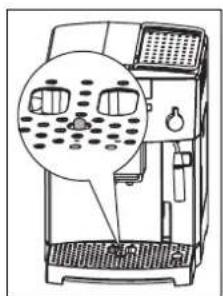
Check that the holes in the coffee dispenser are not blocked. To unblock them, scrape any dry coffee residues away with a needle (Fig. 29).
GB
13.2 Emptying the waste coffee container
The appliance counts the number of coffees made. Every 14 single coffees (or 7 doubles) the symbol comes on to indicate that the waste coffee container is full and must be emptied and cleaned. Until the waste coffee container has been cleaned, the appliance cannot make coffee.
To clean it, unlock and open the service door by pushing the respective button (Fig. 30), the symbol comes on.
Then remove the drip tray (Fig. 31), and empty and clean it.
Empty the waste coffee container and clean it thoroughly, making sure that all residues deposited on the bottom are removed.
Important: Each time you pull out the drip tray, the waste coffee container must also be emptied, even if it is not completely full. If this is not done, when coffee is next made, the grounds in the container may exceed the maximum level and block the appliance.
When you have removed the drip tray, the symbol flashes.
When the coffee machine is in daily use, empty the container daily. Always empty the container with the coffee machine switched on, otherwise the coffee machine does not register that the container has been emptied.
13.3 Cleaning the grinder
Use a soft brush or a vacuum cleaner to remove ground coffee residues from the coffee beans container.

Note! Never put water in the grinder. This would damage the grinder.
Press the "On/Off" key (Fig. 11) and the main switch (Fig. 8) to switch off the coffee machine. Unplug it from the mains socket.
Remove any remaining coffee beans (you could use the vacuum cleaner with the hose or crevice tool attachment for this).
If a foreign object is impossible to remove, contact the Customer Service Centre. Blocking or damage caused by foreign objects in the grinder might be excluded from the guarantee.
Caution! Risk of injury from the moving grinder. Never switch the coffee machine on when you are working on the grinder. This can lead to severe injuries. Before starting work, ensure that the machine is unplugged from the mains socket.
Use a small quantity of coffee beans to test the proper operation of the grinder by making a cup of coffee. The first time the grinder is used, or after cleaning, less ground coffee will enter the brewing unit, because the channel first has to be filled. This can influence the first cup of coffee.
13.4 Cleaning the brewing unit
We advise you to clean the brewing unit regularly (depending on how frequently it is used). If your coffee machine is to be left unused for some time (e.g. holidays), empty the waste coffee container and the water tank, and thoroughly clean the coffee machine, including the brewing unit. Proceed as follows:
Turn the appliance off by pressing the "On/Off" key (Fig. 11) (do not unplug) and wait for all symbols to go off.
Unlock and open the service door at the front by pushing the corresponding opening button (Fig. 30).
Remove the drip tray and the waste coffee container (Fig. 31) and clean them.
Press the two red release buttons on the brewing unit from the sides, pressing towards the centre (Fig. 32), and pull it out.
i Important: The brewing unit can only be removed if the appliance is turned off with the ON/OFF key at the front of the machine. It should not be disconnected from the mains. Attempting to remove the brewing unit when the appliance is on may cause serious damage.
Wash the brewing unit under running water, without using detergents. Never wash the brewing unit in the dish-washer.
Clean the inside of the appliance thoroughly. To remove coffee encrustations from the inside of the appliance, scrape with a plastic or wooden fork or similar tool that does not scratch the surface (Fig. 33), then vacuum up the residues with a vacuum cleaner (Fig. 34).
Replace the brewing unit (Fig. 36, a) by pushing it onto the holder (Fig. 36, b) and pushing in the pin (Fig. 36, c). The pin must be inserted into the pipe at the bottom of the brewing unit (Fig. 36, d).
Push the PUSH symbol (Fig. 36, e) firmly in until the brewing unit clicks into place.
After having heard the click, check that the red buttons (Fig. 36, f) have snapped out, otherwise the service door cannot be closed.
• Fig. 37: The two red buttons have snapped out correctly.
• Fig. 38: The two red buttons have not snapped out.
Replace the drip tray, complete with the waste coffee container.
Close the service door.
i If the brewing unit is not inserted correctly, i.e. when you can hear that it has clicked into place, and the two red buttons have not snapped out correctly, the service door cannot be closed.
If it is hard to insert the brewing unit, before inserting it squeeze it to the right height by pressing it firmly from
the top and bottom simultaneously, as shown in figure 35.
If it is still hard to insert the brewing unit, leave it out of the appliance, close the service door, unplug the appliance from the mains, then plug in again. Wait until all symbols has switched off, then open the service door and replace the brewing unit.
13.5 Running the descaling program
The descaling program allows you to descale your coffee machine simply and effectively. The coffee machine must be descaled when you are instructed to do so by the symbol coming on.
Important: Do not under any circumstances use any descalers which are not recommended by AEG/Electrolux. If other descaling agents are used, AEG/Electrolux accepts no liability for any damage. You can obtain descaling liquid from specialist retailers or from the AEG/Electrolux Service Line.
i The descaling process takes about 45 minutes and should not be interrupted. In the event of a power failure or interruption, the program must be restarted!
Before starting the descaling program, clean the brewing unit (refer to "Cleaning the brewing unit", page 44).
Press the "P" key (Fig. 4). The symbols "P" and come on. Furthermore 3 small symbols above the □, □ and buttons come on to show the present function of these buttons, see "Special mode", page 35
Press the scrolling keys "<" or ">" (Fig. 5) until the symbol is illuminated.
Confirm with the "OK" key (Fig. 5). The symbols and flashing and "P" is steady on.
To cancel the descaling program at this point, switch the machine off with the "On/Off" key (Fig. 11).
GB
Empty the water tank, fill the tank with at least 1 liter of water and add the descaling agent.
Note: Make sure descaling agent is splashed onto surfaces sensitive to acid such as marble, limestone and ceramics.
Place a container with a minimum capacity of 1.5 litres under the steam nozzle (Fig. 9).
Turn the knob for steam and hot water to the position
The descaling program starts and the descaling solution runs out of the steam nozzle. The symbols and "P" are steady on.
The descaling programme automatically performs a series of flushes and pauses to remove limescale deposits from inside the coffee maker.
After approx. 30 minutes, the water tank will be empty and the symbols 📊 and ⚠ are flashing and "P" is steady on.
Turn the knob for steam and hot water back to the position
The machine is now ready to be rinsed with fresh water.
Remove the water tank and fill it with fresh water and then replace it in the appliance.
Empty the container under the steam nozzle and replace it there.
Turn the knob for steam and hot water to the position
A rinsing procedure with fresh water is carried out and the rinse water runs out of the steam nozzle. The symbols ☐, ☐ and "P" are steady on.
After a few minutes, the water tank will be empty and the symbols and are flashing and "P" is steady on.
Turn the knob for steam and hot water back to the position
The symbols as for the last coffee mode selected are shown, and the symbol 📁 is steady on.
Empty the container with rinsing water.
Remove water tank, fill it with fresh water and replace it.
The machine is now ready for use and its status is as for the last coffee mode selected.
i After running the descaling program, you are advised to throw away the first cup of coffee from the machine.
14 Ordering Accessories
To ensure years of satisfaction with your coffee machine and prevent faults arising, it is very important to descale the coffee machine regularly. The original descaling agent is obtainable direct from us.
If you live in Germany, please call our Order Hotline:
1801 - 20 30 60*
(*Local tariff on Deutsche Telekom's landline network) Monday to Friday 8.00 am - 6.00 pm
15 What to do if you see the following symbols on the display ...
The symbol is on steady
- The water tank is empty or is positioned incorrectly.
Fill the water tank, as described in section "Filling with water", page 35, and insert it fully.
- The tank is dirty or encrusted with limescale.
Rinse or descale the water tank.
The symbols and are flashing
• The appliance cannot make coffee.
Place a container under the steam nozzle and turn the knob for steam and hot water anticlockwise to the position (Fig. 9).
• The coffee runs off too slowly.
Turn the knob for setting grinding texture (Fig. 12) one click clockwise whilst the grinder is grinding beans for the preparation of next coffee (see „Setting the grinding texture“, page 42).
The symbol is on steady
• The waste coffee container is full.
Empty the waste coffee container and clean it as described in the section "Emptying the waste coffee container", page 44, then replace it.
The symbol is flashing
- The waste coffee container has probably not been replaced after cleaning.
Open the service door and insert the waste coffee container.
The symbols or and are flashing
- With the ground coffee function selected, ground coffee has not been poured into the ground coffee filler.
Add the ground coffee as described in chapter "Using pre-ground coffee", page 40.
All coffee strength symbols
and are flashing
• The coffee beans have run out.
Fill the coffee bean container, see "Filling the coffee bean container", page 35
- If the coffee grinder is very noisy, this could mean a small stone in the coffee beans has blocked the grinder.
Contact the Customer Service Centre. Blocking or damage caused by for- cign objects in the grinder might be excluded from the guarantee.
The symbol 📄 is on steady
- This indicates the presence of limescale in the appliance.
The descaling procedure, described in the section „Running the descaling program“, page 45, needs to be performed as soon as possible.
The symbol ☐ is on steady
• The service door is open.
Close the service door. If the service door cannot be closed, check that the brewing unit is inserted correctly (see "Cleaning the brewing unit", page 44).
The symbol ∆is flashing
- The brewing unit has probably not been replaced after cleaning.
Insert the brewing unit; see „Cleaning the brewing unit“, page 44
• The inside of the appliance is very dirty.
Thoroughly clean the inside of the appliance; see „Cleaning the brewing unit“, page 44. If the message is still displayed after cleaning, contact the Customer Service Centre.
The symbol is on steady
• This indicates a general alarm.
Contact the Customer Service Centre.
The symbols and are flashing
- The machine has been switched on with the steam knob in open position.
Turn the steam knob clockwise (Fig. 10) as far as it will go, to the position
The symbols 1 and 2 are flashing
- The ambient temperature is too low to operate the appliance.
Use the appliance in a warmer room.
16 Problems that can be resolved before calling the Customer Service Centre
If the appliance is not working, the causes of the malfunction can be identified and resolved by referring to chapter „What to do if you see the following symbols on the display ...“, page 46. If, on the other hand, no symbol is displayed, run the following checks before calling the Customer Service Centre.
GB
The coffee is not hot
• The cups have not been preheated.
Pre-heat the cups by rinsing them in hot water or leaving them for at least 20 minutes on the heated cup rack (H) (see „Tips for making hotter coffee“, page 39).
The coffee is not creamy enough
• The coffee is ground too coarsely.
Turn the knob for setting the grinding texture one click anticlockwise whilst the grinder is grinding beans for the preparation of next coffee (see „Setting the grinding texture“, page 42).
- Wrong type of coffee.
Use a type of coffee for fully automated espresso makers.
The coffee runs out too slowly
• The coffee is ground too finely
Turn the knob for setting grinding texture one click clockwise whilst the grinder is grinding beans for the preparation of next coffee (see „Setting the grinding texture“, page 42).
The coffee runs out too quickly
• The coffee is ground too coarsely.
Turn the knob for setting grinding texture one click anticlockwise whilst the grinder is grinding beans for the preparation of next coffee (see „Setting the grinding texture“, page 42).
The coffee flows out of only one of the dispensers
• The dispenser holes are blocked.
Scrape off the dry coffee residues with a needle (Fig. 29).
When the knob for steam and hot water is turned, no steam comes out of the steam nozzle
- The holes in the steam nozzle and the inner part of the steam nozzle are clogged.
Clean the holes in the steam nozzle and the inner part of the steam nozzle (see "Cleaning the steam nozzle", page 41).
When the or function is selected, the appliance does not deliver coffee, but only water
- The ground coffee may be blocked in the ground coffee filler.
Remove the ground coffee inside the filler using a knife (see „Using pre-ground coffee“, page 40) (Fig. 22). Then clean the brewing unit and the inside of the appliance (see „Cleaning the brewing unit“, page 44)
When the button is pressed, the appliance does not switch on
- The main switch at the back is not switched on (fig. 8) or the appliance is not plugged in.
Check that the main switch is in the "I" position and that the power cable is plugged into the mains socket.
The brewing unit cannot be removed for cleaning
- The appliance is on. The brewing unit can only be removed if the appliance is off.
Turn the appliance off and remove the brewing unit (see „Cleaning the brewing unit“, page 44).
i Important: The brewing unit can only be removed if the appliance is turned off with the ON/OFF key at the front. It should not be disconnected from the mains. Attempting to remove the brewing unit when the appliance is on may cause serious damage.
The coffee does not run out from the dispenser outlets, but from around the sides of the service door
- The holes in the dispenser outlets are clogged with dry coffee.
Remove the dried coffee with a needle (Fig. 29).
- The tilt compartment (R) inside the service door is blocked and cannot swing.
Thoroughly clean the tilt compartment, particularly near the hinges, to ensure they are free to swing smoothly.
Ground coffee was used (not beans) and the appliance does not deliver any coffee
- Too much ground coffee has been added.
Remove the brewing unit and thoroughly clean the inside of the appliance, as described in „Cleaning the brewing unit“, page 44. Repeat the operation using a maximum of 2 scoops of ground coffee.
- The "Coffee strength / Pre-ground coffee" knob has not been turned to the or position and the appliance has used both the ground coffee that has been added and the coffee that has been ground by the grinder.
Thoroughly clean the inside of the appliance, as described in „Cleaning the brewing unit“, page 44. Repeat the operation, first turning the "Coffee strength / Pre-ground coffee" knob as described in „Using pre-ground coffee“, page 40.
• Ground coffee has been added when the appliance was switched off.
Remove the brewing unit and thoroughly clean the inside of the appliance, as described in the section "Cleaning the brewing unit", page 44. Repeat the operation, but switch the appliance on first.
What to do if the coffee machine has to be transported
- Keep the original packaging as transport protection. It is important to use the original plastic bag as a protection against scratches.
- Secure the coffee machine and the thermos jug against jarring. The manufacturer accepts no liability for damage during transportation.
- Empty the water tank and waste coffee container.
- Care should also be taken with the location of the coffee machine - especially in cold weather, when damage can be caused by frost.
17 Statistic mode
The coffee machine has the facility to indicate
- the total number of cups of coffee made,
- the number of jugs prepared, containing 4 cups, 6 cups, 8 cups and 10 cups,
- the number of descalings carried out, as well as
- the number of liters of water dispensed.
Where 2 cups of coffee are dispensed simultaneously, there are also counted as 2 cups of coffee.
To activate the statistic mode, the coffee machine must be switched off.
If necessary, switch the machine off with the "On/Off" key (Fig. 11).
Press the "P" key (Fig. 4) for at least 6 seconds.
The symbols "P" and ☐ come on. Furthermore 3 small symbols above the ☐, ☐ and buttons come on to show the present function of these buttons, see "Special mode", page 35
Repeatedly press the scrolling keys "<" or ">"(Fig. 5) to illuminate the symbol, for which the relevant statistic should be indicated:
number of cups dispensed
number of descalings carried out
4 number of jugs with 4 cups dispensed
6 number of jugs with 6 cups dispensed
8 number of jugs with 8 cups dispensed
10 number of jugs with 10 cups dispensed
number of liters of water dispensed
When a symbol is illuminated, you can indicate the related number as follows:
GB
Press and hold the "OK" key (Fig. 5).
Now individual indicator lights start to flash in sequence, showing the requested number:
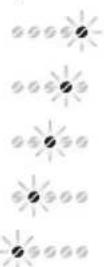
1 x flash corresponds to 1
1 x flash corresponds to 10
1 x flash corresponds to 100
1 x flash corresponds to 1,000
1 x flash corresponds to 10,000
The flashing sequence is continuously repeated, as long as the "OK" key is pressed. A pause of 3 seconds is made before each repetition.
Count the number of individual flashes by each indicator.
Example: The following flashing sequence corresponds to the number 1,529.
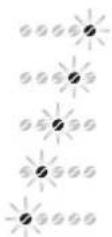
9 x flashes
2 x flashes
5 x flashes
1 x flash
0 x flash
To exit this mode, press the "P" key (Fig. 4) for at least 6 seconds.
18 Technical Data
Mains voltage: 220-240 V
Power consumption: 1350 W
CE This coffee machine complies with the following EU Directives:
- 73/23/EEC of 19.2.1973 "Low Voltage Directive", including Amendment Directive 93/68/EEC.
- 89/336/EEC of 3.5.1989 "EMC Directive", including Amendment Directive 92/31/EEC.
19 Disposal
Packaging material
The packaging materials are environmentally friendly and can be recycled. The plastic components are identified by markings, e.g. >PE<, >PS<, etc. Please dispose of the packaging materials in the appropriate container at the community waste disposal facilities.
Old appliance

The symbol / on the product or on its packaging indicates that this product may not be treated as household waste. Instead it shall be handed over to the applicable collection point for the recycling of electrical and electronic equipment. By ensuring this product is disposed of correctly, you will help prevent potential negative consequences for the environment and human health, which could otherwise be caused by inappropriate waste handling of this product. For more detailed information about recycling of this product, please contact your local city office, your household waste disposal service or the shop where you purchased the product.
20 If service is needed
If repairs should become necessary, including replacement of the mains cable, please telephone in the first instance our AEG-Electrolux Service Line.
AEG
Electrolux
For Germany : 01801 - 20 30 60*
(*Local tariff on Deutsche Telekom's landline network) Monday to Friday 8.00 am - 6.00 pm
For Austria:
For Repairs service: 0810-955 400 *
For Product service: 0810-955 200*
*From TELEKOM AUSTRIA's landline network 0.10 Euro/min.
Original packaging, including expanded foam parts, must be retained.
To avoid damage in transport, the appliance must be packed securely. When sending the appliance in, always add the jug. This is needed to test the appliance.
The warranty period runs for 2 years from the date of purchase. The warranty period is limited to 6 months if the appliance is used commercially. More than 3,000 brewing cycles per year is understood as commercial use.
u Symbole "Attention"
v Symbole "Eau chaude"
w Symbole "Vapeur"

x Symbole "Préparation 2 tasses"
y Symbole "Préparation 1 tasse"
The image contains no text or mathematical content.
natural_image
Pure geometric diagram with intersecting lines and circles, no text or symbols present2 Café e café expresso
h Knapp "Till/Från" ①
u Symbol "Observera"
The image contains no text or characters.
Kovuusaste 3

The image contains no text.

Kovuusaste 4
The image is too blurry to recognize any text content.
Stopień twardości 4
PL
© Copyright by Electrolux
822 949 351 - 01 - 0307


natural_image
Pure geometric diagram with intersecting lines and circular shapes (no text or symbols)
- Contents
- GB
- Figure captions
- Front view (Fig. 1)
- Front view with open service door (Fig. 2)
- Control panel (Fig. 3)
- Coffee and espresso
- Safety Information
- General safety
- Child safety
- Safety in operation
- Safety in cleaning and care
- Special mode
- Before using for the first time
- Setting up and connecting the coffee machine
- Filling with water
- Filling the coffee bean container
- Switching on for the first time
- Switching on the machine
- Switching off the machine
- Setting the water hardness
- Determining water hardness
- Setting and saving the water hardness level
- Making coffee with beans
- Tips for making hotter coffee
- Making several cups of coffee with the jug function
- Using pre-ground coffee
- Frothing milk
- Cleaning the steam nozzle
- Preparing hot water
- Setting the grinding texture
- Setting the coffee temperature
- Cleaning and Care
- Regular cleaning
- Emptying the waste coffee container
- Cleaning the grinder
- Cleaning the brewing unit
- Running the descaling program
- Ordering Accessories
- What to do if you see the following symbols on the display ...
- The symbol H is on steady
- The symbol is flashing
- The symbols or and are flashing
- All coffee strength symbols
- and are flashing
- The symbol 📄 is on steady
- The symbol ☐ is on steady
- The symbol ∆is flashing
- The symbol is on steady
- The symbols and are flashing
- The symbols 1 and 2 are flashing
- Problems that can be resolved before calling the Customer Service Centre
- The coffee is not hot
- The coffee is not creamy enough
- The coffee runs out too slowly
- The coffee runs out too quickly
- The coffee flows out of only one of the dispensers
- When the knob for steam and hot water is turned, no steam comes out of the steam nozzle
- When the or function is selected, the appliance does not deliver coffee, but only water
- When the button is pressed, the appliance does not switch on
- The brewing unit cannot be removed for cleaning
- The coffee does not run out from the dispenser outlets, but from around the sides of the service door
- Ground coffee was used (not beans) and the appliance does not deliver any coffee
- What to do if the coffee machine has to be transported
- Statistic mode
- Technical Data
- Disposal
- If service is needed
- AEG
- Electrolux
- For Austria:
- Café e café expresso
- PL
Brand : AEG-ELECTROLUX
Model : CG 6200
Category : Coffee machine