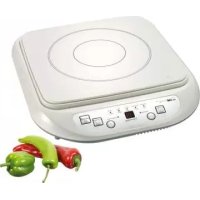
EKI 3092 - Cooker CLATRONIC - Free user manual and instructions
Find the device manual for free EKI 3092 CLATRONIC in PDF.



User questions about EKI 3092 CLATRONIC
0 question about this device. Answer the ones you know or ask your own.
Ask a new question about this device
Download the instructions for your Cooker in PDF format for free! Find your manual EKI 3092 - CLATRONIC and take your electronic device back in hand. On this page are published all the documents necessary for the use of your device. EKI 3092 by CLATRONIC.
USER MANUAL EKI 3092 CLATRONIC
ca. 70^ ca. 100^ ca. 140^ ca. 200^ ca. 240^

1

2

3

4

5
piccola potenza
elevata potenza
General Safety Instructions
Read the operating instructions carefully before putting the appliance into operation and keep the instructions including the warranty, the receipt and, if possible, the box with the internal packing. If you give this device to other people, please also pass on the operating instructions.
- The appliance is designed exclusively for private use and for the envisaged purpose. This appliance is not fit for commercial use. Do not use it outdoors (except if it is designed to be used outdoors). Keep it away from sources of heat, direct sunlight, humidity (never dip it into any liquid) and sharp edges. Do not use the appliance with wet hands. If the appliance is humid or wet, unplug it immediately.
- When cleaning or putting it away, switch off the appliance and always pull out the plug from the socket (pull on the plug, not the cable) if the appliance is not being used and remove the attached accessories.
- Do not operate the machine without supervision. If you should leave the workplace, always switch the machine off or remove the plug from the socket (pull the plug itself, not the lead).
- Check the appliance and the cable for damage on a regular basis. Do not use the appliance if it is damaged.
- Do not try to repair the appliance on your own. Always contact an authorized technician. To avoid the exposure to danger, always have a faulty cable be replaced only by the manufacturer, by our customer service or by a qualified person and with a cable of the same type.
- Use only original spare parts.
- Pay careful attention to the following "Special Safety Instructions".
Children
- In order to ensure your children's safety, please keep all packaging (plastic bags, boxes, polystyrene etc.) out of their reach. Caution! Do not allow small children to play with the foil as there is a danger of suffocation!
- To protect children from the dangers posed by electrical appliances, make sure that the cable is hanging low and that children do not have access to the appliance.
Special safety instructions
- Place the appliance on an even, moisture and heat-resistant surface. Use a heatresistant plate when placing on sensitive surfaces.
- Do not move the device when it is in operation.
- Only touch the machine by using the handles and buttons provided.
- Due to the rising heat and vapours the device should not be operated under wall cupboards.
- Keep the unit at a safe distance from easily infl ammable objects such as furniture, curtains, etc. (30cm). Under no circumstances should the device be installed in cupboards.
- In order to ensure your children's safety, please keep all packaging (plastic bags, boxes, polystyrene etc.) out of their reach.
- Do not heat empty pots on the cooking zone as this may lead to dangerous overheating.
- Ventilation: Always keep the ventilation slots free from any obstructions and dirt.
-
Attention ceramic surface! If the surface is damaged or has cracks the device must be switched off to avoid the hazard of electrical shocks.
-
Attention - induction heat! Metal objects as, e.g., knives, forks, spoons and pot lids should not be placed on the cooking zone as they may get hot.
- Attention - hot surface! The induction cooker initially heats only the base of the cooking utensils used, not the cooking zone itself. However, because of the heat radiated during cooking, dangerously high temperatures may also occur at the cooking zone after the cooking cycle. Hazard of burns!
- Warning: potential damage to your health! People wearing pacemakers must not use this cooker.
Control panel
1 Operating mode indicator 6 Display
2 ON/OFF button 7 pilot lamp of the performance function
3 FUNCTION button (cooking functions) 8 - push button (temperature/performance lower)
4 + push button (temperature/ 9 TIMER key (set the time)
performance higher) 10 temperature-/performance indicator
5 pilot lamp of the temperature function
General information
Cooking with induction technology
When cooking with induction technology, heat is only generated by means of magnetic power, if a pot or pan with a magnetisable base is placed on a switched-on cooking zone. The induction cooker heats only the base of the cooking utensils used, not the cooking zone itself. Under the glass-ceramics surface, the induction coil is located. If the coil is supplied with electrical power a magnetic field develops generating whirls in the pot's base. This results in the heating of the base material. The induction process saves energy as heat is solely produced where it is needed.
What cooking utensils may I use?
Induction cookers require pots, i.e., pot bases made of magnetisable material. Today, cooking utensils appropriate for induction cooking usually bear a note saying 'Suitable for induction hob' or similar.
But principally you may use any iron-based cooking utensils; to find out whether a pot or pan is suitable, i.e., magnetisable just try the following:
Put the respective pot on the hob. If you hear an alarm sound after selecting the cooking function and switching the device on, the pot is not suitable.

For reasons of safety, the device automatically switches to the standby mode after a few seconds.
Cooking utensils made of the following materials are not suitable for induction hobs: Clay, glass or aluminium.
Do not use the following types of pots:
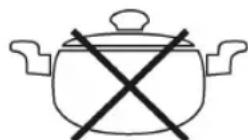
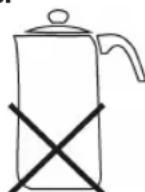

Pots with bended Pots with a base diameter Pots standing (convex/parabolic) bases. of less than 12cm on feet.
GB
GB
Mains supply
Connected load/wattage
The hob can take up an overall load of 1,800W. Because of this high connected load it is recommended to use a separate connection protected over a 16A safety switch.
Pay attention to overloads! Do not use extension cables or multiple sockets as the power consumption of this device is too high for these.
Connection
- Before inserting the mains plug into the socket check whether the voltage which you intend to use corresponds to that of the machine. Please see the label on the machine for details.
- Only connect the machine to a correctly installed safety socket, 230V / 50Hz
Operating instructions
Explanation of the symbols
low temperature high temperature
for about 70^ for about 100^ for about 140^ for about 200^ for about 240^

1

2

3

4

5
low performance
high performance
Depending on the quantity of the food to be cooked, the kind of the pot, and the cooking time the temperature can deviate from the indicated values.
Initial operation
- Standby mode: After you have connected the device's plug to the mains supply, the hub is in standby mode. The operating mode indication (1) flashes.
- Put a suitable pot on the cooking zone.
- Push the ON/OFF button (2) to start the cooking process. The operating mode indication (1) lights up and continuously remains lit-up.
- Use the FUNCTION button (3) to select the desired cooking function.
Cooking function
Push the FUNCTION button (3) repeatedly to select one of the cooking functions available.
The indicator lamp for the respective cooking function will light up.
a) Performance-controlled cooking
GB
- The food to be cooked is continuously simmering on the power setting which has been selected by you. After the cooking zone has been switched on the selected power setting can be changed at any time with the keys (4/8).
b) Temperature-controlled cooking
- The food to be cooked will be heated up to the temperature selected by you and kept warm on this temperature by automatic regulation.
After the cooking zone has been switched on the pre-selected temperature can be changed at any time with the keys (4/8).
In case of temperatures up to 200^ this function is suitable also for frying.
Please do use only highly heat-resistant fat!
Enter stop time: All cooking functions may be assigned a time limit.
- Press the ON/OFF key (2) and select any desired function.
- Push the TIMER button (9) repeatedly to set a stop time between 1 and 99 minutes.
- After the set time has been counted down, the hob is automatically switched off.
The end of the cooking time is indicated by a sound occurring during the last minute.
Further notes
Delete the time: Should you want to delete the preset time, press the key TIMER (9) until the display shows the "0".
Switching off
- Push the ON/OFF button (2).
- The hob changes back to the standby mode from whatever operating mode. The operating mode indication (1) flashes.
- Pull the plug.
- Let the device cool down, before you put it away.
The device has a pot recognition function. After the pot has been taken from the hob, it switches back to the standby mode.
In this context, please pay attention to the following:
Attention: After use, the hob must be switched off using the provided controls - not over its automatic pot recognition function only!
Hazard of burns! Because of the heat radiated during cooking, dangerously high temperatures may occur at the cooking zone after the cooking cycle.
Cleaning
Always pull out the plug from the mains socket before cleaning and wait until the unit has cooled down.
Do not use any wire brush or other abrasive objects.
Do not use any acidic or abrasive detergents.
Under no circumstances should the device be immersed in water for cleaning.
GB
Ceramic Hob
- Clean the surface from food remains when it's still warm using a moist cloth or tissue.
- Wash the hob using a soft sponge and some water, then wipe dry with a soft cloth.
- Cleaning agent for glass-ceramics surfaces: In case of stubborn, baked-in remains, use suitable cleaning products available at special departments of department stores.
Housing
- Clean the housing after use using a slightly moist cloth.
- Make sure that no fluid matter gets into any of the openings of the housing. This might damage the device or result in an electric shock.
Troubleshooting
Device does not function, no indication on the display.
Remedy: Check the mains connection.
- There is a sound after I have selected a cooking function and switched the device on.
Possible cause: You put no or an unsuitable pot on the hob.

For reasons of safety, the device automatically switches to the standby mode after a few seconds.
Remedy: Put a pot on the hob that is suitable for induction hobs.
- The hob suddenly switches off during operation.
Possible cause: The overheating protection (cutout switch) has been activated.
Remedy: Pull the plug and let the device cool down for about 20 min.
Then start operating the device again.
Further cause: The ventilation slots are obstructed.
Remedy: Free the ventilation slots from any obstructions.
- When keeping food warm the pot is not maintaining the temperature.
Possible cause: The pot's base is not level or bended (convex/concave).
Remedy: Put a suitable pot on the hob.
- Error messages
During the operation the display shows the following security instructions:
Security instruction
E1 o. E2 In this case, there is a problem with the electronic control.
Send the device including a description of the error to our service centre.
E3 o. E4 Overheating. See below remedy of the fault.
E5 Undervoltage. Check the power supply system!
E6 Overvoltage. Check the power supply system!
Technical data
GB
Model: EKI 3092
Power supply: 230V, 50Hz
Power consumption: 1800W
Protection class:
1
This device has been tested according to all relevant current CE guidelines, such as electromagnetic compatibility and low voltage directives, and has been constructed in accordance with the latest safety regulations.
Subject to technical changes without prior notice!
Guarantee
The device supplied by our Company is covered by a 24 month guarantee starting on the date of purchase (receipt).
During the life of the guarantee any fault of the device or its accessories ascribable to material or manufacturing defects will be eliminated free of charge by repairing or, at our discretion, by replacing it. The guarantee services do not entail an extension of the life of the guarantee nor do they give rise to any right to a new guarantee!
Proof of the guarantee is provided by the proof of purchase. Without proof of purchase no free replacement or repair will be carried out.
If you wish to make a claim under the guarantee please return the entire machine in the original packaging to your dealer together with the receipt.
Defects to consumables or parts subject to wearing as well as cleaning, maintenance or the replacement of said parts are not covered by the guarantee and hence are to be paid!
The guarantee lapses in case of unauthorized tampering.
After the expiry of the guarantee
After the expiry of the guarantee repairs can be carried by the competent dealer or repair service against the payment of the ensuing costs.
Meaning of the "Dustbin" Symbol
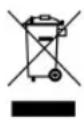
Protect our environment: do not dispose of electrical equipment in the domestic waste. Please return any electrical equipment that you will no longer use to the collection points provided for their disposal.
This helps avoid the potential effects of incorrect disposal on the environment and human health.
This will contribute to the recycling and other forms of reutilisation of electrical and electronic equipment.
Information concerning where the equipment can be disposed of can be obtained from your local authority.
N
Generelle sikkerhetsanvisninger
Les nuye gjennom braksanvisingen for du tar apparatet i bruk. Ta godt vare pa bruksanvis- ningen, garantibeviset, kassalappen og helst ogsa esken med innvendig emballasje. Gis apparatet videre til en tredjeperson, ma bruksanvisingen ogsa folge med.
ca. 70^ ca. 100^ ca. 140^ ca. 200^ ca. 240^

1

2

3

4

5
litten effekt
hoy effekt

Fare for forbrenning!
PnroTOBJeHHe NmC nOMoCbIO HNyKcH
При пriготовени рицс сnomоью Индукшten TeNIO CO3daeTcC nOMOьMu MarHHTOH Cnbl TOIbKO B TOM clyuae, ecIn KAcTpoJЯ NII CKOBOpOA c HAmaHnUHBAIOUeYc HIXKHei NOBepxHOCTbIO CTaBtbcra Ha BKnIOueHHyIO pNITy. Пri n 3Tom HarpeBaETcT OToIbKO HIXKHei NOBepxHOCTb NocdyI, a He cama PNTa. NOD cTeKIOkepAMIKo HaxOJTcR INHyKTOp. Prn CHa6KHeHN INdYKToppa 3NeKTOPO3Heprnei CO3daeTcRA MArHTHoe NOJIe, CO3DAIOUeE MaHHTbIe BOHNH EHN B DHe NocdyI. TAKIM O6pa30M, HIXKHeI NOBepxHOCTb NocdyIHarpeBaETc. TaKo MeToD HARpeBa 3KohOMIT 3HeprIO, TAK KaK TeNIO CO3daeTcNCKIOUHTeJIbHO TaM, rDe OHO HeO6XODIMO.
Kakyo KkyoHHyO NoCydy MoKHO HcNoJIb3OBaTb?
IINyKUOHIOHnIHTbHeO6XoIMMaNocyda,HNKHHaNOBepxHOCTbKOTOpOcTOITn3 MaTePnHa,noJIeJkaUeRoHaMaHnUHBAHnIO.HaHOBo KxOHHO NOCyde YactO yKa3bIbAETcR, nproDHa nOHa IINyKUOHIOIHTbl.
B npHnCne Bbl MoKeTe HcNoIb3ObaT bCIO nocydy, cOepeKaUyIO JKeJe3O, c NOMoCbIO npocToI npOBepKn Bbl CMOKeTe y3HaTb, NOJIeKHT IIN OHA HaMaRnHnBaHnIO:
IocTaBbTe nocydy Ha nnHry. B cnyae ecn noCte TORO, KaK Bbl Bblbpaln yHKunIO npiroTOBHeHHnn HkHn HnHTy, npo3ByuHt akycTneckn CnHAn, To nocyuHa He NOxOHT dNn HHyKunoHHOn IINbI.

IopnHnAm 6e3oNaCHOCTn PJIHTa aBtOMaTHueCKN OTKIIIOyaeTcB peXHM rTOBHOCTN uepe3 HeckOJIbKO cekyHd.
CneIyouune MaTepeHbI He npHroHbI B KaueCTBe nocydu IINr npHroTOBJeHHNn:
TInHa,CTeKIO nn aIOMnHnN.
CneNyouuHe KacTpIOH NcNoIb3OBA Tb HeIb3r:
RUS
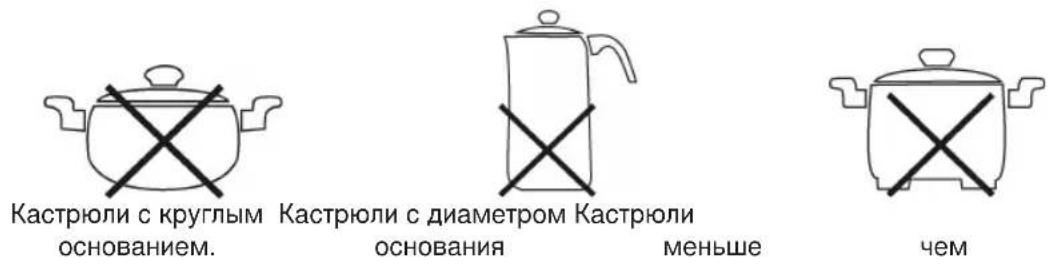
3neKtpnuecKoe noKnIoueHne
BennnHa noDknHoueHn
ПлNTа рассчтаHa Ha MOnHocTb Do 1800B. Пи ТAKОВ ВЕЛЧИЕ ПОДКЛЮЧЕНЯ peKOMeHdYETcH OTДeЛьнБИ ПИТАЮСИmpOBOD CпpeOxpaHITeЛьнOH 3aUHToB B VnDE ДOMaSHHERO abApNHO BbIKNoYatelaHa 16A.
OcToPoxHNo nepErpy3ka! He nCnONb3yIte yDnnHInTeNe Hn MHOrOKpaTHbIX WTeNceJIbHbIX po3eTOK, TAK KaK PnIta 06naAdet CnUkOM 6oBbWOn MOuHbCTbIO.
PoiKJIIOUeHHe
-пелдвклчehнem пибopaВ розупьоевпсоовьтсгпнанржженИСпользуем сети c Hanprжжehmпибopa, Ифорmaць K 3ToMу HaxoДТСЯ Hablчke пибopa.
BKNHouaIte npn6op TOnbko Bpo3kTy C 3aunTHbIMKoHTaKTamN HAnpRKeHNEM 230B,50u, yCTaHOBNEHHyIO B COOTBeTCTBNN C PpeDncaHnARM.
yKa3aHnI NO npIMHeHnIO
06BcHHeCmBOJIOB
Hn3KaTEmnepaTypa BbICOKaTEmnpaTypa
okono 70^ okono 100^ okono 140^
OKOJIO 200^
OKOJIO 240^

1

2

3

4

5
MaJIeHbKaI MOUHOCTb
60nbwa MOnHocTb

B 3aBnCmOCTn OT KOJIueCTBa npOdykTa, TUNa KAcTpPOJN IN BpeMeHn PpIroTOBJIeHn 3HaYeHn TEMnepaTpybI MOrY OTNIuHaTbcr OYka3aHHbIX.
BBeHeHnE B3KcnIyatauHO
- PeKHM rOTOBHOCTH: Pocne BkIIOHeHH B po3ETky IINHaTaNHOAnITcB peKHMrTOBHOCTN. HaynHaet MIRaTB INdNKaTOP pa6Oyero peKHMa (1).
- NocTaBbTe Ha nnHTy noDxOaHuyo nocyu.
RUS
- Yto6bHaayatbpocceppnroTOBHeHnN,HaKMITE Ha KhoNky ON/OFF (BKn./BbIK) (2). HndkaTOp pa6oerypeKmMa (1) cBeHTTCr HenpepbIBHO.
- C nOmoIbIO KhoNKn FUNCTION (3) yCTaHOBnTe JKeNaeMyo FyHKnHO.
Функипн рнг�овлесни
b) PnroTOBneHHe NnI npy yCTaHOBneHHo TEMpepaType
-ПигOTOBHЯманпицаHarpeBaetcdo yctaHOBHeHHoTemnepaTypbI,3aTeM 3Ta TemnepaTypaNoIDepKINBaETcC NOMOUsbAOBTOMaTHueCKoPeylnpOBKn.
YctaHOBJIeHHyO 3apaHee TeMnepaTyPOXHO H3MeHHTb B JIO6oIMOMeHT IocNe BKJIIOUeHnA C NOMOUsbKO KHONOK (4/8).
Pn TemnepaType 200°C 3ta fynkunra TaK Jne noDxOanT n dJ KApKn Bo pntHope.
CneDyET NcNoB30BaTb NCKHIOHTeNbHO MacNo, NOxOJaee Ira BBICOKX TEMpeaTyp!
3aataBbpeMa BbIKIOueHn: Bce yHKun npiroTOBHeHn Nius MOryT 6bIb OrpaHueHb BO BpeMeHn.
- HaKMTe Ha KONky BKNIOUeHn/ByIKNIOUeHn (2) n BbIepeNTe JeJaemyo fHyHKUNIO.
3aTeM HeckoIbko pa3 HaKMMte Ha KONky TIMER (9), yTo6bl yCTaHOBHTb BpeM BbIKIOueHMeJy 1 n 99 MInHyTaMn. IIO nCTeueHm yCTaHOBHeHHOro BpeMeH nJIHTa ABtOMaTHueCKNOTKIOUaETcR.
OkoHuaHHe npnroTOBneHn nnu COo6uaeTcB nocJeHHIO MmHyTu C nOMoubAoKyCTnueCKOro cnHaHa.
DOnonHnTeBhBieYka3aHH

CTepb Bpem: ITOI TORO, UTOBc CTepb yCTaHOBJIeHHOE BpeM HaKIMaTe Ha KHOKNY TIMER (9) Do tex nop, noka ha dinCnnee He noBntc 0
BbIKHIOuHTb
- HaxMMTe Ha KhoNkY ON/OFF (BKn./BbIKn) (2).
- I3 lioboro pejKIma pa60TbI pInTa nepeKInOuaeTcB peJIM rOTOBHocTn. HauHaet MmraTb Hndkatop pa6oeryo pejKIma (1).
- 3aTeM BbIKHouHte NnHTy H3 CeTn.
- Npeed Tem kak y6paTb nHTy, cne dyet daTb eH octbItb.
PnIa o6naaet yHKnei paCno3HaHn HaJIuNy KxOHHo nocdybl. NocJe TOrO, KaK nocya cHTa C nIbI, PnIa nepeKIOUaeTcB peKIM rTOBHOCTN.
PnIMnTe BO BHNMaHHe cneDyUOuNe yKa3aHHr:
OcToPOxHNo: Pocne nolb3OBaHH Heo6XoIMo BblKnIOUHTb IINrty NocpeIcTBOM ycTpoIcTba peryIInpOBKN uypabJeHHa, a He c NOMOJIbIO fYHKcNn paCno3HaHH HauuHnIPOcydbl.
Bepertecb oxorob! Nocne npouceca npiroTOBHeH NnIe nIITa MOKeT HarpeTcRdo OnachOH TeMnepaTypb BCJeDCTBHe N3JyuaEMOro Tennla.
yxo3a yctpoiCTBOM
Ipeed uNCTKO BcERda BbIHMaHTe BNkU n3 po3eTKn HJNTe NOKa np6Op octbHET.
He npimehnTe npoBOIoUHbIe TeKn NIn PpeMeTb C a6pa3HBHbIM NOKpbITHeM.
He npimehnTe cnIbHbIe nIa6pa3nBbIe MOIOUne cpeDCTBa.
HnBkoem cnyuae He norpykaTe 3neKtpnpnbOp B Body.
KepamnueckKa KOHΦopKa
- OctaTKn eBb cIeJyET y6npaTb eIe B TeIJIOM COCTOHN C NOMOUIBIO BIAKHO TpRINN INN 6ymaxHNO canfetKoN.
- CMoTe PnHTy MArKO MoaAko C He6OJIbUIM KOJInueCTBOM BOI IN OCHOBaTeIbHO npOTpnte ee Hacyxo MArKO TpAnKO.
Mooune cpeCTBa IJI NOBepxHocTe H3 CTeknOkepaMKn: B cnuyae npriopeBuxN OCTaTKOB eIb CJeIyET NCNoIb3OBaTb IpOdyKtbl, PpeIlaRaembIe CneuaJIbHbIMN OTdeJaMIMaR a3INHOB.
Kopnyc
- После польбовань поотрпет Корпс сігка Влжно Трпков.
CneIte 3a Tem, yTo6bI B0da He nnona B OTBepCTn KOpnyca. To MoKet npNBecTn K NOBpeKDeHnIO nnTb IIN K 3JeKtpnueckOMy ydApy.
YcTpaHHe HEnCnpaBHOCTeI
-Πητa He pa6oTaet,HaДиCπIee Het nOKa3aHn.
Cnococ yctpaHnHa: PpOBepbTe nOdknIOueHne K cetn.
- Pocne TORO, KaK FyHKnI npHroTOBHeH NnCn BbI6paHa n nnTa BkNIOyeHa, 3ByuHT akyCTnueckn cnHaJ.
Bo3MOxHa npuHa: He noCTaBnHe nocya, nn nocya He noXoNT IJI nnIb.I3 coo6paKeHn 6e3OnacHoCTn nnTa nepeKIOUaetcB peKIM roTOBHOCTn Upe3 HeCKOJIbKO ceyHd.
Cnocob yctpaHnra: IocTaBbTe nocydy, npriOndHyIO dIa INHyKUHOHNOHnnTbI.
- Bo Bpempa60tbi nHtape3Ko OTKJIIOyaeTc.
Bo3MoJHHa npuHnHa: Cpa6oTana 3auNTa ot nepepeBa.
Cnococ yctpaHHeN: BbKJIIOHTe NITy n3 cETn I daTte en OCTbTB TeueHne 20 MInHyT. 3aTeM CHOBA BKJIIOHTe NITy.
Дугаяnpиуна:BeHTINRAUOHHbIeOTBepCTH3aKpbTbI.
Cnoc6 ycpaHnHa: OcbOoDHTe BEHTINRAUHOHHbIe OTBepCTHr OT NIOCTOPOHHHx IpeMeTOB.
- Pn noDaepeHann B ropaem COCTOHN TemepaTypa KactpoHn He coXpaHReTcA.
Bo3MoXnHa npuHnHa: HxNnHnOBepxHOCTb nocyduI hepoBHa nn n3OrHyTa.
Cnocob yctpaHnHa: NocTaBbTe noDxOaIyUo nocdy.
RUS
- CnHraJ O HeNCpBaBHocTAX
Bo Bpempaobtiha dncnnee noBraHOTc CneDyUOune coo6eHHN:
Coo6eHne
E1 nIe E2 B 3TOM cIyuae Imeetc npo6nema c 3JIeKToPOnHbIM ynpaBneHneM.
PoiJIInTe PnIITy C onHcAHHem npo6JIeMbI B haW cepBnCbI ueHTp.
E3 nE4 NpepebaHne. Cm. daJeB pa3ene YcTpaHeHne HeNCnpaBHOCTe.
E5 NOnHHKeHHoe HAnpXKeHne. POpBepbTe 3JNeKtpocetb!
E6 NobuweHHoe HnpanjKeHne. PpoBepbTe 3neKtpocetb!
TexHnueckne daHHbIe
Mодель: EKI 3092
JIeKTpOpaHne: 230B,50u
Iotpe6nemarMoHoctb:1800B
Klaacc 3aunTbI: II
To n3eHne npoNo BCE Heo6xOaHMBie n akTyalbHbIe npOBepKn, npeDncaHHbIe DnpeKTHBOI CE, K npm. Ha 3JeKtpomarHHTHyO COBMeCTHMOCt b N COOTBeTCTBHe Tpe6oBaHnA M K Hn3KOBoJbTHOH TEXHKe, OHO 6blIO TaKke CkOHCTpyuPoBAHO I NOCTpoeHO C yYeTOM NocJeDHnx Tpe6oBaHn IO TEXHKe 6e3OnaCHOCTN.
Mbl octabnem 3a co6oB npaBO Ha TexHnueckne n3MeHeHHI
TapaHTHnHOe 06a3aTeJbCTBO
TapaHTnHbI cpoK Ha TeppntOpHH PoCCnCKo Fedepaun yCTaHaBnBaETcnoHOMOHyIMn npedCTaBNTeJIAMN.
Kaccobbuek aBnAeTcra rapaHTnHbIM TaIOHom. Be3 Hero HeBO3MOKeH 6ecnlaTHbI peMOHT nnn 3aMeHa N3deNIA.
B cnuyae Bo3HKnHOBxHn npnteH3n no rapaHTn, npeTbBnTe H3dene B noHOnKOMnKeTaun, C opHnHaBbHou ynaKOBkOu KaccOBbIM YekOM TOpROBO ToUKe, npoDaBwe 3TO H3dJIe.
IepeKtbi H3HaUNBaEMbIX npHnAdJeHHOCTei IIN TpyuNXcR DeTanei, a TaKHe YnCTka, Texo6cnyKunBaHne IIN 3aMeHa TpyuNXcR DeTanei He NOnaAIO TpOraHTnIO, INo3ToMy npOBoJrTc3a OTdeJIbHyO ONLaty!
TapaHTn TepReTc np BCKpbITn n3dennnoctOpOHmNnlaAMn.
Pocne rapaHTn
Iocne OKOHuaHn Cpoka rapaHTnn, peMOHT n3deNn npOn3BOoHTCa 3a ONlaTy, COOTBeTCTByIOUIMM MaTePcKIMn IIN nyHKtAmC cepBnCHOrO o6cnykBaHH.
Evikc unoobxiic aocaaiaac
GR
AiaBaoTe PIV AO TnV PwTn XpOaNc TnC OuaKEuHc POoEeKtIKa Tc odnyiecs xphonc KAI OTN OuvExia FuaXeTc IG KAa aI e To dEATIO Eyyunons, Tnv TaueiaKn anoBeiN KAI 0oo To duvato Me To XapToKiBtio KAI Tnv EawTePiKn OuaKEuaOia. EaV mTaBiaOeTe Tn OuaKEUn ae TpIouc, npaabote Touc KAI Tc npauoe c odnyiecs xphonc.
- Na xpnoiuioiei Tn oukeun anokleiotik yia idwiTkiXpOan kai yia touc oKOIOUC, yia Touc onoiouc eivai npoopioevn. H oukeun autn dev ivai kaTALnn yia eTAYeLauTIK XpOan. Mny tn xpnoiuioiei OTO uaiBPO (ekTOC av npoBETAI YIA NEPIOIeVn xpOAn 0To unaiBpo). H oukeun npetv a npoATeUeTAa nto uynec 0epkoepaic, aon akTIVoBoia Tou naiou, uypaia (mny tn baxTe OE KAmuia npiTTwON oe Upy) kai aTO KoFTEPcAkpE. Mny xeipZeTe Tn ouakeun me BpeyEvxepia. Se npiTTwn nou bpaxei n ouakeun, byaTe aeaoc to fic aTO nvi pica.
- Na Kλεινετη Σιοκευμετα από καθεχροη και να βγαζετε παντα Σι φις από Σινη πριζα (vα τραβατε στο φις και ὄχι στο καλωδίο), Σιοθετειτε τα εξαρτήματα για καθαρίσμα και σε περιπτωη βλαβης.
Mny aphiVETn ouakeun vaaetoupyei,otav dveiote kovtα. Koxe opaTou eYkataaleinTe Tn 0e anepyaiaac npentv a klevte n ouakeun n vao yaceTo fic aio Tnv npiz (va Tpalpha tTO foic kai oxi to kaawdoio). - Na λέγχετη Σ Μαύκειν και Σ καλώβοι Σακτικό σχετικό με φθορες. Μη χρησιμοποίειτη Σ αύκειν, ὄταν παρουσιαζει κατοία βλάβη.
Mny eiokeuacetoe o idoc Tn oukeun, aaa nate oe evav eoouiootnevo 6iKO. Ia v aTOoEuyovTai kivduvoi, npTei va povtioeTE OE tepiTTwn BaoNc Tou nAektpkoK Aawoiou yia Tnv avTKATAOtaon tou eVxA KAtAAanAo KaivoupyIO KAawOio aTo Tov KAATAKEuaOtn, To ePbIC Tnc Etaipiac m c n ano aa lo avtioixa E6eiikkeuveo atopo. - Na xρησιμοποειτε απολειστικα αυθεντικα Αξεσουαρ.
- Naλαβετε επiαςινόγητις παρακατω "Eidikeς Αποδείεις αφαλείας".
παδια
AiaTnpoue To 6ikaiomega TExvikov aalayaw!
Eyyunon
TnV KAtaekuaouevn aO uacuokun avakauabavoue yyyunon diapkiaac 24 nVwv ano Tnv nepounvi aanans n (taeiaikn anodxi).
EvtoTnpiOeouiaeyyunoc aIOKaiotoue wpeov oioaHnotE aattwau ta Tc oukeun c n Tou aeeouap, ta oioia ophiavtoa e ofoaua uikou n katokeunc, e Etniokeu n, kata T dkiuac pion, e avtikataoan. npoxec yyyunoc dev npateivouv tnV pOeouia eyyunoc, oute unapxdiikaiomega vac yyunoc!
iKaiioaoyntiko eyyunanoc ixuei n anoEiogyopac. Xwpic auto to ikaiooyntiko dev mnpei vayive kauia opeav aTikataoan no wpeav tiokeun.