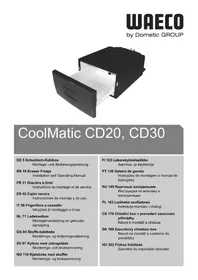
CoolMatic CD 20 - Refrigerator WAECO - Free user manual and instructions
Find the device manual for free CoolMatic CD 20 WAECO in PDF.



| Product type | Drawer refrigerator (mobile cooler) |
| Brand | WAECO |
| Model | CoolMatic CD 20 |
| Useful capacity | 20 liters |
| Interior temperature range | 0 °C to +15 °C |
| Connection voltage | 12 V / 24 V (DC) |
| Nominal current | 3 A (12 V) / 1.5 A (24 V) |
| Battery protection | Shutdown at 10.4 V (12 V) / 22.8 V (24 V), restart at 11.7 V / 24.2 V |
| Refrigeration type | Compressor |
| Defrost | Manual |
| Climate class | N |
| Permissible ambient temperature | +16 °C to +32 °C |
| Maximum air humidity | 90% |
| Maximum continuous tilt angle | 30° |
| Weight | 16.1 kg |
| Recommended use | Mobile: car, boat, caravan |
| Cleaning | Damp cloth, do not immerse, clean the condenser regularly |
| Warranty | Legal (duration not specified) |
| Repairability | Repairs by qualified personnel only |
Frequently Asked Questions - CoolMatic CD 20 WAECO
User questions about CoolMatic CD 20 WAECO
0 question about this device. Answer the ones you know or ask your own.
Ask a new question about this device
Download the instructions for your Refrigerator in PDF format for free! Find your manual CoolMatic CD 20 - WAECO and take your electronic device back in hand. On this page are published all the documents necessary for the use of your device. CoolMatic CD 20 by WAECO.
USER MANUAL CoolMatic CD 20 WAECO
natural_image
Black plastic refrigerator with open lid, showing internal storage space (no text or symbols)CoolMatic CD20, CD30
Installation and Operating Manual
4
5
Please read this operating manual carefully before starting the device. Keep it in a safe place for future reference. If the device is passed on to another person, this operating manual must be handed over to the user along with it.
The manufacturer cannot be held liable for damage resulting from improper usage or incorrect operation.
Contents
1 Explanation of symbols 18
2 Safety instructions .... 19
3 Scope of delivery 21
4 Proper use 22
5 Technical description 22
6 Installation 23
7 Operation 24
8 Cleaning and care 26
9 Warranty 27
10 Disposal 27
11 Troubleshooting 28
12 Technical data .... 30
1 Explanation of symbols

DANGER!
Safety instruction: Failure to observe this instruction will cause fatal or serious injury.

WARNING!
Safety instruction: Failure to observe this instruction can cause fatal or serious injury.

CAUTION!
Safety instruction: Failure to observe this instruction can lead to injury.

NOTICE!
Failure to observe this instruction can cause material damage and impair the function of the product.

NOTE
Supplementary information for operating the product.
▶ Action: This symbol indicates that action is required on your part. The required action is described step-by-step.
√This symbol describes the result of an action.
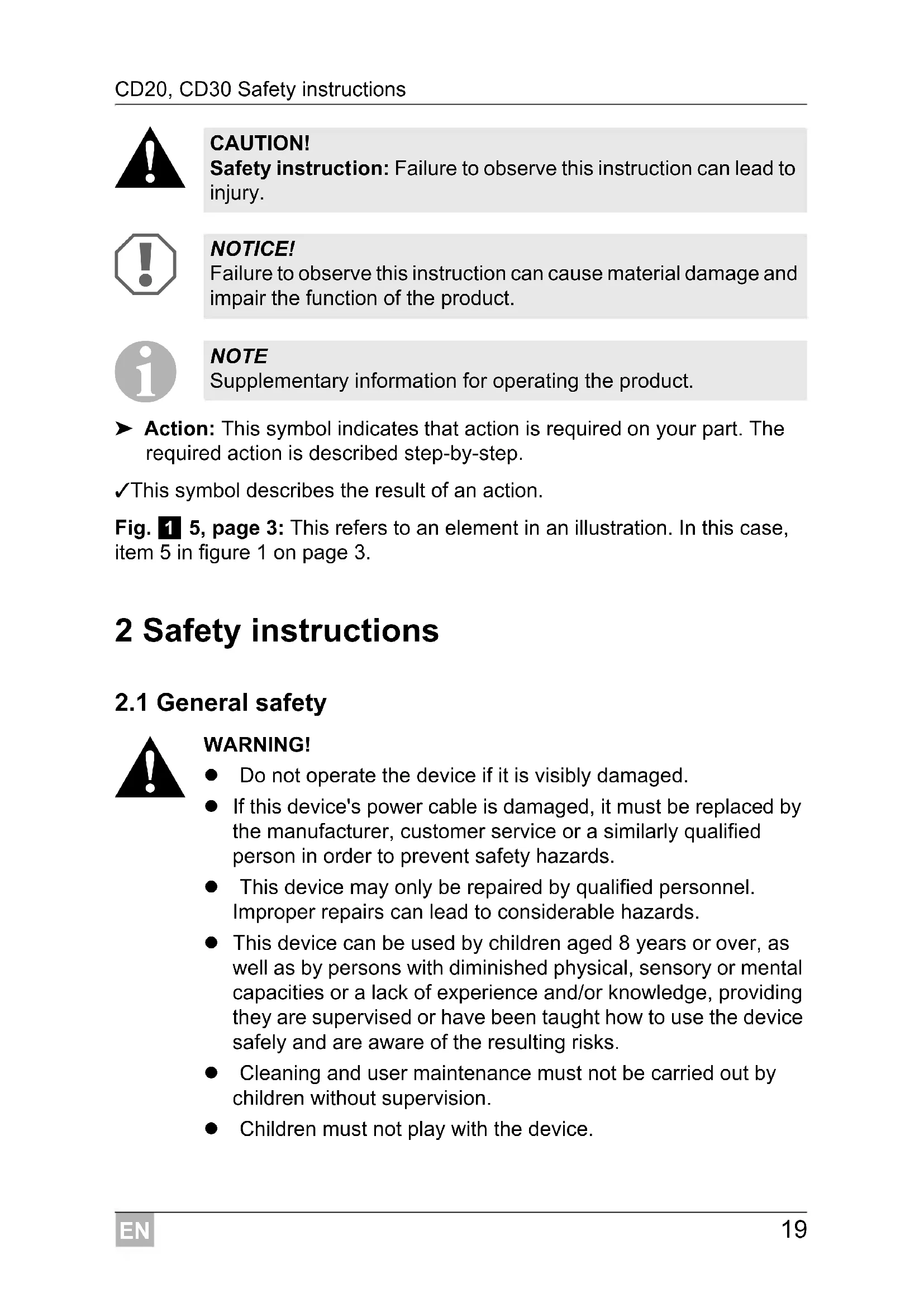
Fig. 1 5, page 3: This refers to an element in an illustration. In this case, item 5 in figure 1 on page 3.
2 Safety instructions
2.1 General safety

WARNING!
- Do not operate the device if it is visibly damaged.
- If this device's power cable is damaged, it must be replaced by the manufacturer, customer service or a similarly qualified person in order to prevent safety hazards.
- This device may only be repaired by qualified personnel. Improper repairs can lead to considerable hazards.
- This device can be used by children aged 8 years or over, as well as by persons with diminished physical, sensory or mental capacities or a lack of experience and/or knowledge, providing they are supervised or have been taught how to use the device safely and are aware of the resulting risks.
- Cleaning and user maintenance must not be carried out by children without supervision.
● Children must not play with the device.
● Children must be supervised to ensure that they do not play with the device.
● Always keep and use the device out of the reach of children under the age of 8 years.
- Do not store any explosive substances such as spray cans with a flammable propellant in the device.

CAUTION!
- Disconnect the device from the mains – before each cleaning and maintenance – after every use
- Food may only be stored in its original packaging or in suitable containers.

NOTICE!
- Check that the voltage specification on the type plate corresponds to that of the energy supply.
- Only connect the device to a DC plug socket in the vehicle (e. g. cigarette lighter) with the DC cable.
● Never pull the plug out of the socket by the cable. - Disconnect the cooler and other power consuming devices from the battery before connecting the quick charging device.
- Disconnect the cooler or switch it off when you turn off the engine. Otherwise you may discharge the battery.
- The cooling device is not suitable for transporting caustic materials or materials containing solvents.
2.2 Operating the device safely

DANGER!
- Do not touch exposed cables with your bare hands.

CAUTION!
- Before starting the device, ensure that the power supply line and the plug are dry.

NOTICE!
- Do not use electrical devices inside the cooler unless they are recommended by the manufacturer for the purpose.
- Do not place the device near naked flames or other heat sources (heaters, direct sunlight, gas ovens etc.).
● Danger of overheating!
Ensure at all times that there is sufficient ventilation so that the heat that arises during operation does not build up. Make sure that the device is sufficiently far away from walls and other objects so that the air can circulate.
● Ensure that the ventilation openings are not covered.
- Do not fill the inner container with ice or fluid.
● Never immerse the device in water.
● Protect the device and the cable against heat and moisture.
- For HGV operation:
Empty the coolbox and switch the device off (see chapter "Switching off the coolbox" on page 25), before the driver's cabin is tipped up.
3 Scope of delivery
Quantity Description
1 Drawer coolbox
4 Mounting bracket
1 Operating instructions
4 Proper use
The drawer coolers CD20 and CD30 are suitable for use in HGVs, boats or caravans and has been designed for a maximum permanent inclination of 30^ .
An optimum cooling capacity is guaranteed at ambient temperatures between +16 °C and +32 °C and at a maximum air humidity of 90 %.

NOTE
Before exposing the cooling device to extreme conditions, please contact the manufacturer.

CAUTION! Health hazard!
- Please check if the cooling capacity of the device is suitable for storing the food or medicine you wish to cool.
- Food may only be stored in its original packaging or in suitable containers.
5 Technical description
The cooling devices can cool goods or keep goods cool in a temperature range from 0 °C to +15 °C (CD20) or -2 °C to +12 °C (CD30).
The coolbox is equipped with a battery monitor which switches the compressor off and on again and thereby protects both the battery and compressor against damage. The switch-off and switch-on points measured at the connection terminals of the compressor are listed in the chapter “Technical data” on page 30.
5.1 Control elements
No. in
fig. 3,
page 4
Explanation
1 Thermostat
6 Installation

NOTICE!
- Ensure that the positive cable is connected to the positive terminal and the negative cable to the negative terminal.
- When choosing the installation location, ensure that the air heated by the liquefier can be drawn off.

NOTE
To avoid voltage loss and therefore a drop in performance, the cable route should be kept as short as possible and should not be interrupted if this is possible. For this reason avoid additional switches, plug or power strips.
Please observe the following instructions:
- Determine the necessary cable cross section of the intake line using the diagram below:
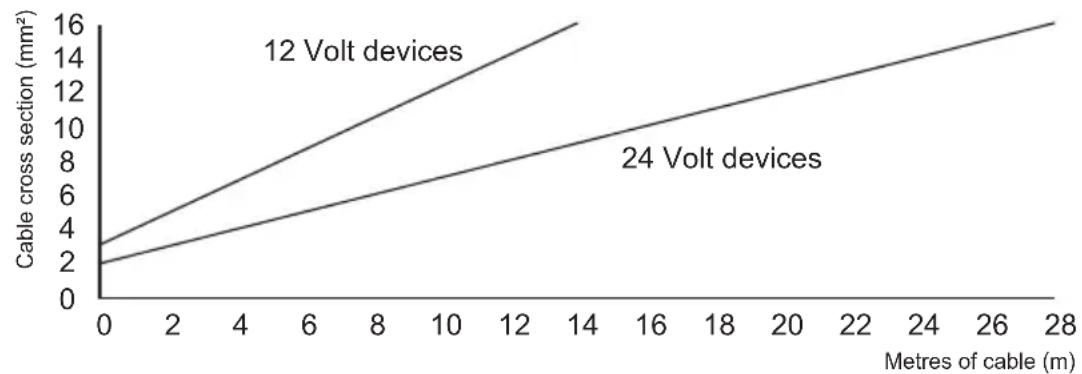
line
| Metres of cable (m) | 12 Volt devices | 24 Volt devices | | ------------------- | --------------- | --------------- | | 0 | 3 | 2 | | 28 | 16 | 16 |- Connect your cooling device as directly as possible to the battery terminal or to an outlet with a fuse of at least 15 A (12 V) or 7.5 A (24 V).
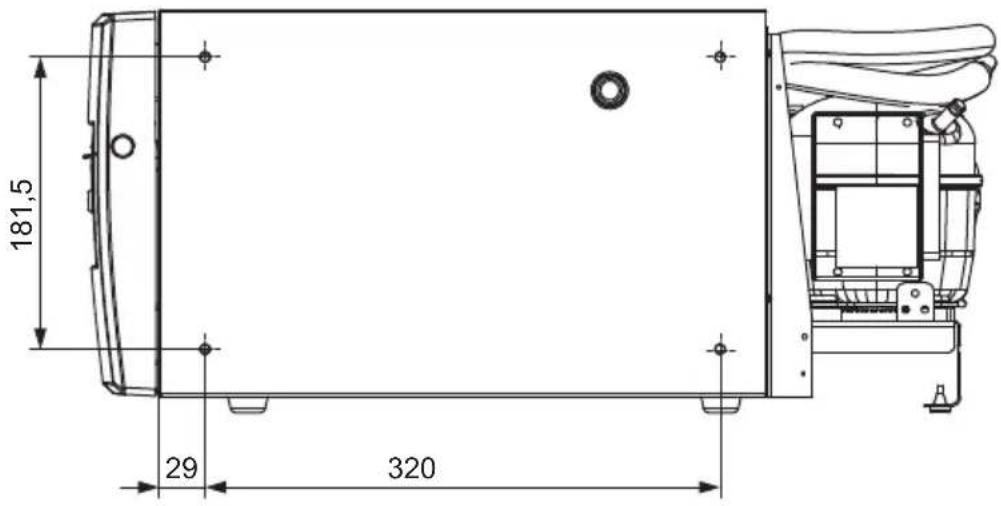
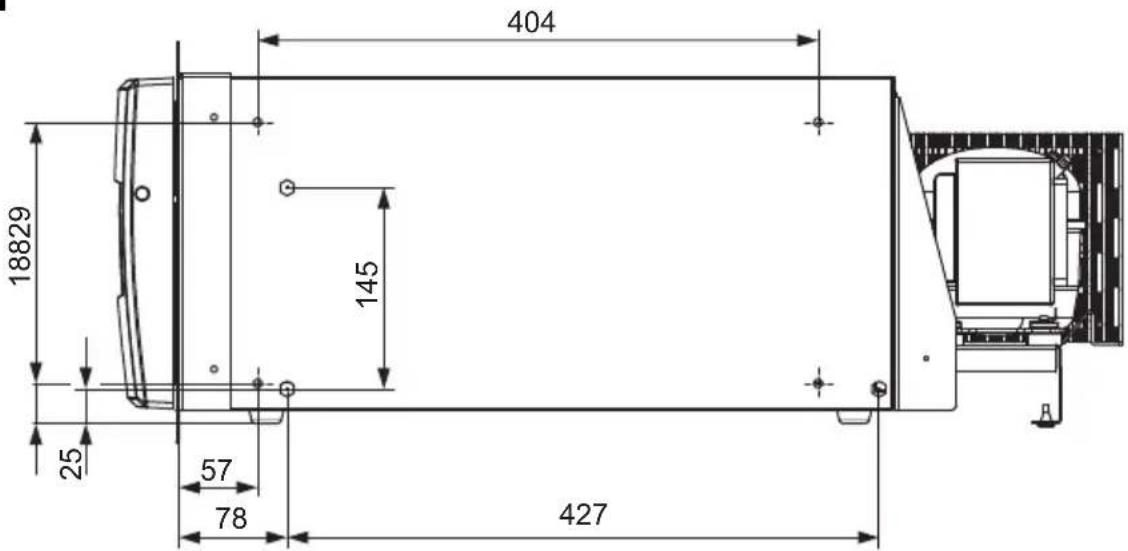
- To screw the device in place use the screwing holes provided on the side of the device (see fig. 4, page 4 and fig. 5, page 4).
- You can detach the compressor from the cooling device and mount it in another place on the cooling device, or separately from it (fig. 2, page 3). Make sure that the refrigerant line is 1.5 m (CD20)/1.5 m (CD30) long.
7 Operation

NOTE
Before starting your new cooling device for the first time, you should clean it inside and outside with a damp cloth for hygienic reasons (please also refer to the chapter “Cleaning and care” on page 26).
7.1 Energy saving tips
- Choose a well ventilated installation location which is protected against direct sunlight.
- Allow warm food to cool down first before placing it in the device to keep cool.
- Do not open the cooling device more often than necessary.
- Do not leave the cooler unit open for longer than necessary.
● Defrost your cooling device as soon as a layer of ice forms. - Avoid unnecessarily low temperatures.
- Clean the condenser of dirt (dust etc.) at regular intervals.
7.2 Switching on the coolbox
▶Open the coolbox drawer.
To switch on the coolbox, turn the thermostat knob clockwise (see fig. 3 1, page 4).
√The coolbox starts cooling the interior.

NOTE
Ensure that the objects placed in the coolbox are suitable for cooling/warming to the selected temperature.
7.3 Selecting the temperature
The switch on the thermostat (see fig. 3 1, page 4) displays the selected temperature.
| Switch position | Temperature range (dependent of ambient temperature) |
| CD20 CD30 |
MAX approx. 0 °C in interior approx. -2 °C in interior
MIN approx. +15 °C in interior approx. +12 °C in interior
If you wish to set the temperature to cooling, turn the thermostat knob (see fig. 3 1, page 4), to the desired temperature range.
7.4 Switching off the coolbox

NOTE
If you wish to leave the cooling device switched off for a longer period, clean it and leave the drawer slightly open. This will prevent unpleasant odours from forming.
▶Open the coolbox drawer.
To switch off the coolbox, turn the thermostat knob (see fig. 3 1, page 4) to the "0" position.
√The coolbox is switched off.
▶If you wish to stop using the coolbox, disconnect the connecting cable from the battery.
7.5 Defrosting
Humidity can form frost in the interior of the cooling device. This reduces the cooling capacity. Defrost the device in good time to avoid this.

NOTICE!
Do not remove the layer of ice with hard or sharp tools. These can damage the plastic of the vaporiser.
▶Take the food or other objects out of the device and place it in another cooling device to keep it cool, if necessary.
▶Switch the cooling device off (see chapter “Switching off the coolbox” on page 25) and leave the drawer open.
▶ Wipe off the water resulting from defrosting or – if present – empty the collecting tray.
8 Cleaning and care

WARNING!
Always disconnect the device from the mains before you clean and service it.

NOTICE! Risk of damage
● Never clean the cooler under running water or in dish water.
- Do not use abrasive cleaning agents or hard objects during cleaning as these can damage the cooler.
▶Occasionally clean the device interior and exterior with a damp cloth.
▶Make sure that the air inlet and outlet vents on the device are free of any dust and dirt, so that heat can be released and the device is not damaged.
9 W a r r a n t y
The statutory warranty period applies. If the product is defective, please contact the manufacturer's branch in your country (see the back of the instruction manual for the addresses) or your retailer.
For repair and guarantee processing, please include the following documents when you send in the device:
● A copy of the receipt with purchasing date
● A reason for the claim or description of the fault
10 Disposal
▶Place the packaging material in the appropriate recycling waste bins wherever possible.
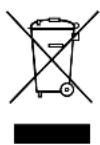
If you wish to finally dispose of the product, ask your local recycling centre or specialist dealer for details about how to do this in accordance with the applicable disposal regulations.
11 Troubleshooting

WARNING!
This device may only be repaired by specialist personnel. Inadequate repairs can lead to considerable hazards.
Compressor does not run
| Feature Possible cause Remedy | ||
| U_TERM=0 Volt | There is an interruption in the connection between the battery and the electronics | Establish a connection |
| Main switch faulty (if installed) Replace the main switch | ||
| Additional supply line fuse has blown (if installed) | Replace the supply line fuse | |
| U_TERM≤ U_ON | Battery voltage is too low Charge the battery | |
| During attempted start up U_TERM≤ U_OFF | Loose cable connectionPoor contact (corrosion) | Establish a connection |
| Cable cross section too small Replace the cable (fig. 2, page 3) | ||
| Battery capacity too low Replace the battery | ||
| During attempted start up U_TERM≥ U_ON | Ambient temperature too high – | |
| Insufficient ventilation and/or air supply | Move the refrigerator to another location | |
| Condensor is dirty Clean the condenser | ||
| Electric circuit between the pins in the compressor interrupted | Defective compressor Replace the compressor | |
U_TERM Voltage between the positive and negative electronic terminals
U_ON Switch on voltage of the electronic connection terminals see chapter “Technical description” on page 22)
U_OFF Switch off voltage of the electronic connection terminals see chapter “Technical description” on page 22)
Interior temperature too low in the "MIN" thermostat setting
| Feature Possible cause Remedy | ||
| Compressor runs continuously | Thermostat sensor has no contact to the vaporiser | Secure the sensor |
| Short circuit in the thermostat line Change | the thermostat | |
| Thermostat defective | ||
| Compressor runs for a long time | Large quantities have been frozen in the vaporiser compartment | |
Cooling capacity drops, interior temperature rises
| Feature Possible cause Remedy | |
| Compressor runs for a long time/continuously | Vaporiser iced over Defrost the vaporiser |
| Cooling area insulation is insufficient (moist/wet) Adjust/replace the drawer seal | |
| Ambient temperature too high | |
| Insufficient ventilation Ensure that the device is sufficiently ventilated | |
| Condensor is dirty Clean the condenser | |
| Fan defective (if installed) Replace the fan | |
| Compressor does not run often | Battery capacity exhausted Charge the battery |
Unusual noises
| Feature Possible cause Remedy | ||
| Loud humming A component of the refrigerant circuit cannot move freely (touching the wall) | Bend the component carefully away from the obstruction | |
| Foreign body jammed between the cooling unit and the wall | Remove the foreign body | |
| Fan noise – | ||
Radio or television interference in the vehicle
Feature Possible cause Remedy
| Reception interference when the compressor is running | The electronic connection of the cooling device is not directly clamped on to the battery | Connect the cooling device as directly as possible to the battery |
12 Technical data
| CD20 CD30 | ||
| Connection voltage: | 12 V---/24 V--- | |
| Switch-off voltage: 10.4 V at 12 V---22.8 V at 24 V--- | ||
| Switch-on voltage: 11.7 V at 12 V---24.2 V at 24 V--- | ||
| Rated current: | 12 V---: 3 A24 V---: 1.5 A | |
| Cooling capacity: | 0 °C bis +15 °C | -2 °C bis +12 °C |
| Capacity: 20 l | 30 l | |
| Climatic class: | N | |
| Ambient temperature: | +16 °C to +32 °C | |
| Relative humidity: | max. 90 % | |
| Permanent inclination: | max. 30° | |
| Dimensions: | fig. 1, page 3 | |
| Weight: | 16.1 kg | 18 kg |
| Test/certificates: |  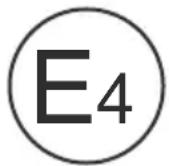 | |
5 Description technique
Dometic Australia Pty. Ltd.
1 John Duncan Court
Varsity Lakes QLD 4227
+61 7 55076000
+61 7 55076001
Mail: sales@dometic-waeco.com.au
AUSTRIA
Dometic Austria GmbH
The Gateway · 25 Canton Road,
Tsim Sha Tsui · Kowloon
+852 24611386
+852 24665553
Mail: info@dometic-waeco.com.hk
HUNGARY
Dometic Plc. Sales Office
Kerékgyártó u. 5.
H-1147 Budapest
+36 1 468 4400
昌 +36 1 468 4401
Dometic Italy S.r.l.
Via Virgilio, 3
I-47100 Forli
+39 0543 754901
+39 0543 756631
Mail: info@dometic.it
NORWAY
Dometic Norway AS
Skolmar 24
N-3232 Sandefjord
+47 33428450
吕 +47 33428459
Mail: firmapost@waeco.no
POLAND
Dometic Poland Sp. z o.o.
Ul. Puławska 435A
02-801 Warszawa
+48 22 414 32 00
+48 22 414 32 01
Mail: info@dometic.pl
RUSSIA
Dometic RUS LLC
Komsomolskaya square 6-1
107140 Moscow
+7 495 780 79 39
+7 495 916 56 53
Mail: info@dometic.ru
SLOVAKIA
Dometic Slovakia Sales Office Bratislava
Nádražná 34/A
SK-900 28 Ivanka pri Dunaji
+421 2 45 529 680
Mail: bratislava@dometic.com
SPAIN
Dometic Spain S.L.
Avda. Sierra del Guadarrama, 16
E-28691 Villanueva de la Cañada
Madrid
+34 902 111 042
+34 900 100 245
Mail: info@dometic.es
SWEDEN
Dometic Scandinavia AB
Gustaf Melins gata 7
Dometic Switzerland AG
Riedackerstrasse 7a
CH-8153 Rümlang (Zürich)
+41 44 8187171
吕 +41 44 8187191
Mail: info@dometic-waeco.ch
TAIWAN
WAECO Impex Ltd.
Taipei Office
9F.-10, No. 1180, Zhongzheng Rd.,
Zhonghe Dist., New Taipei City 23586
+886 2 22237225
昌 +886 2 81926742
Mail: marketing@waeco.com.tw
UNITED KINGDOM
Dometic UK Ltd.
Dometic House · The Brewery
Blandford St. Mary
Dorset DT11 9LS
+44 844 626 0133
昌 +44 844 626 0143
Mail: sales@dometic.co.uk
UNITED ARAB EMIRATES
Dometic Middle East FZCO
P. O. Box 17860
S-D 6, Jebel Ali Freezone
Dubai
+971 4 883 3858
+971 4 883 3868
Mail: info@dometic.ae
UNITED STATES OF AMERICA
Dometic Marine Division
2000 N. Andrews Ave. Extension
Pompano Beach, FL 33069 USA
+1 954 973 2477
+1 954 979 4414
Mail: marinesales@dometicusa.com

- CoolMatic CD20, CD30
- Contents
- Explanation of symbols
- DANGER!
- WARNING!
- CAUTION!
- NOTICE!
- NOTE
- Safety instructions
- General safety
- Operating the device safely
- Scope of delivery
- Quantity Description
- Proper use
- CAUTION! Health hazard!
- Technical description
- Control elements
- Installation
- Operation
- Energy saving tips
- Switching on the coolbox
- Selecting the temperature
- Switching off the coolbox
- Defrosting
- Cleaning and care
- NOTICE! Risk of damage
- W a r r a n t y
- Disposal
- Troubleshooting
- Interior temperature too low in the "MIN" thermostat setting
- Cooling capacity drops, interior temperature rises
- Unusual noises
- Radio or television interference in the vehicle
- Technical data
- Description technique
- Dometic Australia Pty. Ltd.
- AUSTRIA
- Dometic Austria GmbH
- HUNGARY
- Dometic Plc. Sales Office
- Dometic Italy S.r.l.
- NORWAY
- Dometic Norway AS
- POLAND
- Dometic Poland Sp. z o.o.
- RUSSIA
- Dometic RUS LLC
- SLOVAKIA
- Dometic Slovakia Sales Office Bratislava
- SPAIN
- Dometic Spain S.L.
- SWEDEN
- Dometic Scandinavia AB
- Dometic Switzerland AG
- TAIWAN
- WAECO Impex Ltd.
- UNITED KINGDOM
- Dometic UK Ltd.
- UNITED ARAB EMIRATES
- Dometic Middle East FZCO
- UNITED STATES OF AMERICA
- Dometic Marine Division
Brand : WAECO
Model : CoolMatic CD 20
Category : Refrigerator