VCS30 Series II - Speakers BOSE - Free user manual and instructions
Find the device manual for free VCS30 Series II BOSE in PDF.


| Product type | Home cinema speaker system (center speaker + two surround speakers) |
| Brand | Bose |
| Model | VCS30 Series II (VCS-10 center speaker and VCS-30 surround speakers) |
| Dimensions (center speaker) | 82 (h) x 546 (w) x 152 (d) mm |
| Dimensions (surround speaker) | 146 (h) x 280 (w) x 165 (d) mm (each) |
| Weight (center speaker) | 2.7 kg |
| Weight (surround speaker) | 1.49 kg (each) |
| Total packaged weight | 9.1 kg (system) |
| Drivers (center) | 4 x Twiddler™ 6.3 cm |
| Drivers (surround) | 2 x Twiddler™ 6.3 cm (per speaker) |
| Impedance | 4 to 8 ohms (all speakers) |
| Power handling (center) | 10 to 100 W |
| Power handling (surround) | 10 to 80 W |
| Magnetic shielding | Yes, for all speakers |
| Protection circuit | Automatic against overloads |
| Wall mounting | Yes, with brackets included |
| Compatibility | Dolby Digital, Pro-Logic, A/V receivers with surround outputs |
| Maintenance | Clean with a damp cloth and mild detergent |
| Warranty | 5-year limited transferable warranty |
Frequently Asked Questions - VCS30 Series II BOSE
User questions about VCS30 Series II BOSE
0 question about this device. Answer the ones you know or ask your own.
Ask a new question about this device
Download the instructions for your Speakers in PDF format for free! Find your manual VCS30 Series II - BOSE and take your electronic device back in hand. On this page are published all the documents necessary for the use of your device. VCS30 Series II by BOSE.
USER MANUAL VCS30 Series II BOSE
Bose® Home Theater Speakers
Owner's Guide
Brugervjledning
Bedienungsanleitung
Guía del usuario
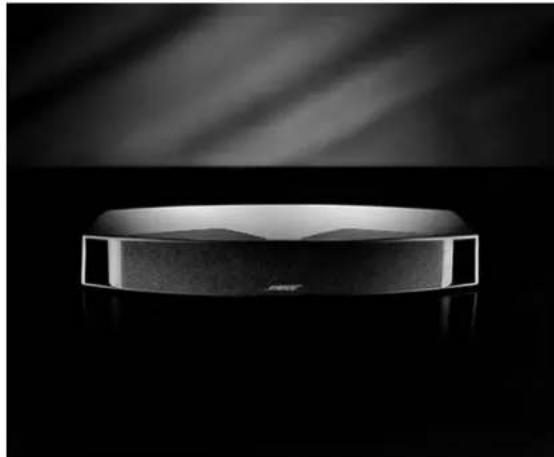
VCS-10° Center Speaker
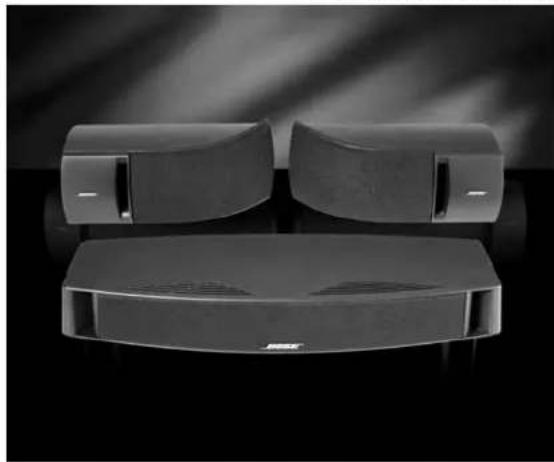
VCS-30® Series II Center/Surround Speaker System
Where to find ...
Setting Up 4
Before you begin 4
Unpack the carton 4
Place the center speaker 6
Position your surround speakers 7
Connect the speakers 8
Choosing speaker cord 8
Be sure to use the cord properly 8
Make the connections 9
Check the connections 10
Mounting your speakers on a wall 11
Adjusting Your Surround Sound Settings 12
For realistic home theater sound 12
How to set your Pro-Logic receiver 12
To use the test tone 12
To balance the bass and treble 12
How to set your Dolby Digital receiver 13
If the sound is interrupted 13
Reference 14
Troubleshooting 14
Customer service 14
Cleaning speakers 15
Warranty period 15
Technical information 15
For your records
Serial numbers are located on the back of each speaker.
Center speaker serial number:
Surround speaker serial numbers: and
Dealer name:
Dealer phone: Purchase date:
We suggest you keep your sales receipt and warranty card together with this owner's guide.
©2001 Bose Corporation. No part of this work may be reproduced, modified, distributed or otherwise used without prior written permission.
Dolby is a trademark of Dolby Laboratories Licensing Corporation.
Setting Up
English
Before you begin
Thank you for choosing Bose® home theater speakers. Both the VCS-10® center speaker and the VCS-30® Series II center/surround speaker system are engineered specifically for use with video soundtracks. They are designed to make the most of audio for video (A/V) surround sound receivers or amplifiers with five amplified speaker outputs.
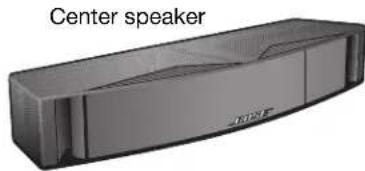
In either package you purchased, there is a center speaker. Its magnetic shielding allows you to put this speaker directly on, above, or below your video screen without causing screen discoloration. There it will deliver clear, crisp soundtrack reproduction from the center channel. Other speakers at the front of your room provide the left and right video sound.
In addition to one center speaker, the VCS-30 Series II system includes two surround speakers. They are designed for use at the rear of your room. Advanced design brackets included in this package make the surround speakers simple to mount on a wall.
Please read and follow the instructions in this guide. They will help you set up and use your new home theater speakers for the fullest listening and viewing enjoyment.
Unpack the carton
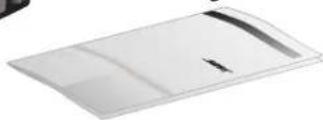
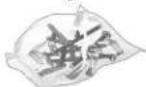
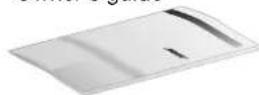
Carefully unpack the carton and save all packing materials for possible future use. Inspect the contents (Figure 1, A or B).
If any speaker appears damaged, do not use it. Instead, repack all parts in the original carton and notify Bose or your authorized Bose dealer immediately.
Note: Now is a good time to record the serial numbers found on the back of each speaker. Write them on your warranty card and on page 3 of this owner's guide.
Setting Up
A. The VCS-10° speaker carton contents
Figure 1
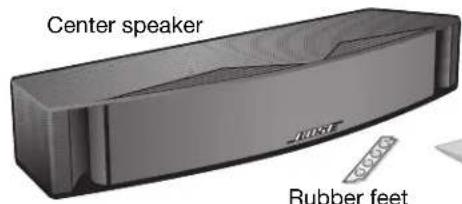
Owner's guide
B. The VCS-30® Series II system carton contents
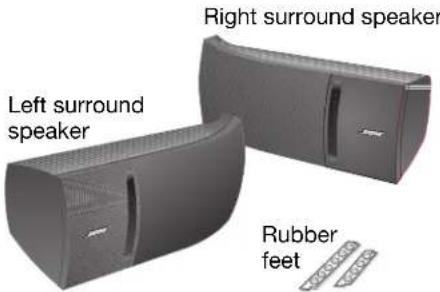

Mounting hardware
Owner's guide
Setting Up
English
Place the center speaker
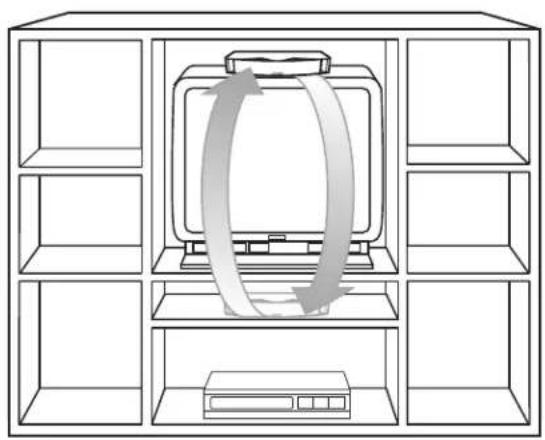
The center speaker provides center channel surround sound performance while taking up very little space. The slim, low-profile design allows it to fit directly on, above, or below your television (Figure 2). Rubber feet ensure stable positioning and magnetic shielding prevents video screen discoloration.
CAUTION: The VCS-10® speaker is not designed to be set on end in a vertical position, mounted on a wall, or to support the additional weight of items placed on top of the speaker, which could also hamper its performance. Do not allow debris or water from plants, or other items on a shelf above, to fall on the speaker.
CAUTION: Do not install near any heat sources, such as radiators, heat registers, stoves, or other apparatus (including amplifiers) that produce heat.
For full enjoyment, follow these placement guidelines:
- Place the speaker on, or very close to, your television set and center it with the screen.
- Be sure to set it on a level surface.
- Apply additional rubber feet farther in from the edges, as needed, for greater stability (Figure 3).
CAUTION: Be sure the center speaker is in a stable position and does not extend beyond the edges of its support. Use additional rubber feet as needed to prevent it from tipping or falling from a television surface that is not completely level.
Figure 2
Alternate choices for placing the center speaker
Figure 3
Adding optional self-adhesive feet to the bottom of the center speaker
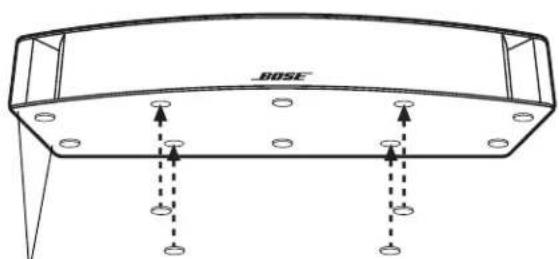
Pre-attached feet (2 of 6)
Optional self-adhesive feet (4 supplied)
Position your surround speakers
Surround speakers in the VCS-30® Series II speaker system provide surround sound effects from the rear of your viewing area (Figure 4).
Alternate choices for placing the surround speakers
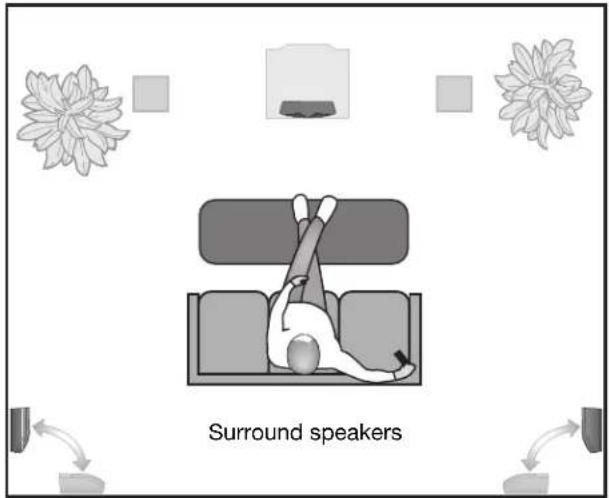
Figure 4
Brackets that come with these speakers allow you to mount them on the wall. If you use the supplied brackets, refer to the bracket instruction diagrams in the Appendix. Do not connect the speakers before reviewing those instructions.
If you prefer, set the speakers on a table or shelf in a horizontal position.

CAUTION: Do not install near any heat sources, such as radiators, heat registers, stoves, or other apparatus (including amplifiers) that produce heat.
For accurate surround sound:
- Place these speakers behind the general viewing area, along the rear wall or to the rear of side walls.
- Place both speakers at the same height.
- Place the speakers as far apart as your room allows.
- To mount the speakers on brackets, be sure to leave room between the end of the bracket and the wall for tightening the bracket screw.
Applying self-adhesive feet to the bottom of a surround speaker
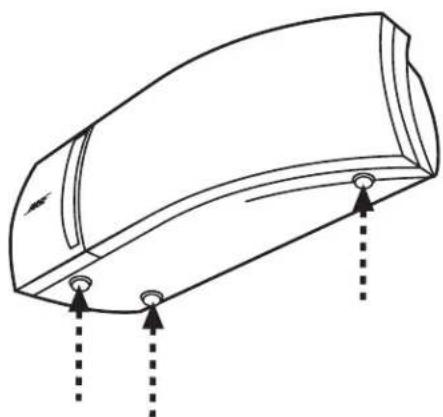
Figure 5
Setting Up
Connect the speakers
CAUTION: Before making any connections, turn off your receiver or amplifier and unplug it from the AC power (mains) outlet. Not doing so may result in damage to your system.
CAUTION: Never use broken or frayed wiring, which can result in damage to your components.
Note: Before running speaker cord through a wall or under a floor, check your local building code requirements and safety regulations. You may want to contact an electrical installer for this information.
If your receiver's center channel is not amplified, you must connect an amplifier to the receiver. Use an RCA cable to connect the center channel RCA-type output on the receiver to the RCA-type input on the amplifier. The speaker will then connect directly to the amplifier instead of to the receiver.
Choosing speaker cord
Be sure to use the proper gauge (thickness) of speaker cord. Standard zip cord (2-conductor, 18-gauge wire found at electrical and hardware stores) works for most applications. If your speakers will be more than 30 feet (9m) from the receiver or amplifier, see the following table, or check with your authorized Bose dealer.
Gauge* Length*
18 (0.75 mm) 30 ft (9 m) maximum
16 (1.5mm^3) 45 ft (14 m) maximum
14 (2.0mm^3) 70 ft (21 m) maximum
- Based on a maximum frequency response deviation of ±0.5dB.
At the ends of each cord, strip approximately 1/2 inch (12 mm) of insulation from both wires. Twist the bare end of each wire, so loose strands will not touch across terminals.
Be sure to use the cord properly.
Speaker cord consists of two insulated wires. The insulation around one wire is marked (striped, collared, or ribbed). This marked wire is always positive (+). The plain wire is always negative (-). These wires correspond to the red (+) and black (-) terminals on the speaker and the receiver or amplifier.
Note: It is sometimes difficult to distinguish wire markings. Inspect both wires carefully.
Make the connections
At the connection end of the speaker, push one terminal lever and insert the appropriate wire (Figure 6).
How to make terminal connections to the center speaker and surround speakers
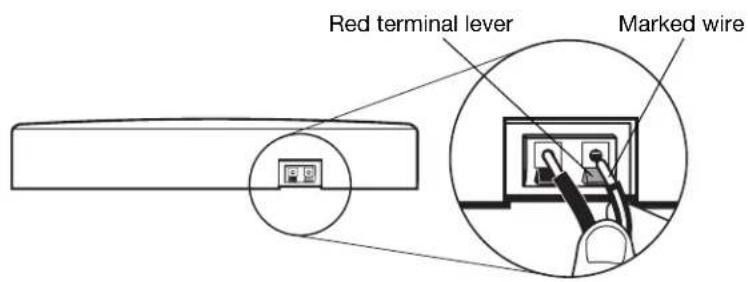
Figure 6
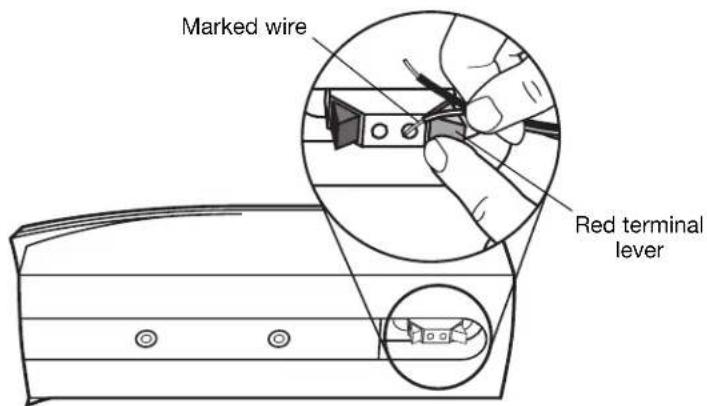
- Connect one end of the speaker cord to your speaker.
A. Attach the marked wire to the red (+) terminal.
B. Attach the plain wire to the black (-) terminal.
- Connect the other end of the same cord to your receiver or amplifier (Figure 7).
A. Attach the marked wire to the red (+) terminal.
B. Attach the plain wire to the black (-) terminal.
- The center speaker connects to the CENTER SPEAKER outputs on the receiver. Some surround sound receivers have two sets of center channel speaker outputs. Use either set.
- The left surround speaker connects to the LEFT SURROUND SPEAKER outputs.
- The right surround speaker connects to the RIGHT SURROUND SPEAKER outputs.
Setting Up
English
Check the connections
Make sure each connection is made positive to positive (+ to +) and negative to negative (- to -). Check to be sure that no loose strands of wire touch across terminals. Bridged wires can short-circuit and damage the electrical components. Tighten any loose connections before you plug in the receiver or amplifier and turn it on.
Completed connections
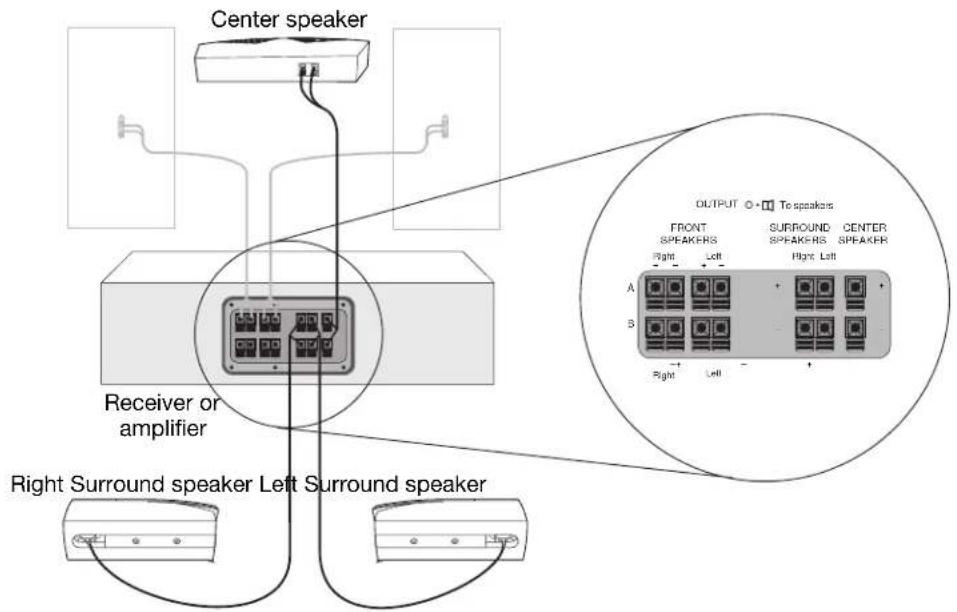
Figure 7
Mounting your speakers on a wall
CAUTION: Do not mount the brackets on surfaces that are not sturdy enough, or that have hazards concealed behind them, such as electrical wire or plumbing. If you are unsure about installing the bracket, contact a qualified professional installer.
CAUTION: Do not hang items from the brackets or speakers. The brackets were designed to support the weight of the speakers only.
Note: See the back pages of this guide for the mounting template and hardware information.
Note: For vertical mounting, mount part A with the hole for screw C at the bottom. Be sure to tighten all screws.
Note: For Stereo Everywhere3 speaker performance, horizontal mounting is required.
- Hold the mounting template in position and mark holes for the mounting hardware. If you plan to feed wires through the wall, mark the speaker wire pilot hole also.
- Drill holes for the chosen mounting hardware.
- Mount bracket part A to the wall and mount bracket part B to the rear of the speaker (Figure 8).
- Secure the speaker with bracket part B to bracket part A using screw C. To adjust the angle, loosen screw C slightly, move the speaker up or down, and retighten screw C.
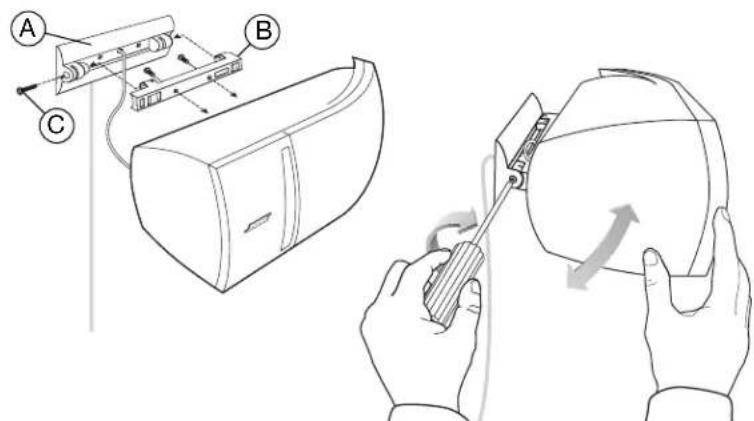
Figure 8
Speaker-bracket installation
Adjusting Your Surround Sound Settings
English
For realistic home theater sound
Each speaker produces only the sound directed to it by your surround sound receiver. During a surround sound program, the front and center speakers will emit sound almost constantly, while the surround speakers may be silent at times.
How to set your Pro-Logic receiver
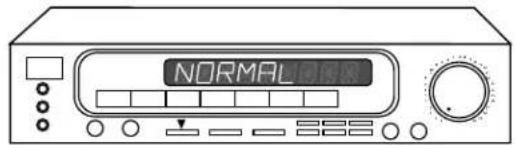
For use in video applications, be sure the SURROUND SOUND center mode setting of your receiver is on NORMAL (Figure 9). You may press in the button labeled Loudness (Bass Boost or Super Bass on some receivers) to see if you prefer that video sound.
Figure 9
The receiver or amplifier set to NORMAL surround sound mode
Use the test tone on your receiver to further verify connections and to adjust the volume level of the speakers.
To use the test tone
- Press test tone ON at the receiver remote.
- Listen and confirm that each speaker reproduces sound as the tone moves from speaker to speaker. One tone should come from both SURROUND speakers at the same time.
- Adjust the volume levels of the CENTER and SURROUND speakers so all of the speakers sound equally loud in your main listening area.
Instructions for this process vary, depending on the receiver brand and model you are using. Follow your receiver owner's guide instructions for more details on using the test tone.
To balance the bass and treble
Upholstered furniture, wall-to-wall carpets, or heavy drapes can muffle treble (high notes), making your speaker system sound bass heavy. Bare floors and walls and hard surface furniture can make your speaker system sound too shrill. After listening to your speakers, you may want to adjust the balance of bass and treble. You can use the bass and treble controls on your receiver.
How to set your Dolby Digital receiver
Your VCS-10 or VCS-30 Series II speakers are compatible with the output from Dolby Digital receivers. Take special care to set the channel output on the Dolby Digital screen menu to SMALL for both the center speaker and surround speakers.
Receiver channel output Proper setting
| Center SMALL | |
| Left and right surround speakers(VCS-30 Series II surround speakers) | SMALL |
Follow the receiver owner's guide instructions for using the receiver test tone to verify your connections and to adjust the volume levels of the speakers.
If the sound is interrupted
The VCS-10 Center Speaker and VCS-30 Series II Center/Surround Speaker System feature an advanced automatic electronic protection circuit to prevent speaker damage due to an overload.
When the center channel speaker detects an overload, the protection circuit intermittently shuts down and resets the speaker a fraction of a second later, until the overload is cleared. Intermittent play will continue for the duration of the overload.
If you hear this interruption, turn down the volume to relieve the overload. You will hear the speaker resume normal play when the volume is set at a safe level.
Note: The overload problem described here should occur only if the receiver is overdriven and sending a distorted signal, or when the center speaker is driven by an amplifier rated well above the 100 watts per channel maximum listed in "Compatibility" on page 15.
Reference
English
Troubleshooting
| Problem What to do | |
| No sound · Check the volume control. ·Make sure the receiver (or amplifier) is plugged in and turned on. ·Check all connections (see page 10). ·Make sure the receiver is not on Mute. ·Make sure headphones are not connected to the receiver. | |
| Center or surround speaker does not work | ·Make sure your receiver has amplified center and surround channels. ·Be sure your receiver is set properly (see page 12 and page 13). ·Check the audio source material to be sure it is encoded for surround sound. ·Check the speaker connections. (see page 10). ·If your surround sound receiver is Pro-Logic, be sure an RCA stereo cable connects the receiver to a stereo sound source (TV, VCR, laserdisc, or DSS player). ·If the receiver is connected directly to a stereo television, make sure that all other program sources (VCR, laserdisc, or DSS player) are connected to the TV using RCA stereo cable as well. ·If your surround sound receiver is Dolby Digital, be sure the sound source (DSS, laserdisc, or DVD player) is connected directly to your receiver as described in your receiver owner's guide. |
| Center speaker intermittently shuts down | ·Reduce the volume until that speaker returns to normal play. Automatic electronic protection circuitry may have engaged to prevent an overload. ·Check the power rating of your receiver (see “Compatibility” on page 15). ·Make sure your receiver is set for NORMAL surround sound mode. |
| Sound is distorted | ·Check the speaker cord for damage. ·Reduce the output level from your TV or other components connected to the receiver. |
Customer service
To arrange for service, contact your authorized Bose dealer, or contact Bose directly.
Cleaning speakers
CAUTION: If liquids get into the product, disconnect the speaker from the receiver and allow it to air dry. Then reconnect the speaker and play it. If you notice any problems with how the speaker functions, disconnect it again and contact Bose customer service.
Clean the outside of your VCS-10 or VCS-30 Series II speakers by wiping each speaker with a damp cloth. If necessary, use a mild detergent, like dish soap, being careful not to allow any liquid to spill through the cloth grille or the ventilation slots of the speakers. No other maintenance is required.
Warranty period
Bose® VCS-10 and VCS-30 Series II speakers are covered by a limited 5-year transferable warranty. Details of the coverage are provided on the warranty card that came with your speakers. Please fill out the information section on that card, detach, and mail it to Bose.
Technical information
Features
Ported speaker enclosures (all speakers)
Magnetic shielding in all speakers
Automatic electronic protection circuitry in all speakers
Syncom® computer quality control of center and surround speakers
Driver complement per speaker
Center speaker: Four (4) 2.5'' (6.3 cm) TwiddlerTM drivers
Surround speaker: Two (2) 2.5'' (6.3 cm) TwiddlerTM drivers
Compatibility
Center speaker: Compatible with amplifiers or receivers with center channel outputs rated 10-100 watts per channel; rated 4-8 ohms
Surround speakers: Compatible with amplifiers or receivers with surround channel outputs rated 10-100 watts per channel; rated 4-8 ohms
Enclosure
Black molded polymer with a tuned port
Size/Weight
Center speaker: 3.25^ × 21.5^ × 6^ ;5.9 lb (8.2 cm x 54.6 cm x 15.2 cm; 2.7 kg)
Each surround speaker: 4.17"H x 10.93"W x 4.98"D; 3.3 lb (14.6 cm x 28.0 cm x 16.5 cm; 1.49 kg)
VCS-10 speakers, packed in carton: 8 lb (3.6 kg)
VCS-30 Series II speaker system, packed in carton: 20 lb (9.1 kg)
Reference
English
Herfindes ...
Opstilling 4
Inden De begynder 4
©2001 Bose Corporation. No part of this work may be reproduced, modified, distributed or otherwise used without prior written permission.
Dolby es unamarca commercial de Dolby Laboratories Licensing Corporation.
Instalación
Antes de comenza
Verification des raccordements 10
(14,6 cm x 28,0 cm x 16,5 cm;
1,45 kg)
Optional speaker cord pilot hole
- Bose® Home Theater Speakers
- Where to find ...
- For your records
- Setting Up
- English
- Before you begin
- Unpack the carton
- Place the center speaker
- Position your surround speakers
- Connect the speakers
- Choosing speaker cord
- Gauge* Length*
- Be sure to use the cord properly.
- Make the connections
- Check the connections
- Mounting your speakers on a wall
- Adjusting Your Surround Sound Settings
- For realistic home theater sound
- How to set your Pro-Logic receiver
- Figure 9
- To use the test tone
- To balance the bass and treble
- How to set your Dolby Digital receiver
- If the sound is interrupted
- Reference
- Troubleshooting
- Customer service
- Cleaning speakers
- Warranty period
- Technical information
- Features
- Driver complement per speaker
- Compatibility
- Enclosure
- Size/Weight
- Herfindes ...
- Instalación
- Antes de comenza
Brand : BOSE
Model : VCS30 Series II
Category : Speakers