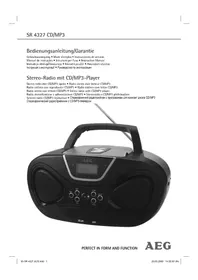
SR 4327 CDMP3 - Cd player/recorder AEG - Free user manual and instructions
Find the device manual for free SR 4327 CDMP3 AEG in PDF.


| Product type | CD player/recorder with radio and USB function |
| Brand | AEG |
| Model | SR 4327 CDMP3 |
| Net weight | 2.05 kg |
| Mains power supply | 220-240 V, 50 Hz |
| Battery power supply | 8 batteries UM2/R14 (1.5 V) |
| Power consumption | 18 W |
| Protection class | II |
| Radio bands | FM 87.5-108 MHz / AM 530-1640 kHz |
| Playable formats | Audio CD, CD-R, CD-RW, MP3 |
| External media | USB (flash drive), SD/MMC card, AUX IN (3.5 mm jack) |
| Playback functions | Repeat (1, all, album), random, program |
| Antenna | Telescopic antenna for FM, built-in antenna for AM |
| Display | LCD screen with time, track, mode indication |
| Speakers | Built-in speakers (stereo) |
| Cleaning | Disconnect and wipe with a slightly damp cloth |
| Laser safety | Class 1 laser, do not open the housing |
| Supplied accessories | Power cord, instruction manual |
Frequently Asked Questions - SR 4327 CDMP3 AEG
User questions about SR 4327 CDMP3 AEG
0 question about this device. Answer the ones you know or ask your own.
Ask a new question about this device
Download the instructions for your Cd player/recorder in PDF format for free! Find your manual SR 4327 CDMP3 - AEG and take your electronic device back in hand. On this page are published all the documents necessary for the use of your device. SR 4327 CDMP3 by AEG.
USER MANUAL SR 4327 CDMP3 AEG
Overview of the Components.. Page 3
Instruction Manual. Page 41
Technical Data Page 45
Język polski
Spis tres'ci
D-47906 Kempen/Germany
5 Bandkeuzeschakelaar (FM.ST / FM / AM)
Colocar as bacterias
General Safety Instructions
Read the operating instructions carefully before putting the appliance into operation and keep the instructions including the warranty, the receipt and, if possible, the box with the internal packing. If you give this device to other people, please also pass on the operating instructions.
- To avoid the risk of fire or an electric shock, you should not expose the device to rain or moisture. Consequently, do not use the device in the immediate vicinity of water - for example near a bath tub, a swimming pool or in a damp cellar.
- Use the device only for the intended purpose.
- Only connect the device at a properly installed plug socket. Pay attention that the specified voltage corresponds to the voltage of the plug socket.
- When using external mains supply, pay attention to the correct polarity and voltage. Always place the batteries in the correct direction.
- Assemble the device in such a way that the available ventilation openings are not covered.
- Never open the housing of the device. Incorrect repairs can constitute a considerable risk for the user. Should the device become damaged, in particular the mains supply cable, do not operate the device any longer, but rather have it repaired by an expert. Check the mains supply cable regularly for damage.
- For safety reasons a broken or damaged mains lead may only be replaced by an equivalent lead from the manufacturer, our customer service department or a similar qualified person.
- If the device is not used for a longer period, remove the plug connector from the plug socket or take out the batteries.
These symbols may be found on the machine and are intended to indicate the following:

The lightning symbol should advise the user of parts in the inside of the device which carry dangerously high voltage levels.

The symbol with an exclamation mark should advise the user of important operation or maintenance instructions in the accompanying documentation.

Devices bearing this symbol work with a "class 1 laser" for tracing the CD. The built-in safety switches should prevent the user being exposed to dangerous laser light, which is invisible to the human eye, when the CD compartment is opened.
Under no circumstances should these safety switches be bypassed or manipulated, as this could result in a danger of exposure to the laser light.
Children and Frail Individuals
- In order to ensure your children's safety, please keep all packaging (plastic bags, boxes, polystyrene etc.) out of their reach.
WARNING!
Caution! Do not allow small children to play with the foil as there is a danger of suffocation!
- This device is not intended to be used by individuals (including children) who have restricted physical, sensory or mental abilities and/or insufficient knowledge and/or experience, unless they are supervised by an individual who is responsible for their safety or have received instructions on how to use the device.
Children should be supervised at all times in order to ensure that they do not play with the device.
Symbols in these Instructions for Use
Important information for your safety is specially marked. It is essential to comply with these instructions in order to avoid accidents and prevent damage to the machine:
WARNING:
This warns you of dangers to your health and indicates possible injury risks.
CAUTION:
This refers to possible hazards to the machine or other objects.
NOTE: This highlights tips and information.
Special safety information
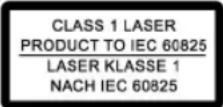
This device works with a class 1 laser.
Overview of the Components
1 Telescopic antenna
2 Handle
3 CD compartment 4 TUNING control
5 Band selection switch (FM.ST / FM / AM)
6 Tab for opening the CD compartment (OPEN/CLOSE)
7 Function selector switch (OFF / CD/MP3/USB / RADIO)
8 VOLUME (volume control)
9 SKIP+ button (forward search)
10 STOP button
11 SKIP- button (reverse search)
12 II button (Play/Pause)
13 LCD display
14 FM.ST control lamp
15 MODE button (repeat/random)
16 PROG button (memory)
17 ALBUM button (album upwards)
18 Loudspeaker
19 USB connection
20 Card slot
42 English
Reverse Side
21 SET button (time)
22 HOUR button (Hours)
23 MINUTE button (minutes)
24 AUX IN connection
25 AC Mains connection
26
Battery
compartment
Intended Use
This device is used for:
The reception of radio programmes
- Playing back audio/MP3 CDs.
It is intended exclusively for this purpose and may only be used as such. It may only be used in the manner described in these instructions for use. The device must not be used for commercial purposes.
Any other use of this device is considered to be contrary to the intended use and may result in damage to materials or even personal injury.
The firm ETV - Elektro-Technische Vertriebsgesellschaft mbH does not accept any liability for damage caused as a result of the use of this device contrary to its intended use.
Start-up of the device/introduction
- Please read the operating instructions carefully before using the device for the first time!
- Select a suitable location for the device, such as a dry, flat, non-slip surface on which it is easy to operate the machine.
- Ensure that the device is sufficiently ventilated!
- Remove the protective film from the display if it is still present.
Power Supply
- Connect the power cable supplied (see battery compartment if necessary (26)) to a properly installed 230V / 50Hz safety power socket and the mains connector AC (25) on the back of the machine.
- Ensure that the voltage is the same as that indicated on the model identifi cation plate.
Setting the Time (in standby mode (OFF))
- Keep the SET button (21) pressed down.
- Press the HOUR button (22) in order to set the hours. Keep the button pressed down until the desired hour is reached.
- Press the MINUTE button (23) in order to set the minutes. Keep the button pressed down until the desired minutes are reached.
The time is stored automatically.
NOTE:
Storage/display of the time is lost as soon as the electricity supply is interrupted. If you would like the time to be displayed even when the device is not connected to the mains, place 4 batteries of type UM2/R14 1.5 V into the recess of the battery compartment (batteries not supplied). To do this, open the battery compartment cover on the bottom.
Inserting the Batteries (not supplied)
- Open the lid of the battery compartment (26) on the bottom.
- Insert 8 batteries of type UM2/R14 1,5V. Please ensure that the polarity is correct (see the floor of the battery compartment)!
- If the device is not used for a long period of time, remove the batteries to avoid the spilling of battery acid.
- Then close the battery lid.
NOTE:
When a mains cable is connected the batteries are automatically switched off.
CAUTION:
- Diff erent battery types or new and used batteries must not be used together.
- Batteries are not to be disposed of together with domestic wastes. Dispose of the used batteries at the relevant collection bin or at your dealer's.
WARNING:
Do not expose the batteries to high temperatures or direct sunlight. Never throw batteries into the fire. There is a danger of explosion!
Transport Safety Device, CD Compartment
- Open the CD compartment (3) by pulling the lid upwards by the tab (6).
- Before operating the machine for the first time, remove the transport safety device from the CD player if it is still in place.
Volume
The desired volume can be sent using the VOLUME / regulator (8).
Switch-off
The machine is switched off when the function selector switch (7) is turned to the OFF position. The time display appears. Unplug the device.
USB Connexion (19)
This device has been developed in accordance with the latest technical developments in the USB fi eld. Unfortunately the large number of diff erent types of USB storage media on off er today makes it impossible to
guarantee full compatibility with all USB storage media. For this reason there may be problems in rare cases with playing back from USB storage media. This is not a malfunction of the device.
- Turn the function selector switch (7) to the CD/MP3/USB position.
- Keep the button (12) pressed down in order to select USB mode. USB appears in the display.
- Connect a USB storage medium. After a few seconds the total number of tracks appears briefly and then playback begins. The current song and the letters MP3 and USB appear in the display.
For operating instructions please see the section "Playing CDs/MP3s".

NOTE:
If there is no CD in the CD compartment at the same time, the USB connection is automatically selected.

CAUTION:
Before you remove the USB storage medium turn the function selector switch (7) to the RADIO position.
Card slot (21)
- If you would like to play back data on an SD/MMC card please insert it into the opening provided.
- Turn the function selector switch (7) to the CD/MP3/USB position.
- Keep the button (12) pressed down to select CARD mode. CARD appears in the display. After a few seconds the total number of tracks appears and then playback begins. The current song and MP3 and CARD appear in the display.
For operating instructions please see the section "Playing CDs/MP3s".

NOTE:
- If a USB storage medium is connected it is not possible to select the memory card.
- If there is no CD in the CD compartment at the same time, the card slot is automatically selected.
AUX IN socket
To connect analogue replay devices. Via this socket you can also hear the sound of other playback devices such as MP3 players, CD players etc. through the loudspeakers.
- Please connect the external device with a 3.5mm stereo jack plug to the AUX IN socket (24).
-
Turn the function selector switch (7) to CD/MP3/USB or RADIO. The device switches automatically to AUX IN operation. The radio or CD sound is switched off.
-
Through the loudspeakers you can hear the playback of the sound from the external device; with the VOLUME control (8) you can change the volume. The CD buttons do not have any function.
- For the remaining procedure please see the operating instructions of the external sound source.
I NOTE:
Adjust the volume of the external device to a comfortable level.
Listening to the Radio
- Turn the function selector switch (7) to the RADIO position.
- Use the band selector switch (5) to select the desired frequency band.
$$ \begin{array}{r l} \text {V H F (S t r e s o)} & = \text {F M S T .}, \text {V H F} = \text {F M}, \ \text {M e d i u m w a v e} & = \text {A M (M o n o)} \end{array} $$
- Tune in the desired station with the station adjustment knob TUNING (4).
- The FM.ST control lamp (14) only lights up when you have selected FM stereo and the station is being received in stereo quality. If reception is too weak and there is noise on the station being received, this lamp will flicker. Where reception is bad we recommend switching to FM.
- For VHF/FM mode pull out the telescopic antenna (1) and turn it to improve reception.
- An aerial is integrated into the device for the reception of AM stations. The machine can be aligned to the station by turning it. In this frequency band programs are transmitted in „mono" only.
Playing CDs/MP3
This is how you play a CD
- Turn the function selector switch (7) to the "CD/MP3/USB" position. The time display appears.
- Open the CD compartment (3) by pulling the lid upwards by the tab (6).
- Insert an audio CD with the printed side facing upwards on to the central cone so that the CD clicks into place and then close the lid of the CD compartment.
- After a few seconds the total number of songs/tracks is shown in the display.
- The CD will play from the first title. The track currently being played, or MP3 are shown in the display.
- In order to remove a CD, please press the STOP key (10), open the CD compartment and lift the CD out carefully.
Always keep the CD deck closed.
44 English
NOTE:
- In the case of CDs in MP3 format that contain folders, when the device changes to a different folder 001 appears for the first track of the new folder.
- If a disc is incorrectly inserted - or no disc has been inserted - the symbol _ _ _ _ _ _ and the word "no" appear in the display.
- Playback of CDs produced by the user cannot be guaranteed due to the large variety of software and CD media available.
Description of the CD buttons
II (12)
Pressing briefy:
You can briefly interrupt and resume playback using this button. The symbol fl ashes in the display. Pressing again continues playback.
Pressing for a longer time:
Selects the USB connection or card slot.
SKIP_+ / SKIP- (9/11)
With an audio CD or a CD in MP3 format playing:
With SKIP + you can jump to the next or previous track etc.
- If the button is kept pressed down, the machine starts to search through the tracks.
The SKIP - button can be used as follows:
Press once = This starts the current track again from the beginning.
Press twice = This jumps back to the previous track.
Press three times = This plays the song before etc. If the button is kept pressed down, the machine starts to search through the tracks.
NOTE:
In the case of CDs in MP3 format that contain folders, when the device changes to a different folder 001 appears for the first track of the new folder.
STOP (10)
The CD stops.
MODE (15)
With an audio CD or a CD in MP3 format playing:
Press once = (the REP emits a fixed light) the current track is repeated continuously.
Press twice = (the ALL em a fi xed light) the whole CD is played continuously.
Press three times = the display contains the word RAND and the track number that is to be played first. All tracks are played back in random order.
Press four times = all functions are cancelled. The normal play mode is resumed.
Only for CDs in MP3 format
Press once = the current track is repeated continuously (REP appears in the display).
Press twice = the selected folder of the MP3 CD is repeated continuously (REP ALBUM appears in the display). Use the ALBUM button (17) to select individual folders.
Press three times = the whole CD is played continuously (REP ALL appears in the display).
Press four times = the display contains the word RAND, MP3 and the track number that is to be played first. All tracks are played back in random order.
Press five times = the function is deactivated and the CD is played in the normal mode.
ALBUM (17)
Press this button during playback to change to a higher folder. The display, e.g. ALBUM 001, fl ashes briefy. Then the CD begins to play back automatically. If the button is pressed in stop mode the display also fl ashes. Then start playback with the button.
Programmed Play
This can be used to program any desired sequence of tracks.
- Press the STOP key (10).
- Press the PROG key (16). The number "P01" (storage location) and the symbol PROG fl ash in the display. Use the SKIP + / SKIP - buttons (9/11) to select the desired track and then press the PROG button again. The display changes to memory slot P02.
NOTE:
- In the case of CDs in MP3 format, press the AL-BUM button (17) in order to change the folder.
-
In the case of CDs in MP3 format that contain folders, when the device changes to a different folder 001 appears for the first track of the new folder.
-
Select the next track with the SKIP+/SKIP- key and press the PROG key again. Repeat the procedure until all the desired tracks are selected.
-
Press the key (12). The playback starts. The first track number selected appears in the display and or MP3 and PROG light up. Press this button to pause briefly the playback.
- Press once the STOP key to stop the playback while retaining the program.
- To play the programme back again, press the button.
- To delete the program, press the STOP key twice. The PROG control lamp goes out.
The device stops automatically once the entire sequence of programmed tracks is completed. The abbreviation PROG goes off and the programmed order of tracks is deleted from the memory.
It is also possible to combine the programmed tracks with the REPEAT function. After you have programmed and started the device, please press the MODE button (15) up to three times and then you can use the functions as described under MODE".
Playing back Music in MP3 Format
With this device it is possible to play back pieces of music in MP3 format. The device also supports all standard CD types: CD, CD-RW, CD-R.
This machine of is able to play MP3 CDs. Up to 200 tracks can be compressed and stored on these CDs. Your machine detects an MP3 CD automatically (the total number of tracks and MP3s appears in the display). If you would like to play one of these CDs, proceed as described under "Playing CDs/MP3". Tracks can be programmed as described under "Playing Back Programmed Tracks".
Please note:
There are a number of diff erent recording and compression methods, as well as quality differences between CDs and self-recorded CDs.
Furthermore, the music industry does not adhere to fixed standards (copy protection).
For these reasons it is possible that in rare cases there are problems with the playback of CDs and MP3 CDs. This is not a malfunction of the device.
Cleaning and Maintenance
- Always remove the mains plug before cleaning the machine.
- Any marks on the surface can be wiped off with a slightly damp cloth without any additives.
Troubleshooting
| Symptoms Course Solution | ||
| CD can not be played back. | CD is not inserted or inserted incorrectly. | Ensure that the disc is inserted with the label facing upwards. |
| Batteries too weak. | Insert new batteries or operate the device with the mains lead. | |
| CD jumps during playback. | Check the disc for fingerprints, dirt or scratches. | Check the disc for fingerprints, dirt or scratches. |
| Memory card does not play back or cannot be selected. | A USB storage medium is connected at the same time. | Remove the USB storage medium. |
Technical Data
Model: SR 4327 CD/MP3
Power supply: 220-240 V, 50 Hz
Battery operation: .8 x 1,5 V, Type UM2/R14
Power consumption: 18 W
Protection class: II
Net weight: 2,05 kg
Radio section:
Frequency ranges: VHF / FM 87,5 ~ 108,0 MHz MW / AM 530 ~ 1640 kHz
This device has been tested according to all relevant current CE guidelines, such as electromagnetic compatibility and low voltage directives, and has been constructed in accordance with the latest safety regulations.
Subject to technical changes without prior notice!

Meaning of the "Dustbin" Symbol
Protect our environment: do not dispose of electrical equipment in the domestic waste.
Please return any electrical equipment that you will no longer use to the collection points provided for their disposal.
This helps avoid the potential effects of incorrect disposal on the environment and human health.
This will contribute to the recycling and other forms of reutilisation of electrical and electronic equipment.
Information concerning where the equipment can be disposed of can be obtained from your local authority.
Język polski
PRODUCT TO IEC 60825
LASER KLASSE 1
NACHIEC60825
Tento spotbrebic pracujc
s laserem tidy 1.
Kmitoctoverezsohy: ...VKV/ FM 87,5\~108,0 MHz
SV/AM 530 1640kHz
CLASS 1 LASER PRODUCT TO IEC 60825
LASER KLASSE 1
NACH IEC 60825
PRODUCT TO IEC 60825
LASER KLASSE 1
NACH IEC 60825
LcH npnIa npauoe 3 na3epom KnaCy 1.
- npnHomy paJionporpam
BjTbOpOBaHHaayio-phiJIiBHaKOMnakT DnCKax i DnCKax BΦopMaTI MP3.
PpnaI np3HaueHO BnKIOUHO nIaX uine i Ioro DO3BOBnREbCBA KOpNCTaTn TILKn DIA O3HaueHOrO. Do3BOBnREbCBA KOpNCTaTn PnpNaI dTIbKn B TaKn Cnoci, RaCe OINcAHO B ciIn HcTykuII. 3a6OpOHRebCBA KOpNCTaTn PnpNaI dI INKOMepuHHn cIeN.
IHJI BINN BHKOPINCTAHH BBAJKAOTbC HHe HANEHHMn 3a npH3NaueHHM i MOKytb Pn3BecTn DO NOLKOJKeHHN pnnlaNy i HabITb DO TpABMaTH3My IIODeI.
PhiIPA ETV-Elektro-Technische Vertriebsgesellschaft mbH/ 36yteneKPToTeXHiOIO npOdyKuII TOB / He Hece BiINOBiDaIb-HocTi 3a WKOyO, 00 BnHNKla BHaCInOk BnKOpNCTaHH pPnAaHy He 3a HaneKHMM pN3HaueHHM.
BkIIOUeHH npuJaY / BBeJeHH
IpeenepmBkHoueHHaMpnaLy yBaXHO npOHTaTe IHctpykuio3eknnyataui!
Дя yctaHOBn npnaIy o6epItb npdaIthe IrycboRIMicue-yeMa6byTn cyxa,piBa,He cIn3bKaNoBepxHrHaKki Bn MoKeTe 3pyHo KOpNCTyBaTnCpnpiaDm.
- PnIMtB Do yBaH, 10 npNlaMae Mae MaTH DOCTaTHIO BeHTNaqio!
A Ksio Ha DnCnnei npna dy 6yna 3axncha nnibka, II cnid BnDaJIHTN.
3a6e3neueHHn eIeKtpHnM CtpyMOM
BCTaBTE BnIKy Ka6eIIO eNEKtpOKNBHeHNA, 10 HaJeXNtB Do npnaDy (INB. BiDInIOK DnR 6atapei (26)), y BiINOBIHO oBnHaHy 3axNCHMn KOHTaKTAMn PO3eTKy 230B / 50Tc MepeKi nepeMHHoro cTpMy AC (25) Na 3bOpoti npnaNy.
3BepHt b ybary Ha Te, 106 Hanpyra B Mepexi BiDnobida na daHMM Ha Ta6nuci 3 TexHiuHMM daHMM BInpo6HnKa npnaNy.
YctaHOBHeHHaCy (BpeKmI Standby (OFF))
(BiTbOPOBaHHa/BiTbOPOBaHbTHBPOBHTyPbIeKabIu SET (21) HATNCHYTHM.
HaNckyIte KJIaIIH HOUR (22), 106 BCTaHOBHTn rOINH. YtpmyTe KJIaIIH HATNCHyTM Do TOrO, NOKn He BCTaHOBHTe notpiOHy rOINH.
LIO6 BCTaHOBHTXBNHNN, HATNCKyTe KNaBIW MINUTE (23).YTPMMyTE KNaBIW HATNCHYTm DO TORO, NOKn HE BCTaHOBITE NOTpIbHy XBNHHy.
- Yac 3aHcybCBA NaM'rtb ABOTMATuHO.

KAK3IBKA:
3aHncaHI B nam'rB roDHH i XBNHn CTHpaOTbcR, RkUO
KHNBHeHH CTpyMOM nepepBaCTbC. RaIO Bu xOyTe
36epertn IHnKaIio yacy taok 6e3 KHNBeHH CTpyMOM
i3 po3eKn, noKlaIITb 4 batapeek Tny UM2/R14 1,5 V Ha
MICue, IO IIN HN xepeDbauHo (batapeek He BXoTb DO
06cary NoCTABKN). Dna uboro cnid BiIDkpTN KpiuKN BiIDInky
Ha 3aDhbomy 6oui.
UctahOBnHn6batae
(Baapei He BxOaTb Do o6cary nocTaBKN)
BiiKpnTe BiDinok nIaTapei (26) Ha 3aHni CTopoHi npnlaNy.
-ПoctabeHaMicue86aTapeK TnnyUM2/R141,5Vein. 3BepHbYbaryHa npaBnIbHy noJIpyHcIb 6aTapei (INBnCb HnKHi cToPOHy BIDInky dIra6aTapei)!
A KIIO Bn He BnKOpNCTOByTe npnnaT prnBaHn Yac, Bnda-niB 6atapei3 BiDInky, uOb yHnKHyTN "BtikaHn" KNCOTN.
- 3aKpHte BIDINOK dIg 6atapei.

KAK3IBKA:
Kuio Bn iNIOHHTe KaebIb Do eNEKtpomepeXi, To KINBHeHH BiD BaTape npnnHHTBCa ABTomauHO.

yBABA:
Batapei pi3Horo Tny a6o HOBI I BKe 3actocobHi 6atapei HE MOKHA BNKOPNCTOByBaTH pa3OM.
BataeI He MoXHa BnKnDaTn B DomaWHe CmTT. PocHMo BiDAtn NcyTi bataeHa CneuaJIbHi NyHKTH 36opy He6e3NeuHnx BiXoJIB aO nobepHyTN B MaRa3HH, De Bn Kynnn npnaad.

3ACTEPEXEHHH:
3a6opOHETbc niDabatn 6bataeB BnNBy BnCOKoi TEMepaTyPn a6o npRmX coHnHX npOMiHB. Ctporo 3a6opOHETbcra KndtN 6bataeB nOlyM' IChyE He6e3neKa Bn6yxy!
Pnncptpi dna 3axncty nporpaBauy KOMnakT-dnckib CD npn TpaHcnopTybaHHI
BidkpiTe rH3IO dN KOMnAaT-DnCKiB CD (3),DnIyOro notHHTb KpuKky 3a HKnAky (6) yBepx.
- Ipeed TMM RIK BKNIOHTN pnpia, Bnndit npncpti dna 3axncty CD-npogpaBau np trpaHcnoptyBaHHI.
Cnla 3Byky
KhoNkoVOLUME/peyIaTOpOMcHny3ByKy(8)BnMoKeTe 6bpatn rYHicTB,uo Bam noDobacr.
BnKJIIOUeHHH
PnnaB BmMKHyTO, kUo KlaBiI nepeKIOueHHeyHKuJ (7) HaxOaNtBCB nIOLOKeHHI OFF/TAPE. NOBbAeTbcN IHINKaui yacy. HanpKinCi cnId BHTARHyTN BUNKy 3 p03eTKN.
USB niiKIOUeHHa (19)
Ley npinad po3p0bneHO Ha octaHHbOMy pIBH TeHXHOro nporpccy B oIbacti USB. BeINka KInbKicTB pi3HN 3ac06IB 3anncy USB, 1O icHy cBorOdi, He 103BOJIe, HaxKaJIb, 3a6e3NeHTN abCOIOHTy CymichcTB npnady 3 ycima 3ac06Am 3anncy USB. Tomy B OKPemix BnnaJkax MoKyTB nOBNTICr npo6IeMn 3 BiITBOPIOBaHHM 3aNNCIB USB. Taki BNnAKn He e DepeKTOM npnilady.
- NocTaBTe nepemHKaH cyHKui (7) B noJIOKeHHA CD/MP3/ USB.
- Ytpmmye klaibII 12) ytnchyTM, uo6 opaTH peKHM USB.IHnKaiaJ USB noBntbcra Ha dncnnei.
3.ПИДКИОчITbToI npnIaI,3ЯKOrO Bn6ydeTe npoBoIHTn 3a- nnc USB.Dekinbka cekyHn i3niHie noRbntcHInΦopMaJri npo 3araIaNHy KJIbKiCTb TBOpIB i po3noHHeTcHix BiTbOpIOBaHHra.Ha dinCnei npu UbOMy BnHa iINkAciJr 3 Ha3BOHO akTuIbHor TbOpY i HAnic MP3 Ta USB.
Lio6 ynpabnT npoecom, npouetaTe, 6yNb naCa, po3in ,PporpaBaHH KOMnKT DnckiB CD/MP3.
BKA3IBKA:
AkuoB npnanaOndHocHo He 3haoNtbcKOMNaKT NCK, To niknoueHH USB oHpaetcbc aTOMaTHHO.
yBATA:
Peped TMM KBIKIOUHTN npnla,3 KORO Bn npoBOJIN 3aNC USB, npeKIOUHTb nepeMkau FyHKui (7) B no3nio RADIO.
InTepeHecnIaKapTKn (21)
- 阿卡贝 BxOyTe BiTbOpBAtn 3aHnC 3 KapTKN SD/MMC, BCTaBe II BOTbp. IIO DnI cyBOr Opepe6aAcTbcR.
- Npebeidtb nepemkauch yHKui (7) B no3nucIO CD/MP3/USB.
- Ytpmyte Klaib II (12) B HATNCHYOMy CTahi, 106 o6 patn pexm CARD. IHnkaqirn CARD NOBtbc B DnCnnei. Iicna dekiibkox cekyHn NOBtbcr IHnkaqir 3araIbHOI KInbKocTI TBopib i PO3NOHTbcr ix BiTbOPHOHa. Ha DnCnnei npri Cbomy BnHa IHnkaqir 3 Ha3BOO aKtyaIbHOr Tbopy i HAnc MP3 Ta CARD.
Lio6 ynpabnT npoecom, npouitaTe, 6yNb nacka, po3in ,PporpaBaHH KOMnKT DnckiB CD/MP3".
BKA3IBKA:
Akuo do npnna ny nkiKIOueHo npnaad 3aHcy USB,TO B6ip peHHMy KapTKn He MOKNIIBM.
- 甲KIOBnPiNaDi OndOuaCHo He 3naOHTbcr KOMnAKT DnCK, To nIckluOeHHa KapTKn npoBOuTbcr aBTOMaTHHO.
AUX IN rhi3do
IiNkHueHHaHAnorBnX 3ykoBtBOPoBaJbHnx npnaib.Ypee3 ce rH3do Bn MoKeTe cIyxaTHpee3 dHaMki3Byk iInHX 3ykoBtBOpOBAJbHnx npnaib Tnny nporpaBaiv MP3, nporpaBaiv KOMNAKT DnCKIB CD ta iHnx.
1.Пдкнчь 3ыковидтборювьн прпал за домогостеpeонihuHoroшт ekepa3,5 MMdo rhizdaAUXIN(24).
2. NpepeBeditb nepemikau phyHKui (7) B noLoXeHHa CD/MP3/USB a6o RADI. PpnaI aBtOMaTHUHO nepeKIOHTbcB peKIM AUX IN. 3Byk paio a6o KOMNaKT DnCKy BiKIOHTbcra.
3. Yepez DnHaMikn Bn MoKeTe CnyXaTH BiTbOpHOBaHH 3Byky 3 NiKIIIOHeHO npInaIy, rYHicTB JAKOTo Bn MoKeTe perynkOBaTH KHOJIKOHO VOLUME (8).KnabiJi CD npn ubomy He FyHKioHyOtB.
4. PtoaIbui iHctpykuii Bm MoKeTe oPnMaTH 3 iHcTpykuii 06CnyroByBaHHn IINpnaiaB, kki BnPiKIIHOaTe.
BKA3IBKA:
IocTaBte peryIaTOp rHyHocti nIkiNHOeHOro npnAny Ha pIbeHb, IIO e pnEeMHm DnA CnyxAHH.
Cnyxanhpaio
- NocTaBTe nepemKauФyHKui(7)В noLoXeHHRAdio.
- 3a donomoro npemmkauy diaana3ohiv (5) o6epitb notpi6Hn Bam diaana3OH padioxBnB.
$$ \begin{array}{c} \text {U K W (S t r e s o)} = \text {F M . S T , U K W} = \text {F M}, \ \text {C e p e n i x v b u n i} = \text {A M (M o n o)} \end{array} $$
- Perjntopom TUNING (4) Bctanobitpaioctaunio, 0o Bn xoyete cnyxatni.
- KOnTpoBHa NaMnOuKa FM.ST (14) cBirntbCra TlBKn B Tomy BnnaIky, Raio Bn o6papan dianaoH UKW Stereo i padiocTaHizr BeE nepeDaui B cTepeofoHiyHomy peKmI. Raio npinom HecTabhN i 3Byk nepeDaui padiocHaJI Mae nepeShokDN, NaMnOuKa Mrrae. Pn noraHOJIKoCTi npniomy peKomeHnyetbcra nepeKInouHTn pinnad B dianaoH FM.
- Pn npniomi paionepedaB diana3oHi UKW/FM BHTHITb Teneckoniuhy anTeHy (1) i o6epHtB ii HABKOLO OCI deKInbKa pa3iB DnI NOKpaueHHN npniOMy.
6.Длгприиму радiocань в дIANa3OHi AM bnpaladi inte- rpoBaHa aHTeHa.Bn moKeTe o6epTaN npilad HABkpyr OCI i TAKHM YHOM UyKaTH ONTMmaJIbHNI pRIMo paIOXBnIb. B cybOMy dianazOni nepeaichi BeDyTBca TiIbKn B peXNMi MOHO 3ByKy.
IporpaBaHHK KomnaKT DnCKIB CD/MP3
TakIM YHHOM Bn MoKeTe npOrpaBAtK KomNaKT dNcK CD
- PepeKIOHITb nepeMnKaH cyHKui (7) Bno3nIIO ,CD/MP3/USB". POBHTBCr iINkauiaJ yacy.
- BiDkPnTe BiDinok nKOMnKaT DnCKiB (3), nIaBoro notarHitb 3a HAKnAky (6) yBepx.
- NoklaTb Ha MicCe KOMnKT EtNKeTKOYo YBepx, PNCHOMy DNCK MaC MaN UINBHN MEXAHH N KOHTaK T 3 PnIADom; NICRzBOrO 3aKpHNe KPNUky BIDInKy.
66 YkpaIHcbka
- Ha dncnnei uepe3 deikibka cekyHMaIOb noBtncd aHI npo 3aIabHy kInbKicTh niceH / TpeKIB.
- IporpaBaHHa KOMnakT DnCKy CD po3noHnaeTbca 3 nepworo nyHKTy. Ha3Ba TbOpY, CnHaN a6o MP3 noKa3yHbTcRa Ha nCnJIeI.
- LioB BuaJNTn KOMNaT DNCK CD i3 BiDInKy, cIiHaTHChyTN KnaBIIuSTOP (10), BiDkpNt N KpuWky BiDInKy CD iObepeXHO BHTARHyTN DnCK.
KpnuKy BiDinKy dny KOMnakT DnCKIB CD cnid TpMaTH 3aBxnn 3aKnTOIO.
BKA3IBKA:
Akuo Bn nporpaete dncB φopmati MP3 3 dekiibkoma faIamn, to nepexid no HactynHoro fainy Mapkyetbcra Ha dinnei cnppo0 001 nna nepworo TBOPY HOBOO faIIa.
Aikuo Dnck 6yno NOKlaedeHo He HaneKHM YHOM aO BnCK BiCyTHI, To Ha DnCnnei MInrae NOBIOMHeHHa, - - - i no" (Hi).
B3r3ky 3 BeIIO KINbKICHO fOpMaTIB KOMnAKT IINCKIB iIHUNx npOrpAMHnx npOdyKTIB npOrpaBaHH ycix fOpMaTIB He MoKe 6yTu rapaHTOBaHM.
Onnc klaibuib CD
II (12)
KopoTkeHaTcCKyBaHHa:
Bn MoKeTe npinnHInn BiTbOpOBaHH Ha KopoTkn Yac i nOtim noHOBTN Ioro. Ha dinCnIeI npu cBOMy Mrratme CmBON LcE OHe HATNCyBaHH KnabiHa npoDObKYe BiTbOpOBaHH 3 TOrO MICr, HA KOMy BOHO 6yNo 3ynHHeHO.
TpBbAte HAaCKyBaHnra:
Ipeeknioaepnnad B peKMM niiknoeHHRA USB a6o 30-BhiHix KapToK.
OuHHe iTexHicHe 6cnyroByBaHH
- PapeOuHHeHnPnpIaNy BnTnHiB BnKy 3 po3eKn eKeKtpnHoI MepeKi.
ПламиHa nobepxhi npilaMy MOKHa BndaHITN 3nerKa BOIoroIO TkaHHOIO,6e3doaTkoBnx MHOHx 3acO6iB.
YcyHeHH HeoJIikB
KuBneHn BiD 6aTaPeek: 8x1.5B, TmU2/R14
Tpyna eIeKtpo63neuHocti: 18Bt
CnoxmbaHn noTyKhoCTi: II
Bara HETTO: 2,05 kg
Paiobok:
3aIIHaaeMo 3a co6oHo npaBo HaTexhiHi 3MiHHI
O6uhe yka3aHnI NO TexHnke 6e3oNac-HocTH
Ipeed hauanom 3KcNpyataun npnbopa BHnMaTeIbHo npo- nHTe npnlaeraemy HNCTpykunno 3KcNpyataunn COxpaHnITE ee BHaJeHHOM Mecte, Bmecte C rapaHTnHbIM TaIOHOM, KaccOBbIM YekOM N, NO Bo3MOXHOCTN, KAPTOHNO Kopo6KOc C ynaKOBouhBM MaTePnAOnM. Ecn daete KOMy-Jn6o NonoJIb- 3OBAtbc npnbopom, O8a3atEnbHO daTe BnpiDauY daHHyo IHCTpykunio IO 3KcNpyataunn.
- TIO6bI ppeDoTbpaTb pCK B03HKnHOBeHn NOKapa HIN NopaKeHHN 3JIeKTpOToKOM, 3aIpe7aEeTc8 3KcIIyATnpoBaTb 3JIeKTpOpiHbOpbI IOI DOxMeH INI BO BAnKHbIX MeCTax. 3aIpe7aEeTcBkUOHTb 3JIeKTpOpiHbOpbI B HenocpeICTBeHHoB 6JIn3OCTN K BOe (HaPIM.: B BaHHoN KOHAte, 6accSeHHe, BNaKHOM NoBaIe).
IcnnoB3ynte 3neKtpnp60pbTolbko nHa3naueHnO.
BknHouaIte 3neKtpnpn6bOpbl TOnbKo B po3EtKN, yCTaHOBJIeHHIbe CooTBeCTBm CO BCEMH ppeDnHcAHMaMn. CneHITe 3a TeM, YTObI HAnpJKeHHe cTeN CoBnaJaNo C HAnpJKeHHeM NITaHnE 3neKtpnpn6bOpa.
EcnIcNoJIb3yETcBHeUHn6KnITaHn,OpaTne BHMaHHe HaeroBbIXoHoe HaprJKeHne nIOJIrpHOCTb, npabInbHo BCTaBJIte 6atapeKn.
YCTaHaBnBaIte 3JNeKTPOnpnp6bI TaK, YTO6bI He 3aKpbBaJIncb HMeIOUneCBA BHTINRAIOHHe OTBepCTH.
HnB KOem Cnyae He BCKpbIbAte 3eKTPponp6Op. HnpofoecchoHaJIbHbI peMOHT npedCTabJIET 60JIbWHyO onaCHOCT bIg nOTpe6nteJ. EcnI 3eKTPponp6Op BblWe I3 cTPO, B OOCeHHoCTn I3 3a DeFeKa TceBOrO WHypa, 60JIbWe erO He BkIOuATb, a 3daTb Ha peMOHT KBaINΦuPi- POBaHOMy CneuaHInCTy. PeryIyrpHO pOBepRrTe cTeBOI WHyP Ha OTCyTCTBHe NOBpeKdEHI.
YTO6bI npEDoTbpaTb HecuactThb Cnuya,IOnyccaetc3aMeHHTb DeeKTHb CeTeBOU hyp TOnbKO Ha paBH03HaHbI Ha 3aBoDE-N3rTOBtene,HaWeM cepBCHOM cHTpeNNOcbTbNcB K KBaIIHnPPOBaHHOMcNeuaJIHCTy. - Ecn 3nEeKtpnp6op DnIroe BpeM He nCnoJb3yeTcA, OTKHouHTe erO OT cETN N BbHBe 6aTapeKeK.
3Tn HAKJIeKIM MOrY T HaxoINbCn Ha KOpNcy N OpaLaaIOT BaWe BHNMaHHe Ha CneLyOuOee:

CIMBOJ MOJIINH yKa3bIaBcT Ha To, YTO BHYTpN 3JEKTponpObopa HMeOTc DeTaII HAXOJaUHeeCn IOD ONaCHbIM, BBICOKM HAnpaKeHem.

CmBON"BOcknuaTeNbHb3HaK"Obaaet BaWe BnMaHHe Ha BaKbIe npImeHaHnB COpOBoDnteBbHbIX DoKymeHTax No POnb3oBaHIO nTexOCMToPy 3NeKTponpno6pa.

3JIeKtponp6OpbC 3TIN CmMBOIOM OCHaUeHbI na3epom Klaacca 1, KOtopbI uNcNoIb3yETcR dIra cHTbIBaHnI KOMNaKT-DnCKa.Bo BpeMa OTKpbIBaHnIOTcKa KOMNaKT-DnCKa, BCTpoEHhIE npdeOxApaHntEbnIbe yCTpoiCTBa npedOTBpaAaHOT nonadahne onaCHO, HeBNIMoTO dIy QelOBeueckoro rna3a, Nyu Ia3epa Ha noTpe6nteJ.
3anpeaetcra OKnHouatb HmMaHnnyInpoBaT 3tn npdeoxpaHHTeHbIe BbIKIOUaTeIN Pn IIObIX O6CTOReTbcTBax, HnaYe BO3HNKHeOnaCHOctb NpdaHnN IOJ Lyu Na3epa.
IeTN Hnua HxkdaHouueceB npncMOtpe
- IV3 coo6paKeHn 6e30NaChOCTn IINI DETe Hr OCTaBnIte neKaTb yNakOBky (IIaTcIKOBbIe MeuKn, KaTOH, NeHO- nIaCTn T.D.) 6e3 npCMOTpa.

PNEyPENKDEHNE!
He no3BOJRAIte DetrM HrpaTb C noJIH3TNHeHOBoI IeHKo. OnaChocTb ydyuB!
3TOT np60p He npedha3aueHd nIIOB3OBAHINIiAMN (BKIOUAR dTeE) C OPAHNEHHbIMn IIN3uCEKMM, CEHCOPHbIMn IIN yMCTBEHHbIMn CNOOC6HOCTHMn IIN IINIAMn, HE IMeHOUMN OITBa N/II INEOxOHNbIX 3HaHN. NCKIOUHeHc COCTABHOT Cnyan, KORda OHN HAXODTcN IOI pncmOTpOM IInca, OTBETCTBEHHoro 3a INX 6e3oNaCHOCTb, INI KOrDa OT 3TOI INCa NOyehbYkA3AHNIO NIOb3OBAHINO pnp6Opom.
Heo6xoJIMO npHcMaTpBaTa 3aJeTbMn, YTO6bI y6eINTbcB TOM, YTO OHN He HrpaKOT C pH6Opom.
CnMBOJI npHMeHReMbIe B DaHHOM pyKOBoDCTBe NOIb3O-BaTeN
BaKhIbe peKOMeHdaun IIN oEcbneueHHaWeJ 6e3OnacHO CTN Oo3HaueHbI NOOCoEHHomy. O6raTeJIbHO CNeDyIte 3TNM peKOMeHdaunm, YTObI ppeOTBpaTnTB HeCuaCTbI CNyau Hnn NIOLOMKy I3dEHN:

PENYIPPEKHEHNE:
PpeDynpexKaet 6oNacHocTn Dnla 3doPoBbI N BO3MOXHOM pncke POnyuHn TpaBMbl.

BHIMAHNE:
Yka3bBaet Ha Bo3MOKHyU ONaCHOCTb IINI3DeJIINI INpyrNX OKpyKaIOxN INpeDMETOB.

IPMHMeyAHHE:JaetcoBtBuHINHΦopMaIHO.
CneuaNbHbIe yka3aHnno 6e3OnacHOCTN

JaHHoe n3dneHne OCHaueHo na3epHBIM MOyIeM KnaCca 1.
O63op Detanei npnbopa
1
2 P
3 0
4 Peryn
5 (FM.ST/FM/AM)
6 (OPEN/CLOSE)
7 ΦyHKUHOHaJIbHbI nepeKIOuATEIb (OFF / CD/MP3/USB / RADIO)
70
Pycckn
8 VOLUME (peyntop rpmkoctn)
9 Khonka SKIP+ (nonck Bnepe)
10
Khonka
STOP
11 Khonka SKIP- (noicnHa3a)
12
KIIHpaon3BeDHeN/lay3a)
13 Hcnnne Ha Kndknx KpntaIannax
14 KohtpOJIbHaJ lamNochka FM.ST
15
KhoNka MODE (noBTop/BOcnpn3
CnyaHOM nopAKe)
16 KhoNka PROG (namrB)
17 KhoNka ALBUM (aIb6oM Bnepe)
18
HnHAMNKN
19
He3do
USB
20 Na3Длн KaToUChN
O6paTHaCTOPoHa
21 KhoNka SET (Ioka3aHne yacOB)
22 KhoNka HOUR (HaCbI)
23 KhoNka MINUTE (MHyTbI)
24 The3do AUX IN
25 TheoIOIPOIKNIOUeHnA Cetn AC
26
OTcEK
6atapeek
IcnoJb3ObaHne no Ha3HaueHnIO
3TOT npn6op npedHa3HaueHdJIa
- PnHema padHOpPpamM
Bocnpo3BeDnA yDnO KOMNaKTmCKOB, KOMNaKTmCKOB BΦopMaTe MP3,ФaIIOB 3aONMHaUOuXyCTPOINCTB
OH npEHa3NaueH NCKIIOHTeJIbHO DnI 3ToI cJIIN M MoKET IcNtOlb3oBaTbCra TOnbKO DnI 3ToI. OH MoKET IcNtOlb3OBaTbCra TOnbKO TaKIM O6pa3OM, KAK 3TO yKa3aHO B DaHHO INHCTpyKUHN NO 06CJyKHBAHINO. BbI He HmEeTe Ppaba IcNtOlb3OBaTb PnO60B INPOMblUHeHHbIXuL9X.
JIO6oe dpyroe npimHeHHe cHTaETc HcNoIb3oBaHHeM He no Ha3NaueHHIO mOKeT HaeCTn MaTePnaJIbHbI yUep6 nII daKe TeLEChIbe NOBpeKdEHnA.
YcTpaHHeH HeHCnpaBHOCTe
Iotppe6nemar mouhoctb: 18BaT
Klacc 3aunbl: II
Bec HeTo: 2,05 K
PdAnOpnepMnH:
Дианалоньчс�Т: ..UKW/FM87,5\~108,0MHz
...MW/AM530\~1640kHz
3To H3eJIeHHe IpoJIo BCE HeoXOaIMbIe I aKtYaJIbIbe IpoBepKn, IpeIINcAHHBe IInpeKTnBOI CE, K npIM. Ha 3JeKtpOMaHTHyo COBMecTmOCbI b COOTBeTCTBHe Tpe6OBAHnM K H3KOBoIbTHoI TEXHKe, OHO 6blIO TaKHe CKOHCTpyIpOBaHo N NOCTpOeHO C yTeHOM NoCleDHNx Tpe6OBAHnI NO TEXHKe 6e3OpNaCHOCTN.
MbOCTaBnem3aCobO npaBOHaTeXHueckne H3MeHeHnI
GARANTIE-KARTE
- Język polski
- Spis tres'ci
- Colocar as bacterias
- General Safety Instructions
- Children and Frail Individuals
- WARNING!
- Symbols in these Instructions for Use
- WARNING:
- CAUTION:
- Special safety information
- Overview of the Components
- English
- Intended Use
- Start-up of the device/introduction
- Power Supply
- Setting the Time (in standby mode (OFF))
- NOTE:
- Inserting the Batteries (not supplied)
- Transport Safety Device, CD Compartment
- Volume
- Switch-off
- USB Connexion (19)
- Card slot (21)
- AUX IN socket
- I NOTE:
- Listening to the Radio
- Playing CDs/MP3
- This is how you play a CD
- English
- Description of the CD buttons
- II (12)
- SKIP_+ / SKIP- (9/11)
- STOP (10)
- MODE (15)
- ALBUM (17)
- Programmed Play
- Playing back Music in MP3 Format
- Please note:
- Cleaning and Maintenance
- Technical Data
- Meaning of the "Dustbin" Symbol
- BkIIOUeHH npuJaY / BBeJeHH
- 3a6e3neueHHn eIeKtpHnM CtpyMOM
- YctaHOBHeHHaCy (BpeKmI Standby (OFF))
- KAK3IBKA:
- UctahOBnHn6batae
- yBABA:
- 3ACTEPEXEHHH:
- Pnncptpi dna 3axncty nporpaBauy KOMnakT-dnckib CD npn TpaHcnopTybaHHI
- Cnla 3Byky
- BnKJIIOUeHHH
- USB niiKIOUeHHa (19)
- BKA3IBKA:
- yBATA:
- InTepeHecnIaKapTKn (21)
- AUX IN rhi3do
- Cnyxanhpaio
- IporpaBaHHK KomnaKT DnCKIB CD/MP3
- TakIM YHHOM Bn MoKeTe npOrpaBAtK KomNaKT dNcK CD
- YkpaIHcbka
- Onnc klaibuib CD
- OuHHe iTexHicHe 6cnyroByBaHH
- O6uhe yka3aHnI NO TexHnke 6e3oNac-HocTH
- IeTN Hnua HxkdaHouueceB npncMOtpe
- PNEyPENKDEHNE!
- CnMBOJI npHMeHReMbIe B DaHHOM pyKOBoDCTBe NOIb3O-BaTeN
- PENYIPPEKHEHNE:
- BHIMAHNE:
- CneuaNbHbIe yka3aHnno 6e3OnacHOCTN
- O63op Detanei npnbopa
- Pycckn
- O6paTHaCTOPoHa
- IcnoJb3ObaHne no Ha3HaueHnIO
- GARANTIE-KARTE
Brand : AEG
Model : SR 4327 CDMP3
Category : Cd player/recorder