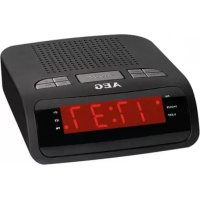
MRC 4142 - Radio AEG - Free user manual and instructions
Find the device manual for free MRC 4142 AEG in PDF.



| Brand | AEG |
| Model | MRC 4142 |
| Product type | FM radio alarm clock |
| Radio frequency band | FM 87.5 - 108 MHz |
| Net weight | Approx. 0.33 kg |
| Mains power supply | DC 5 V (power adapter included, input AC 220-240 V~ 50 Hz, output DC 5 V, 250 mA) |
| Reserve power supply | 2 x 1.5 V AAA/R03 batteries (not included) |
| Power consumption | 2.6 W |
| Main functions | FM radio, dual alarm, sleep timer, snooze, automatic and manual station search, 20 presets |
| Display | LED screen |
| Antenna | Wired dipole antenna |
| Cleaning | Disconnect the device, clean with a soft damp cloth without detergent |
| Safety instructions | Do not expose to water or humidity, do not open the casing, replace used batteries promptly |
| Replaceable batteries | Yes, accessible battery compartment on the bottom |
| Replaceable power supply | Yes, use a 5 V adapter with suitable connector |
| General information | Complies with EU directives, household use only |
Frequently Asked Questions - MRC 4142 AEG
User questions about MRC 4142 AEG
0 question about this device. Answer the ones you know or ask your own.
Ask a new question about this device
Download the instructions for your Radio in PDF format for free! Find your manual MRC 4142 - AEG and take your electronic device back in hand. On this page are published all the documents necessary for the use of your device. MRC 4142 by AEG.
USER MANUAL MRC 4142 AEG
Elimination.. Page 30
Espanol
Indices
Indicación de los
elements de manejo......Pagina 3
Instrucciones de service.......Pagina 31
Overview of the Components......Page 3
Instruction Manual. 47
Technical Data......Page 53
Disposal.. Page 54
Język polski
Spistresci
Przegladelementowoblsugi.....Strona 3
Thank you for choosing our product. We hope you will enjoy using the appliance.
Symbols in these Instructions for Use
Important information for your safety is specially marked. It is essential to comply with these instructions in order to avoid accidents and prevent damage to the machine:

WARNING:
Warnings of dangers for your health and indicates potential risks of injury.

CAUTION:
Indicates potential dangers for the device or other objects.

NOTE:
Highlights tips and information for you.
General Safety Guidelines
Before using this device, carefully read this user manual and keep it together with the Warranty Certificate, cashier receipt and if possible, the original package inclusive its interior packing. If you hand on the device to any third person, include the user manual as well.
- To avoid the risk of fire or electric shock, you should not expose the device to rain or humidity. Do not use the device near water (e.g. bathroom, swimming pool, humid cellars).
- Do not use the unit in extremely hot, cold, dusty, or damp places.
- The unit is designed solely for private use and its intended purpose. This unit is not designed for commercial use.
- Make sure that the power cable is not bent, pinched, or comes into contact with heat sources.
Make sure that the power cable is not a tripping hazard.
The power supply unit is only suitable for use in dry rooms. - Never touch the power supply unit or the cable with wet hands.
- Only connect the power supply unit to a properly installed wall outlet. Ensure that the listed voltage matches the voltage of the wall outlet. Also ensure that the output current, voltage and the polarity of the power supply unit match the information on the connected device.
Always install batteries in the correct direction.
English
- Avoid covering the device's vent openings.
- Never cover the vent holes with objects, such as magazines, tablecloths, curtains etc.
- This appliance shall not be exposed to dripping or splashing water and that no object filled with liquids such as vases shall be placed on apparatus.
- Open sources of fire, such as e.g. burning candles may not be placed onto the unit.
- Never open the device's case. Improper repairs can cause severe danger to the user. If the device or particularly the power cord is damaged, don't use the device any further and have it repaired by a qualified specialist. Check the power cord regularly for damage.
- If you do not use the device for a long period of time, pull the power supply unit from the wall socket and/or remove the batteries.
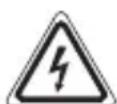
These symbols may be found on the device and shall indicate the following:
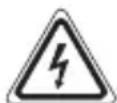
The lightning symbol warns the user of dangerously high voltages inside the case.

The exclamation mark symbol points to important instruction or maintenance remarks in the accompanying guidelines.
Children and disabled persons
- For the safety of your children, keep any packing parts (plastic bags, cartilage, Styrofoam etc.) out of their reach.

WARNING!
Don't let small children play with foils for Danger of suffocation!
- This device is not intended for use by persons (including children) with reduced physical, sensory or mental capabilities, or lack of experience and/or knowledge unless they have been given supervision or instructions concerning the use of the device by a person responsible for their safety.
Supervise children to ensure they do not play with the device.
Overview of the Components
- ANL- button
2 /$NEEP button
3 NCL+ button
4 PRESET button
5 SNOOZE button
6 button
7 MEMORY button
8 button
9 / button
10 Indicator for activated alarm function (8)
11 Indicator for activated alarm function (82
12 Indicator for radio switched on (FM)
13 LED display
14 Indicator for activated "delayed switch-off" function (SLEEP)
15 Indicator for activated "snooze" function (SNOOZE)
Back side (not shown)
DC5V- - - power supply connection
Dipole antenna
Bottom side (not shown)
Battery compartment (power reserve)
First Use of the Device/Introduction
- Select a proper place for the device. A dry, level and slip proof surface is suitable.
Make sure the device is vented sufficiently! - Remove the protective film from the device, if present.
Power supply
- Make sure the grid voltage corresponds to the figures on the rating plate.
Plug the power supply unit into a properly installed protective contact socket. - Connect the device with the power supply unit by plugging the jack of the power supply unit into the "DC 5V - " jack.

CAUTION:
- This device should only be used with the mains supply unit (included). Do not use it for other devices.
- Only use a 5 V power supply unit (3 - 5 - 1). A different supply unit may damage the device.
English
iNOTE:
- Disconnect from mains power supply during longer periods of non-use.
- If you did not insert another reserve battery, the time and the station memory will be lost as soon as the power supply is interrupted.
Inserting the reserve batteries
(Batteries are not included in the scope of delivery)
In case of power failure or if the power supply unit is pulled from the plug, the settings are maintained if the reserve batteries are inserted.
- Open the battery compartment on the bottom side.
- Insert two type AAA/R03 1.5 V batteries. Check that the polarity is correct (see battery compartment).
- Close the battery compartment.
WARNING:
Do not expose the batteries to intense heat, such as sunlight, fire or similar. Danger of explosion!
CAUTION:
- Batteries may leak and lose battery acid. If the device is not used for long periods, remove the battery.
- Different batteries or new and used batteries may not be used together.
- Batteries must not be disposed of in the garbage Please bring used batteries to competent collection centers or back to the dealer.
General Operation
Switch device on/off
- You can toggle the device between standby and radio mode with the button (8). The dot next to "FM" (12) lights up in radio mode.
- To disconnect the unit completely from the mains, pull the mains plug from the socket.
Volume
By pressing the VOL - / VOL + buttons (1/3) you can adjust the desired volume.
Setting the time (in standby)
- Keep the /SLEEP button (2) pressed for a short time. The time indicator begins to flash.
- Set the hours with the button (6) and the minutes with the button (9).
i NOTE:
If you do not press a button within 4 seconds, the settings are automatically accepted.
SLEEP (Delayed switch-off) (2)
When the device is switched on, you can set the time after which the device will turn into standby mode; set the time in 10 minutes intervals from 90 to 10 minutes. The device will turn off automatically after the preset time.
- Press the button. The notification "90" will appear in the display.
- Press the button repeatedly to reduce the time in steps of 10. The "OFF" setting deactivates the function.
To call up the still remaining time, press the button briefly.
Alarm function (in standby mode)
Setting of the Alarm
You can set two alarm times. Proceed as follows:
- Keep the VOL- button pressed for approx. 3 seconds. The indicator begins to flash.
- Set the hours with the /M button (6) and the minutes with the /M button (9).
- Press the A/D-L- button to confirm. Then select how you want to be awakened.
Perform the adjustments with M and H buttons and confirm them with the /Q1 VOL- button. Select from:
bu (Buzzer):
A buzzer sounds when the alarm time is reached. The volume of the buzzer cannot be adjusted.
- Last heard radio frequency:
As soon as your set alarm time is shown, the radio switches on. The last tuned station plays at the last set volume.
- Finally, press the VOL- button again. The first alarm time is now activated.
To set the second alarm time, repeat the above steps with the 空 _ 2 ^ V O L + button (3).
English
iNOTE:
In case of an activated alarm time, a dot will light up at "1", and/or at "2".
- If you do not press a button within 4 seconds, the settings are accepted automatically.
- The alarm function ends automatically after approx. 30 minutes and the device switches off.
Turning off the alarm
To shut the alarm signal off until the next day, press the button (8).
Automatic Alarm Interval
The automatically set alarm function can be shut off for approximately 9 minutes with the SNOOZE button (5).
i NOTE:
If the function is activated, the dot next to "SNOOZE" and " " or " " will flash.
Deactivate the Alarm Function (in standby mode)
To deactivate the alarm function, press the WOL- respectively wOL+ button. The dot at " and/or " will go out.
Radio mode
- Fully uncoil the wire antenna.
- Automatically search for radio stations:
Keep the MEMORY button (7) pressed for approx. 3 seconds. The unit scans the complete frequency band for stations. The radio stations found are stored in ascending order of frequency. The sequence cannot be altered later.
Manual scan for radio stations:
Briefly press the / M / button (9/6), until you have found the radio station which you are looking for.
Preset station: To preset the found station, press the MEMORY button (7). Select a preset location with the buttons M / M (9/6). Preset the MEMORY button one more. The station is preset.
- If the reception is too weak and there is interference on the received station, try to improve the reception by altering the position and uncoiling or coiling the antenna.
Select the preset radio station
Press the PRESET button (4) repeatedly.
Cleaning

CAUTION:
Do not submerge the device in water.
Before cleaning disconnect from mains power supply.
Clean the device with a soft damp cloth without detergents.
Troubleshooting
| Fault Cause Solution | ||
| Unit cannot be operated. | Unit crashes and “hangs”. Disconnect from the mains for around 5 seconds. Then switch the unit on again. | |
Technical Data
Model: MRC 4142
Power supply: DC 5V, Θ-C-
Power Consumption: 2.6 W
Battery power reserve: 2x 1.5 V, AAA, R03
Radio component: Frequency range: FM 87.5 ~ 108 MHz
Net weight: approx. 0.33 kg
Power supply unit
Protection class:
Input: AC 220-240 V~50 Hz
Output: DC 5V, 250 mA
The right to make technical and design modifications in the course of continuous product development remains reserved.
This device has been tested according to all relevant current CE guidelines, such as electromagnetic compatibility and low voltage directives, and has been constructed in accordance with the latest safety regulations.
54 English
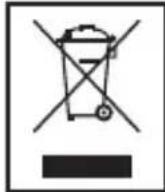
Disposal
Meaning of the "Wheelie Bin" Symbol
Take care of our environment, do not dispose of electrical applications via the household waste.
Dispose of obsolete or defective electrical appliances via municipal collection points.
Please help to avoid potential environmental and health impacts through improper waste disposal.
You contribute to recycling and other forms of utilization of old electric and electronic appliances.
Your municipality provides you with information about collecting points.
Ha npictrooi moxytb 6ytn po3miuehi cIMBOJN, kI nonpeed-jaOTb npo Take:
CnmboJ 6nckabKn nonepeJkae npo Hebe3neky BncoKoi HanpyrN BCEpeDNIH Kopnycy.

Cnmbol 3NaKy Oklky no3Haaye BaxJnBi iHcTpkyi a6o npaDi IooToTexHiHoro o6cnyroByBaHHB B nociHNY, kynI DoJaEtbcA Do npicTpoIO.
Iitniocobn3ocobmntpe6amn
3 MeTOU yHnKHeHH He6e3neKn IaBaxix dTeiTe 36epiraTe 6yIb-akn nakyBaHm MaTepiA (PnaCTuKoBI Kopo6Kn, nepeoropokn, niHOpNaCT Toio) nO3a Mexamn ix DoCxKHOCTi.

PONEPEKHEHRA!
He do3boJrTe mJeHbKm dITAM rpaTnca 3 fOJIbroIO, ockijbKn icHyc He6e3neka 3aDyweHH!
- LcE npictpiH He npn3HaueHn IJRA BnKOpNCTaHn Oco6amn (BkIooaOuH nITe) 3 o6mexeHIMM fiznHIMn Yn po3ymOBHMn 3dio6HOCTaMn, a6o 3 bpaKOM IOCBiNy Ta/a60 3HaHb, kUo 3a HIMN He BeJeTbcra HaJIaY Ni IM He 6yIn HaJaHb iDIOBIDHi Bka3IBKn CTOCOBHO BnKOpNCTaHHr npNCPTPOIO OCO6OIO, RaKa Hece BiDIOBIDAJIbHICtB 3a ixHIO 6e3- neky.
74 YkpaIHcbka
CTeXTe, 106 dITn He 6abuINcB npncTpoEm.
Orlae elementiv npablinn
1 KhoNkaVOL-
2 Khonka /SLEEP
3 KhoNka2VOL+
4 Khonka PRESET
5 Khonka SNOOZE
6 KhoNka/H
7 Khonka MEMORY
8 Khonka
9 KhoNka /M
10 IHHNKaTOp yBIMKHeHOi 6yHKuI
11 INdNKaTOp yBIMKHeHOi yHKui 6yDnJIbHnKa
12 IHHaKaTOp yBIMKHeHoro paio (FM)
13 CbitIIOJIOHN DnCJIeN
14 IhInKaTOp yBIMKHeHoi yHKuIi " BiKnaJeHoro BIMKHeHHa" (SLEEP)
15 Indikatop ybimkhehoi cyhku "noBtopHO CnHany" (SNOOZE)
3aHii 6ik (He noka3aHo)
Po3'em DC 5 V -C-+ nIa nIKnUoyenHn Do Jxepena noCTiHoro cTpyM y DINOJIbHOI aHTeHI
HnKhi 6ik (He Nioka3aHo)
BiiJIOK IaTapeiok (pe3epBHe XnBHeHHa)
BnKOpncTaHnI npncTpoIO Bnepse/o3HaioMJeHHa
Bn6epitb nixoJxme micpe Ira npncptpo. Iy zufo npndaTha cyxa nnacka HeCIn3bKa NOBepxHa.
- IpebeipTe, YI npicptiIN pOBiTpHOETbCA HaleXHIM YIHOM!
3HIMITb 3 npncTpo IO 3axnCHy PIIIBKY, JKUIO BOHa Ue E.
XMBJeHHA
-
YneBhItbC, 10 Hapya MepeXi BiINOBiJaC 3HaueHHa H TaBInuCi 3 TexHcHIMn DaHIMN.
-
Пдклочь блOK кивлени до розетки 3axишим koHTaKTOM, ра Встановпанехним уном.
-Пдкючыпрладдо 6лokaЖИВLEHЯ:ВCTaBTe штЕр 6лokaЖИВLEHЯу po3'EM "DC5V -C-Φ
YBAGA.
- Пилад сдд ВИКОПСТОВУВАТИ разOM i3 SFLOKOM XИВЛЕNHЯ BiД Мерекi (ДоДаETбс) He 3aCTOCOBYITE ИОДdo iHux пиладIB.
BnKOpncToBynte TInbKn 5 B 6Iok XnBHeHn (3- -). BnKOpncTaHn iHJoro 6Ioka XnBHeHH MoKe NOnKoNTn npUlaD
i IPNMITKA.
- Bid'ednyte npnstpii BiD Mepeki XnBHeHHa, kUo He KopnCTyeTeC Hm DoBn npomixok yacy.
-Якшо He BCTableni pe3epBHi 6batapeKn, daHI yacy Ta 3anporpamOBaHnx CTahci BydTyB BTPaueHi y pa3i BiDcyTHOcTi XINBJIeHHI.
BcTablaHHpe3epBHX 6aTapeiok
(BaTapeiKn He BxOJaTb Do KOMPJIeKTy NoCTaUHaHna)
Y pa3i BiiccyTHoCTi KINBJIeHnI YI BInaIKOBOrO BiI'edHaHHa 6JIOKa XINBJIeHHa BiIMepexi HanaHTyBaHHa 36epirAOITbC4 3a HaRBHOCTi BCTaHOBJIeHHx pe3epBHHx BaTapeNOK.
- BiikpnTe BiDIOIOK dIg 6aTapeoK, KIN 3HaXoITbcBHN3y.
- BcTaBTe DBi 6aTapeiKu TnPy AAA/R03 Hanpyro1o 1,5 B. IpeBipTe npaBnIbHicTb noIapHocTi (cxemy npuBeJeHO y BiDciKy).
- 3akpiIte Bicik dIaIbIapei.
NONEPEIXEHHA.
YHnKaIe BnINBy BnCOKNX TEMNepaTpy, HApnKJaI npAmoro COHrHOro npomHHBorHIO Toio, Ha 6aTaPei. IChyE He6e3neKa Bu6yxy!
YBARA.
- BaTapeiKIMoKyTb TeKTn,TO6To 3 HIX MoKe BntiKaTn KncIcNoTa. JKiUO npuJaH e BnKOpNCTOByBaTImeTbCra IpOTaRGM TpNBaIoro Yacy,BnMItb BaTapeiKy.
He moxha BnKOpNCTOByBaTn pa3om pi3Hi 6aTapeiKn a6o HOBy 6aTapeiKy pa3om 3i CTapoIO.
He ytni3ynte 6atapei pa3om i3 nobytOBm cmittam. BnkopncTaHi 6atapei 3daBaYte y BiIOBIDHn nyHKT npNOMy a6o NOBepTaIe ix y nyHKT npndbaHHa.
76 YkpaIHcbka
3araIbHa iHΦopMaizI npo po6Otu npncTpoIO
YBIMKHeHHBIMKHeHHI pncToIO
- Пилад можна поеводпг 3 черювого ржимь ржим pa dio abo habnaки, нацкалочи Кногку (8). Y peximi paio 3acBiyetbca TOnka noprd i3 haHINCOM "FM" (12).
- IINIOBHO BID'EDHaHHI pncTOIO BID JKNBHeHHB NIMITb BNIKy 3 PO3ETK.
Tychicb
Iopri6Hy ruyHicTb moXHa halaStyBaTn 3a donomoroKhoNOK VOL-/VOL+ (1/3).
BcTaHOBJIeHHa cacy (BpeKmI ouikyBaHHa)
1.Утpresу Te haTncHyToIO KhoNkySLEEP (2) kIbka cekyH.ПочHe mepexTiTn iHdka-Top yacy.
2. BctaHOBITb rOINH Ta XBNiHN, HATNCKAIOUH BiINOBIDHO KHOJKN (6) Ta /9).
i PIMITKA.
KUIO npOTaROM 4 cekyHd He HaTnCHyt N KOHOI KhoNKn, HalaSTyBaHHa Bye npiHrTO ABTOMATNUHO.
SLEEP (BiiKnaeHe BmKHeHHa) (2)
Якwo npicntpiy yBIMKHeHO, moKHa BCTaHOBHTn Yac, nicna 36i ry JKOro npicntpiy nepeJeB pexm OuyBaHHra; BCTaHOBiTb Yac i3 10-Tn XBnIHHM iHTepBaIOM y Diana3oHi BiD 90 do 10xbuINH. Pnpicntpiy BImKHeTbcr ABTOMaTHUHO nicna 36i ry BCTaHOblHo rO yacy.
- Hatachitb KhoIky. Ha ekpaHI 3'YBHTbcNobIDomJIeHHa "90".
- Hatackai Te KhoNky KjIbKa pa3iB nocnilb, 06 3MeHnTn Yac i3 Kpokom 10. HanaTuBaHHa "OFF" BmNKae 1o FyHKJIO.
Lio6i3HaTnca yac, 1o IINIBc, 3JeKa HATNCHITb KHOIky.
He 3aHypioTe npicTpiy Body.
- Pered TmK YnCTNT npncptiB, Bi'edHaIte Ioro BiD MepeXj XnBJIeHna.
YnCTbTe npncptiIN BOIoroIO M'RAKOIO rAHUIPKOIO, 6e3 3acOIB dNRA YIuHHeHHA.
YcyHeHHa HeCnpaBHOCTeH
CIMBOJbI npimeHReMbIe B daHHOM pyKOBoDCTBe NOJIb3OBaTeJIa
Baxhble yka3aHn, kacaioeBaIe 6e3oNaChOCTN, OTMeueHb I ocobo. Bo n36exaHne HechacthIx ClyuAeB IN NOBpeXdHn YcTpoiCtBa ObaaIte Ha HIX OC6oe BHIMaHne:
I P E D Y N P E X K D E H N E:
Ipeynpekdaet o6 onacnoCTn drr 3doPoBbN BO3MOXHOM pncKe nOlyeHn TpaBMbl.
BHIMAHHE:
Yka3bIbaet Ha BO3MOXHyIO ONaCHOCTb IaI N3dJIIN I dpynx OkpyxaIoIIN IpeIMeTOB.
I IPNMEUHNA
JaetcoBtBuHΦopMaUIO.
CIMBOJ BOCJIuIaTeJIbHOrO 3HaKa OTMeUaET BaXHbIe INHCTpyKlIn IJIi 3aMeUaHnI O TEXHnueCKOM OBCJIyXkBaHmN B pyKOBoIDCTBax N3 KOMJIneKTA NOCTaBKn.
IeTN IInuHa HxKdaIOUneCBA PnMCOTpe
- I3 coo6paxeHn 6e30nacHOCTn dIy DeTeH He octaBnIe JexaTb ynaKOBky (nlaactN KOBbie MeWK, KapTOH, neHONJIaCT n T.D.) 6e3 npncMOtpa.

PPEyPExKDeHne!
He no3B0JrTe deTm nIgpaTb c POJIINaTIJIeHOBOI pJIeHKO. OnachocTb ydyu7yra!
- 3TOT npnbop He npedHa3Hauhen IJRA NOB3OBaHnA LIuamn (BkIooaJeTei) C orpaHHueHHbIMN fH3UeCKIMN, CEHCOPHBIMN IJIN YMCTBEHNbIMN cNoOC6HOCTAMN IJIN LIuAMN, He IMeIOUIMM ONbITaNJIN HeoBXODMbIX 3HaHNI. VckJIouyehne coCTabJIaIOT ClyuaN, KOrDa OHn HaxOJATcR NOD pncmOTpOM LIuCa, OTBETCTBEHHORO 3a INX 6e30NaCHOCTb, IJIN KOrDa OT 3TOFO LIuA NOJUyeHbI yka3AHN NO NOB3OBaHnIO npnbopom.
Pycckn
Heo6xOIMO npncMaTpNBaTb 3a JeTbMn, YTO6bl y6eINTbC B TOM, YTO OHn He IGamma C np6opom.
O63op detaJIeI npI6opa
1 KhoNkaVOL-
2 Khonka /SLEEP
3 KhoNka2NOL+
4 KhoNka PRESET
5 Khonka SNOOZE
6 KhoNka/H
7 KhoNka MEMORY
8 KhoNka
9 Khonka/M
10 INHnkaTop aKTHINBPOBaHHoYHKnIbHnKaT
11 HnKaTOp aKTHBnPOBaHHoYHKn 6yDnJIbHNKa
12 INIkaTOp BkJIIOeHHOpaIIO (FM)
13 XK dncnnei
14 INHdkaTop aKtINBupOBaHHoYhKcnn "OTLOXeHHoe OTKJIuOHeHne" (SLEEP)
15 HndkaTOp aKTHBnPoBaHHoI cyHKcIN "NOBTOPO CnHana 6yDnJIbHnKa" (SNOOZE)
3aHnA CTOpOHa (He noka3aHa)
Pa3bem 3JIeKtpoNTaHnA DC 5V- -C+ (BXOJnoCT. ToKa)
ДиюльнааHTeHа
HnKnA cToPOHa (He noka3aHa)
Otcek 6aTaapeek (pe3epBHOe nItaHne)
Пер boe npimehne yctpoicTba/BBeJeHne
- BbIepeTe IyCTpoiCTBa IOxOJaIe MeCTo. PnroHa cyXa, POBna HecKoJIb3-KaI NOBepxHocTb.
- YbEaNTecB B DOCTaTOHOBENTINLAuN yCTPOIcTBA!
CHIMITE 3aunTHyIO nIeHky C yCTpoNCTBa, eCIN OHa eCTb.
3neKtpoNTaHne
-
Y6eIITecB COOTBETCTBnCcTeBOrO HAnpJKeHnBEJIuHHe Ha TaJIuHKe HOMHaJIb-HbIX XapakTepNCtIK.
-
ПОДКЛЮЧИТЕ 6ЛOK ИСТОУнka пNTаня K праВиьHO yCTaHOBJIeHHOу 3aUuIeHHOу KOHTaKTHOу pO3ETke.
- IopKIOHTe yCTpOJcTBO K 6IOKy NCTOCHNka NITaHn 3a CHTBkN 1tBpeBOrpa3bema NCTOCHNka NITaHn B THe3do "DC 5 V G-C+

BHIMAHNE:
JaHHoe yCTpoIcTBO DOJXHO pIMeHATbC TOLbKO C NCTOCHKOM CETeBOrO nITaHnB (BXoIIT B KOMJIeKT NOCTABKn). He nCnoJIb3yIte erO c DpyrIMn PpN6OpAMn.
- IcnoIb3yIe ToIbKO nCTOuHnK nITaHn5 B -C+).NcTouHnK nITaHnA npYrTO Tnna MoXET IOBPeDnTB VCTPOINCTBO.

ПРИМЕЧАНЯ:
- OTKJIIOUHTe yCTPOINCTBO OT cTeBOrO 3JIeKTPoINTaHnIa, ecII He IIJIaHnpyETcA nIOJIb3OBaHHe dIITeJIbHbI CpOK.
- Ecni He 6ydt BCTaBHeHa 6aTapeiKa pe3epBHO rntAHn, daHbIe B nAmrIn BpeMeHN i CTaHcN 6vDyT NpTePahbl npn ppebHaHn cTeBOrO 3JeKTPoNTAHn.
BcTabka pe3epBbIX 6aTapeek
(6aTapeiKn He BXoT B KOMJIeKT NOCTaBKn)
Bcnyae HencnpaBHOCTN 3JekTpOnTuHnI Nn npn n3BLeueHnn NCTOCHNk aNTaHnI 3 p03ETK, HAcTPOiKa COxpaHReTc 3a CHT PNTAHN O T BCTaBHeHHbIX pe3epBbix 6aTapeek.
- OTKpoIte OTeCk 6aTaapeEK Ha HIXHNe CTOPOHe.
- BcTaBbTe DBe 3JIeKTPnueckne 6aTapeiKn Tua AAA/R03 c HapJxKeHnem 1,5 B. PpoBepbTe PpaBnIbHOCTb NOLpHOCTn (CM. B OTceke 6aTapeek)
- 3aKpoITe oTceK 6aTaapeek.

PPEyPEXKDEHNE:
He noDBepraTe 6aTapeKn BO3dEiCTBIO MOHoro NcTOHnKa TeNla, HApIMep npMOrO COJIHeuHO rCBeta, OTHI IIN aHaJOnuHoro. OnacHocTb B3pbBa!

BHIMAHHE:
-БатAPEи KMOT BbITEKaTb, Tepa KcNToY. EcIn np6op He nCnoJIb3yETcI dINTeJIbHOE BpEMr, BbITACKnBaTe I3 Hero BaTapeiKn.
He yctaHaBnBaIte BmecTe 6aTapeiKn pa3HOrO Tnna, IIOHO HOBYIO n CTapyIO BaTaPeKn.
He BbIbpaBaIte BaTapeKn BMeCTe C bItOBbIMN OTXdAMN. IoxaanyIcTa, OTHecN Te NcNoJIb3OBAHHbIe BaTapeKn B UeHTP cOopa NII O6paTHo PO3HNUHOMy PPOdaBuY.
84 Pycckn
06uzne npabnla 3Kcnpyaataun
BkIIOueHne/BbIKIOueHne yCTpOiCTBa
BbMOxTepeKIOaTbcMexypeXIMAMN OXnDaHn npaoC nOMoIbIO KHOIKN (8).BpeXimepaio3aropaetcTouka paoCnaPiocbTO FM" (12).
- TTo6bl NOLHOCTbIO OTKJIIOUHTb 6JOK OT CINIOBOrO 3JIeKTPoNTaHnI, N3BLeKInTe BnIKy N3 p03ETKn.
YpOBeHb rPOMKoCTn
Haxatne KhoNOK NOL-/NOL+ (1/3) no3BOJRAET yCTaHOBnTb HxHbIyPOBeHb rPOMKoCTn.
Hactpoika BpeMeHn (B deKyphom pexnme)
- KpaTKOBpeMeHNO yIepXINBaIte HaxaToN KHOkky/SLEEP (2). INHdkaTOp BpeMeHn HaunHaet MngTaTb.
- YctaHOBInTe YacbI C NOMOuKHOHONK/H (6), MHyTbC NOMOuKHOHONK/M (9).
I IPNMEUAHNA:
EcnBbI He HaxMeTe KHOJky B TeueHne 4 cekynd, To HactpoiKn 6ydyT aBTOMaTHueCKn npHrtbl.
SLEEP (OTJIOXeHHoe BbIKIOueHne) (2)
KoIa yCTPOIcTBO BkJIIOUeHO, Bbl MOXeTe yCTaHOBITb BpEma, IocNe KOTOpOTo yCTpoIcTBo nepeiJeT B pEXIM OxNJaHnIA; yCTaHOBITe BpEma c 10-MnHyTHbIM INHTepBaJOM oT 90 do 10 MInyT. YCTPOIcTBO BbIKJIIOuHTcra ABTomaTtueckn IocNe TOrO, KaK HAcTyIIT 3aDaHHoe BpEma.
A B T O M A T U N E C K N Y C T A H O B L E H H A Y H K C I N A 6 y D I N J B H N K A M O X E T 6 b I T b O T K L I O U C H A P R I M E P H O H a 9 M n H y T K h o n k o N S N O O Z E (5).
I INPIMEYAHNA:
EcnHkuaKtBnPoBaHa,HaHHeT MNaTaTb TOnKa HAnpoTnB KHOJOK "SNOOZE" n
OTKIOUeHHe FyHKuIN 6yDnJIbHnka (B DeXyPHoM pexKIme)
IЯ OTKJIIOueHnI 6yIINbHnKa HaxMNTe KHOKNy VOL-,IINNOL+ COOTBETCTBEHNO.
Ipoanaet toka pAnomc"WnIn
86 Pycckn
Pexim paanopnpemnka
1.ПолhoeTbIpa3BepHnTe npOBdHyIO aHTeHHy.
2. ABTomatnueckn nonck paanoctaHn:
Дерхит eнжатои кногу MEmORY (7) npimepno 3 cekyHdbI.Блok haHne t ckaHnroBaHne BCero yactOTHO rnaHa3OHa dRЯ NOCKa paNIOCTaHcH. HAneHbIe CTAuHm coXpaHJOTcB noprKe yBeJIuYeHnra YactOTb.IocNeIOBaTeIbHOCt b paNIOCTaHcH NeIb3r peJaKTnPOBaTb.
Ponck paiaoctaHm BpyHyo:
KpaTKOBpeMeHNO hXMMTe KHOKNy M / H (9/6),do 3aBepWeHn NaCKa HxHOn paIIOCTaHcN.
ПпeДВарNTьнгЯ HabТpoика Ha CTaHцIO: Ддя 3aПИСи HaДeHNoI CTaHцIN B KaueCTBe ПпeДВарNTьно HabTpoeHNoI HaxMITE KhoNkY MEMORY (7).БыбeрИTe MEcTO Ддя 3aПИСи ПпeДВарNTьнoI HabTpoiKn KhoNkAmN (5).Е上诉Я habMITE KhoNkY MEMORY. CTaHцIЯ CTaJa ПпeДВарNTьнO HabTpoeHNoI.
- Пи сишkom слбом пиeme пиимаemую paanoctaцio, nonpoByTe ynyuHTb пиem 3a chet n3mepennoJoxeHn noJpa3BepTbBaHn/ CBopayBaHn aHTehHbl.
BbI6Op npedyctaHOBJeHHo paHIOCTaHcnn Heckolbo pa3 haxmnte KhoNky PRESET (4).
UncTka

BHIMAHHE:
He norgykaite yctpoicTBBO B Body.
- Pered ouhctkOJTKIOUHTe OT cTeBOr 3JeKTPoNTaHnA.
OuHCTTe yCTPOIcTB MoRKO BLaXHOI TKAHbIO 6e3 PnIMHeHnMoIOLUX CpeIDTB.
Диагностка
BbIXoI: DC (noct. Tok) 5 B, 250 mA
CoxpaheNo npaBo Na Texnueckne N KOHCTpyKUHOHHbE N3MeHeHb B paMKaX npoJolkaIoueIcpa3pa60TKn npOyKTa.
Даанhoe устю CTBO npoшлno TeCTIpOBaHne NO BCEx TeKUIMпрIMeHIMbIM HopMaM CE, BKJIQUaJ 3JIeKTpOMaRHTHyO COBMeCTUMOcTb N Yka3aHnI DЯ HN3KOBoJbTHbIX UCTPOICTB, a TAKKe pa3pa6OtaHo corglaCHO nocJeDnHm HopMaM 6e3OnaCHOCTN.
GARANTIEKARTE
warranty card · garantiekaart · carte de garantie · scheda di garanzia · tarjeta de garantia · cartao de garantia · garantikort · karta gwarancyjna · zaručni list · kartica jamstva · carte de garantie · rapaunnoHnKa KapTa · zaručny list · garancijski list · garanciajegy · rapaHTiHnΦopMynp · RapaHTnHbI TaIOH
MRC 4142
24 Monate Garantie gemäß Garantieerklarung - 24 months warranty according to warranty declaration - 24 maanden garantie volgens garantieverklaring - 24 mois de garantie selon la déclaration de garantie - 24 mesi di garanzia secondo la dichiarazione di garanzia - 24 meses de garantia de acuero con la declaracion de garantia - 24 manedes garanti i henhold til garantibeteingelsene - 24 miesiace gwarancji na podstawie oswiadzenia gwarancyneo - zaruka 24 mski podle prohlasei o zaruce - 24 mesecno jamstvo u skladu s jamstvenom deklaracionj - 24 luni garantie conform declarajei de garantie - 24 meeuropaanur a cbotetane c rapaunohnata deknapauen - 24mesa zaruuka podla vyhlasenia o zaruke - 24meseca garancija, skladno z garancijsko izjavo - 24 honap garancia a garanciafeltetelekben leirtak szerint - rapahtna Ha 24 MICHI BIDNOIOHO ZANBI npo rapaHTIO - RapaHTN 24 MEUCA cornachOzraBNEHHBM rapaHTHbIM npasnnam.
Kaufdatum, Handlsterpmel, Unterschrift - date of purchase, dealer stamp, signature - aanko-opdatum, dealerstempel, handsteinkening, date d'achat, tampon du concessionaire, signature - data di acquisto, timbro del rividimento, firma - fecha de compra, selelo del distribuidor, firma - data de compra, carimbo do distribuidor, assinatura - ijopsdato, forhandlsterpmel, signatur - data zakupu, pieczeg sprzedawy, podpis - datum zakoupeni, naftiko prodeje, podcis - datum koupovi, zig trogova, potpi - datum achitile, stampia furunizolni, semrumenta - Jara ha noykmaera, nehar va npogosana, nognac - datum nakupu, peclatka obchodnika/ predacu, podcis - datum nakupu, zig trogova, podcis - vasiiras datuma, kereskedd belyegroje alairas - dae npugbaenm. neyanka npogabua, nqnc - dae npogopetenen, ilhram npogasa. npogmo
ETV
www.etrvd




- Espanol
- Indices
- Język polski
- Spistresci
- Symbols in these Instructions for Use
- WARNING:
- CAUTION:
- NOTE:
- General Safety Guidelines
- English
- Children and disabled persons
- WARNING!
- Overview of the Components
- Back side (not shown)
- Bottom side (not shown)
- First Use of the Device/Introduction
- Power supply
- iNOTE:
- Inserting the reserve batteries
- General Operation
- Switch device on/off
- Volume
- Setting the time (in standby)
- i NOTE:
- SLEEP (Delayed switch-off) (2)
- Alarm function (in standby mode)
- Setting of the Alarm
- Turning off the alarm
- Automatic Alarm Interval
- Deactivate the Alarm Function (in standby mode)
- Radio mode
- Manual scan for radio stations:
- Select the preset radio station
- Cleaning
- Troubleshooting
- Technical Data
- Power supply unit
- English
- Disposal
- Meaning of the "Wheelie Bin" Symbol
- Iitniocobn3ocobmntpe6amn
- PONEPEKHEHRA!
- YkpaIHcbka
- Orlae elementiv npablinn
- 3aHii 6ik (He noka3aHo)
- HnKhi 6ik (He Nioka3aHo)
- BnKOpncTaHnI npncTpoIO Bnepse/o3HaioMJeHHa
- XMBJeHHA
- YBAGA.
- i IPNMITKA.
- BcTablaHHpe3epBHX 6aTapeiok
- NONEPEIXEHHA.
- YBARA.
- YkpaIHcbka
- 3araIbHa iHΦopMaizI npo po6Otu npncTpoIO
- YBIMKHeHHBIMKHeHHI pncToIO
- Tychicb
- BcTaHOBJIeHHa cacy (BpeKmI ouikyBaHHa)
- i PIMITKA.
- SLEEP (BiiKnaeHe BmKHeHHa) (2)
- YcyHeHHa HeCnpaBHOCTeH
- CIMBOJbI npimeHReMbIe B daHHOM pyKOBoDCTBe NOJIb3OBaTeJIa
- I P E D Y N P E X K D E H N E:
- BHIMAHHE:
- I IPNMEUHNA
- IeTN IInuHa HxKdaIOUneCBA PnMCOTpe
- PPEyPExKDeHne!
- Pycckn
- O63op detaJIeI npI6opa
- 3aHnA CTOpOHa (He noka3aHa)
- HnKnA cToPOHa (He noka3aHa)
- Пер boe npimehne yctpoicTba/BBeJeHne
- 3neKtpoNTaHne
- BHIMAHNE:
- ПРИМЕЧАНЯ:
- BcTabka pe3epBbIX 6aTapeek
- PPEyPEXKDEHNE:
- Pycckn
- 06uzne npabnla 3Kcnpyaataun
- BkIIOueHne/BbIKIOueHne yCTpOiCTBa
- YpOBeHb rPOMKoCTn
- Hactpoika BpeMeHn (B deKyphom pexnme)
- I IPNMEUAHNA:
- SLEEP (OTJIOXeHHoe BbIKIOueHne) (2)
- I INPIMEYAHNA:
- OTKIOUeHHe FyHKuIN 6yDnJIbHnka (B DeXyPHoM pexKIme)
- Pycckn
- Pexim paanopnpemnka
- UncTka
- Диагностка
- GARANTIEKARTE
- MRC 4142
Brand : AEG
Model : MRC 4142
Category : Radio