
J170739 - Digital photo frame AGFAPHOTO - Free user manual and instructions
Find the device manual for free J170739 AGFAPHOTO in PDF.



| Product type | Digital photo frame |
| Brand | AgfaPhoto |
| Model | J170739 (AF 5071PS) |
| Dimensions | 191.8 x 139.8 x 26 mm |
| Weight | Approx. 0.366 kg |
| Power supply | AC adapter 100-240 V ~ 50/60 Hz, output 5 V / 1 A |
| Screen | 7-inch diagonal, 16:10 aspect ratio, 432x234 pixels resolution |
| Internal memory | Up to 10 photos (JPEG) |
| Compatible photo file formats | JPEG |
| Supported memory cards | SD, MMC, MS, XD |
| Connections | USB Host port (for USB flash drive), built-in memory card reader |
| Main functions | Automatic slideshow, thumbnail display, image rotation, brightness/contrast/saturation adjustment, transition effects, copy/delete files |
| Recommended ambient temperature | 0°C to 45°C |
| Relative humidity | 20% to 80% |
| Maintenance and cleaning | Use a soft, dry cloth. Do not use liquid, gaseous or flammable products. Unplug before cleaning. |
| Safety | Do not expose to moisture, heat, direct sunlight. Do not touch sockets with wet hands. Keep away from children. |
| Spare parts and repairability | Do not repair yourself. Entrust only to an approved specialist. Use only the supplied power supply. |
| General information | Manufactured by Sagem Communications, distributed by AgfaPhoto Holding GmbH. CE marking, compliance with European directives. |
Frequently Asked Questions - J170739 AGFAPHOTO
User questions about J170739 AGFAPHOTO
0 question about this device. Answer the ones you know or ask your own.
Ask a new question about this device
Download the instructions for your Digital photo frame in PDF format for free! Find your manual J170739 - AGFAPHOTO and take your electronic device back in hand. On this page are published all the documents necessary for the use of your device. J170739 by AGFAPHOTO.
USER MANUAL J170739 AGFAPHOTO
Copyright © 2009 Sagem Communications
Supports mémoire photo
Copyright © 2009 Sagem Communications

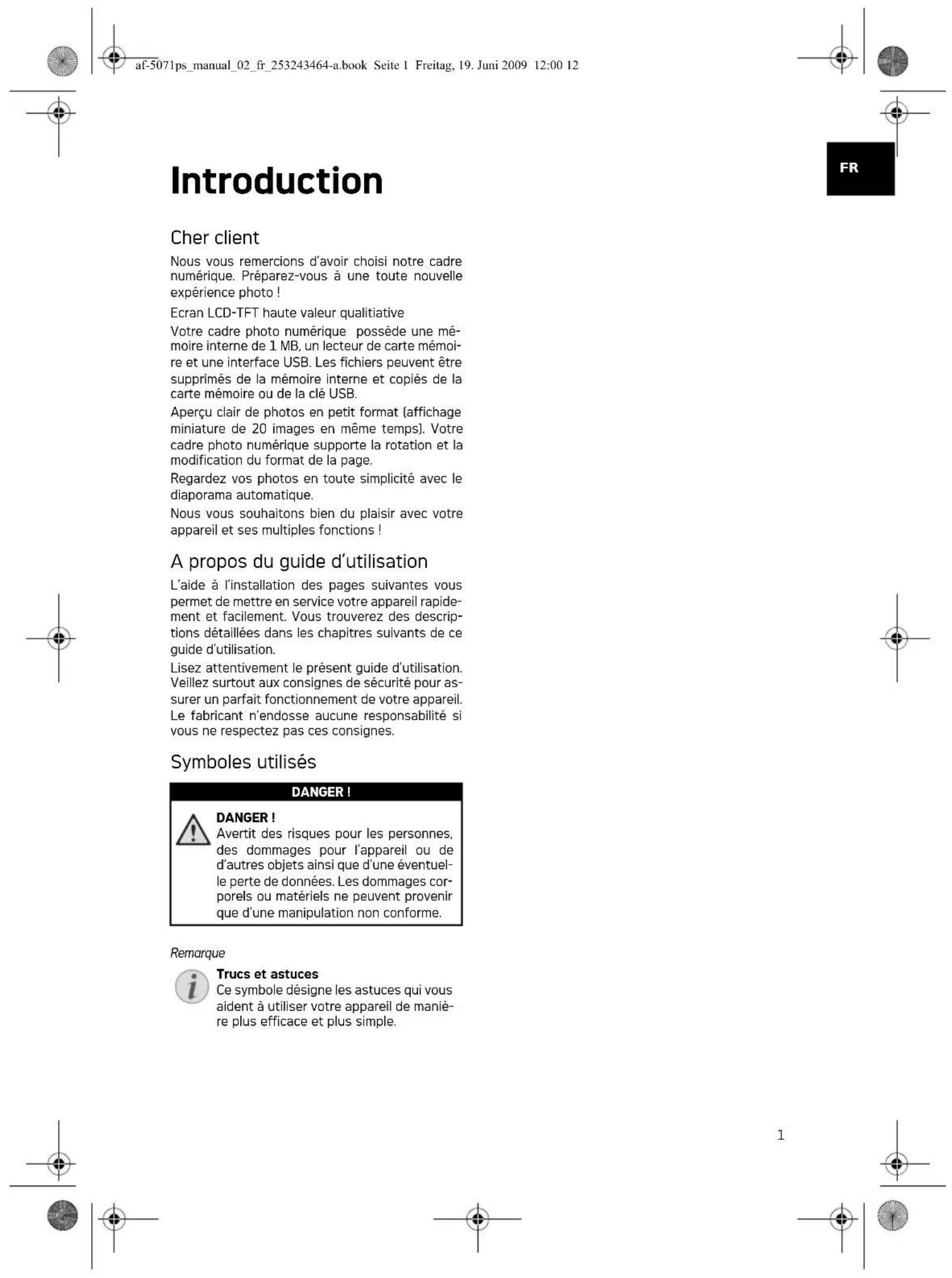
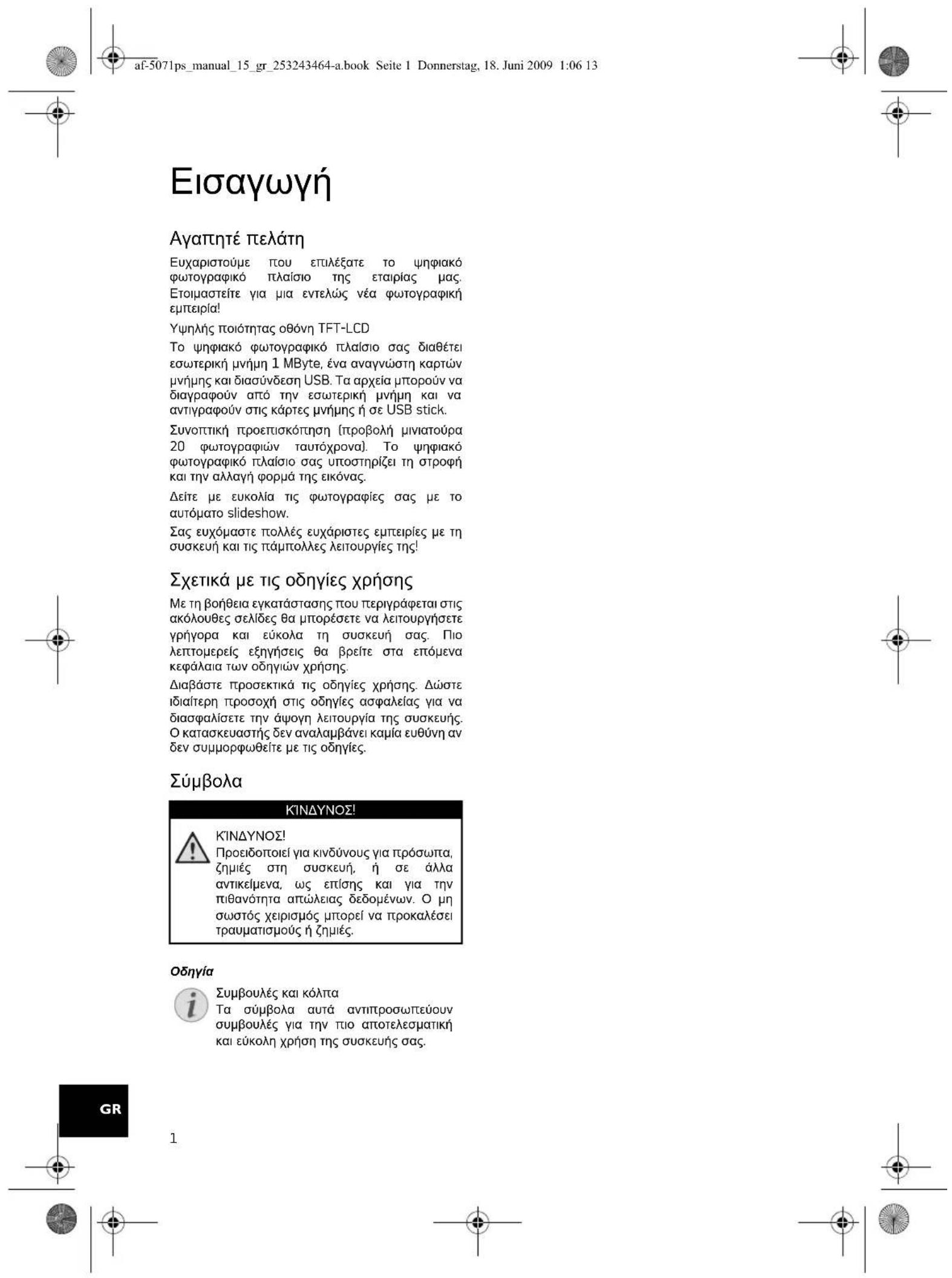
Introduction
Dear Customer
Thank you for purchasing our photo frame. Get ready to experience photography like never before!
High definition LCD screen
Your digital photo frame includes 1MB of built-in memory, a memory card slot and a USB port. Files on the built-in memory can be deleted and files on memory card and USB-disc can be copied.
Supports browse mode (thumbnails of 20 images per page at a time). Your digital photo frame supports photo rotate and stretch function.
An automatic, continuous slide show lets you enjoy all of your photos with ease.
We hope you enjoy your device and its many functions!
About this User Manual
With the installation guide on the following pages, you can start using your device quickly and easily. Detailed descriptions can be found in the following sections of this user manual.
Read the entire user manual carefully. Follow all safety instructions in order to ensure proper operation of your device. The manufacturer accepts no liability if these instructions are not followed.
Symbols Used
DANGER!

DANGER!
Warns about dangers for people, damage to the device or other objects as well as possible loss of data. Injuries or damage can result from improper handling.
Notice

Troubleshooting
This symbol designates tips that will help you to use your device more effectively and easily.
Safety Instructions and Recommendations
EN
Do not make any changes or settings that are not described in this user manual. Physical injury or damage to the device or loss of data can result from improper handling. Take note of all warning and safety notes indicated.
Setting Up the Device
The device is exclusively for indoor use only. The device should rest securely on a stabile, flat surface. Position all cables in such a way that no one will stumble on them, thus avoiding possible injuries to persons or damage to the device itself.
Always handle the unit with care. Avoid touching the LCD screen. Never place heavy or sharp objects on the LCD panel, frame or power cord.
Protect the device against direct sunlight, heat, large temperature fluctuations and moisture. Do not place the device in the vicinity of heaters or air conditioners. Observe the information on temperature and humidity in the technical data.
The device should not be switched on immediately after being moved from a cold to a warm room or vice versa or into a cold room which heated up quickly. In such cases, wait at least three hours until the device has adapted to the changed conditions (temperature, humidity...).
In the event that the device becomes too hot, or if you see smoke coming from the device, you must immediately pull the power cable out of the power socket. Have your device examined by trained professionals at a technical service location. To prevent the spread of fire, open flames should be kept away from the device.
Do not plug in the device in moist rooms. Never touch the mains cable or the mains connection with wet hands.
Do not allow liquids to enter into the device. Disconnect the device from the power socket if liquids or foreign objects have entered the device and have your device examined by trained professionals at a technical service location.
Do not allow children to handle the device without supervision. The packing materials should be kept out of the hands of children.
Power Supply
Use only the enclosed power adapter (see chapter Appendix / Technical Data). Check whether the mains voltage of your device [indicated on the type label] matches the mains voltage available at the setup location. This equipment complies with the voltage type specified on the unit.
Never touch the power cable if the insulation is damaged. Replace damaged wires immediately. Use suitable cables only; if necessary please contact our technical customer service or your retailer.
Before cleaning the surface of your device, disconnect it from the power network. Use a soft, lint-free cloth. Never use liquid, gaseous or easily flammable cleansers (sprays, abrasives, polishes, alcohol). Do not allow any moisture to reach the interior of the device.
Only clean the display with a dry, soft cloth. If the display breaks, a mildly corrosive liquid may escape. Avoid all contact with your skin and eyes.
haRepairs
Do not make any repairs to the device yourself. Improper maintenance can result in injuries or damage to the device. Only have your device repaired by an authorised service centre.
Do not remove the type label from your device; this would void the warranty.
Photo Memory Media
Only use storage media that are compatible with the device. In order to prevent damage to the card or the unit, please turn off the power before removing or inserting the card.
Never pull out the memory card while the device is accessing it. This could cause data to be damaged or lost.

Initial Operation
Packing Contents
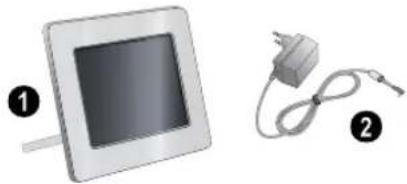
Digital photo frame with bracket
Power supply with exchangeable plugs User Guide (not depicted)
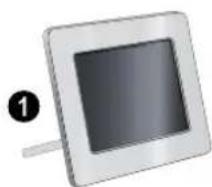
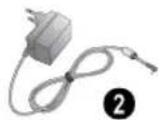
Notice

Missing Package Contents If one of the parts is missing or damaged, please contact your retailer or our customer service.
Connecting power supply
CAUTION!

Mains Voltage at the Site of Installation! Check whether the mains voltage of your device [indicated on the type label] matches the mains voltage available at the setup location.
1 Choose the right plug for your country and slide it onto the power adapter. Ensure that the plug snaps in completely.
2 Insert the small plug of the power supply into the socket on the rear side of your device. Insert the power supply unit into the socket.
Inserting a Memory Card
1 Insert a memory card into the appropriate card slot at the rear of the device. Your photo frame supports the following memory cards: SD/ MMC/MS/XD.
DANGER!

Inserting a Memory Card! Only use storage media that are compatible with the device.
Never pull out the memory card while the device is accessing it. This could cause data to be damaged or lost.
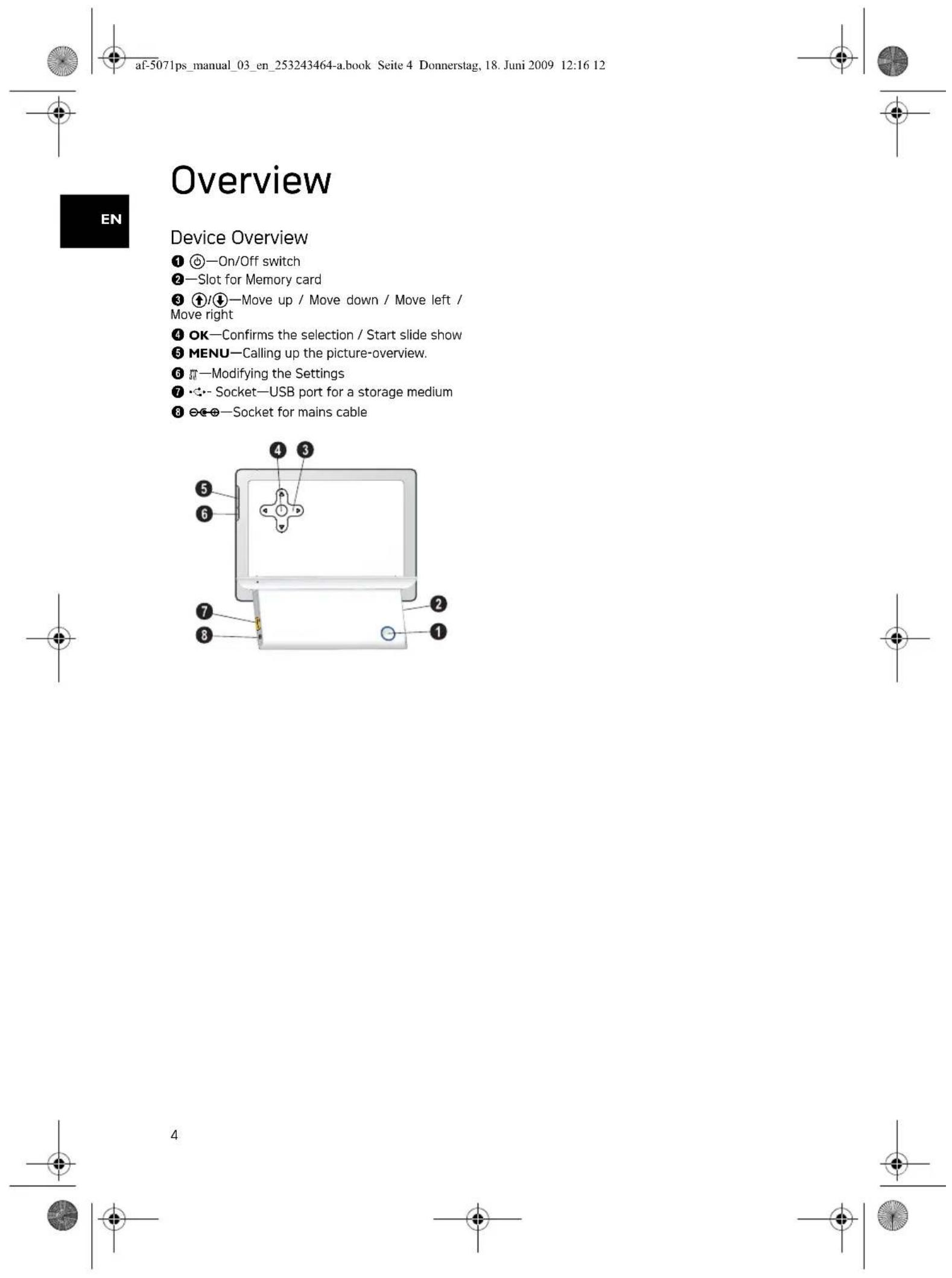
2 Switch the device on using the on/off switch on the rear. The player will start slide show after the start screen be displayed.
Notice

Many Photos on the Memory Card If the memory card contains many photos, it can take some time until the slide show starts.
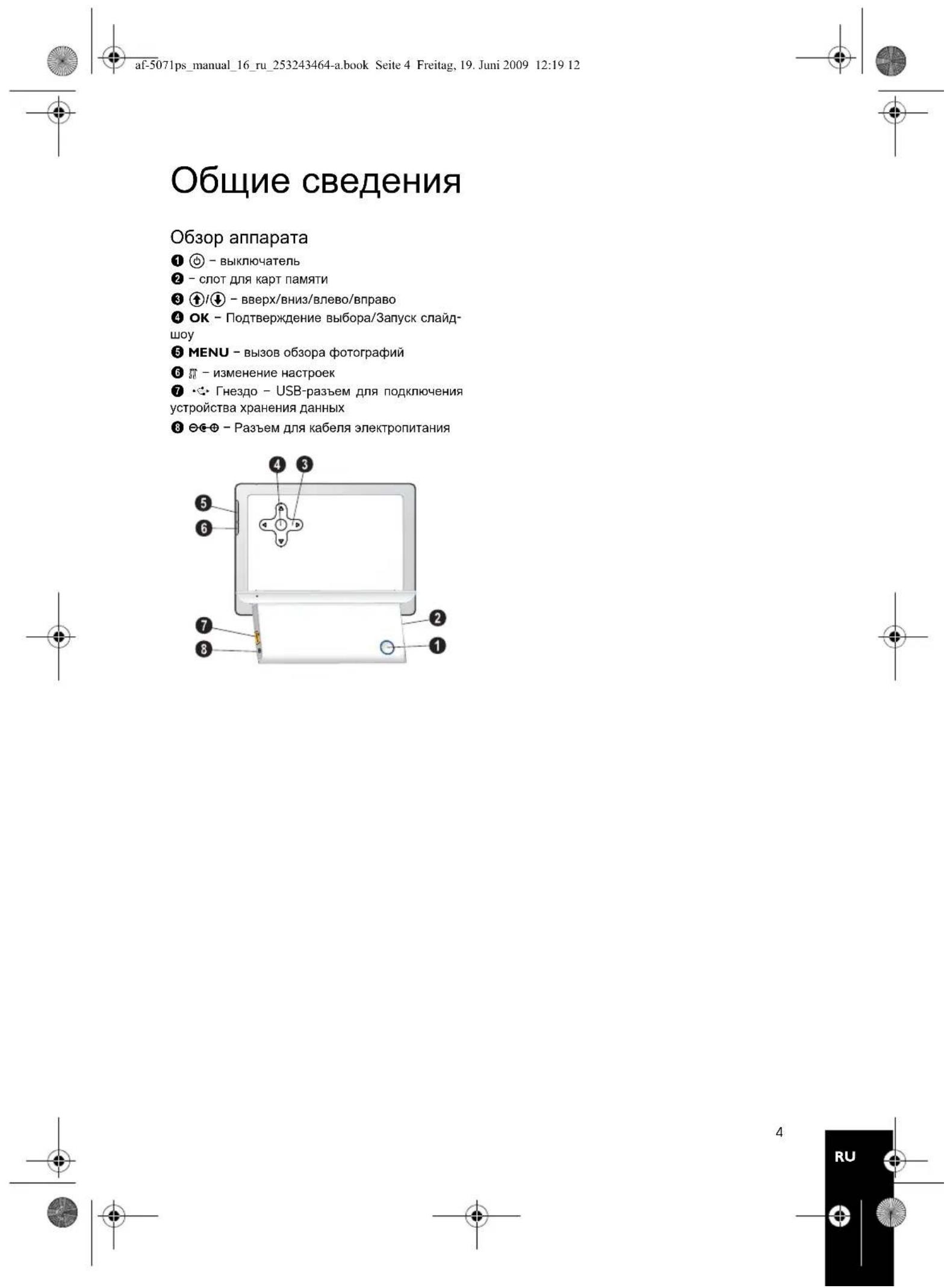
3 Press OK at the rear during a slide show to stop the slide show.
Notice

Using USB device and memory card at the same time If a USB storage device is used at the same time as a storage card, the images from the memory card are displayed first.

Photo Playback
1 Press MENU on the device.
2 Then the frame will display 20 thumbnail images per page.
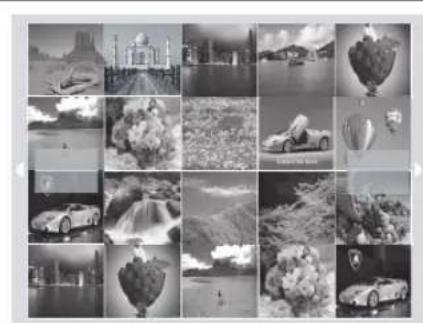
3 Use / or / to select the image from which to start the slide show
4 Press OK to start the slide show.
5 Press OK to pause the slide show. A 'pause symbol' appears on the screen.
6 Press / to skip top the previous or next image.
7 End the slide show using MENU.
Settings
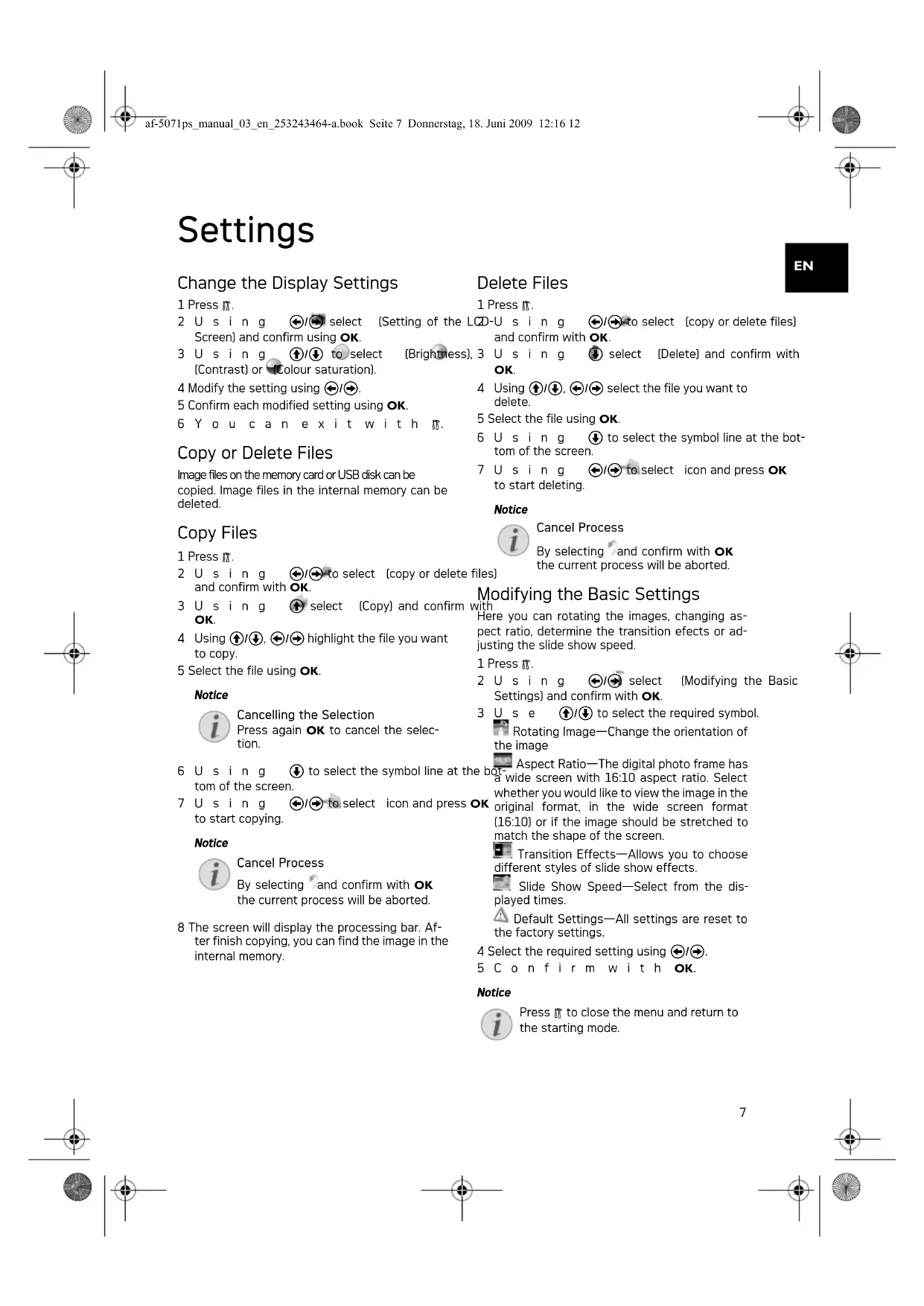
Change the Display Settings
1 Press n.
2 Us i n g
select
(Setting of the
D-U sing
to select
[copy or delete files]
Screen] and confirm using OK.
3 Us i ng
1/
to select
[Brightness],
3 Us i ng
select
[Delete] and confirm with
OK.
4 Modify the setting using I
5 Confirm each modified setting using OK.
6 You can exit with
Copy or Delete Files
Image files on the memory card or USB disk can be copied. Image files in the internal memory can be deleted.
4 Using / .
select the file
e you want to
5 Select the file using OK.
Copy Files
1 Press n.
2 Us i n g
to select
[copy or delete files]
[les] the c
current process will be aborted.
and confirm with OK.
3 Us ing OK.
select
[Copy] and confirm
with
The Basic Settings
4 Using / .
to copy.
high
hlight the file you want
Here you can rotating the images, changing aspect ratio, determine the transition effects or adjusting the slide show speed.
5 Select the file using OK.
Notice

Cancelling the Selection
Press again OK to cancel the selection.
6 Us i ng
tom of the screen.
7 Us i n g
to select
icon and press OK
DK whether you original form
would like to view the film, in the wide scre. the image should be a shape of the screen.
(Modifying the Basic
to start copying.
Notice

Cancel Process
By selecting and confirm with OK the current process will be aborted.
8 The screen will display the processing bar. After finish copying, you can find the image in the internal memory.
Settings
] and
I confirm with OK.
3 Use
(1)
/ to select the req
Rota
tingI
Image—Change the orientation
the image
Select Ratio—The digital photo frame has a screen with 16:10 aspect ratio. Select the image you would like to view the image in the format, in the wide screen format, or if the image should be stretched to the shape of the screen.
Aspect Ratio—The digital photo frame has side screen with 16:10 aspect ratio. Select either you would like to view the image in the final format, in the wide screen format [10] or if the image should be stretched to match the shape of the screen.
图
Transition Effects- Allows you to choose different styles of slide show effects.
图
Slide Show Speed—Select from the desired times.
Default Settings—All settings are reset to factory settings.
4 Select the required setting using
5 Confirm with OK.
Notice

Press to close the menu and return to the starting mode.
EN



Service
Information
| Problems Solutions | |
| Photo Frame does not power on. Check that you can connect the AC adapter to the frame properly. | Connect the AC adapter to the frame properly. |
| Memory card can not be recognized · Check whether you have used a compatible memory card and whether you have inserted the memory card correctly. · Make sure the memory card is not damaged. · Check that the photo format is supported | You have used a compatible memory card and whether you have inserted the memory card correctly. · Make sure the memory card is not damaged. · Check that the photo format is supported |



Appendix
Technical Data
Model .AF 5071PS
Dimensions (× × ) 191.8x139.8x26mm
Weight. 0.366kg
Mains Connection Input: 100-240V~/50-60Hz Output: 5V--/1A
Recommended Ambient 0-45°C
Relative humidity. 20-80%
Display
Screen size. 7
Aspect ratio 16:10
Resolution. 432x234 Pixel
Memory
Internal memory.. up to 10 photos
Connections
USB port USB-Host
Compatible Memory Cards....SD · MMC · MS · XD
Supported formats
Photo formats.JPEG
All data are provided for reference purposes only. AgfaPhotoreserves the right to make any changes without prior notice.
AgfaPhoto is used under license of Agfa-Gevaert NV & Co. KG or Agfa-Gevaert NV. Neither Agfa-Gevaert NV & Co KG nor Agfa-Gevaert NV manufacture this product or provide any product warranty or support.
For service, support and warranty information, contact the distributor or manufacturer.
Contact:AgfaPhoto Holding GmbH, www.agfaphoto.com
Manufacturer: Sagem Communications, www.sagem-communications.com

The CE marking certifies that the product meets the main requirements of the European Parliament and Council directive 1999/5/CE on telecommunications terminal equipment, regarding safety and health of users and regarding electromagnetic interference.
The declaration of compliance can be consulted on the site www.agfaphoto.com
Preservation of the environment as part of a sustainable development logic is an essential concern of AgfaPhoto. The desire of AgfaPhoto is to operate systems observing the environment and consequently it has decided to integrate environmental performances in the life cycle of this products, from manufacturing to commissioning use and elimination.

Packaging: The presence of the logo (green dot) means that a contribution is paid to an approved national organisation to improve package recovery and recycling infrastructures to facilitate. Please respect the sorting rules set up locally for this kind of waste.
Batteries:If your product contains batteries, they must be disposed of at appropriate collection points.
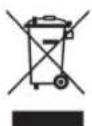
Product: The crossed-out waste bin stuck on the product means that the product belongs to the family of electrical and electronic equipment. In this respect, the European regulations ask you to dispose of it selectively;
- At sales points in the event of the purchase of similar equipment.
- At the collection points made available to you locally [drop-off centre, selective collection, etc.].
In this way you can participate in the re-use and upgrading of Electrical and Electronic Equipment
EN

Copyright © 2009 Sagem Communications
Format: 16.10. Files are of date in net on one file format of in breedbeehd [16:10] client text
e format, or in breedecd (10.16) alemt erder notecard of dat do feto can do boeld
Copyright © 2009 Sagem Communications
Interrumpir la operation
Interrumpir la operation
Copyright © 2009 Sagem Communications
Introdução
Estimado cliente
Copyright © 2009 Sagem Communications

Introduktion
Bäste kund
Tack for du bestamde dig for vara digitala fotoramar. Gor dig redo for en helt ny fotoupplelevelse!
Copyright © 2009 Sagem Communications

SE

Uvod
Vázén y zákazniku,
Vyrobce: Sagem Communications, www.sagem-communications.com

Copyright © 2009 Sagem Communications
Bevezétés
Tisztehl Vásárló!
Copyright © 2009 Sagem Communications
Wstep
Szanowny Kliencie!
Copyright © 2009 Sagem Communications
Introducere
Stimate client
Vä multumim ca aṭi achizitionat Rama Foto digitala commercialzata de compania noastr. Vä recomandam sā fiti pregatit fiindcā veti experimenta arta fotografiei aça cum nu aṭi mai fácut-o pānă acum!
Ecran de cristale lichide de inaltã calitate
Copyright © 2009 Sagem Communications
SK

Giris
Sayin musterimiz,
Fabrikator: Sagem Communications, www.sagem-communications.com
Copyright © 2009 Sagem Communications
TR

9

Copyright © 2009 Sagem Communications
В级以上
YbaxaemblnokynateJIb,
Blaoradapm Bac 3a npno6peTeHne daHHon npodykun. PnrotoBBtec K 3ameyateIbHomy nytewectBnO B mnp fotorpaqnn!
BbICOKKaueCTBeHHbI XnDKoKpNCTaNNueckn DnCnne
YcTpoIcTBo COePjNt BCTpOeHHyIO nAMrTb 1 M6, cNOT dny yCTaHOBKN KapT nAMrTN u USB npT. Bo3MOxHOCTb ydaTb paJnbl co BCTpOeHHoH nAMrTN, a TAKKE BO3MOxHOCTb KOnIpOBAHnR paJNoB C KapTb nAMrTN nn USB-Hocnten
PexnmpedBapntelbHoro npocMoTpa n30paKeHn (noka3 do 20 n30paKeHn Ha cTpaHnue) LnpoBoe ycTpoiCTBO-foTopAmka no3BOJnE T NOBOPaHnBaTb CTPaHnCbI N3MeHrTa Hx fOpMaT.
ABTomatueeckn 3anyckaemb pekim npocmoTpa n3o6paKeHn
MbHaedeemcA,TO BbI NJIyUte YIOBOBnCTBne OT paobtbc annapatom n ero MHOROUnceneHHbx FyHKm!
O6 3TOM pyKOBOIDCTBE NOB3OBaTeJIa
C NOMOJIbIO npINBeHHO daJeepyKOBOCTBa NO yCTaHOBKe Bbl CMoKTe 6bICtPo nPcIcTpyNTb K 3KcNlYatauBaWero annapata. NoDpObHoe ONiCaHne FyHKU IN pINBeDEHO B nocJeYIOx npa3DeJax pyKOBOCTBa NOIb3OBAteJIa.
BHHMaTeNbHo 03HaKoMbTecb c pyKOBOCTBOM nonb3oBaTeYn.ДЯ obecneueHn 6eONaCHO paobToIaNapata coBnIOaTe BCE yKa3AHH texHNK 6eONaCHOCHT.NuROBNTJIb He Hecet OTBeTCTBeHHOCTN B Cnyae HecObNODeHn npaBN texHNK 6eONaCHOCHT.
IcnoJb3yEmbIe 06o3HaueHnA
ONACHOCTb!

ONACHOCTb!
IpeDynpexkdaet o6 onachocctx dIJIIOde, BO3MOXHOCTN NOBpExdHn annapata uINu Dpyrnx yCtpoiCTb, a TaKke O BO3MOXHOH NOtepe DaHHbIX. HenpaBUNbHa 3KcPnyaTaunia MOKeT npBecTe K TpaBmAM NIOBpExdHn annapata.
3ameyauHua

CobetbI peKoMeHdaUIM
3TOT CUMBOI 0603Haayet COBETbl, KOTOpBIE NOMORAOT HAN6Oone npocTo IN 3cpeKTHBNO HcNOLb3OBaTb yCTPOINCTBO.


PekomehdaunnoTexnke6e30napoctn
He BHOcHTe HnKaKHX N3MeHEnH N HaCTpoEK, He ONiCaHHbIX B 3TOM pyKOBoCDtBE NOJIb3OBATeN. HenpabunbHoe NcNOB3OBaHne MOXET npIBeCTN K TpaBMPOBaHIO NIN MaTePnaIbHOMy yUepe6y, NOBpeJxDeHIO YcTPOINCTBa NIN NoTEpe DaHHbIX. CoBNIoAITE BCE npNBedeHbIe npEynpeDInTeNbHbe yKa3aHnN INHCTpyKuINo TN TexNHke Be3ONaCHOCTN.
PpoeDpya HacTPOKn annapata
3TO yCTPOINCTBO npedHa3HaeHo TOnbKO nNnDNBHyanbHoro nCNOB3OBaHHA. Annapat cneDyET yCTaHOBTb Ha NIOCKyO yCTOHNHYBO NOBePxHOCTb. Pacnonarate BCE uHypbl N Ka6eIN TAKIM opa3OM, YTObI HNKTO He MOR NaCTyNTb HA HNX INI CNOTKHTbCR, 3TO MCKHIOAE TO3MOXHOCTb TaBPmIPoBAHHIOHe I NOBpeJENHcAMORO annapata.
YcTpoIcTBOpnpdHa3HaueHoDnA 3KcNpyatauHbByTpnoMeueHn.He npkacaItecb KKK-dncIeHO.He pa3MeuaTe TKeBle nIN ocTpble npedMeTbHa KK-3KpaHe, pAmke nn shHype 3NeKTponTuHn.
3aunuatae annapat ot nonadHn npMOro coIneHORO cbeta, BO3deNCTBn TENla, pe3kXn nepenado TBmepaTpybl n BnA. He pa3meuaTe annapat B6n3n HarpeBaTeJe n KOHNIOHEPOB BO3dyxa.CMOtpnte HNΦOpMaHIO O DOnyCTMOM TeMNEpatye N BlaJHOCTN BO3Dyxa B TEXHuecknx XapAKTEpNCTKax.
He BkIIOUaIte yCTpoIcTBO cpa3y nocne nepemeueHn 13 NOMEeHnC Hn3KoN TEMepaTyPOB B NOMEuHnE C 60nee BBLOCOK O TemnepaTyPOB Hn HAObOPOT, A TAKKe NOcNe 6bICTPORO NOHMAnH N TEMpePAtpyB NOMeUHn. B TAKNX CNTyaunx NDOJNTe He MeHee Tpex YacOB, YTObI yCTPOCTBO aADITnpOBaIOpCb K N3MeHNBWIMCMycNOBnM (TEMpeAtpa, BnaKHOCTb BO3dyxa).
EcnB Baa annapat CnNkOM CnIbHO Harpeetc
Hnn Bbl yBnDnte BblXoJusn N3 Hero DblM,TO
HeMeIeHNO OTKnIOHTe UHyp cTeBOrO
3NeKtpOnNTaHn N3 po3ETKn.OTdaTne BaA
annapat nIpy OcmToPa KBaJIINΦuNpObaHHbIM
CneUaNtCTAM NNN B U CEHTP cepBnCHOrO
06CnykBaHn. JIy InpDeTbpauSeHn BOzropAnHn
3anPeuaTeNoHocnB K annapaTy nCTouHKn
OTKpbIHorO pMaEHn.
Hikorda He nodknoaute annapat K cetn n K TenefoHHo JINHM B cbipbIX NOMEueHnX. Hikorda He kacaiTeCb ceteBOn BuNKn npOeTKn n TenefoHHoro pa3bema BlaKhbIM pykAMN.
He donyckaTe nonaDAnHJXnKoCTe BHytpb annapata. Ecnn BHytpb annapata nonana XnKoCTb nnoctopOHnI npEdMeT, HEmeDneHHO tKnIOHTe shyp
3NEKTPONHTAHN IOTdAte aannapatIIN OCMOTpa KBaHnФmUnpoBaHHbIM CneuMaNTCTAM INB UeHTP cepBnCHORO 6cnyKBaHn.
He no3B0JnTe Detm NOJb3OBAbCAnnapaTOM 6e3 npncMoTa. He donyckaTe deten K ynaKoBOHybIM MaepnAnaM.
3NeKtpnueckoe nTaHne
NcnoIb3yIne ToIbKo 6nok nITaHnB XOJaU B KOMnJIeKT NoCTaBKn (CMOTpIte PnpIOXeHne / TexHnueckne DaHbIe).PpOBepTe, COOTBeTCTByET NIN TnEIKTpONtAHnBAuero Annapata [yKa3AH Ha WnIbDnke] TnY 3NeIKTpONtAHn B MecTe yctAHOBKn annapata. HanpJxHeHn B CeTN NepeMeHHoro TOKa BceTa DOnJHKo COOTBeTCTBOBaTb YKa3aHHOMy HA N3dENII.
He KacaTecb lHypa 3nEeKtpOniTaHnC nOBpeXeHHOI 3nOJIaIeM. HeMeJNeHHo 3aMeHInTe NOBpeXeHnBn Ka6eIb. IcNtOByTe TOnIbKO COOTBeCTByUOIIe Ka6eIMn; npn Heo6XoDMocN ObaPaIaTeCB Cnyk6y TEXHuecko NODepKKn HnK BaWemy NoctBaUmky.
Ipeed ouhctkoi nobepxhoctn annapata
ob3aTeNbHO OTKnIOHTe ero ot cetn
3neKtpOnHtAHn. DInr OCHCTkn nCNOb3yHe
MMyKyo cyXyO 6eBOPCOByo TkaHB.He
npmEnHte dln OChTkn KJNDkN, rA30o6pa3hbx n
roPouX OCHNTeNe [a3po30nn, abpa3NBhie n
nonnyuune cpeDcTB, cnpt). He donyckaIe
nonadaHn BLnH BHyTp bannapaT.
OuHaaTe DnCnne ToIbKO MfKoCxyoTkAhbIO. Ecnn DnCnne Ha KInKnx KpuctaIIax 6ydet pa3bnt,To n3 HrO MoKeT BbTeYb yMepeHHo eKaar XNkoCTb. N36eaiTe IIO6Oro KOHTAKTa KapTpndke C BaWe KeK e N rla3amn.
PemOH
He nbTaItecb caMoCToTEnbHO peMOHTuPOBaTb annapat. HenpaBnblbHbIpeMOHT MOKET npBcEtN K TpaBMm N NOBpXdEHNO annapata.BaW annapat MOxHO peMOHTuPOBaTb TOJbKO B yOJNHOMOeHOM CepBMCHOM ueHTpe.
He CHIMaTe 3aObocko WnIbDnK c annapata, npn 3TOM OTMeHnHOTc rapaHTnHbIe 063aTeNbCTBa.
Hocntenb namrtnoToIpaqni
Icnoj3yTe ToIbKO COBmecTnMbIe C yCTPOINCTBOM HocHTeHnHΦopMaun. Bcerda OTKnHOaHTe 3NEKTPoNTaHHe YCTPOINCTBa npexJe, cem H3BneYb N3 Hero KapTy namrN BO n36ExAHn NOBpeXdEHnA KAPtI namrN nIO bo yCTPOINCTBa.
Hikorda He BbTackBaIte KapTy NamrTu, KOTOPaR NCIOJb3yeTcB TEkyuM MOpHT. 3To MOxET npNBecrN K NOBpeKdEHN UIN K YTpTa DaHHbIX.
BbOD B əKcπŋyaTaцию
KOMNNEKT NOCTABKN
LHpOBApaMaDnApoTOrpaHnHa CToKe
CTeBoa aDantep co CMeHHbIMn CeTeBbIMN BUNKAMN
PykoBODTONo 3KcnnnyatauHnHe noka3aHO
3aMeuHaHua
HeonHbKOMnKeT NOCTABKn EcnOIN H3 3TNX npEMeTOB oTCyTCTByET NNN NOBpeKDeH, 6paNTecb K BaWeMy NoCTABuNKy INN B cnYk6y noDepKKN.
Copyright © 2009 Sagem Communications


- Supports mémoire photo
- Introduction
- Dear Customer
- About this User Manual
- Symbols Used
- DANGER!
- Notice
- Troubleshooting
- Safety Instructions and Recommendations
- Setting Up the Device
- Power Supply
- haRepairs
- Photo Memory Media
- Initial Operation
- Packing Contents
- Connecting power supply
- CAUTION!
- Inserting a Memory Card
- Photo Playback
- Settings
- Change the Display Settings
- Copy or Delete Files
- Copy Files
- EN
- Service
- Appendix
- Technical Data
- Display
- Memory
- Connections
- Supported formats
- Interrumpir la operation
- Introdução
- Estimado cliente
- Introduktion
- Bäste kund
- Uvod
- Vázén y zákazniku,
- Bevezétés
- Tisztehl Vásárló!
- Wstep
- Szanowny Kliencie!
- Introducere
- Stimate client
- Giris
- Sayin musterimiz,
- В级以上
- YbaxaemblnokynateJIb,
- O6 3TOM pyKOBOIDCTBE NOB3OBaTeJIa
- IcnoJb3yEmbIe 06o3HaueHnA
- ONACHOCTb!
- 3ameyauHua
- CobetbI peKoMeHdaUIM
- PekomehdaunnoTexnke6e30napoctn
- PpoeDpya HacTPOKn annapata
- 3NeKtpnueckoe nTaHne
- PemOH
- Hocntenb namrtnoToIpaqni
- BbOD B əKcπŋyaTaцию
- KOMNNEKT NOCTABKN
- 3aMeuHaHua
Brand : AGFAPHOTO
Model : J170739
Category : Digital photo frame