
AF 7088MT - Digital photo frame AGFAPHOTO - Free user manual and instructions
Find the device manual for free AF 7088MT AGFAPHOTO in PDF.


| Brand | AgfaPhoto |
| Model | AF 7088MT |
| Product Type | Digital Photo Frame |
| Screen Size | 7 inches (17.8 cm) |
| Display Resolution | 800 × 480 pixels |
| Supported Image Formats | JPEG, BMP, PNG |
| Supported Video Formats | MPEG-1, MPEG-4, Motion JPEG |
| Supported Audio Formats | MP3, WMA |
| Internal Memory | 512 MB |
| Memory Card Reader | SD, SDHC, MMC, MS |
| USB Port | USB 2.0 (host for USB key) |
| Built-in Speakers | Yes, 2 × 1 W |
| Functions | Slideshow, clock, calendar, random repeat |
| Remote Control | Yes (infrared) |
| Power Supply | 5 V / 1 A power adapter (included) |
| Dimensions (W × H × D) | 190 × 140 × 30 mm |
| Weight | 320 g |
| Frame Material | Black glossy plastic |
| Viewing Angle | 140° horizontal / 120° vertical |
| Operating Temperature | 0 °C to 40 °C |
| Maintenance and Cleaning | Wipe with a dry, soft cloth. Do not use abrasive products or solvents. |
| Safety | Do not expose to moisture, excessive heat, or direct sunlight. Unplug before cleaning. |
| Spare Parts and Repairability | Power adapter available as an option. The device is not designed to be repaired by the user; contact customer service. |
Frequently Asked Questions - AF 7088MT AGFAPHOTO
User questions about AF 7088MT AGFAPHOTO
0 question about this device. Answer the ones you know or ask your own.
Ask a new question about this device
Download the instructions for your Digital photo frame in PDF format for free! Find your manual AF 7088MT - AGFAPHOTO and take your electronic device back in hand. On this page are published all the documents necessary for the use of your device. AF 7088MT by AGFAPHOTO.
USER MANUAL AF 7088MT AGFAPHOTO
natural_image
Child watching a kite flying over a cloudy sky with a monitor displaying a kike on the screen (no text or symbols visible)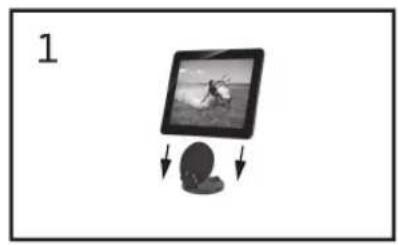
natural_image
Illustration of a screen with a person holding a shoe, showing motion and movement (no text or symbols)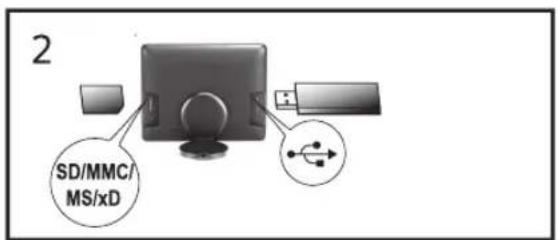


flowchart
graph LR
    A["Device 5"] --> B["Power"]
    B --> C["<1s"]
    C --> D["Processing Step ①"]
    C --> E["Processing Step ②"]
    C --> F["Processing Step ③"]

flowchart
graph LR
    A["Tool Input"] --> B["Product Display"]
    B --> C["Warning Icons"]
    C --> D["Product Display"]
    D --> E["Warning Icons"]
    E --> F["Warning Icon"]
    F --> G["Warning Icon"]
    G --> H["Warning Icon"]
    H --> I["Warning Icon"]
Copyright © 2010 Sagemcom





Supports mémoire photo
Cartes mémoire photo compatibles .....SD/SDHC/ .....MMC/MS/xD
Format Photo ...... JPEG
Fabricant..KUANTECH INCORPORATED COMPANY
Modèle ....KSAD1200150W1UV-1
Entrée.... 100-240V\~/50/60Hz
Sortie 12V==/1,5A
Copyright © 2010 Sagemcom
General Safety Information
Do not make any changes or settings that are not described in this user manual. Physical injury or damage to the device or loss of data can result from improper handling. Take note of all warning and safety notes indicated.
Setting Up the Device
The device is exclusively for indoor use only. The device should rest securely on a stable, flat surface. Position all cables in such a way that no one will stumble on them, thus avoiding possible injuries to persons or damage to the device itself.
Always handle the unit with care. Avoid touching the LCD screen. Never place heavy or sharp objects on the LCD panel, frame or power cord.
Protect the device against direct sunlight, heat, large temperature fluctuations and moisture. Do not place the device in the vicinity of heaters or air conditioners. Observe the information on temperature and humidity in the technical data.
The device should not be switched on immediately after being moved from a cold to a warm room or vice versa or into a cold room which heated up quickly. In such cases, wait at least three hours until the device has adapted to the changed conditions (temperature, humidity...).
In the event that the device becomes too hot, or if you see smoke coming from the device, you must immediately pull the power cable out of the power socket. Have your device examined by trained professionals at a technical service location. To prevent the spread of fire, open flames should be kept away from the device.
Do not plug in the device in moist rooms. Never touch the mains cable or the mains connection with wet hands.
Do not allow liquids to enter into the device. Disconnect the device from the power socket if liquids or foreign objects have entered the device and have your device examined by trained professionals at a technical service location.
Do not allow children to handle the device without supervision. The packing materials should be kept out of the hands of children.
Power Supply
Use only the enclosed power adapter (see chapter Appendix / Technical Data). Check whether the mains voltage of your device (indicated on the type label) matches the mains voltage available at the setup location. This equipment complies with the voltage type specified on the unit.
Never touch the power cable if the insulation is damaged. Replace damaged wires immediately. Use suitable cables only; if necessary please contact our technical customer service or your retailer.
Before cleaning the surface of your device, disconnect it from the power network. Use a soft, lint-free cloth. Never use liquid, gaseous or easily flammable cleansers (sprays, abrasives, polishes, alcohol). Do not allow any moisture to reach the interior of the device.
Only clean the display with a dry, soft cloth. If the display breaks, a mildly corrosive liquid may escape. Avoid all contact with your skin and eyes.
h aRepairs
Do not make any repairs to the device yourself. Improper maintenance can result in injuries or damage to the device. Only have your device repaired by an authorised service centre.
Do not remove the type label from your device; this would void the warranty.
Photo Memory Media
Only use storage media that are compatible with the device. In order to prevent damage to the card or the unit, please turn off the power before removing or inserting the card.
Never pull out the memory card while the device is accessing it. This could cause data to be damaged or lost.

Overview
Packing Contents
moVee Touch - digital photo frame
Removable support
Power supply with exchangeable plugs
Stereo headphones
Cleaning cloth
Travel bag for moVee Touch and support
Quick Start Guide
Warranty Card
Basic Operation
1 If there is a protective foil on the frame, please remove it before attempting to use.
2 Insert a memory card or a USB storage medium into the appropriate slot at the rear of the device (fig. 2). Your photo frame supports the following memory cards: SD/SDHC/MMC/MS/xD.
Notice

Connecting to an Computer (fig. 3)
Using a USB cable (not supplied), you can connect moVee Touch to a computer.
3 Insert the plug of the power supply into the socket of your device (fig. 4). Insert the power supply unit into the socket.
4 Charge the built-in battery before using for the first time for at least 3.5 hours.
5 Switch the device on using the on/off switch POWER on the side. The player will start slide show after the start screen be displayed.
Notice

Resetting the device
If your device does not respond, press and hold POWER at least 10 seconds, to restart the device.
Please note, that the decoding of video files can take up to several minutes.
Menu Overview (Playback) (fig. 5)
When the device is switched on press POWER briefly to call up the main menu.
Tap with your finger on the appropriate symbol on the screen:
① Photo Playback
② Movie Playback
③ Music Playback
Slide your finger over the screen:
Move left / Move right —previous / next Photo/Music/Movie
Move up / Move down — changing the backlight
Setting the Background Music of the Slide Show (fig. 6)
Notice

As background music, you can only use files that are stored in the internal memory.
1 During the slide show tap on the screen to display the icons.
2 Tap on the symbol ⑨ to open the setting menu for the background music.
3 Select the music album, by slide your finger in the overview to the right or to the left.
4 Select the volume, by move the volume control with your finger up or down.
5 Tap on the play-symbol ⑪, to return slide show. The background music starts simultaneously with the slide show.
Menu Overview (Settings) [fig. 6]
Tap on the screen during playback to display the icons. Then tap on the required icon to use it:
① Changing the backlight
② Video-Mode
③ Music-Mode
4 Basic Settings
⑤ Wake-up function (Alarm) activated
⑥ Charge level of the battery
⑦ Power supply connected
⑧ Enlarge / reduce (Zoom)
⑨ Adjusting the volume level or selecting the background music
10 Playback Mode of the slide show (Slideshow by sorted, slideshow by random)
![AGFAPHOTO AF 7088MT - Menu Overview (Settings) [fig. 6] - 1](/content/2026/06/1278444/images/cb420ec41c2e7568a88b63c4739e4ec0980bcf15bca9821903658f25cfcffb1d.jpg)
![AGFAPHOTO AF 7088MT - Menu Overview (Settings) [fig. 6] - 2](/content/2026/06/1278444/images/b73d158ee7e384fd62fcbb7dffd73c3aff900edb7fc65f114bd43ffe3b32c744.jpg)
⑪ Starting, interrupting the slide show
12 Edit photo/music/video (depending on the selected overview)
Managing files
1 During playback, tap on the screen to call up the settings menu.
2 To call up the appropriate operating menu for photo, music, video files tap on the symbol 12.
3 You can browse through the file by slide your finger in the overview of the file to the left or to the right.
4 Select the appropriate storage medium, by tapping the corresponding symbol.
5 Select an album, by tapping the respective album.
6 You can copy files in the desired album, by drag the displayed file (photo/music/video) from the 3D overview (left) to the opened album.
7 You can delete files from an album, by drag the displayed file (photo/music/video) from the 3D overview (left) to the waste bin.
Notice

Creating new Album
1) Tap on the closed album.
2) Enter the desired name using the displayed keyboard.
3) After creating the name tap on 'Enter'.
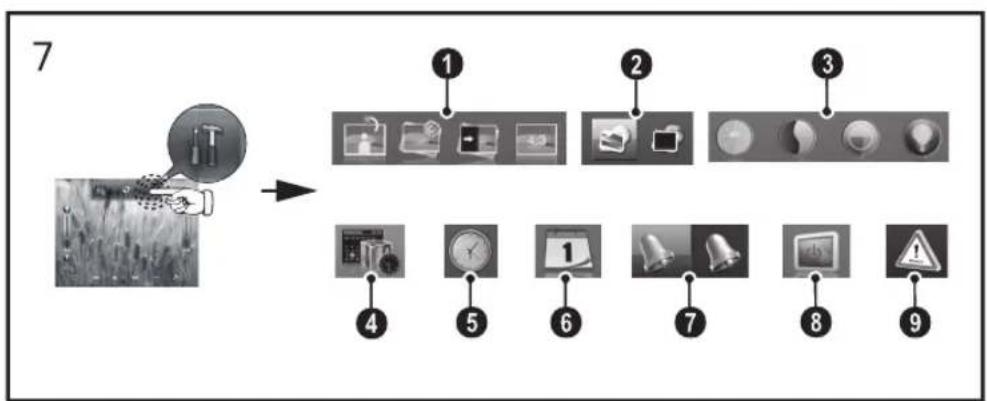
Settings (fig. 7)
1 To call up the settings menu tap on the symbol ④ (fig. 6).
2 Select from the following settings, by slide your finger on the screen to the left or to the right.
① Photo Settings (rotating image, slide show speed, transition effects, aspect ratio)
② ECO Settings (Automatically switch on/off)
③ Display Settings (brightness, contrast, color saturation, backlight)
④ Setting the Fun Frame [personal frame]
⑤ Time (Setting the time)
⑥ Calendar (Setting of year, month, day)
⑦ Alarm (Set the wake-up time and the wake-up signal)
⑧ Setting the Starting Mode (Slide show, Video playback, Slide show and then video playback, Music playback)
⑨ Factory default (Restore the settings to the factory default)
3 Adjust the settings, by tapping the appropriate symbol or by slide you finger on the screen into the corresponding direction.
Important Notes
The screen reacts strangely, when touched with wet fingers
Your moVee Touch is equipped with a capacitive - touch-sensitive screen. Wet fingers or liquids can disturb this capacitive effect.
If the surface of the screen or your finger is wet, please use a dry, clean cloth to dry the surface or finger. Wait several minutes to ensure, the surface of the screen is dry.
Video formats
If some video formats are not compatible with moVee Touch, please convert your file using a free video converter (e.g. AVC - Any Video Converter www.any-video-converter.com/products/
for_video_free/) and use the following settings: Fileformat: *.avi / Video Codec: xVid / Frame Size: <= 640x480 / Video Bitrate: 768 / Video Framer- ate: 25
Audio Codec: MP3 / Audio Bitrate: 128 / Sample Rate: 44100 / Audio Channel: 2 (stereo)
Firmware Update
Software updates are available for downloading on our website on a regular basis.
Visit our website www.agfaphoto.com/movee-touch to check if firmware updates are available for your device and install them in order to enjoy the latest features and improvements.
Technical Data
Dimensions (L×H×W).... 212×170×18mm
Weight of the device.... 0,5kg
Recommended Ambient 5–45°C
Relative humidity....20-80%
Power Consumption
Device is switched on [slide show] ..... 7,24W
Screen size 21.5cm
Aspect ratio 4:3
Resolution....800×600 Pixel
Internal memory....2 GB
USB port ....USB-Host, USB Device
Compatible Memory Cards.SD/SDHC/MMC/MS/xD
Photo formats...... JPEG
Music formats ...... MP3
Video formats ...... MJPEG, Xvid, MPEG4-visual
File format....*.avi, *.mp4, *.mov, *.mpg, ....*.mp3, *.jpg
Max. Video Resolution
MPEG4-visual: 640 × 480 pixel at 30 pictures/sec. (fps)





Built-in rechargeable battery
Battery type....LiPol
Charging time....3,5h
Operating time (slide show) 3h
Power supply
Manufacturer....KUANTECH INCORPORATED COMPANY
Model No....KSAD1200150W1UV-1
Input 100-240V\~/50/60Hz
Output.... 12V==/1,5A
All data are provided for reference purposes only. AgfaPhoto reserves the right to make any changes without prior notice.
AgfaPhoto is used under license of Agfa-Gevaert NV & Co. KG or Agfa-Gevaert NV. Neither Agfa-Gevaert NV & Co KG nor Agfa-Gevaert NV manufacture this product or provide any product warranty or support.
For service, support and warranty information, contact the distributor or manufacturer. Contact: AgfaPhoto Holding GmbH, www.agfaphoto.com
Manufacturer: Sagemcom,
www.sagemcom.com

The CE marking certifies that the product meets the main requirements of the European Parliament and Council directive 1999/5/CE on telecommunications terminal equipment, regarding safety and health of users and regarding electromagnetic interference.
The declaration of compliance can be consulted on the site www.agfaphoto.com


Packaging: To facilitate packaging recycling, please conform to your local selective recycling rules.
Batteries: Old batteries have to be deposited in designated collection areas.

Product: The crossed out dustbin logo on your product signifies it is classified as Electrical and Electronic Equipment covered by special disposal regulations.
To enforce recycling, recovery of The Waste Electrical and Electronic Equipment (WEEE) and to protect the environment and human health, European regulations requires that you selectively collect waste equipment using one of the following options:
- Your retailer will take your equipment back if you are buying a replacement product.
- Waste equipment can also be deposited in designated collection areas.
The paper and cardboard packaging used can be disposed of as recyclable paper. Have the plastic wrapping and Styrofoam packaging recycled or dispose of it in the non-recyclable waste, depending on the requirements in your country.
All rights reserved. No part of this publication may be reproduced, stored in a retrieval system or transmitted in any form or by any means, electronic, mechanical, photocopying, recording, or otherwise, without the prior written permission of AgfaPhoto. The information contained herein is designed only for use with this product. AgfaPhoto is not responsible, if this information is applied to other devices.
This user manual is a document that does not represent a contract.
Errors, printing errors and changes are reserved.
Copyright © 2010 Sagemcom




Dimensioni (L × A × P).... 212 × 170 × 18 mm
Copyright © 2010 Sagemcom




Apparaat is ingeschakeld (diashow).....7,24W
Fotodiagonaal.... 21,5 cm
Copyright © 2010 Sagemcom
Copyright © 2010 Sagemcom




Copyright © 2010 Sagemcom



.KUANTECH INCORPORATED COMPANY
Modellnummer ....KSAD1200150W1UV-1
Copyright © 2010 Sagemcom


Copyright © 2010 Sagemcom







Copyright © 2010 Sagemcom


Copyright © 2010 Sagemcom


Copyright © 2010 Sagemcom




Copyright © 2010 Sagemcom

TR





Copyright © 2010 Sagemcom


Copyright © 2010 Sagemcom


RU

5

natural_image
Pure geometric diagram with intersecting lines and a circular pattern (no text or symbols)



- Supports mémoire photo
- General Safety Information
- Setting Up the Device
- Power Supply
- h aRepairs
- Photo Memory Media
- Overview
- Packing Contents
- Basic Operation
- Notice
- Connecting to an Computer (fig. 3)
- Resetting the device
- Menu Overview (Playback) (fig. 5)
- Setting the Background Music of the Slide Show (fig. 6)
- Menu Overview (Settings) [fig. 6]
- Managing files
- Creating new Album
- Settings (fig. 7)
- Important Notes
- The screen reacts strangely, when touched with wet fingers
- Video formats
- Firmware Update
- Technical Data
- Max. Video Resolution
- Built-in rechargeable battery
Brand : AGFAPHOTO
Model : AF 7088MT
Category : Digital photo frame