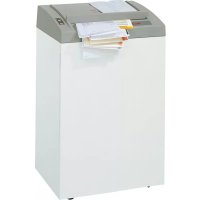
Top Secret 400 S6 - Shredder GEHA - Free user manual and instructions
Find the device manual for free Top Secret 400 S6 GEHA in PDF.



| Product type | Professional document shredder |
| Brand | GEHA |
| Model | Top Secret 400 S6 |
| Cutting type | Strip cut (5.8 mm or 3.9 mm) or cross cut (3.9x50 mm, 1.9x15 mm, 0.78x11 mm, 1x5 mm) |
| Security level (DIN 32757) | 2 to 5 + Level 6 (Geha specification) |
| Cutting capacity (80 g/m²) | Up to 53 sheets (strip cut) or 7-8 sheets (Level 6) |
| Cutting speed | 100 mm/s (strip cut) / 110 mm/s (cross cut) |
| Working width | 400 mm |
| Bin volume | 146 liters |
| Dimensions (W x D x H) | 595 x 470 x 990 mm |
| Weight | 74 kg (strip cut) / 82 kg (cross cut) |
| Power supply | 230 V, 50 Hz (other versions available) |
| Rated power | 2100 W |
| Noise level | 60 dB(A) no load / 68-75 dB(A) under load |
| Operating mode | Continuous operation (auto start/stop) |
| Shreddable materials | Paper, staples, paper clips, credit cards, CDs, floppy disks, DAT cassettes (depending on model) |
| Safety | Safety switches on door and flap; anti-jamming protection; automatic stop in case of jam or open door |
| Maintenance | Oil the cutting block regularly with special oil; clean with a soft cloth and soapy water |
| Spare parts | Shredder bags (ref. 1.442.995.000), special oil 250 ml (ref. 1.235.997.403) |
| Warranty | 2 years machine, 10 years cutter shafts (except security level 5 and Level 6) |
| Delivery contents | Shredder, 5 shredder bags, 1 oil bottle, instruction manual |
Frequently Asked Questions - Top Secret 400 S6 GEHA
User questions about Top Secret 400 S6 GEHA
0 question about this device. Answer the ones you know or ask your own.
Ask a new question about this device
Download the instructions for your Shredder in PDF format for free! Find your manual Top Secret 400 S6 - GEHA and take your electronic device back in hand. On this page are published all the documents necessary for the use of your device. Top Secret 400 S6 by GEHA.
USER MANUAL Top Secret 400 S6 GEHA
natural_image
White industrial paper-cutting machine with roll of white material and CD/DVD disc (no visible text or symbols)top secret 400
BETRIEBSANLEITUNG
AKTENVERNICHTER
OPERATING INSTRUCTIONS
PAPER SHREDDER
NOTICE D'UTILISATION
DESTRUCTEUR DE DOCUMENTS
MANUALE OPERATIVO
DISTRUGGIDOCUMENTI
INSTRUCCIONES DE SERVICIO
DESTRUCTORA DE DOCUMENTOS
GEBRUIKSAANWIJZING
PAPIERVERNIETIGER
BRUKSANVISNING
DOKUMENTFÖRSTÖRARE
INSTRUKCJA OBSŁUGI
NISZCZARKA DOKUMENTÓW
natural_image
Interior view of a white industrial machine with internal components and mounting brackets (no visible text or symbols)natural_image
White paper roll organizer with a black arrow pointing downward (no visible text or symbols)1 Proper use, warranty
The shredder is designed exclusively for destroying paper. Depending on the cutting type, it can also handle small quantities of the following materials:
| Shred width (mm) 3,9 5,8 1,9x15 3 | 9x50 | ||||
| Credit cards, CDs ● ● | ● | ● | |||
| Floppy disks ● ● | ● | ||||
| DAT cassettes ● | |||||
Its sturdy drive mechanism is not damaged by paper clips and staples. Only on machines with safety level HS Level 6 (1 x 5 mm) can the paper not contain staples or paper clips.
The warranty period for the document shredder is 2 years. In addition, there is a 10 year guarantee on the solid steel blade rollers (except for security level 5, HS Level 6). This warranty and guarantee exclude wear and damage caused by improper handling or actions taken by third parties.
2 Safety instructions
- Read the operating instructions before switching on the document shredder. Save these instructions for later use.
- Observe all safety instructions on to the machine.

Risk of injury!
Do not reach into the paper feed slot.
Risk of injury from being pulled in!
Keep long hair, loose articles of clothing, ties, scarves, jewellery, etc. away from feed opening.
Material with the tendency to form loops, e.g. tapes, strapping material, etc. must not be shredded.


Risk of injury from slivers!
Splinter protection from the cross cut machines is only guaranteed if the safety element is covering the paper feed opening. Feed hard credit cards, CDs, discs or DAT cassettes only into the insertion slot.

Keep paper shredder out of the reach of children. Do not let the shredder run if the person using it is not present.

Switch the shredder off and disconnect it from the mains if it is damaged, not working correctly or before relocating or cleaning it.

Service work may only be carried out by Pelikan Customer Service or by the service technicians of our contractual partners.
- Make sure that the mains plug is well accessible.
- Before you insert the mains plug, make sure that the voltage and frequency of your power supply comply with the information on the name plate.
- Make sure that no liquid gets into the shredder.
- The shredder may not be placed near a heater or other heat source.
- The ventilation slots must not be blocked or covered and there must be at least 5 cm space between the shredder and any wall or furniture.
natural_image
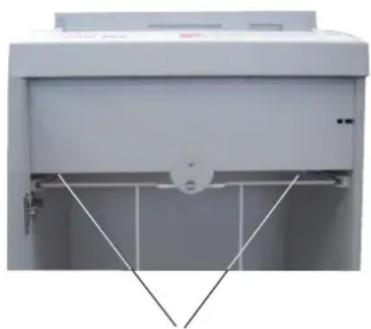
Exterior view of a white industrial machine casing with internal components and mounting brackets (no visible text or symbols)Undo the wing screws securing the unit during transportation.
3 Machine components

1 Safety instructions
2 Inspection door
3 Paper feed opening
Safety element / splinter protection
4 Cover
5 Membrane keyboard
6 Mains switch
7 Name plate
8 Caution label
9 Bottom frame
10 Roller
11 Guide roller
12 Door
Membrane keyboard

ON pushbutton
Shredder is switched on. Cutting system runs in feed direction.

Stop pushbutton
Cutting system stops. Shredder remains in standby function.

Reversing pushbutton
Cutting system runs in reverse direction.

Ready for operation green LED

Cut material bag full red LED

Paper jam – electric motor overloaded red LED

Front door opened red LED
4 Operation
Switching the paper shredder on
- Set mains switch at rear of paper shredder to „I“.

▶ Green LED lights.
▶ Paper shredder is ready for operation (standby)

Notice
Safety switches are installed at the door. Paper shredder can only be switched on if the door is closed.

The document shredder can also be started by pressing the green arrow button:
- Press briefl y:
Cutting device starts.

Automatic stop approx. 3 seconds after the last piece of paper was drawn in, or manual stop when the stop button is pressed.
- Hold down for longer than 2 seconds:
constant operation without light barrier function.
The cutting device runs until it is switched off with the stop button.
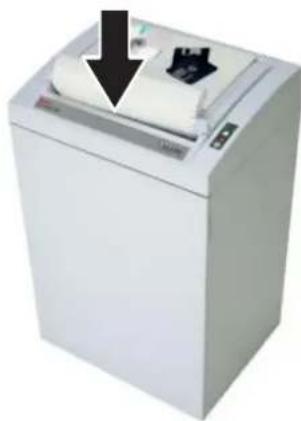
Feed paper
natural_image
White industrial machine with a paper roll and black arrow pointing downward (no visible text or symbols)- Feed paper. See „Technical data“ for sheet capacity.
The shredding process is star-ted by a pho to-cell in the paper feeding opening.
When the paper feed opening is free again, the cut ting sy stem auto ma tical ly swit ches off after app rox. 3 sec. and returns to standby.
Swit ching paper shredder off

- Set mains switch at rear of paper shredder to „0“.
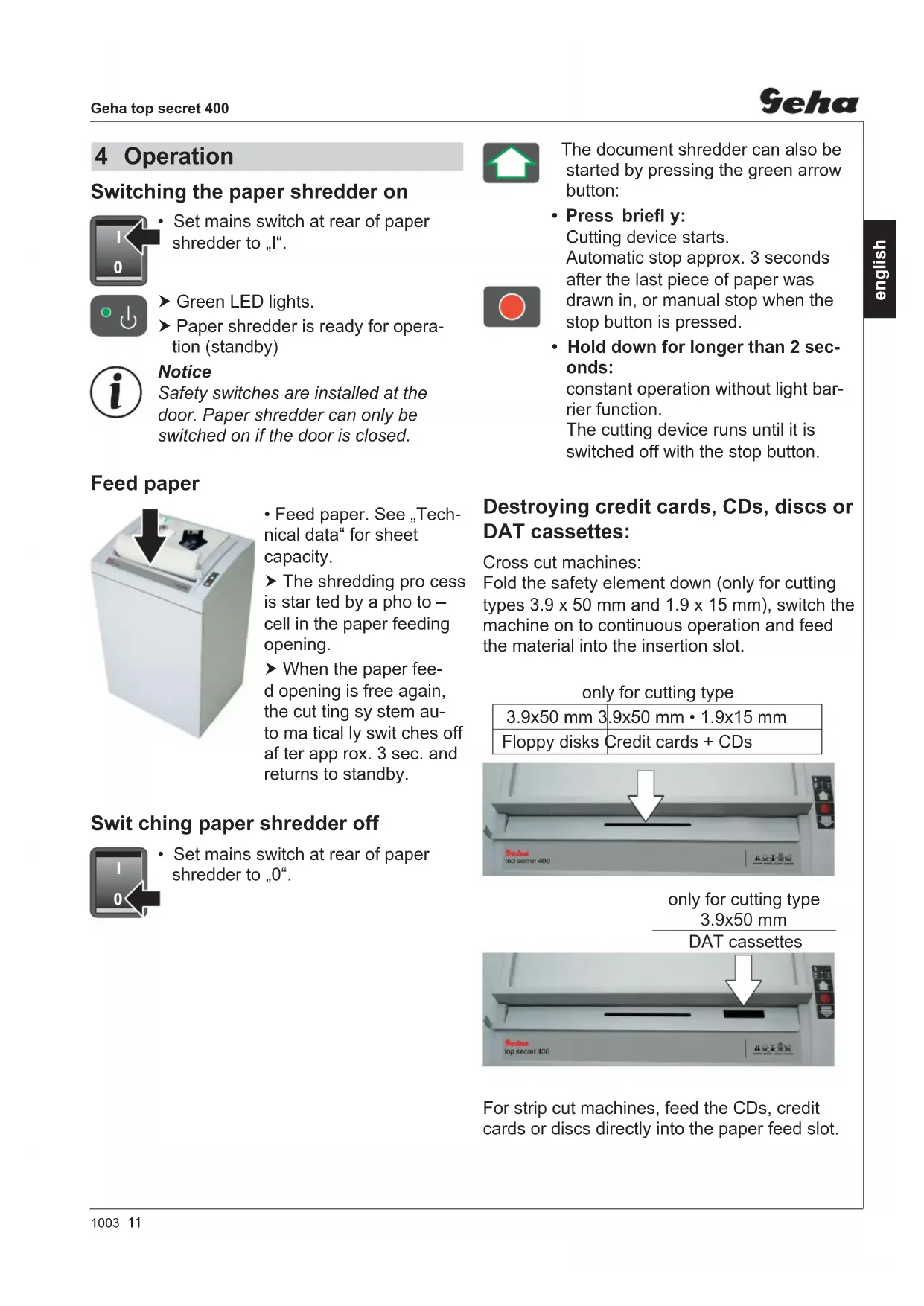
Destroying credit cards, CDs, discs or DAT cassettes:
Cross cut machines:
Fold the safety element down (only for cutting types 3.9 x 50 mm and 1.9 x 15 mm), switch the machine on to continuous operation and feed the material into the insertion slot.
only for cutting type
| 3.9x50 mm 3 | 9x50 mm • 1.9x15 mm |
| Floppy disks Credit cards + CDs | |
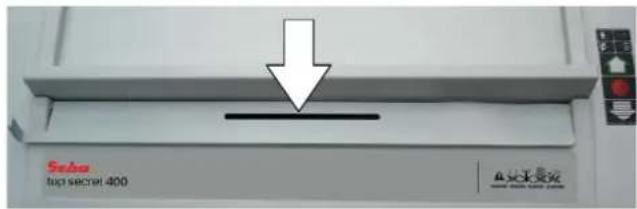
only for cutting type
3.9×50 mm
DAT cassettes

For strip cut machines, feed the CDs, credit cards or discs directly into the paper feed slot.
5 Troubleshooting
Pa per jam
You have fed in too much paper.
▶ Paper shredder jammed.
▶ Red LED in the key pad fl ashes.
▶ Paper shredder reverses automatically.
Notice!
Do not press dashed arrow button and green arrow button alternately forwards and backwards.
Cutting unit can be damaged.
- Pull paper out of the paper feeding opening.
If material is not completely pushed out, then

- Press dashed arrow button.
▶ Paper is pushed out. - Pull paper out.

CAUTION!
Injuries by cutting rollers are possible even when the paper shredder is idle. Keep hands away from the cutting system!
- Separate paper stack and feed paper again.
- The shredding process is started again with the green arrow button or by the light barrier (paper feed).
Electric motor overheated

▶ Red LED on membrane keyboard lights.
▶ Paper shredder switches off automatically.
- Allow paper shredder to cool down for approx. 15 to 20 min.
Front door is open

▶ Red LED on membrane keyboard lights.
▶ Paper shredder stops automatically.
- Close front door.

Note
If the door is opened when the cutting device is running, the document shredder must be started again using the green button after the door of the document shredder has been closed.
Bag for shredded material full

- Red LED on membrane keyboard lights.
▶ Paper shredder stops automatically.

Note
Reversing the cutting device ("Reverse" button) is also possible even when the shredded material container is full.
- Insert new bag.
Notice!
Empty the shredded material container after the paper shredder has been switched off, because otherwise malfunctions of the cutting system could occur when the rocker switch is pressed several times in succession.
6 Cleaning and maintenance
Switch off the shredder and pull out the mains plug. When cleaning only use a soft cloth and a mild soap-water solution. However, no water must enter the equipment.
Check that the door switch is working properly:

Warning!
If the following procedure cannot be performed, switch off the document shredder, disconnect the mains plug and contact customer service.
- Insert the mains plug and switch on the shredder.
- Feed in a sheet of paper and open the front door while the paper is being drawn in.
The cutting unit must turn off immediately and the "door open" indicator must light up. - Close the door.
▶ The cutting unit must not yet restart. - Pull the paper out of the feed opening. The light barrier must be clear.
- Switch off the machine and then switch back on.
▶ The cutting unit starts when paper is fed in.

Oil the cutting unit when cutting performance decreases or the device becomes noisy, or every time you empty the waste container:
- Spray special cutting block oil through paper feed opening across the whole width of the cutting system blades.
- Run cutting system forwards and backwards several times without feeding paper.
▶ Paper dust and particles are shaken off.
7 Scope of delivery
- Paper shredder, ready for connection, in carton packing, carton on pallet, tied with strapping tape
- 5 bags for shredded material
• Special cutting block oil - Operating instructions
Acces so ries
- Bag for shredded material, order No.: 1.442.995.000
• Special cutting block oil 250 ml, order No.: 1.235.997.403

8 Technical data
| Cutting type Strip cut Cross cut | ||||||
| Shred size (mm) 5.8 3.9 3.9 x 50 1.9 x 15 0.78 x 11 1 x 5 | 2 | 2 | 3 | 4 | 5 | Level 6* |
| Safety rating German DIN 32757 – 1 | ||||||
| Cutting ca pa ci ty (Sheet), DIN A4 70 g/m280 g/m2 | 65 - 6751 - 53 | 48 - 5038 - 40 | 38 - 4033 - 35 | 26 - 2820 - 22 | 17 - 1912 - 14 | 9 - 107 - 8 |
| Cutting speed | 100 mm/s | 110 mm/s | ||||
| Weight | 74 kg | 82 kg | ||||
| Noise level (Idle running/ load) | 60 dB(A) / 68 dB(A) | 60 dB(A) / 75 dB(A) | ||||
| Lo ading width | 400 mm | |||||
| Voltage | 230 V, 50 Hz100 V, 50/60 Hz – 115 V, 60 Hz | |||||
| Power for the maximum number of sheets | 2100 W | |||||
| Operating mode | Continuous operation | |||||
| Ambient conditions in operation:TemperatureRelative humidityHeight above sea-level (MSL) | -10 °C to +40 °Cmax. 90 %, without condensationmax. 2,000 m | |||||
| Dimensions W x D x H (mm) | 595 x 470 x 990 | |||||
| Volume of shredded material bag | 146 l | |||||
*) Geha-specifi cation
EC Declaration of Conformity
The manufacturer HSM GmbH + Co. KG, Austrasse 1 - 9, D-88699 Frickingen hereby declares that the machine, referred to here as
document shredder Geha top secret 400
corresponds to the health and safety requirements of the following EC directives listed below due to its conception and design of the version in which it was put into circulation by us:
Machinery directive 2006 / 42 / EC
EMC directive 2004 / 108 / EC
Applied standards and technical specifications:
• EN 55014-1:2006
• EN 61000-4-2:1995 + A1:1998 + A2:2001
• EN 61000-3-2:2006
• EN 61000-4-4:1995 + A1:2001 + A2:2001
• EN 61000-3-3:1995 + A1:2001 + A2:2005 • EN 61000-4-5:1995 + A1:2001
• EN 55014-2:1997 + A1:2001 • EN 61000-4-6:1996 + A1:2001
• EN 13849-1
• EN 61000-4-11:1994 + A1:2001
• EN 60950-1:2006
Authorised representative for the compilation of technical documentation:
Rolf Gasteier - Technical Director
The machine type was tested for compliance with the requirements of the EU Machinery Directive by: the test and certification board of the Technical Administration Committee, c/o Verwaltungs-Berufsgenossenschaft, Deelbögenkamp 4, D-22297 Hamburg, Germany.
This test centre is responsible in accordance with Appendix XI of the EC Machinery Directive.
natural_image
Exterior view of a white industrial machine with internal structural lines (no visible text or symbols)natural_image
White paper<|im_start|> Papua printer with a black arrow pointing to its cover (no visible text or symbols)natural_image
Exterior view of a white industrial machine with internal components and mounting brackets (no visible text or symbols)natural_image
White paper printer with a paper roll and black arrow pointing downward (no visible text or symbols)natural_image
Exterior view of a white industrial machine with internal components and mounting brackets (no visible text or symbols)natural_image
White paper printer with a black arrow pointing downward on top, showing paper roll and printer (no text or symbols visible)natural_image
Exterior view of a white industrial machine casing with internal components and mounting brackets (no visible text or symbols)natural_image
White paper roll organizer with a black arrow pointing downward (no text or symbols visible)natural_image
Exterior view of a white industrial machine with internal components and mounting bracket (no visible text or symbols)Innan maskinen tas i drift: Lossa transportsäkringens vingskruvar.
3 Översikt

natural_image
White paper printer with a paper roll and arrow indicator (no visible text or symbols)natural_image
Exterior view of a white industrial machine with internal structural lines and mounting feet (no visible text or symbols)natural_image
White paper printer with a downward arrow indicating compression (no visible text or symbols)natural_image
Exterior view of a white industrial machine with internal components and mounting brackets (no visible text or symbols)natural_image
White paper<|im_start|> Papua printer with a black arrow pointing to its cover (no visible text or symbols)natural_image
Exterior view of a white industrial machine with internal components and mounting brackets (no visible text or symbols)natural_image
White paper roll organizer with a black arrow pointing downward (no text or symbols visible)natural_image
Exterior view of a white industrial machine with internal components and mounting brackets (no visible text or symbols)natural_image
White industrial paper mill with a roll of paper and a black arrow pointing downward (no text or symbols visible)natural_image
Exterior view of a white industrial machine with internal structural lines and mounting bracket (no visible text or symbols)natural_image
White industrial paper<|im_start|> Puerto Rico printer with a black downward arrow indicating compression (no text or symbols visible)


- Proper use, warranty
- Safety instructions
- Risk of injury!
- Risk of injury from being pulled in!
- Risk of injury from slivers!
- Membrane keyboard
- ON pushbutton
- Stop pushbutton
- Reversing pushbutton
- Operation
- Switching the paper shredder on
- Notice
- Feed paper
- Swit ching paper shredder off
- Destroying credit cards, CDs, discs or DAT cassettes:
- Troubleshooting
- Pa per jam
- You have fed in too much paper.
- Notice!
- If material is not completely pushed out, then
- CAUTION!
- Electric motor overheated
- Front door is open
- Note
- Bag for shredded material full
- Cleaning and maintenance
- Check that the door switch is working properly:
- Warning!
- Scope of delivery
- Acces so ries
- EC Declaration of Conformity
- Översikt
Brand : GEHA
Model : Top Secret 400 S6
Category : Shredder