
Office X10 CD - Shredder GEHA - Free user manual and instructions
Find the device manual for free Office X10 CD GEHA in PDF.


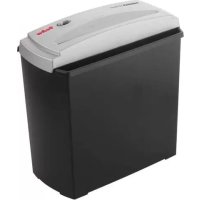
| Product Type | Document Shredder |
| Brand | Geha |
| Model | Office X10 CD |
| Security Level | P-4 (cross-cut) |
| Cutting capacity (A4 80 gsm sheets) | 10 sheets per pass |
| Cutting capacity (CD/DVD) | 1 CD/DVD per pass |
| Feed opening width | 220 mm |
| Cut size | 4 x 40 mm (particles) |
| Bin volume | 20 liters |
| Power supply | 220-240 V, 50/60 Hz |
| Power | 300 W |
| Dimensions (W x D x H) | 350 x 200 x 500 mm |
| Weight | 6.5 kg |
| Noise level | 58 dB(A) |
| Duty cycle | 5 minutes on / 20 minutes off |
| Main functions | Forward/stop/reverse, full bin indicator, CD/DVD and credit card shredding |
| Maintenance and cleaning | Regular oiling of blades every 2 weeks or after 200 passes |
| Safety | Thermal protection, automatic shutdown in case of jam, child safety lock (lock) |
| Spare parts and repairability | Replacement blades, lubrication oil, collection bin |
| Warranty | 2 years |
Frequently Asked Questions - Office X10 CD GEHA
User questions about Office X10 CD GEHA
0 question about this device. Answer the ones you know or ask your own.
Ask a new question about this device
Download the instructions for your Shredder in PDF format for free! Find your manual Office X10 CD - GEHA and take your electronic device back in hand. On this page are published all the documents necessary for the use of your device. Office X10 CD by GEHA.
USER MANUAL Office X10 CD GEHA
Geha
D 4
GB 8
1 12
E 16
F 20
NL 24
UAE 28
RUS 32
S 36
GR 40
TR 44
R0 48
PL 52
CN 56
Thank you for purchasing this Geha quality product. Please read this user manual carefully before operating the device. In particular, please mind the safety instructions, as failure to observe may increase the risk of injury!
SYMBOLS

The device may not be operated by children!
- The cutting unit inside may cause injuries.

Do not touch the cutting unit!
- The cutting unit inside may cause injuries.

Keep all clothing away from the feed slot!
- The cutting unit inside may cause injuries.


Keep hair away from the feed slot!
• The cutting unit inside may cause injuries.

Do not spray flammable gas into the device!
- Caution, there is a risk of fire hazard.
IMPORTANT SAFETY NOTES
Please read the instruction manual completely and carefully before operating the document shredder. In order to prevent any risk of injury, it is important to take basic safety precautions when using an electric device. Always comply with the following basic safety precautions:
- Socket outlet should be installed near the machine and should be easily accessible.
- Keep clothing, jewellery, hair, etc. away from the machine to ensure personal safety. Serious injuries could occur.
- Do not place the device near heat sources or in a humid environment for an extended period of time.
- Please use the device nearby the socket, so you can easily unplug it, if necessary.
- In order to clean or maintain the device, please ensure it is disconnected from the socket.
6 Keep children and animals away from the device to avoid the risk of serious injury. - If the device is not in use for an extended period of time, please disconnect it from the socket.
- The room temperature when operating this device should not exceed 25° C.
INSTALLING SHREDDER
GB
- The centre of gravity is located at the top part of the device. Make sure to position the file shredder on an even surface to prevent it from tipping over.
- Never operate the device near sources of heat or cold, or in an overheated, moist or dusty environment.
- Place the device close to a socket and ensure easy access to the socket, in case the device needs to be unplugged.
- First insert the inner container (for CDs/DVDs) into the paper bin.
- Place the document shredder on the paper bin. Ensure that it is stable. Take care not to pinch your fingers between the upper edge of the bin and the cutting unit.
- Plug the device into the socket and make sure that the working voltage complies with the supplying voltage.
IMPORTANT:
The document shredder can only be placed on the bin in one direction. Ensure that the shredder is properly positioned on the paper bin.
STRUCTURE AND FUNCTION
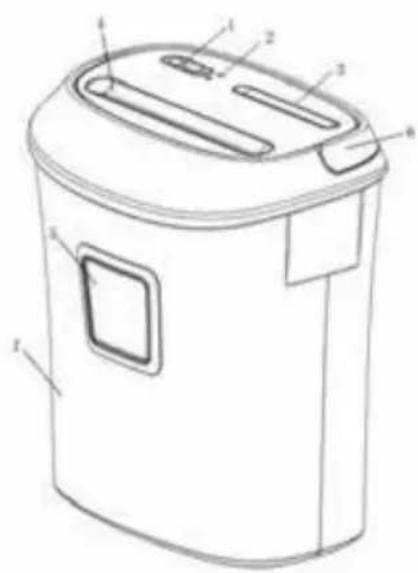
- 3-Position slide switch for AUTO, OFF and REVERSE mode
- Power indicator
- CD/DVD feed
- Paper/Credit card feed
- Transparent viewing window
- Handle bar
- Waste basket
OPERATING ELEMENTS
The slide switch (AUTO/OFF/REV) on the machine performs the following functions:
AUTO: position: The machine is ready to operate, shredding starts as soon as either paper, a CD/DVD or a card is inserted in the corresponding feed.
OFF: position: the machine is switched off
REV: position: paper can be reversed
OPERATION
- Move the slide switch into "AUTO" position. The machine is now in stand-by mode. Insert the paper, CD/DVD or card vertically into the feed. The device will automatically start to shred the paper and will automatically switch back into stand-by mode as soon as the shredding process is completed.
-
In case of a paper jam, or if you would like to withdraw the paper immediately during the regular shredding process, please set the slide switch to „REV“. The machine will start reverse rotation and will return the paper that has not been shredded. Then turn the device off by moving the slide switch to „OFF“.
-
For a long operational life span of the machine as well as a good functioning, note that there is a maximum shredding capacity for this device, meaning that only a certain amount of paper and only one CD/DVD or credit card can be shredded at the same time.
- Please do not shred paper clips, adhesive paper, adhesive tapes or cloth. Doing so will damage the cutting system or decrease the shredding performance.
- In order to clean the waste basket or the machine, or respectively, if the machine is not used for a an extended period of time, please mind to switch the device off and to unplug it.
- This shredder is made for short-time operation. After continuous shredding for 3 minutes, it must be cooled down to room temperature before continuing to shred.
MAINTENANCE
IMPORTANT: Pull the main power plug from the socket before carrying out any maintenance tasks on the file shredder!
When the waste paper container is full, shredded material can be pushed upwards into the cutting mechanism. Make sure to empty the waste paper container before it is filled completely.
Clean the exterior of the file shredder with a moist cloth. Ensure that the cloth is kept well away from the paper feed. This cleaning step is suitable only for the exterior of the device. The exterior of the device is made of plastic. That is why no solvents like benzene or benzole, or any organic solvents (e.g. thinner) may be used to clean the exterior of the device. Never clean the device with a stain remover - this may cause the casing to fade, crack, dissolve or graze.
CAUTION: Make sure that no water gets into the device while cleaning the casing.
TECHNICAL DATA
Model: Shredder Office X10 CD
Cut type: Particles Cut
Cut size: 5 x 38 mm (Paper & Credit card) / 3 pieces CD/DVD
Cutting capacity: 10 sheets (DIN A4/80g/m²); 1 CD/DVD; 1 credit card
Cutting speed: 2.25m / Min
In-feed width: 220 mm / 123 mm for CD/DVD
Input voltage: 230 VAC / 50Hz
Power consumption: 380W / 1.7 A
Noise level: ≤70dB
Dimensions: 360 x 244 x 366 mm
Waste paper container – volume: 21L / 0,8L CD/DVD waste
Operating cycle: 3 min. ON / 40 min. OFF
Net weight: 5,2 kg

| Index | Malfunction | Cause Countermeasure | |
| 1 | After having completed the regular shredding process, the machine does not stop running. | There is too much shredded paper in the waste basket.The shredded paper cannot fall into the waste basket and clear the feed. | Turn off the power, and empty the waste basket.Turn off the power, and press the waste paper down to clear the entry. |
| 2 | Paper feed or sense of rotation is normal, but there is still some waste paper hanging at the exit. | Shredded paper is blocking the paper feed slot. | Set the slide switch to „REV“(if necessary, please remove the shredded paper at the exit of the feed). |
| 3 | The machine stops, when pulled in paper collides with exited paper. | Shredded paper is blocking the automatic induction sensor. | Set the slide switch to „REV“. |
| 4 | The machine does not start although paper is in the entry. | The paper feed takes the corners of the paper in, however, the remaining area of the paper is not sensed automatic induction sensor. | Adapt the position of the feeding paper and make it touch the automatic induction sensor. |
| 5 | The paper is jammed, and the machine stops rotating. | The maximum paper feed-in capacity has been exceeded.The motor has overheated due to a blocked ventilator, which has resulted in the activation of the heat protection system. | Set the sliding switch to „REV“ and withdraw the shredding paper.Unplug the plug and allow the machine to cool down for a while. |
| 6 | The machine does not start after inserting a sheet of paper or it stops running when paper is being inserted. | The paper is too thin, too soft, moist or too crinkly to activate the automatic induction sensor. | Fold the paper and then insert it.Set the slide switch to „REV”. |
DISPOSAL
The symbol depicting a crossed-out rubbish bin means that electrical devices may not be disposed with regular household waste. Please bring the device to an approved recycling centre for environmentally friendly disposal.
WARRANTY
The warranty period for your device is 24 months.
Make sure to keep both your proof of purchase and the original packaging.
Please contact your retailer in case of any problems with the device.
MONTEREN VAN HET APPARAAT
NL
Consum energetic: 380W / 1.7 A
Nivelul de zgomot: ≤70dB
Cotele: 360 x 244 x 366 mm


- GEHA
- SYMBOLS
- IMPORTANT SAFETY NOTES
- INSTALLING SHREDDER
- IMPORTANT
- STRUCTURE AND FUNCTION
- OPERATING ELEMENTS
- OPERATION
- MAINTENANCE
- IMPORTANT: PULL THE MAIN POWER PLUG FROM THE SOCKET BEFORE CARRYING OUT ANY MAINTENANCE TASKS ON THE FILE SHREDDER
- TECHNICAL DATA
- DISPOSAL
- WARRANTY
- MONTEREN VAN HET APPARAAT
Brand : GEHA
Model : Office X10 CD
Category : Shredder