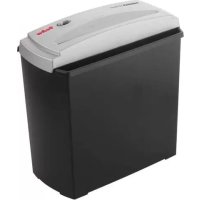
Home & Office S5 - Shredder GEHA - Free user manual and instructions
Find the device manual for free Home & Office S5 GEHA in PDF.



| Brand | GEHA |
| Model | Home & Office S5 |
| Product type | Document shredder |
| Usage | Indoor |
| Cutting format | Straight cut 7 mm |
| Sheet capacity | 5 sheets (A4, 70 g/m²) |
| Insertion slot width | 220 mm |
| Power supply | 220-240 V ~ 50 Hz, 0.6 A |
| Duty cycle | 2 minutes, then 1 hour recommended rest |
| Motor protection | Automatic overload protection |
| Switch | 3 positions: AUTO, OFF, REV (reverse) |
| Automatic detection | Start sensor in the insertion slot |
| Staples and paper clips destruction | Remove before shredding |
| Maintenance | Empty bin regularly; unplug before cleaning |
| Prohibited cleaning products | Do not use sprays, aerosols or solvents |
| Child safety | Never leave unattended near children or pets |
| Warranty | 24 months |
Frequently Asked Questions - Home & Office S5 GEHA
User questions about Home & Office S5 GEHA
0 question about this device. Answer the ones you know or ask your own.
Ask a new question about this device
Download the instructions for your Shredder in PDF format for free! Find your manual Home & Office S5 - GEHA and take your electronic device back in hand. On this page are published all the documents necessary for the use of your device. Home & Office S5 by GEHA.
USER MANUAL Home & Office S5 GEHA
Thank you for choosing this Geha quality product. Before using the device for the first time, carefully read this manual. Please pay special attention to the safety instructions.
WARNING



- Read through these operating instructions carefully and completely before using the machine for the first time.
- Please do not leave the document shredder unattended in the event that children or pets are nearby.
- Always be sure to keep your fingers and hands away from the feed slot in order to avoid serious injury.
- Always be sure to keep all loose objects such as clothing, ties, jewellery, hair and all other small objects away from the feed slot in order to avoid injury and damage.
- Do not spray or keep any aerosol products in or around shredder.
- Remove all paper clips and staples before inserting the paper.
- Attention: The paper shredder is not suitable for shredding of cassettes and disks.
- The document shredder is only suitable for shredding paper, please do not insert any other materials, the paper must be dry and clean.
- Continuous shredding should not exceed two minutes. If the device needs to be operated continuously, we recommend limiting shredding to periods of two minutes and allowing the motor of the device to cool down before shredding again.
- The document shredder should always be turned off and disconnected after use.
- Empty the waste basket frequently, otherwise the shredder may jam. Please disconnect the mains plug in order to empty the basket.
- Never open the casing. In the event of problems with the device, please contact the retailer.
- The device should not be operated with a damaged power cord.
- For indoor use only.
IMPORTANT SAFETY NOTES
Before using the document shredder for the first time, please read the operating instructions. When operating an electrical device, you should always take safety measures to eliminate the risk of injury from electric shock. Therefore please follow the following rules.
- When the shredder is not in operation, before emptying the bin, clearing a paper jam or cleaning the device, always disconnect its plug from the power mains.
- Proceed with extreme care when operating the shredder near children or people with an intellectual disability!
- Protect yourself against damage from electric shock. Never immerse the power cord, the power plug or the device in water or any other liquid.
-
Do not operate the device in the vicinity of water (shredder suitable only for use in dry rooms).
-
Never insert metal objects, jewellery, hair, fingers, cloths, etc. into the paper feeder of the shredder.
- Before shredding a document, remove paper clips and staples.
- Regularly empty the paper bin to prevent paper jams.
- Do not switch on the device if its plug or power cord is damaged or if the shredder does not work properly or is otherwise damaged.
- In the event of an emergency, disconnect the shredder from the power supply by pulling the plug.
- Where possible, install the device near a power socket and ensure that the socket remains freely accessible.
- Do not clean the shredder with cloth or detergents containing aerosols or solvents.
- Do not spray the device with liquids. Do not treat with oil spray.
INSTALLING SHREDDER
- Operate the device only if it stands on a level floor.
- Check the cutting unit to ensure that it is properly placed on the bin.
- Insert the plug of the power cord into a standard power socket.
STARTING SHREDDER
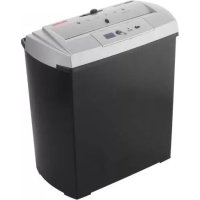
The S5 is operated by means of a sliding switch located at the top of the shredder. This switch can be set to three positions: AUTO, OFF, REV. Set the sliding switch to AUTO to activate automatic paper intake as soon as a document is placed in the feeder slot, triggering the release switch in the feeder opening. If the sliding switch is set to OFF, the shredder does not automatically start up when a document is placed in the feeder opening. We recommend setting the switch to this position when the shredder is not in use. Set the sliding switch to REV, if you wish to operate the shredder continuously in reverse mode. This is required to clear a paper jam in the feeder.
PREVENTING PAPER JAMS AND OVERLOADING
The S5 can shred up to 5 sheets (DIN A4, 70g / m2 ) at a time and can handle documents of up to 220mm in width. If you wish to shred smaller pieces of paper such as envelopes and sales receipts, insert them at the centre of the feeder slot to ensure that the switching sensor is triggered.
The S5 is equipped with a motor overload circuit breaker. A normal operating cycle for shredding at maximum load takes 2 minutes, which must be followed by a break in operation. The power supply to the shredder motor is automatically interrupted in the following cases:
- Continuous operation of the document shredder at maximum capacity over a prolonged period of time, i.e. for more than 2 minutes without interruption.
- Simultaneous insertion of more than 5 sheets of paper (DIN A4, 70g / m2 ) or feeding of paper in a direction other than longitudinal.
Under the above conditions, the automatic overload circuit breaker of the motor might be triggered, interrupting the power supply to the device. If this occurs, proceed as follows:
- Disconnect the power plug from the mains socket and wait until the overload circuit breaker is automatically reset. Remove the paper by pulling it upwards out of the cutting unit and tear off any excess paper.
- Reconnect the power plug to the mains socket and set the sliding switch to REV. Remove the remaining paper from the shredder blades. Set the sliding switch to AUTO. If necessary, repeat this procedure.
- When the feeder slot is again unblocked, continue shredding by setting the sliding switch to AUTO.
In the event of a minor short paper jam, the power supply is interrupted only temporarily. This means that the device can be restarted as soon as the jam is removed.
Remark:
To protect the machine well, we suggest the user to operate it in this way: work two minutes then rest one hour.
TECHNICAL DATA
Model: Shredder S5
Shredding performance: strip width: 7mm
Shredder capacity: 5 sheets of paper (A4, 70g / m2 )
Feeder slot width: 220mm (paper feed)
Power supply: 220-240V AC, 50Hz, 0.6A
DISPOSAL
The waste bin symbol indicates that electrical devices must not be disposed of with normal household waste. Please take your device to a collection centre for electrical appliances for recycling and proper disposal.
WARRANTY
The warranty period for your device is 24 months. For warranty claims, you need your sales receipt. Please also keep the original packaging. If you encounter any problems with your document shredder, please contact your dealer.
INTRODUZIONE
MONTEREN VAN HET APPARAAT
MONTEREN VAN HET APPARAAT
aalal aai jaiy jaiy jaiy jaiy jaiy jaiy jaiy jaiy jaiy jaiy jaiy jaiy jaiy jaiy jaiy jaiy jaiy jaiy jaiy jaiy jaiy jaiy jaiy jaiy jaiy jaiy jaiy jaiy jaiy jaiy jaiy jaiy jaiy
1
.
AUTO ATO
1
a
y
Shredder S5
paV jaojai
③ J = 0
(3) 1,2,3 , 4,5,6
jol .7. jy 0. .glua jui ci jg~
:
:
:Jaiil aeui
:
1
a 1 a 1 1 1 1 1 1 1 1 1 1 1 1 1 1 1 1 1 1
2015年
4
y
J 1

Blaorapm Bac 3a nokynky 3Toro kaueCTBeHHORo n3dennr MapKn Geha. Ipeed BBOOM B DeiCTBnE ChauJaBHMaTeIbHO npouHTaIe HactOJUee pyKOBoDcTBO. Oco6oe BHMaHne o6paITte Ha yka3aHnI NO texHnke 6e30NaCHOCTn.
PNEyNPEIHTeJIbHbIE3HAKIN




- NpeepnepBbIM nCNOJb3OBAHHe m yCTpOcTba BHMaTeIbHO I NOJIHOCTbIO npoHTte DaHHyU HcTpyKuN rno 3KcNlyaTaun.
- He octabnIte yctpoNCTBO IJIy YHNUTOXeHNJ DOKymeHTOB 6e3 npncMOrTa, ecnn PAnOM MOrY T 6bITb DeTn NJI DOMaUHHe JKNBOTHie.
- HnkOrda He kacaTeCb nalbuaM nn pykamn nei npaun BO n36eKaHne TjXeJIbIX TpaBM.
- Bcerda depxnte noaIbwe ot uen noaun CBO6oHcBncaOuune nn He3akpenHHe IpeMetbl, TaKne KaK PpeMetbl Odekbl, RaJIctyKn, IOBeJInpHbIe ykpaWeHna, BOIOcbl IN Dpyrue MeJKe NpeMetbl, BO IN36eKaHne TJaKeJIbIX TpaBM n NOBpeXdHn.
- He paCnblIyTe n He xpaHnte KaKne-JIb6o a3pO30Jn B yCTPOYCTBe nnB6Jn3n Hero.
6.пелрдзагузконсимаiteс HeeCKpenKnДЯбvmarNcokbKnДЯСиваня. - BHIMAHHe: UcTPOIcTBo IJIy yHnHTOKeHn 6ymaxKbIX DOkUMeHTOB He npedHa3HaueHO IJIy YHnHTOKeHn KACCET N DnCKOB.
- UcpoIcTBO IyHnTuKHeHn DOkymeHTOB npEHa3HaueHo Iy pa3pe3aHn ToIbKO 6ymaru, He 3arpykaTe B Hero KaKne-lu6o DpyrNe MaTePnaIb; 6ymara DoJxHa 6bITb cyXoN uYCTOi.
- HenpepbHna pe3Ka He doJxHa npeBbIaTb DByx MnHyT. Ecn Hno6xoDIma HenpepbHna pa6Ota yCTpOcTBa, Mbl peKOMeHdyem OrpaHnUbaTb nepNoDbI pe3Kn DByMa MNHyTaM N daBaTb MOTOpY BO3MOXHOCTb OxJaNTbcra nepei Haayalom CneDuOero nepNoDa pe3Kn.
- Nocne nCnoJb3ObaHn yCTpOcTBA dIy yHuTOxKeHn DOKymeHTOB erO BCerda Hdo OTKnIOuHaTb N OTCoEINHrTb OT 3JIeKTPOcETn.
- Oouaue ocbo6oxdaIte KOp3nHy, nHaue yCTpoiCTBO MoKet 3a6NBaTbC8 OTXoamN. OToeHNHJTE BNkVOT 3JeKTPocEtN nepeD ouHCTKO KOp3HbI DnI OTXoOB.
- HnKoIa He OTKpbBaIte KOpNyc. B Cnyae BO3HKnHOBeHna npo6JIem c yCTPOINCTBOM 06paauNTecb K DnCTpN6bIOTOPV.
- UcTpoICTBO HeIb3a IcNoJIb3OBaTb C NOBpeJdeHHbIM 3JeKTpOuHypOM.
- UcTPOCTBO npeHa3NaYeHO dJa IcNoIb3OBAHnToJbKO BHyTpN NOMEeHN.
BAKHBIE YKA3AHNIO TEXHNIKE BE3ONACHOCTN
IpeKdyeBBOIDtB MaunHy dnyHnTuXeHn DaIOBbIX 6yMaR B DeiCTBne npOHTaTe daHHoe pyKOBOcTBo Nolb3OBaTeJI. Pn NOlb3OBaHN NLeKTPnuCeKNM yCTPOINCTBaMn Heo6xOIMMO Bcerda PnHmAtb OCHOBhie Mepbl PpeIOCTOPOXHOCTN, YTO6bl NCKIouHTb ONaCHOCTb TpaBMnpOBaHn yApOM 3JeKTPnuCeKN M TOKOM. IOTOMy 063aTeJbHo CO6IooJaTe CNeDyUOuNE OCHOBhie npabila.
- Korda yctpoiCTBO He pa6oTaET, Bcerda BbITACKnBaIe BnIOHyO qactb npn OnpoXHeHn npneMHO KOHTeHepa IJra 6ymar, a TaKxe nepeD TeM, Ka K npouHsA Tb yCTPOIcTBO (HaNPmEp, npn 3aeDaHn 6ymar).
-
Byube KpaHe OCTOpOxHbI npn 3KcNlyaTaun yCTpoiCTBa pAOM C DeTbMn HBAIldam!
-
Obecneyte 3aunTy OT BO3MOxH0n ONaCHOCTn NopaxeHn EJIeKTPnueCKnM TOKOM. HnkOrda He NorpykaTe TOKOOnDBoJaN Ka6eIb, BInNoCHyU qAcTb N yCTpOiCTBO B BOdy nnn dpyrne KNDKOCTn.
- He noIb3yIteCb yCTpoiCTBOM B6Jn3N OT BOJbl (npeHa3HaueHo Ira pa6Otbl TOnbKO B cyxnx NOMeUeHnX).
- He donyckaite nonadaHn MeTaJIInuecknx IIN dpyrnx NOCTOpOHnX npedMeTOB, TaKx KaK yKpaWeHn, BOLOcbl, NaIbUbi NTKaHbIe N3DeJIIn B MExaHN3M IpOTJKKN 6ymaru.
- Npeed yHnHToKeHneM dOKyMeHToB ydaIInTe KaHcJIepCKne cKpeKN.
- Perylnapno onopoknHte npneMhB KOHTeHep BO n36eKaHne 3aTopa npn noDaue 6ymaru.
- He BBOIDTe yCTPOINCTBO B 3KcNlyaTaUIO npn NOBpeXdEHnn BInOuHOn qactn nn TOKONoBDOJrero Ka6eI IN HApUWeHNn FyHKUIN yCTPOINCTBa NN KAKOM-JIN60 Dpyrom erO NOBpeXdEHnn.
- Дя pa3BЯ3KN OT ceTN B clyuae KpaHHe HEO6XODMOCr MOKHO BbITaHTb TOKONOBODAUN Ka6eIb n3 yCTpoiCTBa.
- UcTpoIcTBo Heo6xOIMMo yCTaHaBnBaTb B6n3n 7TeNCeJbHOJ po3eTKN, o6ecneuB CBO6oHN bIOCTyn K Hei.
- He nCnoB3yIte TkaHn, npOnuTahHbIe a3pO30JMaN nn paCTBOpNTeJIaMn, a TaKKe cpeDCTBa dJa OUnCTKn.
- He paçnbIJIaIe JnДKocTn B yCtpoiCTBO. He noDBepraIte ero o6pa6Otke paçnbIJIeHHbIM MaClOM.
HAJIADKA YCTPOICTBA
- Θкплуатиуte устюг STBO Ha yctочнВOM OCHOBAHIN C POBHOI NOBepxHOCtbo.
- y6eIITecb B TOM, qTO peJxuM mExaHn3M npaBnIbHO yCTaHOBHeH Ha npneMHOM KOHTeHepE dJa 6yMaru.
- BCTaBbTe BnIOHyU qactb TOKONoBODJueero Ka6eI B CtaHdapTHyU wTeNceIbHyIO p03eTKy.
BBOI MAUINHbI IJI YHNHTOKeHnI DEIOBbIX BYMAB DENCTBVE
YnpaBHeMaHnHOJyHnUToXeHnJeNoBbIX6ymarS5OcyuaceTBnIeTcra DnKOBbIM BbIKIOHaTeIeM, KOtOpbHaxoNTcHabePxy MaunHb. BpacnopeHn ImeeTc TpN noToXeHnA: AUTO, OFF, REV (ABTO,BbIKJI,OBPAT.XOД). Pn yCTaHOBKe B aBTOMaTHueCKn peXm AUTO MaunHa dJa yHnUToXeHnJeNoBbIX 6ymar npOn3BOAnT abTOMaTHueCKoe BTaRnBaHne npn NOBoDe 6ymar n TeM caMbIM HnCUnPOBaHn NycKOBOrO BbIKIOHaTeIeB OTBepCTnJ nnpoDaun 6ymar. YCTaHOBka DBNXKOBORO BbIKIOHaTeIHa OFF (BbIKJI) npenrTCTByet NsCKy MaunHb I Jn yHnUToXeHnJeNoBbIX 6ymar. 3TO noToXeHnpeKomeHdyETcR, KOrda yHnUToXeHnJeNoBbIX 6ymar npocTaANBaET. Pn Bb6ope REV (OBPATHbIN XOD) MaunHa dJa yHnUToXeHnJeNoBbIX 6ymar dInTeNbHO paBoTaEt Ha o6paTHom XoMy. 3ToT peXm Heo6xOdIm dJa yCTpaHeHnra 3aTopa BO BXODHom OTBepCTnN pnp noDaue 6ymar.
3AUNTAOT 3ATOPAPINODAUE BYMAGI
Maunha S5 n3meIbuaeT do 5 InCTOB B CNOxehHom COCTOHN (DIN A4, 70 r/m2) n o6pa6aTbIbAeT InCTbI WnpHOn Do 220 MM. EcnBam Heo6xoJIMO yHnTuXoHTb MaTePnaIbI He6oJIbWoO foOpMaTa, TaKne KaK KOHBeptb IIn N KACCObBie DOkUMeHTb, TO BBODNTe IN B ceHTp OTBepCTnA DnI NOaUn 6yMaRn, YTO6bl HnCUNPOBaTb CeHCOP
nyckOBoro BbIKIouaTeJMaunHa S5 OchaueHa 3aunToB DnuratEnoTnepepy3Kn. HopmaHbHpa6OuHn cUkN npouecca pe3AHn npn MaKcMamhON 3aRpy3Ke npOdoXaeTc2 MHyTbI, nocLe yero DoJxHa COOTBeTCTBeHHO 6bITb BbIDepXaHa dInTeHbHna nay3a. IOnaHa 3NeKTponHTaHn Ha DnuratEnb ycTPOcTBa nppepbBaetc npn CLeNyUx yCNOBnx:
- HenpepbBHaJ 3KcIpyaTauJMaunHbI Iy HnHTOKeHNr DeIOBbIX 6ymar npi MaKcImaJIbHOIpON3BOIDNTeJIbHOCTN B TeueHHe DInTeJIbHOrOBpeMeHN, HanpIMep, 6oJIbwe 2 MmHyT 6e3 nepepbBa.
- Празьшени пожибодпелбовсп pe3aня, habример, BBOd 6oilee 5 nuctOB 6ymarN (DIN A4, 70 r/M2) вODHOM zuKNe, nIn ecn BO BXOdHoe OTBepCTne 6ydt BBeDeHa 6ymara He no dInHe.
Pn BblweHa3BaHHbIX yCIOBnX MoKeT cpa6oTaTb PpeOxpaHnteIb aBTOMaTHueCKo 3aunbl OT nepeRpy3Kn DnRaTeJI, PnueM nOdaa 3JeKTPoNtAHn Ha yCTpOInCTBO npepbIbaETc. B 3Tom cnUae HxKHO pinnrTb CneDyUoJne Mepbl:
- OTKIIOHTe BUNky OT pO3eTKn NepemehHOro TOKa N NOdoXdnte, NOKa 3aunTa OT Npeperpy3Kn He 6ydt DeakTbBnPoBaHa. Tepeb HxKHO CBepx yOTpBaTb IINHIO 6ymary c pejxuero MexAHN3Ma nn ydaJIITb ee.
- BCTaBntb ceTeBOB wTeNCeIb 6paTHO B wTeNCeJIbHyIO po3eTKy ceTn nepemEHORo TOka n nepeBecTn nepeKJIouaTeIb B noLoXeHne REV.
BbItaunb 6umary, octabwyoocn Ha pekuyux nobepxnoctax. Nocne 3Toro nepebeCTn nepekIouateJb 6paTHo B noloxeHne AUTO. Pn Heo6xoUMoctn NobTOptb 3TOT npouecc.
3. Ipn nepeeknouateIe B noJoxeHn AUTO n CBO6oHOM OTBepCTn IJRA BBOda Tepeb MOxHO npOdoJIKNtB HopMaJIbHbI npOceCC pe3aHnA.
KpaTkoBpeMeHHbI He6oJIbWo 3aTop npn PoJaue 6yMaHn IIns b Ha BpeMn npepbBaet 3JIeKTpOHTaHHe. Nocne yCTpaHEnHra 3aTopa MoXHo cpa3y nepe3aNcKaTb yCTpoINCTBO. PnpmeHHe
Current electric: 220-240 Volt current alternative, 50Hz 0.6A
EVACUARE


- WARNING
- IMPORTANT SAFETY NOTES
- INSTALLING SHREDDER
- STARTING SHREDDER
- PREVENTING PAPER JAMS AND OVERLOADING
- REMARK
- TECHNICAL DATA
- DISPOSAL
- WARRANTY
- INTRODUZIONE
- MONTEREN VAN HET APPARAAT
- Y
- SHREDDER S5
- 1
- 2015年
- PNEYNPEIHTEJIBHBIE3HAKIN
- BAKHBIE YKA3AHNIO TEXHNIKE BE3ONACHOCTN
- HAJIADKA YCTPOICTBA
- BBOI MAUINHBI IJI YHNHTOKEHNI DEIOBBIX BYMAB DENCTBVE
- 3AUNTAOT 3ATOPAPINODAUE BYMAGI
- EVACUARE
Brand : GEHA
Model : Home & Office S5
Category : Shredder