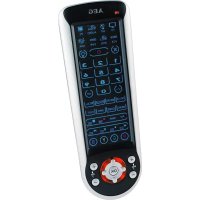
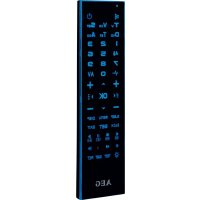
RC 4000 - Remote control AEG - Free user manual and instructions
Find the device manual for free RC 4000 AEG in PDF.



| Brand | AEG |
| Model | RC 4000 |
| Product type | Universal remote control |
| Power supply | 4 AAA 1.5V batteries (R03) |
| Net weight | 0.117 kg |
| Number of controllable devices | Up to 8 (TV, SAT, DVD, VCR, etc.) |
| Main functions | Code search, learning, macro, parental lock, backlight, favorites, teletext, PIP |
| Number of keys | 29 keys + indicator LED |
| Range | Approximately 10 m (not specified) |
| Backlight | Yes, activation by key (3), turns off after 5 seconds |
| Memory | Up to 15 favorite channels, 6 macros, programming per key |
| Programming | By code search or learning from original remote |
| Safety | Do not immerse, respect battery polarity, remove batteries if not used, keep out of reach of children |
| Maintenance | Clean with a dry cloth, replace batteries if necessary |
| Warranty | 24 months from date of purchase |
| Compliance | European directives (electromagnetic compatibility, low voltage) |
| Included accessories | User manual, 4 batteries (not included according to manual) |
Frequently Asked Questions - RC 4000 AEG
User questions about RC 4000 AEG
0 question about this device. Answer the ones you know or ask your own.
Ask a new question about this device
Download the instructions for your Remote control in PDF format for free! Find your manual RC 4000 - AEG and take your electronic device back in hand. On this page are published all the documents necessary for the use of your device. RC 4000 by AEG.
USER MANUAL RC 4000 AEG
D-47906 Kempen/Germany
General Safety Instructions
Read the operating instructions very carefully before putting the appliance into operation and keep the instructions including the warranty, the receipt and, if possible, the box with the internal packing. If you give this device to other people, please also pass on the operating instructions.
- Do not immerse the device in water.
- Use the device only for the intended purpose.
- Insert batteries with the correct polarity.
- If the device is not used for an extended period of time, remove the batteries.
Children and Frail Individuals
- Keep all packaging out of the reach of children (plastic bags, box, polystyrene, etc.).

Warning:
Do not allow children to play with plastic fi lm. There is a risk of suff ocation!
- This is not a toy. Do not allow small children to play with it.
Symbols used in this operating manual
Important information for your safety is specially marked. It is essential to comply with these instructions in order to avoid accidents and prevent damage to the machine:

Warning:
This could endanger your health and possibly injure you.

Attention:
This might damage the unit or other objects.
i Note:
You will find tips and information here.
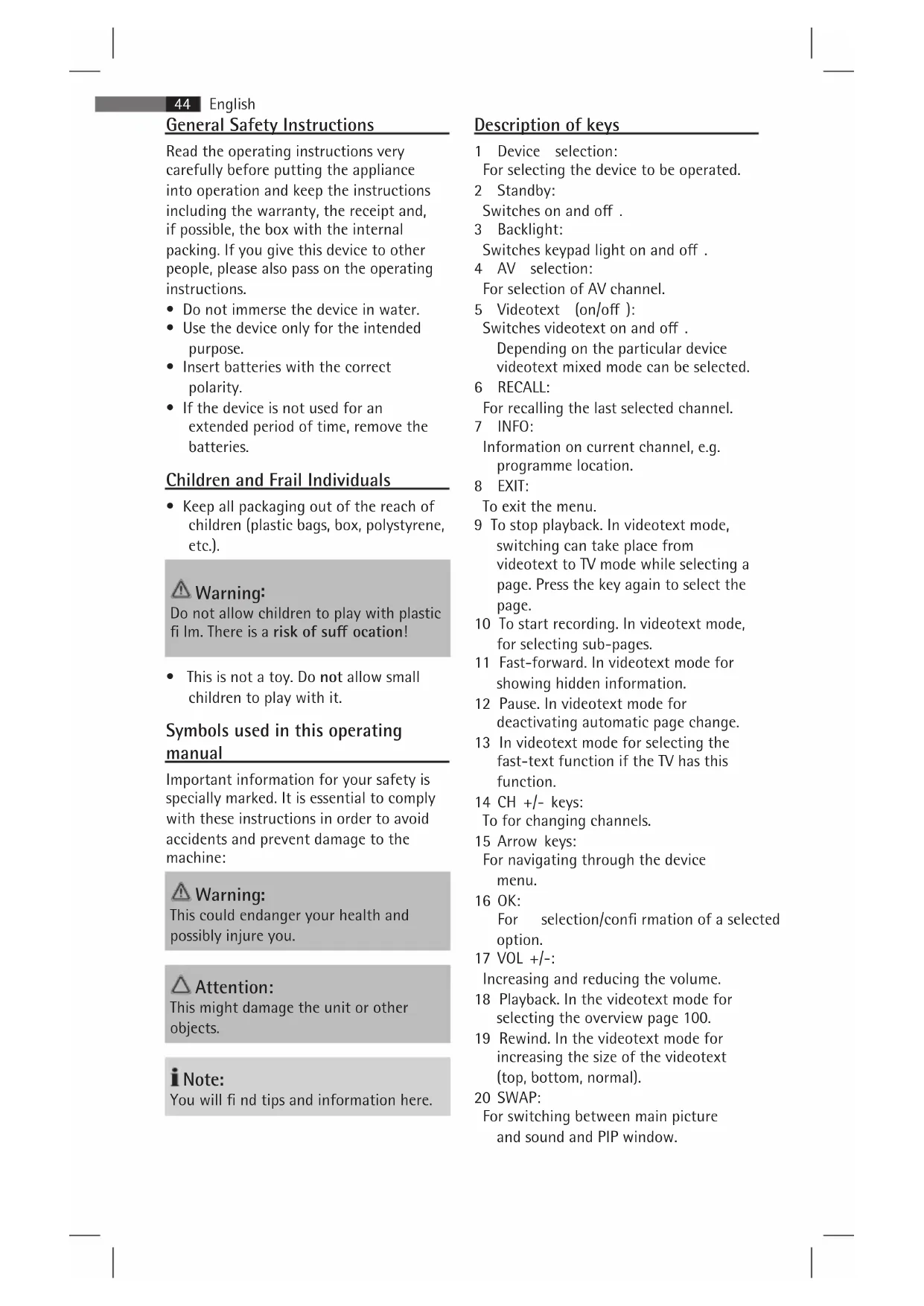
Description of keys
1 Device selection: For selecting the device to be operated.
2 Standby:
Switches on and off.
3 Backlight:
Switches keypad light on and off.
4 AV selection:
For selection of AV channel.
5 Videotext (on/off):
Switches videotext on and off.
Depending on the particular device videotext mixed mode can be selected.
6 RECALL:
For recalling the last selected channel.
7 INFO:
Information on current channel, e.g. programme location.
8 EXIT:
To exit the menu.
9 To stop playback. In videotext mode, switching can take place from videotext to TV mode while selecting a page. Press the key again to select the page.
10 To start recording. In videotext mode, for selecting sub-pages.
11 Fast-forward. In videotext mode for showing hidden information.
12 Pause. In videotext mode for deactivating automatic page change.
13 In videotext mode for selecting the fast-text function if the TV has this function.
14 CH + / - keys:
To for changing channels.
15 Arrow keys:
For navigating through the device menu.
16 OK:
For selection/confIRMation of a selected option.
17 VOL + / -
Increasing and reducing the volume.
18Playback.In the videotext mode for selecting the overview page 100.
19 Rewind. In the videotext mode for increasing the size of the videotext (top, bottom, normal).
20 SWAP:
For switching between main picture and sound and PIP window.
21 PIP:
Activates the PIP (picture in picture) function if the TV has a PIP function.
22 MENU:
Menu display.
23GUIDE:
Displaying the programme manager (EPG) if this function is supported.
24 FAV.CH:
Displaying favourites if this function is supported.
25 MACRO:
Saving and activating macro function.
26-/-:
One or two-digit programme location selection.
27 Number keys
28 Mute
29 LED indicator
Introduction
This universal remote control is suitable for virtually all commercially available brands. The 8 in 1 universal remote control can be used for operating up to 8 devices (TV/DVD/ SAT/VCR/HIFI/PC/DVR/AUX). The universal remote control controls all essential basic functions of your devices.
Inserting the batteries
The universal remote control requires 4 AAA R03 batteries.
- Open the battery compartment at the back of the remote control.
- Insert the 4 batteries in the battery compartment noting the polarity indicated in the battery compartment.
- Close the battery compartment.
i Note:
- If the remote control is not used for an extended period of time, remove the batteries to prevent the leaking of battery acid.
- Replace batteries within 2 minutes to prevent programming loss.
- When replacing the batteries, do not press any of the function keys as this can give rise to programming loss.
Attention:
- Diff erent battery types or new and used batteries may not be used together.
- Batteries do not belong in household waste. Please take the exhausted batteries to an appropriate collection point to a dealer.
Warning:
- Do not expose batteries to high temperatures or direct sunlight. Never throw batteries in a fire. There is a risk of explosion!
- Keep batteries out of the reach of children. Batteries are not toys!
- Never open batteries with force.
- Avoid contact with metallic objects. (Rings, nails, screws, etc.) This is a risk of short-circuit!
- A short-circuit will cause batteries to become very hot or even ignite. There is a risk of burns.
- For your own safety, the battery terminals should be covered with adhesive tape during transport.
If a battery should leak, do not rub the liquid into the eyes or mucous membranes. In the event of contact, wash hands, rinse eyes with clear water and if symptoms persist seek medical advice.
Programming the remote control
The universal remote control offers two programming options. Setting via "Code Search" and "Learn function".
i Note:
The PC functions are preprogrammed and cannot be altered.
"Code Search" function
- Switch on the device you want to operate (e.g. TV). If you are using a video recorder, DVD or CD player, insert a cassette or DVD/CD.
i Note:
The Code Search function is only possible in TV, SAT, DVD and VCR mode.
- Press and hold the respective selection key (e.g. until the LED extinguishes briefly.
- Activate the search function by pressing the "key (18). The LED will start to flash.
- As soon as the device responds (e.g. switches off), confirm by pressing the selection key again (e.g.). The LED will flash 4 times slowly.
i Note:
- Confirma tation of the device code must take place within one second.
-
The search mode can be ended at any time by pressing the EXIT key (8). The LED also flashes 4 times rapidly; the previously programmed code is retained.
-
Check the function of the keys on the device. If several of the keys do not function or incorrectly, repeat the search.
If this method proves unsuccessful, use the Learn function to program the remote control as described below.
i Note:
Owing to the numerous different brands on the market, complete programming of all the functions of your original remote control cannot be guaranteed.
Learn function
The universal remote control is able to "learn" the individual key functions of your original remote control. This function can be used, e.g. when not all functions are programmed via the "Code Search" function.
i Note:
Do not use the following keys for the Learn function: Light (3), Record (10), EXIT (8) and Selection keys (1).
- Ensure that your original remote control works perfectly.
- Place both remote controls on a fl at surface and point both ends that are normally aimed at the device towards each other. The distance between both remote controls should be 2 - 5cm
- Press and hold the respective selection
key (e.g. ) until the LED extinguishes briefly.
- Press the "key (10).
- Now press the key on the universal remote control to be programmed.
- Press and hold the respective key on the original remote control until the LED fl ashes 4 times slowly. The programmed key function is automatically stored.
I Note:
If programming is unsuccessful, the LED will flash 4 times rapidly.
- Neon light can influence programming.
- Repeat steps 5 and 6 until all key functions on the universal remote control have been programmed.
- Finally press the EXIT key to leave the programming mode. The LED will flash 4 times rapidly.
Delete programming
There is a possibility to delete individual keys or all keys of a device.
I Note:
Programming can only be deleted that was carried out via the Learn function.
Delete individual keys
- Press and hold the selection key for the respective device (e.g. ) until the LED extinguishes brief y. Subsequently press the EXIT key (8).
- Now press the key to be deleted. The LED will flash 4 times slowly.
- Press the next key to be deleted.
- When all required keys have been deleted, press the selection key of the device to leave the delete mode (e.g. The LED will flash 4 times rapidly.
Delete all keys of a device
- Press and hold the "● key (10) until the LED extinguishes briefly.
- Press and hold the selection key of the device, the keys of which are to be deleted (e.g.
- The LED will flash 4 times slowly. All keys stored under this selection key are deleted.
Favourites
This function allows preferred channels to be selected. It is possible to program up to 15 favourite channels.
i Note:
This function should only be used in a TV and SAT mode.
Program favourites
- Press and hold the FAV.CH key (24) until the LED extinguishes briefly.
- Enter the channel number.
- Subsequently press the FAV.CH key to store the channel.
- Repeat steps 2 - 3 until all favourite channels have been entered.
- Press the EXIT key (8) to leave the programming mode.
Select favourites
Repeatedly press the FAV.CH key to run through the programmed favourites in succession.
i Note:
If no favourites are programmed, the LED will flash 4 times rapidly.
Delete favourites
- Press and hold the FAV.CH key until the LED extinguishes briefy.
- Press the selection key twice (e.g. to delete the list of favourites. The LED will flash 4 times slowly.
Macro function
It is possible to program a series of keys at the push of a button. Up to 6 of these macros can be programmed on the number keys 1 - 6.
Program macro function
- Press and hold the MACRO key (25) until the LED extinguishes briefly.
- Press the required number key to be programmed (e.g. 1).
- Start programming using the respective selection key (e.g. ). Subsequently press the individual keys to be programmed.
i Note:
Only one key sequence of 16 keys, including the selection key can be programmed. After pressing the 16th keys, macro programming is automatically stored.
- When all keys to be programmed have been pressed, press the MACRO key to store. The LED will flash 4 times slowly.
i Note:
The EXIT key cannot be programmed in a macro function.
Activate macro function
- Press the MACRO key.
- Subsequently press the respective number key (1 - 6), the macro function of which is to be activated. The LED will start to flash.
- When the macro function has been completed, the LED extinguishes.
Delete macro function
- Press and hold the MACRO key (25) until the LED extinguishes briefly.
- Press the EXIT key (8) and subsequently the number key, the macro function of which is to be deleted.
- Confirm the deletion by pressing the OK key (16). The LED will flash 4 times slowly.
Child lock
It is possible to lock the CH + / - keys and the number keys on the universal remote control.
- Press and hold the FAV.CH key (24) until the LED extinguishes briefly.
- Enter the digits "999" with the number keys.
- Press the FAV.CH key again to activate the child lock. The LED will flash 4 times slowly.
To deactivate the child lock, repeat steps 1 - 3.
Backlight
The keypad lighting can be switched on and off with the light key (3).
When the keypad light is switched on, the backlight illuminates each time a key is pressed. This extinguishes after about
5 seconds if no key is pressed within this time.
Specifications
Model: RC 4000
Battery supply: 4 x 1.5V, AAA, R03
Net weight: 0.117kg
Declaration of Conformity
This appliance has been examined according to all appropriate current CE guidelines, e.g. electromagnetic compatibility and Low Voltage Directive and was designed according to the latest safety-relevant regulations.
Subject to technical modifications!
Guarantee
The device supplied by our Company is covered by a 24-month guarantee starting on the date of purchase (receipt).
During the life of the guarantee any fault of the appliance or its accessories attributed to material or manufacturing defects will be remedied free of charge by repair or replacement at our discretion.
The guarantee service does not entail an extension of the life of the guarantee nor does it give rise to any right to a new guarantee!
The receipt is the warranty. Without proof of purchase no free replacement or repair will be carried out.
In the event of repair under the guarantee, please return the complete device in the original packaging together with the receipt to your retailer.
Defects to consumables or parts subject to wearing as well as cleaning, maintenance or the replacement of said parts are not covered by the guarantee and hence are to be paid!
Any tampering with the device will invalidate the guarantee.
After the guarantee period
After the guarantee period, repairs can be carried out at a charge by authorised retailers or repair service.
Meaning of the "Dustbin" symbol
Protect our environment: do not dispose of electrical equipment in the domestic waste.
Electrical appliances that are no longer used must be disposed of at the collection points provided.
This helps to prevent the potential effects of incorrect disposal on the environment and health.
This makes a valuable contribution towards recycling and other forms of using old electrical and electronic appliances.
Information concerning where the equipment can be disposed of can be obtained from your local authority.
Bo3BpaT K nocneHemy BbIbpaHHOMy KaHaNo.
7 INFO:
HhOpMaIg O TeKUeM KaHaIe - HApPmep, Homep nporpaMMbl.
8 EXIT:
BbIXoI n3 MeHIO.
9 octaHObKa BocnpOn3BeJeHn. B pexmEBnDeOTekCTa Pn BB6ope CtpaNcbl MOxHoOcyuEcTBnTb NpeKNIIOHe Hne n3 peXmABnDeOTekCTa B pexm TB. DnBb6opaCTpaHnCbI CHOBa HaxMNTe 3Ty KONKy.
10 Haatab 3ainnc. B pejime BnpeoteKCTa -BbI6op nOCTpaHnU.
11 bIcTpa IepemOTka Bnepei. PoKa3 cKpbITOn INΦopMaunB peXnme BnDeOTekCTa.
12 Pay3a. BkIIOueHne cyHKnnaBbTOMATNueCKORO NpeJIINCTbIBaHnBpeXnme BnDeOTekTa.
13 Bb6op yHKuIN 6bICporo TEKCTa BpeXIMe BNdeOTekCTa,ecn TB NOIDepKINBaET 3Tu yHKUHO.
14 KhoNCH+/-: NpeeknOeHne KaHaIOB.
15 KhoNko co cTePknAmn: NepemseHne no MeHIO.
16 OK: BbIbOp/NoTBepeKdHnyHKTa.
17 VOL +/-: YBeHnueHne n yMeHbIeHne rpoMkoCTn.
18 Bocnpo3BedeHne. Bb6op cTpaHnCbI 063opa 100 B pexime BNdeTeKcTa.
19 Ipeemotka Ha3aJ. YBeJIuYeHne pa3Mepa Ⅲpnta BnDeOTekCTa (HaBepxy, Bn3y, 0bIHy) B pexmE BnDeOTekCTa.
20 SWAP:
IpeKJIIOUeHHe MExIy OCHOBbIM 3O6paXeHnEM N 3ByKOM N OKHom PIP (KaIp B KaIpe).
21 PIP:
BkHcHHe pHKuPiP (KaDp B KaDpe), ecN TeIeBn3Op nOdEepXnBaet 3Ty y_HK HIO.
22 MENU:
BbIOd MeHIO Ha 3KpaH.
23GUIDE:
BbIOHa 3KpaH nporpaMMbl nepeaay (EPG),ecnn 3Ta fynkunnoepjknaeTcra TeNeBu3Opom.
24 FAV.CH:
Ioka3 n36paHHbIX KaHaNoB,ecn 3Ta cyHKnI NOdepKINBaETCa TeNEBn3OpOM.
25 MACRO:
CoXpaHHeHne N BKNIOHeHne FyHKLm MaKpOCOB.
26 -/--
Bb6op DByx3HaHOro HOMepa nporpaMMbl.
27 LpOboBie KHOKN
28 OTKIIOHHe 3Byka
29 CBeTOBoi HnDnKaTOp
BVeBeHne
DaHHbI yHnBepCaNbHbI nYnbT Dy
MOXKeT NcIOJIb3OBAbTCa CO BCEMN
IpeDCTaBHeHHbIMHa pbIHKe TOpRObIMn MapkAm. YHnBePcAIBhBIpybT Dy "8 B 1" MoXeT NcNoJIb3OBAtbcra JIy npaBHeHn 8 ycToiCtBaMn OJHOBpeMeHHo (TV/DVD/SAT/ VCR/HIFI/PC/DVR/AUX).
YHnBepCaIbHbI nylbT Dy oBeCneuBaet ynpaBHeHBe BcEMN OCHOBbIMN FyHKUJMM YCTpOiCTB.
UctaHOBka 6aTapei
Bb16op n36paHHbIX KaHaNoB
IocneObaTeNbHO HaKImaTe KhoNkY
FAV.CHДЯ npocMOTpa 3anporpammmpoBaHHbIX n36paHHbIX KaHaNoB.
I PnmueyaHne:
Ecn He 3aporpaMnpoBaHb HnKaKne n36paHHbI KaHaBb,CBeTOBO INnKkATOp 6bICTpo MmHET 4 pa3a.
YdaenHeNHe 36paHHbIX KaHaNoB
- Haxmte u yepxmbaTe KhoNky FAV.CH (24) do tex nop, noka He cBeTOBoi INHdkatOp He Iorachet Ha KopOTKoe Bpemr.
2.Двждн haЖмITE KhoNky Bbl6opa (HanpIMep, )ДЯ уdaJIeHn CnIcKa n36paHHbIX KaHaNoB.CBeTOBoI INdNKaTOp MeDJIeHHO MmHET 4 pa3a.
ФункцmaKpocOB
BblMOXe3anpOpaMMnpoBaTb BbINOJIHeHHe HeCKoJIbKnxФyHKUOn OdHM HaxaTNEm KHOKN.C NOMOuBHO KHONOK 1-6 MOxHO 3anpOpaMMnpoBaTb Do 6 MaKPOCOb.
- General Safety Instructions
- Children and Frail Individuals
- Warning:
- Symbols used in this operating manual
- Attention:
- i Note:
- Description of keys
- Introduction
- Inserting the batteries
- Programming the remote control
- "Code Search" function
- Learn function
- Delete programming
- Delete individual keys
- Delete all keys of a device
- Favourites
- Program favourites
- Select favourites
- Delete favourites
- Macro function
- Program macro function
- Activate macro function
- Delete macro function
- Child lock
- Backlight
- Specifications
- Declaration of Conformity
- Guarantee
- After the guarantee period
- Meaning of the "Dustbin" symbol
- BVeBeHne
- UctaHOBka 6aTapei
- Bb16op n36paHHbIX KaHaNoB
- I PnmueyaHne:
- YdaenHeNHe 36paHHbIX KaHaNoB
- ФункцmaKpocOB
Brand : AEG
Model : RC 4000
Category : Remote control