
TrueScan BPW4100 - Sphygmomanometer BRAUN - Free user manual and instructions
Find the device manual for free TrueScan BPW4100 BRAUN in PDF.
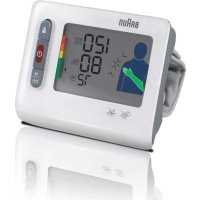




| Brand | Braun |
| Model | TrueScan BPW4100 |
| Product type | Electronic wrist blood pressure monitor |
| Measurement method | Oscillometric |
| Display | LCD screen |
| Systolic pressure measurement range | 60 to 280 mmHg |
| Diastolic pressure measurement range | 30 to 250 mmHg |
| Pulse measurement range | 40 to 180 beats per minute |
| Accuracy (pressure) | ±3 mmHg |
| Accuracy (pulse) | ±5 % |
| Inflation | Automatic, adaptive pressure |
| Power supply | 2 LR03 (AAA) batteries |
| Battery life | Approximately 300 readings |
| Memory capacity | 2 × 40 readings (2 users) |
| Special features | Easy positioning system, irregular beat detector, WHO/ESH indicator, 7-day average |
| Compatible wrist circumference | 13.5 to 21.5 cm |
| Protection type | Type BF, IP4X |
| Operating environment | Temperature 10 °C to 40 °C, humidity 15 to 85% RH |
| Storage environment | Temperature -20 °C to 60 °C, humidity 15 to 85% RH |
| Users | Adults only (not recommended for infants) |
| Maintenance | Clean with a soft, slightly damp cloth; do not wet the cuff |
| Included accessories | Batteries (2 × AAA), case |
| Warranty | Refer to the included warranty card |
Frequently Asked Questions - TrueScan BPW4100 BRAUN
User questions about TrueScan BPW4100 BRAUN
0 question about this device. Answer the ones you know or ask your own.
Ask a new question about this device
Download the instructions for your Sphygmomanometer in PDF format for free! Find your manual TrueScan BPW4100 - BRAUN and take your electronic device back in hand. On this page are published all the documents necessary for the use of your device. TrueScan BPW4100 by BRAUN.
USER MANUAL TrueScan BPW4100 BRAUN
This product is manufactured by Kaz Europe SA under a license to the 'Braun' trademark. 'Braun' is a trademark of Braun GmbH, Kronberg, Germany.
Kaz Europe SA
Place Chauderon 18
CH-1003 Lausanne
Switzerland

©2010 Kaz Europe SA


GB English
Intended use of Braun TrueScan
Braun TrueScan is a blood pressure monitor that has been developed for easy and accurate blood pressure measurements from the wrist. The measuring accuracy of Braun TrueScan was tested at the time of manufacture and was proven by clinical research.

Blood pressure readings from a healthy 31-year old male, measured at 5-minute intervals.
Blood pressure measured in a doctor's office only provides a momentary value. Repeated measurements at home better reflect one's actual blood pressure values under everyday conditions.
Moreover, many people have a different blood pressure when they measure at home, because they tend to be more relaxed than when in the doctor's office.
Regular blood pressure measurements taken at home can provide your doctor with valuable information on your normal blood pressure values under actual «everyday» conditions.
The World Health Organisation (WHO) and the ESH have set up the following standard blood pressure values when measured at resting pulse.
| (mmHg) | !!! !!! - | √ | √ | ||
| Level types | Severe Moderate Mild | High Normal | Normal | ||
| SYS(maximum value) | 180↑ | 160-179 140-159 130-139 120-129 | 120↓ | ||
| DIA(minimum value) | 110↑ | 100-109 90-99 85-89 80-84 | 80↓ | ||
| 2007 ESH- ESC Practice Guidelines for the Management of Arterial HypertensionGuidelines for management of hypertension: report of the fourth working party of the BHS, 2004—BHS IVESH: European Society of Hypertension • ESC: European Society of Cardiology • BHS: British Hypertension Society | |||||


What you should know about this blood pressure monitor
For accurate measurements, all wrist blood pressure monitors must be positioned at heart level. Example: If the monitor is positioned 20 cm below heart level as shown on the left (e.g. by putting the arm on a table), the reading you will obtain is approximately 15 mmHg too high.
Therefore, the Braun TrueScan has an easy positioning system (A): it guides you to hold your measuring arm in the right position at heart level and gives you confirmation of correct arm position before measurement is taken.

Safety Information and Important Precautions
- To ensure accurate measuring results, carefully read the complete use instructions.
- Operate the unit only as intended. Do not use for any other purposes.
- This product is intended for household use only. Keep product and batteries away from children.
- People suffering from cardiac arrhythmia, vascular constriction, arteriosclerosis in extremities, diabetes or users of cardiac pacemakers should consult their doctor before measuring their blood pressure themselves, since deviations in blood pressure values may occur in such cases.
- If you are under medical treatment or taking any medication, please consult your doctor first.
- The use of this blood pressure monitor is not intended as a substitute for consultation with your doctor.
- Do not disassemble or attempt to repair the unit or components.
- Do not use equipment where flammable gas (such as anesthetic gas, oxygen or hydrogen) or flammable liquid (such as alcohol) are present.
- The unit is intended to use in measuring blood pressure and pulse rate for adult only, not recommended for neonatal baby.
- Do not use a cellular phone near the unit. It may result in operational failure.
- Please avoid using in high radiant area in order to make your measuring data correctly.
- Substitution of a cuff different from that supplied might result in measurement error. For more information regarding the Safety Information and Important Precautions, contact your local Service Center.
Product description
A Easy Positioning system B User button C On/off button D Memory/Average Function button E Battery compartment F Time and date setting button G Adjust Button H Cuff I Velcro Strap J User icon
K Systolic pressure
L Diastolic pressure
M WHO/ESH indicator
N Pulse rate
O Heart rate indicator
P Low battery indicator
Q Irregular heartbeat
R Time
S Month and day


Inserting batteries
- Use alkaline batteries, 2 type LR 03 (AAA) (e.g. Energizer) as supplied with this product.
- Warning: do not use rechargeable batteries.
- Remove the battery compartment cover and insert two batteries with correct polarity (see symbol in the battery compartment (E)).
- New batteries (Energizer) will provide approximately 300 measurements.
- Only discard empty batteries. They should not be disposed of in the household waste, but at appropriate collection sites or at your dealer.
Key rules for accurate blood pressure measurements
Correct handling is key for obtaining accurate measuring results!
• Always take readings at the same time of day, ideally in the morning, under the same conditions. - Do not measure within 30 minutes after smoking, coffee or tea consumption. • Take off wrist watch and jewelry before fitting the appliance on the measuring arm. - While taking a measurement, sit down, relax, keep still, especially the hand and fingers of the measuring arm, do not move or speak.

- Hold the appliance at heart level during the measurement. - Wait approximately 3 minutes before repeating a measurement.
Taking a measurement
For a reliable blood pressure measurement, please follow the instructions below. Apply the cuff on your right wrist, when taking a measurement. The device can also be used on your left wrist.

- Place the monitor housing on the slim side of your bare forearm with the monitor facing up. Keep the required 2 cm distance to your palm line.
- Fasten the cuff on your wrist. Make sure that the cuff fits tightly.

- Press the red on/off button (C).

- Put the hand with the appliance on the other upper arm as shown. Slowly move the hand upward along the upper arm. Watch the positioning system (A) and move your hand up or down according to the direction of the arrow shown.

- If your wrist position is accurate the green arm icon on the device will appear with a black outline and the device will sound "BEEP BEEP BEEP BEEP". Directly following the four beeps the device will automatically inflate and begin taking the user's reading. When the measurement is complete the reading is displayed on the LCD.
TOP: SYSTOLIC VALUE
MIDDLE: DIASTOLIC VALUE
BOTTOM: PULSE

If the measuring position is incorrect, the measurement can't start, so there is no possibility to obtain a wrong or inaccurate measurement.
The device will beep rapidly if the positioning system is incorrect. You have to move your arm up or down according to the arrow indication on the LCD screen.

If your wrist position is at the correct level with your heart, the LCD will display and the measurement will start.
Measuring arm: If your wrist position is lower than your heart, the LCD will display as shown and will beep as "BEEP BEEP BEEP BEEP".
If your wrist position is higher than your heart, the LCD will display as shown and will beep as "BEEP BEEP BEEP BEEP".
If the positioning system has been deactivated, you will have no indication before processing the measurement.

Please note:
- In case of system errors or handling mistakes, the display will show an error code, instead of giving you inaccurate results (for details, please see section «What to do if...»).

Turning off
Press the on/off button to turn the product off, otherwise the product will turn off automatically after 2 minutes.
Memory Mode
Your blood pressure monitor can store the readings of 80 (2x40) measurements. Storing is done automatically after each completed measurement. The memory is non-volatile. This means that you will not lose stored data when changing batteries. Once the memory is full, the oldest values will be overwritten.

How to review the memory
• Make sure the product is in power off mode. - Press the Memory/Average Function button. The LCD will display the past 7 days average of blood pressure first. - Press the Memory/Average Function button again and the latest reading will display. - Press it again and the next reading will display.
Average Function: 7 Day Average
- Press the Memory/Average Function button once, and the "7 Day Average" result will show on LCD. • Make sure the DATE / TIME is correct when taking a measurement, so you will get the correct 7 Day Average result.
- If there is no data in memory within past 7 days, "" will show on LCD.

How to delete the memory data
• Make sure the product is in power off mode. - Press the Memory/Average Function button for at least 10 seconds. - LCD will display "del no" as shown. - Press the Memory/Average Function button again. LCD will display "del yes". - If you are sure all the data of corresponding user can be deleted, press "power" button, all the corresponding user's data will be deleted and the device will shut down.
Note: if you have set "delete yes", but do not press a button for 2 minutes, the product will shut off automatically, but the cor-
responding user's blood pressure data will not be deleted. The delete operation must be confirmed by user.
![graph TD A["手机信号"] --> B["移动电话"] B --> C["手机信号"] style A fill:#f9f,stroke:#333 style C fill:#bbf,stroke:#333](/content/2026/02/353226/images/17020c6c913a07e3ab03a2ed9e2e5990e801d89cfbcfc37e4aee7bbb75257855.jpg)
Select mode
How to select user1/user2
- Make sure the product is in power off mode.
- Press the "user" button, and the current user mode will flash on the LCD display.
- Press the "user" button again, it will change to another user mode.
- When you have set the correct user mode, press the "power" button to save the user mode and exit this setting.
- If you have selected the correct user mode and do not press a button for 2 minutes, the product will shut off and save the user mode you have selected automatically.
How to set date and time
- First turn off the product. Press the "set" button, and the "month" will flash.
- Press the "adjust" button to change the current month. (It can only be increased.)
- When the month is correct, press the "set" button again.
- Next the "date" will flash.
- Follow the same operation process to adjust the "date", "hour" and "minute".
- When you finish the date/time setting, you can press the "power" button to shut off the product or if you do not press a button for 2 minutes, the product will shut off and save the user mode you have selected automatically.
![graph TD A["手机"] --> B["手触锁"] B --> C["密码识别"] C --> D["登录确认"] D --> E["身份证号验证"] E --> F["身份验证"] F --> G["用户登录"] G --> H["确认确认"] H --> I["完成确认"]](/content/2026/02/353226/images/cb49baab8a113d55f2add224c970afd8c694a59512909e0dcabe233e0f187589.jpg)
How to set positioning system ON/OFF
Should you wish to deactivate the positioning system proceed as follows:
- First turn off the product.
- Press the "user" button and hold it for 5 seconds.
- If the "position system" is turned ON, the LCD will display "on". If the "position system" is turned OFF, the LCD will display "off".
- Press the "user" button again, the state of "position system" will be changed.
- When the "position system" has been set to your liking, you can


press the "power" button to shut off the product and the "position system" state will be saved.
The WHO/ESH indicator to evaluate blood pressure data
This device has a Blood Pressure Level Indicator (M) established according to WHO and the European Hypertension Society Guidelines (ESH) in 2007. For every measurement displayed on the screen, the cursor will indicate the blood pressure level with the corresponding color code, from green to red. You can use this classification daily to guide you to understand your blood pressure level. If you are really concerned by the classification level, you should consult your doctor.
Irregular Heart Beat Detector
The appearance of this symbol signifies that a certain pulse irregularity was detected during the measurement. Talking, moving, shaking or an irregular pulse during the measurement can result in the appearance of this icon. Usually this is not a cause for concern, however if the symbol appears often, we recommend you seek medical advice. The device does not replace a cardiac examination, but service to detect pulse irregularities at an early stage.
Calibration
This product has been calibrated at the time of manufacture. If used according to the Instructions for use, periodic recalibration is not required. If at any time, you question the measuring accuracy, maintenance and repair, please contact an authorized Kaz Customer Service Centre.
Manufacturing date is given by the LOT number on the back of the product. The three numbers after LOT represent the day of the year of manufacture. The two last digits of the year of manufacture. An example: LOT 25010KYD – this product has been manufactured on the 250th day of the year 2010.
Storage and cleaning
Keep the unit in the storage case when not in use. Clean the product with a soft, slightly damp cloth. Do not wet the cuff or attempt to clean the cuff with water. Do not wash or dry clean the cuff. Do not store the product in a place exposed to direct sunlight or high humidity. Remove the batteries if the unit will not be used for 3 months or longer. Always replace all of the batteries with new ones at the same time. If needed, please use ultraviolet radiation for disinfection.
Specifications
Model: BPW4100
Operation principle: Oscillometric method
Display: Liquid Crystal Display
Measuring range: 0-280mmHg (cuff pressure)
Blood pressure
measurement: Systolic pressure: 60-280mmHg
Diastolic pressure: 30-250mmHg
Pulse rate: 40-180/min
Laboratory accuracy: Cuff pressure: ±3mmHg
Pulse rate: ±5%
Inflation: Automatic, soft adapted to blood pressure
Power supply: 2 batteries, type LR03(AAA)
Electric Shock Protection: Internal power supply appliance type BF
Operating Environment: Temperature +10 C / +40 C
Humidity 15 \~ 85%RH (Noncondensing)
Atmospheric Pressure 105 kPa \~ 80 kPa
Transport and Temperature -20C / +60C
Storage Environment
Humidity 15 ~ 85%RH (Noncondensing)
Atmospheric Pressure 105 kPa ~ 80 kPa
Cuff: Suitable for wrist circumference of 13.5 to 21.5cm
Accessory:
Batteries (2*AAA)
If device is not used within specified temperature and humidity ranges the technical accuracy cannot be ensured.
What to do if...
| Problem Reason Solution | ||
Battery Icon is flashing • Batteries are flat. | • Memory readings can be called up, but measurements are not possible. | Insert new batteries. |
| Err 1 Cuff is not wrapped on the wrist well (too loose). | Rewrap the cuff tighter on the wrist. | |
| Err 2 • Arm moved during inflation measurement.• Systolic pressure is above 280mmHg | Please do not move arm or speak when you take a measurement. | |
| No display No information on the display screen. | Check the battery installation for proper installation of the batteries' polarities | |
| Measurements appear too high or too low | Blood pressure varies constantly during the day. Many factors such as stress, time of day, talking, coughing, laughing, moving etc. when measuring will influence the reading. | Please read “Key rules for accurate blood pressure measurements” and “Taking a measurement” |
| Prior to measurement, the positioning system (A) on the display does not work. | Positioning system (A) is deactivated. | Refer to the chapter «Select mode» to activate the positioning system (A). |

Type BF equipment
Portable and mobile RF communications equipment can affect MEDICAL ELECTRICAL EQUIPMENT.

MANUFACTURER

Temperature Limitation
IP4X: International Protection rating

RoHS

Please do not dispose of the product in the household waste at the end of its useful life. Disposal can take place at your local retailer or at appropriate collection points provided in your country. SYMBOL FOR THE MARKING OF ELECTRICAL AND ELECTRONIC DEVICES ACCORDING TO DIRECTIVE 2002/96/EC.
Subject to change without notice.

CAUTION SIGN. CONSULT ACCOMPANYING DOCUMENTS
This product conforms to the provisions of the EC directive 93/42/EEC (Medical Device Directive).
MEDICAL ELECTRICAL EQUIPMENT needs special precautions regarding EMC. For detailed description of EMC requirements please contact an authorized local Service Centre (see guarantee card).
TUV Safety tests validated
Guarantee
See warranty statement inside the Kaz Customer Service Centre booklet.
DE Deutsch

Ausschalten

Sluk apparatet


Apagado
2007 ESH-ESC Practice Guidelines for the Management of Arterial Hypertension. Guidelines for management of hypertension: report of the fourth working party of the BHS, 2004—BHS IV. ESH: European Society of Hypertension • ESC: European Society of Cardiology • ESC: British Hypertension Society

H Mansetti R Kellonaika

Sammuttaminen
Insert the batteries
wrist.


Deactivation
• Among successful nuclear energy
.(Memory/Average) אַרְהָם / אַרְהָם אַרְהָם אַרְהָם אַרְהָם אַרְהָם אַרְהָם אַרְהָם אַרְהָם אַרְהָם אַרְהָם אַרְהָק)
.(Memory/Average) v1 / v2
.(del yes) "prin'p"
הכלה
אַעְהָר, (אַעְהָר, (LR 03) (AAA) 20, 2, אַעְהָר, אַעְהָר, אַעְהָר, אַעְהָר, אַעְהָר, אַעְהָר, אַעְהָר, אַעְהָר, אַעְהָר, אַעְהָר),

Shutdown


Switch off
Select mode
C (On/off) On/Off button M WHO/ESH indicator
D Memory/Average button
E Battery compartment O Heart rate indicator

How to measure
Turn off
Install batteries
Turn off

Insert batteries
Turn off
EN 1060-1/A1 1995 Non-invasive sphygmomanometers — Part 1: General requirements.
EN 1060-3/A1 1997 Non-invasive sphygmomanometers — Part 3: Supplementary requirements for electro-mechanical blood pressure measuring systems.
EN 1060-4/A1 2004 Non-invasive sphygmomanometers - Part 4: Test procedures to determine the overall system accuracy of automated noninvasive sphygmomanometers
EN 60601-1/A2 1995 Medical electrical equipment – Part 1: General requirements for basic safety and essential performance.
EN 60601-1-2 2007 Medical electrical equipment – part 1-2: General requirements for basic safety and essential performance – Collateral standard: electromagnetic compatibility – Requirements and tests
EN ISO 14971 2007 Medical devices – Application of risk management to medical devices.
EN ISO 10993-1 2003 Biological evaluation of medical devices – Part 1: Evaluation and Testing.
EN 1041:2008 Information supplied by the manufacturer of medical devices.
EN 62304:2006 Medical device software – Software life-cycle processes
EN 980:2008 Symbols for use in labeling of medical devices
- GB ENGLISH
- INTENDED USE OF BRAUN TRUESCAN
- WHAT YOU SHOULD KNOW ABOUT THIS BLOOD PRESSURE MONITOR
- SAFETY INFORMATION AND IMPORTANT PRECAUTIONS
- PRODUCT DESCRIPTION
- INSERTING BATTERIES
- KEY RULES FOR ACCURATE BLOOD PRESSURE MEASUREMENTS
- TAKING A MEASUREMENT
- PLEASE NOTE
- TURNING OFF
- MEMORY MODE
- HOW TO REVIEW THE MEMORY
- AVERAGE FUNCTION: 7 DAY AVERAGE
- HOW TO DELETE THE MEMORY DATA
- SELECT MODE
- HOW TO SELECT USER1/USER
- HOW TO SET DATE AND TIME
- HOW TO SET POSITIONING SYSTEM ON/OFF
- THE WHO/ESH INDICATOR TO EVALUATE BLOOD PRESSURE DATA
- IRREGULAR HEART BEAT DETECTOR
- CALIBRATION
- STORAGE AND CLEANING
- SPECIFICATIONS
- TYPE BF EQUIPMENT
- MANUFACTURER
- TEMPERATURE LIMITATION
- ROHS
- CAUTION SIGN. CONSULT ACCOMPANYING DOCUMENTS
- GUARANTEE
- DE DEUTSCH
- AUSSCHALTEN
- SLUK APPARATET
- APAGADO
- SAMMUTTAMINEN
- INSERT THE BATTERIES
- DEACTIVATION
- הכלה
- SHUTDOWN
- SWITCH OFF
- HOW TO MEASURE
- TURN OFF
- INSTALL BATTERIES
- INSERT BATTERIES
Brand : BRAUN
Model : TrueScan BPW4100
Category : Sphygmomanometer