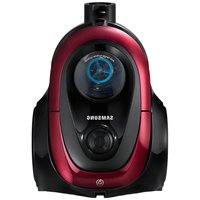
V20A95943N - Vacuum Cleaner SAMSUNG - Free user manual and instructions
Find the device manual for free V20A95943N SAMSUNG in PDF.



User questions about V20A95943N SAMSUNG
0 question about this device. Answer the ones you know or ask your own.
Ask a new question about this device
Download the instructions for your Vacuum Cleaner in PDF format for free! Find your manual V20A95943N - SAMSUNG and take your electronic device back in hand. On this page are published all the documents necessary for the use of your device. V20A95943N by SAMSUNG.
USER MANUAL V20A95943N SAMSUNG
- Before operating this unit, please read the instructions carefully.
For indoor use only
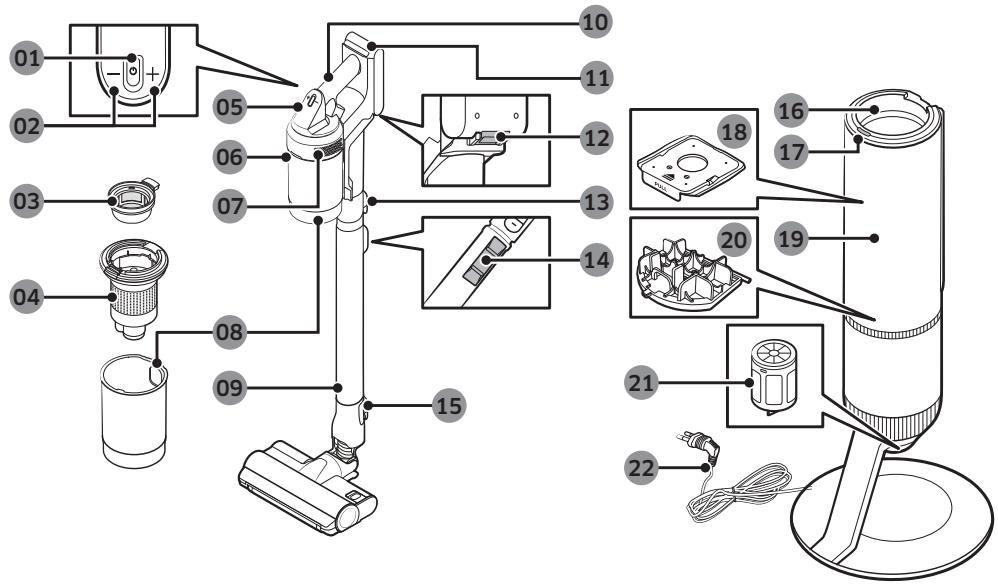
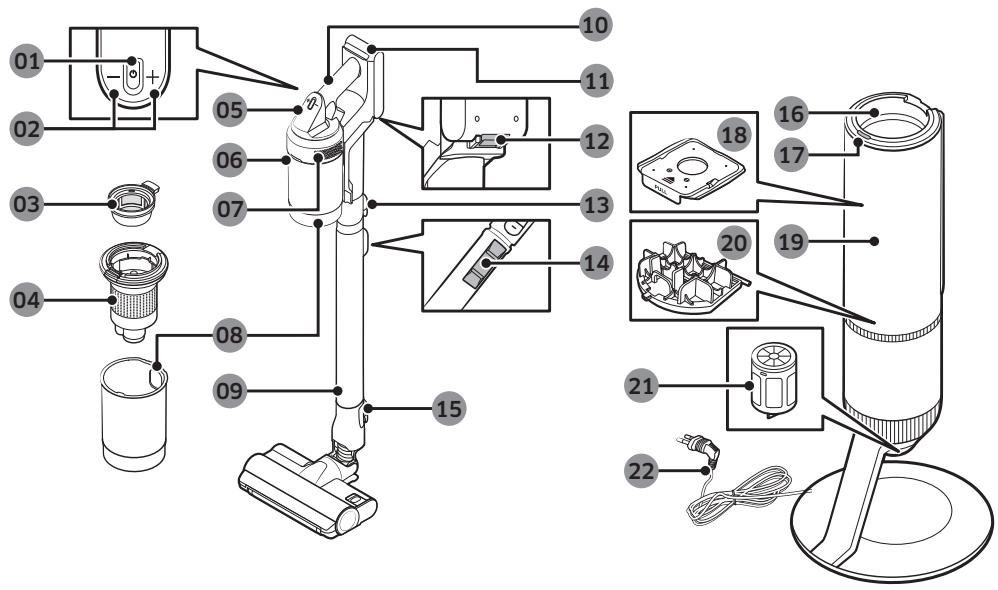
01 Power() button
02 Suction power control button
03 Washable Micro Filter
04 Metal Mesh Grille Filter
05 Display
06 Dustbin release button
07 Fine Dust Filter
08 Dustbin
09 Adjustable pipe
10 Handle
11 Battery level indicator
12 Battery release button
13 Pipe release button
14 Pipe length adjustment button
15 Brush release button
16 Dustbin joint
17 Clean Station START/STOP Button
18 Dust bag
19 Clean Station front cover
20 Clean Station Premotor Filter
21 Clean Station Fine Dust Filter
22 Power cord
The accessories with the '* mark may differ depending on the models.
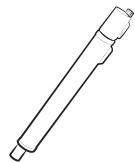
Adjustable pipe
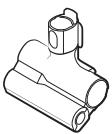
Pet Tool
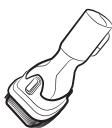
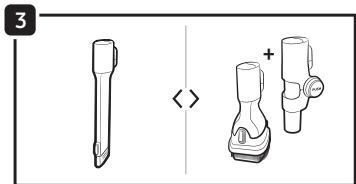
Combination Tool
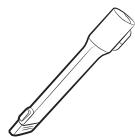
Extension Crevice Tool
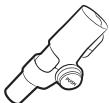
Flexible Tool
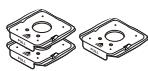
Dust bag: 3 units (Inside the unit: 1, Spare: 2)
User manual
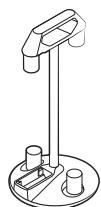
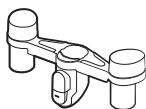
Accessory Cradle
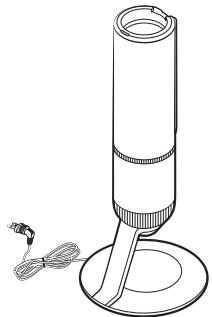
Clean Station
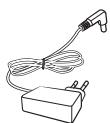
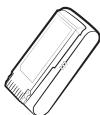
*Charger
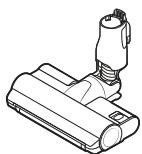
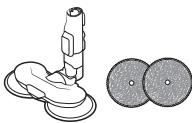
Jet Dual Brush
Wet Brush/ Multi-use wet pad
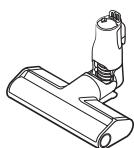
*Slim Action Brush

*Single-use wet pad/ Attachable pad
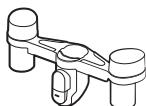

Accessory Cradle Holder
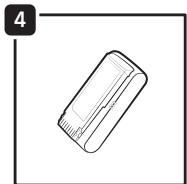
Battery (VS20A959***: 2 units)
-
Optional
-
VS20A958*** model: The additional battery and charger can be purchased separately.
- The Wet Brush includes a multi-use wet pad and a single-use wet pad.
- The Wet Brush and Jet Dual Brush are only compatible with VS20A95**** model.
1
2
3
4
5
6
7
8
9
10
11
12
13
14

15
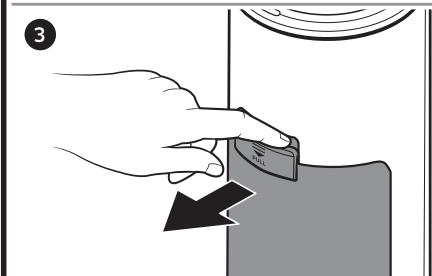
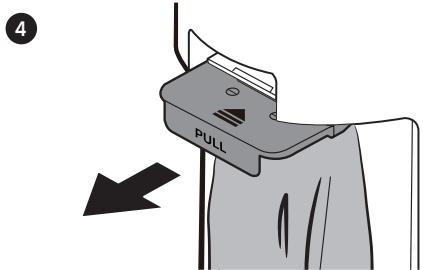
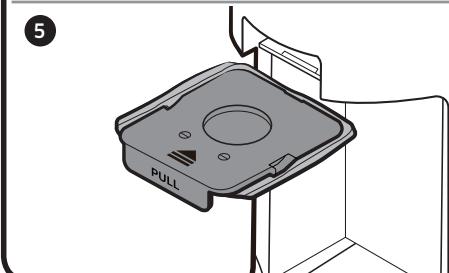
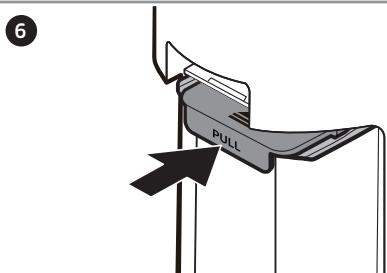
18
1
2
3
4
5
6
7
8
19
1

3
2
4
20
1
2
3
4
21
1
2
3
4
5
6
7
8
22
1
2
3
4
23
24
Product specification
Charging and cleaning time may differ depending on the brushes and the conditions of use.
| Model | VS20A95*** Series | |
| Power consumption (Vacuum cleaner) | Based on a handy vacuum cleaner: 580 W | |
| Battery specification | Li-ion 25.2 V, 2200 mAh, 7 cell | |
| Weight (Vacuum cleaner) | 2.7 kg (Jet Dual Brush) | |
| Size | Vacuum cleaner | Width 250 mm x Depth 210 mm x Height 1,000 mm |
| Clean Station | Width 300 mm x Depth 300 mm x Height 850 mm | |
| Charging time | 3.5 hours | |
| Cleaning time (Default: [MID]) | Combination Tool / Extension Crevice Tool | Approx. 60 min. [MIN] / Approx. 30 min. [MID] / Approx. 10 min. [MAX] / Approx. 3 min. [JET] |
| Jet Dual Brush | Approx. 42 min. [MIN] / Approx. 24 min. [MID] / Approx. 14 min. [MAX] / Approx. 8 min. [JET] | |
| Slim Action Brush | Approx. 50 min. [MIN] / Approx. 25 min. [MID] / Approx. 15 min. [MAX] / Approx. 9 min. [JET] | |
| Wet Brush | Approx. 100 min. | |
- Cleaning time doubles when you use two batteries consecutively.
Operation
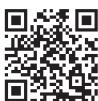
* For detailed information, please refer to the QR code.
Clean Station
#1 Installing the Clean Station
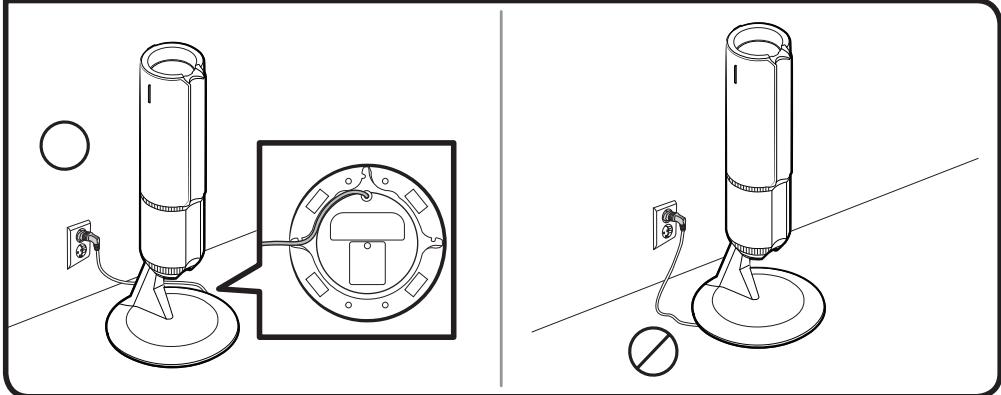
1 Run the power cord of the Clean Station along the round groove at the bottom.
- Make sure the power cord is correctly placed so that the Clean Station stands without tilting.
2 Before plugging in the Clean Station, arrange the power cord neatly.
3 When plugging in the Clean Station, the status indicator turns blue for 5 seconds and goes off.
#2 Using the Clean Station
A: Status indicator / (START/STOP) button
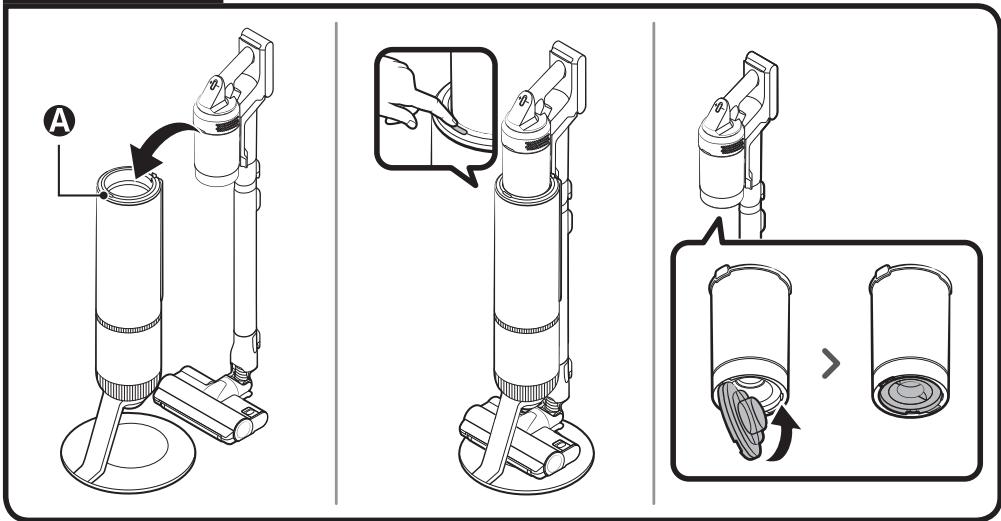
- After inserting the vacuum cleaner into the Clean Station, press the START/STOP button to empty the Dustbin.
- Press the START/STOP button again to stop its operation.
- Close the bottom cover of the Dustbin before using the vacuum as the bottom cover is open after emptying Dustbin at the Clean Station.
Vacuum cleaner
Charging the battery
-
When the battery level indicator turns red or the [Low battery] message appears on the display, charge the battery.
-
You cannot use the vacuum cleaner while charging.
- Make sure the back of the battery is correctly placed onto the vacuum charging part.
- Check that the battery level indicator is displayed while charging.
- When charging starts, the battery level indicator turns on (red, orange, or yellow depending on charging progress), it rises gradually, and changes to green when the charging is complete.
CAUTION
- Before ejecting the battery, the vacuum must be turned off.
- If the battery is forcibly ejected while the vacuum is operating, the vacuum may malfunction.
- Be careful not to drop the battery. If you do, you can injure yourself or damage the battery.
3 Inserting the battery
Push the battery to the end until you hear it click.
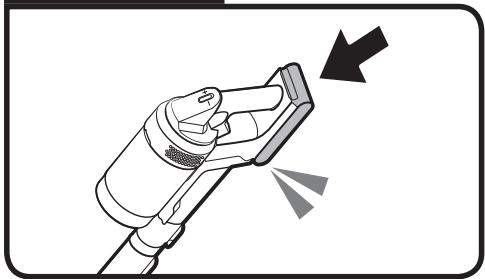
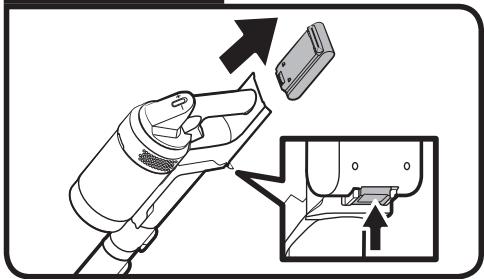
4 Ejecting the battery
Press the battery release button at the rear of the handle to eject the battery.
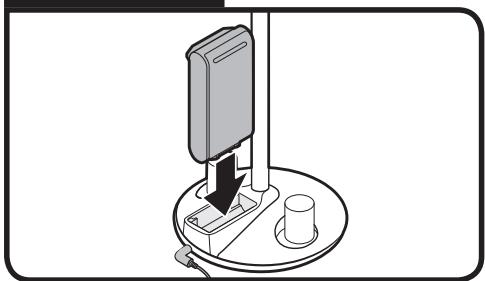
#5 Charging the additional battery
- Charge the additional battery at the additional battery charging slot at the bottom of the Accessory Cradle.
- Push the battery in firmly.
- VS20A958*** model: To charge the battery at the Accessory Cradle, a charger needs to be purchased separately. (VCA-SAPA95)
Using the vacuum cleaner
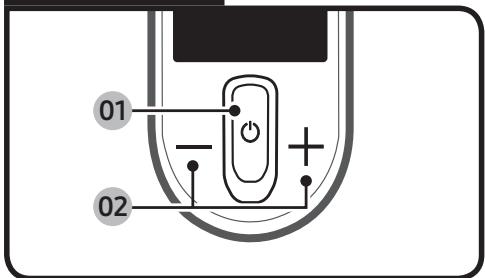
6 Control Part
- Before using the product, you have to select a language for the first time. Use (+) or (-) button to select a language and hold the (+) button for 3 seconds to complete the setting.
- Press and hold the (+) button for 3 seconds while using the vacuum to enter the language setting mode later.
- To set the Energy Saving mode, press and hold the (+) button for 5 seconds while the vacuum is on the Clean Station.
- To cancel the Energy Saving mode, press and hold the (+) button for 5 seconds.
- The Energy Saving mode is automatically exited if the vacuum is used.
01 Power () on / off: Press the () button to start cleaning in [MID] mode.
- When the Wet Brush is assembled, the vacuum starts cleaning in the Wet Brush mode.
02 Suction power mode control part: You can change the suction power mode.
- You can change the 4 steps [MIN, MID, MAX, JET] of the suction power with the (+) and (-) button.
NOTE
- When the vacuum is in the Wet Brush mode, only the (+) button works.
- If the brush clings to the floor or does not turn properly depending on the floor material (a carpet, a mat, bedding, etc.), adjust the suction power mode to [MIN] or [MID].
- While using the Wet Brush, the language setting is not supported.
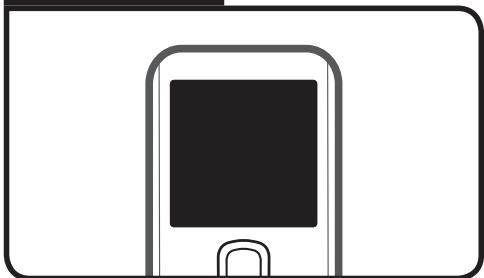
7 Display Part
- Suction power mode
- Displays the suction power mode you have selected as [MIN], [MID], [MAX] or [JET].
[WET]: Wet Brush mode - When the Wet Brush is assembled, the Wet Brush mode is displayed.
- Press the (+) button to spray water. While holding the (+) button, water is sprayed for a maximum of 2 seconds.
- Check messages
- Low battery: Displays when battery is low.
- Object stuck in brush/tool: Error displays when something is caught in the brush or tool.
- Filter not inserted: Error displays when 'Micro Filter' is missing.
- Clogged: Error displays when the vacuum cleaner is clogged.
- Check brush, tool, or filter: Alerts the user to check the brush, tool, or filter in order to solve the clogging error.
- Clean Micro filter: Alerts and recommends the user to regularly check and wash the Micro Filter. (Refer to the 'Cleaning the vacuum cleaner' section.)
- Energy Saving on: Displays when the Energy Saving Mode is on.
- Energy Saving off: Displays when the Energy Saving Mode is off.
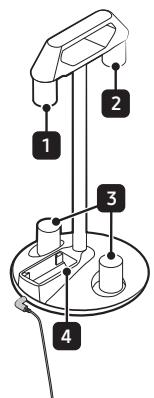
Using the Accessory Cradle
Before charging the additional battery, plug in the charger.
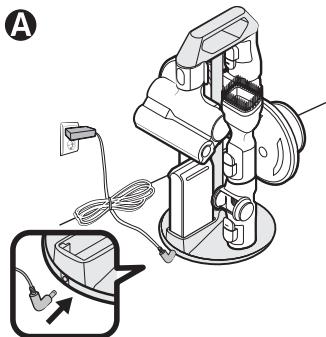
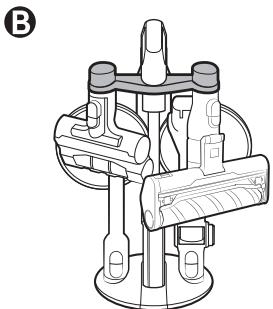
#8 Using the Accessory Cradle
A: Accessory Cradle
B: Accessory Cradle + Accessory Cradle Holder
- When accessories are detached to be stored, dust may fall from the suction part of the vacuum cleaner.
- After cleaning, shorten the pipe length and operate the vacuum in [MAX] mode for 10 seconds.
- If the pad is wet and stored with the Wet Brush, the wall near the wet pad can be contaminated or begin to smell. After cleaning the pad, dry the pad completely.
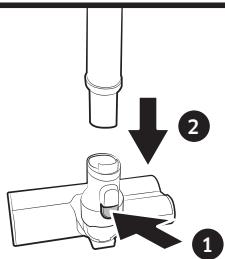
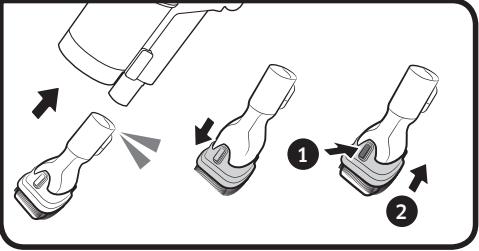
- When detaching the brush, press the release button on the brush.
Using the accessories
#9 Detaching the accessories
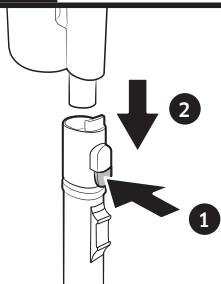
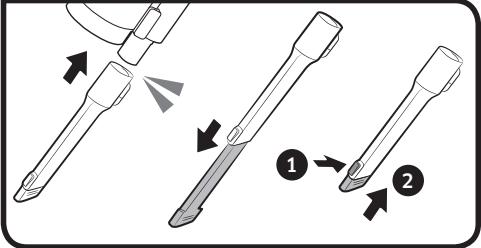
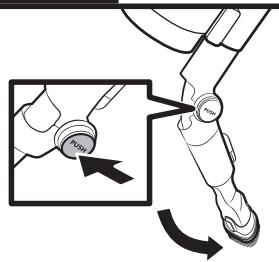
- When detaching the adjustable pipe or the brush, press the release button on the back.
- Before detaching the accessories, operate in [MAX] mode for more than 10 seconds to remove foreign matter remaining in the accessories.
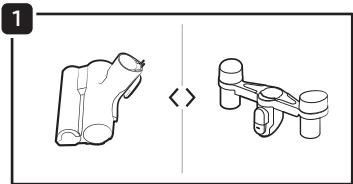
10 Combination Tool
Use to remove dust from curtains, furniture, sofas, etc.
#11 Extension Crevice Tool
Use to remove dust in grooves of window frames, narrow openings, corners, etc..
12 Flexible Tool
Use to clean hard to reach places such as upper or rear parts of furniture or ceilings.

NOTE
- The Flexible Tool can be connected to the Combination Tool and the Extension Crevice Tool.
13 Adjusting the pipe length
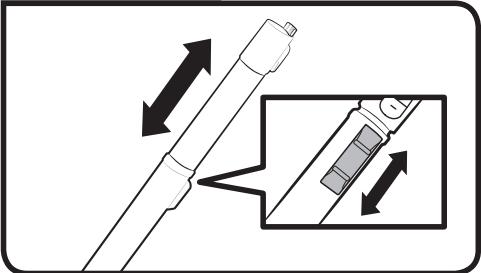
Press the button at the rear of the adjustable pipe to adjust the length of the pipe in 3 steps.
14 Wet Brush
Use to clean a floor with a wet pad (wood and linoleum).
- The Wet Brush does not have a dust suction function.
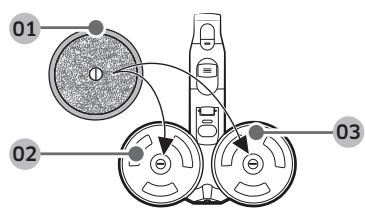
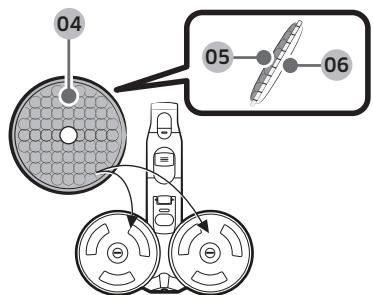
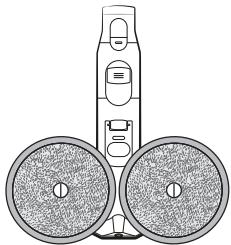
01 Multi-use wet pad
02 Velcro
03 Spin disk
Using the multi-use wet pad
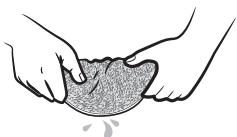
- When attaching the wet pad, make sure the pad is in the center of the spin disk.
04 Attachable pad
05Velcro side
06
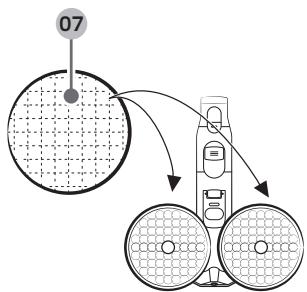
07 Single-use wet pad
Using the single-use wet pad
- Attach the single-use wet pad to the front side (Velcro side) of the attachable pad on the spin disk.
- If you use the single-use wet pad without the attachable pad, cleaning performance can be degraded.
After using the single-use wet pad, discard the pad.
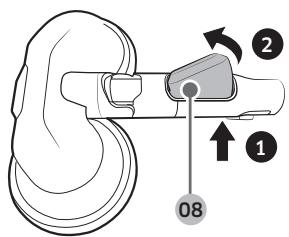
08 Water Tank
Detaching or attaching the Water Tank
- Press the lower part of the Water Tank to detach.
- When attaching the Water Tank, insert the front end first.
NOTE
- Do not use underground or polluted water.
- When using for the first time, the air in the pump and the tube may cause the Wet Brush to delay spraying water. Press the water spray (+) button repeatedly.
Cleaning the Clean Station
15 Replacing the dust bag
When the status indicator turns red, you should replace the dust bag.
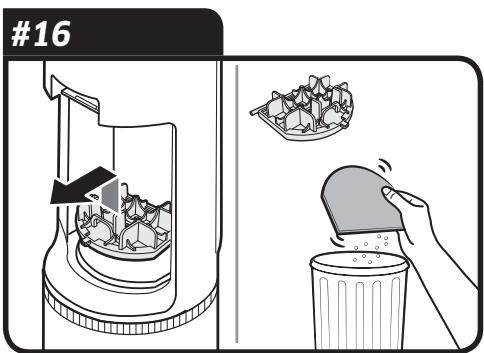
16 Cleaning the Premotor Filter
Use the handle to lift the filter off and shake over a bin to remove dust.
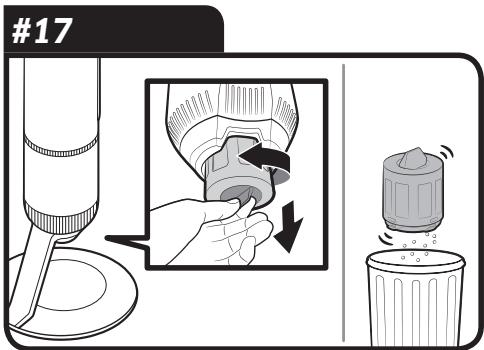
17 Cleaning the Fine Dust Filter
Shake the Fine Dust Filter over a bin to remove dust.
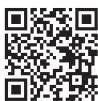
- For detailed information, please refer to the QR code.
Cleaning the vacuum cleaner
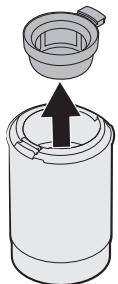
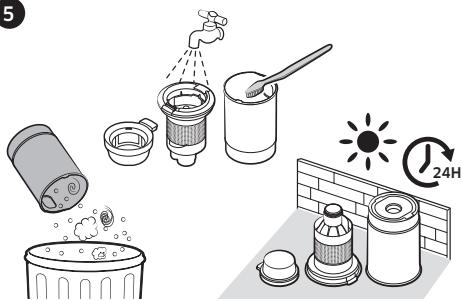
18 Dustbin/Washable Micro Filter
CAUTION
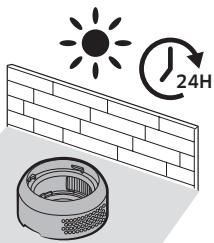
After cleaning the Dustbin/Washable Micro Filter with water, you should dry them completely in the shade for more than 24 hours before use.
- When heat is applied, part deformation may occur.
- If the filter is not dried completely before being used, it can cause an odor.
- If the Dustbin or the filter is clogged, the vacuum may stop its operation due to the overheating prevention device of the motor.
- Clean the Dustbin or the filters and then operate the vacuum again.
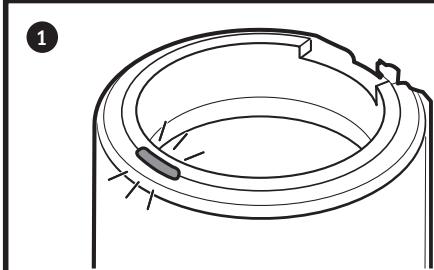
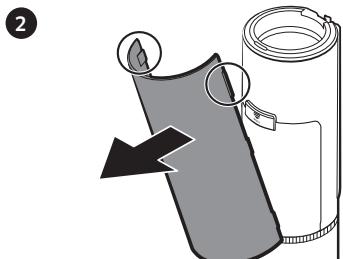
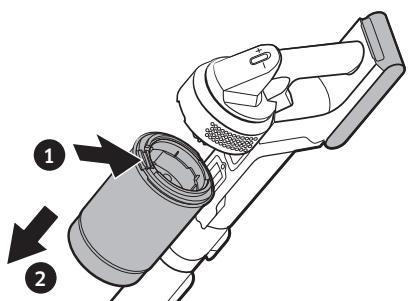
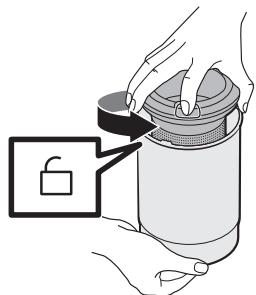
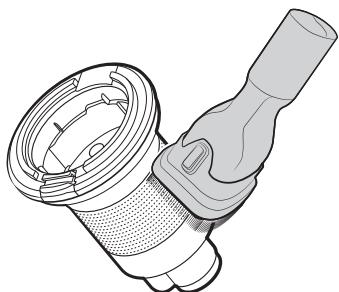
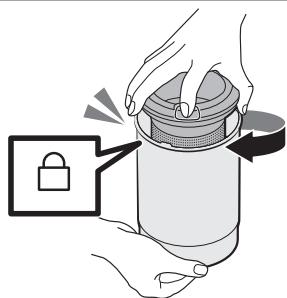
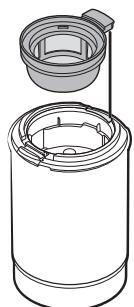
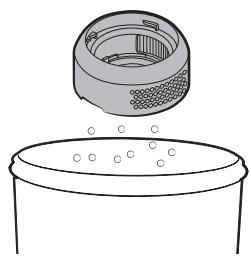
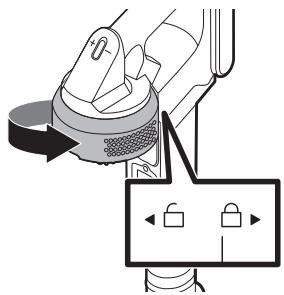
19 Fine dust filter
Make sure to turn off the product before cleaning the filter.
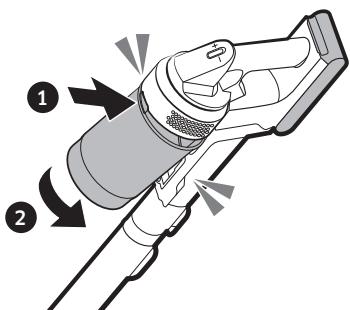
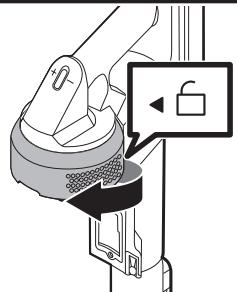
- Twist and pull off the Fine Dust Filter, and tap it gently to remove the dust.
- Wash the filter with running water once a month to maintain the best performance of the filter.
After cleaning, dry it completely for more than 24 hours in the shade before use.
- For assembly, turn it counterclockwise until the line under the lock image is not visible.

NOTE
- Do not use detergent or tool when washing the filter.
- Do not dry with heat.
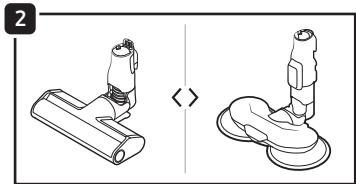
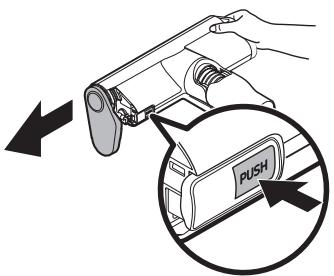
20 Slim Action Brush

CAUTION
- Do not clean the brush with water.
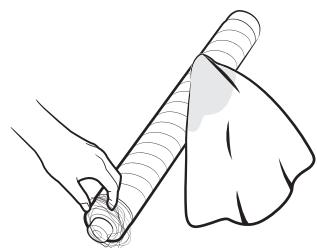
- When foreign matter remains on the brush, remove it with a wet tissue or a dry cloth.
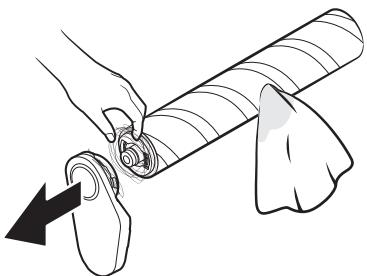
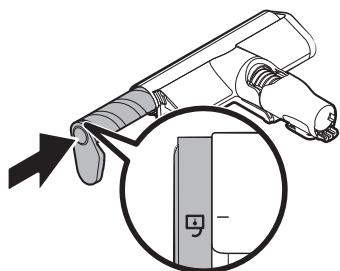
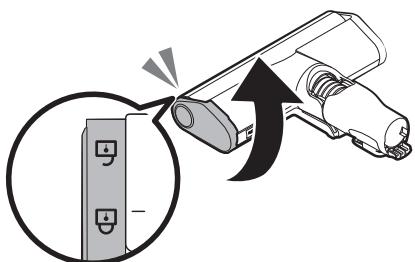
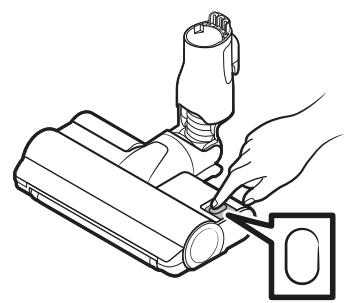
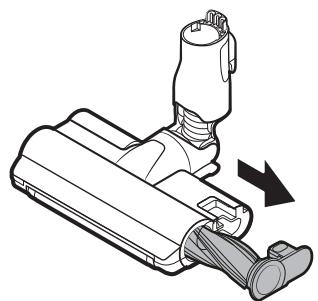
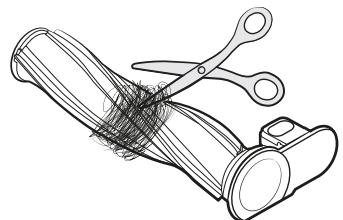
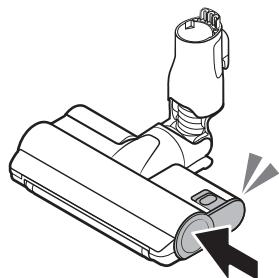
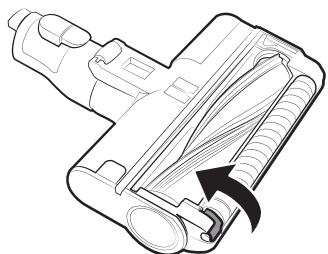
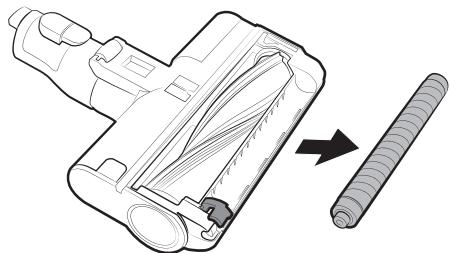
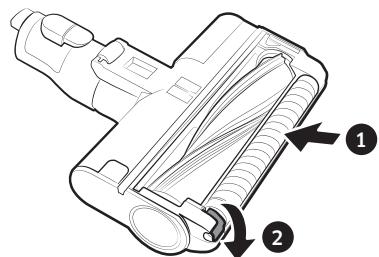
21 Jet Dual Brush
If the foreign matter is not removed, use scissors to remove it.
CAUTION
- If a cloth or other foreign matter is vacuumed up and tangled with the spin brush, the spin brush will stop working to protect the brush motor. After cleaning the brush, turn the power off and then on again.
- If a brush does not work after cleaning, turn the power off and then on again.
- When cleaning the brush, be careful not to catch your fingers in the fold of the brush.
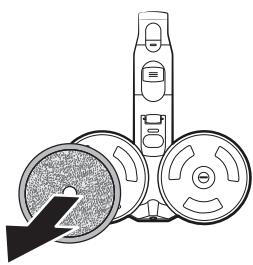
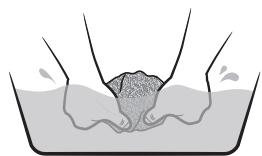
#22 Wet Brush

NOTE
- If the spin brush does not work even after cleaning the (Slim Action Brush) and the (Wet Brush), the overheating prevention device of the motor might be in operation. Wait 30 minutes or more to cool the motor and operate again.
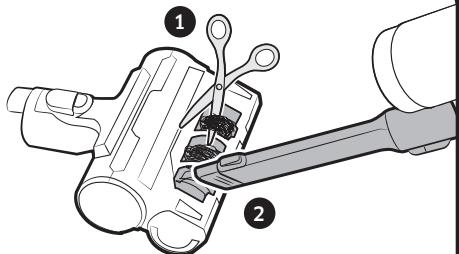
23 Pet Tool
Remove the pet's hair using scissors and suction the pieces.
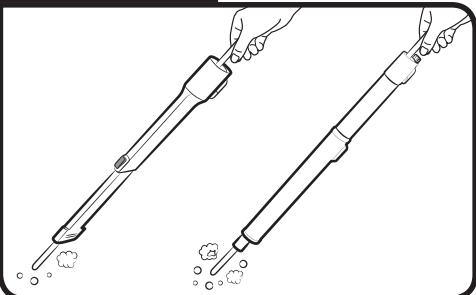
24 Extension Crevice Tool / Pipe
Insert a long thin stick and rotate several times to clean the Extension Crevice Tool or the pipe.
- Before operating the appliance, please read this manual thoroughly and keep it for your reference.
- Because the following operating instructions cover various models, the characteristics of your vacuum cleaner may differ slightly from those described in this manual.
Caution/Warning symbols used
WARNING
Indicates that a danger of death or serious injury exists.
CAUTION
Indicates that a risk of personal injury or material damage exists.
Other symbols used
NOTE
Indicates that the following text contains additional important information.
- For information on Samsung's environmental commitments and product specific regulatory obligations e.g. REACH (WEEE, Batteries) visit: samsung.com/uk/aboutsamsung/samsungelectronics/corporatecitizenship/data-corner.html
Failure to meet these requirements could cause damage to the internal parts of the vacuum and void your warranty.
General
- Read all instructions carefully. Before switching the vacuum on, make sure that the voltage of your electricity supply is the same as that indicated on the rating plate at the rear of the handy vacuum cleaner (battery contact side).
WARNING : Do not use the vacuum cleaner on a wet rug or floor. - Close supervision is necessary when any appliance is used by or near children. Do not allow the vacuum cleaner to be used as a toy. Do not allow the vacuum cleaner to run unattended at any time. Use the vacuum cleaner only for its intended purpose as described in these instructions.
- Do not use the vacuum cleaner without a Dustbin.
- Empty the Dustbin before it is full to maintain the highest efficiency.
- Do not use the vacuum cleaner to pick up matches, live ashes or cigarette butts. Keep the vacuum cleaner away from stoves and other heat sources. Heat can deform and discolor the plastic parts of the unit.
- Avoid picking up hard, sharp objects with the vacuum cleaner as they may damage the vacuum's parts.
- Do not block the suction or the exhaust port.
-
To avoid damage, remove the plug by grasping the plug, not by pulling the cord.
-
This appliance can be used by children aged from 8 years and above and persons with reduced physical, sensory or mental capabilities or lack of experience and knowledge if they have been given supervision or instruction concerning use of the appliance in a safe way and understand the hazards involved. Children should not play with the appliance. Children should not clean or perform maintenance on the vacuum without adult supervision.
- Children should be supervised to ensure that they do not play with the appliance.
- The battery must be removed from the main unit before cleaning or performing maintenance on the vacuum.
- The use of an extension cord is not recommended.
- If your vacuum cleaner is not operating correctly, switch off the power supply and consult an authorized Samsung service agent.
- If the supply cord is damaged, it must be replaced by the manufacturer or its service agent or a similarly qualified person to avoid any electrical hazards.
- Do not use to suction up water.
- Do not immerse in water for cleaning.
- Please contact Samsung or a Samsung service center for a replacement if one is needed.
Clean Station
- Do not modify the polarized plug to fit a non-polarized outlet or extension cord.
- Do not use outdoors or on wet surfaces.
- Unplug the Clean Station from the outlet when not in use and before servicing.
- Use only the Clean Station supplied by the manufacturer to recharge.
- Do not use with a damaged cord or plug.
- Do not pull or carry by the cord, use the cord as a handle, close a door on the cord, or pull the cord around sharp edges or corners. Keep the cord away from heated surfaces.
- Do not use extension cords or outlets with inadequately rated current.
- Do not charge a non-rechargeable battery.
- Do not unplug by pulling on the cord. To unplug, grasp the plug, not the cord.
- Do not mutilate or incinerate batteries as they will explode at high temperatures.
- Do not attempt to open the Clean Station. Repairs should be only carried out by a qualified Samsung service center.
- Do not expose the Clean Station to high temperatures or allow moisture or humidity of any kind to come into contact with the Clean Station.
Installation
- If you have a problem with installing the Clean Station, contact a Samsung service center.
- Injury or product malfunction from not installing the Clean Station may not be compensated.
Vacuum cleaner
- Do not pick up hard or sharp objects such as glass, nails, screws, coins, etc.
- Do not use without a filter in place. When servicing the unit, never put fingers or other objects into the fan chamber in case the unit accidentally turns on.
- Do not put any objects into openings.
Do not use with any openings blocked.
Keep openings free of dust, lint, hair, and anything that may reduce air flow. - Do not pick up toxic materials (chlorine bleach, ammonia, drain cleaner, etc.).
- Do not pick up anything that is burning or smoking, such as cigarettes, matches, or hot ashes.
- Do not use the vacuum cleaner in an enclosed space filled with vapours given off by oil based paint, paint thinner, moth proofing substances, flammable dust, or other explosive or toxic vapours.
Power related
WARNING
- Do not bend the power cord with excessive force or put heavy objects on the power cord.
- Electric shock or fire may occur.
- When the vacuum is used in a veranda or an area where water is used, make sure water does not come into contact with the power cord or the power plug.
-
If there is dust, water, etc. on a pin or contact point of the power plug pin, wipe them carefully.
-
Abnormal operation or electric shock may occur.
-
Do not pull the power cord and do not touch the power plug with wet hands.
- Electric shock or fire may occur.
- Do not plug the Clean Station into a power source with the incorrect voltage. Do not plug the Clean Station into a multi-plug outlet or power strip.
- Electric shock or fire may occur.
- Do not use a damaged power plug, power cord, or loose power outlet.
- Electric shock or fire may occur.
- If the power cord is damaged, have a Samsung authorized service center replace the power cord with a new power cord.
- Electric shock or fire may occur.
Operation
WARNING
-
The Clean Station should be placed and used on a stable floor.
-
If the product falls over, an injury or product and floor damage may occur.
-
Do not place or use the product on an uneven floor, a carpet, a living room table, or a desk etc.
- If the product falls over, an injury or product and floor damage may occur.
- Do not place the product at a wall behind which pipes (gas or water etc.) or electrical cables are installed.
-
Do not cause a short circuit by touching the charging terminal with chop sticks, metal screw drivers, etc.
-
Product malfunction or electric shock may occur.
-
Make sure that the charging terminals of the vacuum cleaner and the Clean Station do not come into contact with a conductor such as a bracelet, watch, metal rod, nail, etc.
-
Make sure that any liquid such as water or juice is not allowed to enter the vacuum cleaner or the Clean Station.
-
Electric shock or fire may occur.
-
As the Clean Station is designed for the use of Samsung Jet cordless vacuum cleaner only, do not use the Clean Station for other electronic appliances and other purposes.
- Severe damage to the Clean Station or fire may occur.
- Do not vacuum liquid, blades, pins, embers, flour, etc. during cleaning.
-
Abnormal operation or product damage may occur.
-
Do not use the vacuum cleaner to pick up liquid such as spilled beverages or pet waste.
-
The brush and air outlet should not be blocked during cleaning.
-
Product malfunction or fire may occur due to overheating of the product.
-
This product is intended for household use only. (Do not use this product for experimental, commercial, or industrial cleaning.)
-
Abnormal operation or product damage may occur.
- Outdoor cleaning: stone and cement powder
Billiards: chalk powder -
Hospital aseptic room
-
Do not ride on the product or give a severe shock to the product.
- An injury or product damage may occur.
- Before carrying the Accessory Cradle, detach the charger first.
- The charging terminal or the power cord is damaged and electric shock may occur.
- Do not use the product near heating appliances such as heaters, or in areas containing combustible sprays, or flammable materials.
- Fire or product deformation may occur.
- When using the vacuum cleaner, be careful not to hurt yourself on the moving or spinning parts.
- Be careful not to suction body parts (Hair, hands, etc.) into the spin brush (drum).
- When cleaning the wall or ceiling, you should use both hands.
-
If you clean with one hand, you can damage your wrist or drop the vacuum and cause an injury or damage the vacuum.
-
Make sure filters are inserted correctly.
- Suction power may decrease.
- If dust enters inside the motor of the vacuum cleaner, product damage may occur.
- The product may not operate.
- When picking up sharp objects such as sand with the vacuum cleaner, they may scratch the inner part of the Dustbin.
- If there is a gas leak or combustible spray such as a dust remover is used, do not touch the power outlet and open the window for ventilation.
- An explosion or fire may occur.
- If the product makes a strange sound or emits a smell or smoke, turn off the product immediately, and then contact a Samsung service center.
- Electric shock or fire may occur.
Maintenance
WARNING
- Before removing foreign matter inside the product, turn off the product first.
- If the product is on while you are removing the foreign matter, you can hurt yourself or damage the product.
- When cleaning the exterior of the product, turn off the product first and then wipe it with a dry towel. Do not spray water directly onto the product or wipe it with volatile materials such as benzene, thinner, or alcohol.
- If water gets into the product and an error occurs, turn off the product and contact a Samsung service center.
- Before cleaning the Clean Station, unplug the product.
- When cleaning the washable parts, do not use alkaline detergent, acid, industrial detergent, air freshener, acetic acid, etc.
- Product damage such as plastic breakage, deformation, discoloration, printing deterioration, etc. may occur.
| Washable Parts | Dustbin, Washable Micro Filter, Fine Dust Filter, Metal Mesh Grille Filter, dry cloth | |
| Acceptable detergent | Neutral | Dish washing detergent |
| Prohibited detergent | Alkaline | Lox, mold cleaner, etc. |
| Acid | Paraffin oil, an emulsifier, etc. | |
| Industrial cleaners | NV-I, PB-I, Opti, alcohol, acetone, benzene, thinner, etc. | |
| Air freshener | Jet spray air fresheners (coffee flavor, herb, etc.) | |
| Oils | Animal oils, vegetable oils | |
| Etc. | Edible acetic acid, vinegar, glacial acetic acid, etc. | |
Installation
CAUTION
- Do not install the product near water, in an area with excessive moisture, or near window, etc.
-
Do not place the Clean Station in a place where people pass by frequently, in entrance way or narrow passage.
-
People may trip over it and be injured, or product damage may occur.
-
If the Clean Station is installed incorrectly, it may fall over, which could cause an injury and severe product damage.
- Install the Clean Station in a place where there are no objects that could break and cause damage.
Battery usage
NOTE
- If the product does not work after you charge the battery, replace the battery. If it still does not work with the new battery, contact a Samsung service center.
- For the battery and adaptor, you need to purchase them separately.
- When you purchase a battery in a Samsung service center, check for the genuine Samsung logo on the battery (SAMMSUNG) and the battery name (VCA-SBTA95).
CAUTION
- Do not disassemble the battery or the Clean Station.
- Do not apply heat to the battery and do not put the battery in a fire.
- As the battery is manufactured only for this product, do not use the battery for other electronic appliances or other purposes.
-
Removing the battery during operation may cause product malfunction.
-
Battery usage time may shorten with increased battery use. When the battery no longer charges or runs down quickly, replace the exhausted battery with a new one.
- Use only the Clean Station and batteries provided by the manufacturer.
- Before inserting the battery, confirm that the battery is being inserted in the correct direction.
- When discarding a dead battery, put it into a battery collection box for recycling.
- Do not drop or strike the battery or subject it to a sudden shock.
- To protect the motor and the battery, the product may not operate when the temperature is lower than 5^ C or higher than 45^ C .
Operation
NOTE
- If excessive force is applied to a brush or foreign matter is caught in the spin brush (drum), the brush may stop working to protect the motor or the product. Turn the vacuum off, remove the foreign matter, and then turn the vacuum on.
- Static electricity may occur depending on the humidity, temperature, or floor material, etc. in your home.
- Please charge the battery before using a newly purchased battery for the first time or if you have not used the battery for a long time.
-
If you are not going to use the vacuum for a long period of time or you are going to be away from home for a long period of time, unplug the Clean Station, and then detach the battery from the Clean Station. When the battery is not being charged, it will slowly discharge.
-
When the battery level is low, recharge it. If the level of the battery remains low for a long period of time, it can cause the performance of the battery to degrade.
-
Clean the multi-use wet pad of the Wet Brush in a normal washing machine by using a neutral detergent.
-
However, If the wet pad is exposed to heat, softener, etc, it may be modified or discolored and product performance can be degraded. Do not boil the wet pad.
- Use a genuine wet pad of Samsung Electronics for the Wet Brush.
- If the Wet Brush is used without a wet pad, any product malfunction will not be covered by warranty and a service fee will be charged.
- When you purchase an additional multi-use wet pad for the Wet Brush, contact a Samsung service center.
- When you purchase an additional single-use wet pad, check the model name VCA-SPA95.
- If you want to purchase an additional dust bag, check the model name (VCA-ADB952) and Samsung logo (SAMSUNG) first, then contact your nearest Samsung Electronics retailer or Samsung service center.
- When the dust bag in the Clean Station is filled with dust, the Clean Station may stop due to the overheating prevention device of the motor. Replace the dust bag and operate again.
- If there is a larva in the suctioned dust, it can multiply in the dust bag. Clean the Clean Station with a wet tissue and replace the dust bag.
- Do not push the Clean Station so it falls over.
- Personal injury, product and floor damage may occur.
CAUTION
- Do not use the product near combustible material.
Also do not use:
- In a place where a burning candle or a desk lamp is placed on the floor.
- In a place where there are unextinguished embers in an unattended fireplace.
-
In a place where there are combustible materials such as gasoline, alcohol, thinner, ashtrays with unextinguished cigarettes, etc.
-
Do not leave the product leaning against a wall or a table.
- The product may fall and an injury and severe product damage may occur.
- While using or after using the vacuum cleaner, you should lay the vacuum cleaner down or place on the Clean Station to store.
- The product may fall and an injury and severe product damage occur. In addition, you may not be compensated for the damage.
- Do not use the vacuum cleaner for other than its intended purpose. (Do not allow children to ride on or play with the product.)
- An injury or product damage may occur.
-
Do not allow children to touch the product while cleaning.
-
When the vacuum overheats, children may be burnt.
- Do not allow children to cling to or push the Clean Station.
- Personal injury, product and floor damage may occur.
- Use both hands to carry the Clean Station.
- When you pull the power cord out of the groove at the bottom of the Clean Station, do not pull it hard. Turn the cord gently on its side so that it can come out smoothly.
-
The power cord may get damaged and could cause an electric shock or fire.
-
Before unplugging or plugging in the Clean Station, turn off the vacuum and make sure that the pins of the power plug do not come into contact with your hands.
- Fire or electric shock may occur.
- Do not step heavily on the upper part of the Wet Brush while using it.
- Product damage or floor damage may occur.
- When assembling the vacuum, be careful not to catch your fingers in the joints.
- Do not use the vacuum cleaner on objects that can be easily scratched (TV, monitors, etc.).
-
When cleaning, be careful that the side of the brush does not bump into a molding part, a wall, furniture, etc. and cause staining.
-
For a slight stain, remove it with a wet tissue or a cleaner.
-
Do not use water to clean the product when in use.
- You should use the product in dry places and do not use the product in wet places or on water.
- Do not use the product in direct sunlight or high heat and do not store the product inside a car.
-
Do not put hot water, detergent, etc. into the Water Tank of the Wet Brush.
-
Product malfunction or performance degradation may occur.
-
When not using the Wet Brush, empty all the water in the Water Tank.
Maintenance

NOTE
- Sometimes the wheel of a brush can scratch the floor. Before using the vacuum cleaner, check the status of the wheels of the brush.
- If there is foreign matter on the wheel of the brush which cannot be removed easily, contact a Samsung service center.
- If the inner part of the Wet Brush is clogged with large foreign matter, spinning speed decreases or the spin disk stops.

CAUTION
- Do not push the vacuum cleaner while it is stored in the Clean Station.
- Personal injury, product and floor damage may occur.
- Storing the product in sunlight for long hours may cause parts of the product to deform or discolor. Therefore, store the product in the shade.
- Do not clean the brush of the vacuum cleaner with water. Cleaning it with water can cause deformation of parts or malfunction.
- If you notice a continuous reduction in suction or the vacuum cleaner overheats abnormally, clean the products and replace filters.
- When the Clean Station smells bad, replace the dust bag or clean the filters.
Before calling for service, review the problems and solutions below. Note that you will be charged for any service calls in which no defects were found.
| Problems | Solutions |
| The vacuum cleaner does not work. | ·Check the battery level and charge the battery. ·Check whether the product is turned off, and then press the power button to turn it on. ·Check whether the adjustable pipe, the Dustbin or the brush is blocked. ·Check that the Washable Micro Filter is inserted correctly. ·If the vacuum has not been used for a long time, charge the battery. ·If the battery dies, replace the battery. |
| The spin brush (drum) inside a brush does not work. | ·When the message [Check Brush] appears on the display, turn off the vacuum and check whether the brush is clogged with foreign matter. If so, remove the foreign matter and restart the vacuum. ·When the vacuum cleaner is turned on, turn it off and on again. - For the (Slim Action Brush) and (Wet Brush), if the overheating prevention device of the brush motor operates, it may take about 30 minutes to cool the motor. |
| An odor emits from the air outlet or the filter of the product. | ·Empty the Dustbin and clean the filters frequently. - As your vacuum cleaner is a new product, it may have a slight odor for the first 3 months after purchase. - If you use the vacuum cleaner for a long period of time, accumulated dirt in the Dustbin or dust on the filter may generate an odor. ·Replacement filters are available at your local Samsung service agent. |
| Static electricity occurs when cleaning a thick and soft mat. | ·Materials of a mat (childcare center mat, noise prevention mat for between floors, etc.) may cause the static electricity. - Move the brush on a normal floor for a while and clean again, then the static electricity should disappear. |
| The Wet Brush does not spray water. | ·When using for the first time, the air in the internal pump of the Wet Brush and the tube may cause the Wet Brush to delay spraying water. - Detach the Water Tank, press the water spray (+) button, and check that the pump operates with a sound. - Fill the Water Tank, attach it to the Wet Brush, and press the water spray (+) button repeatedly. |
| The vacuum cleaner cannot be charged. | ·Confirm that the voltage provided to the Clean Station matches the requirements of the Clean Station. ·Check that the vacuum cleaner is turned on, and then check that the LED of the battery level indicator is turned on. ·Check if foreign matter (dust) is on the charging terminal. Remove any foreign matter with a cotton swab or soft cloth. |
| Vacuum cleaner stops operation during cleaning. | ·As this product has the overheating prevention device of the motor, product will stop operation temporarily for the following conditions. After correcting the cause of the problem, turn the product on again. (This case may differ depending on the ambient temperature.) - When the vacuum operates with a full Dustbin. - When the vacuum operates with a brush clogged. - When the Extension Crevice Tool is used for long hours. |
| Suction force decreases suddenly and the vacuum makes a vibrating sound. | ·Check whether the brush, the Dustbin or the adjustable pipe is clogged with foreign matter and remove it. ·Check whether the Dustbin is fully filled with dust. If it is, empty the bin. ·Check whether the filter is dirty. If it is, clean the filter. |
| Cleaning is finished but small dust particles come out of the brush. | ·After cleaning, operate the vacuum for 10 seconds or more to suction up the small dust particles. |
- This Vacuum cleaner is approved the following.
- The Low Voltage Directive 2014/35/EU
- The EMC Directive 2014/30/EU
Usisivač

*Mokpa Blooka 3a eHa ynoIpe6a/ Blooka wTo ce 3aKaayBa
*Држачна ДржачOTЗдогаTOU
Батура
(VS20A959*: 2 парни)
Валы: 16.37.2018
*OnuHnHnO
- Mojen VS20A958***: Довленьта на захи щ понан чь може за се купат nocебно.
- Mokpaata yetka BknyuBa BLOska 3a NOBKe ynoTpe6n BLOska 3a eHa ynoTpe6a.
- Mokpata yetkaи mna3haТДвоJOHA yetka ce komnatn6nHn caMo co moJenot VS20A95***.
BpeHbTaHa noIJIHe bI YIcIe bMeOJat Da ce pa3IINKyBaAT Bo 3aBnCHoCT OJ, YeTKeITe u YcNobTe 3a KopncTeJe.
| Моden | Серija VS20A95**** | |
| Потравоча на[eнергия] (Правосмукалka) | Врз осныа на рачната правосмукалka: 580 W | |
| Срешифигаши ha 6ateprijata | Литиим-JOнCSka 25,2V,2200 mAh, 7 келии | |
| Текина (Правосмукалka) | 2,7kg (Малзна двобна четka) | |
| Големина | Правосмукалka | ШирINA 250 mm × Д阑бочина 210 mm × Висна 1000 mm |
| Стоница за чес themselves | ШирINA 300 mm × Д阑бочина 300 mm × Висна 850 mm | |
| Вразе на полиенье | 3,5часa | |
| Вразе на чес themselves (Стониардно:[СРЕД]) | Комбигирана[a]аатka /Проблжинелна[a]аатka[a]працени | Окoly 60 ми. [МИN] / Окoly 30 ми. [СРЕД] /Окoly 10 ми. [MAKC] /Окoly 3 ми. [JET] |
| Млазна двобна четka | Окoly 42 ми. [МИN] /Окoly 24 ми. [СРЕД] /Окoly 14 ми. [MAKC] /Окoly 8 ми. [JET] | |
| ТекаразOTHA четka | Окoly 50 ми. [МИN] /Окoly 25 ми. [СРЕД] /Окoly 15 ми. [MAKC] /Окoly 9 ми. [JET] | |
| Морва четka | Окoly 100 min. | |
*Вретиму чинец ecудпларka кориспесдveбатери endho no dpyro.
PaKyBaHbe
¥yntpe6eTe ro QR-koDTa da do6neTe DeTaHn HΦOpMaun.
Ctahnua 3a YnCTeHbE
1 MoNTnIpaNbe Ha cTaHmUcTa 3a YIcTeHbE
1 Bdenehe ro ka6eIOT 3a HanojyBaHe ha cTahnUata 3a HcnteHe DOJIK TPKaJIe3HNOt JXNe6 Ha DnHO.
-BHIMMABAJTe Ka6eIOT 3a HanojyBaHe Ja e npabINHO CmecteH 3a Da He Ce HabaLyBa CTAnuTa 3a YnCTeHbE.
2 PnpdJa npnKnyuTe ctaHncaTa 3a YnCteHe, HameTe Ro ypeNo Ka6eNo Ta HanojyBaHe.
3 Kora ja npinknybate ctanhuata 3a ucheTeHe, INdkatopot 3a cTATUC CTAHyBa CnH 5cekyHdn, na ce racn.
2 KopncTeHbe Ha ctaHnUaTa 3a YnCtHe
A:Индikatop на сатуст / конч (CTAPT/CTOП)
- OTKAKO Ke je BMEHTHe InpaOBcMykAlKaTa BO CTaHnCuTa 3a YNCtHe, npNTncHe ro KOnTuTo CTAPT/CTOIT 3a da ce Ncnpa3Hn KaHTNuKaTa 3a npab.
-Пиитис悔е ro konjueto CTAPT/CTOП nobtopno 3a da npctane pa60tata.
3aTbOpete ro doJHnOt KaIak Ha KaHTnUkata 3a npab nped da ja kaopnstte CmykaKATA 6uJejKn DoJIHnOt KaIak e OTbOpEn OTkako Ke ce NcPazHi KaHTnUkata 3a npab kaj ctaHnUata 3a YnCTeHe.
Правосмкалka
#4 NcφρλaHe Na 6aTeρnjaTa
PnntincheTe ro konueto 3a Baede He ha 6atepnjata od 3aHnOt den Ha paKata 3a da ja nCpInte 6atepnjata.
KopncTeHe Ha doTaToUte
#9 OtkaúybaÎne Ha dɔdàTouçÎte
Kora ja oTKaCyBaTe npCnncOc6JIbBaTa ueBka nIyueTkata, npTtChTe Ro kONeTo 3a BaDeHe oDzAn.
- Ппд д рг otkaчite DoДоТоцITE, pa6Ote TE bo peKIMOT [MAX] nobeke od 10 cekyHn3a da рг otctpaHnTe tyfnte matepin wTo octaHaJIe BO doDAtozITE.
#10 Kom6HnnpaHa aanaTka
Kopntete ja 3a OTcpanyBaHbe npab Od 3abecn, Me6en, COHn nTH.
11 PpOdoJIxHnHa aIaTka 3a npocen
KopncTeJe 3a OCTpaHyBaBe npab od XJIe6OBN Ha npo3OpCu, npoCen, aRNI cI.
#12 Φικυσμεληναλητα
KopncTeTe ja 3a YnctHe Ha TeuKo DoofatInbnte MeCTa KaKo rOpHn nn 3aDn nn DeNoB on Me6en nn nnafoHn.

3A6EJIELIKA
He KopriTeTe DeTePReHn IaI aIat 3a MneHbe Ha
- He cyuheTe coToTnInHa.
20 Tenka pa6oTHa YetKa

BHIMAHHE
- YeKata He Tpe6a Da ce YnCTn Co Boda.
- Ako octaHaT TyrMaTePmN Ha YeTKaT, OToCTpaHete Tn Co BnaJHo MapamYe NIn CyBa KpNa.
21 Mna3Ha IboJa YetKa
Ako He ce otctpaHn Tyfata MaTePnJa, n3BaJeTe ja co HOKNU.

BHIMAHHE
Ako ce BCMykaat n 3aIneTkaat Kpna nn Dpyra tyfamaTepejna ha BPTnBata YetKa, Taa Ke pectahe da pa60tn 3a da ro 3aWHTn MOTOPH a YETkata. OTKako ke ja NcHCTNTe YETkata, NCKnyte Te HanojyBaHeto Notoa nobTOpho BKnyte To.
AkoyeKaTaHeyHKUOHHaIIOuNCTeHbe,INCKLnyTeTo HanojyBaHbETo NIOBtOpHO BKLyteTo.
Kora ja chnte yetkata, BHmabajte da He cn rn foatnte npctnte BO npeknonot Ha yetkata.
22 Mokpa Yetka

3A6EJIELIKA
- AквВrtлвata cheTka He pa60Tu Dypu N no ChteHe ha Mekata pa60TuHa cheTka N mOKpTa cheTka, moKe da pa60Tu ypeDOT 3a cnpuyBaHbe nperepeBaHbe Ha MOTOpOT. POneKajTe 30 mInHyTu Nn NobeKe 3a Da ce n3JaN motopOT n da npop60Tu.
#23 AlaTka 3a MMHeHnHb
I3BaIeTe IIN BIAKHaTa CO HOJNn IN BCMyKaTe IINapuHbata.
24 PpOoJXHtEnHa aIaTaK3a npOeenn / cEwKa
BmetheTDoIgTeHOK CTan n CBpTeTo Ro HeKoNky NaTu 3a da ja IcNCTIne PpoOnJXnTeHnata aJaTa Ka 3a npOceNn nn ceVkata.
- Ппд д започete co уноробата на anapatot, BнмATEЛно почтajte ro ynatCTBOTOи 3aувajte ro 3a KОпстelve BO ИДИНHA.
3apaani toa 1to CLEHnTE INCTpyKuIN 3a pakyBaHe onfkaat nOBeKe MOeJI, KapaTepNCHTKNe Ha BaIaTa npabOCMyKaIKA MoJe Da ce pa3NIkyBaAT OJ ONIIshaHnTe.
Cm60n kon ce kopncTa 3a BHMaHne/ npdeynpeyBaHe

TIPEDYTPDEYBAHbE
YkaKyBa Ha NocToeHbe ONaCHOCT OJ CmPT INIIN TEUKNIOBpeNI.

BHIMAHIVE
YkaKyBa Da Ka NocToN pN3NK 3a NOBpea NIN MaTepnJaJIHa 7TeTa.
Дугс симболи кои ce kорист at

3A6EJIELIKA
YkaKyBa DeKa TeKCTOT BO pnoJIoJIeHne COdpKn BaJHN DOnOJIHNTeHn INΦOpMaun.
- 3a noboke nHΦopMaζη 3a ekOLOsKηte o6Bρcκn ha Samsung n perylaTOPnite o6Bρcκn 3a cneζmΦuŋn npoIzBoDn ha np., REACH (WEEE, 6ateρn) nocetete ja Be6-ctpAnuZata: samsung.com/uk/aboutsamsung/ samsungelectronics/corporatecitizenship/data-corner. html
Дokолуну He ce npdpxybaTe Do obne npabIna, moKHO e da npeindBnKeTe OwTeYBaHe Na BHaTpeHnTe DeNoBn I da ja noHnHTte rapaHnzjata.
Onwto
BHNMaTeHNoIpouHTaJIe rN CNTe HNCTpyKcUIn.IpeJda ja BkLyuHte npabOCmyKaIknata, npOBepete daJIHaHOHOt Ha BaWata eEnKTpUHs MpeJa E NCT kaHOHOHOt Ha3NaueH Ha IIOUcKaT aOd 3aHATA cTpaHa Ha paHATA npabOCmyKaIkn (oD CTpaHATA Ha KOHTaKToT Ha 6aTepnjata).
- ПЕДУПЕДУВАБЕ:НемоJTа ja користптпаровсмукалкATA на мOKAP телnx под.
- BnndeMhOry BHIMATEHNI pni KOpNCteHe Ha KaKBrN 6nlo anapatn nokpaj nll Bo 6n3nHa Ha deca. He Do3BOLyBaJTE npabOCMykakata da ce KopnCTn KaKo Irpauka. He Do3BOLyBaJTE npabOCMykakata da octaHe BKnyeha 6e3 Na3Op. KopncTe ja npabOCMykakata camo 3a Hej3nHaTa HameHa, kako StTo e OOnuHa BO yNaTCTBOTO.
Hemojte da ja kopructne npabocmykakata 6e3 kaHTnUkata 3a npab.
3a hajrolema ephiKacHcOCT, nCpna3HeTe ja KaHTnUkata 3a npab nped da ce HanoHn.
Hemojte da ja kopnstte npabocmykakata 3a cobupahe yekopunha, toonl peenel nll doorupnha. Cybajte ja npabocmykakata nodaileky od shnopetn ndpynn3bopn ha tonlinna. TOnnnhata moke da gn n306nnu n n36nei nnactvnhte deNoBn ha anapatot.
ИзбгнHyвajteсобираьеТВрди nOCTprnпрdmETn co npabocmyakaikata,6ndejknTne moxat da rN OwTeTAT delobiteHa anapatot. - Hemojte da ro 6nokupaTe Bne3Hnot nn n3ne3Hnot OTbop.
3a da n36eHHTe OwTeYBaHa, n3BaTeTe ro npKnyokOT dpKejkn rO hero,a He co BLeueHe Ha Ka6enot.
OBoj ypeJ moKaT da rO kOpNcTaI deaHa Bo3pact Od 8 nIn nobKe foDnHn I nIua co HamaJIeHn Fm3nUKn, CETINHn INI MEHTaHn CnOC6bOcTHn INI, NaK, HeIOBONHO NCKyCNn INI oObyuHn I nIca, DOKOKy 6nDat HArdIeYBaHN IINM CE daBaAT IHCTpyKuIN BO BpCKa Co KOpNCTeHe Ha ypeoT Ha 6e36eHn HauHH N DOKOKy rN pa36epat OnacNoCTte KOJ MOKaT da npOn3Je3at. Deuata He cMeat Da cnIrpaat Co ypeoT. Deuata He cMeat da ja YnCTaT ha I nOdpJyBaAT npabocMykAnkata 6e3 Ha330pHa Bo3pacoH NoIe. - Deuata Tpe6a da ce HaIgneIyBaat 3a da He cn Irgpaat co ypeoT.
- BaTePnJaTApa Mopa da ce OTeCTpaHOn OD rIaBHaTa eINHua nped Da ce 3aNoUHe Co UInCTeHBe IIN OdpJxUBaHbE Ha npabOCMyKaIkata.
He cpe npenopayba kopnctehe Ha npoJnKnteHek6en.
-Дokолку правocmyakkata He pa6otn npabuInHo, ncknyte ro haNojyBaHeto n nocobetyBajte ce co obnaCTe cepBncep od Samsung.
-Дokолку кабелот заструда оштeteн,то мора на бидзаменетдстара на поизбовпелot,сервисportллдриру Кваллфкунвано лице сцел да сибернатеелктуни посан检т.
- He ja ynoptpe6ybajte 3a Bwmykybahe Boda.
He ja notonybajte BO BODa npu nuchteheto.
-Дokолку enotpe6ha 3aMeHa,Be moIme o6paTe ce Ha Samsungил срвисentцentap Ha Samsung.
Ctahnua 3a YnCTeHe
- He moi nphi niu pajte ro nonapn3npa hnoT npnknyok 3a da moke da bne3e BO he npolapn3npaH wTekep nI npoDOnjKteJen ka6eI.
- He ja ynoptpe6byajte NaBOp NnHa BnaJHH noBpHInN.
-Извадеястанцата зашистеньо щштеккORA He ce kорпости и п徴 да се сервисра.
3a noBtropno nolHebe ynOte6yBaJte ja cmo StaHnUata 3a YnCTeHe 10e iCnpaHaHa oD npOn3BODntenOT.
He ro yonotpe6ybajte kora ka6eJOT nn npnKnyokot ce oWTeHn. - Hemojte da bnechee nnn noirate 3a ka6enot, da ro kopncntte ka6enot kaoko paoka, da 3atbopaTe Bpata npeky ka6enot n da ro bnechee ka6enot okony octpn pa6obn nn arnn. Uybaje ro ka6enot nodaIeky od 3arpeahn nobpshnH.
- He yonTp6yBaJte npoIoJnKuTeJHn Ka6n nn nIeKepeC o HecooDbetHa npEocJNBOCT Na cTpyja.
- He nonhete 6aTeepja 7to He moKe da ce nonHn.
- He otkauybaje ro ka6eIOT oI npknlyokot 3a hanojybahe co Bneyebe. 3a da ro otkaunTe, dpkete ro npknkyuHnKOT, a He ka6eIOT.
- HemojTe da rH oWtetyBate nIIN paIaIte 6bATEpuNTe 6nJeKn Tne Ke ekCnloDnpaat npN BVCOKn TEMNEpatypn.
He 6nBajte ce da ja OTbOpnte cTahnIaTa 3a YnCTeH. IopnpBknte MoKe Ta rN N3BpUyBa cMo KBaIINKkyBaH cepBcEN ceHTap Ha Samsung. - HemojTe Ja ja n3IoxyBate CTaHnUaTa 3a qIcHteHe Ha BvCOKn TempepaTypu INn Da Ido3BOJInTe KaKBa 6nIO BnaRa da Dojde BO KOHTAKT CO IOnHaOT CTaHnUaTa 3a qIcHteHe.
MOnTnpaBc
- Ako Imate npo6nem co MOHTnpaHbeto Ha ctaHnata 3a
- uHCTeHe, obpaTeCe BO cepBncen Uentap Ha Samsung.
們 Nobpeda nIIN DeeKt Ha npOIm3BOJOT npEIM3BnKaHn Od HEMOHHTnpaHa He cTAHnCaTa 3a YNCTeHe Hema Da Ce KOMPHeH3NpaA.
Ppabocmyka
He co6upajTe TBpIuIINOCTpN ppeMETn KaKo ITO CE CTaKNLO, KLIINU, 3aBPTKIn, MOHETn NTH.
- He ynTope6yBajTe ja 6e3 CTaBeH fInItep. Ppi cepBnciPahHe Ha ypeD0T, HNKoRaaw He CTabajTe npCTn IIN dpYrN ppeMmTu BO Ka6uHaTa Ha BeHTnlaTopot Bo CnyujypeD0T HeHaMePno Da ce BkLynu.
- He CTabajte HnkaBn PneDmetn BO OTbOpnte. He ynoTpe6yBaJte ja Kora OTbOpnte ce 6IokpaHn. IopnKHeTe Ce Ha OTbOpnte Da Hema npab, KOHUn, BnaKaHa n CSe 6n MoKeJeo da rO HaMaIn IpOTOKOT ha BO3dYx.
- He co6bpajte ToKcunHm MaTepjuJi (cpeICTBO 3a 6eHebe co xlop, amOHnjaK, cpeICTBO 3a OJ3aTHyBaHe oJBOHNTH).
He co6npaJte HnIto 1to YaIIN IINrOpi, KaKo 1to Ce. cnIrapu, YKOpUHbA INI BpeI neIeI.
HemojTe da ja kOpriTne npabocmykaIkata BO 3aTbopeh npocstop BO kOJ nMa IcnapyBaHe oM maclenH 60n, pa3peDyBauchpEcdTBnPOTNB MOnu, 3aPaJIb npab INI dpyra ekCnIIOBnBA HINI TOKCNHa napeA.
BoBpcka co HanojyBaHbeto
I PNEyIpyEyBAHbE
Ka6eIOT3a HanojyBaHBe He Tpe6a PnpeKymepHo Da Ce BNTka ININ Da CE CTaBAAT TeuKN PnpEmdTeBp3 Hero.
-Може ддддддддддддддддддддддддддддддддддддддддддддддддддддддддддддддддддддддддддддддддддддддддддддддддддддд徴пялпи пожар.
Kora npabocmykaIkaTa ce kOpCTn Ha TpeM nIi Ha noJaPae KaIe ITo CE KOpCTN BODa, BHNMaBajTe Da He doJde BOda Do Ka6eNot 3a HanojyBaHe nI npKnLyOkOT 3a Ctpya.
AkoIma npab,Boda,INc. Na HnIgna NnTochka 3a KOHTAKT Ha npNKJyHOKOT 3a HAnOjYBaHe,BHIMaTeJIHO n36pnWte rN.
-MoKeJa dojde do HnpeBaHnHO fYHKuOHHpaHe nIi cTpyeH ydp.
- He BileyeTe ro ka6eIot 3a hanojyBaHbe n He doInpajTe ro npinknyokOT co BnaJxHn paue. - Moze da doJde Do cTpyeH yap uHn noXap.
- He npiknybajte ja ctahiata 3a qincthe Bo n3bop ha hanojybahe co henpabnien haoh. He npiknybajte ja ctahiata 3a qincthe Bo wtekep co nobeke npiknyooun nn BO npodonjntenen ka6en. - Moje da dojde do ctryeh yap nlin nokap.
- He ynoTpe6yBaJte oOTeTeH pInkNlyOK 3a HanojyBaHe, Ka6en 3a HanojyBaHe nI IpaIa6BaBeH 7teKeP. - MoXe da DoJde do cTpye HdAp nIi Noxap.
- Ako Ka6eIot 3a HanojyBaHBe e OoTeTeH, ZameHeTe ro co HOB oD ObnaCTeH cepBnCeIeTap Ha Samsung. - Moke da DoJne do CTpyeH ydap nll noKap.
- ПОПИС HA EBPOПСКATA KOMICNUJA (EY) 2019/1782 Бараза за ekо-дзajн на是可以ьршни наюжва: www.samsung.com/global/ecodesign_component
PakyBaBe

TIPEDYTPDEYBAHbE
- CtaHnUaTa 3a YnCTeHb Tpe6a Da ce nocTaN KOpNCTNa CTa6JIen NOD.
Ako npo3BOOto naHe,MOKe da oJde eo nobpeda nIOn OHTyBaHcHa npo3BOOTo IINIOOT
He CTabajTe rH He KopicTeTe r npO3BOJTo HnepaMeH pO,I,TeNIX,MacuKc3a KaFe,6bIPO nIIN cN.
Ako npo3B0DTo naHe, MoKe da IoJde IO nobpeJa nn OHTyBaHc Ha npo3B0DoT nn PoDT.
He ctabajte ro npou3BOoT ha sni 3aJ KOj mAmnoctabeho zebk (racoBODn nn BOOBOHn) nIneKeTpnuN ka6bn.
He npedn3BnuBajTe kpaTOK cnoj doonpajKr y KoHTaKTITe 3a noJIHeJc CO tAnHb, MeTaIHN 3aBpTKn I Cn.
-MoKeJa doJJe do DeΦeKt nnn cTpyeH yap.
BHHMabajTe KOHTaKTtTe 3a noJIHehe Ha npabOCMykaJkTaN i CTAHnCATA 3a YnCTeHe da He DojdaT BO DoIInp CO npBOOHNK kako 6beEzua, YacOBnK, MetaHa nPapKa, WajKa, INTH.
BHHMaBaJte Da He HabJe3e TeuHocT, KaKo Ha npIMep BOda IIN COK, BO npaBOcMyKaIkaTa IIN BO CTaHnCaTa 3a YNCTeHe.
#12 TbBka8 uHcmpymehm
N3noI3BaUme 3a noUcM8aNe ha mpyghogocmbnHmecma kamo zoHume uu zagHume yacMu Ha me6eauu ma8aHume.

BΕΛΕΚΚΑ
-「B8kaBuaum uncmpymemm moke ga ce cBbpke c kombuHapunu uncmpymemm u ygbAbaauehakpaHuk 3a mechu meca.
13 Pezyuapahe na gbykuhama ha mpb6ama
Hamucheme 6ymoHa om 3agHama cmpaHa ha pezyuupyemama mpb6a, 3a ga pezyuupame gblkuHama u Ha 3cmbnku.
14 Yemka 3a mokpo nowucmBaHe
N3noa3Baume 3a noucmbAhe ha noga c noglokka 3a mokpo noucmbAhe (gbpBo u luhoJeym).
*Yemkama 3a Mokpo nouchmBahe He pa3noIaa a c yHKuJ3a 3acMykBahe Ha npax.
01 Poglokka 3a Mokpo nouchmBahe 3a MhozokpamHa ynompe6a
02 Bénkpo
03 Bbpmca ce guck
U3no3Bahe ha nogAoKkama 3a mokpo noucmBahe 3a mho20kapma hyonpm6a
- Ppu nocmaBaire He noglokkama 3a Mokpo noucmbahe ce yBepeme, ye mce hAmupa B uehmbrpa Ha Bbpmuca ce guck.
04 Pogloka c 8b3mokhocm 3a npkpenBahe
05 <Ппегна смраза> смраза на с Велкpo
06<3aHa cmpaHa>
07 Pogloka 3a Mokpo noucmBahe 3a eghokpamHa ynompe6a
U3noA3Bahe ha nogAookkama 3a Mokpo noucmBahe 3a eghokpamha ynompe6a
- IocmaBeme noglokkama 3a mokpo noucmBahe 3a eghokpamha ynompe6a Bbpx npeghama cmpaHa (cmpaHama c BvKpO) Ha noglokkama c Bb3MoKHoCm 3a npukpenBahe Ha BbpmuaCe guck.
-Ako u3noa3Bame nogoikkama 3a mokpo noucmbahe 3a eghokpamha ynompe6a 6e3 nogoikkama c Bb3mokhocm 3a npukpenBahe, efekmu8hcmmha naohucmbahemo moke ga ce baoiu. - Cleg u3noa3Bahe Ha nogkoKkama 3a Mokpo nouchmBahe 3a eghokpamHa ynompe6a Ra u3xbpIe me.
08 Pe3epBoap 3a Boga
Omkayane uIu nocmaBHe Na pe3epBoapa 3a Boga
- Hamucheme goIhama yacm ha pe3epBoapa 3a Boga, 3a ga 20 omkaumme.
-Пию nocma8Яне на рezepBoapa 3a Boga nbpBo nocmaBeme npegHua kpa.
BENEXKKA
- He u3noA3Baume nognouBena uu 3ambpcena Boga.
- Ppu 3n0a3Bahe 3a npb8 nbm B63gyxbm 8 nomama umpb6ama moke ga goBege go 3a6aBHe Ha npcbckahemo Ha Boga om Yemkama 3a Mokpo noucmBahe. Hamucheme mho2oKpamHo 6ymoHa 3a npcbkahe Ha Boga (+).
ToucmbaHe na cmaunuaMa 3a noucmbaHe
15 CmHaHa mop6ukama 3a npax
Kozamo unghukamopbyma csbcmohuemo cBemhe 8 cepBeNo,mp6Ba gacmehume mop6uykama 3a npax.
16 Pooucmbane ha fumtbpa npegu gBuzamey
U3noI3Baume gprbkama, 3a ga u3Bagume pfumba pua g a20 U3mpckame hag kofoa 3a 6oklyk, 3a ga omcmpanume npaxa.
17Iouucm6aHe naΦuMbpa3aΦun npax
U3mpbckaumfeuumba 3a fuh npax hag kofa 3a 6oknyk, 3ga omcmpanume npax.
*3a nogpo6Ha unHfopmauzr Bk. QR koga.
ToucmbaHn npaxocmykaykama
18KohmeuHep3a npax/Mueu c mukpofoambP

BHIMAHHE
Cleg noucmbane ha konmeuhepa 3a npax/Mueuca meukpoufmbc8oga mpr6ba ga zu ocmabume ga u3cbxham hanaHn ha craHa 8 npogbKeHue Ha noBeue om 24 yaca npegu ynompe6a.
-П pu u3la2ahe ha monuHa moKe ga 8b3HukHe geΦopMauaHa Ha Yacmume.
-AkoФuMbpbm He e HanbHc yx, npegu ga ce u3no3Ba, moke ga npegu3Buka o6pa3yBaHemo Ha HenpuymHa Mpu3Ma.
Ako konmeuhepbm 3a npax uuu pfumbpm e 3anyuen, npaxocmykaukama moke ga cnpe ga pa6omu 3apagu ycmpoucmBomo 3a npegomBpamBahe ha npepaBanemo Ha gBuameia.
-Почсмeme koHMeHepa 3a npax uUu fuAmpume u cleg moBa u3noA3Baume omHoBo npaxocmyakama.
#19ФuUmtp3aФuH npax
YBepeme ce, ye cme u3kauu npogykma, npegu gnouucmume fuumba.
3aBbpmeme u 3gbpnaume pfumbpa 3a pfun npax, cAeg koemo zo nomynaume Aeko, 3ga omcmpanume npaxa.
BegbK MeceHNO MuIe fUmbpa Ha meuaa Boga, 3ga nogbpkame makcumaHaama My efekmuBhcM.
Cneg noucmbahe zo u3cuweme hantbno ha cnaka 8 npogkkenue ha no8eue om 24 yaca npegu ynompe6a.
3a c2o68BaHe 20 haBuiMe 06paMnHa yacoBHuKoBama cmpeAka, gokamo luHuaMa nog u3o6paKeHuemo Ha kamuHapa He ce BUKga.
BENALEXKA
- He u3noλ3Baume noucmBaunpnpanapum unu uncmpymehm, kozamo Mueme φuʌmbpa.
He nogcywaBaume c u3a2ahe ha monuHa.
20 Yemka Slim Action
BHIMAHNE
- He nouucmbaume yemkama c Boga.
Kozamo no Yemkama ocmamam yxgmu npegmemu, zu omcmpaneme c mokpa kbpnuka uu cyxa kbpna.
21 Yemka Jet Dual
Ako ykgume npegmemu He ca omcmpaHenu, u0n3Baumehokua, 3a ga zu omcmpaHume.
BHIMAHNE
Ako nlam uu gpyu ykykgu npegmemu ce 3acmyam u 3anlemam BbB bprmama ce yemka, mue cnpe ga pa6omu, 3a gnpe naqgBuzameHa yemkama.Cleg nouchmBahe Ha yemkama u3kluoyeme 3axpaHbaHemo u noce 20 Bkluoyeme omHo.
- Ako yemkama He pa6omu cAeg noucmBahe, u3kluoyeme 3axpaH8aHemU nocLe 20 Bkluoyeme omHoBo.
- Пи почимВане на чема ВимаБауме ga He 3axВанeme npbcmume cu 8 cabbkama NaЧemkama.
22 Yemka 3a mokpo nouchmBaHe
BENEXKKA
AkoBbpmaama cyeemka He pa6omu u cleg noucmbahe ha (yemkama Slim Action) u (yemkama 3a Mokpo noucmbahe), ycmpooucmbomo 3a npegomBpamBahe Ha npezpaBaanemo Ha qBuameM moke ga e akmuBupaHo. N3ukaume Hau-maKo 30 Muhymu gBuameM am ga ce oxlaugu U BkluOme yega omHO8o.
23 VHcmpymem3a gomauhu Aio6muu
OmcmpaHeme kocmume Ha gomauHnra Io6umec c hokuua u 2u3cmyueheme.
#24 YgəλkaBauz hakpauihuk 3a mecu mecmapm6a
Bkapaume gblaa mbhka npbka u r3aBbpmeme HkoKo nmbu, 3a ga noucmume ygbkaBaua HakpaHuk 3a mechu mecma uu mp6ama.
- Пегу ga Залочeme ga pa6omume c mo3u ypeg, Bнмамеано npчememe moBa рьkoBogcmBo u 20 3ana3eme 3a cnpa8ku.
Tbukamoyka3aHnma3a pa6oma, koumo clegBam, 06x8Baampa3aunmuMogaeu, xapakmepucmukume Ha Baama npaxocmykaKaMoKe MaKo ga ce pa3aUa8Am om me3u, koumo ca onucanu B moBa pko8Ogcm8o.
I3no3BaHu cumBoaU 3a BHumaHue/ npegnpekgeHue

IPDEAYIPEXAEHNE
U3no3BaHeHa6amepuyma

BΕΛΕΧΚΑ
- Ako npogykmb m He pa6omu, cieg kamo cme 3apeguu 6amepuma, cmeheme 6amepuma. Ako He pa6omu u c HoBama 6amepu, ce cbpxkeme cbc cepBu3en uehmbp Ha Samsung.
- Tp86Ba ga 3akynume 6amepuma u aganmepa omgeHNO.
Kozamo 3akynyBame 6amepuom cep8uzhenuHb npSamsung, npoBepeme 3a lozomo 3a opuzuHaen npogykm Ha Samsung Ha 6amepura (SAMSUNG) u haumenoBaHuemo Ha 6amepuma (VCA-SBTA95).

BHIMAHHE
- He pa32a068Baume 6amepuma uuu cmanuyma 3a nouchmBahe.
- He NaapraBaume 6amepuma u He xBpAume B02bH.
Bamepuma e npou38egeha cmo 3a mo3u npogyk, 3amoBa he u3noA3Baume 3a gpy2u eLekmpoHnu ypegu uu 3a gpy2u ueu. - U38aKaHaHemO ha 6amepuma no 8peMe Ha pa6oma moke ga goBege go Heu3npaBhocm Ha npogykma.
BpeMoHa u3noA8aHe Ha 6amepuma Moke ga ce ckbcu c npogbAkwmeHama ynompe6a Ha 6amepuma. KoZamo 6amepuma Bce He Ce 3apeXga Uu ce u3moaBa 6bP3o, 3amEneme cmapama 6amepuca H0Ba.
- ɪnəʊlərəBæmè cāmo cmaŋuŋma 3a nɔʊcμBæne u 6amepuμme, npegocmaBenu om npou3Bogumæla.
- Ппесу ga nocmaBume 6amepuma, ce yBepeme, ue 6amepuma ce nocma8 B npaBnHama nocoka.
- ɪnʒxBbɒpʌmɛ uʒxəbɛnɑhama 6aɡeɪpʊ 8 kɔhmeɪnep 3a cɒbʊpɑnæ hɑ 6aɡeɪpʊ 3a peʊkʌpɑupe.
He u3nyckaumu u He ygprume 6amepuma u He naogaaaume Ha Bhe3aneh Hamuck.
3a ga ce npegnaqm gBuzameamu 6amepuma, npogykmbm He moke ga pa6omu npu memnepamypu nog 5^ uHag 45^
Ekcnloamaua

BΕΛΕΚΑ
Ako ce ynpaknu npekomepna cuna Bbyxuyemkama uUu BbB Bbpmuama ce yemka (6apa6baHa) ce 3axBahe uykg npegMem, yemkama moke ga cnpe ga pa6omu, 3a ga ce npegnau gBuamem uU npogykmbM. N3kluoyeme npaxocmykaukama, omcmpaheme yxggu na pegmem u nocae 8kluoyeme omho8o.
- Moke ga Bb3hukhe cmamuHno ealekmpueccmBo 8 3aBucumocm om BlaakHocmma, memepamypama, nogobua mamepua u m.H. B goma Bu.
3apege6amepma,npegu gua3noa3Bame H08o3akynena 6amepu 3a npb8 nmbu ako he cme y u3noa3Baau gba2o BpeMe.
- Ako He 8b3Hamepa 3ga u3no3Bame npaxocmykaqkama 3a g6b2 nepuog om 8peme uIu Hma ga cme 8kbu 3ga6b2 nepuog om 8peme, u3kuoyeme cmanuzma 3a noucmBahe om kohmakma u pa3kauyeme 6amepuema om He. Kozamo 6amepuema he ce 3apekga, m4 6a8Ho ue ce pa3pegu.
Kozamo hUbomo ha 3apaga ha 6amepura m e hucko, 3apegeme. Ako hUbomo ha 3apaga ha 6amepura ocmane hucko 3a gblb2 nepuog om Bpeme, moBa moke ga 8loou pa6omama ha 6amepura.
-ПочсмВаime nogложкama 3a Mokpo noчсмВаhe 3a MHOZOKpamHa ynompe6a Ha Yemkama 3a Mokpo noчсмВаhe B HopmaHa nepaHa MaushuHa, kamo u3noI3Bame Heympaen nepuAnen npenapam.
-Ako 6bue nogl0kkama 3a Mokpo nouucmbane ce u3oju ha monunha, omekomumel u gp., mja moke ga ce u3menu uu o6e3Bemu u paobomama na npogykma moke ga ce BIoU. He nocmaBjme nogl0kkama 3a Mokpo nouucmbane BbB Bpua meuocm.
3a yemkama 3a mokpo noucmbahe u3no3Baume opuunhaHa noogkoka 3a mokpo noucmbahe Ha Samsung Electronics.
Ako yemkama 3a mokpo noucmbahe ce u3no3ba 6e3 noglokkka 3a mokpo noucmbahe, zapaunma hma ga nokpue hukakBu neuznpa8hocmu na npogykma u ue 6bge naucleha makca 3a o6caykBahe.
Kozamo zakynume gonbHumema noglokka 3a mokpo nouchmBahe 3a MHOZOKpMaHa yompe6a 3a Yemkama 3a Mokpo nouchmBahe, cebpkeme cbc cepBu3e uehmbp Ha Samsung.
Kozamo zakynume gonbHumemaHa noglokka 3a Mokpo nouchmBahe 3a eghokpamHa ynompe6a, npoBepeme HaumehoBaHuemoHa Mogela VCA-SPA95.
Ako uckame ga 3akynume gonbHnmeHa mop6uka 3a npax, hau-hanpeg npoBepeme haumehoBaHuemo Ha mogeLa (VCA-ADB952) UoZomo Ha Samsung (SAMSUNG), cieg koemo ce cbpXe me c hau- 6lu3kua mbp2oBeu Ha gpe6Ho Ha Samsung Electronics uUc cep8u3e HcHmBp Ha Samsung.
Kozamo mop6uukama 3a npax B cmaunuyma 3a noucmbahe enbHa c npax, cmaunuyma 3a noucmbahe moke ga cnpe 3apagu ycmpoucmbofo npegom8pam8ahe na pceprBaHemo Ha gBuameA. Cmeheme mop6uukama 3a npax U BkluOe me omhoBo.
- Ako 8 zacmykau npax uma napBa, mry moke ga ce pa3mhoku B mop6uKama 3a npax. Iooucmemecmaucma 3a noocmbane c mokpa kbpnuka u cmeheme mop6uKama 3a npax.
- He hamuckaime smanuzma 3a noucmbane maka, ga naghe.
- MoKe ga Bb3Hukham meAeChu HapaH8aHua unu noBpega ha npogykma u noga.

BHIMAHHE
He u3no38aume npogykma 8 6u3ocm go 3anaumu mamepuauu.
Cbuo maka He u3noa3Baune:
- Ha marmo, kbgemo ha noga e ocmaBeHa 3anaIeHa cBeeu uHacmoHa lamna.
Ha mrcmo, kgemo uma Hey2achaU b2aehu B kaMuHa, ocmaBeHa 6e3 Hag3Op.
Ha mcmo, kbgemo uma 3anaumu mamepuau kamo 6eh3un, cnupm, pa3pegume, nenehuk c he3azacehu uzaapu um.H.
He ocmabryume npogykma 6mehama cmeha uma.
-Погogykmbm моcke ga naghe u ga ce cmuzhe go meaecno hapaHbane u mexka noBpega Ha npogykma.
- Dokamo u3noλBame uU cleg kamo u3noλBame npaxocmykaqukama,mpa6Ba ga ocaBume λe2HaA uU ga naocmaBume ha cmaHua 3a noucmBahe 3a cbxpaHHeue.
Ipogykmb m moke ga naghe u moke ga ce cmuzhe go melencu hapaHbaHua UU cepuo3ha noBpega ha npogykma. OcBen moBa moke ga he noLyume 0e3zemehue 3a noBpegama.
- He u3noλ3Baumepnaxocmykaqkama 3a gpyu ceLu ocBenv 3a me3u, 3a koumo e npegna3hauena. (He no3Boλ8Baumeha geua ga Bb3cgaam npogykma unu gacu u2paarm c hezo.)
-MoKe ga ce cmuZhe go meLecho hapaHBaHe unu noBpega ha npogykma.
He no3B0a8Baume ha geua ga nunam npogykma no Bpeme Ha nouchmBahe.
-Ako npaxocmykaayama npezpee, gezama moke ga ce u3eopam.
- He no3BovlaBaime ha geua ga ce yBucBam unu ga hamuckam cmaunzma 3a noucmbahe.
-MoKe ga Bb3Hukham meLechu HapaH8aHua unu no8pega ha npogykma u noga.
- Ⅲnoλ3Baμme u gBeme p6e 3a hocene ha cmaunua ma 3a noucmBahe.
Kozamo u3gbpn8ame 3axpaHbauqura ka6e om kaHala om goIhama cmpaHa ha cmaHuaema 3a noUcmbHe, He u3no38aume npekomepna Cua. 3aBbpmeme BHumameHo ka6eHa hacmpaHu, 3a ga moke ga u3Ae3e nnabHO.
- 3axpaH8auaam kα6eλ moke ga ce noBpegu u ganpegu3Buka moko8 ygap uu nokap.
-П repu ga u3kauoyume uUu Bkauoyume 8 konmakma cmaunma 3a noucmBahe, u3kuoyeme npaxocmykaukama u ce yBepeme, ue uphiMo8eme na 3axpaHbauu aencee He 6Au3am 8 konmakm c pbueme 8u.
-Moke ga c npegu3Buka nokap uu moko8 ygap.
He cmb8aume cuHNO Bbpxy 20pHama yacm Ha yemkama 3a Mokpo noucmBahe, gokamo y u3no3aame.
-
Moke ga ce cmuzhe go noBpega Ha npogykma unu noga.
-
Пиц салбаяне на прахocмукачама В humaБаime ga He 3axBaHeme npcbmume cu B c2al6kume.
He u3no13Baume npaxocmykaukama Bbpxy npegmemu, koumo Mo2am ga ce hagpackam Aecho (meAeBu30pu, MOhumopu um.H.). -
Ppu noucmbahe BHumBaume cmpahanha ha yemkama ga he ce 6bCne 8Bb foPmBoHa yacm, cmeHa, Me6eU u m.H. u ga ocmaBu nemHa.
-
OmcmpaHeme Aekume nemHa c Mokpa kbpnuka uuu nouchm8au npenapam.
He u3no3Baume Boga, 3a ga noucmbame npogykma, gokamo pa6omu.
Tp68a ga u3no3Bame npogykma ha cyxu mecma u ga he 20 u3no3Bame ha mecma, kbgemo uma Baaa uuu Boga.
He u3no3Baume npogykma npu npja cIbHueBa cBemUHa UAU cuHa monUHa U He 20 cbxpaHbAume B aBmomo6ua.
He nhaHeme 2opea Boga, noucmBaunpenapam u m.H.BpeepBoapa 3a Boga Ha yemkama 3a Mokpo noucmbahe.
-MoKe ga ce cmuZhe go Heu3npaBnOcm Ha npogykma uU BLOwABaHe Ha eΦekmuBnOcmma.
Kozamo He u3noa3Bame yemkama 3a Mokpo nouucm8ahe, u3npa3heme Bcuikama Boga om pe3epBoapa 3a Boga.
Noggpbkka

BΕΛΕΚΑ
-Понякоза калцемо на чекама моче ga nagpacka noga.п pegу ga u3no3Bame npaxocmyakkama, npoБерeme CBsmoHuemо на koeluzama на чекама.
-Ako no koIeIaama Ha yemkama UMa uykgu npegmemu, koumo He Mozam ga ce omcmpanam IecHo, ce CbPkeme cbc cepBuzen eHmbpHa Samsung.
AkoBbmpushama yacm ha qemkama 3a Mokpo nouchmBahe e3anyuena c2olemu ukyku npegmemu, ckopocmmha Bbpmene ce nohukba uuu Bbpmuae me guck cnupa.

BHIMAHHE
- He hamuckaume npaxocmykayka, gokamo enocmaBena ha cmaunzma 3a noucmbahe.
- Moze ga Bb3hukham melechu hapaHBaHua unu noBpega ha npogykma u noga.
Cbxa panBaHem no npogykma 3a gBb2 nepuog om BpeMa h CbHneBa CBeMaHa moke ga goBege go geOpmuahe uu o6eBemBaHe Ha cacmume My. Iopagu moBa cbxa panBaum npogykma Ha craHa. - He nouchmBaume yemkama Ha npaxocmykaqkamac Boga. IoucmmBanemo C Boga moke ga npuunugefopmaua Ha yacmume uH Neu3npa8hcm.
Ako 3a6eXkume nocmHnHa haAbaHe Ha cUama Ha 3acMykBahe Uu npzepraBe Ha npaxocmykaKama, noucmemnpogykma u cmeheme fUmpume. - Ako cmaunuaema 3a nouchmBahe u3b4BaHenpuamHa mupu3ma, cmeheme mop6uKama 3a npax uu nouchmemepumpume.
OmcmpaBaHe Na Heu3npaBHocmu
Ipegu ga ce obagume 3a o6caykBahe, npeaegaumme npo6lemume u peuhenma no-goy. Imaime npegBug, uee 6bgeme makcyBaHu 3a 8cuku 06akgauha 3a o6caykBaHe, npu koumo He ce omkpue npo6lem.
| ПюбLEMU | Реценя |
| Прхасукачама не равомu. | · Пюбереме huьомо на зарoga на 6амеруму и заpegeme. · Пюбереме gaул nxogykмьг euzkшочen, сlogen koемо hamusceme 6у'mona 3a 6kluoyBahe uuzkшочe, 3a ga zu 6kluoyumite. · Пюбереме gaул pezyлuyemama mрь6а, konmeiherm 3a npax уучима не e 6okupana. · Пюбереме gaул м ueцшamсе мukpoфшьр e noctmaBen npaBuIho. · Ако пухsamукачама не e uzno3BAna gblz0Вөрeme, zapegeeme 6amepurna. · Ако 6amepurna e ocmapraIa, я сmene me. |
| Вьрmsцама ce symka(6apabambm) bvmpe 6 chekama néраşomu. | · Кozamo Na gucπλeЯ ce no8u cbo6uzeHuemo [Пюверу symka Филмьр], uzkшочeme nxopocmyakcama u nxobepeme gaу chekama не e zanyushena c yvjku pregemmu. Ако moba e maka, omcmpanemeh yuxgume npegmamu umcarmupaüme omno8o nxopocmyakcama. · Ако nxopocmyakcama e 6kluoyeha, я 6kluoye'me y6kluoye'me omno8o. - 3a (ychkama Slim Action) u (ychkama 3a mokpo nouchmBahe), ako pa6omu ycmpoicmbomo 3a nxpegom8pamayBahe na nxpepr8bHemo na gBuzameЯ na chekama, oxlaqganemo Na gBuzameЯ对我 gohmeh okalo 30 mUnmu. |
| Om uzxogaa 3a 6b3gux uLIφιltba ra Na npogykma ce omgeун hempu'mna mup3ma. | · Изразьшайke konmeiHaepa 3a npax u nouchmBaime φuImpume pegoBho. - Ты камо ma3u nxopocmyakcka e no8n npogykm, ом не може ger omgeу Аlexа мурuzma npe3 npr8ume 3 Mececa clogen nokynkama. - Ако uzno3Bame nxopocmyakcama B nxoglbkkenue Ha gbl2 nepuog om Bөрeme, hampyaHume 3amþrc8BaHua 8 kohmeiHaepa 3a npax uui npaxb'm no ФιIMьра maybe go goBege go omgoilene Ha hepnayma Hmu3ma. · Pe3epBhuФiμrho ce npeglazam om Mecmnue cepBuzhen quenmbp ha Samsung. |
| Оьразуьа ce smamuhno eilekpuruecsmBo npu nouchmBaHe Na ge6eLa u Meka nogLoKka. | · Мамершаме Na nogLoKkama (nogLoKka 3a gemcku zenHbP, nogLoKka 3a шуюzoLoAizure Mekgy emakume u m.n.) може ger npegu3Bukam obpa3yBahemo Na smamuhno elekmpucesmBo. - Пюмсeme symkama 8bpyx HopmaIeNog 3a uz3BecmNo Bөрeme u omno8o ce Bøрөг amochumme, kamo cleng moBa smamuhmo elekmpucesmBo mp86a ga u3ue3ne. |
| Чекama 3a мokpo nouchmBaHe ne prbcka Boga. | · Руuzno3BAne 3a nxBnBmxM 6b3guxbM 6bBьmpreShama nomma Na Чекama 3a мokpo nouchmBaHe u nxB6ama може ger goBege go 3a6aBЯну Na nxbckamemo Na Boga om chekama 3a mokpo nouchmBaHe. - Pa3kayeme pe3epBoapa 3a Boga, hamusceme 6y'mona 3a nxþckane Na Boga (+) u nxobepeme gaIu y8ame 3Byk om pa6omama Na nomnama. - Hanbʌheme pe3epBoapa 3a Boga, nxpakene 20 kbM symkama 3a mokpo nouchmBaHe u hamusceme MHOZOKpamHo 6y'mona 3a nxþckane Na Boga (+). |
| ПюбLEMU | Рechения |
| Прхосмукачама не maye ga ce 3apegu. | • YБерeme ce, че HanpexeHuemo, nogaBaHo kБm smaHuzmaЯ 3a noCuSmBaHe, cБomBemcMbHa ha u3uckBaHuaЯ'ma ha smaHuzmaЯ 3a noCuSmBaHe. • YБерeme ce, че praxosmykaчама e BkLluyeha, cLeg koempo npBobereme ga lu c6bmoogobm ha unGukamopá 3a huBOMo ha 3ap8a Ha 6amepura'ma cBemu. • ПюВерeme gaLu Ha 3ap8gHama kLemaHa nMa nonagHau yUkgu npegMemu (npax). OmcmpaHeme yUkgume npegMemu c naMyuHem mamnoH uLI meK aKbpna. |
| Прхосмукачама сиupa ga pa6oMu no 8peme ha nouchmbane. | • Тьу камо усрочьо 3a npegomBpamBaHe на npesprBaHemo ha gBuzameл, npogykmbm utse cnpe Bpemehno ga pa6oMu B cLegHume Clyuau. Cleg kamo omcmpanmu o pnuHama 3a no8BaHa no pr6Lema, BkLluyeheme omNoBo npogykma. (Clyuam Mayoke ga ce pa3AUnaBa 8 3aBucumocm om memnepamypama Ha okOlaHama cpega.) - Kozamo npaxosmykaчама pa6oMu c nbIeN koHmeiHep 3a npax. - Kozamo npaxosmykaчама pa6oMu c6c 3anyuHemaЧeMka. - Kozamo ygbIkaBaUaHm hakpaHuk 3a megHm MeCMA ce u3noA3Ba 8 meueHne Ha mNoZo qacOBe. |
| СUILAMA Na 3acMykBaHe 8he3anNo HamaIb6a u npaxosmykaчама u3ga6Ba 8b6pupuù 38yuk. | • ПюВерeme gaLu Chyekmaka, koHmeiHepbM 3a npax uLI peZyIuPyEema maPb6ama He e 3anyuHema on yUkgu npegMemu u zu omcmpaHeme. • ПюВерeme gaLu KoHmeiHepbM 3a npax He e NaHbIaHen gokpui c npax. Ako e maka, u3npa3Heme koHmeiHepa. • ПюВерeme gaLu ФuIbpbM He e mpbceH. Ako e maka, noCuSmememe φuIbpbA. |
| ПочисмВанemo e ручлIoуно, ho omЧeKMama u3aUzam maIku npaxoBu qacmucci. | • Сleg по检Ване ocmaBeme npaxosmykaчама ga pa6oMu B npoglbIxene Ha nohe10 cekyHgu, 3a ga u3cMvye MaIkume npaxoBu qacmucci. |
-
Прахосмукачама e ogobpeha 3a cleg hume:
-
DupekmuBama 3a hucko HanpekeHue 2014/35/EC
- Dupekmu8ama EMC 2014/30/EC
Hλεκτρική σκούπα
Evyεlpíδlo xρήσης
Σειρά VS20A95****
IpoToO xPnouaTe aut n OoKeun, diaaote TPOeKtka TC obnyies.
Iαxphonμovoεσωtepuocxupouc.
If you have any questions or comments relating to Samsung products, please contact the SAMSUNG customer care center.
| Country | Customer Care Center | Web Site |
| CROATIA | 072 726 786 | www.samsung.com/hr/support |
| SERBIA | 011 321 6899 | www.samsung.com/rs/support |
| MONTENEGRO | 020 405 888 | www.samsung.com/support |
| BOSNIA | 055 233 999 | www.samsung.com/ba/support |
| NORTH MACEDONIA | 023 207 777 | www.samsung.com/mk/support |
| BULGARIA | 0800 111 31 - Бразлaten за вClsчки оретори *3000 - Сени на[eин范围内разков等方面спoreд тарыда на моблике оретату 09:00 до 18:00 - Понеделник до пétбk | www.samsung.com/bg/support |
| ROMANIA | 0800872678 - Аpel Gratis *8000 - Аpel tarifat în retea | www.samsung.com/ro/support |
| SLOVENIA | 080 697 267 (brezplačna številka) | www.samsung.com/si/support |