
SELPHYSQUARE QX10S - Photo printer CANON - Free user manual and instructions
Find the device manual for free SELPHYSQUARE QX10S CANON in PDF.




| Product type | Compact photo printer |
| Brand | Canon |
| Model | SELPHYSQUARE QX10S |
| Dimensions (W × D × H) | 102.2 × 143.3 × 31.0 mm |
| Weight | 445 g (body only) |
| Power supply | DC 5.0 V ±0.5 V, max. 900 mA |
| Printing method | Dye-sublimation thermal transfer (with overcoat) |
| Print resolution | 287 × 287 dpi |
| Gradation | 256 shades per color |
| Paper tray capacity | 10 sheets |
| Paper format | 72.0 × 85.0 mm |
| Number of printable sheets per charge | Approximately 20 sheets |
| Print speed (per sheet) | Approximately 43 seconds |
| Connectivity | Wi-Fi (Wireless LAN), Bluetooth |
| Mobile app | SELPHY Photo Layout (iOS/Android) |
| Ink cartridge | XS-20L (sold separately) |
| Operating temperature | 5°C to 40°C |
| Operating humidity | 20% to 80% |
| Maintenance and cleaning | Soft, dry cloth; do not use solvents |
| Replacement parts and repairability | Specific XS-20L paper and ink; USB power adapter (sold separately); contact Canon customer service |
Frequently Asked Questions - SELPHYSQUARE QX10S CANON
User questions about SELPHYSQUARE QX10S CANON
0 question about this device. Answer the ones you know or ask your own.
Ask a new question about this device
Download the instructions for your Photo printer in PDF format for free! Find your manual SELPHYSQUARE QX10S - CANON and take your electronic device back in hand. On this page are published all the documents necessary for the use of your device. SELPHYSQUARE QX10S by CANON.
USER MANUAL SELPHYSQUARE QX10S CANON
SELPHY SQUARE QX10
COMPACT PHOTO PRINTER
Instruction Manual
Japanese
in the case of such an alignment.
in the case of such an end result.
SELPHY SQUARE QX10
COMPACT PHOTO PRINTER
Getting Started
ENGLISH
Make sure you read this guide, including the "Safety Instructions" (2) section, before using the printer. - Reading this guide will help you learn to use the printer properly. - Store this guide safely so that you can use it in the future.
Safety Instructions
- Be sure to read these instructions in order to operate the product safely.
- Follow these instructions to prevent injury or harm to the operator of the product or others.

WARNING
Denotes the risk of serious injury or death.
- Use only power sources specified in this instruction manual for use with the product.
- Do not disassemble or modify the product.
- Do not expose the product to strong shocks or vibration.
- Do not touch any exposed internal parts.
- Stop using the product in any case of unusual circumstances such as the presence of smoke or a strange smell.
- Do not use organic solvents such as alcohol, benzine or paint thinner to clean the product.
- Do not get the product wet. Do not insert foreign objects or liquids into the product.
- Do not use the product where flammable gases may be present.
This may cause electric shock, explosion or fire.
- Do not touch the product connected to a power outlet during lightning storms.
This may cause electric shock.
Periodically remove any dust buildup from the power plug and power outlet using a dry cloth. - Do not plug in or unplug the product with wet hands. - Do not use the product if the power plug is not fully inserted into the power outlet. - Do not expose the power plug and terminals to dirt or let them come into contact with metallic pins or other metal objects. - Do not place heavy objects on the power cord. Do not damage, break or modify the power cord. - Do not wrap the product in cloth or other materials when in use or shortly after use when the product is still warm in temperature. - Do not leave the product connected to a power source for long periods of time. - Do not charge the product at temperatures outside the range of 5 - 40°C (41 - 104°F).
This may cause electric shock, explosion or fire.
- Follow any indications to turn off the product in places where its use is forbidden.
Not doing so may cause other equipment to malfunction due to the effect of electromagnetic waves and even result in accidents.

CAUTION
Denotes the risk of injury.
- Do not touch any parts inside the product.
This may cause injury.
Before Use
Images printed with this product are to be used for personal enjoyment. Unauthorized printing of copyrighted material is prohibited. - The printer warranty is valid only in the country or area of purchase. In case of printer problems while abroad, return to the area of purchase before contacting a Customer Support Help Desk.
Package Contents
SELPHY SQUARE QX10
Charging Cable
Sample Ink Cassette
Sample Sticker Paper
Printed matter is also included. Purchase a Color Ink / Label Set (XS-20L) separately. - The accessory charging cable is a charging only cable, and cannot be used for communication.
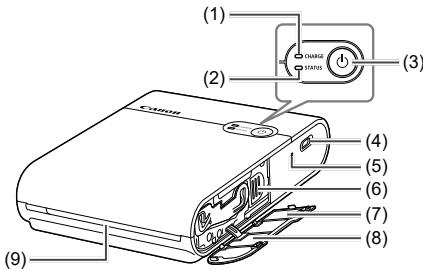
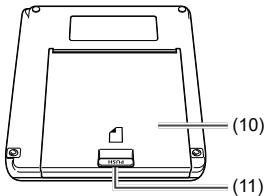
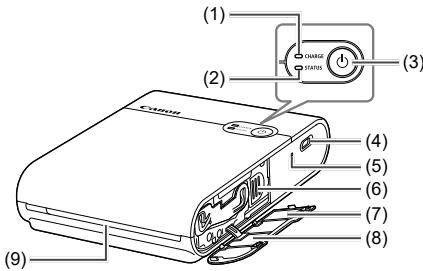
(1) CHARGE lamp (2) STATUS lamp (3) Power button (4) Charging terminal (5) Forced shutdown switch (6) Eject lever
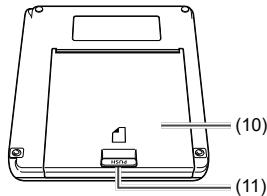
(7) QR code label (8) Ink cassette compartment cover (9) Delivery outlet (10) Paper compartment cover (11) Open button

- Place the printer on a table or other flat, stable surface. Never place the printer on an unstable or tilted surface.
- Do not place objects in front of the delivery outlet that may interfere with the paper during printing.
- The QR code label is needed when you register the printer again, such as when you change your model of smartphone. Take a photo of the QR code with the camera function of your smartphone, etc. and store it carefully.

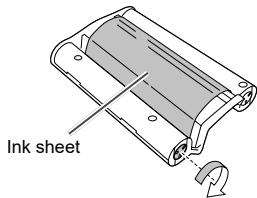
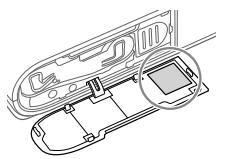
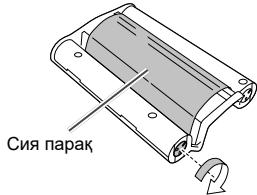
- If the ink sheet is loose, turn the sprocket gently to tighten it. Do not touch the ink sheet.
Lamp indications
| STATUS lamp | CHARGE lamp | Status |
| Off | Off | Power off (Not charged) |
| Blinks slowly green | Charging in progress (Power off) | |
| Lights green | Charging complete (Power off)*1 | |
| Blinks slowly white | Off | Printer start-up in progress |
| Blinks white | Off | Processing... |
| Blinks quickly white | Off | Remove the printed paper. |
| Lights white | Off | Standing by to print (Not charged)*2 |
| Blinks green | Standing by to print (Battery level low) | |
| Blinks slowly green | Standing by to print (Charging in progress) | |
| Lights green | Standing by to print (Charging complete) | |
| Blinks slowly red | Blinks slowly green | Outside the operating temperature range so charging has paused. |
| Blinks red | Off | An error occurred. Check the app message. |
| Blinks green | The battery level is low so printing is not possible. Charge the battery. | |
| Blinks quickly red | Off | An error occurred. Turn the power off and then on again. |
| Blinks quickly green | A battery error occurred. |
1 After a while, the CHARGE lamp turns off. 2 You can check the battery level by pressing the Power button in the Standing by to print (Not charged) status.
- CHARGE lamp blinks two times:
The battery level is low, but the printer can still be used.
- CHARGE lamp blinks three times:
The battery level is sufficient.
Charging the battery
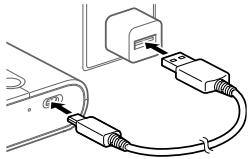
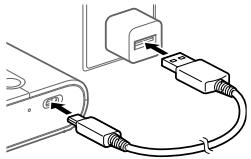
1 Connect the printer and the charging USB AC adapter (sold separately) with the accessory charging cable.
The CHARGE lamp begins to blink green and charging starts. When the CHARGE lamp lights up green, charging is complete.
Installing the app
The smartphone application SELPHY Photo Layout is needed to print with this product.
1 Download and install the latest version of SELPHY Photo Layout.
Search for "SELPHY Photo Layout" from the App Store (in case of an iPhone, iPad) or Google Play (in case of an Android smartphone), and install SELPHY Photo Layout.
2 Start SELPHY Photo Layout.
- Turn on location services on the smartphone.
- Turn off power saving mode and other functions that reduce smartphone battery consumption. Follow the on-screen instructions.

For information on how to operate the printer, such as loading the paper or replacing the ink cassette, refer to [Printer Manual] of SELPHY Photo Layout.
Preparing the printer and printing
This section describes how to turn on the power, load the paper, load the ink cassette, register the printer (QR code), print, and turn off the power.
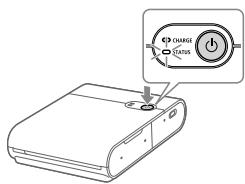
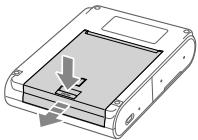
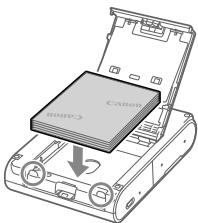
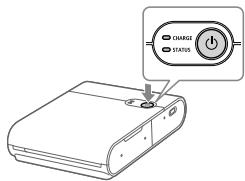
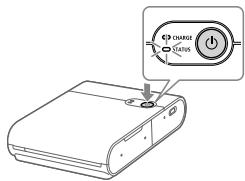
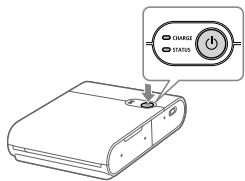
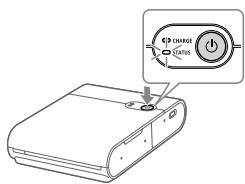
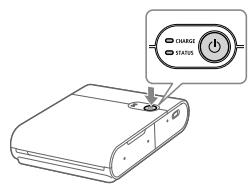
1 Turn on the power.
Hold down the Power button until the STATUS lamp begins to blink white, then wait until the STATUS lamp lights up.
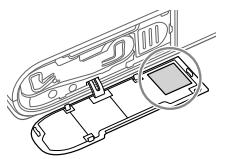
2 Load the paper.
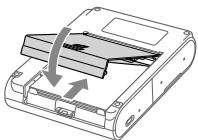
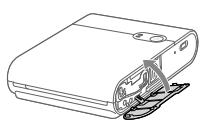
Press the Open button to release the lock, and open the paper compartment cover. - Set the paper (up to 10 sheets) with the printing surface (the surface without the Canon logo) facing downward, being careful not to touch the printing surface. Align the edge of the paper with the circled parts. Do not push the paper to the back of the compartment. - Close the paper compartment cover.

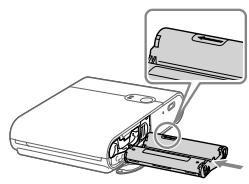
3 Load the ink cassette.
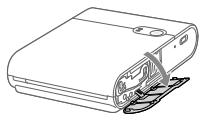
- Open the ink cassette compartment cover.
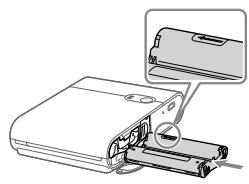
- Insert the correctly oriented new ink cassette into the printer until it clicks into place.
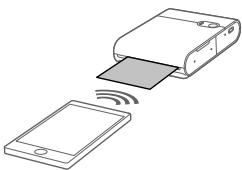
4 Connect and register the printer using the QR code.
- Follow the instructions displayed on the smartphone screen and connect and register the printer using the QR code.
- Close the ink cassette compartment cover.
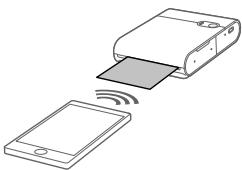
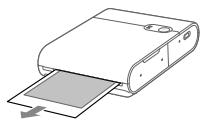
5 Print.
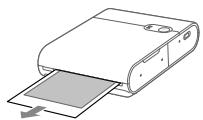
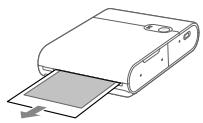
Print the images with SELPHY Photo Layout. When printing is finished, remove the paper from the printer.
6 Turn off the power.
After use, hold down the Power button until the STATUS lamp turns off.
Printing Precautions
- Set the paper with the printing surface (the surface without the Canon logo) facing downward, being careful not to touch the printing surface.
- Do not use paper that has already been printed on or that has written text or other markings.
- The paper extends from the delivery outlet multiple times during printing. Do not pull on the paper until the message indicating to remove the paper is displayed on the smartphone.
- Do not interrupt communication until printing is finished. If communication is interrupted, printing may be performed only partway.
- Do not open the ink cassette compartment cover or the paper compartment cover while the printer is operating.
- If the 'Standing by to print' status continues for approximately 10 minutes, the power will automatically turn off. To resume printing, press the Power button.
| Dimensions | Approx. 102.2 × 143.3 × 31.0 mm (4.02 × 5.65 × 1.23 in.) (Excluding protrusions) |
| Weight | Approx. 445 g (15.70 oz.) (printer body only) |
| Operating temperature | 5 °C - 40 °C (41 - 104 °F) |
| Operating humidity | 20 - 80% |
| Rated input | DC 5.0 V ±0.5 V, max. 900 mA |
| Printing method | Dye-sublimation thermal transfer (with overcoating) |
| Resolution | 287 × 287 dpi |
| Gradation | 256 shades per color |
| Paper tray capacity | 10 sheets |
| Paper size | Approx. 72.0 × 85.0 mm (2.84 × 3.35 in.) |
| Printing range | Selectable by the app from approx. 68 x 68 mm (2.7 x 2.7 in.), approx. 65 x 65 mm (2.6 x 2.6 in.), or approx. 62 x 62 mm (2.4 x 2.4 in.) |
| Printable number of sheets | Approx. 20 sheets (room temperature, battery fully charged) |
| Printing speed (per sheet) | Approx. 43 seconds (room temperature) |
Adapter and charging time: Use a charger with a rated power output of DC 5.0 V, 1000 mA or more to charge the product. Charging takes approximately 2 hours at room temperature, but this time may increase depending on the condition of the battery used and the charging environment. All data is based on tests by Canon. - Printer specifications or appearance are subject to change without notice.
Troubleshooting
If you think the printer may have malfunctioned, first refer to the examples below and check the printer. If the status does not improve even after checking the relevant items, contact a Customer Support Help Desk.
Power
The power does not turn on.
Check the battery level. If the battery does not charge, press the Forced shutdown switch (4) with a thin rod and then charge the battery again.
Charging
The battery cannot be charged.
- The battery cannot be charged during printing. Charge the battery in the 'Standing by to print' status or the 'Power off' status. Use the specified battery charger. If the battery does not charge, press the Forced shutdown switch (4) with a thin rod and then charge the battery again.
The battery runs down quickly.
Battery performance will decrease at low temperatures. Battery consumption may increase depending on the printing settings. Battery power is consumed in the 'Standing by to print' status. To increase the number of sheets that can be printed with a single charge, it is recommended to turn off the power each time printing is finished. - The app indicates the approximate battery level, and the battery may run down quickly depending on the printing conditions. It is recommended to charge the battery soon after use.
A charging error occurs. (STATUS lamp: blinks slowly red, CHARGE lamp: blinks slowly green)
- Charging will pause when the printer is a certain temperature or higher. This is not a malfunction. Disconnect the battery charger, turn off the power, and wait for the printer to cool down. Charging errors will occur more easily when printing continuously, when the ambient temperature is high, and when the inside of the printer is hot.
Charging takes a long time or a charging error occurs. (STATUS lamp: blinks quickly red, CHARGE lamp: blinks quickly green)
- When the printer has not been used for a long period of time, the charging time may increase or a charging error may occur. If this happens, charge the battery again. Use the specified battery charger. (11) If the problem is not resolved, contact a Customer Support Help Desk.
Printing
Printing is not possible.
- Check that the power is turned on. (Fig. 7)
- Check that the ink cassette and paper are loaded correctly. (7, 8)
- Check that the ink sheet is not loose. (4)
- Check that paper other than the specified paper is not being used. (3)
- If the ink cassette has run out, replace it with a new ink cassette. If there is no paper, load the paper. (7, 8)
Images cannot be printed cleanly.
- Check that the ink sheet and paper are not dirty.
- Check that dust and dirt have not adhered inside the printer.
- Check that condensation has not occurred in the printer.
- Check that the printer is not installed near equipment that emits electromagnetic waves or strong magnetic fields.
The smartphone screen colors differ from the printed colors.
- The color expression method differs for smartphone screens and printing. Colors also differ according to the environment (lighting color and intensity) in which the screen is viewed and the screen color adjustments.
Printing takes time.
- Printing will pause when the printer is a certain temperature or higher. This is not a malfunction. Wait a bit before printing again, or turn off the power and wait for the printer to cool down.
- Printing will pause occasionally so printing will take longer than usual when printing continuously, when the ambient temperature is high, and when the inside of the printer is hot.
- The number of times printing pauses may increase depending on the printing settings.
Printing cannot be stopped.
- Even if you cancel printing partway, printing continues until the printing in progress is finished.
- When printing is canceled partway through printing of multiple sheets, printing stops after the current sheet is finished.

Paper
The paper is not fed properly or the jams frequently.
Check that the paper is set correctly. (7) - Check that the paper is not peeling or folded and has not already been printed on. - Check that 11 or more sheets have not been loaded. - Check that paper other than the specified paper is not being used. (3)
The specified number of sheets cannot be printed, or paper remains.
- Paper may remain if the ink cassette runs out.
Paper is not ejected from the delivery outlet.
- If the paper extends partially from the front of the printer, pull out the paper. However, if the paper cannot be pulled out by lightly gripping it with your fingers, do not pull excessively on the paper. In this case, turn the power off and then on again repeatedly until the paper is ejected. If you accidentally turn off the power during printing, turn on the power again and wait until the paper is ejected.
- If the paper has jammed, contact a Customer Support Help Desk. Do not attempt to remove the jammed paper by force. This may cause malfunction.
Wi-Fi
The message "The printer cannot be found." is displayed.
- Check that the power is turned on. (Fig. 7)
- Turn on location services on the smartphone.
- To newly register the printer to the app, tap in the upper left corner of the app home screen and then tap "Do you want to use another QX10? >".
- Registration using the QR code will not be possible if the password has been changed using "Change the password". In this case, register the printer manually.
- If you forgot the password, do the following to initialize the printer settings and then register the printer to the app again.
Turn on the power. → Press and hold the Power button. After 1 second, the STATUS lamp turns off. → Continue pressing the Power button. → When the STATUS lamp begins to blink, release the Power button.
Printing takes time.
- Do not use the printer near a microwave oven or equipment (Bluetooth, etc.) that uses frequencies in the 2.4 GHz band. This may degrade the Wi-Fi signal environment.
- Place the printer and smartphone close to each other without any objects between them.
App
The QR code cannot be scanned.
- Check that there is no shadow on the QR code and that the QR code is being scanned from the front.
- Some smartphones may be unable to scan the QR code well. In this case, register the printer manually.
The message "This photo cannot be used." is displayed.
- If "This photo cannot be used." is displayed by the app, the image size may be too large. Shrink, trim, or otherwise reduce the image size and then try to print again.

When an error message is displayed
- When trouble occurs in the printer, the printer lamps will indicate an error and a message will also be displayed on the smartphone screen. When the action to be taken is displayed together with the error message, perform the instructed operations. When only an error message is displayed, refer to the examples in "Troubleshooting" and check the relevant items. If the problem is not resolved, contact a Customer Support Help Desk.
- When turning the printer off and back on again, make sure that the paper and ink cassette are loaded correctly before turning on the power.

Updating the app and the printer
Always use the latest version of SELPHY Photo Layout. (6) - It may be necessary to update the printer firmware when printing. This requires a sufficient battery level. - Do not turn off the power or press the Forced shutdown switch while firmware update is in progress.
Storing printed photos
Use a permanent marker to write characters on photos. - To prevent discoloration of printed surfaces, avoid storing photos in places subject to temperatures above 40°C (104°F), humid or dusty places, and places subject to direct sunlight. - Do not attach adhesive tape to printed surfaces, allow printed surfaces to contact a vinyl desk mat, business card case, or plastic eraser, apply volatile solvents such as alcohol to printed surfaces, or leave printed surfaces in close contact with other objects, etc. This may cause discoloration, color fading, or color transfer. - When storing photos in an album, select an album with nylon, polypropylene, or cellophane pockets.

Printed surfaces may become discolored depending on the storage state and time. Canon cannot be held liable for this.
Tidying up after printing
- Turn off the power.
- Store the paper and ink cassette loaded in the printer.
- Store the printer in the level condition in a dark place free of dust and dirt. Dust or dirt entering the printer may cause white stripes in photos or other malfunction.

Store unopened paper and ink cassettes in a dark place.
Daily handling
- Do not expose the product to strong force or vibration. This may cause paper jams or other malfunction.
- Do not expose the product to insecticides or volatile substances. Also do not allow the product to contact rubber or vinyl products for long periods of time. This may cause the exterior to degrade.
- When moving the printer from a cold place to a hot place, seal the printer in a vinyl bag to prevent condensation and let the printer adjust to the ambient temperature before removing it from the bag. In the event that condensation occurs, leave the printer at room temperature until the water droplets disappear naturally before using the printer. Wipe away dirt from the printer with a soft, dry cloth.

- Never wipe the printer using neutral detergent or solvents such as benzine or paint thinner. This may cause the exterior to degrade or deform or the paint to peel.
Wi-Fi (Wireless LAN) Precautions
- This product is embedded with a wireless device. The model number is CD1158 (including WLAN module model WM321). Countries and Regions Permitting WLAN Use
Use of WLAN is restricted in some countries and regions, and illegal use may be punishable under national or local regulations. To avoid violating WLAN regulations, visit the Canon website to check where use is allowed.
Note that Canon cannot be held liable for any problems arising from WLAN use in other countries and regions.
- Doing any of the following may incur legal penalties:
Altering or modifying the product
Removing the certification labels from the product
- Do not use the wireless LAN function of this product near medical equipment or other electronic equipment.
Use of the wireless LAN function near medical equipment or other electronic equipment may affect operation of those devices.

Radio Wave Interference Precautions
This product may receive interference from other devices that emit radio waves.
To avoid interference, be sure to use this product as far away as possible from such devices, or avoid using the devices at the same time as this product.
Hereby, Canon Inc. declares that this equipment is in compliance with Directive 2014/53/EU.
The full text of the EU declaration of conformity is available at the following Internet address:
http://www.canon-europe.com/ce-documentation
Wireless LAN Specifications
Frequency band(s): 2401 MHz - 2473 MHz
Maximum radio-frequency power: 11.4 dBm
CANON EUROPA N.V.
Bovenkerwerweg 59, 1185 XB Amstelveen, The Netherlands CANON INC.
30-2, Shimomaruko 3-chome, Ohta-ku, Tokyo 146-8501, Japan
Complies with IMDA Standards DB00671
Security Precautions
Because Wi-Fi uses radio waves to transmit signals, security precautions more stringent than when using a LAN cable are required.
Keep the following points in mind when using Wi-Fi.
Transmission monitoring
Third parties with malicious intent may monitor Wi-Fi transmissions and attempt to acquire the data you are sending.
- Unauthorized network access
Third parties with malicious intent may use this product illegally if they are able to view the information contained in the QR code.
It is recommended to use the smartphone application SELPHY Photo Layout to change the network password as necessary.
Precautions before Repair, Disposal, or Transfer of Ownership
Before transferring ownership, disposing of the product, or sending it for repair, do the following to initialize the settings.
- Turn on the power. Press and hold the Power button. After 1 second, the STATUS lamp turns off. Continue pressing the Power button. When the STATUS lamp begins to blink, release the Power button.
Use of genuine Canon accessories is recommended
This product is designed to achieve excellent performance when used with genuine Canon accessories.
Canon shall not be liable for any damage to this product and/or accidents such as fire, etc., caused by the malfunction of non-genuine Canon accessories (e.g., a leakage and/or explosion of a battery pack). Please note that this warranty does not apply to repairs arising out of the malfunction of non-genuine Canon accessories, although you may request such repairs on a chargeable basis.
CAUTION
DISPOSE OF USED BATTERIES ACCORDING TO LOCAL REGULATIONS.
-India only
This product is not to be disposed of with your household waste, according to the E-Waste (Management) Rules, 2016. This product should be handed over to a designated collection point, e.g., to an authorized collection site for recycling waste electrical and electronic equipment (EEE). Improper handling of this type of waste could have a possible negative impact on the environment and human health due to potentially hazardous substances that are generally associated with EEE. At the same time, your cooperation in the correct disposal of this product will contribute to the effective usage of natural resources. For more information regarding return and recycling of WEEE products, please visit http://www.canon.co.in/environment or write to us at customer.delight@canon.co.in.
Also, this product complies with the "E-Waste (Management) Rules, 2016" and prohibits use of lead, mercury, hexavalent chromium, polybrominated biphenyls or polybrominated diphenyl ethers in concentrations exceeding 0.1% by weight and 0.01% by weight for Cadmium, except for the exemptions set in Schedule II of the Rule.

Direct current

Stand-by
FCC Notice
(Printer, Model CD1158 Systems)
This device complies with part 15 of the FCC Rules. Operation is subject to the following two conditions:
(1) This device may not cause harmful interference, and (2) this device must accept any interference received, including interference that may cause undesired operation.
NOTE: This equipment has been tested and found to comply with the limits for a Class B digital device, pursuant to part 15 of the FCC Rules. These limits are designed to provide reasonable protection against harmful interference in a residential installation.
This equipment generates, uses and can radiate radio frequency energy and, if not installed and used in accordance with the instructions, may cause harmful interference to radio communications. However, there is no guarantee that interference will not occur in a particular installation. If this equipment does cause harmful interference to radio or television reception, which can be determined by turning the equipment off and on, the user is encouraged to try to correct the interference by one or more of the following measures:
Reorient or relocate the receiving antenna. - Increase the separation between the equipment and receiver. - Connect the equipment into an outlet on a circuit different from that to which the receiver is connected. - Consult the dealer or an experienced radio/TV technician for help.
The cable with the ferrite core provided with the printer must be used with this equipment in order to comply with Class B limits in Subpart B of Part 15 of the FCC rules.
Do not make any changes or modifications to the equipment unless otherwise specified in the manual. If such changes or modifications should be made, you could be required to stop operation of the equipment.
Canon U.S.A., Inc.
One Canon Park, Melville, New York 11747, U.S.A.
Tel No. 1-800-OK-CANON (1-800-652-2666)
FCC/IC Notice
Model: CD1158 (including WLAN Module Model WM321, FCC ID: AZD321 / IC: 498J-321)
This equipment complies with FCC/IC radiation exposure limits set forth for an uncontrolled environment and meets the FCC radio frequency (RF) Exposure Guidelines and RSS-102 of the IC radio frequency (RF) Exposure rules. This equipment should be installed and operated keeping the radiator at least 20cm or more away from person's body.
This device complies with Part 15 of FCC Rules and ISED's applicable licence-exempt RSSs. Operation is subject to the following two conditions: (1) this device may not cause interference, and (2) this device must accept any interference, including interference that may cause undesired operation of this device.
This transmitter must not be co-located or operated in conjunction with any other antenna or transmitter.
For CA, USA only
Included lithium battery contains Perchlorate Material - special handling may apply.
See www.dtsc.ca.gov/hazardouswaste/perchlorate/ for details.
Canadian Radio Interference Regulations
CAN ICES-3 (B)/NMB-3 (B)

USA and Canada only:
The Lithium ion/polymer battery is recyclable. Please call 1-800-8-BATTERY for information on how to recycle this battery.
Only for European Union and EEA (Norway, Iceland and Liechtenstein)


These symbols indicate that this product is not to be disposed of with your household waste, according to the WEEE Directive (2012/19/EU), the Battery Directive (2006/66/EC) and/or national legislation implementing those Directives.
If a chemical symbol is printed beneath the symbol shown above, in accordance with the Battery Directive, this indicates that a heavy metal (Hg = Mercury, Cd = Cadmium, Pb =
Lead) is present in this battery or accumulator at a concentration above an applicable threshold specified in the Battery Directive.
This product should be handed over to a designated collection point, e.g., on an authorized one-for-one basis when you buy a new similar product or to an authorized collection site for recycling waste electrical and electronic equipment (EEE) and batteries and accumulators. Improper handling of this type of waste could have a possible impact on the environment and human health due to potentially hazardous substances that are generally associated with EEE. Your cooperation in the correct disposal of this product will contribute to the effective usage of natural resources.
For more information about the recycling of this product, please contact your local city office, waste authority, approved scheme or your household waste disposal service or visit www.canon-europe.com/weeke, or www.canon-europe.com/battery.
Trademarks
- App Store, iPhone and iPad are trademarks of Apple Inc., registered in the U.S. and other countries. Google Play and Android are trademarks of Google LLC. QR Code is a trademark of Denso Wave Inc.
- Wi-Fi®, Wi-Fi Alliance®, WPA™ and WPA2™ are trademarks or registered trademarks of the Wi-Fi Alliance. All other trademarks are the property of their respective owners.
Disclaimer
- Reprinting, transmitting, or storing in a retrieval system any part of this guide without the permission of Canon is prohibited.
- Canon reserves the right to change the contents of this guide at any time without prior notice.
- Illustrations in this guide may differ slightly from the actual equipment.
- The above items notwithstanding, Canon accepts no liability for damages due to mistaken operation of the products. For information about third-party software, read "Third party software" at the end of this guide.
S E L P H Y SQUARE QX10
KOMPAKTNİ FOTOTISKÁRNA
Příručka Začínáme
CZECH
It could cause injury.
Before use
30-2, Shimomaruko 3-chome, Ohta-ku, Tokyo 146-8501, Japan
SELPHY SQUARE QX10
COMPACT PHOTO PRINTER
Quick Start Guide
DANISH
Installing the app
You need the smartphone application SELPHY Photo Layout to print with this product.
1 Download and install the latest version of SELPHY Photo Layout.
• Search for "SELPHY Photo Layout" in the App Store (for iPhone, iPad) or Google Play (for Android smartphone), and install SELPHY Photo Layout.
2 Start SELPHY Photo Layout.
The message "The printer cannot be found." is displayed.
The message "This photo cannot be used." is displayed.
Clean up after printing
30-2, Shimomaruko 3-chome, Ohta-ku, Tokyo 146-8501, Japan
Safety regulations
Approx. 72.0 x 85.0 mm
Print area
30-2, Shimomaru 3-chome, Ohta-ku, Tokyo 146-8501, Japan
30-2, Shimomaruco 3-chome, Ohta-ku, Tokyo 146-8501, Japan
30-2, Shimomaruko 3-chome, Ohta-ku, Tokyo 146-8501, Japan
Model: CD1158 (including WLAN Module Model WM321, FCC ID: AZD321 / IC: 498J-321)
30-2, Shimomaruko 3-chome, Ohta-ku, Tokyo 146-8501, Japan
www.canon-europe.com/weee, or www.canon-europe.com/battery.
Trademarks
Approx. 72.0 x 85.0 mm
30-2, Shimomaruku 3-chome, Ohta-ku, Tokyo 146-8501, Japan
S E L P H Y S Q U A R E QX10
COMPACT PHOTO PRINTER
30-2, Shimomaruco 3-chome, Ohta-ku, Tokyo 146-8501, Japan
30-2, Shimomaruko 3-chome, Ohta-ku, Tokyo 146-8501, Japan
30-2, Shimomaruco 3-chome, Ohta-ku, Tokyo 146-8501, Japan
S E L P H Y S Q U A R E QX10
PHOTO PRINTERS
Getting Started Guide
FINNISH
30-2, Shimomaruco 3-chome, Ohta-ku, Tokyo 146-8501, Japan
30-2, Shimomaruko 3-chome, Ohta-ku, Tokyo 146-8501, Japan
Safety Instructions
Since Wi-Fi uses radio waves to transmit signals, stricter safety instructions are required than when a network cable is used.
S E L P H Y S Q U A R E Q X 10
COMPACT PHOTO PRINTER
Getting Started Guide
TURKISH
30-2, Shimomaruko 3-chome, Ohta-ku, Tokyo 146-8501, Japan
Safety Precautions
S E L P H Y S Q U A R E Q X 10
HnUuS LuhUuUuUuSb-2
huuTu utluunu
Ru8Br1
Read the safety instructions carefully before using this product, and follow them accordingly. (2) For the user: - Do not use this product in a way that may cause injury or damage. - Do not disassemble, repair, or modify the product yourself.
Do not use the product in a humid or dusty place.
Also, do not place the product on an unstable surface. If the product falls, it may cause injury or damage. Be careful not to spill liquids on the product.
OnLnAn
Do not use the product near water or in a wet place.
Do not use the product if the power cord is damaged. (7) Do not use the product if the plug is loose. Do not use the product if the outlet is loose. Do not use the product if the power cord is damaged (3)
Keep the product away from direct sunlight.
Error: The printer cannot be found.
If the message below appears: (7) The camera cannot be used. When you try to use the camera, a message like "Do you want to use another QX10?" may appear. If the QR code is not recognized, the camera may not be connected correctly. Follow the instructions to connect the camera again. If the problem persists, contact the service center.
To connect the camera to the smartphone: → Turn on the camera and the smartphone. 1. Press the button on the camera to turn it on. → Start the app on the smartphone. → If the camera is not detected, turn it off and on again.
The connection may take some time.
The camera uses the 2.4 GHz band for wireless connections (Bluetooth and Wi-Fi). It can connect to a Wi-Fi network. The camera and the smartphone must be within a certain distance for the connection to work.
RwutuWon
Press the button to scan the QR code.
If the QR code is not displayed, or if the QR code is not recognized, follow these steps: - Check the QR code display on the smartphone. Follow the instructions to display the QR code.
If "This photo cannot be used." is displayed:
- If "This photo cannot be used." is displayed, the photo may not be compatible. Check the photo format, or take a new photo with the camera, and then try again.
The photo may not be compatible.
If the photo is not compatible, it may not be displayed correctly, and the camera may not be able to process it. To use the photo, it must be in a compatible format. If the photo is not in a compatible format, convert it to a compatible format using the software provided. If the problem persists, contact the service center.
Rwugluwoh u unwhwnhwgnlu
Using the SELPHY Photo Layout app: (6) Follow the instructions on the screen to print. The app allows you to arrange multiple photos on one page. For details, refer to the app's help.
Suulw mluuulwnutn uwahtunwnnnnu
The camera can be used in a wide range of temperatures. It can operate in temperatures up to 40°C and down to 0°C. Avoid using the camera in extremely hot or cold environments, as this may cause damage. Also, avoid using the camera in humid or dusty conditions. The camera is not waterproof, so do not use it in the rain or near water. If the camera gets wet, dry it immediately. Do not use the camera in places where it may be exposed to strong magnetic fields or static electricity.

Read the user manual carefully before using this product: Canon is not responsible for any damage or injury caused by misuse.
Safety Precautions
Follow the instructions below to ensure safe use: Do not use the device in humid or dusty environments. Keep the device away from water, heat sources, and direct sunlight. Do not insert foreign objects into the device's openings. If the device emits smoke or unusual odors, unplug it immediately and contact customer support.

Important Safety Instructions (continued)
Battery Handling
This device contains a built-in rechargeable battery. Do not attempt to remove or replace the battery yourself. Improper handling may cause fire or explosion. If the battery leaks, avoid contact with skin and eyes. If contact occurs, rinse with water and seek medical attention. Dispose of the battery according to local regulations. Do not expose the device to extreme temperatures or direct sunlight for extended periods. Keep the device away from open flames and heat sources. Use only the specified charger and cable. Do not charge the device in damp or dusty areas. If the device becomes damaged, stop using it immediately and contact support.

Do not use the device while charging. Ensure the charging port is dry before connecting the charger. Use only the provided power adapter and cable. Do not bend or damage the cable.
Wi-Fi (Wireless LAN) Connection
Setting up Wi-Fi: The device supports Wi-Fi (Wireless LAN) standard IEEE 802.11 b/g/n. - Ensure the wireless router is turned on and within range.
To connect to a Wi-Fi network, ensure the network is available and the password is correct. The device will automatically search for available networks. If the network is not found, check that the router is on and within range. For security, use a strong password and enable encryption. If you have trouble connecting, restart the router and the device.
- The device supports WPA/WPA2 encryption for secure connections.
Do not use the device in areas with strong electromagnetic interference.
The device's wireless LAN feature is intended for indoor use only. Do not use it outdoors or in areas with high humidity.
Troubleshooting Common Issues
If the device does not power on, check the battery level and charging status. If the issue persists, contact customer support.
Uhwnnnpn nwnnln hwnun uwnn huwnnuhnhu hnll uwhtp uuu uwnptnh g uu uh oqnwnnntp wu uunpnn uju uunph hn uuduwuluw:
Uulunwuaqnljwu uhgutn
Uuh nn Wi-Fi guulg uqnulu2wutnh hnwhugfu hhuun oounqnnonu t nunhnwhglut, uwhuugnu tu wuytih ndtn uulnulgujwu uhngutn, puu LAN uwnuwju quuu oqnwnnti; Wi-Fi-hg oqnulthu' uh2un h2tphtunluyin:
Sulugutnhnnuwugwu utnwhulnu
Wi-Fi-nu unjwutn hnhuugun n quinn t uiguwuwh utwnny utnwhuutbl tnnnn nnutn hnnuhg, u unwup quann tu hnpabi unnilwldn nnwnuwo unjwuttn:
8wughzhuqnnu6 unnp
Qwnuulua uunnnnpu nUutgnn tnnnnn nnubnn yannnn bu wju uunpu oounqnntu unonhuwlu du, trabnnnuu untutl QR lnnnuuwwuunn nntbwnnuuynl:
funnhnnl n unnuu uwhnuud2unnu jnuu npnlu SELPHY Photo Layout pguwju huaqiuoh uhngnu hnut guh qunnuupunn:
Lwhuqqnl2uwnlutn uwhupwu utnwunnnqtn, htnuwgtin yuu uthwulwnpjuwu hnwnlugh unhwugtin
Uwupu uwnp utuhuwunu wu hwnlupnu uty nnhzhu uhnuwugtin yuu htnwgutin yuu wju ubwnnnquwu nwnuyt gynwnbp htnuwu uwngh ywnqwnnluutng qnnugutnl hwufn:
Uhwngtpuhugulun6u: → Utnp utnufu wuhbpuhwgulun6u: Uby uwnjuwgh uduu njuu uugwu: → Cunnluutp utnuwuywhluhugulun6u: → Tnp uduu unu ulpuanp, pug janntpuhugulun6u:
hunhnnn E unpnuu oqnuqnpnt Canon hnuwj qnnounwuwjhu uwnuwutn
Canon φ hnuw jnnounuulwu uwnuwutn oqnwnnntnl nupnlu uwwuntu wE, nn wju uwnn lwwunhuh qtnwug unnyu: Canon nuynnnnaynun uwnwnuwwunwnl aenlu y npnu n2 qnnounnuuwhu uwnuwruth uwnwnpnu (on. uwnunlng wnunuhngh u (uu) uwnjnluh) hnluuupnu u wunphu huuguo nue uwwu u (u) uawnh onhuw' hnnthh, hwuun: hunnuu bpu h uynuuh nnuu, nn wju twnuuhpn y qnonu ns qnnounuuiuuh uwnuwutn uh wunnpnu uhtnuuwlnpnu unwuguo utnununnqunutn ngwnpu: luwu ntugptnuu wannntp utnununnqunh hnuwuwgtu 6wnnu h hnluupputnu:
luu29rCu8nHu
OASUANR64U8 URSUNsBnC N2U2UR6e RUUU2U3U 5uuyu yunnuuur9h:
1
Uunuwugh nuzugnlu
Ujwwnuupnugntgugghunwn2w6dunhhuwsju 2pn wquwju u nwnuwu onblunnnrjwu:
Uuunn uoh oqnuqnptp quw uh nntp quw uwhtp wju htnuwr untntnnu.
-Uuuhguwtu uplh 6unuwqjutnh utnpn -40°C-hg punan gtnuwwunh6wuh uuwjulutnnu -hunuwu ywu yhn2nu wjntpnlu - Nldtn yhpnughwih twnuynnn unntnll
Ujwutuh wunwnu wannn bu uwwuuiu wufwugh wutl unwuwuun uwhynuwhunwn, hunuwn E unwugutti tunnuhunwnu, uwnuogutn uwf uwnuulwuu uwwuogputn uwh nth: Fwnon gtnwnuushwuh uwwuulutnnu wwnp uwhunuwhttn uwwnn tu ngnnuugut:
Uynuulgoujhwluyuulnulutn
App Store, iPhone L. iPad wulunlutn huulnhuwunlu bu Apple Inc. nultnu uuu-nu u wti tnilutnn qnwuguo wwwuwupjhu wulunlutn: Google Play U Android wulunlutn huunhuunlu tu Google LLC nnuu wunwupwju wuwunlufntn: QR Lynnn hulun huwunl t Denso Wave Inc. nuyltnnjuwu npwupwhu wuwunlun: Wi-Fi, Wi-Fi Alliance, WPA™ u WPA2™ uuulunlulut huunhuunlu tu Wi-Fi Alliance-h wunuwupwhu wuwunlulut qunf qnugubwwnuwupwhu wuwunlulut: Uuwgwo pinn wunwupwu2uulutn hwnhwhunlu t hu nbtug hwuwunwuhwu uthwuwuwntnh uthwuwunjnlun:
Rnwnuunl uwwnnuwwunuulpnlhgh
Unqunlnt unju nntgnjgh nnu twnuununu, hnuwugtl yw uwhuyutnl nnu nnunnuulwu hwwuunqnlu unwug Canon nuynnnpu annunnau: - Canon pluynnnnnpnntu hntu hnwnlup t ytnwnwhnu gwlugwdu wluuunuug luwwuwuuw uunlglu uhnnhb unju nntgnghpnulunwnpnl: Uju nntgnynu utnyugul uunutn yunn tu unnpnlu uunph hnulu unuphg: Uulwhu uunnnuugh' Canon nuutnneunu unwwunwuuununnu nlu sh unuulunu uunptnh uuwu 2whwnpuu hntuupn uwnugw duuutn hwwn: - tnnnnn ynuh oynqnuwquh uhuu unntunlunlutnh hwnu - duunawgtg The Third party software" pudhu, nnn lqnut wju - nqtgnugh ubngnu:
SELPHY SQUARE QX10
Sthuhyuylwu plnIawqhn
Etjunwnuunlguul unnpjlnn
Qwhtnp
102,2 x 143,3 x 31,0 uJ
Uw2 (UnwuJu unuH20)
Unun. 445 q
Unununpuu luynh. 2huuunuu
Unununnuu wuwuhy. Ununwnnuluph ununwnnuu wuwahnp uynuwo twhwpatwnnuu u:
OOO «KaHOh Py»
Cepesnueckna Habepekna, 29, 8-3Tax, 6n3nc-entp «CepespnbI ropond》,MockBa,109028,Pocca
UtnunLoenn Ruwuunwuh huiun
S E L P H Y S Q U A R E QX10
UJAFbIH FOTO PIPNHTEPI
KbickaHa HycKayIbIK
KA3AKUJA
Пинтердколданбасьрьн,блнHyckayIbIKTы«KayinciDiK Hcckaynapbl》(20 )denataNaTBH6enirimekocakbIn 乌bIfbl3. Byn HcyaybIbI bOky npInHTepdi dybIc naIaIaNHyfya YipeTei. ByHcyKaybIKbI 6oanaakTa KOndaHaTbHdain CaKan KoibHb3.
Kayineci3djk HycKaynpbI
ΘHIMdiKayinci naiDanaHy yuiH ocbl HcykaynapbI OKbIFaHBiHbI3fa Ke3 XeTKi3iH3. HIMDi naiDanaHuybI xkapaKaT aImaybi HeMece 6ackaIapra 3nH KeJmey iYiH MbHa HycKaynapdbOpbHdaHb3.

ECKEPTY
Do not touch the heating element or the print head during operation. Do not open or repair the device yourself. Do not insert fingers or other objects into the slots. If the device emits smoke, an unusual smell, or makes strange noises, stop using it immediately. - If the device is damaged, contact the dealer or an authorized service center for repair. - Do not immerse the device in water. Do not place the device in wet or damp areas. Do not use the device in places where it may get wet. This electrical device may cause electric shock, fire, or other hazards. Do not touch the power cord or the power outlet with wet hands. Do not pull the power cord to disconnect it. Keep the power cord away from heat sources and do not place heavy objects on it. Do not bend or damage the power cord. Do not use the device if the power cord or plug is damaged. Do not cover the device with cloth or other materials. Do not place the device near open flames or hot surfaces. Do not use the device in temperatures above 40°C or below 5°C.
Do not touch the heating element or the print head during operation. Do not open or repair the device yourself. Do not insert fingers or other objects into the slots. If the device emits smoke, an unusual smell, or makes strange noises, stop using it immediately. - If the device is damaged, contact the dealer or an authorized service center for repair. - Do not immerse the device in water. Do not place the device in wet or damp areas. Do not use the device in places where it may get wet. This electrical device may cause electric shock, fire, or other hazards. Do not touch the power cord or the power outlet with wet hands. Do not pull the power cord to disconnect it. Keep the power cord away from heat sources and do not place heavy objects on it. Do not bend or damage the power cord. Do not use the device if the power cord or plug is damaged. Do not cover the device with cloth or other materials. Do not place the device near open flames or hot surfaces. Do not use the device in temperatures above 40°C or below 5°C.
This electrical device may cause electric shock, fire, or other hazards.
Do not place the device in places where it may get wet.
If the device is used in a way that may cause electromagnetic interference, it may cause problems.

SAFETY
Do not touch the heating element.
Do not insert fingers or other objects into the slots.
This may cause damage.
Before use
This device is intended for use with the specified accessories. Unauthorized use of materials may cause damage. - If the printer is used in a way that may cause problems, contact the dealer or an authorized service center for repair.
Parts and controls
SELPHY SQUARE QX10
Power cord
Accessories
Materials for the bar. Types of paper / white glossy (XS-20L) white glossy. The charging cable is a cable designed only for charging, it cannot be used for data transfer.
(1) CHARGE (charge) lamp (2) STATUS (status) lamp (3) Charge terminal (4) Charge contact (5) Paper output slot (6) Paper output guide
(7) QR code sticker (8) Accessory attachment (9) Output tray (10) Paper information label (11) DC terminal

- If the printer is not used for a long time, it should be stored properly. The printer should not be stored in a humid or dusty place. When printing, do not place paper or other objects on the output tray. The QR code sticker may become dirty if the printer is used for a long time, or if it is exposed to water, dirt, or if the smartphone model is changed. Use the smartphone camera to scan the QR code and save it.

The device may be damaged if used improperly. Do not disassemble the device.
| STATUSшамы | CHARGEшамы | Куи |
| Өшipurи | Өшipurи | Куатэрүлүй (kyatтalamаган) |
| Жасын түстбын баяжынүлүйтайды | Куattay proочи opbyнданүхатүр (kyatэрүлүй) | |
| Жасын түстбын жанады | Куattay оякталды (kyatэрүлүй)*1 | |
| Ак түстбынбаяжынүлүйтайды | Өшipurи | Принтетер iccke косынүхатүр |
| Ак түстбынжынүлүйтайды | Өшipurи | Өндени... |
| Ак түстбынжындамжынүлүйтайды | Өшipurи | Басынган karааүдүхыногалдь. |
| Ак түстбынжанады | Өшipurи | Басыншыгарудаынданүхатүр (kyatтalamаган)*2 |
| Жасын түстбынжынүлүйтайды | Басыншыгарудаынданүхатүр (батеря куаты).a3) | |
| Жасын tүстбынбаяжынүлүйтайды | Басыншыгарудаынданүхатүр (kyatтalam斡л).a4) | |
| Жасын tүстбынжанады | Басыншыгарудаынданүхатүр (kyatтalam斡л).b0d) | |
| Кьзын tүстбынбаяжынүлүйтайды | Жасын tүстбынбаяжынүлүйтайды | Жумьс Temnéратуарсы диапазоньнаншын тү, сондьтданүхат彦proочci kildıptınl. |
| Кьзын tүстбынжынүлүйтайды | Өшipurи | Кателik obпен ралд. Котданбалнхаварnamacсы каралы.3. |
| Жасын tүстбынжынүлүйтайды | Батеря куаты a3, сондьтдан ралдшынру мукин emec.Батеряныкоттahь.3. | |
| Кьзын tүстбынжындамжынүлүйтайды | Өшipurи | Кателik obпен ралд. Котданбалнхаварnamacсы каралы.3. |
| Жасын tүстбынжындамжынүлүйтайды | Батеря куаты a4, сондьтдан ралдшынру мукин emec.Батеряныкоттahь.3. |
1 When the CHARGE lamp lights up, the battery is low. 2 If the battery is completely discharged, the charge terminal may not work, and the battery may be damaged. - If the CHARGE lamp blinks: the battery is low, but the printer can still be used. - If the CHARGE lamp is off: the battery is fully charged.
Charging the battery
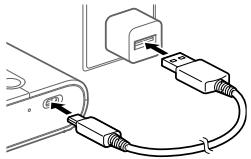
1 Connect the printer to a USB AC adapter (sold separately) using the dedicated charging cable.
The CHARGE lamp lights up and charging starts. When the CHARGE lamp turns off, charging is complete.
Installing the app
To use the printer, you need the SELPHY Photo Layout smartphone app.
1 Install the latest version of the SELPHY Photo Layout app.
Search for "SELPHY Photo Layout" in the App Store (for iPhone, iPad) or Google Play (for Android smartphones) and install it.
2 Launch the SELPHY Photo Layout app.
Connect the smartphone to the camera. You can use the camera's shooting modes and the smartphone battery's remaining capacity. Check the screen instructions.

For details on loading paper and ink cassettes, refer to the SELPHY Photo Layout app's [Printer Manual].
Printing and printing settings
This section describes how to insert paper, load ink cassettes, connect the printer (QR code), print, and replace the ink cassette.
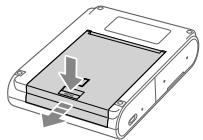
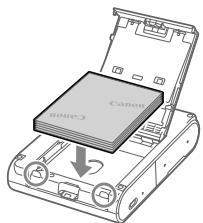
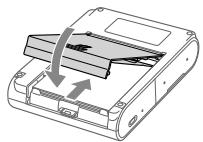
1 Insert paper.
Press the paper cover release button, then open the paper cover.
2 Load paper.
Press the paper cover release button, then open the paper cover. Load the paper with the printable side (Canon Photo Paper Pro) facing up, and align it with the paper guide. Do not load more than 10 sheets. Close the paper cover.
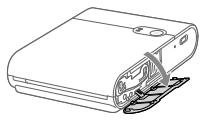
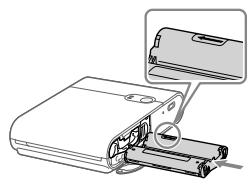
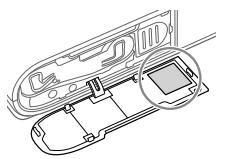
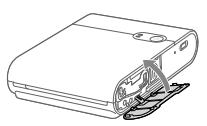
3 Load the ink cassette.
Open the ink cassette cover.
Insert the ink cassette into the printer until it clicks into place.
4 Connect the printer using the QR code and print.
Follow the on-screen instructions to scan the QR code, connect the printer, and print. The ink cassette cover should be closed.
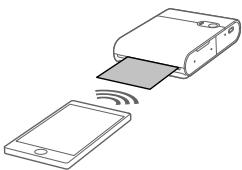
5 Print.
Print using the SELPHY Photo Layout app.
Before starting the printing process, turn on the printer's power.
Wait for the printer to warm up.
- After the warm-up is complete, the printer's STATUS (Ready) indicator will light up.
Starting the printing operation
To start printing, use the printer's operation panel or the printer driver. If the print job is not sent within a certain time, the print data may be deleted. During printing, the print data is stored in the printer's memory. If the print job is interrupted, the printing operation can only be resumed. - While the printer is in operation, you cannot cancel the print job using the printer's panel or the printer driver. If the "Print Data Remaining" indicator stays on for 10 minutes, the printer will automatically turn off. To print the remaining data, turn the printer back on.
Technical specifications
| Башием dipei | Шамамен 102,2 × 143,3 × 31,0 MM (шыficькь яжрел徳и коспаганда) |
| Салмары | Шамамен 445 r (приентер корпунсы faha) |
| Жуmbic temперауразы | 5-40 °C |
| Жуmbic billyдылыры | 20-80% |
| Hominaлды тусынлалын Куат | 5,0В typ. TOK ±0,5В,,en ke6i 900 mA |
| Басьишыогу anecdici | Сублимацьялбітегмобасna (устигri kaбаты бар) |
| Аныктусы | 287 × 287 НуктЕДюМ |
| Градцяя | Өр тycб ойында 256 рени |
| Каfasн hayасьин сыындылыры | 10 пapak |
| Каfasз eлшемi | Шамамен 72,0 × 85,0 MM |
| Басьишыогу ayмары | Колданбашамамен 68х68MM, шамамен 65х65MM Немесe шамамен 62х62MM Кашиктуган Тандай оалды |
| Паразларын bасьлалын сны | Шамамен 20 пapak (бениtemперауразы,батер Толык Куатлган) |
| Басьишыогу жылдамыры (эр паок boийнда) | Шамамен 43 cekyнд (бениtemперауразы) |
Power supply: AC 220-240 V, 50/60 Hz. Current: 1000 mA or more. Use the supplied power cord and plug. The charging process takes about 2 hours at room temperature, but this time may vary depending on the battery condition and the charging environment. All specifications are subject to change without notice. - The printer's technical specifications or external appearance may change without prior notice.
Troubleshooting and maintenance
If the printer does not operate properly, check the items below and then turn the printer off and on again. If the printer still does not work after checking the items, contact your local dealer.
Power
The power does not turn on.
Check the battery. If the battery is low, charge it using the supplied AC adapter and power cord.
Charging
The battery cannot be charged.
The battery cannot be charged while printing is in progress. Charge the battery when the printer is in "Printing" mode or "Power Off" mode. If the battery is low, the charging indicator will light. If the battery is low, charge it using the supplied AC adapter and power cord.
Battery charging time.
Battery charging time depends on temperature. The battery charging time can be adjusted to the main parameters. The battery should be charged when the charge level is low. It is possible to charge the battery at any time, but it is recommended to charge the battery when the charge level is low. After charging, the battery can be used immediately.
The charging indicator may be lit. (STATUS (Charge) lamp: red blinking, CHARGE (Charging) lamp: yellow blinking)
- If the printer is exposed to high temperature or high humidity, the charging process stops. This is not a malfunction.
When the battery charging indicator turns off, the battery is fully charged and the printer is ready for use.
The charging indicator may light up when the battery is low, when the ambient temperature is high, and when the printer is hot.
The charging process may take a long time or the charging indicator may light up. (STATUS (Charge) lamp: red blinking slowly, CHARGE (Charging) lamp: yellow blinking slowly)
If the printer is left unused for a long time, the charging time may be extended or the charging indicator may light up. If this happens, do not charge the battery. Follow the battery charging procedure described in the manual. (11) If the problem persists, contact the service center.
Charging
Charging is not possible.
The battery is not inserted. (7) Insert the battery correctly. (7, 8) If the battery is not inserted correctly, insert it correctly. If the paper is jammed, remove the paper. (7, 8)
Charging is not possible with the cover open.
Use the AC adapter to connect the printer to a power outlet. Connect the printer to the AC adapter and the power cord. Connect the printer to the AC adapter and the power cord. Do not connect the printer to a power source other than the specified one.
The startup screen may differ from the screen shown in the manual.
The screen may differ from the illustrations in this manual. The screen may differ from the illustrations in this manual.
Press the paper feed button.
- If the printer head temperature is high or there is a risk of overheating, the printing process will be paused. This is not a malfunction. When printing resumes, the printer will continue printing. If the print head temperature is high during printing, the printer will pause printing, and then it will resume printing when the temperature drops. It is possible to adjust the printing parameters to prevent this.
It is not possible to stop the printing process.
If the printing process is stopped due to high temperature, it will resume automatically. For example, if the printing process is stopped due to high temperature, the printing process will stop after the print head has cooled down.
Paper
Use paper that is folded or rolled.
Use paper that is not folded or creased. (7) Do not use paper that is wrinkled or has been folded. 11 Or use paper that has been printed on. Do not use paper that has been printed on other than the specified paper. (3)
The number of copies to be printed can be set or changed.
If the paper is jammed in the cassette, it may be possible to remove it.
The paper will be ejected after printing.
If the paper is jammed inside the printer, pull the paper out. If the paper cannot be pulled out easily, do not force it. In this case, turn off the power and contact service. If the power is turned off while printing, turn it back on and continue printing. If the paper is jammed, contact your dealer. The jammed paper may be damaged. It is possible that the paper may be torn.
Wi-Fi
The message "The printer cannot be found." is displayed.
Turn off the power. (7) Turn off the location services on the smartphone. To reconnect the printer, press the button on the printer. If the message "Do you want to use another QX10?" appears, select "Change the password". If the password has been changed, it is possible to reconnect the QR code. In this case, turn off the printer. Reset the password, then set the printer parameters again and reconnect the printer.
Turn off the power. → Press and hold the power button for 1 second, then release the STATUS (green) button. → Press and hold the power button. → If the STATUS (green) button does not light up, check the power button.
Bacbin wibifapya yaKbit Kepek.
The printer can be connected to a smartphone or tablet via wireless LAN (Bluetooth, etc.) or by cable. This makes it possible to print via Wi-Fi. Place the printer and smartphone close to each other, ensuring there is no obstacle between them.
QR code scanning is not possible.
If the QR code is not displayed correctly, scan the QR code again and check the text. It may be possible to scan the QR code with a smartphone. This manual describes the printer's functions.
If the message "This photo cannot be used." appears.
If the message "This photo cannot be used." appears, it may be because the image is too large. Reduce the image size or try using a different image, then try again.
When an error message is displayed
- When the printer is in an error state, the printer will indicate the error with a beep and also display a message on the smartphone screen. If an error message is displayed along with the beep, follow the instructions shown. If the error message is displayed, refer to the troubleshooting section "Searching for and fixing problems" and follow the instructions. If the problem persists, contact the service center.
- When the printer is not in use, remove any paper or cassette that is loaded.
Maintenance and printer storage
Use the latest version of the SELPHY Photo Layout app. (b) During printing, the printer's micro USB port may become hot. This is normal. When the micro USB port is hot, do not touch it or handle it with care.
Storing printed photos
Store printed photos in a photo album. To prevent fading, keep photos away from high temperatures above 40°C, high humidity, direct sunlight, or places with strong odors. Do not stick photos to surfaces, as they may stick to plastic or vinyl, or be damaged by adhesives. This may cause discoloration, fading, or damage. When storing photos in an album, use an album with acid-free, lignin-free, or PVC-free pages.

It is possible to print photos with a matte finish. This is a Canon feature.
Cleaning after printing
Keep the printer and cassette tapes in a dry place. - Do not place the printer, cassettes, or toner cartridges in direct sunlight. - Do not place the printer near heat sources or in places with high humidity.

Store the paper and cassette tapes in a dark place.
Daily maintenance
Do not place the product in a place where it may be exposed to oil, water, or direct sunlight. Paper, toner cartridges, or other accessories may be damaged. Do not use insect repellents or volatile solvents. Do not leave the product in a hot car or in direct sunlight for a long time. The exterior of the product may become deformed. - If the printer is moved from a cold place to a warm place, condensation may occur. To prevent condensation, put the printer in a plastic bag and let it gradually adjust to the room temperature before use. If condensation occurs, wipe the printer with a soft, dry cloth and let it reach room temperature before use. - If the printer is dropped or subjected to strong impact, check for damage.

If the printer is exposed to any liquid, such as water or other liquids, wipe it with a soft, dry cloth. The exterior of the printer may become deformed, discolored, or damaged.
Wi-Fi (Wireless LAN)
Precautions
This product contains a wireless module. The module is CD1158 (using the WM321 WLAN module). - Devices and equipment that are permitted to use the WLAN network - Devices and equipment that are not permitted to use the WLAN network - Use of unauthorized or illegal wireless connections is prohibited. To avoid interference with the WLAN network, use the WLAN network only in permitted areas. For details, refer to the Canon website.
Canon shall not be liable for any problems arising from the use of the WLAN network with other devices or equipment.
The following precautions should be observed when using the wireless network:
Radio wave precautions
This product emits radio waves and may interfere with other devices.
To avoid interference, install the product away from other electronic devices, or use the product at a distance from other devices.
Precautions for wireless LAN
To transmit Wi-Fi signals, the radio waves must be transmitted from the antenna. The wireless LAN antenna is built into the product, so it must be used at a distance from the antenna.
Wi-Fi connection names and passwords are case-sensitive.
Printing
To increase the maximum number of devices that can connect to the Wi-Fi network, you may need to change the router settings.
Printing from a smartphone
If the QR code is damaged, you can still print by entering the password manually.
To print photos easily, use the SELPHY Photo Layout app on your smartphone.
Printing, sending to a computer, or saving to a memory card
When printing, sending to a computer, or saving to a memory card, follow the steps in order and do not skip any steps.
Turn on the power. Press and hold the power button for about 1 second, then release when the STATUS lamp lights up. Press the power button again to turn it off. When the STATUS lamp turns off, release the power button.
Use only Canon-brand paper.
Using non-Canon paper may cause paper jams or other problems.
Canon shall not be liable for any damage or loss caused by the use of non-Canon paper (including ink, battery pack, or other).
The warranty may be void if the product is used with non-Canon consumables or if the product is damaged due to such use. Canon shall not be liable for any damage or loss caused by the use of non-Canon consumables, except as required by law.
CAUTION!
Do not use damaged or leaking batteries.

Current types

Cutting modes
THEMES AND IMAGES
Before using this device, please read all safety instructions carefully.
S E L P H Y S Q U A R E QX10
USER MANUAL
Safety instructions
KYRGYZ
- This manual contains important instructions for use and safety. Read this manual carefully before using the printer. Keep this manual for future reference.
Safety instructions
Battery handling.
Battery handling
1. Connect the printer to the USB adapter (included) using the USB cable.
When the battery indicator is full, the battery is fully charged. When the battery indicator is empty, the battery is empty.
Connecting the power
By pressing the cube button, press the paper, press the cassette, press the QR code, and press the paper feed button.
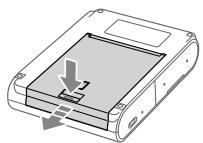
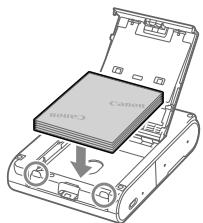
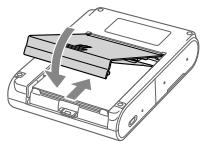
1 Press the cube button.
Press the cube button to turn on the indicator, then press the paper feed button to feed the paper.
2 Press the paper.
Press the paper feed button to feed the paper, then press the paper feed button again to feed the paper. Press the paper feed button (10 times) to feed the paper. Press the paper feed button to feed the paper. Press the paper feed button to feed the paper. Press the paper feed button to feed the paper.
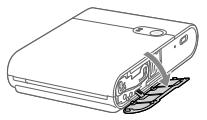
3 Press the cassette.
Press the cassette to feed the paper.
Press the cassette to feed the paper, then press the "ON" button.
4 Press the QR code button to scan the QR code.
Press the QR code button to scan the QR code. Press the cassette to feed the paper.
5 Press the paper feed button.
Press the paper feed button to print with SELPHY Photo Layout.
Press the paper feed button to feed the paper.
Press the cube button.
Press the cube button to turn on the indicator.
The print head is a consumable item (Canon IJ printer part). We recommend replacing it when the print quality deteriorates. If the text is not clear, replace the print head. If the print head is removed and then reinstalled, it may cause problems. When the print head is not in use, store it in the print head holder. If the print head is not used for more than 10 minutes, it may dry out and become clogged. To prevent the print head from drying out, keep it in the print head holder.
Print head
Cleaning
Print temperature
Print speed
Print head holder
Print head replacement
Maintenance
Troubleshooting
Print head replacement procedure
Print head replacement
Print head alignment
Print head cleaning
Print head maintenance (one bar)
Dimensions of the device: 102.2 × 143.3 ×
The battery may heat up during operation.
Temperature of the battery: refer to the battery specifications. If the battery is used in a way that exceeds the specified temperature range, the battery may heat up. In the event of overheating, the battery should be removed. To prevent damage to the battery, it is recommended to remove the battery when it is not in use. If the battery is left in a high-temperature environment, it may heat up. If the battery is used in a way that exceeds the specified temperature range, it may heat up.
The battery may leak. (If the battery is damaged, it may leak. If the battery is damaged, it may leak.)
- The battery temperature may rise during use. This is not a malfunction. If the battery becomes hot, turn off the power and allow it to cool down. When the battery is cool, the temperature will return to normal.
The battery may leak if it is used for a long time. (If the battery is damaged, it may leak. If the battery is damaged, it may leak.)
- If the printer is not used for a long time, the battery may leak. If this happens, remove the battery. Do not use the battery if it is leaking. (11) If the problem persists, contact customer support.
Battery charging
Battery charging is not possible.
Check the power cord. (7) Check the USB cable and the power cord. (7, 8) Check the USB cable. (4) If the USB cable is damaged, replace it with a new one. If the battery is low, charge it. (7, 8)
The printer is ready to print.
Check the USB cable. If the printer is not recognized, check the connection. Do not connect the printer to a USB hub. Check that the printer is not affected by electromagnetic interference.
The print quality may differ from the screen display.
The print quality may differ from the screen display. The screen display may vary depending on the viewing angle and the screen settings.
The battery may leak if it is used for a long time.
- The printer will print on the paper after the temperature has stabilized. If the paper is wrinkled, wait a few minutes and then print again. If the paper is fed incorrectly, the printer may print on the paper with a delay. Check the paper feed for any obstructions or damage.
Do not stop the paper feed abruptly.
Do not pull the paper out by force; instead, gently pull the paper out. - If the paper is fed and then pulled out, the paper feed may be damaged.
Paper
The paper may jam frequently.
Check the paper for proper alignment. (7) Check if the paper is wrinkled, folded, or has been printed on before. Check if the paper is too thick or too thin. (3)
If the paper is fed more than the specified number of sheets, it may jam.
If the paper is damp, it may jam.
The paper may come out with a curl.
If the paper is pulled out from the printer with force, pull it out gently. If the paper is stuck in the rollers, do not pull it out by force; instead, pull it out slowly. If the paper is jammed, turn off the printer and then turn it back on. If the paper is jammed, contact customer support. Do not throw the jammed paper away. This may cause damage.
Wi-Fi
"The printer cannot be found." - Check the connection.
Check the power cord. (7) Turn on the printer. If the printer is connected via a USB cable, check the connection. If the printer is not found, check the network settings. If the password is forgotten, reset the printer and then reconnect it.
Turn on the printer. Press the power button. Wait for 1 second. Press the power button again. If the STATUS indicator is blinking, press the power button again.
The paper feed is jammed.
The printer can be connected to a smartphone via Bluetooth 2.4 GHz or Wi-Fi. The signal may be interrupted. - The printer and smartphone are connected quickly, but the connection may be lost.
Scan the QR code.
To use the QR code function, scan the QR code with a scanner. You can also scan the QR code with a smartphone camera. Then the printer will print the photo.
"This photo cannot be used." - This message is displayed.
If "This photo cannot be used." is displayed, the image may be too large. Crop the image and try printing again.
When an error message is displayed
- If the printer is not working properly, check the printer's indicators and the message on the smartphone screen. If the indicators show an error, follow the instructions. If the error persists, contact customer support.
- If the printer is not working, check the paper and ink cassette.
Printer and paper
Use the latest version of SELPHY Photo Layout. (6) If the printer does not work when printing, update the printer firmware. This may solve the problem. If the problem persists, contact customer support.
Printing photos
To print photos, use the included marker. To prevent smudging, store printed photos at temperatures below 40°C and avoid humidity. Do not touch the printed side with wet hands. Do not place heavy objects on the printed photos. Do not expose printed photos to direct sunlight. This may cause discoloration. When storing photos in an album, use a plastic sleeve or album.

Printed photos should be stored away from heat and humidity. Canon is not responsible for any damage.
Printing on paper
Turn off the printer. - Remove the ink cassette from the printer. - Store the printer in a cool, dry place. If the printer is not used for a long time, the ink may dry out and cause white streaks on photos.

The instructions for using the device are given below.
Daily care
Before using the device, read these instructions carefully. It is possible to damage the device if used incorrectly. Follow the instructions and warnings when using it. Avoid exposing the device to moisture or high temperatures. This may cause damage to the device. - If the printer is used in a dusty environment, it may be necessary to clean the print head more frequently. If the print head is dirty, the print quality may deteriorate. - If the printer is used in a dry, cold, or hot environment, the print quality may be affected.

The printer uses 34 nozzles for black ink and 34 nozzles for color ink. This ensures high-quality, clear, and sharp printing.
Wi-Fi (Wireless LAN) settings
This device is equipped with a wireless LAN function. The model name is CD1158 (WLAN model WM321). The WLAN function is enabled by default.
The WLAN function can be used with other devices that support the same standard. It is possible to connect to a network without using a cable. The WLAN function is disabled when the device is turned off.
Canon devices and other devices that support the WLAN standard can be connected to the network.
The following settings can be made for the device:
Setting the date and time
Entering the certificate
This device uses the LAN function and a network cable or other electronic cable.
The LAN function can be used with a network cable or other electronic cable.
Radio wave interference
This device may cause interference with other devices that use radio waves.
To connect the printer to your network devices, you can use a USB cable or connect via a network.
Network settings
To perform network settings, you can use the Wi-Fi connection method or the LAN cable connection method.
Wi-Fi connection setup instructions are described below.
- Network administrator
If you are using the printer in an environment managed by a network administrator, you may need to obtain the necessary information from them in advance.
If you do not know the network settings
If you do not know the network settings, you can use the QR code to easily configure the printer by scanning it with a smartphone or tablet.
If necessary, you can also use the "SELPHY Photo Layout" application on your smartphone to configure the printer.
Repair, maintenance, and consumables
For repair, maintenance, and consumables, contact the retailer where you purchased the printer or the Canon service center.
- Turn on the printer. → Press and hold the Wi-Fi button for 1 second. The Wi-Fi indicator will blink. → Press the Wi-Fi button again. → When the Wi-Fi indicator stops blinking, release the Wi-Fi button.
Canon recommends using genuine Canon accessories.
When using genuine Canon accessories, the printer will operate at its full performance.
Canon is not responsible for any damage or accidents caused by the use of non-genuine Canon accessories (for example, batteries or power adapters from other manufacturers). Please note that using non-genuine accessories may void the printer's warranty. (For details, refer to the Canon website.)
KOJIIOHUYIIGAH BATAPERAJAPdbI JKEPNIJKTYY Mbl3AMJAPBAJIbIK bIPrBtblHbI3.

Ty3 arbiH

Kytvy
TaTaHDbHbI Ntetyy
Byn eHym Cn3DIN HnyTtK JxHa JxeprnnkTyy Mbl3aMdpbHa bJaBk TneJeNYY TpyDe KblNy KepeK.
S E L P H Y S Q U A R E QX10
KOMNAKTHbIΦOTONPHTEP
Hauano pa60tby
PYCCKN
Перед наразлom pa60тьс пиHTEPом o63aTeHbO O3нakOMbTeCb C daHHbIM pyKOBoDCTBOM, BKJIQUa pa3ДeN «Уka3aHnI NO TextHnke 6e3OnaHocTn》(2). DanhoepykoBoCTBO NOMOXETправиьнолбзOBaTbCS npINHTepom. XpaHInTe 3TO pyKOBoCTBO B HAdEJxOM MeCTe, YTObI erO MOKHO 6blIO NcNoJIb3OBaTb B 6yDyuem.
Yka3aHnno TeXnKe 6e3oNachoctn
- 063aTeNbHo npOHTaIe 3TN yKa3aHnB U cIeJx 6eOpaHoi pa6oTbI C n3dennm. CneyuTe 3TmU yka3aHnM BO n36eKaHHe TpaBMPOBaHnI npuHHEnH INHO rUep6a Nolb3oBaTeJIIO n3deJIIN OkpyKaIOzIM.

BHIMAHHE!
Yka3bBAeT Ha BO3MOXHOCTb Cepbe3HOn TpaBMbl, BnIObT Do CMeptelbHOrO IcxOda.
Use only the power sources specified in this operating manual as intended for this product.
Do not disassemble the product or make changes to its design. Do not subject the product to strong impacts or vibration. Do not touch any exposed internal components. Stop using the product if unusual situations occur, such as the appearance of smoke or an unusual odor. It is forbidden to treat the product with organic solvents, such as alcohol, benzene, or paint thinners. Do not allow moisture to get on the product. Do not insert foreign objects or liquids inside the product. Do not use the product in the possible presence of flammable gases.
Otherwise, there is a danger of electric shock, explosion, or fire.
During a thunderstorm, do not touch the product connected to an electrical outlet.
If this requirement is not observed, electric shock is possible.
Using a dry cloth, periodically remove all accumulated dust from the power plug and electrical outlet. It is forbidden to insert or remove the product's power plug with wet hands. It is forbidden to use the product if the power plug is not fully inserted into the electrical outlet. Do not allow contamination of the power plug and contacts, as well as their contact with metal pins and other metal objects. Do not place heavy objects on the power cord. Do not allow damage or breakage of the power cord, and do not make changes to its design.
Do not cover the product with cloth or other materials during operation or soon after operation, when it is still hot. Do not leave the product connected to the power source for a long time. - Do not charge the product at temperatures outside the range of 5 - 40 °C; otherwise, there is a danger of electric shock, explosion, or fire. Follow all instructions that prescribe turning on the product where its operation is prohibited.
Otherwise, malfunctions in the operation of other equipment caused by electromagnetic waves, and even accidents, are possible.

CAUTION!
Indicates the possibility of injury.
Do not touch any components inside the product. This may lead to injury.
Before use
This device is intended for home use for printing photos. It is forbidden to print materials protected by copyright law. - The printer warranty is valid only in the country or region of purchase. If a problem occurs with the printer during a trip abroad, contact the customer support department of the company in the region of purchase.
Package contents
SELPHY SQUARE QX10 Charging cable Quick start guide Sample sheets Sample stickers Warranty card included printed materials. Color ink cassette / paper set (XS-20L) is sold separately. The auxiliary charging cable is intended only for charging and cannot be used for data transfer.
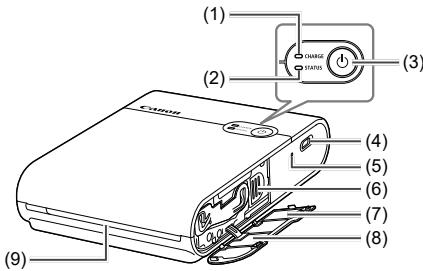
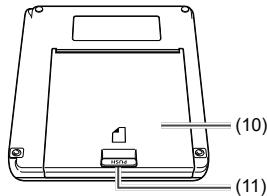
(1) CHARGE indicator (2) STATUS indicator (3) Power button (4) Paper feed (5) Power switch (6) Release lever
(7) Label with QR code (8) Cassette cover with serial numbers (9) Output slot (10) Paper compartment cover (11) Open button

Place the printer on a table or other flat, stable surface. Do not place the printer on an unstable or inclined surface. Do not place objects over the output slot that could block the paper during printing. For re-registering the printer, for example, after replacing the model of the smartphone, a label with a QR code is required. Photograph the QR code using the camera function of the smartphone, etc., and store the photo in a safe place.

If the paper is loosely stretched, carefully turn the star wheel to tighten it.
Do not touch the paper with the serial numbers.
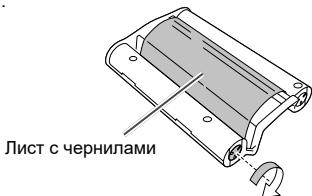
Printing cannot be stopped.
Even if you cancel printing during printing, it will continue until the current print job is completed. In case of canceling printing during printing of multiple sheets, printing stops after the current sheet is finished.
Paper
Make sure the paper is installed correctly. Make sure the paper is not wrinkled, folded, or contains printed images. Make sure no more than 10 sheets are loaded. Make sure the specified paper is used. (3)
Cannot print the specified number of sheets, or not all paper is used.
Paper may remain if all ink from the cassette is used up.
Paper does not come out of the output slot.
If the paper is partially out of the front of the printer, pull the paper out. However, if the paper cannot be pulled out with your fingers without excessive force, do not pull it with excessive force. In this case, turn the power off and on several times to eject the paper. In case of accidental power off during printing, turn on the power and wait until the paper comes out. If the paper is jammed, contact the customer service department. Do not try to forcibly remove jammed paper. This may cause malfunction.
Wi-Fi
A message is displayed: "Printer not found."
- Power is turned on. (7) The location is determined using the smartphone's services. To register the printer for the first time in the app, tap in the upper left corner of the app's home screen, then tap "Use another QR code?". Registration using the QR code will be impossible if you have changed the password using the "Change password" function. In this case, register the printer manually. If you have forgotten your password, perform the following steps to initialize the printer settings, then register the printer in the app again.
Turn on the power. -> Press and hold the power button. After 1 second, the STATUS indicator turns off. -> Keep holding the power button. -> When the STATUS indicator starts flashing, release the power button.
The operation takes a long time.
Do not use the printer near microwave ovens or equipment (Bluetooth, etc.) that uses frequencies in the 2.4 GHz range. This may have a negative effect on the propagation of Wi-Fi signals. Place the printer and smartphone at a short distance without obstacles between them.
App
Cannot scan the QR code.
Make sure that no shadow falls on the QR code and that the QR code is scanned within the specified area. Some smartphones may not be able to scan QR codes correctly. In this case, register the printer manually.
The message "This photo cannot be used." is displayed.
If the app displays the message "This photo cannot be used.", the image may be too large. Save, crop, or reduce the image size in some other way, then try the operation again.
If an error message is displayed
- When an error occurs in the printer, the printer indicators will indicate the error, and a message will be displayed on the smartphone screen. If actions that need to be performed are displayed along with the error message, perform the indicated actions. If only the error message is displayed, see the examples in the "Troubleshooting" section and perform the corresponding checks. If the problem cannot be resolved, contact the customer support department. When turning the printer off and on again, before turning on the power, make sure that the paper and the ink cassette are correctly loaded.
Updating the printer app
Always use the latest version of SELPHY Photo Layout. (6) Before printing, it may be necessary to update the printer's built-in software. For this, a sufficient battery charge level is required. During the update of the built-in software, do not turn off the power and do not press the power switch or the wireless connection switch.
Storing printed photos
Apply the date mark on the photograph using a non-bleeding marker. To prevent discoloration of printed surfaces, avoid storing photographs in places exposed to temperatures above 40°C, in humid or dusty places, and in places exposed to direct sunlight. Do not attach adhesive tape to printed surfaces, do not allow printed surfaces to come into contact with vinyl or plastic sheets, do not apply such paint solvents as alcohol to printed surfaces, and do not leave printed surfaces in close contact with other objects, etc. This may lead to discoloration, fading, and color transfer. When storing photographs in an album, choose an album with non-PVC, polypropylene, or cellulose acetate pockets.

Printed surfaces may discolor depending on the condition and storage time. Canon Inc. is not responsible for such discoloration.
Error after printing
Turn off the power. Store paper and cassettes away from the printer. Store the printer horizontally in a dark place, protected from dust and dirt. Dust and dirt that get into the printer may cause white streaks on photographs or other malfunctions.

Store unopened paper and cassette packages in a dark place.
Daily handling
Do not expose the device to excessive vibration. This may cause paper jams or other malfunctions. Do not expose the device to shocks or volatile substances. Also, do not allow the device to come into contact with acidic or alcoholic objects for extended periods. This may cause damage to the exterior surfaces of the device. - When bringing the printer from a cold place to a warm one, place it in a sealed plastic bag to prevent condensation, and before removing the printer from the bag, allow it to warm up. In case of condensation, before use, leave the printer at room temperature until the water droplets disappear naturally. Remove the ink cartridges with a soft dry cloth.

Do not wipe the printer with a dirty cloth or with solvents such as benzene or paint thinner. This may cause damage to the exterior surfaces of the device, deformation, or peeling of the paint.
Do not use, leave, or store the product in the following places:
- In places where direct sunlight falls; - at temperatures above 40°C; - in humid, dusty places; - in places subject to strong vibration.
This may cause overheating or damage to the printer or adapter, which may result in electric shock, fire, or other injuries, and may also cause deformation of the product or adapter at high temperatures.
Trademarks
App Store, iPhone and iPad are trademarks of Apple Inc., registered in the U.S. and other countries. Google Play and Android are trademarks of Google LLC. QR code is a trademark of Denso Wave Inc. Wi-Fi, Wi-Fi Alliance, WPA™ and WPA2™ are trademarks and registered trademarks of Wi-Fi Alliance. All other trademarks are the property of their respective owners.
Disclaimer
Reproduction, transmission, or storage in a retrieval system of any part of this manual without the written permission of Canon is prohibited. Canon reserves the right to change the contents of this manual at any time without prior notice. Illustrations in this manual may differ slightly from the actual equipment. Notwithstanding the above, Canon is not responsible for damage caused by improper use of the equipment. For information about the software, see the "Third party software" section at the end of this manual.
SELPHY SQUARE QX10
Technical specifications
Power source
Dimensions
102.2 × 143.3 × 31.0 mm
Weight (printer body only)
Approx. 445 g
Country of origin: see the box.
3-30-2 Shimomaruko, Ohta-ku, Tokyo, 146-8501, Japan
Importer for Europe
Contact information is indicated on the box.
Store in a safe place.
S E L P H Y S Q U A R E QX10
COMPACT PHOTON PRINTER
Do not touch the document with your fingers.
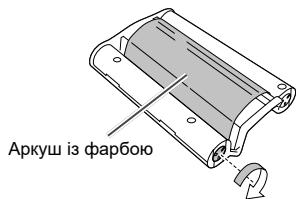
Printer preparation and operation
Read the information about turning on/off the printer, installing the cartridge, printer registration (QR code), printing and turning on/off.
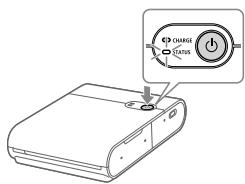
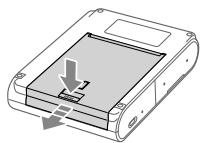
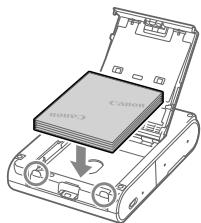
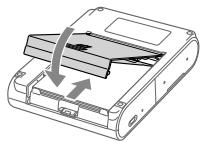
1 Turn on the printer.
Press and hold the power button until the status indicator starts blinking, then release it and wait until the status indicator lights steadily.
2 Load paper.
Press the open button, open the paper cover, then open the paper feed slot. Place paper (up to 10 sheets) with the printable side (Canon logo side) facing down, and adjust the paper guides so they do not protrude from the paper. Do not insert paper beyond the paper feed slot. Close the paper feed slot cover.
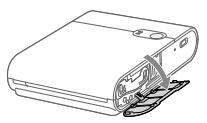
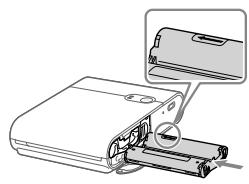
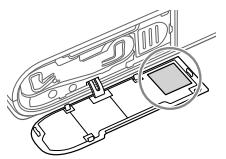
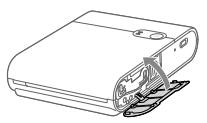
3 Install the cartridge.
Open the cartridge cover.
Insert the new cartridge into the printer with the correct side facing the label.
4 Connect and register the printer using the QR code.
Follow the instructions on the smartphone screen and register the printer using the QR code. Close the cartridge cover.
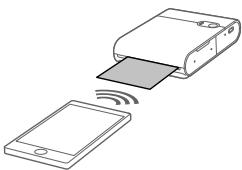
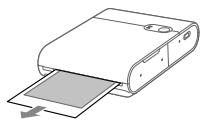
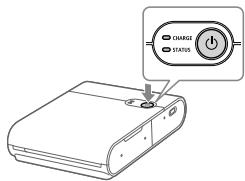
5 Dpykynte.
PnicBnBOKOpNCTaHHHaTNCiHbITpTnMaIte KONKJXuBHeHn,POKn iHdNkaTop CTAHY He BmKHeTbcra.
3aactepexhenn npd qac dpky
BctaHOBJTe npip dpyKOBaHOIO NOBepXHeIO (NOBepXH3 1NOrOTINOM Canon) BnI i6yIbeObepeXhI, uo6 He TopKaTmCra II. He BnKOpncToBvIe npip,Ha kOMy Bxke DpykUbaN a6o Ha kOMy e HapNCu nn IHsui No3HaQKn. Пд ус дукуnanip BuxoOnt b 3 OTBOPy dЯ BvBoOy napepy 6aRaTo pa3iB. He TЯHnIt b3a nanip, pOKn Ha cMaprfoHi He 3'YBaTbCny NobiDOMJIeHN py Te, lo Tpe6a BITaTn nanip. He nepepnbaiTe 3b'30k Do 3aBepseHnI pyky. y pa3i nepepnbHHa 3b'3ky npK moKe 6yTu BIKOHaHO IInue qacTKOBO. He BiDkPnBaIe KpnUky BiDcIky dIy KapTpIzJa a6o KpnUky BiDcIky dIy panepy nI dyac po6Ot npInTepa. KUO CTaH «OiyuBaHHn DpyKy» TpBAtmE npi6n3He 10 XbInH, XINBLeHHA BtOMaTUnHO BmKHeTbC.ДЯ npoOBKeHHn DpyKy HATNCiTb KONky XINBLeHHN.
Texhichi xapaKtepncnkn
KINBHeHH He BMnKaCTbCra.
- IpepeBipTe pibEnb 3apAyn ay akyMnyTopa. KksoakymyIaTOp He 3apJdxKaTbC,HaTNCHtB npeMnKaU npMyC0BOro BmMKaHHa (4) 3a DOnOMoro TOHKOrO CTpnXnHa i 3HOBy cnp6oyTe 3apJdntu akymyIaTOp.
3apnKaHH
AkymyIyTop He 3apdkaetbcra.
Пд ус дуку akymларTop He 3apяджаetbся.Зарджайе akymларTopу ctahi OikyBaHHЯ дуку abo BIMKHeHHЯ XINBHeHHЯ. BukopucToByTe 3a3HaueHn 3apdHn npucTpI. KksoakymyIaTOp He 3apJdxKaTbC,HaTNCHtB npeMnKaU npMyC0BOro BmMKaHHa4)3a DOnOMorO ToHKOro CTpnXn i 3HOBy cnp6oyTe 3apJdNTn akymyIaTOp.
AkymnyTop wBnKo po3paJkaetbcra.
B yMOBaX Hn3bKOI Tempepatypn IpoOyKTnBHCtB aKymyJITopa 3HIXKyETbcra. 3aIeXHO BID HanaTByaHb DpyKy, CNOxNBAHHa 3apA dy aKymyTopa MoKe 36ilbuntncb. 3aayakymyIaTOPa cnoKmbcBc8 B cTaH ouykBaHH npky. IyraTOO 36ilbwni KibKiCtB CTOpIHOK, kIMoKHa HApKyBaTN 3a OINH 3apAkyMlyaTOPa, peKOMeHNyETcb BmMKaTN XNBnEHn YOpa3i nic73abepeHnH npky. - Iporpama Bka3ye npnbIIm3Hn pibeHb 3ap4y akyMnyTopa, i, 3aJexHo BID yMOB dpKy, akyMnyTOp MOKe 7BnIKo po3prntnc. AkyMnyTOp peKOMeHdyEcbc 3ap4xKaTu HeBdO3i nCJIra BkOpNCtAHH.
CtaIacn NOMJIka 3apJxKaHn. (IHnKATOp CTAHY: nobIbHo 6JImae YepBOHm, IHnKATOp 3APJXKAHHr: nobIbHo 6JImae 3eJIeHm)
3aepdkaHn6ynde Tmucabo 3ynHeo, kkuo TeMnepaTpa npntepa doCraHne neBHOro pIBHa a6o nepeBnUHTb Ioro. He e HecnpabHcTIO. BiD'edHaTe 3apdHn npCTpiB, BmKHiB JxNBHeHH Ta 3aueKaIe, nOKn npInTep oxOJHOe. POMINK3aepdkaHn BmHKaOTb qactiue niD qac 6e3nepepBHorO dpyKu, BUCOKoi TEMnepatypn HabKOJIuHbORO cepEDOBua Qn peperpBaHn npInTepa.
3apJxHnTpNBaEObO a6o CTanacn NOMnKAp3apJxHaHH. (INdkaTop CTAHY: wBnko 6nMae YepBOHM, INdkaTop 3APJXAHHH: wBnKO 6nMae 3eJeHM)
If the printer was not used for a long time, the print quality may deteriorate. If the printer has not been used for a long time, clean the print head. Use the designated charging device. (11) If the problem is not resolved, contact the customer service center.
Printing
Printing is not possible.
- Check that the power cord is connected. (7)
- Check that the ink cartridge is installed correctly and the paper is loaded. (7, 8)
- Check that the paper is not jammed. (4)
- Check that the paper used is the designated paper. (3) The ink cartridge may be empty. Replace the ink cartridge. Load paper. (7, 8)
The printed image is blurry.
Check that the paper is not wrinkled or dirty. - Check that there is no dust or dirt inside the printer. - Check that the inside of the printer is not contaminated. Check that the printer is not placed near devices that generate electromagnetic waves or magnetic fields.
The colors on the printout differ from the colors on the screen.
The method of color reproduction on the screen and on paper differs. Also, colors vary depending on the environment (color and intensity of light) in which the document is viewed, and the color settings of the screen.
Printing takes a long time.
Printing will be temporarily paused if the printer temperature exceeds the specified level. This is not a malfunction. Wait a moment for printing to resume, or turn off the power and wait for the printer to cool down. Printing may pause temporarily from time to time, and therefore may take longer than usual. In case of continuous printing, high ambient temperature, or overuse of the printer, the number of temporary pauses may increase.
Printing cannot be paused.
To cancel a print job, press the Cancel button. Printing will continue until the current operation is completed. If you cancel printing while printing multiple pages, printing will be paused after the current page is finished.
Paper
- Check that the paper is installed correctly. (7)
- Check that the paper is not curled or wrinkled, and that there is no crease on it.
- Check that no more than 10 sheets are loaded.
- Make sure you are using paper for its intended purpose. (3)
Do not force the specified number of sheets, or the paper may jam.
- Paper may jam if the cartridge is empty.
Paper does not feed correctly from the tray for paper feeding.
If paper comes out of the printer only partially, pull it out gently. If the paper does not pull out, pull it slightly toward you, but do not pull it with force. In that case, press the feed button several times, then press it again until the paper is ejected. If paper jammed during printing, press the feed button again and wait until the paper is ejected. If paper is stuck, contact customer support. Do not attempt to pull out paper that is stuck by force. This may cause malfunction.
Wi-Fi
The printer cannot be found.
- Check that the smartphone is connected. (7) Turn on the smartphone's wireless connection. To re-register the printer in the app, tap the top right corner of the app's home screen, then select "Do you want to use another QX10?"
- Re-registration via QR code will be impossible if the password has been changed in the "Change the password" menu. In that case, register the printer manually. If you forgot the password, perform the factory reset described below and re-register the printer in the app. Turn on the power. Press and hold the power button. After 1 second, the status indicator will blink. Release the power button when the status indicator starts blinking.
Press and hold the button for a long time.
Do not use the printer near a microwave oven or Bluetooth device, as it uses the 2.4 GHz frequency band. This may degrade the Wi-Fi signal. Place the printer and smartphone close to each other so that there are no obstacles between them.
Program
It cannot be scanned with a QR code.
- Make sure that the QR code is not dirty and that the QR code is scanned from the front side. Some smartphones may not be able to scan QR codes. In that case, register the printer manually.
The message "This photo cannot be used." is displayed.
If the message "This photo cannot be used." is displayed, the image may be too large. Change the image size by cropping, rotating, or other means, and then try printing again.

If an error message is displayed
If a problem occurs during printer operation, the printer will notify you of the error and a message will appear on the smartphone screen. If a message appears along with the error, follow the instructions shown. If only an error message appears, check the "Troubleshooting" section and take the necessary steps. If the problem is not resolved, contact Canon customer support. - If you turn the printer off and on again, wait a moment before turning it on to ensure that the paper is loaded correctly and the ink cartridge is installed.

Updating the program and printer
Always use the latest version of SELPHY Photo Layout. Update the printer firmware if an update is available. For this, you need a sufficiently charged battery. Do not turn off the power or press the power switch during the firmware update.
Storing printed photos
Use a permanent marker to write on photos. To prevent discoloration of printed surfaces, do not store photos in places with temperatures above 40°C, high humidity, or direct sunlight. Do not stick adhesive stickers on printed surfaces, do not allow printed surfaces to come into contact with vinyl materials, adhesives, or rubber, do not apply solvents such as alcohol or spray to printed surfaces, and do not bring printed surfaces into contact with other materials. This may cause discoloration, fading, or color transfer. If you store photos in an album, use an album with non-PVC, polypropylene, or polyester sleeves.

Depending on the conditions and duration of storage, printed surfaces may discolor. Canon is not responsible for this.
After printing
Turn off the power. Remove the paper cassette and store it separately. Store the printer on a flat surface in a dark place without dust or dirt. If dust or dirt gets into the printer, it may cause white spots on photos or other malfunctions.

Store unused paper and ink cartridges in a dark place.
Protect the device from impacts or shocks. They can cause damage to the device or other malfunctions. Protect the device from impacts when connecting cables and connectors. Also, allow the device to remain in contact with moving or vibrating parts for a long time. This can cause damage to the external surface. If you need to move the printer from a cold place to a warm one, leave it in a closed plastic bag until condensation forms on it, then wait until the printer temperature reaches the ambient temperature, and only then remove the bag. If condensation has formed, before using the printer, leave it in a climate-controlled environment and wait until the drops have evaporated naturally. Wipe the printer with a soft, dry cloth.

Never clean the printer with harmful chemicals or solvents, such as benzene or thinners. This can cause damage to the external surface and lead to the release of harmful substances.
Regulatory Information
Using the Network
Wireless LAN
Network)
This section describes the wireless network device. Model number: CD1158 (specifically, model WM321 with WLAN module). Countries and regions where the use of wireless LAN is permitted
In some countries and regions, there are restrictions on the use of wireless LANs, which are subject to national and local regulations. To comply with the regulations regarding wireless LANs, you can check where the use of such networks is permitted on the Canon website.
Please note that Canon is not responsible for problems that may arise as a result of using a wireless LAN in other countries and regions.
The following items may lead to the application of legal sanctions against you:
Modifications or alterations to the device
Issuance of certificates for the device.
Do not use the wireless LAN function of this device with medical equipment or other electronic devices.
Using the WLAN function with medical equipment or other electronic devices may interfere with the operation of those devices.
The device, being a radio transmitter, may interfere with the operation of other devices.
To avoid this, use it as a data source from such devices or do not use them simultaneously.
Safety precautions
Since Wi-Fi uses radio waves for signal transmission, it is necessary to follow stricter security measures than when using a wired LAN.
When using Wi-Fi, remember about the following aspects.
Monitoring of transmission
Third parties with malicious intent may monitor transmissions via Wi-Fi and attempt to obtain the data being sent.
- Unauthorized access to the network
Third parties with malicious intent may illegally use the device if they manage to intercept the information contained in the QR code.
If you need to change the network name, it is recommended to use the SELPHY Photo Layout app on your smartphone.
Disposal, maintenance, or transfer of the device
Before transferring, disposing of, or sending the device for repair, perform the initialization procedure described below.
Turn on the power. → Press and hold the power button. After 1 second, the indicator will start blinking. → Continue holding the power button. → When the indicator starts blinking rapidly, release the power button.
It is recommended to use the original Canon power adapter.
This product is designed for use with genuine Canon ink tanks.
Canon shall not be liable for any damage or loss caused by the use of ink tanks from other manufacturers (such as refilled or remanufactured ink tanks). Please note that the warranty does not cover malfunctions caused by the use of ink tanks from other manufacturers, although you may contact the service center.
WARNING
Dispose of used batteries in accordance with local regulations.

Instructions
Expected
Trademarks
App Store, iPhone and iPad are trademarks of Apple Inc., registered in the U.S. and other countries. Google Play and Android are trademarks of Google LLC. QR code is a trademark of Denso Wave Inc. Wi-Fi, Wi-Fi Alliance, WPA™ and WPA2™ are trademarks or registered trademarks of Wi-Fi Alliance. All other trademarks are the property of their respective owners.
WARNING
Unauthorized reproduction, transmission, or storage in information retrieval systems of any part of this manual is prohibited by Canon. Canon reserves the right to change the contents of this manual at any time without prior notice. Actual appearance may differ slightly from the illustrations in this manual. Despite all descriptions, Canon shall not be liable for any damage caused by improper use of the product. For information about third party software, refer to the "Third party software" section at the end of this manual.
Canon Ukraine LLC
Meynikova St. 2, Entrance A.3 - floor
01601, Kyiv
Ukraine
Third party software
This product includes third party software.
● XySSL
Portions based on XySSL Copyright (C) 2006-2008 Christophe Devine Copyright (C) 2009 Paul Bakker All rights reserved.
MBEDTLS
Portions based on MBEDTLS Copyright (C) 2006-2015, ARM Limited, All Rights Reserved SPDX-License-Identifier: Apache-2.0 Distributed on an "AS IS" BASIS, WITHOUT WARRANTIES OR CONDITIONS OF ANY KIND, either express or implied. You may obtain a copy of the Apache License at http://www.apache.org/licenses/License-2.0
Apache License
Version 2.0, January 2004
http://www.apache.org/licenses/
TERMS AND CONDITIONS FOR USE, REPRODUCTION, AND DISTRIBUTION
- Definitions.
"License" shall mean the terms and conditions for use, reproduction, and distribution as defined by Sections 1 through 9 of this document.
"Licensor" shall mean the copyright owner or entity authorized by the copyright owner that is granting the License.
"Legal Entity" shall mean the union of the acting entity and all other entities that control, are controlled by, or are under common control with that entity. For the purposes of this definition, "control" means (i) the power, direct or indirect, to cause the direction or management of such entity, whether by contract or otherwise, or (ii) ownership of fifty percent (50%) or more of the outstanding shares, or (iii) beneficial ownership of such entity.
"You" (or "Your") shall mean an individual or Legal Entity exercising permissions granted by this License.
"Source" form shall mean the preferred form for making modifications, including but not limited to software source code, documentation source, and configuration files.
"Object" form shall mean any form resulting from mechanical transformation or translation of a Source form, including but not limited to compiled object code, generated documentation, and conversions to other media types.
"Work" shall mean the work of authorship, whether in Source or Object form, made available under the License, as indicated by a copyright notice that is included in or attached to the work (an example is provided in the Appendix below).
"Derivative Works" shall mean any work, whether in Source or Object form, that is based on (or derived from) the Work and for which the editorial revisions, annotations, elaborations, or other modifications represent, as a whole, an original work of authorship. For the purposes of this License, Derivative Works shall not include works that remain separable from, or merely link (or bind by name) to the interfaces of, the Work and Derivative Works thereof.
"Contribution" shall mean any work of authorship, including the original version of the Work and any modifications or additions to that Work or Derivative Works thereof, that is intentionally submitted to Licensor for inclusion in the Work by the copyright owner or by an individual or Legal Entity authorized to submit on behalf of the copyright owner. For the purposes of this definition, "submitted" means any form of electronic, verbal, or written communication sent to the Licensor or its representatives, including but not limited to communication on electronic mailing lists, source code control systems, and issue tracking systems that are managed by, or on behalf of, the Licensor for the purpose of discussing and improving the Work, but excluding communication that is conspicuously marked or otherwise designated in writing by the copyright owner as "Not a Contribution."
"Contributor" shall mean Licensor and any individual or Legal Entity on behalf of whom a Contribution has been received by Licensor and subsequently incorporated within the Work.
- Grant of Copyright License. Subject to the terms and conditions of this License, each Contributor hereby grants to You a perpetual, worldwide, non-exclusive, no-charge, royalty-free, irrevocable copyright license to reproduce, prepare Derivative Works of, publicly display, publicly perform, sublicense, and distribute the Work and such Derivative Works in Source or Object form.
- Grant of Patent License. Subject to the terms and conditions of this License, each Contributor hereby grants to You a perpetual, worldwide, non-exclusive, no-charge, royalty-free, irrevocable (except as stated in this section) patent license to make, have made, use, offer to sell, sell, import, and otherwise transfer the Work, where such license applies only to those patent claims licensable by such Contributor that are necessarily infringed by their Contribution(s) alone or by combination of their Contribution(s) with the Work to which such Contribution(s) was submitted. If You institute patent litigation against any entity (including a cross-claim or counterclaim in a lawsuit) alleging that the Work or a Contribution incorporated within the Work constitutes direct or contributory patent infringement, then any patent licenses granted to You under this License for that Work shall terminate as of the date such litigation is filed.
- Redistribution. You may reproduce and distribute copies of the Work or Derivative Works thereof in any medium, with or without modifications, and in Source or Object form, provided that You meet the following conditions: (a) You must give any other recipients of the Work or Derivative Works a copy of this License; and
(b) You must cause any modified files to carry prominent notices stating that You changed the files; and (c) You must retain, in the Source form of any Derivative Works that You distribute, all copyright, patent, trademark, and attribution notices from the Source form of the Work, excluding those notices that do not pertain to any part of the Derivative Works; and (d) If the Work includes a "NOTICE" text file as part of its distribution, then any Derivative Works that You distribute must include a readable copy of the attribution notices contained within such NOTICE file, excluding those notices that do not pertain to any part of the Derivative Works, in at least one of the following places: within a NOTICE text file distributed as part of the Derivative Works; within the Source form or documentation, if provided along with the Derivative Works; or, within a display generated by the Derivative Works, if and wherever such third-party notices normally appear. The contents of the NOTICE file are for informational purposes only and do not modify the License. You may add Your own attribution notices within Derivative Works that You distribute, alongside or as an addendum to the NOTICE text from the Work, provided that such additional attribution notices cannot be construed as modifying the License.
You may add Your own copyright statement to Your modifications and may provide additional or different license terms and conditions for use, reproduction, or distribution of Your modifications, or for any such Derivative Works as a whole, provided Your use, reproduction, and distribution of the Work otherwise complies with the conditions stated in this License.
- Submission of Contributions. Unless You explicitly state otherwise, any Contribution intentionally submitted for inclusion in the Work by You to the Licensee shall be under the terms and conditions of this License, without any additional terms or conditions. Notwithstanding the above, nothing herein shall supersede or modify the terms of any separate license agreement you may have executed with Licensee regarding such Contributions.
- Trademarks. This License does not grant permission to use the trade names, trademarks, service marks, or product names of the Licensor, except as required for reasonable and customary use in describing the origin of the Work and reproducing the content of the NOTICE file.
- Disclaimer of Warranty. Unless required by applicable law or agreed to in writing, Licensee provides the Work (and each Contributor provides its Contributions) on an "AS IS" BASIS, WITHOUT WARRANTY OR CONDITIONS OF ANY KIND, either express or implied, including, without limitation, any warranties or conditions of TITLE, NON-INFRINGEMENT, MERCHANTABILITY, or FITNESS FOR A PARTICULAR PURPOSE. You are solely responsible for determining the appropriateness of using or redistributing the Work and assume any risks associated with Your exercise of permissions under this License.
- Limitation of Liability. In no event and under no legal theory, whether in tort (including negligence), contract, or otherwise, unless required by applicable law (such as deliberate and grossly negligent acts) or agreed to in writing, shall any Contributor be liable to You for damages, including any direct, indirect, special, incidental, or consequential damages of any character arising as a result of this License or out of the use or inability to use the Work (including but not limited to damages for loss of goodwill, work stoppage, computer failure or malfunction, or any and all other commercial damages or losses), even if such Contributor has been advised of the possibility of such damages.
- Accepting Warranty or Additional Liability. While redistributing the Work or Derivative Works thereof, You may choose to offer, and charge a fee for, acceptance of support, warranty, indemnity, or other liability obligations and/or rights consistent with this License. However, in accepting such obligations, You may act only on Your own behalf and on Your sole responsibility, not on behalf of any other Contributor, and only if You agree to indemnify, defend, and hold each Contributor harmless for any liability incurred by, or claims asserted against, such Contributor by reason of your accepting any such warranty or additional liability.
END OF TERMS AND CONDITIONS
APPENDIX: How to apply the Apache License to your work.
To apply the Apache License to your work, attach the following boilerplate notice, with the fields enclosed by brackets "[ ]" replaced with your own identifying information. (Don't include the brackets!) The text should be enclosed in the appropriate comment syntax for the file format. We also recommend that a file or class name and description of purpose be included on the same "printed page" as the copyright notice for easier identification within third-party archives.
Copyright [yyyy] [name of copyright owner]
Licensed under the Apache License, Version 2.0 (the "License"); you may not use this file except in compliance with the License. You may obtain a copy of the License at
http://www.apache.org/licenses/License-2.0
Unless required by applicable law or agreed to in writing, software distributed under the License is distributed on an "AS IS" BASIS, WITHOUT WARRANTY OR CONDITIONS OF ANY KIND, either express or implied.
See the License for the specific language governing permissions and limitations under the License.
snprintf
You can get the Standard Version from https://www.ijs.si/software/snprintf/ (snprintf_2.2.tar.gz).
Copyright 1999, Mark Martinec. All rights reserved.
This program is free software; you can redistribute it and/or modify it under the terms of the "Frontier Artistic License" which comes with this Kit.
The Frontier Artistic License Version 1.0
Derived from the Artistic License at OpenSource.org.
Submitted to OpenSource.org for Open Source Initiative certification.
Preamble
The intent of this document is to state the conditions under which a Package may be copied, such that the Copyright Holder maintains some semblance of artistic control over the development of the package, while giving the users of the package the right to use and distribute the Package in a more-or-less customary fashion, plus the right to make reasonable modifications.
Definitions
"Package" refers to the script, suite, file, or collection of scripts, suites, and/or files distributed by the Copyright Holder, and to derivatives of that Package created through textual modification.
"Standard Version" refers to such a Package if it has not been modified, or has been modified in accordance with the wishes of the Copyright Holder.
"Copyright Holder" is whoever is named in the copyright statement or statements for the package.
"You" is you, if you're thinking about copying or distributing this Package.
"Reasonable copying fee" is whatever you can justify on the basis of media cost, duplication charges, time of people involved, and so on. (You will not be required to justify it to the Copyright Holder, but only to the computing community at large as a market that must bear the fee.)
"Freely Available" means that no fee is charged for the item itself, though there may be fees involved in handling the item. It also means that recipients of the item may redistribute it under the same conditions they received it.
Terms
- You may make and give away verbatim copies of the source form of the Standard Version of this Package without restriction, provided that you duplicate all of the original copyright notices and associated disclaimers.
- You may apply bug fixes, portability fixes, and other modifications derived from the Public Domain or from the Copyright Holder. A Package modified in such a way shall still be considered the Standard Version.
- You may otherwise modify your copy of this Package in any way, provided that you insert a prominent notice in each changed script, suite, or file stating how and when you changed that script, suite, or file, and provided that you do at least ONE of the following:
a) Use the modified Package only within your corporation or organization, or retain the modified Package solely for personal use. b) Place your modifications in the Public Domain or otherwise make them Freely Available, such as by posting said modifications to Usenet or an equivalent medium, or placing the modifications on a major archive site such as ftp.uu.net, or by allowing the Copyright Holder to include your modifications in the Standard Version of the Package. c) Rename any non-standard executables so the names do not conflict with standard executables, which must also be provided, and provide a separate manual page (or equivalent) for each non-standard executable that clearly documents how it differs from the Standard Version. d) Make other distribution arrangements with the Copyright Holder.
- You may distribute the programs of this Package in object code or executable form, provided that you do at least ONE of the following:
a) Distribute a Standard Version of the executables and library files, together with instructions (in the manual page or equivalent) on where to get the Standard Version. b) Accompany the distribution with the machine-readable source of the Package with your modifications. c) Accompany any non-standard executables with their corresponding Standard Version executables, give the non-standard executables non-standard names, and clearly document the differences in manual pages (or equivalent), together with instructions on where to get the Standard Version. d) Make other distribution arrangements with the Copyright Holder.
- You may charge a reasonable copying fee for any distribution of this Package. You may charge any fee you choose for support of this Package. You may not charge a fee for this Package itself. However, you may distribute this Package in aggregate with other (possibly commercial) programs as part of a larger (possibly commercial) software distribution provided that you do not advertise this Package as a product of your own.
- The scripts and library files supplied as input to or produced as output from the programs of this Package do not automatically fall under the copyright of this Package, but belong to whomever generated them, and may be sold commercially, and may be aggregated with this Package.
- Scripts, suites, or programs supplied by you that depend on or otherwise make use of this Package shall not be considered part of this Package.
- The name of the Copyright Holder may not be used to endorse or promote products derived from this software without specific prior written permission.
- THIS PACKAGE IS PROVIDED "AS IS" AND WITHOUT ANY EXPRESS OR IMPLIED WARRANTY, INCLUDING, WITHOUT LIMITATION, THE IMPLIED WARRANTY OF MERCHANTIBILITY AND FITNESS FOR A PARTICULAR PURPOSE.
The End
http://www.spinwardstars.com/frontier/fal.html
WPA Suppliant
Copyright (c) 2003-2012, Jouni Malinen j@w1.fi and contributors All Rights Reserved.
This software may be distributed, used, and modified under the terms of BSD license:
Redistribution and use in source and binary forms, with or without modification, are permitted provided that the following conditions are met:
- Redistributions of source code must retain the above copyright notice, this list of conditions and the following disclaimer.
- Redistributions in binary form must reproduce the above copyright notice, this list of conditions and the following disclaimer in the documentation and/or other materials provided with the distribution.
- Neither the name(s) of the above-listed copyright holder(s) nor the names of its contributors may be used to endorse or promote products derived from this software without specific prior written permission.
THIS SOFTWARE IS PROVIDED BY THE COPYRIGHT HOLDERS AND CONTRIBUTORS "AS IS" AND ANY EXPRESS OR IMPLIED WARRANTIES, INCLUDING, BUT NOT LIMITED TO, THE IMPLIED WARRANTIES OF MERCHANTABILITY AND FITNESS FOR A PARTICULAR PURPOSE ARE DISCLAIMED. IN NO EVENT SHALL THE COPYRIGHT OWNER OR CONTRIBUTORS BE LIABLE FOR ANY DIRECT, INDIRECT, INCIDENTAL, SPECIAL, EXEMPLARY, OR CONSEQUENTIAL DAMAGES (INCLUDING, BUT NOT LIMITED TO, PROCUREMENT OF SUBSTITUTE GOODS OR SERVICES; LOSS OF USE, DATA, OR PROFITS; OR BUSINESS INTERRUPTION) HOWEVER CAUSED AND ON ANY THEORY OF LIABILITY, WHETHER IN CONTRACT, STRICT LIABILITY, OR TORT (INCLUDING NEGLIGENCE OR OTHERWISE) ARISING IN ANY WAY OUT OF THE USE OF THIS SOFTWARE, EVEN IF ADVISED OF THE POSSIBILITY OF SUCH DAMAGE.
iperf, Copyright (c) 1999,2000,2001,2002,2003,2004,2005 The Board of Trustees of the University of Illinois
All Rights Reserved.
iperf performance test
Mark Gates
Ajay Tirumala
Jim Ferguson
Jon Dugan
Feng Qin
Kevin Gibbs
John Estabrook
National Laboratory for Applied Network Research
National Center for Supercomputing Applications
University of Illinois at Urbana-Champaign
http://www.ncsa.uiuc.edu
Permission is hereby granted, free of charge, to any person obtaining a copy of this software (Iperf) and associated documentation files (the "Software"), to deal in the Software without restriction, including without limitation the rights to use, copy, modify, merge, publish, distribute, sublicense, and/or sell copies of the Software, and to permit persons to whom the Software is furnished to do so, subject to the following conditions:
- Redistributions of source code must retain the above copyright notice, this list of conditions and the following disclaimers.
- Redistributions in binary form must reproduce the above copyright notice, this list of conditions and the following disclaimers in the documentation and/or other materials provided with the distribution.
- Neither the names of the University of Illinois, NCSA, nor the names of its contributors may be used to endorse or promote products derived from this Software without specific prior written permission.
THE SOFTWARE IS PROVIDED "AS IS", WITHOUT WARRANTY OF ANY KIND, EXPRESS OR IMPLIED, INCLUDING BUT NOT LIMITED TO THE WARRANTY OF MERCHANTABILITY, FITNESS FOR A PARTICULAR PURPOSE AND NONINFRINGEMENT. IN NO EVENT SHALL THE CONTRIBUTORS OR COPYRIGHT HOLDERS BE LIABLE FOR ANY CLAIM, DAMAGES OR OTHER LIABILITY, WHETHER IN AN ACTION OF CONTRACT, TORT OR OTHERWISE, ARISING FROM, OUT OF OR IN CONNECTION WITH THE SOFTWARE OR THE USE OR OTHER DEALINGS IN THE SOFTWARE.
Apple Inc. iPad iPhone App Store
- 10.
. Google LLC. Android , Google Play
Denso Wave Inc. 35423423 QR Code
WPA2TM, WPA™, Wi-Fi Alliance®, Wi-Fi®
Wi-Fi Alliance
"Third party software" 1
JdD 1
L 1 1 1 1 1 1 1 1 1 1 1 1 1 1 1 1 1 1 1 1 1 1 1 1 1 1 1 1 1 1 1 1 1 1 1 1 1 1 1 1 1 1 1 1 1 1 1 1 1 1 0
Canon 1
Canon no yllal llllall g oolilililie 1e gill lglg pssnaglll lld GnBn 1/00000000000000000000000000000000000000000000000000000000000000000000000000000000000000000000000000
Aullll lal 1aunlll lalalnla
jiaua jui


a 1
Ciiial 101
julilyl
jaiy jaiy jaiy jaiy jaiy jaiy jaiy jaiy jaiy jaiy jaiy jaiy jaiy jaiy jaiy jaiy jaiy jaiy jaiy jaiy jaiy jaiy jaiy jaiy jaiy jaiy jaiy jaiy jaiy jaiy jaiy jaiy jaiy jaiy jali y
Aulk 15 k 15 k 15 k 15 k 15 k 15 k 15 k 15 k
L (WLAN)


"This photo cannot be used."
(Fig.) .SELPHY Photo Layout
Wi-Fi
"The printer cannot be found."
pduu yrrall aks jpi pi j 15 kkaa qauw al yau w j npduu w uynn 1. "Change the password"
a 1
STATUS 1 aaiy i yj 1 1 jie baii yj waii + aiil
(11)
aal aal aal aal aal aal aal aal aal aal aal aal aal aal
Jaaalll Jai jai piai
Aaiiaiall aalllg yaiyblall
aIbll cIaIe! 1le Ilaie! ayIabll aIyai
1 1
iie 151aie aee yae aee aee eae ee eae eae eae eae eae eae eae eae
a
2 0 1, × 1 5 5, 7 × 1. 4, 9 g _ 1 2
(δj _ j j _ j ^ i _ i )
(baidellbalpus) ≠ te 0 gold
a _ ij = a _ ij · / · - a _ ij = a _ ij · 0
∴ · - γ ·
jits 1 9 ... gamma d cl j · , 0 ± cl j · , j
(a _ i a _ j a _ k ...) (a _ i) ^ = _ l = 1 ^ n a _ l a _ l + 1 ... a _ l + n
0.5 kg = 207
Cl2 ↓ 1.
2017 × 175123070 × 10
(L ∪ S)
Canon distribution
Acb
y
a aae eae ae aee
aai jia acllbll iayi ayi Jauyilabla cui la. aclll gai jauyilabla
Aaall lai lai g aai oai oai
y
aill jbiol aclll
aalln g jll all jpa aellall
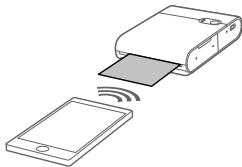
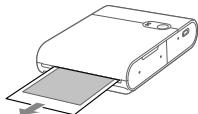
aal
aaiall jjle jnly bai (al)STATUS
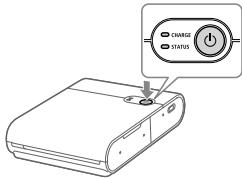
aalllg 1
i jai ci jaiy aikai jaiy
auii jai iiaiuiau aaiai uua
a
sill aill ailiele aiaeallll
aaii jao aaiy aaii baiu y
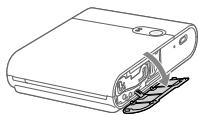
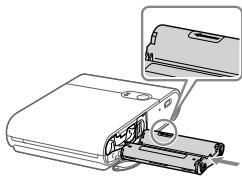
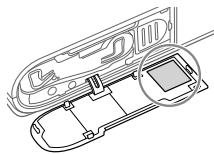
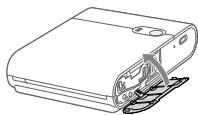
(1) STATUS
15bc 150
a111 10
(Canon
e 1
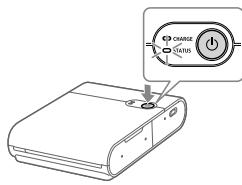
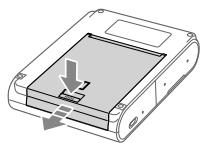
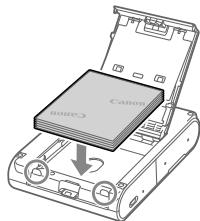
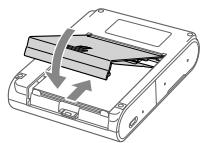
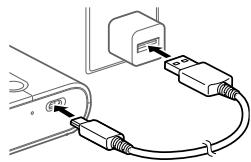
SELPHY Photo Layout
.SELPHY Photo Layout
j j App Store m j "SELPHY Photo Layout" j (Android) Google Play i (iPad iPhone .SELPHY Photo Layout
.SELPHY Photo Layout


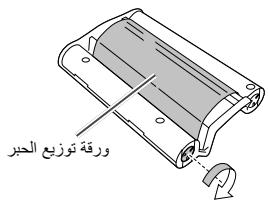

SELPHY SQUARE QX10
Canon




- SELPHY SQUARE QX
- INSTRUCTION MANUAL
- JAPANESE
- GETTING STARTED
- ENGLISH
- SAFETY INSTRUCTIONS
- WARNING
- CAUTION
- BEFORE USE
- PACKAGE CONTENTS
- LAMP INDICATIONS
- CHARGING THE BATTERY
- INSTALLING THE APP
- PREPARING THE PRINTER AND PRINTING
- TURN ON THE POWER
- LOAD THE PAPER
- LOAD THE INK CASSETTE
- CONNECT AND REGISTER THE PRINTER USING THE QR CODE
- TURN OFF THE POWER
- PRINTING PRECAUTIONS
- TROUBLESHOOTING
- POWER
- THE POWER DOES NOT TURN ON
- CHARGING
- THE BATTERY CANNOT BE CHARGED
- THE BATTERY RUNS DOWN QUICKLY
- A CHARGING ERROR OCCURS. (STATUS LAMP: BLINKS SLOWLY RED, CHARGE LAMP: BLINKS SLOWLY GREEN)
- CHARGING TAKES A LONG TIME OR A CHARGING ERROR OCCURS. (STATUS LAMP: BLINKS QUICKLY RED, CHARGE LAMP: BLINKS QUICKLY GREEN)
- PRINTING
- PRINTING IS NOT POSSIBLE
- IMAGES CANNOT BE PRINTED CLEANLY
- THE SMARTPHONE SCREEN COLORS DIFFER FROM THE PRINTED COLORS
- PRINTING TAKES TIME
- PRINTING CANNOT BE STOPPED
- PAPER
- THE PAPER IS NOT FED PROPERLY OR THE JAMS FREQUENTLY
- THE SPECIFIED NUMBER OF SHEETS CANNOT BE PRINTED, OR PAPER REMAINS
- PAPER IS NOT EJECTED FROM THE DELIVERY OUTLET
- WI-FI
- THE MESSAGE "THE PRINTER CANNOT BE FOUND." IS DISPLAYED
- APP
- THE QR CODE CANNOT BE SCANNED
- THE MESSAGE "THIS PHOTO CANNOT BE USED." IS DISPLAYED
- WHEN AN ERROR MESSAGE IS DISPLAYED
- UPDATING THE APP AND THE PRINTER
- STORING PRINTED PHOTOS
- TIDYING UP AFTER PRINTING
- DAILY HANDLING
- WI-FI (WIRELESS LAN) PRECAUTIONS
- RADIO WAVE INTERFERENCE PRECAUTIONS
- CANON EUROPA N.V
- SECURITY PRECAUTIONS
- PRECAUTIONS BEFORE REPAIR, DISPOSAL, OR TRANSFER OF OWNERSHIP
- USE OF GENUINE CANON ACCESSORIES IS RECOMMENDED
- INDIA ONLY
- FCC NOTICE
- CANON U.S.A., INC
- FCC/IC NOTICE
- FOR CA, USA ONLY
- CANADIAN RADIO INTERFERENCE REGULATIONS
- USA AND CANADA ONLY
- TRADEMARKS
- DISCLAIMER
- S E L P H Y SQUARE QX
- PŘÍRUČKA ZAČÍNÁME
- CZECH
- QUICK START GUIDE
- DANISH
- CLEAN UP AFTER PRINTING
- SAFETY REGULATIONS
- S E L P H Y S Q U A R E QX
- GETTING STARTED GUIDE
- FINNISH
- S E L P H Y S Q U A R E Q X
- TURKISH
- SAFETY PRECAUTIONS
- HUUTU UTLUUNU
- RU8BR
- DO NOT USE THE PRODUCT IN A HUMID OR DUSTY PLACE
- ONLNAN
- DO NOT USE THE PRODUCT NEAR WATER OR IN A WET PLACE
- KEEP THE PRODUCT AWAY FROM DIRECT SUNLIGHT
- ERROR: THE PRINTER CANNOT BE FOUND
- THE CONNECTION MAY TAKE SOME TIME
- RWUTUWON
- PRESS THE BUTTON TO SCAN THE QR CODE
- IF "THIS PHOTO CANNOT BE USED." IS DISPLAYED
- THE PHOTO MAY NOT BE COMPATIBLE
- RWUGLUWOH U UNWHWNHWGNLU
- SUULW MLUUULWNUTN UWAHTUNWNNNNU
- BATTERY HANDLING
- WI-FI (WIRELESS LAN) CONNECTION
- TROUBLESHOOTING COMMON ISSUES
- UULUNWUAQNLJWU UHGUTN
- LWHUQQNL2UWNLUTN UWHUPWU UTNWUNNNQTN, HTNUWGTIN YUU UTHWULWNPJUWU HNWNLUGH UNHWUGTIN
- HUNHNNN E UNPNUU OQNUQNPNT CANON HNUWJ QNNOUNWUWJHU UWNUWUTN
- LUU29RCU8NHU
- UUNUWUGH NUZUGNLU
- UYNUULGOUJHWLUYUULNULUTN
- RNWNUUNL UWWNNUWWUNUULPNLHGH
- STHUHYUYLWU PLNIAWQHN
- ETJUNWNUUNLGUUL UNNPJLNN
- QWHTNP
- UW2 (UNWUJU UNUH20)
- OOO «KAHOH PY
- KBICKAHA HYCKAYIBIK
- KA3AKUJA
- KAYINECI3DJK HYCKAYNPBI
- ECKEPTY
- SAFETY
- PARTS AND CONTROLS
- PRINTING AND PRINTING SETTINGS
- INSERT PAPER
- LOAD PAPER
- CONNECT THE PRINTER USING THE QR CODE AND PRINT
- WAIT FOR THE PRINTER TO WARM UP
- STARTING THE PRINTING OPERATION
- TECHNICAL SPECIFICATIONS
- TROUBLESHOOTING AND MAINTENANCE
- BATTERY CHARGING TIME
- THE CHARGING INDICATOR MAY BE LIT. (STATUS (CHARGE) LAMP: RED BLINKING, CHARGE (CHARGING) LAMP: YELLOW BLINKING)
- THE CHARGING PROCESS MAY TAKE A LONG TIME OR THE CHARGING INDICATOR MAY LIGHT UP. (STATUS (CHARGE) LAMP: RED BLINKING SLOWLY, CHARGE (CHARGING) LAMP: YELLOW BLINKING SLOWLY)
- CHARGING IS NOT POSSIBLE
- CHARGING IS NOT POSSIBLE WITH THE COVER OPEN
- THE STARTUP SCREEN MAY DIFFER FROM THE SCREEN SHOWN IN THE MANUAL
- PRESS THE PAPER FEED BUTTON
- IT IS NOT POSSIBLE TO STOP THE PRINTING PROCESS
- USE PAPER THAT IS FOLDED OR ROLLED
- THE NUMBER OF COPIES TO BE PRINTED CAN BE SET OR CHANGED
- THE PAPER WILL BE EJECTED AFTER PRINTING
- BACBIN WIBIFAPYA YAKBIT KEPEK
- QR CODE SCANNING IS NOT POSSIBLE
- IF THE MESSAGE "THIS PHOTO CANNOT BE USED." APPEARS
- MAINTENANCE AND PRINTER STORAGE
- CLEANING AFTER PRINTING
- DAILY MAINTENANCE
- WI-FI (WIRELESS LAN)
- PRECAUTIONS
- RADIO WAVE PRECAUTIONS
- PRECAUTIONS FOR WIRELESS LAN
- PRINTING, SENDING TO A COMPUTER, OR SAVING TO A MEMORY CARD
- USE ONLY CANON-BRAND PAPER
- THEMES AND IMAGES
- KYRGYZ
- CONNECTING THE POWER
- PRESS THE CUBE BUTTON
- PRESS THE PAPER
- PRESS THE CASSETTE
- PRESS THE QR CODE BUTTON TO SCAN THE QR CODE
- THE BATTERY MAY HEAT UP DURING OPERATION
- THE BATTERY MAY LEAK. (IF THE BATTERY IS DAMAGED, IT MAY LEAK. IF THE BATTERY IS DAMAGED, IT MAY LEAK.)
- THE BATTERY MAY LEAK IF IT IS USED FOR A LONG TIME. (IF THE BATTERY IS DAMAGED, IT MAY LEAK. IF THE BATTERY IS DAMAGED, IT MAY LEAK.)
- BATTERY CHARGING
- BATTERY CHARGING IS NOT POSSIBLE
- THE PRINTER IS READY TO PRINT
- THE PRINT QUALITY MAY DIFFER FROM THE SCREEN DISPLAY
- THE BATTERY MAY LEAK IF IT IS USED FOR A LONG TIME
- DO NOT STOP THE PAPER FEED ABRUPTLY
- THE PAPER MAY JAM FREQUENTLY
- IF THE PAPER IS FED MORE THAN THE SPECIFIED NUMBER OF SHEETS, IT MAY JAM
- THE PAPER MAY COME OUT WITH A CURL
- THE PRINTER CANNOT BE FOUND." - CHECK THE CONNECTION
- THE PAPER FEED IS JAMMED
- SCAN THE QR CODE
- THIS PHOTO CANNOT BE USED." - THIS MESSAGE IS DISPLAYED
- PRINTER AND PAPER
- PRINTING PHOTOS
- PRINTING ON PAPER
- DAILY CARE
- WI-FI (WIRELESS LAN) SETTINGS
- RADIO WAVE INTERFERENCE
- NETWORK SETTINGS
- REPAIR, MAINTENANCE, AND CONSUMABLES
- CANON RECOMMENDS USING GENUINE CANON ACCESSORIES
- TATAHDBHBI NTETYY
- HAUANO PA60TBY
- PYCCKN
- YKA3AHNNO TEXNKE 6E3ONACHOCTN
- BHIMAHHE
- CANNOT PRINT THE SPECIFIED NUMBER OF SHEETS, OR NOT ALL PAPER IS USED
- PAPER DOES NOT COME OUT OF THE OUTPUT SLOT
- A MESSAGE IS DISPLAYED: "PRINTER NOT FOUND
- THE OPERATION TAKES A LONG TIME
- CANNOT SCAN THE QR CODE
- IF AN ERROR MESSAGE IS DISPLAYED
- UPDATING THE PRINTER APP
- ERROR AFTER PRINTING
- POWER SOURCE
- DIMENSIONS
- WEIGHT (PRINTER BODY ONLY)
- PRINTER PREPARATION AND OPERATION
- TURN ON THE PRINTER
- INSTALL THE CARTRIDGE
- DPYKYNTE
- AACTEPEXHENN NPD QAC DPKY
- TEXHICHI XAPAKTEPNCNKN
- KINBHEHH HE BMNKACTBCRA
- APNKAHH
- AKYMYIYTOP HE 3APDKAETBCRA
- AKYMNYTOP WBNKO PO3PAJKAETBCRA
- CTAIACN NOMJIKA 3APJXKAHN. (IHNKATOP CTAHY: NOBIBHO 6JIMAE YEPBOHM, IHNKATOP 3APJXKAHHR: NOBIBHO 6JIMAE 3EJIEHM)
- APJXHNTPNBAEOBO A6O CTANACN NOMNKAP3APJXHAHH. (INDKATOP CTAHY: WBNKO 6NMAE YEPBOHM, INDKATOP 3APJXAHHH: WBNKO 6NMAE 3EJEHM)
- THE PRINTED IMAGE IS BLURRY
- THE COLORS ON THE PRINTOUT DIFFER FROM THE COLORS ON THE SCREEN
- PRINTING TAKES A LONG TIME
- PRINTING CANNOT BE PAUSED
- DO NOT FORCE THE SPECIFIED NUMBER OF SHEETS, OR THE PAPER MAY JAM
- PAPER DOES NOT FEED CORRECTLY FROM THE TRAY FOR PAPER FEEDING
- THE PRINTER CANNOT BE FOUND
- PRESS AND HOLD THE BUTTON FOR A LONG TIME
- PROGRAM
- IT CANNOT BE SCANNED WITH A QR CODE
- UPDATING THE PROGRAM AND PRINTER
- AFTER PRINTING
- REGULATORY INFORMATION
- USING THE NETWORK
- WIRELESS LAN
- NETWORK)
- DISPOSAL, MAINTENANCE, OR TRANSFER OF THE DEVICE
- IT IS RECOMMENDED TO USE THE ORIGINAL CANON POWER ADAPTER
- THIRD PARTY SOFTWARE
- ● XYSSL
- MBEDTLS
- END OF TERMS AND CONDITIONS
- SNPRINTF
- PREAMBLE
- DEFINITIONS
- TERMS
- WPA SUPPLIANT
- CANON
- JULILYL
- AAL
Brand : CANON
Model : SELPHYSQUARE QX10S
Category : Photo printer