
HMNV 7184 DXT - Vacuum Cleaner HOOVER - Free user manual and instructions
Find the device manual for free HMNV 7184 DXT HOOVER in PDF.



| Product type | Canister vacuum cleaner |
| Brand | Hoover |
| Model | HMNV 7184 DXT |
| Nominal power | 800 W |
| Dust collection type | Bagless, cyclone |
| Tank capacity | 2 L |
| Filtration | Washable HEPA |
| Noise level | 76 dB |
| Operating radius | 8 m |
| Included accessories | Main brush, crevice tool, upholstery tool, floor brush |
| Weight | 5.2 kg |
| Dimensions (L x W x H) | 40 x 28 x 28 cm |
| Power supply | Mains, 220-240 V, 50/60 Hz |
| Cable length | 6 m |
| Filter maintenance | Monthly water cleaning, drying 24 h |
| Tank cleaning | Empty after each use, wash with warm water |
| Safety | Automatic shut-off in case of overheating, motor protection |
| Repairability | Spare parts available (filter, brush, seal) |
Frequently Asked Questions - HMNV 7184 DXT HOOVER
User questions about HMNV 7184 DXT HOOVER
0 question about this device. Answer the ones you know or ask your own.
Ask a new question about this device
Download the instructions for your Vacuum Cleaner in PDF format for free! Find your manual HMNV 7184 DXT - HOOVER and take your electronic device back in hand. On this page are published all the documents necessary for the use of your device. HMNV 7184 DXT by HOOVER.
USER MANUAL HMNV 7184 DXT HOOVER
DISPLAY TOP FEATURED
INTERFACCIA UTENTE INTERNA
CARATTERISTICHE TECNICHE
HUMIDITY EQUALISER
Tips for keeping food perfect in the Fridge
Where to store your foods in the fridge
Storing Frozen Food
ENERGY SAVING
TAKE CARE
Defrosting
Cleaning and Care
CHANGING THE INTERNAL LIGHT
REVERSING THE DOOR SWING
TROUBLE SHOOTING
Thankyouforpurchasingthisproduct.
Before using your refrigerator, please carefully read this instruction manual in order to maximize its performance. Store all documentation for subsequent use or for other owners. This product is intended solely for household use or similar applications such as:
-
the kitchen area for personnel in shops, offices and other working environments
-
on farms, by clientele of hotels, motels and other environments of a residential type
-atbedandbreakfasts(B&B)
for catering services and similar applications not for retail sale.
This appliance must be used only for purposes of storage of food, any other use is considered dangerous and the manufacturer will not be
responsible for any omissions. Also, it is recommended that you take note of the warranty conditions. Please, to obtain the best possible performance and trouble free operation from your appliance it is very important to carefully read these instructions. Failure to observe these instructions may invalidate your right to free service during the guarantee period.
SAFETY INFORMATION
This guide contains many important safety information. Please, we suggest you keep these instructions in a safe place for easy reference and a good experience with the appliance.
The refrigerator contains a refrigerant gas (R600a: isobutane) and insulating gas (cyclopentane), with high compatibility with the environment, that are, however, inflammable.

Caution: risk of fire
If the refrigerant circuit should be damaged:
- Avoid opening flame and sources of ignition.
Thoroughly ventilate the room in which the appliance is situated
WARNING!
- Care must be taken
while cleaning/carrying the appliance to avoid touching the condenser metal wires at the back of the appliance, as you might injure your fingers and hands or damage your product.
- This appliance is not designed for stacking with any other appliance. Do not attempt to sit or stand on top of your appliance as it is not designed for such use. You could injure yourself or damage the appliance.
Make sure that mains cable is not caught under the appliance during and after carrying/moving the appliance, to avoid the mains cable becoming cut or damaged. - When positioning your appliance take
care not to damage your flooring, pipes, wall coverings etc. Do not move the appliance by pulling by the lid or handle. Do not allow children to play with the appliance or tamper with the controls. Our company declines to accept any liability should the instructions not be followed.
- Do not install the appliance in humid, oily or dusty places, nor expose it to direct sunlight and to water.
- Do not install the appliance near heaters or inflammable materials.
- If there is a power failure do not open the lid. Frozen food should not be affected if the failure lasts for less than 20 hours. If the failure is
longer, then the food should be checked and eaten immediately or cooked and then refrozen.
If you find that the lid of the chest freezer is difficult to open just after you have closed it, don't worry. This is due to the pressure difference which will equalize and allow the lid to be opened normally after a few minutes.
- Do not connect the appliance to the electricity supply until all packing and transit protectors have been removed.
- Leave to stand for at least 4 hours before switching on to allow compressor oil to settle if transported horizontally.
- This freezer must only be used for its intended purpose (i.e. storing and
freezing of edible foodstuff).
- Do not store medicine or research materials in the Wine Coolers. When the material that requires a strict control of storage temperatures is to be stored, it is possible that it will deteriorate or an uncontrolled reaction may occur that can cause risks.
- Before performing any operation, unplug the power cord from the power socket.
- On delivery, check to make sure that the product is not damaged and that all the parts and accessories are in perfect condition.
If in the refrigeration system a leak is noted, do not touch the wall outlet and do not use open flames. Open the
window and let air into the room. Then call a service center to ask for repair.
- Do not use extension cords or adapters.
- Do not excessively pull or fold the power cord or touch the plug with wet hands.
- Do not damage the plug and/or the power cord; this could cause electrical shocks or fires.
- If the supply cord is damaged, it must be replaced by the manufacturer, its service agent or similarly qualified person in order to avoid a hazard.
- Do not place or store inflammable and highly volatile materials such as ether, petrol, LPG, propane gas, aerosol spray cans, adhesives, pure alcohol, etc. These materials may cause
an explosion.
- Do not use or store inflammable sprays, such as spray paint, near the Wine Coolers. It could cause an explosion or fire.
- Do not place objects and/or containers filled with water on the top of the appliance.
- We do not recommend the use of extension leads and multi-way adapters.
-
Do not dispose of the appliance on a fire. Take care not to damage, the cooling circuit/pipes of the appliance in transportation and in use. In case of damage do not expose the appliance to fire, potential ignition source and immediately ventilate the room where the appliance is situated.
-
The refrigeration system positioned behind and inside the Wine Coolers contains refrigerant. Therefore, avoid damaging the tubes.
- Do not use electrical appliances inside the food storage compartments of the appliance, unless they are of the type recommended by the manufacturer.
- Do not damage the refrigerant circuit.
- Do not use mechanical devices or other means to accelerate the defrosting process, other than those recommended by the manufacturer.
- Do not use electrical appliances inside the food storage compartments, unless they are of the type recommended by the manufacturer.
- Do not touch internal
cooling elements, especially with wet hands, to avoid cracks or injuries.
- Maintain the ventilation openings in the appliance enclosure or in the built-in structure, free of obstruction.
- Do not use pointed or sharp-edged objects such as knives or forks to remove the frost.
- Never use hairdryers, electrical heaters or other such electrical appliances for defrosting.
- Do not scrape with a knife or sharp object to remove frost or ice that occurs. With these, the refrigerant circuit can be damaged, the spill from which can cause a fire or damage your eyes.
- Do not use mechanical devices or other equipment to hasten
the defrosting process.
- Absolutely avoid the use of open flame or electrical equipment, such as heaters, steam cleaners, candles, oil lamps and the like in order to speed up the defrosting phase.
- Never use water wash the compressor position, wipe it with a dry cloth thoroughly after cleaning to prevent rust.
It is recommended to keep the plug clean, any excessive dust residues on the plug can be the cause fire. - The product is designed and built for domestic household use only.
-
The guarantee will be void if the product is installed or used in commercial or non-residential domestic household premises.
-
The product must be correctly installed, located and operated in accordance with the instructions contained in the User Instructions Booklet provided.
- The guarantee is applicable only to new products and is not transferable if the product is resold.
- Our company disclaims any liability for incidental or consequential damages.
- The guarantee does not in any way diminish your statutory or legal rights.
- Do not perform repairs on this Wine Coolers. All interventions must be performed solely by qualified personnel.
If you are discarding an old product with a lock or latch fitted to
the door, ensure that it is left in a safe condition to prevent the entrapment of children.
- This appliance can be used by children aged from 8 years and above and by persons with reduced physical, sensory or mental capabilities or with a lack of experience and knowledge; provided that they have been given adequate supervision or instruction concerning how to use the appliance in a safe way and understand the hazards involved.
- Children should not play with the appliance. Cleaning and user maintenance should not be made by children without supervision.
- Locks:If your
Fridge/Freeze is fitted with a lock, to prevent children being entrapped keep the key out of reach and not in the vicinity of the appliance. If disposing of an old Fridge/Freeze break off any old locks or latches as a safeguard.
COMBI REFRIGERATOR HOOVER Climate Class
The appliance is designed to operate at the limited range of ambient temperature, depending on climate zones. Do not use the appliance at the temperature out of the limit. Climate class of your appliance is indicated on the label with technical description inside the fridge compartment.
| Climate Class | Amb. T. (°C) | Amb. T. (°F) |
| SN | From 10 to 32 | From 50 to 90 |
| N | From 16 to 32 | From 61 to 90 |
| ST | From 16 to 38 | From 61 to 100 |
| T | From 16 to 43 | From 61 to 110 |
TRANSPORTATION INSTRUCTIONS
The appliance should be transported only in a vertical upright position. The packing as supplied must be intact during transportation. If during the course of transport the product has been transported horizontally, it must only be laid on its left hand side (when facing the door front) and it must not be operated for at least 4 hours to allow the system to settle after the appliance is brought back to upright position.
- Failure to comply with the above instructions could result in damage occurring to the appliance. The manufacturer will not be held responsible if these instructions are disregarded.
- The appliance must be protected against rain,
moisture and other atmospheric influences.
INSTALLATION INSTRUCTIONS
- If possible avoid placing the appliance near cookers, radiators or in direct sunlight as this will cause the compressor to run for long periods. If installed next to a source of heat or refrigerator, maintain the following minimum side clearances:
| From Cookers | 4" (100 mm) |
| From Radiators | 12" (300 mm) |
| From Fridges | 4" (100 mm) |
- Make sure that sufficient room, with an average temperature of between 16^ and 32^ , is provided around the appliance to ensure free air circulation. Ideally, a space of no less than 9cm on the back and 2cm on the sides.
- The appliance should be located on a smooth surface.
- It is forbidden to use the refrigerator outdoors.
- Protection from moisture. Do not locate the freezer in moist space to avoid the metal parts rusty. And do not spray water to the freezer, otherwise it will weaken the insulation and causes current leakage.
- Refer to "Cleaning and Care" section to prepare your appliance for use.
- If the freezer is installed in unheated areas, garages etc., in cold weather condensation may form on the outer surfaces. This is quite normal and is not a fault. Remove the condensation by wiping with a dry cloth.
- Never place Refrigerator in a wall recessed or into fitted cabinets or furniture when it is working, the grille at the back may become hot and the sides warm. Do not drape the Refrigerator with any covering.
STARTING TO USE
Before you starting to use the freezer, please check that:
- The interior is dry and air can circulate freely at the rear.
- Clean the interior as recommended under "TAKE CARE" section (electric parts of the refrigerator can only be wiped by dry cloth).
- Do not switch on until 4 hours after moving the fridge/freezer. The coolant fluid needs time to settle. If the appliance is switched off at any time, wait 30 minutes before switching back on to allow the coolant fluid to settle.
- Before connecting the Refrigerator to the mains supply position. The
thermostat control dias is located inside the Fridge compartment.
- Turn the thermostat knob to the "3" position and turn on the electricity. The compressor and the light inside the refrigerator will begin to work.
- Before storing foods in your refrigerator, turn the refrigerator on and wait for 24 hours, to make sure it is working properly and to allow the Fridge/Freezer to fail to the correct temperature.
- Open the door 30 minutes later, if the temperature in the refrigerator decreased obviously, it shows that the refrigerator system works well. When the refrigerator operates for a period of time, the temperature controller will automatically set the temperature within limits it opens.
COMBI OPERATION
Appliance connected to power at the first time:
When the appliance is connected to power at the first time, the display will be lit for 2 seconds before going normal and the appliance runs with intelligence function.
Display Control: When the refrigerator door is closed and there is no button operation in 3 minutes, the display light goes off.
When the display light is off, open the refrigerator door or click any button to light it up.
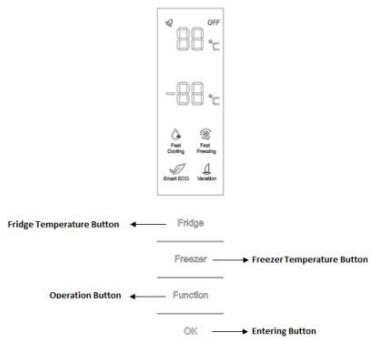
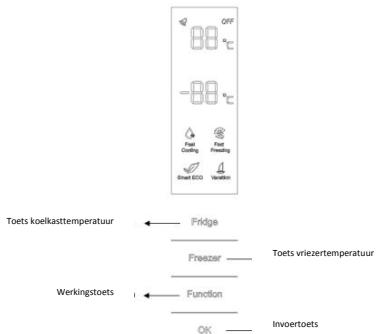
VERTICAL DISPLAY (Only on some models)
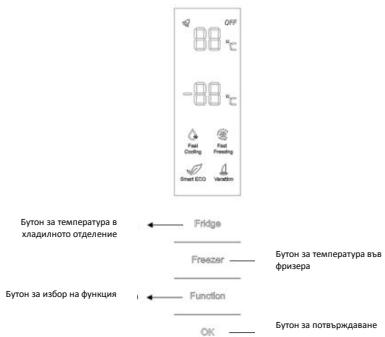
TEMPERATURE SETTING: Click the "Fridge" or "Freezer" button and when it flickers in the symbol, temperatures can be set. Each time when the button is clicked, the temperature changes accordingly. Temperatures cannot be set under functions of fast cooling, fast freezing, Smart ECO and vacation. Under temperature setting, if there is no button operation in 5 seconds, the button stops flickering and the set temperature comes into effect.
SMART ECO: Activate the Smart Eco button to set the temperatures of the fridge in max. energy efficiency conditions (+4°C for fridge temperature, -
18^ for freezer temperature).
To enter Smart Eco: Click "option" until it flickers and then click "OK" to enter this function.
To deactivate Smart Eco: Click "option" until it goes to Smart ECO, click "OK" to quit this function and the light goes off.
FAST COOLING: Activate Fast Cooling mode to start an additional pulse for a fast freezing of the fridge compartment. The function is activated and confirmed by the switching on of the dedicated LED icon.
To enter Fast Cooling: Click "option" until it flickers in "Fast Cooling" and then click "OK" to enter this function.
To deactivate Fast Cooling: Click "option" until it goes to "fast cooling" and then click "OK" to deactivate this function.
FAST FREEZING: Activate Fast Freezing to rapidly freeze big quantities of food keeping intact nutritional food properties. When the light in Fast Freezing goes off and the freezer temperature goes back to the value before fast freezing. When Fast Freezing time is up (26 hours), it deactivates automatically. When it goes to Vacation, Fast Freezing stops.
To enter Fast Freezing: Click "option" until it flickers in "Fast Freezing" and then click "OK" to enter this function.
To deactivate Fast Freezing: Click "option" until it goes to "fast freezing" and then click "OK" to quit this function.
VACATION: In case of long stops, the Vacation function can be used. This function deactivates the fridge compartment, while leaving the freezer on. Ensure that there is no food inside the fridge compartment before using this function. The function is activated and confirmed by the switching on of the dedicated LED icon. The light in Vacation goes off and the refrigerator temperature goes back to the value before Vacation.
Vacation quits under functions of Smart ECO and Fast Cooling.
To enter Vacation: Click "option" until it flickers in "Fast Freezing" and then click "OK" to enter this function.
To deactivate Vacation: Click "option" until it goes to "Vacation" and then click "OK" to quit this function.
POWER OFF MEMORY: Refrigerator can automatically keep all the setting in case of power off. When the unit is plugged in again, the refrigerator will run with the setting before power off.
POWER-ON DELAY: To prevent harm to the refrigerator in case of sudden power cut and power on, the unit does not start immediately if the power off time is less than 5 minutes.
FREEZER OVER-TEMPERATURE ALARM (only in case of power on): When the freezer temperature is higher than 10^ Cat the first time connected to power, the symbol light of the freezer chamber goes on and the number representing temperature flickers.
Press any button or wait for 5 seconds, flickering stops and it goes back to the temperature that was set.
REFRIGERATOR DOOR OPENING ALARM: When the refrigerator is open over 3 minutes, the buzzer will buzz. Close the door or press any button to stop the alarm, but for the latter, the alarm will go off again after 3 minutes.
SENSOR FAULT ALARM: When it shows "E0", "E1", "E2" or other abnormal symbols, it means sensor faults and the refrigerator needs repair.
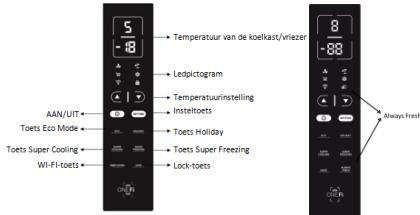
TOP FEAUTRED VERTICAL DISPLAY (Only on some models)
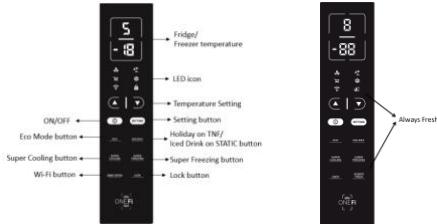
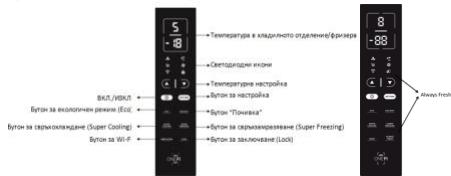
ALWAYS FRESH Button: On models with Always
Fresh Technology press the "Always Fresh" button to activate the function.
SETTING Button: Press "SETTING" to change the temperature.
When button is pressed for the first time: You can change refrigerator temperature with PLUS Button and MINUS Button.
When button is pressed for the second time: You can change refrigerator temperature with PLUS Button and MINUS Button.
On models with Always Fresh Technology press the "Setting" button for 3 seconds to lock and unlock the display.
ON/OFF Button: To turn on Refrigerator Press ON/OFF button for 3 seconds. To turn off Refrigerator: Press ON/OFF button for 3 seconds.
Stand-by Mode: To save energy is possible to activate Stanby Mode. The refrigerator will work in normal state and all leds will turn OFF
To enter Stan-by Mode: Press ON/OFF button for 1 second.
To deactivate Stan-by Mode: Press ON/OFF button for 1 second. Fridge back to normal operation.
ECO MODE Button: Press Eco Mode button to set temperatures of the fridge in max. energy efficiency conditions (+5^ for fridge temperature, -18^ for freezer temperature). If you want to exit the ECO mode function, you need to press the Eco Mode button again and the refrigerator temperature turns back to normal operation.
HOLIDAY Button: In case of long stops, the Holiday function can be used. This function deactivates the fridge compartment, while leaving the freezer on. Ensure that there is no food inside the fridge compartment before using this function. The function is activated and confirmed by the switching
on of the dedicated LED icon. If you want to exit the Holiday function, you will need to press the "Holiday" button again, the light in Holiday goes off and the refrigerator temperature goes back to the value before Holiday.
SUPER COOLING Button: Press Super Cooling button to start an additional pulse for a fast freezing of the fridge compartment. The function is activated and confirmed by the switching on of the dedicated LED icon.
If you want to exit the Super Cooling function, you need to press the Super Cooling button again and the refrigerator temperature turns back to normal operation.
SUPER FREEZING Button: Press Super Freezing button to rapidly freeze big quantities of food keeping intact nutritional food properties. If you want to exit the Super Freezing function, you need to press the Super Freezing button again and the freezer temperature turns back to normal operation.
Wi-Fi Button: This appliance is equipped with OneFi+ technology that allows you to control it remotely via App. Press OneFi+ button to activate Wi-Fi function.
Machine Enrollment (on App): Download the Hoover Wizard App on your device. The Hoover Wizard App is available for devices running both Android and iOS, both for tablets and for smartphones. Get all the details of the One Fi+ functions by browsing the App in DEMO mode.
Open the App, create the user profile and enroll the appliance following the instructions on the device display or the "Quick Guide" attached on the machine. This operation is necessary just for the first installation. To finalize the enrollment following the instruction on the smartphone's screen.
Refrigerator usage from remote by App: When the enrollment is completed, there will be Wi-Fi LED switched on. From now on it will be possible to manage the product by using the buttons on the display or using the App: both of them will be aligned according to the last command given.
LOCK Button: Press Lock button to block display user interface (Lock icon enlights, "LO" appears on display and, after 2 seconds, the refrigerator and freezer temperature shows recovery). If you want to exit Lock function, press the "Lock" button again for 3 seconds, and the refrigerator will exit the Lock function.
INTERNAL USER INTERFACE (Only on some models)

SET Button: Press SET button for setting the temperature until you reach the level you want where level 1 is the warmest and level 4 is the coldest. Under normal operating conditions, we recommend using an intermediate setting (level 2). Once the setting takes effect, it immediately enters the corresponding stall for operation control,
and the stall indicator lights up 3s3min and then goes out. Factory default temperature is set to 2. Long press "SET" key to exceed 3s and enter the hardware self-check program. The hardware self-check operation is effective within 10min, and the long button operation after 10min is invalid.
WI-Fi Button: This appliance is equipped with OneFi+ technology that allows you to control it remotely via App. Press Wi-Fi icon for 3 seconds to activate Wi-Fi function and the icon light changes from white to blue.
Machine Enrollment (on App): Download the Wizard App on your device. The Hoover Wizard App is available for devices running both Android and iOS, both for tablets and for smartphones. Get all the details of the OneFi+ functions by browsing the App in DEMO mode.
Open the App, create the user profile and enroll the appliance following the instructions on the device display or the "Quick Guide" attached on the machine. This operation is necessary just for the first installation. To finalize the enrollment following the instruction on the smartphone's screen.
Refrigerator usage from remote by App: When the enrollment is completed, there will be Wi-Fi LED switched on. From now on it will be possible to manage the product by using the buttons on the display or using the App: both of them will be aligned according to the last command given.
FAST COOL Button: when "FAST COOL" button is pressed, rapid cooling function is activated, according to the 21^ C to refrigeration control gear. Maximum running time is 3h, after this time temperature will be set to 1.
If the "SET" button is pressed in the process of speed cooling, the instant cooling function is immediately withdrawn and the default is entered into the next gear.
TECHNICAL FEATURES HUMIDITY EQUALISER (Only on some models)
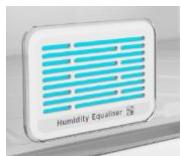
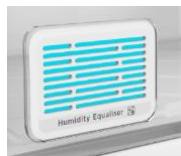
The exclusive Hoover Humidity Equaliser uses this humidity naturally generated by fruits and vegetables to keep always a level between 85% and 95% .
ALWAYS FRESH TECHNOLOGY (Only on some models)
Is the innovative Hoover technology that allows you to preserve food better and longer, both in the refrigerator and in the freezer.
Always Fresh promotes the maintenance and preservation of foods by interacting with their enzymatic activity through the activation of water molecules, naturally present in them.
Preservation technology is activated by a suitable button on the display.
Always Fresh must be switched off during the energy consumption test.
WATER DISPENSER (Only on some models)
The water dispenser allows you to get chilled water
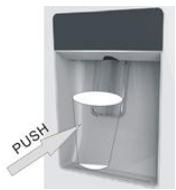
without opening the fridge compartment door.
Before first use
Before using the water dispenser for the first time, remove and clean the water tank located inside the fridge
compartment.
- Lift the water tank out of the fridge compartment.
- Open the water tank cover and then clean the water tank and cover
in warm soapy water. Rinse thoroughly.
- After cleaning, attach the cover to the water tank and then replace
the water tank back on the fridge door. - Clean the dispenser pad outside the fridge door.
Filling the water tank with water
- Open the small cover.
- Fill the water tank with drinkable water up to the Max line.
- Close the small cover.
Dispensing
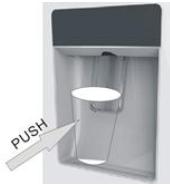
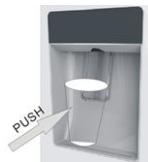
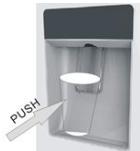
To dispense water, push the dispenser pad gently, using
a glass or container. To stop the flow of water, pull your glass away from the dispenser pad.
Tips for keeping food perfect in the Fridge
Take extra care with meat and fish: cooked meats should always be stored on a shelf above raw meats to avoid bacterial transfer. Keep raw meats on a plate which is large enough to collect juices and cover it with cling film or foil.
Leave space around food: this allows cold air to circulate around the Fridge, ensuring all parts of the Fridge are kept cool.
Wrap up food! to prevent transfer of flavors and drying out, food should be separately packed or covered. Fruit and vegetables need not be wrapped.
Pre-cooked food should be cooled properly: allow pre-cooked food to cool down before placing in the Fridge. This will help to stop the internal temperature of the Fridge from rising.
Shut the door! to prevent cold air escaping, try to limit the number of times you open the door. When retuning from shopping, sort foods to be kept in your Fridge before opening the door. Only open the door to put food in or take it out.
Where to store your foods in the fridge
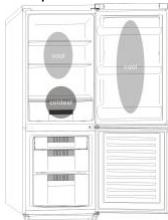
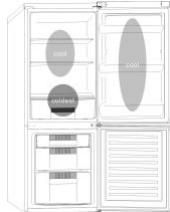
Cool area: this is where to store foods which will
keep longer if they are kept cool. Milk, eggs, yogurt, fruit juices, hard cheeses eg. Cheddar. Opened jars and bottles of salad dressings, sauces and jams. Fats, eg. Butter, margarine, low-fat speads, cooking fats and lard.
Coldest area (0^ to 5^) : this is where foods which must be cold to keep them safe should be kept:
- Raw and uncooked foods should always be wrapped.
-Pre-cooked chilled foods, eg. Ready meals, meat pies, soft cheeses.
-Pre-cooked meats eg. Ham,
-
Prepared salads(including pre-packed mixed green salads, rice, potato salad etc).
-
Desserts, eg. Fromage frais, home-prepared food and leftovers or cream cakes.
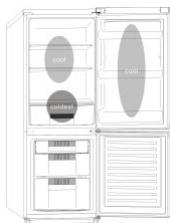
Crisper: this is the most humid part of the Fridge. Vegetables, fruit, fresh salad items eg. Unwashed whole lettuce, whole tomatoes, radishes etc can be stored here.
WE RECOMMEND THAT ALL PRODUCE KEPT IN THE SALAD BIN IS WRAPPED.
NOTE: Always wrap and store raw meat, poultry and fish on the lowest shelf at the bottom of the fridge. This will stop them dripping onto, or touching other foods. Do not store inflammable gasses or liquids in the fridge.
Electrical operation after 3h on the freezer, the temperature in the cabinet above -12^ , the alarm light is lit, and buzzer sounds.
Storing Frozen Food
Prepackaged commercially frozen food should be stored in accordance with the frozen food manufacturer's instructions for a freezer compartment.
To ensure that the high quality achieved by the frozen food manufacturer and the food retailer is maintained the following should be remembered:
- Put packets in the freezer as quickly as possible after purchase.
- Do not exceed "Use By", "Best Before" dates on the packaging.
| DO | DON'T |
| Defrost food from the freezer thoroughly in a fridge or in a microwave oven following defrosting and cooking instructions. | Use pointed sharp edged objects such as knives, forks to remove the ice. |
| Defrost frozen meat | Put hot food in the |
| completely before cooking. | freezer. Let it cool down first. |
| Store commercially frozen food in accordance with the instructions given on the packets that you buy. | Put liquid-filled bottles or sealed cans containing carbonated liquids into the freezer as they may burst. |
| Check contents of the refrigerator at regular intervals. | Remove items from the freezer with wet hands. |
| Clean and defrost your refrigerator regularly. | Freeze fizzy drinks. |
| Prepare fresh food for freezing in small portions to ensure rapid freezing. | Consume ice-cream and water ices direct from freezer. It may cause "freeze burns" on lips. |
| Always choose high quality fresh food and be sure it is thoroughly clean before you freeze it. | Store poisonous or dangerous substances in the freezer. |
| Wrap all foods in aluminum foil or freezer quality plastic bags and make sure any air is excluded. | |
| Wrap frozen food when you buy it and put it into the freezer shortly. | |
| Keep food for as short a time as possible and adhere to "Best Before", "Use By" dates. |
For more about storing, download the App and visit "Tips & Hints".
ENERGY SAVING
For better energy saving we suggest:
- Installing the appliance away from heat sources and not exposed to direct sunlight and in a well-ventilated room.
- Avoid putting hot food into the refrigerator to avoid increasing the internal temperature and therefore causing continuous functionalizing of the compressor.
- Do not excessively stuff foods so as to ensure proper air circulation.
Defrost the appliance in case there is ice to facilitate the transfer of cold. - In case of absence of electrical energy, it is advisable to keep the refrigerator door closed.
- Open or keep the doors of the appliance open as little as possible.
- Avoid adjusting the setting to temperatures too cold.
- Remove dust present on the rear of the appliance.
TAKE CARE
Defrosting
This appliance has automatic defrosting system, no need to defrost by hand.
Cleaning and Care
After defrosting you should clean the Fridge/Freezer internally with a weak solution of bicarbonate of soda. Then rinse with warm water using a damp sponge or cloth and wipe dry. Wash the baskets in warm soapy water and ensure they are completely dry before replacing in the Fridge/Freezer.
Condensation will form on the back wall of the Fridge; however it will normally run down the back wall and into the drain hole behind the salad bin. The drain hole will have a "cleaning spike" inserted into it. This ensures that small pieces off food can not enter the drain. After you have cleaned the inside of your Fridge and removed any food residues from around the whole, use the "cleaning spike" to make sure that there are no blockages. Use standard furniture polish to clean the Fridge/Freezer exterior. Make sure that the doors are closed to prevent polish getting on the magnetic door seal or inside. The grille of the condenser at the back of the Fridge/Freezer and the adjacent components can be vacuumed using a soft brush attachment. Do not use harsh cleaners, scouring pads or solvents to clean any part of the Fridge/Freezer.
CHANGING THE INTERNAL LIGHT
- Before carrying out the LED replacement always disconnect the mains supply.
- Hold and lift up the LED light cover.
- Remove the old LED by unscrewing it in an anti-clockwise direction.
- Replace with a new LED light by screwing it in a clockwise direction marking sure that it is secure in the light holder.
- Refit the light cover and re-connect your Fridge to the mains supply and switch on.
REVERSING THE DOOR SWING Dissemble the Refrigerator Door
- a. Use a tool to remove the screw off the hinge cover, and then remove the latter. Insert the communication line to the hole on the cabinet top.
b. Use a tool to remove the 4 screws off the upper hinge cover and then remove the latter. Pry up the door bush and small end cap cover on the door.
c. Insert the door bush and door communication line into the hole on the door and then put on the small end cap cover.
d. Use a tool to remove the 2 screws as shows in the below figure to remove the hole cover on the cabinet top and get the cabinet communication line out of the hole.
Pry up the small end cap cover on the door and get out the door bush and door communication line.
e. Insert the door bush into the round hole on the door and then put on the small end cap cover.
f. Move the refrigerator door upward over 500mm to remove the door.
- a. Use a tool to remove the 3 screws off the middle hinge cover and then remove the middle hinge.
b. move the freezer door upward over 500mm to remove the door.
c. Remove the adjustable front feet under the lower hinge; use a tool to remove the 4 screws from the lower hinge and then disassemble the lower hinge. Door disassembly is finished.
Assemble door, lower hinge accessories to the corresponding positions
- a. Use a tool to get the door bush out as shown in the below figure and assemble it to the corresponding position of the other side.
b. Use a tool to remove the screws off the stopper ass as shown in the below figure and then assemble them to the other side of the door.
c. Use a tool to remove the axle and two stoppers on the lower hinge and then assemble them to the position as shown in the below figure.
Assemble the refrigerator door and freezer door to the opposite side
-
a. Remove the adjustable front foot as shown below by hand and then assemble the lower hinge to the other side of the cabinet and fix the screws by using a tool.
b. Assemble the shorter adjustable front foot to the lower hinge side and adjust the height of the foot to make the refrigerator stay in level. -
Put on the freezer door and turn the middle hinge by 180^ and then assemble it to the other side of the cabinet; use a tool to screw up the 3 screws to fix the middle hinge.
- Put on the refrigerator door and assemble the upper hinge to the other side of the cabinet; use a tool to screw up the 4 screws to fix the upper hinge.
- After that, connect the door communication line and the cabinet communication line and then put on the upper hinge cover and fix it using a screw.
Assemble the hole cover to the other side of the cabinet and use a tool to screw up the hole cover.
Door disassembly is finished here.
Double check that the door is aligned correctly and all the seals are closed on all sides. If necessary, re-adjust the levelling feet.
NOTE: If you want to have the door swing reversed, we recommend that your contact a qualified technician. You should only try to reverse the door yourself if you believe that you are qualified to do so. All parts removed must be saved to do the reinstallation of the door. You should rest the fridge freezer on something solid so that it will not slip during the door change process. Do not lay the fridge freezer flat as this may damage the coolant system. Ensure the fridge freezer is unplugged and empty. We recommend that 2 people handle the fridge freezer during assembly.
TROUBLE SHOOTING
If the appliance does not operate when switched on, check.
- Power cut: If the internal temperature of the Fridge/Freezer compartment is -18^ C or less when the power returns, your food is safe. The food in your Fridge/Freezer will remain frozen for approx 16 hours with the door closed. Do not open the Fridge/Freezer door more than necessary.
The product is designed and built for domestic household use only.
- The plug is inserted properly in the socket and that the power supply is on. (To check the power supply to the socket, plug in another appliance).
The fuse has blown/circuit breaker has tripped/main distribution switch has been turned off.
The temperature control has been set correctly.
If the refrigerator is exceptionally cold, you may have accidentally adjusted the thermostat control dial to a higher position.
If the refrigerator is exceptionally warm, the compressor may not be working. Turn the thermostat control dial to the maximum setting and wait a few minutes. If there is no humming noise, it is not working. Contact the local store where your purchase was made.
If condensation appears outside of the Refrigerator, this may be due to a change in the room temperature. Wipe off any residue of moisture. If the problem continues contact the local store where your purchase was made.
If the provided plug has been replaced make sure the new plug is properly connected. If the appliance is still not operating after the above checks, please contact Customers Service.
SCRAPPING OLD APPLIANCES
This appliance is marked according to the European directive 2012/19/EU on Waste Electrical and Electronic Equipment (WEEE).
WEEE contains both polluting substances (which can cause negative consequences for the environment) and basic components (which can be re-used). It is important to have WEEE subjected to specific treatments, in order to remove and dispose properly all pollutants, and recover and recycle all materials. Individuals can play an important role in ensuring that WEEE does not become an environmental issue; it is essential to follow some basic rules: WEEE should not be treated as household waste.
WEEE should be handed over to the relevant collection points managed by the municipality or by registered companies. In many countries, for large WEEE, home collection could be present.
In many countries, when you buy a new appliance, the old one may be returned to the retailer who has to collect it free of charge on a one-to-one basis, as long as the equipment is of equivalent type and has the same functions as the supplied equipment.
Conformity
By placing the mark on this product, we are confirming compliance to all relevant European safety, health and environmental requirements which are applicable in legislation for this product.
TABLE DES MATIÈRES
INFORMATIONS SUR LA SÉCURITÉ
COMBI HOOVER
Classe climatique
INSTRUCTIONS DE TRANSPORT
INSTRUCTIONS D'INSTALLATION
DÉMARRAGE
FONCTIONNEMENT COMBINED
UNITE D'AFFICHAGE VERTICAL
UNITE D'AFFICHAGE VERTICALE AVANÇEE
INTERFACE UTILISATEUR INTERNE
CHARACTERISTIQUES TECHNIQUES
HUMIDITY EQUALISER
TECOLOGÍA ALWAYS FRESH(SI ESTÁ PRESENTE)
VERTICAAL DISPLAY MET FUNCTIONS
INTERNE GEBRUIKERSINTERFACE
VERTICAAL DISPLAY (INDIEN AANWEZIG)
VERTICAL DISPLAY MET FUNCTIONS (INDIEN AANWEZIG)
ALWAYS FRESH TECHNOLOGY (INDIEN
AANWEZIG
WATERDISPENSER (INDIEN
AANWEZIG)
TEXNOAOTIA ALWAYS FRESH (EAN
YIAPXEJ: eivai n kalvotouoc texvooloyia tnc Hoover n onoi oac enitpeei va diatneite ta trophi a kalutepa kai yia meyalutepo xpoviko diaotma, too oov thaaloo uvtipnong ooo kai otnv katauxi.
H Always Fresh npoayei tn ouvtnpnok kal tn
diatnpnok twv tpophiaw aaanlenbpwvtac me
tnv evzmuatuk dpaoon touc meow tnC
evpyoioinoc twv mopiwoioupeou, nou
eepiexovtai oe autec me fuoiok topto.
H texyoxiaia diatnpnooc evpyotoieitai me eva
kataa lo koupi enavow oboyn.
DET VERTIKALE DISPLAY
MEST ANVENDTE PÄ DET VERTIKALE DISPLAY
INTERN BRUGERGRAENSEFLADE
TEKNISKEGENSKABER
HUMIDITY EQUALISER
ANTIBAKTERIELT SYSTEM (hvis til stede)
VANDDISPENSER
pá bed and breakfasts (B & B)
SENSOR FAULT ALARM (ALARM VED SENSORFEJL):
SKROTNING AV GAMLA APPARATER
APENALARM FOR KJOLESKAPSDR: Nar
SIGURNOSNE INFORMACije
Ovaj prisučnik sadržava
važne sigurnosne
PRZECHOWYWANE W POJEMNIKU NA SAATKI BYLY ZAWINIETE W FOLIE.
POKNY TYKAUCE SA INSTALACIE
ZACATIEPOUZIVANIA
KOMBINOVANA PREVÄDZKA
VERTIKALNY DISPLEJ
VERTIKALNY DISPLEJ SO ŠPIČOVÍMI
FUNKCIAMI
VNUTORNEPOUZIVATELSKEROZHRANIE
TECHNICKÉ FUNKCIE
HUMIDITY EQUALISER
ANTIBAKTERIÁNY SYSTÉM (ak je k disposzicii)
DAVKOVAC VODY
Tipy na dokonalé uskladnenie potravin v
chladnicke
BbTPUEH IOTPBEHTIICKN INHTEPΦEIC
TEXHNUECKNXAPAKTEPNUCTUKN
HUMIDITY EQUALISER
AHTI6AKTEPNAJHA CNTEMA (aKO e HauuHa)
DNCIEHCEP3ABODA
Cbemu 3a 3ana3Bahe Ha xpaHama nepdekmaHa 6 XnaDunHuka
Kbde da cbxpanhabe bawume xpanu E Xnaunnuka
CbxpaeHue Ha 3ampa3eHa xpaHa
NECTEHE HA EHEPTNIA
IOnDnPbJHKA
Pa3mpa38ahe
Noucmbaue u noodpbjka
CMRAHA HA KPYLUKATA
OBPbUAAHE HABPATNTE
OTCTPAHRAHE HA IPOBJIEMN
Blaoradapm Bn,ye 3akynxTe TOni npOdyKT.
PpeDn da n3non3BaTe BaWnXnaDnHeN ypeD, MoJr
BHNMaTeJIHO IpoUeTeTe TOBa pKOBOdCTBO C
HnCTpyKznn, 3a da NoctnHte Hn-dO6pa
eEeKTHBHOCT. CbXpaHbAte TcIaTa
DOKyMeHTaIa 3a nocLeBaIoo nOla3BaHe IIN 3a dpytn co6cbTeBHeNci. To3n npOdykT e npEHa3Naueh
eHCTBeHO 3a DOMaHaN yNoTpe6a NnI 3a nOobHn npInoJeHn KaTo:
KyxHEnckn 60Kc 3a nepcoHa a B MaRa3uHn, oHncn nI pyra pa6Otha cpeda
BbBfepmN,OTKIneHTNaXOTeIN,MOTeINIBdpyra cpeDaOTxJINISeH TnI
- B cemei nn xotei nn "bed and breakfast" (B & B)
-3a KeTbpnHr YcLyuN I NOIo6Hn npInloKeHHN, Ho He I KaTo o6OpUdBaHe Ha o6eKtn 3a npOdaXbHn Ha dpe6Ho.
TOnu ypeI Tpr6Ba Da 6bDe I3nOJ3BaH CaMo 3a C6xbpaHeMe HA npHa, Bcya Dpyra YnOTpe6a Ce CCHTu 3a OAncha N pOnm3B0dIeJIr HMaJa 6bDe OTOBOpEn 3a KaKbITo N Da e PnOpycku.
PpenopbHTeHNO e cIso da 3ano3Haete C yCLOBnTHa ha rapaunHaTa. 3a da noCTnHHeTe Bb3MOKHO hAI-dO6pa oEkeKTNBHOCT N 6e3npo6IeMnHOyHKuONHpaHE HaypeBa H, e MHOrO BAxoJa npOteTe BmHaMeTHeN To3n INCTpyKUHN. HeCna3BaHTo HA TeIN HcTpyKUHN MoKe JDA Bn LiuIN OT npabOTo H 6e3PiLaTHO O6cLNYKaHe NO Bpeme Ha rapaunHOnHHnepeNoD.
HHΦOPMAIηA 3A BE3OIIACHOCT ToBa pBkoBOIcTBO cbIbpxa MHORO BaJHa INΦOpMaIηa 3a 6e3OJaCHOCT.
Прелорьчаме Вида CBхраньаTeЗи
HnCTpykun Ha 6e3oNaCHO MЯCTO 3a JecHa cnpaBka n Do6pa pa6ota c ypeJa.
XlaДиЛнЯТуpeДсБДьржахlaДиЛен ra3 (R600a:
n306yTaH) n30JaLauHOHeHra3 (UnkIIOpeHTaH), C BVCOKaCbBMecTUMOCT C OKoJHaTaCpeDa, KOITO, o6aue, ca3aPaJIIMN.

BhimsaHne: onaCHOCT
OT noxap
Ako oxlaanTeHaTa Bepnra ce noBpeN:
- N368BaITe OTKpIr OrbH
- N3TOUHnHa 3aJaLBaHe.
- ГржлвО npOBeTpete
CTaTa, B KOrTo Ce HAmnpa ypeDbT.
NPEyPPEXDEHNE!
-БьдeteВнIMaTeJHn npi
ПОчИСТВaHeTO/прЕнсЯн
eToHaуpeДаи
ИЗБЯгВаiteДa
ДOKOCBaTeMeTaJIHnTe
ЖицHaKOMPpeCopaВ
ЗадноКрайHaуpeДa,
Ты KaTOМожeДa
HapaHnTeПьСТИteи
РьцeTeСиИлДa
ПоврeДиTeВашя
ПрODУКТ.
To3n ypei He e npedHa3NaueH 3a CbXpaHeHneTO Ha KaKBInTO n Da e npyTu ypei. He ce onntBaIte Da cyaTe nIi Da ce N3npaBArTe Bbpxu BaIy upei, Tb' Kato He e npedHa3NaueH 3a TaKaBa aynotpe6a. MoKe da ce HapAHnte nIi Da NOBpeDiTE ypeia.
- Ybepete ce, ye 3axpaHbaaT Ka6eI He e 3akLeuEN POn UpeDa NO BpeMe Ha N CleEd npenacJHeTo/npemecTba
HeTo My, 3a da ce
npeDoTbpaTu
npeKbcBaHe nIi
NOBpeJdaHe Ha
3axpaHbAsnKa6eJ.
Korato no3nioHnpaTe ypeda cn, BnImaBaIte Da He nobpeDnte NODOBITE HAcTNIKN, Tpb6nte, CTeHNTe NOKPITNA n.T.H. He MeCTeTe ypeDa Ype3 DbprNaHe Ha KaPaKa IJIu DpbXkata. He N03BOJRABaiTe Ha Deca Da CN iRpaT C ypeDa IJIu Da Pnpat KOHTPOJHn PAHeI. HaShaTa npMa OTXBpIy BCraKaBA OTROBOPHOCT, B Cnyauy che He ce CLeDbAT INHCTpyKcHNTe.
He mONTnpaIte ypeDa Ha BlaJxHn, Ma3Hn nn npaShn MeCTa, HnTO ro n3JaarTe Ha dInpeKTHa cIbHueBa CBETlnHa n BOda.
He mONTnpaTe ypeDa 6IIN3O Do OTOpJIteHn TeLa IIN 3aPaNMM MaTeprnAIn.
Ako ToKbT cnpe, He
OTBaprIte KaPaka.
3aMpa3eHaTa XpaHa He
6n Tpr6BaNo Da 6bJe
3aceHata, aKO LInncata
Ha 3axpaHbAne e 3a NOpMaJIko OT 20 Yaca.AKO
LInncata Ha 3axpaHbAne
e NO-PrOdYbJXHTeJIHa,
XpaHaTa Tpr6Ba Da 6bJe
IPOBepena N I3JaDeHa
BeDHaRa NIIcCROTBeHa N
3aMpa3eHa OTHOBO.
He ce npntecnBaIte, aKO yCTaHOBnTe, ye KaNaKbT Ha XOpN3OHTaJIHnIaΦpN3ep Ce OTBapr TpydNo BeDHa rCleI kATO CTe rO 3aTBOPnIi. ToBa e TaKa Nopadn paZIIkKaTa BvB Bb3dUshOTo HaNraHe, KOeTO ige Ce n3paBnI u Ie N03BOJn KaPaKbT Da 6bJe OTBOpEN CLeI HRAKO MNHyTN.
He cBbP3BaIte ypeDa KbM eIeKTpIueCKOTO 3aXpaHbAHe, DOKaTO BCnUKN ppeDnA3HN eIeMeHTN OT ONaKOBKaTa N 3a TpaHcNopta He 6bDat npemaxHaTn.
Octabete ro B nOKoI
nohe 4 yaca npedn da ro BkIIOUHTe, 3a da MOKe KOMPecOporTO MaCNo Da ce pa3npedeJI, aKO e npenacH XOpN3OHTaJIHO.
To3nΦpns3ep Tpr6Ba da ce n3noJ3Ba camo 3a npedBnIeHaTa ynotpe6a (T.e. CbXpaHene n 3aMPa3raBaHe Ha xpaHNTeHNn pOdyKtN).
He cxbxpanyaBai Te IekapCTBa nI HauyHOn3CleDoBaTeJcKn MaTePnAIn B OXlaIITeJIte 3a BVnHO. Korato Tpr6Ba da ce CbXpaHraMaTePnA,I KOITo N3NCKBa CTpIKTeH KOHTPOJHa Tempepatypata Ha CbXpaHenne, e Bb3MOxHToTOn Da ce pa3BaJIu IJI Na HAcTbII N HeKOHTPOJInpaHa peakzna, K0rTO Ja IpeDn3BnKa pNcKOBe.
- Праздддддддддддддддддддддддддддддддддддддддддддддддддддддддддддддддддддддддддддддддддддддддддддддддддддд徴
- Кразсця, ИЗкючete
- Зхранвашя Кбел OT
- Контакта.
- При достаькata провере Дали пpoДуКтТ He e нobpeДeн Дали ВсчКITE MyЧасти и akcecoapn сВ перф ekTHO сьстонne.
- Ako ce 3a6eJen Teu B OXlaIteJIHaTa CnCTeMa, He NiIpaIte KOHTaKaT ha CTeHaTa N He n3POn3BaIte OTKpNT orbH. OTBopTe npO3OpEua N OCTaBeTe B cTajTa Da BJe3e Bb3dUx. PocLe ce CBbpxKeTe c UeHTbp 3a PoIdpbJka, 3a Da 3aABITpe pEMONT.
He n3noJIbawTe yIbJIxIteJI nn aIaIaTepn.
HeDbpnaIte npekaleno cnllno nIne He npereBbaIte 3axpaHbauNjaKa6eI, nIi He DOKOCBaIte IeNCeLa C MOKpn pIe.
He noBpeJdaIte ⅢeIcEla n/niln 3axpaHbAaIa Ka6eI; TOBa MoJKe Da npUHNi TOKOB yIap nIINpoJap.
He noctabyTe nJIn
cBxpaHЯBaIte 3aIaIMn
N CnJIHO JeTNIBV
MaTePnaJI NaTO eTeRn,
PeTPOJ, IpOpaH-6yTaH,
ra3 npOaN, aePo3OJI,
JeIINa, YnCT aIKoXOI n
T.H. Te3n MaTePnaJI
MOraT Da IpeDn3BVKaT
EKCnlo3nJ.
- Ако зхранвашият
kaбел e поvere徳, за да,
ceизберге опасноct,
Той Трябвда сьдe
poДменен OT
прОИЗВODИТЕЛ, OT
серВИЗЕН ТЕХИК ИЛN OT
лИце СсС CXODнA
КВаллфИКациЯ.
He n3noJ3BaIte nIcBxpaHЯBaIte 3aIaIIMn cnpeIOBE kaTO cnpeI-60n B 6IIN3OCT Do 6In3O Do OXJaNTeJIte 3a BInHO. MoJCe Da npUHHn ekCpIo3N IIN NOJap.
He nocTaBraIte npedMeTu/nnu KOHTeHepn, pJIHn C BODa, Bbpxy ypeDa.
He npenopbVbAme n3noJ3BaHeto Ha yIJIIXTeIN I npexOdHIu-adaTepn.
He yHnIooJaBaIte UpeDa Ype3 rOpene. BnImaBaIte Da He NOBpeIte OxlaIteJHaTa CnCTeMa/Trb6Ite Ha UpeDa IIO BpeMe Ha TpaHcNopTa N EKcPiOaTaunraTa. B ClyuAaH a IOBpeDa He N3JIaRaIte UpeDa Ha OrBn, POTeHcIaJIen N3TOUHn KaPaJIbAne HNe3a6aBHo nPoBETpe CTaTa, KbDeTo Ce HAMIPA UpeDbT.
- OxlaДиTeJHaTa
СИСТЕма, Намираши ce
Зади ВьТреВ
ОхlaДиTeJInTe 3a BИНо
СьДьржа XладиЛeн
агent. 3aTOBa ТрЯБВа дa
сe n36ЯВa
Повразданeto Ha
ТрьбиTe.
He n3poJI3BaIte eIeKtpnuecKn ypeiN B OTeJIeHnra 3a CbXpaHHeHne Ha xpaHa Na ypeDa,OCBEN aKO He ca OT BnD,IpEnOpbUanOT npOn3BOJNTeJI.
He noBpeKdaIte
OxlaIteHaTaBepnra.
He n3poJI3BaIte MexaHnUHn yCTpOiCTBa IJn dpyrncpeDcTBA 3a UCKOpRAVe npOeCa Ha pa3Mpa3YBaHe, pa3JIuHn OT npenOpbUaHnte OT npOn3BOdnteJI.
He n3noI3BaIte eIeKTPnueCk upeiN B OTdJeHnIa 3a CbXpaHEnHe Ha xpaHa, OCBEN aKO He ca OT BnD, npenopbUanOT npOn3BOndTeJI.
- Повдьржайт
- ВентILAционнite
- OTВори на корпуca на
- уреда плни на
- Вграденьота КОнструкция
- СвобODи OT
- пpenяТCTВЯ.
He n3noI3BaIte oCTpnppeJMeTn IIN TaKIBa cpeKeI np6oBe KaTOHOJIOBE INN BILNcI, 3a Da OTCTpaHITe Jeda.
He doKocBaIte BbTpEshHITe OxlaIteJIHn eIemehTn, oc6eNo aKO pBcTe Bn ca MOKpn, Tb' KaTo
MOxHe Ta Ce n3rOpHTe IIN HapaHNTe.
- HnKora He n3noJ3BaIte 3a pa3Mpa3raBaHeTo ceoapn, eJeKtpnueckn HarpeBaTei nn npytn noDobHn eJeKtpnueckn ypeDi.
He cTbpxKeTe c Hoxnnil OCTbp ppeDMeT, 3a da npemaxheTe cKpeXa nnIeJa, KOINTO ce POBBAr. C Tezni ppeDMeTn MOxke Da ce NOBpeDi OXlaJdaaTa BepuRa, TeU OT KOrTo MoXke Da npuHnN NoJap nn Da HapAHN OChTe BN.
He n3poJI3BaIte
MexaHnUHN yCTpOiCTBa
nII npYrO o6OpyDBAHe, 3a Da yCKOpITe
IproueCbT Ha
pa3Mpa3IbAHe. - A6coJIOTHO TpI6Ba Da ce n36raBa n3noJ3BaHepTo Ha OTKpNT OfBn IaI Na eJeKtpnuecko ObOpyDbaHe KaTO peuKn, napoynCTaUKN, CBeU, Ra3eHN lamnni NoDo6Hn, 3a Da ce
yckopnpocebT ha pa3mpa3yahe.
- HNKORA He n3noJ3BaIte BOJa 3a n3MnBaHeTo Ha MЯCTOTO Ha KOMnpecopa, CJIeI NOUcTBAHe n36bpeTe do6pe cbc cyxo napye nlaT, 3a da npedeOTBpaNTe pbkda.
- Пренистелно eда подьржate сенься чист, натунвано на пекалено много прах по сенься може да причinnпожар.
- Пюдунтьт e
- поедназ nauseи
- поразовен само за
- домаша уnotpe6a.
- Гаранцята щe 6ьдe Невалдна, ako прodyкът 6ьдe МоHTиран пи ИЗПОЛЗВан В ТьрROВСКИ Или Нжллшни 6иТOBИ ПOMешени.
- Пюдуктг Трябва да
- Бдe монтуран
- Рравилно, рa3положен
- ИЗПОЛЗВАНВ
- СьOTВЕТСВИЕ
- ИНСТРУКДИNTе,
- СьДыржаши ceВ
IpeoCTaBeHaTa KHNKCa C HcTpyKuN 3a IOTpe6nteJ.
- Гаранцята e
приложима само 3а
Нови пордукту и не може да се п缩水ьрл,\
по рордукът бъде пордаен на Трети лица.
Haata Ta nma He Hocn HkaKBa OTROBOPHOCT 3a CnyaHn nn NocJeDbauN uetn. - Гаранцята по Никakьв начин He peduуцра вашптешаюнилсубектувни пара.
He n3BbPwBaItepeMOHTn PO TO3nOxlaInteI 3a BnHO.BcKaKBr nHTepBeHcIIN Tp86Ba Da 6bDaTn3BbPWBaHneDInHCTBeHO OTKBaJIuΦnIupan nepcoHaJ.
Ako n3xBbPJIte cTap npOdyKT CbC 3aKJIIOUBaHe nn pe3e Ha BpaTaTa, yBepTe ce, ye e OCTaBen B 6e3OpacHO CbCTOJHne, 3a Da ce npEDoTbPaTu
3aKlueBHe Ha Deua.
To3n ypeJ moKe da ce n3noJ3Ba OT Deuca HaJ 8 ToDNH N OT LInCa C HAmaleHn fN3nueckn, cTeHBn IIN YMCTBeHN CNoC6HOCTn IIN LInCa Ha ONIT N PO3HaHnA, aKO ce Na6JIoDaBAt IN Ca HNCTpyKTIpaHn 3a N3NoJ3BaHeTO Ha ypeJa NO 6e3Opacen Naunn pa3bnpat CBbp3aHnTe c TOBa ONaCHOCTn.
- DeçaTa He TpЯБа Дa
ИграТСуpeДa.
Почиствано
ПоДрьЖКаТа He TpЯБа
Дa ce ИЗВыршВаТ оТ
Deça 6e3 HablioDEнe.
Klouka: Ako BaushaT xlaadinHnK/φpns3ep e o6opyDbaH c KluOaJaKa, 3a da ce npedOTbpaTu DeaTa Da ce 3aTBOpaT, CbxpaHaBte KluOa, DaIeU OT DoCTbNa Ha Deua n He B 6ln3OcT do ypeDa. Ako ce n3XBpbJr CTap Phn3ep/XlaadinHnK, CuyneTe BCnckn CTapn 6paBn IIN KluOaJIKN
KaTo npe,Ia3Ha MpaKa.
KOMBUNHHPAH HOOVER
KJIImMaTHuEn KJIac
UpeBt e npoeKtnpan da pa60Tn B OporanuHem TeMnpaTypeH dIana3oH na OKoJHata cpeDa 3abNCIMOCOT OI KIMmatYnHnTe 3OHN. He n3noJI3BaNTyeJa npu TmpePAtyn 3bBn dIana3oHa. KIMmatYNHnT Klaac H BAuny ypeD e nocOeH na CTnKePA C TEXNHeCKOTO OINCaHne B OTdJeLHeMeTO 3a 3Ampa3raBaHe.
TbpbHOaHaNo BkIIOUBaHe Ha ypeJa KbM
3axpaHbAHeTo: Pm nBpBOHaHaHO BkIOnuBaHe Ha xaJINHnKa KbM 3axpaHbAHeTo DncNpIeT ue CBeThe 3a 2 cekyHdn, ppeDn da Ce BpHe KbM o6nuaHoto Cn cbCToHnne X naJINHnKbT da 3apaBoNT.
YnpablenHe Ha dncnner:Korato bpaataHa
XlaadinHnka 6bJe 3aTbOpeHa nB npdoJIhKeHne Ha 3
MnHytn He 6bJe n3BbPseHo HNKaKBo DeiCTBne,
OCBtIeHNeto Ha DCNpner Ce n3KnIOUyBa.
Korato OCBtIeHNeto Ha DCNpner e n3KnIOUyeHo, 3a Da fo BkUOnHTe, OTBOperte BpataHa XlaadinHnka
nll HA tncHe TPOIN3BOJEN 6byTOH.
BEPTHKAJIEH INCIIJEI (ako e HaJIuHa)
HACTPOIKA HA TEMNEPATYPATA:HaTnchete
6byToHa "Fridge" mIn "Freezer" n KOrato YnCNoTo 3aOnOHe Da Mira, ue MoXeTe Da 3aJaDeTe TemNepaTpa. YnCNoTo ce IpomEna npri BCaKo HaTnCKaHe ha 6byToHa. Korato ce n3PbLHnBaT PhynKtne "6bp3o oxLnJaDHe", "6bp3o 3amPa3BaVe", Smart Eco n "NouchBka", NaCTpoRkata Ha TemNepaTpya He moKe da 6bJe pnOpemHa. Po BpeMe Ha IpomHa Ha NaCTpoRkata Ha TemNepaTpyata, Ako B npOdbJxHeMe Ha 5 cekyHdn He 6bJe n3BbPpsiE OdeCTBne, 6byToBc nnpa da npemRgBa n 3aJaDeHeta TemNepaTpya ce 3anaMetra.
SMART ECO ("MHTEJINTEHEHEN EKO
PEKHM"):HaTnCHETe 6yToHa Smart Eco,3a da 3aadaete ontmamaHna 3a eheprnHa eΦeKTHBHOCT TeMepaTypa (+4^ B xlaanHnka,-18°C bBb φpnsera).
3a da bknjoume pekum Smart Eco: Hatackai Te 6byoHa Function, dokato nkoHata Smart Eco He 3anOuHe da mHa, cne ToBa hata nchete OK, 3a da BKNJUHTe TO3n peKIM.
3a da u3KIOUme peKum Smart Eco:HaTnCKaIte 6byToH AFunction, DOKATO HE CTINHete DO NIOHOHa SMART Eco; cIeT TOBA HATNCHEt OK, 3a da n3KJIIOUHeTe To3N peKIM;OCBETLeHHeTo Ha NIOHOHa 1ue Ce I3KIOUH.
FAST COOLING (БьрзО XОЛAJXДАЕ):Включete peхим "БьрзО XОЛAJXДАЕ", за ѳсторate БьрзЗ ampa3aBaHe Na XlaДИНTO OТделене.Тоиpeхим Се ВключBA И NOТБьрЖДABAС haTиСkaHa He CBtOBETHATA KOKHA.
3a da bknloumpekum Fast Cooling:HaTnckaIte 6byOna Function,doKATO nKoHata Fast Cooling He 3anOuHne da mira; cJeT oTa haTnchete OK,3a da 3aJeCTbATE Tozhi peKHM.
3a da u3kIoumpeKum Fast Cooling: Hatackai Te 6byoHa Function,doKaTO He CTMRHete DO INOHATA Fast Cooling; cneL TOBa HataNCHete OK,3a da n3kIouHeTo3n pEXHM.
FAST FREEZING (6bp30 3AMPA3RABAE): BkIIOueTe peKIM "6bp30 3ampa3RABAe", 3a da 3ampa3NEte 6bp30 roJIemn KOJIIOcHTBxa Pxra, KaTO 3ana3NE t cxpAHNTENHtne I CBOITbA HeNOKbTHATn. KORAto CE n3KIOHNCTo HcOHTBxA HeNOKbTA Fast Freezing, TEMNEpatypata BB bPfI3epa Ce BpBuza KbM CTOnHOCTTa, 3a DaJaHa npDei BkIOUVAHeTo Ha To3n peKIM. PeKIMbT 3a 6bp30 3ampa3RABaHe e npOrpaMnAPdA ce N3KIOUAn ABOTMATuH OLeD 26 Yaca. PeKIMbT 3a 6bp30 3ampa3RABaHe ce N3KIOUVA, KORAto 6bJe BkIOUHepeKIMbT Vacation ("POnHbKa").
3a da bknloumpejxum Fast Freezing:HaTnckaIte 6byoHa Function,doKATO hOHOta Fast Freezing he 3aONUHe da mira; cIeD ToBa haTncHete OK,3a da BkLNHTe TOZn peKHM.
3a da u3kIoume peKum Fast Freezing: HatackaiTe 6byota Function,doKaTo He CTnHete Do nKoHaTa Fast Freezing; cne ToBa Hatachete OK,3a da n3kJIouMe TO3n PekIM.
VACATION ("ПОЧИВКА"):В слуай на
npOdbJnKHeHn nepoDoHa Hne3NoI3BaHe Ha xnaIINnka MoXeTe Da I3NO3BaTe pEXmHa "POnuBka". B To3n peXem XnaIInHTo OTdeHen He Cnpa Da paBoTn, Ho FpN3epbTOctabA BkIoUen. YBepeCe,ue BxlaDnHToOT deEnHe NHa XpaHa, npEi Da n3No3BaTe TO3n peXem. To3n peXem CE BkIOUba NnotBpKdAba C hAnickaHe Ha cBTBHTa TkoHa. Korato Ce n3KIOUoh OCBeTHeHTo HA NkOHata Vacation, Tempepatypata B XnaIInHToO ToDeHence Ce BpTu KaBtOStHOCTTa, 3aDaHe Na PpEi BkIOUbaHTo H To3n peXem.
Пи вклочанeto на рекимite Smart Ecoи Fast Cooling, рекимьт Vacation ce n3клоча.
3a da bknlohume pekum Vacation: HatnckaTe 6byoHa Function, dokato nkoHata Vacation He 3anoHne da mira; cneTo ToBa hATnchete OK, 3a da BKNLOHNE TO3n peKIM.
3a da u3KIOUme peKum Vacation: HATCKaHTe 6yToHa Function,doKaTO He CTNIHETe DO INKOHATA Vacation; cIeD ToBa HATNCHETe OK,3a Da N3KIOUHTe TO3N peKIM.
PAMET PPN CINPAHE HA 3AXPAHBAHETO:
XlaJHnKbT 3aOpMnB CnuKn HcTPOKn, B cnyaHa npEkbCbaHe Na eEleKtpOzApaHbAHeTo. Korato 6bJe BkIooH eOTHO, XlaJHnKbT 3e npOblnnp aBoTa npi CbUnte HcTPOKn, KOtTo e mAmApneDi npEkbCBaHTo.
OTLOXHEO BKIOUOBAHE:3a da ce n36eHne noBpeHa Na XlaDnNnKa B CnyaHa H BHe3aHnHO
npekbcahe Na ekeTp03aXpaHbAHeTo n
noCleBdAaTO My NcKaeH,XlaDmHKnT HMa da
ce BkIOnu BeHaRa,ako ekeTp03aXpaHbAHeTo e
6bnlo pekcbchato 3a no-MaIKo OT 5 MNHytn.
AJIAPMA 3A IPEKAJIENO BVCOKA TEMNEPATYPABbBΦPnE3EPA (cma npn BkIoUcbHe):Korato npn pIbPoBaJauHO BkIIOUcbHe KbM 3axpaHBAHeTo TEmnepatypaT BbBΦpN3epe E no-BVCOKA OT 10^, INHdkaTopbT Ha φpN3epe CBeTBa, a YNCLOto Ha TemnepatypaT BbBΦpN3epe 3anoCbA da Mna. Hatnche Tpon3BOJeN bTOH nn N3yakaJIte 5 CEkyHdi. YNCLOto ige cnpe da Mna n iSe ce bBpHe Ha 3aJaDeHata Temnepatya.
AJAPMA 3A OTBOPEHA BPATA HA XIAIINHKA:
Ako BpataHa xlaDnHnKa 6bJe octaBeHa
OTBpeHa Noeue OT 3 MInyTu, uce Ce BKIOuH
3ByKOBa anapMa. 3aTBpOte BpaTa HnHaTcHete
Pon3BOJen 6byToh, 3a Da CnpTe anapMaTa, Ho
NmaIte npEdbN, ye anapMaTa uce Ce BKIOUH
OTHOBOCleD 3MnHyTu.
AJAPMA 3A IOBPEDEH CEH3OP: Ako Ha dnCnIe ne I3nnpe "E0", "E1", "E2" nIi npyr Heo6bnaeh cIMBOJ, TOBA O3nauBa, Yne IaKoI ot ceH3Opnte e NOBPEDEH XlaDIIHNNkT Tp8Ba Da bJa peMOHTnpAH.
ГЛABEH BEPTNUKAJIENДИСПЛЕМ (ako e haJIuHa)
Bytoh ALWAYS FRESH Ha MoJeIHe c TexHoJIoNHa Always Fresh hAnChete 6yToHa "Always Fresh", 3a da aktBivapate fHyHKInrA.
Bytoh SETTING:HaTnchete SETTING,3a da npomehnte TempepaTpata.
HataChete 6yToHa BEdnBx,3a da npomeHInTe TEMepaTpya T XlaDinHOTO OTdelenHe C 6yToHInTe A N V.
HaTnCHete 6yToHa DBA nBtN, 3a da npOMEHTe TEmnepatpata BbB nnpeBa C 6yToHnTe ▲ n▼. Ha MoJoENeCTe cTexHOJorNA AlwAs Fresh HATnCHete 6yToHa "Settings"(HAcTpoKa) 3a 3cekyni, 3a da 3aKIOHnTe NOTKIOHnTe dncJIeN.
Bytoh BKN./N3KKL.: 3a Da BKnIOUHTe XnaIaINHnHa, HataChETe 6yToHa n ro 3aIpbXkTe 3 cekyHn. 3a da N3KIOUHTe XnaIaINHnHa, HataChETe 6yToHa n ro 3aOpbTe 3 cekyHn.
PekmHaZomobHocm:MochTe Da BkIOUHTe peKIMHa rTOBHOCT,3aJaNEcTlneEheptn. XlaIINHHKbT Ⅲ pa6OToN KaKtO bIOKNHOBoHo, HO BCUMKnCBEToNDnO ⅢbDat NkIOUeOHy.
3a Da BKNIOHnTepeKIMHa HrTOBOHcOt, HATNCHeTe 6yToHa BKN./N3KJI. n rO 3aDpbkTe 1 cekynda.
3aДаИЗКЛЮЧИТе рекима на готовсOT, натуСнчЕ 6уToHA BКЛ./ИЗКЛ. И го заюжte 1 с ekУнда.
XlaanHnKbT Ce Bpbu KaBm peJIM Ha HopMaHa
pa60ta.
Bytoh ECO MODE:HaTncheTe 6yToHa 3a ekOIoNurHepezmH,3a da 3aJaTe OEonImaHa 3a eHernHaeFeKtmbHOCT TemnepaTypa (+5^ B XlaIaINHnka,- 18^ BbB φpIn3epa).Ako NcKeTa de Ia N3le3eTe OTekOIOrHnna pezmH, TprBa Da HATncHEte 6yToHaEo OTOHO bTempepaTypa ut ce CbPhe KbM npExxoHnata HactPOnKa.
BytoH HODAY:B cnuyaHa npOdbJInxTeHNn nepoNDnHa neH3noIb3BaHe Ha xlaDInHHka MoXeTe Da n3noIb3BATE pexHMa Holiday ("POnuBka"). B To3n peKHMxlaDInHToOTdEHeNe cnpa da pa60TH, Ho 0pIepzBtOCTabAA BKIOUCh. YbepeTe ce, Che B xlaDInHOTo OTDeEHne HMA xpaHa, npEi Da n3noIb3BATE TO3n pexHM. To3n peKHMce BkIOUbA n NOTbPjDaBA C hATNcKaHe HA CbOTBeHTa N KOHA. AKO ICKATE Da cnpete peKHMa Holiday, Tp6Ba Da hATNCHE TE KOKATA Holiday OTHOB. CBeTOnIObT CE n3KIOUbA n TEMpepatypata Ha XlaDInHOTO OTDeEHne Ce Bp7a KbM HAcTPOKaTaNpeDN BkIOUBaHETO HA pEXMHa Holiday.
Bytoh SUPER COOLING:HaTnchete 6yToHa Super Cooling,3a da cTatnpate 6bp3o 3ampa3BaHe Ha xlaIaHIOTO OTdElenHe. To3n peKHMce BkJIOUba N noTbBpKDaBA C HATNcKa He CaOTBeTHa TkoHa. Ako ICKaTe Da n3Je3eTe OT peKHM Super Cooling, Tp8Ba Da HATnchete 6yToHa Super Cooling oTHOBO n TeMnepaTyPaTa ige Ce bPhe KbM npExdoHaTa NaCTroika.
Bytoh SUPER FREEZING: Hatachete 6ytoha Super Freezing, 3a da 3ampa3nte 6bp3o rolemn KOIueCTBa xpaHa, kato 3ana3nte xpaHnte1nHite n CBOiCTBa HENOKbTHaTn. Ako IcKate da n3Je3eTe OT peXIMa Super Freezing, Tp6Ba Da HataChete 6ytoha Super Freezing OTHO bN TeMnepatyata ue ce BbPhe Km npExdoHaTa HaCTpoKa.
Byto HI-Fi: YpeDbte o obopydban c texhoIorneta
OneFi, koTTo nO3BOLBA ynpAbeHne Ha ypeDa
nCTaHcUHO HoNocpeDCTBOM npINOJKeHne.
HaNTHeTe 6yToHo OneFi, 3a da BKIOJouHne
fHyKcHnTa 3a Wi-Fi.
Pezumpuane Ha ypda (e npunoKeHuemo):
I3terIepe npunoKeHneTo Hoover Wizard ha cBoeto
yctpoCTBO. IpunoKeHneTo Hoover Wizard ce
npedla 3a yctpoCTBa C Android n c iOS, kaKTo 3a
ta5netu, taKa n 3a cMaprFOHn. MoKeTe da Nauynte KaBKn FynHcMn NMa npunoKeHneTo OneFi+, kaTo ro
ctaptnapre B DEMO peKIm.
OTbOpete npInloxeHneTo, c3daiTe cn
nOtpe6nteNcKn npOphiN npErncTpnpaTe ypeDa,
KATO cIeBbATE IHCTpyKuMnTE Ha dIcnPNeHa
yCTPOJCTBOTo CN HN CbKpaTeHOTo p5kOB0DCTBO,
npInloxHeNo KbM ypeDa. ToBaJeCTBne e
Heo6XoIMo CAMIo NO Bpeme Ha nbpBoHaayHa
hNCTaIaUzma. 3a Da 3abbpNte perHcTpaZmuTa,
cIeBbIe NmCTpyKuMnTE Ha ekpaHa Ha BaWsin
cMaPTph/Tablet.
Ducmaunuohno ynpablenue ha xnaudnHuka qpe3 npunoKeHeMo: KOraTo pinnKIOUChte C pernctpauneta Ha ypeDa, HnDAkatoPbT 3a Wi-Fi ue cBteThe. Cne ToBa Ie MoKeTe Da ynpablaBate ypeDa KaKTo KAto N3oNlOBe 6yToHnTe Ha DCnIeN nnqpe3 npunoKeHeMeTo: Te ue OTnHTat nocLeDnHa
3aandaHa KOMaHda eNHOBpeMeHHO.
BytohLOCK("3aknlovahe"):HaTncHeTe 6ytoha Lock,3a Da 3aknOHTe NOTpe6bteLcknna INTEpEeNc Ha DNCLPNe (NKoHATA cKATNaHapYe CBeTa,Ha DNCLPNe Ce NOKa3Ba "LO", a cIeN 2 cekynHa Na DNCLPNe OTOHO Ce NOKa3Ba TEMnpaTpya TxaJANHOTO OTeDeJeHneN bBbΦpinepa).Ako NcKate Da IpNEKpATnte 3aknOVAHETo, HATNCHeTe 6ytoha 3a 3aknOVAHe OTOHO n ro 3aDpbXte 3 cekynDn.
B'bTPEIeH IOTPBEHTEJICKN HHTEPFEnC (aKe eHaJIuNaHa)

Bytoh SET: Hatackai Te 6ytoha SET 3a hactpoika Ha Tempepatypata,doKaTo He doCTHHe TKeIaHOTn HNBO -1"e Hau-TonlOto, a4" e Hau-CTyDEhoto. PInn HopMaHIn yCLOBna Ha paOta npenopbYBaMe da n3no3BATEcpeHa cStOnHocHT (HNO2"2). UOM hactpoikata 6bTe 3aneTemaTeA, Ta BeDnara BIma B Cnila 3a CbOTBeTHOTo OTdeJeHne, KATO HnDnKATOpBT CBeTBa 3a 3eKynHn. FaobnHuNa t Hactpoika Ha tempepatypata e Ha HNBO2". HatncHete 6ytoha SET n ro 3aDpBkTe 3eKynHn, 3a Da CTapTnpate nporpamata 3a camOpnpOBepka Ha xlaDnHnka. Ipnpamata 3a camOpnpOBepka OTHema 10 MHN., kato npes ToBA Bpeme fynKunraTa 3a npodblnJteHnHO Hatackae Ha 6ytoha SET hma da pa6OtN.
BytoH Wi-Fi: UpeDbT e obOpyDbH c TexHoIornTa
OneFi, KOTo pO3BOLRA dNCTaHcUHOHOT My
ynpaBVeHne c NOMoTu HA pnIOJKeHne. HAtNCHeTe
KoHOra Wi-Fi n 3aDpBkTe 3 cekyHn, 3a da
akTNbPate fHyKnCtura Wi-Fi. LBeBtHa N KoHOra tce
ce npOMeHn OT 6JI Ha CnH.
PezucmpupaHa ypeda (pnploKeHuemo):
I3terIe npinoJHHeTO Wizard Ha cBoETO yctpoIcTBO. PnpinoJHHeTo Hoover Wizard ce npedlara 3a yctpoIcTBA C Android n c iOS, kaKTo 3a TabSeTI, Taka n 3a cMaprfoHn. MoKeTe da HayuHte KaBnФyHKnUmHa npinoJHHeTo OneFi+, kaTo ro CTapntpate B DEMO pexnM.
OtBopete npinloxHeHneTo, c3daIte Cn
ntoPbeNteLckn pOphi n perncTnpaIte YpeDa,
kato CLeDbate IHcTpKuINHe Ha dncnlae Ha
yctpoCTbTOBe Cn HnCbKpAteHOTo PbKOBOCTBO,
npinloxHeo KbM ypeDa. Toba DeJeCTBNe e
heo6XoJmo Camo No BpeMe Ha PbBOHaauHa
HHCTaHaZna. 3a Da 3abBpuInTe perNCtPaunHa
cSeBaIte IHcTpKuINHe Ha ekpaHa Ha BaunHa
cmAPtFOh/ta6Net.
Ducmahuonho ynpablenhe Ha xnaodunnkaype3 npunoexenuo: Korato npknlouhte C perntcaupnaa Hau ype, nHdkatopbt 3a Wi-Fi cBeTHe. CneI ToBa Ie MoKeTe Da npablaBate ypeDa KaKTo KATO h3noL3BATE bTyOnHTe Ha DnCnIe nnIype3 npunoXeHNeTO: Te ue OTNATnOncEhdat 3aAdeHa KOMAnHa eHOBPemehNo.
БутуН FAST COOL: Korato hatnichebet SutoHa FAST COOL, ce bknluBa peKIM 3a 6b30 oxJaDaHe, Bb3 OCHobata Na 21^ , 6O3nauH Neu H KOHTPOHJIa
naHJI. MakcimIaHIO ToBpeMe 3a pa6Ota nOd TOni peKIM e 3u.CneI KoToTEMnepaTpyaTe CBpTa o6bPHTa HnHBO "1".
Ako no bpeme Ha 6bpr30 To oxlaqdahe HATNCHeTe 6ytoha SET, pexnmbc Te npekpaTBA BeDhara nXaIaIIHHKbT c BpTa o6pTHo KbM npExxoHaTa NaCTPOka.
TEXHNUECKHXAPAKTEPHCTKHNUMIDITY EQUALISER (ako eHaJIuHa)
CneuHaTaФyHcua 3a NOdIbPxHae Ha NocToHHa BnAkhOCTN3NOI3Ba eCTeBHeTa BnAkhOCT Ha NIOOBete N 3eJeHuYUHTe, 3a Da NpDlbPka HINBO Ha BnAkhOCT MeJdy 85% n 95%
TEHNOLOGIA ALWAYS FRESH (ako e haJIInuHa)
HOBaTbBhata TeXHOIoRnHa Hoover, KOrTo Bn no3BOIraBa da CxbpaHARBe Tno-Do6pe XpaHATA cn n no-DbIro, KaKTo B XlaDnIHnKa, Taka n BB pO3epa. Always Fresh noDnOMarA noDdPbXaHeto N cxbpaHEnHTo Ha xpaHnte Upe3 B3AnMOJeCTBne C tXHaTa eHNIMHa AKTNBHOCT Upe3 AKTNBpuAne Ha BOHNITE MOLeKUYIn, ECTCTBEHO npCsbCTBaUu B TxAq. TexHOIoRmTa 3a CxbpaHene Ce AKTNBpuA Upe3 noDxOJa 6byoN ha DcNpIe „Always Freshe" Tpr6ba Da ce MKNIOHOn No BpeMe H TaTe 3a Notpe6JIeHne HA eHePrn.
ДИСПЕHCEP 3A BOДA (aКо e haJIичHa)
IuceneHcpeb3a B0da nOboJRAba Da cn HauHbATE oxlaedenaBoa,6ea da ce Halaera da OTbapateBbpatata ha XnaDInHOTo OTdelenHe.
Ipedu npbpe ynompe6a
PpeDn da n3noN3BaTe
IncenEncepra 3a BOda 3a npBb
PbT, n3BaJaTe nNoCTeTe
pe3epBoapa 3a BOda, KOnto ce
HaMnpa BbTpe XlaJdInHOTO
OTDeJIHe.
-ИЗваде peзервога за ворда отхладиноудени. <|im_start|>assistant -ИЗваде peзервога за ворда отхладиноу <|im_start|>assistant -ИЗваде peзервога за ворда отхладино <|im_start|>assistant -ИЗваде peзервога за ворда о <|im_start|>assistant -ИЗваде peзервога за ворда о <|im_start|>assistant -ИЗваде peзервога за ворда о <|im_start|>assistant -ИЗваде peзервога за ворда о <|im_start|>assistant -ИЗваде peзервога за ворда о <|im_start|>assistant -ИЗваде peзервогa за ворда о <|im_start|>assistant -ИЗваде peзервогa за ворда о <|im_start|>assistant -ИЗваде peзервогa за ворда о <|im_start|>assistant -ИЗваде peзервогa за ворда о <|im_start|>assistant -ИЗваде peзервогa за ворда о <|im_start|>assistant -ИЗвадеpeзервога за ворда о <|im_start|>assistant -ИЗвадеpeзервога за ворда о <|im_start|>assistant -ИЗвадеpeзервога за ворда о <|im_start|>assistant -ИЗвадеpeзервога за ворда о <|im_start|>assistant -ИЗвадеpeзервога за ворда о <|im_start|>assistant -ИЗваде peзервога за ворда о <|im_start|>assistant -ИЗваде peзервога за ворда о <|im_start|>assistant -ИЗваде peзервога за ворда о <|im_start|>assistant -ИЗваде peзервога за ворда о <|im_start|>assistant -ПОТДЕLENE. <|im_start|>assistant -ИЗваде peзервога за ворда о <|im_start|>assistant -ИЗваде peзервога за ворда о <|im_start|>assistant -ПОТДЕLENE.
- OToBopeTe Kanaka Ha pe3epBoaPa n Cnei ToBa 1nMnIte Hero KanaKa My C ToJIa canyHeHa BODa. IINJnKHeTe CTapelJIHo.
-CneI noOCTBaHene NOCTABeTe KAnaKa Bbpxy pe3epBoaPa, aNoCte rN NoCTabete ObpaTHo Ha bPataTHa XHaADINHnka.
-Почесваite loctyeTo HaДиспенсера OТ bьншаТа CTpaHa Na BpataTа.
IbHeHa pe3epoapa c boda
-OTbOpTeMaJknaKaNaK.
- HambHete pe3epBoapac nnteHa Boda do ueptata Max.
-3aTbOpTeMaJIknKaIaNk.
Hanahe ha boda
3a Da cn haleete BOda, HATINCHETe NEKO IocHTeHO HaDCNcHcepa, Kato m3nOJb3BeTae YauHa WIn Dpyr CbD. 3a Da npkepaTne NbIHeHeto, DpbNHeTe YauHaTa OTOCTHTo HAO DCNcHcepa.
CbBETHa 3a3aIa3BaHe Ha xpaHaTa IepΦeKTHa B XlaIaJIHHka
B3eMeTe DOnbJIHnTeIHH n rpnKc meco np6a:
rotBeHnTe Meca TpRbBa BnHa rA da Ce CbXpaHbBt Ha paFaT haDcypOBITE Meca,3a Da ce n36eHne npExbPJIHe Na 6akTepeN. CbXpaHbBAte CypOBITE Meca BbPx eJna Tabla, KOrTo e DoCTaTbHNO ToIgMa, 3a Da CbHpaCokOBete N a NKpRIte C npO3paueH cHmIMn FOIOHO.
Octabete MCTO OKO XO xapHATA: ToBA NO3BOJIaBA CTyDEHNrBb3dYn Da UzNpKUnpa Btpe B XnaDInNka, KATO rapaHTnpa, Ye BCNUKN qACTn Ha XnaDInNkA ce NoIbBPrkAT CTyDEH.
Onakobana xpaHa! 3a da ce ppeoTbpatn npexBpIaHTo Na BkCObe n 3cUwabaHe, xpaHata Tpr6Ba da 6bde OTeJHO nakoTupaHa IIN NOKPta. PIOIOBete n 3eJeHuYuIte He Tpr6Ba da 6bDaT onakOBAHs.
Ponyrotobte xpaHn Tp8bda 6bdaT oxlaKdAHN
npabuHnO: octaBeTe nOly-roTOBIne XpaHn Da n3CTnHAT ppeDi Da nTO NobaHTe B XlaDnHnKa. Toba xe nomorHe da ce npedotbPaTn nokaBaHoTe Na bTpeHnata TemnPepatya Ha XlaDnHnKa.
3aTbOpTe Bpata!: 3a da npdeoTbpnte CTyDhenr Tb3dyx Da n3le3e, oniTai Te ca Ja ORpaHnHTe bpoI PbTi, KOtO OTbApTe Bpata. Korato ce BpTaate Ot na3ap, coptHpTaTe xpaHnTe, KOtO Tp8Ba Da ce CbXpaHnBtВ XlaDInnHa npei OTbApHe Na Bpata. OTbOpTe Bpata Ca mo 3a da CLOKHTe INI IN3BaNTe xpaHata.
KbIeJa cxbxaHbAte BaIInTe xpaHH B XlaAnlHnKa
XnaHa 30ha: ToBa e MrcTo, KbJeTo Tpr6Ba da ce cbxpaHraBxaPahata, KOaTo ue N3DbpKn PO-dlbIro, Ako Ce cbxpaHraBa Ha CTyDeHO. MlaKo, MaIca, KmceLo MlAko, PINODBOu COKoe, TBbpNc CnpeHa Hnap. YeDbP. OTbOpEnHe 6ypKaHn 6ByTnIKn CbC COcoBe 3a caIaTa, COcoBe n KoHΦnTOpHn. Ma3HNHn, Hnap. MacNo, MaprapInn, pa3aKn 3a Ma3aHe c Hncko CbDpKAnHe Ha Ma3HNHn, Ma3HNHn 3a RotBeHe n CBNHCKa Mac.
Ha-CTyDHa 30Ha (0^ do 5^) TOBa e MAcTOTO, KbDeTo Tp86Ba Da ce NoIdbPjCa CTyDHe, 3a Da Ce CbxpaHbAt xpaHn, KOtTO Tp86Ba Da ca CTyDHeN:
Cypobata n He croTBena xpaHa BnHa n Tp6Ba da 6bJe onakOBaHa.
Пolytroboite oxlaedhen xpaHn, hAnp. TofobnЯctna, Mechn naIOBe, Mekn Cnpena.
Полутою меса, habр. Унka,
- TOTOBU caIaN (BVKIOHUYTEIHO npEDbAPHTeHNO
ONAKOBAH NCMeEH 3eJIeHN CaIaN, opN3, KAPToΦeHa caIaTa nДр.).
DecepTn, Hapr. CnpesChipeHa, DomaHNO
PnIPOTBeHn XpaHn N OCTaHaJIxpaHn NII CMTeAHOBNI TOPTN.
Xpyknaboc: ToBa e hai-BnAkhHata Yact OT XnaDnHnKa. 3eNeHcyu, nIIODeB, cBeJa caIaTa, HnAp. HemHa Tcna MaPyr, ZeiN DoMaTn, penNHyKn NdP. MoRat Da ce CbXpaHbATyK.
HNE INPEINOPBCHAME, BCNUKNI PNOJYKTN, CbXPAHRABAHBN BOTDELEHEHNETO 3A CAJIATN, DA BbDAT ONAKOBAHNI.
3A6EJIEXKA:BnHarnOn oanokBaIte NcBxpaHraBaIte CypBOMeCO, nTnUsn pNba HnH-NHckn paFT B DoHNATA qaCT Ha XnaDNInNka. ToBa Ie rN cnpe da KaIANTn Da DOKOCBat dpyrN xpaHn. He CbXpaHraBaIte 3aNaInteJH raOBe INI TEuHOCTN B XnaDNInNka.
EneKtpnuecka pa60ta, cIe3 3 uaca BvB φpns3epa, tempepatypata B ka6nHa t a hAid-12°C, anapMaTa CBeTInHa e BkIIOUeHa n 3yMep 3ByuN.
CbxaheHHe Ha 3aMpa3eHa XpaHa
PpeBaipTeJIHO onaKaOBaHa n 3ampa3eHa ON TbrPoBeua xpaHa Tp8Ba Da ce CbXpaHbA cNopei INHCTpuNTHe Na PnOINBODIte Ha 3ampa3eHa xpaHa 3x
3a da ce rapaHtnpa noDbprkaHeTo Ha BncoKo KaHeCTBO, NoCTMHTAO To pno3BDoTEna Ha 3ampa3eHN xpaHn I O T bProBecaHa N dpe6Ho, Tp8Ba6 Da ce Hma npEdbNcIeHNO:
- ПоставяптейпakетитБвьфрзераКолкото се може по-сокор сд поунka.
2.He npBvIaBaIte DaIte "M3noJI3BaIte Do", "TogNo do", nocOeHn Ha onakOBkata.
MoHTHpaHe Ha BpaTHTe H DoJIHaTa IIaHTa Ha CbOTBeTHHTe HM MecTa
- a)C NOMOUITa HA OTBepTKa I3BaDeTe BTVIkaTAt, KaKTo E NOKA33HO HA INIOCTpaUNrTa NO-DOJY, IN CLEe TOBa J MOHTpApTe Ha MCTOTo H AOTcpeuHata cTpHa.
6).C NOMOHTa Ha OTBepTKa pa3BnIte BHTOBeTe HcTOnepa, KaKTo E NOk3AHO Ha NIOHCTpaNHa TPO-DOLy, M CNeD TOBA rN 3ABnIE Ha OTCpeuHata CTpAha.
B). C NOMOùTa Ha OTBepTkA CBaIeTe OCTa n DbTa CTOnepa Ha DOJHATA NaHTA, KAto CneI ToBA rN 3aBnEte Ha MCTOTO IM Ha OTCpeUHa TcPAna, KaTKe o NOKa3aHo Ha NIIIOCTpauNtA NO-DOly.
MoHTnpaHe Ha BpaTaHa HAJIaIJIHHKa HΦpH3epaHa OTCpeIHaTa CtpaHa
- a). Cpbka cBaIae TpeDnHpyerynpmyem KpaK, KaKTO e NOKa3AHO NO-DOLY, u CNEd TOBA MOHTnpaJTe DOJIHaTa NaHTa Ha OTCpeUHaTa CTpaHa n 3aBInTe BINTOBete C NOMOuTa Ha OTBeptKa.
6).Моитрипто Кнкься ретиnpуемпений кран стсанда Ндогнота панта инсторite вбочимата на краka, за д оctаге
XlaDnIHNKbT BbB BOdopaBHO nIoJxHeHne.
- IocTaBete BpataHaΦpI3epa n 3aBbPteTe cpeHata naHTa Ha 180 rpaIyca, cneI TOBA J MOHTnape Ha OTCpeUHATA cTpHa Ha KOpnyCa. N3noJ3BaIe OTBepKa, 3a Da 3aBVHNTite 3-Te BInTA, c KOtO DA 3aKpEINTE cpeHATA naHTA.
- Пocstabete bpaata Na xlaDnHnka mMOHTnpaIe rohpata nantHa naOTcrepuHaTcTaHa Ha Kopnyca.ИЗнOLЗВаTe OTBepTKa,3aДа 3aBnHTe 4-te NHTa,C KOtTo da3akpenite rohpata nHaT.
- CneToba cBpJxTe KOMyHnKaUMOHHa Ka6eHa BpataC KOMYHnKAUMOHHa Ka6eHa KOpNcA, a NocIe NoCTabete KaNaka Ha rohpTa nHaTn Iro3aBnHTe C NOMOuTa Ha OTBePTka.
- MoNTnpaIte KaIakHa OTBopa Ha OTcpeuHATA CTpHa Ha KOpNyca n mNoJI3BaHTe OTEBPTKa, 3a Da ro 3aBnHTnte. Do6pe NoppaBHeHa N daII BCmKIn yNtBTHEnHa ca NoCTaBeHa Ha MeCTa Hm.Ako e Heo6XoDIMO, perylnpaIte HnBeJInpaSHTe Kpaeta.
3A6EJEXKA:Ako mkaTe da oobpHete bpaTne Ha xlaadinHnka, npenopbYBaMe Bn da ce o6bpHe TkB KMaNfUncan TExNHK. He ce onHTBaTte camn da o6pbTaBe PTHNE, Ako He npntexKaBaTe DOCTaBHyn nO3HaHn yEmHn. BcNcuOTcPAnEHn cactn Tp8Ba da ce 3ana3T do NOBTOPHo MOHTnpaHe Ha bPaTata. Tp8Ba da noDpTe XlaadinHnka Ha HeoCt6bnHo, taKa Ye da He ce npinlb3Ne, DOkato O6pbTaTe BpaTata. He nolaraTe xlaadinHnka B IeRHaNo IOnIOxHe, Tb KaTo ToBa MoKeJa nOBpei OXlanDaTa CStema. YBepeTe ce, ye XlaadinHnkbTe e N3KIOUeH ONKTAKTA e npz3En. IpnepbTuBaMe demOHTaKa Ho MOnTaKa Ha BpaTata Ha xlaadinHnka Da ce N3BbPbWA OT DbAma Dywn.
OTCTPAHRAHE HA IIPOBJEMN
Ako ypeDbT He pa60n, KOrato e BkIoueH, npoBepTe.
- Пекьсвае на[elektprueeCTBO:Ак
Вытшоната темература на OTделенeto
Xладиннк/Фрзер e-18°C Ил по-NИСК,
KORATO с Бьз��анови[elektprueeCKOTO
Зхарbaе,харна ще sbde Заразета.
Хранatable в Xладиннka/Фрзера ще оctа-te
Замразени зк Okono 16 ча CBс 3aTbOpeha
ВраТа. He OTваряп Te ВраТа на
Xладиннka/Фрзера nobe ue ot
Нeo6xODmOTO.
ALWAYS FRESH TECHNOLOGY (ha van)
BHTPENHHI NOJIb3OBATEJIbCKNI HTEPΦEIC
TEXHNUECKVEXAPAKTEPNCTMKU
HUMIDITY EQUALISER
AHTN6AKTEPNIAIbHAR CNTEMA (ecnuumeemca)
WATER DISPENSER
Cobemblno xpanehuio npodykmob 8 xonodunbHuke
30hblxpanenhy npodykmob 6 xonodunbHuke
XpaHeHue 3amOpOKeHHbIX npodykmoB
3HEPTOC6EPEXEHME
yXoA
PazmopakueaHue
yucmka u yxod
3AMEHA BHYTPEHHEIAMNbi
IPEPYCTAHOBKA DBEPI HA DPYIIO CTOPOHY
IONCK N UCTPAHEHNE HENIOIAOK
HeNoJIb3yIITecb OTKpbITbIM PIIaMeHem INCTOCHNkAmn BOCPJIaMeHEnia; TuaTeJIbHO npOBeTpnte NOMEuEHNue, B KOTOPOM yCTaHOBLeH 3JIeKTPoPnp6Op.
BHIMAHNE!
Khonka SETTING: Haxmte "SETTING", yTo6bl n3MeHntb TemnepaTpy.
KoJra KhoNka Haukata B neBpbIpa3:BbMOKeTe nMehaTb Temnepatypy XOLOINbHnKa C NOMOuBo KhoNOK A PJIIOC u MHVC.
WATER DISPENSER (eclin nmeetc)
IcnneHcepIy BObl NIOB0JIaNET ONoIaTbOxlanKeHHUo BOHy, HeOTKpbIbAaDbpeXIoONdInbHn KAmpebI.
Ipepe nppebIM
UCN01b308aHuEM
PpeKdYeemNcNoIb3OBaTb
DnCnEHeCpJIABOBbIB
IepBbIpa3,N3BNeKeTIe UoNCHTHepe3EByapJDA
BOBbIpaCNOLKeHNHbI
BHTPNXOLOINbHOK KamepbI.
-ИЗБLEКТЕ ВБЕРХ pe3ePBYap ДЯ ВОДы ИЗ XЮДИЛьНЙ КамЕрbl.
- OTKPROMe KpbIbUcKpype3epByapa DJIa BObl, 3aTeM OuHCTnTE pe3epByap DJIa H2aJeT ero TENlON MyBbIbNO BODO. TuaTeJIbHO ONOLONCHITE.
-ПосLEОчNTKnPnKpENITe KpbIuKуК p3eepByapyДЯ BOДыи HBOBy YcTaONbIte pe3eepByapДЯ BOДы Na DBePUx XOLODINBHINA.
- Ouchntte onopy dncnepcepera 3a Dbebpbo xoJIOINbHnka.
3aonHeue pe3epeyapa 8o0ou
- OTKpoIte MaIeHbKyIO KpbIiKy.
-3aIOnHnTe pe3epByap IJIa BOdbI NITbeBOB BODoJ DO LInHHMaKc.
-3akpoIteMaIeHbkyIOKpbIuKy.
Ponb30aHue duCnHcepom
YdJIaIe ocO6oe BnHMaHne Mcy npbIe:
PnpirotOBLeHHBie MChbIe 6JIIOda CLeJeYet
O6JIaTeJIbHO XpaHInTb HA NOLKe BbIe SbIpO RoMaC,
YTObIbNcIKNoHTb 6aKTepeNaJIbHe 3aRpa3HEnHe.
XpaHInTe CbIbe MCoONpOyKbTI Ha TapeJIke
DOCTaTOH0 6BJLShoRo pA3Mepa, YTObIbN3 Hee He
BbTEKaJIi MChbIe COKJ, TAKKe ee CLeJeYet
3aKpbBaTb PIIueBo NIIeHKo INI fOJIbGro.
OctablaIe BOKpyr npOdyKTOB DOCTaTOHNO MecTa:
TAKIM OgbazOM XOJODHbI BO3dYx 6yDeT UcIKyUPOBaTB B XOJODINbHNKe, NOIDepKbNBAH N3KoI TempeaTyB CEx KOMIOHETOB BVHTn Hero.
3aOpauBaIte npOyKtI:YTObI 36EkaTb
nepaHn 3anApOb I BblcBxAHn pOyKToB, IN
CLeNyET pa3dJIbHO yNaKObBbTaB NIN npNKpbIbTaB.
PpyKbI bOoi He HJxHO 3aOpauBaTb B
yNakOBky.
TOTOBbIe 6IIOda CnEyEt npaBnIbHo OXnAaKdTaB: PnpkDe Yem NOMeUaTb pnproTOBLeHoe 6IIO Do B XOLODINbHnik, NOOJDNITE, NOKA OHO OCTbHET.3To NO3BOINT N36ExaTb NOBbIeHNE TMnepaTypbl BHTPn XOLODINbHnika
3aKpbIbAte Debpuy! 7OTo6bI H36eKaTb YTeckn XoIoNDHO BO3Dyxa, NoCTapaJIteBc peKe OTKpbIbTaB Debpuy XoIoNDHbNka. IpeKeJcHem NOpMeaTb KynIeHNbIe IpoDyKTb B XoIoNDHbNK, paccOpTpyeIx. OToKpbIbAte Debpuy ToIbKO dIra TORO, T0To6bI BbHyTb HIN NIOOnKTHb IpoDyKTb.
3OHBxpaHeHHIpoDyKTOB XOJIOHNJIbHHKe
PpOxAaHaa 30Ha: MeCTO, Ige npOyKtB6yUyt XpaHnTbC4 DOnbIe, ecN OH6yUyt npOxAaHbIMN. MoJOkO, iMya, Oryptb, fpyKToBbE cOKN, TbePbIe cbIpy, TaKne KAc YedIep. OTPbIbE bAkhN i 6ByIKN 3aPapBoK dIg caIaTOB, CoycOB u BapeHNI. KInpOBe IpoOyKtB, HAnpMep, CInBouHoe MaCNo, MaprapHN, MAloXkpHbIe cnppebl, KylnHapbIe KxRbIc nCMaleu.
XoJOnaH3OHa (OT 0^ DO +5^) :MeTO, rJe CneJeYe xpaHnTb npOdykTb, temepaTypa KOtOpbIX DoJIKNHa 6bItb HN3Koi:
Cbipy I He nproTOBLeHbI ne pOdyKtbl
Heo6xOJIMO o63aTeNbHO xpaHnTB B ynaKOBe.
-Toobble OXJaKeHHbI ne pOdyKtbl, TaKne KaK
rotobble 6JIOnDa, MChbIe NpOrN, MaRkne Cbipy.
-Toobble McONpOdyKtbl, HApPImep, BetuHa.
-Toobble caJaTb (B TOM YncIe yNaKOBaHNbIe
3eJeHbIe caTaIb-CmeC, PnCObIe I KApToOeJIbHbIe
caJaTb I T.D.
DecepTbI, HapnMpEep, HexnpyhM Mrgkncbip, DomawHne 61oDa n OctaTKn IIO TOpToC KpeomOM.
KoHTeHepIaOoBSeNΦpykTOB:30CaMaB BAnXnH3 OHOxOIOJIbHnKa. OBOuM,ΦpykTb, CBxHeN pOyDkTbI IaI cAIta N.T.D. 3DeCb MOxHO xPahntb HmblTbI cAaT-laTyK, ZelhBbIE TOMaTbI, peDnc I.T.D. PEKOMEHdyETc XPAHNTb BCE pOyDkTbI DJIa CAIATOB B YPiAKOBKE.
IPMMEUHNE. Cbipoe MRCO, PNTuCy Hpb6y CneJeYET
OB3aTeBNo 3ABOpauMbBat B O6epTKy HxpaHnTb Ha
cAmo HNkHeN NoJIke B HNkHeN cactn
XoLOdINbHnKa. 3To IpeDoTbpaTNT KOtAKT N
nonaDaHnCe COKOB HA dpyrne npdoKybl. He CTabBe B
XoLOdINbHnK BOCnPaMeHJIoUncEra3bl Nll
KKnDkOCTN.
EcnTemnepaTpyBaMOp0nIbHnoKampe nocle 3 yacob pa6oTb BbIe -12°C, 3aropaetcNcHnblHbIn HnDnKaTOp N 3BvHT 3yMMep.
XpaHeHHe 3aMOpOKeHHbIX IpoDyKToB
YnaKOBaHbIe npOdyKtI, npEdbapHTelbHO 3aMOpOJeHNbIe B nPOMblUHeNbHbIX ycIOBnX, CNeDyET XpaHnTb B COOTBeTCTBn C N HCTpyKu7mH Nx npO3BDoNTeJIe IdR MOP03NlbHbIX OTeDeHn.
YtO6bIdo6HbTcRaHaIlyuWeroKaCTBa npOdyKTOB, ODOHTHYTO npoIN3BOJTeIeM 3aMOpOKeHNbIX npOdyKTOB, NpOdEepXnBaUWeroCe paeINsAToPOM npOdyKTOB INTAnHnCNEyET NOMHbT cNeDuOuee:
1.ПомецайтпakétыВ морозильник камошибьICTpee посе nx пиоберетеня.
2.He npBbIaIe cpoK xpaHEnHn («ICpOJIb3OBaTbdo...», «CpOk rOJHOCTn»), yka3aHbIe Ha ynaKOBKe.
b. BocnoIb3yIteCb HNCTpyMeHTOMdIa ChTn4BnHToBcKpblkUeBxHero 1wapHnpa, a3ATem CHIMMTE erO.
IOnDnHmnte DBepyHy BtynKy mMaJeHbkyo OKOHeCyHy KpbIshKy Ha DBepn.
c. BCTABTe DBEPHNYBTVNYI DBEPHOI NPOBODOTBEPCTNEBDBEPN A3TaEM HADEBHTe MAJIENKYO OKOHueHNYI KpbliUK.
PnKpENiTE KpBbUOY OTBeTcN KdpyroI CTOpOHe KOpNyca I BOCNoJIb3yITecb INHCTPyEMHTOM IaJ 3AaINbVHbAHBaN KpbIbKn
OTBepCTna.