
BLUE EASY - Audio accessory MR HANDSFREE - Free user manual and instructions
Find the device manual for free BLUE EASY MR HANDSFREE in PDF.



User questions about BLUE EASY MR HANDSFREE
0 question about this device. Answer the ones you know or ask your own.
Ask a new question about this device
Download the instructions for your Audio accessory in PDF format for free! Find your manual BLUE EASY - MR HANDSFREE and take your electronic device back in hand. On this page are published all the documents necessary for the use of your device. BLUE EASY by MR HANDSFREE.
USER MANUAL BLUE EASY MR HANDSFREE
We, the undersigned,
| Company: | TE-GROUP nv |
| Address: | Kapelsestraat 61, 2950 Kapellen - BELGIUM |
declare, that the following equipment:
| Product Name: | mr Handsfree Blue Easy |
| Product Type: | Bluetooth® Speakerphone |
Conforms with the requirements of European Council Directive 99/5/EC.

CONTENTS
SAFETY INSTRUCTIONS 2
BLUE EASY PARTS & FUNCTIONS 2
ACCESSORIES IN THE BOX. 3
GETTING STARTED 4
PAIRING THE BLUE EASY 4
INSTALLATION OF THE BLUE EASY 5
OPERATION OF THE BLUE EASY 6
BLUETOOTH 7
TECHNICAL DATA 8
CARE AND MAINTENANCE 8
GUARANTEE 8
SAFETY INSTRUCTIONS
- Make sure that the operation of the Blue Easy will never influence your safety.
- Make sure not to impact the steering or braking system or other key systems essential for proper operation of the car when installing the Blue Easy.
- Make sure that the deployment of the airbag is not blocked or impaired in any way.
- Make sure that the sun visor mounting cannot cause any damage to your body or your passengers body in case of an accident or unexpected movement.
- Install the Blue Easy before starting your car.
BLUE EASY PARTS & FUNCTIONS
ILLUSTRATION I
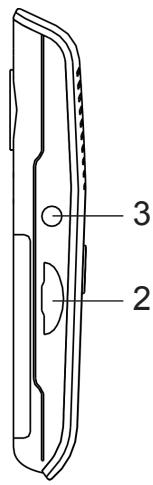
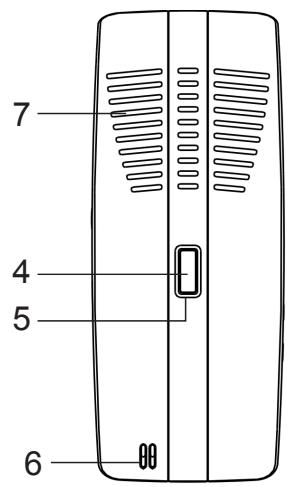
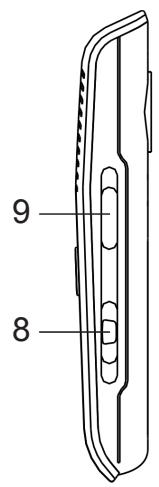
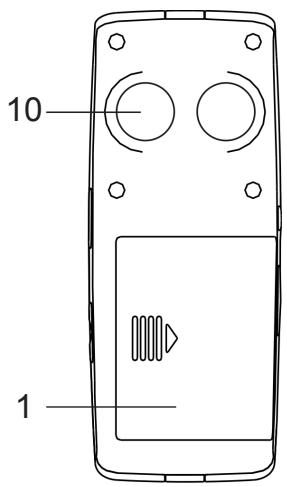
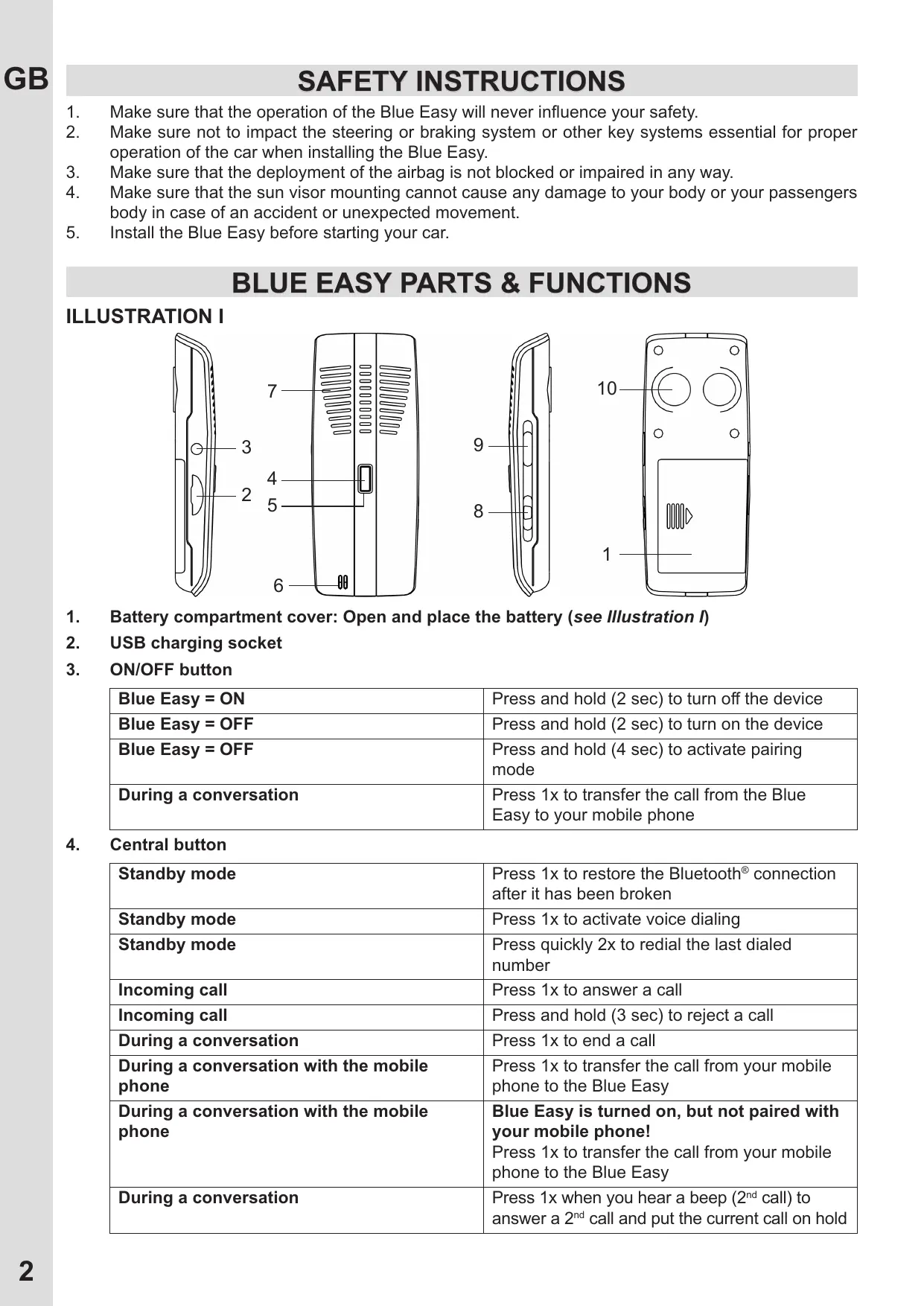
- Battery compartment cover: Open and place the battery (see Illustration I)
- USB charging socket
- ON/OFF button
| Blue Easy = ON | Press and hold (2 sec) to turn off the device |
| Blue Easy = OFF | Press and hold (2 sec) to turn on the device |
| Blue Easy = OFF | Press and hold (4 sec) to activate pairing mode |
| During a conversation | Press 1x to transfer the call from the Blue Easy to your mobile phone |
4. Central button
| Standby mode | Press 1x to restore the Bluetooth® connection after it has been broken |
| Standby mode | Press 1x to activate voice dialing |
| Standby mode | Press quickly 2x to radial the last dialed number |
| Incoming call | Press 1x to answer a call |
| Incoming call | Press and hold (3 sec) to reject a call |
| During a conversation | Press 1x to end a call |
| During a conversation with the mobile phone | Press 1x to transfer the call from your mobile phone to the Blue Easy |
| During a conversation with the mobile phone | Blue Easy is turned on, but not paired with your mobile phone! Press 1x to transfer the call from your mobile phone to the Blue Easy |
| During a conversation | Press 1x when you hear a beep (2ndcall) to answer a 2ndcall and put the current call on hold |
| During a conversation | Press & hold (for 3 sec) to switch between 2 calls |
| During 2ndcall | Press 1x to end 1 of the 2 calls |
5. LED indicator
| Red indicator | • Flashes in Standby mode: low battery capacity • Lights continuously while charging the battery • Lights continuously in mute mode |
| Blue indicator | • Flashes in Standby mode • Lights continuously in privacy mode |
| Red + blue indicator | Flash alternately in pairing mode |
6. Microphone
At all times, please point the microphone towards your mouth. For optimum performance, the microphone should be located at a distance of 30-50 cm from the drivers' mouth. Please make sure that there are no objects in front of the microphone of the Blue Easy.
7. Speaker
8. (+) and (-) Volume buttons
| During a conversation | Press (+) to increase the volume level |
| During a conversation | Press (-) to decrease the volume level |
9. MODE button
| During a conversation | Press 1x to activate privacy mode |
| In privacy mode | Press 1x to deactivate privacy mode |
| During a conversation | Press and hold (3 sec) to activate mute mode |
| In mute mode | Press and hold (3 sec) to deactivate mute mode |
10. Magnets for fixation of the sun visor clip or the metal plate for dashboard fixation
ACCESSORIES IN THE BOX
ILLUSTRATION II
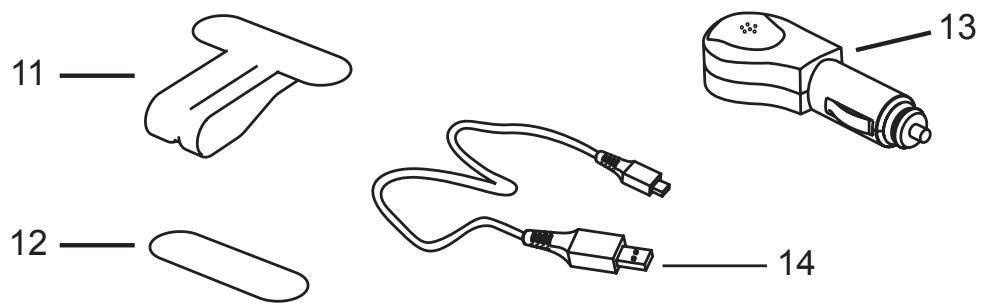
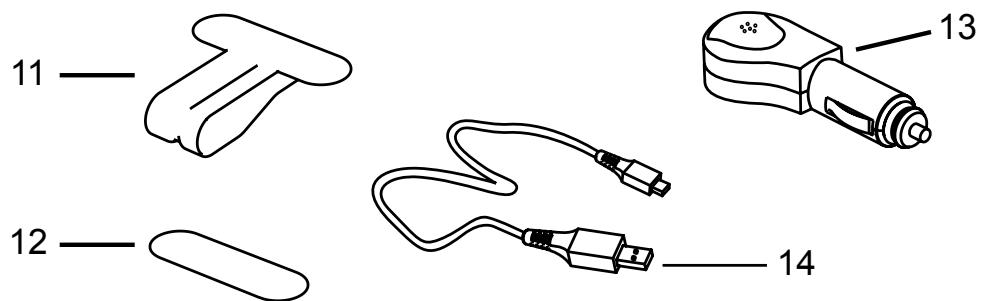
- Clip for sun visor fixation
- Metal plate for dashboard fixation
- Car charger
- USB charging cable
GETTING STARTED
The mr Handsfree Blue Easy is compatible with most Bluetooth® mobile phones.
The 2 devices (the Blue Easy and your mobile phone) only need to be within a maximum of 10 meters of each other to ensure optimal operation, so you do not need to take your phone out of your pocket or bag to make and receive handsfree calls via the Blue Easy.
Attention!
Since Bluetooth® phones produced by different manufacturers provide various functionalities, some functions described in this user's manual could be different or may not be available. (Please refer to the manual of your mobile phone for more detailed information.)
CHARGING THE BATTERY
The Blue Easy comes with a rechargeable battery. Make sure that the Blue Easy is fully charged before using the device.
Attention!
Only use the original chargers included in the packaging to avoid damages.
The Blue Easy offers 2 charging options:
- Via the USB cable (14).
- Via the cigarette lighter (13).
The LED indicator (5) will light red when the charging process begins. The battery is fully charged when the red LED indicator (5) turns off.
Attention!
If the Blue Easy has not been used for a long time, it might take some time before the red LED indicator (5) will turn on.
To ensure optimal battery quality, you should always charge the battery when the red LED indicator (5) is flashing.
Turning on: Press and hold the ON/OFF button (3) until you hear a melody and the blue LED indicator (5) starts flashing.
Turning off: Press and hold the ON/OFF button (3) until you hear a melody and the red LED indicator (5) lights up briefly before turning off again.
Attention!
The Blue Easy will also turn off automatically if there has been no Bluetooth® connection between the Blue Easy and another mobile device for more than 10 minutes.
PAIRING THE BLUE EASY
You are required to pair the Blue Easy with your mobile phone before using it.
How to proceed?
Make sure that the Blue Easy is turned off (LED indicator = off).
- Make sure that the Bluetooth® function of your mobile phone is turned on and let your phone search for Bluetooth® devices. (Please refer to the manual of your mobile phone for more detailed information.)
- Press and hold the ON/OFF button (3) of the Blue Easy until the LED indicator (5) starts flashing by blue and red colours alternately.
The Blue Easy is now in pairing mode.
- Your mobile phone, which is still in search mode, will show the Blue Easy in the list of found Bluetooth® devices.
- Select the Blue Easy in your mobile phone and enter the PIN code 0000 to pair both devices. You will hear a beep.
Attention!
Some mobile phones require an extra action to complete the pairing process with the Blue Easy. (Please refer to the manual of your mobile phone for more detailed information.)
The blue LED indicator (5) will start flashing again.
Attention!
The pairing process should be completed within 2 minutes. After these 2 minutes, you will hear a beep and the Blue Easy will be turned off. You should then restart the pairing process from the beginning.
POSSIBILITY TO PAIR UP TO 8 BLUETOOTH® DEVICES
Your Blue Easy can store pairing information for up to 8 different Bluetooth® devices. Once paired, the Blue Easy can connect immediately with 1 of the 8 devices. When an attempt to pair more than 8 devices is made, the oldest paired device is removed from the memory. When the Blue Easy is turned on, it will automatically initiate a connection with the last mobile phone it was connected to. If you would like to connect the Blue Easy with another device, you first need to disconnect the last paired device.
WHEN COULD THERE BE DISCONNECTION?
In some cases the Blue Easy can be disconnected from your phone and you will need to restore the connection.
- If the Blue Easy has been switched off: Switch on the power with the ON/OFF button (3) and the connection will be restored automatically.
If the mobile phone has been switched off: Turn on the mobile phone and restore the connection via the phone's menu. - If one of the two devices has been out of range: Make sure that both devices are within working range and press the Central button (4) once.
DISCONNECTING THE BLUE EASY AND THE MOBILE PHONE MANUALLY
You can disconnect the Blue Easy from your mobile phone in the following ways:
- Switch off the Blue Easy using the ON/OFF button (3).
Disconnect the Blue Easy in the phone's menu. - Move the phone more than 10 meters away from the Blue Easy.
INSTALLATION OF THE BLUE EASY
ILLUSTRATION III
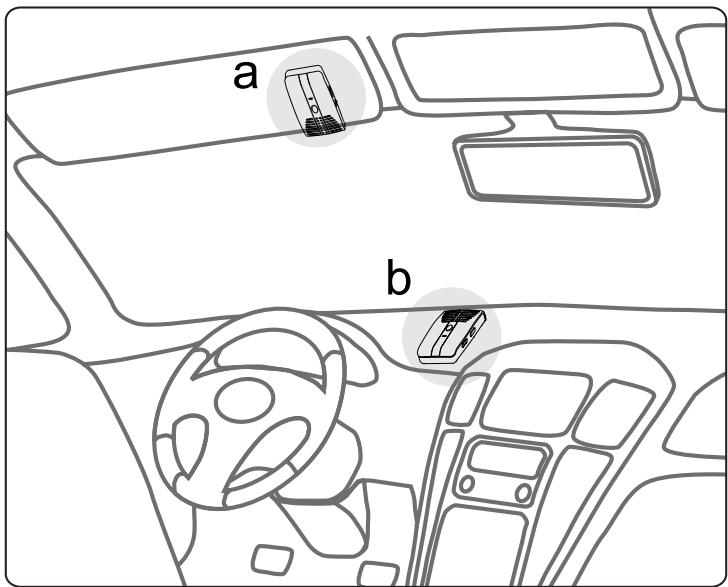
a) On the sun visor: Fix the Blue Easy on the sun visor using the special clip (11) and direct the microphone (6) to your mouth.
b) On the dashboard: Fix the Blue Easy on the dashboard using the metal plate (12).
Make sure that the dashboard is free from dust and dirt before mounting the metal plate.
Attention!
For optimum performance, the microphone should be located at a distance of 30-50 cm from the drivers' mouth.
Before using the mr Handsfree Blue Easy make sure that:
The phone's Bluetooth® feature is on. (Please refer to the manual of your mobile phone for more detailed information.)
The Blue Easy is paired and connected to your phone.
The Blue Easy is switched on and the blue LED indicator (5) flashes.
MAKING A CALL
Using your mobile phone's keypad:
- Dial a number on the keypad.
Press the phone's Talk button.
Attention!
Always talk towards the microphone (6) of the Blue Easy. For optimum performance, please make sure that there are no objects in front of the microphone.
Using voice dialing:
When no call is in progress, press the Central button (4). You will hear a tone that indicates that you can say the desired name ("voice tag"). Say the voice tag. The phone plays the voice tag and dials the related phone number.
Attention!
- You can also activate voice dialing with your phone. (For details on voice dialing, please refer to your phone's user's manual.)
- Please note that the voice dialing function is only available if it is supported by your mobile phone.
ANSWERING A CALL
Press the Central button (4) to answer a call.
ENDING A CALL
Press the Central button (4) to end the current call OR end the call with your mobile phone.
REJECTING A CALL
Press and hold the Central button (4) for 3 seconds to reject the call.
REDIAL
Press the Central button (4) 2x quickly while no call is in progress. You will hear a double beep and the phone will dial the last dialed number.
USE OF THE 2^ND CALL FUNCTION
If you receive a second call during a conversation, you will hear a beep.
You have the following options:
Press the Central button (4) once to answer the 2^nd call and to put the current call on hold.
During a conversation press & hold the Central button (4) for 3 seconds to switch between two calls.
- Press the Central button (4) once during the 2^nd call, to end 1 of the 2 calls.
Attention!
Some phones do not support this Bluetooth® function or ask for confirmation in the mobile phone menu.
ADJUSTING THE SPEAKER VOLUME
When your mobile phone and the Blue Easy are paired, the volume is set in the middle level automatically. During a conversation:
- Press + (8) to increase the volume level. When the maximum level of the speaker is reached, you will hear a beep tone.
- Press - (8) to decrease the volume level. When the minimum level of the speaker is reached, you will hear a beep tone.
USE OF THE "PRIVACY MODE"
Switch a call into "privacy mode":
During a conversation, press the MODE button (9) once. The blue LED indicator (5) will light continuously.
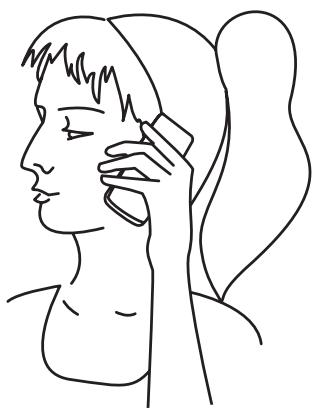
- Hold the speakerphone to your ear and use the Blue Easy as a normal phone. (See illustration IV.)
ILLUSTRATION IV
Attention!
Use this "privacy mode" only when the car is not moving. This is NOT handsfree calling, so it is not safe to use this function while driving!
Switch the call back to "handsfree mode":
- Press the MODE button (9) once. The blue LED indicator (5) will turn off.
USE OF THE "MUTE MODE"
During a conversation you can temporarily turn off the Blue Easy microphone. This is called the "Mute mode".
Activate the "Mute mode" during a conversation:
- Press and hold the MODE button (9) for 3 seconds. The red LED indicator (5) will light continuously.
Switch the conversation back to "handsfree mode":
- Press and hold the MODE button (9) for 3 seconds. The red LED indicator (5) will turn off.
TRANSFER A CALL FROM THE BLUE EASY TO THE MOBILE PHONE AND BACK
Transfer a call from the Blue Easy to the mobile phone:
During a call, press the ON/OFF button (3) once until the blue LED indicator (5) starts to flash.
The call will now be transferred to the mobile phone.
After ending the call, the connection with the Blue Easy will be restored automatically.
Transfer the call from the mobile phone to the Blue Easy:
During a call, press the Central button (4).
RESTORING DEFAULT SETTINGS
If you want to restore the default settings of the Blue Easy and remove all previous pairing information, please follow these steps:
Make sure that the Blue Easy is in Standby mode (the blue LED indicator flashes).
- Press and hold the + and - Volume buttons (8) simultaneously for 10 seconds until the blue LED indicator (5) starts flashing faster.
After restoring the default settings, the Blue Easy will automatically enter pairing mode. If the pairing fails, the Blue Easy will automatically turn off.
BLUETOOTH®
The Bluetooth® word mark and logos are owned by the Bluetooth SIG, Inc. and any use of such marks by TE-Group NV is under license. Other trademarks and trade names are those of their respective owners.
TECHNICAL DATA
| Parameter | Value |
| Charging time | < 3 hours |
| Standby time | Up to 20 days |
| Talk time | Up to 15 hours |
CARE AND MAINTENANCE
The Blue Easy is a product of superior design and should be treated with care. The suggestions below will help you to fulfill any warranty obligations and to enjoy this product for many years.
- Keep the device dry. Precipitation, humidity and all types of liquids or moistures can contain minerals that will corrode the electronic circuitry.
- Do not use or store the device in hot areas. High temperatures can shorten the life of electronic devices and warp or melt certain plastics.
- Do not store the device in cold areas. When it warms up (to its normal temperature), moisture can form inside, which may damage the electronic circuitry boards.
- Do not attempt to open the device. Non-expert handling may damage it.
- Do not use harsh chemicals, cleaning solvents, or strong detergents to clean the device.
MR HANDSFREE WISHES YOU A NICE AND SAFE TRIPI!
GUARANTEE
Mr Handsfree is a registered trademark of TE-Group NV.
The mr Handsfree brand stands for superior product quality and outstanding customer service. That is why mr Handsfree warrants this product against all defects in material and workmanship for a period of three (3) years from the date of original purchase of the product.
The conditions of this guarantee and the extent of responsibility of mr Handsfree under this guarantee are as follows:
This guarantee is limited to the original purchaser of the product and is not transferable to any subsequent purchaser/end user.
- During the guarantee period, the sole responsibility of mr Handsfree will be limited to repair or replace, at its option, any defective parts of the product if this is needed because of malfunction or failure under normal use and conditions. No charge shall be made to the customer for parts and/or repair labor.
- The product must be shipped to an authorized service center in its original and complete packaging, with transportation charges prepaid. Mr Handsfree will not assume responsibility for any losses or damages during transportation.
To obtain repair or replacement within the terms of this guarantee, the customer must provide (a) a proof of purchase (e.g. dated bill of sale); (b) a written specification of the defect(s); (c) a return address and phone number.
This guarantee does not cover and is void with respect to the following:
(a) Products which have been subjected to improper installation, unauthorized repair, improper maintenance, unauthorized modifications or other acts which are not the fault of mr Handsfree; (b) Products which have been subjected to misuse, abuse, neglect, improper handling and storage, an accident or physical damage; (c) Products which have been subjected to fire, water, excessive humidity, sand, dirt, extreme changes in temperature or other conditions which are beyond the control of mr Handsfree; (d) Products which have been used with non-mr Handsfree approved accessories; (e) Products which have the serial number altered, defaced or removed; (f) Products which have been opened, altered, repaired or modified by any unauthorized service center.
- Excluded from any guarantee are consumable items which may need replacing due to normal wear and tear, such as batteries, ear cushions, decorative parts and other accessories.
This guarantee gives you specific legal rights, and you may also have other rights which vary from country to country.
INHOUDSOPGAVE
VEILIGHEIDSINSTRUCTIES 2
ONDERDELEN VAN DE BLUE EASY EN DE FUNCTIONS 2
ACCESSOIRES IN DE DOOS 3
STARTPROCEDURE 4
DE BLUE EASY “KOPPELEN” 4
DE INSTALLATIE VAN DE BLUE EASY 5
DE WERKING VAN DE BLUE EASY 6
BLUETOOTH 8
TECHNISCHE PARAMETERS 8
ZORG EN ONDERHOUD 8
GARANTIE 8
VEILIGHEIDSINSTRUCTIES
ACCESSIONS IN DE DOOS
ILLUSTRATIE II
A MR HANDSFREE DESEJA-LHE UMA BOA E SEGURA VIAGEM!
GARANTIA
CnHn CBeToDIOo (5) NaHcET MInaTb.
BhmuHne!
Ecnn B TeueHne 2 MmHyT pernctpaun He 6bIa ycneuHO BblONHeHa, np03ByuHT 3BykoBoi cnHnI, n Blue Easy BbIKJIOuHTc. HauHnte npocecc pernctpaun cnaJana.
ПОДЕРЖAHNE PEGNCTPAUIN C 8 BLUETOOTH® YCTPOICTBAMN
Blue Easy coxpanyet nHopmauio 8-Mn 3apernctpnpoBAHHbIX C Hm Bluetooth® ycptpocTBax. Blue Easy moKet 6bITb coeHNHeO c 1-M n3 8-Mn 3apernctpnpoBAHHbIX C Hm ycptpocTBom. PnI nonblke 3apernctpnpoBAbTb Blue Easy c 9-bIM ycptpocTBOM, nepBoe n3 3apernctpnpoBAHHbIX C Hm, bYdET ydaJIeHO. IocNe BkJIoueHnA ycptpocTBO Blue Easy naHET nonck Bluetooth® ycptpocTBa, c KOTOpbIM OHO 6blIO coeHNHeO nocIeDNHM. EcII N Bi XOTITE coeHNHTb Blue Easy c dpyrIm 3apernctpnpoBAHHbIM C Hm ycptpocTBOM, Bam Heo6XODIMO pa30pBaTb AKTUBHoe coeINHeHne.
PA3PbIB COEINHEHNA
B HeKOTOpbIX cIyuaX coeINHeHne MeJdy yCTpoiCTBOM Blue Easy n TeJefoHOM MoKeT pa3OpBaTbc. IJa daJIbHeIWeRo IcNoJIb3OBAHnY yCTpoiCTBa Blue Easy Bam Heo6xOdmo BOCCTaHOBtB coeINHeHne:
- Ecnn yctpoiCTBO Blue Easy 6blno BbIKNoyeHo, BkIIOHTe erO, haxab KhoNky ON/OFF (3). CoednHeHne BOCCTaHOBITcA BtOMaTnueckn.
- EcII BbIKIIOueH MObINbHbI TeJeOHO, BKIOUHTe eTo I BOCCTaHOBITE CoEINHeHne Ype3 MeHIO TeJeOHa.
- Ecnn yctpoiCTBO Blue Easy n TelefoH oka3aIncb Ha paccToHn, npebblsaUoem paDnyc DeiCTBna Bluetooth®, npnbni3bTe nx n Haxmnte LcHTpaJIbHyIO KhoNky (4).
TEXHnueCKNE XAPAKTEPNUCTnKN
YXODI N TEXHINUeCKOE OBCJIyJINBAHNE
UcTpoiCTBO rPOMKO CB83n Blue Easy pa3pa6oTaHO n 3rOToBNeHO C nCNoJIb3OBaHHeM nocJeHNX DoCTNXeHn TExNkN n Tpe6yET octopoxHOrO o6paueHn. CLeyuTe npNBedeHHbIM HnxKe peKOMeHdaunm, YTO IO3BOJNT BblONHtB BCE yCIOBn IpeOCTabLnEHNr rapaHTnn n ObecneHt DInItehHyIO n 6e3OTka3HyIO pa6Ory n3dEINy.
- ObeperaTe yCtpoiCTBO n akceccyapbl ot Bnarn. Bnara n BCE BnDbI JnDkoCTe coedejkat MInHepaIbHbIe YactuCbI, Bbl3bIBaIOUne Koppo3H O 3JIeKTPoHHbIX CXEM.
He xpaHnte yCTPOIcTBO npn IOBbIeHHoN TemnepaType. 3TO MOKeT pINBeCTN K COKpaIeHHIO cPoka cnyKbI 3JIeKTPoHHbIX yCTPOIcTB N Bbl3BaTb DeΦOpMaciuN IJN ONJIaBJIeHne PJIaCTNKOBbIX DetanEi.
He xpaHnte yCTpoiCTBO npn Hn3Kx Tempeatypax. Pnp NOBbIeHN TMnepaTpybI DO HopMaJIbHOJ BO3MOXHa KOHdEHCaZna BnAIn BHyTpN KOpnyCa, YTO MOKeT Bbl3BaTb NOBpeJDeHne 3JIeKTPOHHbIX PJIaT.
He nbItaTeScb BcKpbItb Kopnyc yctpoiCtBa. HeKBaJIInΦnIupOBaHHOe o6paIeHne MoKeT npNBecTN K NOBpeKdEHHIO n3deJIy.
He nCnoIb3yIe IJy qNCTKu yCTpoiCTBa arpeccnBhble XmNKaTbl, pactbOpNTen N CInhble MOUoIne cpeiCTBa.
MR HANDSFREE KEJAET BAM CCACTJINBOTO NYTN!
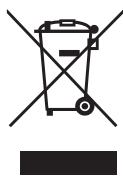
Waste electrical products must not be disposed of with household waste. This equipment should be taken to your local recycling centre for safe treatment.