
BLUE TWIN - Audio accessory MR HANDSFREE - Free user manual and instructions
Find the device manual for free BLUE TWIN MR HANDSFREE in PDF.



| Product Type | Bluetooth Headset |
| Brand | MR HANDSFREE |
| Model | BLUE TWIN |
| Wireless Technology | Bluetooth |
| Maximum Range | 10 meters |
| Talk Time | 7 hours |
| Standby Time | 200 hours |
| Charging Time | 2 hours (first charge 24 hours) |
| Battery Type | Built-in rechargeable battery |
| Indicator Light | Red (charging), Purple (paired/charged) |
| Multifunction Button (MF) | Power on/off, answer/end call, pairing, transfer |
| Volume Buttons | Volume + (2) and Volume - (8) with Mute function |
| Default PIN Code | 0000 |
| Voice Dialing | Yes (if phone compatible) |
| Call Transfer | Yes |
| Second Call | Yes (if operator supports) |
| Included Accessories | Clothing clip, ear hook |
| Weight | Approximately 12 g |
| Compatibility | Bluetooth mobile phones, PC/PDA Bluetooth |
Frequently Asked Questions - BLUE TWIN MR HANDSFREE
User questions about BLUE TWIN MR HANDSFREE
0 question about this device. Answer the ones you know or ask your own.
Ask a new question about this device
Download the instructions for your Audio accessory in PDF format for free! Find your manual BLUE TWIN - MR HANDSFREE and take your electronic device back in hand. On this page are published all the documents necessary for the use of your device. BLUE TWIN by MR HANDSFREE.
USER MANUAL BLUE TWIN MR HANDSFREE
Bluetooth® wireless headset
User's manual
DECLARATION OF CONFORMITY
We, the undersigned
| Company: | TE-GROUP nv |
| Address: | Kapelsestaat 61, 2950 Kapellen - BELGIUM |
declare, that the following equipment:
| Product Name: | BLUE TWIN |
| Product Type: | Bluetooth® headset |
Is in conformity with the Directions of the European Union
EC R&TTE Directive 1999/5/EC
EC Low Voltage Directive 72/23/EEC
EC EMC Directive 89/338/EEC
Conformity of the Bluetooth® headset with the above-mentioned directions is guaranteed by the CE-symbol.
CE
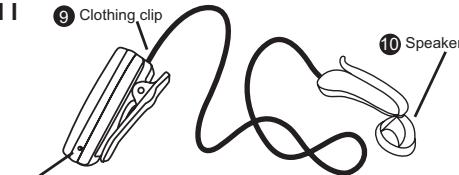
ILLUSTRATIONI
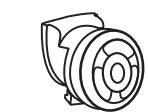
1 Ear plug
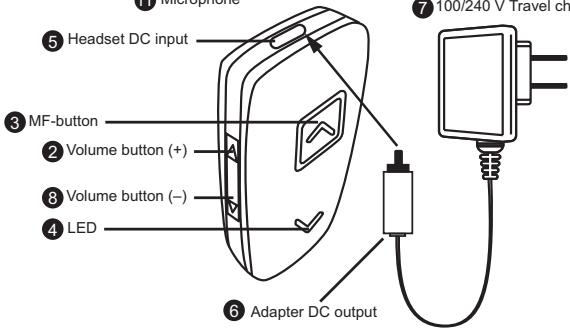
11 Microphone
100/240 V Travel charger
CONTENTS
GETTING STARTED 2
PAIRING THE HEADSET 3
WEARING THE HEADSET 4
MAKING AND ANSWERING / ENDING CALLS 4
TRANSFERRING/SWITCHINGCALLS 5
CONNECTING WITH A PC OR PDA. 5
TROUBLESHOOTING 5
BLUETOOTH 6
GETTING STARTED
CHARGING THE BATTERY
The mr Handsfree Blue Twin headset comes with a rechargeable battery included. For first time use, it takes about 24 hours to fully charge the battery. Afterwards, it takes about 2 hours to fully charge the battery. When the battery is fully charged, the talk time is 7 hours, and the stand-by time will be about 200 hours. The best performance of the Blue Twin's battery is achieved by charging and discharging the unit completely for 3 times.
Plug the Travel Charger (7) into an AC outlet. Connect the adapter (6) into the headset (5) as shown in the picture. Gently press the adapter until it clicks into place. The red indicator (4) on the headset will light up. When the battery is fully charged, the red indicator (4) on the headset will turn off and the purple indicator will turn on.
MAIN FUNCTIONS MULTIFUNCTIONAL AND VOLUME BUTTONS & LED INDICATOR
MF-Button (3):
Power on/off
Answer / end / transfer calls / redial
Pairing
Volume Button (2 + 8)
Adjust volume
Mute-function
LED indicator (4):
| Headset action | Indicator |
| During pairing | Purple LED lights up constantly |
| Pairing successful | Red LED starts flashing every 4 seconds |
| Standby-mode | Red LED lights up every 4 seconds |
| Battery under charging | Red LED is turned on constantly |
| Battery charged | Red LED turns off and purple LED turns on |
TURNING THE HEADSET ON/OFF
To turn the headset on:
Press and hold the MF- button (3) for 5 seconds. You will hear 1 short tone and the purple indicator (4) of the headset flashes. The headset is now turned on.
To turn the headset off:
Press and hold the MF-button (3) for 4 seconds. You will hear 1 short tone and the purple indicator (4) of the headset lights 2 times shortly up. The headset is now turned off.
PAIRING THE HEADSET
You are required to pair the Blue Twin headset with your mobile phone once before using it.
Each Blue Twin headset has a default PIN-code 0000 for pairing, which is stored in its internal memory. You are usually required to enter the PIN-code 0000 in a pairing process with a Bluetooth® mobile phone or other devices; however it depends on the kind of Bluetooth® device that the headset is connected to.
The Blue Twin headset must be turned off before initiating pairing. Press and hold the MF-button (3) until the purple indicator (4) lights up constantly. The headset is now ready for pairing. Initiate the pairing process on your Bluetooth® mobile phone to pair with the Blue Twin headset. (Refer to the manual of your mobile phone.) Select Blue Twin out of the list with found devices on your mobile phone. You will be asked to enter the PIN-code to complete pairing, enter 0000 and confirm it. When the pairing has been successful, the purple indicator (4) of the headset will flash every 4 seconds.
Note:
- If the Blue Twin headset is not in pairing mode, your mobile phone won't find the headset. Please set the headset into pairing mode before letting your mobile phone search for the headset.
- If no pairing is possible for a period of time (approx. two minutes), the headset will automatically leave pairing mode. You may need to start all over again.
- Paired devices remain paired even when:
One of the devices is not turned on.
- A service connection is interrupted or the service stopped.
One or both devices are rebooted.
CONNECTION
In some cases the Blue Twin can be disconnected from your phone and you will need to restore the connection.
- If the Blue Twin has been switched off: Switch on the power and press the MF-button (3) for 3 seconds until the purple indicator starts to flash.
If the mobile phone has been switched off: Turn on the mobile phone and restore the connection via the phone's menu.
If one of the two devices has been out of range: Make sure that both devices are back within working range.
Note:
For all mobile phone types, it is recommended to set "Trust" or "Authorized" for Blue Twin in the Bluetooth® menu of your mobile phone. Please refer to the manual of your mobile phone for more detailed information.
DISCONNECTION
You can disconnect the headset from your phone when, for example, you want to use another Bluetooth® device with your phone. The Blue Twin can be disconnected in the following ways:
- Switch off the headset.
- Disconnect the headset in the phone's menu.
- Move the phone more than 10 meters away from the headset.
WEARING THE HEADSET
The Blue Twin is designed to be comfortably worn in 2 ways.
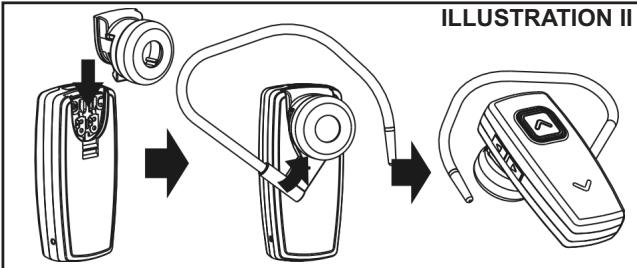
Option 1: wearing the headset on the ear (see ILLUSTRATION II)
You can wear the Blue Twin on your ear, by attaching the ear plug (1) to the headset. Now place the Blue Twin on your ear. You can also use the ear hook to find the most comfortable fit for your ear.
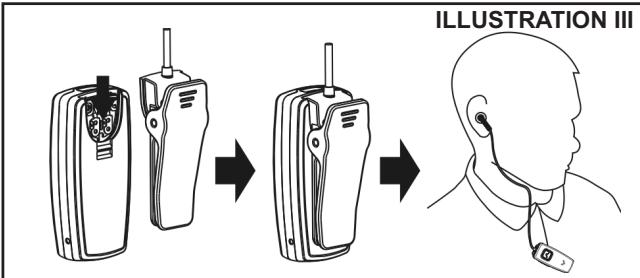
Option 2: wearing the headset on your clothes (see ILLUSTRATION III)
Attach the clothing clip (9) to a piece of clothing as shown in ILLUSTRATION III. Make sure that the microphone (11) is directed towards your mouth. Now place the speaker (10) in your ear, so that you can start making phone calls. As soon as you finished making phone calls, you can also easily clip the speaker to a piece of clothing.
MAKING AND ANSWERING / ENDING CALLS
Once the Blue Twin headset is successfully paired with your mobile phone, you can use it to make and receive calls. The Blue Twin headset can be used with voice dialing if your mobile phone supports this feature. (Please check the manual of your mobile phone).
MAKING CALLS
Using voice dialing:
Press the MF-button (3), wait for a beep and say the name of the person you want to call. Press the MF-button (3) again to cancel voice dialing.
Using the phone keys to make a call:
Enter and dial the number on the mobile phone as you normally do. Once the call has been set up, the sound will be transmitted to your headset automatically.
Redial:
Press and hold the MF-button (3) until you hear a beep (app. 2 sec.) to redial the last number you called.
ANSWERING / ENDING CALLS
When the Blue Twin headset is turned on and there is an incoming call, you will hear a musical tone. Press the MF按钮 (3) to answer the call or press and hold the MF-button (3) for 3 seconds to reject the call. Adjust the headset volume by pressing the + button (2) to increase the volume and pressing the - button (8) to decrease the volume. End the call by pressing the MF-button (3).
When the headset is turned off, press and hold the MF-button (3) for 5 seconds to turn the headset on. Then press the MF-button (3) again to answer the call.
Note:
Due to the different design of some mobile phones, an auto disconnect may happen even when the Blue Twin headset is turned on. In that case, the headset won't ring when there is an incoming call. Press the MF-button (3) for 1 sec. to reconnect the headset with your mobile phone for an incoming call.
MUTE FUNCTION
During conversation, it is possible to mute the microphone.
Press and hold the Volume-button (8) until you hear a beep to activate the Mute function. To disable the Mute function, press the Volume-button (8) again until you hear a beep.
TRANSFERRING / SWITCHING CALLS
To transfer a call:
Press and hold the MF-button (3) until you hear a beep to transfer the call to the mobile phone while talking on the headset. The headset will be turned off. If you want to transfer the call back to the headset, press the MF-button (3) again for 5 seconds.
To switch to a second call:
Press and hold the MF-button (3) for 3 seconds to switch to a second call during a call. This function only works when your mobile phone service provider provides this service (check with your network provider).
CONNECTING WITH A PC OR PDA
You are allowed to connect the Blue Twin headset with a Bluetooth® enabled PC or PDA that is supported with headset and/or handsfree profiles. Please refer to the user manual of your Bluetooth® enabled PC or PDA for setup information.
TROUBLE SHOOTING
-
There is no red indication while charging the battery (even if the Blue Twin headset is connected to the charger).
-
No sound contact between the Blue Twin headset and other devices.
-
For first time use, it could be that the battery capacity is too low. It could take some time accordingly before the red indicator lights up.
- When the headset has not been used for some time or when the battery of the headset is empty, it could also take some time before the red indicator lights up.
Make sure that the two devices have been paired.
Make sure that the headset is turned on.
Make sure that the two devices are within a working range (10 m).
Make sure that your mobile phone is within signal strength. - Some Bluetooth® mobile phones can support only one Bluetooth® headset. Disconnection may happen when there is more than one headset paired with your mobile phone.
| 3. Several Bluetooth® devices appear on my mobile phone while searching the Blue Twin headset. | Most Bluetooth® enabled mobile phones with Bluetooth® function activated can search for more than one Bluetooth® device within operative range. The headset will appear as “Blue Twin” on your mobile phone after having been found by your mobile phone. |
| 4. There is a disturbance noise coming from the Blue Twin headset. | The performance of the headset will be affected by two factors: • Whether your mobile phone is in a good signal area. If your mobile phone is in weak signal area, you won’t hear clearly with the headset. • Whether it is in the operative range (10 m). The headset will automatically try to reconnect within 90 seconds (this depends on your mobile phone). |
BLUETOOTH®
The Bluetooth® word mark and logos are owned by the Bluetooth SIG, Inc. and any use of such marks by TE-Group NV is under license. Other trademarks and trade names are those of their respective owners.
INHOUDSOPGAVE
STARTPROCEDURE 2
PAIRING (KOPPELING) VAN DE HEADSET 3
MANIEREN OM DE HEADSET TE DRAGEN 4
TELEFONEREN EN OPROEPEN BEANTWOORDEN / BEEINDIGEN....4
OPROEPEN DOORSCHAKELEN / OVERSCHAKEKEN NAAR
TWEDE OPROEP 5
VERBINDEN MET EEN PC OF EEN ZAKCOMPUTER (PDA) 5
PROBLEMOPLOSING 5
BLUETOOTH 6
STARTPROCEDURE
BATTERIJ OPLADEN
Met spreakherkenning (voice dialing):
CONNECTER AVEC UN PC OU PDA 5
RÉSOLUTION DES PROBLEMES 5
BLUETOOTH 6
MISE EN ROUTE
RECHARGER LA BATTERIE
CONNECTER AVEC UN PC OU PDA
CONNECTION CON PC O PDA
LIGAR AO PC OU PDA 5
SOLUTION DE PROBLEMAS 5
BLUETOOTH 6
PREPARAR O AURICULAR
CARREGAR AS BATERIAS
I A O P O I TPONOI NOY MNOPEITE NA TO FOPESETE.4
KAHsH KAI ANANTsH KAHsEoN / AHEH KAHsEoN. 4
EKTPONH KAHSEQN / AHPsi DEYTEPHS
EIZEPXOMENHs KAHsHs 5
SYNHEMHEPCHPDA. 5
KpaTkoe pyKOBOCTBO NOIb3OBaTeJIa - 1 wT.
CD c nonhoHnHCTpyKznei-1wT.
CbeToIIOHbI INHdNKaTop (4):
PERNCTPALUNYCTPOINCTBA
Ipejde yem nolb3oBaT bpHnTypy mr Handsfree Blue Twin, BbldoJXhbl 3aperncptnpoBaT ee Ha CBOe Mo6nBHom Tenefohe.
Pn npokynke, kaxdarrapnntypa mr Handsfree Blue Twin nMeET PIN-ko0 0000.ObbuHNO, npnr prrntpaunn Ha Mo6nbhix Tepeohax uN dpurnx Bluetooth-yctpoeTbax, cneJeT BBeCTn PIN-koD. Ondako npoeDpya pernctpaun pa3nbix Bluetooth-yctpoeCTB pa3nnaeTc.
Ipeep nauom pernctpaun y6eintecb, YTO raphntypa Blue Twin BbKIOHcHa. Haxmite u yepxnbte MF-KhONky (3) do tex nop, noka he 3aropntcA fnoletobu INndkaTOp (4). Tenepb raphntypa haoDNTCB a pexmme pernctpaun. 3aperntpuynte raphntypy Blue Twin Ha BaWem Mo6bnHom Tenefohe, cndya INCTpyKUn K moBnHomy Teneoohy. Bb6epnte Blue Twin n3 cnNcKa haindeHHbIX Tepeohom Bluteoth-yctpoiCTB. Ppi 3anPoce PIN-KoDa, BBeMtTe 0000 nOHTBepnte BBO. ECnn pernctpaun npoula ycneuho, fnoletobu INndkaTOp (4) 6ydet 3aropatcb KaKdbie 4 cekHybl.
3ameyane:
- Ecni raphnIpya Blue Twin He haxoIITcB pexmpeIcTpaun, Bau MoIbIbHbI TeIefoH He CMOxet ee o6hApuytB. Bam cIeIyET nepeBeCTn raphNtpyu B pexm perIcTpaun nepeJ hauJIOM perIcTpaun Ha BaIeM MObIbHOM TeIefoH.
- EcnB TceHHe OnpedEnHOro nepnoa (Okono 2MnHyt) perInctpaun He 6bIa ycneuho 3abepehe, To rapHnTypa abTomatueckn BbiJet n3 pexkma peinctpaunn. B 30m cnyae Bam hJxHo hauaTb npoeDpyp perinctpaunn C haHaJa.
- Perictpaunha Bluetooth®-yctpoCTbax coxpaHntc daJe ecn:
OJHO n3 yCTpoINCTB 6blIO BbIKJIOueHO.
CoeHHeHne 6bIIO npepBaHO nn npekpaueHo.
- Ondno nlln o6a yctpoinCTBa 6bIIN nepe3aegxKeHbI.
COEINHEHNE
B HeKOTOpbIX cIyAax coeINHeHne Mexdy Blue Twin n TepeHOM MoKet 6bItb npepBaHa.
Ecn coeHHeHne npepBaIocb n3-3a toro, yTo rapHnTpA Blue Twin 6bJa BbIKIOueHa, BKIOUHTe ee, haxMnte MF-KhONKy (3) uYdepKJBaIte ee 3cekyNdi, noka fnoJeTobInHdNKaTOp He 3aROpNTbcra.
Ecn coeINHeHne npeBaIocb I3-3a TOrO, YTO 6bl N BIKIOueH MOBnBnTteFEOH, BKIOHTe ERO IN BOCCTaHOBITE coeINHeHne uepe3 MeHIO TEFOHa.
Ecn coeunne HnpeBaoocb n3-3a TOrO, YTO yctpoiCTBa OKa3aJIncb 3a npedeJAMn pa6oey dIcTahm (60one 10 M npy r ot npya), cokpatntte nIcTaNIO MU MeJy HMI.
3aMeuHne:
TcboI TenefoH ne 3a npaaunBan noTBePjxJeHne Ha BocCTaHOBJEHn COeJInHeHn, peKOMEnyETc BbIOnHnItb doonHntbnHyu yctahOBky B Luetho"noJMeHIO tenefoHa: npucBoYte raphNtpe Blue Twin cTatyc "AbtopnAzaia" nIu "Pa3peuHHeO."
PA3PbIB COEINHEHNA
BbMOKeTe pa3OpBaT coeINHeHne MeJdy TeNEFOHm n rapHnTypoi Blue Twin, HapnMep, YTO6bI NCIOJIb3OBA TbeneoH c npyHM Bluetooth®-ycToPcTBOM. 3TO MOxHO pOJeNaTb ODNHM N3 CNeDyUOnx CNOC6OB:
- BbIKJIIOUChIte rapHnIpy.
- Pa3OpBnTe coeINHeHneYepe3 MeHIO TeIefoHa.
- 06ecnebye paaccToHnme mexdy rapHnIypoi n TeJeFOHOM 6OJee 10 M.
HOLSEHEIEMTAPHTyPbI
KoHCTpykzma raphnItypbI Blue Twin no3B0n8ET Hocntb ee DByMra cnoc6amn.
Cnoc6 1: HoueHne rapHTpyb By xhe (cM. INJIIOCTPAUIO II)
ПисоeинiteК grapHType6JOK(1)ДиHamika.ПОмecTITe grapHTypyBxO.PiNжЕнHIN Bbl MoKTeИСпОЛьЗOBaTb 3ayuHy.
Cnooc6 1: Hooene rapHnTpyb, npKpenJenHNo K oJekde (cm. INJIIOCTPALNIO III)
PnpocoeHNHTeK raphNtpe KInncy (9) n npnKpeHnTe C ee nomOsbU raphNtpy K OndJe, KaK 3TO nOKa3HO Ha INJIIOCTPALIN III. Y6eIntecb, YTO MnkpofoH (11) HappaBHeB CTopoHy BaWero pTa. Teepb NomeCTte DnHAMNK (10) Byxo. Korda TetefoHHb pa3roBOp 3akOHueH, DnHAMK MOxHO BbyHyb N3 xya N npicTeHytB K OndJe.
HABOP HOMEPA IN PPNEM Bbl3OBA / OKOHUAHNE PA3ROBOPA
Tenepb, korga Bawa raphntpyra Blue Twin 3apernctrhoaba Ha moBbHbM Tenefohe, Bbl Moxete nCOnlb3oBatte enIaeTefooHoro pa3robopa. EcnB Baw MboNbHbIy Tepeh noDdepKnaeT roLocoBoi ha6op, To Bbl Moxete nCOnlb3oBaT bTy fynkcuio I na6opa Homepa (m. INHCTpykuio K BaWemy MObHbOMy TenefoHy).
HABOP HOMEPA
IcnojB3OBAHne roJIOcoBOro Ha6opa:
Haxmnte MF-KhONky (3),doJntecb cnHaHa n npOn3HeNTe NMa a6oHEnTa, KOtOpomy Bby xOTnte no3BOHnTb. Haxmnte MF-KhONky (3) eue pa3, yTo6bl OTMeHnTb roIOcoBoH na6op.
IcnoJIb3OBAHHe KlaBnATypbl TeJefoHa:
Ha6epnte Homep, nCnoB3yra KnaBnAtpy Telefoha. KaK TOnbko npOn3oJET coEnHeHne, 3BOHok 6ydet ABToMaTueckn nepeBeDeH c Telefoha Ha rapHNTpy.
Waste electrical products must not be disposed of with household waste. This equipment should be taken to your local recycling centre for safe treatment.