
BLUE XS - Audio accessory MR HANDSFREE - Free user manual and instructions
Find the device manual for free BLUE XS MR HANDSFREE in PDF.

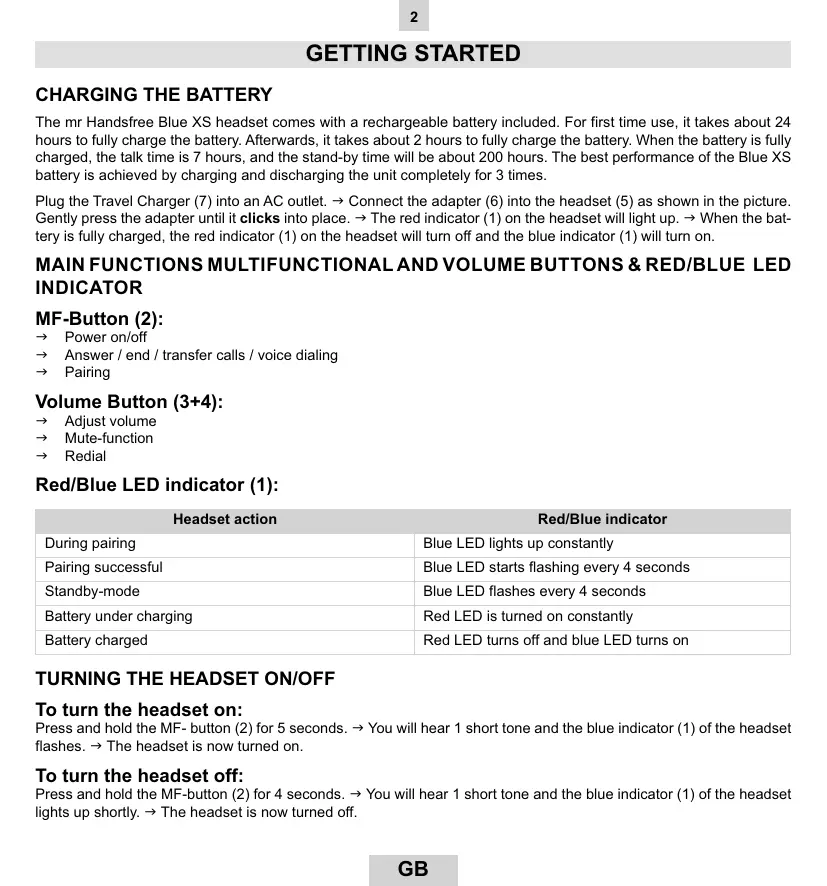


| Product type | Bluetooth Headset |
| Brand | MR HANDSFREE |
| Model | BLUE XS |
| Power supply | Built-in rechargeable battery |
| Initial charging time | 24 hours |
| Normal charging time | 2 hours |
| Talk time | 7 hours |
| Standby time | 200 hours |
| LED indicator | Red (charging), Blue (on/standby) |
| Buttons | Multifunction (MF), Volume +/-, Mute |
| Default PIN code | 0000 |
| Bluetooth range | 10 meters |
| Call functions | Answer, hang up, reject, transfer, second call |
| Voice dialing | Yes (if phone compatible) |
| Last number redial | Yes (long press volume -) |
| Mute function | Yes (volume +/- button, beep) |
| Use with PC/PDA | Yes, Bluetooth compatible |
| Battery type | Rechargeable, lithium-ion (typical) |
Frequently Asked Questions - BLUE XS MR HANDSFREE
User questions about BLUE XS MR HANDSFREE
0 question about this device. Answer the ones you know or ask your own.
Ask a new question about this device
Download the instructions for your Audio accessory in PDF format for free! Find your manual BLUE XS - MR HANDSFREE and take your electronic device back in hand. On this page are published all the documents necessary for the use of your device. BLUE XS by MR HANDSFREE.
USER MANUAL BLUE XS MR HANDSFREE
Bluetooth® wireless headset
| GB | F |
| NL | D |
| I | E |
| GR | RU |
| HU | HR |
User's manual
DECLARATION OF CONFORMITY
We, the undersigned
| Company: | TE-GROUP nv |
| Address: | Kapelsestaat 61, 2950 Kapellen - BELGIUM |
declare, that the following equipment:
| Product Name: | BLUE XS |
| Product Type: | Bluetooth® headset |
Is in conformity with the Directions of the European Union
EC R&TTE Directive 1999/5/EC
EC Low Voltage Directive 72/23/EEC
EC EMC Directive 89/338/EEC
Conformity of the Bluetooth® headset with the above-mentioned directions is guaranteed by the CE-symbol.
CE
CONTENTS
GETTING STARTED 2
PAIRING THE HEADSET 3
MAKING AND ANSWERING / ENDING CALLS 4
TRANSFERRING / SWITCHING CALLS 4
CONNECTING WITH A PC OR PDA. 5
TROUBLESHOOTING 5
BLUETOOTH 6
GETTING STARTED
CHARGING THE BATTERY
The mr Handsfree Blue XS headset comes with a rechargeable battery included. For first time use, it takes about 24 hours to fully charge the battery. Afterwards, it takes about 2 hours to fully charge the battery. When the battery is fully charged, the talk time is 7 hours, and the stand-by time will be about 200 hours. The best performance of the Blue XS battery is achieved by charging and discharging the unit completely for 3 times.
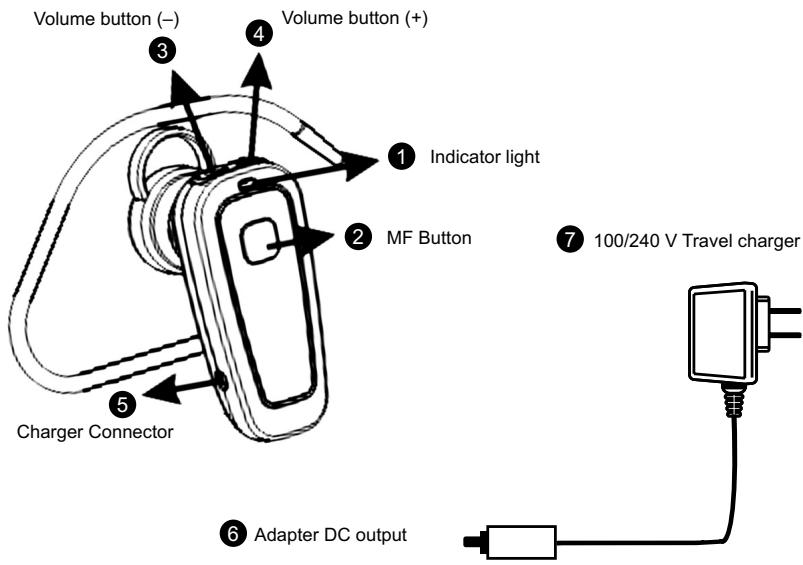
Plug the Travel Charger (7) into an AC outlet. Connect the adapter (6) into the headset (5) as shown in the picture. Gently press the adapter until it clicks into place. The red indicator (1) on the headset will light up. When the battery is fully charged, the red indicator (1) on the headset will turn off and the blue indicator (1) will turn on.
MAIN FUNCTIONS MULTIFUNCTIONAL AND VOLUME BUTTONS & RED/BLUE LED INDICATOR
MF-Button (2):
Power on/off
Answer / end / transfer calls / voice dialing
Pairing
Volume Button (3 + 4)
Adjust volume
Mute-function
Redial
Red/Blue LED indicator (1):
| Headset action | Red/Blue indicator |
| During pairing | Blue LED lights up constantly |
| Pairing successful | Blue LED starts flashing every 4 seconds |
| Standby-mode | Blue LED flashes every 4 seconds |
| Battery under charging | Red LED is turned on constantly |
| Battery charged | Red LED turns off and blue LED turns on |
TURNING THE HEADSET ON/OFF
To turn the headset on:
Press and hold the MF- button (2) for 5 seconds. You will hear 1 short tone and the blue indicator (1) of the headset flashes. The headset is now turned on.
To turn the headset off:
Press and hold the MF-button (2) for 4 seconds. You will hear 1 short tone and the blue indicator (1) of the headset lights up shortly. The headset is now turned off.
PAIRING THE HEADSET
You are required to pair the Blue XS headset with your mobile phone once before using it.
Each Blue XS headset has a default PIN-code 0000 for pairing, which is stored in its internal memory. You are usually required to enter the PIN-code 0000 in a pairing process with a Bluetooth® mobile phone or other devices; however it depends on the kind of Bluetooth® device that the headset is connected to.
The Blue XS headset must be turned off before initiating pairing. Press and hold the MF-button (2) until the blue indicator (1) lights up constantly. The headset is now ready for pairing. Initiate the pairing process on your Bluetooth® mobile phone to pair with the Blue XS headset. (Refer to the manual of your mobile phone.) Select Blue XS out of the list with found devices on your mobile phone. You will be asked to enter the PIN-code to complete pairing, enter 0000 and confirm it. When the pairing has been successful, the blue indicator (1) of the headset will flash every 4 seconds.
Note:
- If the Blue XS headset is not in pairing mode, your mobile phone won't find the headset. Please set the headset into pairing mode before letting your mobile phone search for the headset.
- If no pairing is possible for a period of time (approx. two minutes), the headset will automatically leave pairing mode. You may need to start all over again.
- Paired devices remain paired even when:
One of the devices is not turned on.
A service connection is interrupted or the service stopped.
One or both devices are rebooted.
CONNECTION
In some cases the Blue XS can be disconnected from your phone and you will need to restore the connection.
If the Blue XS has been switched off: Switch on the power and press the MF-button (2) for 1 second.
If the mobile phone has been switched off: Turn on the mobile phone and restore the connection via the phone's menu.
If one of the two devices has been out of range: Make sure that both devices are within working range and press the MF-button (2) once.
Note:
For all mobile phone types, it is recommended to set "Trust" or "Authorized" for Blue XS in the Bluetooth® menu of your mobile phone. Please refer to the manual of your mobile phone for more detailed information.
DISCONNECTION
You can disconnect the headset from your phone when, for example, you want to use another Bluetooth® device with your phone. The Blue XS can be disconnected in the following ways:
- Switch off the headset.
- Disconnect the headset in the phone's menu.
- Move the phone more than 10 meters away from the headset.
MAKING AND ANSWERING / ENDING CALLS
Once the Blue XS headset is successfully paired with your mobile phone, you can use it to make and receive calls. The Blue XS headset can be used with voice dialing and radial if your mobile phone supports this feature. (Please check the manual of your mobile phone).
MAKING CALLS
Using voice dialing:
Press the MF-button (2), wait for a beep and say the name of the person you want to call. Press the MF-button (2) again to cancel voice dialing.
Using the phone keys to make a call:
Enter and dial the number on the mobile phone as you normally do. Once the call has been set up, the sound will be transmitted to your headset automatically.
Redial:
Press and hold the volume-button - (3) for 3 seconds to radial the last number you called.
ANSWERING / ENDING CALLS
When the Blue XS headset is turned on and there is an incoming call, you will hear a musical tone. Press the MF按钮 (2) to answer the call or press and hold the MF-button (2) for 3 seconds to reject the call. Adjust the headset volume by pressing the + button (4) to increase the volume and pressing the - button (3) to decrease the volume. End the call by pressing the MF-button (2).
When the headset is turned off, press and hold the MF-button (2) for 5 seconds to turn the headset on. Then press the MF-button (2) again to answer the call.
Note:
Due to the different design of some mobile phones, an auto-disconnect may happen even when the Blue XS headset is turned on. In that case, the headset won't ring when there is an incoming call. Press the MF-button (2) for 1 sec. to reconnect the headset with your mobile phone for an incoming call.
MUTE FUNCTION
During conversation, it is possible to mute the microphone.
Press and hold the volume-button + (4) until you hear a beep to activate the Mute function. To disable the Mute function, press the volume-button - (3) until you hear a beep.
TRANSFERRING / SWITCHING CALLS
To transfer a call:
Press and hold the MF-button (2) until you hear a beep to transfer the call to the mobile phone while talking on the headset. The headset will be turned off. If you want to transfer the call back to the headset, press the MF-button (2) again for 5 seconds.
To switch to a second call:
Press and hold the MF-button (2) for 3 seconds to switch to a second call during a call. This function only works when your mobile phone service provider provides this service (check with your network provider).
CONNECTING WITH A PC OR PDA
You are allowed to connect the Blue XS headset with a Bluetooth® enabled PC or PDA that is supported with headset and/or handsfree profiles. Please refer to the user manual of your Bluetooth® enabled PC or PDA for setup information.
TROUBLE SHOOTING
| 1. There is no red indication while charging the battery (even if the Blue XS headset is connected to the charger). | For first time use, it could be that the battery capacity is too low. It could take some time accordingly before the red indicator lights up. When the headset has not been used for some time or when the battery of the headset is empty, it could also take some time before the red indicator lights up. |
| 2. No sound contact between the Blue XS headset and other devices. | Make sure that the two devices have been paired. Make sure that the headset is turned on. Make sure that the two devices are within a working range (10 m). Make sure that your mobile phone is within signal strength. Some Bluetooth® mobile phones can support only one Bluetooth® headset. Disconnection may happen when there is more than one headset paired with your mobile phone. |
| 3. Several Bluetooth® devices appear on my mobile phone while searching the Blue XS headset. | Most Bluetooth® enabled mobile phones with Bluetooth® function activated can search for more than one Bluetooth® device within operative range. The headset will appear as “Blue XS” on your mobile phone after having been found by your mobile phone. |
| 4. There is a disturbance noise coming from the Blue XS headset. | The performance of the headset will be affected by two factors: • Whether your mobile phone is in a good signal area. If your mobile phone is in weak signal area, you won’t hear clearly with the headset. • Whether it is in the operative range (10 m). The headset will automatically try to reconnect within 90 seconds (this depends on your mobile phone). |
BLUETOOTH®
The Bluetooth® word mark and logos are owned by the Bluetooth SIG, Inc. and any use of such marks by TE-Group NV is under license. Other trademarks and trade names are those of their respective owners.
TABLE DES MATIÈRES
MISE EN ROUTE 2
ASSOCIATION DE L'OREILLETTE 3
CONNECTER AVEC UN PC OU PDA 5
RÉSOLUTION DES PROBLEMES 5
BLUETOOTH 6
MISE EN ROUTE
RECHARGER LA BATTERIE
CONNECTER AVEC UN PC OU PDA
Met spreakherkenning (voice dialing):
CONNECTION CON PC O PDA
KpaTkoepyKOBOIDCTBO NOIb3OBAteTn -1tT.
CD c nonho nHctpkyqnei -1wT
ПОДГOTOBКИСПОЛБ3OBAHNIO
3APRAKABATAPEN
TapHnIpya mr Hands free Blue XS noCTabJIeTcA c AkkymyIaTOPHOI 6aTaapee. Ipeep nepbIM nCpOJIb3ObaHNmE 6aTaapeo cnDyeET nonHooCTbIO 3a 4aIINb B TceHeN2 4acOB. Ppi noCneJeUoEM mCpONJIb3OBAHNm 6aTaapee nonHooCTbIO 3aqrJaAeTc npBnI3nteBHO 3a 2 Yaca. POnHra 3aPdKa 6aTaapei o6ceNeuBaET Do 7 cacOB pa60tB b pexime pa3roBopa n do 200 cacOB pa60tB b pexime OxKuAnHa.
ПоДКЛЮЧИТЕ 6лOK ПИТаня (7) к розтke Злктуческо сети. → ПОДКЛЮЧИТЕ aДАNTер (6) К rapнIHType (5), octopoхно habадов на несяда. → Ha rapнIHType загорNTСК КаCSHbIM INDkaTOp (1). → Пocл eToR, kak 6aTaperЯ полhoeю зараздntс, красьн IMINKaTOp (1) norachet n 3aORpNTc rOlyбоi (1).
KHONKINHIDNKATOPbI
MHorofoyHKUHOHaJIbHa (MF) KhONka (2):
→ BkIIOueHne/ BbIKIOUeHne rapHNtpybl
→ OTBet Ha 3BOHOK/ 3aBepueHne pa3roBopa/ nepeBOJ 3BOHKOB
→ Perncpaun
KhoPka perynipobkn rpmkoctn (3+4):
→ PerynnpOBKa rpoMkOCTn
→ BpeMeHHoe OTKJIOHeHne MKNpOΦoHa
OxNuaHne
CBeToIaNoIbI KpaChbI/roLy6oI INIkaTOp (1):
IPEBOD3BOHKA/BTOPOB Bbl3OB
IpebeOd 3BOHka:
Tbbo bo BwpeBa3roBopA uepe3 rapHntypy, nepeBecn 3BOHOK ha TeJeFOH, HaxMITE u YdePjKBaIte MF-KHONKY (2), noka He ycblsiuTE 3bYKOBo CnRHaJ. Ecnn BbXOTNE pepeBecn 3BOHOK o6paTHo Ha rapHNTpy, eue pa3 haxMITE u Ha 1 cekNyUdpxNtE MF-KHONKY (3).
BtopoB BbI3OB:
TtO6bI pInHb TbOpB Bb3OB Bo BpEmpa3roBaOp, HaxMMte uJdepXnBaTe 3 cekyHbI MF-KhONKy (2). ΘaФyHKUra pa6oTaET ToIbKo B Tom Cnyae, eCNI ee noDpeXnBaET BaW oneP aTO MPbIbHO CBa3N.
NCIOJIb3OBAHHe C PC INJIN PDA
Bb moKet nCnoIb3ObaTb raphnIpy Blue XS c IIK nn KPK, noDpeKnaIOUMn npoFInb Bluetooth® headset n/ nn handsfree. DnperncTaUIN n daJIbHeJrero nCnoIb3ObaHnra raphnItypbl Blue XS, cneynte peKomeHdaZnM INCTpykUIN NO kCpIyatauIN dNtX yCTpoiCTB.
YCTPAHEHNE HENCINPABHOCTE
-
Пи Зарядke 6atapen He CBetNTcKpaChbI INHdkaTop.
-
Пи пьвом Испolyзовин Зард 6ат胺и может 6ытс слшков Инзим, И может почин Некоторoe Врем до TOТ, Кад загорпс Кpac希и ИнданКотop.
-
Ecni rapiHnIpya He nCOnJIb3ObaNacb DoIIOe BpEmr, NII ecNl batape IIOJIHOCTbO pa3pJxHeA, TAKXe MoKet npOITn HekOTOpoe BpEmr Do TORO, KAK 3aoropntc kpaChbln INHdkatopr.
-
Het CBa3n Mekdy raphHntypoi Blue XS undpyrmmu Bluetooth® yctpoiCTbAMn.
-
Y6eHNTecb, yTO raphNHTypa 3apErnCTpnpOBAHa Ha TOM yCTpoiCTBE.
- y6eHntecb, cyTo rapHNTypa BkJIIOUeHa.
- Y6eJIntecb, yTO paCCToHHe MEXy UcTpoIcTBAMn He 6oJee 10 M.
- Y6eIntecb, yTO BaI TeIeΦoH hXoIHTcB 3OHe DeICTBnI CETN.
- HekotopbIe MobInbHbIe Bluetooth® Tenefohbl o6ecneuBaIoT pa60Ty TOnBko C OndHoi Bluteoth®-rarpHtypoN. YdaJIte Dpyrne rapHntypbl, 3aerntcnproBaHbIe Ha BaWem Mo6nBbHOM tenefohe.
| 3. B pinocece pernictraconr raphnIttypb Blue XS MobilbHbI TeteFoH o6hApxHn HeckolbKo dpyrnx Bluetooth®-yctrhoiCTB. | Болшинстwo Мобилььх тelenфоносBluetooth®В проcesce ретистрашии могут обарухиь HeckolbKo dpyrnx Bluetooth®-yctpoiCTB в пedingлax pa6obeyen Дистанци. Когда Ваш мобилььн тelenфонобарухи traphnIttyp Blue XS, на диспee тelenfoha отобразится "Blue XS". |
| 4. B pinocece pa3roBovapa B raphnItype Blue XS cblshnbl nomexn. | Garhntypa obecneuBaet Лчшю Свяы prin Двух уclobvux: • Ваш тelenфоон дожен haxodmitь сьв зоне с достаточno ВьICOKIM уров hem сИгнала.Еся Ваш мobilbHbI TeteFoH haxodmitя в зоне с侣бого сИгнала, то raphnItypa не сMotionет obecneuBavь хорoшee качstvo Связ. •Garhntypa и мobilьн bTelenфон дожны нхадотя в пedingлax pa6obeyen достанци (нe бolye 10 m).В тени 90 секунд raphnItypa Будт abTomatUneCKN Пытався BOCSTAHOBIVts coedinienhe. |
BLUETOOTH®
Ilorotin n TOBaHbI 3nak Bluetooth® ABnTcO co6CTBeHHocTbO Bluetooth SIG, Inc. IeralbHOCT bCnOJIb3OBAHIN daHHbIX 3nAOKOB KOMnAHne TE-Group NV noITBepXdaetc IuueH3IOHHbIM corNaueHHeM. DpyrIe toProB8ie MapKn ABnTcO co6CTBeHHocTbIO IN BlaJeJIbceB.
TARTALOMJEGYZEK
KEZDETILLEPSEK 2
Waste electrical products must not be disposed of with household waste. This equipment should be taken to your local recycling centre for safe treatment.