
BANG & OLUFSEN BEOSOUND 8 - Wireless Speaker BANG & OLUFSEN - Free user manual and instructions
Find the device manual for free BANG & OLUFSEN BEOSOUND 8 BANG & OLUFSEN in PDF.



| Product Type | Wireless speaker with docking station |
| Brand | Bang & Olufsen |
| Model | BeoSound 8 |
| Power Supply | Included mains cable (100-240 V, 50/60 Hz) |
| Compatibility | iPod, iPhone, iPad (charging and playback) |
| Auxiliary Audio Input | 3.5 mm AUX jack and RCA phono jacks |
| USB Connection | Mini-USB port for audio files from computer |
| Main Functions | Playback from dock, AUX, USB; control via panel or dedicated remote; compatible with Beo4/Beo5 |
| Placement Adjustment | Freespace switch (table), Wall, Corner |
| Indicator Light | Green (on), Orange (pause/mute), Red flashing (standby) |
| Extended Standby Mode | Reduced power consumption, does not charge connected device |
| Charging of Connected Device | Yes in normal operation, no in extended standby |
| Connection Priority | Docking station > USB > AUX |
| Remote Control | Dedicated provided, compatible with Beo4 and Beo5 |
| Operating Temperature | 10°C to 40°C |
| Humidity | Avoid high humidity, rain, splashes |
| Care and Cleaning | Soft dry cloth; for stains, slightly damp cloth with solution of water and mild detergent |
| Safety | Do not open the casing; indoor use only; prolonged listening at high volume harmful |
| Included Accessories | Mains cable, remote control, rear feet, front covers |
| Rating Plate Location | Behind the rear cover |
| Compliance | Directives 2004/108/EC and 2006/95/EC, FCC Class B, Canada |
| Recycling | Do not dispose with household waste; separate collection |
Frequently Asked Questions - BANG & OLUFSEN BEOSOUND 8 BANG & OLUFSEN
User questions about BANG & OLUFSEN BEOSOUND 8 BANG & OLUFSEN
0 question about this device. Answer the ones you know or ask your own.
Ask a new question about this device
Download the instructions for your Wireless Speaker in PDF format for free! Find your manual BANG & OLUFSEN BEOSOUND 8 - BANG & OLUFSEN and take your electronic device back in hand. On this page are published all the documents necessary for the use of your device. BANG & OLUFSEN BEOSOUND 8 by BANG & OLUFSEN.
USER MANUAL BANG & OLUFSEN BEOSOUND 8 BANG & OLUFSEN
For more information see the BeoSound 8 section under:
Warning!
- Do not expose this equipment to dripping or splashing and ensure that no objects filled with liquids, such as vases are placed on the equipment.
- No naked flame sources, such as lighted candles should be placed on the equipment.
- The product can only be switched off completely by disconnecting it from the wall socket. The wall socket should always be easily accessible.
English, 4
Dansk (Danish), 8
Deutsch (German), 12
Espanol (Spanish), 16
Français (French), 20
Italiano (Italian), 24
Nederlands (Dutch), 28
Portugues (Portuguese), 32
Suomi (Finnish), 36
Svenska (Swedish), 40
Eληνικα (Greek), 44
Pycckn (Russian), 48
繁體中文(Traditional Chinese),52
日本語 (Japanese), 56
Korean (Korean), 60
中文 (Simplified Chinese), 64
Important information, 68
English
Mount the rear feet on the BeoSound and make sure the front feet are mounted, unless you want to use the wall bracket.
Place BeoSound 8 on a flat, stable surface, connect the power cable and dock your iPod®/iPhone®/iPad™.
Your iPod/iPhone/iPad is charged when connected.
As well as listening to music stored on your iPod/iPhone/ iPad, you can use your BeoSound 8 to:
- Connect and listen to an external audio source, such as an MP3 player or music phone via line-in.
- Play audio stored or streamed on your computer via USB.
Adjust docking
You must adjust the part of the docking station that supports your iPod/iPhone/iPad by turning the round back part (left or right). Align the front of the iPod/iPhone/ iPad with the front of the BeoSound.
Indicator light
The light is green when the BeoSound is switched on. It is orange when playback is paused or muted. When the BeoSound is switched to standby, the light flashes red once.
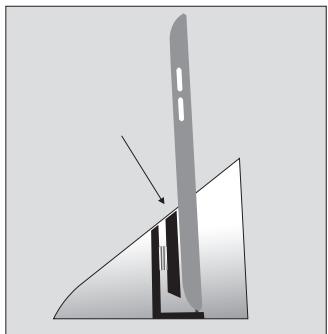
Browse and select music from your digital music collection directly on the iPhone/iPod. Use the operation panel or the dedicated remote to perform basic operation.
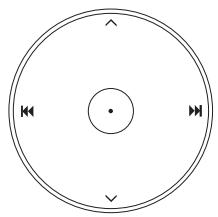
Volume up
Volume down
Previous/Rewind
Next/Fast-forward
Play/Pause
Press and hold for standby
Press and hold for more than 5
seconds for 'deep sleep'*
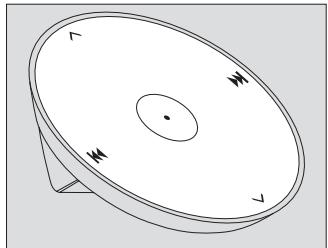
The dedicated remote control can be used in the same way as the operation panel on the BeoSound.
*In 'deep sleep', the power consumption is very low, however a docked iPod/iPhone or iPad is not charged. This function can only be obtained by close-up operation.
A Beo4 or Beo5 remote control can also be used, see the BeoSound 8 section under www.bang-olufsen. com/faq for more information.
To access the connection panel, you must remove the back cover. Pull out the cover at the bottom to release the locks, then lift it off.
The approval labels are placed behind the back cover.
Priority of connections;
- iPod/iPhone/iPad dock
- USB
3.AUX
This means that AUX cannot be activated if an iPod/iPhone/iPad is connected, or other equipment is connected via USB
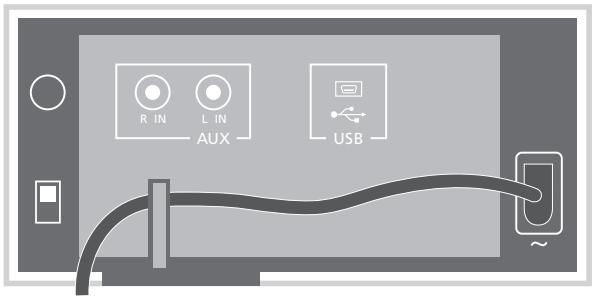
Power input socket (right side)
Use the enclosed mains cord only.
Mini-USB socket
For connection to a computer.
AUX
Phono sockets for connection of, for example, an MP3 player.
Can also be used for connection to the AirPort Express to allow for wireless transmission of iTunes music to the BeoSound.
For safety reasons fasten the mains lead behind the small peg, before running it out from the connection panel.
Position switch (left side)
Free ... Use this setting if the BeoSound is placed on a table or shelf not close to a wall.
Wall ... Use this setting is the BeoSound is placed close to the wall, for example mounted on the wall bracket.
Corner ... Use this setting if the BeoSound is placed in a corner.
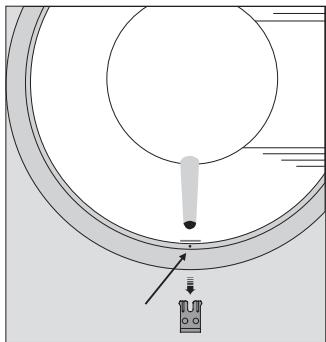
Replace the speaker cover
Remove the front foot.
Insert a small pin, such as a straightened paper clip in the hole under the front foot and push the speaker cover off.
Important!
- Warning! Prolonged listening at high volume levels may cause hearing damage.
- Avoid placing the product in direct sunlight or direct artificial light, such as a spotlight.
- Make sure that the product is set up, placed and connected in accordance with the instructions.
- Place your product on a firm surface or stand where you want it placed permanently. Use Bang & Olufsen approved stands and wall brackets only!
- Do not subject the product to high humidity, rain or sources of heat.
The product is developed for indoor use in dry, domestic environments only. Use within a temperature range of 10 - 40ircC (50 - 105ircF) - Leave enough space around the product for adequate ventilation.
- Do not attempt to open the product. Leave such operations to qualified service personnel.
- The product can only be switched off completely by disconnecting it from the wall socket.
Cleaning
Wipe dust off the surfaces using a dry, soft cloth. Do not use liquid cleaners or aerosol cleaners.
To remove stains or dirt, use a soft, damp cloth and a solution of water and mild detergent, such as washing-up liquid.
Technical specifications, features and the use thereof are subject to change without notice.
Dansk
- iPod/Phone/iPad-Dock
- USB
3.AUX
- Docking station iPod/ iPhone/iPad
- USB
3.AUX
- iPod/iPhone/iPad-dock
- USB
3.AUX
- iPod/iPhone/iPad-docka
- USB
3.AUX
- iPod/iPhone/iPad dock
- USB
3.AUX
Auroo nmaivei oTo AUX 8ev
muopei va evpyoiointhetai eav eivai
ouv6e6evo evi iPod/Phone/iPad
n eav eivai ouv6e6eEvn kanoia
aaln ouakeun µσω USB
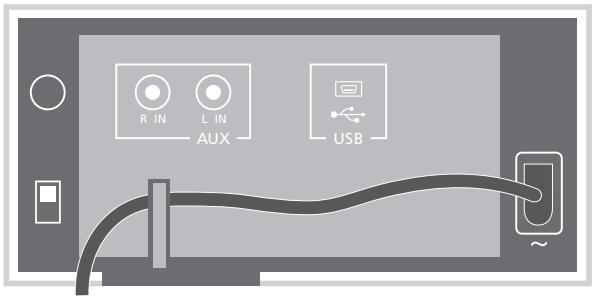
PomeCTe BeoSound 8 Ha poBHyO yCTOuHNByO noBepxHOCTb, pOdkIIOUHTe IHyp nITaHn, 3aTeM yCTaHOBNTe BaW iPod®/iPhone®/iPadTM.
Bau iPod/iPhone/iPad 3apjxaeTcBO BpeMnOIOKJIIOUeHn.
Kpome npocnyuBaHnMy3bIKn, coxpaHeHHoHaBaWem iPod/iPhone/iPad, BmOKeTe nCNoJIb3OBAtB BaWBeoSound 8 dJa:
-ПоdkлоченяпрocлuyшваньВншHERaydnoустpoиства,нарример,MP3-npeepa nImy3bikaльноTeleфona,чepe ьходно pa3beM.
- Bocnpon3BveJeHn3aIInCeN, coxpaHeHHbIX nII nepeJaBaEmbIX Ha BaIsh KOMpbIoTeP uee3 USB.
HacrpoKa dok-ctaHcnn BbMoKeTe HAcTPOuTB cactb DOK-CTaHcNn, KOTopar noDiepeNaBaET Baai iPod/iPhone/ iPad, noBopauBaB ee 3aDIOU qactb (BLeBO nIIN Bnpabo). BbvOBHnIe pepeNDIO npHeIb iPod/iPhone/iPad c nepeJeI npHeIb BoSound.
CBeTOBOn INHnKAtOp
KorDa BeoSound BkIoueH,
INHnKAtOp CBeTtC3 3eJIeHbIM
CBeTOM. Ppi OCTaHOBke
BOcPOn3VeDeHn IJN
OTKnIOUeHn 3ByKa INHnKAtOp
CBeTtC3 opAHKeBbIM CBeTOM.
Ppi nepeKIOUeHn BeoSound
B pexm OxNDaHn INHnKAtOp
MIRaeT ODNn pa3 KpaCHbIM CBeTOM.
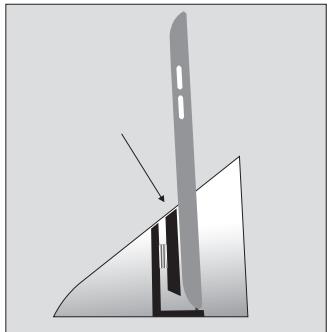
- iPod/iPhone/iPad dock
- USB
3.AUX
鍾鍔鍥鍇鍙鍗鍘鍙鍙鍙鍙鍙鍙鍙鍙鍙鍙鍙鍙鍙鍙鍙鍙鍙鍙鍙鍙鍙鍙鍙鍙鍙鍙鍙鍙鍙鍙鍙鍙鍙鍙鍙鍙鍙鍙鍙鍙鍙鍙鍙鍙鍙鍙鍙鍙鍙鍙鍫鍚鍚鍚鍚鍚鍚鍚鍚鍚鍚鍚鍚鍚鍚鍚鍚鍚鍚鍚鍚鍚鍚鍚鍚鍚鍚鍚鍚鍚鍚鍚鍚鍚鍚鍚鍚鍚鍚鍚鍚鍚鍚鍚鍚鍚鍚鍚鍚鍚鍚鍗鍚
- iPod/iPhone/iPad dock
- USB
3.AUX
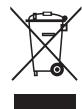
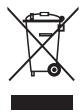
Electrical and electronic equipment, parts and batteries marked with this symbol must not be
disposed of with normal household wastage, it must be collected and disposed of separately to protect the environment.
Your Bang & Olufsen retailer will advise you of the correct way of disposal in your country.
If a product is too small to be marked with the symbol, it will appear in the User Guide, on the Guarantee certificate, or on the packaging.
Pat: US 7639482 B1
For the US-market only!
NOTE: This equipment has been tested and found to comply with the limits for a class B digital device, pursuant to part 15 of the FCC Rules. These limits are designed to provide reasonable protection against harmful interference in a residential installation.
This equipment generates, uses and
can radiate radio frequency energy and, if not installed and used in accordance with the instructions, may cause harmful interference to radio communications. However, there is no guarantee that interference will not occur in a particular installation. If this equipment does cause harmful interference to radio or television reception, which can be determined by turning the equipment off and on, the user is encouraged to try to correct the interference by one or more of the following measures:
- Reorient or relocate the receiving antenna.
- Increase the separation between the equipment and receiver.
- Connect the equipment into an outlet on a circuit different from that to which the receiver is connected.
- Consult the retailer or an experienced radio/TV technician for help.
For the Canadian market only!
This class B digital apparatus meets all requirements of the Canadian Interference-Caising Equipment Regulations.
This product is in conformity with the provisions of the Directives 2004/108/EC and 2006/95/EC.
All Bang & Olufsen products comply with applicable environmental legislation throughout the world.
Dansk (Danish)
Portugues (Portuguese)
Brand : BANG & OLUFSEN
Model : BANG & OLUFSEN BEOSOUND 8
Category : Wireless Speaker