
TOPCLEAN 1100A - Washing machine Ulsonix - Free user manual and instructions
Find the device manual for free TOPCLEAN 1100A Ulsonix in PDF.


User questions about TOPCLEAN 1100A Ulsonix
0 question about this device. Answer the ones you know or ask your own.
Ask a new question about this device
Download the instructions for your Washing machine in PDF format for free! Find your manual TOPCLEAN 1100A - Ulsonix and take your electronic device back in hand. On this page are published all the documents necessary for the use of your device. TOPCLEAN 1100A by Ulsonix.
USER MANUAL TOPCLEAN 1100A Ulsonix
4.4. Gerätegebrauch
This User Manual has been translated using machine translation. We have made every effort to ensure the translation is accurate, but please note that automated translations are not perfect and are not meant to replace human translators. The official version of the User Manual is in English. Any differences between the translated version and the original English are not legally binding. If you have any questions about the accuracy of the translation, please refer to the English version, which is the official reference. More language versions are available upon request via info@expondo.com.
1. Technical data
Table 1: Technical data of the product
| Parameter description | Parameter value |
| Product name | Scrubbing machine |
| Model | TOPCLEAN 1100A |
| Rated voltage [V~] / frequency [Hz] | 220 - 240 / 50 |
| Rated power [W] | 1100 |
| Brush diameter [mm] | 432 |
| Brush rotation speed [rev/min] | 154 |
| Water tank capacity [L] | 12.4 |
| Protection rating IP | IPX4 |
| Dimensions (LxWxH) [cm] | 165.5 x 111 x 246.5 |
| Weight [kg] | 47 |
2. General description
The user manual is designed to assist in the safe and trouble-free use of the device. The product is designed and manufactured in accordance with strict technical guidelines, using state-of-the-art technologies and components. Additionally, it is produced in compliance with the most stringent quality standards.
DO NOT USE THE DEVICE UNLESS YOU HAVE THOROUGHLY READ AND UNDERSTOOD THIS USER MANUAL.
To increase the product life of the device and to ensure trouble-free operation, use it in accordance with this user manual and regularly perform maintenance tasks. The technical data and specifications in this user manual are up to date. The manufacturer reserves the right to make changes associated with quality improvement. The device is designed to reduce noise emission risks to a minimum, taking into account technological progress and noise reduction opportunities.
2.1. Legend
| Icon | Description |
CE | The product satisfies the relevant safety standards.Read instructions before use. |
 | The product must be recycled. |
 | WARNING! or CAUTION! or REMEMBER! Applicable to the given situation.(general warning sign) |
 | Wear protective goggles. |
 | Wear a dust mask (respiratory tract protection). |
 | Wear protective gloves. |
 | Wear foot protection. |
 | ATTENTION! Electric shock warning! |
 | ATTENTION! Rotating parts, entanglement hazard! |
 | Only use indoors. |

PLEASE NOTE! DRAWINGS IN THIS MANUAL ARE FOR ILLUSTRATION PURPOSES ONLY AND IN SOME DETAILS MAY DIFFER FROM THE ACTUAL PRODUCT.
3. Usage safety

ATTENTION! READ ALL SAFETY WARNINGS AND ALL INSTRUCTIONS. FAILURE TO FOLLOW THE WARNINGS AND INSTRUCTIONS MAY RESULT IN ELECTRIC SHOCK, FIRE AND/OR SERIOUS INJURY OR EVEN DEATH.
The terms "device" or "product" are used in the warnings and instructions to refer to:
Scrubbing machine
3.1. Electrical safety
a) The plug must fit the socket. Do not modify the plug in any way. Using original plugs and matching sockets reduces the risk of electric shock.
b) Avoid touching earthed elements such as pipes, heaters, boilers and refrigerators. There is an increased risk of electric shock if the earthed device is exposed to rain, comes into direct contact with a wet surface or is operating in a damp environment. Water getting into the device increases the risk of damage to the device and of electric shock.
c) Do not touch the device with wet or damp hands.
d) Use the cable only for its designated use. Never use it to carry the device or to pull the plug out of a socket. Keep the cable away from heat sources, oil, sharp edges or moving parts. Damaged or tangled cables increase the risk of electric shock.
e) If using the device in a damp environment cannot be avoided, a residual current device (RCD) should be applied. The use of an RCD reduces the risk of electric shock.
f) Do not use the device if the power cord is damaged or shows obvious signs of wear. A damaged power cord should be replaced by a qualified electrician or the manufacturer's service centre.
g) To avoid electric shock, do not immerse the cord, plug or device in water or other liquids. Do not use the device on wet surfaces.
h) ATTENTION! DANGER TO LIFE! While cleaning, never immerse the device in water or other liquids.
i) Do not use in very humid environments or in the direct vicinity of water tanks.
j) Prevent the device from getting wet. Risk of electric shock!
k) Take special care to ensure that the power cords are not caught by the rotating parts of the device.
3.2. Safety in the workplace
a) Make sure the workplace is clean and well lit. A messy or poorly lit workplace may lead to accidents. Try to think ahead, observe what is going on and use common sense when working with the device.
b) Do not use the device in a potentially explosive environment, for example in the presence of flammable liquids, gases or dust. The device generates sparks which may ignite dust or fumes.
c) If you discover damage or irregular operation, immediately switch the device off and report it to a supervisor without delay.
d) If you are unsure about whether the product is operating correctly or if you find damage, please contact the manufacturer's service centre.
e) Only the manufacturer's service centre may make repairs to the product. Do not attempt to make repairs yourself!
f) In case of fire, use a powder or carbon dioxide ( CO2 ) fire extinguisher (one intended for use on live electrical devices) to put it out.
g) Children or unauthorised persons are forbidden to enter a work station. A distraction may result in loss of control over the device.
h) Use the device in a well-ventilated space.
i) Regularly inspect the condition of the safety labels. If the labels are illegible, they must be replaced.
j) Please keep this manual available for future reference. If this device is passed on to a third party, the manual must be passed on with it.

REMEMBER! WHEN USING THE DEVICE, PROTECT CHILDREN AND OTHER BYSTANDERS.
3.3. Personal safety
a) Do not use the device when tired, ill or under the influence of alcohol, narcotics or medication which can significantly impair the ability to operate the device.
b) The machine may be operated by physically fit persons who are able to handle the machine, are properly trained, who have reviewed this operating manual and have received training in occupational health and safety.
c) When working with the device, use common sense and stay alert. Temporary loss of concentration while using the device may lead to serious injuries.
d) Use personal protective equipment as required for working with the device, specified in section 1 “Legend”. The use of correct and approved personal protective equipment reduces the risk of injury.
e) To prevent the device from accidentally switching on, make sure the switch is on the OFF position before connecting to a power source.
f) Do not overestimate your abilities. When using the device, keep your balance and remain stable at all times. This will ensure better control over the device in unexpected situations.
g) The device is not a toy. Children must be supervised to ensure that they do not play with the device.
h) Do not put your hands or other items inside the device while it is in use!
3.4. Safe device use
a) Do not overload the device. Use the appropriate tools for the given task. A correctly-selected device will perform the task for which it was designed better and in a safer manner.
b) Do not use the device if the “ON/OFF” switch does not function properly (does not switch the device on and off). Devices which cannot be switched on and off using the “ON/OFF” switch are hazardous, should not be operated and must be repaired.
c) Make sure the plug is disconnected from the socket before attempting any adjustments, accessory replacements or before putting the device aside. Such precautions will reduce the risk of accidentally activating the device.
d) Make sure the pressure line is disconnected before attempting any adjustments, accessory replacements or doing any work on the device. Such a preventive measure reduces the risk of an accident.
e) When not in use, store in a safe place, away from children and people not familiar with the device who have not read the user manual. The device may pose a hazard in the hands of inexperienced users.
f) Keep the device out of the reach of children.
g) Device repair or maintenance should be carried out by qualified persons, only using original spare parts. This will ensure safe use.
h) To ensure the operational integrity of the device, do not remove factory-fitted guards and do not loosen any screws.
i) When transporting and handling the device between the warehouse and the destination, observe the occupational health and safety principles for manual transport operations which apply in the country where the device will be used.
j) Avoid situations where the device stops working during use due to excessive loading. This may result in overheating of the drive elements and damage to the device.
k) Do not leave this appliance unattended while it is in use.
I) Do not cover the ventilation openings!
m) Do not mix different cleaning chemicals. There is a risk of producing toxic fumes or creating a dangerous mixture.
n) Do not clean surfaces contaminated with toxic, caustic, explosive or similar substances.
o) The cleaned surface should be free from potentially hazardous objects. Always make sure that there are no metal elements or other materials in the work area which might be thrown out by rotating parts, causing property damage or personal injury.
p) Do not use the machine on inclined surfaces.
q) Do not use the machine when it is „dry“, i.e., when
r) the water tank is empty.
s) Do not use strongly foaming detergents.
t) Do not fill the tank with caustic, flammable, explosive or similar substances. Use a mild detergent intended for use with floor scrubbers.
u) Do not fill the tank with hot water.
v) Do not use the device without the tank covers on
w) Please observe legal requirements for disposing of detergents.
x) Do not clean surfaces in explosion hazard areas.
y) Ensure good lighting of the working area.
z) Before starting work, make sure that there are no bystanders on the work surface
aa) When operating the device, move slowly at a steady pace. Running with the device is prohibited.
bb) While working, hold the device handles with both hands.
cc) Scrubber operation may be difficult on uneven and rough surfaces
dd) The device is not a toy. Children must be supervised to ensure that they do not play with the device.
ee) Warning: Do not inhale exhaust gas fumes. Only use indoors when adequate ventilation is provided, and when a second person has been instructed to look after you.
ff) Caution: This machine shall be stored indoors.
gg) Warning: This machine is not suitable for picking up hazardous dust.
hh) Warning: Do not allow the supply cord to come into contact with the rotating brushes.
ii) Warning: Only use the brushes provided with the appliance or those offered by the manufacturer. The use of other brushes may impair safety.

ATTENTION! DESPITE THE SAFE DESIGN OF THE DEVICE AND ITS PROTECTIVE FEATURES, AND DESPITE THE USE OF ADDITIONAL ELEMENTS PROTECTING THE OPERATOR, THERE IS STILL A SLIGHT RISK OF ACCIDENT OR INJURY WHEN USING THE DEVICE. STAY ALERT AND USE COMMON SENSE WHEN USING THE DEVICE.
4. Use guidelines
The device is designed for wet cleaning, waxing and polishing concrete, epoxy, tiled floors, etc. This machine is intended for commercial use, for example in hotels, schools, hospitals, factories, shops, offices and rental businesses.
The user is liable for any damage resulting from unintended use of the device.
4.1. Device description
Figure 1: Parts list of the product

1) Safety lock switch
2) Start button
3) Handle tilt adjustment lever
4) Water distribution adjustment lever
5) The chain connecting the adjustment lever with the tank
6) Main power cord
7) Tank mounting bracket
8) An opening to top up water in the tank
9) Water tank
10) Water release valve
11) Engine power cord
12) Engine cover
13) Housing
14) Caster
15) Base
16) Damper ring
4.2. Preparing for use
4.2.1. Appliance location
The temperature of environment must not be higher than 40° C and the relative humidity should be less than 85%. Ensure good ventilation in the room in which the device is being used. There should be at least 10 cm distance between each side of the device and the wall or other objects. The device should always be used when positioned on an even, stable, clean, fireproof and dry surface, and be out of the reach of children and persons with limited mental and sensory functions. Position the device such that you always have access to the power plug. The power cord connected to the appliance must be properly grounded and correspond to the technical details on the product label.
Disassemble the device and all its components and clean them before the first use.
4.3. Assembling the device
1) Carefully unpack all components of the device.
2) Place the bottom part of the device with casters on the floor.
3) Unscrew the screws marked in the drawing below, place the handle control unit so that the assembly holes in the unit correspond to the holes in the device.
4) Replacing the screws, screw the unit to the device.
Figure 2: Replace the screws

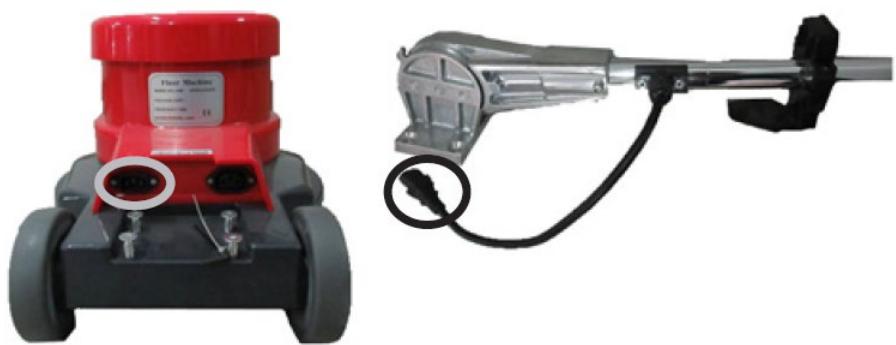
5) Connect the plug fitted to the handle control unit to the socket in the bottom part of the device.
Figure 3: Connect the plug to the socket in the bottom part of the device

6) Fit the water tank onto the pipe of the scrubbing disc, gently pushing it into the mounting brackets. Make sure that it has been properly attached every time before refilling the tank.
Figure 4: Fit the water tank onto the pipe of the scrubbing disc

7) Connect the chain connecting the adjustment lever to the tank.
8) Connect the water hose with the water distribution valve and the connector in the bottom part of the device.
Figure 5: Connect the water hose
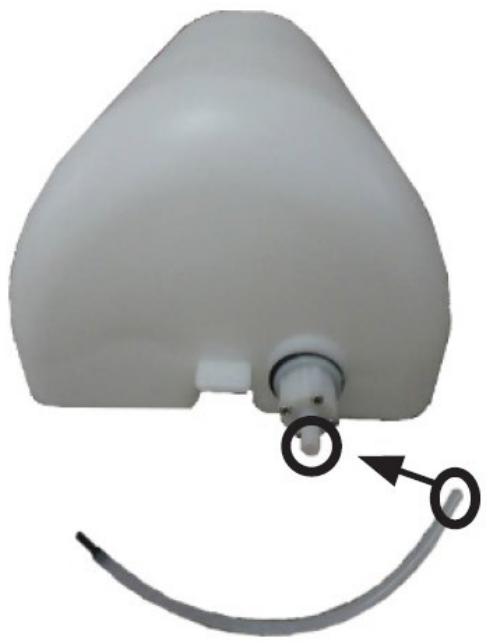
9) In order to attach the scrubbing disc, tilt the scrubber. Place the scrubbing disc onto the handle control unit and turn it counterclockwise until you feel resistance.
Figure 6: Attach the scrubbing disc
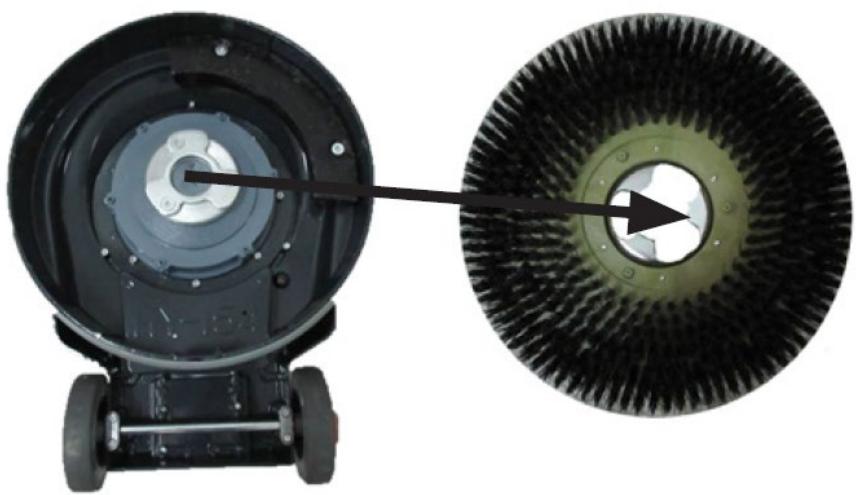
4.4. Device use
4.4.1. Operation instructions
PLEASE NOTE: Hold the handles firmly when starting the engine and while the engine is working.
1) Fill the tank with water and, if needed, with an appropriate cleaning agent.
2) Connect the power cord to the power source.
3) To change the device holder tilt relative to the ground, press the tilt adjustment handle.
4) Slide one of the safety lock buttons towards the centre of the control handles.
5) Press and hold both start buttons to start the engine. Releasing the buttons results in the engine shut down.
6) To distribute water held in the tank, press the water release valve handle.
7) If the water tank becomes empty while the scrubber is working, turn the device off releasing the start buttons, and refill the tank.
8) Turn the device off by turning all switches back to the start position.
9) When you have finished work, position the handle control unit vertically, and disconnect the device from the power source. Drain the water tank. Please note: remember to comply with detergent removal legal requirement.
4.4.2. Hazards in the course of using the device
The hazards that can occur during use of the machine are mechanical hazards. The mechanical hazard occurs in situations in which injuries can result from mechanical impact of various elements, e.g. machine parts, tools, etc. on people. The basic mechanical hazards include squeezing, crushing, cutting, pulling in or catching; impact; puncture; abrasion; as well as slipping and stumbling. These hazards can occur both during normal machine operation and as a result of irregularities in machine operation. These irregularities might result in machine failure. The mechanical hazards can result from: moving machines, transported loads, moving elements, sharp/ rough elements, dropping elements/loads, slippery uneven surfaces, limited space, location of the work station in relation to the ground.
4.4.3. Inspections and periodic control
Before being used, the new or repaired machine must be checked by qualified technical personnel who have knowledge and experience within the scope of operation and maintenance of this type of machine. The machine must be checked regularly by means of visual control of the machine's condition, before, during and after use.
The check must be performed by the machine's operators. Any irregularities in machine operation as well as any damage must be reported to the proper technical personnel. Do not use the machine if damage or any irregularities in its operation were found.
NOTE: Disconnect the machine from the power supply before each inspection.
- Preliminary inspection: Before first use. All new or repaired machines must be checked by a qualified and competent person to ensure the machine meets the requirements of this operating manual.
- Daily check:
- Brush wear check
- Control buttons efficiency check
- Handle control unit mounting check
• Periodic check:
- Water system gaskets wear and tightness check
- Moving elements fasteners check
4.5. Cleaning and maintenance
4.5.1. General instructions
a) Unplug the mains plug and allow the device to cool completely before each cleaning, adjustment or replacement of accessories, or if the device is not being used.
• Wait for the rotating elements to stop.
b) Use only non-corrosive cleaners to clean the surface.
c) After cleaning the device, all parts should be dried completely before using it again.
d) Store the unit in a dry, cool place, free from moisture and direct exposure to sunlight.
e) Do not spray the device with a water jet or submerge it in water.
f) Do not allow water to get inside the device through vents in the housing of the device.
g) Clean the vents with a brush and compressed air.
h) The device must be regularly inspected to check its technical efficiency and spot any damage.
i) Use a soft, damp cloth for cleaning.
j) Do not use sharp and/or metal objects for cleaning (e.g. a wire brush or a metal spatula) because they may damage the surface material of the appliance.
k) Do not clean the device with an acidic substance, agents of medical purposes, thinners, fuel, oils or other chemical substances because it may damage the device.
4.5.2. Disposing of used devices
Do not dispose of this device in municipal waste systems. Hand it over to an electric and electrical device recycling and collection point. Check the symbol on the product, instruction manual and packaging. The plastics used to construct the device can be recycled in accordance with their markings. By choosing to recycle you are making a significant contribution to the protection of our environment.
Contact local authorities for information on your local recycling facility.

5) Koble støpselet som er montert på håndtakskontrollenheten til kontakten i den nedre delen av apparatet.
Figur 3: Koble støpselet til kontakten i den nedre delen av apparatet

6) Monter vanntanken på røret til skrubbeskiven, og skyv den forsiktig inn i monteringsbrakettene. Sørg for at den er ordentlig festet hver gang før du fyller tanken på nytt.
9) For å feste skrubbeskiven, vipp skrubberen. Plasser skrubbeskiven på håndtakskontrollenheten og vri den mot klokken til du føler motstand.
Figur 6: Fest skrubbeskiven

1) Säkerhetslås
2) Startknapp
5) Conecte o plugue da unidade de controle da alça à tomada na parte inferior do aparelho.
Figura 3: Conecte o plugue à tomada na parte inferior do aparelho

4.4. Употреба на устройството
4.4. Χρήση συσκευής
1) Sigurnosna blokada
2) Gumb za pokretanje
5) Spojite utikač postavljen na upravljačku jedinicu ručke u utičnicu u donjem dijelu uređaja.
Slika 3: Spojite utikač u utičnicu u donjem dijelu uređaja
7) Spojite lanac koji spaja polugu za podešavanje sa spremnikom.
8) Spojite crijevo za vodu s ventilom za distribuciju vode i priključkom u donjem dijelu uređaja.
9) Da biste pričvrstili disk za ribanje, nagnite čistač. Postavite disk za ribanje na upravljačku jedinicu ručke i okrećite ga suprotno od kazaljke na satu dok ne osjetite otpor.
1) Varnostno zaklepno stikalo
2) Gumb za zagon
4.4. Uporaba naprave
4.4.1. Navodila za uporabo
For the disposal of the device please consider and act according to the national and local rules and regulations.
CONTACT
expondo Polska sp. z o.o. sp. k.




- GERÄTEGEBRAUCH
- TECHNICAL DATA
- GENERAL DESCRIPTION
- DO NOT USE THE DEVICE UNLESS YOU HAVE THOROUGHLY READ AND UNDERSTOOD THIS USER MANUAL
- LEGEND
- USAGE SAFETY
- ELECTRICAL SAFETY
- SAFETY IN THE WORKPLACE
- PERSONAL SAFETY
- SAFE DEVICE USE
- USE GUIDELINES
- DEVICE DESCRIPTION
- DAMPER RING
- PREPARING FOR USE
- APPLIANCE LOCATION
- ASSEMBLING THE DEVICE
- DEVICE USE
- OPERATION INSTRUCTIONS
- HAZARDS IN THE COURSE OF USING THE DEVICE
- INSPECTIONS AND PERIODIC CONTROL
- CLEANING AND MAINTENANCE
- GENERAL INSTRUCTIONS
- DISPOSING OF USED DEVICES
- УПОТРЕБА НА УСТРОЙСТВОТО
- ΧΡΉΣΗ ΣΥΣΚΕΥΉΣ
- UPORABA NAPRAVE
- NAVODILA ZA UPORABO
- CONTACT
Brand : Ulsonix
Model : TOPCLEAN 1100A
Category : Washing machine