ELLIPSE PRO 1600 FR, ELLIPSE PRO 1600 IEC - Uninterruptible Power Supplies EATON - Free user manual and instructions
Find the device manual for free ELLIPSE PRO 1600 FR, ELLIPSE PRO 1600 IEC EATON in PDF.


| Product type | UPS (Uninterruptible Power Supply) with online double conversion |
| Brand | EATON |
| Models | ELLIPSE PRO 1600 FR, ELLIPSE PRO 1600 IEC |
| Apparent power | 1600 VA |
| Active power | 900 W (typical estimate) |
| Dimensions (W x H x D) | Approximately 440 x 89 x 300 mm (2U rack format) |
| Weight | Approximately 12 kg |
| Input power | 230 V ~ 50/60 Hz (via power cord) |
| Output sockets | 8 sockets (FR: Schuko; IEC: IEC C13), including 4 battery-backed sockets and 4 surge-protected sockets |
| EcoControl function | Automatically disables EcoControl sockets when the main load (Master socket) is in standby or off |
| AVR regulation | Yes, automatic voltage correction (AVR mode) |
| Battery autonomy | Varies depending on load (approximately 10 minutes at full load) |
| Recharge time | 8 hours for a full charge |
| Display | LCD screen with indicators for voltage, load, battery and faults |
| Network/modem protection | Surge protection for telephone line/RJ45 (cable not included) |
| Communication interface | USB port (cable included) compatible with Eaton UPS Companion software |
| Protection circuit breaker | Yes, resetable circuit breaker at the back |
| Installation | Vertical, horizontal or rack 2U (optional kit) |
| Usage conditions | For computers, peripherals, TVs, Hi-Fi, video (excludes lighting, heating, household appliances) |
| Warranty | Registerable online at powerquality.eaton.com |
| Maintenance | Keep plugged in permanently to optimize the battery; clean with a dry cloth |
| Repairability/spare parts | Contact EATON after-sales service; battery replaceable (not stated, to be verified) |
Frequently Asked Questions - ELLIPSE PRO 1600 FR, ELLIPSE PRO 1600 IEC EATON
User questions about ELLIPSE PRO 1600 FR, ELLIPSE PRO 1600 IEC EATON
0 question about this device. Answer the ones you know or ask your own.
Ask a new question about this device
Download the instructions for your Uninterruptible Power Supplies in PDF format for free! Find your manual ELLIPSE PRO 1600 FR, ELLIPSE PRO 1600 IEC - EATON and take your electronic device back in hand. On this page are published all the documents necessary for the use of your device. ELLIPSE PRO 1600 FR, ELLIPSE PRO 1600 IEC by EATON.
USER MANUAL ELLIPSE PRO 1600 FR, ELLIPSE PRO 1600 IEC EATON
natural_image
Exterior view of a black Eaton EAT-N electric vehicle chassis with ventilation grilles and control buttons (no text or symbols on main body)Ellipse PRO 650/850/1200/1600
Installation and user manual
English - Français Deutsch - Italiano Español - Nederlands Português - Ελληνικά Polski - Česky Solvenčina - Slovensko Magyar - Türkçe
natural_image
Illustration of an open box with a curved arrow indicating rotation (no text or symbols)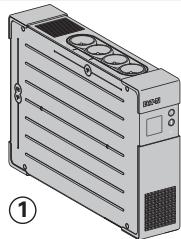
natural_image
Illustration of a server rack unit with ventilation slots and indicator lights (no text or symbols)
②

③
natural_image
Illustration of IEC model connectors with coiled cable (no text or symbols)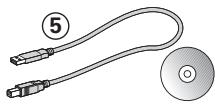
natural_image
Illustration of a U-shaped cable with two connectors and a CD, no text or symbols present

natural_image
Illustration of a rectangular electronic device with ventilation grilles and control panel (no text or symbols)√
natural_image
Illustration of a server rack with a black diagonal line crossing through it (no text or symbols)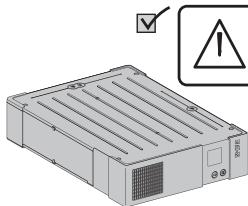
natural_image
Illustration of a server rack with ventilation slots and a warning symbol (no text or labels)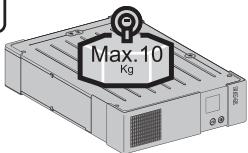
Caution!
EN • Before installing the Ellipse, read the booklet ③ containing the safety instructions that must be followed. Then follow the instructions given in this manual ②.
FR • Avant l'installation de Ellipse, lire le livret ③ qui présente les consignes de sécurité à respecter. Suivre ensuite les instructions du présent manuel ②.
DE • Vor Installation des Ellipse die im Heft ③ genannten Sicherheitsvorschriften lesen. Anschließend die Anweisungen im vorliegenden Handbuch ② befolgen.
IT • Prima dell'installazione del Ellipse, leggere attentamente le istruzioni di sicurezza riportate sul libretto ③. In seguito, attenersi alle istruzioni riportate sul presente manuale ②.
ES • Antes de la instalación del Ellipse, leer el manual ③ que presenta las instrucciones de seguridad a cumplir. A continuación, seguir las instrucciones del presente manual ②.
NL • Lees voordat u het Ellipse gaat installeren eerst de veiligheidsinstructies in boekje ③. Volg daarna de instructies van deze handleiding ②.
PT • Antes da instalação do Ellipse, ler o caderno ③ onde constam as instruções de segurança a respeitar. Depois, seguir as instruções do presente manual ②.
EL • Πριν την εγικατάσταση του Ellipse, διαβάστε το φυλλάδιο ③ με τις συβουλές ασφαλείας που πρέπει να τηρείτε. Στη συνέχεια, ακολουθήστε τις οδηγίες χρήσης αυτού του φυλλαδίου ②.
PL • Przed zainstalowaniem Ellipse, należy przeczytać instrukcję ③, która zawiera niezbędne zalecenia bezpieczeństwa. Następnie należy zapoznać się z zaleceniami zawartymi w niniejszej instrukcji ②.
CS • Před instatací zdroje Ellipse si prostudujte příručku ③ kde najdete bezpečnostní předpisy, které je třeba dodržovat. Dále postupujte podle pokynů uvedených v příručce ②.
SL • Pred inštaláciou výpustky si prečitajte knižku ③, v ktorej sú uvedené bezpečnostné príkazy, ktoré je potrebné dodržať. Potom postupujte podľa pokynov tejto príručky ②.
SK • Preden instalirate Ellipse, preberite knjižico ③, v kateri so varnostna navodila, ki jih je treba upoštevati. Nato sledite navodilom tega priročnika ②.
HU • Az Ellipse telepítése előtt olvassa el a ③-es könyvet, mely a betartandó biztonsági előirásokat tartalmazza. Ezután kövesse a jelen, ②-ös kezikönyv utasításait.
TR • Ellipse'in tesisatini yapmadan önce, uyulacakgüvenliktalimatlarini gösteren ③ sayili kitapçığı okuyunuz. Dana sonra isbu ② sayili ei kitabindaki talimatlara uyunuz.
RU • Перед установкой Источника Бесперебойного Питания (ASI) прочитайте инструкцию ③ с правилами по технике безопасности, которые необходимо соблюдать. Затем следуйте указаниям настоящего руководства ②.
AR
sqrt ٢، أجرص على قراءة الكتاب (Ellipse) : تُم اtrieج التعليمات
sqrt ١، ceٌ مبودة في هذا dxٍ٥.
SV • Innan installation av Ellipse, läs instruktionsmanualen ③ innehållande säkerhetsinstruktionerna och följ sedan dem. Följ sedan instruktionerna som ges i denna manua ②.
FI • Lue nämä ohjeet ennen Ellipse asennusta turvallisuusohjeet ③ ja käyttöohjeet ②.
A
FR / DIN
natural_image
Illustration of a power supply unit connected to an electrical outlet (no text or symbols visible)IEC
natural_image
Illustration of a server rack connected to a tower-mounted unit via cable, with a power outlet shown (no text or symbols present)B
flowchart
graph TD
    A["650 / 850"] --> B["Master"]
    B --> C["EcoControl"]
    C --> D["Master"]
    D --> E["5-20mn"]
    E --> F["Computer"]
    F --> G["Master"]
    G --> H["1200 / 1600"]
    H --> I["Master"]
    I --> J["EcoControl"]
    style A fill:#f9f,stroke:#333
    style B fill:#ccf,stroke:#333
    style C fill:#cfc,stroke:#333
    style D fill:#fcc,stroke:#333
    style E fill:#cff,stroke:#333
    style F fill:#ffc,stroke:#333
    style G fill:#cfc,stroke:#333
    style H fill:#fcc,stroke:#333
    style I fill:#ffc,stroke:#333
    style J fill:#cfc,stroke:#333
C
flowchart
graph TD
    A["Server"] -->|COM| B["USB"]
    B --> C["Computer"]
    D["Internet / modem / fax"] -.-> E["Telephone"]
    E --> F["Mobile Device"]
    style A fill:#f9f,stroke:#333
    style B fill:#ccf,stroke:#333
    style C fill:#cfc,stroke:#333
    style D fill:#fcc,stroke:#333
    style E fill:#cff,stroke:#333
    style F fill:#ffc,stroke:#333
Register warranty at: powerquality.eaton.com
Battery disposal and safety
- Caution. Battery service life is reduced by 50% for every ten degrees above 25^ .
- The battery must be replaced exclusively by qualified personnel (risk of shock), with new battery approved by Eaton to ensure correct operation of the UPS.
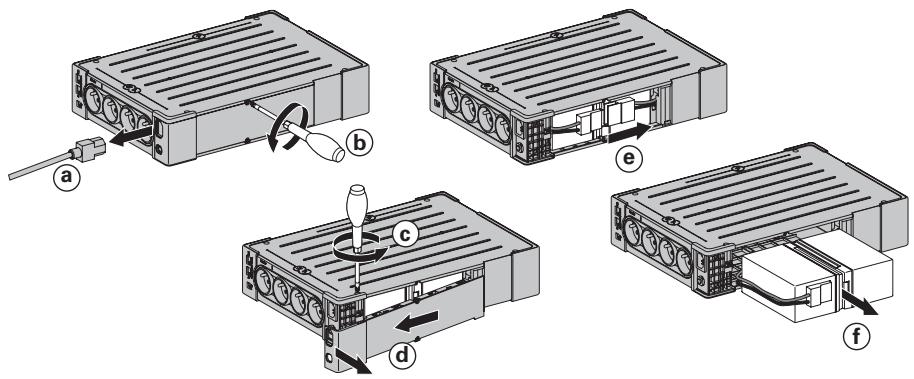
- The battery must be disposed of in accordance with applicable regulations. To remove the battery, shut down the UPS (button ⑥ OFF), remove the power cord and proceed as indicated below "Battery change".
Battery change
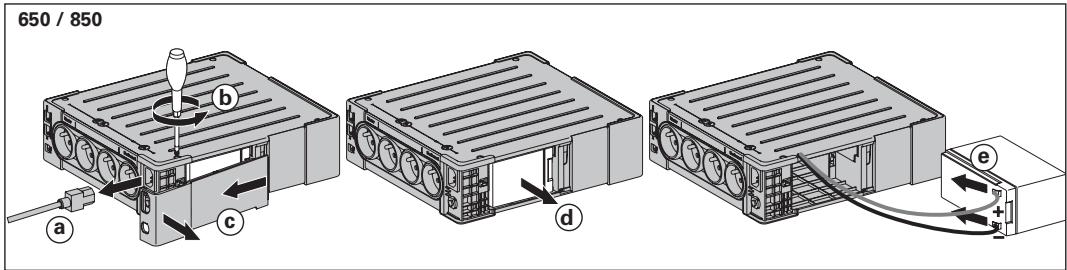
- Warning: take care not to inverse the polarity + (red) and - (black) when connecting the battery as this will destroy the device.
1200 / 1600
Technical characteristics
| Ellipse PRO | 650 | 850 | 1200 | 1600 |
| • UPS power | 650 VA / 400 W | 850 VA / 510 W | 1200 VA / 750 W | 1600 VA / 1000 W |
| • Nominal input voltage | 165 V - 264 V, adjustable to 150 V - 284 V | |||
| • Input frequency | 50/60 Hz (46 - 70 Hz working range) | |||
| • Voltage/frequency of battery backup outlets 19 in battery mode | 220 V / 230 V / 240 V +15 % -20 % (50/60 Hz ± 1 Hz) | |||
| • Total output current for all outlets | 10 A max | |||
| • Output current of battery backup outlets 19 | 3 A max | 3.6 A max | 5.5 A max | 7.3 A max |
| • Leakage current | 0.4 mA | |||
| • Input protection | 10 A resettable circuit breaker | |||
| • Transfer time | 5 ms typical | |||
| • Telephone/Data surge protection | Tel, ISDN, ADSL, Ethernet | |||
| • Sealed lead-acid battery | 12 V, 7 Ah | 12 V, 9 Ah | 2x12V, 7 Ah | 2x12V, 9 Ah |
| • Automatic battery test | Once a week | |||
| • Average battery life | 4 years typical, depending on temperature and number of discharge cycles | |||
| • Operating temperature | 0 to 35 °C | |||
| • Storage temperature | -25 °C to +55 °C | |||
| • Operating relative humidity | 0 to 85 % | |||
| • Operating elevation | 0 to 2000 m | |||
| • Safety standards | IEC 62040-1, CE certified | |||
| • Electromagnetic compatibility standards | IEC 62040-2, C1* | |||
| • Warranty | 3 years | |||
| • Dimensions (mm/inch) | 260 x 82 x 285 / 10.24 x 3.23 x 11.22 | 275 x 82 x 390 / 10.83 x 3.23 x 15.35 | ||
| • Weigth (kg/lb) | 6.9 / 15.2 | 7.3 / 16.1 | 9.7 / 21.4 | 11.5 / 25.4 |
(*) Warning: Output cables should not exceed 10 m length.
Performances tested according to IEC 61643-1 (class 3) standard for 8/20 s surge wave
| AC input source protection, Ellipse PRO: | 650 | 850 | 1200 | 1600 |
| • Uoc (common mode / differential mode) | 6 kV / 2 kV | |||
| • Up (common mode / differential mode) | 1.5 kV / 1 kV | |||
| • In | 3 kA | |||
| Dielectric isolation | ||||
| • AC Ground | 1500 Vac, 50 Hz | |||
| • AC /TEL | 3000 Vac, 50 Hz | |||
| • Tel / Ground | 1000 Vac, 50 Hz | |||
| Temporary overvoltage (TOV) | ||||
| • Uc | 250 Vac | |||
| • Ut | 430 Vac | |||
| Energy dissipation | 405 Joules | |||
1. Operating conditions
- This product is an Uninterruptible Power Supply (UPS) for computers and their peripherals, television sets, stereo systems and video recorders... It must not be used to supply other electrical equipment (lighting, heating, household appliances, etc.).
-
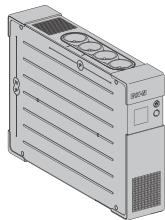
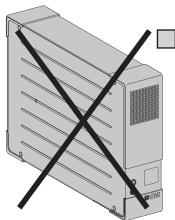
UPS can be installed in horizontal, vertical position, or placed in Rack 2U (optional kit).
-
Description
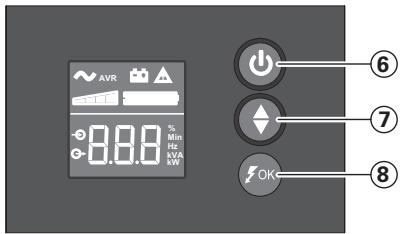
⑥ ON/OFF button for the battery backup outlets
⑦ Scroll down
⑧ ASR LED
LCD
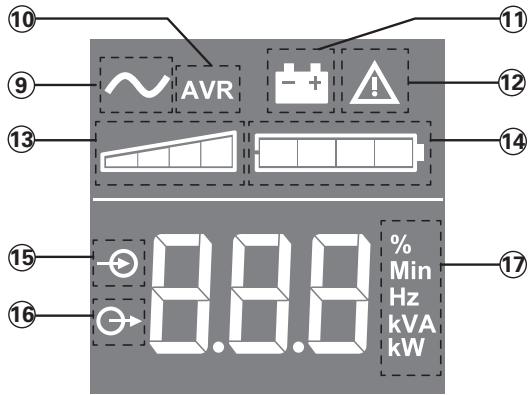
⑨ UPS ON
⑩ AVR mode
⑪ Battery mode
⑫ Internal fault
⑬ Output load level
⑭ Battery level
⑮ Input measurements
⑯ Output measurements
⑰ Measuring unit
Outlets
650 / 850
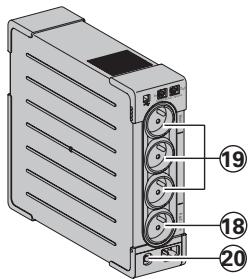
1200 / 1600
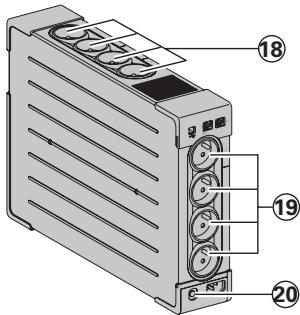
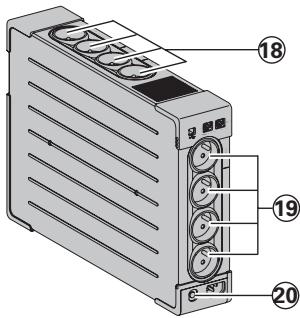
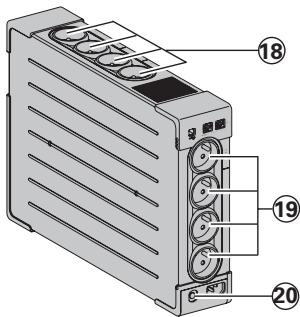
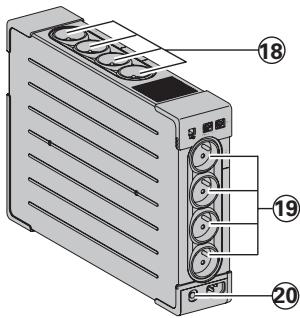
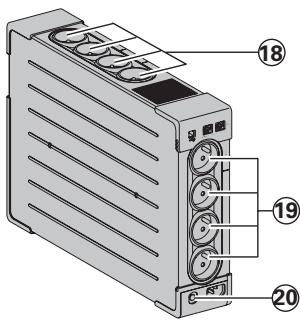
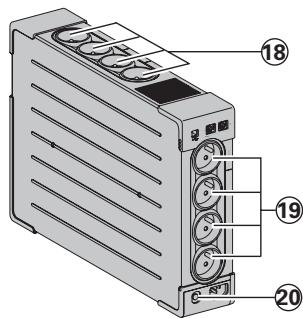
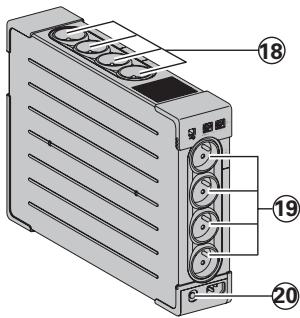
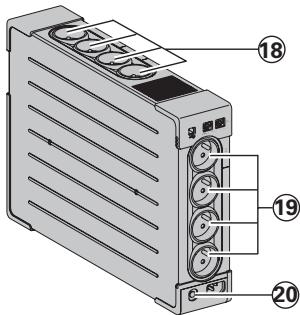
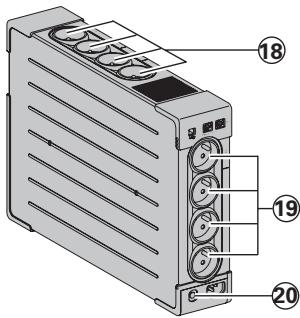
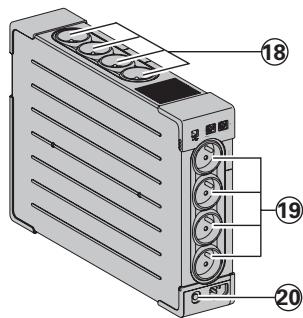
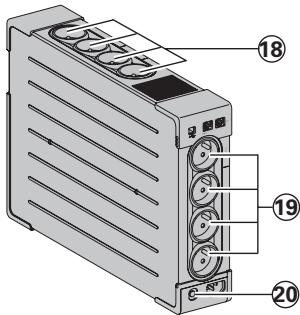
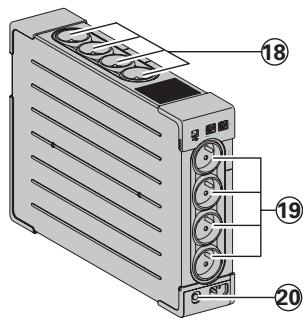
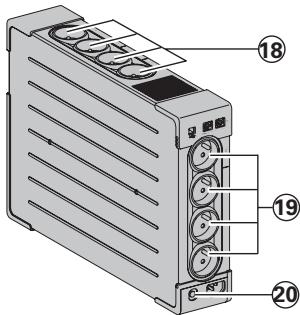
⑱ Surge protection outlets
⑲ Battery backup outlets
20 Protection (circuit breaker)
3. UPS connections
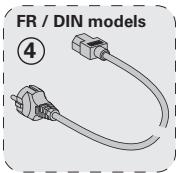
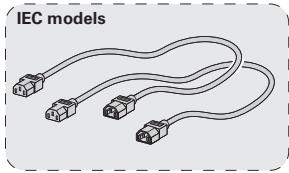
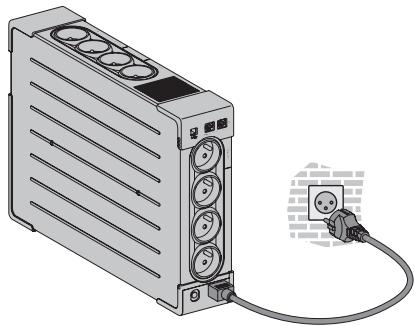
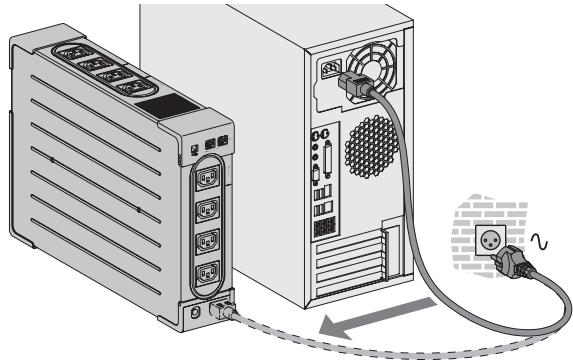
- Connect the UPS ① to the AC-power system via a wall outlet with an earth connector, using the supplied cord ④ for a UPS with FR/DIN sockets or with the supply cord of your computer for a UPS with IEC sockets (see figure A).
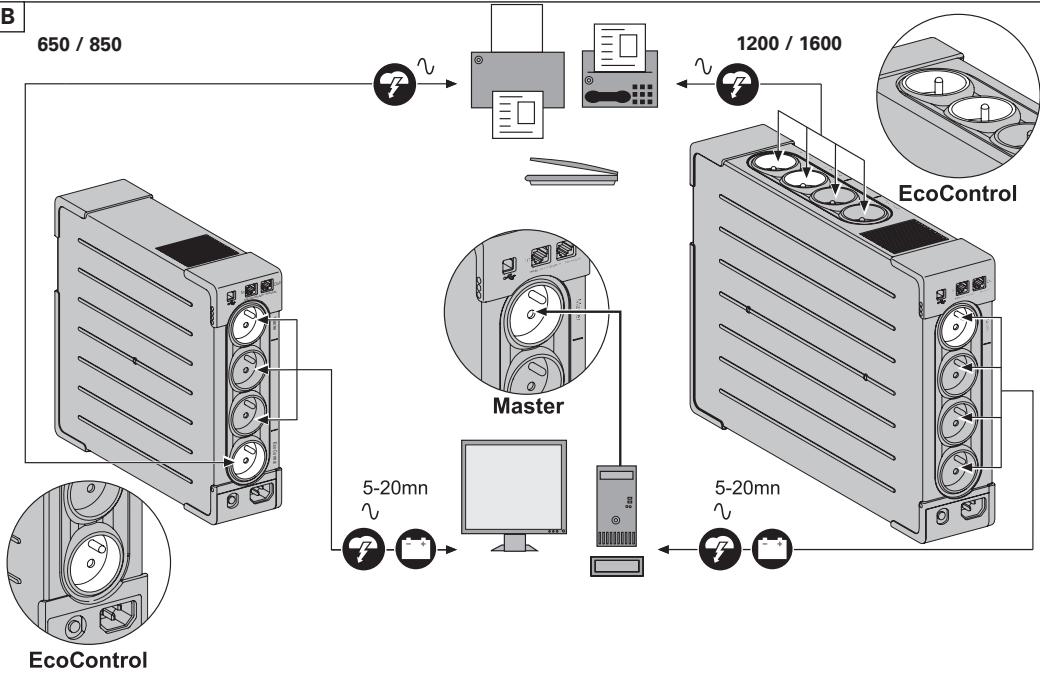
- Plug critical equipment (computer, monitor, modem, etc.) into the outlets ⑲ providing battery backup power and surge protection (see figure B), taking care not to exceed the rated current indicated in amperes.
- Other devices (printer, scanner, fax, etc.) can be connect to the surge protection outlets 18 (see figure B). The surge protection outlets are not backed up by battery power in the event of a power outage.
Optional Internet modem / Network connection:
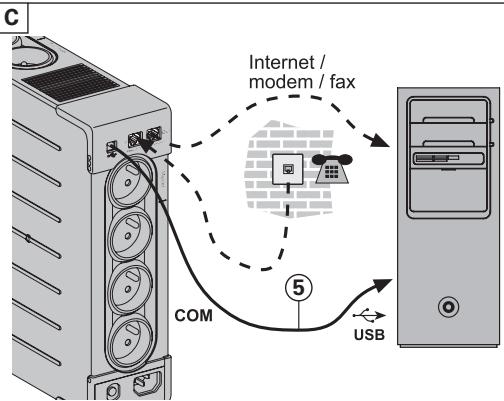
A modem or Ethernet data line can be protected against surges by connecting it via the UPS. Connect the existing device cable between the wall outlet and the UPS, and use a similar cable between the UPS and the device, as indicated in figure C (cable not supplied).
Optional USB connection:
The UPS device can be connected to the computer using the USB cable ⑤ supplied (see figure C).
The software is available on the CD-ROM ⑤ or Eaton UPS Companion software is downloadable from powerquality.eaton.com.
Register for the warranty on powerquality.eaton.com.
4. Master and EcoControl outlets operating procedure
In order to limit energy consumption of peripherals (scanner, printer) in standby mode, the Ellipse PRO is equipped with EcoControl outlets that are dependent on the Master outlet. When the main device supplied by the Master outlet (computer) is shut down, the EcoControl outlets are automatically deactivated and the peripherals shut down.
This function (deactivated by default) is validated and configured using the configuration tool integrated in the software.
Note: when the function is activated, do not connect critical applications to EcoControl outlets.
Threshold setup
A default setup ensures the correct operation of the EcoControl function. However, depending on the consumption of the main load, the trigger threshold of the EcoControl function may have to be modified using the configuration software supplied with the UPS:
- First, make sure that the function is activated in the "EcoControl Function" tab of the configuration tool.
- If the peripherals connected to the EcoControl outlets do not switch off when the main load is not in normal operation (ex: when in standby mode), the detection threshold value must be set to High.
- If the rated consumption level of the main load is low and the EcoControl outlets shut down when the main load is operating normally, the detection threshold value must be set to Low.
5. UPS setting through the LCD
Release scroll down button to select menu
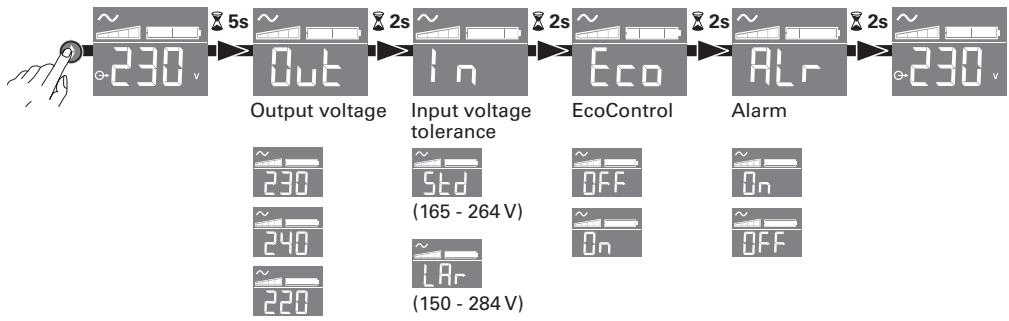
flowchart
graph LR
    A["Hand icon"] --> B["230 v"]
    B --> C["Output voltage"]
    C --> D["In"]
    D --> E["Input voltage tolerance"]
    E --> F["Eco"]
    F --> G["Alarm"]
    G --> H["230 v"]
    H --> I["230 (165 - 264 V)"]
    H --> J["240 (150 - 284 V)"]
    H --> K["220"]
    K --> L["Std (165 - 264 V)"]
    K --> M["LAr (150 - 284 V)"]
    K --> N["OFF On"]
    K --> O["OFF On"]
Example of setting
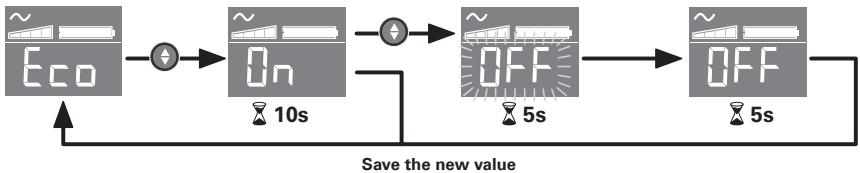
flowchart
graph LR
    A["~ Eco"] --> B["On"]
    B --> C["OFF"]
    C --> D["~ Off"]
    D --> E["5s"]
    style A fill:#f9f,stroke:#333
    style B fill:#ccf,stroke:#333
    style C fill:#cfc,stroke:#333
    style D fill:#fcc,stroke:#333
    style E fill:#ffc,stroke:#333
- LCD shut off if no activity for 3 minutes.
6. Operation
Battery charge
The UPS charges the battery as soon as it is connected to the AC outlet, whether button ⑥ is pressed or not. When used for the first time, the battery will only provide its maximum performance after it has been charged for 8 hours. It is recommended that the UPS be permanently connected to the AC power supply to ensure the best possible performance.
Switching-on the UPS
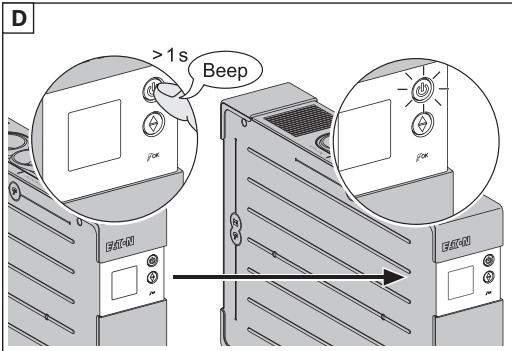
Press button ⑥ for about 1 second.
Surge protection outlets ⑱ without battery backup
Equipment connected to these outlets is supplied as soon as the AC cord ④ is plugged in. They are not affected by button ⑥.
Battery backup outlets 19
Equipment connected to these outlets is supplied as soon as button ⑥ turns green (see figure D).
These outlets can be turned on even if the UPS is not connected to AC power (button ⑥ flashes).
AC-power disturbance
- If AC power is disturbed or fails, the UPS continues to operate on battery power. Button ⑥ flashes green. In normal mode, the audible alarm beeps every ten seconds, then every three seconds when the end of battery backup time is near. In silent mode, the audible alarm simply beeps once when the UPS transfers to battery power.
- If the power outage lasts longer than the battery backup time, the UPS shuts down and automatically restarts when power is restored. Following a complete discharge, a few hours are required to recharge the battery back to full backup time.
Surge protection:
All outlets include surge protection.
Shutdown of the battery backup outlets ⑲
Press button ⑥ for more than two seconds.
7. Troubleshooting
(For further information, visit the www.powerquality.eaton.com site or contact after-sales support.)
| Problem | Diagnostic | Solution | |
| 1 | The battery backup outlets 19 are not supplied with power. | Button 6 is not lighted on. | Press button 6 and check that it turns green. |
| 2 | The connected devices are not supplied when AC power fails. | The devices are not connected to the battery backup outlets 19. | Connect the devices to the battery backup outlets 19. |
| 3 | AC power is available, but the UPS operates on battery power. | Circuit breaker 20, located at the rear of the UPS, has been tripped by an overload on the UPS output. | Disconnect excess equipment and reset the circuit breaker 20 by pressing the corresponding button. |
| 4 | Green button 6 flashes and audible alarm beeps every 3 seconds. | The UPS battery backup outlets 19 are overloaded. | Disconnect excess equipment connected to the battery backup outlets 19 . |
| 5 | Fault sign 12 appear on the LCD panel and audible alarm beeps continuously. | A fault has occurred on the UPS. The battery backup outlets 19 are no longer supplied. | Call after-sales support. |
| 6 | Green LED 8 is off and the filtered outlets 18 are supplied. | Surge protection is no longer provided. | Call after-sales support. |
| 7 | EcoControl outlets keep powered when main application (Master outlet) is stopped. | EcoControl function is not activated or not properly set. | Activate or set properly EcoControl function using the software provided with the product. |
1200 / 1600
1200 / 1600
1200 / 1600
flowchart
graph LR
    A["~ Eco"] --> B["On"]
    B --> C["OFF"]
    C --> D["~ Off"]
    D --> E["~ Off"]
    E --> F["~ Off"]
    F --> G["~ Off"]
    G --> H["~ Off"]
    H --> I["~ Off"]
    I --> J["~ Off"]
    J --> K["~ Off"]
    K --> L["~ Off"]
    L --> M["~ Off"]
    M --> N["~ Off"]
    N --> O["~ Off"]
    O --> P["~ Off"]
    P --> Q["~ Off"]
    Q --> R["~ Off"]
    R --> S["~ Off"]
    S --> T["~ Off"]
    T --> U["~ Off"]
    U --> V["~ Off"]
    V --> W["~ Off"]
    W --> X["~ Off"]
    X --> Y["~ Off"]
    Y --> Z["~ Off"]
    Z --> A
1200 / 1600
1200 / 1600
1200 / 1600
1200 / 1600
flowchart
graph LR
    A["~ Eco"] --> B["On"]
    B --> C["OFF"]
    C --> D["~ Off"]
    D --> E["~ Off"]
    E --> F["~ Off"]
    F --> G["~ Off"]
    G --> H["~ Off"]
    H --> I["~ Off"]
    I --> J["~ Off"]
    J --> K["~ Off"]
    K --> L["~ Off"]
    L --> M["~ Off"]
    M --> N["~ Off"]
    N --> O["~ Off"]
    O --> P["~ Off"]
    P --> Q["~ Off"]
    Q --> R["~ Off"]
    R --> S["~ Off"]
    S --> T["~ Off"]
    T --> U["~ Off"]
    U --> V["~ Off"]
    V --> W["~ Off"]
    W --> X["~ Off"]
    X --> Y["~ Off"]
    Y --> Z["~ Off"]
    Z --> A
1200 / 1600
1200 / 1600
1200 / 1600
1200 / 1600
1200 / 1600