ERSC60 - Electric mower PANASONIC - Free user manual and instructions
Find the device manual for free ERSC60 PANASONIC in PDF.



User questions about ERSC60 PANASONIC
0 question about this device. Answer the ones you know or ask your own.
Ask a new question about this device
Download the instructions for your Electric mower in PDF format for free! Find your manual ERSC60 - PANASONIC and take your electronic device back in hand. On this page are published all the documents necessary for the use of your device. ERSC60 by PANASONIC.
USER MANUAL ERSC60 PANASONIC
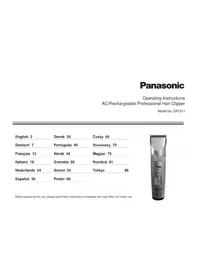
Operating Instructions
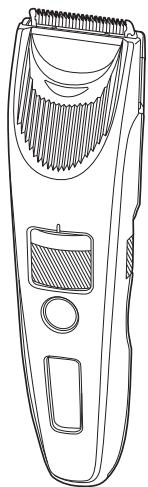
(Household) AC/Rechargeable Hair Clipper
Model No. ER-SC60/ER-SC40
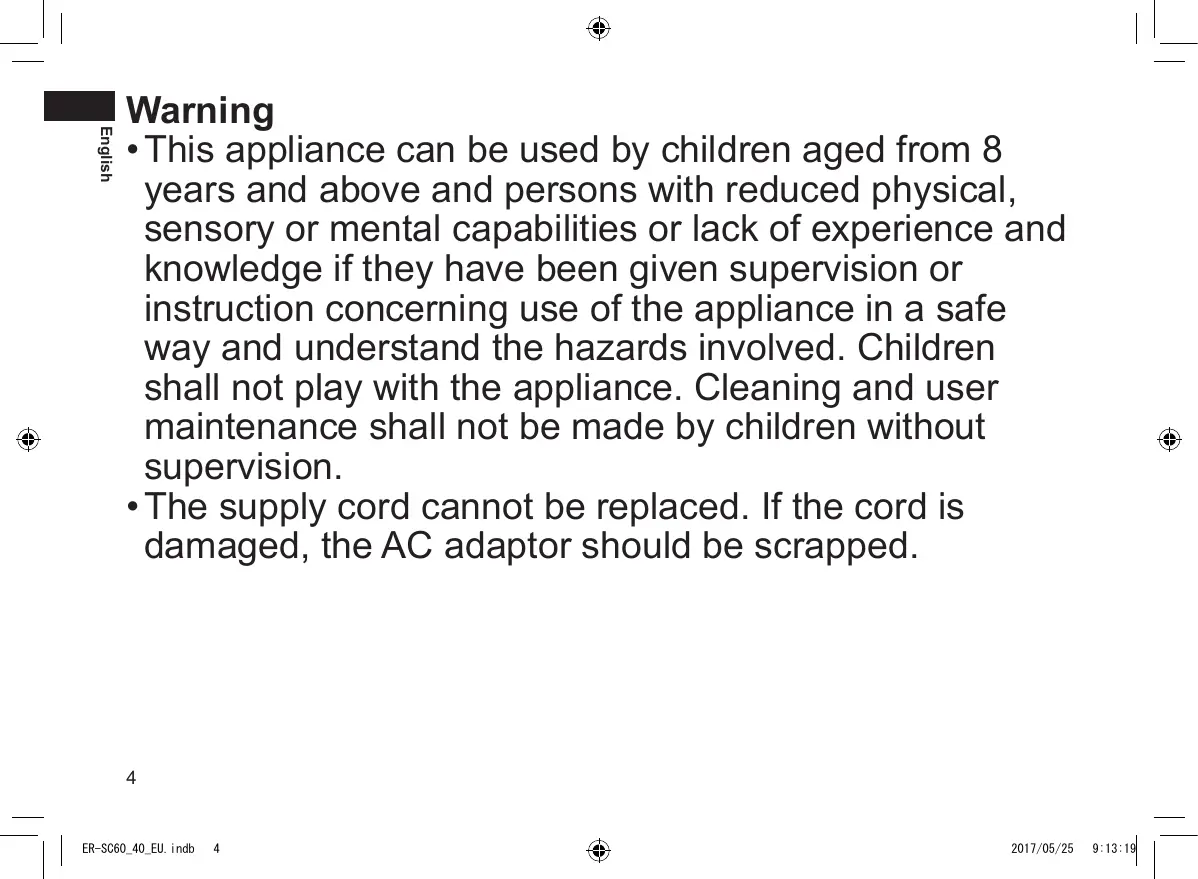
English 3 Dansk 111 Cesky 219
Operating Instructions
(Household) AC/Rechargeable Hair Clipper
Model No. ER-SC60/ER-SC40
Contents
Safety precautions.. 6
Intended use 9
Parts identification. 10
Preparation 11
How to use 12
Cleaning 16
Troubleshooting 18
Blade life. 18
Battery life 18
Removing the built-in rechargeable battery. 19
Specifications 19
Thank you for purchasing this Panasonic product.
Before operating this unit, please read these instructions completely and save them for future use.

English
Warning
- This appliance can be used by children aged from 8 years and above and persons with reduced physical, sensory or mental capabilities or lack of experience and knowledge if they have been given supervision or instruction concerning use of the appliance in a safe way and understand the hazards involved. Children shall not play with the appliance. Cleaning and user maintenance shall not be made by children without supervision.
-
The supply cord cannot be replaced. If the cord is damaged, the AC adaptor should be scrapped.
-
The following symbol means suitable for cleaning under an open water tap.
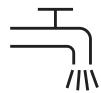
- Do not clean with water when the AC adaptor is attached.
- Do not use anything other than the supplied AC adaptor and the charging stand for any purpose.
Also, do not use any other product with the supplied AC adaptor and the charging stand. (See page 10.)
- The following symbol indicates that a specific detachable power supply unit is required for connecting the electrical appliance to the supply mains. The type reference of power supply unit is marked near the symbol.

Safety precautions
To reduce the risk of injury, loss of life, electric shock, fire, and damage to property, always observe the following safety precautions.
Explanation of symbols
The following symbols are used to classify and describe the level of hazard, injury, and property damage caused when the denotation is disregarded and improper use is performed.

DANGER
Denotes a potential hazard that will result in serious injury or death.

WARNING
Denotes a potential hazard that could result in serious injury or death.

CAUTION
Denotes a hazard that could result in minor injury or property damage.
The following symbols are used to classify and describe the type of instructions to be observed.

This symbol is used to alert users to a specific operating procedure that must not be performed.

This symbol is used to alert users to a specific operating procedure that must be followed in order to operate the unit safely.
WARNING
Power supply

Do not connect or disconnect the adaptor to a household outlet with a wet hand.
- Doing so may cause electric shock or injury.
Do not immerse the AC adaptor and the charging stand in water or wash with water.
Do not place the AC adaptor and the charging stand over or near water filled sink or bathtub.
Never use the appliance if the AC adaptor is damaged or if the power plug fits loosely in a household outlet.
Do not damage, modify, or forcibly bend, pull, or twist the cord. Also, do not place anything heavy on or pinch the cord.
- Doing so may cause electric shock or fire due to a short circuit.

Do not use in a way exceeding the rating of the household outlet or the wiring.
- Exceeding the rating by connecting too many plugs to one household outlet may cause fire due to overheating.

Always ensure the appliance is operated on an electric power source matched to the rated voltage indicated on the AC adaptor.
Fully insert the adaptor.
- Failure to do so may cause fire or electric shock.

Always unplug the adaptor from a household outlet when cleaning.
- Failure to do so may cause electric shock or injury.

WARNING
Regularly clean the power plug, the appliance plug and the charging plug to prevent dust from

accumulating.
- Failure to do so may cause fire due to insulation failure caused by humidity.
Disconnect the adaptor and wipe with a dry cloth.
In case of an abnormality or malfunction
Immediately stop using and remove the adaptor if there is an abnormality or malfunction.
- Failure to do so may cause fire, electric shock, or injury.
- The main unit, charging stand, adaptor or cord is deformed or abnormally hot.
- The main unit, charging stand, adaptor or cord smells of burning.
- There is an abnormal sound during use or charging of the main unit, charging stand, adaptor or cord.
- Immediately request inspection or repair at an authorized service centre.
This product
This product has a built-in rechargeable battery.

Do not throw into fire, apply heat, or charge, use, or leave in a high temperature environment.
- Doing so may cause fluid leak, overheating, or explosion.

Do not modify or repair.
- Doing so may cause fire, electric shock, or injury.
Contact an authorized service centre for repair (battery change, etc.).

Never disassemble except when disposing of the product.
- Doing so may cause fire, electric shock, or injury.
Preventing accidents
Do not place within reach of children or infants.
Do not let them use it.
- Putting parts or accessories in the mouth may cause an accident or injury.
If the oil is consumed accidentally, do not induce vomiting, drink a large amount of water, and contact

a physician.
If the oil comes into contact with eyes, immediately wash thoroughly with running water, and contact a physician.
- Failure to do so may result in physical problems.

CAUTION
Protecting the skin
Do not press the blade against the skin.
Do not use this product for any purpose other than
trimming hair.
Do not directly apply the blades on ears or rough skin (such as swellings, injuries or blemishes).
- Doing so may cause skin injury.

Check that the blades are not damaged or deformed before use.
- Failure to do so may cause skin injury.
Note the following precautions
Do not allow metal objects or trash to adhere to the power plug, the appliance plug or the charging plug
- Doing so may cause electric shock or fire due to a short circuit.

Do not drop or hit against other objects.
- Doing so may cause injury.

Do not wrap the cord around the adaptor when storing.
- Doing so may cause the wire in the cord to break with the load, and may cause fire due to short circuit.

Disconnect the adaptor from the household outlet when not using.
- Failure to do so may cause electric shock or fire due to electrical leakage resulting from insulation deterioration.

Disconnect the adaptor or the appliance plug by holding onto the adaptor or the appliance plug instead of the cord.
- Failure to do so may cause electric shock or injury.
Handling of the removed battery when disposing

DANGER
The rechargeable battery is exclusively for use with this appliance. Do not use the battery with other products.
Do not charge the battery after it has been removed from the product.
- Do not throw into fire or apply heat.
- Do not hit, disassemble, modify, or puncture with a nail.
- Do not let the positive and negative terminals of the battery get in contact with each other through metallic objects.
- Do not carry or store the battery together with metallic jewellery such as necklaces and hairpins.
- Do not use or leave the battery where it will be exposed to high temperatures, such as under direct sunlight or near other sources of heat.
- Never peel off the tube.
- Doing so may cause overheating, ignition, or explosion.

WARNING

After removing the rechargeable battery, do not keep it within reach of children and infants.
- The battery will harm the body if accidentally swallowed. If this happens, consult a physician immediately.
If the battery fluid leaks out, do not touch the battery with your bare hands.
- The battery fluid may cause blindness if it comes in contact with your eyes.
Do not rub your eyes. Wash immediately with clean water and consult a physician. - The battery fluid may cause inflammation or injury if it comes in contact with the skin or clothes.
Wash it off thoroughly with clean water and consult a physician.
Intended use
- Before using an attachment, check that it has been installed correctly. Failure to do so may cause hair to be cut too short.
- The appliance should not be used on animals.
- Apply the oil to the blade before and after each use. (See page 17.)
Failure to apply the oil may cause the following problems.
- The appliance has become blunt.
- Shorter operating time.
- Louder sound.
- Do not use thinner, benzine, alcohol or other chemicals. Doing so may cause failure, cracking or discoloration of the main body.
Clean the main body only with a soft cloth slightly dampened with tap water or soapy tap water.
- Store the appliance in a place with low humidity after use. Failure to do so may cause malfunction due to condensation or rust.
Parts identification
A
B
E
C
F
ER-SC60

D
ER-SC60

G

H

0
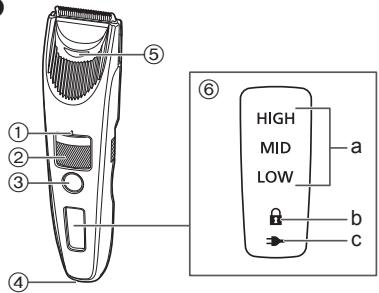
A Main body
① Trimming height indication mark
② Dial (Height adjustment control)
③ Power switch
④ Appliance socket
⑤ Water inlet
⑥ Lamp display
a. Battery capacity lamp
b. Switch lock lamp (A)
c. Charge status lamp ()
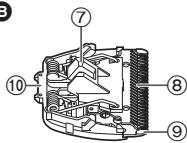
Blade
⑦ Cleaning lever
⑧ Movingblade
(9) Stationary blade
⑩ Mounting hook
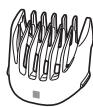
Trimming height comb attachment [A]
(1 mm to 10 mm)
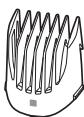
D Trimming height comb attachment [B]
ER-SC60
(11 mm to 20 mm)
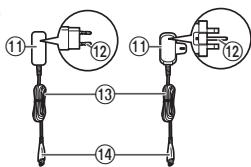
E AC adaptor (RE7-87)
(The shape of the power plug differs depending on the area.)
Adaptor
⑫ Power plug
13 Cord
14 Appliance plug
F Charging stand (RC9-36)
ER-SC60
⑤ Charging plug
16 Stand socket
Accessories
6 Cleaning brush
Oil
Pouch
Preparation
Charging
- Turn the appliance off.
- Wipe off any water droplets on the appliance socket and the charging stand.
1 Connect the appliance plug to the appliance socket.
2 Plug in the adaptor into a household outlet.
- Check that the charge status lamp () glows.
- Charging is completed after approx. 1 hour.
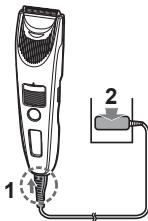
3 Disconnect the adaptor after charging is completed.
While charging

The charge status lamp () glows.
The battery capacity lamp will blink in order of "LOW", "MID", and "HIGH" while the charging progresses.
After charging is completed
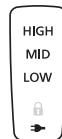

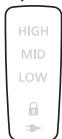
The battery capacity lamp and the charge status lamp () will light up and then turn off after 5 seconds.
Notes
- If there is noise from the radio or other sources while using or charging the appliance, move to a different location to use the appliance.
- The battery will deteriorate if not used for over 6 months, so make sure to perform a full charge at least once every 6 months.
- The charging time may differ when using the appliance for the first time, or if it has not been used for more than 6 months. The lamp on the appliance may not glow for several minutes when first starting charging, but will glow when continuing to charge.
- Recommended ambient temperature for charging is 10^ - 35^ . It may take longer to charge, or the charge status lamp () will blink quickly and the battery may fail to charge properly in extremely high or low temperatures.
- When the charge status lamp () is blinking rapidly (twice every second), there is a charging malfunction. Please charge the battery in the recommended ambient temperature range.
- 1 full charge will provide approximately 60 minutes of continuous operation. (Based on dry using at 20^ - 30^ ) The operating time may differ depending on the frequency of use and the operating method.
- The battery used is a lithium-ion, so charging after every use will have no effect on battery life.
Charging with the charging stand
ER-SC60
- Insert the appliance plug into the charging stand.
- Place the main body on the charging stand.
- Plug in the adaptor into a household outlet.

usu6u3
How to use
- Turn the appliance off.
- Apply the oil to the blade before and after each use. (See page 17.)
- The appliance may not operate in an ambient temperature lower than approximately 5^ .
1 Mount the desired attachment and adjust the trimming height as needed. (See page 13.)
It can also be used without the attachment.
(Trimming height: approx. 0.5mm )
2 Press and trim.
- The power cannot be turned on when the switch lock lamp ( ) blinks, as the power switch is locked.
Press the power switch for more than
2 seconds to unlock. (See this page.)
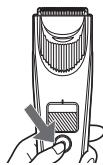
When the battery capacity is low "LOW" blinks when operating the appliance.
The appliance beeps twice after switched off.
You can trim approx. 20 minutes after "LOW" blinks.
(This will differ depending on usage.)
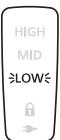
3 Press when finished.
Locking/unlocking the power switch
Locking the power switch
-
Press ① for more than 2 seconds.
-
The switch lock lamp (A) will light up for 5 seconds and turn off.
The appliance will stop operating. -
Release ⑥

Unlocking the power switch
-
Press for more than 2 seconds.
-
The switch lock lamp ( ) will turn off.
-
Once the appliance starts operating, release ①


AC operation
If you connect the AC adaptor to the appliance in the same way as for charging, and turn on the power, you can use it.
- If the remaining battery is too low, the blades may move slowly or stop, even with the AC operation. In this case, charge the battery for 1 minute or more.
- The battery will be discharged, even with the AC operation.
Removing and mounting the attachments
- Take care not to injure hands, etc., with the blade when removing or mounting the attachment.
- Turn the appliance off.
Mounting the attachment
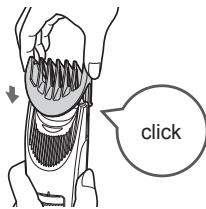
Mount the attachment to the main body until it clicks.
- If the attachment is not attached correctly, it may shift and end up cutting too much during use.
Removing the attachment
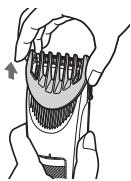
Hold the main body securely and remove the attachment from the main body.
Adjust the trimming height
- Turn the appliance off.
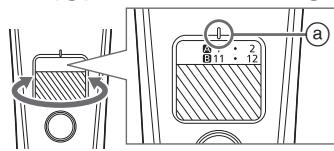
Turn the dial and adjust the trimming height indication mark (a) to the desired height.
Trimming height comb attachment [A]
![PANASONIC ERSC60 - Trimming height comb attachment [A] - 1](/content/2019/10/1332/images/6072c636302f9e6592ca9d4cde30558b0921a89ae4ef0dee62e679bcbb28d81e.jpg)
Trimming height (estimate):
1 mm to 10 mm
![PANASONIC ERSC60 - Trimming height comb attachment [A] - 2](/content/2019/10/1332/images/3a0b028eaf00eb501d29c0b71f59dbbb9105b9a55228bc8a45cd7c54681724c4.jpg)
| Indicator | 1 | • | 2 | • | 3 | • | 4 | • | 5 | • |
| Trimming height (mm) (estimate) | 1 | 1.5 | 2 | 2.5 | 3 | 3.5 | 4 | 4.5 | 5 | 5.5 |
| Indicator | 6 | • | 7 | • | 8 | • | 9 | • | 10 |
| Trimming height (mm) (estimate) | 6 | 6.5 | 7 | 7.5 | 8 | 8.5 | 9 | 9.5 | 10 |
Trimming height comb attachment [B] ER-SC60
![PANASONIC ERSC60 - Trimming height comb attachment [B] ER-SC60 - 1](/content/2019/10/1332/images/456b6793e5cfc715292d281f6f2e5d857f03a28df065559ecb65188633653a2e.jpg)
Trimming height (estimate):
11 mm to 20 mm
![PANASONIC ERSC60 - Trimming height comb attachment [B] ER-SC60 - 2](/content/2019/10/1332/images/e951a295585357c88d2c12b8a10590373f369beddaa70a19b6a6dbf17dafdfaa.jpg)
| Indicator | 11 | • | 12 | • | 13 | • | 14 | • | 15 | • |
| Trimming height (mm)(estimate) | 11 | 11.5 | 12 | 12.5 | 13 | 13.5 | 14 | 14.5 | 15 | 15.5 |
| Indicator | 16 | • | 17 | • | 18 | • | 19 | • | 20 |
| Trimming height (mm) (estimate) | 16 | 16.5 | 17 | 17.5 | 18 | 18.5 | 19 | 19.5 | 20 |
Notes
- Actual hair length will be a little longer than the height you set.
- Setting of 10.5 mm is unavailable.
- It can also be used without the attachment.
(Trimming height: approx. 0.5mm )
Trimming hair
- Do not use when the hair is wet.
A wet hair may stick to the skin or bunch up, making it difficult to trim.
- To maintain sharpness, remove hair trimmings between usages.
- Before trimming, comb your hair with a comb.
Adjusting the length around the ears and sides
Holding the appliance with the power switch facing outwards, trim around the ears and sides by lifting the tip of the attachment little by little from the hairline.
- Trim your hair while holding down your ear with one hand.
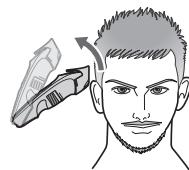

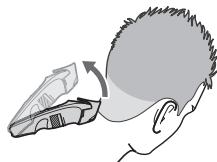
How to align the length at the neckline and at the back of your head
Holding the appliance with the power switch facing outwards, trim from the neckline to the back of your head by lifting the tip of the attachment little by little from the hairline.
Shaping your sideburns
Without the attachment
Holding the appliance with the power switch at the bottom, keep the blade at an angle of 90^ against the sideburns and move the appliance from top to bottom along the skin to trim the sideburns.
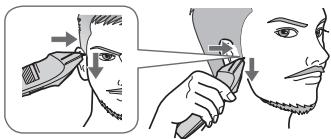
Trimming the downy hair around the neckline
Without the attachment
Holding the appliance with the power switch at the bottom, touching the blade perpendicular to the area of downy hair, and move the appliance downward along the skin.

Trimming to an even length
Holding the appliance with the power switch facing outwards, trim slowly while crisscrossing from various directions to avoid missing any spots.

Notes
- It is recommended to ask someone else to trim around your own ears and neckline.
- The desired results may not be achieved if hair is too long. In this case, trim the hair to a length of about 2 cm before using the appliance.
Cleaning
- Clean the main body, blade and the attachment after each use. (If not cleaned, the motion will become poor and the sharpness will worsen.)
- Turn the appliance off.
- Remove the main body from the AC adaptor.
With water
Main body, blade and the attachment
To remove light dirt
- Remove the attachment and turn the appliance on.
- Run water down the water inlet at the front of the main body, rinse thoroughly for approximately 20 seconds, and then turn the appliance off.
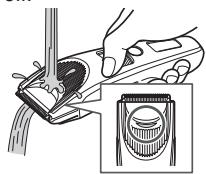
- Rinse with water and shake up and down several times to remove the water.
To remove heavy dirt
- Remove the attachment and blade.
(See pages 13 and 17.) - Clean the main body, the blade and the attachments with running water.

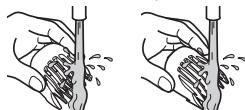
-
Rinse with water and shake up and down several times to remove the water.
-
Wipe off the water with a towel and let it dry naturally.
- It will dry faster with the blade removed.
- Apply the oil to the blade after drying. (See page 17.)
- Attach the blade and attachment to the main body.
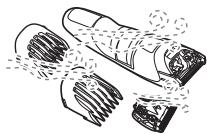
With the brush
Main body and blade
- Remove the blade. (See page 17.)
- Brush off any hair trimmings from the main body and from around the blade.
- Brush off the hair trimmings from the blade edge.
- Brush any hair trimmings out from between the stationary blade and the moving blade while pressing down the cleaning lever (⑥) to raise the moving blade.
- Apply the oil to the blade. (See page 17.)
- Attach the blade and attachment to the main body.
Charging stand ER-SC60
Use the cleaning brush to clean hair trimmings and dust in the charging plug or in the hole on the bottom surface.
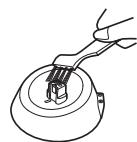
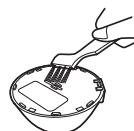
Lubrication
- Apply the oil to the blade before and after each use.
1 Remove the blade. (See this page.)
2 Apply a drop of the oil to each indicated point.
3 Attach the blade to the main body, turn on the power and allow to run for approximately 5 seconds.

Replacement part
Replacement part is available at your dealer or Service Centre.
| Replacement part for ER-SC60/ER-SC40 | Blade | WER9521 |
Removing and mounting the blade
Removing the blade
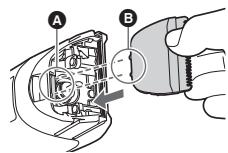
Hold the main body with the switch facing upward and push the blade with your thumb while catching the blade in your other hand.

Mounting the blade
Fit the mounting hook (B) into the blade mounting (A) on the main body and then push in until you hear a click.

Troubleshooting
Perform the following actions. If the problems still cannot be solved, contact the store where you purchased the unit or a service centre authorized by Panasonic for repair.
Problem
The power switch does not turn ON.
The appliance has become blunt.
Operating time is short.
Appliance stopped functioning.
The appliance cannot be charged.
Makes a loud sound.
Action
Unlock the switch lock. (See page 12.)
Until problems are solved, please follow each procedure as follows;
1. Charge the appliance. (See page 11.)
2. Clean the blade and apply oil. (See pages 16 and 17.)
3. Replace the blade. (See page 17.)
4. Have the battery replaced by an authorized service centre.
Insert the appliance plug into the appliance firmly.
Apply oil. (See page 17.)
Confirm that the blade is properly attached.
Blade life
Blade life varies according to the frequency and period of use of the appliance.
For example, the blade life is approximately 2 years when using the appliance for 20 minutes twice a month. Replace the blades if cutting efficiency reduces substantially despite proper maintenance.
Battery life
Battery life will vary according to the frequency and length of use. If the battery is charged once a month, the service life will be approximately 3 years.
If the operating time is significantly shorter even after a full charge, the battery has reached the end of its life.
Removing the built-in rechargeable battery
Remove the built-in rechargeable battery before disposing the appliance.
Please make sure that the battery is disposed of at an officially designated location if there is one.
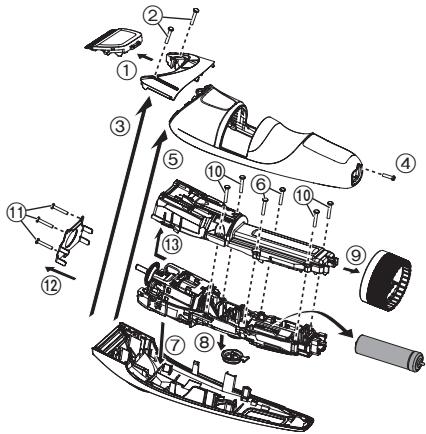
This figure must only be used when disposing the appliance, and must not be used to repair it. If you dismantle the appliance yourself, it may cause malfunction.
- Remove the appliance from the AC adaptor.
- Press the power switch to turn on the power and then keep the power on until the battery is completely discharged.
- Perform steps ① to ⑬ and lift the battery, and then remove it.
- Take care not to short circuit the positive and negative terminals of the removed battery, and insulate the terminals by applying tape to them.
For environmental protection and recycling of materials
This appliance contains a Lithium-ion battery.
Please make sure that the battery is disposed of at an officially assigned location, if there is one in your country.
Specifications
| Power source | See the name plate on the AC adaptor. (Automatic voltage conversion) |
| Motor voltage | 3.6 V--- |
| Charging time | Approx. 1 hour |
| Airborne Acoustical Noise | 62 (dB (A) re 1 pW) |
This product is intended for household use only.
Disposal of Old Equipment and Batteries Only for European Union and countries with recycling systems

These symbols on the products, packaging, and/or accompanying documents mean that used electrical and electronic products and batteries must not be mixed with general household waste.
For proper treatment, recovery and recycling of old products and batteries, please take them to applicable collection points in accordance with your national legislation.
By disposing of them correctly, you will help to save valuable resources and prevent any potential negative effects on human health and the environment.
For more information about collection and recycling, please contact your local municipality.
Penalties may be applicable for incorrect disposal of this waste, in accordance with national legislation.
Note for the battery symbol (bottom symbol)
This symbol might be used in combination with a chemical symbol. In this case it complies with the requirement set by the Directive for the chemical involved.
Panasonic
Bedienungsanleitung
pspepepepepepepepepepepepepepepepepepepepepepepepepepepepepepepepepepepepepepepepepepepepepepepepepepepepepepepepepepepepepepepepepepepepepepepepepepepepepepepepepepepepepepepepepepepepepepepepepepepepe


WAARSCHUWING

pspepepepepepepepepepepepepepepepepepepepepepepepepepepepepepepepepepepepepepepepepepepepepepepepepepepepepepepepepepepepepepepepepepepepepepepepepepepepepepepepepepepepepepepepepepepepepepepepepepepepe

WAARSCHUWING
F Laadhouser (RC9-86) ER-SC60
Identification of dele. 118
Klargoring 119
Anvendelse 120
Rensning 124
Fejlfinding 126
Bladets levetid 126
Batteri-levetid. 126
For at fjerne let snavs
Reservedel for ER-SC60/ER-SC40 Blad WER9521
For in adaptern welt.
- I annat fall kan det resultanta i brand ellerelstot.
Koppla alltid bort adaptern fran vagguttaget infor rengöring. - I annat fall kan det resultera i elstöt aller persorskada.

WARNING
Model c. ER-SC60/ER-SC40
Obsah
C. Modelu ER-SC60/ER-SC40
Obsah
Model No. ER-SC60/ER-SC40
icindekiler
- Aşaqidaki sembol, elektrikli aletin Şebekeye®,®,®,®,®,®,®,®,®,®,®,®,®,®,®,®,®,®,®,®,®,®,®,®,®,®,®,®,®,®,®,®,®,®,®,®,®,®,®,®,®,®,®,®,®,®,®,®,®,®,®,®,®,®,®,®,®,®,®,®,®,®,®,®,®,®,®,®,®,®,®,®,®,®,®,®,®,®,®,®,®,®,®,®,®,®,®,®,®,®,®,®,®,®,®,®,®,®,®,®,®.
- Özel bir ayrilabilir,—ç kaynámı)—unitesi,—gerektiğini,—belirtir.,—ç kaynámı)—unitesinin,—turü”—sembolün,—yananda”—belirtilir.


Güvenlik önlemleri
ER-SC60/ER-SC40污染防治 1 WER9521
2026, Oshinohara, Yasu-Shi, Shiga, Japan
YETKILI TEMSILCI
Ithalatci Firma:
Tesan Iletisim A.Ş.
Cobançese Meh. Bilge Sok. No:17
34196 Yenibosna- Istanbul
Tel: 0212 454 60 70 Faks: 0212 454 60 20
www.tesan.com.tr
URUNUN KULLANIM OMRU 7 YILDIR


MEMO
MEMO

MEMO

Panasonic Corporation
http://www.panasonic.com
© Panasonic Corporation 2017
EN,GE,FR,IT,DU,SP,DA,PT,NW,SW,FI,PL,CZ,SK,HU,RO,TK
Printed in Japan
ER9710SC601E Y0617-0