
Shredstar X5 - Shredder HSM - Free user manual and instructions
Find the device manual for free Shredstar X5 HSM in PDF.


| Brand | HSM |
| Model | Shredstar X5 |
| Product Type | Paper Shredder (Cross-Cut) |
| Cut Size | 4.5 x 30 mm |
| Security Level (DIN 66399) | P-4 / O-1 / T-1 / E-2 |
| Cutting Capacity (A4, 70 g/m²) | 5–6 sheets per pass |
| Intake Width | 220 mm |
| Cutting Speed | 35 mm/s |
| Power Supply | 230 V / 50 Hz |
| Power Consumption | 250 W |
| Weight | 5.25 kg |
| Dimensions (W x D x H) | 345 x 245 x 385 mm |
| Shredded Material Container Volume | 18 L |
| Sound Pressure Level (Idle/Load) | 58 dB(A) / 65 dB(A) |
| Operating Mode | Brief operation (4 min on, 15 min off) |
| Shreddable Materials | Paper, CDs/DVDs, credit cards |
| Safety Features | Overload protection, overheat protection, bin full indicator, auto start via light barrier |
| Maintenance | Oil cutting unit with HSM special lubricating oil (order no. 1.235.997.403) when performance decreases or after each bin emptying |
| Warranty | 2 years (excluding wear and improper use) |
| Included Accessories | Operating instructions, CD container, adapter for UK |
Frequently Asked Questions - Shredstar X5 HSM
User questions about Shredstar X5 HSM
0 question about this device. Answer the ones you know or ask your own.
Ask a new question about this device
Download the instructions for your Shredder in PDF format for free! Find your manual Shredstar X5 - HSM and take your electronic device back in hand. On this page are published all the documents necessary for the use of your device. Shredstar X5 by HSM.
USER MANUAL Shredstar X5 HSM
shredstar S10 shredstar X5 shredstar X8
BETRIEBSANLEITUNG
OPERATING INSTRUCTIONS
NOTICE D'UTILISATION
MANUALE OPERATIVO
INSTRUCCIONES DE SERVICIO
english: Paper shredder HSM shredstar 9
1 Explanation of symbols and safety instructions

WARNING
The safety alert sign word WARNING and text on a grey back-ground warns of the risk of serious to life-threatening injuries.

NOTICE
alerts you to potential property damage.
Note
indicates information for the effective operation of the machine without risk of danger.
Safety instructions

Before using the machine for the first time, read the operating manual, and keep it for later use and to pass on to any subsequent users.
Observe all safety instructions onto the machine.

Risk of injury from sharp blades.
Never reach into the slot of the paper feed.

Risk of injury from being pulled in!

Keep long hair, loose articles of clothing, ties, scarves, jewellery, etc. away from feed opening.
Material with the tendency to form loops, e.g. tapes, strapping material, etc. must not be shredded.

Risk of combustion!
Do not use cleaning agents or pressurized air sprays which contain infl ammable substances, as they could ignite.

Dangerous for children and others!
The machine may not be used by persons (including children under 14 years of age) with limited physical, sensory or mental capabilities or with a lack of experience and knowledge, unless they are supervised by a responsible person or are instructed by them on the use of the machine. Children must be supervised to ensure they do not play with the machine.
Do not leave the document shredder switched on when it is unattended.
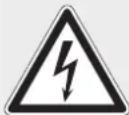
Dangerous mains voltage!
Improper handling of the machine can lead to an electric shock.
- Check the machine and cable regularly for damage.

Switch the shredder off if it is damaged or not working correctly or before relocating or cleaning it and disconnect it from the mains.
- Make sure that no water gets into the shredder. Do not immerse the power cable or the power plug in water. Never touch the power plug with wet hands.
- Never pull the plug out of the socket using the power cable. Always pull out the plug directly.
2 Proper use, warranty
The document shredder is intended for shredding paper and small quantities of CDs/DVDs and credit cards or store cards.
NOTICE
The paper must not have any large paper clips attached. Do not insert envelopes with windows, padded envelopes, newspapers, foils, laminated documents, cardboard, plastic, adhesive or hard materials.
The warranty period for the document shredder is 2 years. This warranty excludes wear, damage due to improper handling, natural depreciation, and actions taken by third parties.
3 Overview
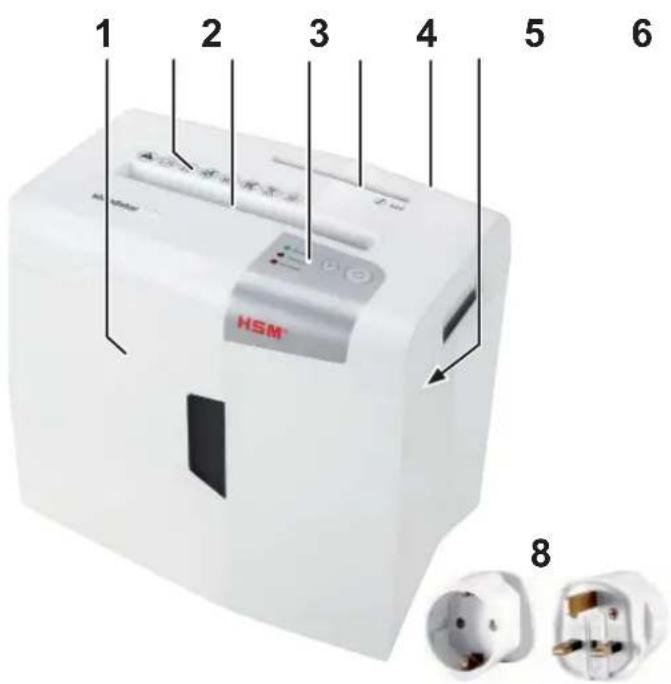
1 Shredded material container
2 Safety instructions
3 Feed opening for paper
4 Operating and display unit
5 Feed opening for CDs/DVDs and customer/credit cards
6 Mains switch
7 Type plate on the underside of the cutting head
8 Adapter (only required in Great Britain)
Operating and display elements

4 Initial start-up

WARNING
Dangerous mains voltage!
Improper handling of the machine can lead to an electric shock.
- Only use the machine in a dry room indoors. Never operate the machine in damp rooms or in the rain.
- Keep the machine, the plug and cable away from open fire and hot surfaces. The ventilation slots must not be blocked or covered and there must be at least 5 cm space between the shredder and any wall or furniture.
- Make sure that the power plug is easily accessible.
-
Before you insert the power plug, make sure that the voltage and frequency of your power supply comply with the information on the name plate.
-
Insert the CD container provided into the bracket on the inside of the shredded material container.
- Plug the power supply into a properly installed socket using the adapter.
5 Operation
Switching on the shredder
- Set mains switch at rear of paper shredder to "I".
- Press the operation button.
The "Ready for operation" indicator lights up.
Note
Do not use both cutting units at the same time. Destroy paper and CDs/credit cards separately.
Shredding paper
Note
You can increase the service life of your shredder by removing staples from the paper.
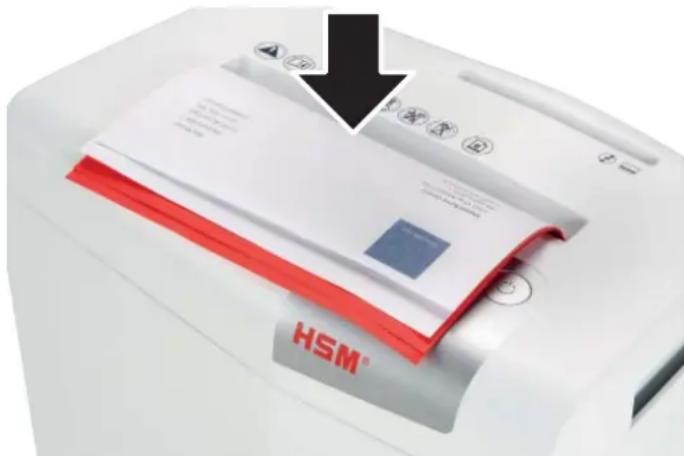
- Feed the paper into the centre of the paper slot. The light barrier starts the cutting unit automatically. Therefore, with thin paper strips, make sure the light barrier detects them.
▶ If feed opening is free again, the cutting unit shuts down and the shredder switches to standby.
Shredding CDs / DVDs

WARNING
Danger of injury by splinters!

Depending on the type of material, splinters can fly out of the cutting unit while shredding CDs and injure your eyes.
- For this reason, wear protective goggles.
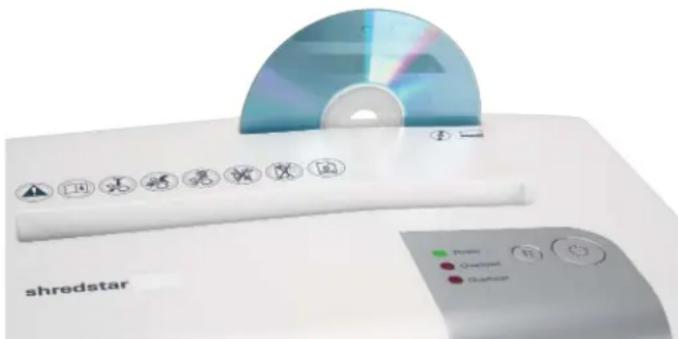
- Feed in just one CD/DVD in the middle of the feed opening.
- Empty the CD container at the latest after shredding 5 CDs. The separate CD container is in the shredded material container.
Shredding credit cards and store cards
- Insert credit card in centre of the feed opening. Dispose of the shredded material and the waste paper separately.
Switching off the shredder
- Press the operation button.
The "Ready for operation" indicator goes out. - Set mains switch at rear of paper shredder to "0".
6 LED displays, troubleshooting
Power
Appliance is ready for use.
Overload
Machine is overloaded. You have fed in too much paper.
The cutting unit runs in reverse for a few seconds and pushes the paper back out again.
- If necessary, press the reverse button "R" to remove the stack of paper.
• Take half the stack of paper.
- Feed the paper in portions.
Overheat The motor has overheated.
- Let the shredder cool down for approx. 30 mins. before using it again.
Bin full
▶ The cutting unit is switched off.
NOTICE
Empty the cut material container, immediately because if it is too full, malfunctions can occur in the cutting system.
There are recessed handles in the housing top to make it easier for you to lift the cutting head.
Cutting unit runs continuously
- The light barrier in the paper feed is blocked with paper. Press the paper through with a thin strong piece of cardboard.
- The light barrier is soiled with paper dust. Clean the sensor with air pressure, a dry paintbrush or a cloth.
For all other malfunctions, check whether the cutting head is correctly positioned on the shredded material container before contacting our customer service.
7 Cleaning and maintenance 8 Disposal / Recycling

WARNING
Dangerous mains voltage!
Improper handling of the machine can lead to an electric shock.

Switch the shredder off before relocating or cleaning it and disconnect the mains plug.
Service work which requires the housing covers to be removed may only be carried out by HSM Customer Service and service technicians of our contractual
partners. See page 154 for our customer service addresses.
Clean the document shredder only with a soft cloth and a mild soap-water solution. However, no water must enter the equipment.

X5, X8 only:
Oil the cutting unit when cutting performance decreases or the device becomes noisy, or every
time you empty the waste container. Only use HSM special lubricating oil for the cutting unit to do this:
- Spray the special cutting unit oil through the paper feed along the entire width of the cutting shafts.
- Run the cutting unit backward without adding paper. To do so, press the R key.
▶ Paper dust and particles are shaken off.

Electrical and electronic old devices contain a variety of valuable materials, but also hazardous substances which were required for function and safety. Incorrect disposal or handling can be dan-
gerous to your health and the environment. Never dispose of old devices in the household waste. Observe the current applicable regulations and use the collection points for returning and recycling electric and electronic devices. Dispose of all the packaging materials also in an environmentally-responsible way.
9 Scope of delivery
• Paper shredder in carton packing
- Operating instructions
Acces so ries
• Special cutting block oil 250 ml order No.: 1.235.997.403
See page 154 for our customer service addresses.
10 Technical data
| Type S10 X5 X8 | |||
| Cutting type Strip cut Cross cut | |||
| Cut size 6 mm 4.5 x 30 mm | |||
| Security level DIN 66399 P-2 / O-1 / T-1 / E-2 | P-4 / O-1 / T-1 / E-2 | ||
| Cutting capacity * (sheets), A4 80 g/m 2 70 g/m 2 | 1012 | 56 | 810 |
| Cutting speed | 35 mm/s | ||
| Intake width | 220 mm | ||
| Power supply | 230 V / 50 Hz | ||
| Power consumption with max. number of sheets | 125 W | 250 W | |
| Weight | 4.65 kg | 5.25 kg | 5.90 kg |
| Shredded material container volume | 18 l | ||
| Separate cutting unit for CD/DVD/customer and credit cards | |||
| Cutting type | Strip cut | ||
| Cut size | 15 mm | ||
| Cutting capacity | 1 CD/DVD (max. 1.2 mm thick) or 1 credit card / store card | ||
| General data | |||
| Operating mode | Brief operation | ||
| Operating time | 4 min | ||
| Cooling time | 15 min | ||
| Ambient conditions in operation:TemperatureRelative humidityHeight above sea-level (MSL) | -10°C to +25°Cmax. 90%, without condensationmax. 2,000 m | ||
| Size W x D x H (mm) | 345 x 245 x 385 | ||
| Sound pressure level emissions(Idle running/ load) | 58 dB(A) / 65 dB(A) | ||
* The maximum number of sheets (DIN A4, 70 g/m² or 80 g/m²), fed lengthways, which can be cut in one cycle. The performance data is determined when the motor is cold and the cutting device is freshly oiled. A weaker mains voltage or a different mains frequency to the one specified could result in less sheet capacity and increased noise during operation. The sheet capacity can vary depending on the structure and properties of the paper and on the way it enters.

This document shredder meets the applicable harmonisation legislation of the European Union:
• Low Voltage directive 2014/35/EU
• EMC directive 2014/30/EU
• RoHS directive 2011/65/EU
The EU declaration of conformity can be requested from the manufacturer.
Overheat De motor is oververhit.
Fare for forbrenning!
- Papir dovodite u sredini otvora za papir. Svjetlosna pregrada automatski pokreće rezni mehanizam. Stoga u slučaju uskog komada papira pazite da ga svjetlosna pregrada može registrirati.
Ako je dovodni otvor ponovno slobodan, rezni se mehanizam isključuje, a uništavač dokumenata prelazi u stanje pripravnosti.
Sip. No. 1.235.997.403
88699 Frickingen / Germany
Tel. +49 7554 2100-0
Fax +49 7554 2100 160
info@hsm.eu
www.hsm.eu
Gratis Hotline
DE, AT, BE, NL, LU, IT
Tel. 00800 44 77 77 66
Fax 00800 44 77 77 67
HSM (UK) Ltd.
14 Attwood Road / Zone 1
Burntwood Business Park
Burntwood · Staffordshire
WS7 3GJ
United Kingdom
Tel. +44 1543 272-480
Fax +44 1543 272-080
info@hsmuk.co.uk
www.hsm.eu
HSM France SAS
Parc de Genève
240, Rue Ferdinand Perrier
69800 Saint-Priest
France
Tél. +33 472 210580
Fax +33 472 517481
France@hsm.eu
www.hsm.eu
HSM of America LLC
419 Boot Road
Downingtown, PA 19335
USA
Tel. +1 484 237-2308
+1 800 613-2110
Fax +1 484 237-2309
customerservice@hsm.us
info@hsm.us
www.hsm.us


- SHREDSTAR S10 SHREDSTAR X5 SHREDSTAR X8
- 1 EXPLANATION OF SYMBOLS AND SAFETY INSTRUCTIONS
- WARNING
- NOTICE
- NOTE
- SAFETY INSTRUCTIONS
- RISK OF COMBUSTION
- DANGEROUS FOR CHILDREN AND OTHERS
- DANGEROUS MAINS VOLTAGE
- 2 PROPER USE, WARRANTY
- OPERATING AND DISPLAY ELEMENTS
- 4 INITIAL START-UP
- 5 OPERATION
- SWITCHING ON THE SHREDDER
- SHREDDING PAPER
- SHREDDING CDS / DVDS
- DANGER OF INJURY BY SPLINTERS
- SHREDDING CREDIT CARDS AND STORE CARDS
- SWITCHING OFF THE SHREDDER
- 6 LED DISPLAYS, TROUBLESHOOTING
- POWER
- OVERLOAD
- OVERHEAT THE MOTOR HAS OVERHEATED
- BIN FULL
- CUTTING UNIT RUNS CONTINUOUSLY
- 7 CLEANING AND MAINTENANCE 8 DISPOSAL / RECYCLING
- X5, X8 ONLY
- 9 SCOPE OF DELIVERY
- ACCES SO RIES
- OVERHEAT DE MOTOR IS OVERVERHIT
- FARE FOR FORBRENNING
- HSM (UK) LTD
- HSM FRANCE SAS
- HSM OF AMERICA LLC
Brand : HSM
Model : Shredstar X5
Category : Shredder