
TalkBand B3 Lite - Smartwatch HUAWEI - Free user manual and instructions
Find the device manual for free TalkBand B3 Lite HUAWEI in PDF.


| Product Type | Fitness Tracking Smartwatch |
| Brand | Huawei |
| Model | TalkBand B3 Lite |
| Dimensions | Headset unit: approx. 44 x 20 x 11 mm; Strap: adjustable |
| Weight | Approx. 25 g (with strap) |
| Display | 0.91-inch PMOLED touchscreen |
| Battery | Built-in rechargeable Li-ion battery; up to 5 days typical usage |
| Charging | USB charging cradle; charging time approx. 1.5 hours |
| Connectivity | Bluetooth 4.2 |
| Water Resistance | IP57 (splash, sweat, and rain resistant) |
| Sensors | 3-axis accelerometer |
| Compatibility | iOS 8.0+ / Android 4.4+ with Huawei Wear app |
| Main Functions | Step counting, sleep tracking, sedentary reminder, call and message notifications, music control, smart alarm, remote camera shutter |
| Operating Temperature | -10°C to +45°C |
| Cleaning and Care | Wipe charging port dry before charging; clean with soft dry cloth |
| Safety | Not for use during swimming or shower; keep away from pacemakers; avoid high volume for prolonged periods |
| Spare Parts and Repairability | Replaceable strap and earcaps; battery non-removable, service at authorized center |
| Regulatory Information | FCC, CE, and EU RF exposure compliant; E-label available on device |
Frequently Asked Questions - TalkBand B3 Lite HUAWEI
User questions about TalkBand B3 Lite HUAWEI
0 question about this device. Answer the ones you know or ask your own.
Ask a new question about this device
Download the instructions for your Smartwatch in PDF format for free! Find your manual TalkBand B3 Lite - HUAWEI and take your electronic device back in hand. On this page are published all the documents necessary for the use of your device. TalkBand B3 Lite by HUAWEI.
USER MANUAL TalkBand B3 Lite HUAWEI
1. Powering on the band
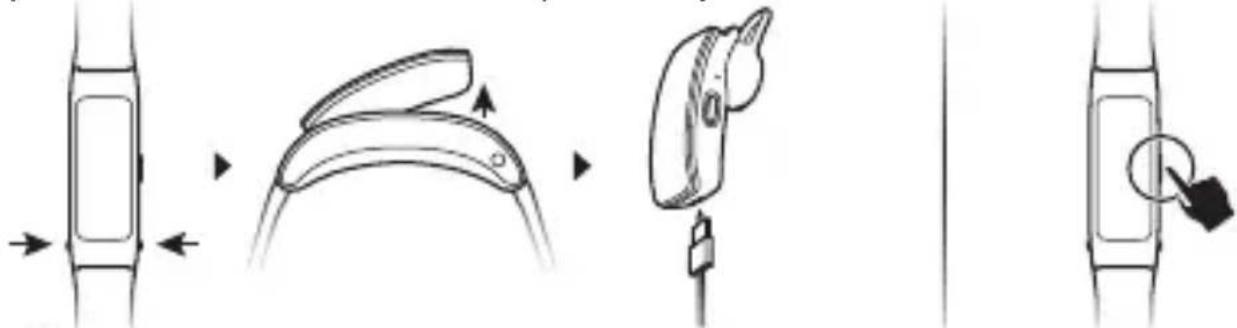
Press the release buttons on the sides to detach the headset unit. Remove the headset unit from the strap. Connect the charger to the charging port on the headset unit. The headset unit will automatically power on. You can also press and hold the side button to power on your band.
flowchart
graph LR
    A["Body Position"] --> B["Internal Component"]
    B --> C["Assembly"]
    C --> D["Final Assembly"]

Wipe the charging port dry before charging.
2. Downloading Huawei Wear
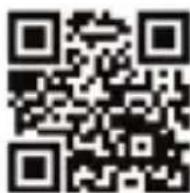
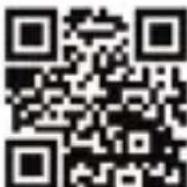
To download and install the Huawei Wear app, scan the QR code on the right, or search for Huawei Wear in the Google Play Store or Apple App Store.
3. Pairing your band with your phone
To pair the band with your phone, follow the onscreen instructions in the Huawei Wear app.
4. Getting help
View the online help in the Huawei Wear app for more information about connection and functions, as well as usage tips.
Copyright © Huawei Technologies Co., Ltd. 2017. All rights reserved. THIS DOCUMENT IS FOR INFORMATION PURPOSE ONLY, AND DOES NOT CONSTITUTE ANY KIND OF WARRANTIES. Trademarks and Permissions
HUAWEI, HANWEI

are trademarks or registered trademarks of Huawei
Technologies Co., Ltd.
The Bluetooth® word mark and logos are registered trademarks owned by Bluetooth SIG, Inc. and any use of such marks by Huawei Technologies Co., Ltd. is under license.
"Made for iPhone" means that an electronic accessory has been designed to connect specifically to iPhone, and has been certified by the developer to meet Apple performance standards. Apple is not responsible for the operation of this device or its compliance with safety and regulatory standards. Please note that the use of this accessory with iPhone may affect wireless performance.
Other trademarks, product, service and company names mentioned may be the property of their respective owners.
Privacy Policy
To better understand how we protect your personal information, please see the privacy policy at http://consumer.huawei.com/privacy-policy, or read the privacy policy and service terms using the app after pairing it with your phone.
Blasting Caps and Areas
Turn off your mobile phone or wireless device when in a blasting area or in areas posted turn off "two-way radios" or "electronic devices" to avoid interfering with blasting operations.
Operation and safety
- Using an unapproved or incompatible power adapter, charger or battery may cause fire, explosion or other hazards.
- Ideal temperatures are -10^ to +45^ .
- Some wireless devices may affect the performance of hearing aids or pacemakers. Consult your service provider for more information.
- Pacemaker manufacturers recommend that a minimum distance of 15 cm be
maintained between a device and a pacemaker to prevent potential interference with the pacemaker. If using a pacemaker, hold the device on the side opposite the pacemaker and do not carry the device in your front pocket.
- Keep the device and the battery away from excessive heat and direct sunlight. Do not place them on or in heating devices, such as microwave ovens, stoves, or radiators.
- Observe local laws and regulations while using the device. To reduce the risk of accidents, do not use your wireless device while driving.
- To prevent damage to your device's parts or internal circuits, do not use it in dusty, smoky, damp or dirty environments or near magnetic fields.
- Do not use, store or transport the device where flammables or explosives are stored (in a gas station, oil depot, or chemical plant, for example). Using your device in these environments increases the risk of explosion or fire.
- Dispose of this device, the battery, and accessories according to local regulations. They should not be disposed of in normal household waste. Improper battery use may lead to fire, explosion, or other hazards.
- The device has undergone testing and has demonstrated water and dust
resistance in certain environments.
- The device has a built-in, non-removable battery, do not attempt to remove the battery, otherwise the device may be damaged. To replace the battery, take the device to an authorized service center.
To prevent possible hearing damage, do not listen at high volume levels for long periods.
- Using a headset at high volumes may damage your hearing. To reduce this risk, lower the headset volume to a safe and comfortable level.
- Exposure to high volumes while driving may cause distraction and increase your risk of an accident.
- If the battery leaks, ensure that the electrolyte does not make direct contact with your skin or eyes. If the electrolyte touches your skin or splashes into your eyes, immediately flush with clean water and consult a doctor.
- When charging the device, make sure the power adapter is plugged into a socket near the devices and is easily accessible.
- Unplug the charger from electrical outlets and the device when not in use.
Disposal and recycling information
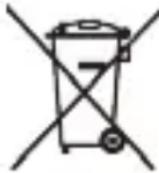
The crossed-out wheeled-bin symbol on your product, battery, literature or packaging reminds you that all electronic products and batteries must be taken to separate waste collection points at the end of their working lives; they must not be disposed of in the normal waste stream with household garbage. It is the responsibility of the user to dispose of the equipment using a designated collection point or service for separate recycling of waste
electrical and electronic equipment (WEEE) and batteries according to local laws.
Proper collection and recycling of your equipment helps ensure electrical and electronic equipment (EEE) waste is recycled in a manner that conserves valuable materials and protects human health and the environment, improper handling, accidental breakage, damage, and/or improper recycling at the end of its life may be harmful for health and environment. For more information about where and how to drop off your EEE waste, please contact your local authorities, retailer or household waste disposal service or visit the website http://consumer.huawei.com/en/.
Reduction of hazardous substances
This device and any electrical accessories are compliant with local applicable rules on the restriction of the use of certain hazardous substances in electrical and electronic equipment, such as EU REACH, RoHS and Batteries (where included) regulations, etc. For declarations of conformity about REACH and RoHS, please visit our web site http://consumer.huawei.com/certification.
EU regulatory conformance
RF exposure requirements
Important safety information regarding radio frequency (RF) radiation exposure: RF exposure guidelines require that the device should be used for wrist worn only. Failure to observe this guideline may result in RF exposure exceeding limits.
Statement
Hereby, Huawei Technologies Co., Ltd. declares that this device is in compliance with the essential requirements and other relevant provisions of Directive 2014/53/EU. The most recent and valid version of the DoC (Declaration of Conformity) can be viewed at http://consumer.huawei.com/certification.
This device may be operated in all member states of the EU.
Observe national and local regulations where the device is used. This device may be restricted for use, depending on the local network.
Frequency bands and power
(a) Frequency bands in which the radio equipment operates: Some bands may not be available in all countries or all areas. Please contact the local carrier for more details.
(b) Maximum radio-frequency power transmitted in the frequency bands in which the radio equipment operates: The maximum power for all bands is less than the highest limit value specified in the related Harmonized Standard.
The frequency bands and transmitting power (radiated and/or conducted) nominal limits applicable to this radio equipment are as follows:
GRU-B09: Bluetooth: 9 dBm
Accessories and Software Information
It is recommended that the following accessories should be used:
Charging cable Spare earcaps
The product software version is GRU-B09: 2.0.16
Software updates will be released by the manufacturer to fix bugs or enhance functions after the product has been released. All software versions released by the
manufacturer have been verified and are still compliant with the related rules.
All RF parameters (for example, frequency range and output power) are not accessible to the user, and cannot be changed by the user.
For the most recent information about accessories and software, please see the DoC (Declaration of Conformity) at http://consumer.huawei.com/certification.
On the calorie screen, press and hold the side button to enter the Regulatory Information screen. Press and hold the side button again to view the E-label.
Please visit http://consumer.huawei.com/en/support/hotline for recently updated hotline and email address in your country or region.
Disposal and recycling information(India)
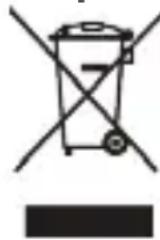
This symbol on the device or on its packaging indicates that the device (including its electrical accessories) should not be disposed of as normal household garbage. Do not dispose of your device as unsorted municipal waste. The device should be handed over to an authorized collection center for recycling or proper disposal at the end of its life. Please contact us on official website: http://consumer.huawei.com/in, e-mail: service.hw.in@
huawei.com, service hotline: 1800-209-6555 (Toll-Free, 9AM-9PM all 7 days, except public holidays) or address: M/S -RUN SERVICE INFOCARE PVT LTD, Ambit IT Park, Module D,4th Floor, Ambattur Industrial Estate, Chennai 600058 to find contact details of the collection center. Improper handling, accidental breakage, damage, and/or improper recycling at the end of its life may be harmful for health and environment.
For more detailed information about the recycling of the device, contact your local city office, the household waste disposal service, or the retail store where you purchased this device.
The disposal of this device is subject to the E-Waste (Management) Rules, 2016. The purpose for separating E-Waste from other wastes is to minimize the potential environmental impacts on human health of any hazardous substances that may be present.
Reduction of hazardous substances(India)
This device is compliant with the E-Waste (Management) Rules, 2016 and does not contain hazardous substances regulated by the Rules except for the applications of exemption.
FCC Regulatory Compliance
RF exposure requirements
Important safety information regarding radio frequency (RF) radiation exposure: RF exposure guidelines require that the device should be used for wrist worn only. Failure to observe this guideline may result in RF exposure exceeding limits.
FCC statement
This equipment has been tested and found to comply with the limits for a Class B digital device, pursuant to Part 15 of the FCC Rules. These limits are designed to provide reasonable protection against harmful interference in a residential installation. This equipment generates, uses and can radiate radio frequency energy and, if not installed and used in accordance with the instructions, may cause harmful interference to radio communications. However, there is no guarantee that interference will not occur in a particular installation. If this equipment does cause harmful interference to radio or television reception, which can be determined by turning the equipment off and on, the user is encouraged to try to correct the interference by one or more of the following measures:
--Reorient or relocate the receiving antenna.
--Increase the separation between the equipment and receiver.
--Connect the equipment into an outlet on a circuit different from that to which the receiver is connected.
--Consult the dealer or an experienced radio/TV technician for help.
This device complies with Part 15 of the FCC Rules. Operation is subject to the following two conditions: (1) this device may not cause harmful interference, and (2) this device must accept any interference received, including interference that may cause undesired operation.
Caution: Any changes or modifications to this device not expressly approved by Huawei Technologies Co., Ltd. for compliance could void the user's authority to operate the equipment.
Instrukcja obsługi
1. Włączanie opaski


flowchart
graph LR
    A["External Component"] --> B["Internal Component"]
    B --> C["Internal Component with Arrow"]
    C --> D["Internal Component with Arrow"]
    D --> E["Internal Component with Arrow"]


flowchart
graph TD
    A["Device with left side"] --> B["Internal Structure"]
    B --> C["Assembly to a device with a curved top part"]
    C --> D["Internal Structure with a circular arrow indicating assembly point"]
    D --> E["Final Assembly with a circular arrow pointing to the right end"]


natural_image
Symbol of a trash bin crossed with diagonal lines, no text or numbers present
flowchart
graph LR
    A["Device Placement"] --> B["Anatomical Close-up"]
    B --> C["Insertion of Valve"]
    C --> D["Insertion of Valve with Insertion"]
    D --> E["Close-up with Insertion"]
    E --> F["Final Adjustment"]

natural_image
Symbol of a trash bin with crossed lines and a solid black rectangle below (no text or labels)flowchart
graph LR
    A["External Component"] --> B["Internal Component"]
    B --> C["Internal Component with Arrow"]
    C --> D["Internal Component with Arrow"]


flowchart
graph LR
    A["Device with left side"] --> B["Internal structure with curved top"]
    B --> C["Internal component with switch"]
    C --> D["Internal component with arrow pointing to right"]
    D --> E["Final device with circular arrow pointing to right"]

Obrišite priključak za punjenje krpom pre punjenja.
2. Preuzimanje aplikacije Huawei Wear
Da biste preuzeli i instalirali aplikaciju Huawei Wear, skenirajte QR kod na desnoj strani ili potražite aplikaciju Huawei Wear u prodavnicama Google Play Store ili Apple App Store.
3. Uparivanje narukvice sa telefonom
Da biste uparili narukvicu sa telefonom, pratite uputstva na ekranu u aplikaciji Huawei Wear.
4. Dobijanje pomoći
Prikažite pomoć na mreži u aplikaciji Huawei Wear da biste saznali više informacija o povezivanju i funkcijama, kao i savetima za korišćenje.
Autorsko pravo © Huawei Technologies Co., Ltd. 2017. Sva prava zadržana.
OVAJ DOKUMENT SLUŽI SAMO U INFORMATIVNE SVRHE I NE PREDSTAVLJA BILO KOJU VRSTU GARANCIJE.


flowchart
graph LR
    A["External Component"] --> B["Internal Component"]
    B --> C["Internal Component with Arrow"]
    C --> D["Internal Component with Arrow"]
    D --> E["Internal Component with Arrow"]

flowchart
graph LR
    A["Rectangular Body"] --> B["Curvedic Body"]
    B --> C["Vertical Body with Arrow"]
    C --> D["Arrow to Top Right"]
    D --> E["Arrow to Bottom Left"]

flowchart
graph LR
    A["External Component"] --> B["Internal Component"]
    B --> C["Internal Component with Arrow"]
    C --> D["Internal Component with Arrow"]
    D --> E["Internal Component with Arrow"]

- Powering on the band
- Downloading Huawei Wear
- Pairing your band with your phone
- Getting help
- Privacy Policy
- Blasting Caps and Areas
- Operation and safety
- Disposal and recycling information
- Reduction of hazardous substances
- EU regulatory conformance
- RF exposure requirements
- Statement
- Frequency bands and power
- Accessories and Software Information
- Disposal and recycling information(India)
- Reduction of hazardous substances(India)
- FCC Regulatory Compliance
- FCC statement
- Instrukcja obsługi
- Włączanie opaski
- Preuzimanje aplikacije Huawei Wear
- Uparivanje narukvice sa telefonom
- Dobijanje pomoći
Brand : HUAWEI
Model : TalkBand B3 Lite
Category : Smartwatch