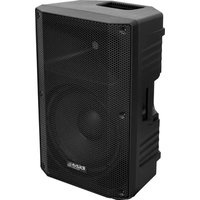
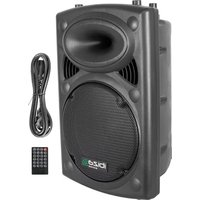
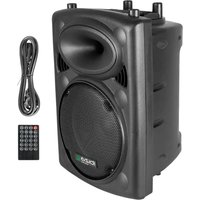
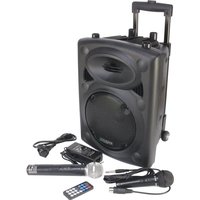
USER MANUAL XTK12A-MKII IBIZA SOUND
ACTIVE FULL-RANGE PA BOXES
REF:
XTK8A-MKII / XTK10A-MKII
8"/20CM - 200W / 10"/25CM - 300W
XTK12A-MKII / XTK15A-MKII
natural_image
Technical line drawing of four different electronic device enclosures or modules (no text or symbols present)
EN- Instruction Manual - p. 3
ACTIVE FULL-RANGE PA BOXES
INSTRUCTION MANUAL
EXPLANATION OF SIGNS
The triangle containing a lightning symbol is used to indicate whenever your health is at risk (due to electrocution, for example).
An exclamation mark in a triangle indicates particular risks in handling or operating the appliance.

CAUTION DO NOT OPEN THE HOUSING SHOCK HAZARD
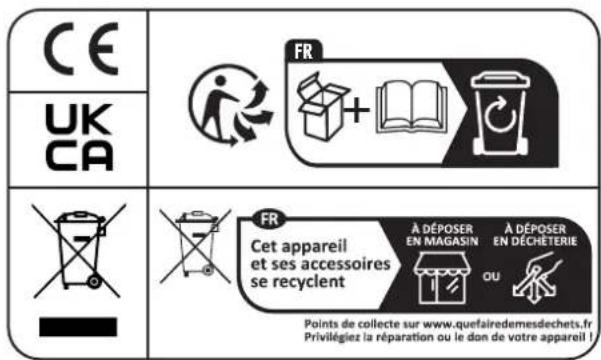
CE Accordance with the requirements of CE standard

Class I protection: Connect only to an earthed mains outlet

The product is for indoor use only

This marking indicates that this product should not be disposed with other household wastes throughout the EU. To prevent possible harm to the environment or human health from uncontrolled waste disposal, recycle it responsibly to promote the sustainable reuse of material resources. To return your used device, se use the return and collection systems or contact the retailer where the product was purchased. They take this product for environmental safe recycling.
IMPORTANT SAFETY INSTRUCTIONS AND DANGER WARNINGS
- Please read the manual carefully and keep it for future reference.
- All safety instructions and warnings must be adhered to. They are part of the manual and must be kept with the manual.
- Any warranty claims are rendered invalid if damage occurs due to non-observance of these operating instructions. We assume no liability for any consequent damage.
- We assume no liability for personal injury or damage to property caused by incorrect handling or disrespect of the safety instructions. Any warranty claims expire in such cases.
- Unauthorized conversions and/or modifications of the appliance are not permitted for safety and licensing reasons (CE).
- The product shall be connected to a power supply only of the type described.
- Unplug the product from the wall socket when it is not to be used for a long time.
- Adequate care shall be taken so that foreign objects do not fall, or liquids are not spilled into the enclosure through openings.
- Do not remove the cover or back, as there are no user-serviceable parts inside.
- The product is approved for operation in dry, closed rooms only. Do not operate the product nearby water, such as in bathrooms or nearby swimming pools. The product shall not be exposed to dripping or splashing and no objects filled with liquids, such as vases, shall be placed on the product.
- Do not place on the product as naked flame source, such as lighted candles.
- Do not use the product in a tropical climate. Only for use in temperate climates.
- Please place the equipment on a level and stable platform. Never place the product on an unstable or movable surface. Persons could be injured or the product damaged by it falling down.
- A minimum distance of 0.5m around the unit must be kept ensuring sufficient ventilation and avoid overheating.
- The appliance may not be exposed to extreme temperatures (< +5°C / > +35°C), strong vibrations or heavy mechanical strain during operation.
- To avoid injury or falls, only lift the device using the handle provided.
- To avoid injury or falls, do not use the product as a seat.
• To avoid hearing loss, do not expose yourself to high volume levels for long periods of time.
- The device complies with current European legislation regarding human exposure to electromagnetic fields.
DISCONNECT DEVICE: The power outlet must be installed near the equipment and be easily accessible.
STAND MOUNTING
- If you use a stand, be sure to observe the following precautions:
- Check the stand specification to be certain it is designed to support the weight of the speaker.
- Observe all safety precautions specified by the stand manufacturer.
- Always verify that the stand is placed on a flat, level, and stable surface.
- Route cables so that performers, crew, and audience will not trip over them and pull the speaker over.
- Remove the speaker from the stand before moving the stand or adjusting its height.
- Before moving the box, remove all connected cables.
- Do not use the speaker's handles for suspended installation. Doing so can result in damage and injury.
- Be sure to fully extend the legs of tripod type stands.
- Position the stand so that the legs do not present a trip hazard.
- Do not attempt to place more than one speaker on a stand.
FUSE REPLACEMENT
- Disconnect the power cord before replacing a fuse. Always replace with the same type of fuse.
CONNECTIONS
- Before connecting the box to other units, turn off the power of all devices. Before turning the power on or off for all devices, set all volume levels to minimum.
- Use only speaker cables to connect the speakers to the speaker jacks.
- Be sure to observe the amplifiers rated load impedance, particularly when connecting speakers in parallel. Connecting an impedance load outside the amplifier's rated range can damage the amplifier.
OPERATION
- Prior to switching the unit on, turn down the volume control to the minimum.
- Connect the audio source to the appropriate input jack.
- Another speaker can be connected to the output jack so that two boxes can be daisy chained.
- Connect the box to the power supply.
- Switch on the audio source, followed by the active speaker.
- Set the volume with the applicable control.
- Adjust the bass & treble.
REAR PANEL
| XTK8A-MKII / XTK10A-MKII XTK12A-MKII / | XTK15A-MKII |
| 1 SD card input SD card input | |
| 2 USB input USB input | |
| 3 Display Display | |
| 4 MODE button: press to select the desired input source | MODE button: press to select the desired input source |
| 5 Short press to skip backwards, long press to reduce the volume of the MP3 player | Short press to skip backwards, long press to reduce the volume of the MP3 player |
| 6 Short press to play/pause the music, long press to select a folder | Short press to play/pause the music, long press to select a folder |
| 7 Short press to repeat the song, long press to link two speakers via TWS | Short press to repeat the song, long press to link two speakers via TWS |
| 8 Short press to skip forwards, long press to increase the volume of the MP3 player | Short press to skip forwards, long press to increase the volume of the MP3 player |
| 9 Volume control for Microphone input Volume control for Channel 1 Microphone input |
| 10 Volume control for Line input Volume control for Channel 2 Microphone input |
| 11 XLR Microphone input connector XLR Microphone input connector |
| 12 Line input, 2 x RCA connectors XLR Microphone input connector |
| 13 Volume control for increasing / decreasing the high frequency level | 6.35mm Jack Microphone input connector |
| 14 Volume control for increasing / decreasing the low frequency level | 6.35mm Jack Microphone input connector |
| 15 Line output, 2 x RCA connectors Volume control for Line in / MP3 player input |
| 16 Master volume control Input source switch for Line in / Media player |
| 17 Power switch Line input, 2 x RCA connectors | |
| 18 Fuse Line output, 2 x RCA connectors | |
| 19 AC input connector Master volume control | |
| 20 Volume control for increasing / decreasing the | high frequency level |
| 21 Volume control for increasing / decreasing the low | frequency level |
| 22 Speaker output speakon connector | |
| 23 Power switch | |
| 24 AC input connector | |
| 25 Fuse | |
- Short press to select USB / SD / BT mode. Press and hold about 3 seconds to Power On/Off
- Short press the button to play the previous song. Press and hold about 3 seconds the button to decrease playing volume
- Short press the button to play the next song. Press and hold about 3 seconds the button to increase playing volume
- Short press to select single song repeat / all songs repeat / random playing. Press and hold about 3 seconds to activate the TWS function
- Short press to stop / play current song. Press and hold about 3 seconds to switch over to folder selection mode
POWER SOURCE
Connect the unit to an AC wall outlet, press the Power button to turn it on/off.
BLUETOOTH OPERATION
- Short press the BT button to turn on the Bluetooth connection, the display shows "bLUE".
- Turn on the Bluetooth function on your mobile device and select "IBIZA - XTK" in the Bluetooth device list.
- After successful connection, you will hear "connected". Adjust the volume on your audio device or press the volume button on the unit to the desired volume level.
- Switch both speakers to Bluetooth mode, press and hold about 3 seconds the TWS button on either speaker to activate the TWS function.
- After successful connection, you will hear "TWS connected". The display of the connected speaker will show "R-bL", and "L-bL" for the other speaker.
CARE
The product should be cleaned only with a polishing cloth or a soft dry cloth. Never clean with furniture wax, benzene, insecticides or other volatile liquids since they may corrode the cabinet.
SPECIFICATIONS
| Model XTK8A-MKII XTK10A-MKII XTK12A-MKII XTK15A-MKII | |
| Max. Power 200W 300W 500W 600W | | | |
| Amplifier Class D, Mono-Amp. Class D, Mono-Amp. Class A/B, | Mono-Amp. | Class A/B, Mono-Amp. |
| Woofer 8" 10" 12" 15" | | | |
| Voice coil 25.5mm 38.6mm 38.6mm 50.5mm | | | |
| Driver | 25mm Compression |
| Feature | MP3 (USB/BT/TWS) |
| BT frequency band | 2402-2480MHz |
| Max. RF emission value | 3.35dBm |
| Input voltage | 230V~ 50/60Hz |
| Dimensions | 235 x 220 x 375mm | 290 x 255 x 435mm | 395 x 365 x 585mm | 420 x 365 x 685mm |
| Weight | 5 kg | 7 kg | 11.5 kg | 15 kg |
ENCEINTES SONO ACTIVES LARGE BANDE
MANUEL D'UTILISATION
EXPLICATION DES SYMBOLES

ATTENTION NE PAS OUVRIR LE BOITIER RISQUE DE CHOC ELECTRIQUE
CAIXAS ACÚSTICAS BASS REFLEX 2 VIAS ATIVAS MANUAL DE INSTRUÇÕES
EXPLICACÃO DOS SINAIS
AKTYWNE GŁOŚNIKI 2-DROŻNE BASS REFLEX
INSTRUKCJA OBSŁUGI
OBRAZLOŽITEV ZNAKOV
Hereby we, LOTRONIC SA
Rue François Englert, 17
1480 TUBIZE
Belgique
+32.2.390.91.91
Certify and declare under our sole responsibility that the following product:

Trade name:
Product name: ACTIVE SPEAKER
Type or model: XTK8A-MKII, XTK10A-MKII
Conforms with the essential requirements of RED directive 2014/53/EU, the 2011/65/EU RoHS directive and the Commission Delegated Directive (EU) 2015/863, REACH 1907/2006 and POP Regulation (EU) 2019/1021 Short-chain chlorinated paraffins (SCCP**, Alkanes C10-13)
Based on the following specifications applied:
EN IEC 62368-1:2020+A11:2020
EN 62479 : 2010
ETSI EN 301 489-1 V2.2.3
ETSI EN 301 489-17 V3.2.4
ETSI EN 300 328 V2.2.2
Place and date of issue: Tubize (Belgium), on 14/11/2023
Manuel De Sousa
Quality manager
LOTRONIC SA
Zoning Tubize II
Rue François Englect 17-02
1480 Tubize - Belgium
T. +32 (0)2 390 91 91 - info@latronic.net
TVA: BE 0887 125 178
CE
Marque:
Désignation commerciale:
ENCEINTE AMPLIFIEE
Type ou modèle:
XTK8A-MKII, XTK10A-MKII
Hereby we, LOTRONIC SA
Rue François Englert, 17
1480 TUBIZE
Belgique
+32.2.390.91.91
Certify and declare under our sole responsibility that the following product:

Trade name:
Product name: ACTIVE SPEAKER
Type or model: XTK12A-MKII, XTK15A-MKII
Conforms with the essential requirements of RED directive 2014/53/EU, the 2011/65/EU RoHS directive and the Commission Delegated Directive (EU) 2015/863, REACH 1907/2006 and POP Regulation (EU) 2019/1021 Short-chain chlorinated paraffins (SCCP**, Alkanes C10-13)
Based on the following specifications applied:
Place and date of issue: Tubize (Belgium), on 14/11/2023
Manuel De Sousa
Quality manager
LOTRONIC SA
Zoning Tubize II
Rue François Englect 17-02
1480 Tubize - Belgium
T. +32 (0)2 390 91 91 - info@latronic.net
TVA: BE 0887 125 178
CE
Marque:
Désignation commerciale:
ENCEINTE AMPLIFIEE
Type ou modèle:
XTK12A-MKII, XTK15A-MKII

XTK8A-MKIIXTK10A-MKIIXTK12A-MKIIXTK15A-MKII
Download the manual in other languages

Any questions or problems?
Contact us

IBIZALIGHTSOUND
Follow us on Instagram

Join us on facebook
Assembled in PRC • Designed by LOTRONIC S.A. •
https://ibizashop.eu/
©Copyright LOTRONIC 2024