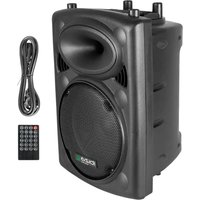
SLK10A-TWS - Speaker IBIZA SOUND - Free user manual and instructions
Find the device manual for free SLK10A-TWS IBIZA SOUND in PDF.


| Product type | Active speaker (powered speaker) |
| Brand | Ibiza Sound |
| Model | SLK10A-TWS |
| Category | Speaker |
| Dimensions | 32 x 27.5 x 45 cm |
| Power supply | 220-240 V~ 50/60 Hz |
| Maximum power | 400 W |
| Amplifier power | 250 W |
| Impedance | 8 Ω |
| Sensitivity | 97 dB |
| Frequency response | 45 Hz - 20 kHz |
| Speaker | Woofer 10" (25 cm) |
| Bluetooth connectivity | Yes, band 2402-2480 MHz, power 3 dBm |
| Inputs | 2 microphones (jack), 1 line (RCA and jack), USB, SD |
| Outputs | Mixing, speaker 8 Ω |
| Functions | USB/SD playback, Bluetooth, REC recording, remote control |
| Protection | SonicGuard circuit for the tweeter |
| Usage | Indoor only |
| Maintenance | Disconnect before cleaning, use a dry cloth |
| Safety | Do not open, do not expose to water or open flames |
| Included accessories | Remote control with button cell battery, power cable |
| Standards | CE, compliant with RED Directive 2014/53/EU |
| Spare parts and repairability | No user-serviceable parts inside |
Frequently Asked Questions - SLK10A-TWS IBIZA SOUND
User questions about SLK10A-TWS IBIZA SOUND
0 question about this device. Answer the ones you know or ask your own.
Ask a new question about this device
Download the instructions for your Speaker in PDF format for free! Find your manual SLK10A-TWS - IBIZA SOUND and take your electronic device back in hand. On this page are published all the documents necessary for the use of your device. SLK10A-TWS by IBIZA SOUND.
USER MANUAL SLK10A-TWS IBIZA SOUND
ACTIVE SOUND SYSTEM
WITH USB & BLUETOOTH
Ref.: SLK10A-TWS
Code: 15-2446
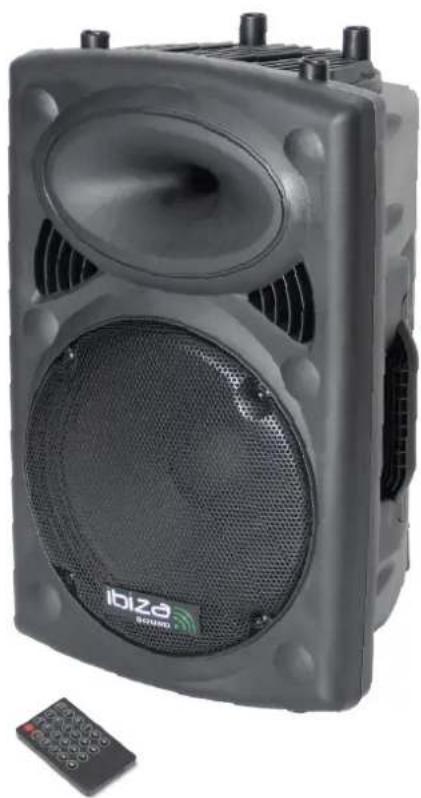
natural_image
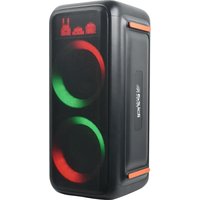
Black portable electronic device with speaker grille and control panel (no visible text or symbols)MANUAL
EN- Instruction Manual - p. 3
WITH USB, BLUETOOTH, SD & TWS INSTRUCTION MANUAL
EXPLANATION OF SIGNS
The triangle containing a lightning symbol is used to indicate whenever your health is at risk (due to electrocution, for example).
An exclamation mark in a triangle indicates particular risks in handling or operating the appliance.

CAUTION DO NOT OPEN THE HOUSING SHOCK HAZARD
CE Accordance with the requirements of CE standard
The product is for indoor use only
This marking indicates that this product should not be disposed with other household wastes throughout the EU. To prevent possible harm to the environment or human health from uncontrolled waste disposal, recycle it responsibly to promote the sustainable reuse of material resources. To return your used device, please use the return and collection systems or contact the retailer where the product was purchased. They can take this product for environmental safe recycling.
IMPORTANT SAFETY INSTRUCTIONS AND DANGER WARNINGS
- Please read the manual carefully and keep it for future reference.
- All safety instructions and warnings must be adhered to. They are part of the manual and must be kept with the manual.
- Any warranty claims are rendered invalid if damage occurs due to non-observance of these operating instructions. We assume no liability for any consequent damage.
- We assume no liability for personal injury or damage to property caused by incorrect handling or disrespect of the safety instructions. Any warranty claims expire in such cases.
- Unauthorized conversions and/or modifications of the appliance are not permitted for safety and licensing reasons (CE).
- The product shall be connected to a power supply only of the type described.
- Unplug the product from the wall socket when it is not to be used for a long time.
- Adequate care shall be taken so that foreign objects do not fall, or liquids are not spilled into the enclosure through openings.
- Do not remove the cover or back, as there are no user-serviceable parts inside.
- The product is approved for operation in dry, closed rooms only. Do not operate the product nearby water, such as in bathrooms or nearby swimming pools. The product shall not be exposed to dripping or splashing and no objects filled with liquids, such as vases, shall be placed on the product.
- Do not place on the product as naked flame source, such as lighted candles.
- Do not use the product in a tropical climate. Only for use in temperate climates.
- Please place the equipment on a level and stable platform. Never place the product on an unstable or movable surface. Persons could be injured or the product damaged by it falling down.
- A minimum distance of 0.5m around the unit must be kept ensuring sufficient ventilation and avoid overheating.
- The appliance may not be exposed to extreme temperatures ( < +5^ / > +35^ ), strong vibrations or heavy mechanical strain during operation.
- To avoid injury or falls, only lift the device using the handle provided.
- To avoid injury or falls, do not use the product as a seat.
• To avoid hearing loss, do not expose yourself to high volume levels for long periods of time. - The device complies with current European legislation regarding human exposure to electromagnetic fields.
DISCONNECT DEVICE: The power outlet must be installed near the equipment and be easily accessible.
SONIC GUARD
The boxes of the SLKA-BT series contain Sonic Guard circuitry that protects the tweeter against damages due to exceptional power peaks from the system. Sonic Guard compresses slightly the signal en deviates the excess power from the compression driver.
OPERATION
Prior to switching the unit on, turn down the volume to the minimum.
Plug the supplied mains lead into the AC input socket on the rear side. Make sure that the supplied mains voltage is 220-240V\~50Hz/60Hz. Set the I/O switch on the rear panel to "I". The switch and the blue LED on the front panel light up. Insert an SD card or USB stick in the appropriate slot. The LCD lights up. Make the settings according to your requirements via the controls on the rear panel or the supplied remote control.
PLAY MP3/WMA MUSIC
- Switch on power. The LED indicator (19) lights up.
- Insert a USB stick (2) or an SD card (3) into the relevant input
- Select USB via the MODE button (4)
- Select a title via the ◀ or ▶ (5) buttons and press ▶ || (7)
- Insert an RCA plug into the LINE IN sockets (14) or a jack plug into the LINE/MIC inputs (13).
- Switch the LINE/MIC selector switch (20) to LINE if you use the LINE inputs, or to MIC if you use the MIC inputs
- Adjust the volume (8 & 12)
MIC INPUTS
If you connect one or two microphones to the MIC inputs (13), set the selector switch (20) to MIC.
Control the microphone volume with mic volume control (12).
REC FUNCTION
Disconnect the speakerbox from your Bluetooth device. Insert a USB stick or SD card. The speaker will automatically switch into USB/SD mode. Connect now the speakerbox to your Bluetooth device and start playing your music. Short press the REC button to record your voice and the music on the inserted USB stick or SD card. Press again to stop recording. Keep the REC button pressed to play the recorded file.
USE OF THE BLUETOOTH FUNCTION
- Press the MODE button until BLUETOOTH displays. The BLUETOOTH function is now activated.
- Activate the Bluetooth function on your smartphone or any other tablet PC.
- The product appears under the name « IBIZA-PORT » and is ready to be connected to your equipment.
- Now play your music via the portable sound system. Set the volume via the Master volume button.
- Don't set the volume of pour smartphone or tablet PC too high. Do not exceed 34 of the total volume to avoid distortion.
CONTROLS ON THE REAR PANEL
- Display
- USB port
- SD socket
- MODE button
- Previous/next/ volume control
- REC mode
- Play/Pause
- Microphone Volume
- MIC ECHO control
- Treble control
- Bass control
- Volume control
- Microphone inputs
- Line input
- Mix output
- ON/OFF switch
- Speaker output
- Mains input
19. Power indicator
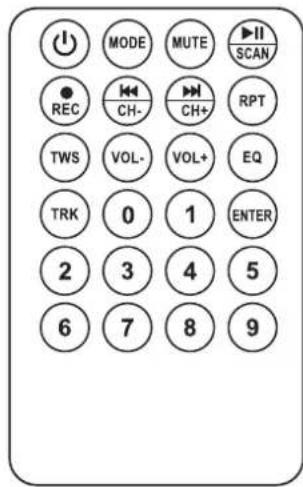
REMOTE CONTROL
ON/OFF button
MODE: Press until the desired operating mode is displayed
MUTE: Sound stop
▶ Play/pause: Press to play a track, press to pause. In FM mode: Search for radio stations
REC: Press to start, stop and play a recorded file
«/CH-: back to the previous track. In FM mode: back to the previous radio station
▶/CH+: Go to the next track. In FM mode: Go to the next radio station
RPT: Repeat one/repeat all tracks
VOL-: Reduce the volume
Vol+: Increase the volume
EQ: Select among several sound modes (Rock, Pop, Jazz, Classic, Flat)
TRK: Track selection. Press the TRK button, select a track via the number keys (0-9) and press ENTER to confirm
Number buttons: Press the number of the desired track
ENTER: Once you have made your selection, press ENTER to confirm.
RECOMMENDATIONS FOR THE BATTERY IN THE REMOTE CONTROL

This symbol indicates that used batteries should not be disposed of with household waste but deposited in separate collection points for recycling.
ATTENTION: Danger of explosion if battery is incorrectly placed. Only replace by the same or equivalent type.
WARNING: Do not swallow the battery. Danger of chemical burns.
The supplied remote control contains a button cell. In case of ingestion, it might cause serious internal burns within only 2 hours that might lead to death. Keep new and old batteries out of the reach of children.
If the battery compartment doesn't close properly, stop using the product and keep it out of the reach of children.
If you are in doubt whether the batteries have been swallowed or introduced into any other part of the body, contact immediately a doctor.
CARE
Before cleaning the unit, disconnect it from the mains. Do not use aggressive cleaning agents. Use a clean cloth to wipe any dust or dirt from the product. We are not liable for damage arising from incorrect handling, improper use or wear and tear. We reserve the right to make technical changes.
SPECIFICATIONS
Woofer 10"/25cm
Max. power 400W
Built-in amp 250W
Impedance....8 Ohms
Sensitivity 97dB
Max. RF mession power of BT 3dBm
Freq. range....45Hz - 20kHz
BT frequency band 2402-2480MHz
Power supply....220-240Vac 50/60Hz
Dimensions 32 x 27.5 x 45cm
CON USB, BLUETOOTH, SD
MANUAL DE INSTRUÇÕES
EU Declaration of Conformity
Hereby we, LOTRONIC SA
Rue F. Englert 17 Bte2
1480 TUBIZE
Belgique
+32.2.390.91.91
Certify and declare under our sole responsibility that the following product:

SOUND

Trade name:
Product name:
SPEAKER WITH BLUETOOTH
Type or model:
SLK8A-TWS, SLK10A-TWS
Conforms with the essential requirements of RED directive 2014/53/EU
Based on the following specifications applied:
Place and date of issue: Tubize (Belgium), on 24/01/2024
Manuel De Sousa
Quality manager
LOTRONIC SA
Zoning Tubize II
Rue François Engler 17 02
1480 Tubize - Belgium
T. +32 (0)2 390 91 91 • info@lotronic.net
TVA: BE 0887 125 178


SLK10A-TWS
Download the manual in other languages
Any questions or problems?
Contact us
IBIZALIGHTSOUND
Follow us on Instagram
Join us on facebook
Assembled in PRC Designed by LOTRONIC S.A.
Rue F. Englert 17 Bt 2 1480 Tubize - Belgium
info@lotronic.net
https://ibizashop.eu/
©Copyright LOTRONIC 2025
- ACTIVE SOUND SYSTEM
- WITH USB & BLUETOOTH
- MANUAL
- WITH USB, BLUETOOTH, SD & TWS INSTRUCTION MANUAL
- EXPLANATION OF SIGNS
- CAUTION DO NOT OPEN THE HOUSING SHOCK HAZARD
- IMPORTANT SAFETY INSTRUCTIONS AND DANGER WARNINGS
- SONIC GUARD
- OPERATION
- PLAY MP3/WMA MUSIC
- MIC INPUTS
- REC FUNCTION
- USE OF THE BLUETOOTH FUNCTION
- CONTROLS ON THE REAR PANEL
- Power indicator
- REMOTE CONTROL
- RECOMMENDATIONS FOR THE BATTERY IN THE REMOTE CONTROL
- CARE
- SPECIFICATIONS
- CON USB, BLUETOOTH, SD
- MANUAL DE INSTRUÇÕES
- EU Declaration of Conformity
Brand : IBIZA SOUND
Model : SLK10A-TWS
Category : Speaker