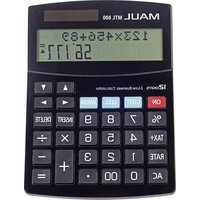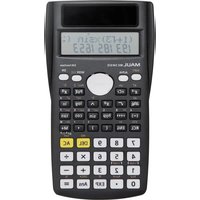
MSC 240 ECO - Calculator MAUL - Free user manual and instructions
Find the device manual for free MSC 240 ECO MAUL in PDF.


User questions about MSC 240 ECO MAUL
0 question about this device. Answer the ones you know or ask your own.
Ask a new question about this device
Download the instructions for your Calculator in PDF format for free! Find your manual MSC 240 ECO - MAUL and take your electronic device back in hand. On this page are published all the documents necessary for the use of your device. MSC 240 ECO by MAUL.
USER MANUAL MSC 240 ECO MAUL
1 ab/c 1 ab/c 3 + 1 ab/c 5 =
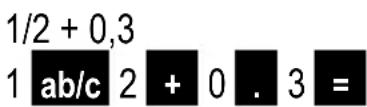
1/2 + 0,3
1 ab/c 2 + 0 . 3 =
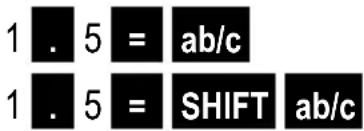
1,5 als Bruch
1 . 5 = ab/c 1 . 5 = SHIFT ab/c
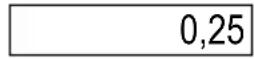
Dezimalwert von 1/4
1 ab/c 4 = ab/c
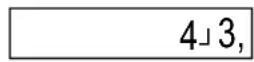
ab/c 1 ab/c 3 = SHIFT ab/c
1」8」15,
0.8
1」1」2,
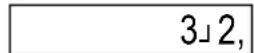
3」2,
0,25
4」3,
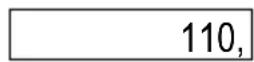
Prozentrechnung
25 x 4 = SHIFT RCL ALFA M+
ALFA M+ x 10 SHIFT = +
110,
(12, 13, 21, 23, 31, 32)
3 nPr 2 =
6,
text_image
MODE MODE 1 SHIFT EXP SHIFT Ans 2 =text_image
1 = ENG ENG ENG SHIFT ENG| 1,00 |
| 1.000,03 |
| 1.000,000,06 |
| 1.000,03 |
| SHIFT | 1 | 2 | = |
| SHIFT | 1 | 2 | = |
| SHIFT | 1 | 3 | = |
| SHIFT | 2 | 1 | = |
| SHIFT | 2 | 2 | = |
| SHIFT | 2 | 3 | = |
text_image
SHIFT MODE 3 = MODE 3 1| SHIFT | MODE | 3 | = |
| MODE | 3 | ▶ | 3 |
| SHIFT | 2 | 1 | ||
| SHIFT | 2 | 2 | ||
| SHIFT | 2 | 3 |
| A | ÷ |
| B | ( |
| C | ( |
| D | - |
| E | ÷ |
| F | ( |
| G | + |
Eingabebereiche
Interne Stellen: 12
General information....31
Switching the product on/off....31
Keys 31
Display....31
Settings 31
Calculation method....31
Angle specification ....31
Display mode 32
Displays....32
Decimal point and thousand-separators 32
Standard settings 33
Settings for regression calculations....33
Input capacity....33
Entry correction....33
Refresh memory....34
Multiple calculations 34
Answer memory 34
Variables....34
Independent memory....34
Basic calculations (comp mode)....36
Arithmetic calculations....36
Fractional arithmetic....36
Percentage calculation 37
Calculations with degrees (hours), minutes, seconds....37
Rounding 38
Trigonometrical functions....38
Hyperbolic functions / area functions....39
Logarithms / antilogarithms....39
Power calculation....40
Roots 40
Reciprocal value....40
Factorials 40
Random numbers....40
Combinatorics....40
Conversion of the angle unit 41
Coordinate conversion....41
Conversion to technical notation 42
Statistical computing....42
Standard deviation (SD mode)....43
Example....44
Regression calculation (REG mode) 44
Regression formulas 45
Linear, logarithmic, exponential, power and inverse regressions 45
Linear regression examples....46
Quadratic regression....47
Example 47
Technical information 49
Error messages....49
Order of operations 50
Stacks....51
Input ranges....52
Power sources 54
Replacing the battery....54
Warranty information 55
General information
Switching the product on/off
The calculator is switched on using the ON key.
The calculator shuts down automatically if no key is pressed for six minutes.
It is possible to switch the product off manually using the key sequence SHIFT AC.
All stored values and settings are saved after switching the calculator on and off.
Keys
Some of the keys have two or three functions:
Key lettering: Primary function
White lettering above the key: Function after pressing SHIFT
White lettering above the key: Function after pressing ALPHA
Display
The display has two lines: the calculation formula is indicated in the top line, the result in the bottom line.
10^7+0.25
10,000,000.25
Settings
Settings are selected by pressing the MODE key repeatedly. Settings appear in the top corner of the display.
Calculation method
The calculator supports 3 calculation methods, which must be selected before calculations:
Standard deviations (SD)
Regression calculations (REG)
Angle specification
The angle specification can be selected by pressing the MODE key twice.
| 1 |
| 2 |
| 3 |
° (Deg)
Radians (Rad)
Grads (Grad)
Display mode
The calculator can display up to 10 digits. Larger values are automatically displayed using exponential notation for every setting. The display format can be set by pressing the MODE key 3 times.
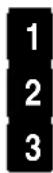
Fixed decimal (Fix)
Exponential (Sci)
Normal (Norm)
The number of decimals or digits for exponential notation can be adjusted using “Fix” and “Sci.”
There are 2 modes to choose from in the "Norm" setting:
Norm 1
Exponential notation for integers with more than 10 digits and for decimal values with more than 2 decimal places.
The examples in these operating instructions use the Norm 1 mode
Norm 2
Exponential display for integers with more than 10 digits and for decimal values with more than nine decimal places.
Displays
By pressing the MODE key 4 times, the display of fractions, as well as the decimal, and the thousands separator can be modified.
Fractions
The key 1 can be used to navigate to the display to set fractions:
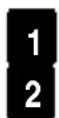
Mixed fractions (a b/c)
False fractions (a/b)
Decimal point and thousand-separators
The cursor can be used ▶ to navigate setting the decimal point and the
Thousands separator:
European formatting (comma)
American formatting (dot)
The examples in these operating instructions use European formatting
Standard settings
Calculation method COMP
Angle specification Degree
Display mode Norm1
Fraction mode ab/c
Decimal point Dot
If settings have been modified, they can be reset to standard values using "Clr" (=key sequence SHIFT MODE) 3) = .
Settings for regression calculations
The REG mode setting allows additional settings, which are described in the section on regression calculations.
Input capacity
The memory for entering calculations can store 79 steps. One step is used each time a number key or operation key is pressed. The SHIFT and ALFA keys do not require a step, SHIFT followed by sin therefore only requires one step.
If more than 73 steps are entered, the cursor is displayed as “■” instead of “_ { to indicate that the maximum memory capacity has almost been reached. If more than 79 steps are needed, the calculation must be split.
The last answer can be called up with the Ans key to use it for additional calculations (see "Answer memory")
Entry correction
The cursor can be moved using the ▶ and ◀ in the desired position to overwrite characters.
The DEL key can be used to delete the cursor position. Insert mode is started using the "Ins" function (=key sequence SHIFT DEL), the insert cursor is displayed and additional characters can be entered at this position. To exist insert mode, use the "Ins" function (key sequence SHIFT DEL) or the = key and the normal cursor will be displayed again
After an error occurs, the calculation formula is displayed using the cursor keys and the cursor is placed where the error occurs.
Refresh memory
The calculation formula and the answer are stored in the refresh memory. The memory capacity is 128 bytes.
After a calculation is completed, the calculation can be edited using the ▶ ▶.
The refresh memory is not deleted using the AC, the last calculation can also be edited again using the ▼ key.
The refresh memory is deleted if:
The ON key is pushed.
If the calculation mode or the settings are changed (see basic settings).
The calculator is shut off.
Multiple calculations
Formulas can be separated using the colon “:” (key sequence ALFA pol() to execute them subsequently.
The following formula can be entered instead of “(30+20)x5”:
30 + 20 ALFA pol( Ans x 5 =
Answer memory
The answer memory can store 12 digits for the mantissa and two digits for exponents.
The answer memory is refreshed after using the functions “=” “%” “M+” “M-” and “STO”, unless an error has occurred.
The answer memory is called up using the Ans key and can
be used in the next calculation for functions of the Type A ( (x,x^3,x^-1,x! , DRG▶ ) and for +,-,^,x- , x, ÷, nPr and nCr.
Variables
There are 9 variables (A to F, M, X and Y) available to store data.
Values with the “STO” function (key sequence SHIFT RCL) + letter are store with the corresponding variables
The value with a variable can be called up using RCL + letter
The variables can be used in calculations via ALFA + letter
The data of a variable are deleted using 0 "STO" + letter
Using “CLR” (key sequence SHIFT MODE) 1 the values of all variables can be deleted at the same time.
Example
store 100 in Variable A
Use variable A in the formula
Delete variable value again
| 100, |
| 200, |
| 0 |
Independent memory
The independent memory uses the same memory area as the Variable M and is particularly suited for summation due to the “M+” “M-” functions
Example:
| 10 | x | 5 | SHIFT | RCL | M+ |
| 25 | M+ | ||||
| 200 | ÷ | 5 | SHIFT | M+ | |
| RCL | M+ |
Initialize memory using 10x5
add 25 in the memory
Subtract 200: 5 from the memory
Call up sum
| 50, | |
| 25, | |
| 40, | |
| 35, |
Basic calculations
The calculation type must be set to "COMP".
If necessary, it must be set using the MODE 1.
The calculator can also be initialized using "Clr All" (key sequence with SHIFT MODE) + 3, in this case it is set to "COMP" and all stored values are deleted (see settings).
Some calculation types, especially scientific functions require more time for execution; it is necessary to wait until the answer is displayed before continuing to enter calculations.
Arithmetic calculations
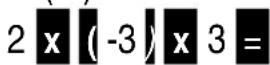
Negative values, except exponents, must be placed in parentheses.
The parenthesis does not have to be closed at the end of a calculation.
Examples:
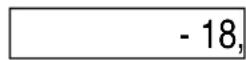
2x(-3)x3
2x10⁻²
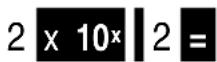
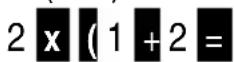
2x(1+2)
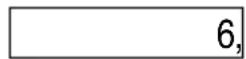
Fractional arithmetic
Specify in the setting, whether false fractions (e.g. 5/3) or mixed fractions (e.g. 1 2/3) are used. An error is reported, if a mixed fraction is entered using the “false fractions” setting.
If the total in the answer is more than 10 digits, the value is indicated as decimals.
The answers for mixed fraction/decimal calculations are always indicated as decimals.
The conversion of fraction can take several seconds
Examples
1 1/3 + 1/5

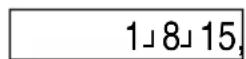
1/2 + 0,3

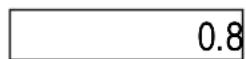
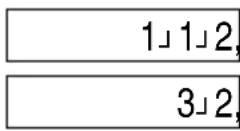
1,5 as a fraction


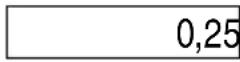
Decimal value of 1/4

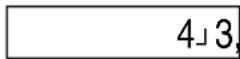
1 1/3 as a false fraction 1

Percentage calculation
The % function is called up using the key sequence SHIFT =
Examples:
10% of 200

1000 + 5%

1000 - 5%

% percentage 40 of 1000

% increase from 500 to 200+500

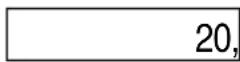
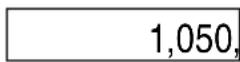
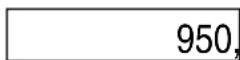
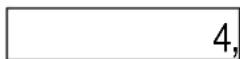
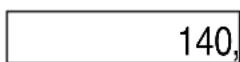
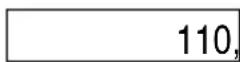
A % addition or subtraction is not possible in the answer memory, the subtotal must be stored in form of a variable or in the temporary storage.
Example:
(25 x 4) + 10%


Calculations with degrees (hours), minutes, seconds
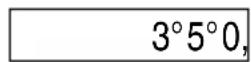
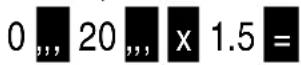
It is possible to perform calculations with degrees (hours), minutes, and seconds and values can be converted between angular measures (or hours) and decimal values.
Examples
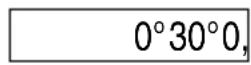
2^20'+45'

20 x 1,5
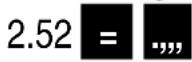
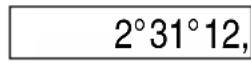
Converting 2,52 in angular measures
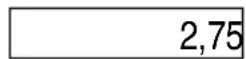
Converting 2° 45' into a decimal value

Rounding
The display of the values is determined under settings, and can be adjusted to "Fix", "Sci", or "Norm" using the MODE key, as well as the number of decimal places or number of digits for exponential notation (see settings).
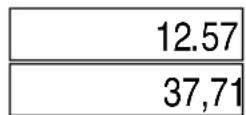
Displaying 12,562 with 2 decimal places
MODE MODE MODE 1 2 (if it has not yet been set)
12.567 =
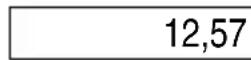
The display shows a rounded number, but 12 decimal places continue to be used for calculations
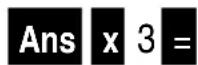
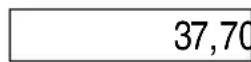
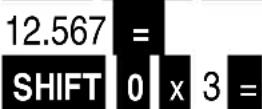
The “Rnd” function can be used (key sequence SHIFT 0) to only include the displayed decimal places in calculations:
Rounding 12,567 to 2 decimal places
MODE MODE MODE 1 2
(if it has not yet been set)
Trigonometrical functions
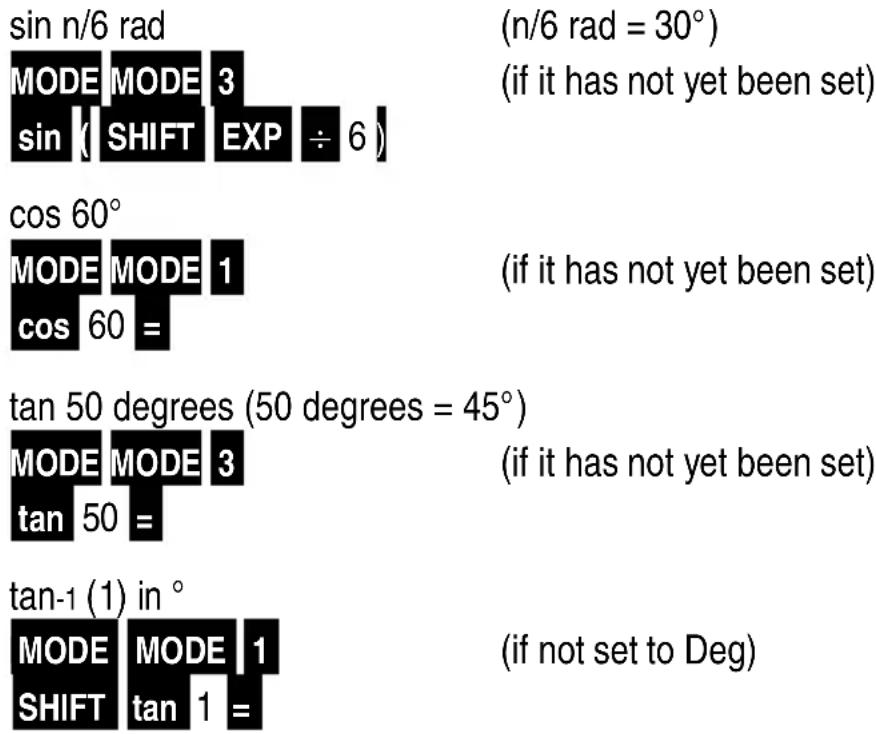
The unit for angular measures is adjusted under settings and can be changed using the MODE (see settings).
Examples:
text_image
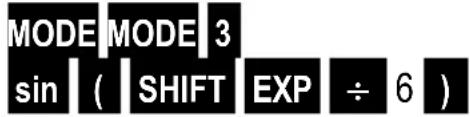
sin n/6 rad MODE MODE 3 sin | SHIFT EXP ÷ 6 | (n/6 rad = 30°) (if it has not yet been set) cos 60° MODE MODE 1 cos 60 = (if it has not yet been set) tan 50 degrees (50 degrees = 45°) MODE MODE 3 tan 50 = (if it has not yet been set) tan-1 (1) in ° MODE MODE 1 SHIFT tan 1 = (if not set to Deg)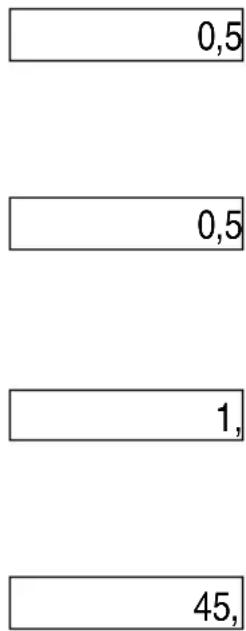
text_image
0,5 0,5 1, 45,Hyperbolic functions / area functions
Hyperbolic sine function
sinh 5.2
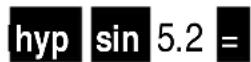
90,63336266
Inverse hyperbolic functions
sinh -1 50

4,605270171
Logarithms / antilogarithms
Natural logarithms (base e)
In 25
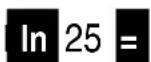
3,218875825
Common logarithms (base 10)
log 25
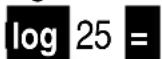
1,397940009
Antilogarithms
Base e

24,5325302
Base 10
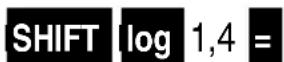
25,11886432
Power calculations
Square of 6:
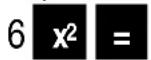
Cube of 7:
4 to the power of 5:
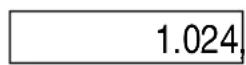
Roots
Square root of 9:
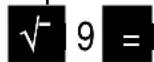
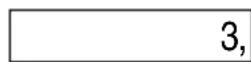
Cube root of 125:

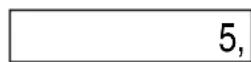
5th root of 243:

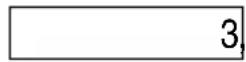
Reciprocal value
Reciprocal value of 3/4:
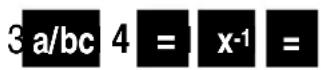
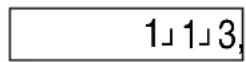
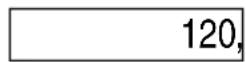
Factorials
Factorials of 5 (=5x4x3x2x1)
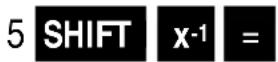
Random numbers
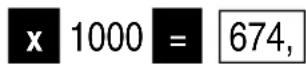
Random number between 0 and 999

Combinatorics
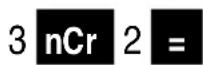
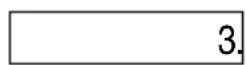
Combinations
How many teams of 2 can be created with 3 persons
(12≌21, 13≌31, 23≌32)
Permutations
How many different 2-digit numbers can be generated from 3 numbers, if a number can only be selected once.
(12, 13, 21, 23, 31, 32)
3 nPr 2 =
6,
Conversion of the angle unit
The answer is provided in the unit determined in settings.
The entry can be made in Deg, Rad, or degrees.
n (key sequence SHIFT EXP) Converting radians to °
MODE MODE 1 SHIFT EXP SHIFT Ans 2 =
(if it has not yet been set)
180
Converting 90° into centesimal degrees
MODE MODE 3 90 SHIFT Ans 1 = (if it has not yet been set)
100,
Coordinate conversion
The calculation results are stored in the variables E (key sequence ALFA cos) and F (key sequence ALFA TarI).
Converting polar coordinates (r=1, θ=30°) in right-angled coordinates
(X=0.866025403, Y=0,5)
MODE MODE 1 (if not set to Deg) SHIFT pol(1, 30) X ALFA tan Y
0,866025403 0,866025403
Converting right-angled coordinates (1, 1) in polar coordinates (Deg)
(x=2,=45^)
MODE MODE 1 (if it has not yet been set)
pol(1, 1) x
1,414213562 45,
ALFA Tan θ
Conversion to technical notation
The display is converted independently of the format determined in the settings into technical notation using the ENG key.
By pressing the key repeatedly, the number of digits is increased by 3. The key sequence
SHIFT ENG reduces the number by 3.
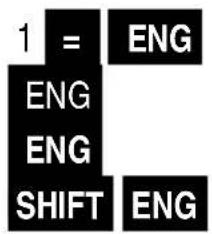
text_image
1 = ENG ENG ENG SHIFT ENG| 1,00 |
| 1.000,03 |
| 1.000,000,06 |
| 1.000,03 |
Statistical computing
The memory must be erased before calculation. It can be deleted using the key sequence SHIFT MODE 1 II.
Standard deviation
The calculator must be set to SD mode (key sequence MODE 2.)
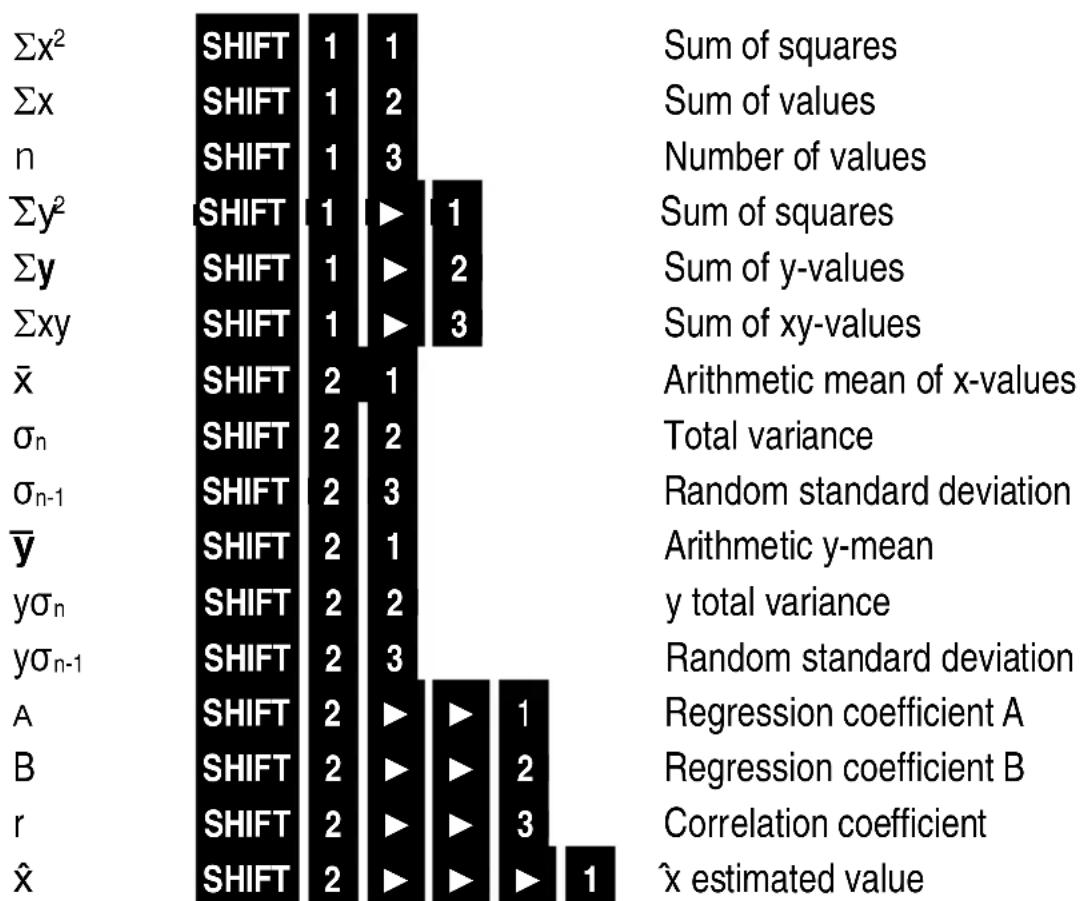
Entry data are used to calculate the values for n (count), x(sum) , x^2 , (sum of squares), x (arithmetic mean), _n (standard deviation), _n-1 (random standard deviation).
Data entry is made using the value, followed by the M^+ key, the count of data entered is shown in the top line of the display.
A value can also be repeated multiple times without repeat entries by pressing M+ or by using the key sequence:
Value, SHIFT , number of occurrences
During or after completing data entry, the data can be checked using the key sequence ▶, ◀. After the data value is displayed, the frequency of the value is shown for multiple entries by M+ if the value occurs with a frequency of 1 and was entered using SHIFT, the corresponding frequency is shown. Values can be modified, deleted, or entered additionally:
Entry = Value will be modified
SHIFT MODE Value will be deleted
Entry M+ Value is entered additionally, the previous value remains
The data are stored in the memory. When the memory is full, the alert "Data Full" is shown. The key = can be used to decide how to react to this:
2 Cancel, the value will not be stored 1 The value is stored, but can neither be displayed nor changed while scrolling.
After changing the calculation mode, the data can no longer be displayed or modified.
Results can be called up after calculation using the following keys:
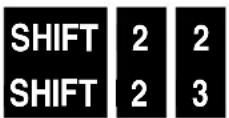
Σx² SHIFT 1 1 Sum of squares Σx SHIFT 1 2 Sum of values n SHIFT 1 3 Number of values
_n _n - 1

text_image
SHIFT 2 1 SHIFT 2 2 SHIFT 2 3Arithmetic mean
Total deviation
Random standard deviation
Example:
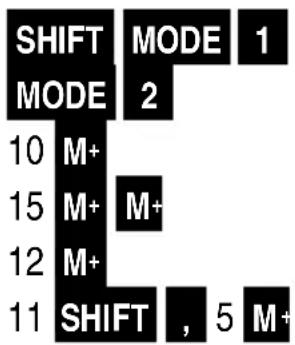
n, x , x^2 , , n , n-1 for the following values: 10, 15, 15, 12, 11, 11, 11, 11, 11
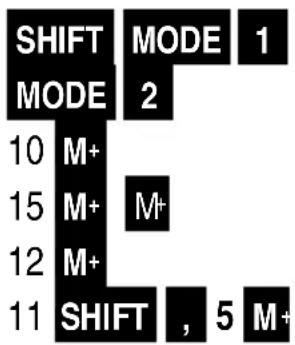
text_image
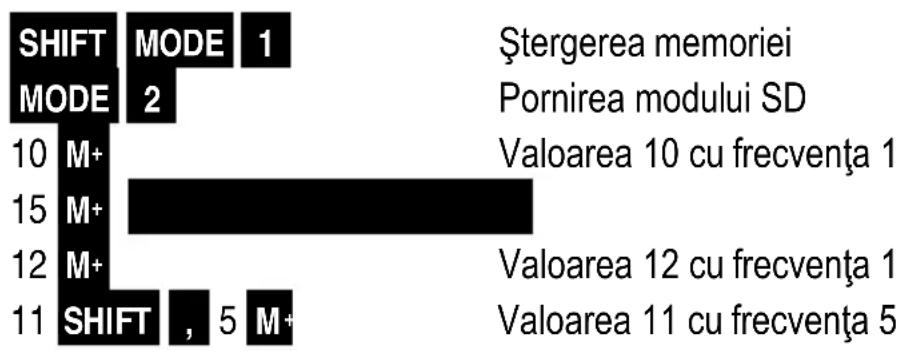
SHIFT MODE 1 MODE 2 10 M+ 15 M+ M+ 12 M+ 11 SHIFT , 5 M+Delete memory
Switch on SD mode
Value 10 with a frequency of 1
2x value of 15 with a frequency of 1
Value 12 with a frequency of 1
Value 11 with a frequency of 5
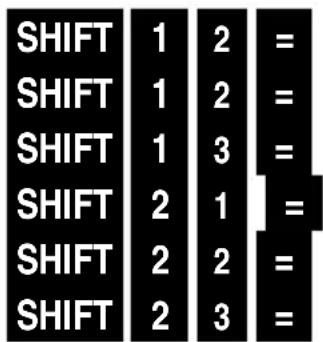
text_image
SHIFT 1 2 = SHIFT 1 2 = SHIFT 1 3 = SHIFT 2 1 = SHIFT 2 2 = SHIFT 2 3 =Σx2 sum of squares
Σx sum of values
n number of values
Arithmetic mean
_n Total deviation
_n - 1 Random standard deviation
| 1.299, |
| 107, |
| 9, |
| 11,88888889, |
| 1,728483243, |
| 1,833333333 |
Regression calculation (REG mode)
The calculator must be set to SD mode (key sequence MODE 3).
The following additional settings are required for SD mode:
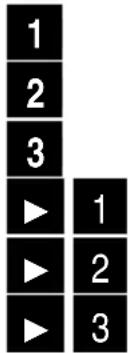
Logarithmic regression
Exponential regression
Power regression
Inverse regression
Quadratic regression
The memory and variables must be erased before calculation. It can be deleted using the key sequence SHIFT MODE 1 or 3.
Data are entered using the x-value, y-value M^+ , the number of data pairs entered is shown in the top line of the display.
A value pair can also be repeated multiple times without repeat entries by pressing M^+ or
by using the key sequence:
x-value, y-value SHIFT, Frequency M+
After and during entry, data can be edited as shown in the section on standard deviation, however the x and y-values will be shown separately.
The variables are deleted if the regression type is modified
Regression formulas
| Linear regression | y = A + B × |
| Logarithmic regression | y = A + B * x |
| Exponential regression | y = A * e^x |
| Power regression | y = A * x^Bx |
| Inverse regression | y = A + B * 1/x |
| Quadratic regression | y = A + Bx + Cx^2 |
Linear, logarithmic, exponential, power and inverse regression
Data can be called up after data entry and used in formulas similarly to variables:
Sample Linear regression
Preparation
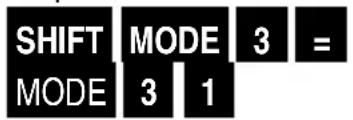
text_image
SHIFT MODE 3 = MODE 3 1Delete memory and variables
Set linear regression mode.
Data:
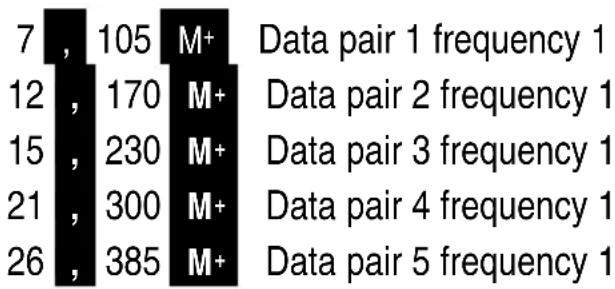
other
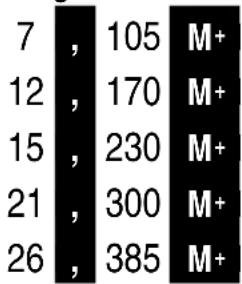
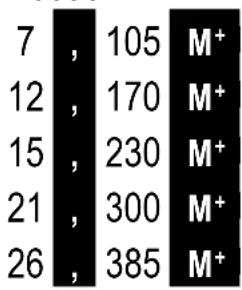
| Data pair | Frequency | Value | | :--- | :--- | :--- | | 1 | 1 | 7 | | 2 | 1 | 105 | | 3 | 1 | M+ | | 4 | 1 | Data pair 1 frequency 1 | | 5 | 1 | 12 | | 6 | 1 | 170 | | 7 | 1 | M+ | | 8 | 1 | Data pair 2 frequency 1 | | 9 | 1 | 15 | | 10 | 1 | 230 | | 11 | 1 | M+ | | 12 | 1 | Data pair 3 frequency 1 | | 13 | 1 | 21 | | 14 | 1 | 300 | | 15 | 1 | M+ | | 16 | 1 | Data pair 4 frequency 1 | | 17 | 1 | 26 | | 18 | 1 | 385 | | 19 | 1 | M+ | Data pair 5 frequency 1Calculation results:
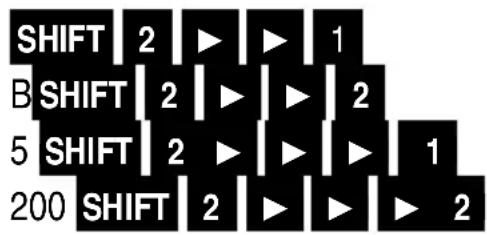
text_image
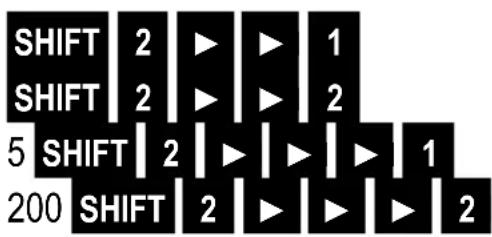
SHIFT | 2 | ▶ | ▶ | 1 B SHIFT | 2 | ▶ | ▶ | 2 5 SHIFT | 2 | ▶ | ▶ | 1 200 SHIFT | 2 | ▶ | ▶ | 2Regression coefficient A
Regression coefficient B
estimated value with x =5
estimated value with y=1000
| 1,18043088 |
| 14,61849192 |
| 74,27289048 |
| 13,60055266 |
Quadratic regression
After data entry and completing the calculation, the same data can be called up in other regression modes and be used in formulas similarly to variables; However the following applies additionally and in deviation:
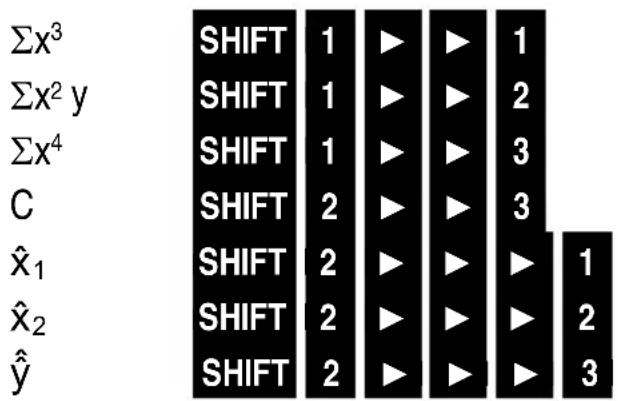
bar
| Function | Shift | |---|---| | Σx³ | SHIFT 1 | | Σx² y | SHIFT 1 | | Σx⁴ | SHIFT 1 | | C | SHIFT 2 | | x̂₁ | SHIFT 2 | | x̂₂ | SHIFT 2 | | ŷ̂ | SHIFT 2 | | | Shift 1 | | | Shift 2 | | | Shift 3 | | | Shift 3 | | | Shift 1 | | | Shift 2 | | | Shift 3 | | | Shift 1 |Regression coefficient C instead of r
Example
Relationship between the number of work hours per week and satisfaction factor (1-100):
| Hours Satisfaction | |
| 9 30 | |
| 12 50 | |
| 14 | 70 |
| 30 | 90 |
| 35 95 | |
| 40 90 | |
| 47 75 | |
| 51 60 | |
| 55 | 45 |
| 60 30 | |
The estimated values for satisfaction are to be determined for 20 work hours per week and for the number of hours (since the regression curve is parabolic, there are 2 estimated values x_1 and x_2 ) to achieve a satisfaction factor of 80.
Preparation:
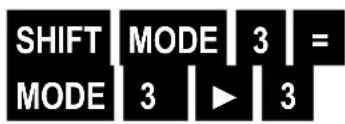
text_image
SHIFT MODE 3 = MODE 3 ▶ 3Delete memory and variables
Set quadratic regression mode
Data:
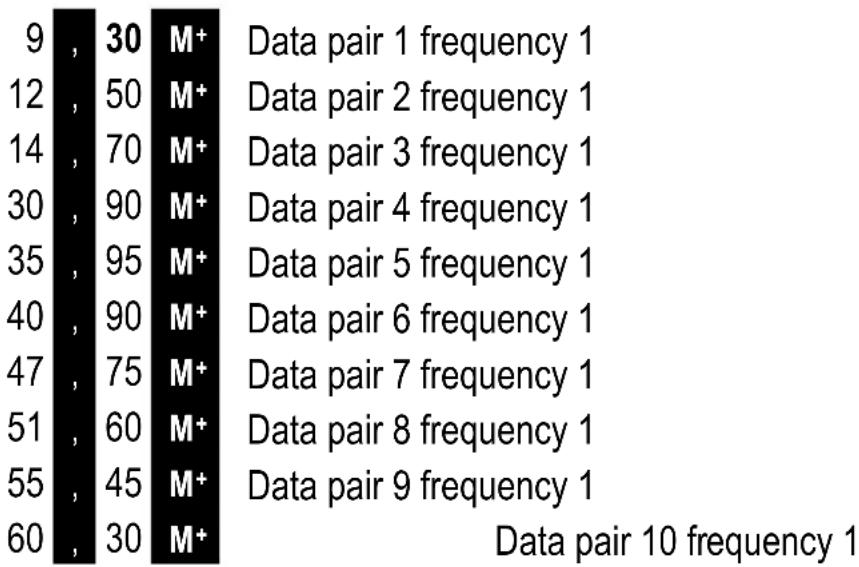
text_image
9 , 30 M+ Data pair 1 frequency 1 12 , 50 M+ Data pair 2 frequency 1 14 , 70 M+ Data pair 3 frequency 1 30 , 90 M+ Data pair 4 frequency 1 35 , 95 M+ Data pair 5 frequency 1 40 , 90 M+ Data pair 6 frequency 1 47 , 75 M+ Data pair 7 frequency 1 51 , 60 M+ Data pair 8 frequency 1 55 , 45 M+ Data pair 9 frequency 1 60 , 30 M+ Data pair 10 frequency 1Calculation results:
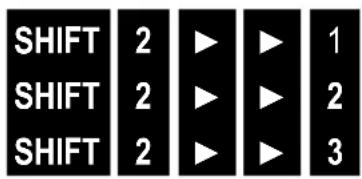
text_image
SHIFT 2 ▶ ▶ 1 SHIFT 2 ▶ ▶ 2 SHIFT 2 ▶ ▶ 3Regression coefficient A
Regression coefficient B
Regression coefficient C
| -11,37086377 |
| 6,332638377 |
| 0,095418311 |
Estimated values:

text_image
80 SHIFT 2 ▶ ▶ ▶ 1 _1: Hours for satisfaction factor of 80 21,20163378 80 SHIFT 2 ▶ ▶ ▶ 2 _2: Hours for satisfaction factor of 80 45,16548472 20 SHIFT 2 ▶ ▶ ▶ 3 : Satisfaction at 20 h 77.11457922Technical information
Error messages
Error messages can be deleted using the AC key, please check the settings and calculation formulas in this case (see section 1). If no error is found, the calculator must be reset using the key sequence SHIFT MODE 2 or 3 = (the stored values are deleted for 3). If the condition continues to be abnormal, switch the calculator off and back on, then a self-check is implemented and all data are erased.
Math ERROR
The calculation result or entered values are outside of the permitted calculation range or an illegal operation has occurred (e.g. division by zero).
Check that the entered values (also saved values) are authorized (see table)
Stack ERROR
The stack capacity has been exceeded (numeric stack of max.10 levels, command stack max. 24 levels). The calculation must be simplified or divided
Syntax ERROR
Illegal mathematic operation, correct the calculation formula
Arg ERROR
Improper use of argument, the entry values or formulas must be corrected
Order of operations
The calculation operations are performed in the following sequence of precedence:
1 Coordinate transformation: Pol (x,y), Rec (r, )
2 Type A functions (value is entered and then the function key):
3 Powers and roots: ^, xy, x√
$$ \mathsf {x} ^ {3}, \mathsf {x} ^ {2}, \mathsf {x} ^ {1}, \mathsf {x}!, \dots , \hat {\mathsf {x}}, \hat {\mathsf {x}} _ {1}, \hat {\mathsf {x}} _ {2}, \hat {\mathsf {y}}, \mathsf {D R G} \blacktriangleright $$
4 a b/c
5 Abbreviated multiplication format in front of n, e (base of natural logarithm), Memory name or variable name: 2 n, 3e, 5A, nA etc.
6 Type B functions (value after function key):
-3-1 , lg, ln, ex, 10x, sin, cos, tan, sin-1, cos-1, tan-1, sinh, cosh, tanh, sinh-1, cosh -1, tanh-1, (-)
7 Abbreviated multiplication format in front of Type B functions: 2 √3, Alog2, etc.
8 Permutations and combinations: nPr, nCr
9 x, ÷ 10 +, -
Operations of the same precedence are performed from right to left. exln -120 -ex{ln( -120 )}.
Other operations are performed from left to right.
Operations enclosed in parentheses are performed first.
Negative numbers must be placed in parentheses, the negative sign (-) is a Type B function (value after function), which is performed after Type A functions.
Example: (-3)_2=9, 32=-9
Stacks
The numeric stack for values has 10 levels and the command stack for values has 24 levels.
Storage occurs in the above-described order of precedence.
An error (Stack ERROR) occurs, if the calculation is too complicated and the capacity of the stacks is exceeded.
The stacks are deleted after the calculation is performed.
Example: 5 ÷ ((52 ÷ (3 + 7) × 3) × 2) - 8
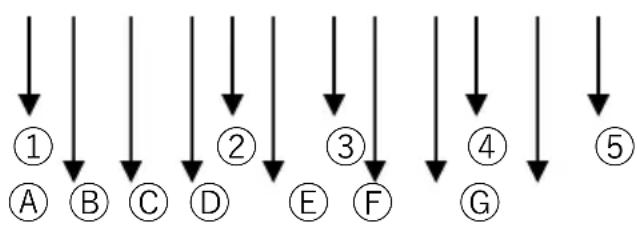
flowchart
graph TD
    A["①"] --> B["②"]
    B --> C["③"]
    C --> D["④"]
    D --> E["⑤"]
    A --> F["⑥"]
    B --> G["⑦"]
    C --> H["⑧"]
    D --> I["⑨"]
    E --> J["⑩"]
Numeric stack command stack
| 1 | 5 |
| 2 | 5 |
| 3 | 2 |
| 4 | 3 |
| 5 | 7 |
| A | ÷ |
| B | ( |
| C | ( |
| D | - |
| E | ÷ |
| F | ( |
| G | + |
Input ranges
Internal decimal places: 12
Accuracy: typically, accuracy is ± 1 in the 10. place.
| Functions | Input ranges |
| sinx | DEG: 0 ≤ |x| ≤ 4,499999999 × 10^10 |
| RAD: 0 ≤ |x| ≤ 785398163,3 | |
| GRA: 0 ≤ |x| ≤ 4,99999999 × 10^10 | |
| cosx | DEG: 0 ≤ |x| ≤ 4,500000008 × 10^10 |
| RAD: 0 ≤ |x| ≤ 785398164,9 | |
| GRA: 0 ≤ |x| ≤ 5,000000009 × 10^10 | |
| tanx | DEG: Same as sinx, except when |x| = (2n-1)x 90 |
| RAD: Same as sinx, except when |x| = (2n-1)x /2 | |
| GRA: Same as sinx, except when |x| = (2n-1)x 100 | |
| ^-1 x | 0 ≤ |x| ≤ 1 |
| ^1 - x | |
| ^-1 x | 0 ≤ |x| ≤ x 9,999999999 × 10^99 |
| hx | 0 ≤ |x| ≤ x 230,2585092 |
| hx | |
| h^-1 x | 0 ≤ |x| ≤ x 4,999999999 × 10^99 |
| h^-1 x | 1 ≤ x ≤ x 4,999999999 × 10^99 |
| 0 ≤ |x| ≤ x 9,999999999 × 10^99 | |
| h^-1 x | 0 ≤ |x| ≤ x 9,999999999 × 10^1 |
| x / In | 0 < x ≤ 9,999999999 × 10^99 |
| 10^x | -9,999999999 × 10^99 ≤ x ≤ 99,99999999 |
| e^x | -9,999999999 × 10^99 ≤ x ≤ 230,2585092 |
| 0 ≤ x < 1 × 10^100 | |
| x^2 | |x| < 1 × 10^50 |
| 1/x | |x| < 1 × 10^100; x 0 |
| [3]x x! | |x| < 1 × 10^100 0≤ x ≤ 69 (x is an integer) |
| nPr | 0≤ n < 11x,10≤ r ≤ n(n, r sind Ganzzahlen)1 ≤ {n! / (n -)!}≤1x10100 |
| nCr | 0≤ n < 11x,10≤ r ≤ n(n, r, are integers)1 ≤ [n! / {r! (n -)!}]≤1x10100 |
| Pol(x, y) | |x|, |y| ≤ 9,999999999 x 1049(x2 + y2) ≤ 9,999999999 x 1099 |
| Red(r, θ) | 0 ≤ r ≤ x 9,999999999 x 1099θ: (Same as sin x) |
| °; “ | |a|, b, c<1x101000≤b,c |
| °; “ | |x| <1x10100(Decimal <> sexagesimal conversion)0°0°0° ≤ |x| ≤ 999999°59 |
| ^ (xy) | x > 0: -1x10000000000000000000000000000000000000000000000000000000000000000000000000000000000000000000000000000 |
| x = 0: y > 0x < 0: y = n1/n+1 (n is an integer)However: -1x10100000000000000000000000000000000000000000000000000000000000000000000000000000000000000000000000000 |
The answer memory can store 10 digits for the mantissa and 2 digits for exponents, the accuracy is ± 1 for the 10th digit. In the exponential display, the calculation error ± 1 in the lowest digit.
The errors add up for continuous calculations and can become bigger, which also applies to repeated internal calculations such as , x- , x! , nPr, nCr etc.
The errors can also become bigger close to the singular and turning points of a function.
Power sources
Solar energy: The ECO calculators obtain are powered by solar cells that convert sunlight into electricity. In the absence of light, the display may fail or no longershow correct data. In this case, make sure that the calculator is sufficiently illuminated by a second light source. The minimum light intensity required foroperation is 50 lux.
Warranty information
Jakob Maul GmbH, Jakob-Maul-Str. 17, D-64732 Bad König, Phone: 06063-502-100, Fax: 06063-502-210, Email: contact@maul.de: (hereafter “Manufacturer”) guarantees the end customer (hereafter “Customer”) according to the following provisions that products delivered to customers in Germany, Austria, or Switzerland will be free from material or manufacturing defects for a time period of 5 years from the date of delivery (warranty period). The manufacturer shall rectify claims asserted for such defects at their expense by repairing the product or supplying new or refurbished parts at their own discretion. The warranty does not cover any included batteries. Other customer claims against the manufacturer, particularly for compensation, are excluded.
In addition to this product warranty, the Customer's legal warranty claims against the manufacturer or retailer remain unaffected by this warranty. Claims arising from this warranty are only valid, if the product does not have any damages or wear caused by improper use of the product. In particular, damages caused by improper use of the product include damages due to impact or shock, or damages caused by improper repairs not implemented by the manufacturer.
Claims arising from this warranty can only be asserted by returning or sending the product to the retailer, or directly to the manufacturer. The prerequisite for the warranty claim is the provision of an original receipt including purchase date.
The warranty applies to the aforementioned extent and is subject to the above-mentioned requirements, including the submission of the proof of purchase or, in case of resale, for any owner of the product residing in Germany, Austria, or Switzerland.
The warranty is subject to the laws of the Federal Republic of Germany excluding UN sales law. For customers, who conclude the agreement for a purpose not related to professional or commercial activities (end users), the choice of law does not affect the obligatory provisions of the nation's law in which the customer maintains their usual residence.
Table des matières
Généralités ....58
Allumer/éteindre 58
Touches....58
Ecran....58
Réglages 58
Mode de calcul....58
Écart type (mode SD)....70
Exemple....71
Fractions mixtes (a b/c)
Fractions impropres (a/b)
text_image
10 x 5 SHIFT RCL M+ 25 M+ 200 ÷ 5 SHIFT M+ RCL M+1 ab/c 1 ab/c 3 + 1 ab/c 5 =
1」8」15,
1/2 + 0,3
1 ab/c 2 + 0 . 3 =
0.8
1,5 comme fraction
1 . 5 = ab/c 1 . 5 = SHIFT ab/c
1」1」2, 3」2,
ab/c 1 ab/c 3 = SHIFT ab/c
4」3,
Pourcentage
25 x 4 = SHIFT RCL ALFA M+
ALFA M+ x 10 SHIFT = +
110,
(12, 13, 21, 23, 31, 32)
3 nPr 2 =
6,
MODE MODE 1 SHIFT EXP SHIFT Ans 2 =
text_image
1 = ENG ENG ENG SHIFT ENG| 1,00 |
| 1.000,03 |
| 1.000,000,06 |
| 1.000,03 |
text_image
SHIFT MODE 3 = MODE 3 1| SHIFT | MODE | 3 | = |
| MODE | 3 | ▶ | 3 |
| A | ÷ |
| B | ( |
| C | ( |
| D | - |
| E | ÷ |
| F | ( |
| G | + |
Zones de saisie
text_image
1 . 5 = ab/c 1 . 5 = SHIFT ab/c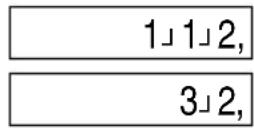
(12, 13, 21, 23, 31, 32)
3 nPr 2 =
6,
text_image
1 = ENG ENG ENG SHIFT ENG| 1,00 |
| 1.000,03 |
| 1.000,000,06 |
| 1.000,03 |
Calcoli statistici
| SHIFT | 1 | 2 | = |
| SHIFT | 1 | 2 | = |
| SHIFT | 1 | 3 | = |
| SHIFT | 2 | 1 | = |
| SHIFT | 2 | 2 | = |
| SHIFT | 2 | 3 | = |
bar
| Function | SHIFT | 1 | 1 | |---|---|---|---| | Σx² | SHIFT | 1 | 2 | | Σx | SHIFT | 1 | 3 | | n | SHIFT | 1 | ▶ | | Σy² | SHIFT | 1 | 1 | | Σy | SHIFT | 1 | ▶ | | Σxy | SHIFT | 1 | ▶ | | x | SHIFT | 2 | 1 | | σₙ | SHIFT | 2 | 2 | | σₙ₋₁ | SHIFT | 2 | 3 |Somma dei quadrati
Somma dei valori
Numero dei valori
text_image
SHIFT MODE 3 = MODE 3 1| SHIFT | MODE | 3 | = |
| SHIFT | MODE | 13 |
| A | ÷ |
| B | ( |
| C | ( |
| D | - |
| E | ÷ |
| F | ( |
| G | + |
Aree di immissione
Cifre interne: 12
1 ab/c 1 ab/c 3 + 1 ab/c 5 =
1/2 + 0,3
1 ab/c 2 + 0. 3 =
1,5 como fracción
1 . 5 = ab/c 1 . 5 = SHIFT ab/c
Valor decimal de 1/4
1 ab/c 4 = ab/c
ab/c 1 ab/c 3 = SHIFT ab/c
1」8」15,
0,8
1」1」2, 3」2,
0,25
4」3,
25 x 4 = SHIFT RCL ALPHA M+
ALPHA M+ x 10 SHIFT = +
110,
(12, 13, 21, 23, 31, 32)
3 nPr 2 =
6,
MODE MODE 1 SHIFT EXP SHIFT Ans 2 =
MODE MODE 3 90 SHIFT Ans 1 =
text_image
1 = ENG ENG ENG SHIFT ENG| 1,00 |
| 1.000,03 |
| 1.000,000,06 |
| 1.000,03 |
text_image
SHIFT MODE 3 = MODE 3 1| SHIFT | MODE | 3 | = |
| MODE | 3 | ▶ | 3 |
| SHIFT | 2 | 1 | ||
| SHIFT | 2 | 2 | ||
| SHIFT | 2 | 3 |
| A | ÷ |
| B | ( |
| C | ( |
| D | - |
| E | ÷ |
| F | ( |
| G | + |
©
| Funciones | Campo de entrada |
| x! | 0≤ x ≤ 69 (x es un número entero) |
| nPr | 0≤ n < 1x,10≤ r ≤ n(n, r son números enteros)1 ≤ {n! / (n -)!}×1×10100 |
| nCr | 0≤ n < 1x,10≤ r ≤ n(n, r son números enteros)1 ≤ [n! / {r! (n -)!}]×1×10100 |
| Pol(x,y) | |x|, |y| ≤ 9,999999999 × 1049(x2 + y2) ≤ 9,999999999 × 1099 |
| Rec(r,θ) | 0 ≤ r ≤ x 9,999999999 × 1099θ: (lgual que sin x) |
| °‘ “°‘ “ | |a|, b, c<1×101000≤b,c |
| |x| <1×10100(Conversion decimal <> sexagesimal)0°0°0° ≤ |x| ≤ 999999°59 | |
| ^ (xy) | x > 0: -1x10000000000000000000000000000000000000000000000000000000000000000000000000000000000000000000000000000 |
| Sin embargo: -1×10100000000000000000000000000000000000000000000000000000000000000000000000000000000000000000000000000 |
1 ab/c 1 ab/c 3 + 1 ab/c 5 =
1/2 + 0,3
1 ab/c 2 + 0 . 3 =
1,5 como fração
1 . 5 = ab/c 1 . 5 = SHIFT ab/c
Valor decimal de 1/4
1 ab/c 4 = ab/c
ab/c 1 ab/c 3 = SHIFT ab/c
1」8」15,
0.8
1」1」2,
3」2,
0,25
4」3,
25 x 4 = SHIFT RCL ALFA M+
ALFA M+ x 10 SHIFT = +
110,
Cálculos com graus (horas), minutos, segundos
Os graus (horas), minutos e segundos podem ser calculados e os valores podem ser convertidos entre a medida angular (ou horas) e os valores decimais.
Exemplo
2^20^+45^

20' × 1,5

(12, 13, 21, 23, 31, 32)
3 nPr 2 =
6,
MODE MODE 1 SHIFT EXP SHIFT Ans 2 =
MODE MODE 3 90 SHIFT Ans 1 =
text_image
1 = ENG ENG ENG SHIFT ENG| 1,00 |
| 1.000,03 |
| 1.000,000,06 |
| 1.000,03 |
text_image
SHIFT MODE 3 = MODE 3 1| SHIFT | MODE | 3 | = |
| MODE | 3 | ▶ | 3 |
| SHIFT | 2 | 1 | ||
| SHIFT | 2 | 2 | ||
| SHIFT | 2 | 3 |
| A | ÷ |
| B | ( |
| C | ( |
| D | - |
| E | ÷ |
| F | ( |
| G | + |
Área de introdução
| 10 | x | 5 | SHIFT | RCL | M+ |
| 25 | M+ | ||||
| 200 | ÷ | 5 | SHIFT | M+ | |
| 40, | |||||
| RCL | M+ |
1 ab/c 1 ab/c 3 + 1 ab/c 5 =
1/2 + 0,3
1 ab/c 2 + 0 . 3 =
1,5 als breuk
1 . 5 = ab/c 1 . 5 = SHIFT ab/c
ab/c 1 ab/c 3 = SHIFT ab/c
1」8」15,
0.8
1」1」2,
3」2,
0,25
4」3,
Procenten
25 x 4 = SHIFT RCL ALFA M+
ALFA M+ x 10 SHIFT = +
110,
(12, 13, 21, 23, 31, 32)
3 nPr 2 =
6,
text_image
1 = ENG ENG ENG SHIFT ENG| 1,00 |
| 1.000,03 |
| 1.000,000,06 |
| 1.000,03 |
Statistische berekeningen
text_image
SHIFT MODE 3 = MODE 3 1geheugen en variabelen wissen modus lineaire regressie instellen
Gegevens:
text_image
7 , 105 M+ 12 , 170 M+ 15 , 230 M+ 21 , 300 M+ 26 , 385 M+text_image
SHIFT MODE 3 = MODE 3 ▶ 3geheugen en variabelen wissen
modus kwadratische regressie instellen
Gegevens:
| 9 | , | 30 | M+ |
| 12 | , | 50 | M+ |
| 14 | , | 70 | M+ |
| 30 | , | 90 | M+ |
| 35 | , | 95 | M+ |
| 40 | , | 90 | M+ |
| 47 | , | 75 | M+ |
| 51 | , | 60 | M+ |
| 55 | , | 45 | M+ |
| 60 | , | 30 | M+ |
| A | ÷ |
| B | ( |
| C | ( |
| D | - |
| E | ÷ |
| F | ( |
| G | + |
Invoerbereiken
Interne posities: 12
1 ab/c 1 ab/c 3 + 1 ab/c 5 =
1/2 + 0,3
1 ab/c 2 + 0 . 3 =
1,5 jako ułamek
1 . 5 = ab/c
1.5 = SHIFT ab/c
ab/c 1 ab/c 3 = SHIFT ab/c
1」8」15,
0.8
1」1」2,
3」2,
0,25
4」3,
25 x 4 = SHIFT RCL ALFA M+
ALFA M+ x 10 SHIFT = +
110,
(12, 13, 21, 23, 31, 32)
3 nPr 2 =
6,
text_image
MODE MODE 1 SHIFT EXP SHIFT Ans 2 =text_image
1 = ENG ENG ENG SHIFT ENG| 1,00 |
| 1.000,03 |
| 1.000,000,06 |
| 1.000,03 |
| SHIFT | 1 | 2 | = |
| SHIFT | 1 | 2 | = |
| SHIFT | 1 | 3 | = |
| SHIFT | 2 | 1 | = |
| SHIFT | 2 | 2 | = |
| SHIFT | 2 | 3 | = |
text_image
SHIFT MODE 3 = MODE 3 1text_image
SHIFT MODE 3 = MODE 3 ▶ 3| A | ÷ |
| ☒ | ( |
| C | ( |
| D | - |
| E | ÷ |
| F | ( |
| G | + |
The image contains no text or characters. It is a blank rectangular box.
Törtszámítás
1 ab/c 1 ab/c 3 + 1 ab/c 5 =
1」8」15,
1/2 + 0,3
1 ab/c 2 + 0 . 3 =
0.8
1,5 törtként
1 . 5 = ab/c 1 . 5 = SHIFT ab/c
1」1」2, 3」2,
ab/c 1 ab/c 3 = SHIFT ab/c
4」3,
Százalékszámítás
25 x 4 = SHIFT RCL ALFA M+
ALFA M+ x 10 SHIFT = +
110,
(12, 13, 21, 23, 31, 32)
3 nPr 2 =
6,
MODE MODE 1 SHIFT EXP SHIFT Ans 2 =
MODE MODE 3 90 SHIFT Ans 1 =
| SHIFT | 1 | 2 | = |
| SHIFT | 1 | 2 | = |
| SHIFT | 1 | 3 | = |
| SHIFT | 2 | 1 | = |
| SHIFT | 2 | 2 | = |
| SHIFT | 2 | 3 | = |
text_image
SHIFT MODE 3 = MODE 3 1text_image
SHIFT MODE 3 = MODE 3 ▶ 3| A | ÷ |
| B | ( |
| C | ( |
| D | - |
| E | ÷ |
| F | ( |
| G | + |
Beviteli területek
Belső helyek: 12
text_image
10 x 5 SHIFT RCL M+ 25 M+ 200 ÷ 5 SHIFT M+ RCL M+1 ab/c 1 ab/c 3 + 1 ab/c 5 =
1」8」15,
1/2 + 0,3
1 ab/c 2 + 0 . 3 =
0.8
1,5 kot ulomek
1 . 5 = ab/c 1 . 5 = SHIFT ab/c
1」1」2, 3」2,
Decimalna vrednost 1/4
1 ab/c 4 = ab/c
0,25
ab/c 1 ab/c 3 = SHIFT ab/c
4」3,
Odstotni izračun
25 x 4 = SHIFT RCL ALFA M+
ALFA M+ x 10 SHIFT = +
110,
Izračuni s stopinjami (ure), minute, sekunde
(12, 13, 21, 23, 31, 32)
3 nPr 2 =
6,
MODE MODE 1 SHIFT EXP SHIFT Ans 2 =
MODE MODE 3 90 SHIFT Ans 1 =
(X=0.866025403, Y=0,5)
text_image
1 = ENG ENG ENG SHIFT ENG| 1,00 |
| 1.000,03 |
| 1.000,000,06 |
| 1.000,03 |
text_image
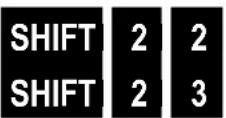
SHIFT 1 1 SHIFT 1 2 SHIFT 1 3 SHIFT 2 1Vsota kvadratov
Vsota vrednosti
Prikaz vrednosti
Aritmetična sredina
_n
_n - 1
Skupni odklon
Vzorčni odklon
Primer:
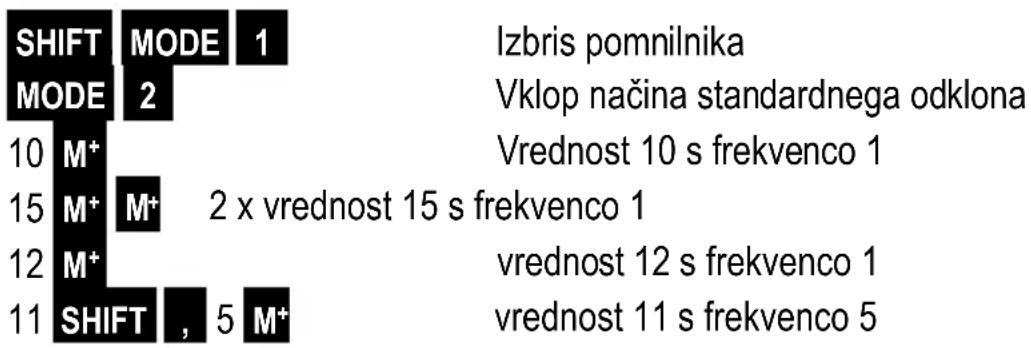
n, x , x^2 , , _n , _n-1 za vrednosti: 10, 15, 15, 12, 11, 11, 11, 11, 11, 11
text_image
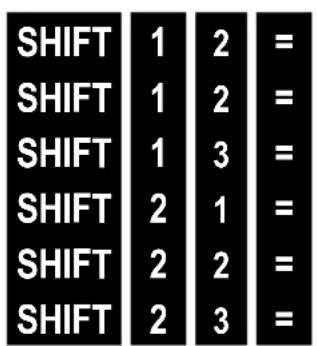
SHIFT 1 2 = SHIFT 1 2 = SHIFT 1 3 = SHIFT 2 1 = SHIFT 2 2 = SHIFT 2 3 =text_image
SHIFT MODE 3 = MODE 3 1Brisanje pomnilnika in spremenljivk
Nastavljanje načina linearne regresije
Podatki:
text_image
7 , 105 M+ 12 , 170 M+ 15 , 230 M+ 21 , 300 M+ 26 , 385 M+Par podatkov 1 Frekvenca 1
Par podatkov 2 Frekvenca 1
Par podatkov 3 Frekvenca 1
Par podatkov 4 Frekvenca 1
Par podatkov 5 Frekvenca 1
Rezultati:
| SHIFT | MODE | 3 | = |
| MODE | 3 | ▶ | 3 |
Brisanje pomnilnika in spremenljivk
Nastavljanje načina kvadratne regresije
Podatki:
| 9 | , | 30 | M+ |
| 12 | , | 50 | M+ |
| 14 | , | 70 | M+ |
| 30 | , | 90 | M+ |
| 35 | , | 95 | M+ |
| 40 | , | 90 | M+ |
| 47 | , | 75 | M+ |
| 51 | , | 60 | M+ |
| 55 | , | 45 | M+ |
| 60 | , | 30 | M+ |
| A | ÷ |
| B | ( |
| C | ( |
| D | - |
| E | ÷ |
| F | ( |
| G | + |
Polja za vnos
text_image
10 x 5 SHIFT RCL M+ 25 M+ 200 ÷ 5 SHIFT M+ RCL M+1 ab/c 1 ab/c 3 + 1 ab/c 5 =
1/2 + 0,3
1 ab/c 2 + 0 . 3 =
1,5 jako zlomek
1 . 5 = ab/c 1 . 5 = SHIFT ab/c
ab/c 1 ab/c 3 = SHIFT ab/c
Výpočet procent
25 x 4 = SHIFT RCL ALFA M+
ALFA M+ x 10 SHIFT = +
1」8」15,
0.8
1」1」2,
3」2,
0,25
4」3,
20,
1,050,
950,
4,
140,
110,
(12, 13, 21, 23, 31, 32)
3 nPr 2 =
6,
MODE MODE 1 SHIFT EXP SHIFT Ans 2 =
MODE MODE 3 90 SHIFT Ans 1 =
text_image
1 = ENG ENG ENG SHIFT ENG| 1,00 |
| 1.000,03 |
| 1.000,000,06 |
| 1.000,03 |
Statistické výpočty
text_image
SHIFT 2 1 SHIFT 2 2 SHIFT 2 3Aritmetický průměr
Celková odchylka
Výběrová odchylka
Příklad:
n, x , x^2 , , _n , _n-1 pro hodnoty: 10, 15, 15, 12, 11, 11, 11, 11, 11
text_image
SHIFT MODE 1 MODE 2 10 M+ 15 M+ M+ 12 M+ 11 SHIFT , 5 M+Pamět smazat
Zapnout režim SD
text_image
SHIFT 1 2 = SHIFT 1 2 = SHIFT 1 3 = SHIFT 2 1 = SHIFT 2 2 = SHIFT 2 3 =text_image
SHIFT MODE 3 = MODE 3 1| SHIFT | MODE | 3 | = |
| MODE | 3 | ▶ | 3 |
| A | ÷ |
| B | ( |
| C | ( |
| D | - |
| E | ÷ |
| F | ( |
| G | + |
Vstupní oblasti
Interní místa: 12
text_image
1 . 5 = ab/c 1 . 5 = SHIFT ab/cDesatinná hodnota z 1/4

(12, 13, 21, 23, 31, 32)
3 nPr 2 =
6,
text_image
MODE MODE 1 SHIFT EXP SHIFT Ans 2 =text_image
1 = ENG ENG ENG SHIFT ENG| 1,00 |
| 1.000,03 |
| 1.000,000,06 |
| 1.000,03 |
Štatistické výpočty
| SHIFT | 1 | 2 | = |
| SHIFT | 1 | 2 | = |
| SHIFT | 1 | 3 | = |
| SHIFT | 2 | 1 | = |
| SHIFT | 2 | 2 | = |
| SHIFT | 2 | 3 | = |
text_image
SHIFT MODE 3 = MODE 3 1Vymazat' pamät' a premenné
| SHIFT | MODE | 3 | = |
| MODE | 3 | ▶ | 3 |
Vymazat' pamät' a premenné
| SHIFT | 2 | 1 | ||
| SHIFT | 2 | 2 | ||
| SHIFT | 2 | 3 |
Regresný koefizient A
| A | ÷ |
| A | ( |
| A | ( |
| D | - |
| D | ÷ |
| D | ( |
| G | + |
Oblasti zadávania
Interné miesta: 12
Presnost: Vo všeobecnosti je presnost ± 1 na 10. mieste.
| Funkcie | Oblast' zadávania |
| sinx | DEG: 0≤|x| ≤ 4,499999999 x 10¹⁰ |
| RAD: 0≤|x| ≤ 785398163,3 | |
| GRA: 0≤|x| ≤ 4,99999999 x 10¹⁰ | |
| cosx | DEG: 0≤|x| ≤ 4,500000008 x 10¹⁰ |
| RAD: 0≤|x| ≤ 785398164,9 | |
| GRA: 0≤|x| ≤ 5,000000009 x 10¹⁰ | |
| tanx | DEG: Rovnaké ako sinx, okrem prípadov, ked' |x| = (2n-1)x 90 |
| RAD: Rovnaké ako sinx, okrem prípadov, ked' |x| = (2n-1) x π/2 | |
| GRA: Rovnaké ako sinx, okrem prípadov, ked' |x| = (2n-1)x 100 | |
| sin-1x | 0 ≤ |x| ≤ 1 |
| cos1-x | |
| tan-1x | 0 ≤ |x| ≤ x 9,999999999 x 1099 |
| sin hx | 0 ≤ |x| ≤ x 230,2585092 |
| cos hx | |
| sin h-1x | 0 ≤ |x| ≤ x 4,999999999 x 1099 |
| cos h-1x | 1 ≤ x ≤ x 4,999999999 x 1099 |
| tanhx | 0 ≤ |x| ≤ x 9,999999999 x 1099 |
| tan h-1x | 0 ≤ |x| ≤ x 9,999999999 x 10⁻¹ |
| log x / In | 0 < x ≤ 9,999999999 x 1099 |
| 10x | -9,999999999 x 1099 ≤ x ≤ 99,99999999 |
| ex | -9,999999999 x 1099 ≤ x ≤ 230,2585092 |
| √x | 0 ≤ x < 1 x 10100 |
| x2 | |x| < 1 x 1050 |
| 1/x | |x| < 1 x 10100; x ≠ 0 |
| 3√x | |x| < 1 x 10100 |
| x! | 0≤ x ≤ 69 (x je celé číslo) |
| nPr | 0≤ n < 1x10¹⁰, 0≤ r ≤ n(n,r sú celé čísla)1 ≤ {n! / (n -)!}<1x10100 |
| nCr | 0≤ n < 1x10¹⁰, 0≤ r ≤ n(n,r sú celé čísla)1 ≤ [n! / {r! (n -)!}]<1x10100 |
| Pol(x,y) | |x|, |y| ≤ 9,999999999 x 1049(x2+y2) ≤ 9,999999999 x 1099 |
| Rec(r,θ) | 0 ≤ r ≤ x 9,999999999 x 1099θ: (Rovnaké ako sin x) |
| °: " | |a|, b, c<1x101000≤b,c |
| °: " | |x| <1x10100(Desatinné <> Sexagesimal-premena)0°0°0° ≤ |x| ≤ 999999°59 |
| ^ (x y) | x >0: -1x10000000000000000000000000000000000000000000000000000000000000000000000000000000000000000000000000000 |
| x√y | y>0: x ≠0-1x10100<1/ xlog y<100y = 0: x >0y < 0: x = 2n 1/n(n je celé číslo)Avšak: -1x10100< ylog |x|<100 |
| a b/c | Súčet miest pre celé číslo, čitatel' a menovatel' nesmie byt' viac ako 10 číslic (vrátane značiek delenia) |
| SD(REG) | |x| <1x1050 xσn, yσn, x̄, ȳ: n ≠ 0|y| <1x1050 xσn - 1, yσn - 1, A, B, r:|n| <1x10100 n≠ 0, 1 |
1 Sabit virgül (Fix) 2 Üstel (Sci) 3 Normal (Norm)
1 ab/c 1 ab/c 3 + 1 ab/c 5 =
1/2 + 0,3
1 ab/c 2 + 0 . 3 =
Kesir olarak 1,5
1 . 5 = ab/c 1 . 5 = SHIFT ab/c
ab/c 1 ab/c 3 = SHIFT ab/c
Yüzde hesaplamaları
25 x 4 = SHIFT RCL ALFA M+
ALFA M+ x 10 SHIFT = +
1」8」15,
0.8
1」1」2,
3」2,
0,25
4」3,
20,
1,050,
950,
4,
140,
110,
2 ..., 20 ..., + 0 ..., 45 ..., =
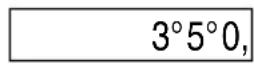
3^5^0,
20' × 1,5
0 ,,, 20 ,,, x 1.5 =
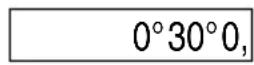
0^30^0,
12,567 = SHIFT 0 x 3 =
12,57 37,71
(12, 13, 21, 23, 31, 32)
3 nPr 2 =
6,
MODE MODE 1 SHIFT EXP SHIFT Ans 2 =
MODE MODE 3 90 SHIFT Ans 1 =
(X=0.866025403, Y=0,5)
text_image
1 = ENG ENG ENG SHIFT ENG| 1,00 |
| 1.000,03 |
| 1.000,000,06 |
| 1.000,03 |
| SHIFT | 1 | 1 |
| SHIFT | 1 | 2 |
| SHIFT | 1 | 3 |
| SHIFT | 2 | 1 |
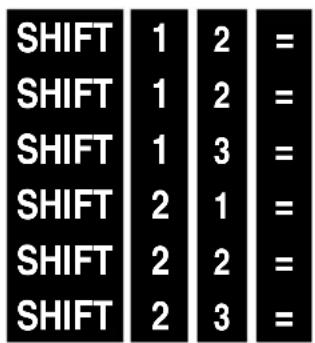
Karelerin toplamı
Değerlerin toplamı
Değerlerin sayısı
Aritmetik ortalama
_n _n - 1
Toplam sapma
Test sapması
Örnek:
n, x , x^2 , , _n , _n-1 su değerler için: 10, 15, 15, 12, 11, 11, 11, 11, 11
text_image
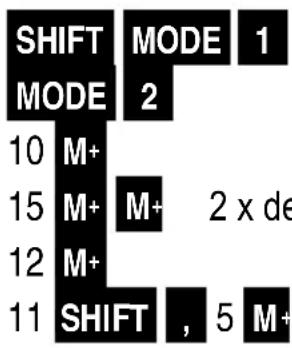
SHIFT MODE 1 MODE 2 10 M+ 15 M+ M+ 2 x de 12 M+ 11 SHIFT , 5 M+Belleği sil
SD modunu aç
Değer 10, sıklık 1
Değer 12, sıklık 1
Değer 11, sıklık 5
text_image
SHIFT 1 2 = SHIFT 1 2 = SHIFT 1 3 = SHIFT 2 1 = SHIFT 2 2 = SHIFT 2 3 =text_image
SHIFT MODE 3 = MODE 3 1| SHIFT | MODE | 3 | = |
| MODE | 3 | ▶ | 3 |
| A | ÷ |
| B | ( |
| C | ( |
| D | - |
| E | ÷ |
| F | ( |
| G | + |
Giriş alanları
text_image
10 x 5 SHIFT RCL M+ 25 M+ 200 ÷ 5 SHIFT M+ RCL M+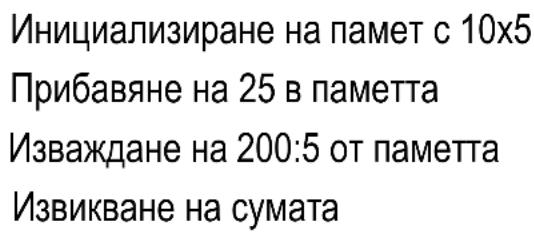
text_image
1 . 5 = ab/c 1 . 5 = SHIFT ab/c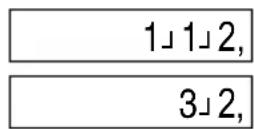
text_image
25 x 4 = SHIFT RCL ALFA M+ ALFA M+ x 10 SHIFT = +110,
(12, 13, 21, 23, 31, 32)
3 nPr 2 =
6,
MODE MODE 1 SHIFT EXP SHIFT Ans 2 =
MODE MODE 3 90 SHIFT Ans 1 =
text_image
1 = ENG ENG ENG SHIFT ENG| 1,00 |
| 1.000,03 |
| 1.000,000,06 |
| 1.000,03 |
n, Σx, Σx², , σₙ, σₙ₋₁ за стойностите: 10, 15, 15, 12, 11, 11, 11, 11, 11
text_image
SHIFT PEEKIM 3 = MODE 3 1| SHIFT | MODE | 3 | = |
| MODE | 3 | ▶ | 3 |
| SHIFT | 2 | 1 | ||
| SHIFT | 2 | 2 | ||
| SHIFT | 2 | 3 |
| A | ÷ |
| A | ( |
| A | ( |
| A | - |
| A | ÷ |
| A | ( |
| G | + |
Полета за въвеждане
text_image
10 x 5 SHIFT RCL M+ 25 M+ 200 ÷ 5 SHIFT M+ RCL M+1 ab/c 1 ab/c 3 + 1 ab/c 5 =
1」8」15,
1/2 + 0.3
1 ab/c 2 + 0 . 3 =
0.8
1,5 ca fractie
1 . 5 = ab/c 1 . 5 = SHIFT ab/c
1」1」2, 3」2,
ab/c 1 ab/c 3 = SHIFT ab/c
4」3,
Calcul procentaj
25 x 4 = SHIFT RCL ALFA M+
ALFA M+ x 10 SHIFT = +
110,
Calcule cu grade (ore), minute, secunde
(12, 13, 21, 23, 31, 32)
3 nPr 2 =
6,
Conversia valorii de unghi
MODE MODE 1 SHIFT EXP SHIFT Ans 2 =
MODE MODE 3 90 SHIFT Ans 1 =
text_image
1 = ENG ENG ENG SHIFT ENG| 1,00 |
| 1.000,03 |
| 1.000,000,06 |
| 1.000,03 |
Calcule statistice
text_image
Introducere = SHIFT MODE Introducere M+n, x , x^2 , , _n , _n-1 pentru valorile: 10, 15, 15, 12, 11, 11, 11, 11, 11, 11
tree
| Node | Mode | Value | | :--- | :--- | :--- | | 1 | SHIFT | 5 | | 2 | MODE | 1 | | 3 | M+ | | | 4 | 10 | M+ | | 5 | M+ | | | 6 | 15 | M+ | | 7 | 12 | M+ | | 8 | SHIFT | 5 | | 9 | 11 | Valoarea 11 cu frecventa 5 | | 10 | M+ | | | 11 | Shift | | | 12 | M+ | | | 13 | M+ | | | 14 | M+ | | | 15 | M+ | | | 16 | M+ | | | 17 | M+ | | | 18 | M+ | | | 19 | M+ | | | 20 | M+ | | | 21 | M+ | | | 22 | M+ | | | 23 | M+ | | | 24 | M+ | | | 25 | M+ | | | 26 | M+ | | | 27 | M+ | | | 28 | M+ | | | 29 | M+ | | | 30 | M+ | | | 31 | M+ | | | 32 | M+ | | | 33 | M+ | | | 34 | M+ | | | 35 | M+ | | | 36 | M+ | | | 37 | M+ | | | 38 | M+ | | | 39 | M+ | | | 40 | M+ | | | 41 | M+ | | | 42 | M+ | | | 43 | M+ | | | 44 | M+ | | | 45 | M+ | | | 46 | M+ | | | 47 | M+ | | | 48 | M+ | | | 49 | M+ | | | 50 | M+ | | | 51 | M+ | | | 52 | M+ | | | 53 | M+ | | | 54 | M+ | | | 55 | M+ | | | 56 | M+ | | | 57 | M+ | | | 58 | M+ | | | 59 | M+ | | | 60 | M+ | | | 61 | M+ | | | 62 | M+ | | | 63 | M+ | | | 64 | M+ | | | 65 | M+ | | | 66 | M+ | | | 67 | M+ | | | 68 | M+ | | | 69 | M+ | | | 70 | M+ | | | 71 | M+ | | | 72 | M+ | | | 73 | M+ | | | 74 | M+ | | | 75 | M+ | | | 76 | M+ | | | 77 | M+ | | | 78 | M+ | | | 79 | M+ | | | 80 | M+ | | | 81 | M+ | | | 82 | M+ | | | 83 | M+ | | | 84 | M+ | | | 85 | M+ | | | 86 | M+ | | | 87 | M+ | | | 88 | M+ | | | 89 | M+ | | | 90 | M+ | | | 91 | M+ | | | 92 | M+ | | | 93 | M+ | | | 94 | M+ | | | 95 | M+ | | | 96 | M+ | | | 97 | M+ | | | 98 | M+ | | | 99 | M+ | | | 100: Ştergerea memoriei Pornirea modului SD Valoarea 10 cu frecventa 1 Valoarea 12 cu frecventa 1 Valoarea 11 cu frecventa 5| SHIFT | 1 | 2 | = | Σx2 suma pătratelor | 1.299, |
| SHIFT | 1 | 2 | = | Σx suma valorilor | 107, |
| SHIFT | 1 | 3 | = | n numărul de valori | 9, |
| SHIFT | 2 | 1 | = | media aritmetică | 11,88888889 |
| SHIFT | 2 | 2 | = | σ_n abatere totală | 1,728483243 |
| SHIFT | 2 | 3 | = | σ_n-1 abatere de eşantion | 1,833333333 |
text_image
SHIFT MODE 3 = MODE 3 1| SHIFT | MODE | 3 | = |
| MODE | 3 | ▶ | 3 |
| SHIFT | 2 | 1 | ||
| SHIFT | 2 | 2 | ||
| SHIFT | 2 | 3 |
Coeficient de regresie A Coeficient de regresie B Coeficient de regresie C
| -11,37086377 |
| 6,332638377 |
| -0,095418311 |
Valori estimate:
| 80 | SHIFT | 2 | 1 | |||
| 80 | SHIFT | 2 | 2 | |||
| 20 | SHIFT | 2 | 3 |
| A | ÷ |
| A | ( |
| A | ( |
| A | - |
| A | ÷ |
| A | ( |
| G | + |
Domenii de introducere
Cifre interne: 12
1 ab/c 1 ab/c 3 + 1 ab/c 5 =
1/2 + 0.3
1 ab/c 2 + 0 . 3 =
1,5 ως κλάσμα
1 . 5 = ab/c
1.5 = SHIFT ab/c
ab/c 1 ab/c 3 = SHIFT ab/c
1」8」15,
0.8
1」1」2,
3」2,
0,25
4」3,
25 x 4 = SHIFT RCL ALFA M+
text_image
In 25 = 3,218875825$$ \log 25 = 1,397940009 $$
Βάση το ε

24,5325302
Βάση το 10

25,11886432
Δυνάμεις
Τετράγωνο του 6:
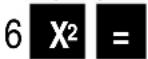
36,
Κύβος του 7:
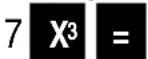
343,
4η δύναμη του 5:
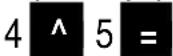
1.024,
Pížes
text_image
1 = ENG ENG ENG SHIFT ENG| 1,00 |
| 1.000,03 |
| 1.000,000,06 |
| 1.000,03 |
| SHIFT | 1 | 2 | = |
| SHIFT | 1 | 2 | = |
| SHIFT | 1 | 3 | = |
| SHIFT | 2 | 1 | = |
| SHIFT | 2 | 2 | = |
| SHIFT | 2 | 3 | = |
text_image
SHIFT MODE 3 = MODE 3 1text_image
SHIFT MODE 3 = MODE 3 ▶ 3παλινδρόμηση
Παράδειγμα: (-3) 2 = 9, -32 = -9
Συσσωρευτές
| A | ÷ |
| B | ( |
| C | ( |
| D | - |
| E | ÷ |
| F | ( |
| G | + |
Εμβέλειες εισαγωγής
Εσωτερικά ψηφία: 12
1 ab/c 1 ab/c 3 + 1 ab/c 5 =
1/2 + 0,3
1 ab/c 2 + 0 . 3 =
1,5 как дробь
1 . 5 = ab/c
1.5 = SHIFT ab/c
ab/c 1 ab/c 3 = SHIFT ab/c
1」8」15,
0.8
1」1」2,
3」2,
0,25
4」3,
25 x 4 = SHIFT RCL ALFA M+
ALFA M+ x 10 SHIFT = +
110,
2 ..., 20 ..., + 0 ..., 45 ..., =
3^5^0,
20' × 1,5
0 ,,,, 20 ,,,, x 1.5 =
0^30^0,
2 .,,, 45 .,,, = SHIFT .,,,
2,75
Округление
12,567 = SHIFT 0 x 3 =
12,57 37,71
(12, 13, 21, 23, 31, 32)
3 nPr 2 =
6,
MODE MODE 1 SHIFT EXP SHIFT Ans 2 =
MODE MODE 3 90 SHIFT Ans 1 =
text_image
1 = ENG ENG ENG SHIFT ENG| 1,00 |
| 1.000,03 |
| 1.000,000,06 |
| 1.000,03 |
| SHIFT | 1 | 2 | = |
| значения | 1.299, | ||
| SHIFT | 1 | 2 | = |
| SHIFT | 1 | 3 | = |
| SHIFT | 2 | 1 | = |
| SHIFT | 2 | 2 | = |
| SHIFT | 2 | 3 | = |
text_image
SHIFT MODE 3 = MODE 3 1| SHIFT | MODE | 3 | = |
| MODE | 3 | ▶ | 3 |
| A | ÷ |
| B | ( |
| C | ( |
| D | - |
| E | ÷ |
| F | ( |
| G | + |
Поля ввода данных
text_image
1 1/3 + 1/5 1 ab/c 1 ab/c 3 + 1 ab/c 5 =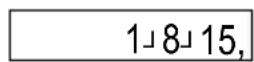
text_image
1/2 + 0,3 1 ab/c 2 + 0 . 3 =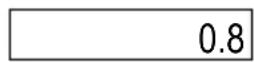
1,5 murruna
text_image
1 . 5 = ab/c 1 . 5 = SHIFT ab/c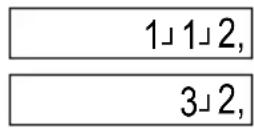
1/4 kümnendväärtus

1 1/3 liigmurruna 1

Protsendiarvutus
text_image
25 x 4 = SHIFT RCL ALFA M+
Arvutused Gradiga (tunnid), minutite, sekunditega
sin π/6 rad (π/6 Rad = 30°)
text_image
MODE MODE 3 sin ( SHIFT EXP ÷ 6 )(12, 13, 21, 23, 31, 32)
3 nPr 2 =
6,
Nurgaargumendi teisendamine
MODE MODE 1 SHIFT EXP SHIFT Ans 2 =
MODE MODE 3 90 SHIFT Ans 1 =
(X=0.866025403, Y=0,5)
MODE | MODE | 1 (kui ei ole seadistatud režiimile Deg) SHIFT | pol(1, 30) X ALFA | tan Y
0,866025403 0,866025403
text_image
1 = ENG ENG ENG 1.000,000, SHIFT ENG| 1,00 |
| 1.000,03 |
| 06 |
| 1.000,03 |
Statistikaarvutused
text_image
Sisestus = SHIFT MODE Sisestus M+Väärtust muudetakse
| SHIFT | 2 | 1 |
| SHIFT | 2 | 2 |
| SHIFT | 2 | 3 |
| SHIFT | 1 | 2 | = |
| SHIFT | 1 | 2 | = |
| SHIFT | 1 | 3 | = |
| SHIFT | 2 | 1 | = |
| SHIFT | 2 | 2 | = |
| SHIFT | 2 | 3 | = |
Σx2 Ruutude summa
Σx Väärtuste summa
n Väärtuste arv
x Aritmeetiline keskmine
_n Koguviga
_n-1 Esindusviga 1,833333333
| 1.299, |
| 107, |
| 9, |
| 11,88888889 |
| 1,728483243 |
text_image
SHIFT MODE 3 = MODE 3 1| SHIFT | MODE | 3 | = |
| MODE | 3 | ▶ | 3 |
| A | ÷ |
| B | ( |
| C | ( |
| D | - |
| E | ÷ |
| F | ( |
| G | + |
Sisestusvahemikud
Sisemised kohad: 12
1 ab/c 1 ab/c 3 + 1 ab/c 5 =
1/2 + 0,3
1 ab/c 2 + 0 . 3 =
1,5 kā dałskaitlis
1 . 5 = ab/c
1.5 = SHIFT ab/c
ab/c 1 ab/c 3 = SHIFT ab/c
Procentu aprēkini
Procentu funkciju izsauc ar taustiņu kombināciju SHIFT = .
Piemēri:
10 % no 200
200 x 10 SHIFT =
1000 + 5%
1000 x 5 SHIFT = +
1000 - 5%
1000 x 5 SHIFT = -
25 x 4 = SHIFT RCL ALFA M+
ALFA M+ x 10 SHIFT = +
1」8」15,
0.8
1」1」2,
3」2,
0,25
4」3,
20,
1,050,
950,
4,
140,
110,
(12, 13, 21, 23, 31, 32)
3 nPr 2 =
6,
MODE MODE 1 SHIFT EXP SHIFT Ans 2 =
MODE MODE 3 90 SHIFT Ans 1 =
text_image
1 = ENG ENG ENG 1.000,000, SHIFT ENG| 1,00 |
| 1.000,03 |
| 06 |
| 1.000,03 |
text_image
SHIFT MODE 3 = MODE 3 1bar
| Variable | Shift | |---|---| | Σx³ | SHIFT 1 | | Σx² y | SHIFT 1 | | Σx⁴ | SHIFT 1 | | C | SHIFT 2 | | x̂₁ | SHIFT 2 | | x̂₂ | SHIFT 2 | | ŷ | SHIFT 2 | | | SHIFT 1 | | | SHIFT 2 | | | SHIFT 3 | | | SHIFT 3 | | | SHIFT 1 | | | SHIFT 2 | | | SHIFT 2 | | | SHIFT 3 |text_image
SHIFT MODE 3 = MODE 3 ▶ 3| A | ÷ |
| B | ( |
| C | ( |
| D | - |
| E | ÷ |
| F | ( |
| G | + |
levades apgabali
lekšējās zīmes: 12
REŽIMAS REŽIMAS
cos 60 =
(jei nenustatyta i Deg)
tan 50 laipsniu 50 laipsniu = 45°)
(12, 13, 21, 23, 31, 32)
3 2 =
6
natural_image
Abstract black geometric shape on white background (no text or symbols)Reikšmių skaičius
Aritmetinis vidurkis
Bendras nuokrypis
Imties nuokrypis
Pavyzdys :
n,Σ x,Σ x(2), ̄x, σₙ, σₙ₋₁ reikšmėms: 10, 15, 15, 12, 11, 11, 11, 11, 11, 11, 11, 11.

Išvalyti atminti
text_image
= Σx2 = = = = = =Σx2 Kvadratų suma
1.299
Σx Verčių suma
n Vertybių skaičius
x Aritmetinis vidurkis
_n Bendras nuokrypis
natural_image
Black background with six white right-pointing triangles arranged in two rows (no text or symbols)x |vertinimas
y |vertis
natural_image
Abstract black-and-white geometric pattern with white triangular shapes arranged in a grid (no text or symbols)Regresijos koeficientas C vietoj r
Pavyzdys
natural_image
Pure black rectangle with a white play button and equals sign in the top-right corner (no text or symbols beyond basic graphical elements)natural_image
Black background with six white right-pointing triangles arranged in two rows (no text or symbols)| A | ÷ |
| B | ( |
| C | ( |
| D | - |
| E | ÷ |
| F | ( |
| G | + |
lvesties sritys
text_image
1 . 5 = ab/c 1 . 5 = SHIFT ab/c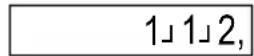
Decimalna vrijednost od 1/4

text_image
25 x 4 = SHIFT RCL ALFA M+ ALFA M+ x 10 SHIFT = + 110,Izračuni s gradijanima (satima), minutama, sekundama
text_image
12,567 = SHIFT 0 x 3 = 37,71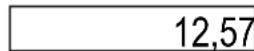
Trigonometrijske funkcije
sin π/6 rad (π/6 Rad = 30°)
MODE MODE 3 (ako nije postavljeno na radijane)
sin (SHIFT EXP ÷ 6) 0,5
cos 60°
log 25 = 1,397940009
Baza e

Baza 10

Potencije
Kvadrat od 6:
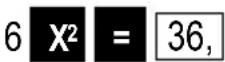
Kub od 7:
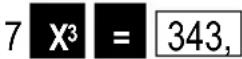
- potencija od 5:
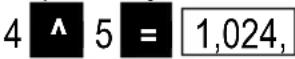
Korijeni
(12, 13, 21, 23, 31, 32)
3 nPr 2 = 6.
Pretvorba kutnog argumenta
90 SHIFT Ans 1 = 100,
Pretvorba koordinata
Rezultati izračuna pohranjuju se u varijable E (redoslijed tipki ALFA cos) i F (redoslijed tipki ALFA Tan).
Pretvori polarne koordinate (r=1, =30^ ) u pravokutne koordinate (X=0.866025403, Y=0,5)
MODE | MODE | 1 (ako nije postavljeno na stupnjeve) SHIFT | pol(1,30) X 0,866025403 ALFA | tan Y 0,866025403
| A | ÷ |
| B | ( |
| C | ( |
| D | - |
| E | ÷ |
| F | ( |
| G | + |