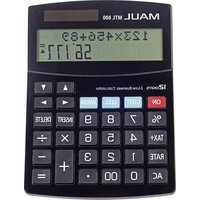
MTL 800 - Calculator MAUL - Free user manual and instructions
Find the device manual for free MTL 800 MAUL in PDF.


User questions about MTL 800 MAUL
0 question about this device. Answer the ones you know or ask your own.
Ask a new question about this device
Download the instructions for your Calculator in PDF format for free! Find your manual MTL 800 - MAUL and take your electronic device back in hand. On this page are published all the documents necessary for the use of your device. MTL 800 by MAUL.
USER MANUAL MTL 800 MAUL
| Example | Key operation | Display |
| 6 + 7 = 13 | [6] [+] [7] [=] | 6 + 713.2 |
| 10 - 6 = 4 | [1][0][-][6] [=] | 10 - 64.2 |
| 5 x 7 = 35 | [5] [x] [7] [=] | 5 x 735.2 |
| 14 ÷ 7 = 2 | [1][4][+][7] [=] | 14 ÷ 72.2 |
| 10 + 6 x 4 = 34 | [1][0][+][6][x][4][=] | 10 + 6 x 434.2 |
| Calculate 6% of 100 | [1][00][x][6][%] | 100 x 6 %6.2 |
| Add 8% to 20 | [2][0] [+] [8] [%] | 20 + 8 %21.62 |
Tastenfunktionen:
text_image
Image containing a gray square icon and two sets of symbols: one with 'T%' and another with a triangle symbol, likely representing a mathematical or logical expression.text_image
RATE TX 5.text_image
RATE TX 5.text_image
Image containing a gray icon and two sets of symbols: a square with equals sign and a horizontal line with percentage symbols.GB: Operating Instructions desktop calculator MTL 800
| Example | Key operation | Display |
| 6 + 7 = 13 | [6] [+] [7] [=] | 6 + 713.2 |
| 10 - 6 = 4 | [1][0][-][6] [=] | 10 - 64.2 |
| 5 x 7 = 35 | [5] [x] [7] [=] | 5 x 735.2 |
| 14 ÷ 7 = 2 | [1][4][+][7] [=] | 14 ÷ 72.2 |
| 10 + 6 x 4 = 34 | [1][0][+][6][x][4][=] | 10 + 6 x 434.2 |
| Calculate 6% of 100 | [1][00][x][6][%] | 100 x 6 %6.2 |
| Add 8% to 20 | [2][0] [+] [8] [%] | 20 + 8 %21.62 |
Key Operations:
[ON] : On key - Turn the power on
[AC] : All clear key - Clear contents of current calculation
[%] : Percentage key - Calculate with percentages
[DELETE] : Delete key - Delete input value
[INSERT] : Insert key - Insert input value
Automatic Power Off - Saves battery power by turning the power off if left unused for 5 to 8 minutes.
How to review calculations:
Press the "UP ARROW" or "DOWN ARROW" keys to review your previous calculations.

Press the „LEFT ARROW“ or „RIGHT ARROW“ keys to move the cursor for corrections.

How to correct a previous calculation:
Change
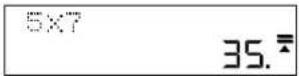
5×7=35
to 5 x 8 = 40
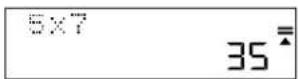
Use the „LEFT ARROW“ key to move the cursor over the 7 by pressing the arrow twice.

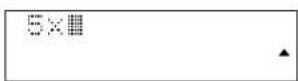
Press the 8 key to replace the 7 then press the „EQUAL“ key.

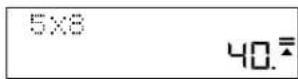
How to insert a value:
Change 5 x 8 = 40 to 5 x 78 = 390.
Use the „LEFT ARROW" key to move the cursor over the 8 by pressing the arrow twice.

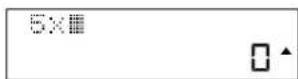
Press the „INSERT“ key, then the 7 key, then the „EQUAL“ key.

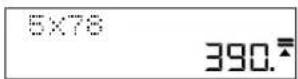
How to delete an input value:
Change 5 x 78 = 390 to 5 x 7 = 35.
Use the „LEFT ARROW“ key to move the cursor next to the number to be deleted.

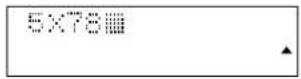
Press the „DELETE“ key to delete the relevant value then press the „EQUAL“ key.

How to calculate profit margin:
Example: Your cost is 100. Enter 100 then press the „COST“ key.
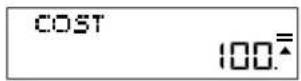
You want to sell at 150. Enter 150 then press the "SELL" key.
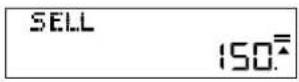
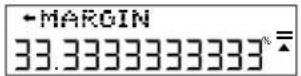
The profit margin will now automatically show. In this case the profit margin is 33.33%.
How to calculate sell price:
Example: Your cost is 100.
Enter 100 then press the „COST“ key
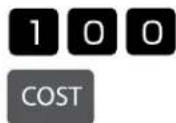
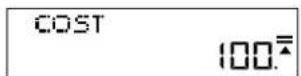
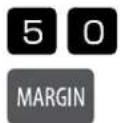
You want to make a 50 % profit margin. Enter 50 then press the „MARGIN“ key.
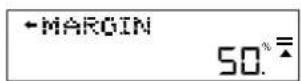
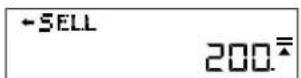
The sell price will now automatically show. In this case the sell price is 200.
How to change or set tax rate:
Press the "RATE" key and the current rate will show. In this example 5%.

text_image
RATE TX 5.Enter the value to which you wish to set or change the tax rate. In this case 7%. Enter 7 then press the „RATE“ key. You will be asked to verify the change.

text_image
7 RATE Tx=5→7?If the change is correct, press the „EQUAL“ key. The new tax rate is now set.

text_image
Image containing a gray icon and two sets of symbols: a square with equals sign and a horizontal line with percentage symbols.How to calculate price with tax:
If you are buying an item for 25 € and you want to know how much it will cost after taxes, at the rate of 7% as set in the previous step, enter 25 then press the „TAX+“ key.

text_image
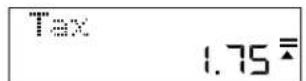
2 5 TAX+ 2526,75 € is the total price with tax included.
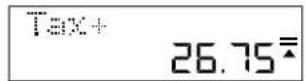
1,75 € is the tax you paid.
How to replace the battery:
-
Remove battery cover on the back of unit by removing screw.
-
Remove old battery.
-
Insert new battery (LR44) with + side up.
-
Replace the battery cover and tighten screw
Caution:
- Keep the battery out of the reach of children.
• A drained battery left in the calculator may leak and damage the calculator. - Do not throw the battery into a fire as it may explode.
Guarantee
This product has been manufactured with the utmost care and by applying the strictest quality guidelines. The material used and the manufacturing process are subject to constant testing. The guarantee is valid for five years and covers the repair of defects in the production process or in the materials used. The period of guarantee commences with the day of sale to the first user. The payment slip or the purchase bill are proof. Damage attributable to improper handling, mechanical damage or natural wear and tear as well as damage to due the batteries (if supplied) are excluded from the guarantee. In cases of manipulation by parties other than the supplier the guarantee lapses. No liability is accepted for consequential damages. Complaints in respect of recognisable defects must be reported within fourteen days after the receipt of the goods. Hidden defects should be notified immediately on discovery. Goods which have been justifiably rejected will be repaired. In case we let a reasonable period of grace pass without eliminating the defect the buyer is entitled to withdraw from the contract. In case of guarantee claims please forward the device with the receipt to the point of sale. Please, provide your name, address and a description of the defect. In the case of defects occurring outside the guarantee period a repair or replacement subject to payment of the costs is possible. In such cases, please contact again the point of sale. Nothing in the above conditions excludes the application of provisions of the EU.