
YT-82198 - Polisher Yato - Free user manual and instructions
Find the device manual for free YT-82198 Yato in PDF.


| Brand | Yato |
| Model | YT-82198 |
| Product Type | Polisher |
| Weight | 2.5 kg |
| Rated Voltage | 230-240 V~ |
| Rated Frequency | 50 Hz |
| Rated Power | 1400 W |
| Rated Speed | 600-3200 min⁻¹ |
| Polishing Disc Diameter | 180 mm |
| Accessory Thread | M14 |
| Sound Pressure Level (LpA) | 83.6 dB(A) ± 3.0 |
| Sound Power Level (LwA) | 91.6 dB(A) ± 3.0 |
| Vibration Level (ah) | 6.36 m/s² ± 1.5 |
| Insulation Class | II |
| IP Protection Degree | IPX0 |
| Main Functions | Polishing, electronic speed control, spindle lock, adjustable auxiliary handle (right-handed/left-handed) |
| Maintenance and Cleaning | Clean with air jet (max 0.3 MPa), brush or dry cloth. Do not use chemicals. |
| Safety | Wear eye and ear protection mandatory. Use with both hands. Do not use for grinding or cutting. |
| Spare Parts and Repairability | Polishing disc, protective cover, auxiliary handle. Repair by authorized workshop using original parts. |
| General Information | Domestic and professional use for polishing metals, wood and mineral materials. |
Frequently Asked Questions - YT-82198 Yato
User questions about YT-82198 Yato
0 question about this device. Answer the ones you know or ask your own.
Ask a new question about this device
Download the instructions for your Polisher in PDF format for free! Find your manual YT-82198 - Yato and take your electronic device back in hand. On this page are published all the documents necessary for the use of your device. YT-82198 by Yato.
USER MANUAL YT-82198 Yato
CE

PL
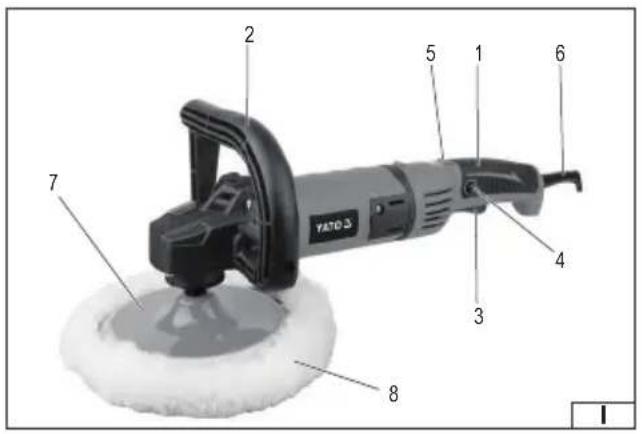
- body with grip holder
- auxiliary grip handle
- electric switch
- switch lock
- rotation control
- power cord with plug
- polishing wheel
- polishing pad
DE
Wear protective goggles
Wear hearing protectors
Always work the grinder holding it with two hands
Second class of insulation
This symbol indicates that waste electrical and electronic equipment (including batteries and storage cells) cannot be disposed of with other types of waste. Waste equipment should be collected and handed over separately to a collection point for recycling and recovery, in order to reduce the amount of waste and the use of natural resources. Uncontrolled release of hazardous components contained in electrical and electronic equipment may pose a risk to human health and have adverse effects for the environment. The household plays an important role in contributing to reuse and recovery, including recycling of waste equipment. For more information about the appropriate recycling methods, contact your local authority or retailer.
The polisher is an electrical tool designed for polishing and preserving surfaces of metal, wood and mineral materials. It facilitates and speeds up conservation work. Under no circumstances may the tool be used for processing materials other than those listed above, e.g. for grinding and cutting. The correct, reliable and safe operation of the polisher depends on its proper use, therefore before use:
Before using the tool, read the entire manual and keep it.
Always wear eye protection!
Do not use polishing discs and covers with a maximum permissible peripheral speed of less than 80 m/s!
Do not use polishing discs or covers with a maximum permissible rotational speed lower than the rotational speed of the tool.
The supplier is not liable for any damage resulting from failure to comply with the safety regulations and recommendations of this manual.
EQUIPMENT
The polisher is supplied with the following equipment:
- additional handle
- polishing disc
- shield cover
TECHNICAL PARAMETERS
| Parameter Unit of measurement Value | ||
| Catalogue number YT-82198 | ||
| Nominal voltage [V~] 230 - 240 | ||
| Nominal frequency [Hz] 50 | ||
| Rated power [W] 1400 | ||
| Rated speed [min] | -1 600 - 3200 | |
| Polishing wheel diameter [mm] 180 | ||
| Polishing disc attachment M14 | ||
| Mass | [kg] | 2.5 |
| Noise level | ||
| - sound pressure LpA ± KpA | [dB (A)] | 83.6 ± 3.0 |
| - power LwA ± KwA | [dB (A)] | 91.6 ± 3.0 |
| Vibration level ab ± K | [m/s 2 ] | 6.36 ± 1.5 |
| Insulation class | II | |
| Degree of protection | IPX0 |
The declared noise emission value has been measured using a standard test method and can be used to compare one tool with another. The declared noise emission value can be used in a preliminary exposure assessment.
The declared vibration total value has been measured using a standard test method and can be used to compare one tool with another. The declared vibration total value can be used in a preliminary assessment of exposure.
Note! Vibration emission during tool operation may differ from the declared value depending on how the tool is used.
Note! Safety measures to protect the operator must be defined that are based on an assessment of exposure in the actual conditions of use (including all parts of the operating cycle, such as times when the tool is switched off or idle and activation time).
GENERAL POWER TOOL SAFETY WARNINGS
Warning! Please read all safety warnings, illustrations and specifications provided with this power tool. Failure to follow them may result in electric shock, fire or serious injury.
Save all warnings and instructions for future reference.
The term "power tool" used in the warnings refers to all corded and cordless electric power tools.
Workplace safety
Keep your work area clean and well lit. Clutter and poor lighting can cause accidents.
Do not operate power tools in explosive atmospheres, such as in the presence of flammable liquids, gases or fumes.
Power tools create sparks which may ignite the dust or fumes.
EN
Do not allow children or bystanders into the work area. Loss of concentration can cause loss of control.
Electrical safety
The plug on the electric cord must match the outlet. Do not modify the plug in any way. Do not use any plug adapters with grounded power tools. An unmodified plug that matches the outlet reduces the risk of electric shock.
Avoid body contact with grounded surfaces such as pipes, radiators, and refrigerators. Grounding your body increases the risk of electric shock.
Do not expose power tools to precipitation or moisture. Water or moisture entering a power tool will increase the risk of electric shock.
Do not overload the power cord. Do not use the power cord to carry, pull, or disconnect the plug from the wall outlet. Keep the power cord away from heat, oil, sharp edges, and moving parts. A damaged or entangled power cord increases the risk of electric shock.
When working outdoors, use extension cords designed for outdoor use. Using an extension cord designed for outdoor use reduces the risk of electric shock.
If using a power tool in a damp environment is unavoidable, a residual current device (RCD) should be used as protection against supply voltage. The use of an RCD reduces the risk of electric shock.
Personal safety
Stay alert, watch what you are doing and use common sense when operating a power tool. Do not use a power tool while tired or under the influence of drugs, alcohol or medication. Even a moment of inattention while operating a power tool can result in serious personal injury.
Use personal protective equipment. Always wear eye protection. The use of personal protective equipment such as dust masks, non-skid safety shoes, hard hats, and hearing protection reduces the risk of serious personal injury.
Prevent accidental starting. Ensure that the power switch is in the “off” position before connecting to power source and/or battery pack, picking up or carrying the power tool. Carrying a power tool with your finger on the switch or energizing a power tool that has the switch in the “on” position can result in serious injury.
Remove any wrench or key that is used to adjust the power tool before turning it on. A wrench or key left attached to a rotating part of the power tool may result in serious injury.
Do not overreach or overextend. Maintain proper posture and balance at all times. This will make it easier to control the power tool in the event of unexpected situations while working.
Dress appropriately. Do not wear loose clothing or jewelry. Keep hair and clothing away from moving parts of the power tool. Loose clothing, jewelry, or long hair can be caught in moving parts.
If devices are provided for the connection of dust extraction or dust collection facilities, ensure that these are connected and used correctly. The use of dust extraction reduces the risk of dust-related hazards.
Don't let the experience gained from frequent use of the tool cause you to become careless and ignore safety rules.
Careless action can cause serious injuries in a split second.
Use and care of power tools
Do not overload the power tool. Use the correct power tool for the selected application. The correct power tool will provide better and safer work when used for the designed load.
Do not use a power tool if the power switch does not turn it on and off. A tool that cannot be controlled with the power switch is dangerous and must be repaired.
Disconnect the plug from the power outlet and/or remove the battery pack if detachable from the power tool before making any adjustments, changing accessories, or storing the tool. Such precautions will prevent the power tool from being switched on accidentally.
Store the tool out of the reach of children, do not allow persons unfamiliar with the power tool or these instructions to use the power tool. Power tools are dangerous in the hands of untrained users.
Maintain power tools and accessories. Check the tool for misalignment or binding of moving parts, breakage of parts and any other condition that may affect the power tool's operation. Any damage should be repaired before using the power tool. Many accidents are caused by poorly maintained tools.
Cutting tools should be kept clean and sharp. Properly maintained cutting tools with sharp edges are less likely to bind and are easier to control during operation.
Use power tools, accessories and attachments etc. in accordance with these instructions, taking into account the type and conditions of work. Use of tools for work other than those designed may result in a hazardous situation.
Keep handles and gripping surfaces dry, clean and free from oil and grease. Slippery handles and gripping surfaces do not allow safe operation and control of the tool in hazardous situations.
Repairs
Have your power tool repaired only by authorized service centers, using only original spare parts. This will ensure proper safety of your power tool.
ADDITIONAL SAFETY INSTRUCTIONS
The tool is intended for polishing only. Read all warnings, instructions, illustrations and specifications provided with the power tool. Failure to follow all instructions listed below may result in electric shock, fire and/or serious injury.
Do not convert this tool to perform a job for which it was not designed and specified by the manufacturer. Such conversion could result in loss of control and cause serious injury.
Using the tool as a grinder, cutter or in any other way than described in the instructions is prohibited. Working with the tool for which it was not intended may create a risk and result in personal injury.
Do not use accessories that have not been designed and intended by the manufacturer. Just because accessories can be attached to the tool does not mean that they guarantee safe operation.
The maximum speed of the accessory must be equal to or greater than the maximum speed of the tool. Accessories with a lower speed than the tool may fall to pieces during operation.
The outside diameter and thickness of accessories must be within the size range specified for the tool. Accessories of incorrect size cannot be properly guarded and handled.
The mounting hole size of wheels, discs, flanges and other accessories must match the spindle size of the tool. Accessories whose mounting hole size does not match the spindle size of the tool will vibrate when started and this may cause loss of control of the tool.
Do not use damaged accessories. Before each use, inspect accessories for chips, cracks, abrasions and excessive wear. If accessories are dropped, inspect them for damage or install new, undamaged accessories. After inspecting and installing accessories, position yourself and bystanders outside the plane of rotation of the accessories, then run the tool for one minute at maximum speed. Damaged accessories will be destroyed during the test.
Use personal protective equipment. Depending on the application, use face shields, goggles or safety glasses. If required, wear dust masks, ear protection, gloves and aprons that protect against small pieces of accessories or materials generated during work. Eye protection must be capable of stopping flying debris generated during work. Dust mask must be capable of filtering dust generated during work. Prolonged exposure to noise can result in hearing loss.
Maintain a safe distance between the work area and bystanders. People entering the work area must use personal protective equipment. Fragments generated during work or fragments of damaged accessories may fly outside the immediate work area.
When performing an operation where the wheel may contact a hidden live wire or the power cord, hold the grinder only by insulated gripping surfaces. The wheel contacting a live wire may cause metal parts of the tool to become live and could give the operator an electric shock.
Keep the power cord away from rotating parts of the tool. If you lose control of the tool, the cord can be cut or snagged, and your hand or arm can be pulled into the rotating parts of the machine.
Never lay the tool down until the rotating parts have come to a complete stop. The rotating parts can „grab” the ground and throw the tool out of control.
Do not start the tool while carrying it. Accidental contact with rotating parts can cause clothing to be caught and pulled in and the tool to contact the operator's body.
The tool's ventilation openings should be cleaned regularly. The motor fan draws dust and dirt generated during operation into the tool. Excessive accumulation of metal particles contained in the dust increases the risk of electric shock.
Do not operate the tool near flammable materials. Sparks generated during operation may cause fire.
Do not use accessories that require liquid cooling. Water or coolant may cause electric shock electric.
The thread size of the accessory must match the spindle thread of the grinder. For accessories mounted with collars, the accessory mounting hole must match the size of the mounting collar. Accessories that do not match the mounting of the power tool will cause imbalance, excessive vibration and may cause loss of control.
Warnings related to tool kickback towards operator
Kickback is a sudden reaction to a pinched or jammed disc, polishing belt, brush or other accessory. Pinching or binding causes the rotating accessory to stop abruptly, causing the power tool to rotate in the direction opposite to the accessory's rotation.
For example, if an abrasive wheel is pinched or pinched by the workpiece, the edge of the wheel that enters the pinch point can dig into the surface of the material causing the wheel to pull out or be thrown.
The wheel may also be thrown toward or away from the operator, depending on the direction of movement of the wheel at the point of pinch. Abrasive wheels may also break under these conditions.
Kickback of the tool towards the operator is the result of improper use and/or failure to follow the instructions in the operating instructions. The phenomenon can be avoided by following the recommendations below.
A firm grip on the tool and proper body and arm position will help you resist kickback forces. Always use the auxiliary handle, if supplied with the tool, to provide maximum control in the event of kickback or unexpected rotation when starting the tool. The operator is able to control tool rotation or kickback if proper precautions are taken.
Never place your hand near rotating parts of the tool. The rotating parts may, during kickback, contact your hand.
Do not position yourself in the area where the tool will move during a kickback. The kickback will force the tool in the opposite direction of the grinding wheel's rotation, where it will pinch.
Be especially careful when working near corners, sharp edges, etc. Avoid bouncing or jamming the grinding disc. When
EN
working on corners or edges, there is an increased risk of jamming the disc abrasive, leading to loss of tool control or tool kickback. Do not use chain saw blades for woodworking, segmented diamond blades with a circumferential gap between segments greater than 10 mm or toothed saw blades. Such blades cause frequent kickback and loss of control of the tool.
Warnings related to polishing
Do not allow any loose part of the polishing cover or drawstrings to spin freely. Clip or cut off any loose drawstrings. Loose drawstrings can become entangled in the operator's fingers or caught in the workpiece.
INSTALLATION OF EQUIPMENT ELEMENTS
Installing the additional handle
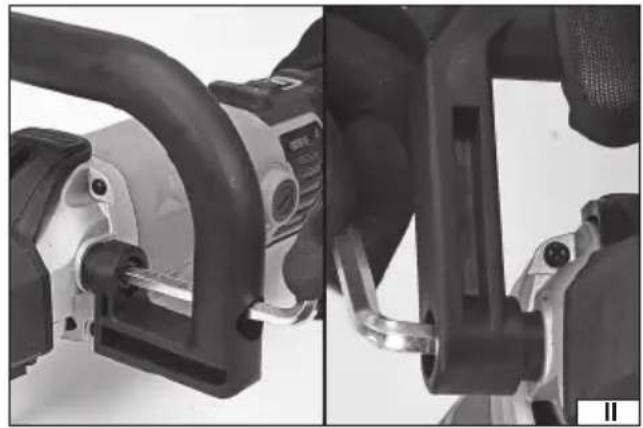
The handle is screwed into place with recesses that make it easier to attach the handle to the tool head and set it at the desired angle. Place the handle on the sockets in the housing, set it at the desired angle, and then attach the additional handle by screwing it securely and firmly to the tool head (II). It is forbidden to work without the additional handle installed. Note! The polisher allows for mounting the handle in both right- and left-handed versions.
ATTENTION! The polishing disc may only be operated when the supply voltage is disconnected. Pull the polisher cable plug out of the socket!
Polishing disc assembly
Disconnect the power supply from the tool by unplugging the power cord from the wall outlet.
Screw the polishing disc onto the spindle.
Press the spindle lock (IV) and tighten the polishing disc.
Release the lock
Insert the tool's electrical cord plug into the socket, switch on the polisher and observe its operation without any load for about 1 minute. Remove the plug from the socket and check the mounting of the disc.
Putting on covers
Make sure that the cover you are installing is free from any defects. Covers that show visible cracks, tears, fraying, or any other damage or deformation are not allowed.
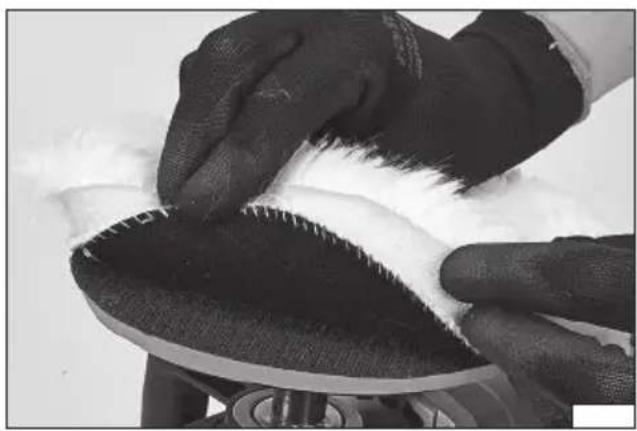
A polishing cover is supplied with the polisher and it is not recommended to use it to apply polishes or other polishing agents. The disc supplied with the polisher is equipped with Velcro, which allows the attachment of a cover equipped with Velcro. In addition, other covers and other discs equipped with a threaded fastening of the size specified in the table can be attached. When applying covers equipped with Velcro, they should be placed concentrically on the polishing disc (III).
Non-concentric placement of the cover may cause vibrations during operation, which in turn may lead to uneven working results, damage to the polished surface and, in extreme cases, even to the destruction of the cover, disc or polished surface.
Note! When securing covers equipped with a string at the edge of the cover, it must be tied securely and tightly so that it does not come undone during use.
Removing the polishing disc
Turn off the polisher and disconnect the polisher's electrical plug from the wall outlet.
Press the spindle lock and unscrew the polishing disc from the spindle.
USING THE POLISHER
Unplug the tool from the electrical outlet!
Before starting to work with the tool, check that the housing body and the connecting cable with the plug are not damaged. If any damage is visible, it is forbidden to connect the device to the mains!
Check if the polishing disc is not damaged. If there are any cracks, scratches or other damage, replace the disc with a new one without these defects.
Working with damaged discs is prohibited!
Select the appropriate type of polishing disc cover for the type of work.
Wear eye protection, hearing protection, and work gloves.
Check that the switch is in the "off" position. Then insert the device's electrical cord plug into a power outlet.
Adopt a proper posture to ensure balance and turn the polisher on using the switch.
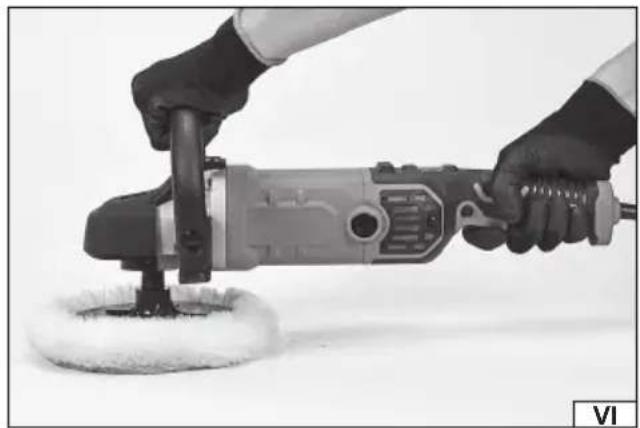
Start working by gently applying the disc with the entire side surface to the processed material (VI). During work, do not exert too much pressure on the processed surface. Move the tool in smooth movements towards and away from you. Observe the effects of work and adjust the rotational speed and pressure of the polishing disc. If using polishing agents, read the documentation supplied with them before starting work.
EN
The polisher must not be overloaded - the temperature of the external surfaces must never exceed 60 °C.
After finishing work, turn the tool off, unplug the power cord from the wall outlet and inspect it.
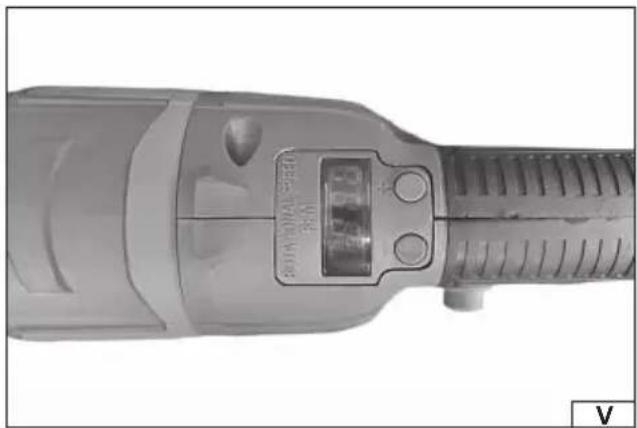
Speed control (V)
The polisher has a speed control using buttons located above the switch. It is possible to adjust the speed within the range given in the technical data table. The button marked „+” increases the speed, and the button marked „-” decreases the speed. The current value of the set speed is displayed on the display.
Lower speeds should be used for the initial application of polishing paste, after it has been spread on the polished surface, the speed should be increased. When dry polishing, high speeds should be used.
MAINTENANCE AND INSPECTIONS
NOTE! Before starting any adjustments, maintenance or servicing, unplug the tool from the power outlet. After finishing work, check the technical condition of the power tool by visually inspecting it and assessing: the body and handle, the electric cable with the plug and bending protection, the operation of the electric switch, the patency of the ventilation slots, the sparking of the brushes, the noise level of the bearings and gears, the start-up and the smoothness of the operation. During the warranty period, the user may not add any power tools or replace any components or parts, as this will void the warranty. Any irregularities observed during the inspection or during work are a signal to carry out repairs at a service point. After finishing work, the housing, ventilation slots, switches, additional handle and covers should be cleaned, for example, with an air jet (with a pressure of no more than 0.3 MPa), a brush or a dry cloth without using any chemicals or cleaning fluids. Clean the tools and handles with a dry, clean cloth.
DE
WERKZEUGMERKMALE
ĎALŠIE BEZPEČNOSTNÉ POKYNY
DODATNE SIGURNOSNE UPUTE
Alat je namijenjen samo za poliranje. Pročitajte sva upozorenja, upute, ilustracije i specifikacije priložene uz električni
HR
alat. Nepoštivanje svih dolje navedenih uputa može dovesti do strujnog udara, požara i/ili ozbiljne ozljede.
Nemojte preinačivati ovaj alat za obavljanje poslova za koje nije dizajniran i specificiran od strane proizvođača. Takva preinaka može rezultirati gubitkom kontrole i uzrokovati ozbiljne ozljede.
EN IEC 62841-2-3:2021+ A11:2021
EN IEC 55014-1:2021
EN IEC 55014-2:2021
EN IEC 61000-3-2:2019 + A1:2021
EN 61000-3-3:2013 + A1:2019 + A2:2021
DECLARATION OF CONFORMITY
0525/YT-82198/EC/2025
We declare and guarantee with full responsibility that the following products:
Car polisher; 230-240 V\~50 Hz; 1400 W; 600 - 3200 min -1 ; 180 mm; item no. YT-82198
meet requirements of the following European Standards / Technical Specifications:
EN 62841-1:2015 + A11:2022
EN IEC 62841-2-3:2021+ A11:2021
EN IEC 55014-1:2021
EN IEC 55014-2:2021
EN IEC 61000-3-2:2019 + A1:2021
EN 61000-3-3:2013 + A1:2019 + A2:2021
and fulfill requirements of the following European Directives:
2006/42/EC Machinery and safety elements
2014/30/EU Electromagnetic compatibility (EMC) Directive
2011/65/EU Restriction of the Use of Certain Hazardous Substances
Serial number: concern all serials numbers of item(s) mentioned in this declaration
The person authorized to compile the technical file:
Agnieszka Rędziak
(Place and date of issue)
V-CE PREZES ZARZADU
JAN SZMIDT
(Name and signature of authorized person)
TOYA S.A.
EN IEC 62841-2-3:2021+ A11:2021
EN IEC 55014-1:2021
EN IEC 55014-2:2021
EN IEC 61000-3-2:2019 + A1:2021
EN 61000-3-3:2013 + A1:2019 + A2:2021


- PL
- DE
- EQUIPMENT
- GENERAL POWER TOOL SAFETY WARNINGS
- EN
- ELECTRICAL SAFETY
- PERSONAL SAFETY
- USE AND CARE OF POWER TOOLS
- REPAIRS
- ADDITIONAL SAFETY INSTRUCTIONS
- WARNINGS RELATED TO TOOL KICKBACK TOWARDS OPERATOR
- WARNINGS RELATED TO POLISHING
- INSTALLATION OF EQUIPMENT ELEMENTS
- INSTALLING THE ADDITIONAL HANDLE
- POLISHING DISC ASSEMBLY
- PUTTING ON COVERS
- REMOVING THE POLISHING DISC
- USING THE POLISHER
- SPEED CONTROL (V)
- MAINTENANCE AND INSPECTIONS
- WERKZEUGMERKMALE
- ĎALŠIE BEZPEČNOSTNÉ POKYNY
- DODATNE SIGURNOSNE UPUTE
- HR
- DECLARATION OF CONFORMITY
Brand : Yato
Model : YT-82198
Category : Polisher