USER MANUAL YT-82925 Yato
NL DRAADLOZE POLIJSTMACHINE
CE
PL EN DE RU UA LT LV CZ SK HU RO ES FR IT NL GR BG
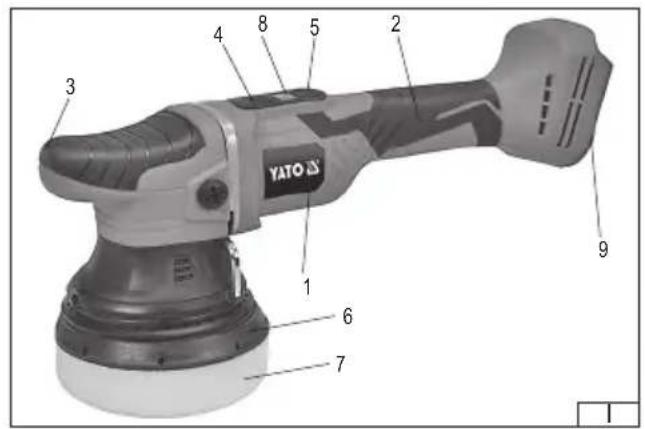
- housing
- handle
- front handle
- electric power switch
- rotational speed control
- base disc
- polishing pad
- display
- battery socket
- battery
- battery charger
DE
Read the operating instruction
Wear protective goggles
This symbol indicates that waste electrical and electronic equipment (including batteries and storage cells) cannot be disposed of with other types of waste. Waste equipment should be collected and handed over separately to a collection point for recycling and recovery, in order to reduce the amount of waste and the use of natural resources. Uncontrolled release of hazardous components contained in electrical and electronic equipment may pose a risk to human health and have adverse effects for the environment. The household plays an important role in contributing to reuse and recovery, including recycling of waste equipment. For more information about the appropriate recycling methods, contact your local authority or retailer.
CHARAKTERYSTYKA WYROBU
The cordless polisher is a universal, portable tool which does not require an external power source, designed for DIY enthusiasts to polish and, to a lesser extent, grind surfaces made of different materials with abrasive paper. Its specific advantages will be appreciated by DIY enthusiasts performing various assembly and finishing works. As the proper use of the power tool is required for the correct, reliable and safe operation please:
Read the entire instructions manual before the first use of the tool and keep it for future reference.
The manufacturer shall not be held liable for any damage resulting from failure to observe the safety regulations and recommendations specified in this manual.
EQUIPMENT
The product is supplied complete and does not require assembly. The product comes with a sponge polishing pad and a wrench for removing the disc. The YT-82924 article is equipped with a battery and a dedicated charger. The article YT-82925 is not supplied with a battery and charger.
TECHNICAL DATA
| Parameter Unit Value | | |
| Catalogue No. YT-82924, YT-82925 | | |
| Operating voltage [V DC] 18 | | |
| Revolutions (idle speed) [min] | -1 2100 – 5000 | |
| Noise level | | |
| - sound pressure [dB] 75.0 ± 3.0 | | |
| - power Lout | [dB] 86.0 ± 3.0 | |
| Protection rating IP20 | | |
| Insulation class III | | |
| Vibration level | [m/s2] | 4.56 ± 1.5 |
| Weight | [kg] | 2.9 |
| Tool chuck | ["] | M8 |
| Maximum grinding disc diameter | [mm] | 125 |
| Battery type | | Li-ion |
| Battery capacity | [Ah] | 1.5 |
| Charger* | | |
| Input voltage | [V~] 220 – 240 | |
| Mains frequency | [Hz] | 50 / 60 |
| Output voltage | [V DC] 21 | |
| Output current | [A] | 2 |
| Rated power | [W] | 60 |
| Charging time** | [h] | 3 |
* only for models equipped with a battery and charger
** the specified charging time applies only to the battery with the capacity listed in the table
The declared noise emission value has been measured using the standard test method and can be used to compare one tool to another. The declared noise emission value can be used in the preliminary exposure assessment.
The declared total vibration value has been measured using the standard test method and can be used to compare one tool to another. The declared total vibration value can be used in the initial exposure assessment.
Caution! The vibration emission during tool operation may differ from the declared value, depending on the manner the tool is used.
Caution! Safety measures to protect the operator, which are based on an assessment of exposure under actual conditions of use (including all parts of the work cycle, such as the time when the tool is switched off or idle and the activation time), must be specified.
Warning! Read all safety warnings, illustrations and specifications provided with this power tool. Failure to do so may result in electric shock, fire or serious injury.
EN
Keep all warnings and instructions for future reference.
The term "power tool" used in warnings applies to all tools driven by power both wired and wireless.
Workplace safety
Keep the workplace well-lit and clean. Disorder and poor lighting can be causes of accidents.
Do not work with power tools in an environment with an increased risk of explosion, containing flammable liquids, gases or vapors. Power tools generate sparks that can ignite dust or fumes.
Children and third persons should not be allowed to enter the workplace. Loss of concentration can result in loss of control.
Electrical safety
The plug of the electric cable must match the power socket. You must not modify the plug in any way. Do not use any plug adapters with earthed power tools. An unmodified plug that fits the outlet reduces the risk of electric shock.
Avoid contact with earthed surfaces such as pipes, radiators and coolers. Grounding the body increases the risk of electric shock.
Do not expose power tools to contact with atmospheric precipitation or moisture. Water and moisture that gets inside the power tool increases the risk of electric shock.
Do not overload the power cable. Do not use the power cord to carry, pull or unplug the power plug from the power outlet.
Avoid contact of the power cable with heat, oils, sharp edges and moving parts. Damage or entanglement of the power cord increases the risk of electric shock.
In the case of working outside closed rooms, use extension cords intended for work outside closed rooms. The use of an extension cord adapted for outdoor use reduces the risk of electric shock.
When using a power tool in a humid environment is unavoidable as a protection against supply voltage use a residual current device (RCD). The use of RCD reduces the risk of electric shock.
Personal safety
Stay alert, pay attention to what you do and keep common sense while working with the power tool. Do not use a power tool when you are tired or under the influence of alcohol or medication. Even a moment of inattention while working can lead to serious personal injury.
Use personal protective equipment. Always wear eye protection. The use of personal protective equipment such as dust masks, anti-slip safety shoes, helmets and hearing protection reduce the risk of serious personal injury.
Prevent accidental operation. Make sure that the electric switch is in the “off” position before connecting to the power supply and / or battery, lifting or moving the power tool. Moving the power tool with the finger on the switch or powering the power tool, when the switch is in the “on” position can lead to serious injuries.
Before turning on the power tool remove any keys and other tools that were used to adjust it. The key left on the rotating parts of the power tool can lead to serious injuries.
Do not reach and do not lean too far. Keep the right attitude and balance all the time. This will allow easier control over the power tool in case of unexpected work situations.
Dress accordingly. Do not wear loose clothing or jewelry. Keep your hair and clothing away from moving parts of the power tool. Loose clothing, jewelry or long hair can be caught by moving parts.
If the devices are fitted for the connection of dust extraction or dust collection, make sure that they are connected and used properly. The use of dust extraction reduces the risk of dust hazards.
Do not let the experience acquired from frequent use of the tool resulted in carelessness and ignoring safety rules.
Carefree action can cause serious injuries in a fraction of a second.
Do not overload the power tool. Use the power tool appropriate for the selected application. The right power tool will provide a better and safer job if used according to the designed load.
Do not use the power tool, if the electric switch does not allow switching on and off. Power tool, which cannot be controlled by means of a power switch is dangerous and must be returned for repair.
Disconnect the plug from the power socket and / or remove the battery if it is detachable from the power tool before adjusting, changing accessories or storing the tool. Such preventive measures will allow you to avoid accidentally turning on the power tool.
Keep the tool out of the reach of children, do not let people who do not know how to operate the power tool or these instructions use a power tool. Power tools are dangerous in the hands of untrained users.
Maintain power tools and accessories. Check the tool for mismatches or jams of moving parts, damage to parts and any other conditions that may affect the operation of the power tool. Damage must be repaired before using the power tool. Many accidents are caused by incorrectly maintained tools.
Keep cutting tools sharp and clean. Properly maintained cutting tools with sharp edges are less prone to jamming and are easier to control when working.
Use power tools, accessories and inserted tools etc. in accordance with these instructions, taking into account the type and conditions of work. The use of tools for work other than designed is likely to result in a dangerous situation.
Handles and gripping surfaces must be dry, clean and free from oil and grease. Slippery handles and gripping surfaces do not allow for safe operation and control of the tool in dangerous situations.
EN
Repairs
Repair the power tool only in authorized facilities using only original spare parts. This ensures proper operation safety of the power tool.
ADDITIONAL SAFETY INSTRUCTIONS
Hold the tool by the insulated handles, as the sanding surfaces may come into contact with its power cord. Cutting the cord may cause the metal parts of the tool to become live and give the operator an electric shock.
Toxic dust may form during sanding of some surfaces. For example, surfaces coated with lacquer with lead addition. Inhalation of toxic dust may pose a risk to the tool operator or bystanders. In this case, use appropriate personal protective equipment such as dust masks, work in well-ventilated rooms and use external dust extraction systems.
PREPARING FOR OPERATION
Warning! Before installation, replacement or removal of accessories, make sure that the battery is disconnected from the tool.
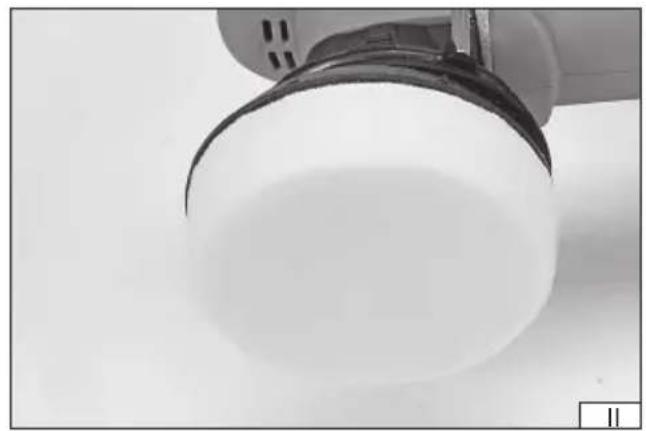
Installation of polishing pads (II)
The polishing disc only allows the mounting of pads fitted Velcro fasteners. It is forbidden to use pads of another type, e.g. fixed with a string.
The pads should be mounted concentrically on the polishing disc. Eccentric attachment may cause excessive vibrations during work which in turn may lead to uneven finish, damage to the polished surface and, in extreme cases, even damage to the pad, disc or the polished surface.
If the pad has holes for easier removal of dust during use it should be attached in such a way that the holes in the pad coincide with those in the disc.
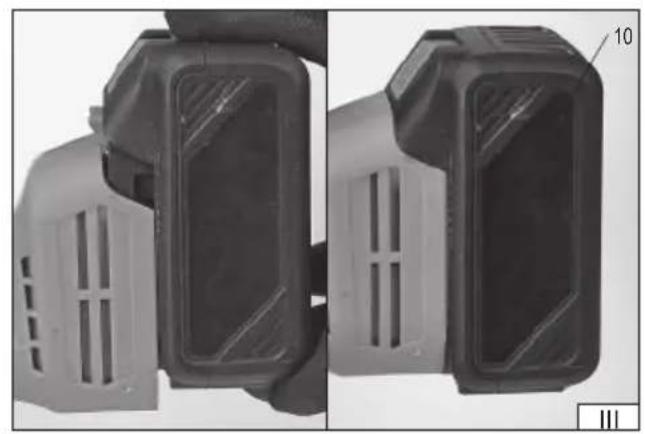
Battery installation (III)
Warning! Before installing the battery in the tool, make sure that the power switch is in the off position - O.
Slide the battery into the battery socket guides until it snaps into the socket. A correctly installed battery cannot be removed otherwise than by pressing and holding the battery latch in this position, and then pulling the battery out of the tool socket.
Warning! Before starting work, make sure that the tool body and battery housing are not damaged. Stop working in case of damage!
Connect the tool to mains. Switch the tool on by moving the switch to the "on" position - I.
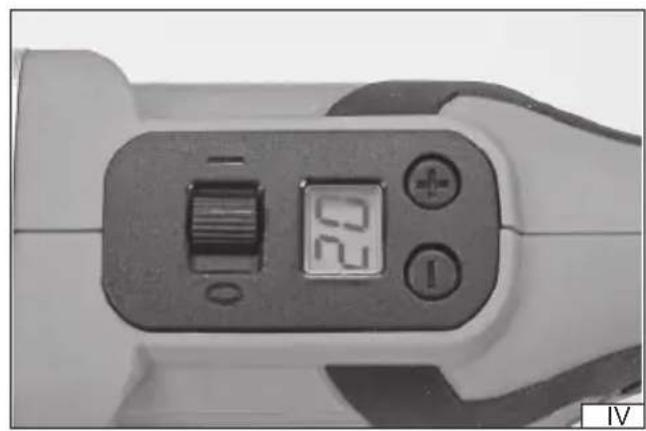
The display will show 00. Adjust the speed by pressing the buttons marked “+” and “-” (IV). The “+” button increases the speed, while “-” decreases it. The display shows the speed in hundreds of revolutions, e.g. 20 means a speed of 2000 rpm.
Grasp the polisher with both hands by the grip and the front handle. Make sure that the disc does not come into contact with any object and hold it in this position. The disc will start to spin in the direction indicated by the arrow on the tool housing. Wait for the disc to achieve its set rotational speed and hold the polisher in this position for approx. 30 seconds. If there are no signs of malfunctioning, such as increased vibration, excessive noise or suspicious smell coming out of the tool it means that you can start working.
To stop the tool, move the switch to the O-off position and wait for the disc to stop completely. Then disconnect the battery from the tool and proceed with maintenance.
Caution! The disc may be still spinning for some time after turning off the tool. Wait until the disc has stopped rotating before putting the tool down. It is prohibited to force the disc to stop by pushing it against a workpiece or other object.
Useful tips on working with the polisher
Never hold the polisher in any other way but by the handle grips. Improper grip will not ensure safe operation and may obscure ventilation openings. This can lead to overheating of the tool.
Start work by gently applying the side surface of the pad to the workpiece. Do not exert too much pressure on the workpiece during operation. Move the tool towards and away from you, and gradually to a side. Observe the effects and adjust the torque speed and pressure of the polishing disc. If polishing agents are used, read the documentation provided with them before starting work.
Due to the lack of dust extraction systems, it is not recommended to use the tool as a grinder for working on large surfaces using abrasive sheets, e.g. for stripping paints, rust or sanding wood. Fine abrasive sheets can be used to smooth the surface before
EN
using polishing agents.
Work with abrasive sheets always in well-ventilated areas and often raise the tool foot to clean the work surface. The abrasive sheet to be used must be selected according to the type of sanded surface. It is recommended to consult the dealer or the manufacturer of the abrasive sheets for advice on their intended use.
Do not reuse the used abrasive sheet. Do not use damaged abrasive sheets. Sheets with cracks, tears, cavities, or other damages may disintegrate during operation and cause injuries.
Avoid checking the condition of the wood surface worked with your bare hand. This can cause injury from splinters and burrs generated during work. Do not stop the polisher in one place; this will cause uneven work results. Do not exert excessive pressure on the workpiece when working with abrasive sheets. The pressure should be uniform throughout the entire working time. The polisher should be guided in such a way that the abrasive sheet adheres to the sanded object with the entire surface. Excessive pressure can cause the tool to overheat and damage the worked surface and even tear the abrasive sheet or damage the tool foot.
Take regular breaks during operation to check the condition of the abrasive sheet. If the abrasive sheet is found to have been clogged with dust generated during work, or that the abrasive grain has worn, replace the sheet with a new one.
The polisher has an adjustable motor speed, which changes the number of foot oscillations. Higher rotational speed results in faster and more accurate surface finishing, however, it can lead to overheating or even burning of the worked surface, especially when using too much pressure.
Safety instructions for battery charging
Caution! Before starting charging, make sure that the power unit body, cord and plug are not cracked or damaged. It is forbidden to use a defective or damaged charging station and power unit! Use only the supplied charging station and power unit to charge the batteries. The use of another power unit may result in fire or damage to the tool. The battery should only be charged in a closed, dry room, protected against unauthorised access, especially by children. Do not use the charging station and power unit without the constant supervision of an adult! If you need to leave the room where the tool is being charged, disconnect the charger from the mains by removing the power unit plug from the mains socket. If smoke, suspicious odours, etc. are escaping from the charger, remove the charger plug from the mains socket immediately!
The compressor is supplied with an uncharged battery and should therefore be charged according to the procedure described below with the included power unit and charging station before use. Li-ion (lithium-ion) batteries do not have the so-called “memory effect”, which means they can be recharged at any time. However, it is recommended to discharge the battery during normal operation and then charge it to full capacity. If, due to the nature of work, it is not possible to use the battery in such a manner every time, it should be done at least every several work cycles. Never discharge any batteries by short-circuiting the battery plates, as this will cause irreparable damage! In addition, do not check the battery charge status, by short-circuiting the plates and checking their sparking.
Battery storage
Ensure the proper storage conditions to extend the battery's life. The battery can withstand approximately 500 charge-discharge cycles. Store the battery at a temperature ranging from 0°C to 30°C at the relative air humidity of 50% . Charge the battery to approx. 70% of its total capacity to store it for a longer period of time. In case of prolonged storage, the battery should be periodically charged once a year. Do not over-discharge the battery as this will shorten its life and may cause irreparable damage.
During storage, the battery will gradually discharge due to leakage. The self-discharge process depends on the storage temperature – the higher the temperature is, the faster the discharge process is. If the batteries are stored incorrectly, the electrolyte may leak. In case of leakage, secure the leak with a neutralising agent. In the case of electrolyte contact with eyes, rinse eyes thoroughly with water, and immediately seek medical attention. It is not allowed to use the appliance with a damaged battery. If the battery is completely worn, return it to a specialist waste disposal centre.
Transport of batteries
Lithium-ion batteries are treated as hazardous materials, according to legal regulations. The user of the device can transport the product together with the battery and the batteries alone, by land. In that case, no additional conditions have to be met. If you entrust transport to third parties (e.g. a courier company), follow the regulations regarding the transport of hazardous goods. Before shipping, please contact a properly qualified person. It is not allowed to transport damaged batteries. For the duration of transport, remove the demountable batteries from the product, secure the exposed contacts, for example by covering them with insulation tape. Protect the batteries in the packaging in such a way that they do not move inside the packaging during transport. National regulations for the transport of hazardous materials must also be observed.
Charging the battery
Caution! Before charging, disconnect the power unit from the mains by removing the plug from the mains socket. In addition, clean the battery and battery clamps of dirt and dust with a soft, dry cloth.
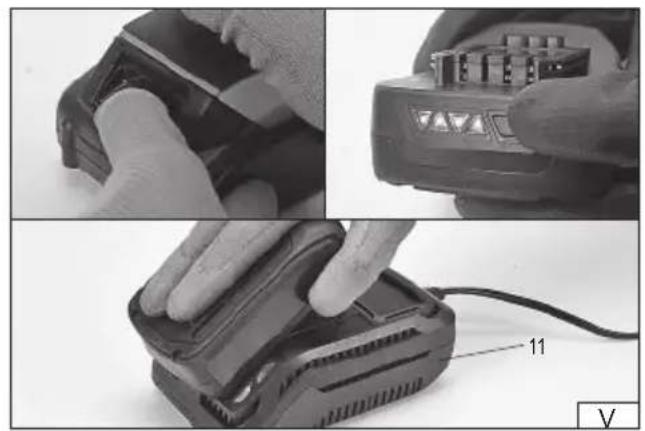
The battery has a built-in charge indicator. The LEDs will light up by pressing the button (II), the more of them come on, the more charged the battery is. If the LEDs do not light up when the button is pressed, the battery is discharged.
Disconnect the battery from the tool.
Slide the battery into the charger socket (V).
Plug the charger into a mains socket.
EN
The red LED will light up, which indicates the charging process.
When charging is complete, the red LED will turn off and the green LED will light up to indicate that the battery is fully charged.
Pull the power unit plug out of the mains socket.
Pull the battery out of the charging station by pressing the battery clamp button.
Caution! If the green LED lights up when the charger is connected to the mains, the battery is fully charged. In this case, the charger will not start the charging process.
Error messages
The tool displays codes of errors that the sensors have detected. Each of the errors has its own code.
E1 – overload protection trip. Switch the tool off and on again, if this does not work, the tool has been damaged and must be handed over to an authorised service centre.
E3 – tool switch protection trip. Switch the tool off and on again, if this does not work, the tool has been damaged and must be handed over to an authorised service centre.
E4 – disc rotary movement blockage which may indicate the overloading or damage to the tool. Switch the tool off and on again, if this does not work, the tool has been damaged and must be handed over to an authorised service centre.
E5 – tool overheating. The tool has been running for too long with too much load. Switch the tool off and wait at least 30 minutes for it to cool down.
E6 – supply voltage too low. Switch off the tool, remove the battery and charge it or connect another fully charged one.
E7 – damage to the device. Switch the tool off and on again, if this does not work, the tool has been damaged and must be handed over to an authorised service centre.
E8 – damaged motor. Switch the tool off and on again, if this does not work, the tool has been damaged and must be handed over to an authorised service centre.
E9 – supply voltage too high. The tool must be switched off and the battery removed. Make sure that the rated voltage of the battery complies with that of the tool.
MAINTENANCE AND INSPECTIONS
CAUTION! Remove the battery from the device's socket before performing adjustment, technical service or maintenance. Having finished working, check the device for damage by visually inspecting the exterior and the body and the battery handle, the functioning of the electric switch, the vents for clogging, the motor brushes for sparking, the noise level of the bearings and the drive transmission, and how the device starts and runs. During the warranty period, the user is not allowed to install any power tools or replace any components or parts, as this will void the warranty rights. Any irregularities found during the check or the operation signal the need for repair to be done at the servicing centre. Having finished your work, clean the housing, the vents, all switches, all handles and guards with compressed air (at 0.3 MPa maximum), a brush or a dry cloth. Do not use any chemicals or cleaners.
Clean the cutter and the handles with a clean dry cloth.
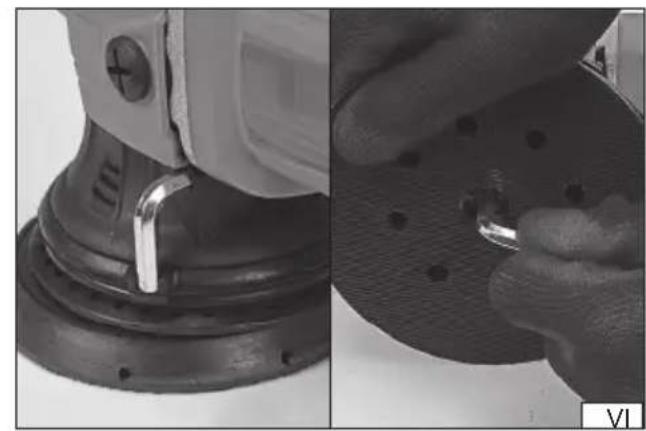
After each use, remove the disc and clean the inside of the disc chamber. The dusty chamber reduces the dust extraction efficiency which impairs the conditions and safety in the workplace. Hold the disc by hand and use a wrench to unscrew the fixing screw (VI). Clean the interior of the dust extraction chamber with a paint brush or a brush with a soft bristle and a stream of compressed air at a pressure of not more than 0.3 MPa. After cleaning the inside of the chamber, install the disc and screw the fastening screw. The tool has a wrench holder in which it should be stored each time it is not used.
PRODUKTBESCHREIBUNG
CARACTÉRISTIQUES DU PRODUIT
Transport van accu's
1024/YT-82924/EC/2024
We declare and guarantee with full responsibility that the following products:
meet requirements of the following European Standards / Technical Specifications:
and fulfil requirements of the following European Directives:
Serial number: concern all serials numbers of item(s) mentioned in this declaration
The person authorized to compile the technical file:


