USER MANUAL H43S80GUX HAIER
More Creation More Possibilities
| H43S80GUX | H50K85GUX | H65S85GUX |
| H50S80GUX | H55K85GUX | H75S85GUX |
| H55S80GUX | H65K85GUX | H55S90GUX |
| H65S80GUX | H75K85GUX | H65S90GUX |
| H75S80GUX | H43S85GUX | H75S90GUX |
| H85S80GUX | H50S85GUX | |
| H43K85GUX | H55S85GUX | |
User Manual EN
User Manual AR
Illustrations in this guide are provided for reference only and may differ from the actual product appearance. Product design and specifications may be changed without notice.
LED Television
TURNING ON THE TV
- Install the stand and place the TV on a solid surface.
- Connect the antenna or cable to the ANT aerial socket on the back of the TV set.
- Power:
Plug the cord into a working power outlet.
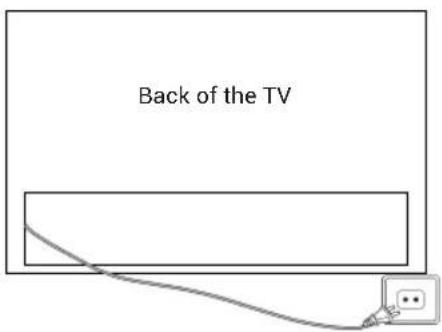
- Turn the TV on:
Press on the remote control or POWER button at the bottom/side of the TV.

ACCESSORIES
Remote Control - 1 pc
User's Manual - 1 pc
Base Stand - 1 set
CE Leaflet - 1 pc
Warranty Card - 1 pc
Power cord - 1 pc
Screws:
Addendum - 1 pc
S80: (4xQ4, 2xQ3) - 6 pcs
EEL - 1 pc
K85: (4xQ4) - 4 pcs
S85, S90: (4xM3, 4xQ4) - 8 pcs
GENERAL SPECIFICATIONS
H43K85GUX/H50K85GUX/H55K85GUX
H43S85GUX/H50S85GUX/H55S85GUX
H43S80GUX/H50S80GUX/H55S80GUX
| Size (Diagonal) 43" 50" 55" | | |
| Resolution 3840x2160 |
| Max Refresh rate | 60Hz @ 3840x2160 | 60Hz @ 3840x2160 |
| Aspect Ratio 16:9 |
| TV System ATV (PAL, SECAM)/DTV (DVB-T/C/T2/S2) |
| Video Signal System | PAL, SECAM |
| Input Power Voltage | 100-240V~50/60Hz |
| Rated Power | 100W | 120W |
| Audio Output | 2x10W | 2x10W |
| Standby Power consumption | ≤0.5W |
| Environmental Condition | Operating ambient temperature: +5°C~+40°COperating environment humidity: 25%~80%Storage Temperature: -15°C~+45°CStorage Humidity: <80%Atmospheric Pressure: 86~106Kpa |
H65K85GUX/H75K85GUX
H65S85GUX/H75S85GUX
H65S80GUX/H75S80GUX/H85S80GUX
| Size (Diagonal) | 65" 75" 85" | | |
| Resolution 3840x2160 |
| Max Refresh rate | 60Hz @ 3840x2160 |
| Aspect Ratio 16:9 |
| TV System ATV (PAL, SECAM)/DTV (DVB-T/C/T2/S2) |
| Video Signal System | PAL, SECAM |
| Input Power Voltage | 100-240V~50/60Hz |
| Rated Power 200W 220W 230W | | |
| Audio Output 2x | 3.5W |
| Standby Power consumption | ≤ 0.5W |
| Environmental Condition | Operating ambient temperature:+5°C~ +40°COperating environment humidity:25%~80%Storage Temperature: -15°C~+45°CStorage Humidity: <80%Atmospheric Pressure: 86~106Kpa |
H55S90GUX/H65S90GUX/H75S90GUX
| Size (Diagonal) 55" 65" 75" | | |
| Resolution 3840x2160 |
| Max Refresh rate | 120Hz @ 3840x2160144Hz @ 3840x2160 (HDMI3, HDMI4) |
| Aspect Ratio 16:9 |
| TV System ATV (PAL, SECAM)/DTV (DVB-T/C/T2/S2) |
| Video Signal System | PAL, SECAM |
| Input Power Voltage | 100-240V~50/60Hz |
| Rated Power 150W 200W 220W | |
| Audio Output 2x13.5W + 18W |
| Standby Power consumption | ≤ 0.5W |
| Environmental Condition | Operating ambient temperature:+5°C~+40°COperating environment humidity:25%~80%Storage Temperature: -15°C~+45°CStorage Humidity: <80%Atmospheric Pressure: 86~106Kpa |
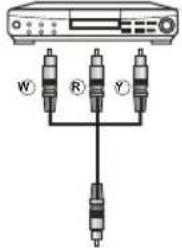
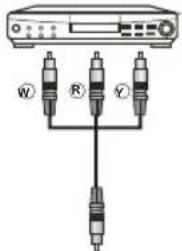
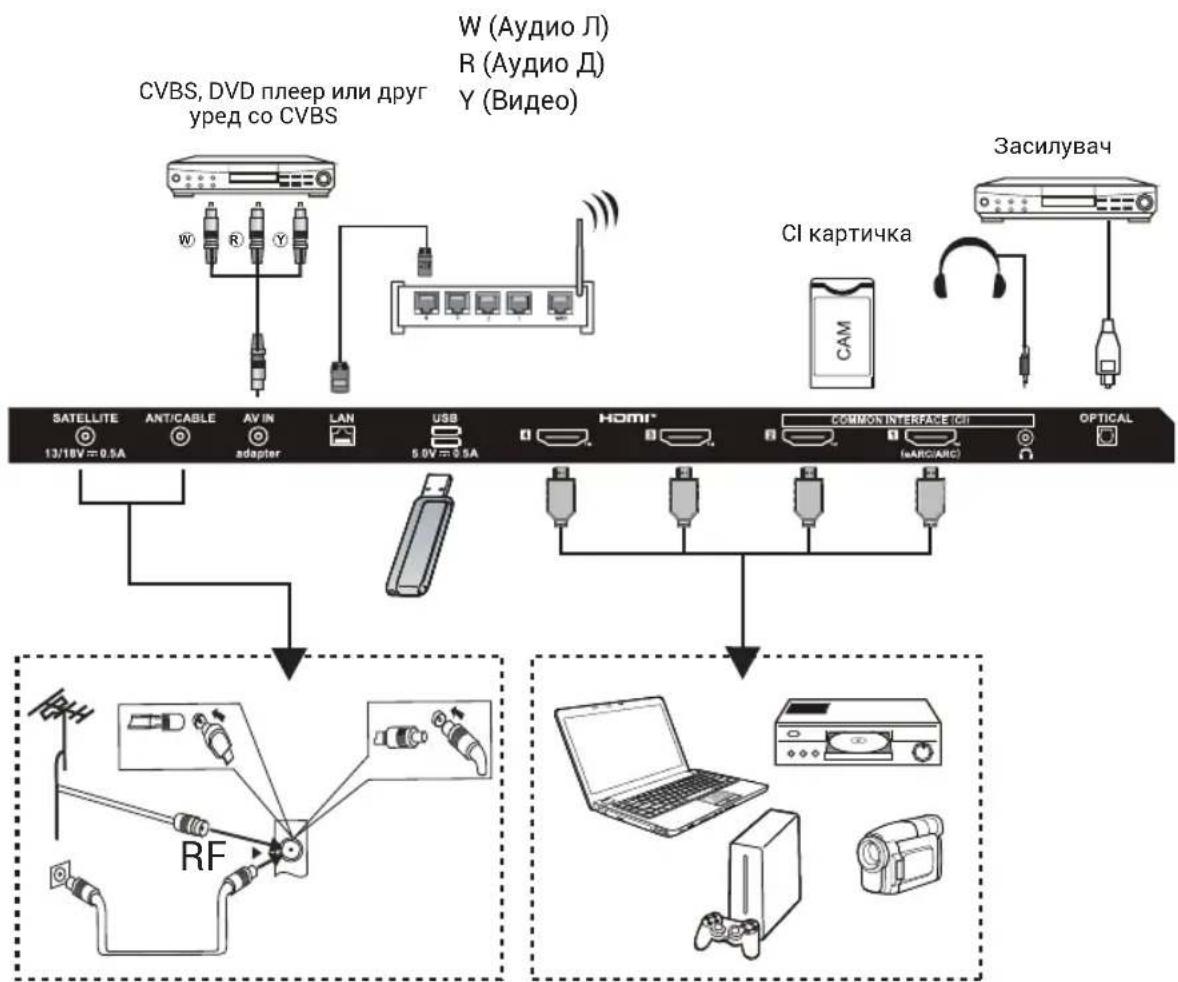
Please refer to the user's manual of the equipment to be connected as well. You can use the input terminals on the TV set rear as follows.
It can be connected to the following appliances: VCR, multi disc player, DVD, camcorder, video game or stereo system, etc.
Note:
- Sometimes it will not support in different device because the device supplies nonstandard signal.
- The equipment and connecting cables shown in the picture are not included and need to be purchased separately.
H43K85GUX/H50K85GUX/H55K85GUX/H65K85GUX/H75K85GUX
H43S80GUX/H50S80GUX/H55S80GUX/H65S80GUX/H75S80GUX/H85S80GUX
![graph TD A["CVBS, DVD Player or other machine with CVBS"] --> B["CI card"] B --> C["Amplifier"] C --> D["Satellite 13/18V=0.5A"] D --> E["ANT/CABLE"] E --> F["AV IN adapter"] F --> G["LAN"] G --> H["USB 5.0V=0.5A"] H --> I["HDMI™"] I --> J["COMMON INTERFACE (CI)"] J --> K["OPTICAL"] K --> L["Laptop"…](/content/2026/05/752162/images/f333f1fd2a7739129145f2b27faf3feeec8e47bda7fd37af71aa96f6dcb385a7.jpg)
Audio/Video machine with HDMI interfaces
H43S85GUX/H50S85GUX/H55S85GUX/H65S85GUX/H75S85GUX
![graph TD A["TV Device"] --> B["CVBS, DVD Player or other machine with CVBS"] B --> C["USB 5.0V=500mA"] C --> D["SATELLITE 13/18V=500mA"] C --> E["ANT/CABLE AV IN adapter"] C --> F["LAN LAN"] C --> G["USB"] G --> H["HDMI™"] H --> I["COMMON INTERFACE (CD)"] I --> J["CL card CAM"] I --> K["OPTICAL"] L[…](/content/2026/05/752162/images/2e84b214fa09222939f10a776a995a2342158e1c508aa5da09f68e5cfaedbfa4.jpg)
Audio/Video machine with HDMI interfaces
H55S90GUX/H65S90GUX/H75S90GUX
![graph TD A["Amplifier"] --> B["USB 5.0V=0.5A 5.0V=1.0A"] B --> C["SATELLITE 13/18V=500mA"] C --> D["ANT/CABLE"] D --> E["4K@144HZ4K@14HZ2 IeARC/ARCI"] E --> F["COMMON INTERFACE (CD)"] F --> G["4K@60HZ4K@60HZ1"] G --> H["AV IN adapter"] I["CVBS, DVD Player or other machine with CVBS"] --> J["W"] I --…](/content/2026/05/752162/images/541db01f2bd5774d709e1062601732d268630cd0fda57ff74311ede3405cfe44.jpg)
Audio/Video machine with HDMI interfaces
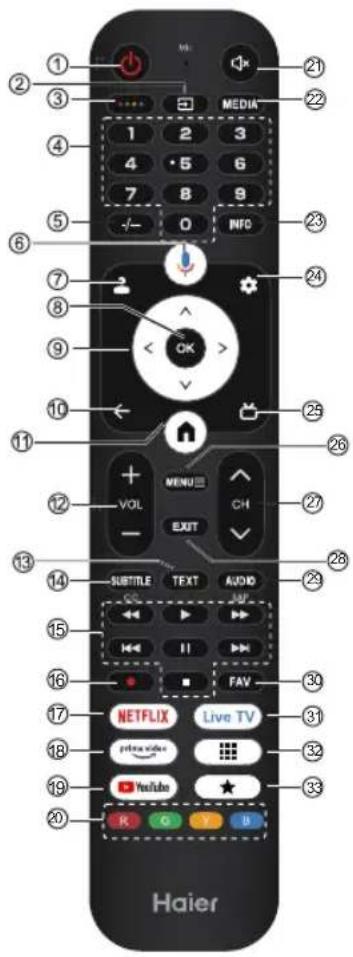
Subject to the actual product functions.
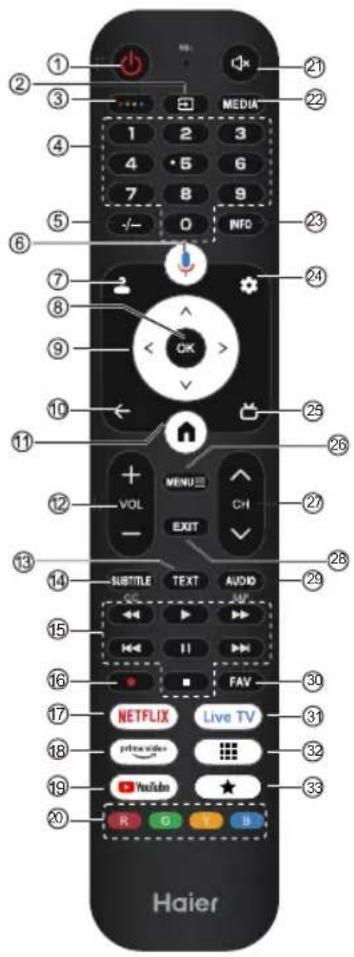
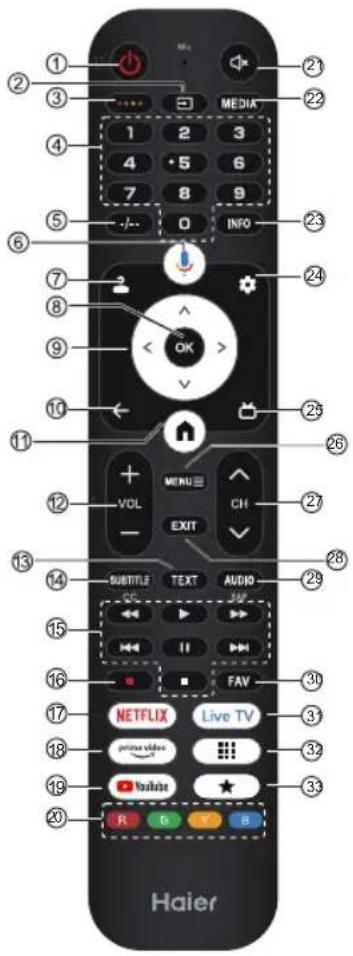
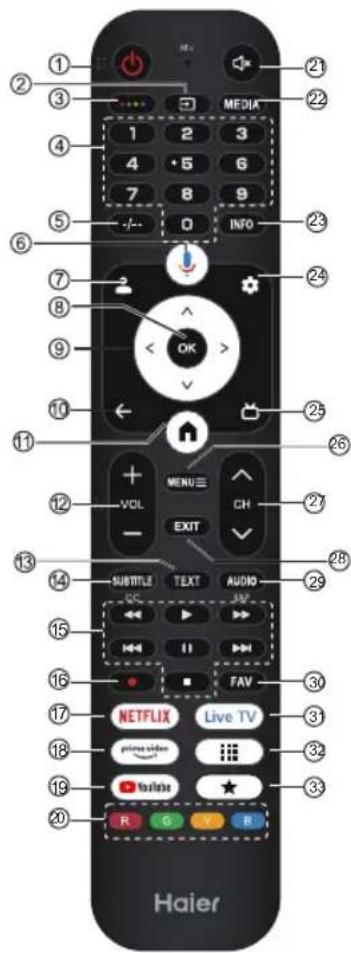
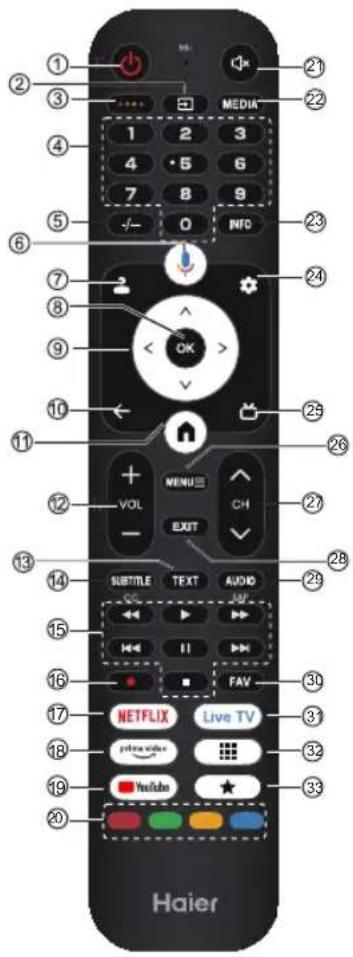
| # Item Descriptions |
| 1 | Power | Press to turn the TV on or off. When your TV is off, power still flows through it. To completely disconnect power, unplug the power cord. |
| 2 | | Press to open the input source list. |
| 3 | | Press to open Soft Keyboard. |
| 4 | 0~9 number | Press to enter a TV channel number. |
| 5 | -/-- | Press to set the TV channel number input. |
| 6 | | Press to open the Google Assistant. |
| 7 | | Press to open user account page. |
| 8 OK | Enter the selected option or perform the selected operation. |
| 9 | | Press to navigate the on-screen menu. |
| 10 | BACK Return to the previous menu. |
| 11 | Press to open the Home Page. |
| 12 | VOL+/VOL- | Press VOL+ or VOL- to adjust volume level. |
| 13 | TEXT | Show or hide Teletext. |
| 14 | SUBTITLE | Press to set subtitle function. |
| 15 | Media Control media playback in Media mode. |
| 16 | REC | Press button to start recording (In DTV mode). |
| 17 | NETFLIX Press to open the NETFLIX. |
| 18 | | Press to open the prime video. |
| 19 | YouTube | Press to open the YouTube. |
| 20 | Coloured buttons | Implement the relevant operations according to the prompt at the bottom of the menu in the text. |
| 21 | Press to open the mute. |
| 22 | MEDIA | Press to open the Media Center. |
| 23 | INFO | Press to display the channel information |
| 24 | | Press to open the settings menu. |
| 25 | | Press to display electronic programme guide in TV mode. |
| 26 | MENU ≡ | Press to open or close the on-screen menu. |
| 27 | CH∨/CH^ | Press change TV channels. |
| 28 | EXIT | Exit the current operation. |
| 29 | AUDIO | Press to set NICAM in ATV. Select the Sound Tracks in DTV. |
| 30 | FAV | Press to display your favourite channel. |
| 31 | Live TV | Press to enter the last input source in LiveTV. |
| 32 | | Press to open the app list. |
| 33 | | Create a shortcut for your favorite app. |
Eye-protection Function: (In color temperature standard mode meets TUV low blue light requirements)
Low Blue Light - Low Blue Light mode on your TV is designed to reduce the level of blue light to protect your eyes. Press Remote control Settings - Display & Sound Display Advanced Settings Low Blue Light (Optional: Off, Low, Middle, High).
To reduce eye strain and protect your eyes when you watch TV for a period of time, you are recommended to:
• Take regular and frequent breaks, avoid watching TV for periods of more than one hour.
Watching TV for long periods of time may cause eye fatigue.
- Look away from the TV screen and focus on distant objects for at least 10 minutes during watch break time.
- Relax yourself during watch break time by doing eye exercises or outdoor activities.
- The best recommended viewing distance is 3 times the vertical height of the TV screen.
- Regular breaks and exercises are extremely helpful in relieving eye strain and fatigue.
INITIAL SETUP
The first time you turn on your TV, the setup wizard will guide you through setting up basic settings. Please follow the text tips to complete the first-time setup.
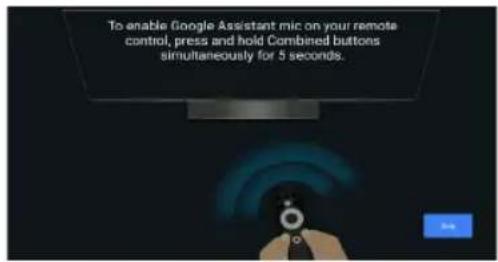
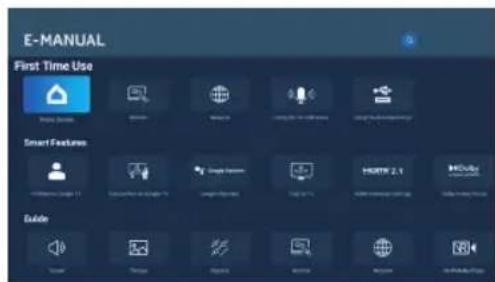
E-Manual
E-Manual is built into your TV and can be displayed on the screen. To learn more about your TV features, access your E-Manual by referring to the following.
E-Manual may be available depending on the region or model.
- Press HOME button to access the home page.
- Press UP/DOWN/LEFT/RIGHT and OK button to select and enter "E-Manual" in "Apps".
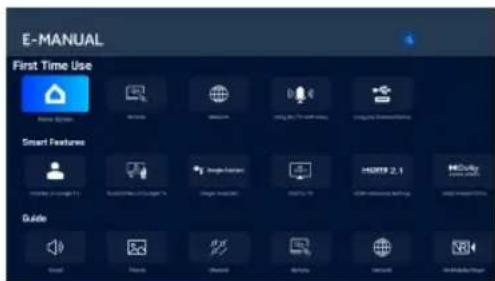
Note: The picture is only for reference.
ACCESSIBILITY FUNCTION DESCRIPTION EN
Accessibility function description
Talkback (Screen reader)
Talkback is a screen reader accessibility feature that assists visually impaired users by reading aloud on-screen text, menu items and other elements. It can also be set up to use with Accessibility Shortcut.
Text to speech
A Text To Speech Engine is a software component that converts text into natural-sounding speech.
The Text To Speech Engine works in the background, supplying the core speech synthesis functionality.
Applications such as screen readers, virtual assistants, or language learning tools often call upon the Text To
Speech Engine to generate audio output, but the engine itself does not interact with users directly.
This page provides settings to pick the active Text To Speech Engine if there are multiple engines installed in the system, to set basic configurations for Text To Speech engines, like language, reading speed, etc.
Text Scaling
This configuration could scale the text in system-wide applications up or down based on end user's need.
Bold Text
This configuration allows the text in system-wide applications to be bolded for better readability.
Color correction
The "Color correction" setting is designed to help people with color vision differences see on-screen colors more clearly. By enabling this option, you can adjust the way colors are displayed, making it easier to enjoy your favorite shows and apps.
Accessibility shortcut
When the Accessibility shortcut is on, the end user can press both the BACK and DOWN buttons for 3 seconds to start an accessibility feature.
This setting could help the end user to choose the targeted accessibility feature of the shortcut, or to switch the shortcut function on and off.
Keyboard accessibility
Time to take action (accessibility timeout)
This setting allows users to adjust how long the messages and notifications stay on the screen.
The longer stay would enlarge the chance that end user notice the message and take necessary action.
Key repeat delay
This setting allows users to adjust the key repeat delay, which could help the end user get a better experience when pressing buttons on the remote control.
Switch Access
Switch Access lets users interact with TV using one or more switches. Switch Access can be helpful if the end user's interaction with remote control is limited.
ACCESSIBILITY FUNCTION DESCRIPTION EN
Audio Description
The end user would hear a description of what's happening on screen in supported movies and shows by enabling this setting.
Captions
The "Captions" settings let users turn on/off captions, decide the visual appearance of the captions in supported apps.
High contrast text
The "High Contrast Text" setting makes on-screen text easier to read by using brighter colors and clearer outlines. This feature is especially helpful for people who find regular text hard to read.
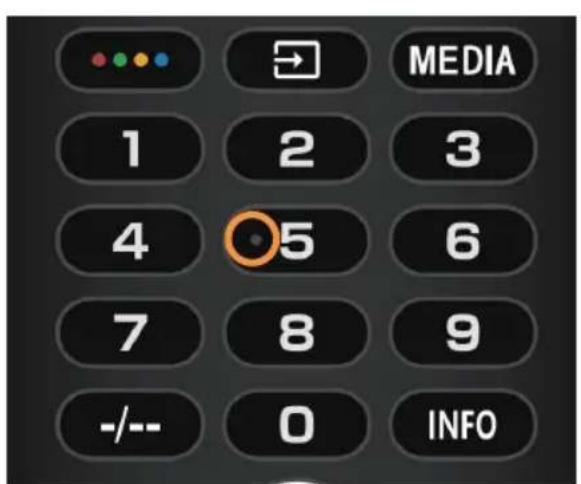
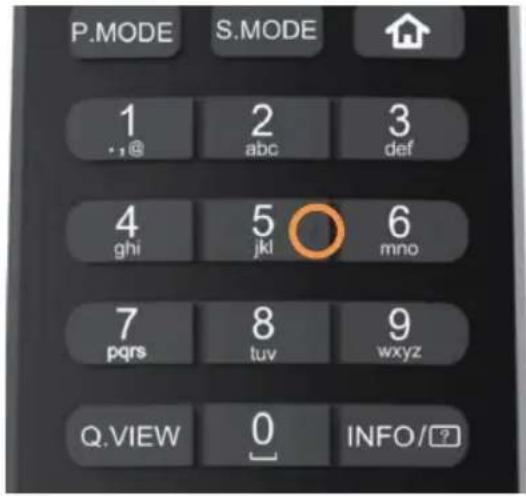
The TV remote control has tactile dots on the number 5 button to help you find the buttons easily. For example, among the numeric buttons, only the number 5 has a tactile dot to help you find all the numeric buttons.
TURNING ON THE TV
ACCESSORIES
Electronic manual
H43K85GUX/H50K85GUX/H55K85GUX/H65K85GUX/H75K85GUX
H43S80GUX/H50S80GUX/H55S80GUX/H65S80GUX/H75S80GUX/H85S80GUX
![graph TD A["TV System"] --> B["CVBS, reproductor de DVD u otra máquina con CVBS"] B --> C["Switch"] C --> D["W (Audio L)"] C --> E["R (Audio R)"] C --> F["Y (Vídeo)"] G["Amplificador"] --> H["Tarjeta CI"] H --> I["Monitor"] J["SATELLITE 13/18V=0.5A"] --> K["Anticable"] K --> L["AV in adapter"] L -->…](/content/2026/05/752162/images/0546d9ca93ac5de6989f266abfc3f32effaa963f13b9a1fc5737b343928caec2.jpg)
Audio/video machine with HDMI interfaces
H43S85GUX/H50S85GUX/H55S85GUX/H65S85GUX/H75S85GUX
![graph TD A["TV: CVBS, reproductor de DVD u otra máquina con CVBS"] --> B["USB"] B --> C["Satellite 13/18V=500mA"] B --> D["ANT/CABLE AV IN adapter"] B --> E["LAN LAN USB 5.0V=500mA"] B --> F["Harmonic Device"] G["TV: W (Audio L) R (Audio R) Y (Vídeo)"] --> H["Amplificador"] I["Tarjeta CI"] --> J["Ca…](/content/2026/05/752162/images/f2ee42f59ad94c0e5050412a972feed59b3f70899ad94f3d87248cbf7359217a.jpg)
Audio/video machine with HDMI interfaces
H55S90GUX/H65S90GUX/H75S90GUX![graph TD A["Amplificador"] --> B["USB 5.0V=0.5A 5.0V=1.0A"] B --> C["SATELLITE 13/18V=500mA ANTICABLE"] C --> D["HDMI™ 4K@144HZ4K@14HZ (aARC/ARC)"] D --> E["COMMON INTERFACE (CD) 4K@60HZ4K@60HZ"] E --> F["AV IN adapter"] G["W (Audio L) R (Audio R) Y (Vídeo)"] --> H["CVBS, reproductor de DVD u otra m…](/content/2026/05/752162/images/2c520a2e01999060d2e554ce49368aacd806afa50cb1604995bcdc5e75dda2df.jpg)
Audio/video machine with HDMI interfaces
Electronic manual
GENERAL SPECIFICATIONS
H43K85GUX/H50K85GUX/H55K85GUX
H43S85GUX/H50S85GUX/H55S85GUX
H43S80GUX/H50S80GUX/H55S80GUX
E-manual
ACCESSORIES
ACCESSORIES
H43K85GUX/H50K85GUX/H55K85GUX/H65K85GUX/H75K85GUX
H43S80GUX/H50S80GUX/H55S80GUX/H65S80GUX/H75S80GUX/H85S80GUX
![graph TD A["TV"] --> B["CVBS, odtwarzacz DVD lub\ninne uzrądzenie z CVBS"] B --> C["W (lewy kanał audio)\nR (prawy kanał audio)\ny (wideo)"] C --> D["Karta CI"] D --> E["Wzmacniacz"] F["SATELLITE"] --> G["ANT/CABLE"] G --> H["AV IN"] H --> I["adapter"] I --> J["LAN"] J --> K["USB"] K --> L["5.0V=0.5…](/content/2026/05/752162/images/614421198c25069f03b515895086194222b79ab372b8ce8921fbc5c56d70c591.jpg)
E-manual
ACCESSORIES
ACCESSORIES
H43K85GUX/H50K85GUX/H55K85GUX/H65K85GUX/H75K85GUX
H43S80GUX/H50S80GUX/H55S80GUX/H65S80GUX/H75S80GUX/H85S80GUX
![graph TD A["CVBS, DVD плейър или друго устройство с CVBS"] --> B["Satellite 13/18V=0.5A"] C["W (Аудио L) R (Аудио R) Y (Видео)"] --> D["Ant/CABLE"] D --> E["AV IN adapter"] E --> F["LAN 5.0V=0.5A"] F --> G["USB"] G --> H["HDMI"] H --> I["COMMON INTERFACE ICE (ARCIAKCI)"] I --> J["OPTICAL"] K["Amplif…](/content/2026/05/752162/images/89de8fd6c29cadd124210a345f3f0ffd1b76c788cc43ead8e10701f2af621586.jpg)
GENERAL SPECIFICATIONS
H43K85GUX/H50K85GUX/H55K85GUX
H43S85GUX/H50S85GUX/H55S85GUX
H43S80GUX/H50S80GUX/H55S80GUX
Electronic manual
ACCESSORIES
H43K85GUX/H50K85GUX/H55K85GUX/H65K85GUX/H75K85GUX
H43S80GUX/H50S80GUX/H55S80GUX/H65S80GUX/H75S80GUX/H85S80GUX
![graph TD A["TV Device"] --> B["Anticable Antenna"] A --> C["AV In Adapter"] A --> D["LAN USB 5.0V~0.5A"] A --> E["HI/MI Ethernet"] A --> F["Common Interface I/O (sARC/ARC)"] A --> G["Optical CPU"] H["Amplifier"] --> I["CI karti"] H --> J["CVBS, DVD Oynatici veya CVBS arabirimine sahip diğer cihazlar…](/content/2026/05/752162/images/5e30d67820961ce06460fae0e2b0ffdeef474a25b15f1fe3c49946323a3ec07e.jpg)
E-Guide
- Turn on the TV:
Press C on the remote control or the POWER button on the bottom/side of the TV.
CONTROL BUTTONS

H43K85GUX/H50K85GUX/H55K85GUX/H65K85GUX/H75K85GUX
H43S80GUX/H50S80GUX/H55S80GUX/H65S80GUX/H75S80GUX/H85S80GUX
![graph TD A["TV Device"] --> B["Antenna"] A --> C["Analog/Amplifier"] A --> D["USB"] A --> E["HI/MI"] A --> F["Compu Interface"] A --> G["Home Device"] H["Forstærker"] --> I["CAM"] H --> J["Analog/Amplifier"] H --> K["HI/MI"] L["SATELLITE 13/18V=0.5A"] --> M["RF"] N["ANT/CABLE"] --> M O["AV IN adapte…](/content/2026/05/752162/images/04da64540acbfb8a79f2261224f32834b43b0ef0fc4d1490512f22655eb2fe40.jpg)
eGuide
GENERAL TECHNICAL DATA
H43K85GUX/H50K85GUX/H55K85GUX
H43S85GUX/H50S85GUX/H55S85GUX
H43S80GUX/H50S80GUX/H55S80GUX
H43K85GUX/H50K85GUX/H55K85GUX/H65K85GUX/H75K85GUX
H43S80GUX/H50S80GUX/H55S80GUX/H65S80GUX/H75S80GUX/H85S80GUX
![graph TD A["CVBS,DVD-soitin tai muu laite, jossa on CVBS."] --> B["LAN"] B --> C["USB 5.0V=0.5A"] C --> D["HI/MI*"] D --> E["COMMON INTERFACE (CI)"] E --> F["Vahvistin"] F --> G["CL-kortti"] G --> H["AVIN adapter"] H --> I["ANTICABLE"] I --> J["RF"]](/content/2026/05/752162/images/46a6ed8939ca98ec0e35092ce4c7b85c68fdf7e01dc35e22b9c95a85b81d19c1.jpg)
ACCESSORIES
H43K85GUX/H50K85GUX/H55K85GUX/H65K85GUX/H75K85GUX
H43S80GUX/H50S80GUX/H55S80GUX/H65S80GUX/H75S80GUX/H85S80GUX
![graph TD A["CVBS, DVD-spiller eller annen maskin med CVBS"] --> B["Forsterker"] B --> C["CI-kort"] C --> D["Satellite 13/18V=0.5A"] C --> E["ANTICABLE"] C --> F["AV IN adapter"] C --> G["LAN"] C --> H["USB 5.6V=0.5A"] C --> I["HDMI™"] C --> J["COMMON INTERFACE (CI)"] C --> K["OPTICAL"] L["RF"] --> M…](/content/2026/05/752162/images/1448d52534e451b966027b162dc03bfee0caae0b91430ed2f47d0be66d7e518d.jpg)
Audio/Video device with HDMI interface
H43S85GUX/H50S85GUX/H55S85GUX/H65S85GUX/H75S85GUX![graph TD A["TV: CVBS, DVD-spiller eller annen maskin med CVBS"] --> B["Forsterker"] B --> C["Cl-kort: CAM"] C --> D["HDMI™"] D --> E["RF"] E --> F["Laptop"] F --> G["Laptop with monitor"] style A fill:#f9f,stroke:#333 style B fill:#ccf,stroke:#333 style C fill:#cfc,stroke:#333 style D fill:#fcc,stro…](/content/2026/05/752162/images/4f4c1d7d01178423810147c682a0fc6be94aaaab7fb7ac85cea61d7556d0189c.jpg)
Audio/Video device
with HDMI interface
H55S90GUX/H65S90GUX/H75S90GUX
![graph TD A["Forsterker"] --> B["USB 5.0V=0.5A 5.0V=1.0A"] B --> C["SATELLITE 13/18V=500mA"] C --> D["ANT/CABLE"] D --> E["HDMI™"] E --> F["COMMON INTERFACE (CD)"] F --> G["AV IN adapter"] G --> H["Laptop"] H --> I["RF"] I --> J["Laptop"] J --> K["Camera"] L["W (lyd L) R (lyd H) Y (video)"] --> M["CV…](/content/2026/05/752162/images/c58cf4e3118666924ae3a6272ae5687750fdb61aad958fbf093ff7c30ecc9b31.jpg)
Audio/Video device
with HDMI interface
NOTE
Electronic user manual
ACCESSORIES
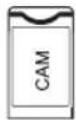
CI card

![graph TD A["Device"] --> B["RF"] C["Audio System"] --> D["Laptop"] E["Headphones"] --> F["Audio Device"] G["Radio Station"] --> H["RF"] I["Camera"] --> J["Laptop"]](/content/2026/05/752162/images/18b00bbf6eb9cab8acd6c0a619ec25b658ba16fe9d8284b3c255c0442d263b6d.jpg)
Audio/video device with HDMI interfaces
NOTE
Electronic manual
ACCESSORIES
H43K85GUX/H50K85GUX/H55K85GUX/H65K85GUX/H75K85GUX
H43S80GUX/H50S80GUX/H55S80GUX/H65S80GUX/H75S80GUX/H85S80GUX
![graph TD A["CVBS, dvd-speler of ander apparaat met CVBS"] --> B["Satellite 13/18V=0.5A"] A --> C["Anticable"] A --> D["AV in adapter"] A --> E["LAN"] A --> F["USB 5.0V=0.5A"] A --> G["HDMI"] A --> H["Common Interface (CI)"] A --> I["Optical"] J["W (audio links)"] K["R (audio rechts)"] L["Y (Video)"]…](/content/2026/05/752162/images/0f44f24d4a352253982c01f123800146a35a390c81ea72ac840335c1b3e75753.jpg)
CI card
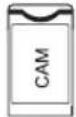

![graph TD A["Device"] --> B["RF"] C["Device 1"] --> D["RF"] E["Device 2"] --> F["RF"] G["Device 3"] --> H["RF"] I["Device 4"] --> J["RF"] K["Laptop"] --> L["Camera"] M["Laptop"] --> N["Monitor"]](/content/2026/05/752162/images/4932fc4418bea8b3760a402eda0142ba429a2bebffc59b8d7b0afc462b7128df.jpg)
Audio/video device
E-Manual
ACCESSORIES
H43K85GUX/H50K85GUX/H55K85GUX/H65K85GUX/H75K85GUX
H43S80GUX/H50S80GUX/H55S80GUX/H65S80GUX/H75S80GUX/H85S80GUX
![graph TD A["TV Device"] -->|CVBS, συσκευή, αναπαραγωγής DVD ή άλλη συσκευή με CVBS| B["Switch"] B --> C["USB 5.0V=0.5A"] C --> D["SATELLITE 13/18V=0.5A"] C --> E["ANT/CABLE adapter"] C --> F["AV IN"] C --> G["LAN"] C --> H["USB"] H --> I["HDMI"] I --> J["COMMON INTERFACE (CII) (aARC/ARC)"] I --> K["…](/content/2026/05/752162/images/e1c60a948ac1a4980a9f74ef59aaf38645406527c78437f5ffffe9f9f44cb2a6.jpg)

H65K85GUX/H75K85GUX H65S85GUX/H75S85GUX H65S80GUX/H75S80GUX/H85S80GUX
H43K85GUX/H50K85GUX/H55K85GUX/H65K85GUX/H75K85GUX
H43S80GUX/H50S80GUX/H55S80GUX/H65S80GUX/H75S80GUX/H85S80GUX
![graph TD A["TV Device"] -->|W, R, Y, AC, V, W, X, Y, Z, CVBS, CVBS (Cloud) | B["Switch"] B --> C["Radio System"] C --> D["SATELLITE 13/18V mm 0.5A"] C --> E["AV IN adapter"] C --> F["LAN USB 50V mm 0.5A"] C --> G["HDMI*"] G --> H["Common Interface (CC)"] H --> I["OPTICAL (Laptop)"] C --> J["Smartpho…](/content/2026/05/752162/images/2fb0c5f594400cc1ae34f964dcb416dbb2d8794465d35827a284d38b42dc44dc.jpg)

Electronic manual
ADDITIONAL EQUIPMENT
| Daljinski upravljač - 1 kom | Korisnički priručnik - 1 kom |
| Postolje za bazu - 1 set | CE Letak - 1 kom |
| Garantni list - 1 kom | Кабел за напајање - 1 kom |
| Vijci: | Dodatak - |
| S80: (4xQ4, 2xQ3) - 6 kom | 1 kom |
| K85: (4xQ4) - 4 kom | EEL - 1 kom |
| S85, S90: (4xM3, 4xQ4) - 8 kom | |
GENERAL SPECIFICATIONS
H43K85GUX/H50K85GUX/H55K85GUX
H43S85GUX/H50S85GUX/H55S85GUX
H43S80GUX/H50S80GUX/H55S80GUX
| Veličina(Dijagonala) | | 50" 55"43" |
| Rezolucija | 3840x2160 |
| Maksimalna stopa osvežavanja | 60Hz @ 3840x2160 | 60Hz @ 3840x2160 |
| Razmera 16:9 | |
| TV sistem | ATV (PAL, SECAM)/DTV (DVB-T/C/T2/S2) |
| Sistem video signala | PAL, SECAM |
| Ulazni napon napajanja | 100-240 V~50/60 Hz |
| Nominalna snaga | | 120 W100 | W 150 W |
| Audio izlaz | 2x10 W 2x1 | 3.5 W10 W | |
| Potrošnja energije u stanju pripravnosti | ≤ 0.5 W |
| Uslovi okruženja | Radna temperatura okruženja:+5°C ~ +40°CVlažnost radnog okruženja:25%~80%Temperatura skladištenja: -15 °C ~ +45 °CVlažnost skladišta: < 80%Atmosferski pritisak: 86~106 kPa |
H65K85GUX/H75K85GUX
H65S85GUX/H75S85GUX
H65S80GUX/H75S80GUX/H85S80GUX
| Veličina(Dijagonala) | | 75" 85"65" |
| Rezolucija | 3840x2160 |
| Maksimalna stopa osvežavanja | 60Hz @ 3840x2160 |
| Razmera 16:9 | |
| TV sistem | ATV (PAL, SECAM)/DTV (DVB-T/C/T2/S2) |
| Sistem video signala | PAL, SECAM |
| Ulazni napon napajanja | 100-240 V~50/60 Hz |
| Nominalna snaga | | 220 W200 | W 230 W |
| Audio izlaz | 2x13.5 W |
| Potrošnja energije u stanju pripravnosti | ≤ 0.5 W |
| Uslovi okruženja | Radna temperatura okruženja:+5°C ~ +40°CVlažnost radnog okruženja:25%~80%Temperatura skladištenja: -15 °C ~ +45 °CVlažnost skladišta: < 80%Atmosferski pritisak: 86~106 kPa |
H55S90GUX/H65S90GUX/H75S90GUX
| Veličina(Dijagonala) | | 65" 75"55" |
| Rezolucija | 3840x2160 |
| Maksimalna stopa osvežavanja | 120Hz @ 3840x2160144Hz @ 3840x2160 (HDMI3, HDMI4) |
| Razmera 16:9 | |
| TV sistem | ATV (PAL, SECAM)/DTV (DVB-T/C/T2/S2) |
| Sistem video signala | PAL, SECAM |
| Ulazni napon napajanja | 100-240 V~50/60 Hz |
| Nominalna snaga | | 200 W150 | W 220 W |
| Audio izlaz | 2x13.5 W+18W |
| Potrošnja energije u stanju pripravnosti | ≤ 0.5 W |
| Uslovi okruženja | Radna temperatura okruženja:+5°C ~ +40°CVlažnost radnog okruženja:25%~80%Temperatura skladištenja: -15 °C ~ +45 °CVlažnost skladišta: < 80%Atmosferski pritisak: 86~106 kPa |
Also refer to the user manual for the equipment you wish to connect. You can use the input terminals on the rear of the TV:
E-manual
The E-manual is built into the TV and can be displayed on the screen. To learn more about the functions of your TV, open the E-manual as follows. The E-manual is available depending on the region and model.
- Press the HOME button to open the home screen.
- Press UP/DOWN/LEFT/RIGHT and the OK button to select and open the "E-Manual" in the "Apps" menu.
Note: The image is for reference only.
APPENDICES
H43K85GUX/H50K85GUX/H55K85GUX/H65K85GUX/H75K85GUX
H43S80GUX/H50S80GUX/H55S80GUX/H65S80GUX/H75S80GUX/H85S80GUX
E-Manual
ACCESSORIES
Electronic Manual
GENERAL SPECIFICATIONS
H43K85GUX/H50K85GUX/H55K85GUX
H43S85GUX/H50S85GUX/H55S85GUX
H43S80GUX/H50S80GUX/H55S80GUX
| Veličina(Dijagonalno) | 43" 50" 55" | |
| Rezolucija | 3840 × 2160 |
| Maksimalna stopa osvježavanja | 60 Hz @ 3840 × 2160 | 60 Hz @ 3840 × 2160 |
| Omjer stranica | 16:9 |
| TV sistem | ATV (PAL, SECAM)/DTV (DVB-T/C/T2/S2) |
| Video signalni sistem | PAL, SECAM |
| Ulazni napon napajanja | 100-240V~50/60Hz |
| Nazivna snaga | 100 W | 120 W 150 | W |
| Audio izlaz | 2x10 W | 2x10 W 2x | 13.5 W |
| Potrošnja energije u stanju pripravnosti | ≤ 0.5 W |
| Okolinski uvjeti | Radna temperatura okoline:+5°C ~ +40°CVlažnost radnog okruženja:25% ~ 80%Temperatura skladištenja: -15°C ~ +45°CVlažnost skladištenja: < 80%Atmosferski pritisak: 86 ~ 106 kPa |
APPENDICES
Remote control - 1 pc.
H43K85GUX/H50K85GUX/H55K85GUX/H65K85GUX/H75K85GUX
H43S80GUX/H50S80GUX/H55S80GUX/H65S80GUX/H75S80GUX/H85S80GUX
![graph TD A["TV: CVBS, DVD plejer ili drugi uređaj sa CVBS"] --> B["Switch"] C["Video: W (Audio L), R (Audio R), Y (Video)"] --> D["Switch"] E["Camera: Cl kartica"] --> F["Switch"] G["Pod: Pojačalo"] --> H["Switch"] I["SATELLITE 13x18V=0.5A"] --> J["Ant/CABLE adapter"] J --> K["AV IN"] K --> L["LAN 5…](/content/2026/05/752162/images/3a5c4d2df5ca119cd125c7ee4122e4e4854415489568cee4b795ac01cec98cd2.jpg)
Audio/video device with HDMI interfaces
H43S85GUX/H50S85GUX/H55S85GUX/H65S85GUX/H75S85GUX
![graph TD A["TV Device"] --> B["CVBS, DVD plejer ili drugi uređaj sa CVBS"] B --> C["USB"] C --> D["SATELLITE 13/18V = 500mA"] C --> E["ANT/CABLE AV IN adapter"] C --> F["LAN LAN USB 5.0V = 500mA"] C --> G["CI kartica CAM"] G --> H["HDMI™"] H --> I["COMMON INTERFACE (CI)"] I --> J["(eARC/ARC)"] I -->…](/content/2026/05/752162/images/3417fe2aa363bb64020f1e30919584167c7ca9715c238d2f7d771ee4d83c5304.jpg)
Audio/video device with HDMI interfaces
H55S90GUX/H65S90GUX/H75S90GUX
![graph TD A["Pojačalo"] --> B["USB 5.0V=0.5A 5.0V=1.0A"] B --> C["SATELLITE 13/18V=500mA ANTICABLE"] C --> D["HDMI™ 4K@144HZ4K@14HZ (aARC/ARC)"] D --> E["COMMON INTERFACE(CI) 4K@60HZ4K@60HZ1"] E --> F["Laptop"] F --> G["RF"] G --> H["Laptop with cameras"]](/content/2026/05/752162/images/39da7ec43e1c5be4286e96c81522022908c36375bd6a91f08eac79f2a591b541.jpg)
Audio/video device with HDMI interfaces
NOTE
Subject to actual product functions.
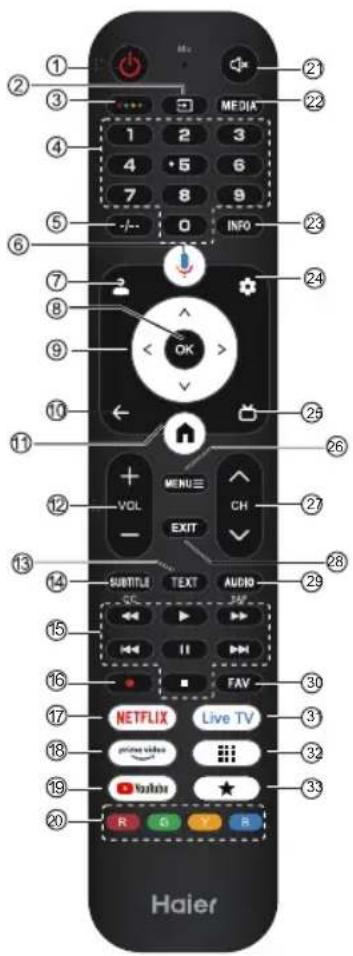
| # Stavka Opis |
| 1 | Napajanje | Pritisnite za uključivanje ili isključivanje televizora. Kada je vaš TV isključen, struja i dalje teče kroz njega. Da biste potpuno isključili napajanje, izvucite kabl za napajanje iz utičnice. |
| 2 | | Pritisnite da otvorite listu ulaznih izvora. |
| 3 | | Pritisnite za otvaranje softverske tastature. |
| 4 | 0~9 broj Pritisnite za unos broja TV kanala. |
| 5 | -/-- Pritisnite za podešavanje unosa broja TV kanala. |
| 6 | | Pritisnite da otvorite Google Assistant. |
| 7 | | Pritisnite za otvaranje stranice korisničkog računa. |
| 8 U | redu Unesite odabranu opciju ili izvršite odabranu radnju. |
| 9 | | Pritisnite za navigaciju kroz meni na ekranu. |
| 10 | NAZAD Vrati se na prethodni meni. |
| 11 | | Pritisnite za otvaranje početne stranice. |
| 12 | VOL+/VOL- Pritisnite VOL+ ili VOL- za podešavanje nivoa zvuka. |
| 13 | TEKST | Prikaži ili sakrij teletekst. |
| 14 | SUBTITLE | Pritisnite za podešavanje funkcije titlova. |
| 15 | | Kontrolirajte reprodukciju medija u načinu rada Media. |
| 16 | REC | Pritisnite dugme da biste započeli snimanje (u DTV režimu). |
| 17 | NETFLIX Pritisnite za otvaranje NETFLIX-a. |
| 18 | | Pritisnite za otvaranje prime video. |
| 19 | YouTube | Pritisnite za otvaranje YouTubea. |
| 20 | Obojene tipke | Izvršite odgovarajuće radnje prema uputstvu na dnu menija u tekstu. |
| 21 | | Pritisnite za otvaranje opcije bez zvuka. |
| 22 | MEDIJI | Pritisnite da otvorite Media Center. |
| 23 | INFO Pritisnite za prikaz informacija o kanalu |
| 24 | | Pritisnite za otvaranje izbornika Postavke. |
| 25 | | Pritisnite za prikaz elektronskog programskog vodiča u TV režimu. |
| 26 | MENI ≡ | Pritisnite za otvaranje ili zatvaranje menija na ekranu. |
| 27 | | CHV/PRitisnite ili da prchijenite kanale na TV-u. |
| 28 | IZLAZ | Izađite iz trenutne radnje. |
| 29 | AUDIO | Pritisnite za podešavanje NICAM-a u ATV-u. Odaberite zvučne zapise u DTV-u. |
| 30 | FAV | Pritisnite za prikaz vašeg omiljenog kanala. |
| 31 | Live TV | Pritisnite za ulazak u posljednji izvor signala u LiveTV-u. |
| 32 | | Pritisnite da otvorite listu aplikacija. |
| 33 | | Kreirajte prečicu za vašu omiljenu aplikaciju. |
Eye protection function: (In standard color temperature mode, TUV low blue light requirements are met)
Low Blue Light – Low blue light on your TV is designed to reduce the level of blue light to protect your eyes. Press on the remote control: Settings → Display&Sound → Display → Advanced Settings → Low Blue Light (Optional: Off, Low, Middle, High).
To reduce eye strain and protect your eyes when watching TV for extended periods, it is recommended that you:
- Take regular and frequent breaks, avoid watching TV for more than one hour.
E-Manual
APPENDICES
H43K85GUX/H50K85GUX/H55K85GUX/H65K85GUX/H75K85GUX
H43S80GUX/H50S80GUX/H55S80GUX/H65S80GUX/H75S80GUX/H85S80GUX
![graph TD A["CVBS, DVD predvajalnik ali druga naprava s CVBS"] --> B["CI kartica"] B --> C["Ojačevalnik"] D["SATELLITE 13/18V=0.5A"] --> E["RF"] F["ANTICABLE"] --> E G["AV IN adapter"] --> E H["LAN 5.0V=0.5A"] --> I["HDMI™"] J["USB"] --> I K["COMMON INTERFACE (SI) (sARCIAEC)"] --> I L["OPTICAL"] -->…](/content/2026/05/752162/images/65550d944cfe87866f808814e80c75211d3ff4049f6cc2040e8bdb26b88f67a4.jpg)
Audio/video device with HDMI interfaces
H43S85GUX/H50S85GUX/H55S85GUX/H65S85GUX/H75S85GUX
![graph TD A["TV: CVBS, DVD predvajalnik ali druga naprava s CVBS"] --> B["USB"] B --> C["Satellite 13/18V = 500mA"] B --> D["AV IN adapter"] B --> E["LAN"] B --> F["USB 5.0V = 500mA"] B --> G["CI kartica"] G --> H["Ojačevalnik"] H --> I["HIOMI™"] I --> J["Common Interface (CI)"] J --> K["(eARC/ARC)"]…](/content/2026/05/752162/images/dd9fd2bf12743255c2541a458a71c6329aadccee592dc64168e071432f41982c.jpg)
Audio/video device with HDMI interfaces
H55S90GUX/H65S90GUX/H75S90GUX
![graph TD A["Ojačevalnik"] --> B["USB 5.0V=0.5A 5.0V=1.0A"] B --> C["SATELLITE 13/16V=500mA ANT/CABLE"] C --> D["4K@144HZ4K@144BZ IaARC/ARCI"] D --> E["COMMON INTERFACE/CD"] E --> F["4K@60HZ4K@60Hz"] F --> G["AV IN adapter"] H["CVBS, DVD predvajalnik ali druga naprava s CVBS"] --> I["ICAM"] J["CI kar…](/content/2026/05/752162/images/30cf1d7c6d4007b95d5b38aa1036f3a29cca55f2f1d887f563a453fe47dad1b3.jpg)
Audio/video device with HDMI interfaces
NOTE
E-Manual
ACCESSORIES
H43K85GUX/H50K85GUX/H55K85GUX/H65K85GUX/H75K85GUX
H43S80GUX/H50S80GUX/H55S80GUX/H65S80GUX/H75S80GUX/H85S80GUX
![graph TD A["CVBS, DVD player ili drugi uređaj s CVBS izlazom"] --> B["SIU"] C["W (Audio L) R (Audio R) Y (Video)"] --> B D["CI kartica"] --> E["CD/PCI"] F["Pojačalo"] --> G["Optical"] H["SATELLITE 13/18V=0.5A"] --> I["RF"] J["ANT/CABLE adapter"] --> I K["AV IN"] --> I L["LAN 5.0V=0.5A"] --> I M["USB…](/content/2026/05/752162/images/3724e5bf40f9c3b9bfe97a06a75f0e80f617120f3d66b6a5e835fac843daa13d.jpg)
E-Manual
H43K85GUX/H50K85GUX/H55K85GUX/H65K85GUX/H75K85GUX
H43S80GUX/H50S80GUX/H55S80GUX/H65S80GUX/H75S80GUX/H85S80GUX
![graph TD A["TV System"] --> B["Antenna"] A --> C["Analog Devices"] A --> D["RF Interface"] A --> E["Computer"] F["Audio System"] --> G["Satellite 13/18V=0.5A"] F --> H["Remote Control"] I["Home Device"] --> J["Smartphone"] K["Camera"] --> L["USB 5.0V=0.5A"] K --> M["HDMI"] N["Monitor"] --> O["Laptop…](/content/2026/05/752162/images/19a940eb59a9048f63ad0ad24386cedd2de6c776bd0a34e373c5d8ef7cf92172.jpg)
ACCESSORIES
Electronic manual
PRIEDAI
Remote control User manual
- 1 pc. - 1 pc.
H43K85GUX/H50K85GUX/H55K85GUX/H65K85GUX/H75K85GUX
H43S80GUX/H50S80GUX/H55S80GUX/H65S80GUX/H75S80GUX/H85S80GUX
![graph TD A["CVBS, DVD grotuvas arba kitas jrenginys su CVBS"] --> B["SIATellite 13/18V=0.5A"] A --> C["STiprintuvas"] D["W (garsas - kairė) R (garsas - dešinė) Y (vaizdas)"] --> E["SIATellite 13/18V=0.5A"] F["CI kortelė"] --> G["SIATellite 13/18V=0.5A"] H["ANTICABLE"] --> I["AV IN adapter"] I --> J[…](/content/2026/05/752162/images/ce85cc1abfe798ce24e8e16e3e7845e7d0ea9d9125e2885c7e78701e5c5d8712.jpg)
Electronic manual
ACCESSORIES
H43K85GUX/H50K85GUX/H55K85GUX/H65K85GUX/H75K85GUX
H43S80GUX/H50S80GUX/H55S80GUX/H65S80GUX/H75S80GUX/H85S80GUX
![graph TD A["CVBS, DVD-mängija või muu seade, millel on CVBS"] --> B["Satellite 13/18V=0.5A"] A --> C["AV IN adapter"] A --> D["LAN 5.0V=0.5A"] A --> E["USB"] A --> F["HDMI"] A --> G["DIAM"] A --> H["DIAM"] A --> I["DIAM"] A --> J["DIAM"] K["W (Heli L) R (Heli R) Y (Video)"] --> A L["Võimendi"] --> M…](/content/2026/05/752162/images/65fa6d7baa9cd93b18477480a8633b5237dd1e24fe76d26f53e4d055170046c1.jpg)
Audio/video device with HDMI interface
H43S85GUX/H50S85GUX/H55S85GUX/H65S85GUX/H75S85GUX
![graph TD A["CVBS, DVD-mängija või muu seade, millel on CVBS"] --> B["W (Heli L)"] A --> C["R (Heli R)"] A --> D["Y (Video)"] E["Võimendi"] --> F["CI-kaart"] G["SATELLITE 13/18V = 500mA"] --> H["ANT/CABLE AV IN adapter LAN USB 5.0V = 500mA"] H --> I["Hardware"] J["HDMI™"] --> K["Common Interface (CI)…](/content/2026/05/752162/images/8126c6d5e1f12e7552b6b962aa29f1ce037a6639eba6dfcb8cc5f8768235147d.jpg)
Audio/video device with HDMI interface
H55S90GUX/H65S90GUX/H75S90GUX
![graph TD A["Võimendi"] --> B["USB 5.0V=0.5A 5.0V=1.0A"] B --> C["Satellite 13/16V=500mA"] C --> D["ANT/CABLE"] D --> E["HDMI™ 4K@144HZ4K@144HZ (eARC/ARC)"] E --> F["Common Interface CII 4K@60HZ4K@60HZ"] F --> G["AV IN adapter"] H["W (Heli L) R (Heli R) Y (Video)"] --> I["CVBS, DVD-mängija või muu se…](/content/2026/05/752162/images/092fb62021aed45fd9884795ad60bf6575ca5bd5c774a1e55013ebda50004cf6.jpg)
Audio/video device with HDMI interface
Electronic manual
E-manual
Electronic manual
H43K85GUX/H50K85GUX/H55K85GUX/H65K85GUX/H75K85GUX
H43S80GUX/H50S80GUX/H55S80GUX/H65S80GUX/H75S80GUX/H85S80GUX
![graph TD A["TV Device"] --> B["CVBS, DVD spilari eða önnur tæki með CVBS"] A --> C["W (Hljóð L)"] A --> D["R (Hljóð R)"] A --> E["Y (Myndband)"] F["Magnari"] --> G["CAM"] F --> H["CI-kort"] I["SATELLITE 13/18V=0.5A"] --> J["ANT/CABLE adapter"] J --> K["AV IN"] K --> L["LAN 5.0V=0.5A"] L --> M["USB"]…](/content/2026/05/752162/images/306628a84d71620c7f367c12748bc6e0104f9334ea0417289d3dd5ecd1be2ff9.jpg)
User Manual
ACCESSORIES
E-manual
ACCESSORIES
H43K85GUX/H50K85GUX/H55K85GUX/H65K85GUX/H75K85GUX
H43S80GUX/H50S80GUX/H55S80GUX/H65S80GUX/H75S80GUX/H85S80GUX
![graph TD A["TV Device"] --> B["Anticable"] B --> C["AV In adapter"] C --> D["LAN"] D --> E["USB 5.0V=0.5A"] E --> F["HDMI"] F --> G["Common Interface (SI)"] G --> H["Optical"] I["Video"] --> J["W (Bal audio)"] I --> K["R (Jobb audio)"] I --> L["Y (Videó)"] M["Camera"] --> N["CI-kártya"] O["Analog"]…](/content/2026/05/752162/images/b8e28e400472551356f28266ff4383f0e01d9bf7afeb848fce064f58ca956b1d.jpg)
E-Manual