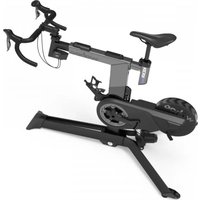
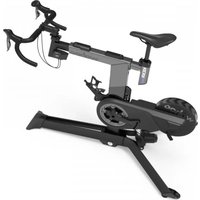
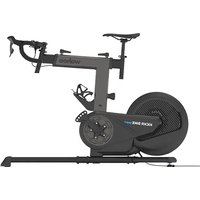
KICKR Bike Pro - Indoor bike trainer Wahoo - Free user manual and instructions
Find the device manual for free KICKR Bike Pro Wahoo in PDF.


| Product Type | Connected indoor bike trainer |
| Brand | Wahoo |
| Model | KICKR Bike Pro |
| Power supply | Mains adapter included (100-240 V) |
| Max user weight | 113,5 kg (250 lbs) |
| Adjustable crank lengths | 165, 167,5, 170, 172,5, 175 mm |
| Display | Integrated LED screen: locked/unlocked mode, gear, incline, connection status |
| Connectivity | ANT+, Bluetooth, Wi-Fi (via Wahoo app) |
| Main functions | ERG mode (constant power), Simulation mode (incline, wind), manual incline control, electronic gear shifting |
| App compatibility | Zwift, SYSTM, Wahoo ELEMNT, etc. |
| Adjustments | Saddle height, handlebar height, reach, setback, tilt, crank length |
| Safety | Locked mode to prevent unintended movements, emergency stop via app |
| Maintenance and cleaning | Wipe after each use with a soft cloth, check screws and bolts, unplug before cleaning |
| Spare parts and repairability | Pedals, saddle, handlebar, cranks, belt, etc. Support via Wahoo Fitness |
| Warranty | Check Wahoo Fitness website for terms |
| General information | Requires two people for assembly. Indoor use only. Operating temperature: ambient. |
Frequently Asked Questions - KICKR Bike Pro Wahoo
User questions about KICKR Bike Pro Wahoo
0 question about this device. Answer the ones you know or ask your own.
Ask a new question about this device
Download the instructions for your Indoor bike trainer in PDF format for free! Find your manual KICKR Bike Pro - Wahoo and take your electronic device back in hand. On this page are published all the documents necessary for the use of your device. KICKR Bike Pro by Wahoo.
USER MANUAL KICKR Bike Pro Wahoo
natural_image
Exterior view of a Wahoo stationary bike with visible branding and wheels (no text or symbols beyond branding)KICKR BIKE PRO
smart bike
QUICK START GUIDE
Thank you for purchasing the Wahoo KICKR BIKE PRO!

SCAN THE QR CODE FOR:
- Assembly and Set Up Instructions
- Firmware Updates
- Product Registration
Download the app then scan the QR Code again to initiate setup.
LEARN MORE:
For instructional videos, compatible apps, FAQs, or to submit a support request please visit: www.wahoofitness.com/support
PLEASE CONTACT US WITH
QUESTIONS OR CONCERNS AT:
Wahoo Fitness
90 W. Wieuca Rd NE, Suite 110
Atlanta, GA 30342 United States
https://support.wahoofitness.com
TELEPHONE:
United States: 1-877-978-1112
Germany: +49-30-568-373827
United Kingdom: +44-800-808-5773
Phone Hours: Monday - Friday
9am-5pm Eastern Time Zone
For safety, read this manual and all safety information thoroughly before assembly and use.
- Assemble the KICKR BIKE PRO only as stated in the information contained in this manual.
- Do not modify the KICKR BIKE PRO.
- All instructions can be viewed on our website: www.wahoofitness.com/instructions.
- Images may not reflect final product exactly.
The following instructions must be observed at all times in order to prevent personal injury and physical damage to equipment and surroundings. The instructions are classified according to the degree of danger or damage which may occur if the product is used incorrectly:
Failure to follow the instructions will result in death or serious injury.
Failure to follow the instructions will result in death or serious injury.
Failure to follow the instructions could cause personal injury and/or physical damage to equipment or surroundings.
SAFETY INFORMATION
CAUTION
- Improper or excessive exercise can result in serious injury. Always consult your physician before beginning or modifying any exercise program.
- The Wahoo App KICKR BIKE PRO Fit algorithm(s) do not guarantee injury prevention.
- Contact with the moving parts of the KICKR BIKE PRO could result in serious injury.
- Do not put hands or objects near moving parts of the KICKR BIKE PRO.
- Keep children and pets away from the KICKR BIKE PRO.
- Do not dismount the KICKR BIKE PRO while the flywheel is in motion.
- Do not wear loose clothing or shoes with loose laces that could result in unintended contact with moving parts.
- Do not exceed the maximum rider weight of 250 lbs. (113.5 KG).
- Instability of the KICKR BIKE PRO could result in serious injury. Only use the KICKR BIKE PRO on stable, level surfaces.
- The KICKR BIKE PRO is intended for indoor use only. Do not store outdoors or near water.
- The KICKR BIKE PRO may become hot to the touch when used for extended periods of time. Allow components to cool before touching.
- To avoid risk of fire or electric shock, only use the included power adapter with the KICKR BIKE PRO.
- Unplug the KICKR BIKE PRO when not in use and prior to cleaning and/or maintenance.
- Device alterations, improper and/or incomplete use, assembly or operation can result in serious injury.
ENSURE PROPER ASSEMBLY
- Follow the instructions provided in the manual when assembling the product.
- Read all safety information and ensure understanding of assembly instructions before assembling and using the KICKR BIKE PRO.
- Keep this manual for future reference.
- Improper assembly, maintenance or use will void the warranty.
- The KICKR BIKE PRO may be placed on a mat to protect floor or carpet if desired.
- Wahoo Fitness is not liable for improper or incomplete assembly of the KICKR BIKE PRO.
BEFORE EACH RIDE
- Check to ensure that stem bolts are tight and that handlebars cannot rotate.
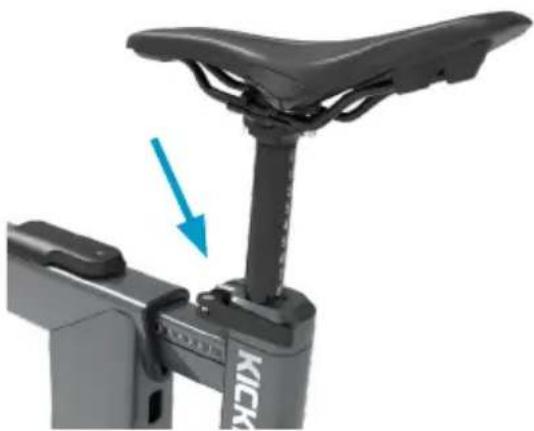
- Confirm that your saddle is properly installed and all bolts are properly tightened.
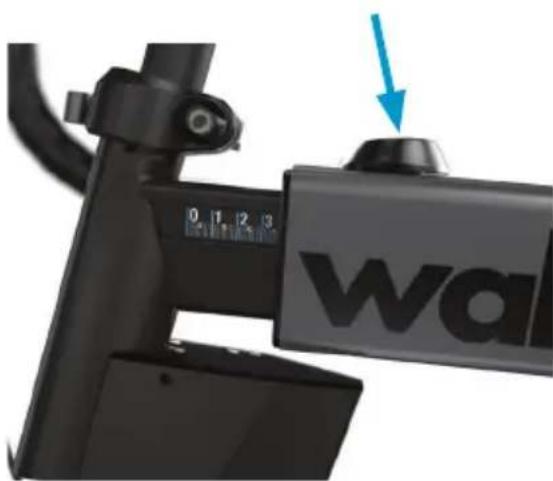
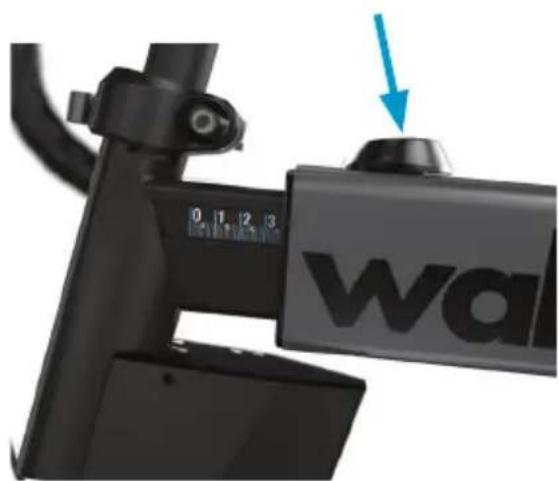
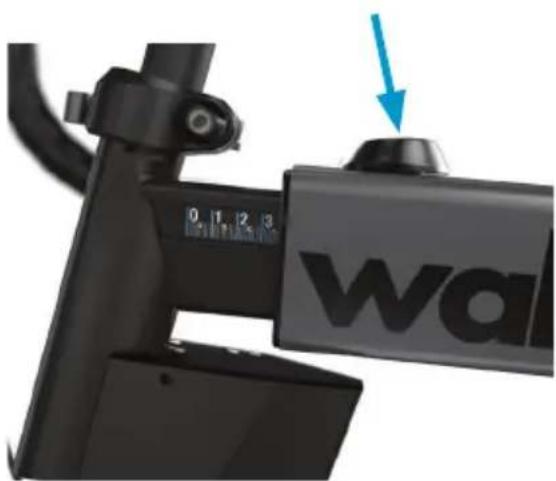
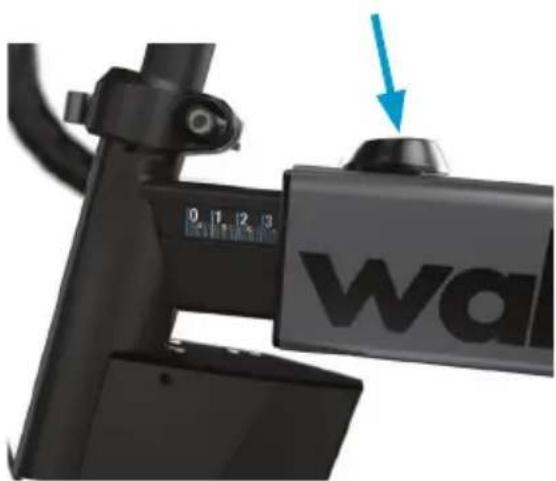
- Ensure that both the levers for adjusting reach and setback are fully closed.
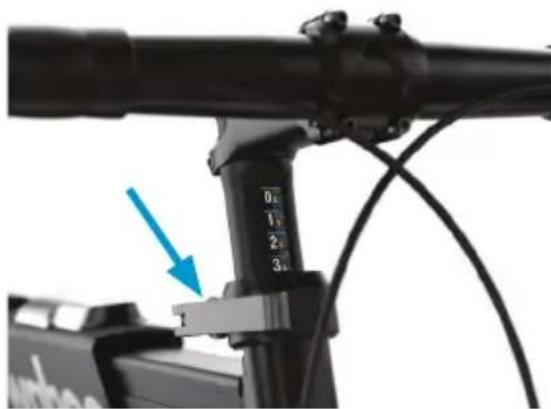
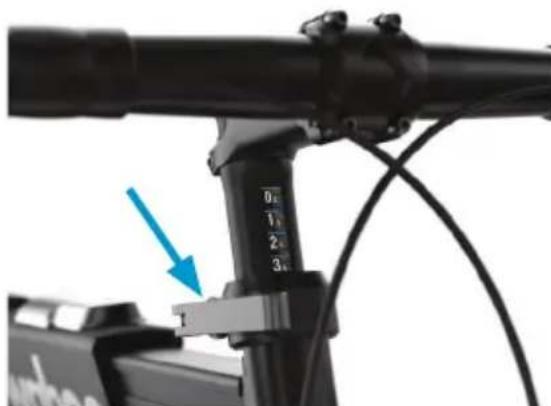
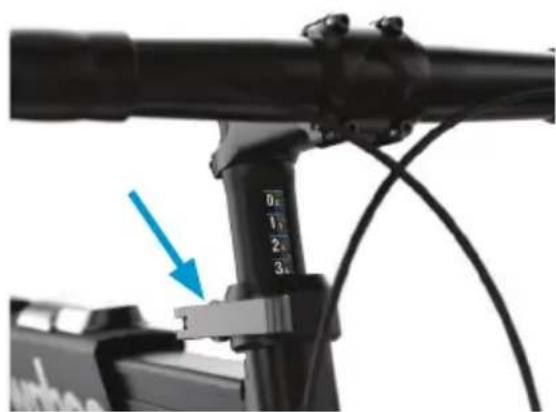
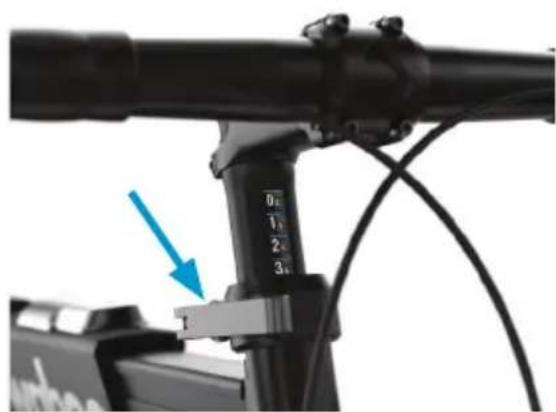
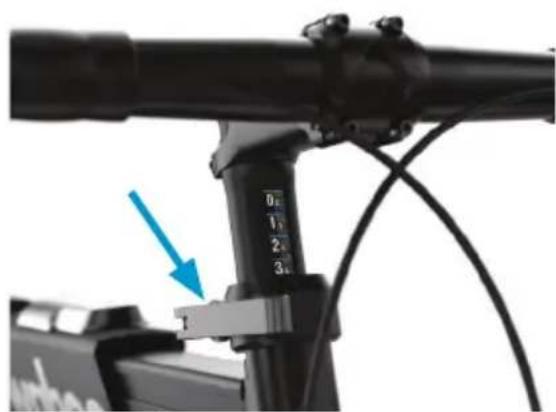
- Check that the seatpost and steer tube quick release clamps are tightened and fully closed.
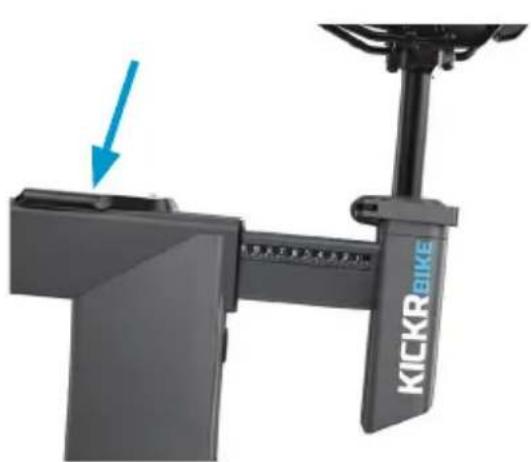
- Ensure that the standover height pin is properly seated and resting in the corresponding height position hole and that the lever is fully closed.
- That your pedals are properly installed and adequately tightened.
• Refer to this manual for proper torque specs. - Before each ride ensure that the area is clear and that the KICKR BIKE PRO has full range of tilt motion.
- Level the KICKR BIKE PRO's feet and make sure the floor is clear of any debris.
- Check the power cord and brick for any damage before plugging it in.
- Ensure the KICKR BIKE PRO is in locked mode before starting your ride.
MAINTENANCE AND STORAGE
It is important to follow the below maintenance tips to ensure optimal performance of your KICKR BIKE PRO:
After each training session:
- Use a soft cloth to wipe the KICKR BIKE PRO dry or remove any sweat or water.
- Unplug the KICKR BIKE PRO when stored or plug into surge protector.
- Routinely check for signs of rust, corrosion, or excessive wear.
- Inspect all bolts and screws for rust or damage.
To move and store your KICKR BIKE PRO, use the casters to move the KICKR BIKE PRO to a safe place for storage:
- Grab the handlebars and lift, then grab the front foot. Hold the front foot to navigate to place of storage.
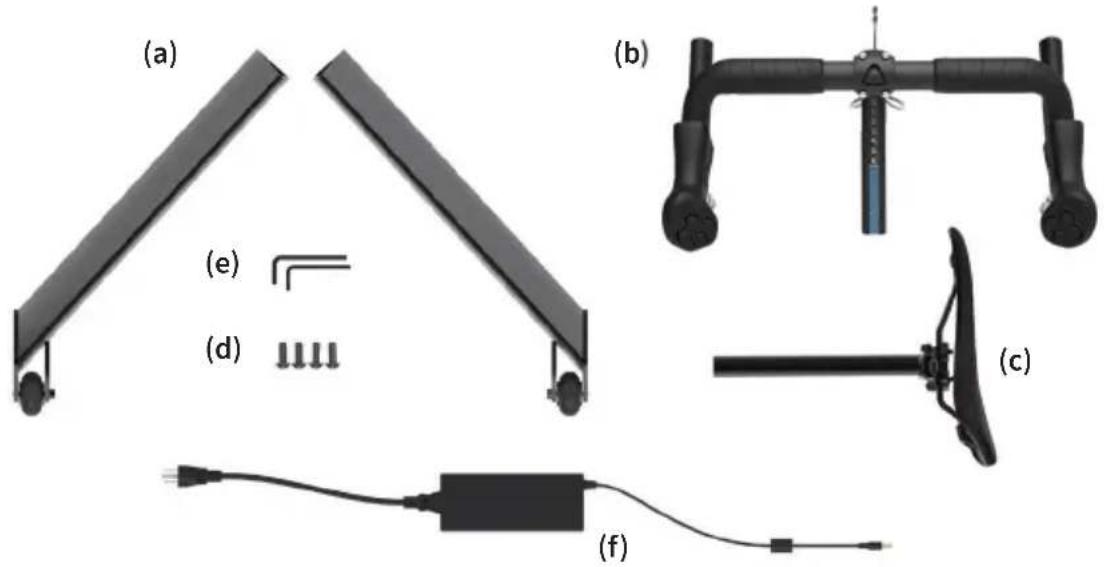
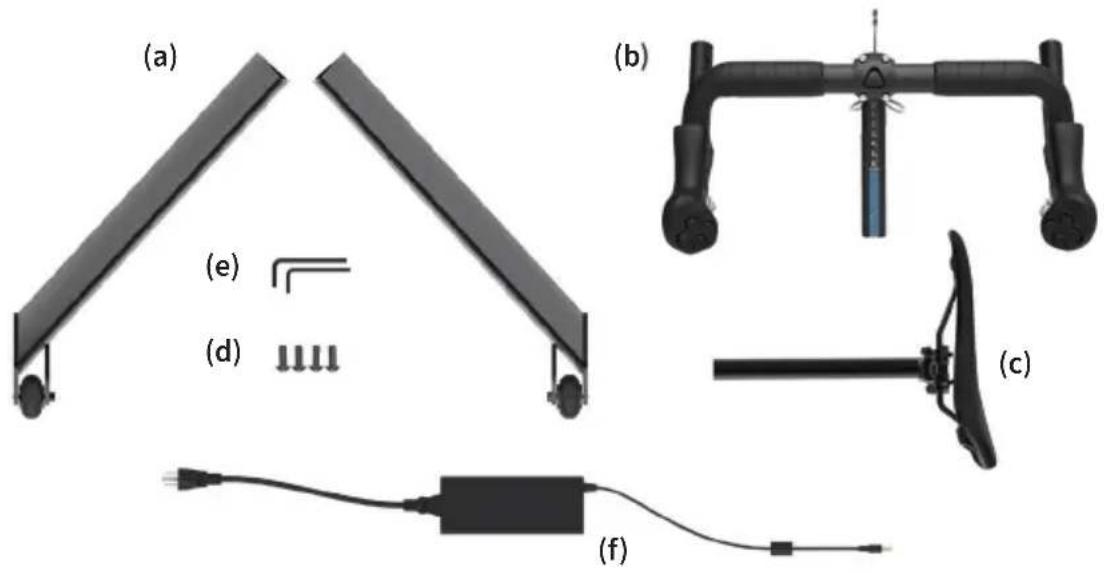
BOX CONTENTS
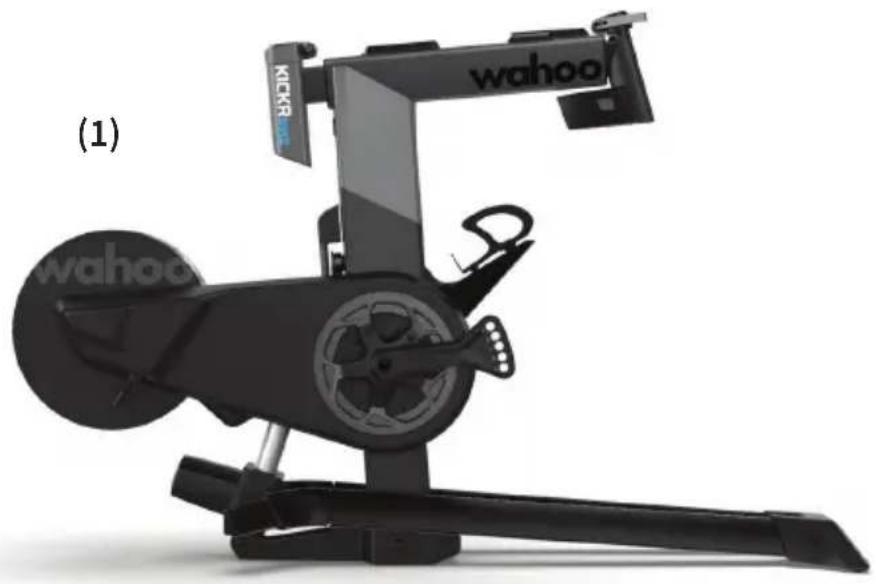
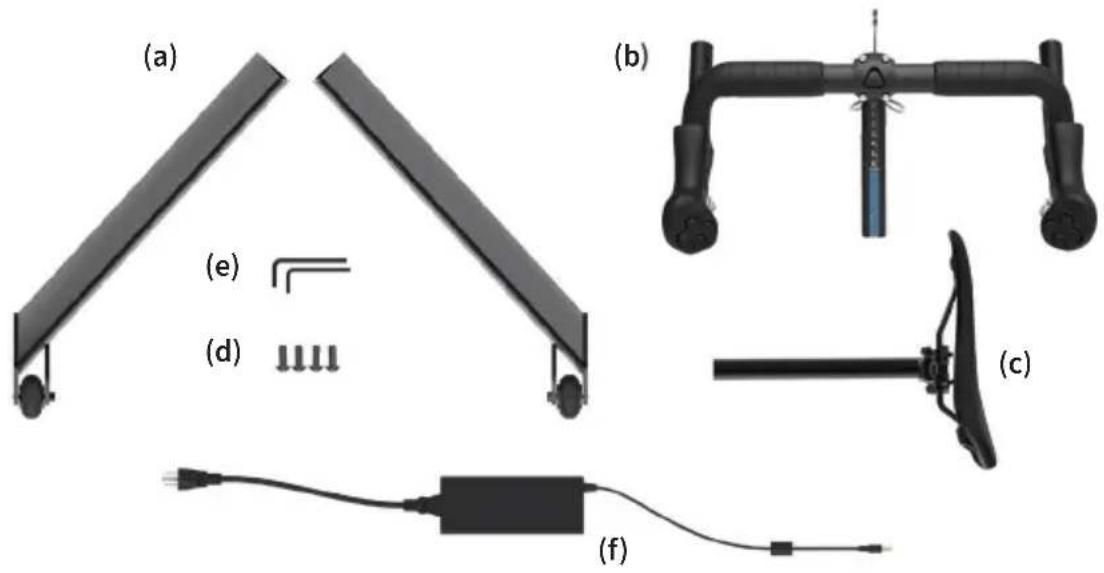
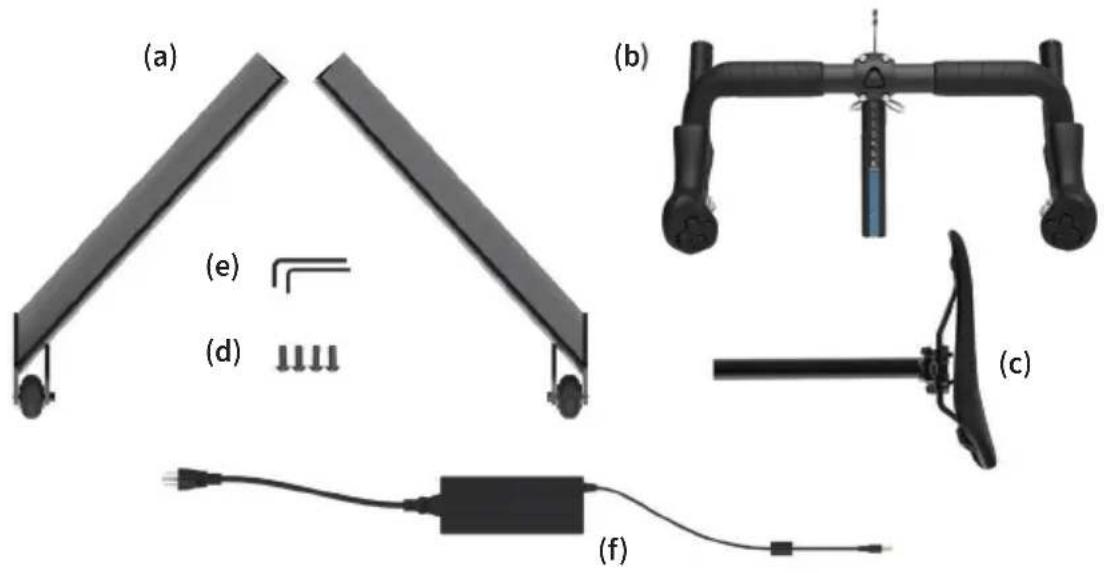
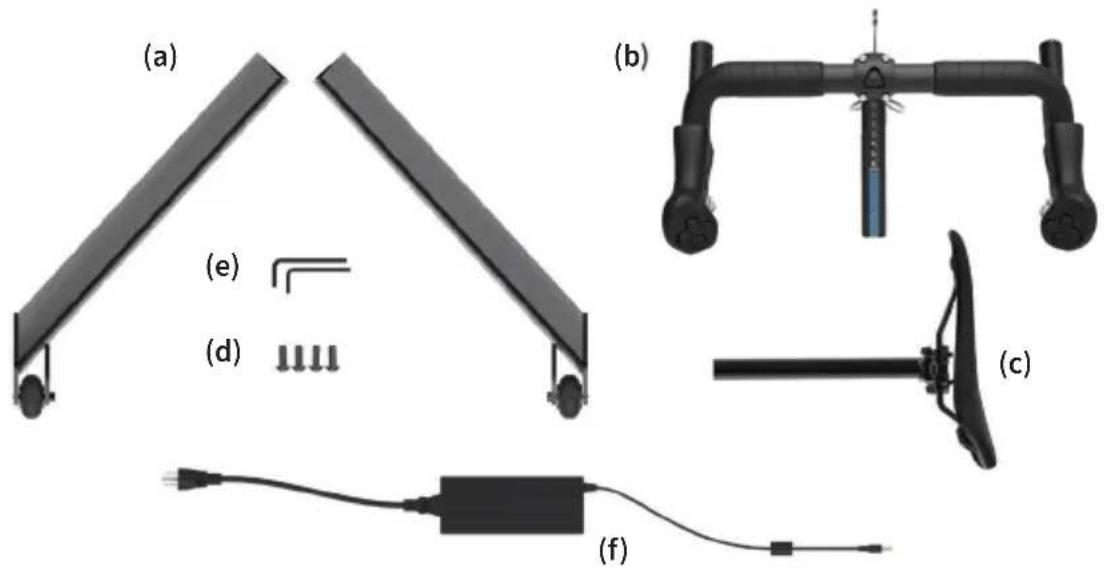
(1) KICKR BIKE PRO main assembly
(2) ACCESSORY BOX
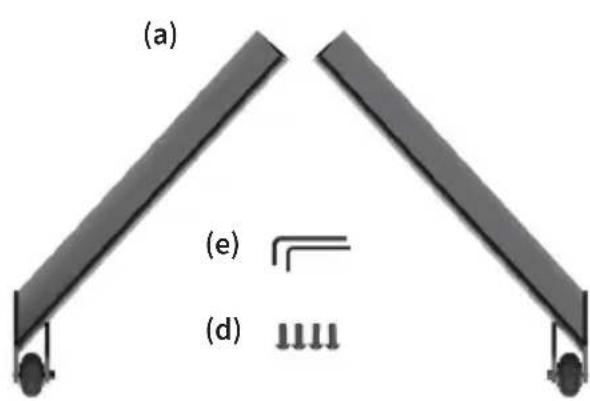
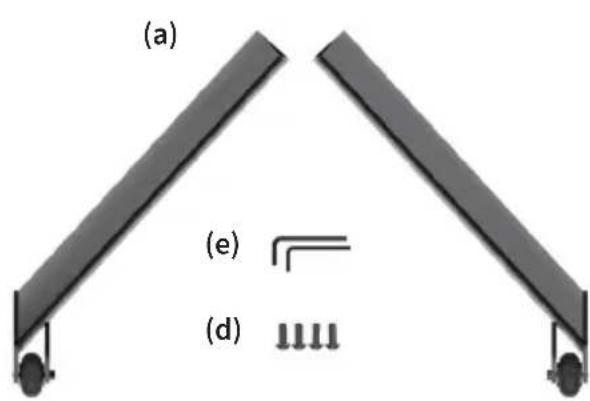
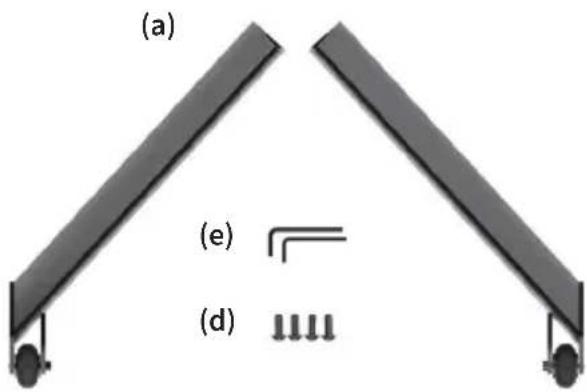
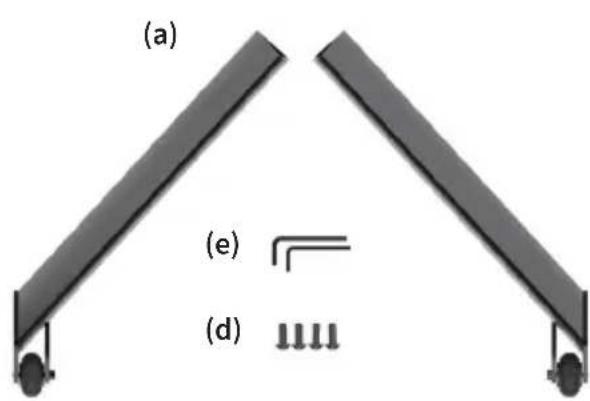
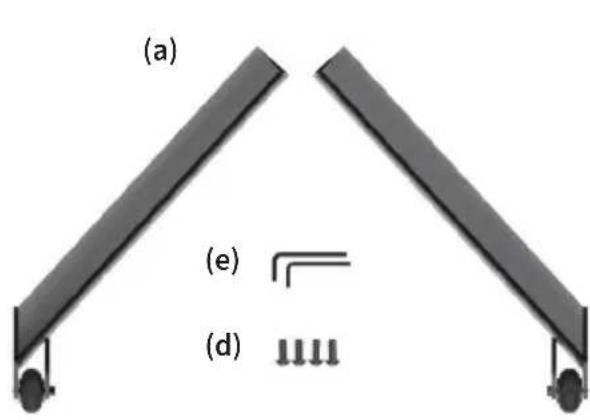
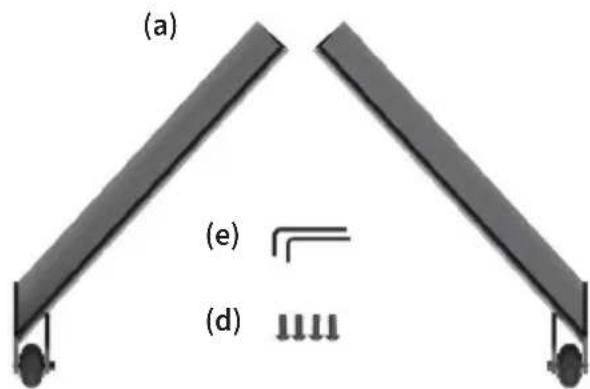
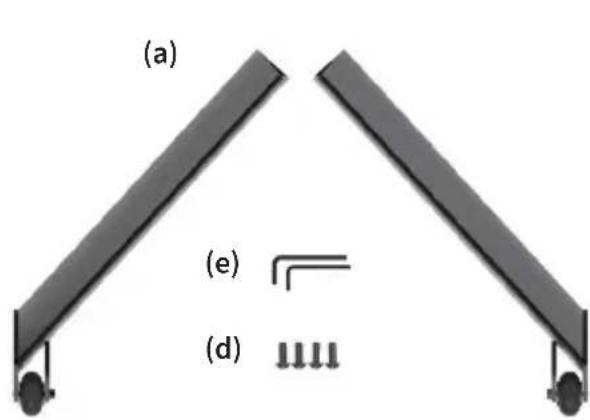
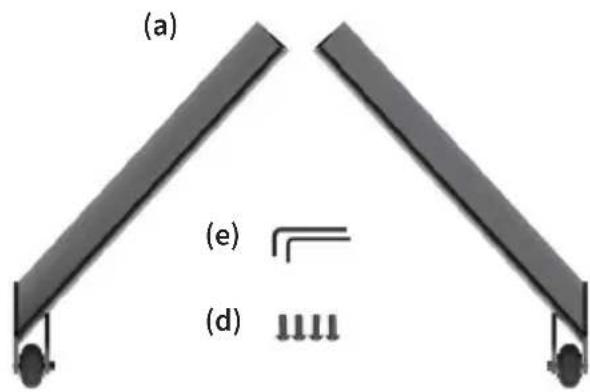
(a) Rear stabilizer legs (2)
(e) Hex wrenches (4,5mm)
(c) Seatpost assembly
(f) AC power adapter
natural_image
Black Wahoo stationary exercise machine with visible branding and control panel (no text or symbols on the device itself)(2)
natural_image
Diagram of two identical mechanical components labeled (a) and (d), with no text or symbols present.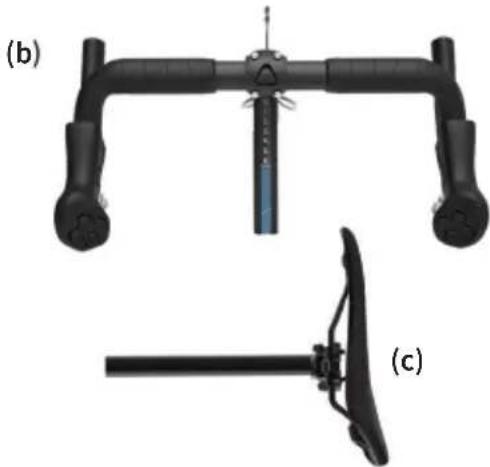
natural_image
Technical illustration of a mechanical device with two views: (b) top view and (c) side view, both without any text or symbols.
natural_image
Pure electrical circuit lines without any symbolsKICKR BIKE PRO PARTS
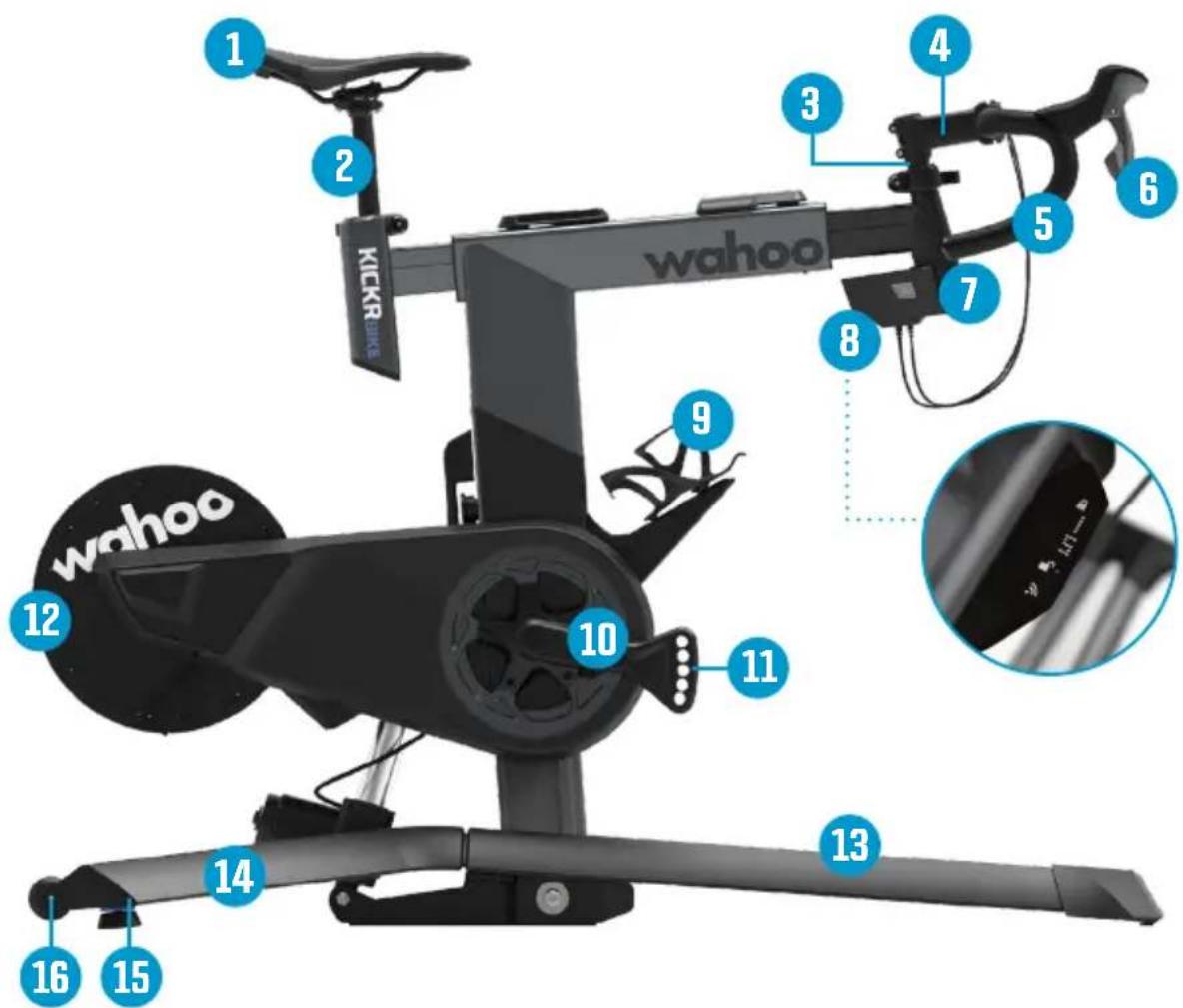
(1) Saddle
(2) Seatpost
(3) Steer Tube
(4) Stem
(5) Handlebars
(6) Shifters
(7) Head Tube
(8) LED Display
(9) Water Bottle Cage
(10) Crank Arms
(11) Crank Length
Adjustment
(12) Flywheel
(13) Base
(14) Rear Stabilizer Leg
(15) Leveling Feet
(16) Castors
KICKR BIKE PRO ADJUSTMENT POINTS
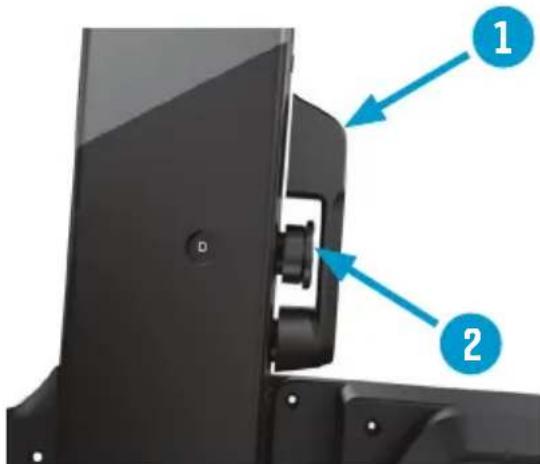
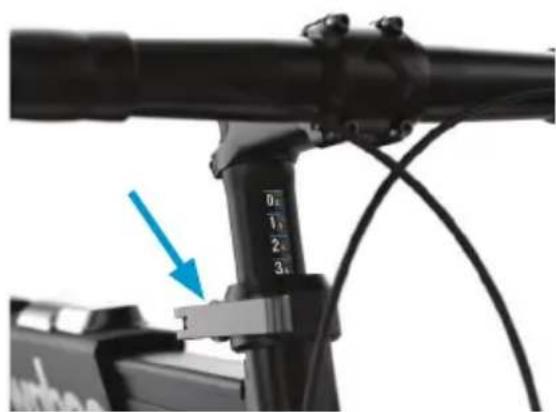
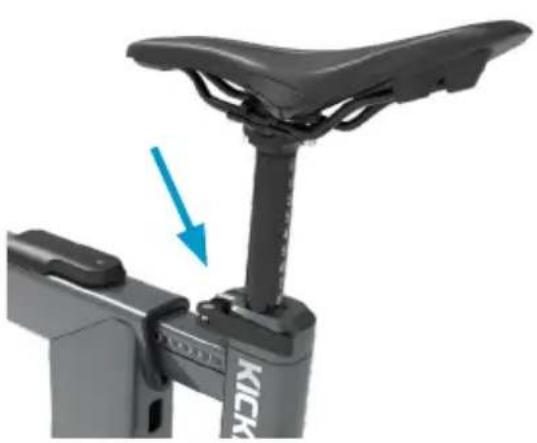
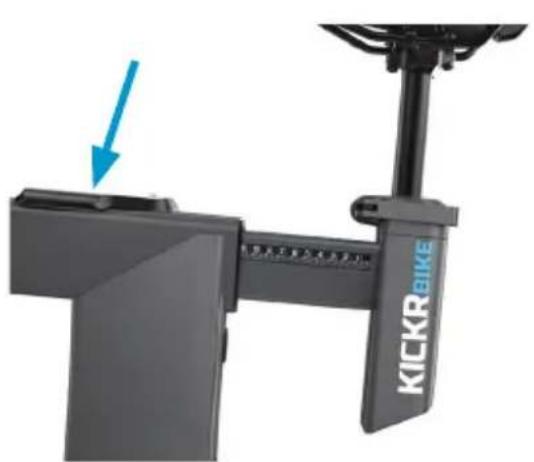
Standover Height Adjustment
natural_image
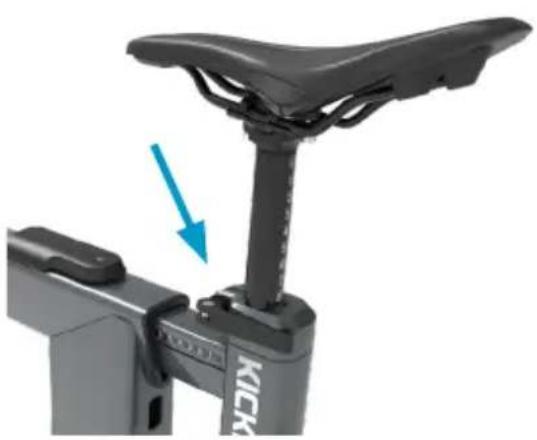
Close-up of a black stationary bike with a blue arrow pointing to the seat, showing no text or symbols on the device itself.Saddle Height Adjustment

natural_image
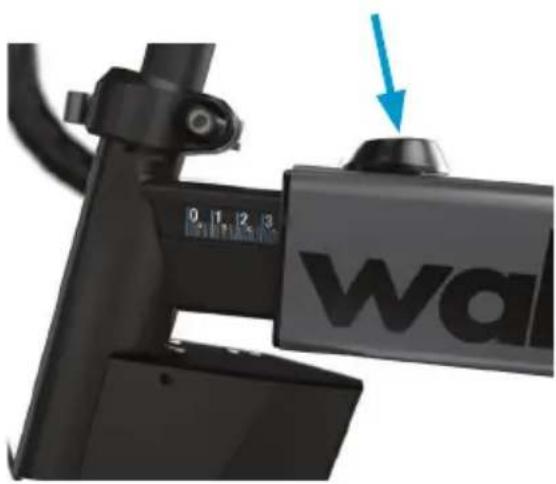
Close-up of a KICKRBIKE bicycle lever mechanism with a blue arrow pointing to the handle (no text or symbols on the device itself)Setback Adjustment
natural_image
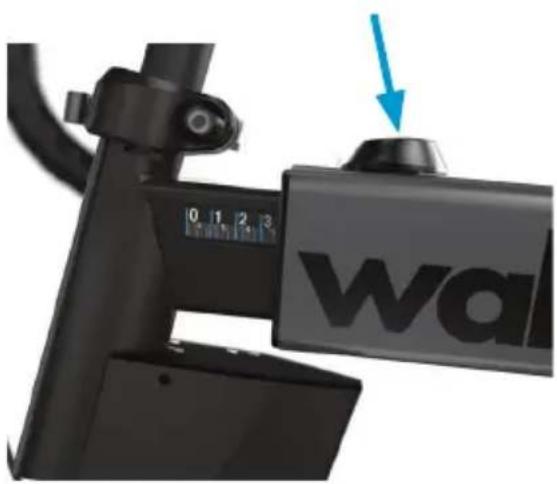
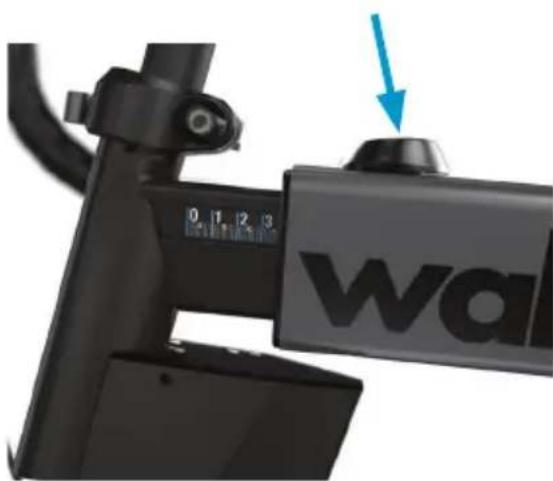
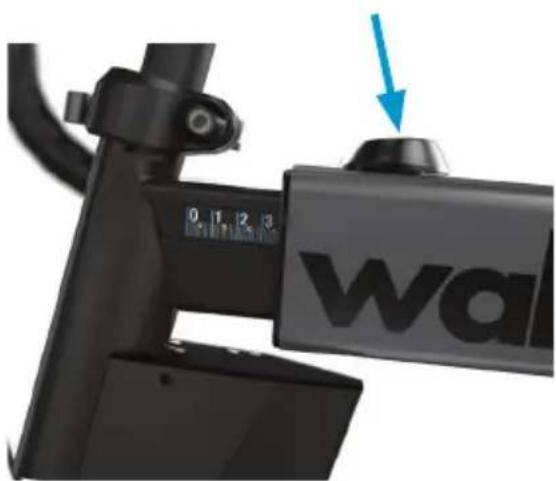
Close-up of a black electric scooter front bumper with 'wa' logo and blue arrow pointing to the top component (no text or symbols on body)Reach Adjustment
natural_image
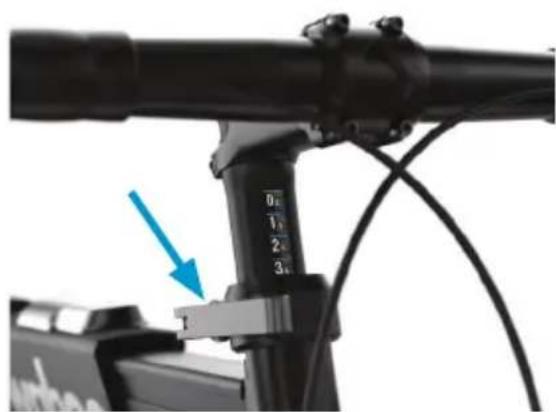
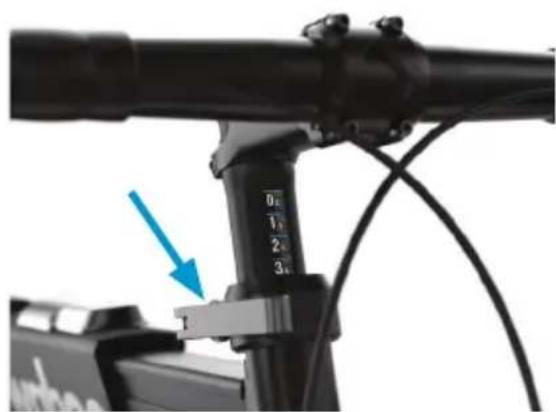
Close-up of a bicycle headstock with a blue arrow pointing to a component, no visible text or symbols.Stack Height Adjustment
natural_image
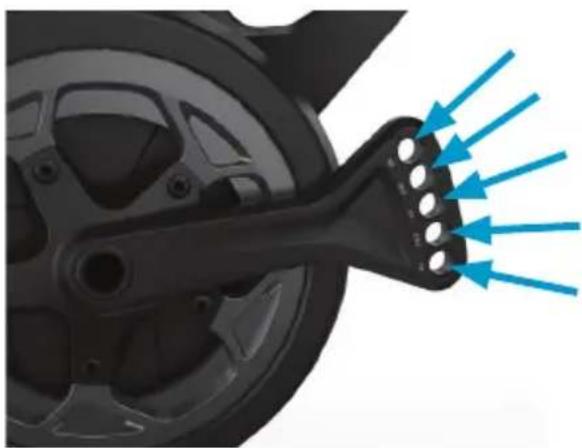
Mechanical component with blue directional arrows indicating flow or force (no text or symbols)Crank Length Adjustment
KICKR BIKE PRO SETUP
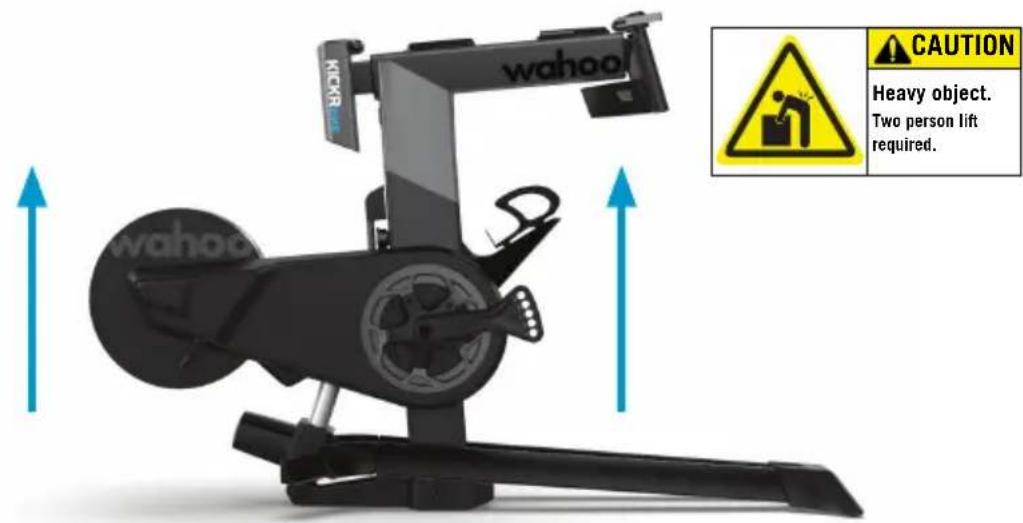
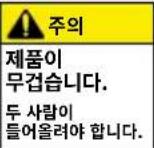
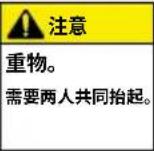
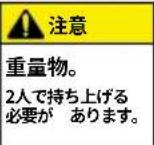
KICKR BIKE PRO assembly requires two people. Remove and lay out all items from the accessory box, ensuring all items are included. To begin, team lift the KICKR BIKE PRO to remove it from the box.
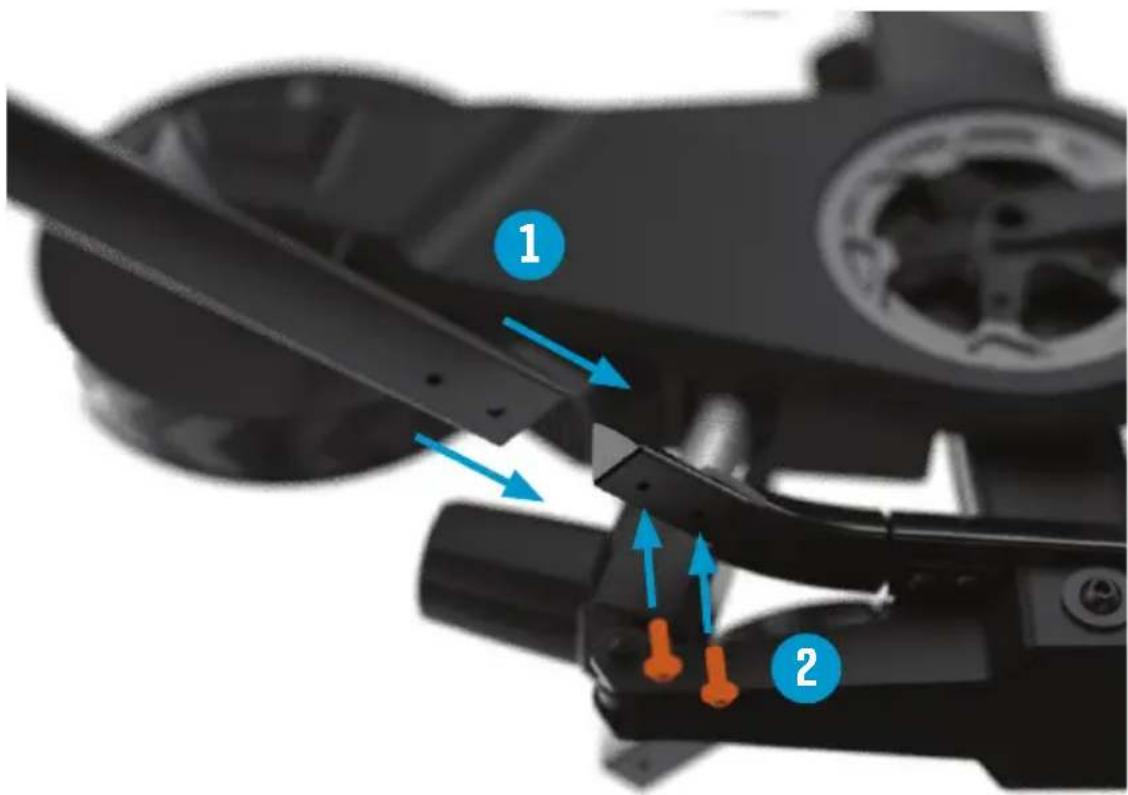
With one person tilting the frame for access, assemble stabilizer leg to lower frame with supplied 5mm hex bolts. Repeat process for opposite side.
Tightening torque

24 - 28 N- m
KICKR BIKE PRO ASSEMBLY
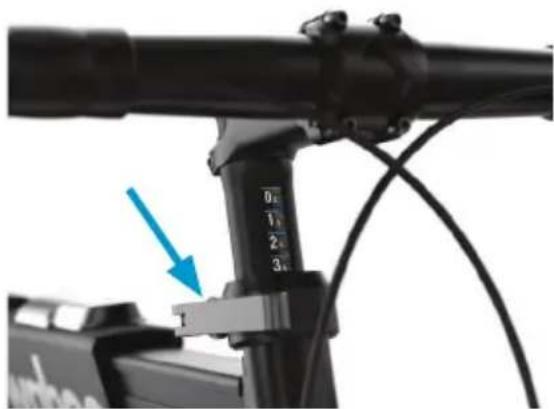
Attach the handlebar assembly to the KICKR BIKE PRO using front reach extension quick release.
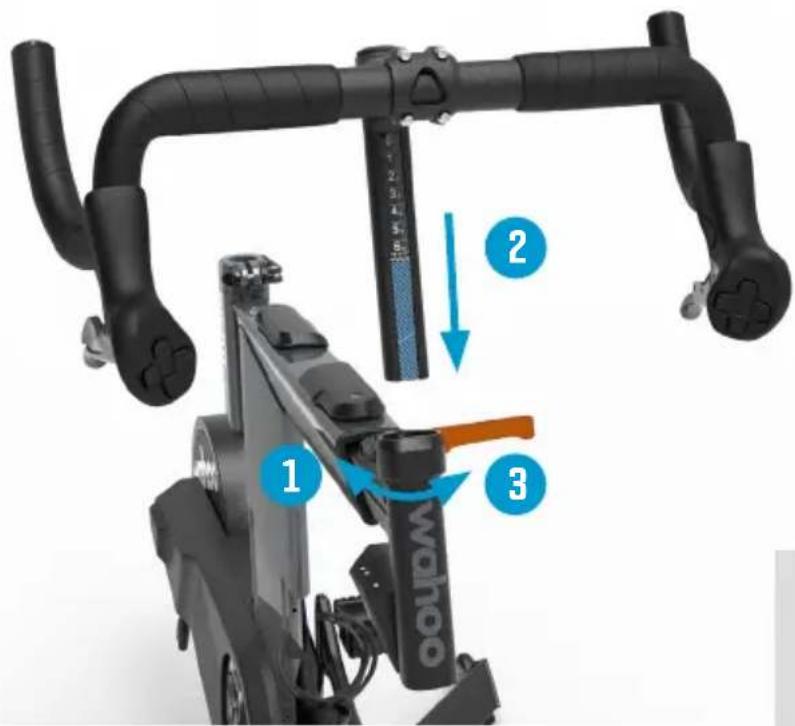
The handlebars will be tipped down. Use a 4mm Allen wrench to loosen (but do not remove) the stem bolts on the face plate. Rotate the handlebars to your desired position. Tighten stem bolts evenly on the face plate.
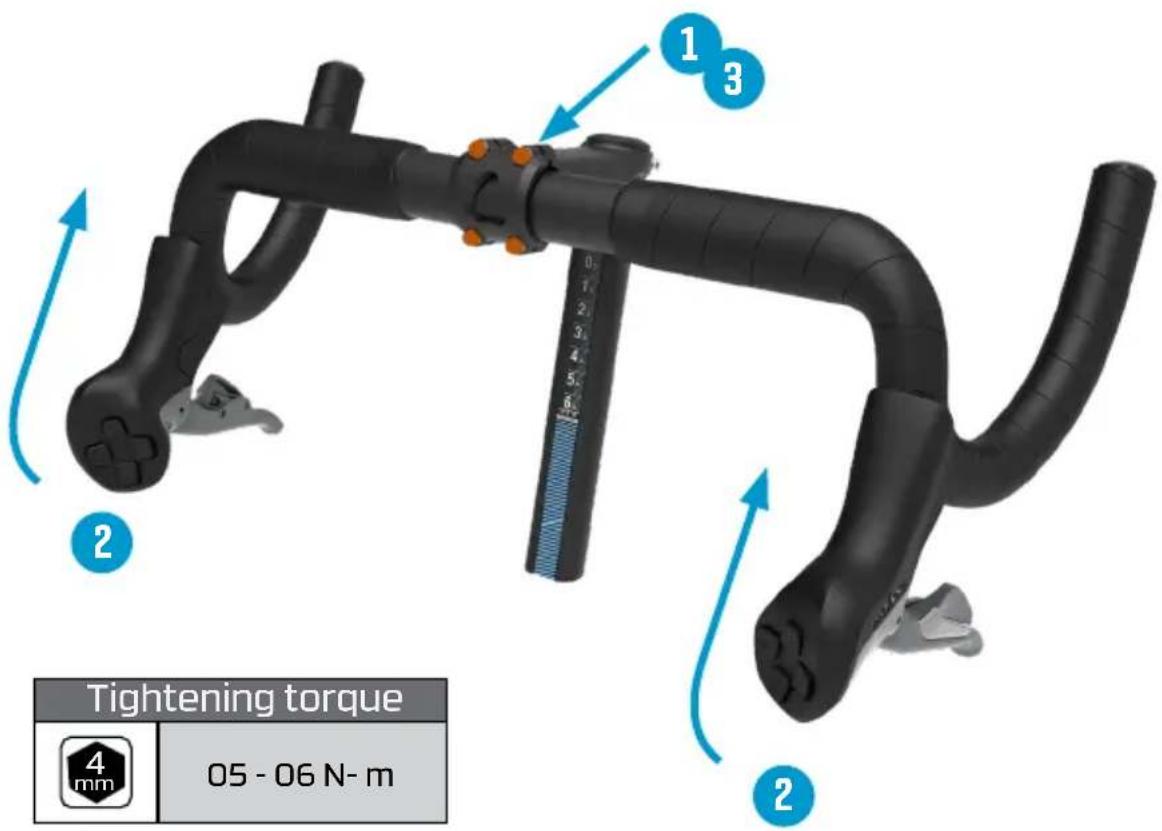
| Tightening torque | |
| 05 - 06 N- m | |
KICKR BIKE PRO ASSEMBLY
continued
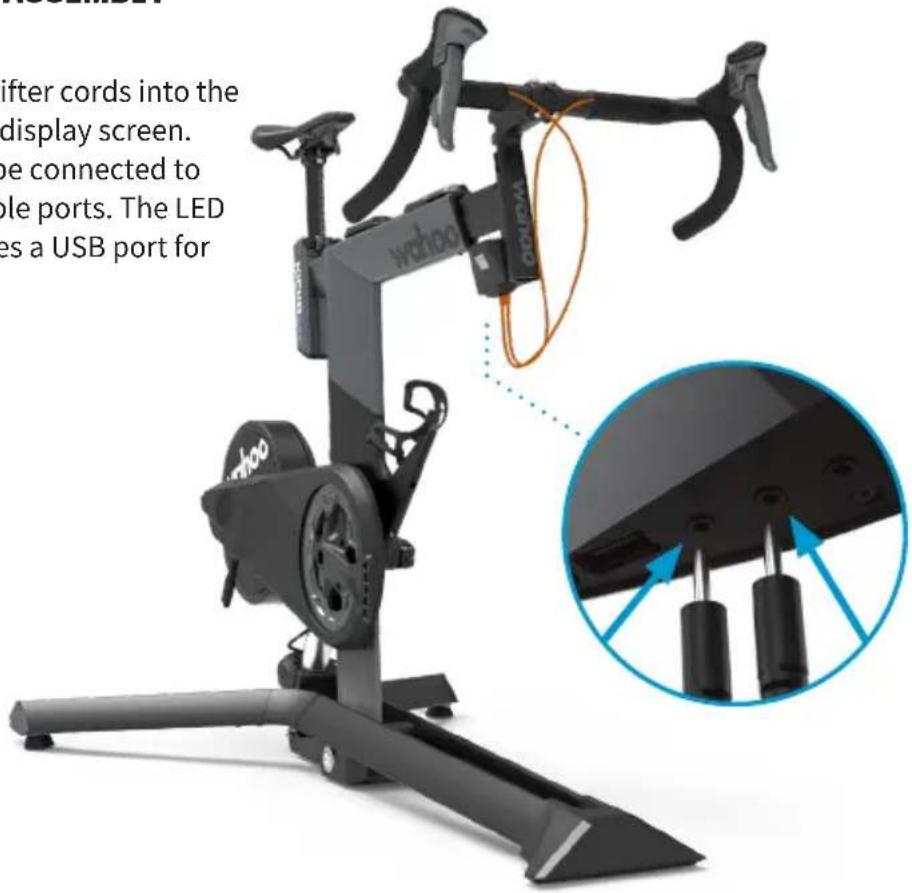
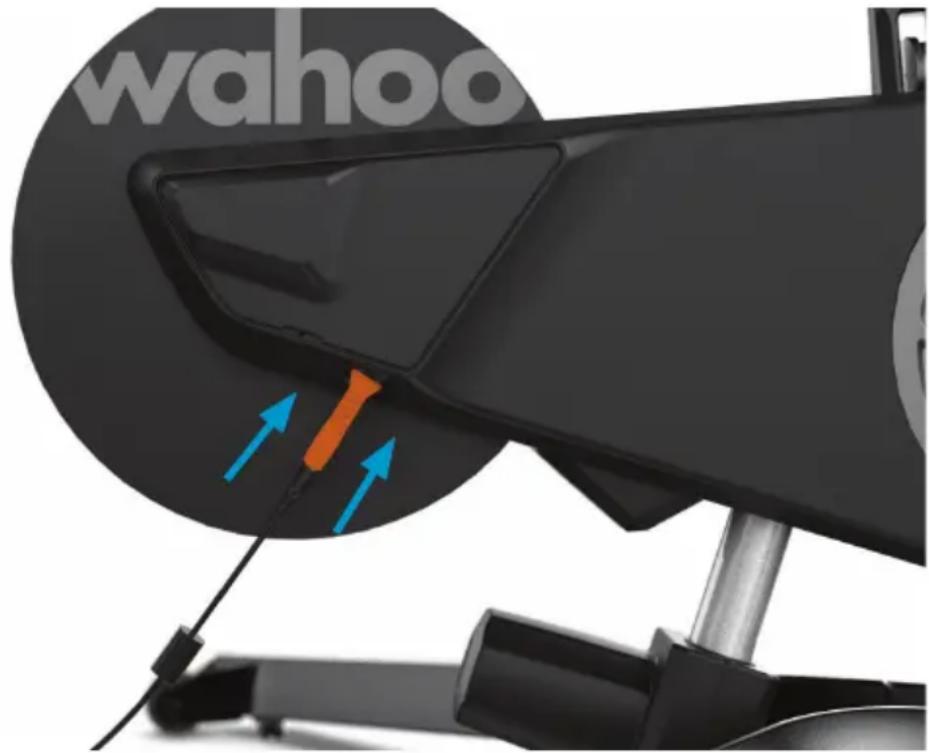
Plug both of the shifter cords into the bottom of the LED display screen. Shifter cords may be connected to any of the 3 available ports. The LED display also features a USB port for device charging.
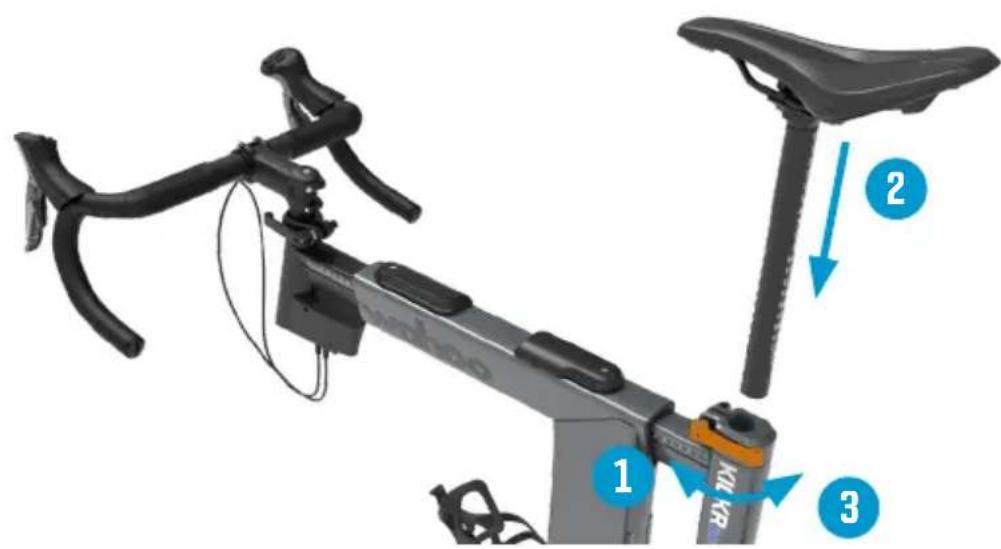
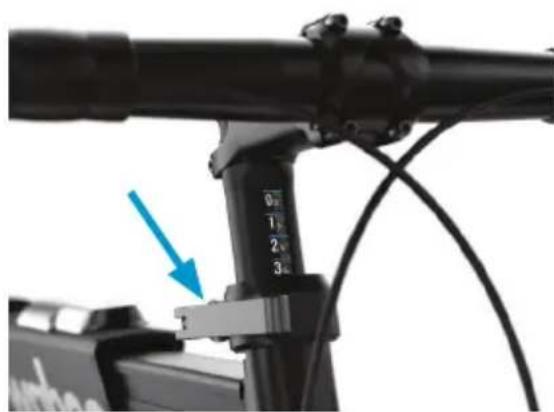
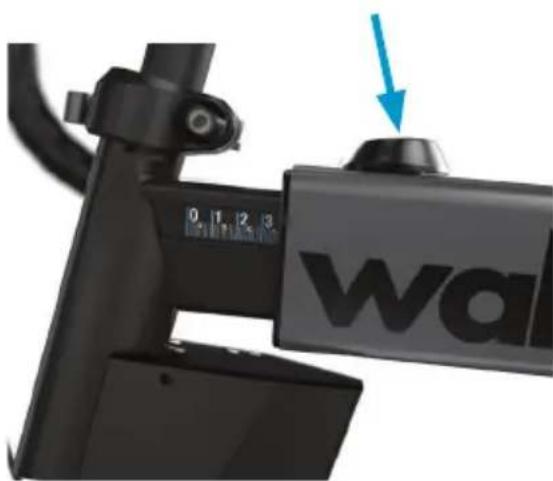
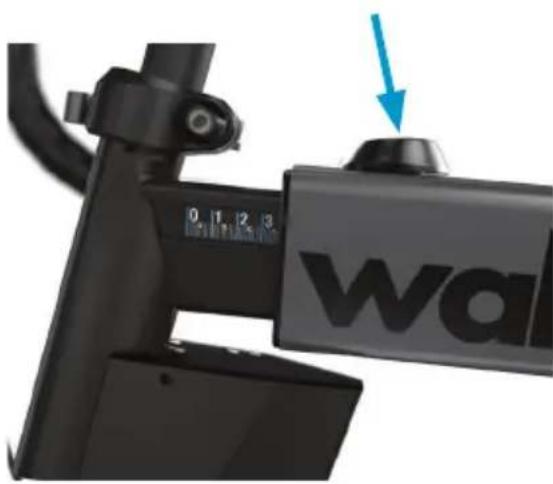
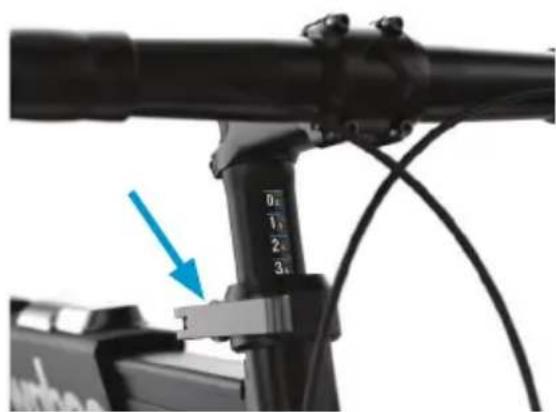
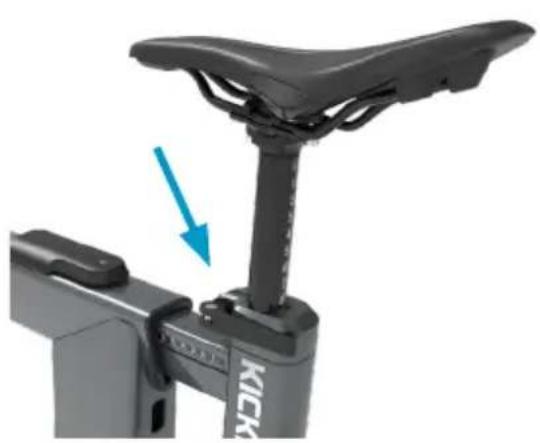
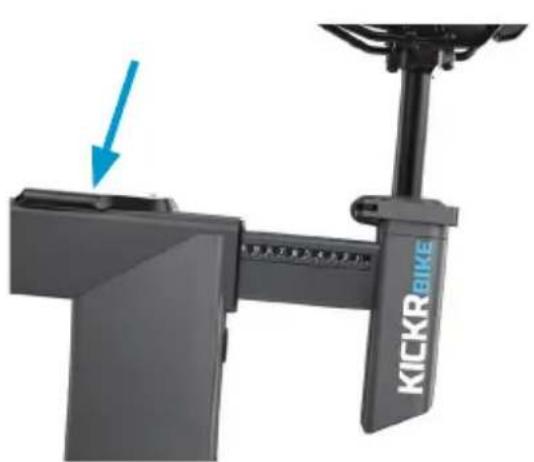
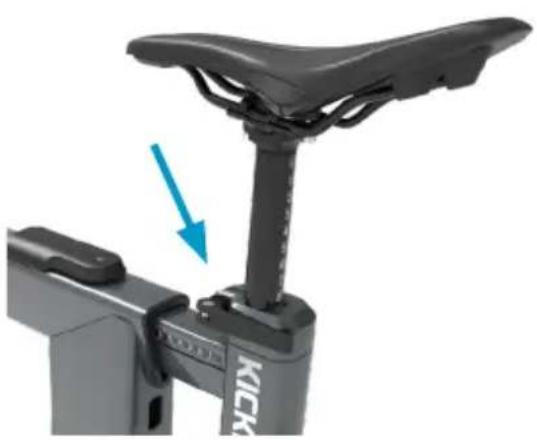
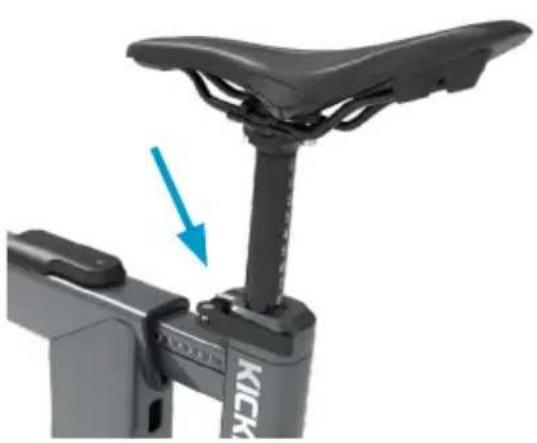
Insert the seatpost assembly into the KICKR BIKE PRO by loosening/tightening the rear extension quick release.
KICKR BIKE PRO ASSEMBLY
continued
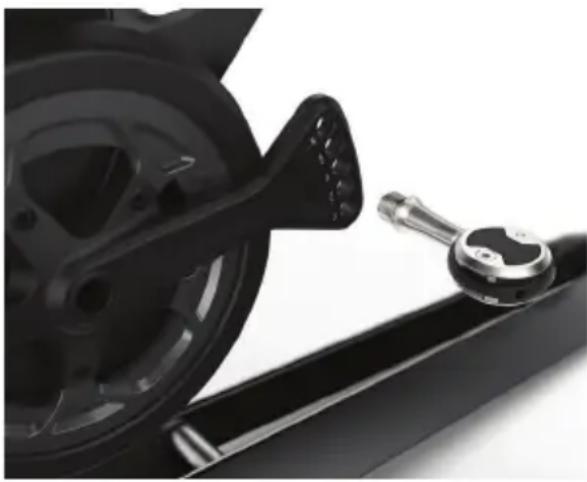
Attach pedals to the crank arms.
Some pedal axles may require the use of washers (included) for necessary clearances to KICKR BIKE PRO housings.
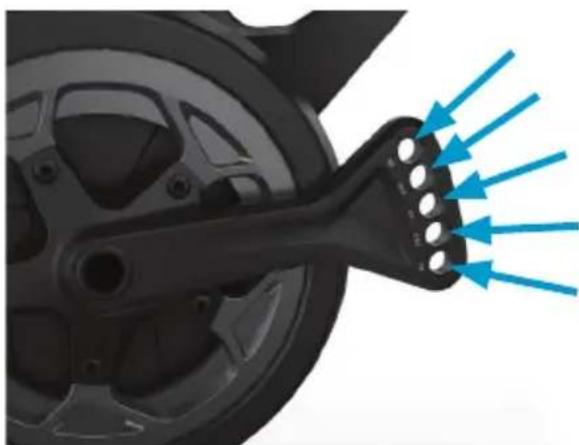
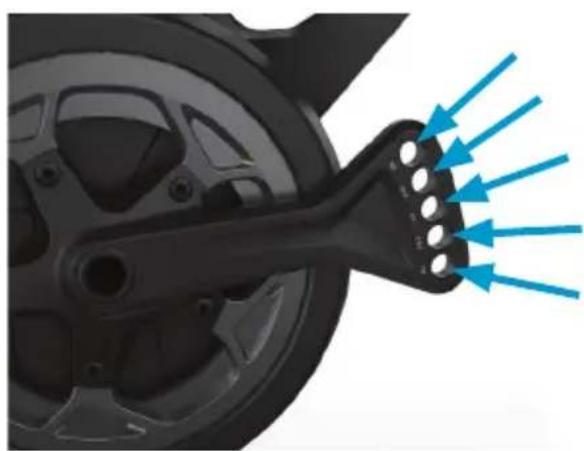
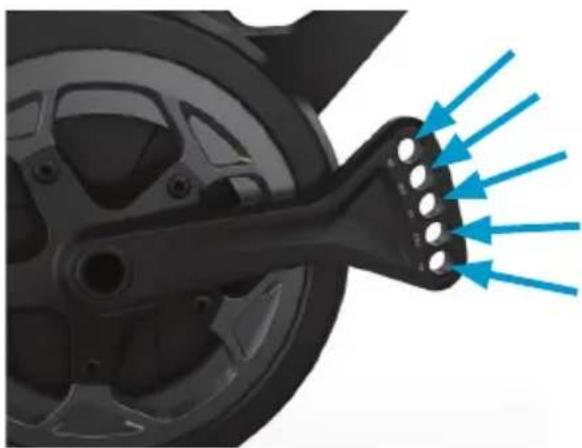
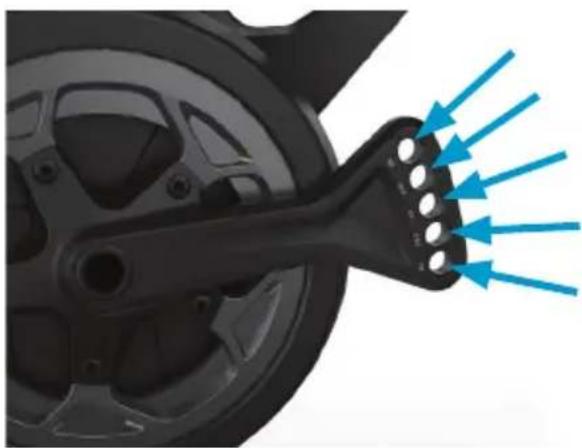
The KICKR BIKE PRO crank arm is designed for you to customize your bike fit. This design accommodates 165mm, 167.5mm, 170mm, 172.5mm and 175mm crank lengths by simply moving your pedal to the corresponding hole on the crank arm.
Identify the left and right pedals. Grease the threads on both pedals. Thread the right pedal into the drive side crank using washer for correct spacing (if needed). Use a wrench to ensure snug fit. Thread the left pedal into non drive side crank using washer for correct spacing (if needed). Use a wrench to ensure snug fit. fit.
natural_image
Close-up of a black bicycle wheel and attached mechanical lever (no visible text or symbols)Tightening torque
30 - 35 N- m

NOTE: Pedal threads are different from left to right. Right side pedals have right-hand threads (removes counterclockwise, installs clockwise). The left side pedal has left-hand threads (removes clockwise, installs counterclockwise). Improper installation or cross threading can cause damage to the KICKR BIKE PRO's cranks.
Use the included AC power adapter to connect the KICKR BIKE PRO to a standard wall outlet.
KICKR BIKE PRO includes a built in LED Display providing you with data on demand. The LED Display will show the following data:
- Whether your KICKR BIKE PRO is currently in LOCKED or UNLOCKED Mode
• What gears you are currently in. - Your current grade percentage after you manually change grades.
- Connection status of your KICKR BIKE PRO to indicate if it is currently paired to an external device.
LOCKED AND UNLOCKED MODES
Use the button (11) on the side of the LED Display to toggle between modes.
Locked Mode: Use the shifter's manual controls for direct tilt control. While the lock LED is illuminated, external software will not move the KICKR BIKE PRO.
Unlocked Mode: The KICKR BIKE PRO reacts to grade changes from external software like Zswift or from your ELEMNT GPS bike computers. If the shifters are used to change the grade manually in Unlocked Mode, the KICKR BIKE PRO will automatically switch to Locked Mode.

natural_image
Two black-and-white images showing a device with sensor icons and signal symbols, no readable text or labels present.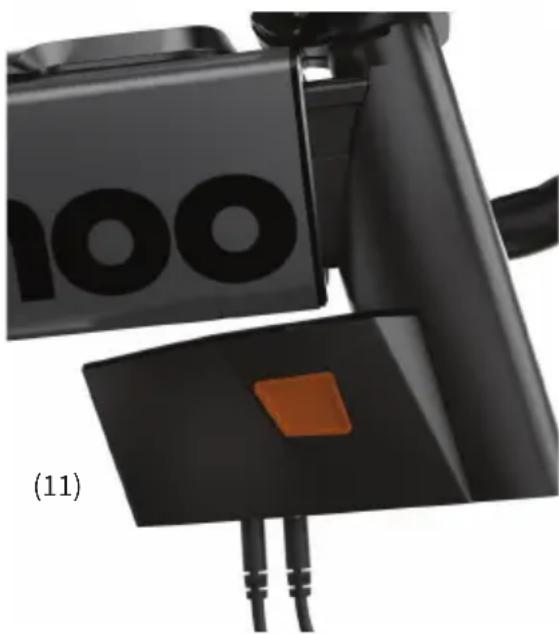
natural_image
Close-up of a black electronic device with orange buttons and cable, labeled (11) (no readable text or symbols)USING THE WAHOO APP
From the Wahoo App you will be able to complete your setup, fit, customize, update and control your KICKR BIKE PRO. Download the Wahoo App for free from the Apple App Store or from the Android Google Play Store.

SETUP: The Wahoo App offers step by step KICKR BIKE PRO assembly instructions as well as account login and product registration. This ensures you will get all the latest information regarding your KICKR BIKE PRO.
FIT: The Wahoo App ensures you get the best fit on your KICKR BIKE PRO. The in-app fit calculation walks you through recreating your outdoor bike fit indoors.
CUSTOMIZE: Once your fit is dialed in, use the Wahoo App to further customize your KICKR BIKE PRO. From number of speeds to gear ratio and shifter configuration, the KICKR BIKE PRO is designed to mirror your outdoor bike.
UPDATE: Use the Wahoo App to make sure your KICKR BIKE PRO is always up to date with the latest firmware to ensure accuracy and get the latest features.
CONTROL: The Wahoo App has the following workout modes that you can use to control the KICKR BIKE PRO.
WI-FI: Setting up Wi-Fi in the Wahoo App will keep your KICKR BIKE PRO up to date automatically with the latest firmware updates.
ERG: Set your desired power, the KICKR BIKE PRO will increase or decrease the resistance to maintain a constant power output, regardless of speed.
SIM: Enter your weight, grade and the KICKR BIKE PRO will accurately model the power curve just as if you were riding outdoors.
CONNECTIVITY
Wahoo offers the most connected ecosystem for indoor and outdoor cycling.
Complete your KICKR BIKE PRO experience with an ELEMNT Bike Computer, TRACKR Heart Rate Monitor, KICKR Mat, and KICKR HEADWIND.
COMPATIBILITY
• ELEMENT GPS Bike Computers
• Apple devices running iOS 16.0 or newer
- Android 10 or newer (with ANT+ or Bluetooth® enabled)
• Mac computers (with an ANT+ USB adapter or Bluetooth® enabled)
- Windows PCs (with ANT+ USB adapter)
For a full list of KICKR compatible apps visit: www.wahoofitness.com/fitness-apps#kickr

WARRANTY INFORMATION
For information related to warranty please visit the Wahoo Fitness website at: https://www.wahoofitness.com/returns-and-warranty
Warranty claims can also be made online at https://support.wahoofitness.com
Additionally you may request a free copy of the warranty terms by writing to:
Wahoo Fitness Headquarters
90 West Wieuca Road NE
Atlanta, GA 30342
Attn: Warranty Request
Part# WFBIKE4
Model # WF146
FCC:PADWF146
IC: 10563A-WF146
AUSTRALIAN WARRANTY INFORMATION
This document details the terms and conditions of the warranty provided with this product. Please disregard any other representations contained on this product's packaging or provided with this product, which constitute or appear to constitute a warranty. Subject to the exclusions and limitations set out below, we warrant to you that if you purchase a product directly from us, or from any of our authorised resellers, that it will not contain defects which are a result of faulty manufacturer workmanship or materials. This warranty subsists for 1 year from the date of purchase.
Subject to any rights you have under the Australian Consumer Law, we will not be liable for defects which are a result of damage or loss caused by factors beyond our control, any product which has not been maintained according to any care or maintenance instructions provided with the product, any alterations to a product which are not performed by us, or damage or defects caused to the product due to unusual or non-recommended use. We will not be liable for any special, indirect, consequential or economic loss or damage or loss of profits whatsoever suffered by you or any other person resulting from any act or omission by us. Our total liability in respect of this Warranty against Defects is limited to the replacement of the goods.
Any claim made under this warranty must be made by returning the defective goods to us, at your expense. Please provide details of the defect and evidence of purchase to https://support.wahoofitness.com This Warranty against defects is provided in addition to other rights and remedies that you may have at law. Our goods come with guarantees that cannot be excluded under the Australian Consumer Law. You are entitled to a replacement or refund for a major failure and for compensation for any reasonably foreseen loss or damage. You are also entitled to have the goods repaired or replaced if the goods fail to be acceptable quality and the failure does not amount to a major failure. Consult the dealer or an experienced radio/TV technician for help. To assure continued compliance, any changes or modifications not expressly approved by the party responsible for compliance could void the user's authority to operate this equipment. (Example- use only shielded interface cables when connecting to a computer or peripheral devices). Caution! The manufacturer is not responsible for any radio or TV interference caused by unauthorized modifications to this equipment. Such modifications could void the user's authority to operate the equipment.
IC STATEMENT
This device complies with Industry Canada license-exempt RSS standard(s). Operation is subject to the following two conditions:
(1) this device may not cause interference, and (2) this device must accept any interference, including interference that may cause undesired operation of the device. The device meets the exemption from the routine evaluation limits in section 2.5 of RSS 102 and users can obtain Canadian information on RF exposure and compliance.
CE STATEMENT
Hereby, Wahoo Fitness declares that this product is in compliance with:
The essential requirements and essential relevant provisions of directive 2014/53/EU.
The full text of EU declaration of conformity (DoC) is available at the following internet address:
www.wahoofitness.com/regulatory-notices. The object of the declaration described above is in conformity with the relevant European Union harmonization Legislation: Directive 2014/53/EU and any other applicable directives. This declaration is issued under the sole responsibility of Wahoo Fitness, LLC.
All listed Wahoo products operate within the 2402-2480MHz frequency band and below the maximum output power threshold of 100mW (20dBm).
Regulatory authorities within the EU may obtain compliance information by writing to:
Wahoo Fitness LLC
90 W. Wieuca Road 110
Atlanta, GA 30342
This device meets new EU cybersecurity standards to help protect your network and data.
Scan QR code or visit https://wahoofitness.com/regulatory-notices to get support and learn more about optional and default wireless connectivity.

CALIFORNIA PROPOSITION 65
The enclosed hardware and its packaging contain chemicals the State of California has found to cause cancer, birth defects or reproductive harm.
FCC RULES PART 15
The enclosed hardware device complies with part 15 of the FCC Rules. Operation is subject to the following two conditions: (1) This device may not cause harmful interference and (2) it must accept any interference received, including interference that may cause undesired operation.
FCC COMPLIANCE STATEMENT
This equipment has been tested and found to comply with limits for a Class B digital device, pursuant to Part 15 of the FCC rules. These limits are designed to provide reasonable protection against harmful interference in residential installations. The equipment generates, uses, and can radiate radio frequency energy, and if not installed and used in accordance with the instructions, may cause harmful interference to radio communications. However, there is no guarantee that interference will occur in a particular installation.
If this equipment does cause interference to radio or television equipment reception, which can be determined by turning the equipment off and on, the user in encouraged to try to correct the interference by one or more of the following measures:
- Reorient or relocate the receiving antenna
Any changes or modifications not expressly approved by the party responsible for compliance could void the user's authority to operate this equipment.
90 W. Wieuca Rd NE, Suite 110
Atlanta, GA 30342 United States
https://support.wahoofitness.com
TELÉFONO:
(e) Llaves Allen (4,5mm)
(c) Conjunto del sillín
natural_image
Black Wahoo stationary exercise machine with visible branding and wheels (no text or symbols on the device itself)(2)
natural_image
Diagram of two identical mechanical components labeled (a) and (d), with no text or symbols present.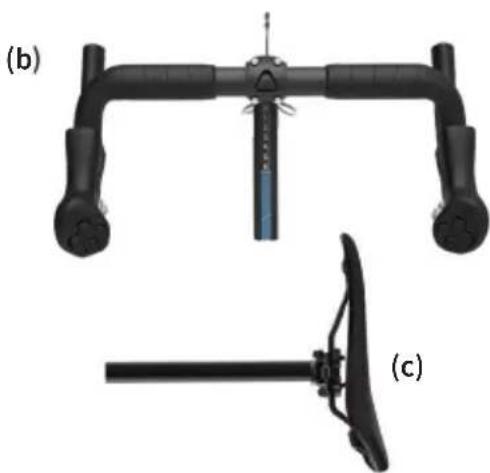
natural_image
Technical illustration of a mechanical device with two views: (b) top view and (c) side view, both showing black components without any text or symbols.
natural_image
Pure electrical circuit lines without any symbolsPIEZAS DE LA BICICLETA KICKR BIKE PRO
natural_image
Close-up of a black mechanical component with blue arrows pointing to features, labeled 1 and 2 (no text or symbols beyond labels)natural_image
Close-up of a black stationary bike with a blue arrow pointing to the seat, labeled 'KICK' on the side (no other text or symbols)natural_image
Close-up of a KICKR BIKE bicycle lever mechanism with a blue arrow indicating motion (no text or symbols on the device itself)natural_image
Close-up of a black bicycle leg with a wall-mounted device and a blue arrow pointing to the top component (no readable text or symbols)Ajuste del alcance
natural_image
Close-up of a bicycle's front wheel and lever assembly with a blue arrow pointing to a component (no text or symbols visible)natural_image
Mechanical component with blue directional arrows indicating flow or force (no text or symbols)Par de apriete

24 - 28 N·m
MONTAJE DE LA BICICLETA KICKR BIKE PRO
MONTAJE DE LA BICICLETA
natural_image
Two identical black rectangular objects with white symbols, resembling a stylized device or tool (no readable text or labels)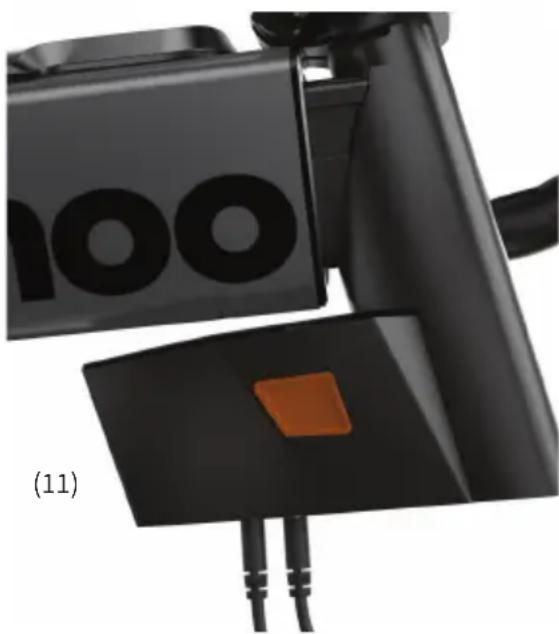
natural_image
Close-up of a black electronic device with orange buttons and cable, labeled (11) (no readable text or symbols)Wahoo Fitness Headquarters
90 West Wieuca Road NE
Atlanta, GA 30342
Attn: Warranty Request
Part# WFBIKE4
Model # WF146
FCC:PADWF146
IC: 10563A-WF146
DECLARACIÓN DE CE
90 W. Wieuca Rd NE, Suite 110
Atlanta, GA 30342 United States
https://support.wahoofitness.com
TELEFONE:
natural_image
Black Wahoo stationary exercise machine with visible branding and control panel (no text or symbols on the device itself)(2)
natural_image
Technical illustration of a mechanical device with two arms and a separate view showing a lever mechanism (no text or symbols)
natural_image
Simple line drawing of a connected electrical component with a bulb and terminal block (no text or symbols)natural_image
Close-up of a black stationary bike with a blue arrow pointing to the seat (no text or symbols visible)natural_image
Close-up of a KICKR BIKE bicycle lever mechanism with a blue arrow pointing to the handle (no text or symbols on the device itself)Ajuste de recuo
natural_image
Close-up of a black mechanical device with a blue arrow pointing to a wall-mounted component (no text or symbols visible)Ajuste de alcance
natural_image
Close-up of a bicycle headstock with a blue arrow pointing to a component, no visible text or symbols.natural_image
Close-up of a mechanical component with blue directional arrows indicating flow or force (no text or symbols)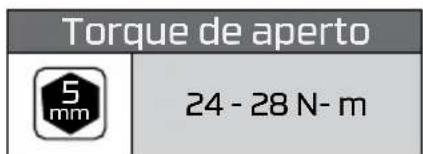
MONTAGEM DA BICICLETA KICKR
KICKR BIKE PRO
natural_image
Close-up of a black bicycle wheel and lever mechanism (no text or symbols visible)Tightening torque
30 - 35 N- m
natural_image
Two black rectangular objects with pixelated icons, possibly a device or sensor device, against a blurred background (no readable text or symbols)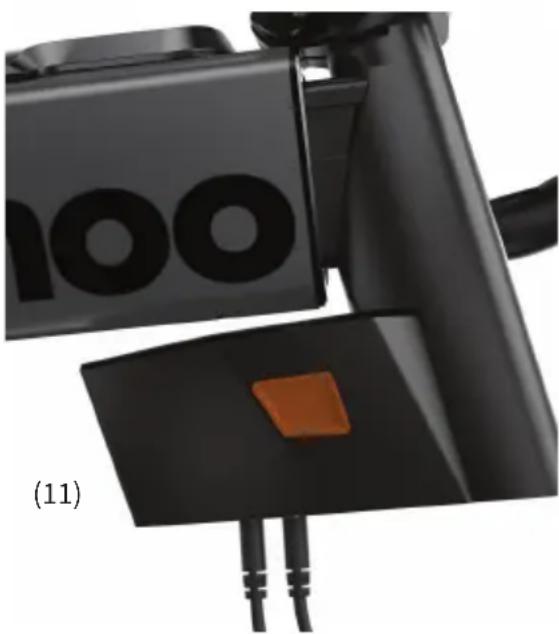
natural_image
Close-up of a black automotive electrical plug with orange buttons and cable (no visible text or symbols)USANDO O APLICATIVO WAHOO
www.wahoofitness.com/fitness-apps#kickr

INFORMAÇÕES SOBRE A GARANTIA
Para obter informações relacionadas à garantia, visite o site da Wahoo Fitness em: https://www.wahoofitness.com/returns-and-warranty
Wahoo Fitness Headquarters
90 West Wieuca Road NE
Atlanta, GA 30342
Attn: Warranty Request
Part# WFBIKE4
Model # WF146
FCC:PADWF146
IC: 10563A-WF146
GARANTIA LIMITADA
90 W. Wieuca Rd NE, Suite 110
Atlanta, GA 30342 United States
https://support.wahoofitness.com
TÉLÉPHONE :
natural_image
Black Wahoo stationary exercise machine with visible branding and wheels (no text or symbols on the device itself)(2)
natural_image
Diagram of two identical mechanical components labeled (a) and (d), with no text or symbols present.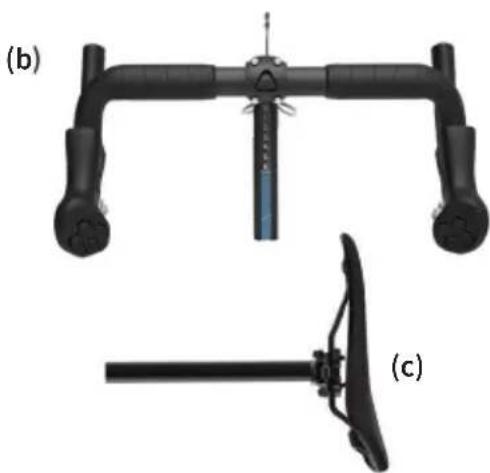
natural_image
Technical illustration of a mechanical device with two views: (b) top view and (c) side view, both without any text or symbols.
natural_image
Pure electrical circuit lines without any symbolsnatural_image
Close-up of a black mechanical component with blue arrows pointing to features, labeled 1 and 2 (no text or symbols beyond labels)natural_image
Close-up of a black stationary bike with a blue arrow pointing to the seat, showing no text or symbols on the device itself.natural_image
Close-up of a KICKR BIKE bicycle support structure with a blue arrow pointing to the component (no text or symbols on the diagram itself)Réglage du recul
natural_image
Close-up of a black electric scooter front bumper with 'wa' logo and blue arrow pointing to the top component (no text or symbols on body)natural_image
Close-up of a bicycle headstock with a blue arrow pointing to a component, no visible text or symbols.natural_image
Mechanical component with blue directional arrows indicating flow or force (no text or symbols)natural_image
Black Wahoo robotic bike with directional arrows and warning sign (no text or symbols on the device itself)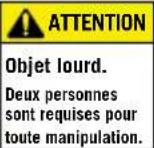
Couple de serrage

24 - 28 N-m
MONTAGE DU KICKR BIKE PRO
MONTAGE DU KICKR BIKE PRO suite
natural_image
Close-up of a black automotive wheel and attached mechanical lever (no visible text or symbols)Couple de serrage
30 - 35 N-m
natural_image
Close-up of a black object with white icons and symbols, possibly a device or sensor panel (no readable text or symbols)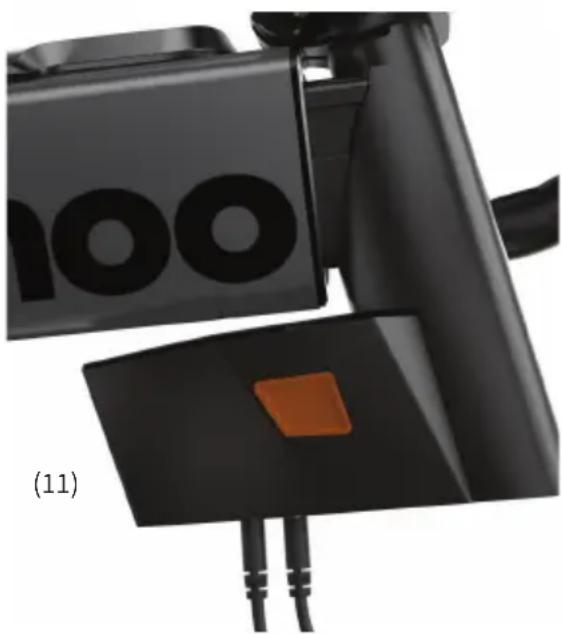
natural_image
Close-up of a black automotive camera with orange buttons and cable (no visible text or symbols)UTILISATION DE L'APPLICATION WAHOO
INFORMATIONS SUR LA GARANTIE
| Wahoo Fitness Headquarters90 West Wieuca Road NEAtlanta, GA 30342Attn: Warranty Request | Part# WFBIKE4Model # WF146FCC:PADWF146IC: 10563A-WF146 |
IC STATEMENT
90 W. Wieuca Rd NE, Suite 110
Atlanta, GA 30342 United States
https://support.wahoofitness.com
TELEFONO:
natural_image
Black Wahoo stationary exercise machine with visible branding and control panel (no text or symbols on the device itself)(2)
natural_image
Technical illustration of a mechanical device with two views labeled (b) and (c), showing no text or symbols.
natural_image
Pure electrical circuit lines without any symbolsPARTI DELLA BICICLETTA KICKR
natural_image
Close-up of a black mechanical component with blue arrows pointing to features, labeled 1 and 2 (no text or symbols beyond labels)natural_image
Close-up of a black stationary bike with a blue arrow pointing to the seat, showing no text or symbols on the device itself.natural_image
Close-up of a KICKR bike lift mechanism with a blue arrow indicating motion direction (no text or symbols on the diagram itself)natural_image
Close-up of a black bicycle leg mechanism with a blue arrow pointing to the top component (no readable text or symbols)Regolazione reach
natural_image
Close-up of a bicycle headstock with a blue arrow pointing to a component, no visible text or symbols.natural_image
Mechanical component with blue directional arrows indicating flow or force (no text or symbols)natural_image
Exterior view of a black Wahoo robotic device with directional arrows and warning symbol (no text or labels on the device itself)
natural_image
Close-up of a black bicycle wheel and attached mechanical lever (no visible text or symbols)Coppia di serraggio
30 - 35 N m

natural_image
Close-up of a black Wahoo VR headset with blue and orange directional arrows indicating motion (no text or symbols on device)DISPLAY A LED DELLA BICICLETTA KICKR
natural_image
Two black-and-white images showing a device with sensor icons and control buttons, no readable text or symbols present.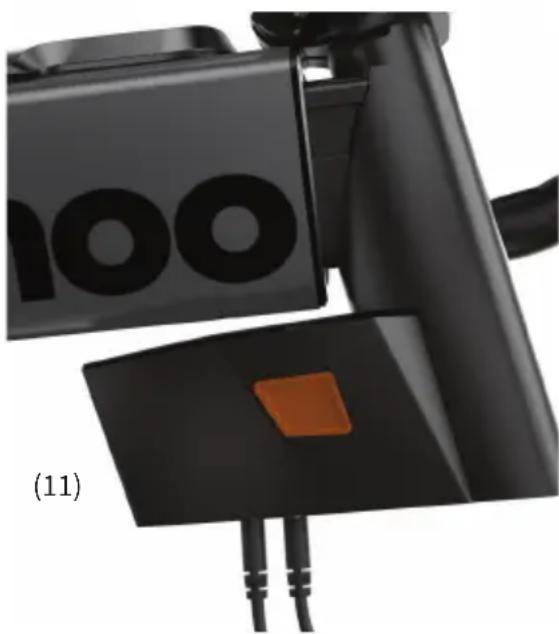
natural_image
Close-up of a black electronic device with orange buttons and cable, labeled (11) (no readable text or symbols)UTILIZZO DELL'APP WAHOO
Wahoo Fitness Headquarters
90 West Wieuca Road NE
Atlanta, GA 30342
Attn: Warranty Request
Part# WFBIKE4
Model # WF146
FCC:PADWF146
IC: 10563A-WF146
GARANZIA LIMITATA
90 W. Wieuca Rd NE, Suite 110
Atlanta, GA 30342 United States
https://support.wahoofitness.com
TELEFON:
United States: 1-877-978-1112
Germany: +49-30-568-373827
United Kingdom: +44-800-808-5773
Phone Hours: Monday - Friday
9am-5pm Eastern Time Zone
natural_image
Black Wahoo stationary exercise machine with visible branding and control panel (no text or symbols on the device itself)(2)
natural_image
Technical illustration of a mechanical device with two views: top shows a lever mechanism, bottom shows a tool or bracket (no text or symbols)
natural_image
Pure electrical circuit lines without any symbolsKICKR BIKE PRO PARTS
natural_image
Close-up of a black stationary bike with a blue arrow pointing to the seat, showing no text or symbols on the device itself.natural_image
Close-up of a KICKRBIKE bicycle lever mechanism with a blue arrow pointing to the handle (no text or symbols on the device itself)natural_image
Close-up of a black bicycle leg mechanism with a blue arrow pointing to the top component (no text or symbols visible)natural_image
Close-up of a bicycle headstock with a blue arrow pointing to a component, no visible text or symbols.natural_image
Close-up of a car wheel and steering wheel with blue directional arrows indicating motion or force (no text or symbols)natural_image
Black Wahoo robotic device with directional arrows indicating movement, no visible text or symbols on the device itself.
Tightening torque

24 - 28 N- m
natural_image
Close-up of a black bicycle wheel mounted on a metal support frame, with a metallic tool inserted (no visible text or symbols)Tightening torque
30 - 35 N- m
natural_image
Close-up of a black fitness bike with blue and orange directional arrows indicating movement or force (no text or symbols)natural_image
Two black-and-white images showing a device with sensor icons and control buttons, no readable text or symbols present.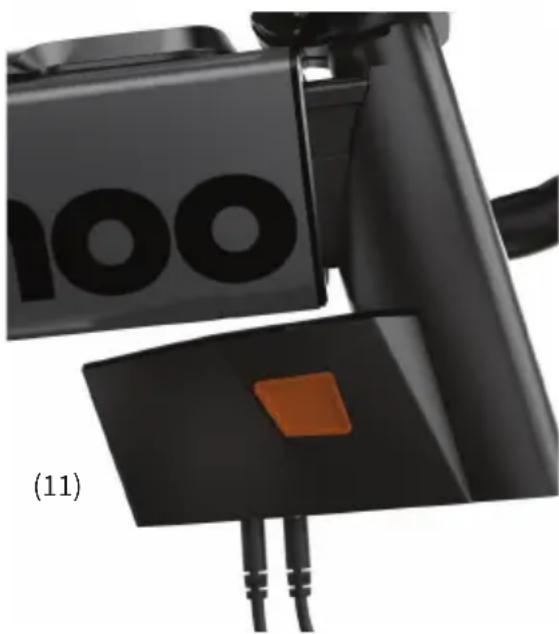
natural_image
Close-up of a black electronic device with orange buttons and cable, labeled (11) (no readable text or symbols)MIT DER WAHOO APP
www.wahoofitness.com/fitness-apps#kickr

GARANTIE-INFORMATIE
https://support.wahoofitness.com
Wahoo Fitness Headquarters
90 West Wieuca Road NE
Atlanta, GA 30342
Attn: Warranty Request
Part# WFBIKE4
Model # WF146
FCC:PADWF146
IC: 10563A-WF146
GARANTIEBESTIMMUNG
Wahoo Fitness LLC 90 W. Wieuca Road 110
Atlanta, GA 30342
90 W. Wieuca Rd NE, Suite 110
Atlanta, GA 30342 United States
https://support.wahoofitness.com
TELEFOON:
natural_image
Black Wahoo stationary exercise machine with visible branding and wheels (no text or symbols on the device itself)(2)
natural_image
Technical illustration of a mechanical device with labeled parts (b) and (c), showing no text or symbols beyond labels.
natural_image
Pure electrical circuit lines without any symbolsKICKR BIKE PRO ONDERDELEN
(1) Zadel
(2) Zadelpen
(3) Bovenbuis
(4) Stuurpen
(5) Stuur
(6) Shifters
Hoogte Instellen
natural_image
Close-up of a black bicycle leg with a blue arrow pointing to the seat, labeled 'KICKER' (no text beyond label)natural_image
Close-up of a KICKR BIKE bicycle lever mechanism with a blue arrow indicating motion (no text or symbols on the lever itself)Setback aanpassing
natural_image
Close-up of a black station bike handle with 'wa' logo and blue arrow pointing to the top component (no readable text or symbols beyond branding)Reach
natural_image
Close-up of a bicycle's front wheel and lever assembly with a blue arrow pointing to a component (no text or symbols visible)natural_image
Mechanical component with blue directional arrows indicating flow or force (no text or symbols)| Torque kracht | |
| 24 - 28 N-m | |
KICKR BIKE PRO MONTAGE
natural_image
Close-up of a black bicycle wheel and attached mechanical component (no visible text or symbols)Torque kracht
30 - 35 N- m

natural_image
Close-up of a black outdoor fitness equipment with blue arrows indicating movement or change, no visible text or symbols on the device itself.natural_image
Two black-and-white images showing a device with sensor icons and control buttons, no readable text or symbols present.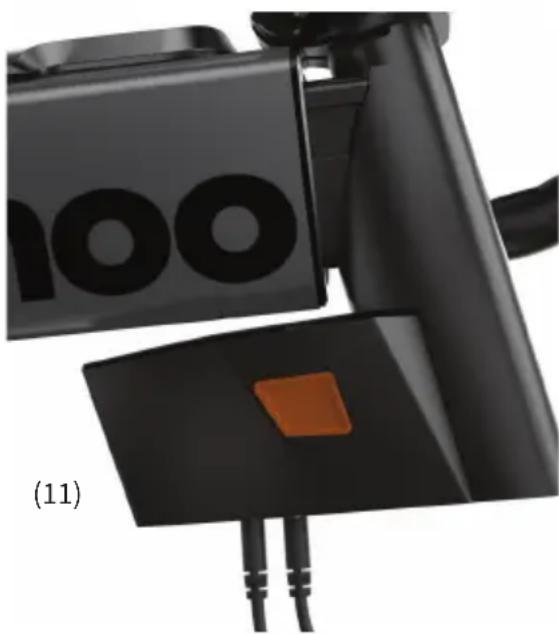
natural_image
Close-up of a black electronic device with orange buttons and cable, labeled (11) (no readable text or symbols)DE WAHOO-APP GEBRUIKEN
Vanuit de Wahoo-app kun je je installatie, pasvorm, personaliseren, update en beheer je KICKR BIKE PRO. Download de Wahoo-app gratis in de Apple App Store of in de Android Google Play Store.

www.wahoofitness.com/fitness-apps#kickr

GARANTIE-INFORMATIE
Wahoo Fitness Headquarters
90 West Wieuca Road NE
Atlanta, GA 30342
Attn: Warranty Request
Part# WFBIKE4
Model # WF146
FCC:PADWF146
IC: 10563A-WF146
BEPERKTE GARANTIE
90 W. Wieuca Rd NE, Suite 110
Atlanta, GA 30342 United States
https://support.wahoofitness.com
TELEFON:
natural_image
Black Wahoo robotic exercise machine with visible branding and wheels (no text or symbols on the device itself)(2)
natural_image
Technical diagram showing exploded and assembled views of a mechanical device with labeled components (a) through (f), no readable text or symbols present.CZEŚCI ROWEROWE KICKR
natural_image
Close-up of a stationary bike with a blue arrow pointing to the seat and a 'KICKER' label on the base (no text beyond labels)natural_image
Close-up of a KICKRBIKE bicycle lever mechanism with a blue arrow indicating motion direction (no text or symbols on the device itself)Korekta cofnięcia
natural_image
Close-up of a black bicycle leg mechanism with a blue arrow pointing to the top component (no text or symbols visible)Regulacja zasięgu
natural_image
Close-up of a bicycle headstock with a blue arrow pointing to a component, no visible text or symbols.natural_image
Mechanical component with blue directional arrows indicating flow or force (no text or symbols)natural_image
Close-up of a black bicycle wheel and attached mechanical component (no visible text or symbols)Dokręcania
30 - 35 N- m

natural_image
Close-up of a black Wahoo VR headset with blue and orange arrows indicating motion or signal flow (no text or symbols on the device itself)WYŚWIETLACZ LED KICKR BIKE PRO
natural_image
Close-up of a black tag with white function buttons and signal icons, no readable text or symbols present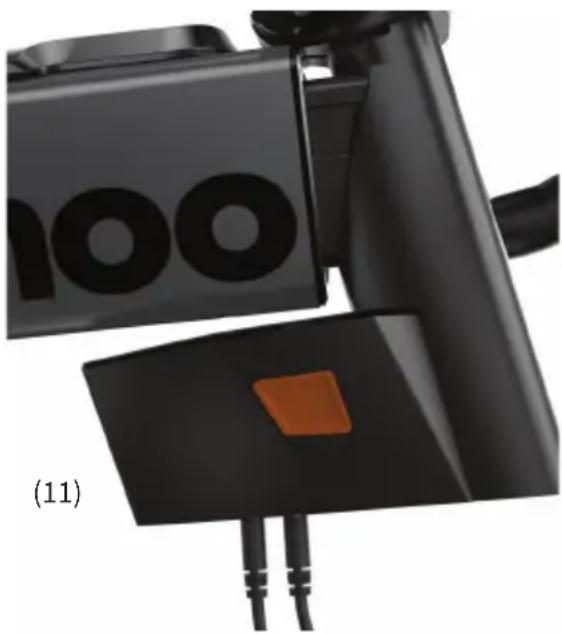
natural_image
Close-up of a black electronic device with two leads and a small orange button, labeled (11) (no readable text or symbols)KORZYSTANIE Z APLIKACJI WAHOO
INFORMACJE GWARANCYJNE
Wahoo Fitness Headquarters
90 West Wieuca Road NE
Atlanta, GA 30342
Attn: Warranty Request
Part# WFBIKE4
Model # WF146
FCC:PADWF146
IC: 10563A-WF146
OGRANICZONA GWARANCJA
90 W. Wieuca Rd NE, Suite 110
Atlanta, GA 30342 United States
https://support.wahoofitness.com
ไnsคัพท์:
natural_image
Black and white photo of a Wahoo stationary exercise machine (no visible text or symbols on the device body)(2)
natural_image
Technical illustration of a mechanical device with two views: top shows a lever mechanism, bottom shows a tool or bracket (no text or symbols)
natural_image
Pure electrical circuit lines without any symbolsɔːɪkə KICKR BIKE PRO
natural_image
Close-up of a black KICKS bike leg mechanism with a blue arrow indicating the pivot point (no text or symbols on the diagram itself)natural_image
Close-up of a KICKR BIKE bicycle lever mechanism with a blue arrow indicating motion (no text or symbols on the device itself)การปรับความพ่ายแพ็
natural_image
Close-up of a black station bike with a wall-mounted device and a blue arrow pointing to the top component (no readable text or symbols)การปรับการเข้าถึง
natural_image
Close-up of a bicycle's front wheel and lever assembly with a blue arrow pointing to a component (no text or symbols visible)natural_image
Mechanical component with blue directional arrows indicating flow or force (no text or symbols)natural_image
Close-up of a black bicycle wheel and attached mechanical lever (no visible text or symbols)แรงบิดในการขัน
natural_image
Two black-and-white images showing a device with sensor icons and control buttons, no readable text or symbols present.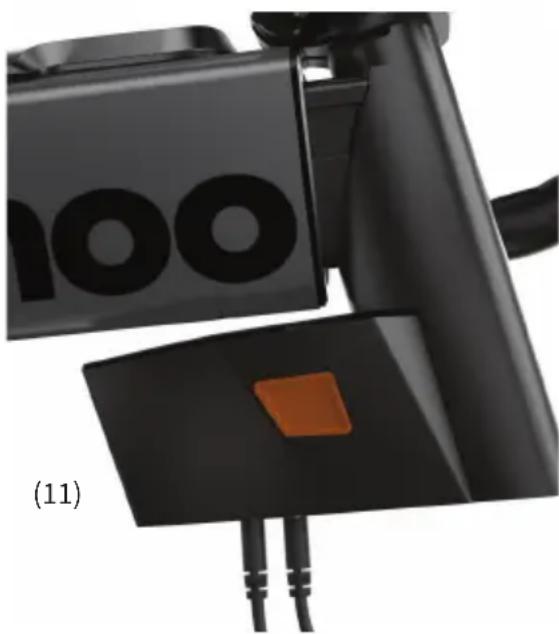
natural_image
Close-up of a black electronic device with orange buttons and cable, labeled (11) (no readable text or symbols)การใช้แอพ WAHOO
ข้อมูลการรับประกัน
Wahoo Fitness Headquarters
90 West Wieuca Road NE
Atlanta, GA 30342
Attn: Warranty Request
Part# WFBIKE4
Model # WF146
FCC:PADWF146
IC: 10563A-WF146
www.wahoofitness.com/support를 방문하십시오.
90 W. Wieuca Rd NE, Suite 110
Atlanta, GA 30342 United States
https://support.wahoofitness.com
전화:
미국:1-877-978-1112
natural_image
Black Wahoo robotic exercise machine with visible wheels and a mounted sensor (no text or symbols on the device itself)(2)
natural_image
Technical diagram showing four labeled components: a triangular frame, a mechanical device with a lever, a schematic of a cable, and a connected wire (no text or symbols present)KICKR BIKE PRO 부품
스텐드오버 높이 조정
natural_image
Close-up of a black KICKS bike leg mechanism with a blue arrow indicating the pivot point (no text or symbols on the diagram itself)안장 높이 조정
natural_image
Close-up of a KICKRBIKE bicycle lever mechanism with a blue arrow indicating motion direction (no text or symbols on the lever itself)셋백 조정
natural_image
Close-up of a black bicycle leg with a wall-mounted device and a blue arrow pointing to the top component (no readable text or symbols)리치 조정
natural_image
Close-up of a bicycle headstock with a blue arrow pointing to a component, no visible text or symbols스택 높이 조정
natural_image
Mechanical component with blue directional arrows indicating flow or force (no text or symbols)크랭크 길이 조정
KICKR BIKE PRO 설정
natural_image
Black wheeled fitness machine with blue directional arrows indicating movement, no visible text or symbols on the device itself.
| 조임 토크 | |
| 24~28 N- m | |
KICKR BIKE PRO 조립
natural_image
Close-up of a black bicycle wheel and attached mechanical lever (no text or symbols visible)조임 토크
30\~35 N-m
natural_image
Two black-and-white images showing a device with sensor icons and control buttons, no readable text or symbols present.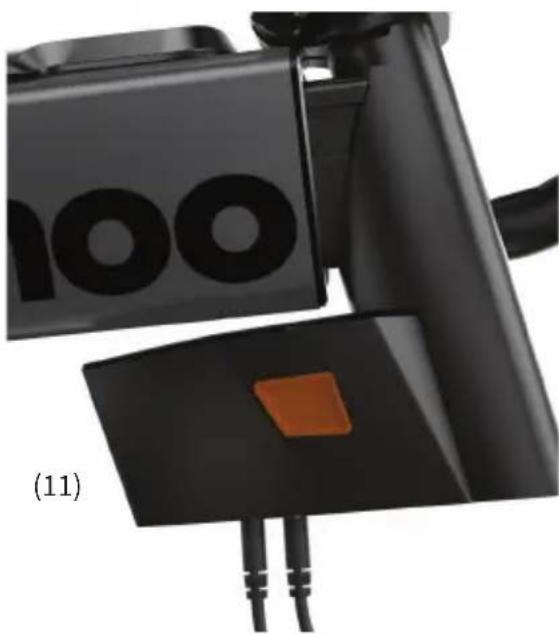
natural_image
Close-up of a black mechanical device with orange buttons and two leads, labeled (11) (no readable text or symbols)WAHOO 앱용
KICKR 환 앱체을 면 www.wahoofitness.com/fitness-apps#kickr을 오.

보증 정보
Wahoo Fitness Headquarters
90 West Wieuca Road NE
Atlanta, GA 30342
Attn: Warranty Request
Part# WFBIKE4
Model # WF146
FCC:PADWF146
IC: 10563A-WF146
제한적 보증
www.wahoofitness.com/support
如有问题或疑虑,请联系我们:
Wahoo Fitness
90 W. Wieuca Rd NE, Suite 110
Atlanta, GA 30342 United States
https://support.wahoofitness.com
电话:
美国:1-877-978-1112
natural_image
Black Wahoo stationary exercise machine with visible branding and control panel (no text or symbols on the device itself)(2)
natural_image
Technical diagram showing exploded and assembled views of a mechanical or electrical component, including a cable, switch, and motor assembly (no text or symbols present)KICKR BIKE PRO 部件
跨骑高度调节
natural_image
Close-up of a black bicycle leg with a blue arrow pointing to the seat, labeled 'KICKER' (no additional text or symbols)鞍座高度调节
natural_image
Close-up of a KICKR BIKE bicycle lever mechanism with a blue arrow indicating motion direction (no text or symbols on the device itself)后移量调节
natural_image
Close-up of a black bicycle leg with a wall-mounted device and a blue arrow pointing to the top component (no readable text or symbols)前伸量调节
natural_image
Close-up of a bicycle's front wheel and suspension bracket with a blue arrow pointing to the base component (no text or symbols visible)踏板距轴心高度调节
natural_image
Mechanical component with blue directional arrows indicating flow or force (no text or symbols)曲柄长度调节
KICKR BIKE PRO 安装
natural_image
Black Wahoo robotic bike with directional arrows indicating movement or force (no text or symbols on the device itself)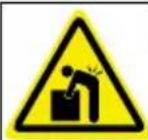
natural_image
Close-up of a black bicycle wheel mounted on a metal support frame, no visible text or symbolsnatural_image
Close-up of a black mechanical component with white function buttons and sensor icons, no readable text or symbols present.锁定和解锁模式
natural_image
Close-up of a black mechanical device with circular holes and a small orange button, labeled (11) (no readable text or symbols)使用 WAHOO 应用程序
www.wahoofitness.com/fitness-apps#kickr

保修信息
https://www.wahoofitness.com/returns-and-warranty
Wahoo Fitness Headquarters
90 West Wieuca Road NE
Atlanta, GA 30342
Attn: Warranty Request
Part# WFBIKE4
Model # WF146
FCC:PADWF146
IC: 10563A-WF146
有限质量保证
訪: www.wahoofitness.com/support
如有問題,請聯絡我們:
Wahoo Fitness
90 W. Wieuca Rd NE, Suite 110
Atlanta, GA 30342 United States
https://support.wahoofitness.com
電話:
美國:1-877-978-1112
natural_image
Black Wahoo robotic exercise machine with visible wheels and a mounted sensor (no text or symbols on the device itself)(2)
natural_image
Technical diagram showing four labeled components: a triangular frame, a mechanical device with a lever, a schematic of a cable, and a connected wire (no text or symbols present)KICKR BIKE PRO 零件
支架高度調節
natural_image
Close-up of a black bicycle leg with a blue arrow pointing to the seat, showing no text or symbols on the device itself.馬鞍高度調節
natural_image
Close-up of a KICKRBIKE bicycle lever mechanism with a blue arrow indicating motion direction (no text or symbols on the lever itself)阻礙調整
natural_image
Close-up of a black bicycle leg with a wall-mounted device and a blue arrow pointing to the top component (no readable text or symbols)範圍調整
natural_image
Close-up of a bicycle headstock with a blue arrow pointing to a component, no visible text or symbols.堆疊高度調節
natural_image
Mechanical component with blue directional arrows indicating flow or force (no text or symbols)曲柄長度調節
KICKR BIKE PRO 設定
natural_image
Black Wahoo robotic device with directional arrows and warning symbol (no text or labels on the device itself)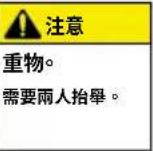
| 擰緊扭矩 | |
| 24 - 28 N- m | |
KICKR BIKE PRO 組裝
natural_image
Close-up of a black bicycle wheel mounted on a metal support frame, no visible text or symbols擰緊扭矩
使
30 - 35 N- m

natural_image
Two black-and-white images showing a device with sensor icons and control buttons, no readable text or symbols present.鎖定和解鎖模式
natural_image
Close-up of a black electronic device with two leads and a small orange button, labeled (11) (no readable text or symbols)使用 WAHOO 應用程式
www.wahoofitness.com/fitness-apps#kickr

鎖定和解鎖模式
https://www.wahoofitness.com/returns-and-warranty
Wahoo Fitness Headquarters
90 West Wieuca Road NE
Atlanta, GA 30342
Attn: Warranty Request
鎖定和解鎖模式
90 W. Wieuca Rd NE, Suite 110
Atlanta, GA 30342 United States
https://support.wahoofitness.com
電話:
natural_image
Black Wahoo stationary exercise machine with visible branding and control panel (no text or symbols on device body)(2)
natural_image
Technical diagram showing exploded and assembled views of a mechanical or electrical component, including a cable, switch, and motor assembly (no text or symbols present)KICKR BIKE PRO部品
スタンドオーバー 高さ調整
natural_image
Close-up of a black stationary bike with a blue arrow pointing to the seat (no text or symbols visible)サドル 高さ調整
natural_image
Close-up of a KICKR BIKE device with a blue arrow pointing to a component, no visible text or symbols on the device itself.セット バック 調 整
natural_image
Close-up of a black bicycle leg with a wall-mounted device and a blue arrow pointing to the top component (no readable text or symbols)リーチ調整
natural_image
Close-up of a bicycle's front wheel and suspension bracket with a blue arrow pointing to the base component (no text or symbols visible)スタック高さ調整
natural_image
Mechanical component with blue directional arrows indicating flow or force (no text or symbols)クランク長調整
natural_image
Exterior view of a Wahoo stationary exercise machine with directional arrows and warning symbol (no text or labels on the device itself)
natural_image
Close-up of a black bicycle wheel and lever mechanism (no text or symbols visible)締め付けトルク
30\~35 N-m
限定保証
https://support.wahoofitness.com
Wahoo Fitness Headquarters
90 West Wieuca Road NE
Atlanta, GA 30342
Attn: Warranty Request
Part# WFBIKE4
Model # WF146
FCC:PADWF146
IC: 10563A-WF146
限定保証
This device meets new EU cybersecurity standards to help protect your network and data.
Scan QR code or visit https://wahoofitness.com/regulatory-notices to get support and learn more about optional and default wireless connectivity.







R 217-220639
Authorized Representative
For EU sales:
24HOUR-AR Van Nelleweg 1,
3044 BC Rotterdam, The Netherlands
For UK sales:
24hour-AR, 15 Beaufort Court Admirals Way, Canary Wharf
London, United Kingdom, E14 9X
Email: compliance@24hour-ar.com
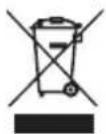
WEEE DISPOSAL INFORMATION
Waste electrical products must be handed over to a designated collection point for disposal to be recycled in an environmentally sound manner as required by law. Improper disposal of this product could result in harm to the environment or human health. For more information about where you can drop off your waste for recycling, please contact your Local Authority responsible for WEEE disposal, or with the retailer where you purchased this product.
PTSI STATEMENT
The full text of the SOC is available at https://wahoofitness.com/regulatory-notices
- KICKR BIKE PRO
- Thank you for purchasing the Wahoo KICKR BIKE PRO!
- SCAN THE QR CODE FOR:
- LEARN MORE:
- PLEASE CONTACT US WITH
- QUESTIONS OR CONCERNS AT:
- TELEPHONE:
- SAFETY INFORMATION
- CAUTION
- ENSURE PROPER ASSEMBLY
- BEFORE EACH RIDE
- MAINTENANCE AND STORAGE
- BOX CONTENTS
- KICKR BIKE PRO PARTS
- KICKR BIKE PRO SETUP
- Tightening torque
- KICKR BIKE PRO ASSEMBLY
- LOCKED AND UNLOCKED MODES
- USING THE WAHOO APP
- CONNECTIVITY
- COMPATIBILITY
- WARRANTY INFORMATION
- AUSTRALIAN WARRANTY INFORMATION
- IC STATEMENT
- CE STATEMENT
- CALIFORNIA PROPOSITION 65
- FCC RULES PART 15
- FCC COMPLIANCE STATEMENT
- TELÉFONO:
- PIEZAS DE LA BICICLETA KICKR BIKE PRO
- MONTAJE DE LA BICICLETA KICKR BIKE PRO
- MONTAJE DE LA BICICLETA
- DECLARACIÓN DE CE
- TELEFONE:
- MONTAGEM DA BICICLETA KICKR
- USANDO O APLICATIVO WAHOO
- INFORMAÇÕES SOBRE A GARANTIA
- GARANTIA LIMITADA
- TÉLÉPHONE :
- Couple de serrage
- MONTAGE DU KICKR BIKE PRO
- MONTAGE DU KICKR BIKE PRO suite
- UTILISATION DE L'APPLICATION WAHOO
- INFORMATIONS SUR LA GARANTIE
- TELEFONO:
- PARTI DELLA BICICLETTA KICKR
- Coppia di serraggio
- DISPLAY A LED DELLA BICICLETTA KICKR
- UTILIZZO DELL'APP WAHOO
- GARANZIA LIMITATA
- TELEFON:
- MIT DER WAHOO APP
- GARANTIE-INFORMATIE
- GARANTIEBESTIMMUNG
- TELEFOON:
- KICKR BIKE PRO ONDERDELEN
- KICKR BIKE PRO MONTAGE
- Torque kracht
- DE WAHOO-APP GEBRUIKEN
- BEPERKTE GARANTIE
- CZEŚCI ROWEROWE KICKR
- Dokręcania
- WYŚWIETLACZ LED KICKR BIKE PRO
- KORZYSTANIE Z APLIKACJI WAHOO
- INFORMACJE GWARANCYJNE
- OGRANICZONA GWARANCJA
- ไnsคัพท์:
- ɔːɪkə KICKR BIKE PRO
- แรงบิดในการขัน
- การใช้แอพ WAHOO
- ข้อมูลการรับประกัน
- KICKR BIKE PRO 부품
- KICKR BIKE PRO 설정
- KICKR BIKE PRO 조립
- 조임 토크
- WAHOO 앱용
- 보증 정보
- 제한적 보증
- 如有问题或疑虑,请联系我们:
- 电话:
- KICKR BIKE PRO 部件
- KICKR BIKE PRO 安装
- 锁定和解锁模式
- 使用 WAHOO 应用程序
- 保修信息
- 有限质量保证
- 如有問題,請聯絡我們:
- 電話:
- KICKR BIKE PRO 零件
- KICKR BIKE PRO 設定
- KICKR BIKE PRO 組裝
- 擰緊扭矩
- 鎖定和解鎖模式
- 使用 WAHOO 應用程式
- 電話:
- KICKR BIKE PRO部品
- 締め付けトルク
- 限定保証
- Authorized Representative
- WEEE DISPOSAL INFORMATION
- PTSI STATEMENT
Brand : Wahoo
Model : KICKR Bike Pro
Category : Indoor bike trainer