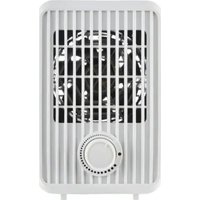
STHL 600 A1 - Electric heating SILVERCREST - Free user manual and instructions
Find the device manual for free STHL 600 A1 SILVERCREST in PDF.


User questions about STHL 600 A1 SILVERCREST
0 question about this device. Answer the ones you know or ask your own.
Ask a new question about this device
Download the instructions for your Electric heating in PDF format for free! Find your manual STHL 600 A1 - SILVERCREST and take your electronic device back in hand. On this page are published all the documents necessary for the use of your device. STHL 600 A1 by SILVERCREST.
USER MANUAL STHL 600 A1 SILVERCREST
Operating and Safety Instructions
This product is only suitable for well insulated spaces or occasional use.
BEFR CH
RADIATEUR DE TABLE SOUFFLANT
Before reading, fold out the page with the images and familiarise yourself with all the features of the device.
DE AT CH
GB/IE/NI/CY/MT Operation and Safety Instructions Page 5
text_image
Technical diagram of a heating unit with labeled components including fan, vent, and cooling elements1. Introduction 6
1.1 Intended Use 6
1.2 Scope of Delivery...6.
1.3 Equipment...6
1.4 Technical data...6
2. Safety Instructions 8
2.1 General Safety Instructions...9
3. Before commissioning....11....
3.1 Device Installation...1.1
4. Starting Up ...11
4.1 Switching the unit on/off...1.1
4.2 Overheat Protection 11
4.3 Tilt Protection 12
5. Maintenance, Cleaning and Storage 12
-
Disposal 12
-
ROWI Germany GmbH Warranty 12
-
Service 14
DESKTOP FAN HEATER STHL 600 A1
1. Introduction
We congratulate you on your new device purchase. You have thus opted for a high quality product. These Directions for Use are an integral part of this product. They contain important information for safety, use and disposal. Prior to the product use, make yourself familiar with all instructions for use and safety. Use the product only as described and only for the specified fields of use. If you hand on the product to third parties, also hand over all the product documents.
1.1 Intended Use
This device is only intended for heating of closed and dry rooms during transitional periods. It can be used as supplementary heating or as a temporary heating option for well insulated rooms. The device is not intended for use in special conditions, for example, in a corrosive or explosive area (dust, vapour or gas). Do not use the device outdoors. Any other use or modification of the device is deemed to be an improper use and means a considerable risk of accidents. For damage caused by the improper use, no liability will be accepted by us. This device is meant only for private use and not for commercial use.
1.2 Scope of Delivery
1 Desktop fan heater STHL 600 A1
1 Instruction manual
1.3 Equipment
1 On/Off switch
2 Tip-over protection
3 Temperature regulator (thermostat)
4 Control light
1.4 Technical data
Input voltage: 230 V
Mains frequency: 50-60 Hz
Heating output: 600 W
Heating level: 1
Protection class: II /
Power cable length: 1,5 m
\~

Information requirements for electric local space heaters
Model identifier(s): STHL 600 A1
Item Symbol Value Unit
Heat output
| Nominal heat output P | nom | 0.6 kW |
| Minimum heat output (indicative) | Pmin | 0.6 kW |
| Maximum continuous heat output | Pmax,c | 0.6 kW |
Auxiliary electricity consumption
| At nominal heat output el _max | 0 | kW |
| At minimum heat output el _min | 0 | kW |
| In standby mode el _SB | 0 | kW |
Item Unit
Type of heat input, for electric storage local space heaters only (select one)
manual heat charge control, with integrated thermostat [no]
manual heat charge control with room and/or outdoor temperature feedback [no]
electronic heat charge control with room and/or outdoor temperature feedback [no] fan assisted heat output [no]
Type of heat output/room temperature control (select one)
single stage heat output and no room temperature control [no]
Two or more manual stages, no room temperature control [no]
with mechanic thermostat room temperature control [yes]
with electronic room temperature control [no]
electronic room temperature control plus day timer [no]
electronic room temperature control plus week timer [no]
Other control options (multiple selections possible)
room temperature control, with presence detection [no]
room temperature control, with open window detection [no]
with distance control option [no]
with adaptive start control [no]
with working time limitation [no]
with black bulb sensor [no]
ROWI Germany GmbH
2. Safety Instructions

Please read all safety information and instructions.

Failure to comply with the safety instructions and precautions may result in serious injury and/or property damage.
For future reference, keep all safety instructions and precautions in a safe place!
Danger to life by electrical current!
Contacting the live cables or components is dangerous to your life!
Fire risk!
To reduce the risk of fire, keep textiles, curtains and other combustible materials at least 1 m away from the air outlet.

Risk of overheating!
To avoid overheating of the device, never cover it with anything.
- If the mains cable or plug is damaged, do not use the device! Do not restart the device before having a new mains cable or plug installed by an authorised specialist.
- Never open the housing of the device. Touching the live cables and connections and/or modifying the electrical and mechanical installation means danger to your life by electric shock!
- No user action is required to set the product to 50 or 60 Hz or to 220 or 240 V. The product automatically adjusts to the correct frequency or voltage.
■ Before you connect the appliance, compare the electrical connection parameters on the nameplate (voltage and frequency) with the data of your electric network. Make sure that all the data match so that no damage may occur to the device.
■ Make sure that the power supply cable is not damaged and not laid on hot surfaces and/or sharp edges.
- Ensure the power cable does not kink or become trapped.
- Repair of electrical equipment may only be carried out by experts who are specially trained by the manufacturer. Improper repair can cause considerable danger for the device users.
2.1 General Safety Instructions
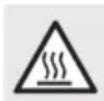
Beware of hot surfaces!
CAUTION: Some parts of the product can become very hot and cause burns. Pay particular attention when children and vulnerable people are present.

The device is only intended for indoor use!
Before using the device, check it for visible damage. If the device fell down or got damaged, do not start it.
If the power supply cable of this device is damaged it should be replaced by the manufacturer or by its customer service or a similarly qualified person, to avoid danger.
- The fan heater should not be used in small rooms if there are people in there that cannot leave the room independently, unless constant supervision is ensured.
This device can be used by children aged from 8 years and above and by physically, sensory or mentally restricted persons if they are supervised or given instructions on safe use and understand the hazards involved as it does not require any experience or knowledge. This device is not a toy for children to play with! Cleaning and user maintenance shall not be carried out by children without supervision.
Children under the age of 3 are to be kept away unless they are continually supervised.
Children between the age of 3 and 8 are only allowed to switch the device on or off if they are supervised or given instructions on safe use and understand the hazards involved, provided that it has been placed or installed in its intended normal operating position. Children between the age of 3 and 8 shall not plug in, regulate and clean the heater or perform user maintenance!
- Check the item for completeness and function before commissioning!
- Do not operate a dropped unit.
- Do not use the product if you notice any visible damage.
■ The heater must be placed on a firm, flat and horizontal floor.
- Repair of the device shall only be done by authorised companies qualified in this field or by the after-sales service. Improper repair can cause considerable danger for the device users. Moreover, it will void all warranty claims.
■ Defective components may only be replaced with original spare parts. Only if original spare parts are used, it is ensured that the security requirements are met.
■ Protect the device against humidity and penetration of liquids.
- When disconnecting, pull the power cable from the wall socket by the power plug only, do not jerk out the cable.
- Do not use the device in the vicinity of open flames.
- Do not place the device directly under or above a wall socket.
In the case of faults or during a thunderstorm, pull out the connector plug from the wall socket.
- Never use the device in the direct vicinity of a bath tub, shower or swimming pool.
- Only operate the device with the power cord fully rolled out. Never wind the power cable around the device. Make sure that the power cable does not contact hot surfaces. Route the cable so that nobody can stumble over it.
3. Before commissioning
3.1 Device Installation
■ Remove all packaging material and all transport bracing from the device.
For a safe and trouble-free running of the device, choose the installation location which meets the following requirements:
■ The floor should be firm, flat and horizontal.
- Keep the following minimum clearances from the device housing: 50 cm from its lateral side, 50 cm above, 50 cm from its rear side and 1 m from its front side.
Do not place the device in a hot and wet or very humid environment or near combustible material.
The socket should be easily accessible so that the mains connection cable can be easily disconnected, if necessary.
■ Temperature range: from 0 to +40 °C
■ Air humidity (no condensation): 5–75 %
Please note: When you use the device the first time, a slight odour may occur.
4. Starting Up
4.1 Switching the unit on/off
Plug the unit into a mains socket. Set the on/off switch 1 to the „I” position to supply power to the unit.
Now turn the temperature regulator 3 clockwise to the maximum level.
When the desired temperature has been reached, slowly turn the control dial 3 back until you hear a click. The temperature is now set. The table fan heater switches on and off automatically to regulate the set temperature.
- When switching off, the indicator light 4 goes out. To set a higher or lower temperature, turn the temperature regulator 3 clockwise/counterclockwise respectively.
To switch off the unit, set the on/off switch 1 to the „0“-position.
■ Pull the mains plug out of the socket.
⚠️ Before you cover the device or put it away, wait until it has cooled down.
4.2 Overheat Protection
This device is equipped with an overheating protection. If the device is too hot, the heating element switches off automatically.
Turn the device OFF by turning the heating level switch 1 to "0" and pull the power plug out of the socket. Wait until the device has cooled down - at least 10 minutes.
Check the air inlet and air outlet holes. Eliminate the cause of the overheating before you restart the device.
CAUTION! Usually the device never gets overheated without cause! If it gets too hot, there is a danger of fire!
- Check whether the device is able to give off the heat properly: Is the device covered with anything? Or, perhaps, it is too close to a wall or other obstacle? Check whether the grids on the front or rear side are free of dirt and not covered. Is the fan blocked?
If possible, eliminate the cause of the problem or contact the service hotline (see chapter "Service").
Please note: If the overheating protection is triggered for the second time, you should turn OFF the device and contact the service hotline (see chapter "Service") - regardless if you have found the cause of the problem or not.
4.3 Tilt Protection
This device is equipped with a tilt protection 2 . It is located at the bottom of the unit. If the device is inadvertently knocked over or subjected to a strong tilt during operation, the unit switches off automatically. The unit only works in upright position.
5. Maintenance, Cleaning and Storage
■ Always disconnect the power plug when the device is not in use and before any cleaning or in the event of operating faults!
- Clean the device only when it is turned OFF and in a cooled condition.
■ Ensure that no moisture penetrates into the device in order to avoid irreparable damage.
■ Clean the housing with a soft dry cloth only. Do not use aggressive and/or abrasive cleaning agents.
■ Remove dust deposits from the protective grille with a vacuum cleaner.
■ Store the device in a dry room.
6. Disposal

The packaging is made of environmentally friendly materials that you can dispose of at your local recycling centres.

text_image
FR LE TRI + FACILE ÉLÉMENTS D'EMBALLAGE BAC DE TRIThe Triman logo is valid in France only.
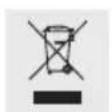
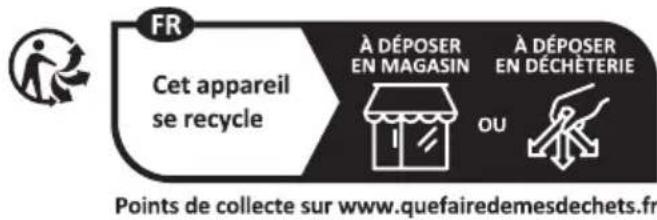
This product is subject to the European Directive 2012/19/EU. Do not dispose of the product in household waste, but via municipal collection points for material recycling! Further information on
how to dispose of the discarded device can be obtained from your local authority or city council.
Observe the labelling of the packaging materials when separating waste; these are marked with abbreviations (a) and numbers (b) with the following meaning: 1-7: Plastics/20-22: Paper and cardboard/80-98: Composites.
7. ROWI Germany GmbH Warranty
Dear Customer,
This appliance has a 3-year warranty valid from the date of purchase. If this product has any faults, you, the buyer, have certain statutory rights. Your statutory rights are not restricted in any way by the warranty described below.
Warranty conditions
The validity period of the warranty starts from the date of purchase. Please keep your original receipt in a safe place. This document will be required as proof of purchase.
If any material or production fault occurs within three years of the date of purchase of the product, we will either repair or replace the product for you or refund the purchase price at our discretion. This warranty service is dependent on you presenting the defective appliance and the proof of purchase (receipt) and a short written description of the fault and its time of occurrence.
If the defect is covered by the warranty, your product will either be repaired or replaced by us. The repair or replacement of a product does not signify the beginning of a new warranty period.
Warranty period and statutory claims for defects
The warranty period is not prolonged by repairs effected under the warranty. This also applies to replaced and repaired components. Any damage and defects present at the time of purchase must be reported immediately after unpacking. Repairs carried out after expiry of the warranty period shall be subject to a fee.
Scope of the warranty
This appliance has been manufactured in accordance with strict quality guidelines and inspected meticulously prior to delivery.
The warranty covers material faults or production faults. The warranty does not extend to product parts subject to normal wear and tear or fragile parts such as switches, batteries or those made of glass.
The warranty does not apply if the product has been damaged, improperly used or improperly maintained. The directions in the operating instructions for the product regarding proper use of the product are to be strictly followed. Uses and actions that are discouraged in the operating instructions or which are warned against must be avoided.
This product is intended solely for private use and not for commercial purposes. The warranty shall be deemed void in cases of misuse or improper handling, use of force and modifications/repairs which have not been carried out by one of our authorised Service centres.
Warranty claim procedure
To ensure quick processing of your case, please observe the following instructions:
Please have the till receipt and the item number (IAN 441440_2301) available as proof of purchase.
- You will find the item number on the type plate on the product, on the front page of the instructions (bottom left), or as a sticker on the rear or bottom of the appliance.
If functional or other defects occur, please contact the service department listed either by telephone or by e-mail.
- You can return a defective product to us free of charge to the service address that will be provided to you. Ensure that you enclose the proof of purchase (till receipt) and information about what the defect is and when it occurred.
text_image
PDF ONLINE www.lidl-service.comAt www.lidl-service.com you can download this manual as well as many other manuals, product videos and installation software. This QR code will take you directly to the Lidl service page (www.lidl-service.com) and allow you to open your operating instructions simply by entering the article number (IAN 441440_2301).
8. Service
If any problems occur during use of your ROWI Germany product, please proceed as follows:
Contact us
You can contact the service team of ROWI Germany at:
ROWI Germany GmbH
(free call from a German landline)
IAN 441440_2301
Most problems can be resolved with the skilled technical support of our Service Team.