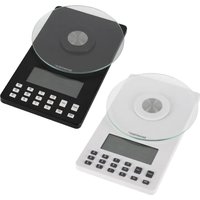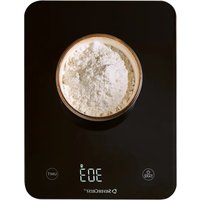
SAKW 10 A1 - Kitchen scales SILVERCREST - Free user manual and instructions
Find the device manual for free SAKW 10 A1 SILVERCREST in PDF.


User questions about SAKW 10 A1 SILVERCREST
0 question about this device. Answer the ones you know or ask your own.
Ask a new question about this device
Download the instructions for your Kitchen scales in PDF format for free! Find your manual SAKW 10 A1 - SILVERCREST and take your electronic device back in hand. On this page are published all the documents necessary for the use of your device. SAKW 10 A1 by SILVERCREST.
USER MANUAL SAKW 10 A1 SILVERCREST
Operating instructions
FR BE
K∅KKENVÅGT MED DIGITALVISNING
Before reading, unfold the page containing the illustrations and familiarise yourself with all functions of the device.
DE AT CH
- Introduction 2
- Intended use 2
- Warnings and symbols used 2
- Safety information 3
4.1. Safety guidelines for rechargeable batteries 5
- Package contents 6
- Appliance description 6
- Technical data 6
- Charging the integrated battery 7
- Use 7
9.1. Weighing 7
9.2. Adding & weighing (tare function) 8
9.3. Removing ingredients 8
9.4. Switching the scales off 8
-
Cleaning 8
-
Storage 8
- Troubleshooting 9
- Disposal 9
- Kompernass Handels GmbH warranty 9
14.1. Service 10
14.2. Importer 10
1. Introduction
Congratulations on the purchase of your new appliance. You have selected a high-quality product.

The instructions for use are part of this product. They contain important informa-
tion about safety, usage and disposal. Before using the product, please familiarise yourself with all instructions regarding safety and use. Use the product only as described and for the specified range of applications. Please also pass on all documents to any future owner.
2. Intended use
This appliance is suitable for weighing and adding household quantities of food in dry indoor rooms. It is intended exclusively for use in domestic households. Not for commercial or industrial use! The manufacturer accepts no liability for damages caused by improper use or incorrect operation of the appliance.
3. Warnings and symbols used
The following warnings and symbols are used in these instructions for use, on the packaging and on the appliance (where applicable):
| DANGER! A warning with this symbol and the signal word "DANGER" indicates an imminently hazardous situation which will result in death or serious injury if not avoided. | |
| WARNING! A warning with this symbol and the signal word "WARNING" indicates a potentially hazardous situation which could result in death or serious injury if not avoided. | |
| CAUTION! A warning with this symbol and the signal word "CAUTION" indicates a potentially hazardous situation which could result in a minor or moderate injury if not avoided. |
 | ATTENTION! A warning with this symbol and the signal word "ATTENTION" indicates a potential situation which could result in property damage if not avoided. |
 | Note: A note identifies additional information that facilitates the use of the appliance. |
 | For indoor use only. |
 | DC current/voltage. |
 | Food-safe |
 | Protection class III (protection through extra-low voltage) |
 | Read the instructions. |
 | USB® is a registered trademark of USB Implementers Forum, Inc. All other names and products may be the trademarks or registered trademarks of their respective owners. |
 | Do not dispose of electrical appliances in the household waste! |
 | Dispose of the packaging in an environmentally-responsible manner. |
| The packaging is made of recyclable materials. Observe the labelling on the packaging material when sorting for disposal: The material is labelled with abbreviations (a) and numbers (b) with the following meanings: 1-7: plastics, 20-22: paper and cardboard, 80-98: composites. | |
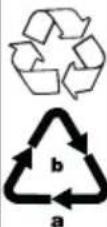 | |
 | The packaging contains paper and/or cardboard components. |
| FR Cet appareil et ses accessoires se recyclent | A DÉPOSER EN MAGASIN | A DÉPOSER EN DECHETRIE |
| OU | ||
| Points de collecte sur www.quefairedemestechets.fr Privélégie la réparation ou le don de votre appareil I | ||
| FR | + | |
| FR | FR: The product, its pack- aging and the operating instructions are recyclable. They are subject to an extended manufacturer responsibility and will be collected separately. | |
4. Safety information
DANGER!
■ Make sure that the charging cable does not become wet or damp. Route the cable in such a way that it cannot be caught or damaged.
- Keep the appliance and the charging cable away from hot surfaces.
WARNING!
■ This appliance may be used by children aged 8 years and above and by persons with limited physical, sensory or mental capabilities or lack of experience and knowledge, provided that they are under supervision or have been told how to use the appliance safely and are aware of the potential risks.
■ Cleaning and user maintenance tasks may not be carried out by children unless they are supervised.
■ Do not allow children to use the appliance as a toy.
■ Never leave children unattended with the packaging material. Keep children away from the packaging. There is a risk of suffocation!
■ Prior to use, check the appliance for visible external damage. Do not operate an appliance that has been damaged or dropped.
■ Never open the appliance housing. There are no parts inside which require user maintenance. This could lead to injuries and damage to the appliance.
■ All repairs must be carried out by authorised specialist companies or by the Customer Service department. Improper repairs may put the user at risk. It will also invalidate any warranty claims.
ATTENTION!
■ Use only the supplied charging cable to charge the appliance.
■ If you are using a USB power supply, the mains socket must always be easily accessible so that the USB power supply can be quickly disconnected from the socket in a hazardous situation. You should also observe the operating instructions for the USB power supply.
■ Do not use any aggressive cleaning agents or solvents. They could damage the surface.
■ Do not allow any liquids or moisture to get into the appliance.
■ Do not place anything on the scales when they are not in use.
■ Do not load the scales with more than 10 kg.
■ Protect the scales from impacts, moisture, dust, chemicals, extreme temperature fluctuations, and keep them away from heat sources (ovens, radiators).
■ Defective components must always be replaced with original replacement parts. Only by using original replacement parts can it be assured that the safety requirements are being complied with.
■ Do not expose the scales to
- high temperatures or strong electromagnetic fields (e.g. mobile phones),
-severe vibrations,
-extreme mechanical stresses,
-or direct sunlight.
This appliance contains sensitive electronic components. Therefore, it is possible that it may be disrupted by radio transmissions from other devices in the vicinity, such as mobile phones, two-way radios, remote controls, microwave ovens, etc. If there are any false readings on the display, remove these kinds of devices from the immediate vicinity of the scales.
■ Protect the appliance from electrostatic charges/discharges. These can impede the internal data exchange and lead to incorrect indications on the display.
4.1. Safety guidelines for rechargeable batteries
The product is equipped or supplied with a lithium-ion battery. The battery in this appliance cannot be replaced.
RISK OF EXPLOSION!
■ Do not open or short-circuit the battery.
This could cause the battery to overheat and explode. There is a risk of fire!
■ Never throw the battery into a fire or water.
■ Do not subject the battery to mechanical stress.
■ Never leave the appliance unattended during charging.
WARNING!
RISK OF INJURY DUE TO BATTERY LEAKAGE!
■ High temperatures can affect the battery. Avoid direct sunlight and proximity to heat sources such as radiators.
■ Under extreme conditions, the battery cells may leak. Avoid contact with skin, eyes and mucous membranes. In the event of accidental contact, rinse the affected areas with plenty of clean water and contact a doctor.
■ Leaking or damaged batteries can cause chemical burns to the skin. Always wear protective gloves if you have to touch the batteries.
ATTENTION! PROPERTY DAMAGE!
■ Only charge the appliance with a USB power adapter with protection class II that is approved for use with household appliances and has an output voltage of 5 V—and an output current of max. 1 A.
■ Never store the appliance when it is discharged. Prolonged storage in a discharged state can cause permanent damage to the battery. If the appliance is stored for a longer period of time, the charge level of the battery must be checked regularly. The optimum charge level is between 50% and 80%.
5. Package contents
● Premium Digital Kitchen Scales
- USB charging cable (initially located in the holder 8)
- Instructions for use
i Note
▶ Remove the appliance and all of the parts from the box and remove all packaging material and any protective film.
▶ Check the package for completeness and signs of visible damage.
▶ If any items are missing or damaged as a result of defective packaging or transportation, please contact the Service Hotline (see section Service).
6. Appliance description
Figure A
① Battery indicator
② Tare indicatorT
③ Weight unit indicator
4 Negative value/minus indicator
5 button
6 TARE button
Figure B
7 Hanger
8 Holder for the USB charging cable
9 On/Off switch
10 Charging socket
Figure C
11 USB charging cable (type C)
7. Technical data
| Input voltage 5.0 V | == |
| Input current 1.0 A | |
| Integrated battery (Li-ion) | 300 mAh / 3.7 V === |
| Max. measurement range | 10,000 g / 352.75 oz / 22:0.75 lb:oz / 352.0 fl oz / 10,000 ml |
| Weight increments | 1 g / 0.05 oz / 1 ml |
8. Charging the integrated battery
i Note
The battery must be charged for at least 1 - 1.5 hours before the first use.

▶ Use the appliance only in dry interior rooms.
i Note
The USB charging cable 11 and charging socket 10 are used only to charge the integrated battery. They are not suitable for data transmission.
▶ Only charge the appliance with a USB power adapter with protection class II that is approved for use with household appliances and has an output voltage of 5 V== and an output current of max. 1 A.
▶ Use only the supplied USB charging cable ⑪ to charge the integrated battery. Disconnect the USB charging cable ⑪ from the appliance when charging is complete.
▶ The appliance cannot be used during charging.
Charge the appliance fully before using it for the first time or when L0 appears in the display.
1) Make sure that the appliance is switched off at the On/Off switch ⑨.
2) Insert the USB plug of the USB charging cable ⑪ into the charging socket ⑩.
3) Connect the USB charging cable ⑪ to a suitable mains adapter and plug the mains adapter into a mains socket.
—The display ■ ① flashes during charging.
-Once the appliance is fully charged, the display ① remains lit.
4) Disconnect the appliance from the power supply and unplug the USB charging cable ⑪ from the appliance.
The battery can be recharged at any time and at any battery level.
9. Use
i Note
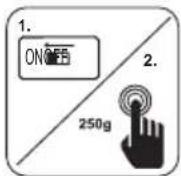
Before using them the first time, familiarise yourself with how to switch on the scales and remove the sticker from the weighing surface describing how to switch them on.
9.1. Weighing
1) If not already done: Set the On/Off switch ⑨ to the ON position.
2) Place the scales on a level, non-slip surface and make sure that they are completely horizontal.
If the scales are switched off, e.g. after the automatic switch-off, but the On/Off switch ⑨ is already in the ON position:
3) Activate the scales by either pressing the button ⑥ briefly or tapping on the weighing surface (with at least 250 g of pressure).
(i) Note
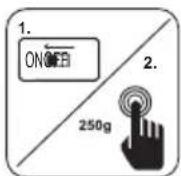
Activating the scales by pressing the ⏻ button ⑥ or tapping on the weighing surface only works if the On/Off switch ⑨ is in the ON position!
4) Set the weight unit with the UNIT button 5. Every time the button is pressed, the weight unit indicator ③ switches to the next unit in the following order: g > oz > lb oz > ml > fl oz (grammes > ounces > pounds:ounces > millilitres > liquid ounces).
! ATTENTION! Never place more than 10 kg (10,000 g / 352.75 oz / 22:0.75 lb:oz / 352.0 fl oz / 10,000 ml) on the scales. Otherwise, they could be irreparably damaged. In cases of doubt, first weigh heavy food using more sturdy scales.
5) Place food to be weighed on the scales. The display shows the weight in the selected weight unit.
9.2. Adding & weighing (tare function)
If you want to weigh several different substances (e.g. various ingredients for a dough) in combination, you can set the scales to 0 each time before adding a further ingredient.
1) If you wish to reset the scales to 0 after the first measurement in order to measure the next ingredient, press the ⏻ button ⑥ briefly. The weight display shows ☐ g. The T indicator ② appears.
2) Place the new material on the weighing surface. The new weight is displayed.
3) Repeat the process for each additional ingredient, but only until the maximum load of the appliance is reached.
9.3. Removing ingredients
You can also use the scales to weigh an amount you take out after the weighing process (for instance, if have added too much).
1) To do this, reset the scales to 0 by pressing the button ⑥. The weight display shows ① g. The T indicator ② appears.
2) Remove the material from the weighing surface. The weight of the removed quantity is displayed as a negative weight. The indicator 4 is shown before the weight.
3) Press the ⏻ button Ⓐ again to reset the scales to 0. The weight display shows ☐ g.
4) You can now add or remove other quantities.
9.4. Switching the scales off
The scales switch off automatically after about 3 minutes of inactivity. To switch the scales off manually, press and hold the ⏻ button ⑥ until the scales switch off.
i Note
▶ If you do not intend to use the scales for a longer period, set the On/Off switch ⑨ to OFF.
10. Cleaning
DANGER!
▶ Never clean the appliance while it is charging. There is a risk of electric shock!
! ATTENTION!
▶ Do not use aggressive, chemical or abrasive cleaning agents. They could damage the outer surfaces of the appliance.
▶ To avoid irreparable damage to the appliance, ensure that no moisture gets into it during cleaning.
◆ Wipe off the scales with a damp cloth and then dry them with a lint-free cloth. For stubborn soiling add a little mild detergent to the cloth. Wipe off any detergent residue using a cloth moistened with fresh water only.
Wipe the USB charging cable ⑪ with a damp cloth. Ensure that the it is completely dry before the next use.
11. Storage
Place the USB charging cable 11 in the holder 8 on the rear of the appliance so that it is firmly seated.
You can keep the scales handy by hanging them on the wall using the hanger ⑦.
For longer storage periods, store the scales in a dry and dust-free location. Set the On/Off switch ⑨ to OFF.
! ATTENTION!
▶ Never store the appliance when it is completely discharged. Prolonged storage in a discharged state can cause permanent damage to the battery.
The optimum charge level for storage is between 50% and 80%.
12. Troubleshooting
| Fault Cause Remedy | ||
| The scales cannot be switched on. | The On/Off switch 9 is set to OFF.The battery is empty. | Set the On/Off switch 9 to the ON position.Charge the appliance. |
| The display shows Err. | The maximum load of 10,000 g / 352.75 oz / 22:0.75 lb:oz / 352.0 fl oz / 10,000 ml has been exceeded. | Remove the material from the scales.Reduce the amount of material and weigh it in several steps. |
| The message Err appears on the display and cannot be reset. | The maximum load of 10,000 g / 352.75 oz / 22:0.75 lb:oz / 352.0 fl oz / 10,000 ml has been exceeded. | Remove the material from the scales.Switch the scales off and on again.Reduce the amount of material and weigh it in several steps. |
| The display shows LO. | The battery charge is low. | Charge the appliance. |
If you cannot solve the problem using any of the solutions suggested above, please contact the Customer Service department.
13. Disposal
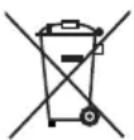
The symbol of the crossed-out wheelie bin means that this appliance may not be disposed of in regular household waste at the end of its service life. The
appliance must be deposited at an established collection point, recycling centre or disposal company.
Please erase all personal data before returning an appliance.
Before returning an appliance, please remove any batteries that are not permanently enclosed within the old appliance as well as any light sources that can be removed without destroying the appliance. Then dispose of these items separately.
If the rechargeable batteries are permanently installed, you must indicate during disposal that the appliance contains a battery.
The built-in rechargeable battery in this appliance cannot be removed for disposal.
The packaging is made from environmentally friendly material which can be disposed of at your local recycling plant.
Dispose of the packaging in an environmentally friendly manner.
14. Kompernass Handels GmbHwarranty
Dear Customer,
This appliance has a 3-year warranty valid from the date of purchase. If this product has any faults, you, the buyer, have certain statutory rights. Your statutory rights are not restricted in any way by the warranty described below.
Warranty conditions
The warranty period starts on the date of purchase. Please keep your receipt in a safe place. This will be required as proof of purchase.
If any material or manufacturing fault occurs within three years of the date of purchase of the product, we will either repair or replace the product for you or refund the purchase price (at our discretion).
This warranty service requires that you present the defective appliance and the proof of purchase (receipt) within the three-year warranty period, along with a brief written description of the fault and of when it occurred.
If the defect is covered by the warranty, your product will either be repaired or replaced by us. The repair or replacement of a product does not signify the beginning of a new warranty period.
Warranty period and statutory claims for defects
The warranty period is not prolonged by repairs effected under the warranty. This also applies to replaced and repaired components. Any damage and defects present at the time of purchase must be reported immediately after unpacking. Repairs carried out after expiry of the warranty period shall be subject to a fee.
Scope of the warranty
This appliance has been manufactured in accordance with strict quality guidelines and inspected meticulously prior to delivery.
The warranty covers material faults or production faults. The warranty does not extend to product parts subject to normal wear and tear or to fragile parts which could be considered as consumable parts such as switches or parts made of glass.
The warranty does not apply if the product has been damaged, improperly used or improperly maintained. The directions in the operating instructions for the product regarding proper use of the product are to be strictly followed. Uses and actions that are discouraged in the operating instructions or which are warned against must be avoided.
This product is intended solely for private use and not for commercial purposes. The warranty shall be deemed void in cases of misuse or improper handling, use of force and modifications / repairs which have not been carried out by one of our authorised Service centres.
Warranty claim procedure
To ensure quick processing of your case, please observe the following instructions:
■ Please have the till receipt and the item number (IAN) 489833_2501 available as proof of purchase.
■ You will find the item number on the type plate on the product, an engraving on the product, on the front page of the operating instructions (below left) or on the sticker on the rear or bottom of the product.
If functional or other defects occur, please contact the service department listed either by telephone or by e-mail.
- You can return a defective product to us free of charge to the service address that will be provided to you. Ensure that you enclose the proof of purchase (till receipt) and information about what the defect is and when it occurred.
You can download these instructions along with many other manuals, product videos and installation software at www.lidl-service.com.
This QR code will take you directly to the Lidl service page (www.lidl-service.com) where you can open your operating instructions by entering the item number (IAN) 489833_2501.
14.1. Service
GB Service Great Britain
Tel.: 0800 404 7657
E-Mail: kompernass@lidl.co.uk
IE ServiceIreland
Tel.: 1800 101010
E-Mail: kompernass@lidl.ie
IAN 489833_2501
14.2. Importer
Please note that the following address is not the service address. Please use the service address provided in the operating instructions.
KOMPERNASS HANDELS GMBH
BURGSTRASSE 21
44867 BOCHUM
GERMANY
www.kompernass.com
Inhaltsverzeichnis
1. Einleitung 12
KOMPERNASS HANDELS GMBH
BURGSTRASSE 21
44867 BOCHUM
DEUTSCHLAND
www.kompernass.com
Table des matières
1. Introduction 24
KOMPERNASS HANDELS GMBH
BURGSTRASSE 21
44867 BOCHUM
ALLEMAGNE
www.kompernass.com
Inhoud
1. Inleiding 38
KOMPERNASS HANDELS GMBH
BURGSTRASSE 21
44867 BOCHUM
DUITSLAND
www.kompernass.com
Obsah
1. Úvod 50
! POZOR! HMOTNÉ ŠKODY!
KOMPERNASS HANDELS GMBH
BURGSTRASSE 21
44867 BOCHUM
NĚMECKO
www.kompernass.com
Spis treści
1. Wstep 60
KOMPERNASS HANDELS GMBH
BURGSTRASSE 21
44867 BOCHUM
NIEMCY
www.kompernass.com
Obsah
1. Úvod 72
KOMPERNASS HANDELS GMBH
BURGSTRASSE 21
44867 BOCHUM
NEMECKO
www.kompernass.com
Índice
KOMPERNASS HANDELS GMBH
BURGSTRASSE 21
44867 BOCHUM
ALEMANIA
www.kompernass.com
Indholdsfortegnelse
1. Indledning 94
2. Anvendelsesområde 94
3. Anvendte advarsler og symboler 94
KOMPERNASS HANDELS GMBH
BURGSTRASSE 21
44867 BOCHUM
TYSKLAND
www.kompernass.com
Indice
KOMPERNASS HANDELS GMBH
BURGSTRASSE 21
44867 BOCHUM
GERMANIA
www.kompernass.com
Tartalomjegyzék
1. Bevezető 116
KOMPERNASS HANDELS GMBH
BURGSTRASSE 21
44867 BOCHUM
NÉMETORSZÁG
www.kompernass.com
text_image
PDF ONLINE www.lidl-service.com
text_image
FR © ©KOMPERNASS HANDELS GMBH
BURGSTRASSE 21
44867 BOCHUM
GERMANY
www.kompernass.com
Last Information Update · Stand der Informationen · Version des informations
Stand van de informatie · Stav informací · Stan informacji · Stav informácií
Estado de las informaciones · Tilstand af information · Versione delle informazioni