SC-BMAX30 - Hi-fi system PANASONIC - Free user manual and instructions
Find the device manual for free SC-BMAX30 PANASONIC in PDF.


User questions about SC-BMAX30 PANASONIC
0 question about this device. Answer the ones you know or ask your own.
Ask a new question about this device
Download the instructions for your Hi-fi system in PDF format for free! Find your manual SC-BMAX30 - PANASONIC and take your electronic device back in hand. On this page are published all the documents necessary for the use of your device. SC-BMAX30 by PANASONIC.
USER MANUAL SC-BMAX30 PANASONIC
natural_image
Line drawing of a rectangular industrial device with wheels and internal compartments (no text or symbols)Panasonic®
Model No.
Operating Instructions
Wireless Speaker System
Bedienungsanleitung
Thank you for purchasing this product.
For optimum performance and safety, please read these instructions carefully.
Please keep this manual for future reference.
The symbols on this product (including the accessories) represent the following:

AC

DC

Class II equipment (The construction of the product is double-insulated.)
Table of contents
Supplied accessories....2
Safety precautions 2
Caution for AC mains lead 3
Transporting the unit ....3
(Important) About the splashproof ....4
Power sources 5
Overview of unit 6
Bluetooth® operation 7
Using a USB device....8
External equipment....9
Using microphones or guitar....9
Illumination effects 10
Others 10
Troubleshooting 10
Maintenance 11
References ......12
Specifications 13
To remove the battery when disposing of this unit.....14
Supplied accessories
Check and identify the supplied accessories.
□ 2 AC mains leads
Safety precautions
WARNING
Unit
- To reduce the risk of fire, electric shock or product damage,
- Do not let water or other liquids drip or splash inside the unit.
- Do not expose accessories (battery pack, battery charger, AC adaptor, SD memory card and etc.) to rain, moisture, dripping or splashing.
- Do not place objects filled with liquids, such as vases, on accessories.
– Use only the recommended accessories.
- Do not remove covers.
- Do not repair this unit by yourself. Refer servicing to qualified service personnel.
- Do not let metal objects fall inside this unit.
Battery pack (Lithium ion battery pack)
- Risk of fire, explosion and burns. Do not disassemble, heat above 50^ or incinerate.
CAUTION
Unit
- To reduce the risk of fire, electric shock or product damage,
- Do not install or place this unit in a bookcase, built-in cabinet or in another confined space. Ensure this unit is well ventilated.
- Do not obstruct this unit's ventilation openings with newspapers, tablecloths, curtains, and similar items.
- Do not place sources of naked flames, such as lighted candles, on this unit.
- This unit is intended for use in moderate climates.
- This unit may receive radio interference caused by mobile telephones during use. If such interference occurs, please increase separation between this unit and the mobile telephone.
- Set the unit up on an even surface away from direct sunlight, high temperatures, high humidity, and excessive vibration.
- This system might get warm after prolonged usage. This is normal. Do not be alarmed.
AC mains lead
- The mains plug is the disconnecting device. Install this unit so that the mains plug can be unplugged from the socket outlet immediately.
Battery
- Danger of explosion if battery is incorrectly replaced. Replace only with the type recommended by the manufacturer.
- When disposing of the batteries, please contact your local authorities or dealer and ask for the correct method of disposal.
- Do not heat or expose to flame.
- Do not leave the battery(ies) in a car exposed to direct sunlight for a long period of time with doors and windows closed.
- Do not expose to low air pressure at high altitude.
- Do not expose to extremely low air pressure, as this may result in explosions or leakage of flammable liquids and gases.
- Avoid the use in the following conditions
– High or low extreme temperatures during use, storage or transportation. - Disposal of a battery into fire or a hot oven, or mechanically crushing or cutting of a battery, that can result in an explosion
- Extremely high temperature and/or extremely low air pressure that can result in an explosion or the leakage of flammable liquid or gas.
Caution for AC mains lead
(For the AC mains plug of three pins)
For your safety, please read the following text carefully.
This appliance is supplied with a moulded three pin mains plug for your safety and convenience.
A 3-ampere fuse is fitted in this plug.
Should the fuse need to be replaced please ensure that the replacement fuse has a rating of 3-ampere and that it is approved by ASTA or BSI to BS1362.
Check for the ASTA mark ◆ or the BSI mark 🏠 on the body of the fuse.
If the plug contains a removable fuse cover you must ensure that it is refitted when the fuse is replaced. If you lose the fuse cover the plug must not be used until a replacement cover is obtained.
A replacement fuse cover can be purchased from your local dealer.
Before use
Remove the connector cover.
How to replace the fuse
The location of the fuse differ according to the type of AC mains plug (figures A and B). Confirm the AC mains plug fitted and follow the instructions below.
Illustrations may differ from actual AC mains plug.
- Open the fuse cover with a screwdriver.
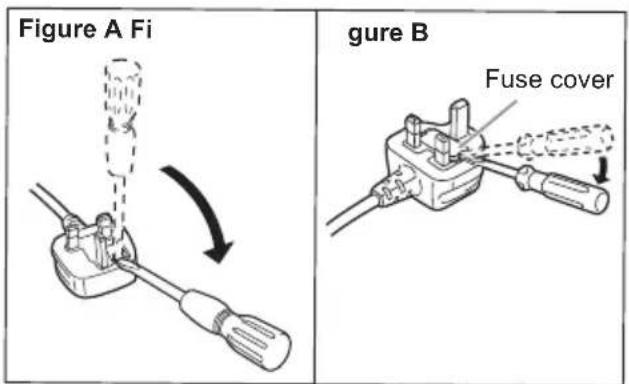
text_image
Figure A Fi gure B Fuse cover- Replace the fuse and close or attach the fuse cover.
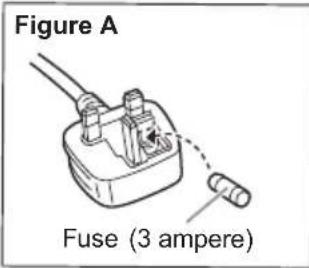
text_image
Figure A Fuse (3 ampere)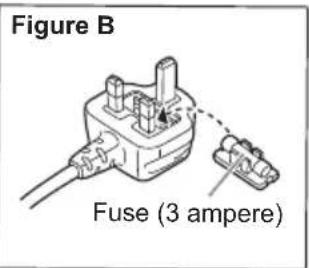
text_image
Figure B Fuse (3 ampere)Transporting the unit
Preparation
Disconnect all connected devices and cables from the unit.
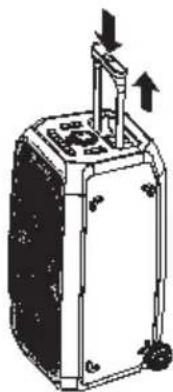
1 Press the button and pull out the telescopic handle.
natural_image
Diagram of a device with directional arrows indicating movement or force (no text or symbols present)2 Hold the handle of the unit firmly when dragging the unit.
3 Place the unit on a flat, stable surface with the rubber feet facing down.
Placement
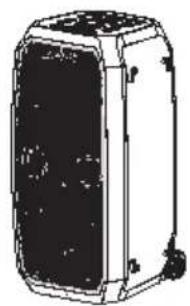
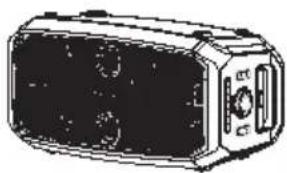
You can place this unit vertically or horizontally.
Vertical placement
natural_image
Line drawing of a rectangular electronic device with internal components and mounting feet (no text or symbols)Horizontal placement
(Place the side with the rubber feet facing down.)
natural_image
Illustration of a rectangular electronic device with buttons and display screen (no text or symbols)Note:
- Keep your speakers more than 10 mm from other objects for proper ventilation.
- These speakers do not have magnetic shielding. Do not put them near TVs, PCs or other equipment easily influenced by magnetism.
- When you play at high levels for a long period, it can cause damage to the speakers and decrease the life of the speakers.
- Decrease the volume in these conditions to prevent damage:
– When the sound is distorted. - When you adjust the sound quality.
CAUTION!
- Improper handling or transportation manner may cause the unit to fall, etc., resulting in damage and/or personal injury.
- Do not touch the speaker cone's reverberating surfaces:
- This may damage the speaker cone.
– The speaker cone may be hot. - Do not put the unit on a table or any elevated surface.
• Do not allow children to climb on the unit. - Be careful when babies or children are near.
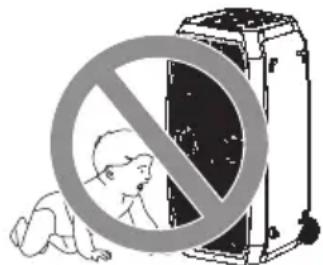
text_image
Safety warning symbol with prohibition sign over a baby crawling under a device(Important) About the splashproof
Splashproof performance\*
Specifications for this unit are equivalent of IPX4 of IEC 60529.
About the IPX4 (liquid ingress protection level against splashing water)
This unit retains its functionality after being sprayed with water, provided that the following conditions are met:
• Room temperature tap water is sprayed.
- Water is sprayed from a distance of approx. 20 cm away from this unit.
- Water is sprayed at all angles with multiple nozzles at a rate of 1.8 litres per minute for 10 minutes.
- Supplied accessories are not splashproof.
* Splashproof is not guaranteed under all conditions.
Cautions for using around water
For the splashproof performance, read the information on IPX4 (above) and observe the following points. Improper use may result in a malfunction:
- Securely close the terminal cover.
- Do not open or close the terminal cover with wet hands or when water droplets are on this unit. Doing so may cause malfunction such as terminal rusting with the water droplets.
- Do not connect and use a USB cable (not supplied) or an audio cable (not supplied).
- Do not pour soap water or detergent, or immerse in water.
- Remove any hair, lint, sand, dust, etc., that may be attached to the terminal cover before closing.
- Leaving the device with water droplets in a cold region may result to malfunction such as the covers stuck closed.
- When water enters inside this unit, stop using this unit, and contact the nearest Dealer or Service Center. Malfunction due to exposure to water by improper handling by the customer will not be covered by the warranty. Supplied accessories are not splashproof.
Power sources
The unit can be switched on by using AC power supply source. If AC power supply source is not available, you can use the built-in battery.
Using the household mains socket
Connect the AC mains lead only after all the other connections have been made.
Connect the AC mains lead.
Do not use any other AC mains lead except the supplied one.
(For the AC mains plug of three pins)
READ THE "Caution for AC mains lead" BEFORE CONNECTION. (Page 3)
Hold the unit when connecting or disconnecting the AC mains lead to prevent the unit from falling.
Rear view
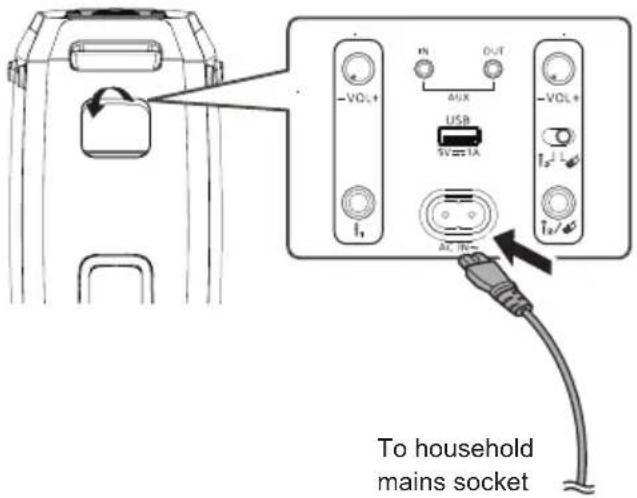
text_image
To household mains socketConserving power
The system consumes a small amount of power even when it is in standby mode. Disconnect the power supply if you do not use the system.
Some settings will be lost after you disconnect the system. You have to set them again.
Using the built-in battery
This unit contains lithium-ion rechargeable battery. Do not remove it except for when disposing of the product.
Charge the battery before use.
The battery is charged automatically when AC mains lead is connected.
While the battery is being charged, the battery indicator bar flashes, and once fully charged, all the bars light up.
The battery LED indicator shows the battery levels.
Note:
- When the battery level is below 10%, [💡] button red light will flash.
- In DC mode the battery LED indicator lights up for 10 seconds after the unit is switched on.
- In AC standby mode when the battery is fully charged, all indicators will light up for 5 minutes then go out.
Checking the built-in battery level
When the unit is turned on and the battery LED indicator is off, press any button to switch it on to check the battery level.
Note:
- Connect to the AC mains lead for first time use to wake up the battery. The unit will turn off if AC power is disconnected within 4 minutes after the battery wake-up.
- Connect AC mains lead for charging before battery is flat.
- The unit will automatically shut down when the battery is flat or the surrounding temperature range is out of -10^ to 50^ .
- When this unit is not used over a long period of time, charge the built-in battery at least once every 1-2 months to prevent it from deteriorating.
- It is recommended to charge the battery in the temperature of between +10°C and +35°C. The battery charging may not be possible even though AC mains lead is connected when it is out of recommended temperature range.
- The battery may not charge when the temperature surrounding the battery is high during the operation or right after the operation even when it is within the recommended temperature range. In such case, stop the usage and let it cool down.
- If the battery life is significantly reduced after a full charge, it may indicate that the battery needs replacement. Consult the store where you purchased the unit for a battery replacement. Alternatively, you can still use the unit by connecting it to an AC power source.
Overview of unit
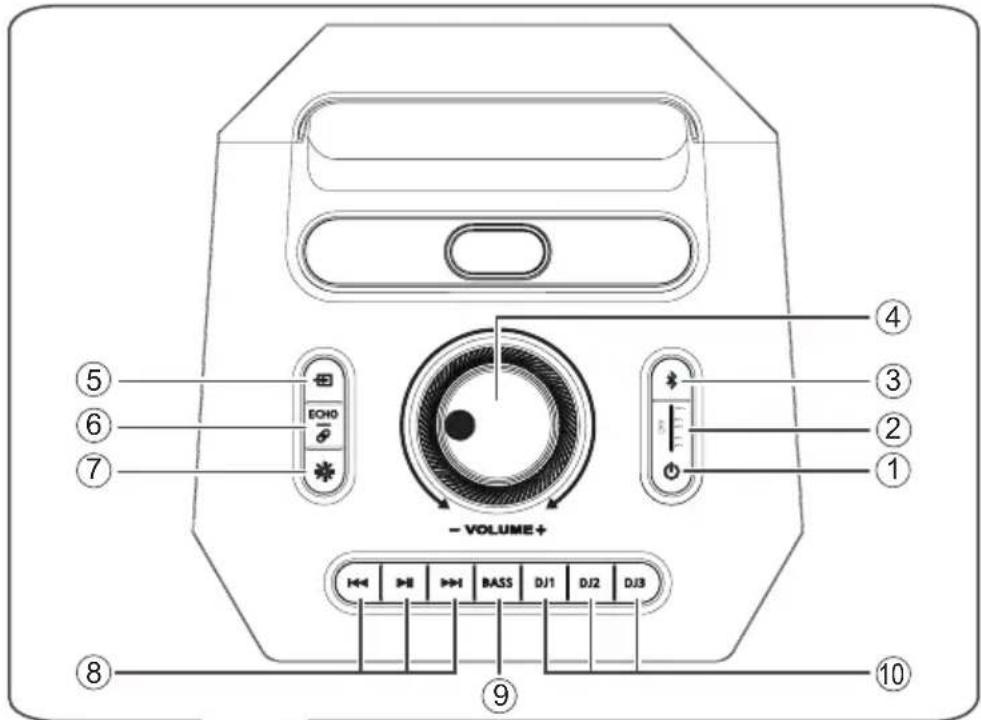
text_image
④ ③ ② ① - VOLUME+ ⑤ ⑥ ⑦ ECHO - ⑧ ⑨ 10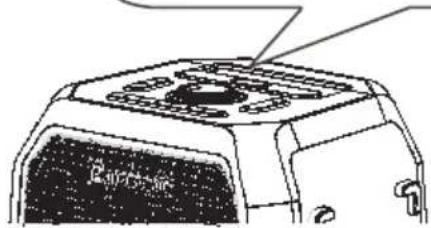
natural_image
Line drawing of a mechanical component with no visible text or symbols① On/Off switch [⏻]
- Press to switch on the unit.
- Press and hold for 3 seconds to switch off the unit in DC mode; or to enter AC standby mode. In AC standby mode, the unit is still consuming a small amount of power.
② Battery LED indicator
③ Select the Bluetooth® as the source
④ Adjust the system volume level
The increasing or decreasing illumination light rings indicate the volume level.
⑤ Select the audio source
The button light colors indicate different sources:
- Bluetooth®: deep blue
- USB: ocean green
- AUX: grass green
⑥ Adjust the microphone echo level
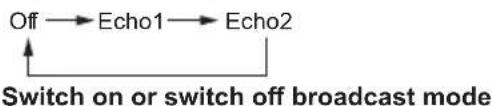
flowchart
graph LR
    A["Off"] --> B["Echo1"]
    B --> C["Echo2"]
    C --> D["Switch on or switch off broadcast mode"]
⑦ Select the illumination effects
⑧ Basic playback control
text_image
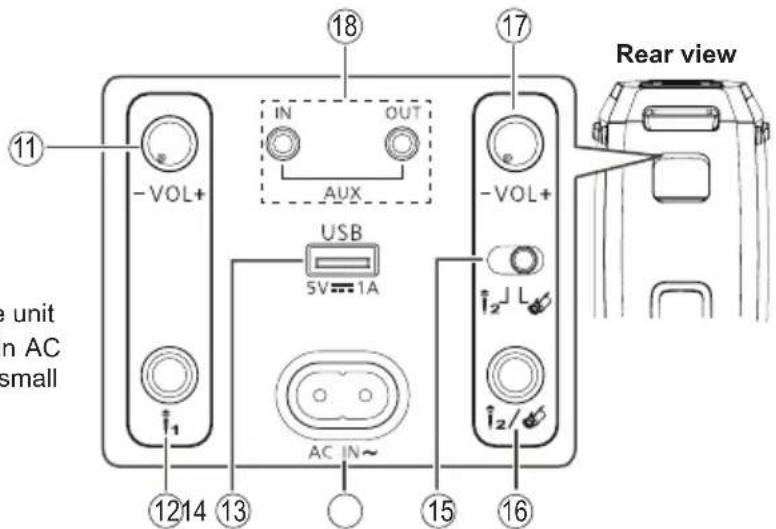
11 -VOL+ IN OUT AUX 18 17 -VOL+ USB 5V=1A AC IN~ 1214 13 15 16 Rear view e unit in AC small⑨ Switch on or switch off the Extra bass effect
⑩ DJ function selection buttons
Press [DJ1] to [DJ3] to Play sample tones
⑪ Adjust microphone 1 volume level
⑫ Microphone jack 1 (for wired microphone or for wireless microphone dongle)
⑬ USB port (5 V = 4-A)
⑭ AC IN terminal
⑮ Switch between microphone 2 / guitar
⑯ Microphone jack 2 / guitar jack
⑰ Adjust microphone 2 / guitar volume level
⑱ AUX IN / AUX OUT jacks
Bluetooth® operation
You can connect and play an audio device wirelessly through Bluetooth®.
Preparation
- Switch on the unit.
- Switch on the Bluetooth® feature of the device and put the device near the system.
- Read the operating instructions of the device for details.
Pairing a device
1 Press [\*].
The button light starts blinking.
2 Select "Panasonic SC-BMAX30" from the Bluetooth® menu of the device.
If prompted for a passkey, input "0000".
The device connects with this unit automatically after pairing is complete.
Note:
- You can pair up to 8 devices with this unit. If a 9th device is paired, the device that has not been used for the longest time will be replaced.
- Depending on the searching functionality of the Bluetooth® device and the surrounding environment, if the product name is not shown on the Bluetooth® menu of the device, switch off and then switch on the Bluetooth® feature of the device repeatedly during the pairing process.
Connecting a device
1 Press [\*].
2 Select "Panasonic SC-BMAX30" from the Bluetooth® menu of the device.
3 Start playback on the device.
Note:
- A device must be paired to connect.
- When the Bluetooth® is selected as the source, this unit will automatically try to connect to the last connected device.
Bluetooth® Playback
| Play Press [ ]. | ▶II |
| Pause Press [Press again to continue playback. | ▶II]. |
| Skip Press [ | ◀◀] or [▶]d skip track. |
Note:
- Depending on the Bluetooth device, some operations may not work.
Multi Connect
This unit supports Multi Connect, which can connect up to 2 devices simultaneously.
Press and hold [✗] for 3 seconds to pair with the second device after the fidevice is connected.
To switch between the connected devices
When one of the connected devices is playing, you can easily switch control to another connected device simply by starting a playback on that device. The previous playback will be paused automatically.
Note:
- This function may not work for some apps or devices (depending on app or device specifications).
- This function cannot be enabled simultaneously with Broadcast mode.
Broadcast
This function supports unlimited connections between SC-BMAX30 in-range to play the same music simultaneously.
Setting the unit as audio transmitter
Press and hold [ ECHO ] and [ simultaneously for 3 seconds. [ ECHO ] button lights up. The unit enters audio transmitter mode.
Repeat the operation to exit.
Setting the unit as audio receiver
Press and hold [ ECHO ] for 3 seconds. [ ] button lights up, [→] button light goes out. The unit enters audio receiver mode.
In audio receiver mode the source selection, Bluetooth® operation, playback control and DJ function are disabled.
Repeat the operation to exit.
Adjust volume level of the connected units
All connected units volume can be adjusted separately. Whenever the transmitter unit volume is adjusted, all receiver units volume will automatically switch to the same level as the transmitter unit.
Note:
- Broadcast function cannot be enabled simultaneously with Multi Connect mode.
- DJ sound from the transmitter unit will not be played on the receiver unit.
Disconnecting a device
Disconnect the Bluetooth ^® device from the Bluetooth ^® menu of the device.
Note:
• A device is disconnected when you:
- Select a different source.
- Move the device out of the maximum range.
- Disable the Bluetooth ^ transmission of the device.
- Switch off the unit or the device.
Bluetooth® Standby
This function automatically switches on the unit when you establish a Bluetooth® connection from a paired device.
Press and hold [⏻] and [✝] simultaneously until the illumination light ring flashes twice to switch on this function.
To cancel, press and hold ⏻] and [✗ until the illumination light ring flashes once.
Note:
- This function only works when the AC mains lead is connected.
- If this function is set on before switching off the unit, when you disconnect and connect the AC mains lead, this function will work automatically.
Using a USB device
Preparation
Before you connect a USB device to the system, make sure you do a backup of the data.
Decrease the volume and connect the USB device to the USB port.
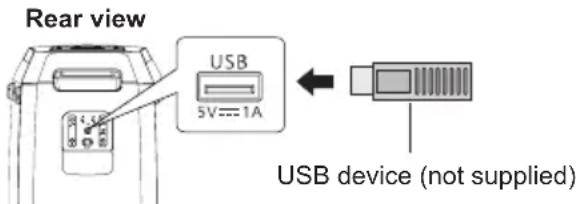
text_image
Rear view USB 5V---1A USB device (not supplied)Hold the unit when connecting or disconnecting the USB device.
Note:
- Do not use a USB extension cable. The unit cannot recognise USB device connected through a cable.
USB Playback
You can playback MP3 and WAV files in the USB device.
The unit automatically switches to USB mode upon insertion of the USB device. [→] button lights up in ocean green.
| Play Press [ ]. | ▶II |
| Pause Press [ ]. | ▶IIPress again to continue playback. |
| Skip Press [ | ◀◀] or [◀◀] skip track. |
| Search Press and hold [ ] or [◀◀ | ▶▶ |
Note:
- The unit repeats all tracks automatically.
- Files are defined as tracks and folders are defined as album.
• Maximum depth of file system tree is 1 directory level. - Tracks must have the extension ".mp3" or ".MP3", ".wav" or ".WAV".
- Tracks will not necessarily be played in the order you recorded them.
- Some files can fail to work because of the sector size.
- Only files with sampling rate of 44.1/48kHz are supported.
Charging a device
Charging starts when a device (rated value: 5 V/1 A) is connected to the USB port of this unit.
Preparation
Switch on the unit.
Connect a device.
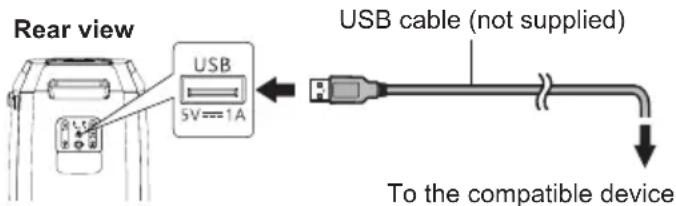
text_image
Rear view USB 5V==1A USB cable (not supplied) To the compatible deviceConfirm from the screen of the connected device, etc. to make sure charging has started.
Note:
- A cable compatible with your device is required. Use the cable that comes with your device.
- Even if you connect a cable compatible with the USB port of this unit, your device may not be charged. In that case, use the charger that comes with the device.
- Do not connect a device with a rated value higher than 5 V/1 A to this unit.
- To check if charging is complete, look at the screen of the connected device, etc.
- Once fully charged, remove the USB cable from the USB port.
- When the unit is powered on using the built-in battery, charging stops when the unit is turned off.
External equipment
Preparation
- Disconnect the AC mains lead.
- Switch off all equipment and read the appropriate operating instructions.
Note:
- Do not bend cables at sharp angles.
- Components and cables are sold separately.
• Sound distortion can occur when you use an adapter. - If you want to connect equipment other than those described, refer to the audio dealer.
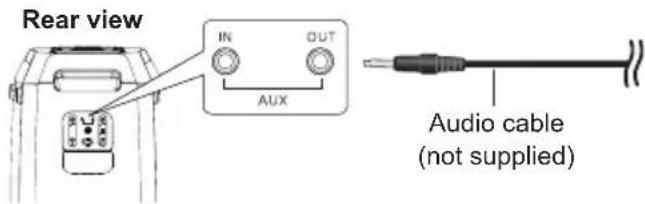
Using the auxiliary input / output
Preparation
- When using AUX OUT jack, make sure the external device is equipped with AUX IN jack (∅ 3.5 mm).
- Decrease volume of the unit and the external device before you connect or disconnect the external device.
text_image
Rear view IN OUT AUX Audio cable (not supplied)1 Connect an external device to AUX IN jack or AUX OUT jack.
Plug type: ∅ 3.5 mm stereo
2 Turn on the unit.
The unit automatically switches to AUX mode upon insertion of the audio cable. [→] button lights up in grass green.
3 Play the external device when using AUX IN jack; play the unit when using AUX OUT jack.
Using microphones or guitar
Preparation
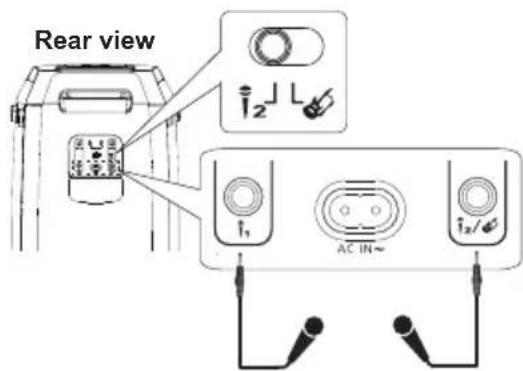
- Rotate the microphone/guitar volume knobs on the rear side of the unit to their minimum level before you connect or disconnect the microphone/guitar.
- Before connecting to microphone 2/guitar jack, push the switch to the left or right to select the corresponding jack function.
text_image
Rear view I₂ I₁ AC IN~ I₂/12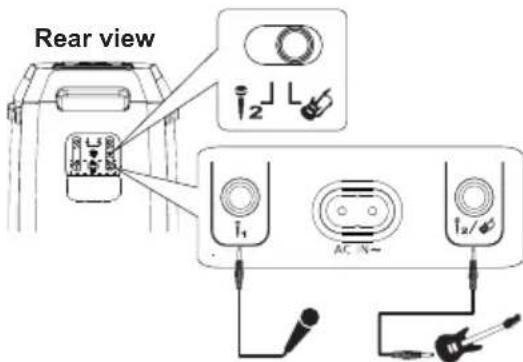
text_image
Rear view I₁ AC N~1 Connect microphones or guitar.
Plug type: ∅ 6.3 mm monaural
2 If you want to sing or play guitar along with background music, play the music source and adjust the volume of the unit.
3 Adjust the volume of microphone or guitar.
Rotate the corresponding volume knobs on the rear side of the unit.
Adjust echo level
ECHO
Press [ ] repeatedly to adjust the echo level of the microphone.
Note:
- If a strange noise (howling) is emitted, move the microphone/guitar away from the speakers, or decrease the volume of the microphone/guitar.
- When you do not use the microphone/guitar, disconnect it from the microphone/guitar jack, and decrease the volume of the microphone/guitar to its minimum.
Illumination effects
You can change the illumination effect on the unit.
Press [★] repeatedly to select the effect.
Pattern A selection of 4 illumination patterns in multiple colours.
Off Turn off illumination and strobe lights
Using strobe lights
Press and hold [★to turn on or turn off the strobe lights.
Others
Auto off
This function will automatically switch off the unit if there is no sound and it is not being used for approximately 15 minutes.
Note:
- This function may not work when a microphone/guitar is connected.
DEMO play
The unit will play built-in demonstration song repeatedly.
1 Press and hold [ ] and [ ] simultaneously for 3 seconds. Demonstration song is played.
2 Press and hold [◀◀] and [→] again to stop the demonstration song.
Note:
• Volume control and DJ function is not available in Demo mode.
Troubleshooting
Before requesting service, make the following checks. If you are in doubt about some of the check points, or if the solutions indicated do not solve the problem, consult your dealer for instructions.
Common problems
The unit does not work.
- The safety device has been activated. Do the following:
- Press and hold [☐] to turn the unit to power off.
- Press [again to turn on the unit. If the problem persists, consult your dealer.
Sound is distorted or no sound.
- Adjust the volume of the system.
- Turn off the system, determine and correct the cause, and then turn on again. It can be caused by straining of the speakers through excessive volume or power, and when using the system in a hot environment.
A humming sound can be heard during playback.
- An AC mains lead or fluorescent light is near the cables. Keep other appliances and cords away from the cables of this system. The sound level reduces.
- The protection circuit has been activated due to the continuous use at high volume output. This is to protect the system and maintain the sound quality.
The sound level reduces.
- The protection circuit has been activated due to the continuous use at high volume output. This is to protect the system and maintain the sound quality.
USB
The USB device or the contents in it cannot be read.
- The format of the USB device or the contents in it are not compatible with the system.
- USB devices with storage capacity of more than 32GB cannot work.
- USB devices may not be recognised when connected to this system with a USB extension cable or USB hub.
Slow operation of the USB device.
- Large content size or large memory USB device takes longer time to read.
Bluetooth®
Pairing cannot be done.
- Check the Bluetooth® device condition.
- The device is out of the 10 m communication range. Move the device nearer to the system.
The device cannot be connected.
- The pairing of the device was unsuccessful. Do pairing again.
- The pairing of the device has been replaced. Do pairing again.
- This system might be connected to a different device. Disconnect the other device and try connecting the device again.
- The system may have a problem. Turn off the system and then turn on again.
The device is connected but audio cannot be heard through the system.
- For some built-in Bluetooth® devices, you have to set the audio output to "Panasonic SC-BMAX30" manually. Read the operating instructions of the device for details.
Playback during Multi Connect is not working or no sound.
- Restart the app of the device.
- The control of the device was not turned successfully. Disconnect the existing connected devices and try again.
Sound from the device is interrupted.
- The device is out of the 10 m communication range. Move the device nearer to the system.
- Remove any obstacle between the system and the device.
- Other devices that use the 2.4 GHz frequency band (wireless router, microwaves, cordless phones, etc.) are interfering. Move the device nearer to the system and distance it from the other devices.
Battery
The battery stops charging while connected to the AC mains lead.
- The battery temperature is either too low or too high. Adjust the room temperature accordingly. If the problem persist, the battery might be deteriorated, consult your dealer.
- If the battery life is significantly reduced after a full charge, it may indicate that the battery needs replacement. Consult your dealer for a battery replacement. Alternatively, you can still use the unit by connecting it to an AC power source.
Factory reset
Reset the memory when the following situations occur:
- There is no response when buttons are pressed.
- You want to clear and reset the memory contents.
Press and hold [◀◀] and [◀] until the unit plays version announcement.
All the settings are set back to the factory preset.
Maintenance
Disconnect the AC mains lead before maintenance. Clean this system with a soft, dry cloth.
Note:
- Never use alcohol, paint thinner or benzine to clean this system.
- Before using chemically treated cloth, read the instructions that came with the cloth carefully.
References
About Bluetooth®
Panasonic bears no responsibility for data and/or information that is compromised during a wireless transmission.
Frequency band
- This system uses the 2.4 GHz frequency band.
Certification
- This system conforms to the frequency restrictions and has received certification based on frequency laws. Thus, a wireless permit is not necessary.
- The actions below are punishable by law in some countries:
– Taking apart or modifying the unit.
– Removing specification indications.
Restrictions of use
- Wireless transmission and/or usage with all Bluetooth® equipped devices is not guaranteed.
- All devices must conform to standards set by the Bluetooth SIG, Inc.
- Depending on the specifications and settings of a device, it can fail to connect or some operations can be different.
- This system supports Bluetooth® security features. But depending on the operating environment and/or settings, this security is possibly not sufficient. Transmit data wirelessly to this system with caution.
- This system cannot transmit data to a Bluetooth device.
Range of use
- Use this device at a maximum range of 10 m.
- The range can decrease depending on the environment, obstacles or interference.
Interference from other devices
- This system may not function properly and troubles such as noise and sound jumps may arise due to radio wave interference if this unit is located too close to other Bluetooth® devices or the devices that use the 2.4 GHz band.
- This system may not function properly if radio waves from a nearby broadcasting station, etc. is too strong.
Intended usage
- This system is for normal, general use only.
- Do not use this system near an equipment or in an environment that is sensitive to radio frequency interference (example: airports, hospitals, laboratories, etc.).
Licenses
The Bluetooth® word mark and logos are registered trademarks owned by the Bluetooth SIG, Inc. and any use of such marks by Panasonic Corporation is under license. Other trademarks and trade names are those of their respective owners.
Specifications
General
| Power supply | AC 110 V to 240 V, 50/60 Hz |
| Power consumption | 65 W |
| Power consumption in standby mode (approximate) | |
| With Bluetooth® Standby mode is off(Low power mode) | 0.5 W |
| With Bluetooth® Standby mode is on(Networked Standby) | 2.0 W |
| Power consumption in standby during charging (maximum) | 18.1 W |
Dimensions (W x H x D)
| 335 mm × 669 mm × 323.6 mm | |
| Net weight | Approx. 13.6 kg |
| Gross weight | Approx. kg |
| Operating temperature range | 0°C to +40°C |
| Battery charging temperature range | +10°C to +35°C |
| Operating humidity range | |
| 35% to 80% RH (no condensation) | |
Amplifier section
Woofer and tweeter:
80 W per channel (4Ω), 1kHz, 30% THD
Total RMS power 320 W
Bluetooth® section
| Version | Bluetooth® Ver. 5.3 |
| Class Class 1 | |
| Supported profiles | AVRCP 1.4, A2DP |
| Frequency band | 2.4 GHz band FH-SS |
| Operating frequency | 2402 MHz to 2480 MHz |
| Operation distance | 10 m line of sight |
| Supported codec | SBC |
Terminals section
USB port
USB standard USB 2.0 full-speed
Media file format support
MP3 (*.mp3), WAV (*.wav)
Maximum number of files (songs) 99
Supported USB capacity 32 GB
USB device file system FAT32
USB port power DC OUT 5 V, 1.0 A (Max)
Microphone
Terminal Mono, 6.3 mm jack (1 system)
Guitar
Terminal Mono, 6.3 mm jack (1 system)
AUX IN
Terminal Stereo, 3.5 mm jack (1 system)
AUDIO OUT
Terminal 16.8 Stereo, 3.5 mm jack (1 system)
Speaker section
Speaker unit(s)
Tweeter 6.4 cm cone type x 2
Woofer 18 cm cone type x 2
Battery section
Built-in battery 7.2 V (Li-ion 4950 mAh)
Battery life in use
Playback time Approx. 14 hours*
Battery charging time (25°C)
Unit is OFF Approx. 4 hours
* This battery playtime is only a reference and may vary depending on music content and battery aging after numerous charging and discharging cycles. It's achievable with a predefined music source, illumination light turned off, volume level at 1/4, and Bluetooth® streaming source.
Note:
- Specifications are subject to change without notice. Mass and dimensions are approximate.
- Total harmonic distortion is measured by the digital spectrum analyser.
To remove the battery when disposing of this unit
Remove the built-in battery before disposing of this unit.
Never disassemble this product, except for when disposing of it.
The illustrations below are not intended for repair of this unit, but for its disposal. Once you disassemble this unit, it can never be reassembled.
Note:
- Before disassembling this unit, disconnect the AC mains lead and discharge the battery completely.
- If you have trouble removing the battery, consult your dealer or nearest service center.
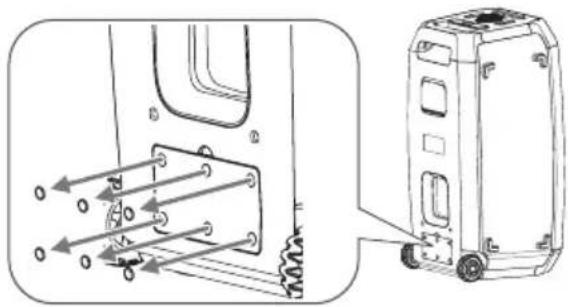
1 Remove the battery cover.
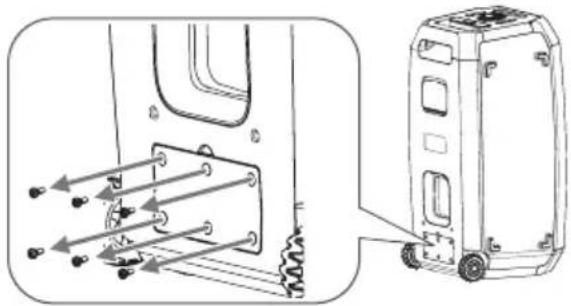
Remove the screw covers (x6) from the battery cover. Use an object with sharp end (e.g. tip of a thumbtack) to lift the screw covers.
natural_image
Technical line drawing of a vehicle chassis with attached motor and suspension components (no text or symbols)Remove the screws (x6) that secure the battery cover. Use a commercially available Phillips head screwdriver (size: No. 2) to remove the screws.
natural_image
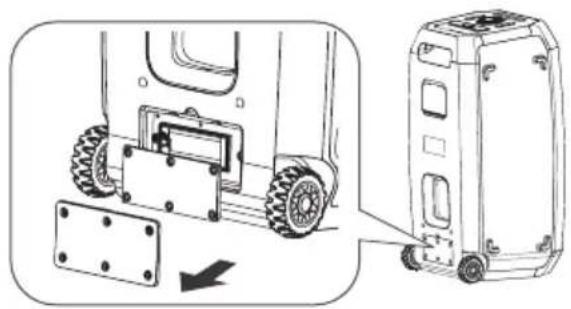
Technical line drawing of a vehicle chassis with attached motor and battery components (no text or symbols)Lift up and remove two battery covers.
natural_image
Technical line drawing of a vehicle chassis with wheels and mounting bracket, showing side view (no text or symbols)2 Remove the battery.
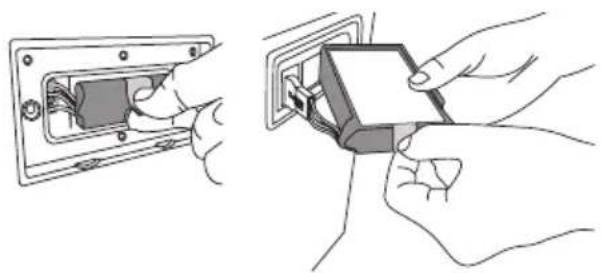
Pinch on to the tab and pull the battery out from the battery compartment.
natural_image
Illustration showing two hands installing or adjusting a wall-mounted electrical socket (no text or symbols present)Disconnect and remove the battery from the unit.
text_image
Diagram showing a hand holding a rectangular object with an arrow indicating direction, labeled with number ①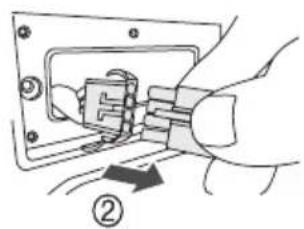
natural_image
Diagram of hands inserting a plug into a socket (no text or symbols visible)Handling of the used rechargeable battery
• Insulate the terminals with cellophane tape or similar material.
- Do not disassemble.
- When the battery becomes unusable, bring it to a facility that accepts used rechargeable batteries instead of disposing of it.
To dispose of or transfer this unit
The unit may keep the user settings information in the unit. If you discard this unit either by disposal or transfer, then follow the procedure to return all the settings to the factory defaults to delete the user settings (Page 11).
- The operation history may be recorded in the memory of this unit.
Product conformity information for customers in the UK
Declaration of Conformity (DoC)
Hereby, “Panasonic Marketing Europe GmbH” declares that this product is in compliance with the essential requirements and other relevant provisions of the Radio Equipment Regulations 2017.
Customers can download a copy of the original DoC for our RE products from our DoC server:
https://www.ptc.panasonic.eu/compliance-documents
Importer for UK:
Panasonic UK, a branch of Panasonic Marketing Europe GmbH,
Maxis 2, Western Road, Bracknell, Berkshire, RG12 1RT
| Type of wireless | Frequency band | Maximum power (dBm E.I.R.P.) |
| Bluetooth® | 2402 - 2480 MHz | Max.10 dBm |
Confirmation of Compliance with UK Regulations
This product complies with UK relevant Regulations and Standards (being those relevant for England, Wales and Scotland).
Panasonic UK, a branch of Panasonic Marketing Europe GmbH, Maxis 2, Western Road, Bracknell, Berkshire, RG121RT
Contact in the UK:
Panasonic Testing Centre on behalf of Panasonic UK, a branch of Panasonic Marketing Europe GmbH (Importer), Maxis 2. Western Road, Bracknell, Berkshire, RG12 1RT

Specifications are subject to change without notice.
Manufactured by:
Panasonic Marketing Europe GmbH
Hagenauer Strasse 43, 65203 Wiesbaden, Germany
Disposal of Old Equipment and Batteries Only for European Union and countries with recycling systems
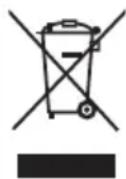
These symbols on the products, packaging, and/or accompanying documents mean that used electrical and electronic products and batteries must not be mixed with general household waste. For proper treatment, recovery and recycling of old products and used batteries, please take them to applicable collection points in accordance with your national legislation.
By disposing of them correctly, you will help to save valuable resources and prevent any potential negative effects on human health and the environment.
For more information about collection and recycling, please contact your local municipality.
Penalties may be applicable for incorrect disposal of this waste, in accordance with national legislation.
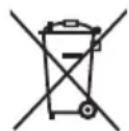
Note for the battery symbol (bottom symbol):
This symbol might be used in combination with a chemical symbol. In this case it complies with the requirement set by the Directive for the chemical involved.
English
Declaration of Conformity (DoC)
Hereby, "Panasonic Marketing Europe GmbH"
declares that this product is in compliance with
the essential requirements and other relevant provisions
of Directive 2014/53/EU.
Customers can download a copy of the original DoC for our RE products from our DoC server:
https://www.ptc.panasonic.eu/compliance-documents
Importer for EU:
Panasonic Marketing Europe GmbH
Hagenauer Strasse 43, 65203 Wiesbaden, Germany
Authorized Representative in EU:
Panasonic Marketing Europe GmbH
Panasonic Testing Centre
Winsbergring 15, 22525 Hamburg, Germany
| Type of wireless | Frequency band | Maximum power (dBm E.I.R.P.) |
| Bluetooth® | 2402 - 2480 MHz | Max.10 dBm |
natural_image
Technical line drawing of a mechanical device with directional arrows indicating movement (no text or symbols)natural_image
Simple line drawing of a rectangular device with rounded corners and a black interior, no text or symbols present.natural_image
Illustration of a rectangular electronic device with buttons and display (no text or symbols)Hinweis:
text_image
Illustration showing a baby crawling under a prohibition symbol next to an electric stove, indicating no protection or disinfection.text_image
④ ③ ② ① - VOLUMB+ ⑤ ⑥ ⑦ ECHO - VOLUMB+ ⑧ ⑨ ⑩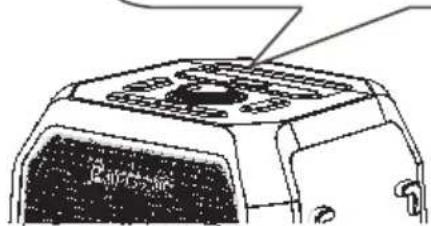
natural_image
Technical line drawing of a mechanical component with no visible text or symbolsnatural_image
Technical line drawing of a vehicle chassis with attached motor (no text or symbols)natural_image
Technical line drawing of a vehicle chassis with attached components and mounting brackets (no text or symbols)natural_image
Technical illustration of a vehicle chassis with wheels and a door panel, showing no text or symbolsnatural_image
Illustration showing two hands installing or adjusting an electrical socket (no text or symbols present)text_image
Diagram showing a hand holding a rectangular object with an arrow indicating direction, labeled with number ①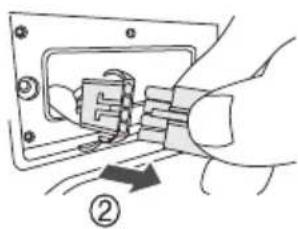
text_image
Diagram showing electrical switch connection with labeled parts and directional arrowPanasonic Testing Centre
natural_image
Technical line drawing of a mechanical device with arrows indicating assembly or movement (no text or symbols)natural_image
Simple line drawing of a rectangular device with a dark interior and wheels, no text or symbols present.natural_image
Line drawing of a rectangular electronic device with a control panel and indicator lights (no text or symbols)Remarque :
text_image
Safety warning symbol with a baby crawling under a prohibition sign next to an open refrigeratortext_image
④ ③ ② ① - VOLUME+ ⑤ ⑥ ⑦ ⑧ ⑨ ⑩
natural_image
Line drawing of a mechanical component with no visible text or symbols⑬ Port USB (5 V = 1 A)
⑭ Borne AC IN
⑱ Prises AUX IN / AUX OUT
Dimensions (L x H x P)
335 mm × 669 mm × 323,6 mm
natural_image
Technical line drawing of a vehicle chassis with attached motor (no text or symbols)natural_image
Technical line drawing of a vehicle chassis with attached motors and spring components (no text or symbols)natural_image
Technical line drawing of a vehicle chassis with wheels and mounting bracket (no text or symbols)2 Retirez la batterie.
natural_image
Illustration showing two hands installing or adjusting a wall-mounted electrical socket (no text or symbols present)text_image
Diagram showing a hand holding a rectangular object with an arrow indicating direction, labeled with number ①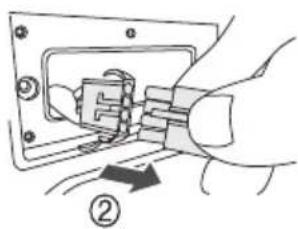
natural_image
Illustration of hands connecting a component into an electrical socket (no text or symbols)natural_image
Technical line drawing of a device with directional arrows indicating movement or force (no text or symbols)natural_image
Simple line drawing of a rectangular device with rounded corners and a black interior, no text or symbols present.natural_image
Line drawing of a rectangular electronic device with ports and a central screen (no text or symbols)Nota:
text_image
Illustration showing a baby crawling under a prohibition symbol with a crossed-out refrigerator, indicating no protection or disinfection.natural_image
Technical line drawing of a mechanical component with no visible text or symbolsStandard USB USB 2.0 full-speed
Formati file multimediali supportati
MP3 (*.mp3), WAV (*.wav)
natural_image
Technical line drawing of a vehicle chassis with attached motor and wheels (no text or symbols)natural_image
Technical line drawing of a vehicle chassis with attached components and directional arrows indicating motion (no text or symbols)natural_image
Technical line drawing of a vehicle chassis with wheels and a door panel, showing no text or symbolsnatural_image
Illustration showing hands installing or adjusting a wall-mounted electrical socket (no text or symbols present)text_image
Diagram showing a hand holding a rectangular object with an arrow indicating direction, labeled with number ①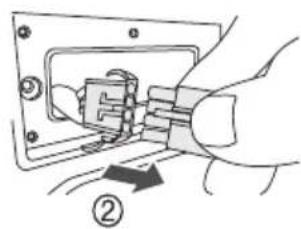
natural_image
Hand inserting a plug into an electrical socket (no text or symbols visible)Panasonic Testing Centre
Winsbergring 15, 22525 Amburgo, Germania
natural_image
Diagram of a device with directional arrows indicating movement or force (no text or symbols present)natural_image
Simple line drawing of a rectangular device with rounded corners and a black interior, no text or symbols present.natural_image
Illustration of a rectangular electronic device with buttons and display (no text or symbols)Nota:
text_image
Safety warning symbol showing a baby crawling under a crossed-out refrigerator with no text or labelsnatural_image
Technical line drawing of a mechanical component with no visible text or symbols① Interruptor de Encendido/Apagado [💡]
natural_image
Technical line drawing of a vehicle chassis with attached motor (no text or symbols)natural_image
Technical line drawing of a vehicle chassis with attached suspension components (no text or symbols)natural_image
Technical line drawing of a vehicle chassis with wheels and a door panel, showing no text or symbols2 Sacar la batería.
natural_image
Illustration showing hands installing or adjusting a wall-mounted electrical socket (no text or symbols present)text_image
Diagram showing a hand holding a rectangular object with an arrow indicating direction, labeled with number ①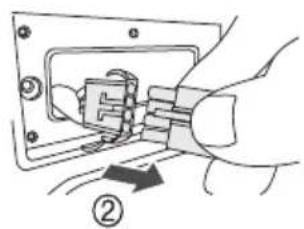
natural_image
Hand inserting a plug into a socket, showing electrical wiring (no text or symbols)Panasonic Testing Centre
natural_image
Technical line drawing of a device with directional arrows indicating movement or force (no text or symbols)natural_image
Simple line drawing of a rectangular device with a rounded top and side panels, no text or symbols present.natural_image
Illustration of a rectangular electronic device with a control panel and indicator lights (no text or symbols)Uwaga:
text_image
Safety warning symbol with a baby crawling under a crossed-out refrigerator, indicating no protection or disinfection.natural_image
Technical line drawing of a mechanical component with no visible text or symbolsnatural_image
Technical line drawing of a vehicle chassis with attached motor and wheels (no text or symbols)natural_image
Technical line drawing of a vehicle chassis with attached components and directional arrows indicating motion (no text or symbols)natural_image
Diagram showing a vehicle chassis with wheels and a separate view of the chassis (no text or symbols present)2 Wyjmij baterię.
natural_image
Illustration showing hands installing or adjusting a wall-mounted component, no text or symbols presenttext_image
Diagram showing a hand holding a rectangular object with an arrow indicating direction, labeled with number ①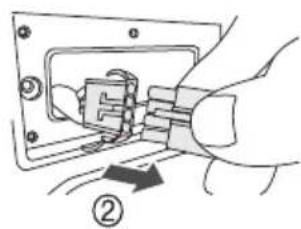
natural_image
Hand inserting a plug into an electrical socket (no text or symbols visible)Panasonic Testing Centre
Winsbergring 15, 22525 Hamburg, Germany
natural_image
Technical line drawing of a mechanical device with arrows indicating motion or assembly (no text or symbols)natural_image
Line drawing of a rectangular electronic device with a black top and white base, featuring no visible text or symbols.natural_image
Illustration of a rectangular electronic device with a control panel and indicator lights (no text or symbols)Poznámka:
text_image
Safety warning symbol with a baby crawling under a prohibition sign next to an open refrigeratornatural_image
Technical line drawing of a mechanical component with no visible text or symbols① Vypínač [⏻]
DC VÝSTUP 5 V, 1,0 A (max.)
Mikrofon
Výstup Mono, 6,3 mm jack (1 systém)
Kytara
Výstup Mono, 6,3 mm jack (1 systém)
AUX IN
natural_image
Technical line drawing of a mechanical assembly with no visible text or symbolsnatural_image
Technical line drawing of a vehicle chassis with attached components and directional arrows indicating motion (no text or symbols)natural_image
Diagram showing a vehicle chassis with wheels and a door panel, connected to a smaller vehicle (no text or symbols present)2 Vyjměte baterii.
natural_image
Illustration showing two hands installing or adjusting a wall-mounted electrical socket (no text or symbols present)text_image
Diagram showing a hand holding a rectangular object with an arrow indicating direction, labeled with number ①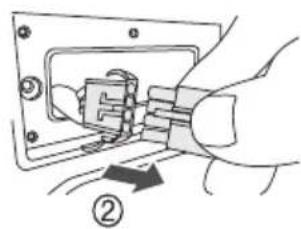
natural_image
Hand inserting a plug into an electrical socket (no text or symbols visible)natural_image
Diagram of a device with directional arrows indicating movement or force (no text or symbols present)natural_image
Line drawing of a rectangular electronic device with a black top and white base, featuring a small circular button on the right side (no text or symbols)Vandret placering
natural_image
Illustration of a rectangular electronic device with ports and buttons (no text or symbols)Bemærk:
text_image
Illustration showing a baby crawling under a prohibition symbol next to an open device, indicating no protection or disinfection.(Vigtigt)
Om stænksikkerhed
natural_image
Technical line drawing of a mechanical component with no visible text or symbols① Tænd/sluk-knap [∅]
natural_image
Technical line drawing of a vehicle chassis with attached motor (no text or symbols)natural_image
Technical line drawing of a vehicle chassis with attached components and directional arrows indicating motion (no text or symbols)natural_image
Technical line drawing of a vehicle chassis with wheels and mounting bracket, showing side view (no text or symbols)2 Fjern batteriet.
natural_image
Illustration showing hands installing or adjusting a wall-mounted electrical socket (no text or symbols present)text_image
Diagram showing a hand holding a rectangular object with an arrow indicating direction, labeled with number ①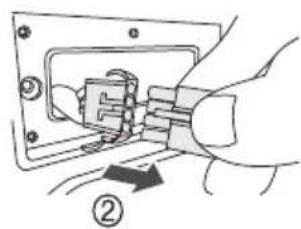
natural_image
Hand inserting a plug into an electrical socket (no text or symbols visible)Panasonic Testing Centre
Winsbergring 15, 22525 Hamborg, Tyskland
| Type trådløs forbindelse | Frekvensbånd | Maksimal effekt (dBm E.I.R.P.) |
| Bluetooth® | 2402 - 2480 MHz | Maks. 10 dBm |
natural_image
Diagram of a device with directional arrows indicating movement or force (no text or symbols present)natural_image
Simple line drawing of a rectangular device with a rounded top and side panels, no text or symbols present.natural_image
Line drawing of a rectangular electronic device with ports and buttons (no text or symbols)Huomautus:
text_image
Safety warning symbol showing a baby crawling under a prohibition sign next to an open refrigeratornatural_image
Line drawing of a mechanical component with no visible text or symbolsnatural_image
Technical line drawing of a vehicle chassis with attached motor and wheels (no text or symbols)natural_image
Technical line drawing of a vehicle chassis with attached components and motion arrows (no text or symbols)natural_image
Diagram showing a vehicle chassis with wheels and a separate vehicle chassis, no text or symbols present2 Poista akku
natural_image
Illustration showing two hands installing or adjusting a wall-mounted electrical socket (no text or symbols present)text_image
Diagram showing a hand holding a rectangular object with an arrow indicating direction, labeled with number ①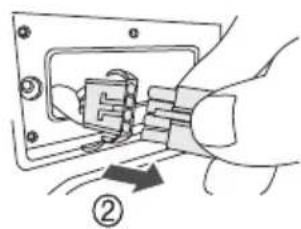
natural_image
Hand inserting a plug into a socket (no text or symbols visible)natural_image
Diagram of a device with directional arrows indicating movement or force (no text or symbols present)natural_image
Line drawing of a rectangular electronic device with a lid and base (no text or symbols)natural_image
Illustration of a rectangular electronic device with ports and buttons (no text or symbols)Obs:
text_image
Safety warning symbol with crossed-out prohibition sign over a baby crawling, next to a device with debrisnatural_image
Technical line drawing of a mechanical component with no visible text or symbols① På/av-knapp [💡]
Demonstration song is played.
natural_image
Technical line drawing of a vehicle chassis with attached motor and suspension components (no text or symbols)natural_image
Technical line drawing of a vehicle chassis with attached components and directional arrows indicating motion (no text or symbols)natural_image
Diagram showing a vehicle chassis with wheels and a separate view of the rear vehicle (no text or symbols present)2 Ta bort batteriet.
natural_image
Illustration showing hands installing or adjusting a wall-mounted electrical socket (no text or symbols present)text_image
Diagram showing a hand holding a rectangular object with an arrow indicating direction, labeled with number ①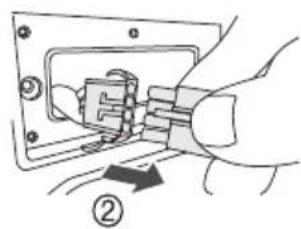
natural_image
Hand inserting a plug into an electrical socket (no text or symbols visible)Panasonic Testing Centre
Winsbergring 15, 22525 Hamburg, Tyskland
| Typ av trådlös | Frekvensband | Maximal effekt (dBm E.I.R.P.) |
| Bluetooth® | 2402 - 2480 MHz | Maks. 10 dBm |
Specifications....13
natural_image
Diagram of a mechanical device with directional arrows indicating movement or force (no text or symbols present)natural_image
Line drawing of a rectangular electronic device with a black panel and two wheels (no text or symbols)natural_image
Line drawing of a rectangular electronic device with buttons and ports (no text or symbols)Opmerking:
natural_image
Technical line drawing of a mechanical component with no visible text or symbols① Aan/uit-schakelaar [+]
USB standard USB 2.0 full-speed
natural_image
Technical line drawing of a vehicle chassis with attached components and directional arrows indicating motion (no text or symbols)natural_image
Technical line drawing of a vehicle chassis with attached components and motion arrows (no text or symbols)natural_image
Technical line drawing of a vehicle chassis with wheels and mounting bracket, showing side view (no text or symbols)natural_image
Illustration showing hands installing or adjusting a wall-mounted electrical socket (no text or symbols present)text_image
Diagram showing a hand holding a rectangular object with an arrow indicating direction, labeled with number ①![PANASONIC SC-BMAX30 - ① Aan/uit-schakelaar [+] - 1](/content/2026/04/741498/images/4d437e5ceaf170f398a604fd6ef4f25d70c13aa08afc2e7a9e1d6cfcc047a1c8.jpg)
natural_image
Hand inserting a plug into an electrical socket (no text or symbols visible)Panasonic Testing Centre
Declaration of Conformity (DoC)
Hereby, “Panasonic Marketing Europe GmbH” declares that this product is in compliance with the essential requirements and other relevant provisions of Directive 2014/53/EU.
Customers can download a copy of the original DoC for our RE products from our DoC server:
https://www.ptc.panasonic.eu/compliance-documents Importer for EU:
Panasonic Marketing Europe GmbH, Hagenauer Strasse 43, 65203 Wiesbaden, Germany
Authorized Representative in EU:
Panasonic Marketing Europe GmbH, Panasonic Testing Centre, Winsbergring 15, 22525 Hamburg, Germany
| Type of wireless | Frequency band | Maximum power (dBm E.I.R.P.) |
| Bluetooth® | 2402 - 2480 MHz | Max.10 dBm |