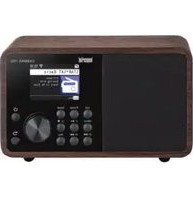
USER MANUAL DABMAN 120 Imperial

For more information, scan the QR code or go to the following link to see the extended manual. https://cdn.nedis.com/manuals/html/DABMAN120BK
A
B
C
ASA_Setting
01/03
ASA_state: ON
location: error
Alert Volume: 10
D
location
Enter location code
XXX-XXXXX-XXXXX
https://asa.radio

E
location
Enter location code
XXX-XXXXX-XXXXX
Invalid Location
https://asa.radio

F
Alert Volume
10

Quick start guide
DABMAN 120BK
INTRODUCTION
Thank you for purchasing the DABMAN 120BK. When you use the DABMAN 120BK for the first time, please read these instructions carefully, and retain them for reference in future. You will be able to fully enjoy the many functions of the radio only if you follow the instructions.
These operating instructions are part of the device! If you sell or pass on the device, please be sure to also pass on these operating instructions.
Intended use
This product is a consumer electronics device that serves as a receiver for DAB+ FM radio signals and for playback of audio files from a USB data carrier and as a Bluetooth playback device. Any other operation or use of the product is considered improper and may result in personal injury or damage to property.
- Only use the product as described in this manual.
• This product is intended to be used indoors.
• The product is not intended for professional use.
- This product is intended to be only serviced by the manufacturer or a specialist.
- This product is not intended for use by persons (including children) with reduced physical, sensory, or mental capabilities or lack of experience and knowledge, unless they have been given supervision or instruction concerning the use of the product by a person responsible for their safety.
- The warranty does not cover faults caused by incorrect handling, damage, assembly or attempted repairs. The same applies to normal wear and tear.
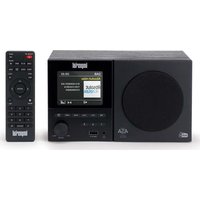
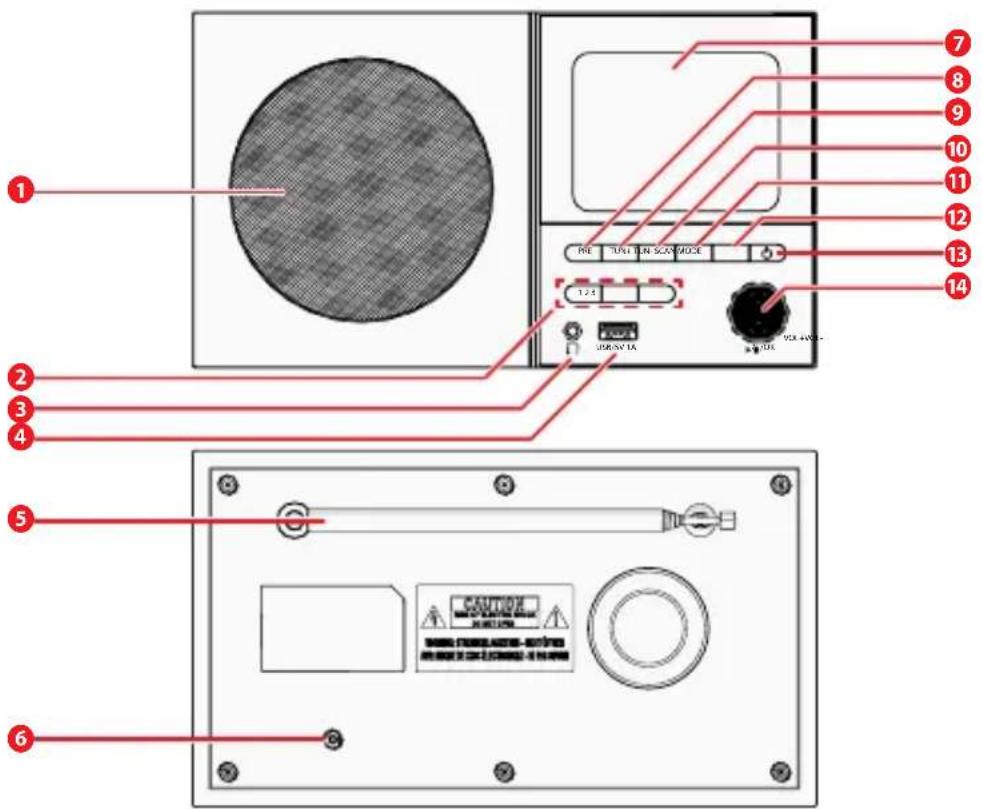
Main parts (image A)
1 Speaker
2 Favourite buttons
Use these buttons to select a favourite radio station.
3 Headphone out
You can connect a wired headphone to this 3,5 mm output.
4 USB
Connect the product to a USB data carrier here, such as a USB stick, to play back music files or charge an external battery.
5 DAB/DAB+/FM Antenna
Telescope antenna to get DAB/DAB+/FM signal reception, adjust the length and direction to get good reception.
6 DC Input
Connect the power adaptor attached in the giftbox (5V/2A, Type-C) into the DC IN type-C connector to supply the power.
7 Display
8 Preset
Direct memory recall for your favourite stations.
9 Tune +
Navigate through menus or tune up to the next frequency/station.
10 Tune -
Navigate through menus or tune down to the previous frequency/station.
11 Scan
Initiates a station scan in DAB or FM mode.
12 Mode
Switches between DAB, FM, USB and Bluetooth.
13 Power
Turns the radio on or off (standby mode).
14 Play and volume knob
Confirm you selection by pushing the knob, and turn the knob to adjust the volume up/down.
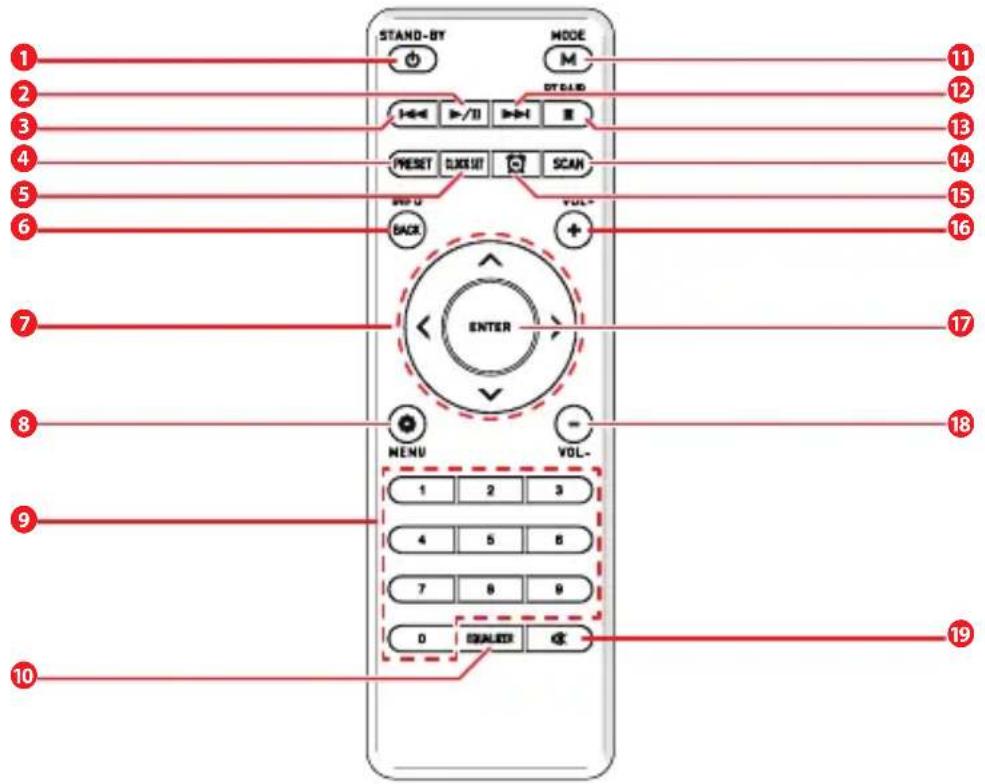
Main parts (image B)
The product can be controlled using both the product buttons and the remote control. Using the remote control is the more convenient and simpler way to operate the product.
1 Standby
Switches the radio on or sets it into standby mode.
2 Play / Pause
Plays or pauses music in USB/Bluetooth mode.
3 Previous
Press this button to go back one step in the menu.
4 Preset
Direct memory recall for your favourite stations.
5 Clock
Set the time on the clock.
6 Info / back
Displays additional information about the current station or track.
Press this button to go back one step in the menu.
7 Navigation up/down - left/right
Use these arrow keys to navigate through the menu.
Use this button to activate the product's menu.
9 Numerical keypad
10 EQ equalizer function
Use this button to activate the equalizer function and change individual sound settings.
11 Mode
Switches between DAB, FM, USB and Bluetooth.
12 Next
Press this button to go forward one step in the menu.
13 Stop
Stops the music.
14 FM/DAB scan
Initiates a station scan in DAB or FM mode.
15 Alarm
Set the alarm.
16 VOL +
Use this button to increase the volume.
17 ENTER/OK
This button is used to confirm an entry or selection.
18 VOL -
Use this button to decrease the volume.
19 Mute
Mutes the product's volume to silent.
Items supplied
| Quantity Description |
| 1 DABMAN 120BK |
| 1 Remote control |
| 1 External power supply unit |
| 1 Battery for remote control typeCR 2025/3V (already instertedin remote control) |
| 1 Operating manual |
SAFETY NOTICES
Please read the safety notices carefully before operating the product. Please note all warnings and instructions both on the product and in the operating manual.
Explanation of safety notices
You will find the following categories of safety notices in the operating manual:
WARNING!
Signal word used to indicate a potentially hazardous situation which, if not avoided, could result in death or serious injury.
CAUTION!
Signal word used to indicate a potentially hazardous situation which, if not avoided, could result in minor or moderate injury.
NOTE!
Instructions with the word NOTE will warn you of possible material or environmental damage. These notes contain special advice related to the economic operation of the receiver.
Basic safety notices
Warning!
Choking hazard:
- Do not let children play with packaging material. Packaging materials can lead to choking and suffocation. Always keep the packaging material out of reach of children.
Electrical hazard:
- Never insert any object into the ventilation opening of the product. The product contains electrical components.
- Do not expose the product to water, rain, moisture, or high humidity.
- Do not use the product where splashing of water might occur, e.g. bathroom, swimming pool or close to a vase.
- Do not use this product in environments where condensation may form. If the product is used in a warm, humid room, moisture or water droplets can build up inside, which may cause it to malfunction. If this happens, turn off the product and leave it unplugged for 1 to 2 hours to allow it to dry completely before turning it back on.
- Only power the product with the voltage corresponding to the markings on the product.
- Keep the product away from pets and other animals. Animals can bite through the power cable and suffer electrical shock.
- Do not open the product, there are no user serviceable parts inside.
- This product may only be serviced by a qualified technician for maintenance.
Fire hazard:
- Immediately unplug the product when any excessive heat, smoke, or any abnormal condition occurs.
- Do not place the product on top of other electrical equipment.
- Unplug the product from the power source and other equipment if problems occur.
- Do not overload electrical outlets or extension cords.
- Do not expose batteries to open flames or extreme heat, as they may explode.
Chemical burn hazard:
- Always keep batteries, both full and empty, out of reach of children to avoid the chance of swallowing. Dispose of used batteries immediately and safely. Seek immediate medical attention when you suspect that batteries have been swallowed.
- In the event of a leaking battery, do not allow the liquid to come in contact with the skin or eyes. If contact has been made, wash the affected area with copious amounts of water and seek medical advice.
- If the battery compartment does not close securely, stop using the product and keep it away from children.
- To prevent damage or injury from possible battery leakage, remove the batteries if the re-mote control will not be used for an extended period.
Caution!
Risk of hearing loss:
- Excessive sound pressure when using earphones or headphones can lead to damage or loss of hearing. Do not listen with earphones or headphones at an increased volume over a longer period of time.
Note!
Risk of damaging the product:
- Use the product only in moderate climates. Avoid
extremely cold or hot environments. The recommended operating temperature is between OircC and 35ircC .
- Only use attachments/accessories specified by the manufacturer.
- Make sure the power adapter cable is out of the way and does not bend near the connections. Do not pinch the cable, do not walk over it and do not place heavy objects onto the cable.
- Disconnect the product from the power outlet during lightning storms or before pro-longed periods of disuse.
- Do not interrupt the connection when the product is transferring or formatting files. Data may be corrupted or lost.
Correct positioning:
- Make sure the product is placed on a flat and stable surface.
- Avoid placing the radio close to sources of heat, e.g. radiators, open fires, e.g. candles, or devices with strong magnetic fields, e.g. loudspeakers.
- Do not place any containers with liquids (e.g. vases) on the radio.
- Avoid places subject to direct sunshine or with a very high level of dust.
- Do not cover the ventilation openings. Always leave at least 5 cm of space around the product.
Risk of improper use:
- Do not use an USB extension cable because it can cause interference resulting in failing of data. Plug the USB memory stick directly into the product.
Correct handling of batteries:
- Do not charge non-rechargeable batteries.
- Batteries may contain poisonous substances. Batteries must be disposed of in accordance with current legal regulations and with consideration for the environment. Do not dispose of batteries in your domestic waste.
• Always replace batteries by the same type.
- Ensure that the plus (+) and minus (-) poles are inserted correctly to avoid a short circuit.
- Remove leaking batteries from the appliance immediately and clean the contacts before inserting new batteries.
• Store batteries in a cool and dry place.
- When possible, remove the batteries from the product when not in use.
INSTALLATION
Please remove the parts carefully from the packaging. Check whether all parts are present.
General operating instructions
- Switch the product on or off using the power buttonA 13 orthestandbybuttonB 1.
- Use the play and volume knob A14 or the VOL+ buttonB 16 or VOL-buttonB 18 to increase or decrease the volume.
- The menu items can be navigated using the play and volume knob 14, tune+buttonA 9 and tune - button 10, or thenavigation buttons B7.
- Press the play and volume knob A 14 or the ENTER/OKbuttonB 17 to confirmaselection.
- Press the tune + button A9 and tune-button A10 to navigate through different frequency/stations.
- Short press the mode button A 12 to switch between DAB/FM/USB/Bluetooth.
- Press the mute button 19 tomutethesound.
- Long press the mode button A 12ormenu buttonB 8 to open the menu items.
Automatic Safety Alert (image C t/m F)
This product is equipped with a DAB+ Automatic Safety Alert (ASA) system, which will interrupt music play to broadcast emergency alerts. Do not disable this functionality unless absolutely necessary.
- Open the menu items.
- Open the ASA settings.
- Switch on the ASA.
- Open the location settings.
- Enter the 12-digit location code and press the ENTER/OK button B⑰.
If the location code is incorrect, Invalid Location is displayed. Find the correct location code at www.asa.radio
- Open the volume settings.
- Choose the volume of the ASA. The default level is 10.
Preparing the remote control
Remove the battery transport lock on the remote control. To do this, pull out the plastic tab on the battery housing of the remote control. This establishes the battery contact.
To replace the remote control battery, open the battery compartment on the back of the remote control. Pull the battery compartment out of the remote control.
Remove the battery and insert a new battery of the same type.
Warning!
There is a risk of explosion if batteries are used improperly! Read the safety instructions in chapter Safety notices and ensure that the battery polarity is correct! Then replace the battery compartment.
Power connection
Connect the power supply unit included in the scope of delivery to the corresponding socket on the back of the product. Now plug the mains adapter into a 230 V socket. Press the knob A 14 or the standby button B 1 on the remote control to switch on the product. The product starts up.
Language selection
- Open the menu items.
- Open the language settings.
- Navigate to the desired language and press the ENTER/OK button B17.
Saved settings briefly appear on the display before reverting back to the previous mode.
Settings not confirmed by pressing the ENTER/OK button B17 are not saved.
Operating mode selection
- Short press the mode button B ⑪ to switch between DAB, FM, USB and Bluetooth.
- Press the ENTER/OK button B 17.
After 5 seconds of inactivity the selected mode is automatically selected.
DISPOSAL INSTRUCTIONS
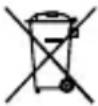
The symbol on the product, packaging or operating manual indicates this requirement.
The materials used are recyclable as indicated by their markings. By recycling or otherwise re-using old products or their components you are making an important contribution to the protection of our environment. Please enquire from your local authorities where the appropriate recycling centre is located. Please ensure that spent batteries as well as electronic waste are not disposed of in your domestic waste, and are professionally recycled.
FEATURES AND TECHNICAL DATA
Product:
| USB port USB 2.0 standard |
| Audio output 3.5 mm jack, Audio L/R/Coax; S/PDIF optical |
| Temperature range 0 °C | -35 °C |
| DAB radio frequency range | 174.928-239.2 MHz |
| FM radio frequency range | 87.5-108 MHz |
| Power consumption 8 W | |
| Speaker power output 5 W RMS |
| Bluetooth | V5.3 |
| QDID | 180349 |
| Speaker | 1x 5 W speaker |
AC power adapter:
| Manufacturer | DongGuan Obelieve Electronice Co., Ltd. Huazhaoxin Industrial Park B-4/F, Golden Phoenix Industrial Zone, Fenggan Town, Dongguan City, Guangdong Province, P.R. China. |
| AC input 100 - 240 V ~ 5060 Hz |
| Output voltage current 12V 1 A |
| Power output 12 W | |
| Average operational efficiency | ≥83.64% |
| Efficiency at minor power (10%) | ≥74.34% |
| Standby power consumption | < 0.072 W |
GUARANTEE
Nedis B.V. offers service and warranty in accordance with the European law, which means that in case of repairs (both during and after the warranty period) you should contact your local dealer.
- It is not possible to send products that need repairs to Nedis B.V. directly.
- If this unit is opened or accessed by a non-official service centre in any way, the warranty expires.
- This device is not suitable for professional use. In case of professional use, all warranty obligations of the manufacturer will be voided.
DISCLAIMER
Updates to firmware and/or hardware components are made regularly. Therefore some of the instruction, specifications, and pictures in this documentation may differ slightly from your particular situation. All items described in this guide are for illustration purposes only and may not apply to your particular situation. No legal right or entitlements may be obtained from the description made in this manual.
We, Nedis B.V. declare as manufacturer that the product DABMAN 120BK from our brand Imperial®, produced in China, has been tested according to all relevant CE standards and regulations and that all tests have been passed successfully. This includes, but is not limited to the RED 2014/53/EU regulation, ErP 2009/125/EC regulation and the RoHS 2011/65/EU regulation.
The complete Declaration of Conformity (and the safety datasheet if applicable) can be found and downloaded via:
https://doc.nedis.com/en-us/DABMAN120BK

Kurzanleitung
DABMAN 120BK
EINFÜHRUNG
Schakelt de radio in of zet hem in stand-by.
② Spelen / Pauzeren
Commuta tra DAB, FM, USB e Bluetooth.
13 Potenza
Commuta tra DAB, FM, USB e Bluetooth.
12 Avanti
OMINAISUUDET JA TEKNISET TIEDOT
Tuote:
| Producent | DongGuan Obelieve Electronice Co, Ltd. Huazhaoxin Industrial Park B-4/F, Golden Phoenix Industrial Zone, Fenggan Town, Dongguan City, Guangdong Province, P.R. China. |
POKYNY NA LIKVIDÁCIU

Adaptor electric AC:
natural_image
Abstract network diagram with interconnected nodes and lines on a light blue gradient background (no text or symbols)


10/2025 V01.2
Nedis BV
Reitscheweg 1
5232 BX 's-Hertogenbosch
The Netherlands
service@nedis.com