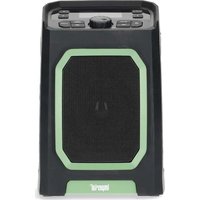
DABMAN OR 5 - Radio Imperial - Free user manual and instructions
Find the device manual for free DABMAN OR 5 Imperial in PDF.


Pick your language and provide your email: we'll send you a specifically translated version.
| Product Type | Portable DAB/DAB+ Radio |
| Brand | Imperial |
| Model | DABMAN OR 5 |
| Dimensions (approx.) | 200 x 100 x 50 mm |
| Weight (approx.) | 0.5 kg |
| Power Supply | AC adapter (included) or 4 x AA batteries (not included) |
| Radio Bands | DAB/DAB+, FM |
| Presets | 10 DAB and 10 FM presets |
| Display | Backlit LCD |
| Alarm | Dual alarm with snooze function |
| Sleep Timer | Yes, adjustable (15/30/60/90 minutes) |
| Headphone Jack | 3.5 mm stereo |
| Speaker | Mono |
| Cleaning and Maintenance | Wipe with a soft, dry cloth. Do not use abrasive cleaners. |
| Safety | Keep away from water and moisture. Do not disassemble. |
| Spare Parts and Reparability | Contact Imperial customer service for spare parts and repairs. |
| General Information | Designed for home and portable use. Includes user manual. |
Frequently Asked Questions - DABMAN OR 5 Imperial
How do I switch between DAB and FM modes?
Press the Source button to toggle between DAB and FM modes.
How do I set an alarm?
Press Alarm button, select alarm 1 or 2, set the time, and choose the source (buzzer, DAB, FM). Confirm with OK.
Why is my DAB reception poor?
Ensure the antenna is fully extended. Try repositioning the radio near a window or away from large metal objects.
Can I use rechargeable batteries?
Yes, you can use 4 AA rechargeable batteries. Note that the radio will not charge them internally; use an external charger.
How do I perform a factory reset?
Press and hold the Menu button for 5 seconds, then select 'Factory Reset' and confirm.
What is the sleep timer and how do I set it?
The sleep timer turns off the radio automatically after a set time. Press Sleep repeatedly to cycle through 15, 30, 60, 90 minutes or off.
How do I store a preset?
Tune to the desired station, press and hold a preset number (1-10) until you hear a beep.
The display shows 'No Service'. What should I do?
Check that you are in a DAB coverage area. Perform an auto scan by pressing Menu > 'Auto Scan'.
Can I connect headphones?
Yes, plug a standard 3.5 mm stereo headphone into the headphone jack located on the side. The built-in speaker will mute.
How do I clean the radio?
Unplug the AC adapter and remove batteries. Wipe the exterior with a soft, dry cloth. Avoid using liquid or aerosol cleaners.
User questions about DABMAN OR 5 Imperial
0 question about this device. Answer the ones you know or ask your own.
Ask a new question about this device
No questions yet. Be the first to ask one.
Download the instructions for your Radio in PDF format for free! Find your manual DABMAN OR 5 - Imperial and take your electronic device back in hand. On this page are published all the documents necessary for the use of your device. DABMAN OR 5 by Imperial.
USER MANUAL DABMAN OR 5 Imperial
Manual assistant
Powered by Anthropic
Waiting for your message
Product information
Brand : Imperial
Model : DABMAN OR 5
Category : Radio