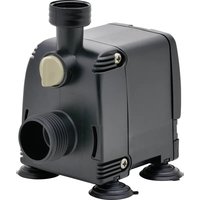
PAS 4200 - Water pump EDEN - Free user manual and instructions
Find the device manual for free PAS 4200 EDEN in PDF.


| Product type | Aquarium water pump |
| Brand | Eden |
| Model | PAS 4200 |
| Max flow rate | 4200 l/h |
| Max head height | 3.5 m |
| Max power consumption | 80 W |
| Supply voltage | 230 V AC, 50 Hz |
| Protection rating | IPX8 (immersion up to 1 m) |
| Max immersion depth | 1 m |
| Permissible water temperature range | +4 to +35 °C |
| Dimensions (L x W x H) | 76 x 115 x 119 mm |
| Weight | 1.2 kg |
| Mains cable length | 1.5 m |
| Suction connection | G1 thread, hose diameter 25 mm |
| Discharge connection | G3/4 thread, hose diameter 25 mm |
| Material | Plastic (pump housing) |
| Intended use | Indoor, private aquarium, water circulation and draining |
| Installation mode | Submerged or dry (position below water level) |
| Flow regulation | Yes, integrated flow regulator |
| Cleaning | Clear water and soft brush; grid with cleaning comb |
| Wear parts | Motor unit, suction cups |
| Disposal | Dispose of via take-back system; cut the cables |
Frequently Asked Questions - PAS 4200 EDEN
User questions about PAS 4200 EDEN
0 question about this device. Answer the ones you know or ask your own.
Ask a new question about this device
Download the instructions for your Water pump in PDF format for free! Find your manual PAS 4200 - EDEN and take your electronic device back in hand. On this page are published all the documents necessary for the use of your device. PAS 4200 by EDEN.
USER MANUAL PAS 4200 EDEN
EN Operating instructions
FR Notice d'emploi
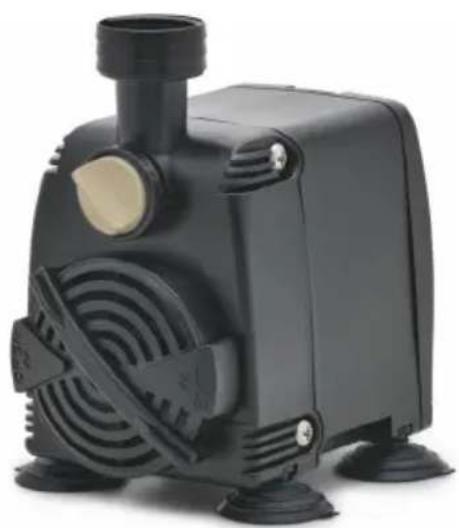
Original-Anleitung.
Sicherheitshinweise
PAS0009
Getaucht aufstellen
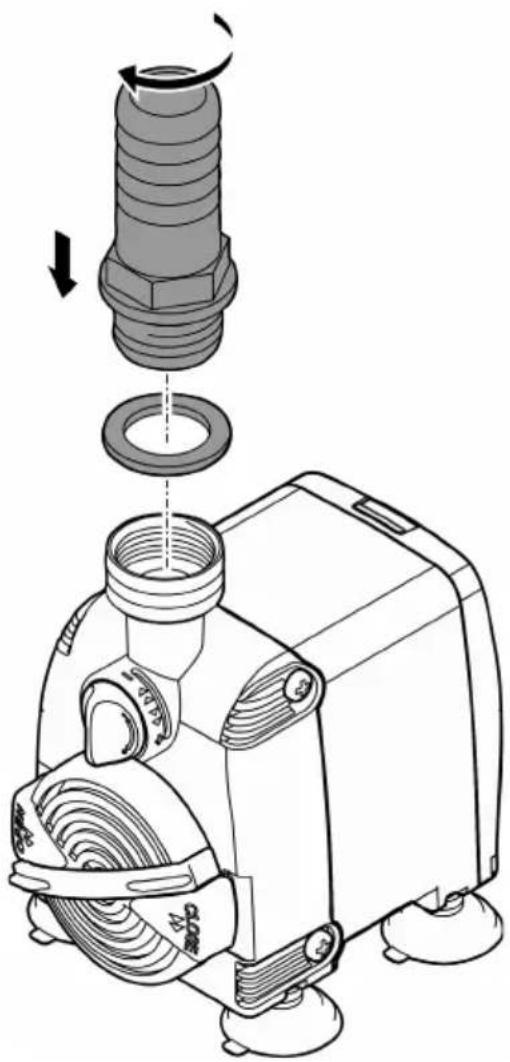
BSE0003
PAS0013
VORSICHT
PAS0015
Electrical connection
- Only connect the unit if the electrical data of the unit and the power supply match.
- Only plug the unit into a correctly installed outlet.
- Protect open plugs and sockets from moisture.
Safe operation
- Disconnect all electrical devices in the water from the power supply before reaching into the water. Otherwise there is a risk of severe injuries or death by electrocution.
- Do not use the unit, if electrical lines or the housing are damaged.
- The supply cord cannot be replaced. If the cord is damaged, the appliance should be scrapped.
- The impeller unit in the pump contains a magnet with a strong magnetic field that may affect the operation of pacemakers or implantable cardioverter defibrillators (ICDs). Keep a distance of at least 0.2 m between the implant and the magnet.
- Never pull on electric cables. In particular, never carry units on their cables.
- Route lines in such a way that they are protected from damage and do not present a tripping hazard.
- This unit can be used by children aged 3 and above and by persons with reduced physical, sensory or mental capabilities or lack of experience and knowledge if they are supervised or have been instructed on how to use the unit in a safe way and they understand the hazards involved. Do not allow children to play with the unit. Only allow children to carry out cleaning and user maintenance under supervision.
- Never carry out technical changes to the unit.
• Always unplug the unit before working on it. - Only carry out work on the unit that is described in this manual.
- Only use original spare parts and accessories.
- Should problems occur, please contact the authorised customer service or EDEN.
Intended use
Only use the product described in this manual as follows:
- For maintaining the water circulation in an aquarium.
- For transferring water from and draining basins or ponds/pools.
- Indoors and for private aquarium-keeping purposes.
- While adhering to the technical specifications. (→ Technical data)
The following restrictions apply to the unit:
- Do not use in swimming ponds.
- Never use the unit with fluids other than water.
- Never run the unit without water.
- Do not use the unit together with chemicals, food, flammable, explosive substances or other liquids aside from water.
- Do not connect to the domestic water supply.
- Do not use for commercial or industrial purposes.
- According to EMC (Electromagnetic Compatibility), this is a class A unit. The unit may cause malfunctions in living environments. It is the user's responsibility to take suitable countermeasures.
Product Description
Overview
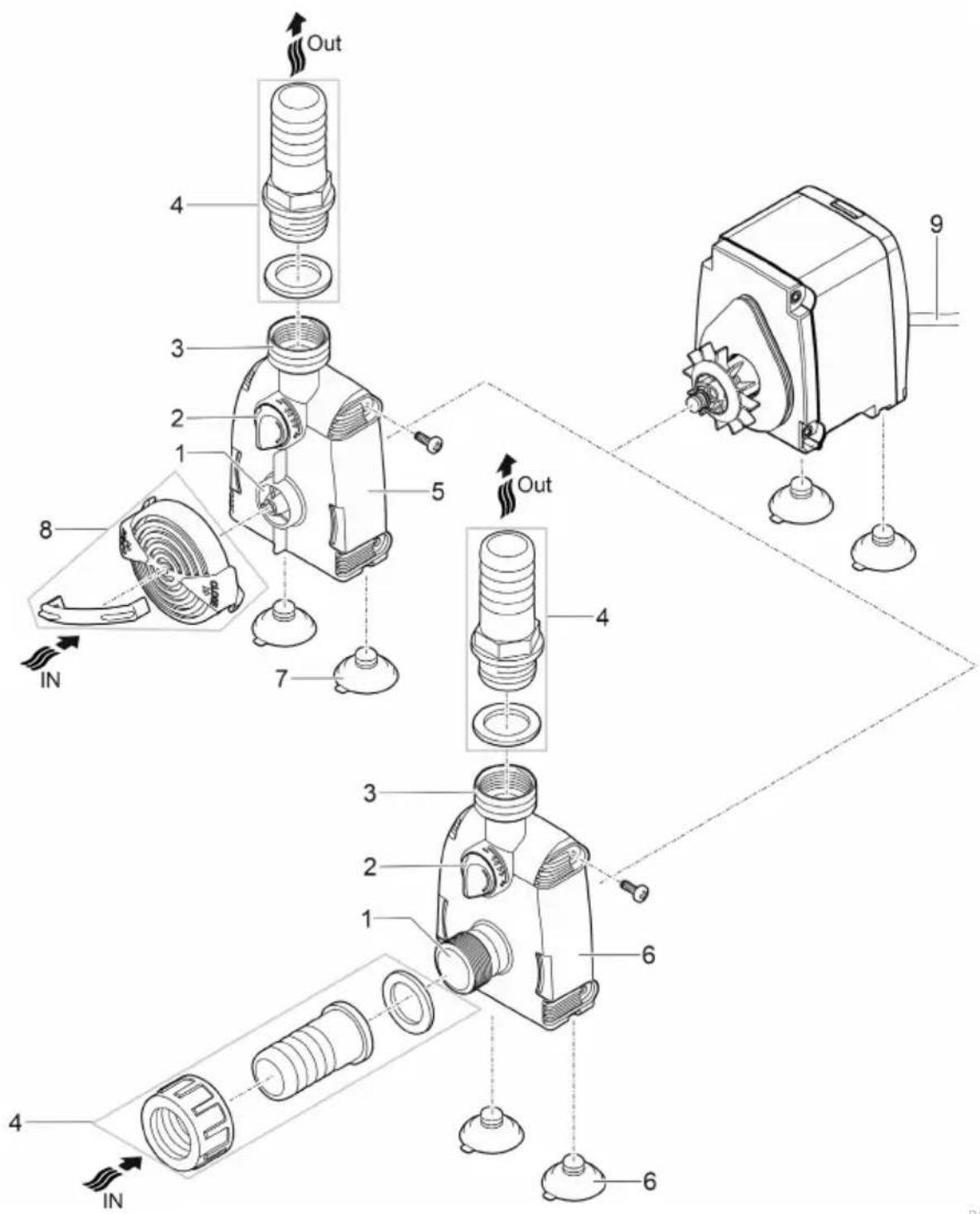
PAS0009
| 1 | Inlet (suction side) |
| 2 | Flow rate controller |
| 3 | Outlet (pressure side) |
| 4 | Hose sleeve |
| 5 | Pump housing for submerged installation |
| 6 | Pump housing for dry installation |
| 7 | Suction cups for fastening the pump on smooth surfaces |
| 8 | Dirt trap grating with cleaning comb |
| 9 | Power cable |
EN
Symbols on the unit


The unit is protected against the results of permanent immersion in water to a depth of 1 m.


Only use the unit in indoor spaces.

Protect the unit from direct sunlight.

Do not dispose of the unit with normal household waste.
Read the operating instructions.
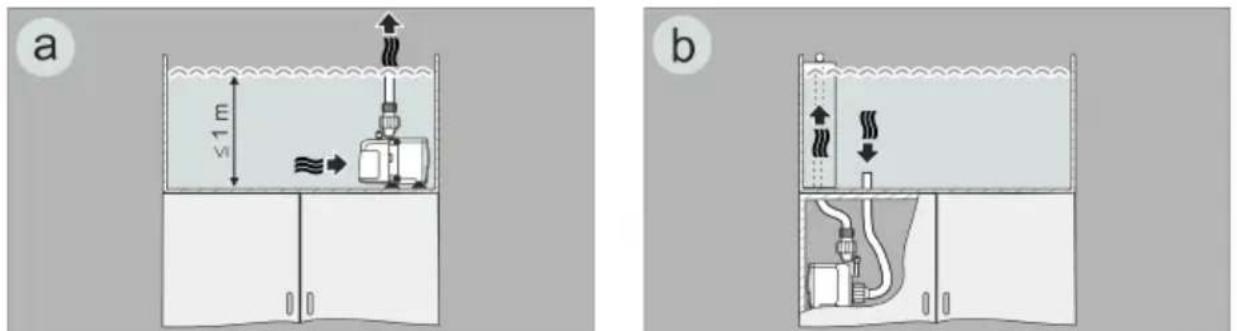
Installation variants
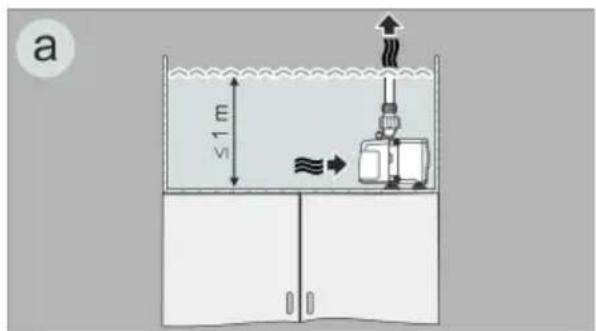
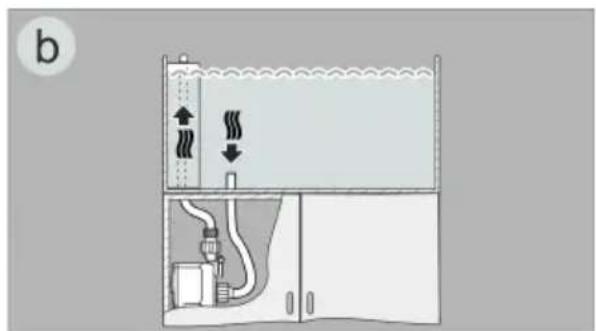
01X0022
- Variant (a): Submerged pump installation.
- The pump is positioned in the basin.
— Water flow via the filter cage.
- Variant (b): Dry pump installation.
- The pump is positioned without the filter cage outside of the basin but lower than the water level.
— Water flow via a hose at the pump inlet.
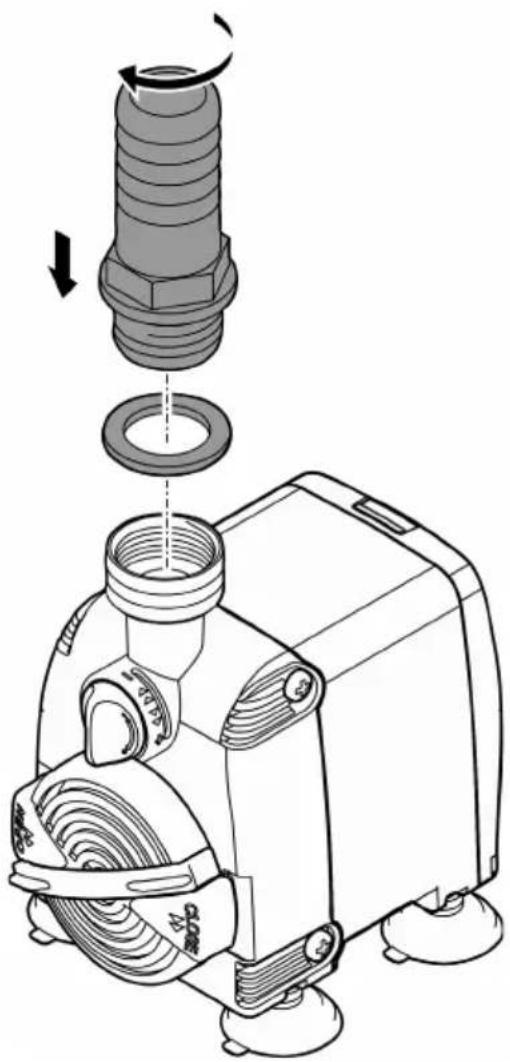
Installation and connection
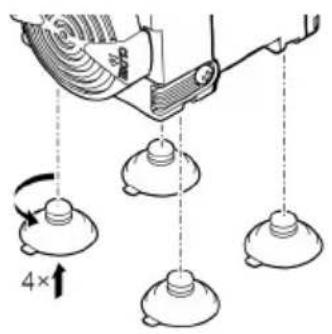
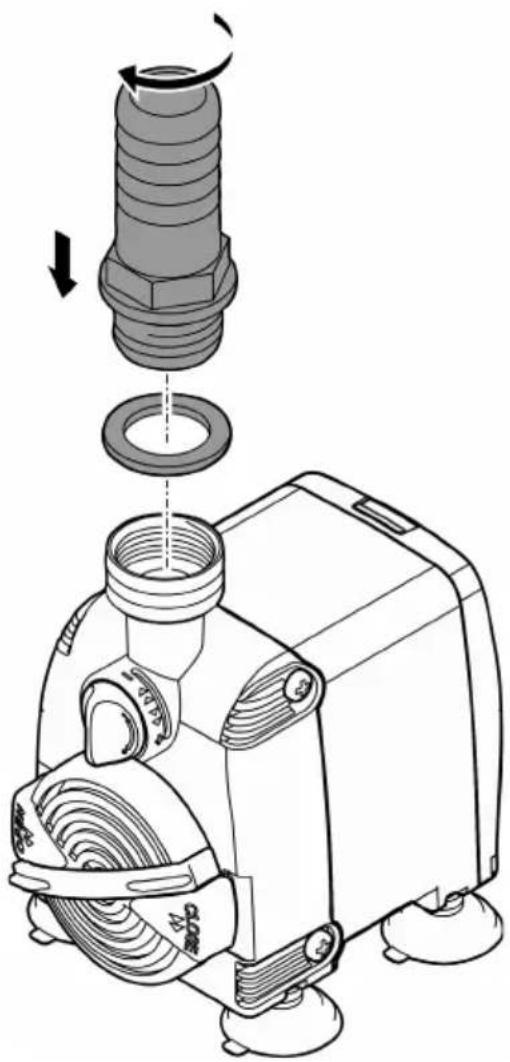
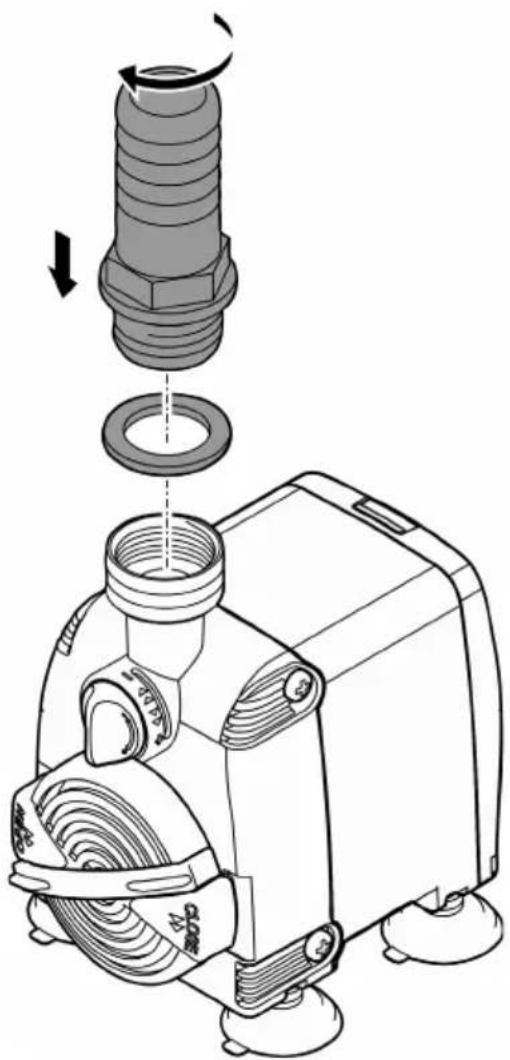
• Install the suction cups.
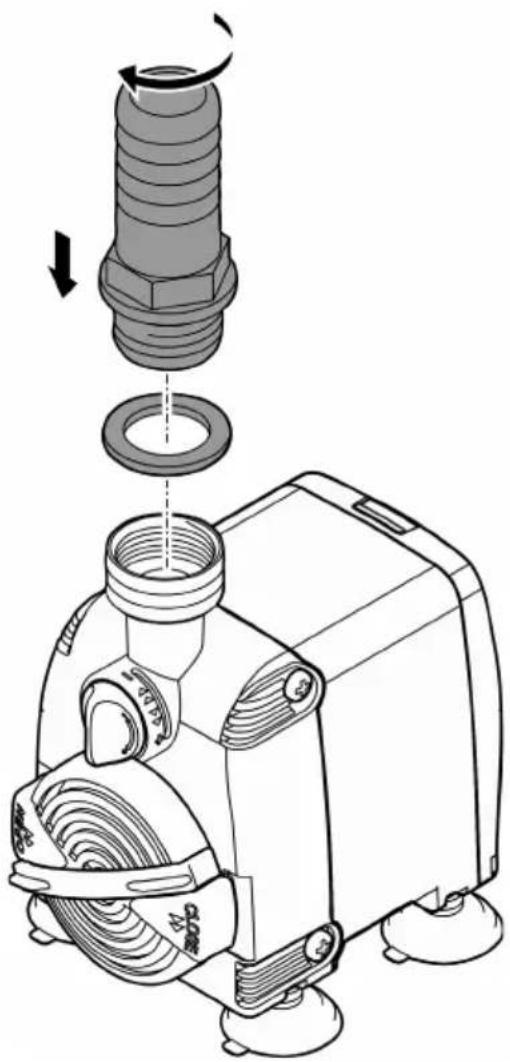
Submerged installation
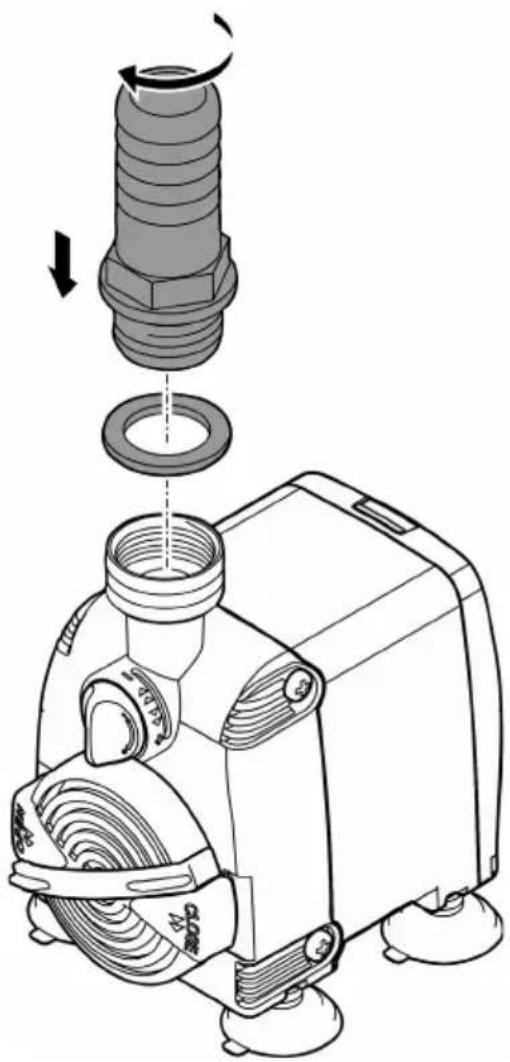
Do not plug the power plug into the socket yet!
PAS0012
PAS0016
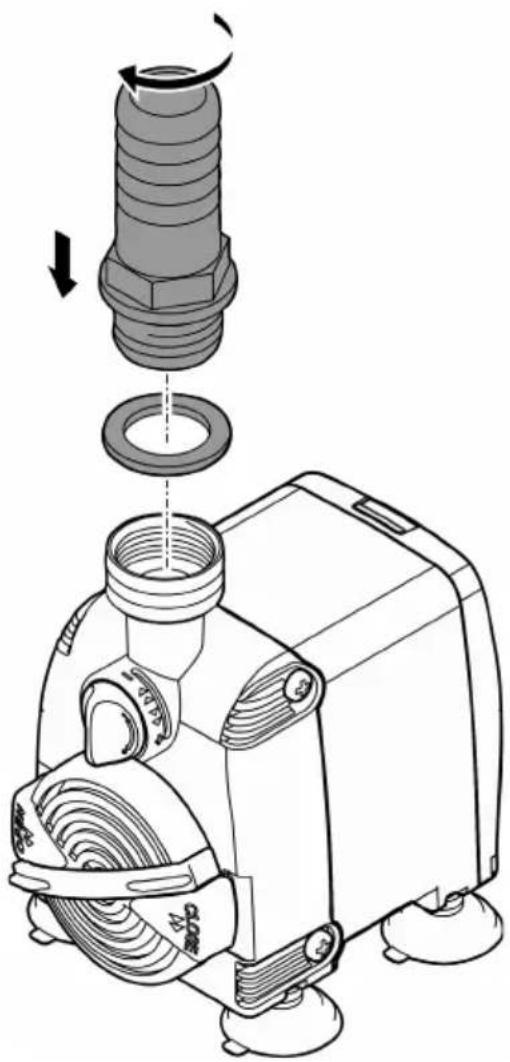
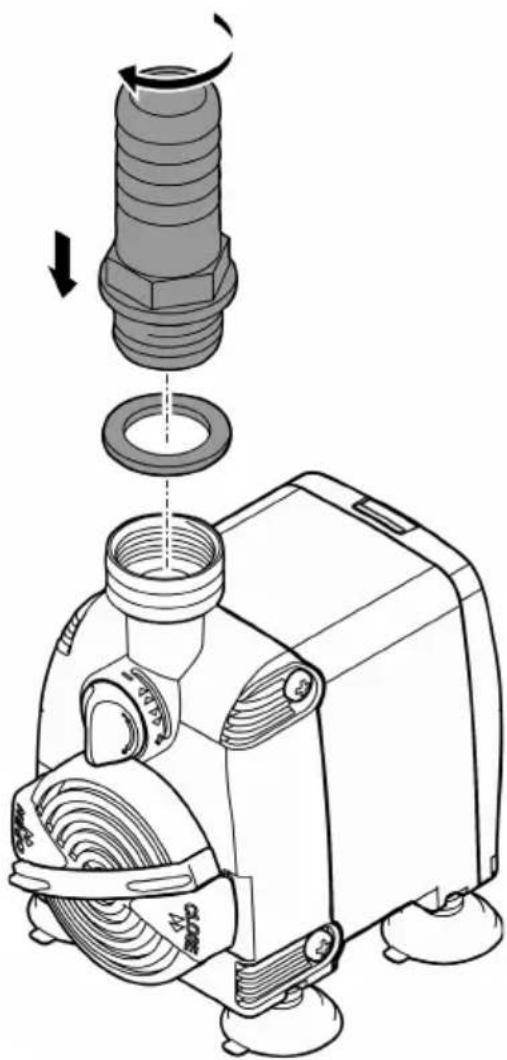
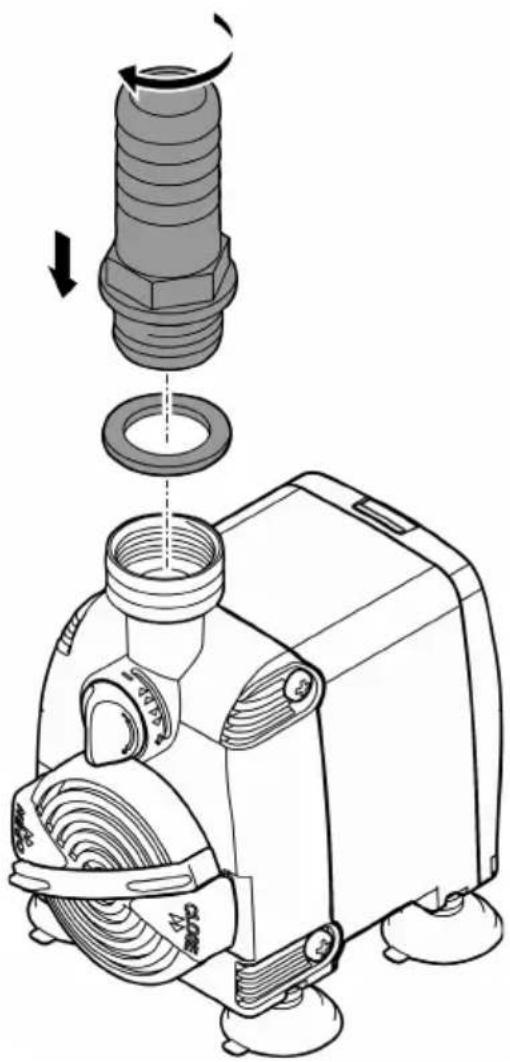
Dry installation
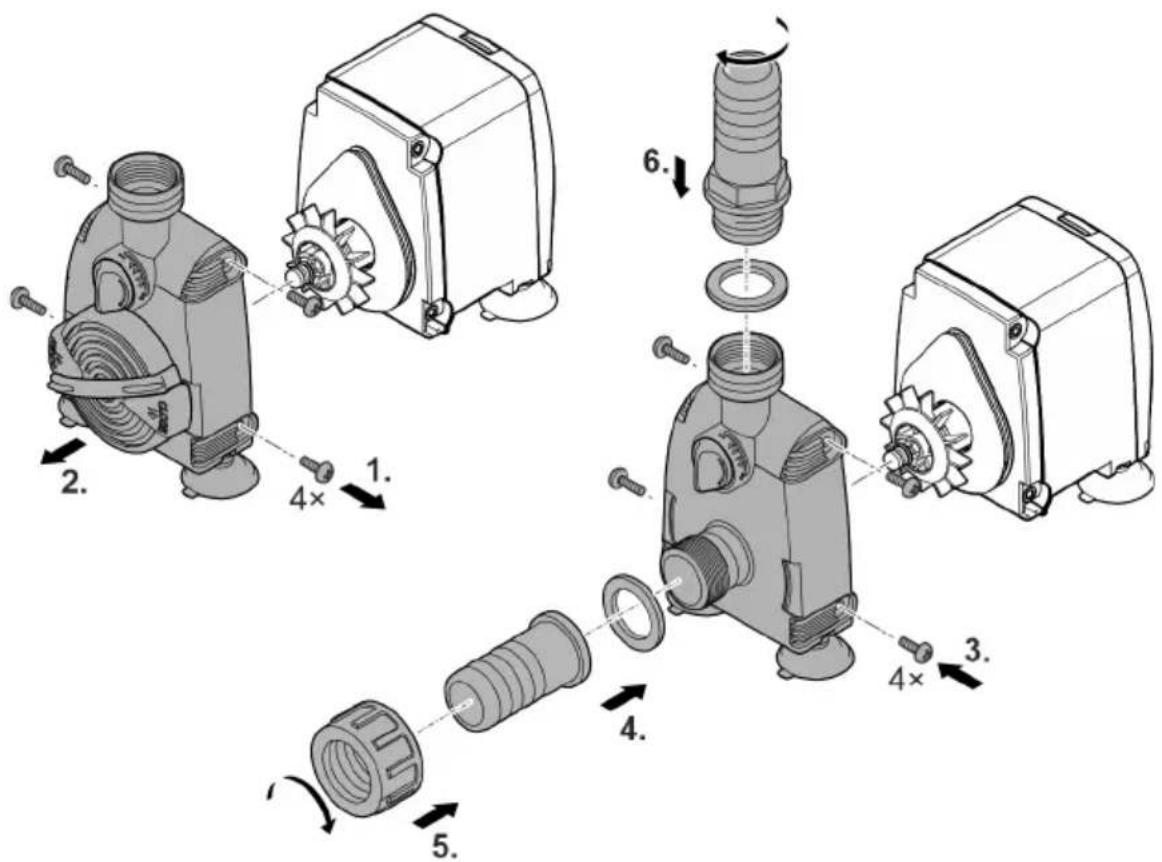
Do not plug the power plug into the socket yet!
PAS0011
Commissioning/start-up
NOTE
Never allow the pump to run dry. Otherwise the pump may be destroyed.
▶ Only operate the pump when it is submerged or flooded.
Switching ON/OFF
- Switching on: Plug the power plug into the outlet.
- The unit switches on immediately.
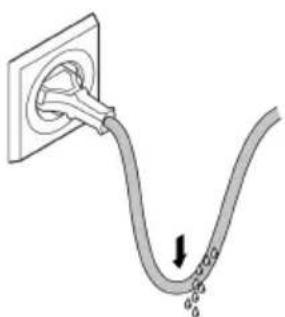
- Lay the mains cable so that a drip loop is formed and the lowest point is below the socket. This prevents dripping water from entering the socket.
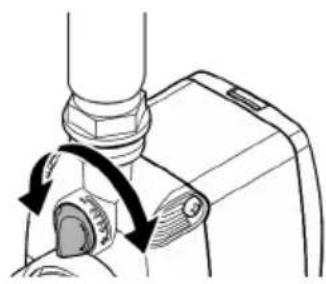
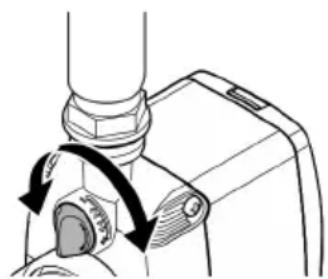
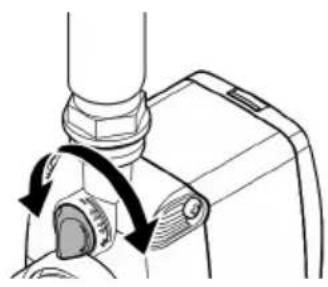
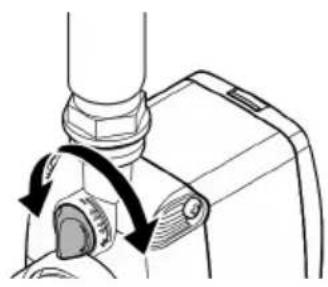
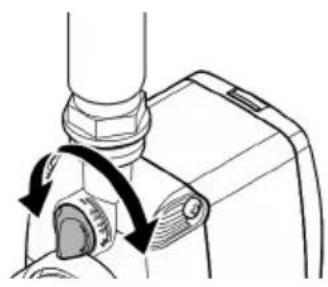
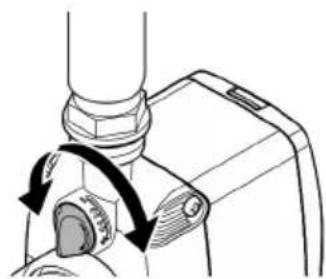
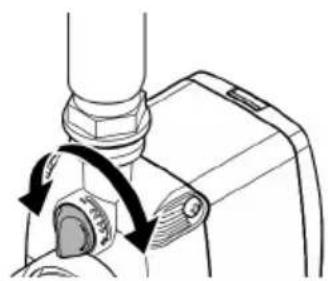
- Set the desired flow rate.
- Switching off: Pull the power plug from the outlet.
Form a drip loop
Set the flow rate
BSE0003
PAS0013
Maintenance and cleaning
CAUTION
Risk of injury due to unexpected start-up. Internal monitoring functions may switch off the unit and automatically reactivate it.
▶ Disconnect the power plug before carrying out any work on the unit.
NOTE
Do not use aggressive cleaning agents or chemical solutions. These agents can damage the housing, impair the function of the device and harm animals, plants and the environment.
▶ If possible, clean the unit with clear water and a soft brush or a sponge; remove stubborn dirt with the aid of the recommended cleaning agents.
Cleaning the device
i Clean the unit as required but at least twice per year.
- Recommended cleaning agent for removing stubborn limescale deposits: – Vinegar- and chlorine-free household cleaning agent.
• After cleaning, thoroughly rinse all parts in clean water.
Cleaning the dirt trap grating
With submerged installation, the flow openings in the dirt trap grating require regular cleaning.
- For easy cleaning, move the cleaning comb back and forth multiple times.
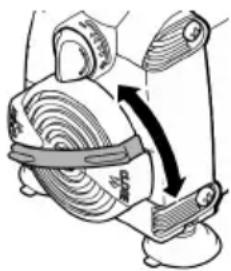
PAS0015
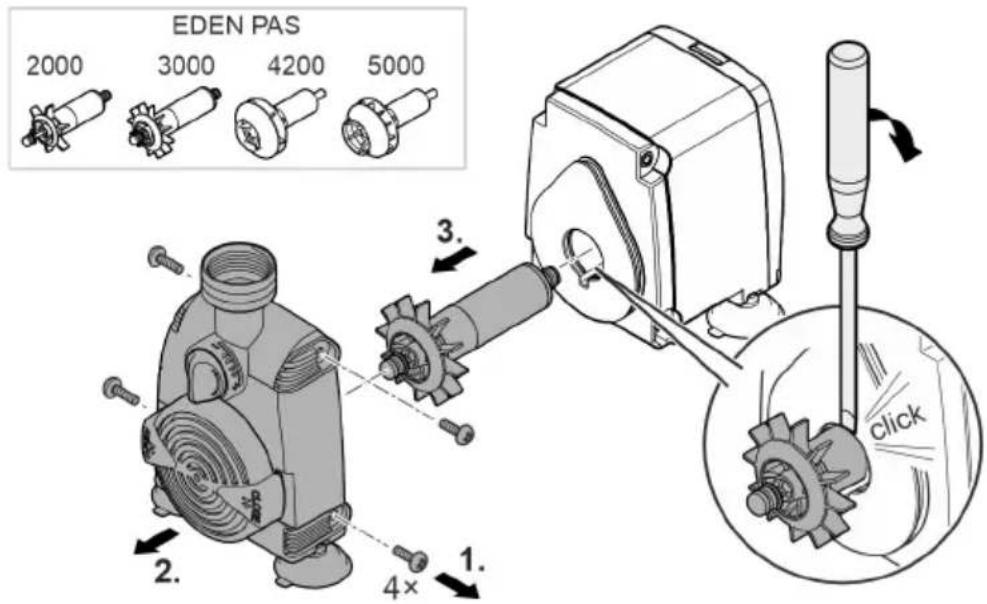
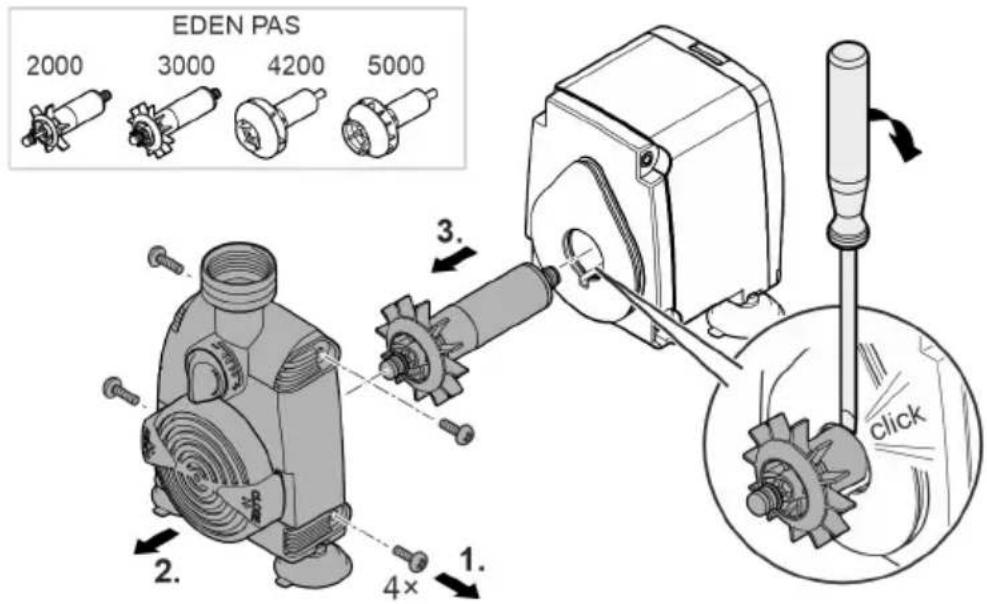
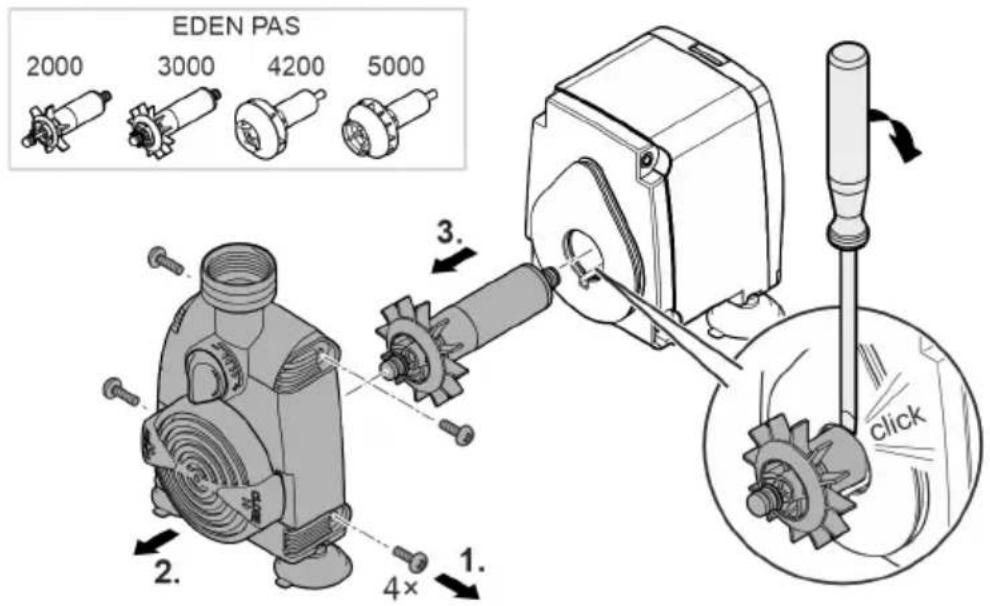
Cleaning/replacing the impeller unit
PAS0010
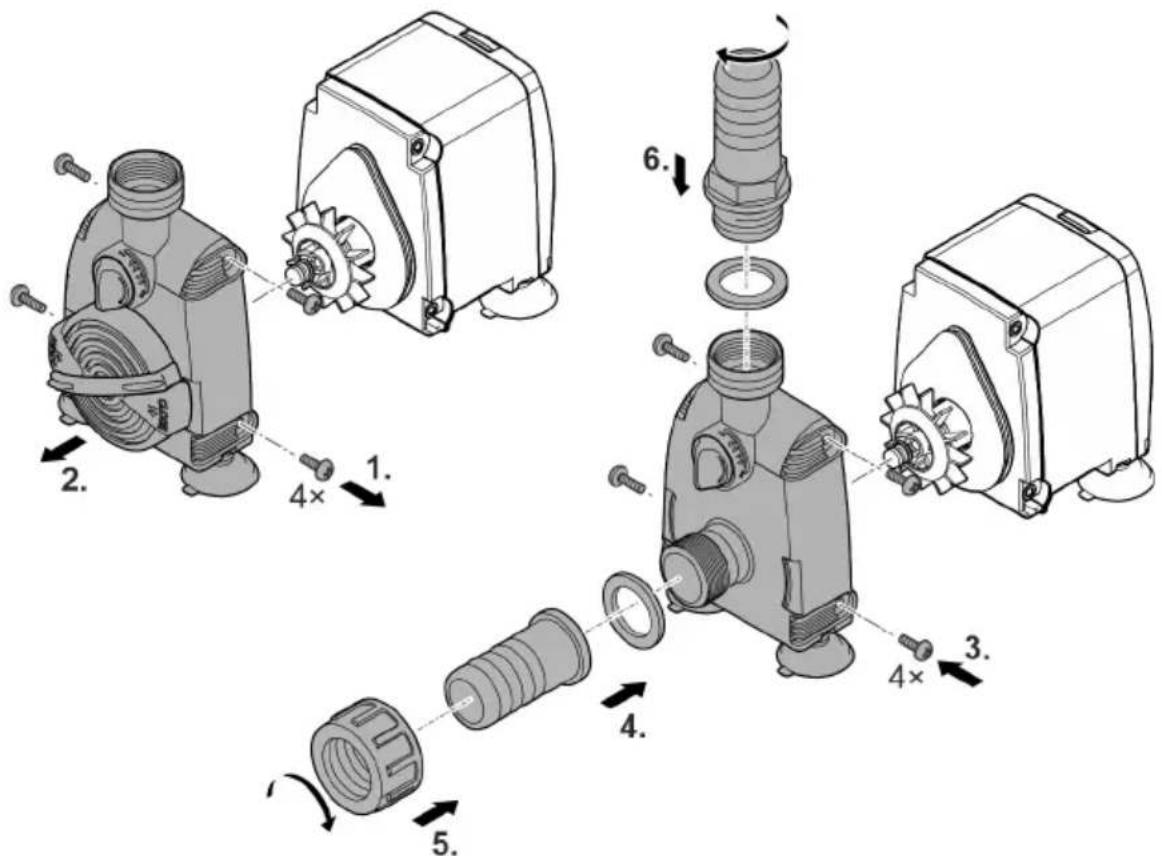
How to proceed:
- Undo and remove the screws at the side of the pump housing.
- Remove the pump housing.
- Remove the impeller unit.
- If necessary, use a wide-blade screwdriver to lever the impeller unit out of its position in the motor housing. For this, insert the screwdriver blade into the groove between the impeller unit and motor housing, and firmly turn the screwdriver in order to dislodge the impeller from its position.
- Proceed carefully so as not to damage the motor housing or 0 ring.
- Clean or replace the impeller unit and subsequently reassemble the pump in the reverse order.
- EDEN PAS 4200, 5000: Firmly push the impeller unit into position in the motor housing.
Malfunction remedy
| Malfunction | Cause | Remedy |
| The unit does not start up | No mains voltage | Check the mains voltage. |
| Impeller unit blocked | Clean the unit | |
| Water flow insufficient Only submersed during installation | Pump housing or impeller unit soiled | Clean the unit |
| Flow controller set to insufficient flow rate | Move the flow controller in the + direction | |
| Impeller unit worn | Replace the impeller unit. | |
| Pump housing clogged | Clean the unit |
Wear parts
- Impeller unit
- Suction cups
EN
Technical data
| PAS | 2000 | 3000 | 4200 | 5000 | ||
| Connection voltage | V AC | 230 | 230 | 230 | 230 | |
| Mains frequency | Hz | 50 | 50 | 50 | 50 | |
| Max. power consumption | W | 31.5 | 55 | 80 | 82 | |
| Max. pump capacity | l/h | 2000 | 2800 | 4200 | 5000 | |
| Max. pump head | m | 2.2 | 3.0 | 3.5 | 3.1 | |
| Protection type | IPx8 | IPx8 | IPx8 | IPx8 | ||
| Max. immersion depth | m | 1 | 1 | 1 | 1 | |
| Permissible range, water temperature | °C | +4 ... +35 | +4 ... +35 | +4 ... +35 | +4 ... +35 | |
| Connection, suction side | Thread | G3/4 | G3/4 | G1 | G1 | |
| Hose diameter | mm | 20 | 20 | 25 | 25 | |
| Connection, pressure side | Thread | G3/4 | G3/4 | G3/4 | G3/4 | |
| Hose diameter | mm | 20 | 20 | 25 | 25 | |
| Dimensions | Length | mm | 76 | 76 | 76 | 76 |
| Width | mm | 115 | 115 | 115 | 115 | |
| Height | mm | 119 | 119 | 119 | 119 | |
| Length of power cable | m | 1.5 | 1.5 | 1.5 | 1.5 | |
| Weight | kg | 1.0 | 1.2 | 1.2 | 1.2 | |
Disposal
NOTE
Do not dispose of this unit with household waste.
▶ Dispose of the unit by using the return system provided for this purpose.
▶ Should you have questions, please contact your local disposal company. They will give you information on how to correctly dispose of the unit.
▶ Render the unit unusable by cutting the cables.
PAS0009
Régler le débit
BSE0003
PAS0013
PAS0015
PAS0009
Gedompeld opstellen
NL
Stel het debiet in
BSE0003
PAS0013
PAS0015
Rotor reinigen/vervangen
PAS0010
Zo gaat u te werk:
PAS0009
ES
Ajustar el flujo
BSE0003
PAS0013
PAS0015
PAS0009
PT
BSE0003
PAS0013
PAS0015
PAS0009
IT
PAS0011
BSE0003
PAS0013
PAS0009
DA
PAS0013
PAS0015
PAS0009
Nedsenket montering
NO
BSE0003
PAS0013
PAS0015
PAS0009
BSE0003
PAS0013
PAS0015
Rengör/byt ut drivenheten

PAS0010
Gör så här:
PAS0009
BSE0003
PAS0013
Puhdistus ja huolto
HUOMIO
PAS0015
PAS0009
BSE0003
PAS0013
PAS0015
PAS0009
PAS0013
PAS0015
PAS0009
Instalace ponořené
Nastavení průtoku
BSE0003
PAS0013
Čištění a údržba

POZOR
PAS0009
BSE0003
PAS0013
Čistenie a údržba

POZOR
PAS0009
Postavitev v vodi
BSE0003
PAS0013
PAS0009
| 1 | Ulaz (usisna strana) |
| 2 | Regulator za količinu protoka |
| 3 | Izlaz (tlačna strana) |
| 4 | Crijevna navlaka |
| 5 | Kućište pumpe za potopljeno postavljanje |
| 6 | Kućište pumpe za postavljanje na suhom |
| 7 | Sisaljke za pričvršćivanje pumpe na glatke površine |
| 8 | Rešetka za hvatanje prljavštine s češljem za čišćenje |
| 9 | Električni kabel |
Simboli na uređaju
| IPX8 1.0 m | Uređaj je zaštićen od trajnog uranjanja na dubini do 1 m. | |
 | Rabite uređaj samo u zatvorenim prostorijama. | |
 | Zaštitite uređaj od izravnog sunčanog zračenja. | |
 | Ne zbrinjavajte uređaj s običnim kućnim otpadom. | |
 | Pročitajte priručnik za uporabu. | |
Načini instalacije
HR
- Varijanta (a): Potopljeno postavljanje pumpe.
- Pumpa se postavlja u bazen.
— Potiskivanje vode preko filtarske košare.
- Varijanta (b): Postavljanje pumpe na suhom.
- Pumpa se pozicionirano bez filtarske košare izvan bazena, ali ispod razine vode.
— Potiskivanje vode preko crijeva na ulazu pumpe.
PAS0013
PAS0015
HR
PAS0009
Montare imersată
Reglarea debitul
BSE0003
PAS0013
PAS0015
RO
PAS0009
Поставяне под вода
PAS0011
Настройка на дебита

BSE0003
PAS0013
PAS0015
BG
PAS0009
Встановлення у воді
PAS0013
Чистка і догляд

ОБЕРЕЖНО
PAS0015
UK
PAS0009
BSE0003
PAS0013
Очистка и уход
ОСТОРОЖНО
PAS0015
RU
PAS0009
先不要将电源插头插入插座!
PAS0012
PAS0016
干燥安装
先不要将电源插头插入插座!
PAS0011
ZH
调试
提示
泵不得无水运转。否则会毁坏该泵。
设置流量
BSE0003
PAS0013
清洁和保养
小心
PAS0015
ZH
清洁/更换运行单元
PAS0010
步骤如下:
48477 Hörstel | Germany
info@pfg-gmbh.com
www.edensrl.com



- SICHERHEITSHINWEISE
- GETAUCHT AUFSTELLEN
- VORSICHT
- ELECTRICAL CONNECTION
- SAFE OPERATION
- INTENDED USE
- PRODUCT DESCRIPTION
- OVERVIEW
- SYMBOLS ON THE UNIT
- INSTALLATION VARIANTS
- INSTALLATION AND CONNECTION
- SUBMERGED INSTALLATION
- DRY INSTALLATION
- COMMISSIONING/START-UP
- NOTE
- SWITCHING ON/OFF
- MAINTENANCE AND CLEANING
- CAUTION
- CLEANING THE DEVICE
- CLEANING THE DIRT TRAP GRATING
- CLEANING/REPLACING THE IMPELLER UNIT
- MALFUNCTION REMEDY
- WEAR PARTS
- DISPOSAL
- GEDOMPELD OPSTELLEN
- ROTOR REINIGEN/VERVANGEN
- NEDSENKET MONTERING
- RENGÖR/BYT UT DRIVENHETEN
- GÖR SÅ HÄR
- PUHDISTUS JA HUOLTO
- HUOMIO
- INSTALACE PONOŘENÉ
- ČIŠTĚNÍ A ÚDRŽBA
- POZOR
- ČISTENIE A ÚDRŽBA
- POSTAVITEV V VODI
- SIMBOLI NA UREĐAJU
- NAČINI INSTALACIJE
- MONTARE IMERSATĂ
- ВСТАНОВЛЕННЯ У ВОДІ
- ЧИСТКА І ДОГЛЯД
- ОБЕРЕЖНО
- ОЧИСТКА И УХОД
- ОСТОРОЖНО
- 干燥安装
- 调试
- 提示
- 清洁和保养
- 小心
- 清洁/更换运行单元
Brand : EDEN
Model : PAS 4200
Category : Water pump