PSGE 300 A1 - Power bank PARKSIDE - Free user manual and instructions
Find the device manual for free PSGE 300 A1 PARKSIDE in PDF.


User questions about PSGE 300 A1 PARKSIDE
0 question about this device. Answer the ones you know or ask your own.
Ask a new question about this device
Download the instructions for your Power bank in PDF format for free! Find your manual PSGE 300 A1 - PARKSIDE and take your electronic device back in hand. On this page are published all the documents necessary for the use of your device. PSGE 300 A1 by PARKSIDE.
USER MANUAL PSGE 300 A1 PARKSIDE
natural_image
Exterior view of a black Pareto box device with control knobs and buttons (no readable text or symbols beyond branding)
SOLAR-GENERATOR 300 W - PSGE 300 A1 SQLAR-POWERED GENERATOR 300 W - PSGE 300 A1 GENERATEUR SOLAIRE 300 W - PSGE 300 A1
DE ○ CHAT
SOLAR-GENERATOR 300 W
Operating and Safety Instructions
Translation of Original Operating Manual
NL BE
ZONNEGENERATOR 300 W
GENERATOR SOLARNY 300 W
Before reading, unfold the page containing the illustrations and familiarise yourself with all functions of the device.
FR BE CH
4
natural_image
Line drawing of an electronic device with a solar panel, power cord, and light source (no text or symbols)5
natural_image
3D illustration of a cylindrical battery with horizontal bands and a top cap (no text or symbols)Günzburger Straße 69
D-89335 Ichenhausen
Verehrter Kunde,
service.AT@scheppach.com
Service-Adresse (DE):
Scheppach GmbH
Günzburger Str. 69
DE - 89335 Ichenhausen
Service-Adresse (AT):
Gausch Hubert
Table of contents: Page:
- Explanation of the symbols on the device.... 16
- Introduction.... 17
- Description of the product....17
- Scope of delivery 17
- Proper use....17
- Safety information.... 18
- Technical data....19
- Unpacking 20
- Charging....20
- Description of the various connections and the display 21
- Start up 22
- Electrical connection 23
- Cleaning 23
- Transport....23
- Storage 23
- Maintenance 24
- Disposal and recycling 24
- Troubleshooting....25
- Warranty certificate....26
- Exploded view....154
- Declaration of conformity....156
1. Explanation of the symbols on the device
 | Read the operating and safety instructions before start-up and follow them! |  | Warning against UV radiation |
 | Do not use the product in wet conditions! Protect from moisture! |  | Protection class II (double insulation) |
 | Observe warnings and safety instructions! |  | The product complies with the applicable European directives. |
 | Do not throw old equipment away with household waste |  | The charging unit is only suitable for use indoors. |
 | Efficiency class of the mains power unit |  | Mains power unit corresponds to the RoH guideline |
| [w6ZK]IPX0 | pnp-transistor (switching mains power unit) |  Ta: 25°C Ta: 25°C | Functional low voltage with safe separation |
 | Connection identification |
2. Introduction
Manufacturer:
Scheppach GmbH
Günzburger Straße 69
D-89335 Ichenhausen
Dear cust
omer,
We hope your new product brings you much enjoyment and success.
Note:
In accordance with the applicable product liability laws, the manufacturer of this product assumes no liability for damage to the product or caused by the product arising from:
- Improper handling,
- Failure to comply with the operating instructions
- Repairs carried out by third parties, unauthorised specialists.
• Installing and replacing non-original spare parts
• Application other than specified - Failure of the electrical system in the event of the electrical regulations and VDE provisions 0100, DIN 13 / VDE0113 not being observed
Please consider:
Read through the complete text in the operating manual before installing and commissioning the device.
This operating manual should help you to familiarise yourself with your product and to use it for its intended purpose.
The operating manual includes important instructions for the safe, proper and economic operation of the product, for avoiding danger, for minimising repair costs and downtimes and for increasing the reliability and extending the service life of the product.
In addition to the safety instructions in this operating manual, you must also observe the regulations applicable to the operation of the product in your country.
Keep the operating manual package with the power tool at all times and store it in a plastic cover to protect it from dirt and moisture. They must be read and carefully observed by all operating personnel before starting the work.
The product may only be used by personnel who have been trained to use it and who have been instructed with respect to the associated hazards. The required minimum age must be observed.
In addition to the safety instructions in this operating manual and the separate regulations of your country, the generally recognised technical rules relating to the operation of such machines must also be observed.
We accept no liability for accidents or damage that occur due to a failure to observe this manual and the safety instructions.
3. Description of the product
- Transport handle
- LED on/off switch
- Charge connection
- On/off switch with operating display
- 230V - output
- AC button with operating display
- 12V DC - output
- USB 5V2.4A - output
- LCD display
- USB - type C - output
- DC button with operating display
- LED
- Solar generator
- Power supply
- Mains power unit connection cable
LCD display (Fig. 3)
A Battery level
B Battery level in %
C Overload protection
D AC (AC = alternating current)
E DC-12V (DC = direct current)
F Charging capacity
G fan
H USB
I USB-C
J AC - output power
4. Scope of delivery
- Solar generator (13)
- Mains power unit (14)
- Mains power unit connection cable (15)
5. Properuse
The product is designed to charge rechargeable batteries or operate electronic products that do not exceed a max. power of 300 W.
The product may only be used in the intended manner. Any use beyond this is improper. The user/operator, not the manufacturer, is responsible for damages or injuries of any type resulting from this.
An element of the intended use is also the observance of the safety instructions, as well as the assembly instructions and operating information in the operating manual. Persons who operate and maintain the machine must be familiar with it and must be informed about potential dangers.
In addition, the applicable accident prevention regulations must be strictly observed.
Other general occupational health and safety-related rules and regulations must be observed.
The liability of the manufacturer and resulting damages are excluded in the event of modifications of the machine.
The machine may only be operated with original parts and original accessories from the manufacturer. The safety, operating and maintenance specifications of the manufacturer, as well as the dimensions specified in the technical data, must be observed.
Please note that our products were not designed with the intention of use for commercial or industrial purposes. We assume no guarantee if the product is used in commercial or industrial applications, or for equivalent work.
6. Safety information
⚠️ DANGER
A failure to observe these instructions poses an extreme danger of death or the risk of life-threatening injuries.
⚠ WARNING
A failure to observe these instructions poses a danger of death or the risk of serious injuries.
NOTE
Personal injury or property damage can result from incorrect operation.
General safety information
Danger
- Please do not disassemble, repair or transform, which may cause electric shock, heat, fire and other dangers.
-
Do not place the product near the source of fire or expose it to fire or heat as this could result in fire, burns, and other hazards.
-
This product cannot be charged and used in dew, bath-house, rain and other places; do not use water to clean the product, it will cause electric shock, heat, fire and other dangers.
- Do not touch this product or connector plug when your hands are wet. It may cause electric shock hazard.
- Do not use metal to contact AC output interface. It may cause electric shock, fever, fire and other dangers.
- Please do not dispose of the product in general waste disposal. Electricity shock, heat and fire may occur in the garbage collection truck or in the garbage collection truck.
- Do not use AC connections other than those specified. It may cause electric shock, fever, fire and so on.
- Please check the rated specifications of the connection interface or the connection product and do not exceed the specifications. It may cause electric shock, fever, fire and so on.
- Please do not have a strong impact on the product such as a drop or a hammer strike. This can result in an electric shock, heating up, fire or damage to the product.
- Do not place, store and use the product at locations where it can fall down or drop (e.g. on high shelves). This can result in an electric shock, heating up, fire or damage to the product.
- Do not move the product, while it is charging or in use. Heating up, fire, electric shock or damage can be caused to the product due to vibrations or impacts while moving.
⚠ Warning!
- Please keep the place clean for use and storage. Powder or small metal contact terminal may cause short circuit, accidents such as smoke or fire.
- Make sure to check the product before use. In the case of anomalies such as breakages, cracks, leaks, heating up or breakage of the AC power line, please stop using the product immediately.
- Do not let children use this product or it may cause accidents or injuries.
- Do not use if a connector cannot be fully inserted due to a loose or deformed interface. Otherwise, electric shocks, heating up and fire can be caused.
- Please do not use it on the beach or in dusty places. Or it may cause smoke, fire.
-
Please do not use and keep in the car, trunk, loading table or high temperature place under direct sunlight. Otherwise, it may cause product failure obstacles or deterioration or cause fever.
-
If the liquid within the product adheres to the skin or clothing, please wash with water immediately. Otherwise may cause the skin injury and so on. Wash the liquid out of the eyes. After washing with clean water, please see a doctor immediately. It may cause the risk of blindness.
- In the event of a thunderstorm or lightning strike, pull the power cord out of the socket while charging. Overload can lead to overheating, fire, and other accidents.
- Please charge the product within the specified voltage range (100-240 V alternating current). Otherwise, heat, fire, and other accidents may result.
- Please do not place the product upside down or on its side when using and storing it, otherwise it may cause leakage, heat, fire and other hazards.
Note
- Stop using the product immediately if any abnormalities such as rust, unusual smell, heating, etc. appear.
- When transporting the product by a car, etc., please fix it so that it cannot be moved. Otherwise, the product may be damaged, resulting in electric shock, heat, fire, etc.
- Do not allow this product or the power cord to come into contact with water or other liquids. This may lead to short circuits, heat, fire, etc.
- Charge, use and store this product at temperatures between 0 and 40^ , otherwise loss of power or heating up may occur.
- In the event of an accidental drop or impact, the housing could be damaged by electric shock, heat, fire, etc. Please stop using the product immediately. To avoid accidents, immediately contact the installation and maintenance personnel responsible on site.
- Read through the operating instructions completely before connecting the electrical products. Operating errors can lead to accidents or injuries.
- Before connecting electrical products, ensure that electrical products are switched off. A sudden start of electrical products can result in accidents or injuries.
- Make sure to turn off the main switch during storage to avoid unnecessarily discharging the battery and avoiding electric shock.
ATTENTION!
This power tool generates an electromagnetic field during operation. This field can impair active or passive medical implants under certain conditions. In order to prevent the risk of serious or deadly injuries, we recommend that persons with medical implants consult with their physician and the manufacturer of the medical implant prior to operating the machine.
Residual risks
The product has been built according to state-of-the-art and the recognised technical safety rules. However, individual residual risks can arise during operation.
- Health hazard due to electrical power, with the use of improper electrical connection cables.
• Furthermore, despite all precautions having been met, some non-obvious residual risks may still remain. - Residual risks can be minimised if the "Safety information" and the "Proper use" together with the operating manual as a whole are observed.
- Avoid accidental starting of the machine: the operating button may not be pressed when inserting the plug in an outlet. Use the tool that is recommended in this operating manual. This is how to ensure that your machine provides optimum performance.
7. Technical data
Power output
AC output
Rated voltage....230 V\~
Nominal power 300 W
Peak power 400 W (3s)
Frequency....50 Hz
DC12V output
Rated voltage.... 12 V (±1 V)
Rated current....max. 10 A
Required connector type: .... Coaxial connector 5.5 mm x 2.5 mm
USB 5V2.4A output
QC....Apple, Samsung
Rated voltage....5 V (±0.25 V)
Rated current....2.4 A
USB-C - output
QC PD 3.0 (60 W)
Rated voltage....5 V/3 A; 9 V/3 A; 12 V/3 A; 15 V/3 A; 20 V/3 A
Input power
Power supply....17.5 Vdc, 4.8 A
Battery Li-Ion
Nominal power 307 Wh
Rated voltage.... 14.8 V
Battery cell type ......INR18650-3.7 V / 2600 mAh(5C)
Battery capacity....20800 mAh
Voltage 10.8 - 16.8 V
Loading time with solar panel....approx. 7 h with max. lighting intensity
Loading time with charging cable....approx. 5 - 7 h
Working conditions
Air humidity 5% - 90%
Operating temperature....0°C - 40°C
General
Protection category....IP20
Protection class....II
Dimensions....275 x 155 x 215 mm
Weight 4.2 kg
Technical changes reserved!
8. Unpacking
- Open the packaging and carefully remove the device.
- Remove the packaging material, as well as the packaging and transport safety devices (if present).
- Check whether the scope of delivery is complete.
- Check the device and accessory parts for transport damage. In the event of complaints the carrier must be informed immediately. Later claims will not be recognised.
- If possible, keep the packaging until the expiry of the warranty period.
- Familiarise yourself with the product by means of the operating manual before using for the first time.
- With accessories as well as wearing parts and replacement parts use only original parts. Replacement parts can be obtained from your dealer.
- When ordering please provide our article number as well as type and year of manufacture for your product.
ATTENTION!
The device and the packaging material are not children's toys! Do not let children play with plastic bags, films or small parts! There is a danger of choking or suffocating!
9. Charging
NOTE:
The product is not fully charged when delivered. We recommend fully charging the product before initial use.
While charging the product, the battery symbol on the display (9) is in the dynamic state. After fully charging the rechargeable battery, the display symbol is in the static state.
⚠️ Note: Please ensure that the connected electrical products work properly before using this product.
⚠️ Note: It is normal for the product to warm up while charging.
Regular discharging and charging increases the service life.
Note: Ensure that the cabling is properly inserted otherwise the contact terminals could melt or catch fire at high temperatures.
⚠️ Note: Charge the product at an ambient temperature of 0 to 40 °C.
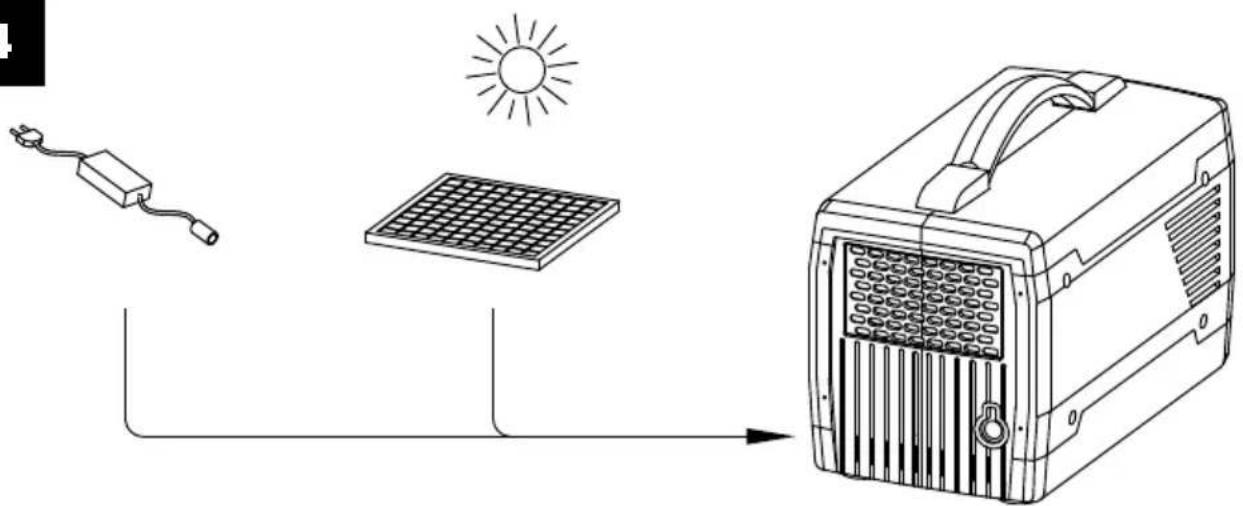
9.1 Charging with the mains power unit (14) (Fig. 1, 2, 3, 4)
Always use the standard charging device supplied with the product.
- Press the on/off switch with operating display (4) until it lights up green. The LCD display (9) is visible.
- Connect the mains power unit connection cable (15) to the mains power unit (14) and the charge connection (3) on the rear side of the solar generator (13). Connect the mains power unit (14) to a power connection.
- You can read the charge status on the LCD display (9).
- When the solar generator (13) is fully charged, the charging process is ended automatically.
- As soon as the solar generator is fully charged, switch the product off and disconnect the mains power unit connection cable (15) from the power connection.
9.2 Charging with a solar panel (Fig. 1, 2, 3, 4)
- Press the on/off switch with operating display (4) until it lights up green. The LCD display (9) is visible.
- Place your solar panel (not included in the scope of delivery) in a location which receives as much direct sunlight as possible.
-
Connect the solar panel to the charge connection (3) on the rear side of the solar generator (13).
-
You can read the charge status on the LCD display (9).
- When the solar generator (13) is fully charged by the solar panel, the charging process is ended automatically.
- Disconnect the charge cable from the solar generator and switch it off.
⚠️ Note: You can link several solar panels to each other in order to shorten the charging time. The solar generator is able to absorb 80 W of charging power. The off-load voltage of the solar panel should be between 14V and 40V. Otherwise, the overvoltage protection of the charging process can be triggered or cause damage
⚠️ Note: The charge time is dependent on the light intensity and can vary depending on the light irradiation.
9.3 Charging via the 12 Volt socket (cigarette lighter) in a vehicle
- Ensure that the vehicle engine is running.
- Connect the solar generator and the 12 Volt socket of your vehicle using a cigarette lighter cable or a car charging cable (not included in scope of delivery).
- Charge the solar generator after starting the vehicle. You can read the charge status on the LCD display (9).
- When the solar generator (13) is fully charged, the charging process is ended automatically.
- Please disconnect the cigarette lighter cable or the car charging cable from the solar generator after it has been fully charged.
⚠️ NOTE: IF THE CAR BATTERY IS 12 V, THE PRODUCT CANNOT BE FULLY CHARGED. If the car battery is 24 V, the product can be fully charged.
10. Description of the various connections and the display
10.1 Connections
This product is equipped with 3 function outputs, namely the AC area, DC area and USB area.
- USB type C output (10): Smartphones, tablets etc.
- USB 5V2.4A output (8): Smartphone, MP3 player, digital camera, electronic reader, tablet, computer etc.
- 12V DC output (11): Mainly used for lighting with LED light bulbs.
- 230V AC output (5): Notebook, camera, display devices and other working devices for the alternating current supply with a max. power of 300 W.
⚠️ Note: The direct current output (DC) is suitable for most products on the market. Some products with high current can trigger the overload protection (see 11.6).
⚠️ Note: Devices with a starting current higher than 40 A must not be operated with this product.
⚠️ Note: Devices with a rated output of more than 300 V must not be operated with this solar generator.
10.2 Display (Fig. 3)
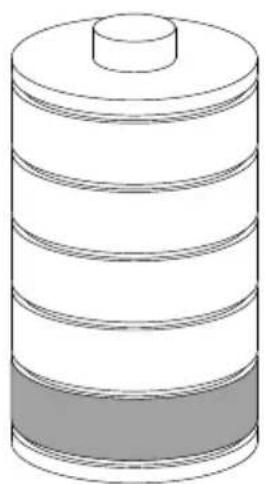
| Battery status (A) Displays | the battery status in a bar (0-20%, 21-40%, 41-60%, 61-80% and 81-100%). The remaining capacity is displayed by the remaining bar on the display during use. If the solar generator is charging, a bar flashes. |
| Battery status in % (B) The | charge status is displayed in percent. |
| Overload protection (C) A | lightning symbol is displayed as soon as the overload protection is activated. |
| AC (D) | Alternating current is active. |
| DC (E) | Direct current is active. |
| INPUT (F) | The input charging power is displayed. |
| Fan (G) | The fan symbol is displayed in AC mode. |
| USB (H) | USB 5V2.4A connections are active. |
| USB-C (I) | Shows that a consumer has been connected using the USB-C connection. |
| OUTPUT AC (J) | The AC output power is displayed. |
11. Start up
⚠️ Note: If certain connections are not used, switch them off to save power. To do this, press the DC button with operating display (11) or AC button with operating display (6).
ATTENTION: When using the respective consumer, select the appropriate output depending on the required type of current for the consumer to be operated.
11.1 Switching the product on and off (Fig. 1) Switching on:
- Press the on/off switch with operating display (5) until the operating display lights up green.
- The LCD display (9) is visible.
Switching off:
- Keep the on/off switch (4) with operating display pressed for a few seconds.
- The operating display and the LCD display (9) go out.
⚠️ Note: The LCD display (9) goes out automatically after a certain amount of time without operation. Press the on/off switch with operating display (4) briefly to switch the LCD display (9) on again.
⚠️ Note: If the DC / AC buttons are switched off and no consumer is connected to the USB C-connection (10), the product is shut down automatically after 15 minutes to save power.
⚠️ Note: Always remember to turn off the product when not in use.
11.2 Supplying the consumer with direct current (Fig. 1, 3)
Press the DC button with operating display (11) to supply the products with direct current.
- Insert a consumer into the corresponding output.
- With the product switched on, press the DC button with operating display (11) to switch on the 12V DC output (7) and the USB connections (8).
- The corresponding operating display lights up and the display symbols for "DC-12V" (E) and USB (H) are displayed on the LCD display (9). (Fig. 3)
-
The corresponding output can now be used.
-
Press the DC button with operating display (11) again to switch off the 12V DC output (7) and the USB connections (8).
- The corresponding operating display goes out and the display symbols for "DC-12V" (E) and USB (H) are no longer displayed on the LCD display (9).
11.3 Supplying the consumer with alternating current (Fig. 1, 3)
Press the AC button with operating display (6) to supply the products with alternating current.
- Insert a consumer into the corresponding output.
- With the product switched on, press the DC button with operating display (6) to switch on the AC output (5).
- The corresponding operating display lights up green and the display symbols for "AC" (D) is displayed on the LCD display (9).
- The fan (G) also switches on when the temperature rises and the corresponding display symbol is displayed on the LCD display (9).
- The output can now be used.
- Press the DC button with operating display (6) again to switch off the AC output (5).
- The operating display goes out and the display symbols for "AC" (D) is no longer displayed on the LCD display (9). The display symbol of the fan (G) disappears as soon
as the device has cooled down again
You can read the consumption of your AC consumers on the LCD display (9). The value indicates how much power your products draw from the solar generator.
11.4 USB C-connection (10) (Fig. 1, 3)
If the USB C-connection (10) is connected to a device, the solar generator (13) detects this automatically and switches on. The connected consumer is charging. At the same time, the LCD display (9) displays information about the battery status.
Note:
- When using the USB C-connection (10), the DC-button with operating display (11) and the AC button with operating display (6) must not be pressed. Furthermore, the on/off switch with operating display (5) must not be pressed.
- Always unplug consumers which are not being used as the solar generator (13) always remains switched on as long as a consumer is connected to the USB C-connection (10).
11.5 LED (12) (Fig. 1)
ATTENTION! Do NOT look directly into the light!
Never point the light beam directly into the eyes of people or animals! Danger of injury.
- Press the LED button (2) with the product switched on.
- The brightness can be adjusted by pressing the LED button (2). The sequence is: low brightness, high brightness and off.
- Press and hold the LED button (2) for 2-3 seconds for the SOS function.
- Press and hold the LED button (2) again to switch it off.
11.6 Overload protection (Fig. 3)
The solar generator (13) is equipped with overload protection.
- Disconnect the consumer from the product which triggers the overload protection. And wait until the overload protection symbol (lightning) on the LCD display (9) disappears.
- Switch the product off and let it cool down for approx. 15 mins.
- Then the product can be used as usual.
⚠️ Note: If the charge status drops below 10%, the solar generator switches itself off.
⚠️ Note: Make sure to fully charge the solar generator before long periods not in use. Otherwise it can negatively affect the service life of the battery.
12. Electrical connection
The connection complies with the applicable VDE and DIN provisions. The customer's mains connection as well as the extension cable used must also comply with these regulations.
Important information
In the event of overloading, the product switches itself off. After a cool-down period (time varies), the product can be switched back on again.
Damaged electrical connection cable.
The insulation on electrical connection cables is often damaged.
This may have the following causes:
- Pressure points, where connection cables are passed through windows or doors.
-
Kinks where the connection cable has been improperly fastened or routed.
-
Places where the connection cables have been cut due to being driven over.
- Insulation damage due to being ripped out of the wall outlet.
- Cracks due to the insulation ageing.
Such damaged electrical connection cables must not be used and are life-threatening due to the insulation damage.
Check the electrical connection cables for damage regularly. Ensure that the connection cables are disconnected from electrical power when checking for damage.
Electrical connection cables must comply with the applicable VDE and DIN provisions. Only use connection cables with the designation "H05VV-F".
The printing of the type designation on the connection cable is mandatory.
13. Cleaning
Attention!
Switch the product off before performing any cleaning work.
We recommend that you clean the product directly after every use.
Wipe dust off the product from time to time with a dry cloth. Do not use any cleaning products or solvents; they could attack the plastic parts of the product. Make sure that no water can penetrate the interior of the product.
14. Transport
When transporting, make sure that the product is switched off and no consumers are connected.
For a short transport distance, carry the product by the transport handle (1).
If transporting the product with a car or similar, please ensure that the product does not move during transport. Otherwise, the product can be damaged. This can lead to electric shock, heating up, fire etc.
15. Storage
Store the product and its accessories in a dark, dry and frost-free place that is inaccessible to children. The optimum storage temperature lies between 0 and 40 °C.
Store the product in its original packaging. Cover the product to protect it from dust or moisture. Store the operating manual with the product.
Do not store the product in the car, boot, loading platform or in other hot locations in direct sunlight. It may cause the product failure, degradation or thermal problem.
Please fully charge the product before storage. To prevent a deep discharge, the product must be charged every 3 months even if not in use.
16. Maintenance
There are no parts on the product that require maintenance. Have tasks that are not described in these operating instructions carried out by our service centre.
Repairs
Repair work on the electrical equipment may only be carried out by electricians.
Please provide the following information in the event of any enquiries:
- Type plate data
Service information
Note that with this product the following parts are subject to natural or usage-related wear, or that the following parts are required as consumables.
Wearing parts*: Rechargeable battery
* may not be included in the scope of supply!
Accessories:
Solar panel Art. no. 5812901901
17. Disposal and recycling
Information on packaging


The packaging materials are recyclable. Please dispose of packaging in an environmentally friendly manner.
Information on the German Electrical and Electronic Equipment Act (ElectroG)
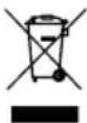
Electrical and electronic appliances do not belong in household waste, but should be collected and disposed of separately.
- Used batteries or rechargeable batteries that are not installed permanently in the old appliance must be removed before disposal. Their disposal is regulated by the battery law.
- Owners or users of electrical and electronic appliances are obliged by law to return them after use.
- The end user bears personal responsibility for deleting his personal data from the old appliance to be disposed of.
- The symbol of the crossed-through rubbish bin means that electrical and electronic appliances may not be disposed of in the household rubbish.
- Electrical and electronic appliances can be handed in at the following places at no charge:
- Public service disposal or collection points (e.g. municipal building yards)
- LIDL offers you return options directly in its shops and markets. Return and disposal are free of charge for you.
- Up to three waste electrical devices per type of device, with an edge length of no more than 25 centimetres, can be returned free of charge to the manufacturer without prior purchase of a new device from the manufacturer or taken to another authorised collection point in your vicinity.
-
Further supplementary take-back conditions of the manufacturers and distributors can be obtained from the respective customer service.
-
If the manufacturer delivers a new electrical appliance to a private household, the manufacturer can arrange for the free collection of the old electrical appliance upon request from the end user. Please contact the manufacturer's customer service for this.
- These statements only apply to appliances that are installed and sold in the countries of the European Union and are subject to European Directive 2012/19/EU. Different provisions may apply to the disposal of electrical and electronic appliances in countries outside the European Union.
Information on the German Battery Act (BattG)

Used batteries and rechargeable batteries do not belong in household waste, but should be collected and disposed of separately.
- For safe removal of batteries or rechargeable batteries from the electrical appliance and for information on their type or chemical system, follow the further information within the operating or installation instructions.
- Owners or users of batteries and rechargeable batteries are obliged by law to return them after use. Return is lim-
ited to the handover of customary household quantities.
- Used batteries can contain harmful substances or heavy metals that can cause damage to the environment and human health. Reuse of the used batteries and use of the resources contained therein contributes to the protection of these two essential commodities.
- The symbol of the crossed-through rubbish bin means that batteries and rechargeable batteries may not be disposed of in household rubbish.
-
In addition, if the symbol Hg, Cd or Pb appears under the rubbish bin, this stands for the following:
-
Hg: Battery contains more than 0.0005% mercury
- Cd: Battery contains more than 0.002% cadmium
- Pb: Battery contains more than 0.004% lead
- Rechargeable batteries and batteries can be handed in at the following places at no charge:
- Public service disposal or collection points (e.g. municipal building yards)
-
Points of sale of batteries and rechargeable batteries
-
Disposal points of the common take-back system for the used batteries of appliances
- Disposal point of the manufacturer (if not a member of the common take-back system)
- These statements apply only to rechargeable batteries and batteries that are sold in the countries of the European Union and that are subject to European Directive 2006/66/EU. Different provisions can apply to the disposal of rechargeable batteries and batteries in countries outside the European Union.
Removing the rechargeable battery before disposing of the appliance
- The integrated rechargeable battery must be removed before disposal of the appliance and disposed of separately in an environmentally friendly manner.
- Mask off the contacts and package the rechargeable battery such that it cannot move in the packaging. Please observe any additional national regulations.
18. Troubleshooting
The following table shows fault symptoms and describes remedial measures in the event of your machine failing to work properly. If you cannot localise and rectify the problem with this, please contact your service workshop.
| Fault Possible cause Remedy | ||
| Device does not work or not as expected | Overheating protection | Check if ambient temperature above 40 °C. Output is restarted when the generator cools down. |
| Battery over-current protection | Disconnect the product from the power connection and carry out commissioning again. | |
| Battery charging protection Contact the customer service department. | ||
| Protection at low discharge temperatures | Check the ambient temperature, whether it is lower than -20 °C. | |
| Battery low voltage protection | Charge the product in good time, restart after it has fully charged. | |
| Power inverter overcurrent protection | Check if the AC output is overloaded or short-circuited. | |
| Power inverter overload protection Check if the AC output is overloaded. | ||
| Power inverter short-circuit protection | Check if the AC output is overloaded or short-circuited. | |
| Protection against overvoltage while charging | Check whether the input voltage exceeds the maximum input voltage. | |
| Battery overheat protection | Check the ambient temperature, whether it is higher than 40 °C. Allow the product to cool down. | |
19. Warranty certificate
Dear Customer,
All of our products undergo strict quality checks to ensure that they reach you in perfect condition. In the unlikely event that your device develops a fault, please contact our service department at the address shown on this guarantee card. Of course, if you would prefer to call us then we are also happy to offer our assistance under the service number printed below. Please note the following terms under which guarantee claims can be made:
- These guarantee terms cover additional guarantee rights and do not affect your statutory warranty rights. We do not charge you for this guarantee.
- Our guarantee only covers problems caused by material or manufacturing defects, and it is restricted to the rectification of these defects or replacement of the device. Please note that our devices have not been designed for use in commercial, trade or industrial applications. Consequently, the guarantee is invalidated if the equipment is used in commercial, trade or industrial applications or for other equivalent activities. The following are also excluded from our guarantee: compensation for transport damage, damage caused by failure to comply with the installation/assembly instructions or damage caused by unprofessional installation, failure to comply with the operating instructions (e.g. connection to the wrong mains voltage or current type), misuse or inappropriate use (such as overloading of the device or use of non-approved tools or accessories), failure to comply with the maintenance and safety regulations, ingress of foreign bodies into the device (e.g. sand, stones or dust), effects of force or external influences (e.g. damage caused by the device being dropped) and normal wear resulting from proper operation of the device.
The guarantee is rendered null and void if any attempt is made to tamper with the device.
- The guarantee is valid for a period of 3 years starting from the purchase date of the device. Guarantee claims should be submitted before the end of the guarantee period within two weeks of the defect being noticed. No guarantee claims will be accepted after the end of the guarantee period. The original guarantee period remains applicable to the device even if repairs are carried out or parts are replaced. In such cases, the work performed or parts fitted will not result in an extension of the guarantee period, and no new guarantee will become active for the work performed or parts fitted. This also applies when an on-site service is used.
- In order to assert your guarantee claim, please contact the service partner shown below. If the complaint is within the guarantee period, we will provide you with a return slip, with which you can return your defective device free of charge to us. It would help us if you could describe the nature of the problem in as much detail as possible. If the defect is covered by our guarantee then your device will either be repaired immediately and returned to you, or we will send you a new device.
Of course, we are also happy offer a chargeable repair service for any defects which are not covered by the scope of this guarantee or for units which are no longer covered. To take advantage of this service, please send the device to our service address.
Service-Hotline (GB):
00800 4003 4003
(0,00 EUR/Min.)
Service-Email (GB):
service.GB@scheppach.com
Service Address (GB):
Forest Park & Garden
Coed Court, Taffsmead Road
Treforest, Ind. Estate, Pontypridd CF375SW
At www.lidl-service.com you can download this and many more manuals, product videos plus installation software.
The QR code takes you directly to the Lidl service page (www.lidl-service.com) and you can open your operating manual by entering the article number (IAN) 420343_2207.
Günzburger Straße 69
D-89335 Ichenhausen
Cher client,
Service-hotline (BE):
00800 4003 4003
(0,00 €/Min.)
Service-Hotline (CH):
00800 4003 4003
(0,00 €/Min.)
Email du service (FR):
service.FR@scheppach.com
E-mailadres (BE):
service.BE@scheppach.com
Service-Email (CH):
service.CH@scheppach.com
Scheppach France Strassburg
2, Impasse Jean Millot
FR - 6700 Strasbourg
Serviceadres (BE):
Service Center Bruyninckx
Guldendelle 30
BE - 1930 Zventem (Nossegem)
Günzburger Straße 69
D-89335 Ichenhausen
Geachte klant,
10.2 Display (afb. 3)
11.5 LED (12) (afb. 1)
11.6 Overbelastingsbeveiliging (afb. 3)
Service-hotline (BE):
00800 4003 4003
(0,00 €/Min.)
E-mailadres / Email du service (NL):
service.NL@scheppach.com
E-mailadres (BE):
service.BE@scheppach.com
Serviceadres / Adresse du service (NL):
Günzburger Straße 69
D-89335 Ichenhausen
Vážený zákazníku,
Günzburger Straße 69
D-89335 Ichenhausen
Szanowny Kliencie,
11.5 Lampka LED (12) (rys. 1)
Günzburger Straße 69
D-89335 Ichenhausen
Vážený zákazník,
11.5 LED (12) (obr. 1)
Günzburger Straße 69
Günzburger Straße 69
D-89335 Ichenhausen
Kære kunde,
Günzburger Straße 69
89335 Ichenhausen, Germania
Egregio cliente,
service.IT@scheppach.com
Günzburger Straße 69
D-89335 Ichenhausen
Kedves Ügyfelünk!

EC Declaration of Conformity Translation of the original EC declaration of conformity
Standard references:
EN IEC 62040-1:2019; IEC 62477-1:2012+A11:2014; EN IEC 61000-6-1:2019; EN 61000-6-3:2007+A1:2011; EN 62133-2:2017
This declaration of conformity is issued under the sole responsibility of the manufacturer.

Last Information Update · Stand der Informationen · Version des informations · Stand van de informatie · Stav informaci · Stan informaciji · Stav informacií · Estado de las informaciones · Tilstand af information · Versione delle informazioni · Informaciók állása · Stanje informaciji
Zadnje informacije · Stadiul informațiilor · Дата на информация · ́Екбоо́н тов пл́профорішу
Update: 09 / 2022 · Ident.-No.: 420343_2207_3912802974-3912802978; 39128029916; 39128029951; 39128029975;
39128029976
IAN 420343_2207