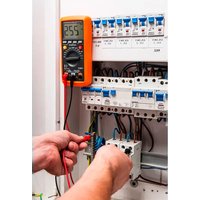
94-001 - Multimeter NEO tools - Free user manual and instructions
Find the device manual for free 94-001 NEO tools in PDF.


| Product Type | Digital Multimeter |
| Brand | NEO tools |
| Model | 94-001 |
| Display | 3½ digit LCD, max 1999, refresh 2-3 times/s |
| Dimensions | 158 x 75 x 35 mm |
| Weight | 200 g (with batteries) |
| Power Supply | 3 x 1.5 V AAA batteries |
| Measurement Category | CAT III, 300 V AC/DC |
| Maximum Measurable Voltage (DC) | 300 V |
| Maximum Measurable Voltage (AC) | 300 V rms |
| Maximum Measurable Current (DC/AC) | 10 A (up to 200 mA on INPUT jack) |
| Maximum Resistance | 20 MΩ |
| Maximum Capacitance | 1000 μF |
| Measurable Temperature | -20 °C to 1000 °C / 0 °F to 1800 °F |
| Main Functions | DC/AC voltage measurement, DC/AC current, resistance, temperature, capacitance, diode, continuity test, transistor hFE, data hold (DATA H), max hold (MAX H), backlight, auto power off |
| Protection | Fuses: F250 mA L250 V (μA/mA) and F10A 300 V (10A) |
| Maintenance and Cleaning | Use a cloth moistened with a mild detergent. Do not use abrasive sponges or solvents. |
| Safety | Do not measure voltages >300 V, disconnect power before resistance measurement, follow safety instructions (see manual) |
| Spare Parts and Repairability | Replaceable fuses (F250mA L250V and F10A 300V), AAA batteries. Repairs with original parts only. |
| Included Accessories | User manual, 1 pair of test leads, 1 thermocouple, 1 transistor adapter |
| Operating Temperature | 0 °C to 40 °C, humidity <75% |
| Storage Temperature | -10 °C to 50 °C, humidity <85% |
Frequently Asked Questions - 94-001 NEO tools
User questions about 94-001 NEO tools
0 question about this device. Answer the ones you know or ask your own.
Ask a new question about this device
Download the instructions for your Multimeter in PDF format for free! Find your manual 94-001 - NEO tools and take your electronic device back in hand. On this page are published all the documents necessary for the use of your device. 94-001 by NEO tools.
USER MANUAL 94-001 NEO tools
natural_image
Digital multimeter with attached probe and test probes (no visible text or symbols on main subject)DIGITAL MULTIMETER INSTRUCTION MANUAL 94-001
SAFETY INFORMATION
This digital multimeter have been designed acco-rding to : EN 61010-1:2010; EN 61010-2-030:2010; EN 61010-2-033:2012; EN 61010-031:2002+A1:2008; EN 61326-1:3013; EN 61326-2-2:2013 with a measurement category (CAT III; 300 V AC/DC; 10 A AC/DC) and pollution degree 2.
Warning
To avoid possible electric shock or personal injury, follow these guidelines:
a. Do not use the meter if it is damaged. Before you use the meter, inspect the case. Pay particular attention to the insulation surrounding the connectors.
b. Inspect the test leads for damaged insulation or exposed metal. Check the test leads for continuity. Replace damaged test leads before you use the meter.
c. Do not use the meter if it operates abnormally. Protection may be impaired. When in doubt, have the meter serviced.
d. Do not operate the meter around explosive gas, vapor, or dust.
e. Do not apply more than the rated voltage, as marked on the meter, between terminals or between any terminal and earth ground.
f. Before use, verify the meter's operation by measuring a known voltage.
g. When measuring current, turn off circuit power before connecting the meter in the circuit. Remember to place the meter in series with the circuit.
h. When servicing the meter, use only specified replacement parts.
i. Use caution when working above 30V ac rms, 42V peak, or 60V dc. Such voltages pose a shock hazard.
j. When using the probes, keep your fingers behind the finger guards on the probes.
k. If you connect test probes to measuring points, connect black „COM" probe first, after it red „INPUT" probe. During disconnecting probes from measurement point perform the reverse operation.
I. Remove the test leads from the meter before you open the battery cover or the case.
m. Do not operate the meter with the battery cover or portions of the case removed or loosened.
n. To avoid false readings, which could lead to possible electric shock or personal injury, replace the batteries as soon as the low battery indicator 🕒 appears.
o. To avoid electric shock, don't touch any live conductor with hand or skin.
p. Remaining endangerment: When an input terminal is connected to dangerous live potential it is to be noted that this potential at all other terminals can occur!
q. CATIII - Third category of measurement mens that multimeter is adapted to connection and measurement of low voltage circuits. For example tools for home use, portable tools and simmilar and Installation circuit inside the building, which all along are inside its walls (Including switchgear and branch circuit components). Don't use this multimeter to measure installations which need fourth class multimeters
Caution
To avoid possible damage to the meter or to the equipment under test, follow these guidelines:
a. Disconnect circuit power and discharge all capacitors before testing resistance, diode, continuity, temperature or capacitor.
b. Use the proper terminals, function, and range for your measurements.
c. Before measuring current, check the meter's fuse and turn off the power to the circuit before connecting the meter to the circuit.
d. Before rotating the range switch to change functions, remove the test leads or the clamp from the circuit under test.
e. Before inserting transistor to the adapter, always be sure all the test leads have been removed from the meter.
f. Remove test leads from the meter before opening the battery cover
SYMBOLS
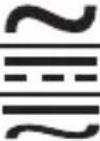 | AC (alternating current) | |
| DC (direct current) | ||
| DC or AC (alternating current or direct current) | ||
 | Important safety information. Refer to the manual. | |
 | Dangerous voltage may be present. Be cautious. | |
 | Earth ground | |
 | Fuse | |
 | Compliance with the „New Approach" Directives of the European Union | |
 | Double insulated |
 | Low battery |
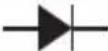 | Diode |
 | The maximum value is being held. |
 | The display data is being held. |
 | Fahrenheit |
 | Centigrade |
 | Continuity test |
 | Measurement with clamp (optional ), widening the field of applications of the meter |
| AUTO Autorange |
MAITENANCE
To continue protection against fire, replace fuse only with the specified voltage and current ratings : F 250 mA L 250V, fast action. To clean the meter, use a damp cloth and mild detergent only, do not use abrasives or solvents on it.
GENERAL DESCRIPTION
This digital multimeter is compact 3½ digits digital multimeter for measuring DC and AC voltage, DC and AC current, resistance, temperature, diode, transistor, continuity, capacitance. It has the functions of polarity indication, data hold, maximum value hold, overrange indication and automatic power-off. It can be operated easily and is an ideal instrument tool.
INSTRUCTION
- Display 3½ digit LCD, with a max. reading of 1999
- "RANGE" Button. The meter defaults to the autorange mode when you measure the voltage, current or resistance. When the meter is in the autorange mode, "AUTO" is displayed. To enter and exit the manual range mode:
a. Press „RANGE" button
The meter enters the manual range mode and the symbol „AUTO“ turns off. Each press of the „RANGE“ button increments the range.
When the highest range is reached, the meter wraps to the lowest range.
b. To exit the manual range mode, press and hold down the „RANGE“ button for 2 seconds, the meter returns to the autorange mode and the symbol „AUTO“ is displayed again.
3. „FUNC." Button
When you measure the current, pressing this button will switch the meter between DC function and AC function. When you measure the temperature, pressing this button will switch the meter between * mode and * mode. When you measure the diode or the continuity, pressing this button will switch the meter between the diode and the continuity functions.
- Power Switch
It can be used to turn on/off the meter.
- Function/Range Switch
This switch can be used to select desired function and range.
- „10A" Jack
Plug-in connector for the red test lead for current (200mA\~10A)
measurements.
- „COM" Jack
Plug-in connector for black (negative) test lead.
- „INPUT" Jack
Plug-in connector for the red test lead for all measurements except current (≥ 200mA) measurements.

Button
To turn on or off the backlight, press and hold this button for about 2 seconds.
The backlight will turns off automatically about 15 seconds later
after you turn on it.
- DATA H Button
After pressing the button, the present reading is held on the display, meanwhile DATA H is displayed on the LCD as an indicator. To exit the Hold Mode, press the button again and the indicator DATA H will disappear.
- MAX H Button
To hold the maximum value, press this button, and MAX H will appear as an indicator, the meter will hold the maximum value of all readings taken since the button was pressed. To exit the maximum value hold mode, just press this button gain, and MAX C appear.
In some ranges, the maximum value hold mode is not available.
GENGRAL SPECIFICATION
Display: LCD, 1999 counts, updates 2-3 times/sec
Overrange Indication: „OL" shown on the display
Battery: 1.5V X 3, AAA
Polarity Indication: „-” displayed automatically
Low Battery Indication: + shown on the display
Operating Temperature: 0°C to 40°C, <75%RH
Storage Temperature: -10°C to 50°C, <85%RH
Dimensions: 158 X 75 X 35 mm
Weight: about 200g (including battery)
SPECIFICATIONS
Accuracy is specified for a period of one year after calibration and at 18°C to 28°C, with relative humidity <75%.
DC Voltage
| Range Resolution Accuracy | |
| 200mV 0.1mV | |
| 2V 0.001V | |
| 20V 0.01V | |
| 200V 0.1V | |
| 300V 1V ± (1%+5) |
Input Impedance: 10M
Overload Protection: 300V DC/AC rms (200mV range : 250V DC/AC rms)
Max. Input Voltage: 300V D
AC Voltage
| Range Resolution Accuracy | |
| 2V 0.001V | |
| 20V 0.01V | |
| 200V 0.1V | |
| 300V 1V ± (1.2%+5) |
Input Impedance: 10M
Frequency Range: 40Hz \~ 400Hz
Overload Protection: 300V DC/AC rms
Response: Average, calibrated in rms of sine wave
Max. Input Voltage: 300V AC rms
DC Current
| Range Resolution Accuracy | |
| 200μA 0.1μA | |
| 2000μA 1μA | |
| 20mA 0.01mA | |
| 200mA 0.1mA | |
| 2A 0.001mA | |
| 10A 0.01A ± (2%+10) |
Overload Protection:
μA and mA ranges: 250mA L 300 fuse
2A and 10A ranges: fuse F10A300V
Max. Input Current:
„INPUT" jack : 200mA
„10A" jack: 10A
( For measurements > 5A : duration <15 seconds, interval >15 minutes )
Voltage Drop: 200μA, 20mA and 2A ranges : 20mV
2000μA, 200mA and 10A ranges: 200mV
AC Current
| Range Resolution Accuracy | |
| 200μA 0.1μA | |
| 2000μA 1μA | |
| 20mA 0.01mA | |
| 200mA 0.1mA | |
| 2A 0.001mA | |
| 10A 0.01A ±(3.0%+10) |
Overload Protection:
μA \~ and mA ranges: F 250mA L 250V fuse
2A and 10A ranges: unfused
Max. Input Current:
„INPUT" jack: 200mA
„10A" jack: 10A
( For measurements > 5A : duration <15 seconds, interval >15 minutes )
Voltage Drop: 200μA, 20mA and 2A ranges : 20mV
2000μA, 200mA and 10A ranges: 200mV
Frequency Range: 40Hz \~ 400Hz
Response: Average, calibrated in rms of sine wave.
DC Current (with clamp, optional)
| Range Resolution Accuracy | ||
 200A 200A | 0.1mV/0,1A ± (1.2%+5) | |
| 1000A | 1mV/1A ± (1.2%+5) | |
Overload Protection: 250V DC/AC rms
Max. Input Voltage: 200mV
AC Current (with clamp, optional)
| Range Resolution Accuracy | ||
 200A 200A | 0.1mV/0,1A ± (1.5%+5) | |
| 1000A | 1mV/1A ± (1.5%+5) | |
Overload Protection: 250V DC/AC rms
Max. Input Voltage: 200mV
Frequency Range: 40Hz \~ 400Hz
Response: Average, calibrated in rms of sine wave
Resistance
| Range Resolution Accuracy | |
| 200Ω 0.1Ω | ± (1.2%+5) |
| 2kΩ 0.001Ω | ± (1%+5) |
| 20kΩ 0.01Ω | |
| 200kΩ 0.1Ω | |
| 2MΩ 0.001Ω ± (1.2%+5) | |
| 20MΩ 0.01Ω ± (1.5%+5) |
Open Circuit Voltage: about 0.25V
Overload Protection: 250V DC/AC rms
Temperature (°C, °F)
| Range Resolution Accuracy | |
| -20°C ~ 1000°C 1°C | |
| 0°F ~ 1800°F 1°F | |
Overload Protection: 250V DC/AC rms
Capacitance
| Range Resolution Accuracy | |
| 20nF 0.01μF | ± (8%+10) |
| 200nF 0.1μF | ± (5%+5) |
| 2μF 0.001μF | |
| 20μF 0.01μF | |
| 200μF 0.1μF | |
| 1000μF 1μF ± (8%+10) |
Overload Protection:
200μF and 1000μF ranges: no overload protection the other ranges: F 250mA L 250V fuse
Open Circuit Voltage: about 0.5V
Overload Protection: 250V DC/AC rms
Transistor hFE Test
| Range hFE Test | Current Test Voltage | ||
| PNP : NPN 0 ~ 1000 | Ib ≈ 2 Vce ≈ 1V |
Diode and Continuity
| Range Resolution | Accuracy | |
 | it Voltage: about 0.5V The approximate forward voltage drop will be displayed | Open Circuit Voltage: about 1.5V |
 | The built-in buzzer will sound if the resistance is less than about 30 | Open Circuit Voltage: about 0.5V |
Overload Protection: 250V DC/AC rms
For Continuity Test:
When the resistance is between 30 and 100, the buzzer may sound or may not sound. When the resistance is more than 100, the buzzer won't sound
- Connect the black test lead to the „COM" jack, and the red test lead to the „INPUT" jack.
- Set the range switch to or-position.
Select auto range or manual range with the „RANGE“ button.
- In manual range, if the voltage magnitude to be measured is not known beforehand, select the highest range.
- Connect the test leads across the source or load to be measured.
- Read the reading on the display. For DC voltage measurement, the polarity of the red test lead connection will be indicated as well.
Note:
- In small range, the meter may display an unstable reading when the test leads have not been connected to the load to be measured. It is normal and will not affect the measurements.
- In manual range mode, when the meter shows the overrange symbol „OL“, a higher range has to be selected.
- To avoid damage to the meter, don't measure a voltage which exceeds 300 Vdc (for DC voltage measurement) or 300Vac (for AC voltage measurement).
Measuring Current
- Connect the black test lead to the „COM“ jack. If the current to be measured is less than 200mA, connect the red test lead to the „INPUT“ jack. If the current is between 200mA and 10A, connect the red test lead to the „10A“ jack instead.
- Set the range switch to desired A , mA or A range. If the current magnitude to be measured is not known beforehand, set the range switch to the highest range position and then reduce it range by range until satisfactory resolution is obtained.
- Select DC current measurement or AC current measurement with the „FUNC." button.
-
Select auto range or manual range with the „RANGE" button. In manual range, if the current magnitude to be measured is not known beforehand, select the highest range.
-
Connect test leads in series with the circuit to be measured.
- Read the reading on the display. For DC current measurement, the polarity of the red test lead connection will be indicated as well.
Note:
When the display shows the overrange symbol „OL“, a higher range has to be selected.
Measuring Current (with clamp, optional)
- If you want to measure DC current, you must use the DC clamp. If you want to measure AC current, you must use the AC clamp.
- Connect the negative (-) output lead of the selected clamp to the „COM“ jack, connect the positive (+) output lead of the clamp to the „INPUT“ jack,
- Set the range switch to position
- Select DC current measurement or AC current measurement with the "FUNC." button.
- Select auto range or manual range with the „RANGE" button. In manual range, if the current magnitude to be measured is not known beforehand, select the highest range.
- Clamp the circuit to be measured with the clamp. Each time only one cable should be clamped and the cable should be in the center of the clamp jaws.
- Read the reading on the display. For DC current measurement, the polarity of the positive (+) output lead of the clamp will be indicated as well.
Note:
- In manual range mode, when the display shows the overrange symbol „OL“, a higher range has to be selected.
- Don't touch the circuit under test with hand or skin.
- Matching problem about the meter and the sensitivity of the clamp :
a. The sensitivity of the matching clamp is 0.1A/0.1mV. If you use a matching clamp, the present indicated value is same to the measured value.
b. If you use a clamp whose sensitivity does not equal 0.1A/0.1mV, you should multiply the present reading by a factor which is determined by the used clamp, the result is the measured value.
To determine the factor, please refer to the instruction of the clamp which you use.
Measuring Resistance
- Connect the black test lead to the „COM“ jack and the red test lead to the „INPUT“ jack (Note: The polarity of the red test lead is positive „+”).
- Set the range switch to range .
- Select auto range or manual range with the „RANGE“ button. In manual range mode, when the display shows the overrange symbol „OL“, a higher range has to be selected.
- Connect the test leads across the load to be measured.
- Read the reading on the display.
Note:
- For resistance measurements > 1MΩ, the meter may take a few seconds to stabilize reading. This is normal for high-resistance measurement.
-
When the input is not connected, i.e. at open circuit, the symbol „OL“ will be displayed as an overrange indicator.
-
Before measuring in-circuit resistance, be sure that the circuit under test has all power removed and all capacitors are fully discharged.
Measuring Capacitance
- Connect the black test lead to the „COM“ jack and the red test lead to the „INPUT“ jack.
- Set the range switch to desired „1000μF“, 20μF” or „nF” position.
- Select auto range or manual range with the „RANGE“ button.
- Connect test leads across the capacitor to be measured. Make sure that the polarity of connection is observed (The red test lead should be connected to the anode of the capacitor, the black one should be connected to the cathode of the capacitor).
- Read the reading on the display.
Note:
In small range, before the test leads are connected to the capacitor, the display may show a reading, it is normal because of the stray capacitance of the test leads and input circuit of the meter. It will not affect the measurement accuracy.
Continuity Test
- Connect the black test lead to the „COM“ jack and the red test lead to the „INPUT“ jack (Note: The polarity of the red test lead is positive „+”).
- Set the range switch to range .)))
- Press the "FUNC." button to select continuity measurement mode, and the symbol \\ will appear as an indicator.
- Connect the test leads to the circuit to be measured.
- If the circuit resistance is lower than about 30, the built-in buzzer will sound.
Diode
- Connect the black test lead to the „COM“ jack and the red test lead to the „INPUT“ jack (Note: The polarity of the red test lead is positive „+“).
- Set the range switch to range →.
- Press the "FUNC." button to select diode measurement mode, and the symbol → will appear as an indicator.
- Connect the red test lead to the anode of the diode to be tested and the black test lead to the cathode.
- The meter will show the approximate forward voltage of the diode.
- If the connections are reversed, "OL" will be shown on the display.
Transistor Test
- Set the range switch to hFE position.
- Connect the adapter to the „COM" jack and the „INPUT" jack. Don't reverse the connection.
- Identify whether the transistor is NPN or PNP type and locate emitter, base and collector lead. Insert the leads of the transistor to be tested into the proper holes of the transistor test socket of the adapter.
- LCD display will show the approximate hFE value.
Measuring Temperature
- Set the range switch to Temp range.
-
Press the „FUNC.“ button to select °C or °F mode, and the symbol „°C„ or „°F„ will appear as an indicator.
-
Insert the black (or „-“) plug of the K type thermocouple to the „COM“ jack, and the red (or „+“) plug to the „INPUT“ jack.
- Carefully touch the end of the thermocouple to the object to be measured.
- Wait a while, read the reading on the display.
Auto Power Off
If you don't operate the meter for about 15 minutes, it will turn off automatically. To turn on it again, just rotate the range switch or press a button.
If you press the „DATA H” button to arouse the meter after it turns off automatically, the automatic power-off function will be disabled.
BATTERY REPLACEMENT
When the symbol 🕒 appears on the display, it shows that the battery should be replaced. To replace the battery, use an appropriate screwdriver to gently rotate the rotary lock on the battery cover by 90° in the indicated direction. Remove battery cover, replace the exhausted batteries with new batteries of the same type („AAA” type). Reinstall the battery cover, and gently rotate the rotary lock by 90° clockwise to lock the battery cover.
Note:
Excess force will cause damage to the rotary lock.
Don't use a screwdriver which is not big enough.
FUSE REPLACEMENT
| Owners manual 1 piece | |
| Test leads 1 pair | |
| K type thermocouple 1 piece | |
| Adapter 1 piece |
ENVIRONMENT PROTECTION

Do not dispose of electrically powered products with household wastes, they should be utilized in proper plants. Obtain information on wastes utilization from your seller or local authorities. Used up electric and electronic equipment contains substances active in natural environment. Unrecycled equipment constitutes a potential risk for environment and human health
| Gama Descompunere Exactitate | ||
| 20nF | 0.01nF ± (8%+10) | |
| 200nF | 0.1nF | ± (5%+5) |
| 2μF | 0.001μF | |
| 20μF | 0.01μF | |
| 200μF | 0.1μF | |
| 1000μF | 1μF | ± (8%+10) |
PAGRINDINIAI MATUOKLIO DUOMENYS
Ekranas: LCD, maksimali informacija 1999, duomenys atnaujinami 2-3 kartus per sek.
leejas impedance: 10MΩ
Leejas impedance: 10MΩ
Frekvences diapazons: 40Hz \~ 400Hz
REPLACEMENT DU FUSIBLE

- DIGITAL MULTIMETER INSTRUCTION MANUAL 94-001
- SAFETY INFORMATION
- Warning
- Caution
- To avoid possible damage to the meter or to the equipment under test, follow these guidelines:
- MAITENANCE
- GENERAL DESCRIPTION
- INSTRUCTION
- „FUNC." Button
- GENGRAL SPECIFICATION
- SPECIFICATIONS
- Note:
- Measuring Current
- Measuring Current (with clamp, optional)
- Measuring Resistance
- Measuring Capacitance
- Continuity Test
- Diode
- Transistor Test
- Measuring Temperature
- Auto Power Off
- BATTERY REPLACEMENT
- ENVIRONMENT PROTECTION
- PAGRINDINIAI MATUOKLIO DUOMENYS
- REPLACEMENT DU FUSIBLE
Brand : NEO tools
Model : 94-001
Category : Multimeter