STLK 8 D2 - Air-conditioner SILVERCREST - Free user manual and instructions
Find the device manual for free STLK 8 D2 SILVERCREST in PDF.


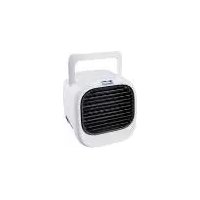
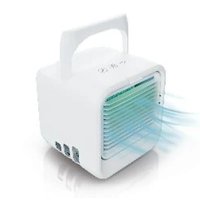
| Product type | Air cooler with fan and ambient lighting |
| Brand | SilverCrest |
| Model | STLK 8 D2 |
| Dimensions (W x D x H) | Approx. 177 x 167 x 178 mm |
| Weight | Approx. 700 g |
| Power supply | USB-C power adapter, input 100-240 V AC, output 5 V / 2 A (10 W) |
| Power consumption | Up to 8 W in normal operation (depending on lighting and speed) |
| Maximum air flow | 4.04 m³/min |
| Noise level | 61.4 dB(A) |
| Fan speed | 3 adjustable speeds |
| Evaporation rate | Speed 1: ~80 ml/h, Speed 2: ~90 ml/h, Speed 3: ~100 ml/h |
| Runtime (full tank) | Approx. 7 hours |
| Water tank capacity | 300 to 700 ml (fill level display) |
| Ambient lighting | Multicolor LED with color cycle mode, 8 colors + dimming (100%, 50%, 30%) |
| Air filter | Removable filter, weekly cleaning, replacement every 6 months |
| Maintenance | Clean tank every 72h with vinegar; air filter: soak in water+vinegar for 15 minutes |
| Safety | Indoor use only; do not immerse; unplug before cleaning; do not cover grilles |
| Spare parts | Air filter available at shop.targa.de (ref. IAN 446361_2307) |
| Warranty | 3 years (excluding normal wear and filter) |
| Operating temperature | 5 °C to +40 °C, max 75% RH |
| Storage temperature | -10 °C to +50 °C, max 85% RH |
Frequently Asked Questions - STLK 8 D2 SILVERCREST
User questions about STLK 8 D2 SILVERCREST
0 question about this device. Answer the ones you know or ask your own.
Ask a new question about this device
Download the instructions for your Air-conditioner in PDF format for free! Find your manual STLK 8 D2 - SILVERCREST and take your electronic device back in hand. On this page are published all the documents necessary for the use of your device. STLK 8 D2 by SILVERCREST.
USER MANUAL STLK 8 D2 SILVERCREST
Last Information Update
KLIMATYZATOR STOŁOWY
Operating instructions and safety instructions
NI RE
TABEL LIGHTKOELED
TAFEL-LOCHIKOELER
Hondeling en Weightedochwitzingen
02
STOLNI CHLADICI VENTILATOR
4. Bedienelemente
natural_image
Line drawing of a mechanical device with a base and top component, showing no text or symbols.
natural_image
Line drawing of a computer monitor with ventilation grilles and ventilation ducts (no text or symbols)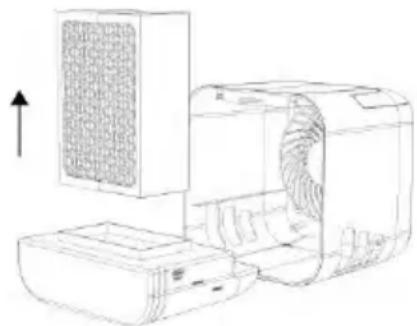
natural_image
Line drawing of a portable air conditioner unit with a mesh cover and fan blade (no text or symbols)natural_image
Technical line drawing of an air conditioner unit showing internal components and airflow direction (no text or symbols)https://www.targa.gmbh/downloads/conformity/446361_2307.pdf
9.1 Filling/refilling the water reservoir 37
9.2 Operation....38
9.2.1 Establishing the power supply....38
9.2.2 Switching the air cooler on....39
9.2.3 Mood light....39
9.2.4 Dimming the mood light 39
9.2.5 Adjusting the fan speed....40
9.2.6 Switching the air cooler off 40
- Cleaning the air cooler 40
10.1 Cleaning the front panel and housing....41
10.2 Cleaning the water reservoir....41
10.3 Cleaning the fan ....41
10.4 Cleaning the air filter 41
10.5 Reassembling the air cooler 42
- Transporting the air cooler.... 42
- Storage when not in use 42
- Ordering replacement filters.... 43
13.1 Replacing the air filter....43
- Troubleshooting.... 44
- Environmental regulations and disposal information.... 45
- Conformity notes 47
- Warranty and Service Information 48
Congratulations!
By purchasing the SilverCrest STLK 8 D2 tabletop air cooler, hereinafter referred to as the air cooler, you have opted for a quality product.
Before first using it, familiarise yourself with the way the air cooler works and read these operating instructions through carefully. Be careful to follow the safety instructions and only use the air cooler as described in the operating instructions and for the applications given.
Keep these operating instructions in a safe place. If you sell or pass this air cooler on to another person, it is imperative that you also hand over this manual. It is an integral part of the product.
1. Trademark information
The SilverCrest trademark and the SilverCrest brand are the property of their respective owners.
Other names and product can be trademarks or registered trademarks of their respective owners.
2. Intended use
This air cooler is designed to refresh the air in enclosed rooms. The air cooler is not intended to be used as a light. It has not been designed for corporate or commercial applications. Use the air cooler for private purposes only. Any use other than that mentioned above does not correspond to the intended use. This air cooler fulfils all standards and directives listed in the EU Declaration of Conformity. Any modifications to the air cooler which are not approved by the manufacturer, improper repairs or use of non-authorised replacement parts may result in these directives no longer being met. The manufacturer accepts no liability for any damage or malfunctions resulting from this.
Observe the regulations and laws in the country of use.
3. Package contents
Remove the air cooler and all the accessories from the packaging. Remove all packaging material and check that all parts are complete and undamaged. If you find anything missing or damaged, please contact the manufacturer.
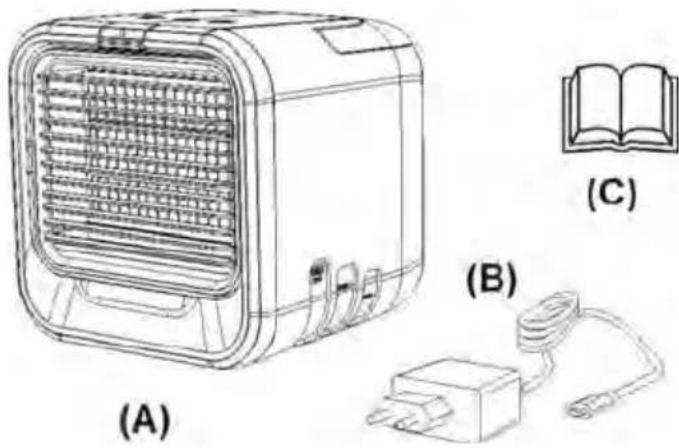
(A) SilverCrest air cooler STLK 8 D2
(B) Mains power adapter with USB cable
(c) This user manual
4. Controls
On the inside of the cover, the air cooler is shown with figures indicated. The meanings of the numbers are as follows:
1 Closure flap on front panel
2 On/Off button
3 Fan speed button
4 Mood light button
5 Handle
6 Power input socket (type USB-C)
7 Air inlet grille
8 Non-slip feet
9 Fill level display
10 Front panel (with adjustable air outlet grille)
11 Air filter
12 Housing
13 Water reservoir
5. Technical specifications
5.1 Air cooler
| Operating voltage 5 V | ... |
| Nominal current consumption 2 A | |
| Dimensions (WxDxH) approx. 177 | x 167 x 178 mm |
| Weight approx. 700 g | |
| Operating environment 5°C to +40°C, max. 75% rel. humidity | |
| Storage temperature -10°C to +50°C, max. 85% rel. humidity | |
| Evaporation volume Fan speed 1: approx. 80 ml/hFan speed 2: approx. 90 ml/hFan speed 3: approx. 100 ml/h | |
| Air cooling time with full water reservoir | Approx. 7 hours |
5.2 Mains power adapter
| Vendor, address, register of commerce number | TARGA GmbH, Coesterweg 45, 59494 Soest (Germany), HRN: 12035 |
| Manufacturer 601A, 602A, 603A, | 604A, 701A, 702A, 703A, and 704A,Building 22, CIMC Intelligent Manufacturing Center, No. 15,Shunye West Road, Xingtan Town, Shunde District, Foshan City,Guangdong Province, China |
| Model | EU: TY0500200E1mnUK: TY0500200G1mn |
| Input voltage 100 - 240 V | |
| AC input frequency 50 / 60 Hz | |
| Output voltage 5.0 V | ... |
| Output current 2.0 A | |
| Output power 10.0W | |
| Average efficiency when in use | 79.1 % |
| Power consumption at zero load | 0.07 W |
Note on IP protection class: The mains power adapter is protected against solid foreign bodies with a diameter greater than 12.5 mm, corresponding to protection class IP20.
5.3 Fan
| Maximum fan flow rate F 4.04 m^3 /min | |
| Power consumption P 7.4 W | |
| Service value SV* 0.55 ( m^3 /min)/W | |
| Power consumption in standby mode PSB | 0.098 W |
| Noise level LWA 61.4 dB(A) | |
| Max. air speed c 3.454 m/s | |
* Determined in accordance with IEC 60879 2019
The air cooler has a rated power of 10 W (5 V / 2 A). If used properly, the power consumption is up to 8 W, depending on the lighting setting and the fan speed.
The technical data and design may be changed without prior notice.
6. Safety instructions
Before you use this air cooler for the first time, please read the following notes and heed all warnings, even if you are familiar with handling electronic devices. Keep these operating instructions in a safe place for future reference.
Explanation of warnings and symbols used
DANGER! This signal word indicates a danger with a high risk, which will lead to death or major injuries if not avoided.
WARNING! This signal word indicates a danger with a moderate risk, which can lead to death or major injuries if not avoided.

ATTENTION! This signal word indicates a danger with a low risk, which can lead to minor or moderate injuries if not avoided.

CAUTION! This signal word indicates important instructions to protect against damage to property. This symbol denotes further information on the topic.
DC voltage
AC voltage
Protection Class II
Use only in dry, indoor areas!
This symbol indicates that the operating instructions must be read/followed before use.
Manufacturer's address
Short-circuit protected, sealed safety transformer
Switchable power supply
The mains power adapter is designed for a maximum ambient temperature of 40 °C .
Efficiency Class 6
Do not use the mains power adapter (B) if the contact pins are bent or damaged.
USB-C port
DANGER! Personal safety
- This air cooler may be used by children of 8 years or over or by persons with physical, sensory or mental impairments or those
with no knowledge or experience, providing they are supervised or they have been given instructions on the proper use of the air cooler and they understand the associated risks. Do not allow children to play with the air cooler.
- The product must not be cleaned or maintained by unsupervised children.
- Keep the air cooler and all accessories out of the reach of children under the age of 8 years.
Keep the packaging materials out of the reach of children. There is a risk of suffocation!
General safety instructions
- Check the air cooler for visible damage before use. Damaged devices must not be used. Risk of injury!
- Only use the air cooler and the mains power adapter (B) in dry inside spaces!
- Please note that the high humidity can encourage the growth of biological organisms nearby.
- Do not allow the area around the air cooler to get too damp or wet. If the area gets too damp, reduce the fan speed. If the fan speed cannot be reduced any further, the air cooler should only be used periodically. Do not allow absorbent materials such as carpets, curtains or tablecloths to get damp.
-
Do not leave water in the water reservoir (13) when the air cooler is not in use.
-
Empty and clean the air cooler before storing it. Clean the air cooler before you use it again.
- WARNING: Micro-organisms which could be present in the water or the area where the air cooler is used or stored can grow in the water reservoir (13) and be emitted into the air, which can lead to serious health risks if the water is not replaced and the water reservoir (13) properly cleaned every 72 hours.
- The water reservoir (13) must be emptied and refilled after 72 hours at most. Before refilling, clean the water reservoir (13) with clean water and a little vinegar. Remove any sediment, deposits or layers of dirt from the surface of the water reservoir (13) and internal surfaces. Carefully dry all surfaces.
- Always place the air cooler on a stable surface so it cannot tip over.
• Always use the handle (5) to move the air cooler. - Any repairs to the air cooler or the mains power adapter (B) must be carried out by the manufacturer's customer services department or an authorised professional to eliminate any risks to the user. Any improper repair attempts will invalidate the warranty.
-
Never expose the air cooler to rain. Protect the device from moisture and make sure that no liquids or objects are allowed to penetrate the housing. Never immerse the device in water and do not place objects containing liquids (e.g. vases) on the air cooler. This could cause irreparable damage.
-
Do not use the air cooler near naked flames such as candles. This could cause irreparable damage.
- Avoid direct sunlight. This could cause irreparable damage to the air cooler.
- Please note that furniture care products may contain substances that can damage the non-slip feet (8) of the air cooler, so be careful if you have been using this type of products.
- Unplug the mains power adapter (B) from the mains socket before cleaning or transporting the device, removing and replacing the filter and refilling with water.
- In order to completely disconnect the air cooler from the mains, unplug the mains power adapter (B) from the mains socket.
- Never pull on the cable to remove the mains power adapter (B) from the mains outlet, always pull the mains power adapter (B) itself. Otherwise, it could get damaged.
- Only use the power adapter and cable provided to supply power to the air cooler. Do not use other power adapters.
- Do not use the power adapter provided to supply power to other electrical devices.
- The power input socket (6) cannot be used for charging devices with a USB charging connector (e.g. a mobile phone). This could damage the air cooler or the external device.
-
Do not connect other charging devices (e.g. power banks) to the power input socket (6). This could damage the air cooler or the external device.
-
Do not insert items through the air inlet grille (7) or the air outlet grille on the front panel (10) into the device.
- Never cover the air inlet grill (7) or the air outlet grill on the front panel (10) and leave plenty of clear space around the device.
- Do not place any objects on the air cooler.
- Only fill the water reservoir (13) with fresh tap water or distilled water, never with other liquids.
- Never operate the air cooler near naked flames or other heat sources.
- Only use the air filters (11) designed for this air cooler. These air filters (11) may not be used for other devices, nor may other air filters be used for the air cooler.
- This air cooler is not intended for operation with an external clock timer or separate remote control system.
Note on mains disconnection
The mains power adapter (B) still uses electricity in standby mode. To disconnect properly from the mains, it must be unplugged from the mains socket.

No action needs to be taken by the user to set the product to 50 or 60 Hz. The product automatically adjusts to 50 or to 60 Hz.
7. Copyright
All the contents of this user manual are protected by copyright and provided to the reader for information only. Copying data and information without the prior explicit written consent of the author is strictly forbidden. This also applies to any commercial use of the contents and information. All texts and diagrams are up-to-date as of the date of printing. Subject to change without notice.
8. Before you start
Check the air cooler and the accessories for damage. If the air cooler is damaged, do not use it.
9. Getting started
Place the air cooler on a flat, stable surface (e.g. a table). When you carry it, use the fold-out handle (5).

CAUTION! If the device is faulty or used incorrectly (too much liquid added), water can leak out of the bottom of the device.
CAUTION! If there is no water in the water reservoir (13), the air cooler can be switched on using the on/off button (2), but only works as a fan (i.e. it will not cool the air). The light effects can still be set using the mood light button (4).
The parts of the air cooler can be taken apart and put back together without tools. So it is easy to refill and clean the air cooler.
Wet the new air filter (11) completely under cold, running water before putting it into operation. This ensures optimum cooling effect from the start.
9.1 Filling/refilling the water reservoir

WARNING! The water reservoir (13) must be emptied, cleaned and refilled after 72 hours at most. Micro-organisms present in the water or the area where the air cooler is used or stored can grow in the water reservoir (13) and be emitted into the air, which can lead to serious health risks if the water is not replaced and the water reservoir (13) properly cleaned every 72 hours.
How to fill the water reservoir (13):
- Press slightly with your finger on the top of the closure flap of the front panel (1). This allows it to be detached from the housing.
- Now pull the water reservoir (13) with the air filter (11) inserted carefully forwards out of the housing (12).
- Lift the air filter (11) up out of the water reservoir (13).
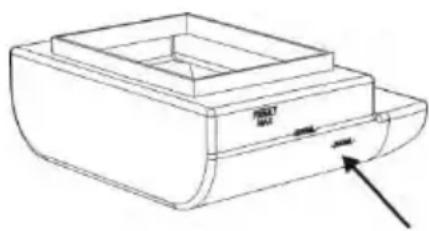
- Fill the water reservoir (13) with water. For the device to work properly, there must be between 300 ml and 700 ml water in the reservoir. Keep an eye on the fill level display (9) on the side of the water reservoir (13), see the arrow in the diagram opposite.
natural_image
Line drawing of a mechanical device with a base and top component, showing an arrow pointing to a component (no text or symbols present)
You can also pre-chill the tap water in the fridge or fill the water reservoir (13) with ice cubes for a better cooling effect.

CAUTION! Only use fresh, clean tap water or distilled water. Adding other substances (e.g. essential oils) could damage the air cooler.
- Insert the air filter (11) into the water reservoir (13), push both back into the housing (12) and replace the front panel (10) so that the closure flap on the front panel (1) clicks into place. First, feed the lug on the bottom of the front panel with adjustable air outlet grille (10) into the recess in the bottom of the front side of the casing then push the top edge of the front panel with adjustable air outlet grill (10) against the housing (12) until it clicks properly into place.
The air cooler is now ready to use.
9.2 Operation

The air cooler does not indicate that the water reservoir is empty (13). So you should keep an eye on the fill level display (9) and top up the water as necessary.

You can also use the device without water. In this case, it does not cool the air, it just moves it around like a fan.
9.2.1 Establishing the power supply
How to connect the air cooler to the power supply:
-
Connect the mains power adapter (B) to a mains socket which meets the power adapter specifications (see Chapter 5, Technical specifications).
-
Then connect the cable connector (type USB-C) from the power adapter to the power input socket (6) on the back of the air cooler.
9.2.2 Switching the air cooler on
How to switch the air cooler on:
- Press the On/Off button Ⓞ (2) to switch the air cooler on.
The mood light flashes once to indicate fan speed 1. The air cooler starts working.
- Set the air outlet grille on the front panel (10) to the angle you want to adjust the direction of the air flow.
9.2.3 Mood light
After it is switched on, the air cooler initially works with no light effects. But you can select from a range of colours and effects to suit your mood:
-
Press the mood light button ⚙ (4) once. The device then switches into colour change mode. The colour of the mood light changes every few seconds.
-
Press the mood light button ⚙(4) again. The mood light turns green.
You can press the mood light button ⚙(4) multiple times to toggle through the light colours or switch the light off again.
Every press of the mood light button (4) changes the light colour in the following sequence:
Mood light off - Colour change mode - green - red - blue - yellow - purple - white - light blue - Mood light off - etc.
9.2.4 Dimming the mood light
If you wish, you can reduce the light intensity of the mood light. How to dim the mood light:
-
Press and hold the mood light button ⚙(4). After three seconds, the light intensity is reduced to 50% of the luminosity.
-
If you press and hold the mood light button ⚙ (4) again, the light intensity is reduced to 30% of the luminosity.
-
Press and hold the mood light button ⚙ (4) again and the light intensity of the mood light reverts to full luminosity (100%).
9.2.5 Adjusting the fan speed
After it is switched on, the air cooler is initially set to fan speed 1. If necessary, you can adjust the air flow to your requirements. The procedure is as follows:
- Press the fan speed button (3). The mood light flashes blue twice and the fan moves to speed 2.
- Press the fan speed button Ⓐ(3) again. The mood light flashes blue three times and the fan moves to speed 3.
- Press the fan speed button Ⓤ (3) again. The mood light flashes blue once and the fan reverts to speed 1.
9.2.6 Switching the air cooler off
How to switch the air cooler off:
- Press the On/Off button Ⓒ (2) to switch the air cooler off.
The fan switches off and the mood light goes out.
10. Cleaning the air cooler
WARNING! Disconnect the air cooler from the power supply before cleaning for safety reasons.
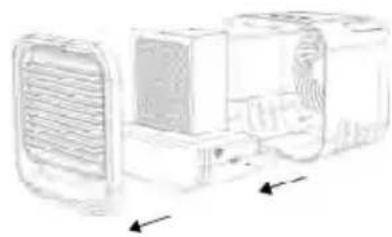
To clean the air cooler, open the housing (12) and disassemble the air cooler. The procedure is as follows:
- Disconnect the mains power adapter (B) from the mains socket and disconnect the power adapter cable from the power input socket (6) on the air cooler.
- Press slightly with your finger on the top of the closure flap of the front panel (1). This allows it to be detached from the housing.
- Now pull the water reservoir (13) with the air filter (11) inserted carefully forwards out of the housing (12).
- Lift the air filter (11) up out of the water reservoir (13). If the air filter is still wet, place it in a bowl, in the sink or in a wash-basin where it can drip.
natural_image
Diagram of a vehicle interior showing airflow or ventilation system with no visible text or symbols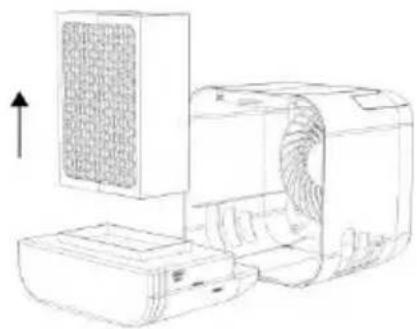
natural_image
Line drawing of a computer with a grid-patterned panel and external casing (no text or symbols)10.1 Cleaning the front panel and housing
To clean front panel with adjustable air outlet grille (10) and the housing (12), use a clean, soft cloth, which you can moisten slightly if necessary. Never use solvents or aggressive detergents. Make sure that no liquid gets into the housing (12). You can dust the air outlet grill with a soft paintbrush or blast the dust off with dry compressed air.
10.2 Cleaning the water reservoir
The water reservoir (13) should be cleaned after every use but at least every 72 hours to avoid a build-up of bacteria. How to clean the water reservoir (13):
- Pour away any remaining water.
- Fill the water reservoir (13) with 500 ml warm tap water and add a tablespoonful of vinegar. Gently stir the water and leave to stand for approx. 5 minutes.
- Pour away the vinegar and water mix and rinse the water reservoir (13) out with fresh tap water.

If there is a build-up of dirt in the corners of the water reservoir (13), use a bottle brush or a toothbrush to remove it.
- Wipe the water reservoir (13) dry inside and out.
10.3 Cleaning the fan
You can remove dust from the fan and the air inlet grille (7) using a soft paintbrush. If necessary, you can blast it out with dry compressed air.
10.4 Cleaning the air filter
You should clean the air filter (11) once a week. You should also replace it with a new air filter (11) every 6 months. You can buy new air filters (11) online from the following address: shop.targa.de

ATTENTION! If you notice a musty smell or discover mould on the air filter (11), do not use the air cooler until you have thoroughly cleaned the air filter (11).
How to clean the air filter (11):
- Fill a bowl or a pan with equal parts water and vinegar.
- Soak the air filter (11) for approx. 15 minutes in the vinegar solution.
- Then rinse the air filter out with clean water.
- Reassemble the air cooler (see section below).
- If you do not wish to use the air cooler again immediately, let it run for about 4 hours at fan speed 3 without water to ensure the air filter (11) is well dried out and no bacteria can form.
10.5 Reassembling the air cooler
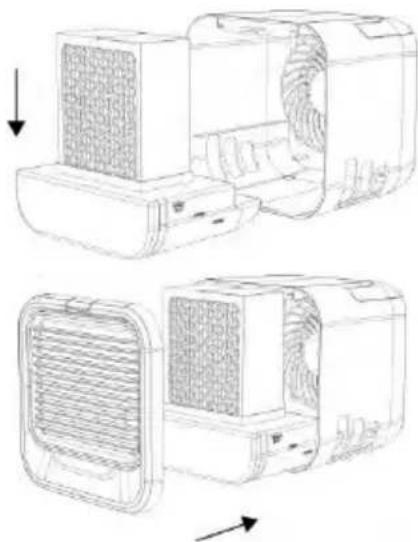
Once you have carefully cleaned all parts of the air filter, you can reassemble it. The procedure is as follows:
- If you wish to continue using the air cooler, fill the water reservoir (13).
- Insert the air filter (11) into the water reservoir (13), push both back into the housing (12) and replace the front panel (10) so that the closure flap on the front panel (1) clicks into place. To do this, feed the lug on the bottom of the front panel with adjustable air outlet grille (10) into the recess in the bottom of the front side of the casing then push the top edge of the front panel with adjustable air outlet grill (10) against the housing (12) until the closure slot on the front panel (1) clicks into place.
- If you wish to continue using the air cooler, reconnect the power supply.
natural_image
Technical line drawing of a device with internal grating and ventilation slots, showing two views (top and side) without any text or symbols.11. Transporting the air cooler
If you wish to transport the air cooler, disconnect it from the mains power and disconnect the power adapter and the power adapter cable from the device. Always carry the air cooler by the handle (5).
12. Storage when not in use

If you do not plan to use the air cooler for some time, empty the water reservoir (13) and clean the air cooler as described in the chapter on "Cleaning the air cooler". Reassemble it and allow it to run for at least 4 hours at fan speed 3. This dries out the air filter (11) and the interior of the device and prevents build-up of bacteria. Store the air cooler in a clean, cool, dry place.
• Empty and clean the air cooler before storing it. Clean the air cooler before you use it again.
13. Ordering replacement filters
You should replace the air filter (11) with a new air filter (11) every 6 months. The air filter (11) is a wearing material and is not covered by the warranty. You can buy new air filters (11) online from the following address: shop.targa.de
13.1 Replacing the air filter
How to replace the air filter (11):
- Press the On/Off button Ⓞ (2) to switch the air cooler off. The fan switches off and the mood light goes out.
- Disconnect the mains power adapter (B) from the mains socket and disconnect the power adapter cable from the power input socket (6) on the air cooler.
- Press slightly with your finger on the top of the closure flap of the front panel (1). This allows it to be detached from the housing.
- Now pull the water reservoir (13) with the air filter (11) inserted carefully forwards out of the housing (12).
- Lift the old air filter (11) up out of the water reservoir (13). If the air filter is still wet, place it in a bowl, in the sink or in a wash-basin where it can drip.

Wet the new air filter (11) completely under cold, running water before putting it into operation. This ensures optimum cooling effect from the start.
-
If you wish to continue using the air cooler, fill the water reservoir (13).
-
Insert the new air filter (11) into the water reservoir (13), push both back into the housing (12) and replace the front panel (10) so that the closure flap on the front panel (1) clicks into place. First, feed the lug on the bottom of the front panel with adjustable air outlet grille (10) into the recess in the bottom of the front side of the casing then push the top edge of the front panel with adjustable air outlet grill (10) against the housing (12) until it clicks properly into place.
-
Insert the air filter (11) into the water reservoir (13), push both back into the housing (12) and replace the front panel (10) so that the closure flap on the front panel (1) clicks into place. To do this, feed the lug on the bottom of the front panel with adjustable air outlet grille (10) into the recess in the bottom of the front side of the casing then push the top edge of the front panel with adjustable air outlet grill (10) against the housing (12) until the closure slot on the front panel (1) clicks into place.
-
If you wish to continue using the air cooler, reconnect the power supply.
14. Troubleshooting
Not working
- Check that the mains power adapter (B) is properly connected to the mains socket and the USB connector on the power adapter cable is securely connected to the power input socket (6).
- Check that the mains socket used is live.
Air is not cooled
- Check there is still water in the water reservoir (13). Top up the water if necessary.
Mood light not working
- Press the mood light button ⓧ (4) to switch on the mood light or change the light colour. See section "9.2.3 Mood light".
- Environmental regulations and disposal information
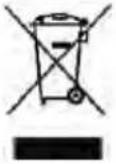 | Devices marked with this symbol are subject to the European Directive 2012/19/EU. All electrical and electronic devices must be disposed of separately from household waste at official disposal centres. Avoid damage to the environment and risks to your personal health by disposing of the device properly. For further information about proper disposal, contact your local government, disposal bodies or the shop where you bought the device. |
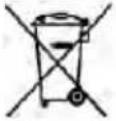 | The symbol of the crossed-out wheelie bin on conventional and rechargeable batteries indicates that they cannot be disposed of in normal domestic waste but must be disposed of separately.Where batteries contain toxic materials, the chemical symbol of the toxic material is shown underneath the symbol, with meanings as follows:- Pb: Battery contains lead- Cd: Battery contains cadmium- Hg: Battery contains mercuryYou are obliged by law to return used batteries. Old batteries can contain toxic materials which can be damaging to health or the environment if not properly stored or disposed of. Batteries also contain important raw materials (e.g. iron, zinc, manganese and nickel) which can be reused.After use, you can return the batteries to us or to a local collection point (e.g. in retail outlets or a local collection point) free of charge. Please note that batteries must be disposed of fully discharged at appropriate collection points for old batteries. If disposing of batteries which are not fully discharged, take precautions to prevent short circuits. |
 | Dispose of all packaging in an environmentally friendly manner. Cardboard packaging can be taken to paper recycling centres or public collection points for recycling. Any film or plastic contained in the packaging should be taken to your public collection points for disposal. |
 ES/PT ES/PT |
Only relevant for France:

FR
ÉLÉMENTS D'EMBALLAGE


FR
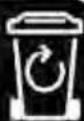
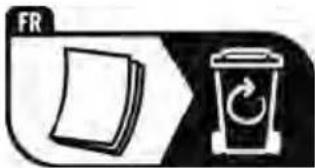
The product, the accessories, the printed material and the packaging are recyclable. They are subject to enhanced manufacturer responsibility and are sorted and collected separately.

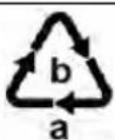
Please note the markings on the packaging material when disposing of it, it is labelled with abbreviations (a) and numbers (b), the meanings of which are as follows:
1-7: plastic / 20-22: paper and cardboard / 80-98: composite materials.
| Symbol | Material Contained in the following packaging elements for this product |
 | Corrugated cardboard Packaging, inside box |
 | Paper Silk paper to protect the product |
16. Conformity notes
The product complies with the requirements of the applicable European and national directives. Evidence of conformity has been provided. The manufacturer has the relevant declarations and documentation. The external power adapter complies with regulation 2019/1782/EU.
The product complies with the requirements of the applicable national directives of the Republic of Serbia.

The product complies with the requirements of the applicable national directives for Great Britain.
The complete EU Declaration of Conformity is available for download from this link:
https://www.targa.gmbh/downloads/conformity/446361_2307.pdf
17. Warranty and Service Information
Warranty of TARGA GmbH
Dear Customer,
This device is sold with three years warranty from the date of purchase. In the event of product defects, you have legal rights towards the seller. These statutory rights are not restricted by our warranty as described below.
Warranty conditions
The warranty period commences upon the date of purchase. Please keep the original receipt in a safe place as it is required as proof of purchase. If any material or manufacturing faults occur within three years of purchase of this product, we will repair or replace the product free of charge as we deem appropriate.
Warranty period and legal warranty rights
The warranty period is not extended in the event of a warranty claim. This also applies to replaced and repaired parts. Any damage or defects discovered upon purchase must be reported immediately when the product has been unpacked. Any repairs required after the warranty period will be subject to charge.
Scope of warranty
The device was carefully manufactured in compliance with stringent quality guidelines and subjected to thorough testing before it left the works. The warranty applies to material and manufacturing faults. This warranty does not cover product components which are subject to normal wear and which can therefore be regarded as wearing parts, or damage to fragile components such as switches, rechargeable batteries or components made of glass. This warranty is void if the product is damaged, incorrectly used or serviced. To ensure correct use of the product, always comply fully with all instructions contained in the user manual. The warnings and recommendations in the user manual regarding correct and incorrect use and handling of the product must always be observed and complied with. The product is solely designed for private use and is not suitable for commercial applications. The warranty is rendered void in the event of incorrect handling and misuse, if it is subjected to force, and also if any person other than our authorised service technicians interfere with the device. No new warranty period commences if the product is repaired or replaced.
Submitting warranty claims
To ensure speedy handling of your complaint, please note the following:
Before using your product for the first time, please read the enclosed documentation carefully. Should any problems arise which cannot be solved in this way, please call our hotline.
- Always have your receipt, the product article number as well as the serial number (if available) to hand as proof of purchase.
- If it is not possible to solve the problem on the phone, our hotline support staff will initiate further servicing procedures depending on the fault.
- You can find this and many more manuals, product videos and installation software available for download at www.lidl-service.com. This QR code takes you directly to the LIDL service page (www.lidl-service.com). There, you can enter the item number (IAN) to access your operating manual.

Service
Phone: 0800 404 7657
E-Mail: targa@lidl.co.uk

Phone: 1800 101010
E-Mail: targa@lidl.ie

Phone: 800 62230
E-Mail: targa@lidl.com.mt
Phone: 8009 4241
E-Mail: targa@lidl.com.cy
IAN: 446361_2307

Manufacturer
Please note that the following address is not a service address. First contact the service point stated above.
TARGA GmbH
Coesterweg 45
59494 Soest
GERMANY
Table des matières
4. Commandes
natural_image
Technical line drawing of a mechanical device with a base and top component, showing no text or symbols.
natural_image
Technical line drawing of a vehicle or electronic device with ventilation grilles and directional arrows indicating movement (no text or symbols)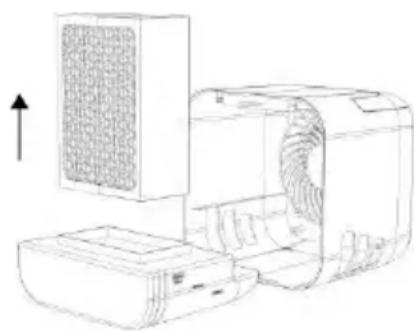
natural_image
Line drawing of a portable air conditioner unit with a grid-patterned cover and ventilation duct (no text or symbols)natural_image
Technical line drawing of a device with internal components and airflow indicators (no text or symbols)https://www.targa.gmbh/downloads/conformity/446361_2307.pdf
Cher client, chère cliente,
Cher client, chère cliente,
4. Bedieningselementen
natural_image
Line drawing of a rectangular electronic device with a label pointing to its side panel (no text or symbols present)
natural_image
Diagram of a mechanical component with arrows indicating direction (no text or symbols)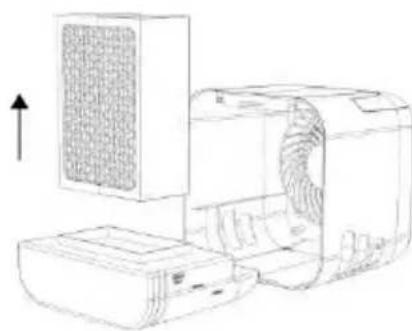
natural_image
Line drawing of a computer with a mesh cover and external casing (no text or symbols)natural_image
Technical line drawing of a mechanical device showing internal components and airflow direction (no text or symbols)11. De luchtkoeler transporteren
https://www.targa.gmbh/downloads/conformity/446361_2307.pdf
natural_image
Line drawing of a rectangular electronic device with a label pointing to its side panel (no text or symbols present)
natural_image
Technical line drawing of a computer monitor with ventilation grilles and ventilation ducts (no text or symbols)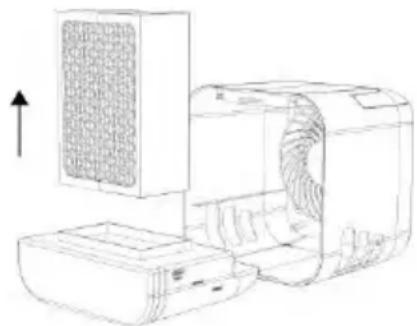
natural_image
Line drawing of a portable air conditioner unit with a mesh grille and ventilation duct (no text or symbols)natural_image
Technical line drawing of a dual-chamber air conditioner unit with heat exchanger and fan cover (no text or symbols)https://www.targa.gmbh/downloads/conformity/446361_2307.pdf
4. Ovládací prvky
natural_image
Line drawing of a rectangular electronic device with a label pointing to its side panel (no text or symbols present)
natural_image
Diagram of a vehicle's front and side views with directional arrows indicating movement (no text or symbols)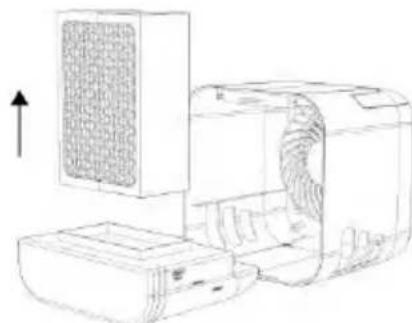
natural_image
Line drawing of a portable air conditioner unit with a fan and front panel, showing internal components (no text or symbols)natural_image
Technical line drawing of a dual-camera air conditioner unit with heat sinks and ventilation grilles (no text or symbols)https://www.targa.gmbh/downloads/conformity/446361_2307.pdf
4. Ovládacie prvky
natural_image
Line drawing of a rectangular electronic device with a label pointing to its side panel (no text or symbols present)
natural_image
Technical line drawing of a vehicle front panel with ventilation grilles and side-mounted air filters (no text or symbols)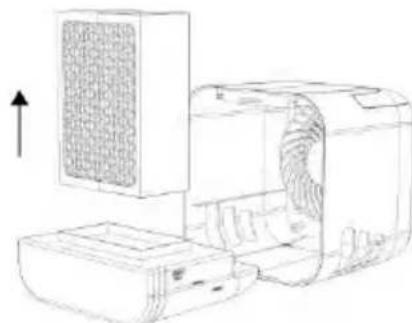
natural_image
Line drawing of a portable air conditioner unit with a grid-patterned cover and adjacent casing (no text or symbols)natural_image
Technical line drawing of a mechanical device with internal components and airflow indicators (no text or symbols)11. Preprava ochladzovača vzduchu
https://www.targa.gmbh/downloads/conformity/446361_2307.pdf
17. Informácie o záruke a servise
Záruka spoločnosti TARGA GmbH
4. Mandos
natural_image
Line drawing of a rectangular electronic device with a labeled component and an arrow pointing to it (no text or symbols present)
natural_image
Diagram of a vehicle air vent system with ventilation grilles and fan blades (no text or labels)natural_image
Line drawing of a computer with a mesh screen and external casing (no text or symbols)natural_image
Technical line drawing of a portable air conditioner unit with ventilation grilles and cooling fins (no text or symbols)https://www.targa.gmbh/downloads/conformity/446361_2307.pdf
natural_image
Line drawing of a rectangular electronic device with a label pointing to its side panel (no text or symbols present)
natural_image
Technical line drawing of a vehicle air vent assembly (no text or symbols)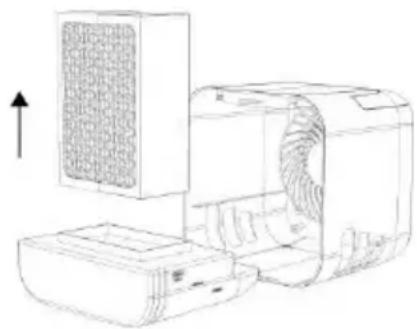
natural_image
Line drawing of a portable air conditioner unit with a grid-patterned cover and control panel (no text or symbols)natural_image
Technical line drawing of a computer air conditioner unit showing internal components and airflow direction (no text or symbols)https://www.targa.gmbh/downloads/conformity/446361_2307.pdf
4. Comandi
natural_image
Line drawing of a rectangular electronic device with a label pointing to its side panel (no text or symbols present)
natural_image
Line drawing of a vehicle air conditioner unit with ventilation grilles and airflow arrows (no text or symbols)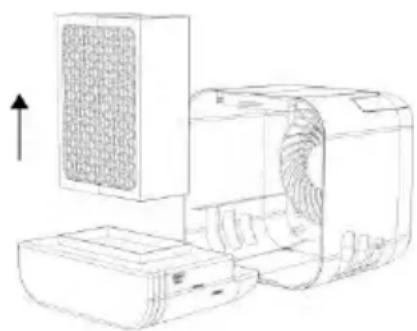
natural_image
Line drawing of a computer with a grid-patterned panel and external casing (no text or symbols)natural_image
Technical line drawing of a dual-camera air conditioner unit with heat sinks and ventilation grilles (no text or symbols)https://www.targa.gmbh/downloads/conformity/446361_2307.pdf
4. Kezelöszervek
natural_image
Line drawing of a rectangular electronic device with a label pointing to its side panel (no text or symbols on the device itself)
natural_image
Technical line drawing of a vehicle front panel with ventilation grilles and side-mounted air ducts (no text or symbols)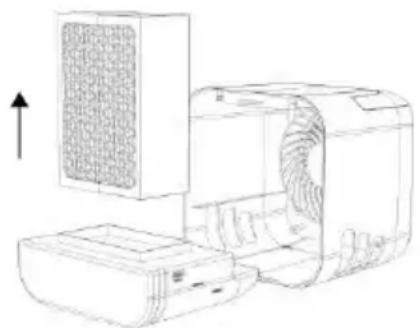
natural_image
Line drawing of a portable air conditioner unit with a grid-patterned cover and adjacent fan (no text or symbols)natural_image
Technical line drawing of a device with internal grating and ventilation slots, showing two views (top and side) without any text or symbols.https://www.targa.gmbh/downloads/conformity/446361_2307.pdf