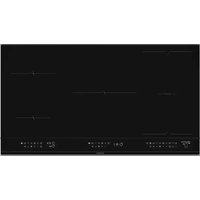
DPI4932BP - Cooker DE DIETRICH - Free user manual and instructions
Find the device manual for free DPI4932BP DE DIETRICH in PDF.


User questions about DPI4932BP DE DIETRICH
0 question about this device. Answer the ones you know or ask your own.
Ask a new question about this device
Download the instructions for your Cooker in PDF format for free! Find your manual DPI4932BP - DE DIETRICH and take your electronic device back in hand. On this page are published all the documents necessary for the use of your device. DPI4932BP by DE DIETRICH.
USER MANUAL DPI4932BP DE DIETRICH
Service :
Type :
natural_image
Diagram of a solar panel with grid layout and mounting points, no text or symbols presentENCASTREMENT
natural_image
Line drawing of hands using a tool to cut or mark a curved object on a mechanical component (no text or symbols)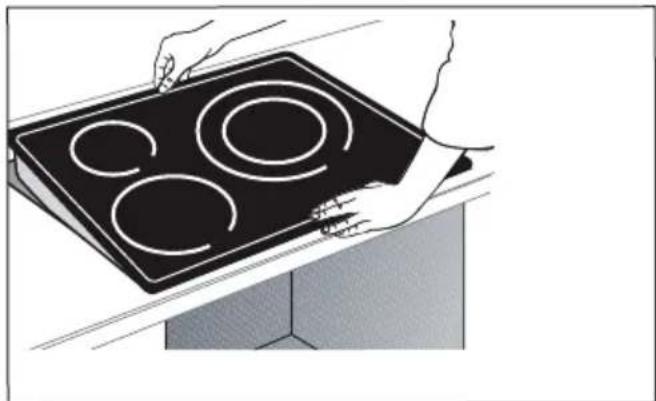
natural_image
Illustration of hands holding a black electric stove with four circular cutouts (no text or symbols)
Important
natural_image
Three identical grayscale toolbar icons with various geometric and symbolic shapes (no text or labels)Lexique clavier

On / Off

Verrouillage / Clean Lock

natural_image
Pure electrical circuit lines without any symbolsnatural_image
Pure electrical circuit symbol for a battery, no text or labels presentnatural_image
Pure electrical circuit lines without any symbols.4 UTILISATION DE VOTRE APPAREIL
| Symbol Unit | Value | |||||||||||||||||||||||||||||||||||||||||||||||||||||||||||||||||||||||||||||||||||||||||||||||||||||||||||||||||||||||||||||||||||||||||||||||||||||||||||||||||||||||||||||||||||||||||||||||||||||||||||||||||||||||||||||||||||||||||||||||||||||||||||||||||||||||||||||||||||||||||||||||||||||||||||||
| Model identification | PR | PR | PR | PR | PR | PR | PR | PR | PR | PR | PR | PR | PR | PR | PR | PR | PR | PR | PR | PR | PR | PR | PR | PR | PR | PR | PR | PR | PR | PR | PR | PR | PR | PR | PR | PR | PR | PR | PR | PR | PR | PR | PR | PR | PR | PR | PR | PR | PR | PR | PPR | PPR | PPR | PPR | PPR | PPR | PPR | PPR | PPR | PPR | PPR | PPR | PPR | PPR | PPR | PPR | PPR | PPR | PPR | PPR | PPR | PPR | PPR | PPR | PPR | PPR | PPR | PPR | PPR | PPR | PPR | PPR | PPR | PPR | ||||||||||||||||||||||||||||||||||||||||||||||||||||||||||||||||||||||||||||||||||||||||||||||||||||||||||||||||||||||||||||||||||||||||||||||||||||||||||||||||||||||||||||||||||||||||||||||||||||||||||||||||||||||||||
| Rating date | PR | PR | PR | PR | PR | PR | PR | PR | PR | PR | PPR | PPR | PPR | PPR | PPR | PPR | PPR | PPR | PPR | PPR | PPR | PPR | PPR | PPR | PPR | PPR | PPR | PPR | PPR | PPR | PPR | PPR | PPR | PPR | PPR | PPR | TPR | TPR | TPR | TPR | TPR | TPR | TPR | TPR | TPR | TPR | TPR | TPR | TPR | TPR | TPR | TPR | TPR | TPR | TPR | TPR | TPR | TPR | TPR | TPR | TPR | TPR | TPR | TPR | TPR | TPR | TPR | TPR | TPR | TPP | TPP | TPP | TPP | TPP | TPP | TPP | TPP | TPP | TPP | TPP | TPP | TPP | TPP | TPP | TPP | TPP | TPP | TPP | TPP | TPP | TPP | TPP | TPP | TPP | TPP | TPP | TPP | TPP | TPP | TPP | TPP | TPP | TPP | |||||||||||||||||||||||||||||||||||||||||||||||||||||||||||||||||||||||||||||||||||||||||||||||||||||||||||||||||||||||||||||||||||||||||||||||||||||||||||||||||||||||||||||||||||||||||||||||||||||||
| Type of hub | Induction ** | PR | PR | PR | PR | PR | PR | PR | PR | PR | PR | PR | PR | PR | PR | PR | PR | PPR | PPR | PPR | PPR | PPR | PPR | PPR | PPR | PPR | PPR | PPR | PPR | PPR | PPR | PPR | PPR | PPR | PPR | PPR | PPR | PPR | PPR | TPR | TPR | TPR | TPR | TPR | TPR | TPR | TPR | TPR | TPR | TPR | ||||||||||||||||||||||||||||||||||||||||||||||||||||||||||||||||||||||||||||||||||||||||||||||||||||||||||||||||||||||||||||||||||||||||||||||||||||||||||||||||||||||||||||||||||||||||||||||||||||||||||||||||||||||||||||||||||||||||||||||||||||||||||||
| Total power | K | |||||||||||||||||||||||||||||||||||||||||||||||||||||||||||||||||||||||||||||||||||||||||||||||||||||||||||||||||||||||||||||||||||||||||||||||||||||||||||||||||||||||||||||||||||||||||||||||||||||||||||||||||||||||||||||||||||||||||||||||||||||||||||||||||||||||||||||||||||||||||||||||||||||||||||||
| Number of cooking zones and/or areas | 5 | 5 | 5 | |||||||||||||||||||||||||||||||||||||||||||||||||||||||||||||||||||||||||||||||||||||||||||||||||||||||||||||||||||||||||||||||||||||||||||||||||||||||||||||||||||||||||||||||||||||||||||||||||||||||||||||||||||||||||||||||||||||||||||||||||||||||||||||||||||||||||||||||||||||||||||||||||||||||||||
| Feeding technology (induction cooking zones and cooking areas, radiant cooking zones, solid plates) | Inuction ** | |||||||||||||||||||||||||||||||||||||||||||||||||||||||||||||||||||||||||||||||||||||||||||||||||||||||||||||||||||||||||||||||||||||||||||||||||||||||||||||||||||||||||||||||||||||||||||||||||||||||||||||||||||||||||||||||||||||||||||||||||||||||||||||||||||||||||||||||||||||||||||||||||||||||||||||
| For circular cooking zones or areas: diameter of useful surface area per electric heated cooking zone, rounded to the nearest 5 mm | 1 | 0 | 16 | 23 | 30 | |||||||||||||||||||||||||||||||||||||||||||||||||||||||||||||||||||||||||||||||||||||||||||||||||||||||||||||||||||||||||||||||||||||||||||||||||||||||||||||||||||||||||||||||||||||||||||||||||||||||||||||||||||||||||||||||||||||||||||||||||||||||||||||||||||||||||||||||||||||||||||||||||||||||||
RELATIONS CONSOMMATEURS FRANCE
You have just purchased a De Dietrich product. This choice reflects your high standards and taste for the French way of life.
Resulting from over 300 years' know-how, the De Dietrich creations embody the fusion between design, authenticity and technology at the service of culinary arts. Our appliances are manufactured using noble materials and offer an irreproachable quality of finish.
We are certain this high-quality product will enable cooking enthusiasts to express all their talents.
The De Dietrich Customer Service Department is at your disposal for all your questions and suggestions to always better meet your expectations.
We are honoured to be your new partner in the kitchen and thank you for your trust.
With its factories based in France, in Orléans and Vendôme, De Dietrich cultivates

a constant search for excellence, perpetuating exceptional know-how in the design of perfectly finished products. Many of our electrical appliances are certified by the "Origine France Garantie" label, an acknowledgement which certifies they are manufactured in France.
This label both ensures the quality and durability of our appliances, as well as their traceability, thus offering a clear and objective
indication of their provenance.
www.de-dietrich.com
De Dietrich
CRÉATEUR D'ÉMOTIONS DEPUIS 1684
CONTENTS
IMPORTANT SAFETY ADVICE AND PRECAUTIONS 4-5
1/ ENVIRONMENT....6
Environmental protection....6
2/ INSTALLATION....7-9
Unpacking....7
Building in 7-8
Electric connection....9
3/ PRESENTATION OF YOUR APPLIANCE....10-11
Control panel 10-11
4/ USING THE OVEN....12-24
Settings management....12
Choice of cookware 12
Cooking ring selection....13
Switching On / Off....14
Adjusting the power 14
Adjusting the timer 16
Control panel locking (child safety lock) 16
Cooking function....17-22
Example of a recipe....23
Safety and recommendations....25
5/ CARE 26
6/ TROUBLESHOOTING AND SOLUTIONS .....27
IMPORTANT SAFETY ADVICE AND PRECAUTIONS
IMPORTANT SAFETY INSTRUCTIONS - READ CAREFULLY AND KEEP FOR FUTURE USE.
This user guide is available for download on the brand's website.
Your appliance complies with applicable European Directives and regulations.
This appliance may be used by children aged 8 years and older, and by persons with impaired physical, sensory or mental capacities, or without experience or knowledge, if they are correctly supervised or have received prior instructions on how to use the appliance safely and have understood the risks involved.
Children must not be allowed to play with the appliance.
Cleaning and maintenance operations must not be carried out by children without supervision.
Children under 8 years of age should not be allowed near the appliance, unless they are constantly supervised.
Your hob is equipped with a child safety device that locks its operation after use or during cooking (See "Child Safety use" section).

The appliance and its accessible parts become hot during use.
Precautions must be taken to avoid touching the heating elements.
Metal objects such as knives, forks, spoons and lids must not be placed on the cooking surface as they may become hot.

CAUTION: cooking must be monitored. Short cooking requires stant surveillance.
Danger of fire: do not store objects in the cooking zones.
Leaving oil or fat to cook unattended on a hob can be dangerous and lead to fire. NEVER attempt to extinguish a fire with water. Instead, switch off the appliance and cover the flame with a lid or a fire blanket.

If the surface is cracked, turn off the appliance to avoid the risk of electric shock.
Do not use your hob until you have replaced the glass top.
These hobs must be connected to the mains via an all-pole cut-off device that complies with current installation regulations. A disconnection device must be incorporated into the fixed wiring. Your hob is designed to work at a frequency of 50Hz or 60Hz (50Hz/60Hz), without you having to do anything.
The appliance must be connected via a standardised power supply cable with the suitable number of conductors for the type of connection wanted (see installation chapter)
IMPORTANT SAFETY ADVICE AND PRECAUTIONS
If the power cable is damaged, it should be replaced by the manufacturer, its after-sales service department or a similarly qualified person, so as to avoid danger.
Ensure that the power cables of any electrical appliances plugged in close to the hob are not in contact with the cooking zones.
WARNING : In order to avoid interference between your cooking hob and a heart pacemaker, the pacemaker must be designed and programmed in compliance with the regulations that apply to it. Ask the pacemaker manufacturer or your GP.
Only use hob protectors designed by the manufacturer of the cooking appliance or listed as suitable in the user guide, or included with the appliance. The use of unsuitable protectors could cause accidents.
Avoid hard shocks from cookware: although the vitroceramic glass worktop is very sturdy, it is not unbreakable.
Do not place any hot lids flat on your cooking hob. A suction effect may damage the vitroceramic surface. Avoid dragging cookware across the surface, which could damage the decorative finish on the vitroceramic top in the long term.
Never use aluminium foil for cooking. Never place items wrapped in aluminium foil or packaged in aluminium dishes on your cooking hob.
The aluminium will melt and permanently damage your appliance.
Do not store cleaning products or flammable products in the cabinet underneath the hob.
Never use a steam cleaner to clean your cooking hob.
The appliance is not designed to be switched on using an external timer or separate remote control system.
After use, turn off the hob using its control device and do not rely on the pan sensor to do this.
PROTECTING THE ENVIRONMENT
This symbol indicates that this appliance must not be treated as household waste.
Your appliance contains a large amount of recyclable
material. This logo indicates that used appliances must be taken to a special waste collection point. Contact your local authority or retailer for details of your nearest used equipment collection points. Recycling of appliances organised by your manufacturer is carried out under the best conditions, in accordance with the European regulation on waste disposal of electronic and electrical equipment. Some of the packaging material used for this appliance can also be recycled. Recycle and contribute towards protecting the environment by disposing of packaging in local waste containers designed for this purpose. We thank you for your help in protecting the environment.
Advice on how to save energy
Cooking with the correctly sized lid saves energy. If you use a glass lid, you can control your cooking perfectly.
.2 INSTALLATION
UNPACKING
Remove all the protective elements from the hob.
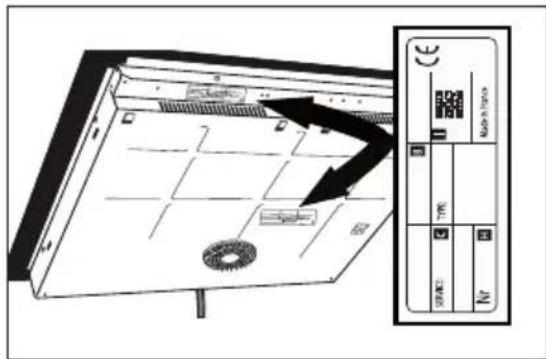
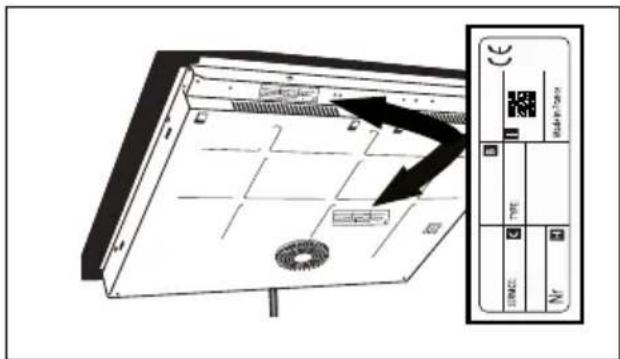
Check and respect the appliance's characteristics that appear on the nameplate. Note the service and standard references shown on this plate in the boxes below for future reference.
| Service: | Type: |
FITTING THE HOB
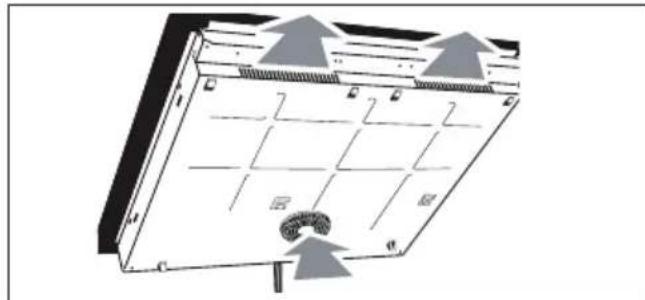
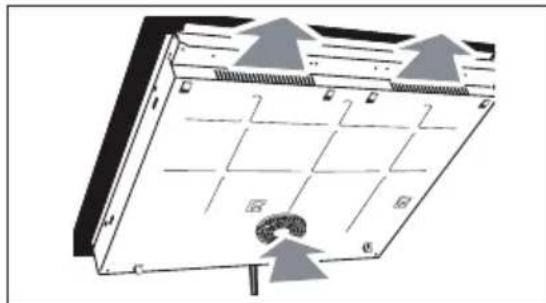
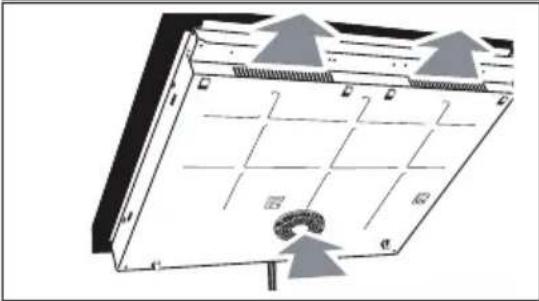
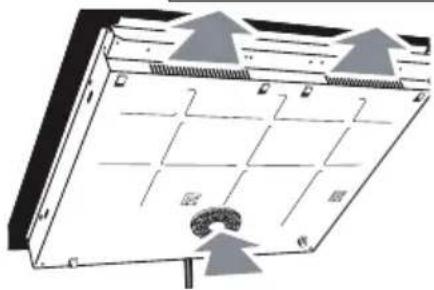
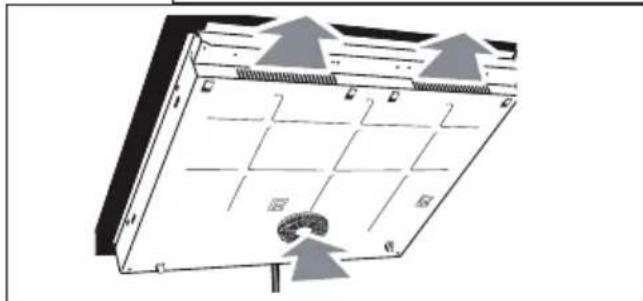
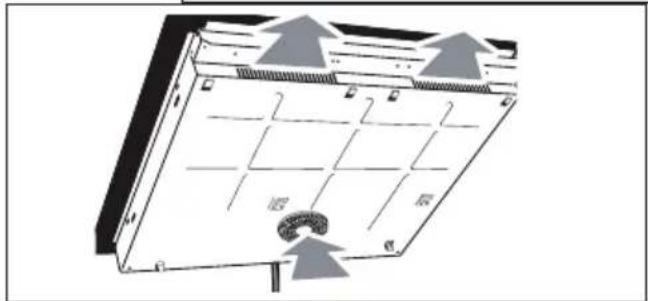
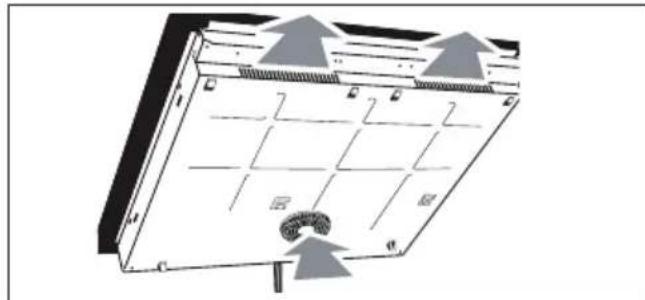
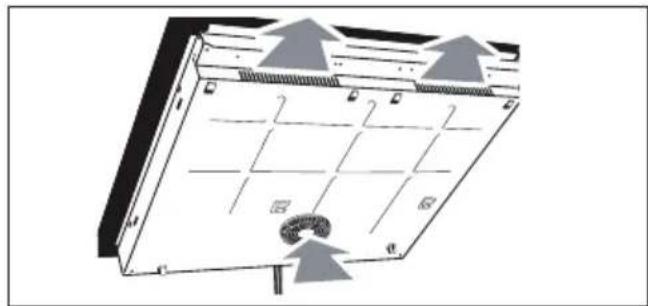
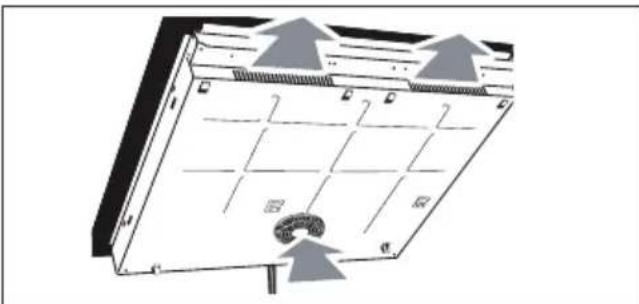
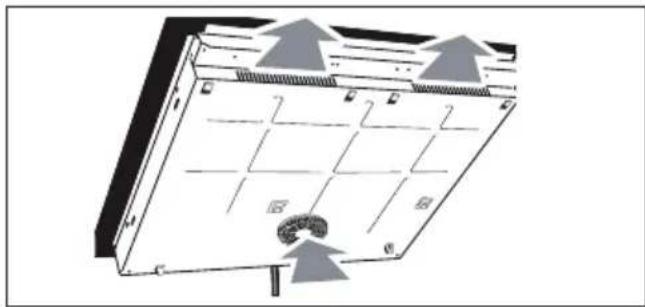
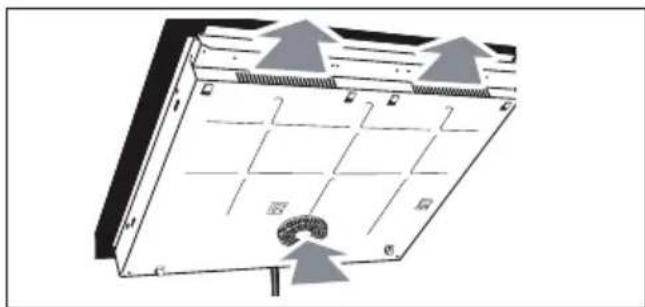
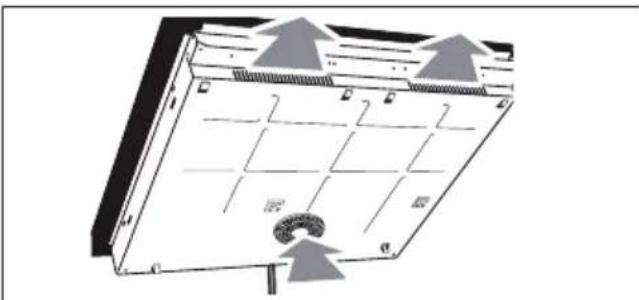
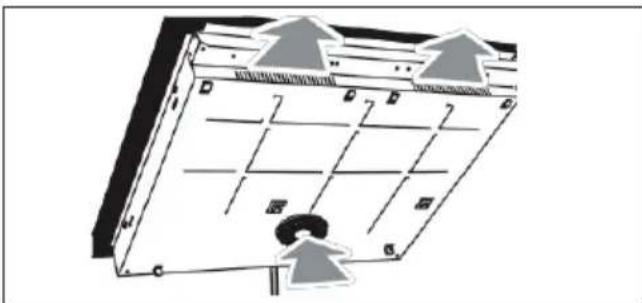
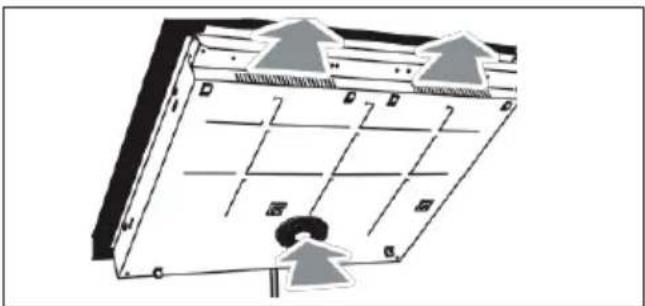
Check that the air intakes and outlets ^1 are unobstructed.
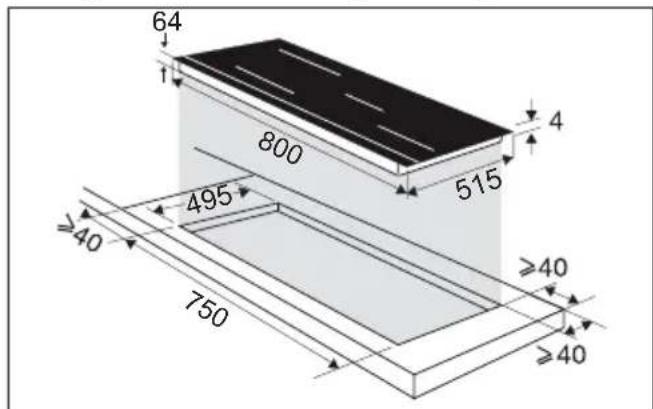
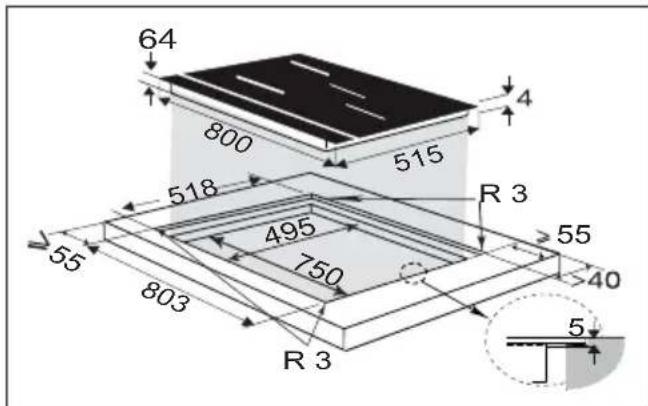
Comply with the information concerning the fitting dimensions (in millimetres) of the work top destined to receive the hob. Check that air can flow correctly between the front and back of your hob.
natural_image
Diagram of a solar panel with grid layout and directional arrows indicating airflow or movement (no text or symbols)Fitting into the worktop Fitting flush with the worktop
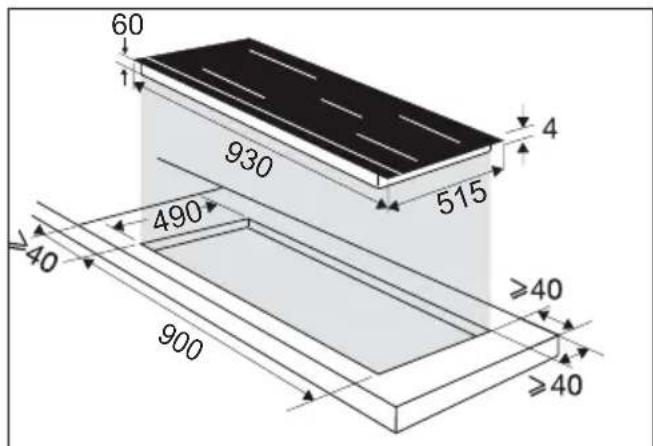
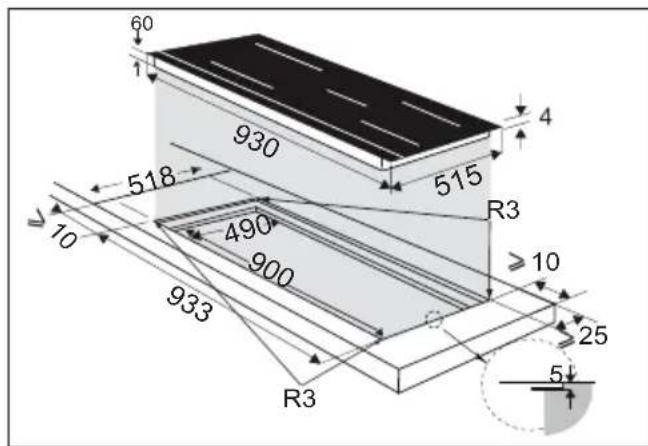
• 2 INSTALLATION
If installing the hob above a drawer,
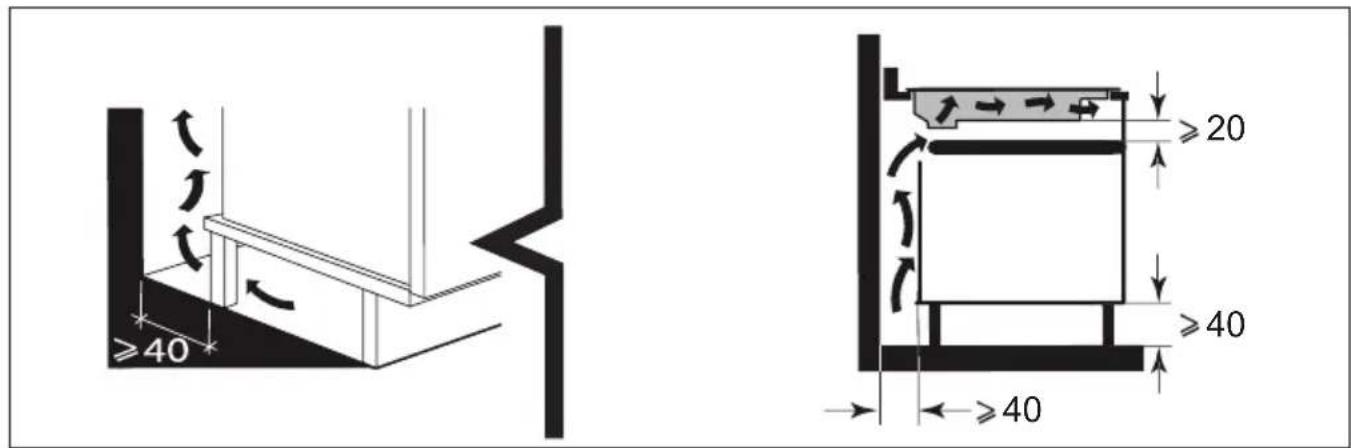
or above a built-in oven, comply with the dimensions provided on the illustrations to ensure a sufficient outlet air flow.
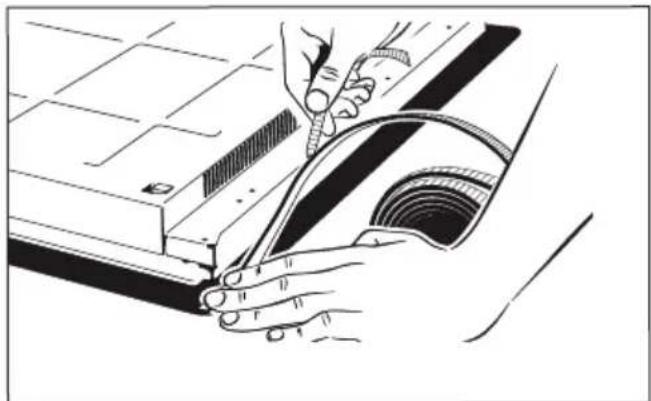
Apply a seal all around the edge of the hob before fitting it.

natural_image
Line drawing of hands using a tool to cut or mark a curved object on a mechanical component (no text or symbols)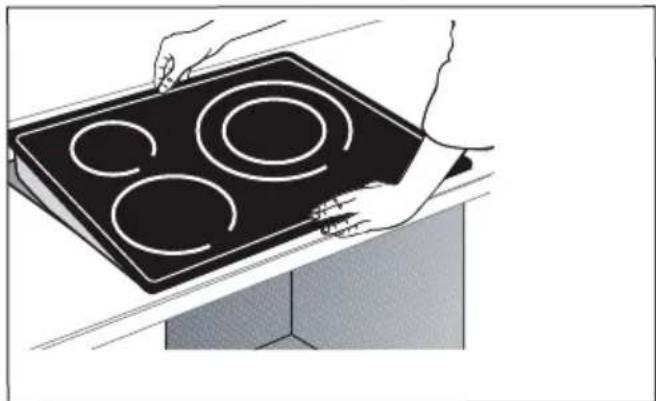
natural_image
Illustration of hands holding a black electric stove with four circular cutouts (no text or symbols)
Important
If your hob is located above your oven, the hob's thermal safety devices can impede the simultaneous use of the hob and the oven's pyrolysis programme, display code "F7" in the control zones. In such circumstances we recommend that you increase the hob's ventilation by creating an opening in the side of the cabinet (8cm x 5cm).
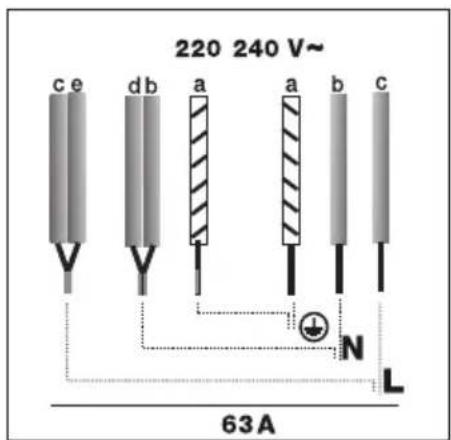
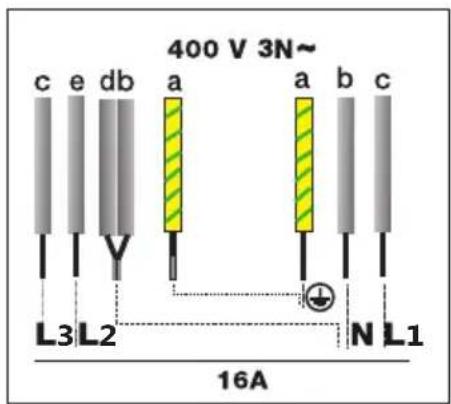
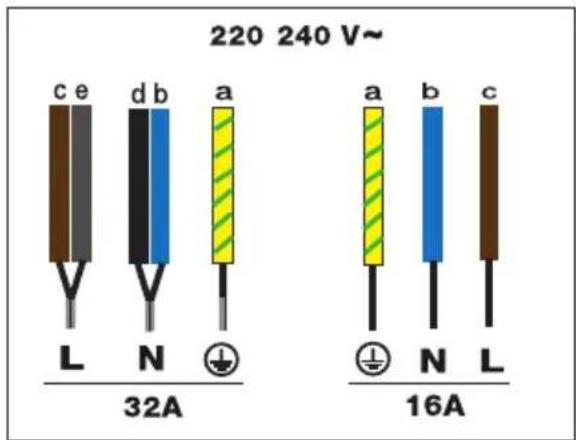
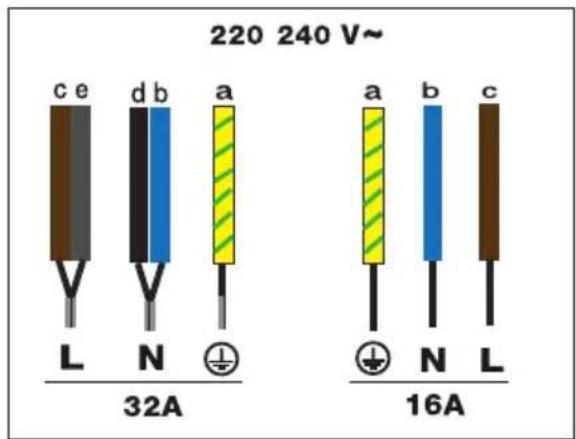
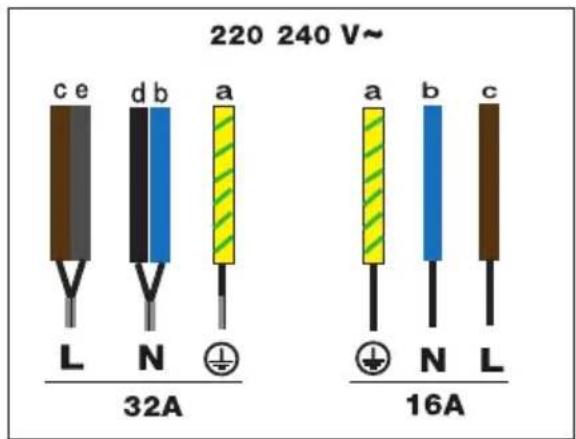
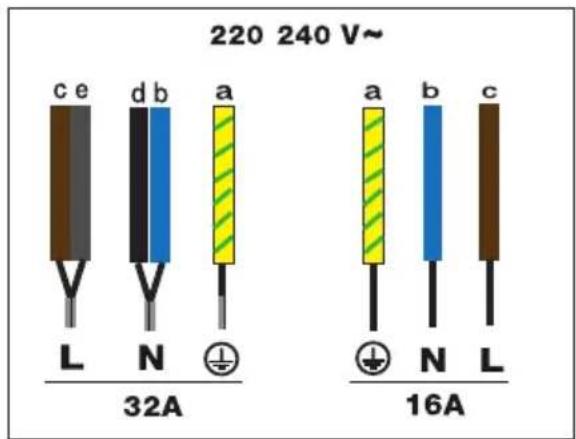
ELECTRIC CONNECTIONS
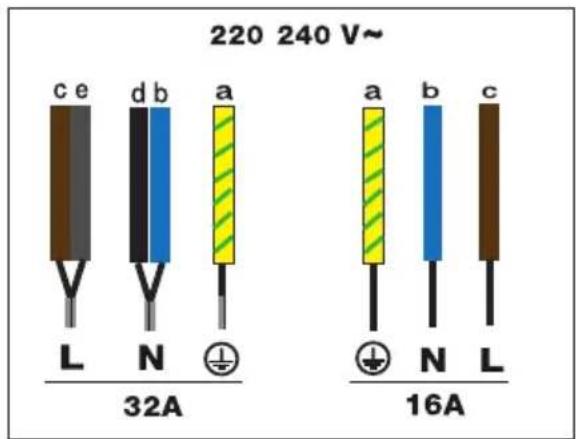
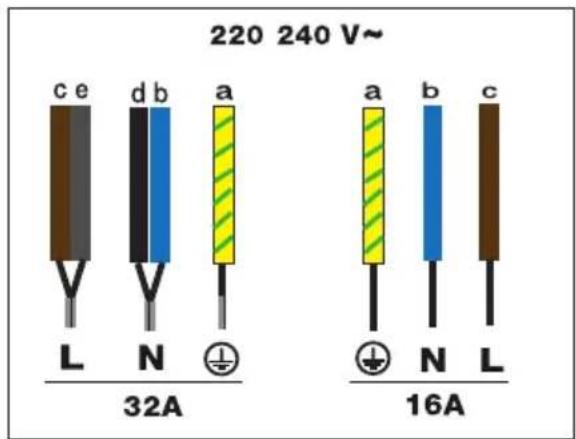
These hobs must be connected to the mains via an all-pole cut-off device that complies with current installation regulations. A disconnection device must be incorporated into the fixed wiring.
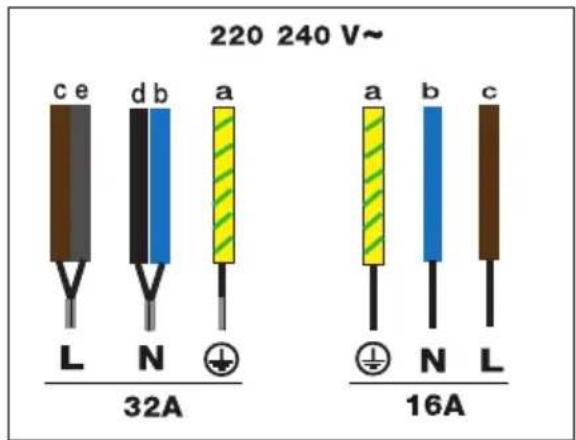
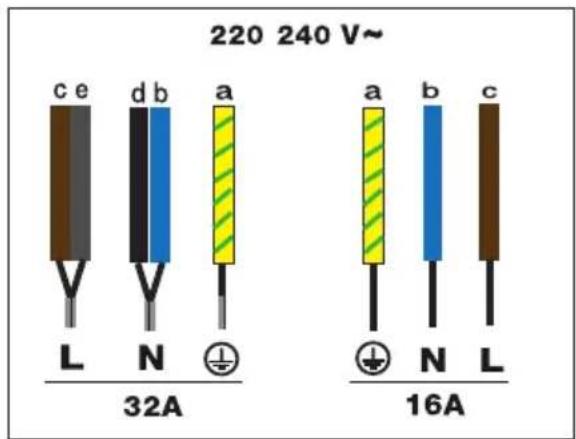
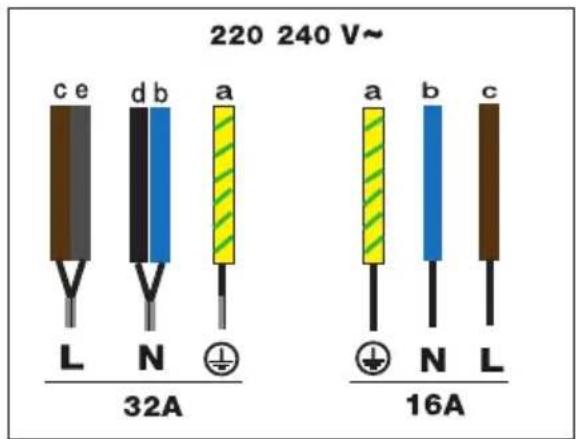
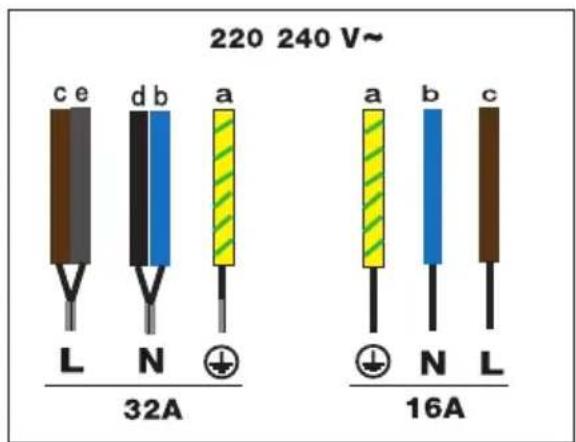
Identify the cable for your hob:
a) green-yellow
b) blue
c) brown
d) black
e) grey
When power is first supplied to your hob, or after an extended power outage, an indicator light will appear on the control panel.
Wait or press any key on the control panel to make the information disappear and use your hob (this display is normal and is reserved for use by After-Sales Service, where applicable).
In all cases, it should be disregarded.
.3 PRESENTATION OF YOUR APPLIANCE
CONTROL PANEL
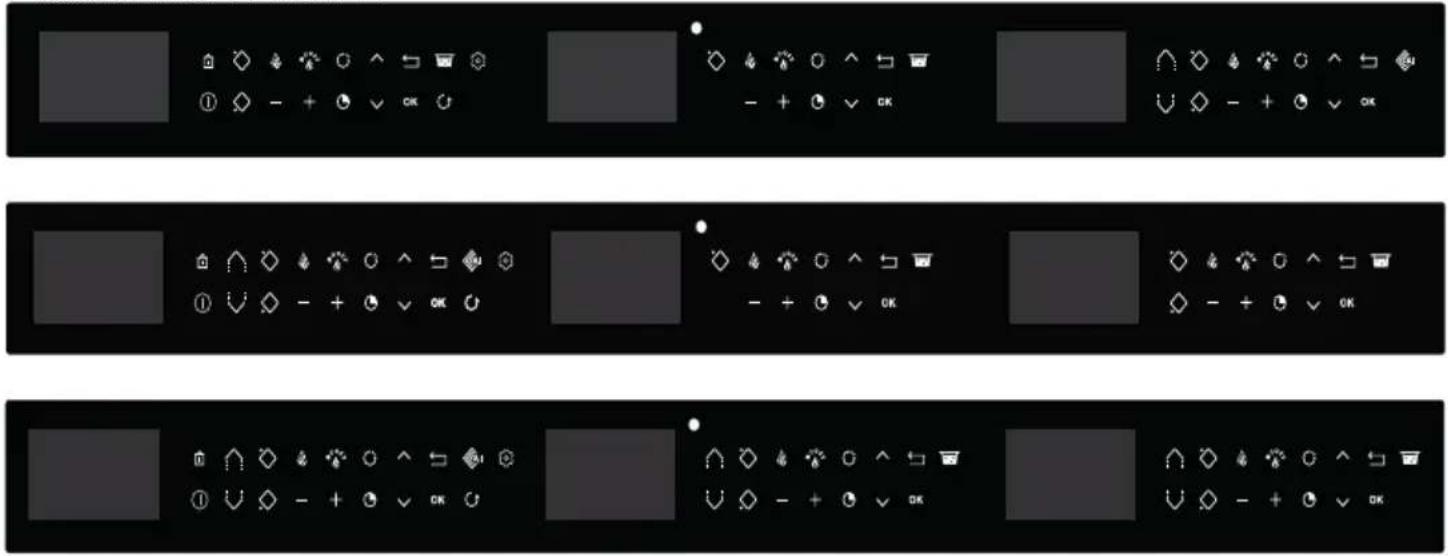
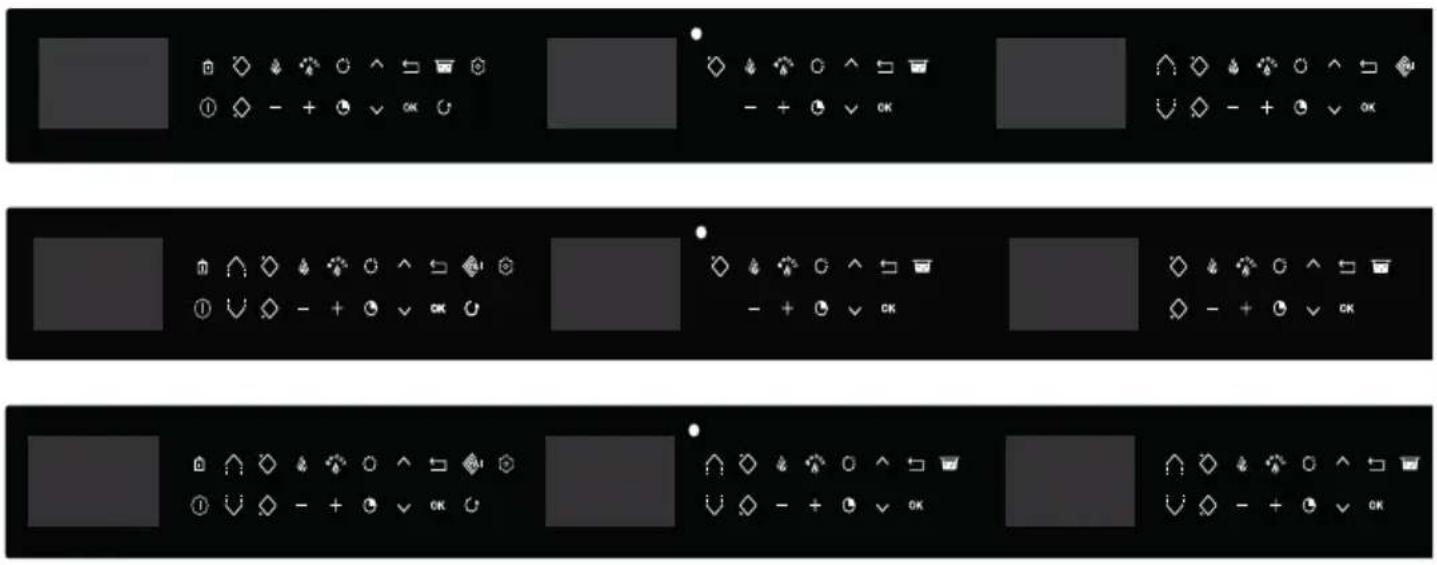
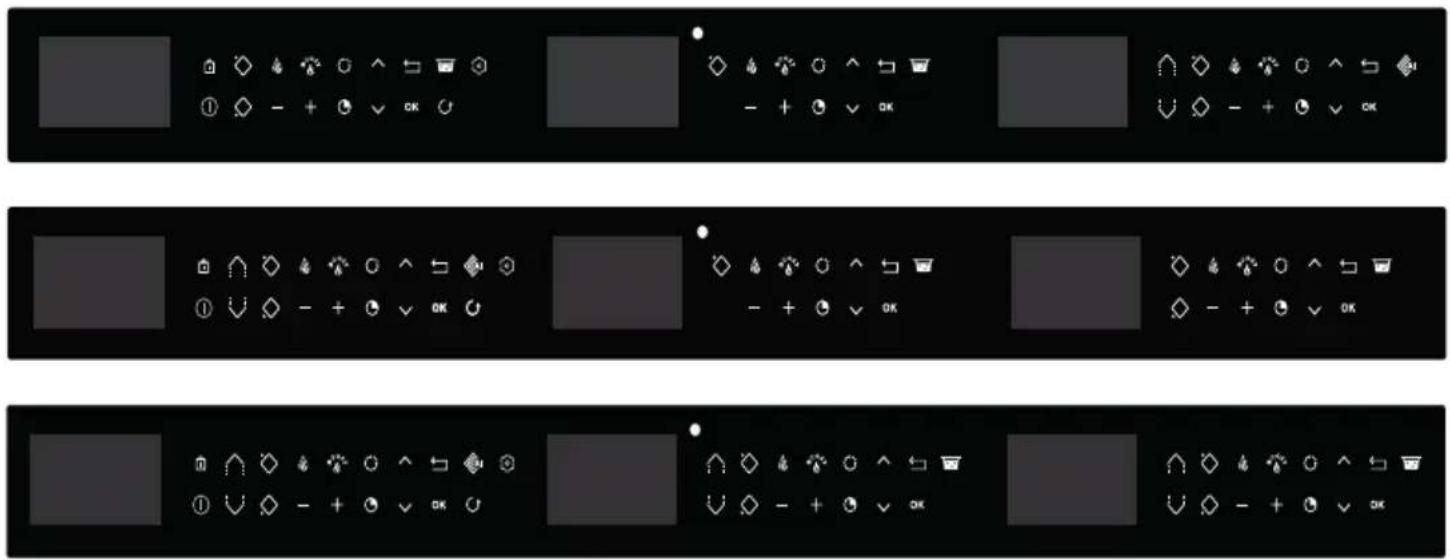
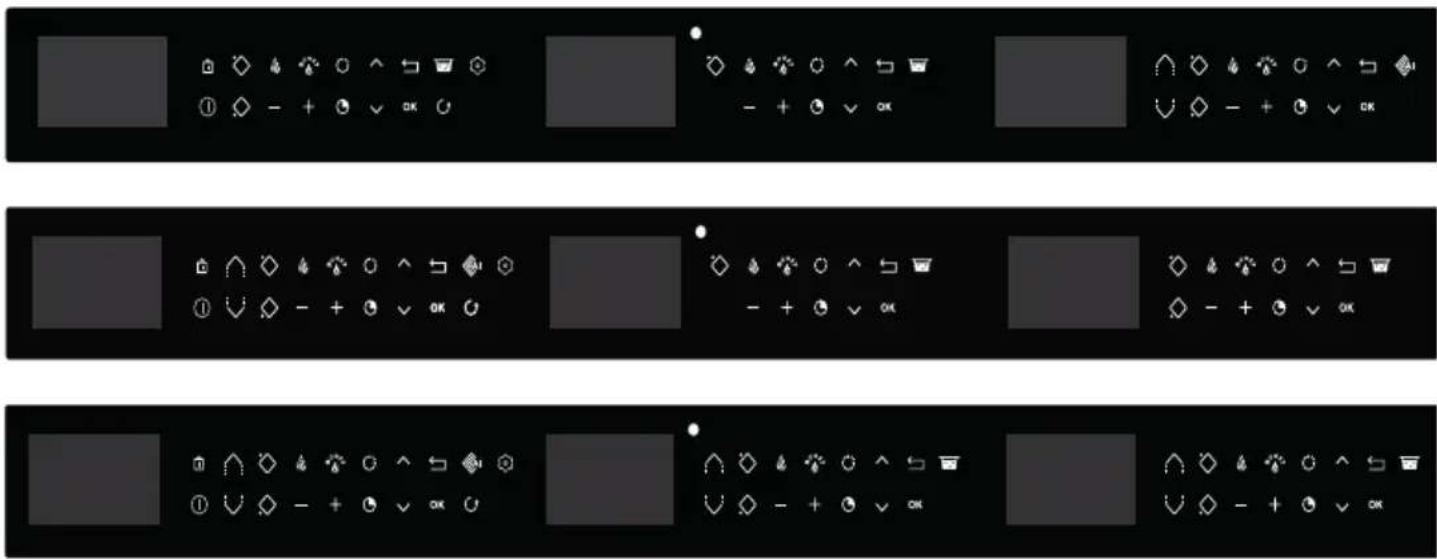
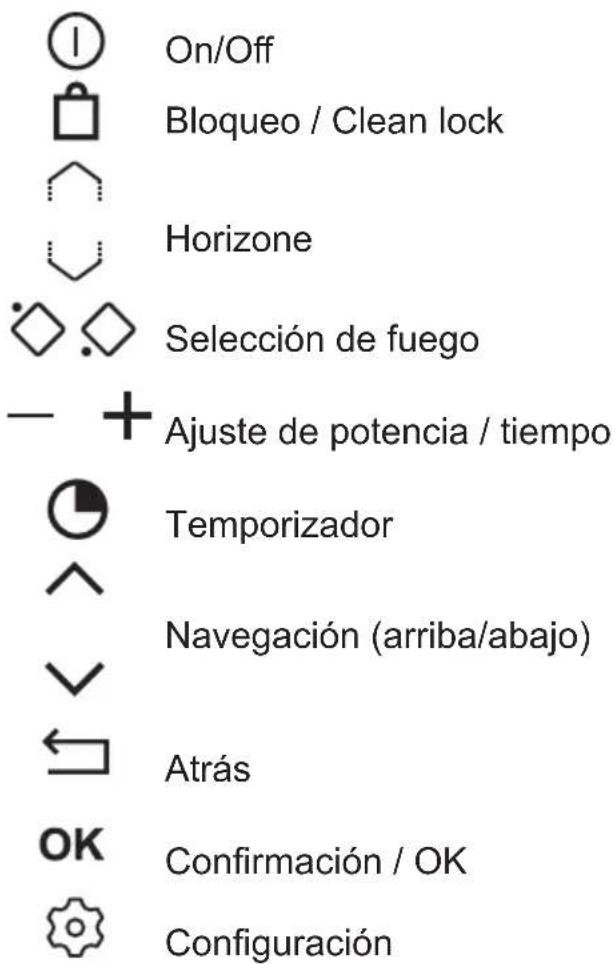
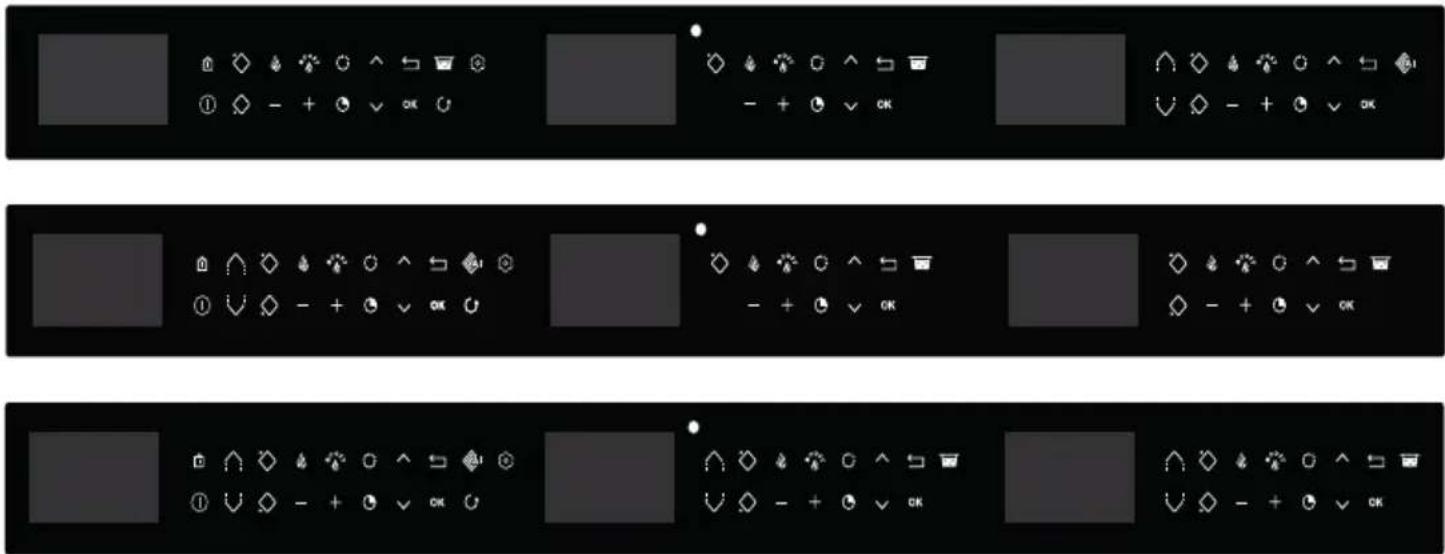
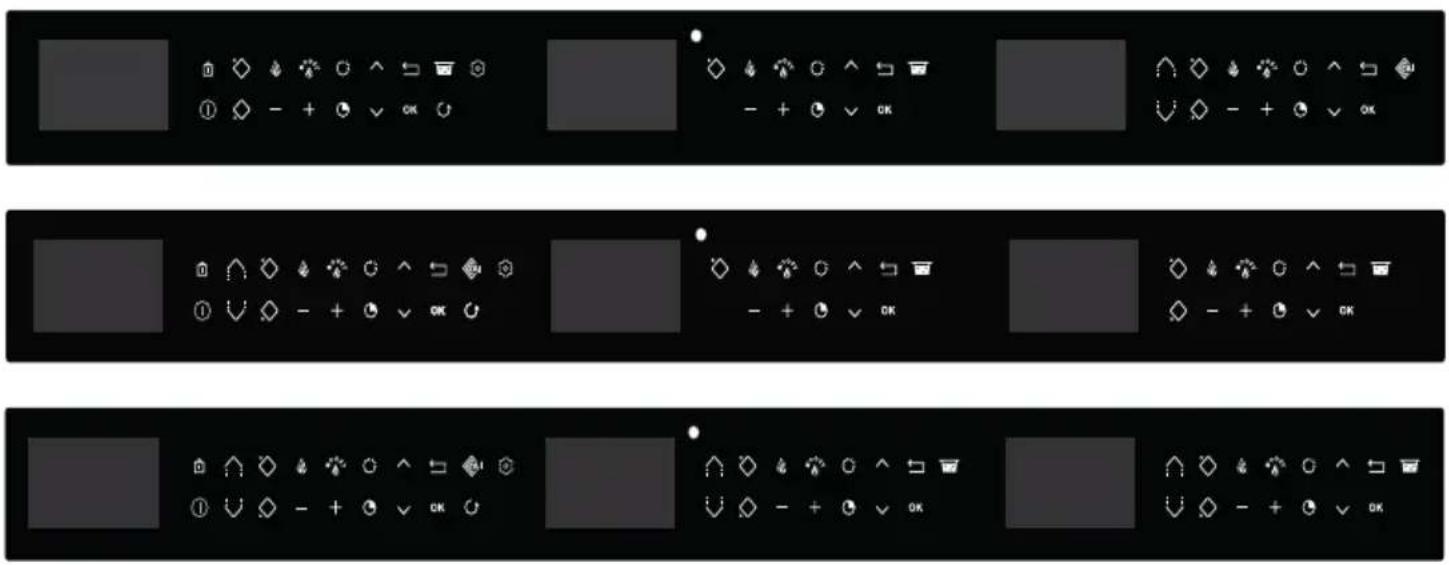
Control panel glossary Direct access

On / Off

Locking / Clean Lock

Horizone (depending on model)


Choice of cooking ring
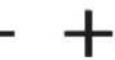
Power / time setting

Timer

Navigation (top / bottom)


Back

Validation / OK

Parameters

Power

Boil
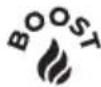
Boost
Function

Elapsed time function

Cooking assistant

Recall function
.3 PRESENTATION OF YOUR APPLIANCE
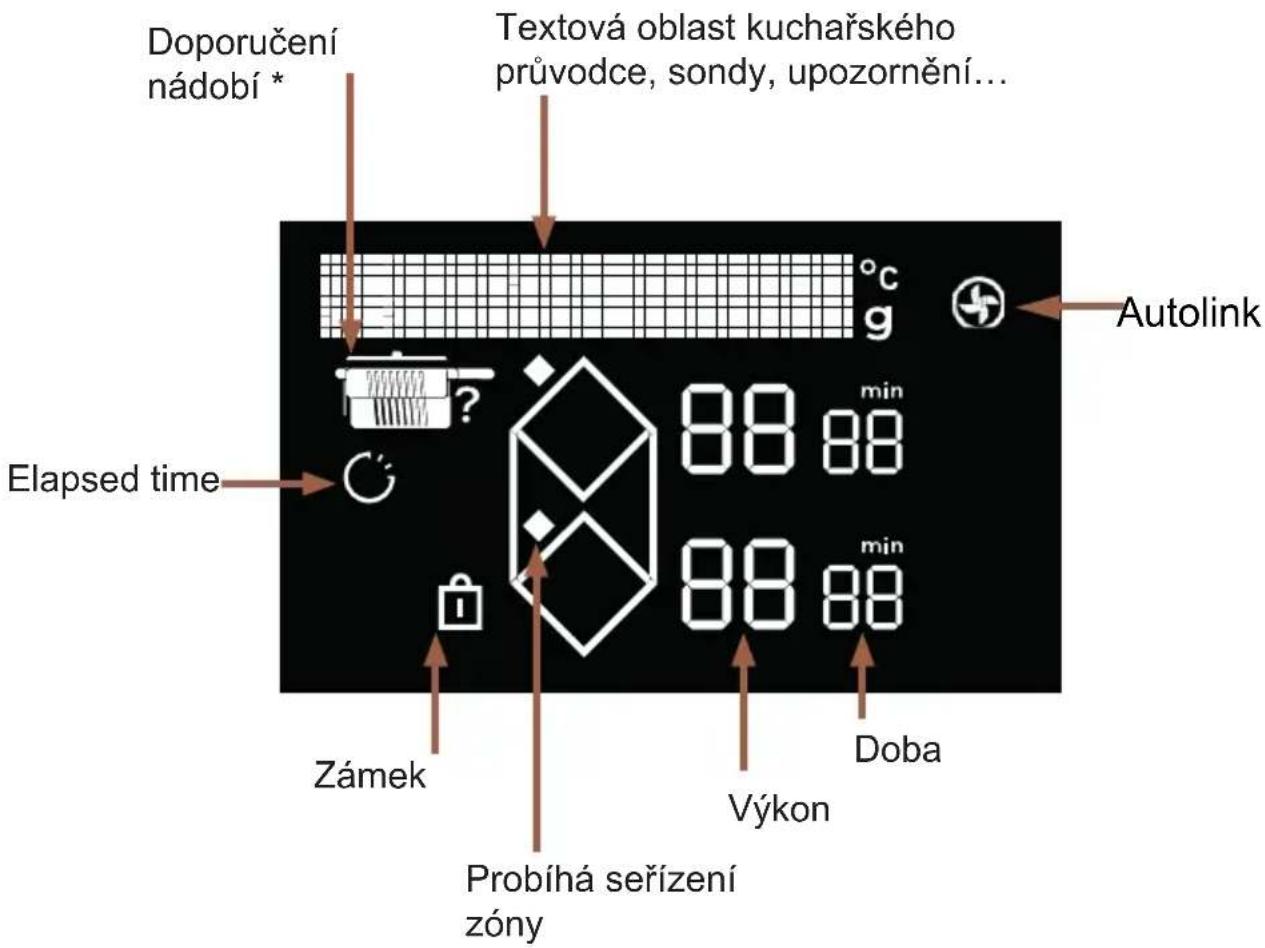
Display glossary
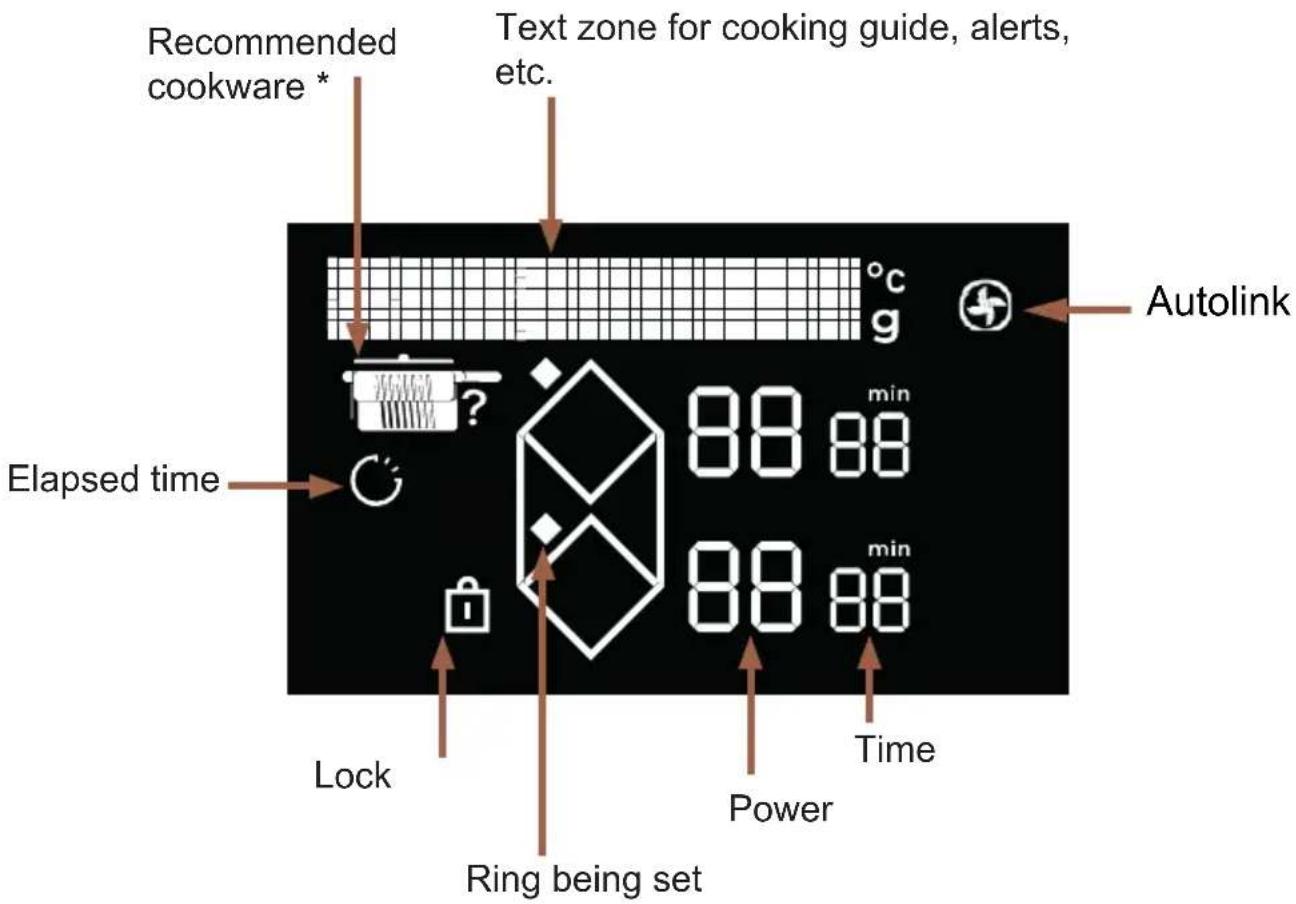
* Recommended cookware
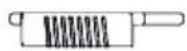
Frying pan
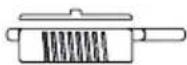
Frying pan with lid
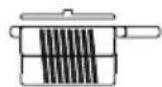
Pan with lid
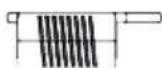
Pan
When switching your hob on for the first time, you can personalise different functions.
SETTINGS MANAGEMENT
Press the ⚙key to access the settings:
• Language (French by default)
- Connexion (Autolink) : The hob autonomously communicates its power levels to the hood, which automatically adjusts its speed and switches the light on or off. There is no need to adjust the settings on the hood. The hood automatically remains at speed 1 for about 2 minutes after the hob is switched off before also switching off.
- Brightness (5 levels possible)
- Maintenance: If a problem occurs, you can access the Maintenance menu. If you contact the After-Sales Service, you may be asked to provide the product codes displayed in the diagnostic. The “Reinitialise” option lets you reset your appliance to factory settings.
The \ and keys enable you to navigate through the menu.
Press the ← key to go back to the previous menu without changes.
Press OK to confirm your choice.
CHOICE OF COOKWARE
Most cookware is compatible with induction. Only glass, terracotta, aluminium without a special base, copper and some non-magnetic stainless steels do not work with induction cooking.
We suggest that you choose cookware with a thick, flat bottom. The heat will be better distributed and cooking will be more uniform. Never leave an empty pan to heat unattended.
Do not put cookware on the control panel.
COOKING RING SELECTION
You have several cooking rings available. Select one that is suitable, based on the size of the pan.
If the base of the cookware is too small, the power indicator will start to flash and the cooking ring will not work, even if the cookware's material is recommended for induction. Avoid using pans which are smaller in diameter than the cooking ring (see table).
| Burner diameter (cm) | Maximum power of cooking ring (Watts) | Diameter of bottom of cookware (cm) |
| 16 2400 10 - | 18 | |
| 18 2800 11 - | 22 | |
| 21 3600 11 - | 22 | |
| 23 3700 12 - | 24 | |
| 28 / 30 377 / 5 | 500 15 - 32 | |
| Horizone 3700 | 4600(*) 18 - Oval - fish dish | |
| 1/2 zone 2800 | 1 - 22 |
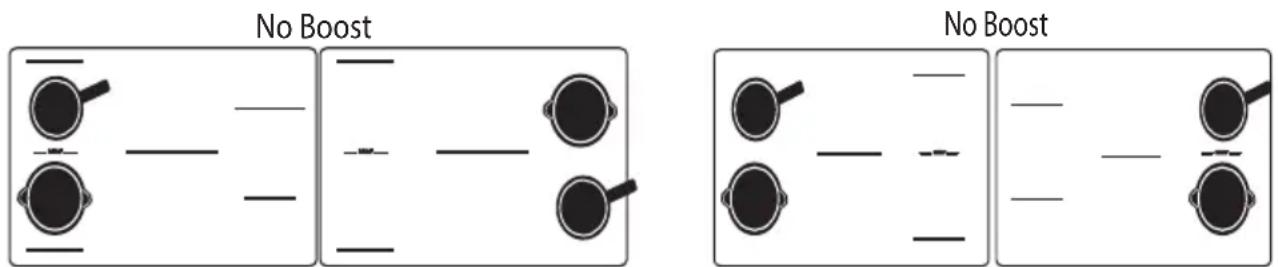
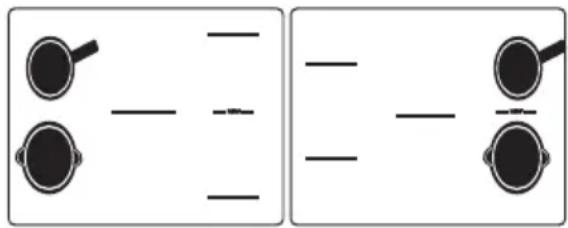
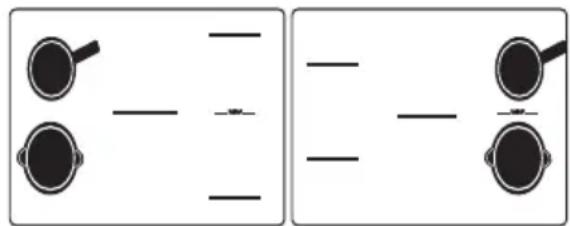
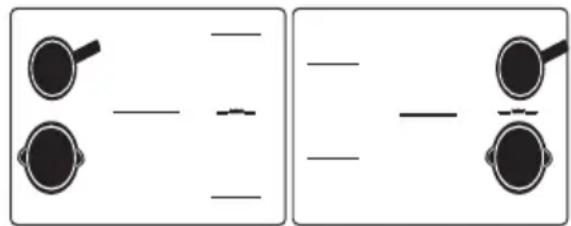
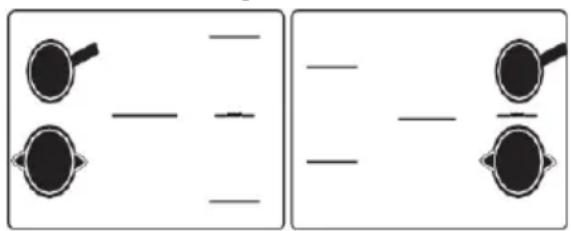
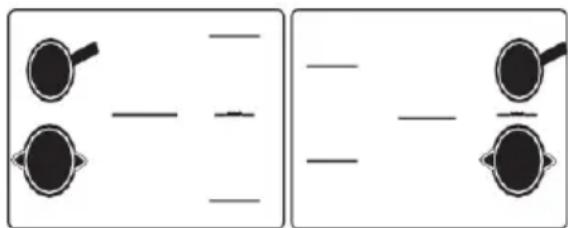
When several cooking rings are used at the same time, the hob manages the power distribution, so as not to exceed its total power. When using the maximum power setting (Boost) on several rings at the same time, make sure to position your cookware in the best configurations, and avoid the ones below.
① SWITCHING ON AND OFF
flowchart
graph LR
    A["Start"] --> B{Decision}
    B -->|Yes| C["Process Step 1"]
    B -->|No| D["Process Step 2"]
    C --> E["Output"]
    D --> E
    E --> F["Final Output"]
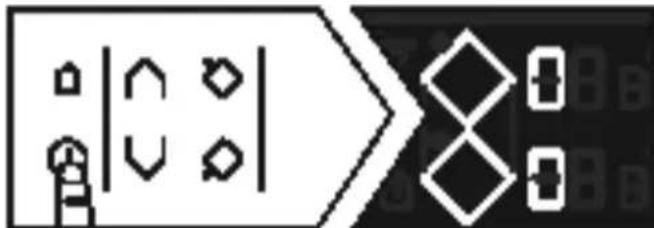
Press Ⓘ.
A "0" displays in each zone available for 8 seconds.
The hob automatically detects your pans.
When a pan is detected, the "0" flashes with a dot over the ring detected. You can then adjust the power. If you do not select a power level, the cooking ring will automatically turn itself off.
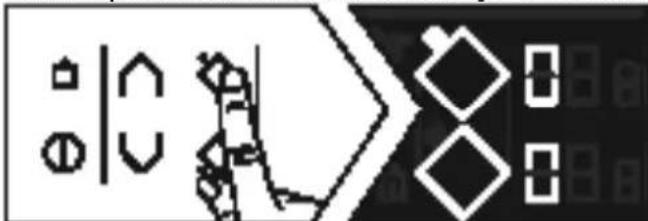
If no pan is detected select your cooking ring:
natural_image
Pure electrical circuit lines without any symbolsSwitching off a zone on the hob
natural_image
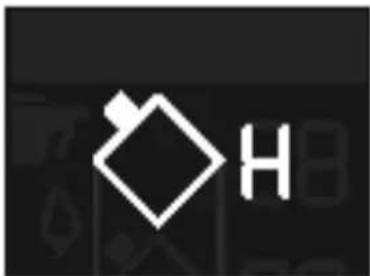
Pure electrical circuit lines without any symbolsPress and hold the key for the ring, a long beep sounds and the display switches off or the "H" symbol (residual heat) appears.
Press the ⏻key to switch the hob off completely.
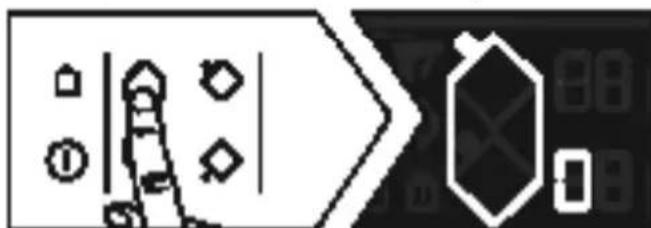
HORIZONE
The Horizone ring can be used as 2 separate zones or as 1 full zone. To select the
full zone, press the key.
The power and timer are adjusted as for a normal cooking ring.
natural_image
Pure electrical circuit lines without any symbolsPOWER SETTING
Press the + or - button to adjust the power level from 1 to 19.
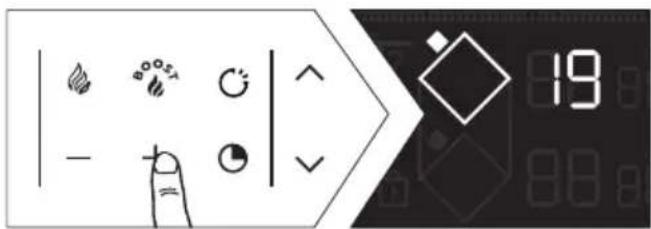
When switching on, you can go directly to maximum power (apart from boost) by pressing the "-" key for the zone.

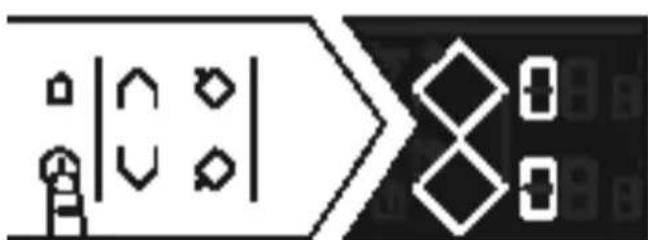
Direct access
Two keys are available to provide direct access to pre-set power levels:
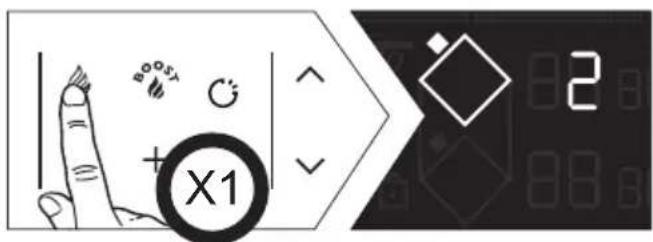
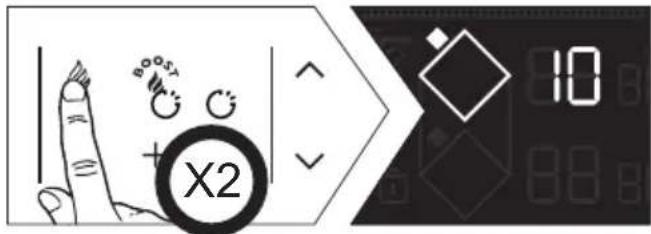
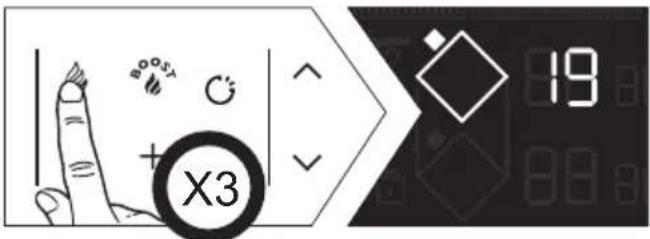
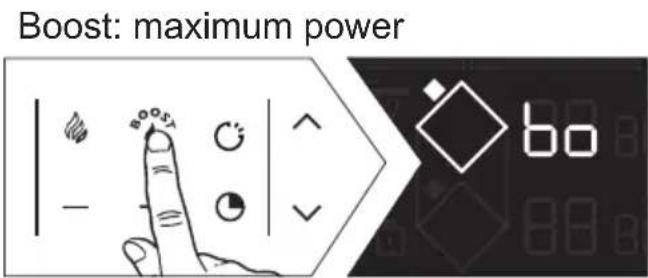
The power and timer are adjusted as for a normal cooking ring. All these power values apart from BOOST can be modified.
Proceed as follows:
The hob must be switched off with the display on:
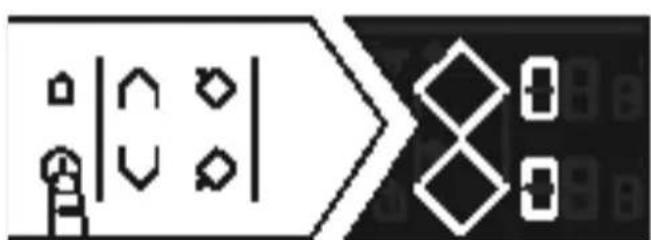
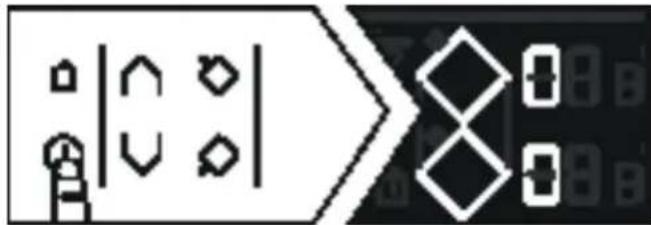
- Two diamonds display to access the direct access settings.
- First step
- Select 🏠 by pressing and holding it.
- Set the new power level between 1 and 3 (to keep warm) by pressing the + or
- keys.
-
a beep confirms your action.
-
Second step
- Repeat the previous setting
- Set the new power level between 4 and 11 (to simmer) by pressing the + or - keys.
- a beep confirms your action.
- Third step
- Repeat the previous setting
- Set the new power level between 12 and 19 (to sear) by pressing the + or - keys.
- a beep confirms your action.

SETTING THE TIMER
Each cooking ring has a dedicated timer. This can be set once the relevant cooking ring is on.
To activate or adjust the timer, press the timer key

To make setting a very long time easier, you can go straight to 8 hours by pressing the - key from the start.
Press - again to reduce the time hour by hour up to 2 hours and 99 minutes.
At the end of cooking, the display indicates 0 and a warning beep sounds. To cancel the timer, press any key for the cooking ring being used. Failing this, the beeping will stop after a few minutes. To stop the timer while cooking, press the + and - keys at the same time.
Independent timer
This function enables you to time an event without starting cooking by selecting an non-used ring.

flowchart
graph LR
    A["Input"] --> B{Gate 1}
    B -->|Yes| C["Logic Gate"]
    B -->|No| D["Logic Gate"]
    C --> E["Time 0: t0 min"]
    D --> F["Time 1: t0 min"]
    E --> G["Output"]
    F --> H["Output"]
You can stop the timer by pressing and holding down the cooking ring selection key.

CONTROL PANEL LOCKING (Child safety lock)
Your hob has a child safety device which locks the controls when the hob is not in use or during cooking (to maintain the current settings). For safety reasons, only the stop and ring selection keys are still active, allowing the hob or a cooking ring to be switched off.
Locking
Press the ☐key (padlock) until the lock symbol appears the displays and a beep confirms the operation.
Table locked in operation
When you press the power or timer controls for the rings which are "on": The 🔗 symbol starts to flash.
Unlocking
Press the 🔗key until the lock symbol disappears from the display and a beep confirms your operation.
CLEAN LOCK function
This function allows you to temporarily lock your hob while cleaning it. To activate Clean lock :
Press the 🔒 key briefly
A beep sounds and the 🔊 symbol flashes on the display.
After a predefined time, the lock will automatically disengage. A double beep sounds. You can stop Clean Lock at any time by pressing and holding the touchkey.
COOKING FUNCTIONS

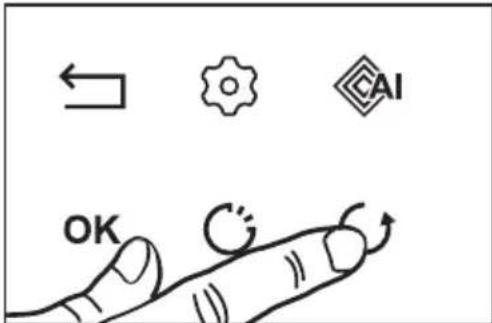
RECALL function
This function lets you display the last "power and timer" settings for all the burners which were switched off less than 3 minutes previously.
To use this function, the hob must be unlocked.
Press the On/Off key, then press and release
When the hob is on, the function shown the power and timer settings for the ring(s) that have been switched off for less than 30 seconds.
The Recall function does not work "after switching off the hob".

BOIL FUNCTION
With this function you can boil and simmer water to cook pasta, for example. Select your ring and briefly press the "Boil" key 📄

Set the quantity of water required (from 0.5 to 6 litres).
Confirm by pressing the "Boil" key 📄 wait a few seconds for automatic confirmation.
Cooking starts.
A beep sounds when the water is boiling and the "Boil" flashes in the display.
You can then add the pasta
and confirm by pressing the "Boil" key
By default, the display shows the power and a cooking time of 8 minutes.
You can still adjust the power and the cooking time suggested.
A beep sounds out when cooking is finished.
NOTE: It is important that water is at ambient temperature at the start of cooking or the final result will be distorted.
Do not use a cast iron pan with this function.
You can also use this function to cook any food that needs to be cooked in boiling water.
NOTE: It is important that water is at ambient temperature at the start of cooking or the final result will be distorted.
Do not use a cast iron pan with this function.
You can also use this function to cook any food that needs to be cooked in boiling water.

Elapsed TIME function
This function displays the time since the power setting was last changed for a selected cooking ring.
To use this function, press the Okey.
The time elapsed flashes on the timer display for the chosen burner.
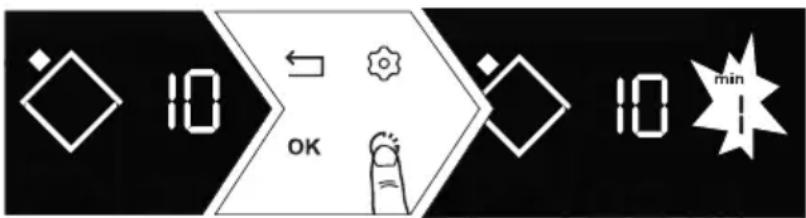
If you want cooking to end within a specific time, press the key and, within 5 seconds, press + on the timer to increase it to the desired cooking time. The elapsed time is displayed fixed for 3 seconds and then the remaining time is displayed. A beep sounds to confirm your choice.
This function is available with or without the timer function.
Note: if a time is displayed on the timer, wait for 5 seconds before modifying the cooking time
After 5 seconds, the cooking time can be modified.

Cooking assistant function
Under this function are gathered: Recipes / Boil / Blanch.
Your hob includes a cooking guide offering you a selection of recipes. This cooking mode selects for you the suitable cooking parameters based on the food to be prepared.
The hob must be switched on, press CAI to access the different functions.
The recommended utensils according to the recipe will display on the screen.

We suggest that you choose cookware with a thick, flat bottom. The heat be better distributed and cooking will be more uniform. Never leave an empty pan to heat unattended.

Do not place any cookware on the control panel as this would damage your product
Recipe selection
To obtain optimal cooking results, you need to use stainless steel cookware for all recipes, excluding the crepe and pancake recipes which were optimised for utensils with applied bottoms.
We offer you a selection of food items for which the hob recommends and automatically sets a power level and cooking time according to the type and desired quantity.
| Recipe Family Ingredient DONENESS | (if necessary) | ||
| Meat Beef End | Medium Thick | ||
| Burger Fresh | Frozen | ||
| Lamb Cutlets | |||
| Pork | Medium chop Thick chop | ||
| Duck Breast | Aiguillettes | ||
| Poultry White | Thigh | ||
| Seafood Fillet | Steak Fillet | ||
| Whole fish Small | Round Flat | ||
| Crabs Poach | Poach ECO* | ||
| Shrimp Poach | Poach ECO* Grill | ||
| Mussels / Cockles | 500 / 1000 /2000g | ||
| Scallops | 200 / 500 / 600g | ||
| Vegetables | Tomatoes Courgettes Aubergines Peppers Onions | ||
| Mushrooms | Chopped Whole | ||
| Blanched potatoes | |||
| Spinach | |||
Recipe selection
| Recipe Family Ingredient DONESS | (if necessary) | ||
| Desserts Melted chocolateCrêpesPancakesBrioche / Pain perduCaramel | |||
| Eggs Fried | OmeletteScrambledBoiledSoft boiledHard boiledQuail | ||
| Pasta / Rice Dried | pasta Penne | Penne ECO*SpaghettiSpaghetti ECO*TagliatelleTagliatelle ECO*Pasta shellsPasta shells ECO*Whole wheat | |
| Dried pasta 100 / 150 / 200 | g | ||
| Rice White | Whole wheatBlack | ||
* The ECO recipes refer to passive cooking, which makes it possible to save energy by using residual heat. Thanks to a lid, heat remains concentrated inside the pan after stopping the hob, which makes it possible to continue cooking for a time predetermined by the ECO function.
Boil function (AI)
This function enables you to boil water and keep it boiling without overflowing to cook pasta, for example.
Place your pan on a cooking ring.
Set the quantity of water required (from 0.5 to 6 litres) using the the √ keys.
The hob proposes the most suitable ring.
Confirm by pressing OK
Cooking starts.
A beep sounds when the water is boiling and a message on the display prompts you to add the ingredients. When it is done, press OK confirm.
The time and power display. You can however adjust them at your convenience. A beep sounds out when cooking is finished.
NOTE: It is important that water is at ambient temperature at the start of cooking or the final result will be distorted.
Do not use a cast iron pan or a lid with this function. You can also use this function to cook any food that needs to be cooked in boiling water.
Grill function
This function enables you to use the De Dietrich grill accessory on the twin cooking ring to grill food while avoiding overcooking and using excess fat. The grill accessory is not provided with the hob and is available from your retailer.
Blanch function
This cooking technique consists in cooking vegetables in boiling water for a few minutes, then immersing them in ice-cold water to interrupt cooking.
This preserves both the vivid colour of vegetables as well as their texture. This function enables you to cook vegetables in boiling water for 8 minutes maximum.
Select the quantity of water in which to immerse the vegetables.
Place your pan with the ingredients on a cooking ring.
Recipe example for a Beef cut:
» Switch the hob on ⏻
» Press .CAI
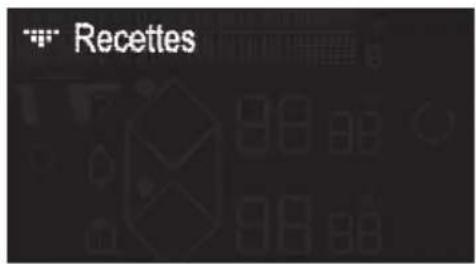

» Select the "Recipes" menu with the▼/▲ keys »Pressthe key to confirm the "Recipes" selection
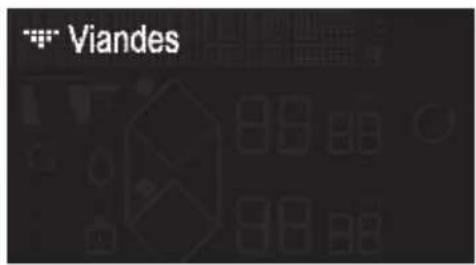

» Select the "Meat" menu with the √/ ^ keys »Pressthekey OK to confirm the "Meat" selection
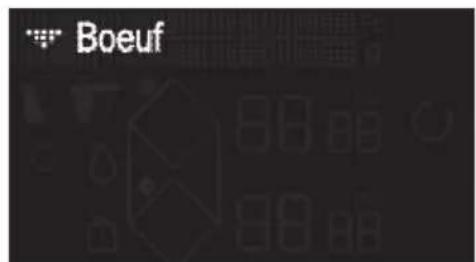

» Select the "Beef" menu with the √/ \ keys »Pressthekey OK confirm the "Beef" selection
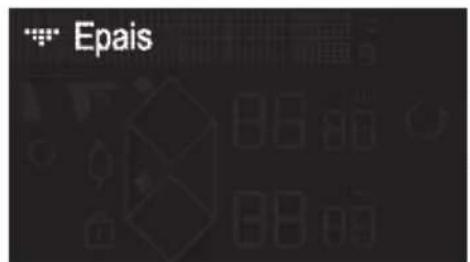

» Select the thickness of your Beef cut with the √ keys »Pressthe OKkeys to confirm the thickness
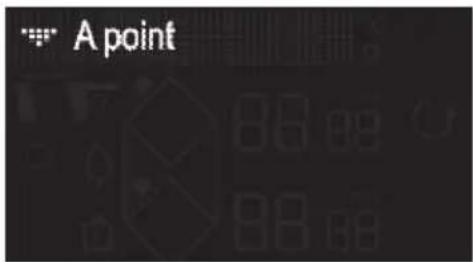

» Select the desired doneness with the √ / ^ keys » Press the OK key to confirm the doneness.
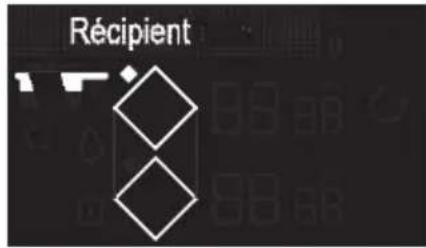
» The hob's display recommends the best cookware for an optimal result, as well as the suitable ring to cook your food on.
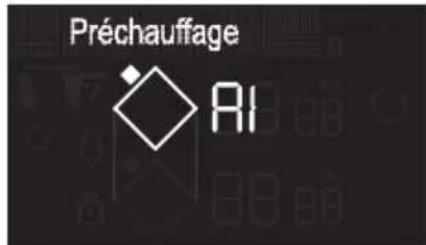
» Once you have placed the utensil on the ring, confirm with the OK » An empty preheating phase initiates.
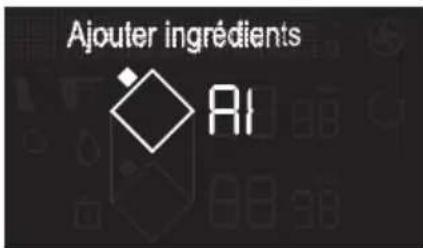
» Once preheated, the hob's display prompts you to place your beef cut.
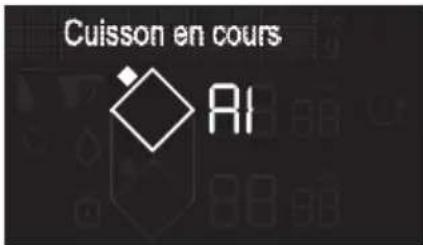
» After placing the ingredient, press the OK » The cooking time for the first side of the beef cut starts to count down.
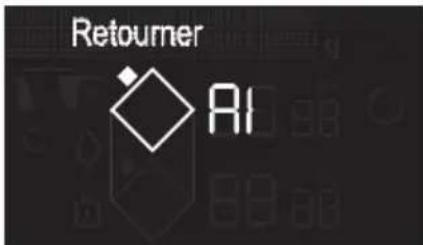
» Once this time is up, the display prompts you to turn the meat over. » After turning it over, press the keyOK » The second cooking phase starts.
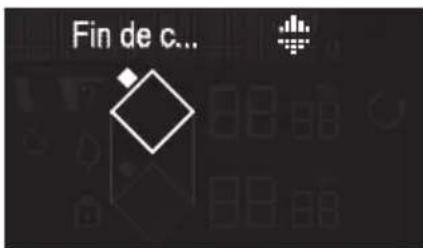
» Once cooked, the hob emits several beeps. »Press to extend the cooking time.
Note: Before the cooking ends, if "min" flashes, you can add the cooking time by pressing ⏻ then + or -.
SAFETY PRECAUTIONS & RECOMMENDATIONS
Residual heat
After intensive use, the cooking ring you have just used may remain hot for several minutes,
A "H" symbol is displayed during this time.
Avoid touching the areas concerned.
Temperature limiter
Each cooking ring is fitted with a safety sensor that continuously monitors the temperature of the bottom of the pan. In the event that an empty pan is left on a zone that is switched on, the sensor automatically adapts the power delivered by the hob and limits the risk of damaging the cookware or the hob.
Spillage protection
The hob may be switched off in the following three cases:
- Spillage covering the control keys.
- Damp cloth placed over the keys.
- Metal object placed on the control keys.
Remove the object or clean and dry the keys and resume cooking.
In these cases, the -symbol is displayed accompanied by an audible signal.
"Auto-Stop" System
If you forget to switch off a pan, your hob has an “Auto-Stop” safety function that automatically switches off the forgotten cooking ring after a pre-set time (between 1 and 10 hours based on the power level setting).
If the safety system is triggered, the cooking ring is shown as switched off with "AS" displayed on the control panel and a beep sounds for about 2 minutes. To stop it, simply press any of the control keys.

Sounds similar to the ticking of a clock may be heard.
These sounds occur when the hob is in operation and disappear or decrease according to the heating configuration. Low whistling or humming may also occur depending on the model and on the quality of your pan. Such noises are a normal part of induction technology and do not indicate a fault.
We do not recommend using any hob protection mechanisms.
LOOKING AFTER THE HOB
For light soiling, use a kitchen sponge. Use hot water to wet the area to be cleaned and then wipe dry.
For burnt-on food deposits, sugary spills, melted plastic, use a scouring sponge and/or a special glass cleaning scraper. Use hot water to wet the area to be cleaned, use a special glass cleaning scraper to remove the dirt, finish off with a scouring sponge and then wipe dry.
For rings and hard water residue, apply warm white vinegar to the stain, let stand, then wipe with a soft cloth.
For shiny metal streaks and weekly maintenance, use a special vitroceramic glass product. Apply the special product (which contains silicon and preferably has a protective effect) to the vitroceramic glass.
Important note: do not use abrasive powders or scourers. Use cleaning creams and special gentle washing up sponges.
WHEN USING FOR THE FIRST TIME
You notice that something appears in the display. This is normal. It will disappear after 30 seconds.
The circuit breaker trips/blows a fuse or only one side of the hob works. The hook-up of your
hob is faulty. Verify its compliance (see connexion chapter).
The hob gives off a smell during the first few uses. The appliance is new. Heat each zone for half an hour with a pan full of water.
WHEN POWERING ON
The hob does not work and the lights on the panel stay off.
There is no power to the hob. The electrical supply or the connection are faulty. Inspect the fuses and the circuit-breaker.
The hob does not work and another message is displayed. The electronic circuit is faulty. Call the After-Sales service.
Fault code F9 : voltage less than 170 V.
Fault code D1 : temperature less than 5°C.
DURING USE
The hob does not work, the screen displays and a beep sounds.
There was a spillage or an object is obstructing the control panel. Clean or remove the object and resume cooking.
Code F7 is displayed.
The electronic circuits have overheated (See "Fitting" chapter).
While a heating area is on, the control panel's illuminated symbols continue to flash.
The pan being used is not suitable.
The pans make a noise and the hob emits a clicking noise during cooking (see the “safety and recommendations” tip). This is normal. With certain types of pan, heat passing from the hob to the pan causes this clicking.
The ventilation continues to operate after the hob is switched off.
This is normal. It cools the electronics.
In the event of a persistent fault, switch off your hob for 1 minute. If the problem persists, contact the After-Sales Service.

VÁŽENÁ ZÁKAZNICE, VÁŽENÝ ZÁKAZNÍKU
natural_image
Diagram of a solar panel with grid layout and directional arrows indicating airflow or movement (no text or symbols)ZABUDOVÁNÍ
natural_image
Line drawing of hands using a tool to cut or mark a curved object on a mechanical component (no text or symbols)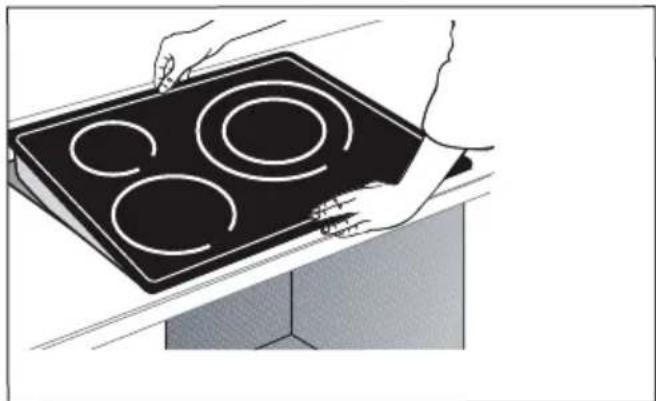
natural_image
Illustration of hands holding a black electric stove with four circular cutouts (no text or symbols)
Důležité upozornění
.3 POPIS VAŠEHO PŘÍSTROJE
LIŠTA
natural_image
Three identical grayscale toolbar icons with various geometric and symbolic shapes on black background (no text or labels).3 POPIS VAŠEHO PŘÍSTROJE
Legenda displeje
natural_image
Pure electrical circuit lines without any symbols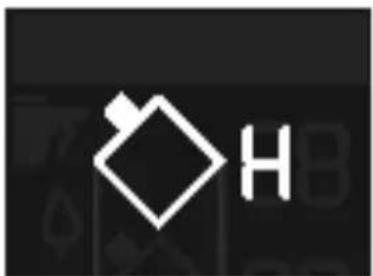
natural_image
Pure electrical circuit symbol for a battery, no text or labels presentnatural_image
Pure electrical circuit lines without any symbols.4 POUŽITÍ ZAŘÍZENÍ
Service : ...... Type : ....
natural_image
Diagram of a server rack with ventilation grilles and a curved pipe outlet (no text or symbols)INDBYGNING
natural_image
Illustration of hands using a tool to cut or mark a curved object on a mechanical component (no text or symbols visible)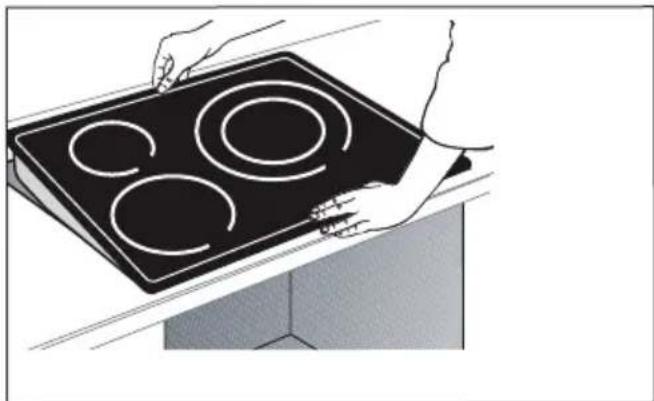
natural_image
Illustration of hands holding a black electric stove with four circular cutouts (no text or symbols)
Vigtigt
.3 PRASENTATION AF APPARATET
BETJENINGSPANEL
natural_image
Abstract geometric shapes and symbols on a black background, no readable text or labelsnatural_image
Pure electrical circuit symbol for a battery, no text or labels presentnatural_image
Pure electrical circuit lines without any symbols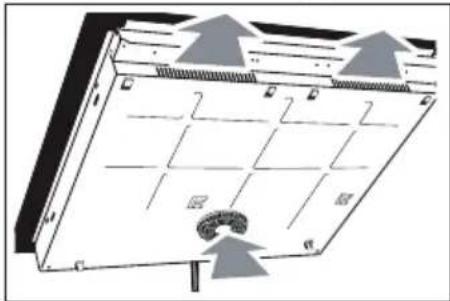
natural_image
Diagram of a server rack with grid layout and ventilation ducts, no text or symbols presentEINBAU
natural_image
Illustration of hands using a tool to cut or mark a curved object on a surface (no text or symbols visible)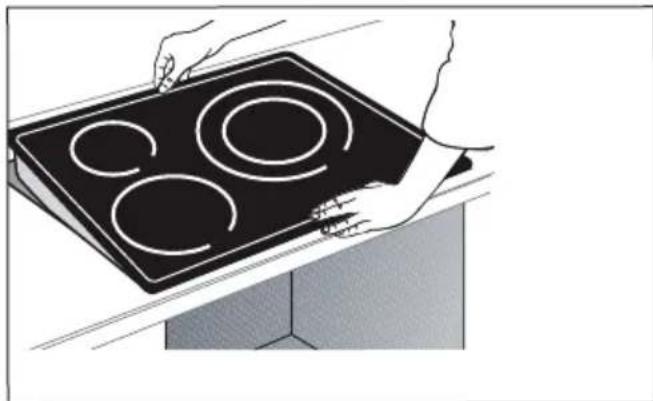
natural_image
Illustration of hands holding a black electric stove with four circular cutouts (no text or symbols)
Wichtig


natural_image
Pure graphical toolbar icons without any text or symbolsGlossar Tasten

On / Off

Verriegelung / Clean Lock

Auswahl der Garzone

Horizone
natural_image
Two identical diagrams showing a cooking pan with handles, each with horizontal lines and no text or symbols.No Boost
natural_image
Two identical diagrams showing a pair of black circular objects with horizontal and vertical lines, no text or symbols present.natural_image
Pure electrical circuit lines without any symbolsnatural_image
Pure electrical circuit symbol for a battery, no text or labels presentService : ...... Type : ....
natural_image
Diagram of a solar panel with grid layout and airflow arrows, no text or symbols presentEMPOTRAMIENTO
natural_image
Illustration of hands using a tool to cut or mark a curved object on a surface (no text or symbols visible)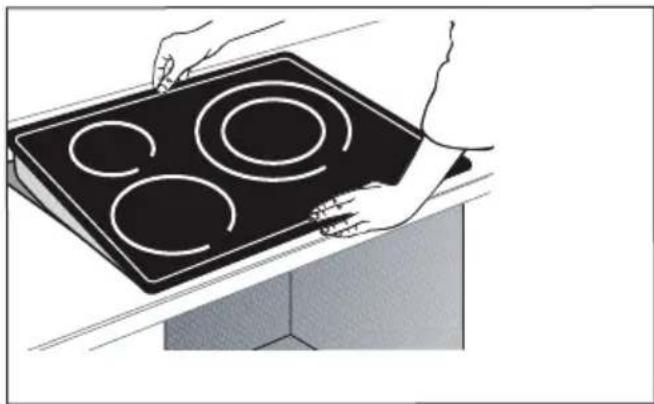
natural_image
Illustration of hands holding a black electric stove with four circular cutouts (no text or symbols)
Importante
PANEL DE CONTROL
natural_image
Three identical grayscale toolbar icons with various geometric and symbolic shapes on a black background (no text or labels)Teclado
natural_image
Pure electrical circuit lines without any symbols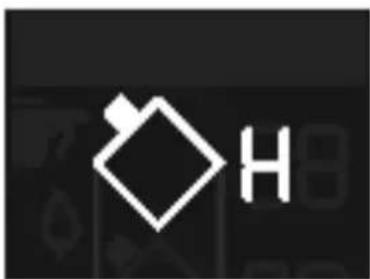
natural_image
Pure electrical circuit lines without any symbolsService : ...... Type : ....
natural_image
Diagram of a solar panel with grid layout and airflow arrows, no text or symbols presentΕΝΤΟΙΧΙΣΜΟΣ
natural_image
Illustration of hands using a tool to cut or mark a curved object on a surface (no text or symbols present)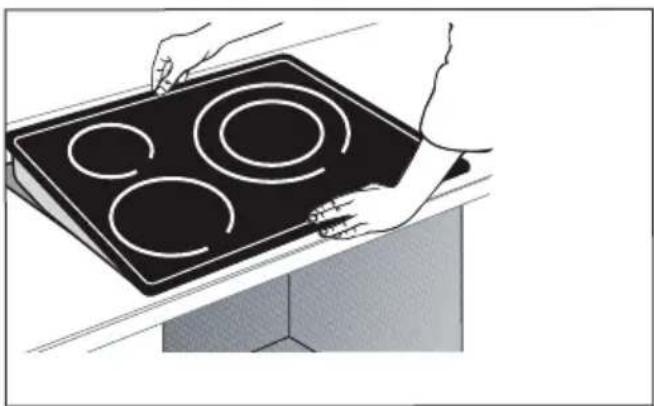
natural_image
Illustration of hands holding a black electric stove with four circular cutouts (no text or symbols)
Προσοχή
natural_image
Three identical grayscale toolbar icons with various geometric and symbolic shapes (no text or labels)ΔΙΑΧΕΙΡΙΣΗ ΠΑΡΑΜΕΤΡΩΝ
natural_image
Pure electrical circuit lines without any symbolsnatural_image
Pure electrical circuit symbol for a battery, no text or labels presentflowchart
graph LR
    A["Input"] --> B{Timer: 0-2}
    B -->|Yes| C["Output"]
    B -->|No| D["Feedback to Timer"]
    D --> E["Output"]

    subgraph Logic
    F["Symbol: Hexagon, Circle, Triangle, Square"] --> G["State: +/-"]
    end

    subgraph Digital
    H["Symbol: Diamond, Triangle, Square"] --> I["State: 0-2 Min"]
    end

    subgraph Output
    J["Symbol: Hexagon, Circle, Square"] --> K["State: -0.5 Min"]
    end

    style Logic fill:#f9f,stroke:#333
    style Digital fill:#bbf,stroke:#333
natural_image
Illustration of hands using a tool to cut or mark a component on a cutting board (no text or symbols visible)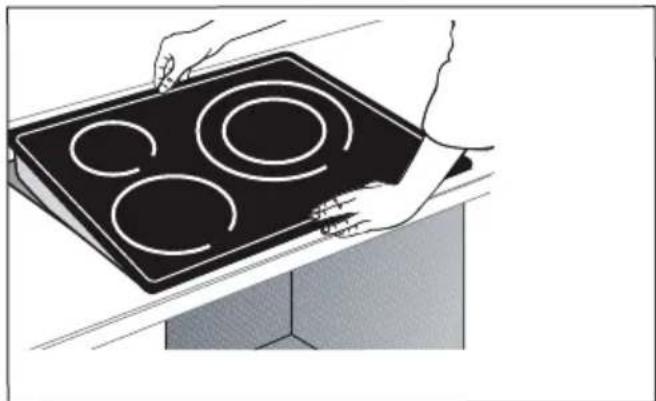
natural_image
Illustration of hands holding a black electric stove with four circular cutouts (no text or symbols)
Tärkeää


natural_image
Pure graphical toolbar icons without any text or symbolsnatural_image
Illustration of four different cooking pot designs with different panes (no text or symbols)Paistinpannu
natural_image
Pure electrical circuit lines without any symbols
natural_image
Pure electrical circuit symbol for a battery, no text or labels present
Service : ...... Type : ....

natural_image
Diagram of a solar panel with grid layout and airflow arrows, no text or symbols presentBEÉPÍTÉS
natural_image
Illustration of hands using a tool to cut or mark a curved object on a surface (no text or symbols visible)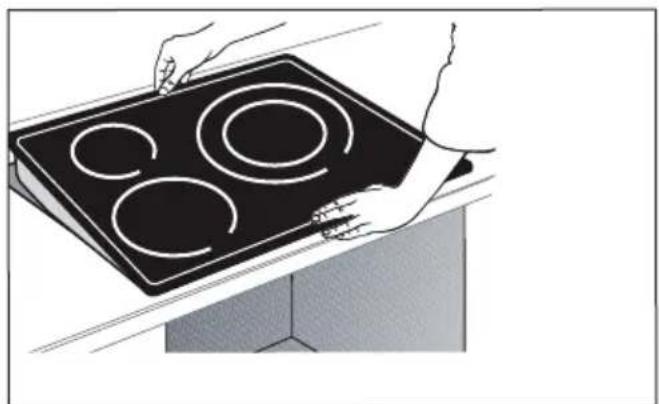
natural_image
Illustration of hands holding a black electric stove with four circular cutouts (no text or symbols)
Fontos


natural_image
Pure electrical circuit lines without any symbols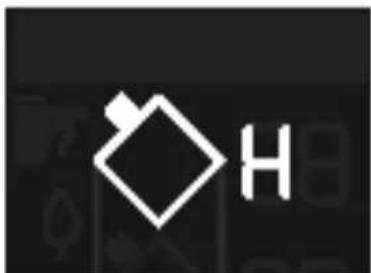
natural_image
Pure electrical circuit symbol for a battery, no text or labels presentnatural_image
Pure electrical circuit lines without any symbols| Service : |
| Type : |
natural_image
Diagram of a solar panel with grid layout and mounting points, no text or symbols presentINCASSO
natural_image
Line drawing of hands using a tool to cut or mark a curved object on a surface (no text or symbols)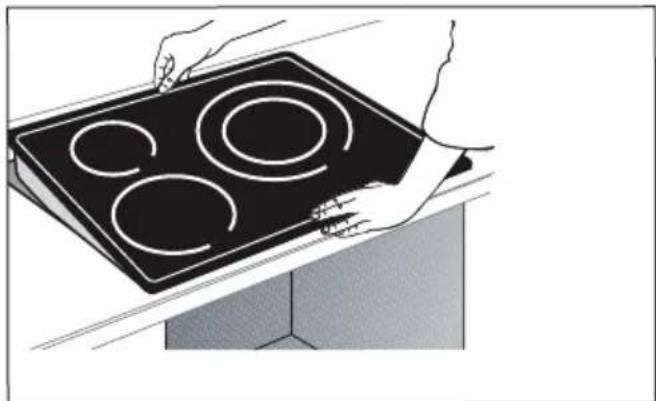
natural_image
Illustration of hands holding a black electric stove with four circular cutouts (no text or symbols)
Importante
natural_image
Pure electrical circuit lines without any symbolsnatural_image
Pure electrical circuit symbol for a battery, no text or labels presentnatural_image
Pure electrical circuit lines without any symbols.4 UTILIZZO DELL'APPARECCHIO
2/ INSTALLATIE....7-9
Uitpakken....7
Inbouwen....7-8
| Service: |
| Type: |
natural_image
Diagram of a solar panel with grid layout and directional arrows indicating airflow or movement (no text or symbols)INBOUW
natural_image
Line drawing of hands using a tool to cut or mark a curved object on a surface (no text or symbols)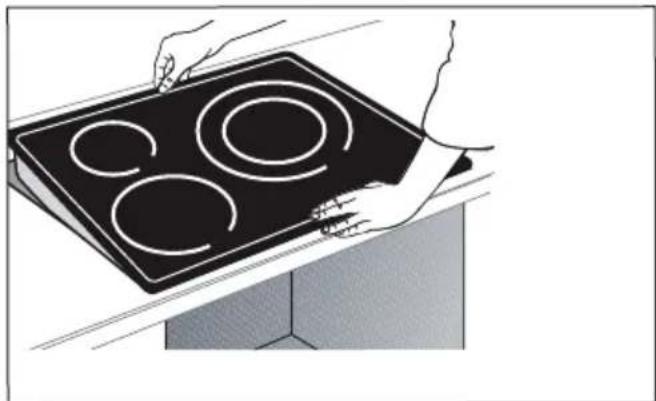
natural_image
Illustration of hands holding a black electric stove with four circular cutouts (no text or symbols)
Belangrijk
natural_image
Three identical grayscale toolbar icons with various geometric and symbolic shapes on a black background (no text or labels)natural_image
Pure electrical circuit lines without any symbolsnatural_image
Pure electrical circuit symbol for a battery, no text or labels presentnatural_image
Pure electrical circuit lines without any symbols.4 GEBRUIK VAN UW APPARAAT
5/ VEDLIKEHOLD....26
6/ FEIL OG L∅SNINGER....27
natural_image
Diagram of a solar panel with grid layout and mounting base, showing airflow direction (no text or symbols)NEDFELLING
natural_image
Line drawing of hands using a tool to cut or mark a curved object on a flat surface (no text or symbols)
natural_image
Illustration of hands holding a black electric stove with four circular cutouts (no text or symbols)
Viktig
.3 PRESENTASJON AV APPARATET
KONTROLLPANEL



natural_image
Pure graphical toolbar icons without any text or symbolsForklaring på symbolene Direkte tilgang

On / Off

Tastelås / Clean Lock

Horizone


Velge kokeplate


Navigering (opp/ned)

Tilbake


Bekrefte / OK

Innstillinger

Effekt

Koke
Boost
Funksjon

natural_image
Two identical diagrams showing a pair of black cooking pots with handles, separated by a horizontal line (no text or symbols)No Boost
natural_image
Two identical diagrams showing a pair of black circular objects with horizontal and vertical lines, no text or symbols present.① SLÅ AV OG PÅ
flowchart
graph LR
    A["Start"] --> B{Decision}
    B -->|Yes| C["Process Step 1"]
    B -->|No| D["Process Step 2"]
    C --> E["Output"]
    D --> E
    E --> F["Final Output"]
Trykk på tasten Ⓘ.
natural_image
Pure electrical circuit lines without any symbolsnatural_image
Abstract geometric logo with white diamond and letter H on black background (no text or symbols)Trykk lenge på tasten til kokeplaten ◇du hører et langt lydsignal og displayet slukkes eller symbolet "H" (restvarme) vises.
INNSTILLING AV TIDSURET
Hver kokeplate har et eget tidsur. Tidsuret kan innstilles så snart kokeplaten er slått på.
flowchart
graph LR
    A["State 1"] --> B["State 2"]
    B --> C["State 3"]
    C --> D["State 4"]
    D --> E["Output Display"]

    subgraph State_1
        F["+0.5V"]
        G["-0.5V"]
        H["+0.5V"]
        I["+0.5V"]
    end

    subgraph State_2
        J["State 1"]
        K["-0.5V"]
        L["State 2"]
        M["State 3"]
        N["State 4"]
        O["State 5"]
    end

    subgraph State_3
        P["State 1"]
        Q["-0.5V"]
        R["State 2"]
        S["State 3"]
        T["State 4"]
        U["State 5"]
    end

    subgraph State_4
        V["State 1"]
        W["-0.5V"]
        X["State 2"]
        Y["State 3"]
        Z["State 4"]
        AA["State 5"]
    end

    subgraph State_5
        AB["State 1"]
        AC["-0.5V"]
        AD["State 2"]
        AE["State 3"]
        AF["State 4"]
        AG["State 5"]
    end

    subgraph State_6
        AH["State 1"]
        AI["-0.5V"]
        AJ["State 2"]
        AK["State 3"]
        AL["State 4"]
        AM["State 5"]
    end

    subgraph State_7
        AN["State 1"]
        AO["-0.5V"]
        AP["State 2"]
        AQ["State 3"]
        AR["State 4"]
        AS["State 5"]
    end

    subgraph State_8
        AT["State 1"]
        AU["-0.5V"]
        AV["State 2"]
        AW["State 3"]
        AX["State 4"]
        AY["State 5"]
    end

    subgraph State_9
        AZ["State 1"]
        BA["-0.5V"]
        BB["State 2"]
        BC["State 3"]
        BD["State 4"]
        BE["State 5"]
    end

    subgraph State_10
        BF["State 1"]
        BG["-0.5V"]
        BH["State 2"]
        BI["State 3"]
        BJ["State 4"]
        BK["State 5"]
    end

    subgraph State_11
        BL["State 1"]
        BM["-0.5V"]
        BN["State 2"]
        BO["State 3"]
        BP["State 4"]
        BQ["State 5"]
    end

    subgraph State_12
        BQ --> BR["-0.5V"]
        BS["State 1"]
        BT["State 2"]
        BU["State 3"]
        BV["State 4"]
        BW["State 5"]
    end

    subgraph State_13
        BX["State 1"]
        BY["-0.5V"]
        BZ["State 2"]
        CA["State 3"]
        CB["State 4"]
        CC["State 5"]
    end

    subgraph State_14
        DZ["State 1"]
        DB["-0.5V"]
        BEZ["State 2"]
        BFZ["State 3"]
        BGZ["State 4"]
        BHZ["State 5"]
    end

    subgraph State_15
        BEZ --> BFZ
    end

    subgraph State_16
        BFZ --> BGZ
    end

    subgraph State_17
        BGZ --> BHZ
    end

    subgraph State_18
        BHZ --> BIZ
    end

    subgraph State_19
        BIZ --> BJZ
    end

    subgraph State_20
        BJZ --> BKZ
    end

    subgraph State_21
        BKZ --> BLZ
    end

    subgraph State_22
        BLZ --> BNZ
    end

    subgraph State_23
        BNZ --> BOZ
    end

    subgraph State_24
        BOZ --> BPZ
    end

    subgraph State_25
        BPZ --> BPZ
    end

    subgraph State_26
        BPZ --> BZZ
    end

    subgraph State_27
        BZZ --> BZZ
    end

    subgraph State_28
        BZZ --> BZZ
    end

    subgraph State_29
        BZZ --> BZZ
    end

    subgraph State_30
        BZZ --> BZZ
    end

    subgraph State_31
        BZZ --> BZZ
    end

    subgraph State_32
        BZZ --> BZZ
    end

    subgraph State_33
        BZZ --> BZZ
    end

    subgraph State_34
        BZZ --> BZZ
    end

    subgraph State_35
        BZZ --> BZZ
    end

    subgraph State_36
        BZZ --> BZZ
    end

    subgraph State_37
        BZZ --> BZZ
    end

    subgraph State_38
        BZZ --> BZZ
    end

    subgraph State_39
        BZZ --> BZZ
    end

    subgraph State_40
        BZZ --> BZZ
    end

    subgraph State_41
        BZZ --> BZZ
    end

    subgraph State_42
        BZZ --> BZZ
    end

    subgraph State_43
        BZZ --> BZZ
    end

    subgraph State_44
        BZZ --> BZZ
    end

    subgraph State_45
        BZZ --> BZZ
    end

    subgraph State_46
        BZZ --> BZZ
    end

    subgraph State_47
        BZZ --> BZZ
    end

    subgraph State_48
        BZZ --> BZZ
    end

    subgraph State_49
        BZZ --> BZZ
    end

    subgraph State_50
        BZZ --> BZZ
    end

    subgraph State_51
        BZZ --> BZZ
    end

    subgraph State_52
        BZZ --> BZZ
    end

    subgraph State_53
        BZZ --> BZZ
    end

    subgraph State_54
        BZZ --> BZZ
    end

    subgraph State_55
        BZZ --> BZZ
    end

    subgraph State_56
        BZZ --> BZZ
    end

    subgraph State_57
        BZZ --> BZZ
    end

    subgraph State_58
        BZZ --> BZZ
    end

    subgraph State_59
        BZZ --> BZZ
    end

    subgraph State_60
        BZZ --> BZZ
    end

    subgraph State_61
        BZZ --> BZZ
    end

    subgraph State_62
        BZZ --> BZZ
    end

    subgraph State_63
        BZZ --> BZZ
    end

    subgraph State_64
        BZZ --> BZZ
    end

    subgraph State_65
        BZZ --> BZZ
    end

    subgraph State_66
        BZZ --> BZZ
    end

    subgraph State_67
        BZZ --> BZEZZBZZBZZBZZBZZBZZBZZBZZBZZBZZBZZBZZBZZBZZBZZBZZBZZBZZBZZBZZBZZBZZBZZBZZBZZBZZBZZBZZBZZBZZBZZBZZBZZBZZBZZBZZBZZBZZBZZBZZBZZBZZBZZBZZBZZBZZBZZBZZBZZBZZBZZA/BZZBZZBZZBZZBZZBZZBZZBZZBZZBZZBZZBZZBZZBZZBZZBZZBZZBZZBZZBZZBZZBZZBZZBZZBZZBZZBZZA/BZZA/BZZA/BZZA/BZZA/BZZA/BZZA/BZZA/BZZA/BZZA/BZZA/BZZA/BZZA/BZZA/BZZA/BZZA/BZZA/BZZA/BZZA/BZZA/BZZA/BZZA/BZZA/BZZA/BZZA/BZZA/BZZA/BZZA/BZZA/BZZA/BZZA/BZZA/BZZA/BZZA/BzzA/BZZA/BZZA/BZZA/BZZA/BZZA/BZZA/BZZA/BZZA/BZZA/BZZA/BZZA/BZZA/BZZA/BZZA/BZZA/BZZA/BZZA/BZZA/BZZA/BZZA/BzzA/BzzA/BzzA/BzzA/BzzA/BzzA/BzzA/BzzA/BzzA/BzzA/BzzA/BzzA/BzzA/BzzA/BzzA/BzzA/BzzA/BzzA/BzzA/BzzA/BzzA/BzzA/BzzA/BzzA/BzzA/BzzA/BzzA/BzzA/BzzA/BzzA/BzzA/BzzA/BzzA/BzzAB/BB/BB/BB/BB/BB/BB/BB/BB/BB/BB/BB/BB/BB/BB/BB/BB/BB/BB/BB/BB/BB/BB/BB/BB/BB/BB/BB/BB/BB/BB/BB/BB/BB/BB/BB/BB/BB/BB/BB/BB/BB/BB/BB/BB/BB/BB/BB/BB/BB/BB/BA/BB/BB/BB/BB/BB/BB/BB/BB/BB/BB/BB/BB/BB/BB/BB/BB/BB/BB/BB/BB/BB/BB/BB/BB/BB/BB/BB/BB/BB/BB/BB/BB/BB/BB/BB/BB/BB/BB/BB/BB/BB/BB/BB/BB/A<nl>
VEDLIKEHOLD AV PLATETOPPEN
Service : ...... Type : ....
natural_image
Diagram of a solar panel with grid layout and directional arrows indicating airflow or movement (no text or symbols)ZABUDOWA
natural_image
Illustration of hands using a tool to cut or mark a curved object on a mechanical component (no text or symbols visible)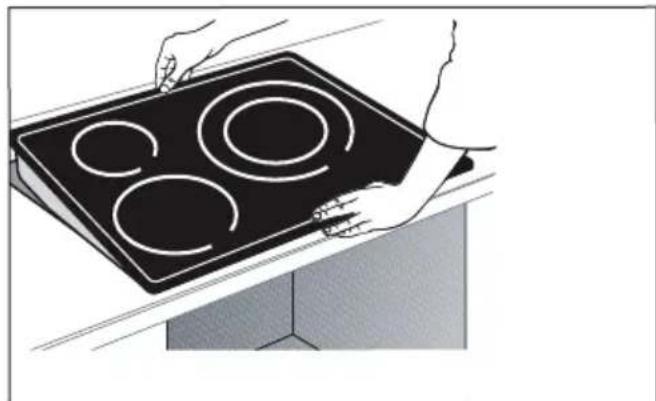
natural_image
Illustration of hands holding a black electric stove with four circular cutouts (no text or symbols)
Ważne
PASEK
natural_image
Three identical grayscale toolbar icons with various geometric and symbolic shapes (no text or labels)natural_image
Pure electrical circuit lines without any symbolsnatural_image
Pure electrical circuit symbol for a battery, no text or labels presentnatural_image
Pure electrical circuit lines without any symbolsService : ....
Type :
natural_image
Diagram of a solar panel with grid layout and directional arrows indicating airflow or movement (no text or symbols)ENCASTRE
natural_image
Illustration of hands using a tool to cut or mark a curved component, no text or symbols present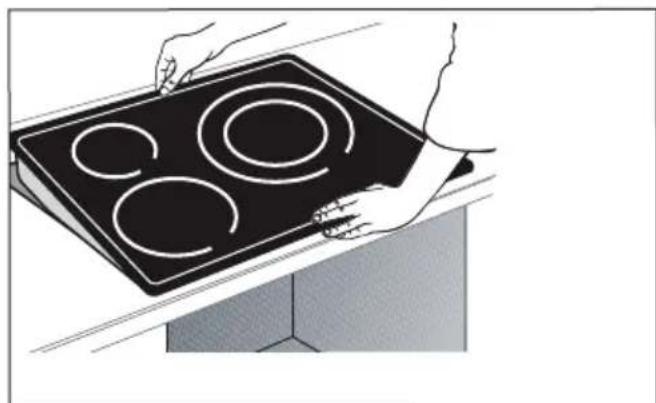
natural_image
Illustration of hands holding a black electric stove with four circular cutouts (no text or symbols)
Importante
natural_image
Three identical grayscale toolbar icons with various geometric and symbolic shapes on black background (no text or labels)natural_image
Pure electrical circuit lines without any symbolsnatural_image
Pure electrical circuit symbol for a battery, no text or labels presentnatural_image
Pure electrical circuit lines without any symbolsService : ...... Type : ....
natural_image
Diagram of a solar panel with grid layout and directional arrows indicating airflow or movement (no text or symbols)ВСТРАИВАНИЕ
natural_image
Illustration of hands using a tool to cut or mark a curved object on a mechanical component (no text or symbols visible)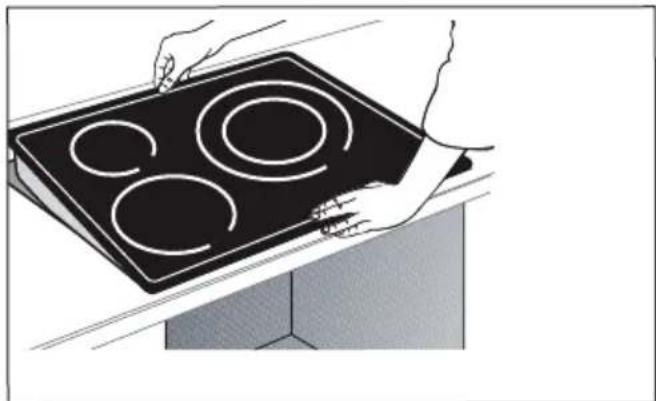
natural_image
Illustration of hands holding a black electric stove with four circular cutouts (no text or symbols)
Важно!

natural_image
Pure graphical toolbar icons without any text or symbols
natural_image
Pure graphical toolbar icons without any text or symbolsnatural_image
Illustration of five different cooking pots with different fill patterns (no text or symbols)Сковорода
Сковорода с крышкой
Кастрюля с крышкой
Кастрюля
natural_image
Two identical diagrams showing two black pots with handles placed horizontally, each with horizontal lines (no text or symbols)No Boost
natural_image
Two identical diagrams showing a pair of black circular objects with horizontal and vertical lines, no text or symbols present.① ВКЛЮЧЕНИЕ И ВЫКЛЮЧЕНИЕ
flowchart
graph LR
    A["Start"] --> B{Decision}
    B -->|Yes| C["Process Step 1"]
    B -->|No| D["Process Step 2"]
    C --> E["Output"]
    D --> E
    E --> F["Final Output"]
Нажмите кнопку Ⓘ.
natural_image
Pure electrical circuit lines without any symbolsnatural_image
Pure electrical circuit symbol for a battery, no text or labels presentService : ...... Type : ....
natural_image
Diagram of a solar panel with heat exchangers and cooling fins, showing airflow direction (no text or symbols)ZABUDOVANIE
natural_image
Illustration of hands using a tool to cut or mark a curved object on a mechanical component (no text or symbols visible)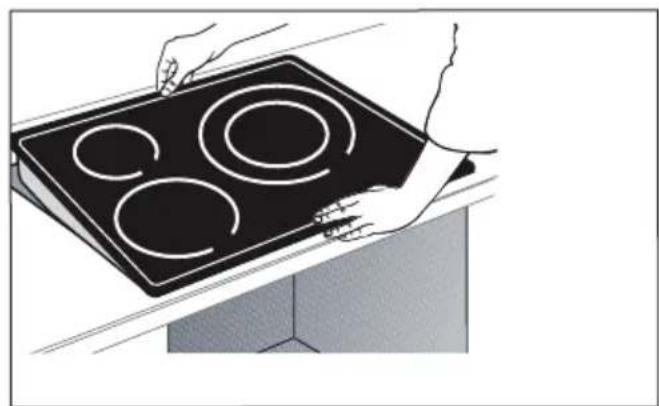
natural_image
Illustration of hands holding a black electric stove with four circular cutouts (no text or symbols)
Dôležité
3 PREDSTAVENIE VÁŠHO ZARIADENIA
PANEL
natural_image
Pure electrical circuit lines without any symbolsnatural_image
Pure electrical circuit lines without any symbolsnatural_image
Pure electrical circuit lines without any symbols.4 POUŽITIE VÁŠHO ZARIADENIA
Avdelning:
Typ:
natural_image
Diagram of a 3D panel with grid layout and directional arrows indicating movement or force (no text or symbols)ENCASTREMENT
natural_image
Illustration of hands using a tool to connect or install a mechanical component (no text or symbols visible)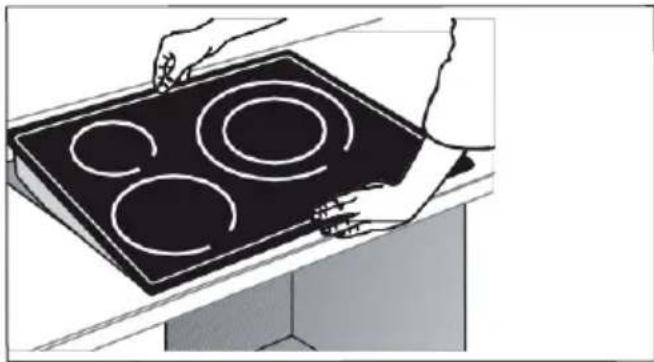
natural_image
Illustration of hands holding a black electric stove with four circular cutouts (no text or symbols)
Viktigt
natural_image
Three identical grayscale tool icons on black background, no text or symbols presentNavigering (upp/ner)


Backspace

OK / OK

Parametrar
Direkt åtkomst

Power

Koka
Boost
Funktion

natural_image
Two identical diagrams showing identical black circular objects with handles, each enclosed in a rectangle (no text or symbols)Ingen boost
① SLÅ PÅ - AV
flowchart
graph LR
    A["Input"] --> B{Decision}
    B -->|Yes| C["Process"]
    B -->|No| D["Output"]
    C --> E["Final Output"]
    D --> E
Tryck på①
natural_image
Abstract geometric logo with white diamond and letter H on dark background (no text or symbols)Ett "H" visas under denna period.
| Symbol | Várde | Edu | *Incorporation of the following table is the first time in the 2024. Incorporation of the following table is the first time in the 2025. | |||||||||||||||
| Indeferring agent | LADYPT | LADYPT | LADYPT | *Incorporation of the following table is the first time in the 2024. Incorporation of the following table is the first time in the 2025. | ||||||||||||||
| Ningkada | *Incorporation of the following table is the first time in the 2024. Incorporation of the following table is the first time in the 2025. | |||||||||||||||||
| Typographic | *Incorporation of the following table is the first time in the 2024. Incorporation of the following table is the first time in the 2025. | |||||||||||||||||
| Totalals | 147 | 1000 | 1000 | 1002 | A | *Incorporation of the following table is the first time in the 2024. Incorporation of the following table is the first time in the 2025. | ||||||||||||
| Totalalal subal system | 5 | 5 | 5 | 6 | *Incorporation of the following table is the first time in the 2024. Incorporation of the following table is the first time in the 2025. | |||||||||||||
| Sociophosphatidinhibitor/antibody and/or antihypoxia, during antihypoxia, white pulses | Pakazr | *Incorporation of the following table is the first time in the 2024. Incorporation of the following table is the first time in the 2025. | ||||||||||||||||
| For dilution systems after smokers: dianer plan with a baron for upregulation, cation, cation and cation from 1 to 3 times | p | 4 | 31 | 31 | m | |||||||||||||
| p | 4 | 21 | 21 | m | ||||||||||||||
| p | 21 | 4 | 4 | m | ||||||||||||||
| p | m | |||||||||||||||||
| p | m | |||||||||||||||||
| For the dilution systems after dosing and hand-pain and/or paraparam-tation and/or antihypoxia, cation from 1 to 3 times | p | 20 | 49.01 | 49.01 | 49.01 | 49.01 | m | The system may be used to monitor the system's performance in the system's performance in the system's performance in the system's performance in the system's performance in the system's performance in the system's performance in the system's performance in the system's performance in the system's performance in the system's performance in the system's performance in the system's performance in the system's performance in the system's performance in the system's performance in the system's performance in the system's performance in the system's performance in the system's performance in the system's performance. | ||||||||||
| p | 49.01 | m | ||||||||||||||||
| p | 49.01 | m | ||||||||||||||||
| Beglefinbungs-kanan-datenate, enteral ping | Cmax/min | 181.2 | 181.1 | 181.8 | m | *Incorporation of the following table is the first time in the 2024. Incorporation of the following table is the first time in the 2025. Incorporation of the following table is the first time in the 2025. | ||||||||||||
| Cmax/min | 181.0 | 181.0 | 181.2 | m | ||||||||||||||
| Cmax/min | 181.0 | 181.1 | 181.1 | m | ||||||||||||||
| Cmax/min | m | |||||||||||||||||
| Cmax/min | m | |||||||||||||||||
| Cmax/min | 181.2 | 181.2 | 181.2 | 181.2 | m | |||||||||||||
| Cmax/min | 181.2 | m | ||||||||||||||||
| Cmax/min | 181.2 | m | ||||||||||||||||
| Beglefinbungs-kanan-datenate, enteral ping | m | *Incorporation of the following table is the first time in the 2024. Incorporation of the following table is the first time in the 2025. Incorporation of the following table is the first time in the 2025. | ||||||||||||||||
| c | 181.1 | 181.0 | 181.0 | 181.0 | m | |||||||||||||
. 8 KUNDSERVICE
INTERVENTIONER
Відділ:
Тип:
natural_image
Diagram of a 3D grid structure with directional arrows indicating movement or force (no text or symbols)РЕЄСТРАЦІЯ
natural_image
Illustration of hands using a tool to cut or inspect a mechanical component (no text or symbols visible)
natural_image
Illustration of hands holding a black electric stove with three circular cutouts (no text or symbols)
Важливо
natural_image
Three grayscale toolbar icons with various geometric and symbolic shapes on a black background (no text or labels)Словник клавіатури

natural_image
Two identical diagrams showing identical black circular objects with handles, each connected to a horizontal line (no text or symbols)No Boost
natural_image
Abstract black-and-white graphic with white geometric shapes and partial letter 'H' (no readable text or symbols)natural_image
Abstract geometric shapes and symbols on a black background, no readable text or labelsflowchart
graph TD
    A["HE"] --> B["Medium Diamond"]
    B --> C["Circle"]
,הַרְשָׁוּוּוּוּוּוּוּוּוּוּוּוּוּוּוּוּוּוּוּוּוּוּוּוּוּוּוּוּוּוּוּוּוּוּקֹתְבָרִי,
natural_image
Diagram of a solar panel with grid layout and airflow arrows, no text or symbols presentService : ....
Type :
תְבָרִי בְּרִי
natural_image
Illustration of hands using a tool to cut or mark a curved object on a surface (no text or symbols visible)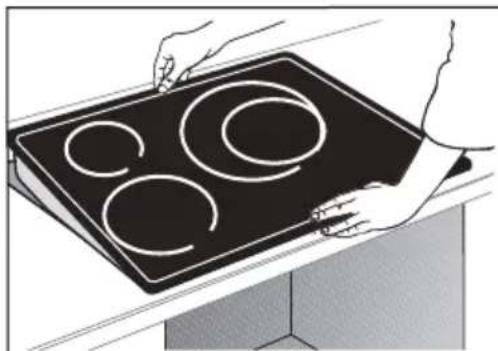
natural_image
Illustration of hands holding a black induction cooktop with three circular cutouts (no text or symbols)natural_image
Pure electrical circuit lines without any symbolsהכלה / וְרָׁה
natural_image
Pure electrical circuit lines without any symbolsHorizone
.הכלההוּרָהוּרָהוּרָהוּרָהוּרָהוּרָהוּרָהוּרָהוּרָהוּרָהוּרָהוּרָהוּרָהוּרָהוּרָה
ת.הכלההוּרָהוּרָהוּרָהוּרָהוּרָהוּרָהוּרָהוּרָהוּרָהוּרָהוּרָהוּרָהוּרָהוּרָהוּרָה
.הכלההוּרָהוּרָהוּרָהוּרָהוּרָהוּרָהוּרָהוּרָהוּרָהוּרָהוּרָהוּרָהוּרָהוּרָהוּרָה
תְכָה בְּרִי: B
תְרָהִיָּוֹ: C
תְרָהִיַעֹן : H
QR T17 : 1
| FR IT Information concerning ties plaques de cuisson domestiques electricas - UE n° 662014 | Informationi relativa si plani cottura elektrid ser uso domestico - UE n° 662014 |
| CS NI informace tlykaj se elektrickych varnych desek pro domacnost - UE n° 662014 | Informatie met betrekking tohuisheudelijke elektrische kookolaten - UE n° 662014 |
| DA P Odyorsninger for elbogepalder si husholdningstrug - UE n° 662014 | Informacje dotyczne domowych pity grażejnej elektrycznych - UE n° 662014 |
| DE P informationen zu elektrischen Haushalslochmodien - UE n° 662014 | Informaciones relatives a placas elektrische domesticae - UE n° 662014 |
| EL SH Plaipade elektrikych voryniewej spiektrojcie osiąg - UE n° 662014 | Informacje v pripade elektrikych varnych doslek pre domacnost - UE n° 662014 |
| EN SP information for domestic electric holes - UE n° 662014 | Information om elektriska hållar för hushállnuk - UE n° 662014 |
| Symbol Unit | Value | |||||||||||||||||||||||||||||||||||||||||||||||||||||||||||||||||||||||||||||||||||||||||||||||||||||||||||||||||||||||||||||||||||||||||||||||||||||||||||||||||||||||||||||||||||||||
| Model identification | PR | PR | PR | PR | PR | PR | PR | PR | PR | PR | PR | PR | PR | PR | PR | PR | PR | PR | PR | PR | PR | PR | PR | PR | PR | PR | PR | PR | PR | PR | PR | PR | PR | PR | PR | PR | PR | PR | PR | PR | PR | PR | PR | PR | PR | PR | PR | PR | PR | PR | PPR | PPR | PPR | PPR | PPR | PPR | PPR | PPR | PPR | PPR | PPR | PPR | PPR | PPR | PPR | PPR | PPR | PPR | PPR | PPR | PPR | PPR | PPR | PPR | PPR | PPR | PPR | PPR | PPR | PPR | PPR | PPR | PPR | PPR | ||||||||||||||||||||||||||||||||||||||||||||||||||||||||||||||||||||||||||||||||||||||||||||||||||||
| Rating date | 10 | 10 | 10 | 10 | 10 | 10 | 10 | 10 | 10 | 10 | 10 | 10 | 10 | 10 | 10 | 10 | 10 | 10 | 10 | 10 | 10 | 10 | 10 | 10 | 10 | 10 | 10 | 10 | 10 | 10 | 10 | 10 | 10 | 10 | ||||||||||||||||||||||||||||||||||||||||||||||||||||||||||||||||||||||||||||||||||||||||||||||||||||||||||||||||||||||||||||||||||||||||||||||||||||||
| Type of hub induction ** | ||||||||||||||||||||||||||||||||||||||||||||||||||||||||||||||||||||||||||||||||||||||||||||||||||||||||||||||||||||||||||||||||||||||||||||||||||||||||||||||||||||||||||||||||||||||||
FR : Information réglementation UE 2023/826
EN : Information on EU regulation 2023/826 - CS : Informace o nařízení EU 2023/826 - DA : Information om EU-forordnung 2023/826 - DE : Informationen zur EU-Verordnung 2023/826 - EL : Πληροφορίες σχετικά με τον κανονισμό (EE) 2023/826 - ES : Información sobre el reglamento UE 2023/826 - IT : Informazioni sul regolamento UE 2023/826 - NL : Informatie over EU-verordening 2023/826 - FI : Tietoa EU-asetuksesta 2023/826 - PL : Informacje o rozporządzeniu UE 2023/826 - PT : Informações sobre o regulamento da UE 2023/826 - SK : Informácie o EU 2023/826 - SV : Information om EU-förordning 2023/826
| FR : Consommation électricitéEN : Electricity consumption - CS : Spotřeba elektrické energie - DA : Elforbrug - DE : Stromverbrauch - EL : Kataváλωση ηλεκτρικής ενέργειας - ES : Consumo de electricidad - IT : Consumo di energia elettrica - NL : Elektriciteitsverbruik - FI : Sähkönkulutus - PL : Zużycie energii elektrycznej - PT : Consumo de eletricidade - SK : Spotreba elektrickej energie - SV : Elförbrukning | FR : Laps de temps pour passer dans le modeEN : Time Frame to Switch to Mode - CS : Časový rámec pro přepnutí do režimu - DA : Tidsramme for at skilfte til tilstand - DE : Zeitrahmen für den Wechsel in den Modus - EL : Xpovníkó πλαίσιο για μετάβαση σε λειτουργία - ES : Período de tiempo para cambiar al modo - IT : Intervallo di tempo per passare alla modalità - NL : Tijdsspanne om over te schakelen naar modus - FI : Aikaväli tilaan siirtymiselle - PL : Ramy czasowe do przełączenia w tryb - PT : Período de tempo para mudar para o modo - SK : Časový rámec na prepnutie do režimu - SV : Tidsram för att växla till läge | |
| FR : Mode arrêtEN : Off Mode - CS : Režim vypnutí - DA : Slukket tilstand - DE : Aus-Modus - EL : λειτουργία εκτός λειτουργίας - ES : Modo apagado - IT : Modalità spenta - NL : Ult-modus - FI : Pois päältä -tila - PL : Tryb wyłączenia - PT : Modo Desligado - SK : Režim vypnutia - SV : Av-läge | < 0,5W * 70s |
FR : * N/A selon modèle
EN : depending on model - CS : v závislosti na modelu - DA : afhengig af model - DE : je nach Modell - EL : aváloya με το μοντέλο - ES : Dependiendo del modelo - IT : a seconda del modelo - NL : afhankelijk van het model - FI : mallista riippuen - PL : w zależności od modelu - PT : dependendo do modelo - SK : v závislosti od modelu - SV : beroende på model