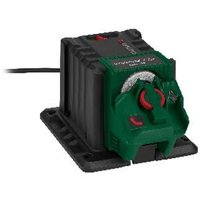
PSS 65 D1 - Sharpening station PARKSIDE - Free user manual and instructions
Find the device manual for free PSS 65 D1 PARKSIDE in PDF.


User questions about PSS 65 D1 PARKSIDE
0 question about this device. Answer the ones you know or ask your own.
Ask a new question about this device
Download the instructions for your Sharpening station in PDF format for free! Find your manual PSS 65 D1 - PARKSIDE and take your electronic device back in hand. On this page are published all the documents necessary for the use of your device. PSS 65 D1 by PARKSIDE.
USER MANUAL PSS 65 D1 PARKSIDE
natural_image
Exterior view of a black industrial electrical contactor device (no visible text or symbols)SCHÄRFSTATION / SHARPENING STATION / STATION D'AFFÛTAGE PSS 65 D1
DE AT BE CH
SCHÄRFSTATION
Bedienungsanleitung
Translation of the original instructions
FR BE
STATION D'AFFÛTAGE
B
D
E
natural_image
Line drawing of three different types of scissors (no text or symbols)⚠ VORSICHT!

natural_image
Line drawing of three different types of scissors (no text or symbols)HINWEIS
Intended use.... Page 25
Scope of delivery Page 25
Parts description.... Page 25
Technical data.... Page 26
General safety instructions.... Page 27
General Safety Directions for Power Tools.... Page 27
Further Safety Instructions.... Page 29
Residual risks ...... Page 29
Assembly Page 30
Operation.... Page 30
Troubleshooting Page 34
Cleaning and maintenance Page 35
Cleaning Page 35
Storage Page 35
Transportation Page 35
Disposal Page 35
Warranty Page 36
Warranty claim procedure.... Page 36
Service Page 37
EC Declaration of conformity.... Page 38
| List of pictograms usedThe following warnings are used in this user manual, on the packaging and on the rating label: | |||
  | Read the instruction manual! |  | CAUTION! Pay attention to the safety instructions. |
 | Wear eye protection! | ||
 | DANGER! This symbol in combination with the signal word “Danger” marks a high-risk hazard that if not prevented could result in death or serious injury. |  | Wear ear protection! |
 | Wear safety gloves! | ||
 | WARNING! This symbol in combination with the signal word “Warning” marks a medium-risk hazard that if not prevented could result in death or serious injury. |  | Switch off the product and disconnect it from the mains before replacing attachments, cleaning and when not in use. |
 | Unplug | ||
 | CAUTION! This symbol in combination with the signal word “Caution” marks a low-risk hazard that if not prevented could result in minor or moderate injury. |  | Alternating current/voltage |
 | Protection class II (double insulation) | ||
 | Safety information Instructions for use | [A40Z] | CE mark indicates conformity with relevant EU directives applicable for this product. |
SHARPENING STATION
● Introduction
We congratulate you on the purchase of your new product. You have chosen a high quality product. The instructions for use are part of the product. They contain important information concerning safety, use and disposal. Before using the product, please familiarise yourself with all of the safety information and instructions for use. Only use the product as described and for the specified applications. If you pass the product on to anyone else, please ensure that you also pass on all the documentation with it.
Intended use
The sharpening station is suitable for sharpening tools (e.g. drills, knives, scissors, picks, chisel).
The device is not intended for all other types of applications (e.g. grinding with unsuitable grinding tools, grinding with a coolant solution, grinding hazardous materials such as asbestos).
The equipment is intended for use in the field of DIY. It is not designed for commercial use.
The equipment is designed for use by adults. Young people over the age of 16 are permitted to use the equipment only under supervision.
The manufacturer shall not be liable for damages caused by use other than for the intended purpose or by incorrect operation.
- Scope of delivery
WARNING!
▶ Unpack the equipment and check that it is complete. Dispose of the packaging material correctly.
1x Appliance
1x Sharpener for knives and scissors
1x Sharpener for drills
1x Sharpener for picks and chisels
1x Spare grinding wheel
1x User manual
Parts description
Fig. A
1 Sharpener for knives and scissors
2 Power cord with power plug
3 On/off switch
4 Spacer
5 Magnet holder
6 Tool table
7 Retaining screw for angular adjustment
8 Protective hood
9 Mounting holes for work bench assembly
10 Grinding wheel
11 rotatable drill mount
12 Knurled nut for drill-fastening
13 Release lever for sharpener
14 Drill holder
15 Adjusting device
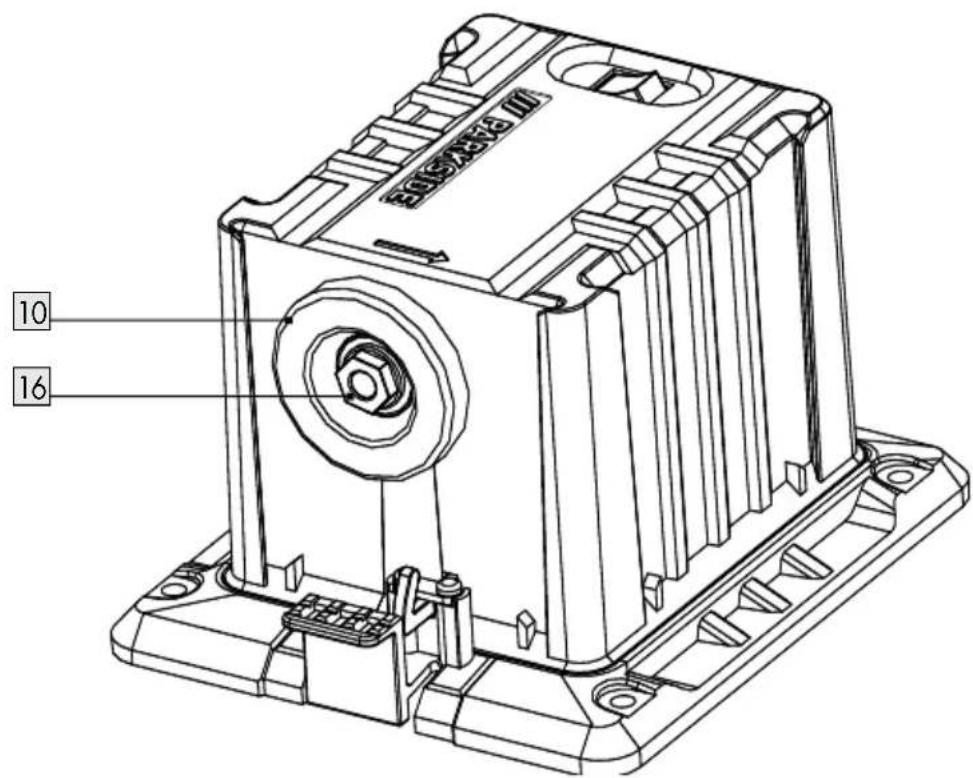
16 Grinding wheel nuts
- Technical data
Sharpening station PSS 65 D1
Nominal
Input voltage: 220 - 240 V\~, 50 Hz
Power consumption
P: 65 W (S6 20%)*
Power consumption
accessories): approx. 1.26 kg
Grinding angle
range: 15^ - 50^
Sharpness drill
diameter: 3 - 10 mm
Sharpness knife
width: 6 – 51 mm
Grinding wheel
Outer diameter: ∅ 49.5 mm
Borehole diameter: ∅ 10.14 mm
Thickness: 7.9 mm
Abrasive: Diamond
Base body: Metal
Working speed: max. 60 m/s
Rotational speed: max. 23100 min ^-1
Sound pressure
level ( L_pA ): 60.4 dB; K_pA = 3 dB
Sound power level
(L_WA) : 73.4 dB; K_WA = 3 dB
* Operating mode S6 20%: Continuous operation with intermittent load (cycle time 10 min). In order not to heat the motor. more than permitted, the motor may only be operated for 20% of the cycle time with the stated nominal power and must then continue running for 80% of the cycle time without a load.
** Operating mode S1: Continuous operation with constant load
- Noise and vibration values have been determined according to the standards and regulations mentioned in the declaration of conformity.
The declared vibration total value and the declared noise emission value have been measured in accordance with a standard test method and may be used for comparing one tool with another.
The declared total vibration value and the declared noise emission value may also be used for a preliminary assessment of exposure.
WARNING!
The vibration and noise emissions during actual use of the power tool can differ from the declared values depending on the manner in which the tool is used, especially what kind of workpiece is processed.
Try to minimise exposure to vibration and noise. Examples of measures to reduce vibration include wearing gloves when using the tool and limiting working time. All parts of the operating cycle must be taken into account (e.g. times when the power tool is switched off and when it is running idle in addition to the trigger time).

General safety instructions
● General Safety Directions for Power Tools

WARNING!
Read all safety warnings, instructions, illustrations and specifications provided with this power tool. Failure to follow all instructions listed below may result in electric shock, fire and/or serious injury.
Save all warnings and instructions for future reference.
The term “power tool” in the warnings refers to your mains-operated (corded) power tool or battery-operated (cordless) power tool).
Work area safety
- Keep work area clean and well lit. Cluttered or dark areas invite accidents.
- Do not operate power tools in explosive atmospheres, such as in the presence of flammable liquids, gases or dust. Power tools create sparks which may ignite the dust or fumes.
- Keep children and bystanders away while operating a power tool. Distractions can cause you to lose control.
Electrical safety
Power tool plugs must match the outlet. Never modify the plug in any way. Do not use any adapter plugs with earthed (grounded) power tools. Unmodified plugs and matching outlets will reduce risk of electric shock.
- Avoid body contact with earthed or grounded surfaces, such as pipes, radiators, ranges and refrigerators. There is an increased risk of electric shock if your body is earthed or grounded.
- Do not expose power tools to rain or wet conditions. Water entering a power tool will increase the risk of electric shock.
Do not abuse the cord. Never use the cord for carrying, pulling or unplugging the power tool. Keep cord away from heat, oil, sharp edges or moving parts. Damaged or entangled cords increase the risk of electric shock.
When operating a power tool outdoors, use an extension cord suitable for outdoor use. Use of a cord suitable for outdoor use reduces the risk of electric shock.
If operating a power tool in a damp location is unavoidable, use a residual current device (RCD) protected supply. Use of an RCD reduces the risk of electric shock.
Personal safety
- Stay alert, watch what you are doing and use common sense when operating a power tool. Do not use a power tool while you are tired or under the influence of drugs, alcohol or medication.
A moment of inattention white operating power tools may result in serious personal injury.
Use personal protective equipment. Always wear eye protection. Protective equipment such as dust mask, non-skid safety shoes, hard hat, or hearing protection used for appropriate conditions will reduce personal injuries.
■ Prevent unintentional starting. Ensure the switch is in the off-position before connecting to power source and/or battery pack, picking up or carrying the tool. Carrying power tools with your finger on the switch or energising power tools that have the switch on invites accidents.
■ Remove any adjusting key or wrench before turning the power tool on. A wrench or a key left attached to a rotating part of the power tool may result in personal injury.
Do not overreach. Keep proper footing and balance at all times.
This enables better control of the power tool in unexpected situations.
■ Dress properly. Do not wear loose clothing or jewellery. Keep your hair, clothing and gloves away from moving parts. Loose clothes, jewellery or long hair can be caught in moving parts.
If devices are provided for the connection of dust extraction and collection facilities, ensure these are connected and properly used. Use of dust collection can reduce dust-related hazards.
Do not let familiarity gained from frequent use of tools allow you to become complacent and ignore tool safety principles. A careless action can cause severe injury within a fraction of a second.
Power tool use and care
- Do not force the power tool. Use the correct power tool for your application. The correct power tool will do the job better and safer at the rate for which it was designed.
- Do not use the power tool if the switch does not turn it on and off. Any power tool that cannot be controlled with the switch is dangerous and must be repaired.
■ Disconnect the plug from the power source and/or remove the battery pack, if detachable, from the power tool before making any adjustments, changing accessories, or storing power tools. Such preventive safety measures reduce the risk of starting the power tool accidentally.
■ Store idle power tools out of the reach of children and do not allow persons unfamiliar with the power tool or these instructions to operate the power tool. Power tools are dangerous in the hands of untrained users. - Maintain power tools and accessories. Check for misalignment or binding of moving parts, breakage of parts and any other condition that may affect the power tool's operation. If damaged, have the power tool repaired before use. Many accidents are caused by poorly maintained power tools.
- Keep cutting tools sharp and clean. Properly maintained cutting tools with sharp cutting edges are less likely to bind and are easier to control.
Use the power tool, accessories and tool bits etc. in accordance with these instructions, taking into account the working conditions and the work to be performed.
Use of the power tool for operations different from those intended could result in a hazardous situation.
- Keep handles and grasping surfaces dry, clean and free from oil and grease. Slippery handles and grasping surfaces do not allow for safe handling and control of the tool in unexpected situations.
Service
- Have your power tool serviced by a qualified repair person using only identical replacement parts.
This will ensure that the safety of the power tool is maintained.
● Further Safety Instructions
■ Connect the device only to a power point with a RCD (Residual Current Device) with a measured residual current of not more than 30 mA.
- Keep the mains cable and extension cable away from the grinding wheel. In the event that it is damaged or severed, immediately disconnect the plug from the socket.
Do not touch the cable before it has been disconnected from the mains. Risk of electric shock.
The replacement of the plug or the cable must be carried out by the manufacturer or his/her customer service in order to avoid any hazards.
- Only switch the device on once it is safely fixed to the worktop.
For your own safety only use accessories and attachments which were stated in the operating instructions or recommended or specified by the tool manufacturer.
- Only use grinding wheels where the printed rotational speed is at least as high as what has been specified on the name plate of the device.
- Carry out a visual inspection of the grinding wheel before use. Do not use any damaged or deformed grinding wheels. Replace any damaged or worn grinding wheels.
■ Make sure that the sparks produced by grinding do not present a danger, e.g. reach people or ignite flammable substances.
■ Never keep the fingers between the grinding wheel and spark protection or in close proximity to the protective hoods. There is a risk of crushing.
The rotating parts of the device cannot be covered due to functional reasons. Therefore, proceed cautiously and hold the workpiece firmly in order to avoid slipping which could cause your hands to come into contact with the grinding belt or grinding wheel.
The workpiece gets hot during grinding. Do not touch the machined area, allow it to cool down. There is a risk of burning. Do not use coolants or the like.
If you are tired or have consumed alcohol or tablets, do not work with the device. Always have a break on time.
■ Switch the device off and remove the mains plug
- to loosen a blocked insertion tool,
- if the connection line is damaged or entangled,
– in case of unusual sounds.
■ Only use grinding wheel from original supplier.
Residual risks
Even if properly operating and handling this electric tool, some residual risks will remain. Due to its construction and build, this electric tool may present the following hazards:
■ Lung damage, if suitable respiratory protection is not worn.
■ Hearing damage, if suitable ear protection is not worn.
- Damages to health due to – touching the area of the grinding tool which was not covered;
– the ejection of pieces from workpiece or damaged grinding wheels.
■ Damage to your health caused by swinging your hands and arms when operating the appliance for longer periods of time or if the unit is not held or maintained properly.

WARNING!
Warning! During operation, this electric tool generates an electromagnetic field which, under certain circumstances, may impair the functionality of active or passive medical implants. To reduce the risk of serious or lethal injuries, we recommend that persons with medical implants consult their doctor and the manufacturer of their medical implant before operating the machine.

Assembly

CAUTION! RISK OF INJURY!
▶ Ensure that you have sufficient space in which to work, and that you do not endanger other people.
All covers and protective devices must be assembled properly before commissioning.
▶ Disconnect the mains plug before changing the setting on the device.
Setting up
Place the sharpening station on firm surface and fasten the device. Ideally, bolt the sharpening station to the surface. Use the mounting holes for the work bench assembly A 9 in the baseplate for this.
NOTE
The screws and nuts required for assembly are not part of the scope of delivery.
Mount the sharpener
- Select one of the three sharpeners.
- In order to remove a sharpener from the working position, you must press down the release lever for the sharpener A 13.
- Remove the sharpener from the guide rails, upwards.
- In the storage positions, the sharpeners are not fixed to the right and left side and can be easily removed from the guide rails.
- In order to fasten the selected sharpener in the working position, from above push this into the guide rails. Press the sharpener down until it snaps into place.

CAUTION!
The sharpeners also present a safety device. Never use this device without a sharpener. Risk of injury!

Operation

CAUTION! RISK OF INJURY!
Always disconnect the plug from the mains socket before working.
Use only grinding disks and accessories recommended by the manufacturer. The use of other insertion tools and other accessories may cause risk of injury.
▶ Never operate the device without the visual protection disk.
Switch on the equipment only when it is safely installed on the work surface.

CAUTION!

Despite spark protection, always wear safety goggles while working in order to avoid eye injuries.

CAUTION!

We recommend wearing ear protection to prevent damage to hearing.

CAUTION!
Keep your hands away from the grinding wheel and grinding belt when the device is in operation. Injury hazard.
Switching on and off
NOTE
▶ Ensure that the mains voltage matches the specifications on the rating plate.
Connect the equipment to the mains.
- To switch on, press the "I" On switch and the device starts up A 3.
- To switch off, press the "0" off switch and the device switches off A 3.
After switching on the device, wait until the device has reached its max. speed. Only then must you start with the grinding.

CAUTION!
The disk will continue to run after the equipment is switched off. There is a risk of injury.
Test run:
Before starting work and after each change of grinding disk, carry out a test run of at least 60 seconds with no load. Switch off the equipment immediately if the disk runs lumpy, substantial vibrations occur, or abnormal noises are generated.

Sharpening drills
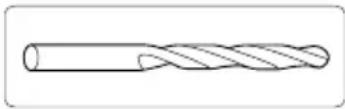
Drills with a diameter of 3-10 mm can be sharpened.
- Mount the selected sharpener (see Mounting sharpener).
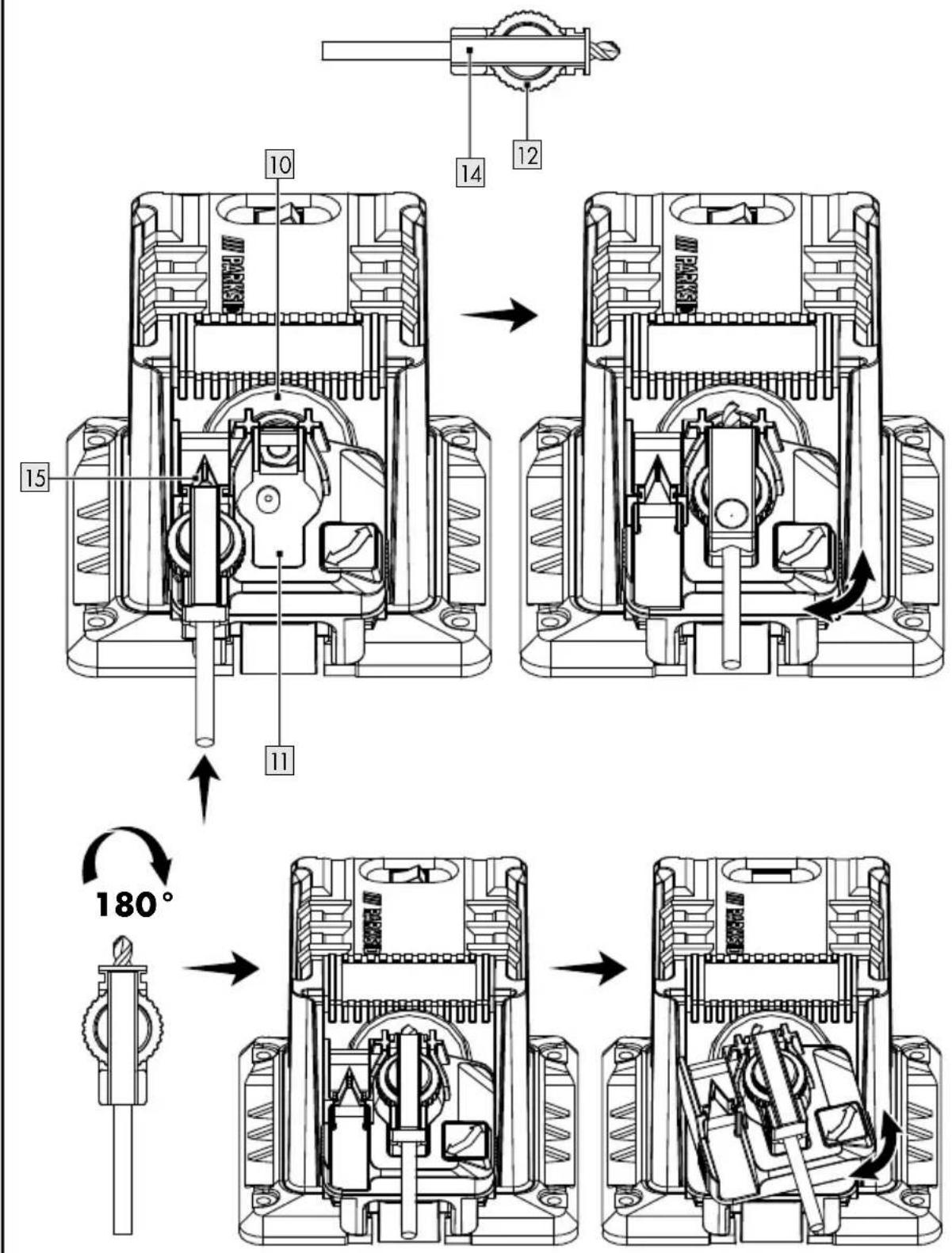
- Remove the drill holder 14 from the sharpener.
- Insert the drill into the drill holder 14. Do not attach the drill.
- Insert the drill holder 14 upwards into the adjusting device 15 using the knurled nut for drill-fastening 12.
- Push the drill to the front into the V-nut up to the metal stop. The cutting edges of the drill must fit closely to the metal surfaces.
- Using the knurled nut fasten the drill for drill-fastening 12.
- Remove the drill holder 14 and insert this into the rotatable drill mount 11 from below using the knurled nut for drill-fastening 12.
- Check the alignment of the drill. The cutting edges of the drill must be touching the grinding wheel 10.
- Switch the device on and grind the drill by moving the rotatable drill mount to and fro in the direction of the arrow.
-
Switch the device off and wait for the grinding wheel 10 to stop.
-
Remove the drill holder 14 and insert it into the rotatable drill mount 11 by rotating in by 180°. Using the same adjustment, you can grind the opposite cutting edge of the drill.
- Switch the device on and grind the drill.
- Switch the device off and wait for the grinding wheel 10 to stop.
C Sharpening picks and chisels
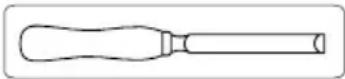
- Mount the selected sharpener (see Mounting sharpener).
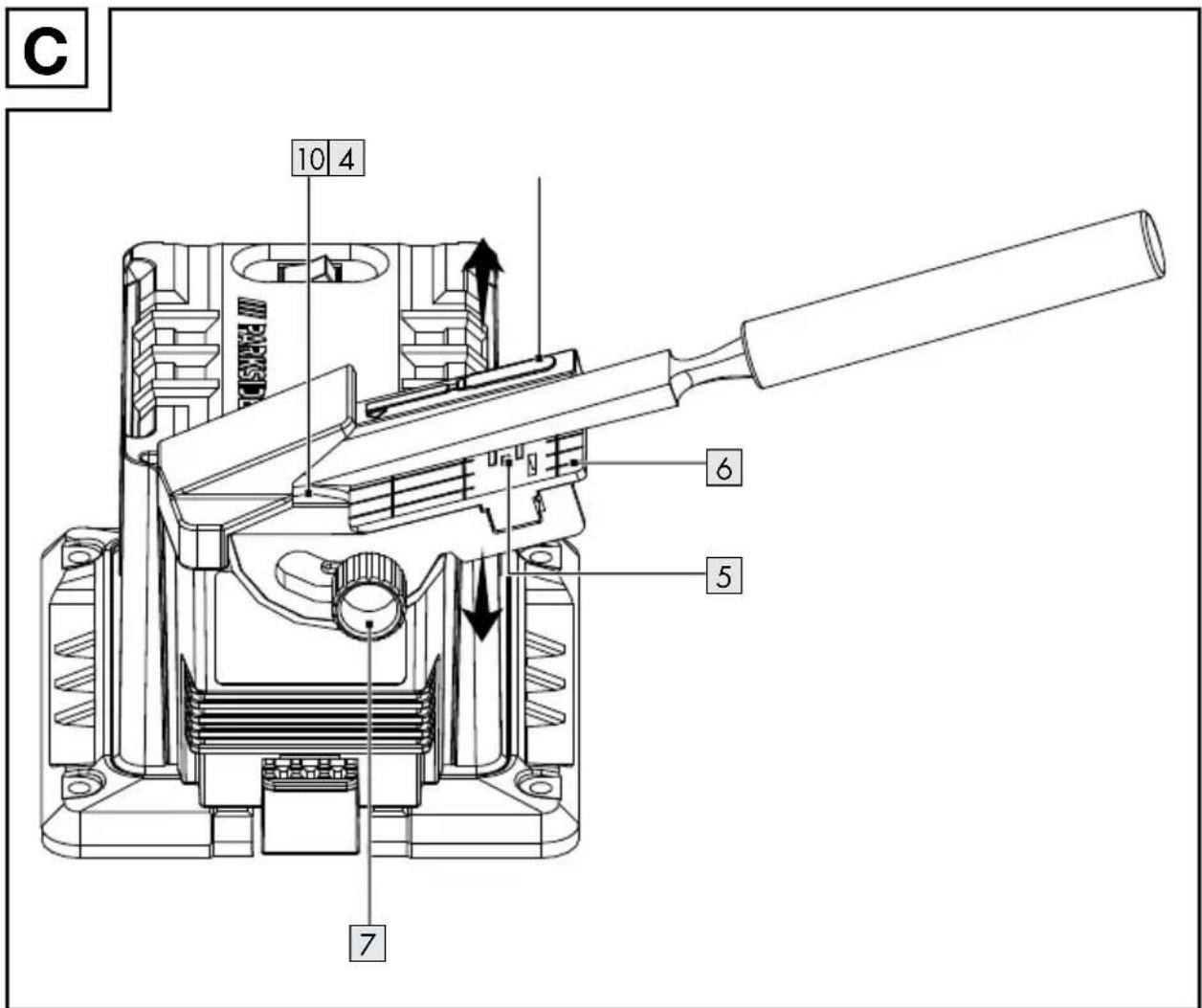
- Place the blade on the tool table 6 so that it lies against the spacer 4. The magnetic holder 5 keeps the blade in position.
- Release the retaining screw for the angular adjustment 7 and turn the tool table 6 into position. Select the angle according to the existing bevel angle (angle of the bevelled edge).
- Tighten the retaining screw for angular adjustment 7 again.
- Switch the device on and move the tool table 6 equally back and forth along the grinding wheel 10.
- Always use light pressure while sharpening and slowly push the blade towards the grinding wheel 10.
- Repeat the sharpening process until all irregularities have been removed.
- Switch the device off and wait for the grinding wheel 10 to stop.
NOTE
To sharpen a chisel, turn the chisel over and repeat the process from Point 5.
D Sharpening knives
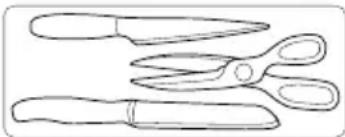
natural_image
Line drawing of three different types of scissors (tens, pliers, and shears) with no text or symbolsCAUTION!

Wear safety gloves when handling knives and scissors.
NOTE
The device is not suitable for grinding serrated knives.
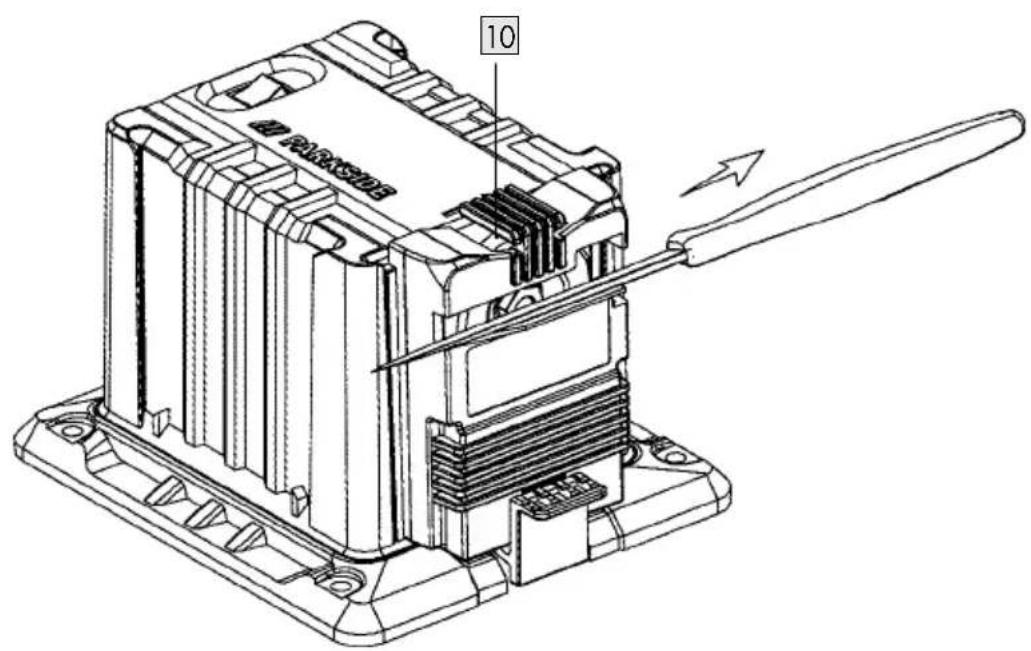
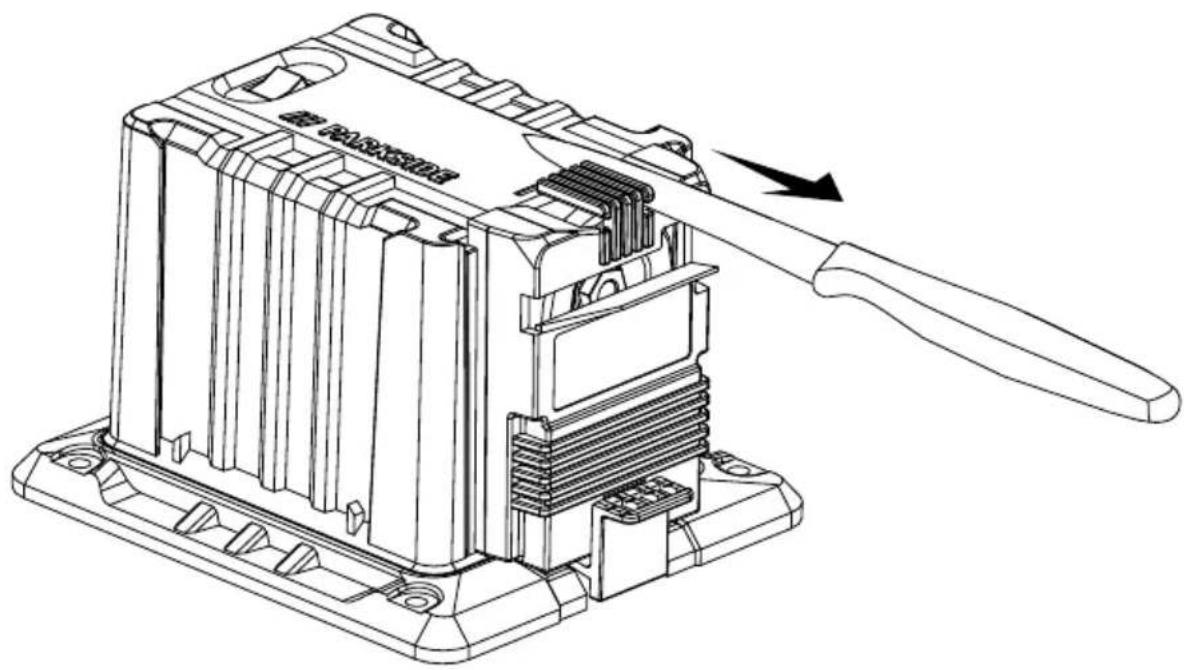
- Mount the selected sharpener (see Mounting sharpener).
- Turn the machine on.
- Insert the blade of the knife right into the grinding slot.
- Using light pressing guide the blade along the grinding wheel 10 and evenly and slowly pull the knife towards you.
- Turn the knife and insert the knife blade into the opposite grinding slot.
- Repeat this grinding process for this side of the blade as well.
- Execute the alternating grinding process until the cutting edge is burr-free and sharp.
- Switch the device off and wait for the grinding wheel 10 to stop.
NOTE
Depending on the user preference, the knife can also be ground using the front grinding slot.
E Sharpening scissors
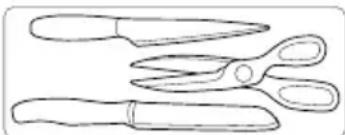
natural_image
Line drawing of three different types of scissors (no text or symbols)NOTE
The device is not suitable for grinding serrated scissors. The device is not suitable for grinding pinking shears.
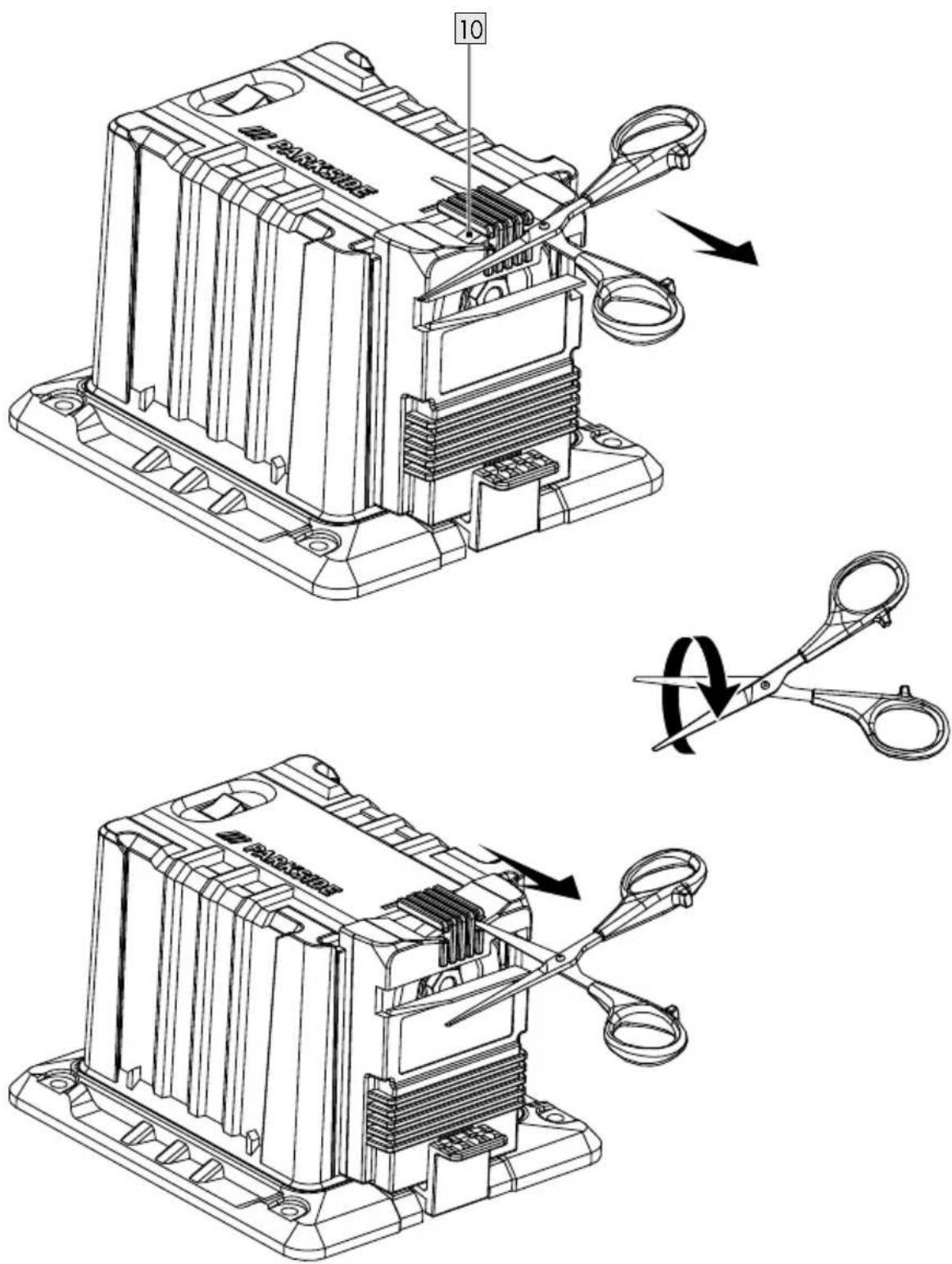
- Mount the selected sharpener for knives and scissors 1 (see Mounting sharpener).
- Completely open the scissors.
- Turn the machine on.
- Insert one of the scissor blades into the grinding slot.
- Using light pressure guide the blade from the screw up to the tip along the grinding wheel 10.
- Remove the scissors from the sharpening station and turn the scissors to sharpen the other blade.
- Insert the other scissor blade into the grinding slot.
- Using light pressure guide the blade from the screw up to the tip along the grinding wheel 10.
- Execute the alternating grinding process until the cutting edges are burr-free and sharp.
- Switch the device off and wait for the grinding wheel 10 to stop.
Changing the grinding wheel
NOTE
Information on replacement:
▶ Never operate the device without protective equipment.
▶ Ensure that the grinding wheel dimensions match those of the device.
▶ Never use separate bushings or adapters in order to make grinding wheels whose hole is too large fit the device.
Do not use any saw blades.
▶ Always reassemble the device completely after replacing the grinding wheel.

CAUTION!

Switch the device off and remove the mains plug. Allow the device to cool down.
NOTE
When the grinding wheel r16 is being tightened or loosened, the grinding wheel 10 must be held firm by hand or the axle held firmly in place with a pair of pliers.
- Release the grinding wheel nut 16 in the clockwise direction (left-handed thread).
- Remove the grinding wheel 10.
- Set up a new grinding wheel 10. Screw the grinding wheel nut 16 in the anti-clockwise direction (left-handed thread).
- Test run: Before starting work and after each change of grinding disk, carry out a test run of at least 60 seconds with no load. Switch off the equipment immediately if the disk runs lumpy, substantial vibrations occur, or abnormal noises are generated.
Replacement parts/accessories
- Compatible replacement parts for this product can be purchased at www.Optimex-Shop.com.
- Please have the order number ready for your order. Orders can only be placed and processed online.
Part Order number
Grinding Wheel 10 943516401
If you are not sure where you can purchase compatible parts, please contact the Lidl Service Hotline (see „Service").
● Troubleshooting

WARNING!

Always disconnect the plug from the mains socket before working. Danger of electric shock.
Problem Cause Solution
| Device doesn't start. | Mains voltage missing.Main circuit breaker is tripped. | Check the socket, mains cable, line, mains plug, repairs to be carried out by qualified electrician if necessary, check main circuit breaker. |
| On/off switch A 3 may be defective. | Repair by Customer Care. | |
| Engine faulty. | ||
| Grinding tools do not move although the engine is running. | Grinding wheel nut A 16 loose. | Tighten grinding wheel nut (see “Changing the grinding wheel”). |
| Workpiece, remaining work- pieces or remaining grinding tools block drive. | Remove blockages. | |
| Engine is slower and stops. | Device is overloaded through workpiece. | Reduce pressure on grinding tool. |
| Workpiece unsuitable. | ||
| Grinding wheel does not rotate smoothly, abnormal noises can be heard. | Grinding wheel nut A 16 loose. | Tighten grinding wheel nut (see “Changing the grinding wheel”). |
| Grinding wheel A 10 faulty. | Change grinding wheel. |
● Cleaning and maintenance

WARNING!

Disconnect the plug before adjustment, maintenance or repair.

WARNING!
Have any work not described in these instructions carried out by a specialist workshop. Use only original components. Allow the equipment to cool before carrying out any maintenance and cleaning work. There is a risk of burns.
Before each use, check the equipment for obvious defects such as loose, worn or damaged components and check that screws or other parts are sitting correctly.
In particular, check the grinding disk A 10. Replace damaged parts.

Cleaning
NOTE
Do not use cleaning agents or solvents. Chemical substances may attack plastic parts of the equipment. Never clean the equipment under running water.
- Clean the equipment thoroughly after each use.
- Clean the surface of the device with a soft brush or cloth.

Storage
■ Store the appliance in a dry place well out of reach of children.
- Grinding disks must be stored dry and upright and are not to be stacked.
- Transportation
■ Protect the product against shocks and strong vibrations that occur especially during transport in vehicles.
- Secure the product against slipping and tipping.
● Disposal
The packaging is made of environmentally friendly materials, which may be disposed of through your local recycling facilities.

Observe the marking of the packaging materials for waste separation, which are marked with abbreviations (a) and numbers (b) with following meaning: 1–7: plastics/20–22: paper and fibreboard/80–98: composite materials.
Product:
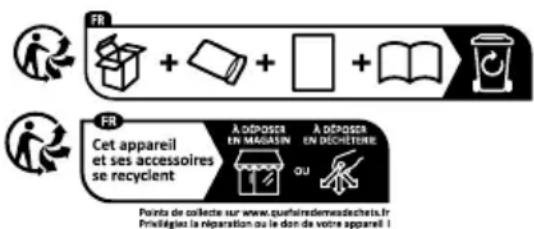
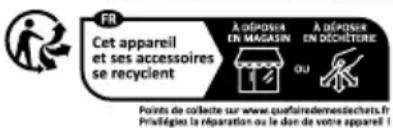
The product incl. accessories, manual and packaging materials are recyclable and are subject to extended producer responsibility.
Dispose them separately, following the illustrated Info-tri (sorting information), for better waste treatment.
The Triman logo is valid in France only.

Contact your local refuse disposal authority for more details of how to dispose of your wornout product.
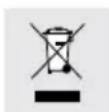
To help protect the environment, please dispose of the product properly when it has reached the end of its useful life and not in the household waste. Information on collection points and their opening hours can be obtained from your local authority.
● Warranty
The product has been manufactured to strict quality guidelines and meticulously examined before delivery. In the event of material or manufacturing defects you have legal rights against the retailer of this product. Your legal rights are not limited in any way by our warranty detailed below.
The warranty for this product is 3 years from the date of purchase. The warranty period begins on the date of purchase. Keep the original sales receipt in a safe location as this document is required as proof of purchase.
Any damage or defects already present at the time of purchase must be reported without delay after unpacking the product.
Should the product show any fault in materials or manufacture within 3 years from the date of purchase, we will repair or replace it – at our choice – free of charge to you. The warranty period is not extended as a result of a claim being granted. This also applies to replaced and repaired parts.
This warranty becomes void if the product has been damaged, or used or maintained improperly.
The warranty covers material or manufacturing defects. This warranty does not cover product parts subject to normal wear and tear, thus considered consumables (e.g. batteries, tubes, cartridges), nor damage to fragile parts, e.g. switches or glass parts.
● Warranty claim procedure
So that your request can be processed quickly, please observe the following instructions:
For all inquiries, please have the receipt and item number (e.g., IAN 494644_2504) ready as proof of purchase.
The article number can be taken from the identification label on the product, engraving on the product, the front cover of your manual (at the bottom left), or the sticker on the back or bottom of the product.
If malfunctions or other defects arise, first contact the service department indicated below by phone or email.
You can then send a product recorded as defective to the communicated service address postage-free, making sure to enclose proof of purchase (receipt) and information on the details of the defect and when it occurred.
You can download and view this and numerous other manuals at parkside-diy.com. This QR code takes you directly to parkside-diy.com. Choose your country and use the search screen to search for the operating instructions. Entering the item number (IAN) 494644_2504 takes you to the operating instructions for your item.

Service
GB Service Great Britain
Tel.:08000518970
Contact form on parkside-diy.com
IAN 494644_2504
IE Service Ireland
Tel.:1800851251
Contact form on parkside-diy.com
IAN 494644_2504
● EC Declaration of conformity
EU DECLARATION OF CONFORMITY (N° 494644\_2504)
IAN: 494644_2504
Product identification:
"PARKSIDE" Sharpening Station
Model Number: HG09795
The object of the declaration described above is in conformity with the relevant Union harmonisation legislation:
| Directive 2006/42/EC |
| Directive 2014/30/EU |
| Directive 2011/65/EU and all related amendments |
References to the relevant harmonised standards used or references to the other technical specifications in relation to which conformity is declared:
| N° / Parts |
| Directive 2006/42/EC |
| EN 62841-1:2015/A11:2022 |
| Directive 2014/30/EU |
| EN IEC 55014-1:2021 |
| EN IEC 55014-2:2021 |
| EN IEC 61000-3-2:2019/A1:2021 |
| EN 61000-3-3:2013/A2:2021 |
The object of the declaration described above is in conformity with Directive 2011/65/EU of the European Parliament and of the Council of 8 June 2011 on the restriction of the use of certain hazardous substances in electrical and electronic equipment:
| N° / Parts |
| Directive 2011/65/EU |
| EN IEC 63000:2018 |
Additional information:
| N° / Parts |
| EN ISO 12100:2010 |
Keeper of the technical documentation: OWIM GmbH & Co.KG
Signed for and on behalf of:
This declaration of conformity is issued under the sole responsibility of the manufacturer.
Translation of the original declaration of conformity
Neckarsulm 05.06.2025
Place
Date
EN
natural_image
Line drawing of three different types of scissors (no text or symbols)ATTENTION!

natural_image
Line drawing of three different types of scissors (no text or symbols)REMARQUE
PDF ONLINE parkside-diy.com
natural_image
Line drawing of three different types of scissors (no text or symbols)⚠️ VOORZICHTIG!

natural_image
Line drawing of three different types of scissors (no text or symbols)OPMERKING
natural_image
Line drawing of three different types of scissors (no text or symbols)⚠ OSTROŻNIE!

natural_image
Line drawing of three different types of scissors (no text or symbols)UWAGA
natural_image
Line drawing of three different types of scissors (no text or symbols)⚠️ POZOR!

natural_image
Line drawing of three different types of scissors (tens, pliers, and shears) with no text or symbolsPOZNÁMKA
natural_image
Line drawing of three different types of scissors (no text or symbols)! UPOZORNENIE!

natural_image
Line drawing of three different types of scissors (tens, pliers, and shears) with no text or symbolsPOZNÁMKA
natural_image
Line drawing of three different types of scissors (no text or symbols)¡PRECAUCIÓN!

natural_image
Line drawing of three different types of scissors (no text or symbols)NOTA
natural_image
Line drawing of three different types of scissors (no text or symbols)! FORSIGTIG!

natural_image
Line drawing of three different types of scissors (no text or symbols)BEMÆRK
natural_image
Line drawing of three different types of scissors (no text or symbols)ATTENZIONE!

natural_image
Line drawing of three different types of scissors (no text or symbols)NOTA
natural_image
Line drawing of three different types of scissors (no text or symbols)VIGYÁZAT!
