Clementine 8480BT - Radio PNI - Free user manual and instructions
Find the device manual for free Clementine 8480BT PNI in PDF.


User questions about Clementine 8480BT PNI
0 question about this device. Answer the ones you know or ask your own.
Ask a new question about this device
Download the instructions for your Radio in PDF format for free! Find your manual Clementine 8480BT - PNI and take your electronic device back in hand. On this page are published all the documents necessary for the use of your device. Clementine 8480BT by PNI.
USER MANUAL Clementine 8480BT PNI
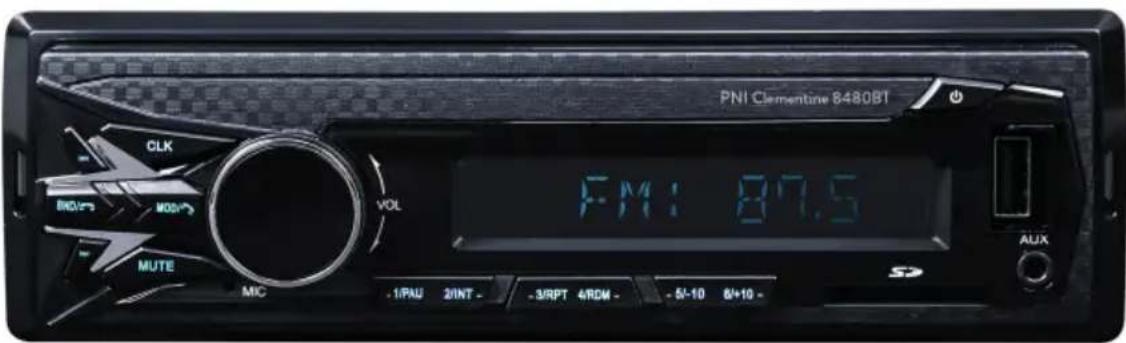
PNI Clementine 8480BT
DAB Radio Player
text_image
PNI Clementine 8480BT CLK RDC MOS MUTE MIC VOL FM: 87.5 -1/PAU 2/INT - 3/RPT 4/ROM - 5/-10 6/+10 - AUXEN User manual .... 3
- Do not use the product in very high or very low temperature conditions.
- Do not insert metal objects (screws or coins) inside the unit to avoid short circuiting.
- The unit can play MP3 files. Do not attempt to playback photo or video files. The type of file being played will be displayed on the unit screen.
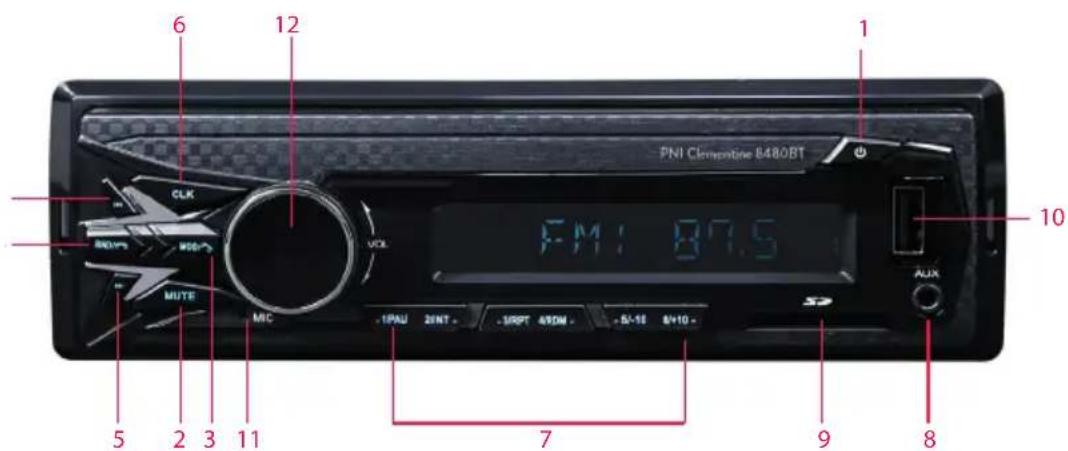
FRONT PANEL DESCRIPTION:
text_image
PNI Clemenske B480BT CLK VOL MUTE MIC 12 6 1 1 10 5 2 3 11 7 9 8 -1PAU 2INT - 5RPT 4ROM - 5+10 8+10 - AUX- On / off button
- Mute button
- Playback source selection button (radio, AUX, Bluetooth) / reject call
- Scroll back and forth song / radio frequency search
- Display and time setting
- Preset radio stations
- Auxiliary input
- SD card slot
- USB slot
- Microphone
- Multifunction button: sound settings, enable / disable AF (Auto Frequency)
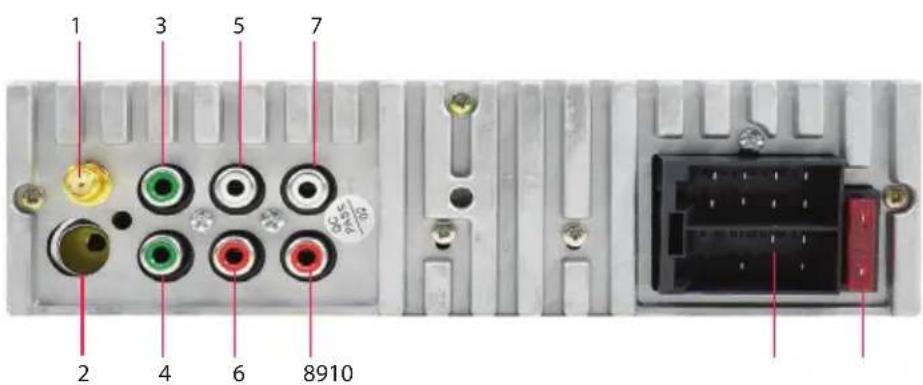
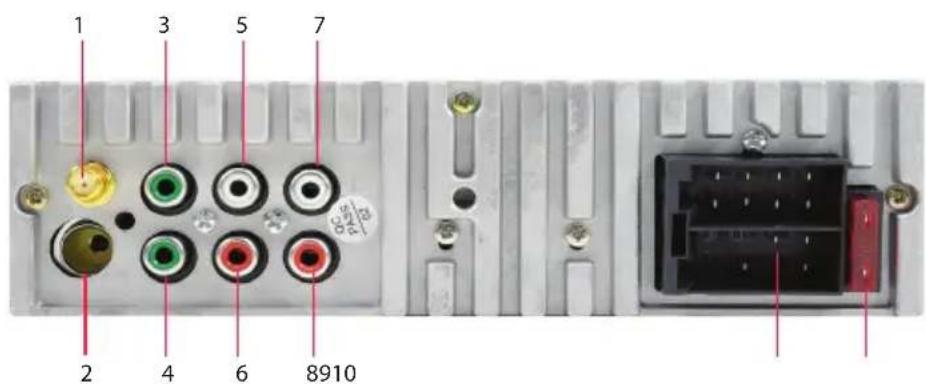
REAR PANEL CONNECTIONS:
text_image
1 3 5 7 2 4 6 8910EN
- DAB antenna
- FM antenna
- Subwoofer 1
- Subwoofer 2
- Left front speaker
- Right front speaker
- Left rear speaker
- Right rear speaker
- ISO connector
- Fuse
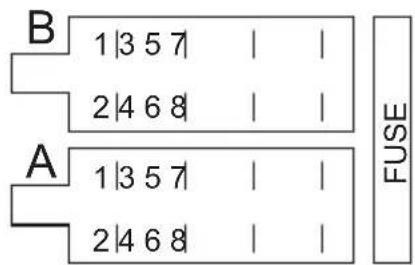
ISO connector:
text_image
B 1|3 5 7 | | 2|4 6 8 | | A 1|3 5 7 | | 2|4 6 8 | | FUSEA:
1- 1- Right rear speaker +
2- 2- Right rear speaker -
3- 3- Right front speaker +
4- Battery + 4- Right front speaker -
5- Antenna connector 5- Left front speaker +
6- 6- Left front speaker -
7- Contact + 7- Left rear speaker +
8- Ground (GND) 8- Left rear speaker -
INSTALLATION INSTRUCTIONS
text_image
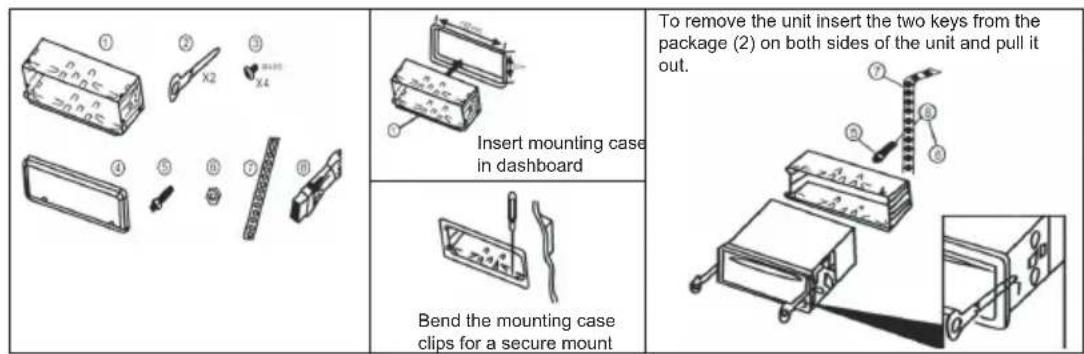
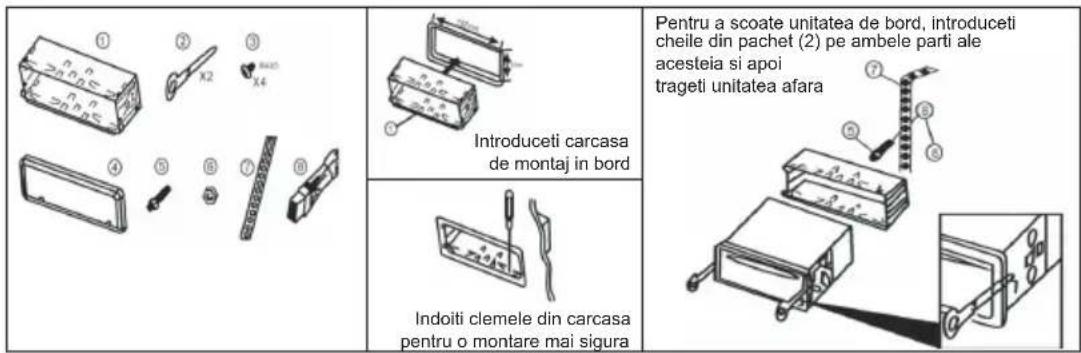
To remove the unit insert the two keys from the package (2) on both sides of the unit and pull it out. Insert mounting case in dashboard Bend the mounting case clips for a secure mount- Insert the mounting case into the dashboard.
- Bend the clips for a more secure fit.
- To remove the palyer, insert the two included keys on both sides of the mounting case and then pull the player out.
DAB ANTENNA INSTALLATION
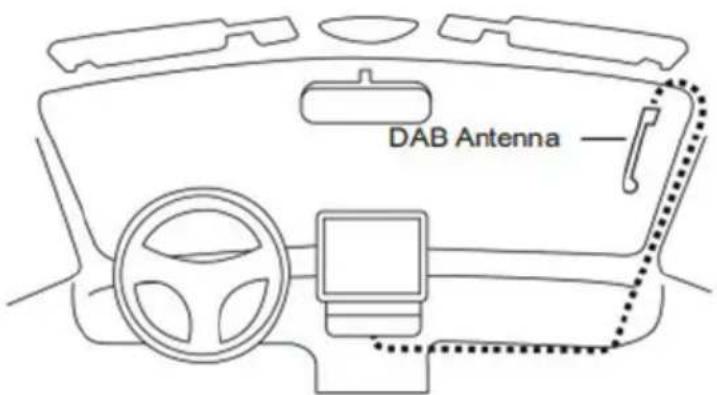
- The DAB antenna included in the package must be fixed on the windshield in a vertical position (see the image below).
- Clean the surface where you are going to fix the antenna.
- Carefully remove the protective foil from the adhesive surface of the antenna and position the antenna in the desired location. The antenna must be
positioned so that it gets in contact with the metal part of the car (there is no need to remove the paint in the point of contact).
- Pull the antenna cable (3 meters long) through the car until you reach the player. Screw the golden antenna connector into the dedicated connector on the back of the player.
- The thinner antenna cable must be connected to a 12V power supply.
text_image
DAB AntennaWarning:
- Do not install the antenna in a place where it could obstruct the driver's visibility.
- Do not pull the cable through the Air Bag area or through places that could block the safe driving of the vehicle.
- The heliomatic windshield reduces the antenna performance.
DAB RADIO
- Press the MODE key to select the DAB source
- Press and hold the BAND key to automatically scan the present radio stations.
- Briefly press the BAND key to display information about the radio station being listened to.
- 6 radio stations will be saved automatically. Press the number keys on the front panel of the player to select and listen to the radio station corresponding to that memory.
- Long press one of the number keys to save the listened radio station to that position.
- Press the arrow keys to move to the previous or next radio station.
BLUETOOTH:
PNI 8480BT is equipped with Bluetooth that allows you to take calls from your phone or play audio files through the car's audio system.
Turn on the device
Press the MODE key on the remote control or on the front panel. Select BT (Bluetooth).
EN
Search for available Bluetooth devices with your phone. Select "PNI 8480BT" and connect it with your phone. Once connected, the BT icon on the screen will no longer flash. BT ON will appear on the screen.
Select the music you want to listen to on the MP3 player from your phone.
Taking and making a phone call:
Press the “BAND” button to answer a call or the “MODE” button to end or reject it.
Press the "MODE" button to transfer the call only to the phone.
REMOTE CONTROL BUTTON DESCRIPTION:
| 1. Long press = start / stopShort press = select source playback | 10. Radio search and memory | |
| 2. Mute 11. EQ | ||
| 3. Band selection 12. Digital key | ||
| 4. Last Track | 13. Repeat the current track | |
| 5. Next Track 14. Play intro | ||
| 6. Clock | 15. Skip over the following10 tracks | |
| 7. Volume - | 16. Skip over the previous10 tracks | |
| 8. Volume + | 17. Play / pause the song | |
| 9. Multifunctional selection key | 18. Random tracks play | |
TROUBLESHOOTING:
- The unit doesn't start
- check the ISO connection - power cables
- The power button doesn't work
- press the Reset button on the front panel; if it still doesn't work, unplug the power
and plug it in again after a while
-
No sound or just noise coming from the speakers
-
check the ISO connection, speaker cables or sound settings
- Low quality sound
- check the ISO connection, speaker cables
- Poor radio reception
- check the radio antenna connection
TECHNICAL SPECIFICATIONS:
Radio FM/DAB Yes
Frequency FM 87.5-108.0 MHZ
DAB 174.928 - 239.200 MHZ
Sensitivity <= 20 dB
Stereo separation >= 25 dB
Signal-to-noise ratio >= 60 dB
Compatible files MP3
Distortion <= 0.3%
Memory 18 FM radio station/6 DAB radio
station
Maximum audio power 4x45W
ISO connector Yes
Bluetooth Yes
Subwoofer output Yes, 2
Dimensions 188x122x50 mm
Power supply 12V / 24V
Standby consumption max. 10A
Working temperature -26^ +60^
WARNINGS:
Installing this player on a car should be done by qualified personnel after checking the type of power and audio connectors on the car.
Some cars are equipped with different sockets configured against ISO standards (different thread positioning).
If the vehicle is not equipped with international standard ISO connectors, the necessary modifications should be made by qualified personnel before fitting the player.
Download the E Way link application from the Google Play Store or scan the QR code below:

natural_image
Blue square icon with a white abstract geometric logo (no text or symbols)
text_image
QR code image containing encoded data, no visible human-readable text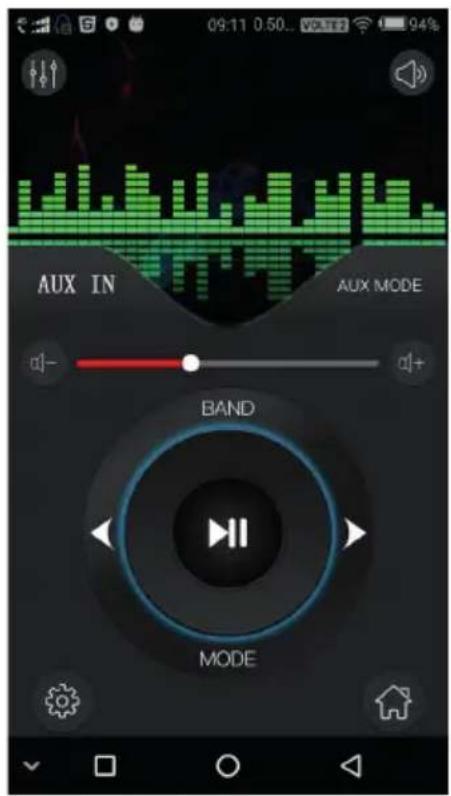
text_image
09:11 0:50.. VOLTEN 94% AUX IN AUX MODE BAND MODEWith the E Way link application you can remotely control your player.
Activate the Bluetooth function on your phone and on the player and pair the two devices.
You can remotely control the main functions: volume, mode, band, forward, backward, play / pause and so on.
ПРЕДУПРЕЖДЕНИЯ:
text_image
DAB AntennaВнимание:
natural_image
Blue square icon with white abstract geometric logo (no text or symbols)
text_image
QR code image containing encoded data, no visible human-readable text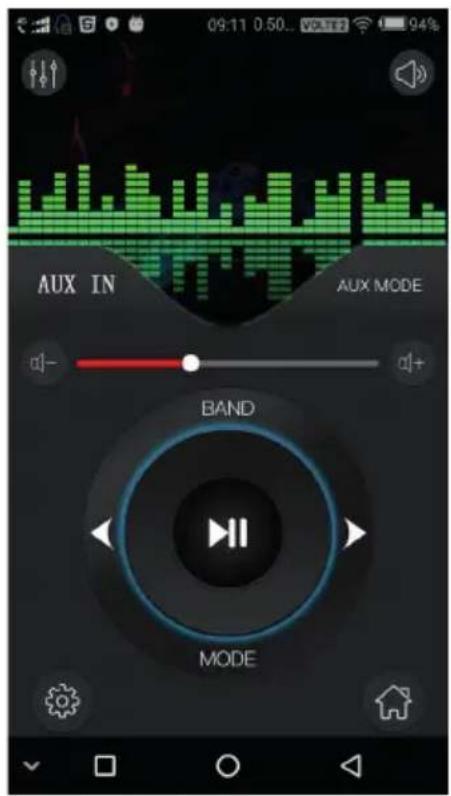
text_image
09:11 0:50.. VOLTET 94% AUX IN AUX MODE BAND MODEtext_image
6 12 PNI Cleverantine 8480BT CLK MOUTR MUTE VCLK FM: 87.5 AUX MIC -1PAU 2INT - 3RPT 4ROM - N-10 8+10 -text_image
Exploded view diagram of a mechanical assembly with numbered parts and labeled features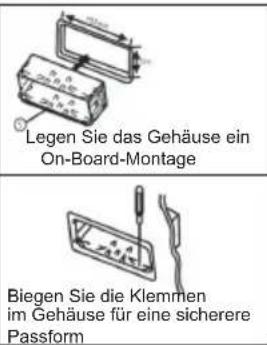
text_image
DAB AntennaWarnung:
natural_image
Blue square icon with white abstract geometric logo (no text or symbols)
text_image
QR code image containing encoded data, no visible human-readable text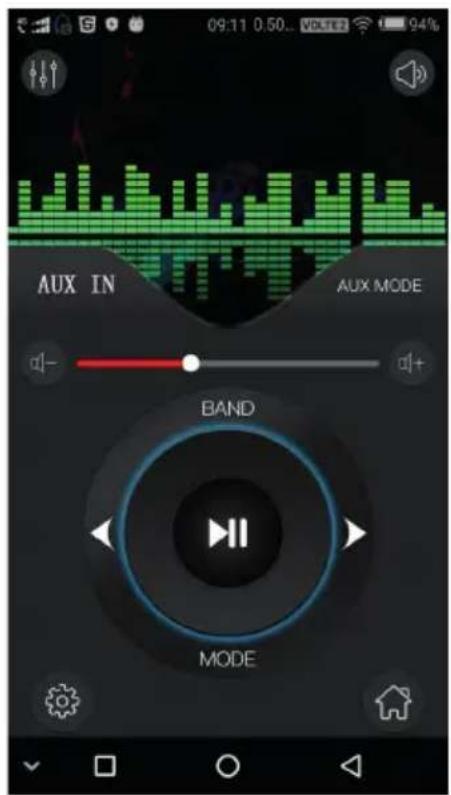
text_image
09:11 0:50... VOLTRE 94% AUX IN AUX MODE BAND MODEtext_image
DAB AntennaAdvertencia:
natural_image
Blue square icon with white abstract geometric logo (no text or symbols)
text_image
QR code image containing encoded data, no visible human-readable text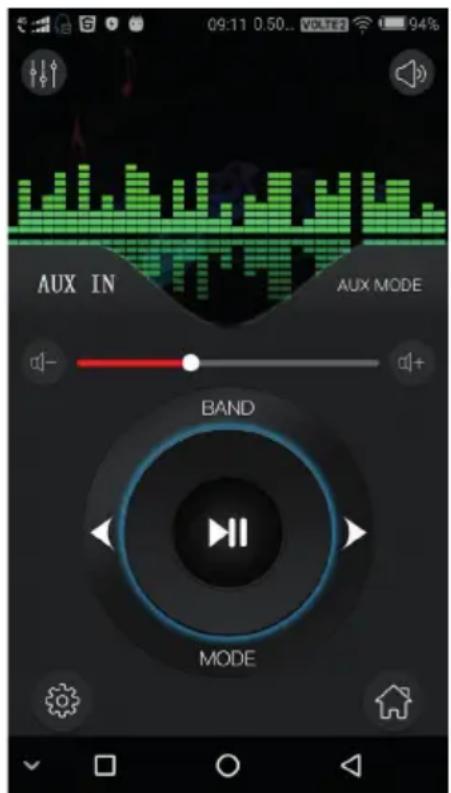
text_image
09:11 0.50.. VOLTE2 94% AUX IN AUX MODE BAND MODEtext_image
6 12 1 THE CHINESE 34800T F: 11: 87.5 10 5 2 3 11 7 9 8text_image
DAB AntennaAvertissement:
Mémoire 18 stations de radio FM / 6 stations
de radio DAB
Puissance audio maximale 4x45W
Connecteur ISO Oui
Bluetooth Oui
natural_image
Blue square icon with white abstract geometric logo (no text or symbols)
text_image
QR code image containing encoded data, no visible human-readable text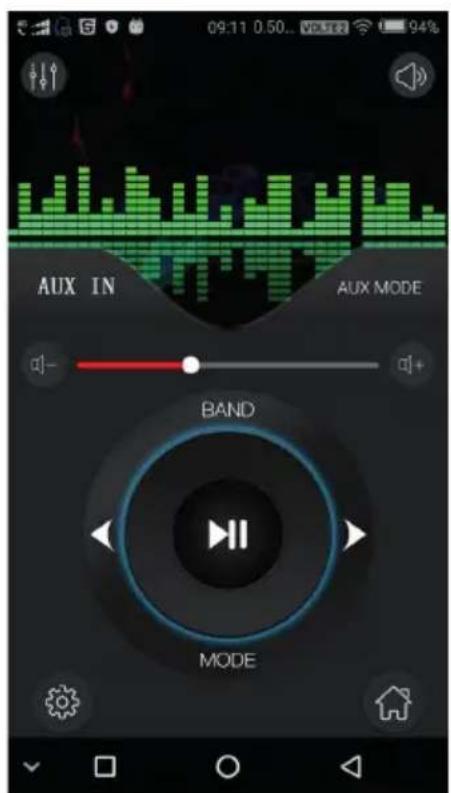
text_image
09:11 0:50... VOUTER 94% AUX IN AUX MODE BAND MODEtext_image
① ② ③ X2 X4 ④ ⑤ ⑥ ⑦ ⑧ Insert mounting case in dashboard To remove the unit insert the two keys from the package (2) on both sides of the unit and pull it out. Bend the mounting case clips for a secure mounttext_image
DAB AntennaFigyelem:
natural_image
Blue square icon with white abstract geometric logo (no text or symbols)
text_image
QR code image containing encoded data, no visible human-readable text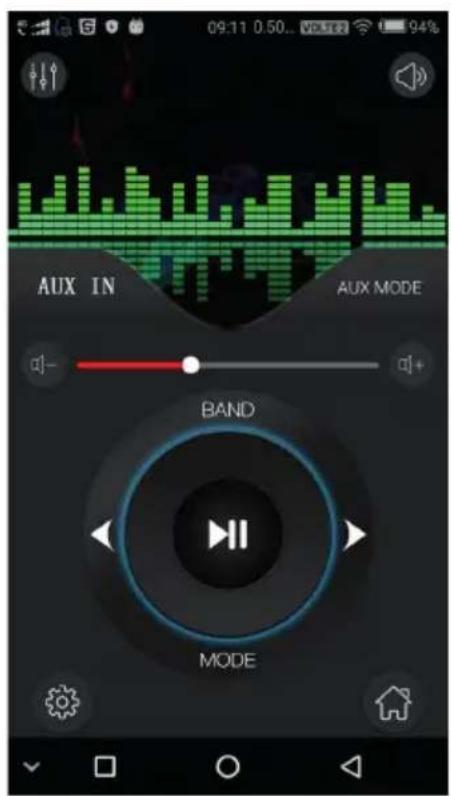
text_image
09:11 0:50... VOUTER 94% AUX IN AUX MODE BAND MODEtext_image
6 12 1 PNI Cavity 0450/BT CLK MOUT VOL F M I: 87.5 ALLR MUTE MIC SRAU 3INT - SRPT CREM - S-10 S+10 - 7 5 2 3 11 9 8text_image
Diagram showing eight labeled mechanical parts with annotations and symbols, including blocks, tools, and a ruler.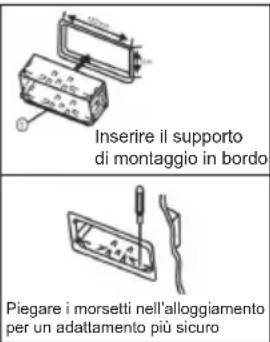
text_image
DAB AntennaAvvertimento:
Memoria 18 FM radio station/6 DAB radio
station
natural_image
Blue square icon with white abstract geometric logo (no text or symbols)
text_image
QR code image containing encoded data, no visible human-readable text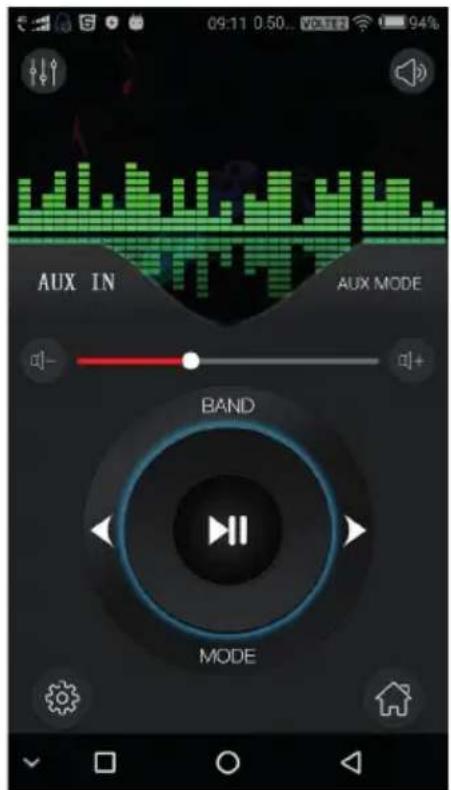
text_image
09:11 0:50... VOLTEN 94% AUX IN AUX MODE BAND MODEtext_image
DAB AntennaWaarschuwing:
- Long press one of the number keys to save the listened radio station to that position.
- Press the arrow keys to move to the previous or next radio station.
BLUETOOTH:
natural_image
Blue square icon with white abstract geometric logo (no text or symbols)
text_image
QR code image containing encoded data, no visible human-readable text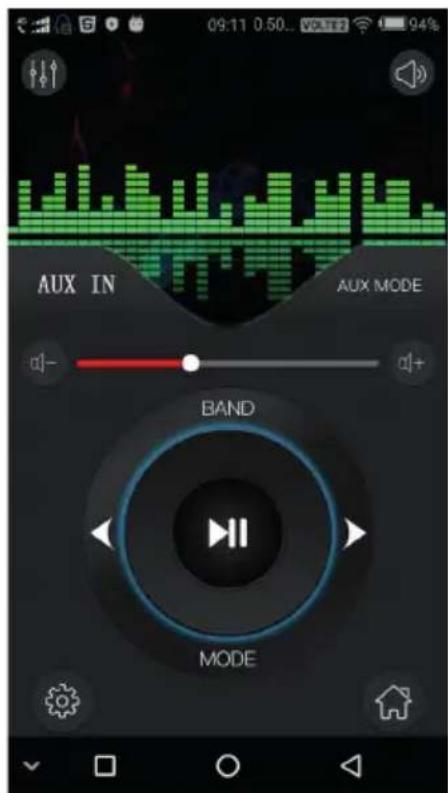
text_image
09:11 0:50... VOLT2 94% AUX IN AUX MODE a1- a1+ BAND MODEtext_image
DAB AntennaOstrzeżenie:
ROZWIĄZYWANIE PROBLEMÓW:
natural_image
Blue square icon with a white abstract geometric logo (no text or symbols)
text_image
QR code image containing encoded data, no visible human-readable text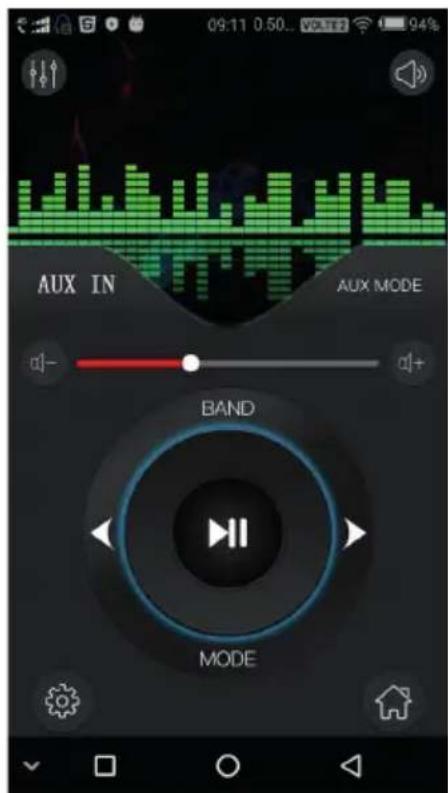
text_image
09:11 0:50... VOLT2 94% AUX IN AUX MODE a1- a1+ BAND MODECONEXIUNI PANOU SPATE:
text_image
1 3 5 7 2 4 6 8910RO
- Antena DAB
- Antena FM
- Subwoofer 1
- Subwoofer 2
- Difuzor fata stanga
- Difuzor fata dreapta
- Difuzor spate stanga
- Difuzor spate dreapta
- Conector ISO
- Siguranta
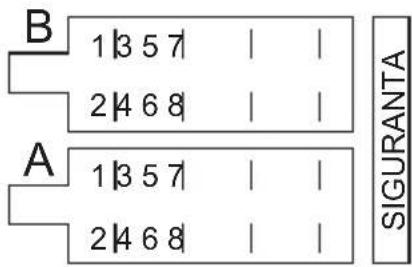
Conector ISO:
text_image
B 1|3 5 7 | | 2|4 6 8 | | A 1|3 5 7 | | 2|4 6 8 | | SIGURANTAA:
1-
2-
3-
4- Bateria +
5- Antena
6-
7- Contact+
8- Masa (GND)
B:
1- Difuzor dreapta spate +
2- Difuzor dreapta spate -
3- Difuzor dreapta fata +
4- Difuzor dreapta fata -
5- Difuzor stanga fata +
6- Difuzor stanga fata -
7- Difuzor stanga spate +
8- Difuzor stanga spate -
INSTRUCTIUNI DE MONTAJ
text_image
DAB AntennaAtentionari:
CONEXIUNE BLUETOOTH:
Consum in standby maxim 10A
Temperatura de lucru -26°C\~+60°C
AVERTISMENTE:
natural_image
Blue square icon with white abstract geometric logo (no text or symbols)
text_image
QR code image containing encoded data, no visible human-readable text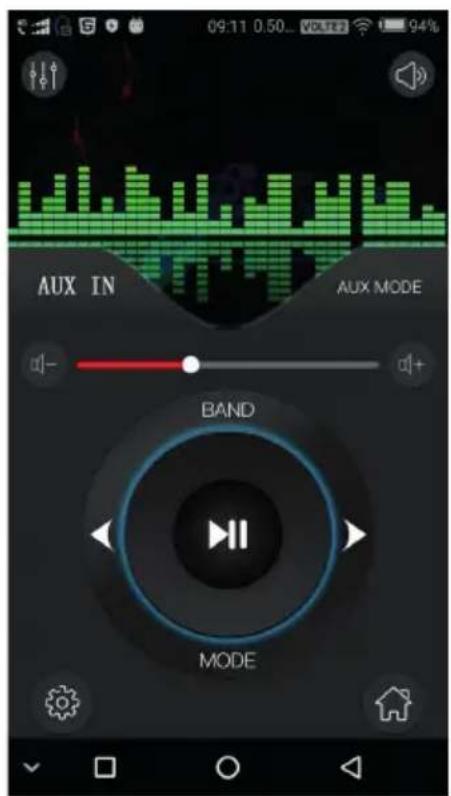
text_image
09:11 0.50... VOLTLE 94% AUX IN AUX MODE BAND MODEPrin aplicatia E Way link puteti controla de la distanta player-ul dvs.
EU Simplified Declaration of Conformity
SC ONLINESHOP SRL declares that Car radio MP3 player PNI Clementine 8480BT complies with the Directive EMC 2014/30/EU, RED 2014/53/UE and ROHS 2011/65/EU. The full text of the EU declaration of conformity is available at the following Internet address: https://www.mypni.eu/products/7321/download/certifications