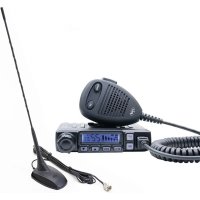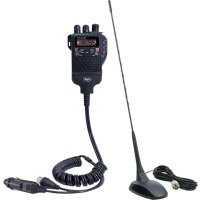
Escort HP 62 - Talkie Walkie PNI - Free user manual and instructions
Find the device manual for free Escort HP 62 PNI in PDF.


| Product Type | Portable CB station (walkie-talkie) |
| Brand | PNI |
| Model | Escort HP 62 |
| Dimensions (W x H x D) | 73 x 35 x 92 mm |
| Weight | 424 grams |
| Power supply | 7.2 – 13.2 V DC (nominal 12 V) via cigarette lighter adapter or 6 AA batteries (optional) |
| Number of channels | 40 channels FM/AM (depending on band) |
| Frequency range | 26.965 – 27.405 MHz (depending on band) |
| Modulation modes | AM (A3E) and FM (F3E) |
| Antenna impedance | 50 Ohms |
| RF output power | 4 W (AM/FM, 10% cycle) |
| Speaker | 8 Ohms, 0.5 W |
| Microphone type | Condenser (built-in) |
| Main functions | Adjustable squelch, RF gain, Dual Watch, Auto Scan, EMG keys (channels 9/19), band selection (EC, EU, UK, etc.), power saving, display backlight |
| Connectivity | BNC connector for external antenna, microphone-headset jack (compatible PNI HF32/HF34), 12V adapter/external antenna (supplied) |
| Compatible accessories | Li-Ion battery 1500 mAh (PNI PB-HP62), mains charger 230V + BNC antenna (PNI AK-HP62), 6 AA battery holder (PNI SB-HP62), BNC antenna 20 cm (PNI ANTHP62) |
| Safety | Fuse 2A 250V type F; do not use on 24V battery; avoid temperatures < -26°C or > +60°C; turn off before engine start; do not transmit for long periods at full power |
| Maintenance and cleaning | Clean with a dry cloth; avoid excessive humidity and shocks |
| Repairability and spare parts | Replaceable fuse; for other parts, contact PNI support or an authorized dealer |
| General information | PLL synthesizer; compatible with European CB bands via simple selection; user manual available in multiple languages |
Frequently Asked Questions - Escort HP 62 PNI
User questions about Escort HP 62 PNI
0 question about this device. Answer the ones you know or ask your own.
Ask a new question about this device
Download the instructions for your Talkie Walkie in PDF format for free! Find your manual Escort HP 62 - PNI and take your electronic device back in hand. On this page are published all the documents necessary for the use of your device. Escort HP 62 by PNI.
USER MANUAL Escort HP 62 PNI
natural_image
Black-and-white photo of a portable radio receiver with antenna, earplifier, and cable (no visible text or symbols)EN User manual 3
⚠️ Please read the following precautions to prevent fire, personal injury or the radio destruction.
Do not attempt to adjust the radio while driving; is dangerous.
This radio is designed for power supply at 12V DC. Do not use a 24V battery to power the radio.
Do not place the station on an excessively dusty, damp or unstable surface.
Do not connect the antenna during transmission, risk of burning or electric shock.
⚠️ Please keep distance from devices that cause interference (such as TV, generator, etc.)
⚠️ People who use pacemakers are advised to keep distance from the antenna during transmission and especially not to touch it.
Do not connect metal objects to the internal electrical side; danger of electric shock.
Avoid exposing the radio to temperatures below -26^ and above +60^ , the temperature on a vehicle may sometimes exceed 80^ , which can cause irreparable damage to electric devices. Do not expose the radio to sunlight.
Do not place anything on the radio, it will prevent it from cooling down.
⚠️ Check to see if you have enough charged battery to avoid rapid discharge.
⚠️ It is important to stop the radio before starting the engine, to avoid damage caused by high starting voltage.
You must use a 2A 250V fuse type F. Under no circumstances use a higher value.
⚠️ If an abnormal odor or smoke is detected as coming from the radio, switch off the appliance immediately.
⚠️ Do not transmit for a long time, the radio may warm up.
⚠️ Keep the station away from children.
INTRODUCTION
The PNI HP-62 is a small portable transceiver which guarantees great performance for many years of use. What is unique to this innovative transceiver is the capability to select any of European CB bands with an easy and quick procedure. The PNI HP-62 has built-in Channel Phase Loop synthesizer (PLL) circuit and an automatic battery economy circuit.
Important Note!
Some countries may require you to own or purchase a CB license – please check with the relative authorities in your country.
-
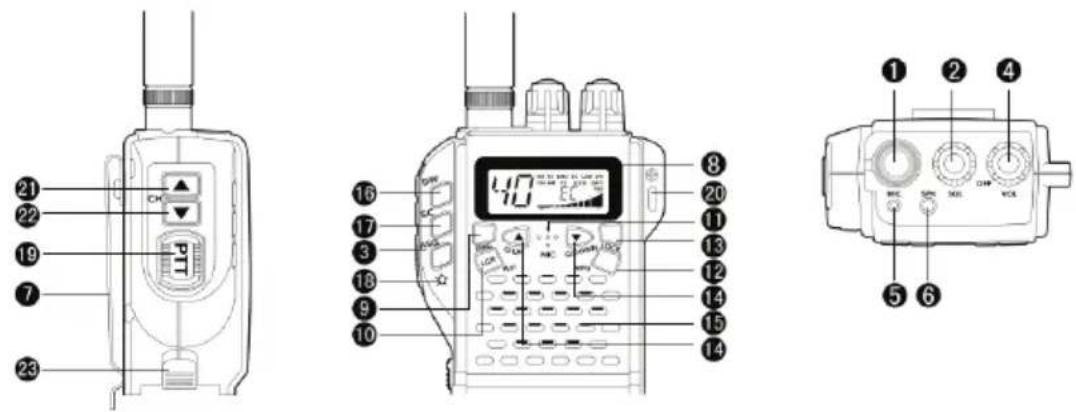
Antenna connection: fix a compatible antenna (not included in the package). To get better performance, you can use an external antenna that plugs into the included adapter.
-
Squelch Control: This function allows to reduce background noise of the station. By rotating the button to the right, the function becomes active. By rotating the button to the left, the function becomes inactive. The button should be set precisely to the position where the background noise disappears.
-
ASQ key: briefly press this key to turn on the backlight of the screen. When the screen light is on, press again to turn off the backlight. By long pressing this key, enter the ASQ mode. While you are in ASQ mode, briefly press this key to enter the ASQ level adjustment mode, the current level of Squelch will blink. Use the Q.UP/Q DOWN keys to change the ASQ level (there are 5 levels available). Also in ASQ mode, briefly press the ASQ key twice to turn off or turn on the backlight of the screen.
-
ON/OFF and Volume Control key:
Rotate this knob to the right to turn on the radio. Turn slightly to the right to adjust the volume.
-
Microphone jack: Connect a headset with a microphone
-
External speaker jack: Connect a headset with a microphone
-
Belt clip
-
Multifunction backlighted display
text_image
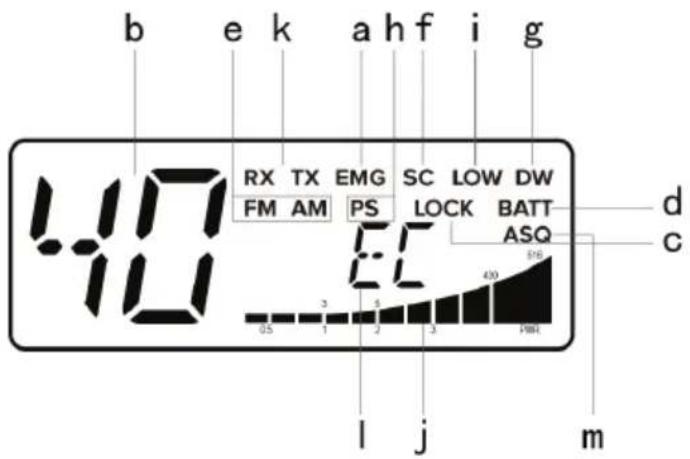
b e k a h f i g 40 RX TX EMG SC LOW DW FM AM PS LOCK BATT d c 65 3 2 1 2 3 40 50 l j mThis liquid crystal display has been projected to show the operative modality:
a. The EMG function is active
b. Selected channel number (1 to 40)
c. Lock: The key lock function is active
d. BATT: Low battery indicator
e. AM/FM mode
f. SC: The SCAN function is active
g. DW: DUAL WATCH function
h. PS: The Power Save function is active. If no key is pressed for 5 seconds, the radio enters the power saving mode.
i. Low (Low Power) function is active
j. The received signal strength and the power of the transmitting signal
k. RX/TX: TX = transmit mode; RX=received mode
I. Frequency band selected
m. ASQ function available
-
EMG key: briefly press this key to enter emergency mode 9/19; the EMG icon will blink
-
A/F-LCR key: to select AM or FM mode; the modulation you are setting will be displayed on the screen. If you select a frequency that operates only in the FM band, the A/F-LCR key will activate the Last Channel Recall (LCR)
-
Microphone: During the broadcast, hold the microphone at a distance of 4 cm from the mouth and speak using a normal tone of voice.
-
RFG Key: briefly press this key, on the screen "R 00" will show up; "00" will flash. Press the Q.UP/Q DONW keys to select one of the 9 levels (00, 06, 12 ... 54); press this button again to confirm and exit.
Note: We recommend to disable RFG function (or level 06 for louder areas).
-
Lock key: It allows you to lock the keyboard, thus avoiding accidental use of the keys.
-
Q.UP-Q.DOWN keys: To skip 10 channels up (Q.UP) or 10 channels down (Q.DOWN)
-
Loudspeaker
-
Dual Watch: This function allows the synchronization on two different channels at the same time. Thanks to this function, you can monitor a second channel. When a signal on the second channel is received, the conversation on the first channel is automatically interrupted and the receiver switches on the second channel. The monitoring starts again 4 seconds after the signal end.
TO activate this function, operate as follows:
- Select the desired channel through the channel selector
- Press the DW button
- Select the second channel
- Press the button DW again
- To cancel the function press again the DW button or the PTT button
- SCAN key: you can automatically search for a busy channel
- Turn the squelch clockwise until the background noise is no longer heard.
- Press the "SCAN" button: the transceiver will scan automatically all the channels until a carrier is being received.
- When it finds the carrier, it stops and starts again some seconds after the end of the communication on the channel.
- When the radio is transmitting, the scan function is deactivated.
-
Key ☆: when in the SQ mode short press this button, turn on the background ligh, short press this button again, to turn off the ligh, long press this button will enter ASQ, in ASQ mode, short press the button to turn on the background ligh and short press again will turn off the light.
-
Push to talk button (PTT): Its pressure activates the transmission. When it is released, the receiver is activated.
-
Hole for wrist belt
-
Channel UP: To skip to the next channel. Keeping this button pressed, the "auto-repeat" function is obtained.
-
Channel DOWN: To skip to the previous channel. Keeping his button pressed, the "auto-repeat" function is obtained.
-
Contact for power adapter and external antenna. Pull the button up to remove the adapter.
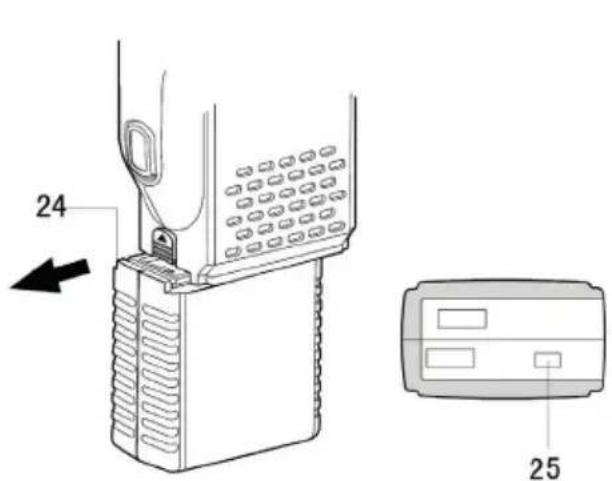
text_image
24 25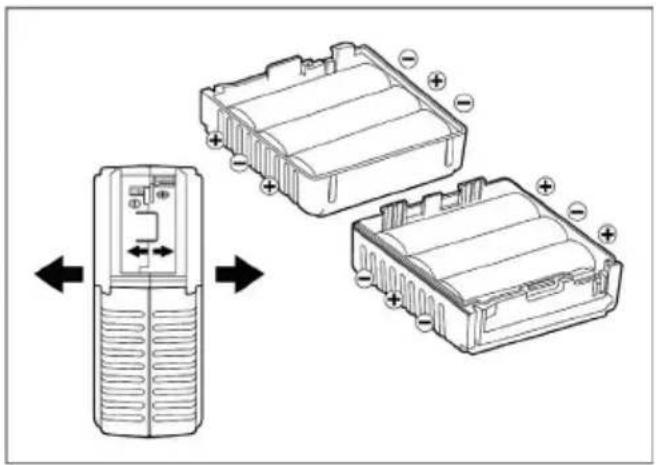
natural_image
Diagram showing a mobile phone module with battery pack and internal components, no text or symbols present- Battery compartment (optional accessory, not included): Add 6 Ni-Cadmium alkaline batteries
COMPATIBLE ACCESSORIES
- Adapter for 12V power supply and outdoor antenna for PNI Escort HP 62 (code PNI-AE-HP62)
- Rechargeable Li-Ion 1500mAh battery PNI PB-HP62 and 230V power adapter and BNC antenna for PNI Escort HP 62 (code PNI-AK-HP62)
- Holder for 6 AA batteries (R6) for PNI Escort HP 62 (code PNI-SB-HP62)
- BNC antenna, 20 cm, for PNI Escort HP 62 (code PNI-ANTHP62)
HOW TO OPERATE
- Attach the included car adapter. Connect the PL259 plug to an external antenna, and the cigarette lighter socket on the vehicle
- Turn the ON/OFF button clockwise. Adjust the volume to a level of comfort.
- Adjust the SQUELCH level
- Select the desired channel using the UP/DOWN keys or the QUICK UP QUICK/DOWN keys
Note: If you can not change the channel, check if the EMG or LOCK key has not been pressed.
To transmit: press and hold the PTT button, then talk into the microphone
To receive: simply release the PTT button
The frequency bands must be chosen according to the country you are in.
Procedure:
- Switch off the unit.
- Turn it on while pushing the "Q.UP" and "SC" buttons.
- By pushing the CH ▲CH ▼ buttons, select the desired frequency band (see the chart here below)
- To fix your selection press the "Q.UP" button.
Notes:
In the UK frequency band, you can directly select the CE band by pressing the AM/FM key for 2 seconds.
| Channels 40FM (see the frequency band chart) | |
| Frequency range 26.965~27.405 MHz | |
| Operation mode F3E (FM), A3E (AM) | |
| Antenna impedance 50 Ohm | |
| Loudspeaker 8 Ohm 0.5W | |
| Supply voltage 7.2÷13.2 nom 12V | |
| Dimensions 73 x 35 x 92 mm | |
| Weight 424 gr | |
| RECEIVER | |
| Sensitivity at 10dB S/N 0.5uV (AM) 0.25uV (FM) | |
| Selectivity > 60dB | |
| Squelch range 0.25V-500uV | |
| Audio output power 0.5W 8 ohm (10% distortion) | |
| Distortion at 1000uV 3% | |
| Audio frequency response 400-2400Hz | |
| Intermediate frequency | I°10.695MHz/II° 455KHz |
| Spurious response | More than 60 dB |
| Current drain at standby | 100mA when the power save mode is off45mA when the power save mode is on |
| TRANSMITTER | |
| RF Output Power | duty cycle 10% 4W AM/FM |
| Frequency Tolerance | 0.005% |
| Harmonic Suppression | >70dB |
| Current Drain | 900mA |
| Modulation | AM 90% (±5%)FM dev.2.0 KHz |
PNI EXTRA 48 is a small CB radio antenna suitable for cars and trucks, compatible with all CB radio transceivers on the market. It is very easy to install with the magnetic mount included in the package.
MOUNTING INSTRUCTIONS
Fix the antenna on the magnetic base and position it in the center of the car dome.
Connect the antenna to the CB transceiver.
Note: The antenna is tuned from the factory.
TECHNICAL SPECIFICATIONS
| Frequency 26 - 28Mhz | Whip length 440 mm | ||
| Gain >5dbi Cable RG174, L=4000 mm | |||
| S.W.R. <1.2:1 Polarity Vertical | |||
| Power max. 150W Material Fiberglass | |||
| Impedance 50 Ohm Magnetic mount 103 x 66 x 40 mm | |||
ПРЕДУПРЕЖДЕНИЯ ЗА БЕЗОПАСНОСТ
text_image
① ② ④ BCC SPC MCC CHMP MCC ⑤ ⑥natural_image
Diagram showing two views of an electric vehicle battery pack with internal compartments and polarity indicators (no text or symbols)- Отделение батерии (аксесоар по избор, не е включен): Добавете 6 алкални батерии Ni-кадмий
| E 26.965-27.405 | 40CH (4W AM/FM | ES | CH09: 27.065MHz FM CH19: 27.185MHz FM |
natural_image
Diagram showing two views of an electric vehicle battery pack with internal components and polarity indicators (no text or symbols)natural_image
Diagram showing a device with internal components and directional arrows indicating movement (no text or symbols present)natural_image
Diagram showing a mobile phone module with two battery compartments and directional arrows indicating orientation (no text or symbols present)| E 26.965-27.405 | 40CH (4W AM/FM | ES | CH09: 27.065MHz FM CH19: 27.185MHz FM |
natural_image
Diagram showing two battery cell structures with polarity indicators, one with left-side rotation and the other with right-side rotation (no text or symbols)natural_image
Diagram showing two battery cell modules with polarity indicators and directional arrows indicating movement (no text or symbols present)VEILIGHEIDSWAARSCHUWINGEN
natural_image
Diagram showing a mobile phone module with two battery compartments and directional arrows indicating orientation (no text or symbols present)INSTALLATIE INSTRUCTIES
natural_image
Diagram showing a mobile phone module with two battery housing compartments and an open case, illustrating internal components (no text or symbols present)natural_image
Diagram showing a device with internal components and directional arrows indicating movement (no text or symbols present)- Compartiment baterii (accesoriu optional, nu este inclus): Adaugati 6 baterii alcaline.
ACCESORII COMPATIBILE
EU Simplified Declaration of Conformity
SC ONLINESHOP SRL declares that PNI Escort HP 62 CB radio and PNI Extra 48 CB Antenna complies with the Directive RED 2014/53/UE. The full text of the EU declaration of conformity is available at the following Internet address:
https://www.mypni.eu/products/6225/download/certifications
BG:
https://www.mypni.eu/products/6225/download/certifications
DE:
https://www.mypni.eu/products/6225/download/certifications
ES:
https://www.mypni.eu/products/6225/download/certifications
HU:
https://www.mypni.eu/products/6225/download/certifications
IT:
https://www.mypni.eu/products/6225/download/certifications
NL:
https://www.mypni.eu/products/6225/download/certifications
PL:
https://www.mypni.eu/products/6225/download/certifications
RO:
Declaratie UE de conformitate simplificata
https://www.mypni.eu/products/6225/download/certifications